An international law enforcement action codenamed “Operation Synergia III” has sinkholed tens of thousands of IP addresses and seized servers linked to cybercrime operations worldwide.
During this Interpol-led operation, which took place between July 2025 and January 2026, authorities from 72 countries have seized 212 electronic devices and servers and made 94 arrests, with another 110 suspects still under investigation.
“Police in Togo arrested 10 suspects operating a fraud ring from a residential area. Some specialized in technical crimes such as hacking social media accounts, while others carried out social engineering schemes including romance scams and sextortion,” Interpol noted. “In Bangladesh, police arrested 40 suspects and seized 134 electronic devices related to a large range of cybercrime schemes, including loan and job scams, identify theft or credit card fraud.”
In another significant development, Chinese investigators in Macau identified over 33,000 phishing and fraudulent websites. Threat actors used these sites to impersonate casinos, as well as banks, government sites, and payment service sites, to steal victims’ credit card details and personal information.
Advertisement
This joint operation follows Operation Synergia II, which led to the arrest of 41 suspects between April and August 2024 and the seizure of 1,037 servers and other cybercrime infrastructure operating from 22,000 IP addresses.
During the first stage of Operation Synergia, law enforcement identified another 70 cybercrime suspects and took down another 1,300 command-and-control servers used in ransomware, phishing, and malware campaigns.
More recently, between December 8 and January 30, African police across 16 countries arrested 651 suspects and recovered over $4.3 million in another Interpol-coordinated joint police action codenamed Operation Red Card 2.0.
Two other joint actions, Operation Serengeti and Operation Africa Cyber Surge, that targeted African cybercrime in recent years have also led to thousands of arrests and the disruption or dismantling of multiple multimillion-dollar operations.
Advertisement
“Cybercrime in 2026 is more sophisticated and destructive than ever before, but Operation Synergia III stands as a powerful testament to what global cooperation can achieve,” Neal Jetton, INTERPOL’s Director of the Cybercrime Directorate, added on Friday.
“INTERPOL remains at the forefront of this fight, uniting law enforcement agencies and private sector experts to dismantle criminal networks, disrupt emerging threats and protect victims around the world.”
Malware is getting smarter. The Red Report 2026 reveals how new threats use math to detect sandboxes and hide in plain sight.
Download our analysis of 1.1 million malicious samples to uncover the top 10 techniques and see if your security stack is blinded.
Ever spent ages trying to curl or smooth your hair only to end up juggling multiple hot tools, wishing one device could dry, style, and shape everything in one go?
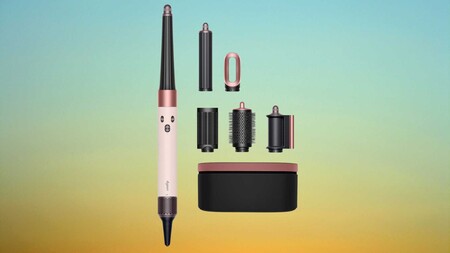
The Dyson Airwrap i.d is designed to replace several separate styling tools, using Dyson’s signature Airwrap technology to style hair while it dries rather than relying on extreme heat.
Instead of clamping or pressing hair between heated plates, the device uses high-velocity airflow to attract and wrap strands around its barrels, which helps shape curls and waves while reducing the heat damage common with traditional styling tools.
Advertisement
Advertisement
Powered by a 1300W motor, the tool delivers strong airflow that helps dry hair quickly while still giving users control through three speed settings and three heat levels for adjusting the styling process.
That flexibility becomes especially useful for people with longer hair, as the device is specifically designed for chest-length or longer styles and can handle thicker sections without constant repositioning or repeated passes.
Where the Dyson Airwrap i.d really earns its reputation is in the number of styling options it offers without needing separate appliances scattered across your bathroom counter.
Advertisement
Included attachments such as the concentrator, diffuser, and brush heads, allow the device to move from rough drying to smoothing or shaping depending on the look you want that day.
The Dyson Airwrap i.d multi-styler and Dryer straight+wavy also makes everyday styling less complicated because switching attachments takes seconds, meaning you can transition from drying to curling without stopping to reach for another tool.
Advertisement
At £399, the Dyson Airwrap i.d remains a premium styling device, but this discount brings the price closer to what many people would normally spend on several separate hair tools combined.
At this year’s GDC Festival of Gaming, conversations around the future of game development are back, and amid this conversation is LightSpeed Studios. Remember last year when they first teased their “Original IP Initiative“? The one where they promised to pour serious resources into building new worlds from scratch? Well, they’re back at GDC 2026 with the receipts. They’re pulling back the curtain on a strategic framework for creating original IPs that they’ve been quietly building and pulling together a team around for the past year.
It’s Not Just About Making Games, It’s About Building Worlds That Last
Here’s the thing about the gaming industry right now: everyone’s chasing the next big thing, but most are doing it with their eyes fixed on what’s already working. LightSpeed Studios is taking a different tack. They’ve spent the last twelve months assembling what amounts to a creative dream team and building what they’re calling a “proprietary framework” for developing original IPs.
Translation? There’s a rhyme and reason to how they design games. And it’s centered around a system designed to consistently produce games that don’t just look good but feel like it could be new, or a breath of fresh air.
The Heavy Hitters Have Entered the Chat
If you’re going to bet big on original IP, you bring in the best in the business. Enter Feng Zhu, recently appointed as Creative Director, whose resume reads like a master class in world-building. Known for his design work on shaping major Hollywood franchises, including Star Wars Episode 3, his job at LightSpeed Studios aims to channel all that cinematic storytelling expertise into original games.
In parallel, Kristin Gallagher, Studio Manager of the newly unveiled LightSpeed Mocap LA, a new state-of-the-art motion capture studio, is leading a purpose-built facility engineered for tackling complicated stunt sequences that Gallagher herself describes as among the most complex that she’s encountered in her 20-year career. When someone with that many years of experience is willing to admit this, it’s hard not to pay attention.
Advertisement
The “90:10” Rule That Changes Everything
Here’s where it gets interesting. During his GDC session “Creating IP Through Understanding,” Zhu dropped some details about the philosophy, which he calls the “90:10 Balance,” that’s driving all of this.
For any given title, 90% of it is rooted in reality. For example, this could include actual locations, historical context, and proportions that make sense in the real world.
The remaining ten percent? Whether it’s cranking up the tension in the narrative of a distinctive storyline, this is where game designers can ink their own personality and break from convention to create a memorable game. It’s like building a home. The foundation and framework are familiar and proven to work. But the interior design is where you make your home your own.
The Production Infrastructure Powering LightSpeed Studio’s Motion Capture
In the spirit of Hollywood and what makes action-packed blockbuster films stand out, this is where motion capture enters the picture. LightSpeed Mocap LA isn’t just any warehouse, as it’s stocked with state-of-the-art Vicon Valkyrie cameras, but what you can’t physically see are the custom APIs developed in-house to handle file management, and tools for streamlining the entire pipeline, which created an environment where complexity isn’t a barrier.
This enables the LightSpeed Mocap LA to dive into complex scenes like capturing a single hero performer, despite being surrounded by thirteen motion capture artists, while keeping every subject perfectly isolated. Or coordinating seven performance capture actors alongside four additional performers, all within a unified pipeline.
Advertisement
What This Means for LightSpeed Studios’ Future Gamers
So why should you care? Because this framework isn’t just theoretical. It’s already being deployed and set to be deployed on LightSpeed Studios’ future titles. Making pretty games is a baseline, but beyond this, a great game involves building worlds with depth, identity, and a storyline that’s immersive and compelling enough to keep you coming back. When the industry sometimes feels stuck between sequels and reboots of games, it’s refreshing when a studio has a framework set on consistently creating titles that are genuinely new.
Meta’s 2Africa undersea cable project has hit another geopolitical snag, this time in the Persian Gulf. According to Bloomberg, Alcatel Submarine Networks (ASN), the company responsible for laying parts of the system, has declared force majeure (a contractual clause that excuses a party from liability if an extraordinary, unforeseeable event… Read Entire Article Source link
Apple is dropping its commission rate in the App Store in China to 25% from 30% following discussions with the Chinese regulator, the company said Thursday. The new 25% commission will apply to paid apps and in-app purchases, while a lower 12% commission (down from 15%) will be charged for auto-renewals of in-app purchases after their first year.
The changes go into effect on March 15, 2026, and will not require developers to accept new terms, Apple said.
The decision to adjust commissions without a long, public battle indicates both how important China is to Apple’s market, as well as how Apple sees its App Store’s business value. The company in its first quarter reported soaring iPhone sales in China, with revenue up 16% year-over-year, helping it deliver a record-breaking quarter.
Compared with the EU, where Apple and regulators have been going back and forth on commission changes for years, Apple seemingly dropped its rates in China without pushback. Meanwhile, in the U.S., Apple prevailed in a legal battle with Fortnite maker Epic Games, as a judge decided the iPhone maker was not a monopoly, though developers won the right to route their users to alternative purchase methods (at least for now). As a result, Apple has kept the same rates in the U.S., though it has programs that offer discounted rates for various parties, like small businesses.
“We are committed to terms that remain fair and transparent to all developers, and to always offering competitive App Store rates to developers distributing apps in China that are no higher than overall rates in other markets,” the company said in its announcement.
Driveways are generally quite durable, but they’re not perfect. Gravel driveways can get exceptionally messy and fall apart, while old, cracked concrete driveways require filling solutions to stay together. Beyond these tried-and-true materials, there’s another, more eco-friendly solution that has steadily gained traction among homeowners. Recycled asphalt pavement (RAP) driveways use old, crushed-up asphalt mixed with filler materials to create an effective asphalt alternative that appears fairly similar to any other driveway.
The fact that RAP doesn’t require new materials means it’s less energy-intensive, more eco-friendly, and cheaper to produce. This equates to installation savings, with some estimates placing RAP driveways at between $6.20 and $8.75 per square foot, while others claim it can cost less than $6. In comparison, some estimates put regular asphalt at $7 to $13 per square foot, with concrete costing between $6 and $15. Of course, the final cost will be influenced by driveway size, location, labor costs, and other individual factors. On average, a RAP driveway is likely to last around 20 years, so long as it’s properly taken care of. This involves tasks like routine resealing and re-compaction.
Advertisement
This may make it seem like a RAP driveway is the perfect solution to an old, crumbling driveway. However, much like other driveway types, the material has drawbacks that some may find aren’t worth the hassle.
Advertisement
Drawbacks to recycled asphalt pavement driveways
For all of its benefits, the recycled asphalt pavement driveway may not be the right choice for everyone. Some negatives are rather minor, such as RAP not being as aesthetically pleasing to some as a brand-new gravel or concrete driveway. Meanwhile, others are much larger, like potential groundwater contamination. RAP is porous and requires chemical binders to keep it held together. There is some concern that these chemicals can leech from the material when it rains, leading to water pollution. Unfortunately, there has yet to be conclusive research into this topic, so the impact of RAP driveways in this regard is somewhat uncertain.
Speaking of driveway breakdown, perhaps the biggest negative that plagues this material is cracking and crumbling. As an amalgamation of crushed-up materials, RAP driveways are tightly compacted and therefore more brittle than fresh asphalt. Thus, they’re more prone to breaking and cracking. Worse yet, moss, grass, and weeds can start growing if the cracks are large enough to expose the soil beneath the driveway. That’s why thorough preparation of the area where the driveway will go before setting it down is crucial.
While it has its share of issues, recycled asphalt pavement is a viable, budget-friendly, and largely environmentally conscious option that many homeowners could benefit from. It’s not the only alternative to a conventional driveway, though, and some may want to explore converting a solid driveway into a permeable one instead, especially if they want to reduce flooding.
Inevitably, the more you use something — your Mac included — the more dirty and cluttered it’s likely to become. At that point, you can buy a new machine, but the more economical move is to make what you have already work better. To help your computer feel new, or at least a little cleaner and less chaotic, we put together this guide with techniques and useful apps that have helped us maintain a more organized computer. I’ve been using these tips since before I first published this guide in 2021, and they’ve helped keep my 2018 MacBook Air looking and running (almost) like brand new.
How to clean your Mac’s screen and body
While there are many products out there from manufacturers claiming their one does it best, my advice is to keep things simple. It’s also the one Apple recommends. To start, you will need some water in a spray bottle and a clean microfiber cloth. You can use regular water from the tap but I’ve found distilled water works best; it’s far less likely to leave residue behind on your Mac, particularly on the display. You can buy distilled water at a grocery store or make it yourself with some simple cookware. Either way, it’s more affordable than dedicated cleaning solutions. If you don’t already own any microfiber towels, Amazon sells affordable 24-packs you can get for about $10.
One other product I would recommend is a Giottos Rocket Blower. I can’t say enough good things about this little tool. It will save you from buying expensive and wasteful cans of compressed air.
As for the actual process of cleaning your Mac, remember to start with a clean cloth (that’s part of the reason we recommend buying them in bulk). You’ll save yourself time and frustration this way. Begin by turning off your computer and unplugging it. If you bought a Rocket Blower, use it now to remove any dust. If not, take a dry microfiber cloth and go over your computer. Take special care around the keys, particularly if you own an older Mac with a butterfly keyboard.
Advertisement
Next, dampen one side of your cleaning cloth with water. Never spray any liquid directly on your computer. You’ll have more control this way and you’ll avoid getting any moisture into your Mac’s internals. I always clean the display first since the last thing I want to do is create more work for myself by transferring dirt from some other part of my computer to the screen.
The last step is to buff and polish your computer with the dry side of the cloth. Be gentle here as you don’t want to scratch the screen or any other part of. That’s it. Your Mac should be looking clean again.
How to organize your hard drive
Igor Bonifacic / Engadget
One of the trickiest parts of cleaning your Mac’s hard drive is knowing where to start; most of us have apps on our computers we don’t even remember installing in the first place. Thankfully, macOS comes with a tool to help you with that exact issue.
Navigate to System Settings > General > Storage. Here you’ll find a tool that separates your storage into broad categories like “Applications,” “Documents,” “Music,” “Photos” and so on. Either double-click on an item in the list or click the circled i icon to see the last time you used an app and how much space it’s taking up. You can delete the apps from the same window.
Advertisement
The applications section is particularly helpful since you can see the last time you used a program, as well as if it’s no longer supported by the operating system or if it’s outdated thanks to a more recent release.
You don’t need me to tell you to uninstall programs you don’t use, but what you might not know is that there’s a better way to erase them than simply dragging them to the trash can. A free program called AppCleaner will help you track down any files and folders that would get left behind if you were just to delete an application.
Igor Bonifacic / Engadget
After deleting any apps you don’t need, move to the Documents section. The name is somewhat misleading here since you’ll find more than just text files and Keynote spreadsheets. In this case, documents turns out to be the tool’s catch-all term for a variety of files, including ones that take up a large amount of space. You can also safely delete any DMGs (disc image files with the extension .dmg) for which you’ve installed the related app.
The other sections in the storage space are self-explanatory. The only other thing I’ll mention is if you’ve been using an iPhone for a while, there’s a good chance you’ll have old iOS backups stored on your computer. You can safely delete those, too.
Advertisement
Tips and tricks for keeping a neat Desktop and Finder
Igor Bonifacic
Let’s start with the menu bar. It may not technically be part of the desktop, but a tidy one can go a long way toward making everything else look less cluttered. My recommendation here is to download an app called Bartender. At first glance, it’s a simple program allowing you to hide unwanted menu bar items behind a three-dots icon, but the strength of Bartender is that you get a lot of customization options. For example, you can set a trigger that will automatically move the battery status icon out from hiding when your computer isn’t connected to a power outlet.
While we’re on the subject of the menu bar, take a second to navigate to System Settings > General > Login Items & Extensions and look at all the apps that launch when you boot up your system. You can speed up your system by paring down this list to only the programs you use frequently.
When it comes to the desktop itself, less is more. Nothing will make your computer look like a cluttered mess more than a busy desktop. Folders and stacks can help, but for most people, I suspect part of the problem is they use their desktop as a way to quickly and easily find files that are important to them.
If you’ve ever struggled to find a specific file or folder on your computer, try using your Mac’s tagging capabilities instead. Start by opening the Finder Settings menu (Command + ,) and click the Tags tab. You can use the default ones provided by macOS or make your own. Drag the ones you think you’ll use most often to the favorites areas at the bottom of the preferences window. This will make it so that they’re easily accessible when you want to use them. To append a tag to a file or folder, click on it while holding the ctrl key and select the one you want from the dropdown menu. You can also tag a file while working on it within an app. Keep in mind you can apply multiple tags to a single file or folder, and you can even apply them to applications.
Advertisement
Igor Bonifacic / Engadget
What makes tags so useful in macOS is that they can appear in the sidebar of the Finder window, and are easily searchable either directly with Finder or using Siri. As long as you have a system for organizing your files, even a simple one, you’ll find it easier to keep track of them. As one example, I like to apply an Engadget tag to any files related to my work. I’ll add an “Important” tag if it’s something that’s critical and I want to find quickly.
One tool that can help supercharge your Finder experience is Alfred. It’s effectively a more powerful version of Apple’s Spotlight feature. Among other things, you can use Alfred to find and launch apps quickly. There’s a bit of a learning curve, but once you get a hang of it, Alfred will change how you use your Mac for the better.
How to organize your windows and tabs
Igor Bonifacic / Engadget
If you’ve used both macOS and Windows 10, you’ll know that Apple’s operating system doesn’t come with the best window management tools. You can click and hold on the green full-screen button to tile a window to either the left or right side of your screen, but that’s about it and the feature has always felt less precise than its Windows counterpart.
My suggestion is to download an app that replicates Windows 10’s snapping feature. You have several competing options that more or less offer the same functionality. My go-to is a $5 program called Magnet. If you want a free alternative, check out Rectangle. Another option is BetterSnapTool, which offers more functionality than Magnet but doesn’t have as clean of an interface. All three apps give you far more ways to configure your windows than what you get through the built-in tool in macOS. They also come with shortcut support, which means you can quickly set up your windows and get to work.
Out of the Big Three (Ford, Stellantis, and General Motors), it seems that only GM is still putting effort into carrying the electric vehicles torch. Ford is in the process of converting its Lightning truck to a range-extended hybrid, leaving only the Mach-E for the Big Blue Oval, and Stellantis is struggling to stay afloat after sunsetting its plug-in hybrids and offering a small handful of EVs like the Dodge Charger Daytona and Fiat 500e.
Meanwhile, Chevy, Cadillac, and GMC are churning out EVs. One such model, and a hotly anticipated one at that, is the Chevy Equinox EV, the battery powered counterpart of the perennially popular crossover.
As my least stereotypical “car guy” opinion, I like crossover SUVs, and after a stint selling Chevys at a dealership I have a slight fondness for the Equinox and its attempt at generally no nonsense transportation. The idea of the 2026 Equinox EV is taking that no nonsense approach even further by removing the internal combustion from the equation entirely, and providing a passage into the world of battery-electric at a price that’s easier to stomach. Let’s see if it delivers on that idea.
Advertisement
Budget specs for a budget EV?
Alex Hevesy/SlashGear
Mechanically, the Equinox EV shares the important architecture parts with the Cadillac Optiq, and while as of now there is no Buick or GMC equivalent, I wouldn’t be surprised if that changed. While we are still waiting for the return of the Bolt, the Equinox EV is the smallest EV that GM produces. Funnily enough Chevy doesn’t list the battery capacity of the Equinox EV anywhere on its site, but confirmed that it has an 85 kilowatt-hour capacity when SlashGear first drove it in 2024.
The Equinox I drove was a front-wheel drive model with a single 220 horsepower motor, compared to the dual motor all-wheel drive 300 horsepower model. The need for less electrical juice means more range, up to 319 miles if you play your cards right and drive towards the cautious side. For comparison, the all-wheel drive model gets an estimated 307 miles on a charge.
Advertisement
A lot of the same
Alex Hevesy/SlashGear
Driving-wise, it’s perfectly acceptable transportation and not much more than that. The acceleration isn’t pokey or puttering (or whatever the EV equivalent is), but it isn’t all that exciting. I didn’t expect to be wowed by a relatively heavy EV with 220 horsepower, though. It’s not athletic, to put it in a more diplomatic way. I surmise that the all-wheel drive version would be a little livelier, given the extra juice. This single-motor model feels a little slow, given what we’ve come to expect from an EV.
The inside, unsurprisingly, is very Equinox-like, right down to the 1960s Chevy Impala taillight-shaped HVAC vents. In fact, there are very few differences between the interior of the gas-powered Equinox and the Equinox EV. I’ve driven Equinoxes of several model years, and this is much of the same. It’s functional and approaching “Nice,” but it’s not a luxury car by any means. Plus, it doesn’t have Apple CarPlay, which was a bit of an annoyance.
Advertisement
The general lack of buttons in newer GM vehicles takes getting used to. The interior was a nice respite from the last gasps of winter cold, but it didn’t stand out all that much apart from being somewhere moderately comfortable to sit in while going from place to place.
Advertisement
The Equinox economy
Alex Hevesy/SlashGear
One of the biggest selling points of the Equinox EV (and, if we’re being real, the gas powered Equinox too) is the price. It’s billed as one of the least expensive EVs on the market, and with a base MSRP of $34,995, only rivals like the Nissan Leaf and the revived Chevy Bolt beat it out with prices just under $30,000. The Hyundai Ioniq 5 is exactly $5 more expensive than the Equinox. This particular Equinox EV, however, with its decent amount of bells, whistles, bits, and baubles sits a bit higher in the price bracket.
The 2026 Chevrolet Equinox EV LT 2, as opposed to the LT 1 trim, gives you leather-like “EvoTex” seats, a big sunroof, roof rails, and the ability to get GM’s Level 2 semi-autonomous “Super Cruise” technology. It has a base price of $41,900. This particular example was fitted with the “Active Safety Package 3” which includes the aforementioned Super Cruise; it’s a $3,355 option.
The $3,100 “Convenience Package II” gives you fancier 21-inch wheels, ventilated front seats, a heads-up display, dual-zone climate control, and LED headlights. Add in the destination charge of $1,395 and you get to to $49,750 for the second-least-expensive GM EV. Interestingly, the distinctive color–a purple-y “Galaxy Gray Metallic”–is a no-cost option, which is nice.
Advertisement
Slim competition
Alex Hevesy/SlashGear
Nearly $50,000–and without all-wheel drive–might be a tougher sell. For comparison, the base price (before any extras) of an all-wheel drive equipped Equinox LT 2 is $45,095. The extra bit of power and handling surety that AWD gives you might just be worth it. Competition is a little slim for the Equinox EV. With it being an SUV, it’s rivals are primarily Ford’s Mustang Mach-E and the Tesla Model Y.
Getting into the numbers, all three options get you roughly around 300 miles of driving for within the $50,000 range when you mess around with options, and all are available with all-wheel drive. Plus, all three are now capable of charging at Tesla Supercharger stations. Tesla gives you the least options and is priced at $39,990 before destination charge. It has a range of 321 miles, but the all wheel drive version–priced at $41,990–has only 294 miles of range.
Without getting into the weeds on Ford’s somewhat confusing pricing structure on the Mach-E, to get an equivalent to the Equinox EV that I tested, when it comes to interior options, you’d be spending over $46,000, as the extended battery option puts the range up to 320 miles. Without it, the range is a paltry 260 miles.
Advertisement
2026 Equinox EV verdict
Alex Hevesy/SlashGear
The 2026 Chevy Equinox EV LT 2 that I drove did not wow me, but it didn’t disappoint me, either. It is not in any way an interesting or particularly exciting vehicle to drive. But here’s a huge caveat: Chevy didn’t design it to be one. The regular Equinox isn’t either. It’s basic transportation that is, in this particular case, entirely electric: a somewhat more futuristic extension of what the gas-powered Equinox sets out to do.
On those terms, I would consider the Equinox EV a success. Would I buy one? Probably not, but I’m also not the demographic of who would typically buy a regular Equinox either. I would lean towards the smaller and generally more exciting (and less expensive) Nissan Leaf. It’s a more compelling vehicle and wholly different from the rest of Nissan’s lineup.
If you are already one of the millions of people who have bought an Equinox, though, and you want something that’s more of the same (in a good, familiar way), then you should consider an Equinox EV. If you just want an electric SUV for a good price, the Equinox might also be the best option, although with the demise of the federal tax credit for EVs, it could pay to shop around and see what kind of manufacturer deals you can score.
Crimson Desert finally gets PS5 Pro footage and ‘overall performance across the three modes is impressive’ but we’re still waiting on PS5 and Xbox Series X footage
The first proper look at Crimson Desert running on the PS5 Pro has been shared
Digital Foundry got hands-on with the console version and praises its ray tracing tech across all three graphics modes
Performance mode, “by and large,” meets its 60fps target with the odd drop in populated areas
Crimson Desert launches next week for PC and consoles, and the first proper look at PlayStation 5 Pro footage has finally been revealed.
Pearl Abyss’s open-world action-adventure game is scheduled to launch on March 19. Still, the only promotional footage we’ve had a decent look at over the month has been on PC, even though the game is also coming to PlayStation and Xbox.
Finally, after months of waiting and some skepticism from fans about the game’s console performance, Digital Foundry was given exclusive access to Crimson Desert running on the PlayStation 5 Pro, and it looks seriously impressive.
Article continues below
Advertisement
“Their [Pearl Abyss’s] BlackSpace engine delivers results that are nothing short of remarkable,” said DF’s John Linneman, and although there is some “jank” to content with, “the overall impression is striking.”
“From performance to crowd behaviour, animation, freedom, foliage, lighting, everything. It is a stunning game,” Linneman adds. “And on PS5 Pro here, you actually don’t lose that much.”
Across PC, PS5, PS5 Pro, and Xbox Series X, the game offers three graphics modes: Performance, Balanced, and Quality, and according to DF, ray tracing technology is fully present and accounted for on PS5 Pro.
Advertisement
The ray-traced diffuse global illumination that was highlighted in DF’s PC preview, the per-pixel solution, is also enabled on the console, offering a fully dynamic ray-traced-driven lighting system, and the footage looks gorgeous.
Sign up for breaking news, reviews, opinion, top tech deals, and more.
Performance mode offers 60fps, and Linneman said it “puts up a good fight” and “by and large” meets its target, adding, “I was surprised by how good it was overall.”
Crimson Desert on PlayStation 5 Pro – The Digital Foundry Deep Dive – YouTube
DF also notes that frame rate does dip in areas with larger crowds and places involving lots of non-playable characters (NPCs), and also dropped “significantly” during an early game battle into the 30fps region.
A similar issue can be triggered in large cities, too, but Linneman said that this is “not the norm at all” for the game. The game’s Quality mode in 30fps and Balanced option in 40fps also appear stable, with 60fps being more “challenging”.
Advertisement
Crimson Desert‘s Performance, Balanced, and Quality modes also aim for 1080p, 1440p, and 4K, respectively, with the first two using PSSR (PlayStation Spectral Super Resolution) to upscale to a 4K output. But DF said this isn’t the latest upgraded version of Sony’s tech that is expected to be added to the game, as we saw with Resident Evil Requiem, so the results should be improved.
Linneman adds that he prefers playing in balanced mode, “but if the new PSSR is as effective as we think it is, the base 1080p from the optimal mode may still deliver an impressive experience with higher frame-rates.”
“In terms of GPU scalability, the game works. Yes, the optimal and balanced modes use upscaling, but the base resolution is high enough that even the original PSSR looks fine overall, minus some artefacts that we should expect to see gone with the upgraded PSSR,” Linneman said.
Advertisement
“In terms of CPU, that was a more pressing concern – today’s mid-range PC CPUs are considerably more capable than the consoles. Here, the limitations can be more felt, but never enough to feel that the game is ‘poorly optimised’.”
It’s important to note that we’ve yet to see proper PS5 and Xbox Series X|S footage, but DF said “The signs are looking good.”
Copilot Health analyses health records, history and wearable data to generate ‘suggestions’ and answers.
Consumers have long used AI chatbots for healthcare queries. Despite concerns around its effectiveness, AI giants are making more dedicated tools to ask sensitive questions.
Yesterday (12 March), Microsoft introduced Copilot Health, a separate, “secure space” within the Copilot platform, where users can upload medical information and ask queries. Copilot Health, according to the company, brings together health records, wearable data, and health history into one place.
“We’re approaching the dawn of medical ‘superintelligence’ – the moment when affordable, world-class medical knowledge and support is at your fingertips whenever you need it,” commented Mustafa Suleyman, the CEO of Microsoft AI in a post on X.
Advertisement
Microsoft – as well as the likes of OpenAI and Anthropic, with similar tools – maintain that AI chatbots not a replacement for doctors, but rather something that helps users better understand their health data. Amazon has also launched a similar tool, and all of them promise privacy and security.
According to OpenAI, more than 230m people globally asked ChatGPT health and wellness-related questions weekly. By far the biggest AI chatbot with more than 900m weekly users, trends on ChatGPT are a strong indicator on overall consumer behaviour around AI usage.
This, even as growing concern around data privacy from the service providers and third parties mount, as well as documented cases of AI ‘psychosis’, isolation and unhealthy habits.
Advertisement
Despite the concerns, as pointed out by Forrester principal analyst Arielle Trzcinski, Big Tech is winning this race over traditional healthcare providers.
“Providers that delay embedding similar tools into their own digital front doors risk losing influence over patient decisions – not because any one tool is perfect, but because they’re available,” Trzcinski said.
“These announcements signal a shift in how consumers think about access. These experiences must now offer continuous, AI‑mediated guidance.” Forrester finds that consumers responded equally favourably to AI tools provided by healthcare providers and public AI tools.
Don’t miss out on the knowledge you need to succeed. Sign up for the Daily Brief, Silicon Republic’s digest of need-to-know sci-tech news.
Starting in June, the Pan-European Game Information (PEGI) age rating system, Europe’s equivalent to the ESRB, will begin assigning PEGI-16 ratings to all games that sell random items. Furthermore, microtransactions will earn an automatic PEGI-12 rating, and NFTs or other blockchain-related items will be rated PEGI-18. Read Entire Article Source link