Connect with us

Tech

Microsoft latest in the Big Tech race for AI health tools

Published

on

Copilot Health analyses health records, history and wearable data to generate ‘suggestions’ and answers.

Consumers have long used AI chatbots for healthcare queries. Despite concerns around its effectiveness, AI giants are making more dedicated tools to ask sensitive questions.

Yesterday (12 March), Microsoft introduced Copilot Health, a separate, “secure space” within the Copilot platform, where users can upload medical information and ask queries. Copilot Health, according to the company, brings together health records, wearable data, and health history into one place.

“We’re approaching the dawn of medical ‘superintelligence’ – the moment when affordable, world-class medical knowledge and support is at your fingertips whenever you need it,” commented Mustafa Suleyman, the CEO of Microsoft AI in a post on X.

Advertisement

Microsoft – as well as the likes of OpenAI and Anthropic, with similar tools – maintain that AI chatbots not a replacement for doctors, but rather something that helps users better understand their health data. Amazon has also launched a similar tool, and all of them promise privacy and security.

According to OpenAI, more than 230m people globally asked ChatGPT health and wellness-related questions weekly. By far the biggest AI chatbot with more than 900m weekly users, trends on ChatGPT are a strong indicator on overall consumer behaviour around AI usage.

While it is generally understood that AI systems don’t actually “understand” information, models are increasingly being deployed in sensitive areas such as healthcare for large-scale data analysis.

This, even as growing concern around data privacy from the service providers and third parties mount, as well as documented cases of AI ‘psychosis’, isolation and unhealthy habits.

Advertisement

Despite the concerns, as pointed out by Forrester principal analyst Arielle Trzcinski, Big Tech is winning this race over traditional healthcare providers.

“Providers that delay embedding similar tools into their own digital front doors risk losing influence over patient decisions – not because any one tool is perfect, but because they’re available,” Trzcinski said.

“These announcements signal a shift in how consumers think about access. These experiences must now offer continuous, AI‑mediated guidance.” Forrester finds that consumers responded equally favourably to AI tools provided by healthcare providers and public AI tools.

Don’t miss out on the knowledge you need to succeed. Sign up for the Daily Brief, Silicon Republic’s digest of need-to-know sci-tech news.

Advertisement

Source link

Continue Reading
Click to comment

Leave a Reply

Your email address will not be published. Required fields are marked *

Tech

Running A PC Off AA Cells With Buck Converters Really Boosts Performance

Published

on

After the previous attempt of running a PC off AA cells got a lot of comments, [ScuffedBits] decided to do the scientifically responsible thing and re-ran the experiment with all the peer-reviewed commentary in mind. Although we noted with the previous experiment that only alkaline cells were used, [ScuffedBits] rectified this by stating that both carbon and alkaline AA cells were used the first time around.

For this second experiment a number of changes were made, though still both carbon and alkaline cells were put into the mix. To these a third string was added, consisting of NiMH cells, for a total of 64 cells with each of the three strings outputting around 25 VDC when fully charged. These fed a cheap buck regulator module to generate the 12 VDC for the DC-DC converter on the mainboard’s ATX connector.

Although it appears that the same thin Cat-5e-sourced wiring was used, with the higher voltage this meant a lower current, making it significantly less sketchy. Unlike with the first experiment, this time around the Core i3 530 based PC could run much longer and even boot off the DIY battery pack. After a quick game and pushing through a Cinebench run for 64 Watts maximum power usage, it turned out that there was still plenty of time for more fun activities, such as troubleshooting Minecraft and even playing it.

Advertisement

After a total runtime of 33 minutes and 19 seconds the voltage finally dropped too low to continue. A quick check of cells in each string, it turned out that the carbon cells were the most drained with significant terminal voltage drop. The alkaline cells had been pushed down to a level where they could still probably run a wall clock, but the NiMH cells showed a healthy 1.2 V, meaning that a fully NiMH battery pack could go a lot longer.

This probably isn’t too surprising when we look at the history of battery packs in laptops, where NiCd quickly got pushed out by NiMH-based packs for having significantly higher power density and none of the problems with recharging and disposal. Even today 1.5 V Li-ion-based AA cells do not have significantly more capacity than NiMH AA cells, making this chemistry still very relevant today. Even if you’re not trying to build your own battery pack for running a desktop PC off.

Advertisement

Source link

Continue Reading

Tech

Adobe CEO to step down after 18 years as investors question the company's next act

Published

on


Adobe shares fell about 7% in extended trading after the announcement, leaving the stock down roughly 23% so far this year and near a three-year low.
Read Entire Article
Source link

Continue Reading

Tech

Microsoft launches Copilot Health

Published

on

Microsoft has launched Copilot Health, a dedicated, secure space within its Copilot AI assistant that aggregates personal health data from wearables, electronic health records, and laboratory results, then applies AI to surface what the company calls a “coherent story” of a user’s health.

The product opened its waitlist on 12 March 2026 and is rolling out in phases, initially to English-speaking adults in the United States.

The launch marks Microsoft’s most direct entry into consumer health AI and places it alongside OpenAI, which introduced ChatGPT Health in January 2026, and Anthropic, which unveiled Claude for Healthcare the same month.

In the words of Dominic King, VP of Health at Microsoft AI: “2026 feels like an important year for consumer health.”

Advertisement

He told press briefing attendees that Microsoft’s consumer AI products, Copilot and Bing, already field more than 50 million health-related questions a day.

Copilot Health appears as a dedicated tab in the Copilot web interface and mobile app. Users create a health profile by entering basic details such as age and sex, then optionally connect data sources.

From there, the tool can analyse lab results, interpret wearable readings, surface connections across data streams, and help users prepare questions ahead of clinical appointments.

The data plumbing

Three connectors power the platform’s personal health layer. Wearable data, covering activity levels, sleep patterns, and vital signs, flows in from more than 50 devices, with Apple Health, Oura, and Fitbit cited as examples.

Electronic health records come through HealthEx, a US health data infrastructure provider whose network spans more than 52,000 healthcare organisations via direct FHIR-endpoint exchange, as well as TEFCA individual access services across more than 12,000 organisations. Lab results connect through Function, a venture-backed medical testing provider.

Advertisement

HealthEx confirmed the partnership in a separate press release issued on the same day. The company’s co-founder and CEO, Priyanka Agarwal, M.D., described the integration as giving users access to their health history “across labs, medications, conditions, clinical notes and more” with the ability to revoke access at any time.

Microsoft itself confirmed that users can disconnect any connector instantaneously and that health data in Copilot Health is not used for AI model training, a point the company has repeated prominently in all communications around the product.

For general health information, as opposed to personal data, Microsoft says it has elevated content from credible health organisations across 50 countries, with source selection verified by its clinical team using standards set by the National Academy of Medicine.

Responses include citations and source links. The platform also serves expert-written answer cards from Harvard Health and connects to real-time US provider directories, allowing users to search for clinicians by specialty, location, languages spoken, and insurance coverage.

Advertisement

The AI roadmap: towards ‘medical superintelligence’

Microsoft is framing Copilot Health as a step toward a longer-term goal it describes as “medical superintelligence”, a term the company has been using since at least late 2025. The vision is AI that can combine the breadth of a general physician with the depth of a specialist.

The vehicle most cited for this ambition is the Microsoft AI Diagnostic Orchestrator (MAI-DxO), a research-stage system the company says has produced strong results in clinical evaluation environments.

Microsoft says forthcoming publications will detail how MAI-DxO can be applied across a wider range of cases and conditions. The company states that any new AI features drawing on these research capabilities will only be released into Copilot Health after rigorous clinical evaluation and with clear labelling, a commitment that reads as a regulatory buffer as much as a product design principle.

“We truly believe we’re on the path to medical superintelligence that brings together both the wide-ranging knowledge of a family doctor or general physician as well as the deep domain expertise of a specialist,” said Dominic King, VP of Health, Microsoft AI.

Advertisement

Privacy, governance, and the HIPAA question

Microsoft has been careful on data governance. Copilot Health data and conversations are stored separately from general Copilot interactions, encrypted at rest and in transit, subject to stricter access controls, and not used for model training.

The product has achieved ISO/IEC 42001 certification, the international standard for AI management systems, which requires third-party verification of how an organisation builds, governs, and improves its AI services.

The platform has also been developed with an external advisory panel of more than 230 physicians from more than 24 countries, alongside consumer advocacy organisations including AARP, which serves 38 million older Americans, and the National Health Council, which represents over 180 patient advocacy groups.

However, a significant regulatory caveat emerged during press briefings. King confirmed that Copilot Health is not subject to HIPAA, the US federal law governing the privacy and security of patient health data,  because it operates as a direct-to-consumer service where users are sharing their own data, rather than as a covered healthcare entity.

Advertisement

King said: “HIPAA is not required for a direct-consumer experience like this when you’re using your own data,” while adding that Microsoft intends to announce updates on its HIPAA controls. He declined to specify what those updates would entail.

This distinction matters. HIPAA compliance obligates healthcare organisations to strict data handling, breach notification, and minimum necessary use standards.

Consumer health platforms that fall outside HIPAA, as Copilot Health does at launch, are not subject to the same enforcement regime. The FDA’s relaxation of rules around wearable clinical decision support at the start of 2026 adds further regulatory complexity: it means more AI-enabled health tools can reach consumers without pre-market FDA review.

The clinical reception

Initial expert reaction has been broadly cautious rather than hostile. Arjun Manrai, assistant professor of biomedical informatics at Harvard Medical School, told Healthcare Brew that the approach makes strategic sense, describing the use of personal context in AI health interactions as likely to become a defining trend in 2026. He called helping people prepare for doctor’s appointments a good target for large language models.

Advertisement

Physicians interviewed by the New York Times acknowledged that AI-assisted health tools could help people access health information at a time when care is becoming increasingly expensive and clinicians increasingly stretched.

But the same physicians flagged concerns about privacy risks from sharing records with large technology companies, and the potential for tools like Copilot Health to prompt unnecessary clinical visits by making users anxious about data patterns that may be clinically insignificant.

Microsoft’s standard disclaimer sits at the bottom of every Copilot Health communication: the product is not intended to diagnose, treat, or prevent diseases, and is not a substitute for professional medical advice.

Advertisement

Source link

Continue Reading

Tech

Higher Jet Fuel Prices Could Melt Your Summer Travel Plans

Published

on

The price of jet fuel has doubled since the Iran war began two weeks ago, as disruptions in vital shipping lanes limit the global trade of crude and refined oil. The airlines that run on it are racing to keep up. Jet fuel alone accounts for somewhere between 25 and 35 percent of airlines’ costs. The next stop is higher ticket prices.

It’s already happening, to some degree. Several airlines, including Air Asia and Hong Kong Airlines, have explicitly said they’re adding to their usual fuel surcharges. Domestic US ticket prices are up (though they were rising before the war too). “When [the oil price] goes up this rapidly, airfares go up,” United Airlines CEO Scott Kirby told The Wall Street Journal this week. “They also come down, by the way, when fuel goes back down.”

Because no one has a crystal ball, what this all means for travelers is up in the air. Travel and airline industry experts say it’ll take several more weeks of conflict and high fuel prices to really begin reshaping the economics of travel—or to know, even, whether it’s happening. Airlines set initial schedules, routes, and ticket prices months out, which means the money they’re losing today to high costs might only be recouped through ticket sales for flights well into the future.

Here’s what’s likely going on behind the scenes at airlines that will decide whether high fuel prices translate into scrambled travel plans.

Advertisement

Travel vs. Leisure

For now, airlines are likely tinkering around the edges of operations and ticketing plans, says Ahmed Abdelghany, who studies airline operations as a professor in Embry-Riddle Aeronautical University’s College of Business. Some of these changes likely won’t be perceptible to the average flier. To make flights more fuel-efficient, for example, and less expensive to operate, airlines have likely already gotten careful about how much fuel is being carried on each flight, he says—less weight, less fuel burned. Upping ticket prices is an easier lift logistically for airlines, but not an automatic move.

“We say the airlines have three devils: volatility in fuel price, volatility in demand, and volatility in weather,” Abdelghany says. “For airlines to raise the fare, it’s not an easy decision, because it’s going to affect demand.”

In fact, many airlines could shield regular vacationers from the brunt of price spikes, initially, because they believe some demand will stick around despite high fares. Since the disruptions that came with the Covid-19 pandemic, several major airlines have rejiggered their business models to focus on business fliers, who tend to be less price-sensitive as they travel on the company dime. “There’s more focus on premium travelers and increased upselling, as opposed to a model that was more domestically focused and had a larger share of business from the main cabin,” says Jarrett Bilous, the managing director for transportation, aerospace, and defense at S&P Global Ratings. Airlines could choose to pass on higher prices to spendier passengers first.

The tickets less affected by price hikes in the shorter term, then, might be the ones more likely to have leisure travelers aboard: trips that start and end on weekends, or last two weeks instead of a handful of days (which reads “business trip”).

Advertisement

But there’s no guarantee that airlines will stick to that strategy if the high fuel prices drag on, Bilous says. The newer theories about sustainable business traveler demand haven’t been tested during a real financial squeeze. “We really haven’t had either a sustained demand downturn or a price shock in quite some time,” he says.

A New World

If the jet-fuel price shock continues for weeks or even months, bigger changes—and inconveniences—might be headed to an airline near you. Airlines might cut their schedules, targeting less profitable routes to start. (They could also nix flights that pass through the unsettled airspace around the ever-widening conflict.)

During the last major and sustained fuel shock in 2008, airlines charged for checked and eventually carry-on bags. Though the aviation business has changed since then, it’s possible airlines could once again start experimenting with new ways to make extra money off fliers. “New ancillary revenues, fees, charges, maybe lowering the maximum weight of check-in bags—it’s possible,” Abdelghany says. But these sorts of new systems would take a while to implement.

Bilous, the analyst, stopped short of offering ticket-buying advice. “The risk of higher prices has certainly grown versus a few weeks ago,” he says. “Just how much higher, if at all, they go, it remains to be seen.”

Advertisement

Source link

Continue Reading

Tech

Dyson Airwrap i.d hits Black Friday big saving again

Published

on

Ever spent ages trying to curl or smooth your hair only to end up juggling multiple hot tools, wishing one device could dry, style, and shape everything in one go?

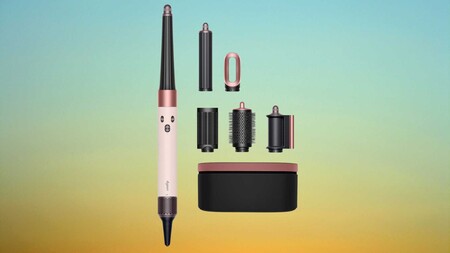
Then we can help you out, as the Dyson Airwrap i.d multi-styler and Dryer straight+wavy is now £399, down from its usual £479.99 retail price.

That brings one of Dyson’s most advanced hair styling tools back to a rare Black Friday-level saving during this Amazon Spring Deal Days sale.

Deal Dyson Airwrap idDeal Dyson Airwrap id

Dyson Airwrap i.d hits Black Friday big saving again

The Dyson Airwrap i.d has scored another hefty Black Friday discount, putting this sought‑after styler firmly back in the spotlight.

Advertisement

View Deal

The Dyson Airwrap i.d is designed to replace several separate styling tools, using Dyson’s signature Airwrap technology to style hair while it dries rather than relying on extreme heat.

Instead of clamping or pressing hair between heated plates, the device uses high-velocity airflow to attract and wrap strands around its barrels, which helps shape curls and waves while reducing the heat damage common with traditional styling tools.

Advertisement

Advertisement

Powered by a 1300W motor, the tool delivers strong airflow that helps dry hair quickly while still giving users control through three speed settings and three heat levels for adjusting the styling process.

That flexibility becomes especially useful for people with longer hair, as the device is specifically designed for chest-length or longer styles and can handle thicker sections without constant repositioning or repeated passes.

The Whatsapp LogoThe Whatsapp Logo

Get Updates Straight to Your WhatsApp

Join Now

Where the Dyson Airwrap i.d really earns its reputation is in the number of styling options it offers without needing separate appliances scattered across your bathroom counter.

Advertisement

Included attachments such as the concentrator, diffuser, and brush heads, allow the device to move from rough drying to smoothing or shaping depending on the look you want that day.

The Dyson Airwrap i.d multi-styler and Dryer straight+wavy also makes everyday styling less complicated because switching attachments takes seconds, meaning you can transition from drying to curling without stopping to reach for another tool.

Advertisement

At £399, the Dyson Airwrap i.d remains a premium styling device, but this discount brings the price closer to what many people would normally spend on several separate hair tools combined.

Advertisement

SQUIRREL_PLAYLIST_10148964

Source link

Continue Reading

Tech

Inside LightSpeed Studios’ Bold New Blueprint for Building the Next Generation of Original Games

Published

on

At this year’s GDC Festival of Gaming, conversations around the future of game development are back, and amid this conversation is LightSpeed Studios. Remember last year when they first teased their “Original IP Initiative“? The one where they promised to pour serious resources into building new worlds from scratch? Well, they’re back at GDC 2026 with the receipts. They’re pulling back the curtain on a strategic framework for creating original IPs that they’ve been quietly building and pulling together a team around for the past year.

It’s Not Just About Making Games, It’s About Building Worlds That Last

Here’s the thing about the gaming industry right now: everyone’s chasing the next big thing, but most are doing it with their eyes fixed on what’s already working. LightSpeed Studios is taking a different tack. They’ve spent the last twelve months assembling what amounts to a creative dream team and building what they’re calling a “proprietary framework” for developing original IPs.

Translation? There’s a rhyme and reason to how they design games. And it’s centered around a system designed to consistently produce games that don’t just look good but feel like it could be new, or a breath of fresh air.

The Heavy Hitters Have Entered the Chat

If you’re going to bet big on original IP, you bring in the best in the business. Enter Feng Zhu, recently appointed as Creative Director, whose resume reads like a master class in world-building. Known for his design work on shaping major Hollywood franchises, including Star Wars Episode 3, his job at LightSpeed Studios aims to channel all that cinematic storytelling expertise into original games.

In parallel, Kristin Gallagher, Studio Manager of the newly unveiled LightSpeed Mocap LA, a new state-of-the-art motion capture studio, is leading a purpose-built facility engineered for tackling complicated stunt sequences that Gallagher herself describes as among the most complex that she’s encountered in her 20-year career. When someone with that many years of experience is willing to admit this, it’s hard not to pay attention.

Advertisement

The “90:10” Rule That Changes Everything

Here’s where it gets interesting. During his GDC session “Creating IP Through Understanding,” Zhu dropped some details about the philosophy, which he calls the “90:10 Balance,” that’s driving all of this.

For any given title, 90% of it is rooted in reality. For example, this could include actual locations, historical context, and proportions that make sense in the real world.

The remaining ten percent? Whether it’s cranking up the tension in the narrative of a distinctive storyline, this is where game designers can ink their own personality and break from convention to create a memorable game. It’s like building a home. The foundation and framework are familiar and proven to work. But the interior design is where you make your home your own.

The Production Infrastructure Powering LightSpeed Studio’s Motion Capture

In the spirit of Hollywood and what makes action-packed blockbuster films stand out, this is where motion capture enters the picture. LightSpeed Mocap LA isn’t just any warehouse, as it’s stocked with state-of-the-art Vicon Valkyrie cameras, but what you can’t physically see are the custom APIs developed in-house to handle file management, and tools for streamlining the entire pipeline, which created an environment where complexity isn’t a barrier.

This enables the LightSpeed Mocap LA to dive into complex scenes like capturing a single hero performer, despite being surrounded by thirteen motion capture artists, while keeping every subject perfectly isolated. Or coordinating seven performance capture actors alongside four additional performers, all within a unified pipeline.

Advertisement

What This Means for LightSpeed Studios’ Future Gamers

So why should you care? Because this framework isn’t just theoretical. It’s already being deployed and set to be deployed on LightSpeed Studios’ future titles. Making pretty games is a baseline, but beyond this, a great game involves building worlds with depth, identity, and a storyline that’s immersive and compelling enough to keep you coming back. When the industry sometimes feels stuck between sequels and reboots of games, it’s refreshing when a studio has a framework set on consistently creating titles that are genuinely new.

Source link

Continue Reading

Tech

Meta's massive undersea cable project delayed in Persian Gulf as Iran conflict escalates

Published

on


Meta’s 2Africa undersea cable project has hit another geopolitical snag, this time in the Persian Gulf. According to Bloomberg, Alcatel Submarine Networks (ASN), the company responsible for laying parts of the system, has declared force majeure (a contractual clause that excuses a party from liability if an extraordinary, unforeseeable event…
Read Entire Article
Source link

Continue Reading

Tech

Apple drops commission rates in China without a fuss

Published

on

Apple is dropping its commission rate in the App Store in China to 25% from 30% following discussions with the Chinese regulator, the company said Thursday. The new 25% commission will apply to paid apps and in-app purchases, while a lower 12% commission (down from 15%) will be charged for auto-renewals of in-app purchases after their first year.

The changes go into effect on March 15, 2026, and will not require developers to accept new terms, Apple said.

The decision to adjust commissions without a long, public battle indicates both how important China is to Apple’s market, as well as how Apple sees its App Store’s business value. The company in its first quarter reported soaring iPhone sales in China, with revenue up 16% year-over-year, helping it deliver a record-breaking quarter.

Compared with the EU, where Apple and regulators have been going back and forth on commission changes for years, Apple seemingly dropped its rates in China without pushback. Meanwhile, in the U.S., Apple prevailed in a legal battle with Fortnite maker Epic Games, as a judge decided the iPhone maker was not a monopoly, though developers won the right to route their users to alternative purchase methods (at least for now). As a result, Apple has kept the same rates in the U.S., though it has programs that offer discounted rates for various parties, like small businesses.

Advertisement

The changes in China are documented in the new version of the Apple Developer Program License Agreement.

“We are committed to terms that remain fair and transparent to all developers, and to always offering competitive App Store rates to developers distributing apps in China that are no higher than overall rates in other markets,” the company said in its announcement.

Source link

Advertisement
Continue Reading

Tech

Skip Concrete & Gravel – This Driveway Alternative Is Cheaper (And Looks Great)

Published

on


Driveways are generally quite durable, but they’re not perfect. Gravel driveways can get exceptionally messy and fall apart, while old, cracked concrete driveways require filling solutions to stay together. Beyond these tried-and-true materials, there’s another, more eco-friendly solution that has steadily gained traction among homeowners. Recycled asphalt pavement (RAP) driveways use old, crushed-up asphalt mixed with filler materials to create an effective asphalt alternative that appears fairly similar to any other driveway. 

The fact that RAP doesn’t require new materials means it’s less energy-intensive, more eco-friendly, and cheaper to produce. This equates to installation savings, with some estimates placing RAP driveways at between $6.20 and $8.75 per square foot, while others claim it can cost less than $6. In comparison, some estimates put regular asphalt at $7 to $13 per square foot, with concrete costing between $6 and $15. Of course, the final cost will be influenced by driveway size, location, labor costs, and other individual factors. On average, a RAP driveway is likely to last around 20 years, so long as it’s properly taken care of. This involves tasks like routine resealing and re-compaction.

Advertisement

This may make it seem like a RAP driveway is the perfect solution to an old, crumbling driveway. However, much like other driveway types, the material has drawbacks that some may find aren’t worth the hassle.

Advertisement

Drawbacks to recycled asphalt pavement driveways

For all of its benefits, the recycled asphalt pavement driveway may not be the right choice for everyone. Some negatives are rather minor, such as RAP not being as aesthetically pleasing to some as a brand-new gravel or concrete driveway. Meanwhile, others are much larger, like potential groundwater contamination. RAP is porous and requires chemical binders to keep it held together. There is some concern that these chemicals can leech from the material when it rains, leading to water pollution. Unfortunately, there has yet to be conclusive research into this topic, so the impact of RAP driveways in this regard is somewhat uncertain.

Speaking of driveway breakdown, perhaps the biggest negative that plagues this material is cracking and crumbling. As an amalgamation of crushed-up materials, RAP driveways are tightly compacted and therefore more brittle than fresh asphalt. Thus, they’re more prone to breaking and cracking. Worse yet, moss, grass, and weeds can start growing if the cracks are large enough to expose the soil beneath the driveway. That’s why thorough preparation of the area where the driveway will go before setting it down is crucial.

While it has its share of issues, recycled asphalt pavement is a viable, budget-friendly, and largely environmentally conscious option that many homeowners could benefit from. It’s not the only alternative to a conventional driveway, though, and some may want to explore converting a solid driveway into a permeable one instead, especially if they want to reduce flooding.

Advertisement


Source link

Advertisement
Continue Reading

Tech

How to clean and organize your Mac

Published

on

Inevitably, the more you use something — your Mac included — the more dirty and cluttered it’s likely to become. At that point, you can buy a new machine, but the more economical move is to make what you have already work better. To help your computer feel new, or at least a little cleaner and less chaotic, we put together this guide with techniques and useful apps that have helped us maintain a more organized computer. I’ve been using these tips since before I first published this guide in 2021, and they’ve helped keep my 2018 MacBook Air looking and running (almost) like brand new.

How to clean your Mac’s screen and body

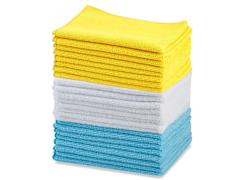
While there are many products out there from manufacturers claiming their one does it best, my advice is to keep things simple. It’s also the one Apple recommends. To start, you will need some water in a spray bottle and a clean microfiber cloth. You can use regular water from the tap but I’ve found distilled water works best; it’s far less likely to leave residue behind on your Mac, particularly on the display. You can buy distilled water at a grocery store or make it yourself with some simple cookware. Either way, it’s more affordable than dedicated cleaning solutions. If you don’t already own any microfiber towels, Amazon sells affordable 24-packs you can get for about $10.

One other product I would recommend is a Giottos Rocket Blower. I can’t say enough good things about this little tool. It will save you from buying expensive and wasteful cans of compressed air.

As for the actual process of cleaning your Mac, remember to start with a clean cloth (that’s part of the reason we recommend buying them in bulk). You’ll save yourself time and frustration this way. Begin by turning off your computer and unplugging it. If you bought a Rocket Blower, use it now to remove any dust. If not, take a dry microfiber cloth and go over your computer. Take special care around the keys, particularly if you own an older Mac with a butterfly keyboard.

Advertisement

Next, dampen one side of your cleaning cloth with water. Never spray any liquid directly on your computer. You’ll have more control this way and you’ll avoid getting any moisture into your Mac’s internals. I always clean the display first since the last thing I want to do is create more work for myself by transferring dirt from some other part of my computer to the screen.

The last step is to buff and polish your computer with the dry side of the cloth. Be gentle here as you don’t want to scratch the screen or any other part of. That’s it. Your Mac should be looking clean again.

Image for the mini product module

How to organize your hard drive

Igor Bonifacic / Engadget

One of the trickiest parts of cleaning your Mac’s hard drive is knowing where to start; most of us have apps on our computers we don’t even remember installing in the first place. Thankfully, macOS comes with a tool to help you with that exact issue.

Navigate to System Settings > General > Storage. Here you’ll find a tool that separates your storage into broad categories like “Applications,” “Documents,” “Music,” “Photos” and so on. Either double-click on an item in the list or click the circled i icon to see the last time you used an app and how much space it’s taking up. You can delete the apps from the same window.

Advertisement

The applications section is particularly helpful since you can see the last time you used a program, as well as if it’s no longer supported by the operating system or if it’s outdated thanks to a more recent release.

You don’t need me to tell you to uninstall programs you don’t use, but what you might not know is that there’s a better way to erase them than simply dragging them to the trash can. A free program called AppCleaner will help you track down any files and folders that would get left behind if you were just to delete an application.

AppCleaner

Igor Bonifacic / Engadget

After deleting any apps you don’t need, move to the Documents section. The name is somewhat misleading here since you’ll find more than just text files and Keynote spreadsheets. In this case, documents turns out to be the tool’s catch-all term for a variety of files, including ones that take up a large amount of space. You can also safely delete any DMGs (disc image files with the extension .dmg) for which you’ve installed the related app.

The other sections in the storage space are self-explanatory. The only other thing I’ll mention is if you’ve been using an iPhone for a while, there’s a good chance you’ll have old iOS backups stored on your computer. You can safely delete those, too.

Advertisement

Tips and tricks for keeping a neat Desktop and Finder

Bartender

Igor Bonifacic

Let’s start with the menu bar. It may not technically be part of the desktop, but a tidy one can go a long way toward making everything else look less cluttered. My recommendation here is to download an app called Bartender. At first glance, it’s a simple program allowing you to hide unwanted menu bar items behind a three-dots icon, but the strength of Bartender is that you get a lot of customization options. For example, you can set a trigger that will automatically move the battery status icon out from hiding when your computer isn’t connected to a power outlet.

While we’re on the subject of the menu bar, take a second to navigate to System Settings > General > Login Items & Extensions and look at all the apps that launch when you boot up your system. You can speed up your system by paring down this list to only the programs you use frequently.

When it comes to the desktop itself, less is more. Nothing will make your computer look like a cluttered mess more than a busy desktop. Folders and stacks can help, but for most people, I suspect part of the problem is they use their desktop as a way to quickly and easily find files that are important to them.

If you’ve ever struggled to find a specific file or folder on your computer, try using your Mac’s tagging capabilities instead. Start by opening the Finder Settings menu (Command + ,) and click the Tags tab. You can use the default ones provided by macOS or make your own. Drag the ones you think you’ll use most often to the favorites areas at the bottom of the preferences window. This will make it so that they’re easily accessible when you want to use them. To append a tag to a file or folder, click on it while holding the ctrl key and select the one you want from the dropdown menu. You can also tag a file while working on it within an app. Keep in mind you can apply multiple tags to a single file or folder, and you can even apply them to applications.

Advertisement
macOS tagging

Igor Bonifacic / Engadget

What makes tags so useful in macOS is that they can appear in the sidebar of the Finder window, and are easily searchable either directly with Finder or using Siri. As long as you have a system for organizing your files, even a simple one, you’ll find it easier to keep track of them. As one example, I like to apply an Engadget tag to any files related to my work. I’ll add an “Important” tag if it’s something that’s critical and I want to find quickly.

One tool that can help supercharge your Finder experience is Alfred. It’s effectively a more powerful version of Apple’s Spotlight feature. Among other things, you can use Alfred to find and launch apps quickly. There’s a bit of a learning curve, but once you get a hang of it, Alfred will change how you use your Mac for the better.

How to organize your windows and tabs

Magnet

Igor Bonifacic / Engadget

If you’ve used both macOS and Windows 10, you’ll know that Apple’s operating system doesn’t come with the best window management tools. You can click and hold on the green full-screen button to tile a window to either the left or right side of your screen, but that’s about it and the feature has always felt less precise than its Windows counterpart.

My suggestion is to download an app that replicates Windows 10’s snapping feature. You have several competing options that more or less offer the same functionality. My go-to is a $5 program called Magnet. If you want a free alternative, check out Rectangle. Another option is BetterSnapTool, which offers more functionality than Magnet but doesn’t have as clean of an interface. All three apps give you far more ways to configure your windows than what you get through the built-in tool in macOS. They also come with shortcut support, which means you can quickly set up your windows and get to work.

Advertisement

Check out more from our spring cleaning guide.

Source link

Continue Reading

Trending

Copyright © 2025