Wikipedia describes Freenet as “a peer-to-peer platform for censorship-resistant, anonymous communication,” released in the year 2000. “Both Freenet and some of its associated tools were originally designed by Ian Clarke,” Wikipedia adds. (And in 2000 Clarke answered questions from Slashdot’s readers…)
And now Ian Clarke (aka Sanity — Slashdot reader #1,431) returns to share this announcement:
Freenet’s new generation peer-to-peer network is now operational, along with the first application built on the network: a decentralized group chat system called River.
The new version is a complete redesign of the original project, focusing on real-time decentralized applications rather than static content distribution. Applications run as WebAssembly-based contracts across a small-world peer network, allowing software to operate directly on the network without centralized infrastructure.
Advertisement
An introductory video demonstrating the system is available on YouTube. “While the original Freenet was like a decentralized hard drive, the new Freenet is like a full decentralized computer,” Clarke wrote in 2023, “allowing the creation of entirely decentralized services like messaging, group chat, search, social networking, among others… designed for efficiency, flexibility, and transparency to the end user.”
“Freenet 2023 can be used seamlessly through your web browser, providing an experience that feels just like using the traditional web,”
We may receive a commission on purchases made from links.
Simple electrical tasks are among the many home improvement projects you can try doing yourself without professional help. While just about any DIYer can change out electrical sockets and light switches, and many can install a new ceiling fan or replace a garbage disposal, it’s important to have the right tools for the job.
Advertisement
There are easy-to-use electrical tools that can test for the presence of voltage, ensure wiring is connected to new outlets correctly, and measure temperatures without contact to check components for overheating. In addition, using good-quality hand tools makes the work easier and helps deliver professional-level results.
A word to the wise, however: Licensed electricians undergo extensive training to ensure their safety while they’re working on energized lines. That is, of course, because of the inherent risks involved working with electricity; it’s important to recognize and avoid the worst mistakes you can make when doing electrical work. However, as long as you keep safety in mind, anyone can easily use some of the electrical tools Home Depot has on offer to perform basic DIY electrical tasks.
Advertisement
A non-contact voltage tester
While a multimeter is handy to have around the home and garage for general use and testing purposes, a non-contact voltage tester can identify energized circuits without getting too close. One highly-rated example from Home Depot is the Klein Tools NCVT3P priced at $29.97, although the big-box retailer carries several versions from Klein and other brands.
The Klein NCVT3P is a digital dual-range non-contact voltage tester with an integrated LED flashlight that detects the presence of alternating current (AC) ranging from either 12 to 1,000 volts or 70 to 1,000 volts. It also comes with a pocket clip to keep it readily available either on your person or in tool bag, automatically powers off when inactive to save its battery, features drop protection from up to 6.6 feet, and has an IP67 intrusion rating against dust and water.
The NCVT3P’s user-selectable dual ranges allow it to detect power in standard-voltage electrical wiring found in homes and buildings as well as low-voltage applications such as landscape lighting and irrigation systems. Positively detecting voltage in a circuit provides for a safer work environment, making this device an absolute must for anyone doing electrical work themselves.
Advertisement
Users have the option to use the NCVT3P with the flashlight and audible alarm on or off while testing for voltage. They can also choose to use the lower-range voltage setting to provide more sensitivity when testing for higher voltages. The unit is simple to use and understand; a green light indicates no voltage detection, while a red light means the circuit is energized. Home Depot customers give it a 4.6-star rating across 592 reviews.
Advertisement
A digital GFCI receptacle tester
Once you’ve installed a new outlet in our home or shop, it’s often a good idea to test it before plugging in something expensive. One way to ensure you’ve gotten all the right wires on the right connections is to use a receptacle tester. Home Depot carries a wide variety of brands and styles, but it’s hard to beat the Milwaukee digital GFCI receptacle tester priced at $26.97, especially with its 4.7-star rating across 70 reviews.
This Milwaukee tester comes with the two AAA batteries required to use it, and has the added feature of testing ground fault circuit interrupter (GFCI) receptacles, those outlets with a reset button on them. These types of outlets are designed to protect against dangerous electrical shocks, and a GFCI tester is a safe way to ensure they are working correctly before trusting them with your life or your appliances.
The Milwaukee digital GFCI receptacle tester is easy to use; simply press the power button and plug it in to any standard household 120V outlet, and the incorporated green and red LED lights will indicate if the outlet is working correctly or has a fault. At the same time, the backlit LCD screen displays pertinent information, such as the amount of voltage detected and any electrical issues like reversed wires. The screen’s hold function retains the information until it’s cleared, a handy feature when you’re using the tester behind a refrigerator or furniture and can’t see clearly until you pull it back out. Pushing the test button with the unit inserted into a GFCI outlet will show if the interrupter is working correctly.
Advertisement
An electrician’s hand tool kit
A proper set of hand tools is a must for any DIY electrical work, although they’re often among the most underrated tools you’ll need for wiring jobs. An electrician’s hand tool set, like the 4-piece Milwaukee electrician’s hand tool kit priced at $55.88 from Home Depot, is a good example; it includes a multibit screwdriver, wire cutters, wire strippers, and a utility knife. It’s also a good choice based on its 4.7-star rating stemming from 1014 reviews.
The wire stripper/cutter included with the Milwaukee electrician’s tool kit features a simple locking mechanism for one-handed operation, spring-loaded jaws, a curved wire cutting blade, and the capability to strip solid wire sizes from 18 to 10-gauge and stranded wire from 20 to 12-gauge. In addition, the tool has a tapered nose with pliers and provisions to cut #6-32 and #8-32 bolts and straighten the threads after for easy installation.
Advertisement
The other tools in the kit are likewise useful. The 11-in-1 screwdriver contains eight hex screwdriver bits, including square bits, and three common nut driver sizes. The screwdriver handle is three-lobed for increased leverage and comfort. The mini flush cutter is spring loaded for simple one-handed operation. The tool produces precise cuts on thin wire strands and cleanly cuts cable tie ends to reduce snag hazards, leaving a professional appearance to your DIY job, and Milwaukee’s Fastback folding utility knife has an easy to open “press-and-flip mechanism” that allows users to deploy the blade with one hand. The knife’s design also allow changing blades without requiring the use of tools.
Advertisement
An infrared thermal imaging camera
While these high-tech tools are admittedly relatively high priced your average DIYer, infrared thermal imaging cameras come in handy around the home and garage. They’re especially handy for electrical work. You can use them to inspect outlets, junction boxes, breakers, and sub-panels for hot spots, which can indicate wiring issues like undersized wires, excessive amperage draw, and loose connections.
Home Depot sells infrared thermal imaging cameras produced by a variety of top brands. The rechargeable pro thermal imaging camera from Klein Tools, for example, lists for $649.99. A less expensive infrared thermal imaging camera is the Mileseey TR10, which sells for $159.99 at the retailer. Additionally, it features a better overall rating — 4.8 stars to Klein’s 4.5 — but both devices have fewer than 30 reviews each, likely due to their high cost.
The TR10 thermal camera features a high-resolution 240×240-pixel screen with a 25hz refresh rate for clearer, smoother imaging. The unit senses temperatures between -4 degrees up to 1,022 degrees Fahrenheit, displaying temperatures as a range of colors and identifying the high, low, and center-point temperatures on the screen with an accuracy of +/-2 degrees Celsius. A simple trigger pull captures the display image, and the TR10 IR thermal camera’s built in 8GB memory allows storage of 30,000 screen images. Users can transfer the stored images to a laptop, PC, or tablet by using an applicable USB-C cord.
Advertisement
Why these easy-to-use electrical tools from Home Depot were chosen
Photovs/Getty Images
It’s clear that an electrician’s tool kit likely contains much more than these four Home Depot tools. However, many of these may be more technical in nature or too complicated for use by beginner DIYers without the necessary training and acquired skills.
That’s why we focused on the electrical tool categories highlighted here. They’re all easily attainable and simple to use, ensuring immediate competence and supporting electrical safety when used by anyone. The specific examples are also highly rated by users and come from reputable companies like Klein Tools and Milwaukee. Only the Mileseey TR10 infrared thermal imaging camera strays from the ranks of established brands. It was included here due to its budget price compared to alternative products, its strong initial user reviews, and the company’s history of quality electronics, namely in the form of range finders used for golfing.
Nvidia controls processors and networking, forming the backbone of AI factories today
Nvidia could soon control not just chips but energy, models, and applications
Huang frames AI not as software, but as the foundation of modern industry
Nvidia chief executive Jensen Huang recently described artificial intelligence through the metaphor of a multi-layered system.
The framework explains how modern AI systems operate as an industrial chain rather than isolated software tools.
The structure consists of five layers: energy, chips, infrastructure, models, and applications, which interact with industries and consumers.
Article continues below
Advertisement
How the AI stack functions across layers
“Every successful application pulls on every layer beneath it, all the way down to the power plant that keeps it alive,” Huang wrote, illustrating how intelligence generated in real time depends on physical resources across the computing ecosystem.
Nvidia already dominates the processor layer, supplies networking technologies, and provides computing platforms inside large data centers.
Advertisement
The company’s influence over infrastructure includes systems that connect thousands of processors into machines capable of generating intelligence continuously.
These facilities, sometimes described as AI factories, require land, electrical supply, and networking systems to operate at scale.
Sign up to the TechRadar Pro newsletter to get all the top news, opinion, features and guidance your business needs to succeed!
Huang noted that the construction of new chip fabrication plants, computer assembly facilities, and data centers is occurring in multiple regions.
Advertisement
“We are a few hundred billion dollars into it,” he wrote. “Trillions of dollars of infrastructure still need to be built.”
The expansion reflects one of the largest industrial buildouts associated with modern computing.
At the top of the stack sit applications that convert computing capacity into economic value.
Advertisement
Huang cited examples, including drug discovery platforms, industrial robotics, legal analysis tools, and autonomous vehicles, which act as physical embodiments of artificial intelligence.
“A self-driving car is an AI application embodied in a machine,” he wrote. “A humanoid robot is an AI application embodied in a body.”
These systems rely on models capable of processing language, images, scientific data, and real-world environments, increasing demand for computing resources across the lower layers of the stack.
The framework also suggests how Nvidia could expand across the layers it described.
Advertisement
Companies controlling foundational technology sometimes extend into adjacent layers, similar to Amazon after building AWS.
Nvidia has been actively expanding into networking systems and large-scale computing infrastructure.
The company has also invested in areas such as photonics that affect how data moves between computing systems.
If Nvidia expands further into models, infrastructure, energy supply, or applications, the company could operate across most of the layers described in Huang’s framework.
Advertisement
By framing AI as a layered stack, Nvidia is not just explaining the industry, it is staking its claim across it.
From chips to infrastructure to applications, the company wants to have its cake and eat it too.
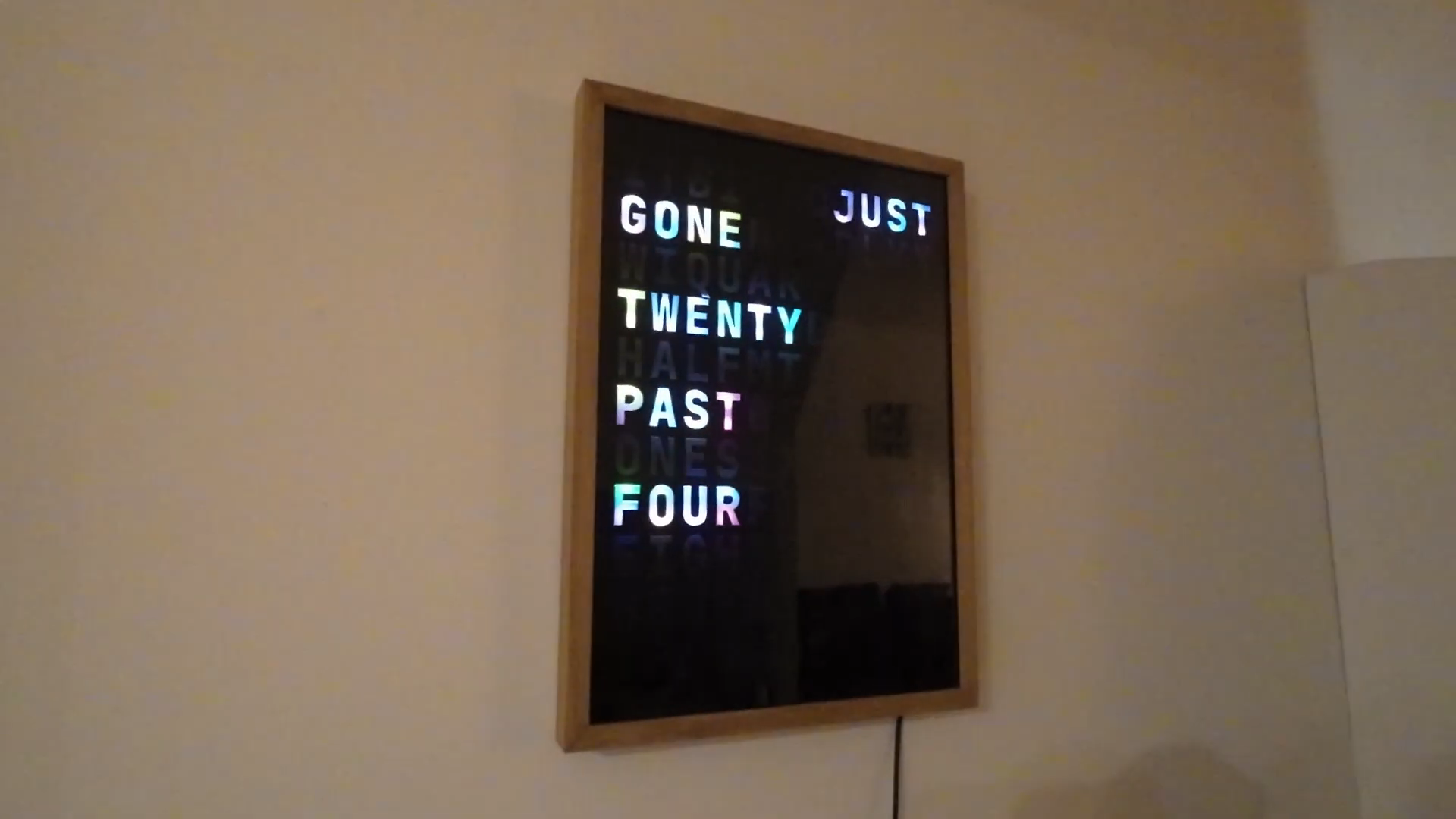
Reading analog clocks is a pretty straightforward skill to learn. However, if you’ve already learned to read and don’t want to pick up the extra skill, a word clock is a perfect solution for telling time. [povey_tech] found some nice examples in the wild but didn’t appreciate the price, so he set about building his own.
The build is based around an ESP32 microcontroller. While many projects in this vein would use the onboard wireless connectivity to query network time servers, in this case, the board relies on the user manually setting the time and a DS1307 real-time-clock module to keep a steady tick. Also onboard is a VEML7700 ambient light sensor, which the microcontroller uses to control the brightness of the WS2812 LEDs inside the board.
The words themselves are laser cut out of acrylic panels, with everything set inside a tidy oak picture frame. A layer of anti-reflective glass in front helps cut down on glare, while [povey_tech] was so kind as to implement two LEDs per letter to allow for lovely color gradients to be displayed. Configuring the clock is easy thanks to a webpage hosted on the ESP32 that allows for control of dimming modes, colors, and setting the time. Home Assistant integration is something planned for the future.
A threat actor tracked as Storm-2561 is distributing fake enterprise VPN clients from Ivanti, Cisco, and Fortinet to steal VPN credentials from unsuspecting users.
The attackers manipulate search results (SEO poisoning) for common queries like “Pulse VPN download” or “Pulse Secure client” to redirect victims to spoofed VPN vendor sites that closely mimic VPN solutions from legitimate software vendors.
After examining the attack and command-and-control (C2) infrastructure, Microsoft researchers discovered that the same campaign used domains related to Sophos, Sonicwall, Ivanti, Check Point, Cisco, WatchGuard, and others, targeting users of multiple enterprise VPN products.
In the observed attack, Microsoft found that the fake sites link to a GitHub repository (now taken down) that hosts a ZIP archive containing a fake VPN MSI installer.
Advertisement
Fake Fortinet website Source: Microsoft
When executed, this file installs ‘Pulse.exe’ into %CommonFiles%\Pulse Secure, and drops a loader (dwmapi.dll) and a variant of the Hyrax infostealer (inspector.dll).
The fake VPN client displays a legitimate-looking login interface that invites victims to enter their credentials, which are captured and exfiltrated to the attacker’s infrastructure.
The malware, which is digitally signed with a legitimate, but now revoked, certificate from Taiyuan Lihua Near Information Technology Co., Ltd., also steals VPN configuration data stored in the ‘connectionsstore.dat’ file from the legitimate program’s directory.
To reduce suspicion, the fake VPN client displays an installation error after stealing the credentials, and redirects them to the real vendor’s site to download the legitimate VPN client.
“If users successfully install and use legitimate VPN software afterward, and the VPN connection works as expected, there are no indications of compromise to the end users […], [who] are likely to attribute the initial installation failure to technical issues, not malware,” explains Microsoft.
Advertisement
Meanwhile, in the background, the infostealer malware creates persistence for Pulse.exe via the Windows RunOnce registry key, ensuring the infection survives system reboots.
The researchers recommend that system administrators enable cloud-delivered protection in Defender, run EDR in block mode, enforce multi-factor authentication, and use SmartScreen-enabled browsers.
Microsoft has also provided indicators of compromise (IoCs) and hunting guidance to help detect and block this campaign early.
Malware is getting smarter. The Red Report 2026 reveals how new threats use math to detect sandboxes and hide in plain sight.
Download our analysis of 1.1 million malicious samples to uncover the top 10 techniques and see if your security stack is blinded.
The interference has scrambled the Automatic Identification Systems (AIS) that ships rely on to share their positions. That means tankers carrying hundreds of thousands of tons of oil may not know exactly where nearby vessels are – a potentially catastrophic problem in narrow waterways, where even a small navigational error… Read Entire Article Source link
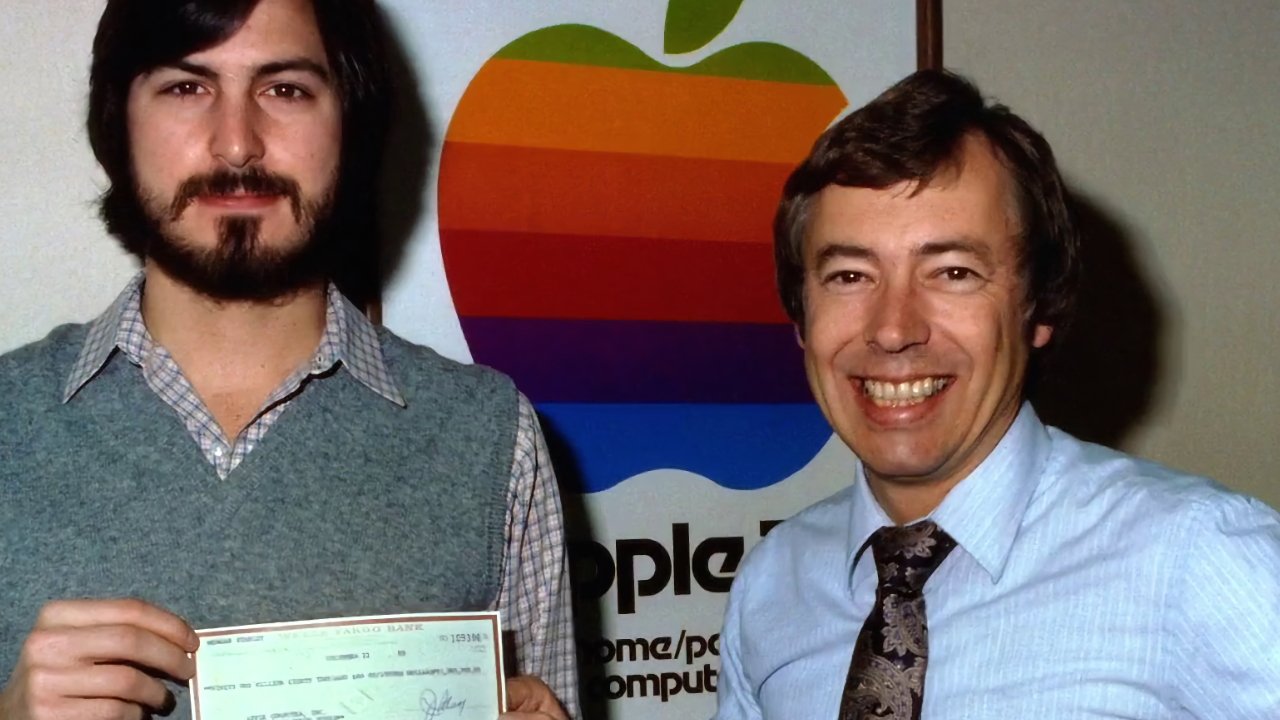
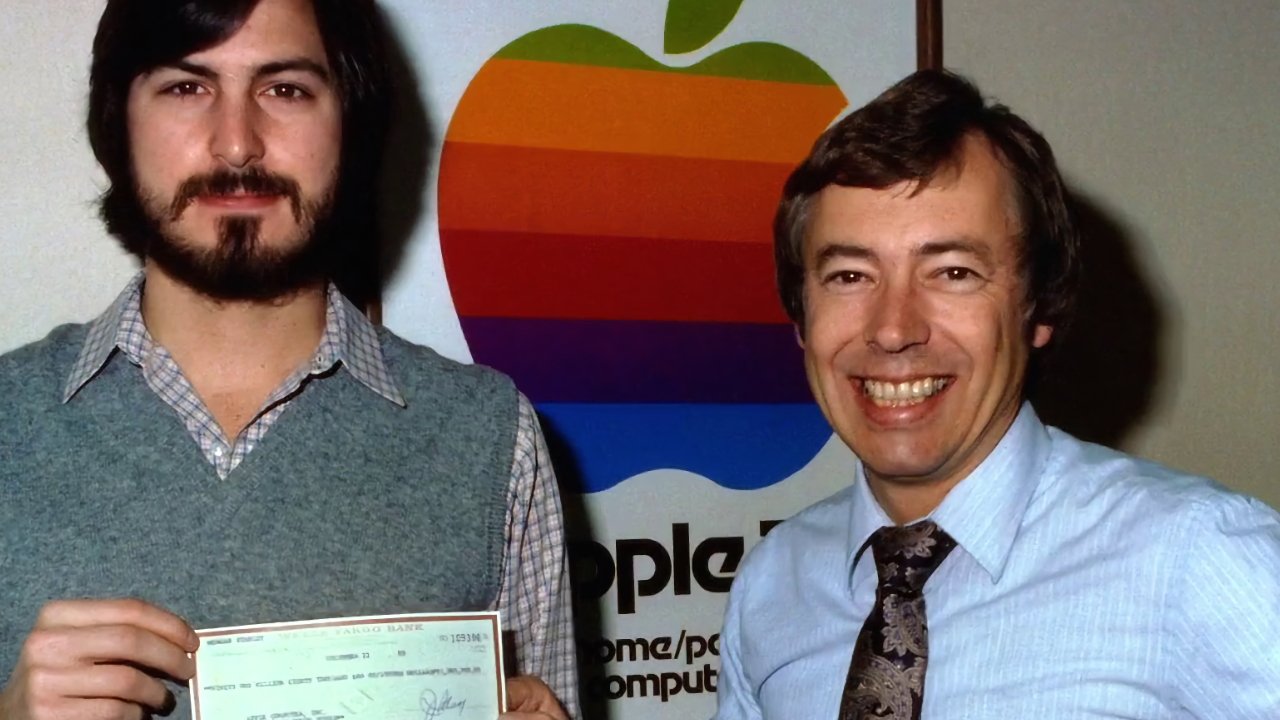
Neither of Apple’s first two CEOs are particularly remembered next to the likes of Steve Jobs, John Sculley, or Tim Cook, yet Mike Markkula, Apple’s second CEO, certainly should be.
Mike Markkula (right) with Steve Jobs in the 1970s — image credit: allaboutstevejobs
Michael Scott was the first CEO of Apple, but he was hired by Mike Markkula. And then if not exactly fired, he was at least pointed toward the door by Markkula. Without Markkula, there would quite possibly never have been an Apple. And there certainly wouldn’t be one that stood the test of time. Continue Reading on AppleInsider | Discuss on our Forums
Ex-Apple designer Alan Dye did not leave the company by himself, and a new report on Sunday says that he took others with that pioneered Liquid Glass with him. As we’ve said before, there is no possibility that Apple will ditch this overhaul.
Liquid Glass is Apple’s future, like it or not
Apple’s Liquid Glass redesign of all of its operating systems from iPhone to Mac may have proven divisive, and it was certainly spearheaded by Alan Dye. But there is no possibility that it will be dropped, even as Bloombergnow reports that several designers left alongside Dye when he moved to Meta. This new report from Mark Gurman’s “Power On” newsletter says that Apple whipped out Liquid Glass as a wild card to distract from its failings in Apple Intelligence. But then in the same breath, the report also says that Liquid Glass was many years in the making. Continue Reading on AppleInsider | Discuss on our Forums
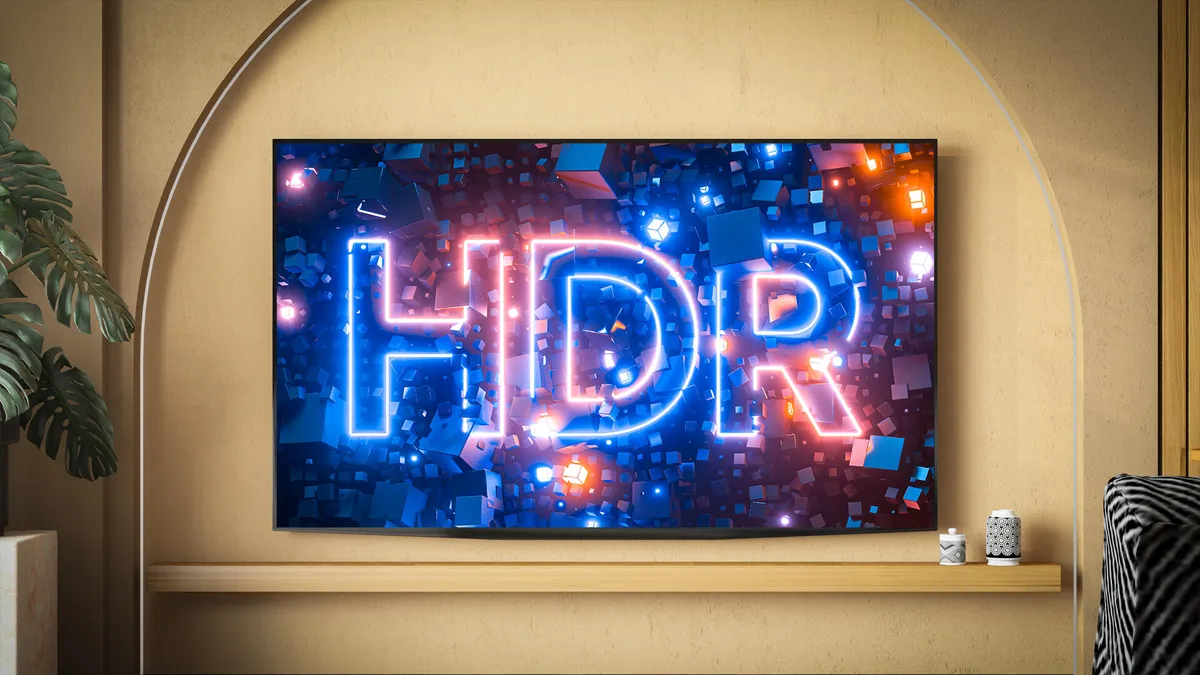
Nearly all new TVs and projectors have the ability to decode HDR, or high dynamic range, video. In most cases, HDR content looks better than non-HDR material, though an individual display’s ability to deal with the extra data can vary greatly. There are multiple HDR formats, including Dolby Vision, Dolby Vision 2, HDR10, HDR10 Plus and HLG. Most displays can only decode one or two of these. Likewise, streaming services and 4K Blu-rays typically offer only one or two.
Fortunately, all HDR displays can play HDR content — just not always in the best format available. Here’s what to keep in mind when shopping for a new TV or deciding which streaming service to use for a movie or show.
The basics
Advertisement
These images attempt to illustrate, on your standard dynamic range screen, what HDR can do on HDR displays. The top left shows how the image appears on an SDR display, tuned so the shadows are visible. Notice how the highlights in the clouds are “blown out,” meaning they lack detail. The upper right shows the HDR version with detail preserved in the clouds. The lower left shows the same image adjusted to preserve the highlights, which causes the shadows to disappear. HDR displays showing HDR content have a wider dynamic range — the difference between the brightest and darkest parts of an image.
HDR10plus.org
In CNET’s TV and projector reviews, we’ve found that both the capabilities of the TV itself and the way HDR is used in the movie or TV show have a greater impact on image quality than the specific HDR format. In other words, just because a display supports a “better” HDR format doesn’t mean it will look better than one that doesn’t. Here’s a tour of the HDR landscape today.
Everything supports HDR10, but many TVs and sources will also have at least one of the other formats.
Dolby Vision and HDR10 Plus can look better in specific ways compared to HDR10. All will look better than non-HDR, standard dynamic range content.
One format might look “better” than another on paper, but in the real world, image quality depends far more on the TV’s overall performance and how the content was made.
Most new TVs can display HDR content, which preserves more detail in both bright and dark areas of an image, creating a greater “dynamic range” than non-HDR content (i.e., pretty much everything you’ve ever watched). That older format is now called SDR, or standard dynamic range. On an HDR TV, HDR content can look far more punchy and vibrant than traditional video.
The dynamic range of what’s captured by the camera (left) and what’s possible on SDR and HDR displays.
AJA
Just having an HDR TV isn’t enough; you also need HDR content. Without it, the TV doesn’t have much to work with. It may still look good and can artificially expand SDR content for a slight improvement, but to get the most out of HDR you need content designed for it. Thankfully, there’s now plenty available, including movies, TV shows and even video games. Chances are your favorite new programs already support HDR.
HDR10
Supported by everything.
Better image quality potential than SDR, but perhaps not as good as HDR10 Plus or Dolby Vision.
Static metadata.
HDR10 is about as close to a universal standard as we’ve got. Because it’s free for manufacturers to use, it’s supported almost everywhere. Every HDR TV can decode it and every HDR streaming device supports it. Nearly all HDR content includes an HDR10 version, sometimes alongside more advanced formats such as Dolby Vision, which we’ll discuss shortly.
HDR10’s main limitation is its “static” metadata, meaning a single HDR “look” is applied to an entire movie or show. That’s still better than SDR, but it doesn’t allow very bright or very dark scenes to look their absolute best within the same film. This one-size-fits-all approach works, but it prevents both the content and the TV from reaching their full potential. Dynamic metadata, which most other HDR formats use, addresses this limitation.
Static metadata is like forcing an entire football team to wear the same size shirt. It might fit the quarterback and look OK on the big linebacker and tiny kicker, but everyone would look better in shirts sized for them.
Advertisement
HDR10 isn’t backward-compatible with SDR TVs, so it’s no good for broadcast. You’ll find it available with streaming content and on 4K Blu-ray.
HDR10 Plus
Championed by Samsung.
Dynamic metadata.
Potentially better image than vanilla HDR10.
As you may have guessed from the name, HDR10 Plus is similar to HDR10, but with a little plus. The “plus” in this case is dynamic metadata, which improves on HDR10’s static version. This means that on a per-scene — or even per-image — basis, the content can provide the TV with all the information it needs to look its absolute best.
While there are certain fees for manufacturers to use HDR10 Plus, they’re much less than what Dolby charges for Dolby Vision. Because it’s from Samsung, it’s highly unlikely there will ever be an LG TV with HDR10 Plus. Sony is another holdout, likely for similar reasons. However, Epson, TCL, Hisense, Roku and others offer HDR10 Plus compatibility.
It’s a little hard to see in this graphic, but notice how the frames on the right show different levels of brightness in the sky. This example uses a standard dynamic range image on a standard dynamic range screen. HDR10 Plus’s dynamic metadata allows filmmakers to optimize how each shot or scene is displayed. HDR10, by contrast, uses static metadata — a single setting that must serve as a compromise between the darkest and brightest scenes.
Advertisement
Samsung
On the content side, there’s Amazon, Apple TV, Disney Plus, Paramount Plus and Netflix, among others. Keep in mind that just because a company or streaming service supports HDR10 Plus doesn’t mean that every product or show/movie is compatible with or has HDR10 Plus data.
Potentially the best image quality of all the formats.
Less content available than with HDR10.
The de facto “step up” HDR format.
Dolby Vision, like HDR10 Plus, can have dynamic metadata. Streaming services including Netflix, Amazon, Vudu and Apple TV support it, and you can find it on some 4K Blu-rays. Some Dolby Vision features — including dynamic metadata and color handling — are optional in HDR formatting for NextGen TV, though over-the-air HDR content remains rare.
This is an approximation, using two SDR images, of what you’d see if you placed an SDR and HDR TV side-by-side.
Advertisement
Dolby
The downside of Dolby Vision is that manufacturers have to pay Dolby to use it. In return, Dolby helps them optimize their TVs to look their best with DV content. For some companies, that’s an easy way to improve picture quality. Larger manufacturers — like a certain Korean brand that begins with the letter S — prefer to invest in their own HDR formats instead, thank you very much.
After HDR10, this is the most popular HDR format, but that doesn’t mean it’s universal. Samsung is the biggest holdout, for reasons mentioned above. Generally speaking, if a company doesn’t support Dolby Vision, it likely supports HDR10 Plus, though some companies support both. There is less Dolby Vision content than there is vanilla HDR10 content, but big-budget movies and TV shows almost always include it.
Dolby
Announced at CES 2026, Dolby Vision 2 introduces several new features. The most controversial, in my opinion, is optional motion smoothing, which would allow directors or showrunners to smooth scenes they consider too juddery, such as fast pans. The format also includes “content intelligence” features that adjust a TV’s performance based on ambient light and the content being shown. Midpriced and lower-end TVs will support the base version of Dolby Vision 2, while higher-end models will offer Dolby Vision 2 Max, which includes the motion-smoothing feature. We’ll have to see how it’s implemented once TVs and compatible content arrive, possibly later this year.
The good news is DV2 is compatible with all current Dolby Vision TVs. Older DV TVs won’t have access to the new features, of course, but the HDR and dynamic metadata will still work.
Advertisement
HLG
From BBC and NHK.
Free to use.
Broadcast-friendly.
Hybrid Log Gamma was created by Britain’s BBC and Japan’s NHK. Unlike the formats we’ve discussed so far, it’s actually backward-compatible with SDR TVs. One signal that works on both older TVs and newer ones is a huge deal for broadcasters. As you can imagine, it’s not without drawbacks — mainly when it comes to picture quality. Like HDR10, HLG is likely better than SDR, but it may not match the picture quality of some other HDR formats. It’s the format used for over-the-air HDR broadcasts.
A graphical representation of an SDR and HLG signal. The vertical axis is the signal, from broadcast, cable or satellite, for example. “0” is black, “1” is bright white. The horizontal axis is the physical brightness coming out of your television. An SDR TV would see the HLG signal and think it was “normal,” showing an image with, perhaps, better highlight detail. An HDR TV that’s HLG-compatible would understand what to do with the HLG signal and show that brighter information as a physically brighter part of the image (i.e., how HDR normally works).
Public Domain/Creative Commons
There’s already wide TV support. Content is still in the early stages, however. If you can get the BBC’s iPlayer (whether you’re in the UK or using a VPN), that service has HLG support. DirecTV and YouTube also support HLG, but there’s just not a lot of content so far. It’s free and fills an important niche, but it’s been years since it came out and it hasn’t been widely adopted. Some phones can record HDR via HLG, which you can playback on HLG-compatible displays.
Technicolor’s Advanced HDR comes in multiple flavors: SL-HDR1 is similar to HLG in that it’s fully backward-compatible with SDR TVs, allowing for one signal to rule them all; SL-HDR2 has dynamic metadata like HDR10 Plus and Dolby Vision; SL-HDR3 uses HLG as a base, but adds dynamic metadata.
The path to SDR and HDR in one SL-HDR1 signal. The top is the content creation, the bottom is what your TV will do with it. The SDR content is automatically created from the HDR signal.
Technicolor
Content is limited to some NextGenTV broadcasts. It’s unlikely it will get wide acceptance among streaming companies.
Here’s the tl;dr: HDR10 is the main HDR format. Dolby Vision and HDR10 Plus are the step-up options that offer potentially better image quality. All HDR should look better than older SDR content (or the non-HDR version of modern content). NextGenTV continues its slow rollout. The potential of free over-the-air HDR is still there, but at this point it’s in the hands of the individual channels and channel owners as to how much HDR they want to broadcast.
Generally speaking, it’s worth making sure any new TV you’re considering supports either Dolby Vision or HDR10 Plus since the dynamic metadata can make a noticeable difference, especially on the best TVs. The good news is that the majority of new shows, movies and even many games, all support HDR in one way or another. Most TVs and projectors do as well, though of course, some better than others.
Note: This story was first published in 2018 but is updated regularly to reflect new HDR formats and info.
“Just the anachronism of seeing Doom, one of the poster children for the moral panic around violent video games, on a Nintendo console is novel,” writes Kotaku — especially with the console’s underpowered “Super FX” coprocessor
Hampered by a nearly unplayable framerate, especially in later levels, and mired by sacrifices, like altered levels, no floor or ceiling textures, and the entire fourth episode being cut, [1995’s] Doom on the Super NES was not a good version of the game, but it was Doom running on the Super NES, and, for that alone, [programmer Randal] Linden’s genius deserves recognition.
But then in 2022 when Audi Sorlie interviewed Linden on the YouTube show DF Retro, “Not really knowing where fate was going to take us, I asked [Linden] a throwaway question regarding the source code for Doom.”
If you ever worked on this again, Sorlie asked, would you make any improvements or do anything differently?”
Advertisement
“Yeah,” Linden replied. “I have plenty of ideas if I could go back, but, you know, I don’t think anyone’s asking me to go back to Super Nintendo Doom and improve it.”
A few years passed, and Sorlie joined Limited Run Games as lead producer for their development department. When LRG asked him to run down his craziest ideas, a new, improved release of Randal Linden’s Doom loomed large. Convincing Linden was easy, and Sorlie said even the folks at license holder Bethesda were more amused than anything.
“You want to go back and develop for Super Nintendo?” they asked Sorlie. “Like, for real…?”
“The trick was actually pretty cool,” Linden said. “It’s right here.” He pointed to a chip on the prototype SNES cartridge, similar to the one Limited Run sent me to test out the game. “It’s a Raspberry Pi 2350.” Super FX chips are no longer in production for obvious reasons, but with a clever bit of programming, Linden was able to load software onto the Raspberry Pi that fools the SNES into thinking the game has one. “The Super Nintendo doesn’t know that it’s not talking to a Super FX,” he explained. When he programs for it, he writes code almost identical to what he’d write for an authentic Super FX chip.
Advertisement
“I had to go back and reverse-engineer my own code from 30 years ago,” Linden laughed. “It’s like, what was I doing here? And what was I doing there? Yeah, it was pretty tricky, some of the code. I was like, wow, I used to be very smart.” The result of Linden’s work? It’s Doom, running right on a Super Nintendo, but it’s smoother, packed with new content, and even includes rumble.
A new open-source tool called Betterleaks can scan directories, files, and git repositories and identify valid secrets using default or customized rules.
Secret scanners are specialized utilities that scour repositories for sensitive information, such as credentials, API keys, private keys, and tokens, that developers accidentally committed in source code.
Since threat actors often scan configuration files in public repositories for sensitive details, this type of utility can help identify secrets and protect them before attackers can find them.
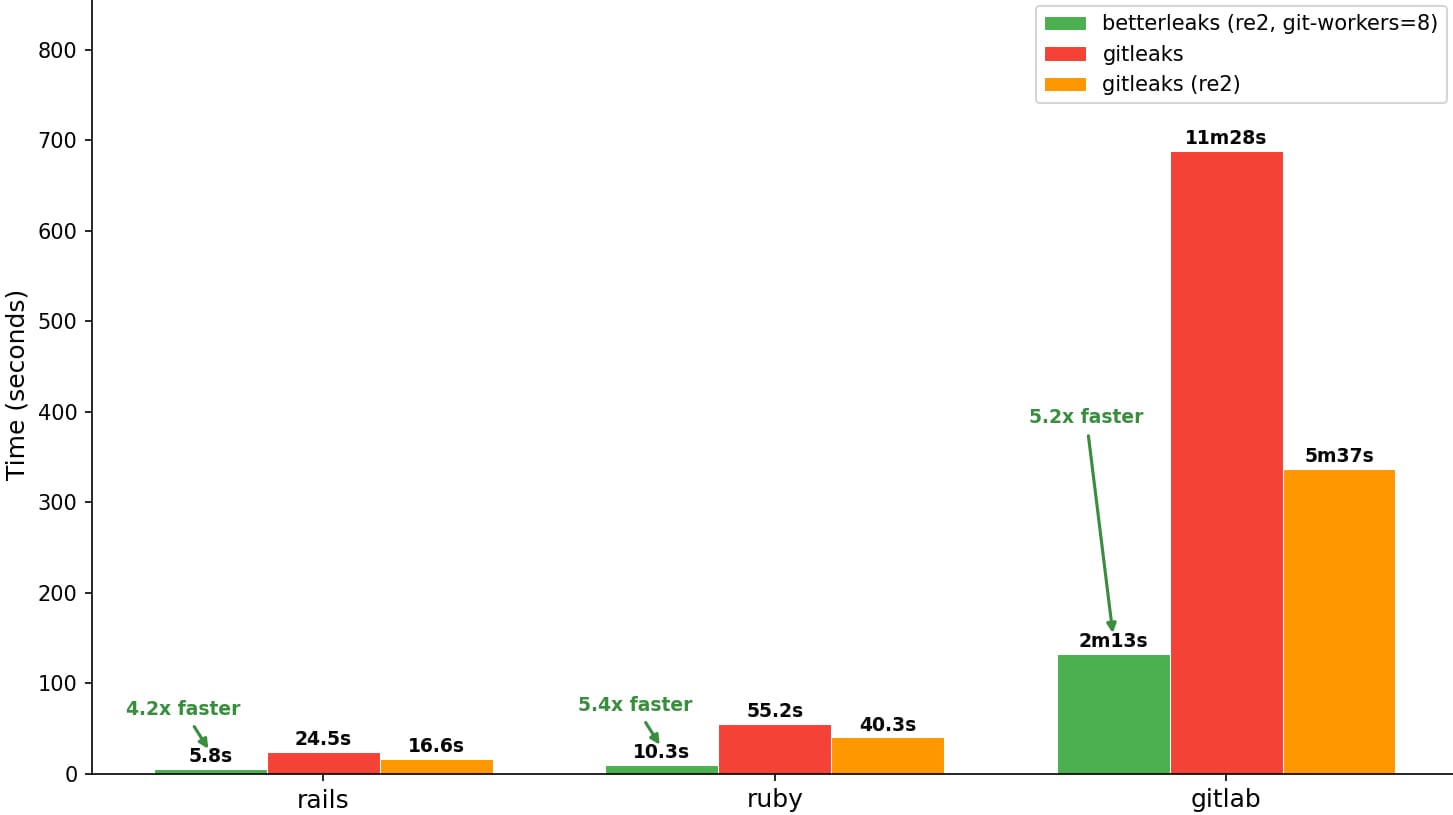
The new Betterleaks project is intended as a more advanced successor to Gitleaks and is maintained by the same team, with support from Aikido, a Belgian company that provides a platform for securing the development cycle.
Advertisement
Scanning speed comparison Source: GitHub
Betterleaks is developed by Zach Rice, Head of Secrets Scanning at Aikido Security, who also authored the popular Gitleaks with 26 million downloads on GitHub and more than 35 million pulls on Docker and GitHub Container Registry (GHCR).
“Betterleaks is the successor to Gitleaks. We’re dropping the “git” and slapping “better” on it because that’s what it is, better,” Rice says.
Betterleaks was created after Rice lost full control over Gitleaks, which he started developing eight years ago. The list of features in the new tool includes:
Rule-defined validation using CEL (Common Expression Language)
Token Efficiency Scanning based on BPE tokenization rather than entropy, achieving 98.6% recall vs 70.4% with entropy on the CredData dataset
Pure Go implementation (no CGO or Hyperscan dependency)
Automatic handling of doubly/triply encoded secrets
Expanded rule set for more providers
Parallelized Git scanning for faster repository analysis
The developer has also revealed additional features planned for the next version of Betterleaks, like support for additional data sources beyond Git repositories and files, LLM-assisted analysis for better secret classification, more detection filters, automatic secret revocation via provider APIs, permissions mapping, and performance optimizations.
Regarding the project’s governance, Rice explains that it uses the open-source MIT license and is maintained by three additional people beyond himself, including contributors from the Royal Bank of Canada, Red Hat, and Amazon.
Rice underlined that Betterleak’s design philosophy combines human-centric use with accommodation for AI agent workflows, including CLI features optimized for automated tools that scan AI-generated code.
Advertisement
Malware is getting smarter. The Red Report 2026 reveals how new threats use math to detect sandboxes and hide in plain sight.
Download our analysis of 1.1 million malicious samples to uncover the top 10 techniques and see if your security stack is blinded.