The downtown Seattle skyline. (GeekWire Photo / Lisa Stiffler)
Five months after releasing its “responsible AI plan” providing guidelines for the municipality’s use of artificial intelligence, the City of Seattle has tapped the brakes on the tech’s official deployment for city employees.
Mayor Katie Wilson last month paused the planned citywide rollout of Microsoft Copilot, as first reported Monday in The Seattle Times. Her predecessor, Mayor Bruce Harrell, had approved the launch before leaving office in December.
“While implementation of the technology is delayed, the education and governance work continues,” Megan Erb, spokesperson for the Seattle Information Technology Department, told GeekWire. “The City is still conducting educational roadshows for departments, as well as working to advance our foundational work in data governance and data readiness.”
In September, Seattle released its AI plan, which covers training and skill-building opportunities for city employees, and establishes a framework to facilitate and evaluate the use of AI tools in city operations. The city also conducted a pilot test of Copilot with 500 employees. The technology is available at no additional cost for Microsoft 365 users under Seattle’s enterprise agreement.
Participants reported:
Advertisement
Collectively saving more than 450 hours of work per week, such as drafting communications, report preparation, document analysis and research.
The technology proved most helpful for writing more clearly, producing faster summaries of documents and meeting notes, and quick access to policies and regulations.
83% said Copilot Chat provided “business value.”
79% said it was a positive user experience.
Seattle has been a leader in efforts to adopt next-gen AI tools, and says it issued the nation’s first generative AI policy in fall 2023. Even before the recently released AI plan, Seattle already had policies requiring “human-in-the-loop” oversight, meaning employees must review generative AI outputs before official use and disclose when work is AI assisted. The city also identified prohibited applications, such as AI in hiring decisions and facial recognition, due to concerns about bias and reliability.
Concerns about municipal AI regulations and oversight are widespread. An investigative series published earlier this year by the news organization Cascade PBS found that multiple Washington cities had limited guardrails around AI use, raising public trust and privacy concerns. Seattle was not among the cities scrutinized.
Seattle leaders in the past have framed their effort as a balance between embracing new technology and upholding their fundamental obligation to serve the public, emphasizing that AI is a tool — not a replacement for employees.
Erb said the delayed deployment of Copilot is a part of a “phased approach” to ensure “the City responsibly tests and adopts artificial intelligence tools, meets all privacy and security requirements, and deploys solutions that provide clear benefits to employees while upholding the City’s Responsible AI commitments.”
Rob Lloyd, Seattle’s chief technology officer, resigned last month, effective March 27, to become executive director of the Center for Digital Government. The city is recruiting a replacement.
Advertisement
In December, the city appointed Lisa Qian as its first AI Officer. Her experience includes serving as a senior manager of data science at LinkedIn, as well other tech company leadership positions.
During the fall budget process, the Seattle City Council asked the Seattle IT Department to provide quarterly reports on the use of AI, and that information will be submitted April 1.
The city previously identified 41 priority projects in which AI could potentially improve government performance and public services. Updates on those efforts will be included in the upcoming report, Erb said.
An anonymous reader quotes a report from Inside Climate News: Republican lawmakers in multiple states and Congress are advancing proposals to shield polluters from climate accountability and prevent any type of liability for climate change harms — even as these harms and their associated costs continue to mount. It’s the latest in a counter-offensive that has unfolded on multiple fronts, from the halls of Congress and the White House to courts and state attorneys general offices across the country.
Dozens of local communities, states and individuals are suing major oil and gas companies and their trade associations over rising climate costs and for allegedly lying to consumers about climate change risks and solutions. At the same time, some states are enacting or considering laws modeled after the federal Superfund program that would impose retroactive liability on large fossil fuel producers and levy a one-time charge on them to help fund climate adaptation and resiliency measures. But many of these cases and climate superfund laws could be stopped in their tracks, either by the conservative majority on the U.S. Supreme Court or by the Republican-controlled Congress.
Last month the court decided to take up a petition lodged by oil companies Suncor and ExxonMobil in a climate-damages case brought against the companies by Boulder, Colorado. The petition argues that Boulder’s claims are barred by federal law, and if the justices agree, it could knock out not only Boulder’s lawsuit but also many others like it. The court is expected to hear the case during its upcoming term that starts in October. There is also a possibility that Republicans in Congress will take action before then to gift the fossil fuel industry legal immunity, similar to that granted to gun manufacturers with the 2005 Protection of Lawful Commerce in Arms Act. Sixteen Republican attorneys general wrote (PDF) to U.S. Attorney General Pam Bondi in June suggesting that the Department of Justice could recommend legislation creating precisely this type of liability shield. And last month, one Republican congresswoman announced that such legislation is indeed in the works. “The ultimate democratic institution in America is the jury,” said former Washington Gov. Jay Inslee. Enacting policies that prevent or block climate-related lawsuits against polluters, he said, would effectively shutter “the doors of the courthouse to Americans that have been injured by oil and gas company pollution and by their lies and deceit about that pollution.”
“I really think it’s an un-American effort to deny Americans the traditional right of access to a jury,” Inslee said. Oil and gas executives are “terrified” by the prospect of having to stand before a jury and face evidence of their climate-change lies and deception, he added. “You’ll see the steam coming out of the jury’s ears when they hear about how they’ve been lied to for decades. [Oil companies] understand why juries will be outraged by it, and they are shaking in their boots. The day of reckoning is coming, and that’s why they’re afraid.”
The Pittsburgh startup’s AI platform will create digital twins of Pacific Fleet vessels, starting with 18 ships, as the Navy races to fix a maintenance crisis costing up to $20 billion a year.
Roughly 40% of the United States Navy’s fleet is unavailable at any given time. Ships are queued in dry dock. Maintenance cycles stretch across months. The cost of the backlog, according to Gecko Robotics CEO Jake Loosararian, runs somewhere between $13 billion and $20 billion annually. And as he puts it, “at a time when you need every asset you can get, that’s pretty critical.”
On Tuesday, the Pittsburgh startup announced it had signed a five-year IDIQ (indefinite delivery, indefinite quantity) contract with the US Navy and the General Services Administration, with a ceiling of $71 million.
The initial award stands at $54 million. It is the largest contract the Navy has ever awarded Gecko Robotics , and the largest robotics deal the Navy has signed to date.
Advertisement
The 💜 of EU tech
The latest rumblings from the EU tech scene, a story from our wise ol’ founder Boris, and some questionable AI art. It’s free, every week, in your inbox. Sign up now!
The work begins immediately with 18 ships in the US Pacific Fleet, destroyers, amphibious warships, and littoral combat ships, over the next nine months. Gecko’s wall-climbing robots, drones, and sensors will crawl across hulls, decks, and welds, gathering data points that would take human inspectors weeks to collect.
That raw data feeds into Cantilever, the company’s AI-powered operating platform, which converts it into a detailed digital twin of each vessel: a living, updatable model of the ship’s structural health.
Advertisement
The company says its technology can identify necessary repairs up to 50 times faster and more accurately than manual inspection techniques. Critically, the inspection can happen before a ship even reaches dry dock, meaning the right parts and personnel can be staged in advance, rather than the process beginning only once the vessel is already out of service.
Defense One reported that just 41% of ships completed repairs on time in 2025, well short of the Navy’s 71% goal. The Navy has since reset its target to above 60%, with the broader ambition of reaching 80% fleet combat surge readiness by 2027.
Gecko’s contract structure is also notable for its scope: because it runs through the GSA, any branch of the Department of Defense can access the company’s AI and robotics under the agreement, not just the Navy.
“Readiness isn’t just a metric. It’s all that matters,” Loosararian said in a statement. “This growing partnership is about the unfair advantages Gecko is deploying to our Navy and how prediction, through our robotics and AI products, ensures our brave men and women are the most advantaged in the world in their fight to defend freedom.”
Advertisement
The contract arrives at a moment of heightened urgency around US shipbuilding capacity. The Trump administration released a multi-page plan in February to revive the sector, which has fallen significantly behind China. Pennsylvania Senator Dave McCormick, in a statement, said the deal demonstrated how “engineers, researchers, and skilled tradesmen from a great Pennsylvania company are leading advances in technology, artificial intelligence, autonomous systems, and robotics and giving our military the capabilities it needs for the next generation of American defence.”
Gecko is not new to the Navy. The company, co-founded by Loosararian and Troy Demmer, now its president, has previously deployed its TOKA series robots on destroyers, amphibious vessels, and aircraft carriers, and has worked with defence prime contractor L3Harris on digital twins for military aircraft.
Earlier this year it partnered with BPMI, a contractor for the Naval Nuclear Propulsion Programme, to cut inspection times on nuclear carrier and submarine components by up to 90%.
The company was last valued at $1.25 billion following a Series D round led by Cox Enterprises in June 2025, which brought its total funding to $173 million. It remains private. The TOKA robots that will crawl the Pacific Fleet’s hulls are the same ones Gecko has been deploying in power generation, oil and gas, and heavy manufacturing for years, the argument being that the physical world, whether it’s a coal boiler or a guided-missile destroyer, yields its secrets the same way: slowly, and only to whoever has the patience to look closely enough.
Full-color 3D printing is something of a holy grail, if nothing else just because of how much it impresses the normies. We’ve seen a lot of multi-material units the past few years, and with Snapmaker’s U1 and the Prusa XL it looks like tool changers are coming back into vogue. Just in time, [Radoux] has a fork of OrcaSlicer called FullSpectrum that brings HueForge-like color mixing to tool changing printers.
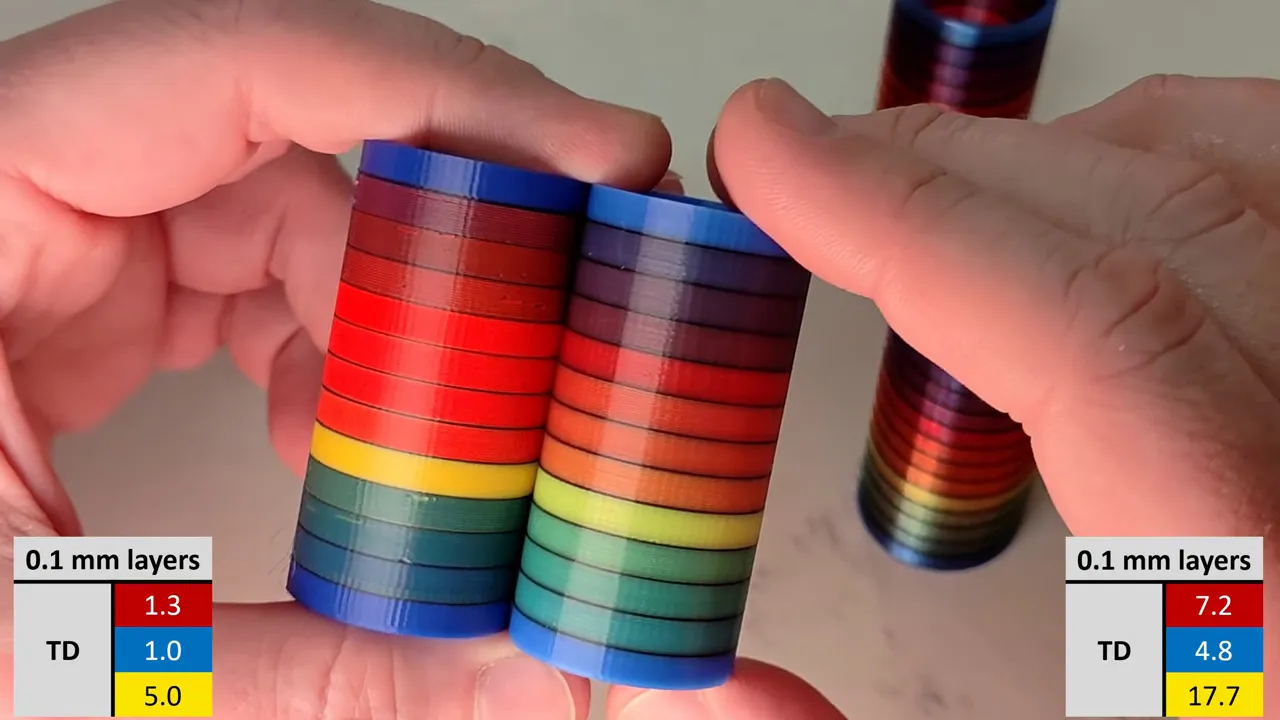
The hook behind FullSpectrum is very simple: stacking thin layers of colors, preferably with semi-translucent filament, allows for a surprising degree of mixing. The towers in the image above have only three colors: red, blue, and yellow. It’s not literally full-spectrum, but you can generate surprisingly large palettes this way. You aren’t limited to single-layer mixes, either: A-A-B repeats and even arbitrary patterns of four colors are possible, assuming you have a four-head tool changing printer like the Snapmaker U1 this is being developed for.
FullSpectrum is in fact a fork of Snapmaker’s fork of OrcaSlicer, which is itself forked from Bambu Slicer, which forked off of PrusaSlicer, which originated as a fork of Slic3r. Some complain about the open-source chaos of endless forking, but you can see in that chain how much innovation it gets us — including this technique of color mixing by alternating layers.
[Wombly Wonders] shows the limits of this in his video: you really want layer heights of 0.8 mm to 0.12 mm, as the standard 0.2 mm height introduces striping, particularly with opaque filaments. Depending on the colors and the overhang, you might get away with it, but thinner layers generally going to be a safer bet. Fully translucent filaments can blend a little too well at the edges, but the HueForge community — that we’ve covered previously — has already got a good handle on characterizing translucency and we’ll likely see a lot of that knowledge applied to FullSpectrum OrcaSlicer as time goes on.
Advertisement
Now, you could probably use this technique with an multi-material unit (MMU), but the tool-changing printers are where it is going to shine because they’re so much faster at it. With the right tool-changer, it’s actually faster to run off a model mixing colors from the cyan-yellow-magenta color space that it is to print the same model with the exact colors needed loaded on an MMU. That’s unexpected, but [Wombly] does demonstrate in his video with a chicken that’s listed as taking nineteen hours on Bambu’s MakerWorld as taking under seven hours.
Could this be the killer app that pushes tool-change printers into the spotlight? Maybe! Tool changing printers are nothing new, after all. We’ve even seen it done with a delta, and lots of other DIY options if you don’t fancy buying the big Prusa. If you’ve been lusting after such a beast, though, you might finally have your excuse.
We spend hours testing every product or service we review, so you can be sure you’re buying the best. Find out more about how we test.
Oukitel WP61 Plus: 30-second review
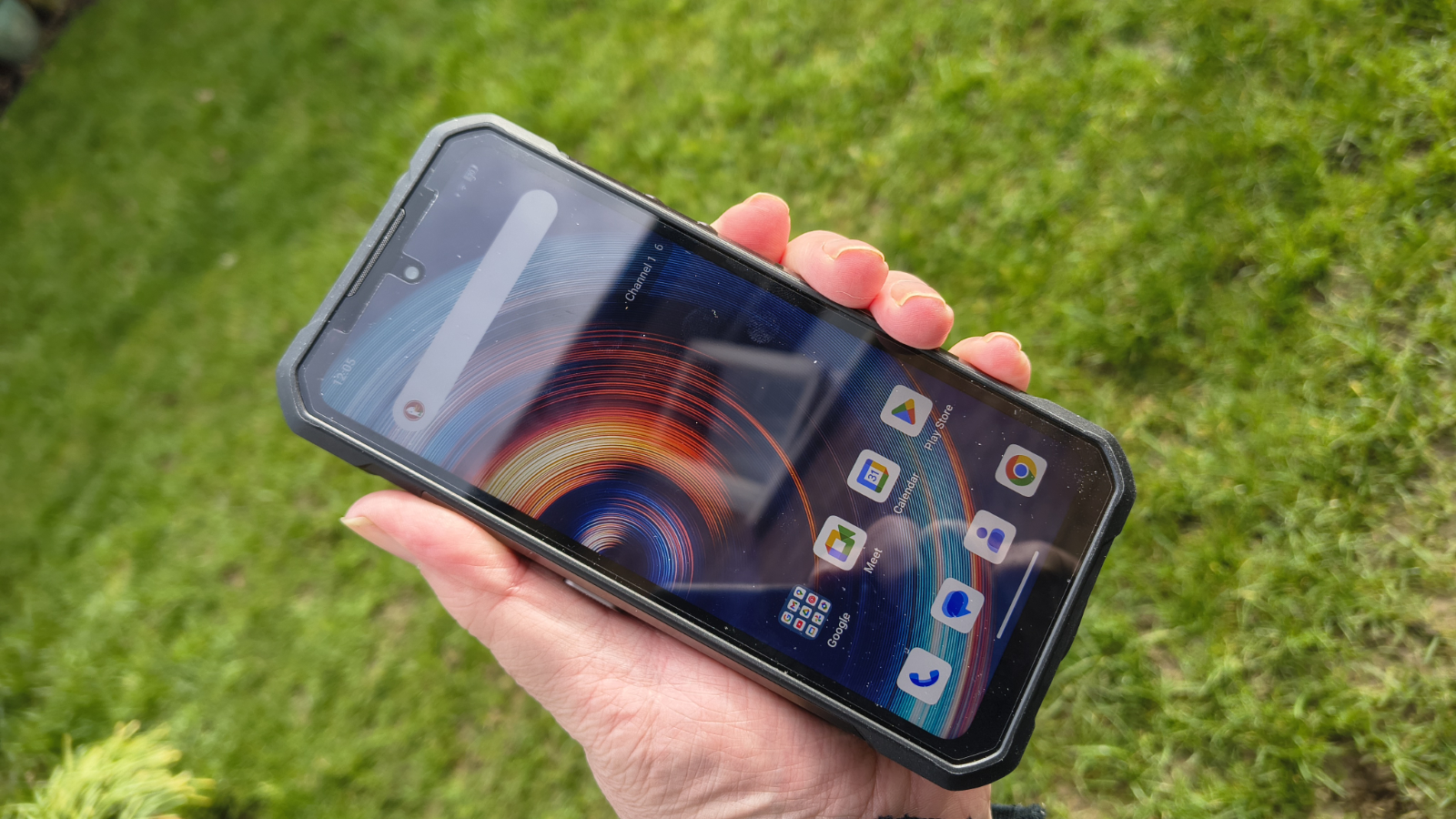
Unveiled at IFA 2025 in Berlin, the Oukitel WP61 Plus is the brand’s flagship all-in-one rugged smartphone, featuring a 20,000 mAh battery, an integrated 2W DMR walkie-talkie, and a high-powered camping flashlight.
But what is likely to confuse people is that the WP60 and WP62 have been available for some time, but Oukitel held the WP61 Plus back.
Advertisement
Built for outdoor professionals, search-and-rescue workers, or those who routinely find themselves in the great outdoors, the WP61 Plus is entering a highly competitive market.
There are four versions of the WP61 that all share the same SoC, memory, and storage model but differ in the special features included. There is a base model, the Plus model reviewed here, that has a 2W DMR walkie-talkie, the WP61 Ultra with thermal imaging, and the WP61 Ti with NTN Skylo Satellite communications.
All of them use the Dimensity 7025 processor, have 12GB of RAM, 512GB of storage and the same 108MP primary camera.
Advertisement
The large 6.8-inch FHD+ display runs at 120Hz, which is a welcome touch for a rugged device, and Android 16 puts it on the cutting edge for that platform
Where the WP61 Plus truly distinguishes itself, however, is in its extended utility features. The built-in DMR (Digital Mobile Radio) walkie-talkie operates at 2W and is designed to maintain group communications in areas where cellular coverage fails.
Sign up to the TechRadar Pro newsletter to get all the top news, opinion, features and guidance your business needs to succeed!
Oukitel quotes a range of 5.5km (3.4 miles) for DMR communications, but this will work without any cell service.
Advertisement
Combined with the camping light and the ability to act as a power bank for smaller devices, this phone is positioned less as a smartphone and more as a portable field communications and survival tool.
The only significant downside of this design is its physical scale; at over 650g, this isn’t a small or lightweight design, and with the walkie-talkie antenna attached, it becomes even more unwieldy.
The WP61 Plus might not break into our best rugged smartphone selection, but if you are looking for a general-purpose rugged phone for an adventure trek, then it could be an option.
(Image credit: Mark Pickavance)
Advertisement
Oukitel WP61 Plus: price and availability
How much does it cost? $370/£280/€323
When is it out? Available soon
Where can you get it? You can get it directly from Oukitel or via online retailers such as Amazon.
Direct from Oukitel, the asking price for the WP61 Plus is $369.99/£279.99/€322.68, which is a good deal if you accept the view that this is a discount from $499.99/£378.37/€436.06, a price at which this product has never been sold.
You read that correctly. At the time of writing, while Oukitel are promoting this product, it remains out of stock. Also, it’s not available via online retailers, but that’s probably right around the corner.
The Plus model is $50 more than the base model, but $60 less than the Ultra option. There is no price yet for the Satellite model.
There are lots of phones that use the same or similar SoCs, like the Blackview Oscal Tank 1, RugOne Xever 7 Pro, Doogee S200 and Oukitel WP300. All these are cheaper, but lack the DMR walkie-talkie technology.
Advertisement
Blackview has the Xplore 1 Walkie Talkie that sells for €383.95 direct from the makers, a good amount more than the WP61 Plus.
The Unihertz Atom XL is a much smaller phone with the same DMR technology, priced at $289.99 at the official Unihertz outlet. However, I’d avoid this phone because there are no US or Global models.
A better choice is the Armour 26 Ultra Walkie-Talkie, but its base price is $649.99, making it substantially more expensive.
For a DMR-capable phone, the WP61 Plus is reasonably priced, though it might seem a little expensive for the platform specification.
Advertisement
(Image credit: Mark Pickavance)
Oukitel WP61 Plus: Specs
Swipe to scroll horizontally
Item
Spec
CPU:
Advertisement
MediaTek Dimensity 7025 (6nm)
GPU:
IMG BXM-8-256
NPU:
Advertisement
MediaTek’s APU 780
RAM:
12GB
Storage:
Advertisement
512GB
Screen:
6.8-inch FHD+ LCD
Resolution:
Advertisement
1080 x 2460 pixels 650nits
SIM:
2x Nano SIM + TF (one shared position)
Weight:
Advertisement
651.6 grams
Dimensions:
179.5 x 85 x 27.5 mm
Rugged Spec:
Advertisement
IP68 IP69K dust/water resistant (up to 2m for 30 minutes), MIL-STD-810H Certification
Rear cameras:
108MP Camera + 8MP Night vision +2MP macro
Front camera:
Advertisement
32MP Sony IMX616
Networking:
5G bands, WiFi 5, Bluetooth 5.2
Audio:
Advertisement
130 dB 5W speaker
OS:
Android 16
Battery:
Advertisement
20000 mAh (45W wired, 5W reverse charge)
Colours:
Black
Advertisement
Oukitel WP61 Plus: design
Built for the field, not the pocket
DMR Antenna
Standard layout
The WP61 Plus makes no apologies for its bulk. At 179.5 x 85 x 27.5 mm, it is a substantial device, and one that is clearly engineered to accommodate its enormous 20,000mAh battery alongside the walkie-talkie antenna hardware and camping light module. The extra 27.5 mm of depth alone sets it apart as a very different prospect from a standard smartphone, and not one you can easily fit in a pocket.
What can make this design even more challenging to store is that in the box is a 92mm antenna for the DMR walkie-talkie that screws into the top right of the phone. You can choose not to attach that, but I presume that will impact the ability to communicate using that functionality.
The Oukitel WP series devices have traditionally used a combination of reinforced polycarbonate and aluminium alloy framing, and the WP61 doesn’t deviate from that, making it a device that can withstand heavy abuse.
The device supports a ‘seat charger’, a docking cradle that allows the phone to be mounted and charged in a fixed location, such as a vehicle dashboard or on a desk. This is a thoughtful addition for fleet operators or those who need their device always charged and ready. The dock isn’t included as standard, and its arrival date and price haven’t been released yet.
(Image credit: Mark Pickavance)
In terms of the general aesthetics and layout, there isn’t anything especially surprising about the WP61 Plus. The button arrangement is the one most rugged phones use, with the power (doubling as a fingerprint reader) and volume buttons on the right, the custom button on the left, where the SIM tray is also placed.
Advertisement
The buttons are all metal, and the sides of the chassis are all machined aluminium, making this phone feel both comfortable to hold and seemingly indestructible.
Both the top and bottom edges feature a waterproof plug: one for the antenna on the top and another covering the USB port on the bottom. Both of these are held in place with screws, suggesting they could be replaced when they wear out if Oukitel makes replacements available.
To avoid wearing out the USB-C cover, the dock has four metal contact points on its bottom face, allowing it to be charged without inserting a cable.
The rear has three noticeable features: a camping light, a 5W speaker, and the camera cluster. The 1200-lumen camping light is obscured by a reference sticker that contains important information you don’t want to misplace by peeling it off and throwing it away, annoyingly.
Advertisement
According to Oukitel, the speaker is rated at 130 dB, which would undoubtedly damage your hearing if you held it against your ear while it was making noise. The top-centre placement of that speaker also pushes the three rear camera lenses to the phone’s outer edge, which isn’t ideal.
While I’ve seen worse, the WP61 Plus seems to try to be many things at once and has slightly compromised some of its features in the process.
(Image credit: Mark Pickavance)
Design score: 3.5/5
Advertisement
Oukitel WP61 Plus: hardware
MediaTek Dimensity 7025
20000 mAh battery
Walkie-talkie
This is the third phone I’ve covered that uses the MediaTek Dimensity 7025, and I haven’t changed my opinion of it.
Instead of this being a new and exciting SoC, it’s a renaming of the older Dimensity 930, a chip from May 2022. If you research this silicon, you will find that the Dimensity 7025 was launched in 2024, but the underlying chip is at least two years older.
That explains why all the 70XX SoCs are made using a 6nm process, whereas all the 73XX and 74XX chips use the new and superior 4nm process.
Ironically, that’s not the biggest issue with this platform, since, as SoCs go, the Dimensity 7025 is an effective power-efficient system that delivers a good user experience for the most part.
A bigger problem is that the CPU is coupled with the IMG BXM-8-256 GPU, one of those PowerVR IMG designs that is poor by modern standards. It drives the Android 16 interface reasonably, but it’s not a game-friendly GPU. Critically, it lacks some of the OpenGL and Vulkan functionality that interactive graphics apps often use.
Advertisement
For the WP61 Plus’s intended use cases, it is a sensible and efficient choice, but more modern MediaTek designs, such as the Dimensity 7300 and 7400, offer far more potential.
In large, rugged phones, a 20000 mAh battery isn’t exceptional, but this device helps because it supports a 45W charger, which is included. That enables the phone to charge from zero to full capacity in about four hours, and get more than half of a charge in ninety minutes.
This is dramatically better than the WP60 offered with the same battery capacity, as that phone could only charge at 33W. Though, as I recall, the WP60 did reverse charge at 7W, where the WP61 Plus only puts out 5W.
(Image credit: Mark Pickavance)
You can get a similar platform and battery in a wide range of rugged phones, but the final feature I’ll talk about here is something that is in relatively few: a DMR (Digital Mobile Radio) walkie-talkie.
Advertisement
The radio in the WP61 Plus transmits at 2W, which is a meaningful output for direct device-to-device communication. DMR is a professional-grade digital radio standard, typically used in construction, security, and emergency services, making this a genuine productivity tool rather than a novelty. And, the hardware here can also work with Analogue technologies, alongside DMR-capable handsets.
As I only have one WP61 Plus, I wasn’t able to test the assertion that communication of over 5.5km was possible, but the technology is capable of that, so I don’t doubt it could work at that range in theory. The beauty of this technology is that it doesn’t rely on any other infrastructure to operate, though the practical range may be limited by terrain.
For those working together off the grid or at a building site, the range seems enough to be practical, even if it won’t work if you travel beyond the potential range, or put a mountain between those talking.
The custom button opens the DMR app to initiate a call, and you can select a channel to communicate over. While you can add custom channels, the app includes the standard DMR-approved channels for a range of countries, including Europe, the USA, Australia, and Taiwan. Iran, Korea, Malaysia, Russia, Japan and China.
Advertisement
As a matter of interest, I researched the DMR frequencies for various countries, and discovered that for some, like India, for higher power transmitters like this one, using 5W and with better range, a WPC license is required. So if you are not in any of the countries I previously listed, it might be worth researching which DMR channels you can use and any other clearances required before purchasing.
Even with those potential caveats, the DMR part of this device is undoubtedly the best aspect, should you have more than one of these or other DMR handsets to hand.
Oukitel WP61 Plus: cameras
108MP, 8MP night vision and 2MP Macro on the rear
32MP on the front
Four cameras in total
(Image credit: Mark Pickavance)
The Oukitel WP61 Plus has four cameras:
Advertisement
Rear camera: 108MP Samsung ISOCELL HM6 (S5KHM6), 8MP SK Hynix Hi-846 night vision IR sensor, 2MP BYD BF2257CS Macro Front camera: 32MP Sony IMX616 Sensor
Oddly, this camera arrangement is remarkably similar to a range of phones I’ve recently reviewed, except that many of them use a GalaxyCore sensor for the 2MP macro function, whereas the WP61 Plus uses the BYD BF2257CS for the same job.
The combination of the 108MP Samsung ISOCELL HM6 (S5KHM6) and the 8MP SK Hynix Hi-846 night-vision IR sensor was seen on the Oukitel WP60 Pro. But that phone didn’t use the Sony IMX616 front-facing sensor, and it used a GalaxyCore GC02M1 for the Macro.
The Sony IMX616 is better than the 32MP GalaxyCore GC32E1, but the 2MP Macro sensors don’t make a huge difference to the close-up shooting you can do.
Advertisement
The weakness of this layout is that the 108MP Samsung ISOCELL HM6 (S5KHM6) is used to avoid the need for zoom optics by providing a high-resolution sensor that can be cropped or pixel-binned. It offers a range of zoom settings from 1.0x to 4.0x. But it’s still not as good as having actual zoom optics, as the zoom jumps between settings, and the results for some digital zoom factors are better than for others.
The SK Hynix Hi-846 night vision sensor delivers impressive results in complete darkness, although it captures only in monochrome. And the Macro sensor is exceptionally grainy and requires excessive amounts of light to produce passable results.
Probably the biggest disappointment of this camera is that the primary Samsung ISOCELL has a resolution of 108MP, and you can shoot at that full resolution, but incredibly, the best video resolution available is only 1440p. That this phone, with a 108MP sensor, can’t offer 4K video is embarrassing.
The hardware is rated for 8K at 24 frames per second (fps) and 4K at 120fps, so the video resolution is down to the choices Oukitel made about the SoC and the Android camera application.
Advertisement
This camera can take some excellent still images, but if I were to drag a phone this big and heavy about the wilderness, I would at least expect it to shoot 4K video.
(Image credit: Mark Pickavance)
Oukitel WP61 Plus Camera samples
Image 1 of 12
(Image credit: Mark Pickavance)
(Image credit: Mark Pickavance)
(Image credit: Mark Pickavance)
(Image credit: Mark Pickavance)
(Image credit: Mark Pickavance)
(Image credit: Mark Pickavance)
(Image credit: Mark Pickavance)
(Image credit: Mark Pickavance)
(Image credit: Mark Pickavance)
(Image credit: Mark Pickavance)
(Image credit: Mark Pickavance)
(Image credit: Mark Pickavance)
Oukitel WP61 Plus: performance
Older 6nm SoC
GPU issues with OpenGL 3.1 and Vulkan 1.3
Great battery life
Swipe to scroll horizontally
Phone
Oukitel WP61 Plus
Advertisement
Blackview Oscal Tank 1
SoC
MediaTek Dimensity 7025
MediaTek Dimensity 7050
Advertisement
GPU
IMG BXM-8-256
Mali‑G68 MC4
NPU
Advertisement
MediaTek’s APU 780
MediaTek NPU 550
Memory
12GB/512GB
Advertisement
12GB/256GB
Weight
656g
640g
Advertisement
Battery
20000
20000
Geekbench
Advertisement
Single
959
920
Multi
Advertisement
2362
2466
OpenCL
failed
Advertisement
2471
Vulkan
failed
3036
Advertisement
PCMark
3.0 Score
13080
11684
Advertisement
Battery
40h 9m Est.
33h 57m Est.
Charge 30
Advertisement
%
28
13
Passmark
Advertisement
Score
6620
6861
CPU
Advertisement
5284
5285
3DMark
Slingshot OGL
Advertisement
3741
5293
Slingshot Ex. OGL
3738
Advertisement
4150
Slingshot Ex. Vulkan
2614
3940
Advertisement
Wildlife
Failed
2232
Row 19 – Cell 0
Nomad Lite
Advertisement
Failed
266
Rather than putting the WP61 Plus against another phone with the same SoC, I thought it might be appropriate to compare it with a marginally better chip, so I chose the Blackview Oscal Tank 1. It uses the MediaTek Dimensity 7050, slightly better than the 7025.
Both of these phones have the same battery capacity and RAM, which makes them closer to each other than many other rugged phones. size
Advertisement
What these results show is that the Dimensity 7025 is modestly slower than the 7050 used in the Tank 1, until you test it with a graphics benchmark. The IMG BXM-8-256 GPU can’t run the OpenGL and Vulkan APIs used by GeekBench and is required for 3DMark Wildlife and Nomad Lite.
But the upside of poor GPU performance is that the battery lasts much longer, with the WP61 Plus running for more than 40 hours. However, that result is a predicted endpoint because, like the Oscal Tank 1, the WP61 Plus crashed PCMark before exhausting the battery. Not sure if this is an issue with the benchmark or how both these phone makers are managing their batteries.
The overall performance of the WP61 Plus is fine for most uses, but it’s not a phone that gamers or anyone who uses VR will embrace. However, with curation, the battery could easily last six days or more, which could be useful off-grid.
(Image credit: Mark Pickavance)
Advertisement
Oukitel WP61 Plus: Final verdict
The Oukitel WP61 Plus is a device that sets out to do something genuinely different in a crowded market. Rather than competing solely on processing power or camera resolution, it bundles a professional-grade walkie-talkie, an enormous battery, and a camping light into a package that could plausibly replace multiple pieces of equipment for an outdoor professional or expedition team.
The Dimensity 7025 is not the most exciting chipset, and the physical dimensions mean this is not a device you will comfortably carry in a trouser pocket. But if your priorities are extended endurance, off-grid communications, and resilience in harsh environments, the WP61 Plus presents a compelling case at the asking price.
How useful DMR technology is to you will depend on whether you already use it or intend to buy multiple phones for walkie-talkie use. If it’s not something you’ll use immediately, you could save yourself $50 by buying the base model, since it has everything else I’ve mentioned here.
Advertisement
Should I buy a Oukitel WP61 Plus?
Swipe to scroll horizontally
Oukitel WP61 Plus Score Card
Attributes
Notes
Rating
Value
Advertisement
Reasonable cost for a well-made device
4/5
Design
Substantial but purpose-built for outdoor use
Advertisement
3.5/5
Hardware
Unique walkie-talkie, 20,000mAh battery and mid-range SoC
4/5
Advertisement
Camera
Good for still images, but the lack of 4K video is poor
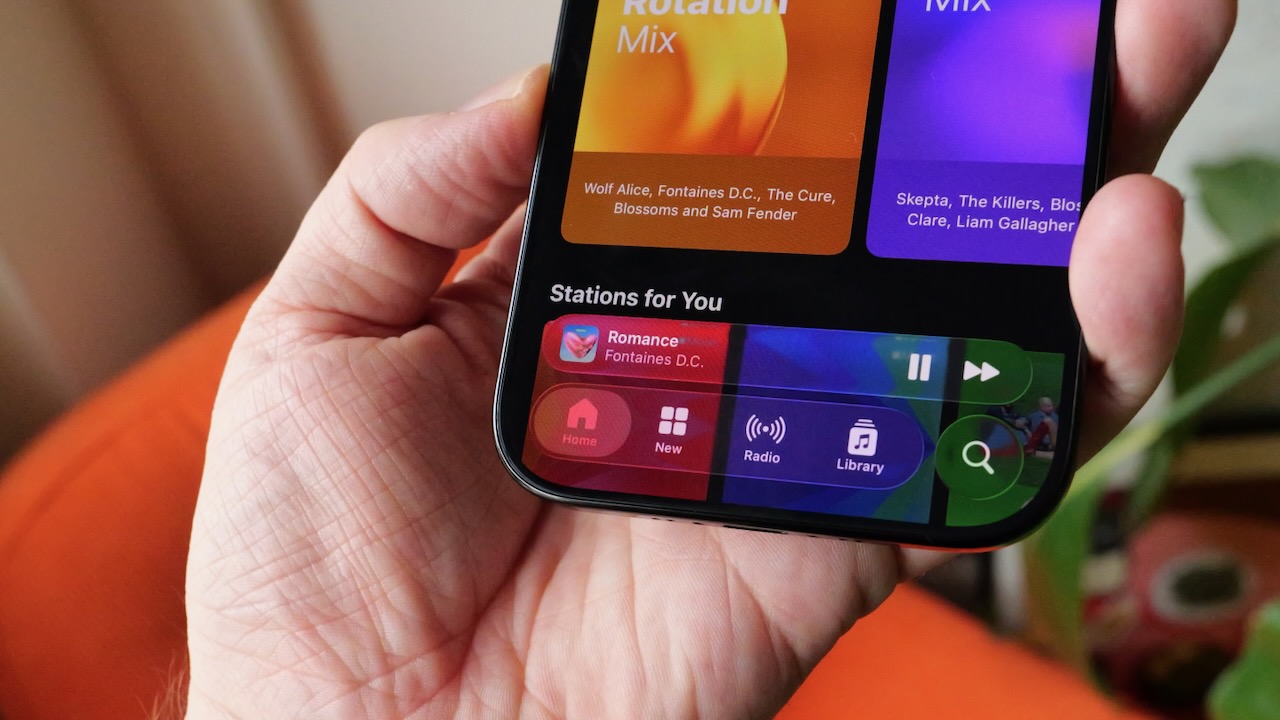
Liquid Glass first arrived across Apple’s recent platforms, including iOS 26 and macOS Tahoe. This brought a translucent, layered look to menus, widgets and system UI elements. While the redesign sparked mixed reactions from users, it appears Apple is committed to refining the style. They are refining it rather than replacing it.
The report says internal versions of iOS 27 and macOS 27 largely stick with the same design direction. That’s partly because the interface has strong backing internally. Apple’s new software design chief Steve Lemay — who took over the role after Alan Dye departed for Meta — was closely involved in developing Liquid Glass. In fact, he is expected to continue evolving the concept rather than replacing it outright.
Advertisement
That approach mirrors how Apple handled another major visual shift in the past. When iOS 7 abandoned skeuomorphic textures for a flat design, Apple spent several years gradually refining the look. Instead of dramatically changing it again, they chose to refine it.
Advertisement
In the meantime, Apple has already started offering small tweaks for users who find the effect too strong. Updates like iOS 26.1 introduced a “Tinted” option that increases the opacity of Liquid Glass elements across the system. Additionally, iOS 26.2 added a slider to adjust the transparency of the Lock Screen clock.
Apple had reportedly explored a system-wide Liquid Glass opacity slider during the development of iOS 26. However, they ran into engineering challenges when trying to apply the setting consistently across the entire interface. According to Gurman, the company could revisit that idea in a future version of iOS 27.
Advertisement
For now, though, the direction seems clear: Liquid Glass isn’t a short-lived experiment; it’s the foundation of Apple’s next generation of software design.
No matter how much we don’t like and oppose it, personal data is now a commodity. Our phone numbers, addresses, shopping habits, or employment history details are collected, analyzed, and traded among data brokers, marketers, recruiters, insurers, and countless other buyers, not to mention frauds and thieves.
However, trying to remove your online presence manually means tracking down every single company that holds your data (which can be hundreds), submitting legal deletion requests, and repeating the process when your data reappears or your request is ignored. This can easily become a full-time job.
That’s why data broker removal services exist: to automate, manage, and repeat those requests on your behalf.
But how to choose the best provider? Below, you will find a 2026 evaluation of the most recognized names in the industry.
Advertisement
Top Data Broker Removal Services at a Glance
Category
Incogni
Aura
DeleteMe
Optery
OneRep
Pricing (monthly when billed annually)
From $7.99
From $9.99
From $6.97
From $3.25
From $8.33
Free option
30-day money-back guarantee
14-day free trial, 60-day money-back guarantee
Free scan
Basicself-service, 30-day money-back guarantee
5-day trial, 30-day money-back guarantee
Automation Level
High
Medium-High
Medium-Low
Medium
Medium-High
Broker coverage
420+ public and private brokers
200+ brokers, mainly private
up to 850+ brokers (varies by plan), mainly public
120-640+sites (varies by plan)
310+ sites, mainly public
Verification
Dashboard, Deloitte Limited Assurance Report
App alerts and screenshots
Quarterly reports and screenshots
Screenshots and exposure scans
Dashboard and monthly reports
Best for
Long-term, low-effort privacy
Identity + privacy bundle
Detailed proof and control
Data exposure prediction
Public removals, Families
Incogni: Best for Balanced Automation, Coverage, and Accountability
Overview and Pricing
Incogni focuses on the continuous removal of personal data from data brokers, including both public people-search sites and private commercial databases.
Incogni’s plans start at $7.99/month when billed annually, and even the basic option contains all you need for effective data removal. Higher-tier plans only change prioritization and scope. There’s no free option, but you can take advantage of its 30-day money-back guarantee to see if the service suits your needs.
Features
Fully-automated opt-out and deletion requests across 420+ data brokers
Recurring removal cycles: 60 days for public, 90 days for private brokers
Supported by Deloitte’s limited assurance assessment, Incogni officially reports that it has processed 245+ million removal requests from 2022 to mid-2025, indicating sustained operations rather than one-time cleanups. As data brokers can reacquire information and their databases refresh regularly, the recurring cycle is vital if you want to protect your online footprint in the long run.
Transparency and Reputation
Apart from a limited assurance report by Deloitte, the service also holds Editors’ Choice Awards from PCMag and PCWorld, which praise its automation system and wide coverage.
On Trustpilot, Incogni has generally positive feedback, with an average rating of 4.4 based on over 2,000 reviews. Users often note actual reductions in spam and visible listings.
Advertisement
User Experience
Once you set up your account, you need to verify your identity. After that, Incogni will handle most data removal activity in the background without involving you directly. The clear, straightforward dashboard will show you all the brokers Incogni has contacted, confirmed removals, responses, and next scheduled cycles. You can peek into it whenever you like, but you don’t have to engage to make the process effective.
Advantages
Disadvantages
High automation
No screenshots
Broad coverage
No free trial
Deloitte Limited Assurance Report
Basic reporting
30-day money-back guarantee
Phone support only on Unlimited plans
Industry recognition
Recurring cycles and resubmitted requests
Clear interface, straightforward user experience
Aura: Best All-in-One Identity and Privacy Suite
Overview and Pricing
Aura is not a provider like others on this list, as it combines data removal service with broader digital protection features, including credit alerts, antivirus, VPN, device security, and identity theft monitoring.
Aura’s prices begin at $9.99/month when billed annually. What’s more, you get a 14-day free trial and a 60-day money-back guarantee for risk-free testing.
Features
Automated data removal across 200+ data brokers (mainly private)
Identity theft monitoring
Dark web monitoring
Credit score and breach alerts
Antivirus/anti-malware protection
VPN
Family and multi-device plans
Effectiveness
When it comes to data removal itself, this Aura functionality is automated. The platform first scans broker and people-search sites, submits deletion requests whenever finding your
information, and re-checks for reappearances. However, as it’s not its main focus, its data removal coverage is quite narrow compared to dedicated solutions. Aura’s value is the strongest only if combined with the whole toolkit.
Advertisement
Transparency and Reputation
Aura has been widely described in the identity protection space with overall positive sentiments. You can find Aura reviews on PCMag, Forbes, and NerdWallet. On Trustpilot, it holds an average rating of 4.2 based on almost 1,000 reviews. Users appreciate its all-in-one service, but broker removal results themselves don’t match those ensured by services focused exclusively on that problem.
User Experience
Aura’s interface contains all the features offered by the providers, showing alerts, scans, security postures, removal status, and more. This holistic view appeals to people who seek central management of their online presence, but for many users, it can be overwhelming.
Advantages
Disadvantages
Privacy+security bundle
Narrower coverage
Insurance
Manual approval steps
60-day money-back guarantee
Overwhelming user experience
14-day free trial
No third-party verification
Comprehensive alerts
DeleteMe: Strong for Proved Public People-Search Listing Deletion
Overview and Pricing
DeleteMe focuses on public people-search sites and background information databases. These are mentions that usually appear in search results when someone Googles your name.
The cheapest DeleteMe plan is $6.97/month when billed annually and can be used by 1 person.
Advertisement
Features
Automated scans of people-search sites (up to 850+, depending on the plan)
Expert manual handling
Quarterly detailed reports
Coverage for individuals, couples, and families
Limited custom removal requests (40-60 per year, plan-dependent)
DIY opt-out tutorials
Effectiveness
DeleteMe is quite effective at removing visible information from many major public listings. The company was a pioneer when, in 2010, it entered the industry with its
part-automatic, part-human-assisted approach. The team submits requests and tracks
progress, then provides you with scheduled, detailed reports that include, for example, even screenshots.
Transparency and Reputation
DeleteMe has been in the industry since 2010, which says a lot about its reliability. It has generally positive user reviews, especially when it comes to its detailed reporting system and exhaustive explanations about what was removed. There have been no third-party assessments of its services, but the provider has a good reputation in the industry, as seen in the review in PCMag or praise from Forbes. When it comes to user feedback, it has a rating of
4.0 on Trustpilot, though based only on 180+ reviews.
Advertisement
User Experience
Contrary to Incogni’s live and always-on progress monitoring, which you can check but don’t have to, DeleteMe is more report-centric. Users receive quarterly PDF summaries that show what sites were contacted, where their information was removed, and what remains pending.
Many people appreciate their human approach.
Advantages
Disadvantages
Clear, detailed reporting
Slower cycles
Long-standing service
Less automation
Human expertise
Narrower broker reach
30-day money-back guarantee
US-mainly coverage
Optery: Best for Exposure Visibility
Overview and Pricing
Optery’s main field of expertise is discovering where your personal data exists, providing users with insight into exposures before and during removal attempts.
Optery’s offer starts at $3.25/month when billed annually. The company also has a free, self-service version. Apart from that, you get a free scan and a 30-day money-back guarantee.
Advertisement
Features
Exposure dashboard displaying where your personal data exists
Automated removal from up to 630+ brokers with paid plans
Initial free scan across 120+ sites and free self-service plan
Guided removal request sending process
Custom removal submissions
Manual tracking of opt-outs and their status
Effectiveness
Optery is most effective at identifying where your personal data has been exposed. Then, for its removal, it blends automatic attempts with user-guided actions and manual tracking.
It doesn’t have the same automated recurring cycles as, for example, Incogni, but it may be helpful if you want to truly understand data exposures.
Transparency and Reputation
Optery is often highlighted for its exposure insights and transparency. Users appreciate the “seeing where my data lives” model, but many note that broader coverage comes only with more expensive plans, while manual user input is still needed.
On Trustpilot, Optery has 171 reviews with an average rating of 4.1. It has also been reviewed by PCMagquite enthusiastically, though they mentioned that the service doesn’t distinguish between removed data and never-found data. TechRadarpraised it for its ease of use.
User Experience
Optery is more interactive and gives you more control of the process (which can be both an advantage and a disadvantage, depending on how much time you’re willing to sacrifice). Its dashboard clearly shows where your personal data is, and then you need to decide which removals are more important and what to do next. You also get before and after screenshots as visual proof, while reports are AI-improved to make them more accurate and detailed.
Advertisement
Advantages
Disadvantages
Free scan
Broader coverage with more expensive plans
Free self-service
US-focused
30-day money-back guarantee
Slower with cheaper plans
Clear interface & control
No phone support
Onerep: Best for Public Listing Removal and Families
What It Does
OneRep automates removal requests issued to public people-search sites. Its focus is on high-risk databases like Intelius and Whitepages. The service also ensures quarterly recurring checks to combat resurfacing of your data.
However, there’s significant controversy around the company (more of that below).
Onerep’s prices start at $8.33/month when billed annually. It also offers a 5-day free trial. What makes it attractive and more affordable is its family plans that cover up to 6 members.
Features
Automated scans and removal requests across 310+ data brokers
Quarterly re-scanning
Great family value
Clear and straightforward dashboard tracking
Effectiveness
Optery is effective when it comes to reducing online visibility on many public sites, including those deemed high-risk. However, this provider doesn’t focus on private commercial
brokers that are responsible for a large portion of the spam. It makes Optery’s reach much narrower.
Advertisement
Transparency and Reputation
OneRep has a mixed reputation in the privacy protection community.
User reviews vary: some praise successful public listing removals, while others complain about slow relisting or only partial effects. Still, it holds a quite impressive average rating of
However, it’s essential to know that Krebs on Security revealed that in March 2024, Mozilladecided to drop OneRep from its list of recommendations due to the company’s CEO’s involvement in running people-search networks. This raised serious questions about conflict of interest in the industry. While the provider stated that Onerep operates completely independently and never sells user information, it is still often referenced in privacy circles.
Advertisement
User Experience
Onerep’s dashboard is pretty simple to manage. It shows progress on targeted sites and all removal requests, though it’s not really an automated model, so it only suits users who don’t mind handling the process.
Advantages
Disadvantages
Great family value
Industry controversies
5-day free trial
30-day money-back guarantee highly conditioned
Quarterly re-scans
US focus
Public listing coverage
Little customization
No third-party verification
Narrower scope
Final Perspective for 2026
When it comes to choosing a data removal service, the main difference is usually in scope and depth. Some providers focus on visible people-search listings, while others dig deeper to find your personal information in harder-to-find databases. They also vary in the recurring cycles they offer (or not).
Managing your overall online visibility is vital, but if you really want to reduce the amount of your information circulating on the web, you need to focus on less visible broker networks. Or rather, choose a provider built around large-scale broker coverage. Only then will you be able to enjoy more sustained results.
In 2026, Incogni stands out among its competition, as it combines a wide broker reach, continuous removal cycles, and a streamlined, low-maintenance experience. Not to mention that it was independently assessed. While other providers are not to be altogether dismissed, Incogni’s focused, automated approach offers the most comprehensive way out.
Advertisement
FAQ
Why can’t I just remove my data from brokers myself?
Manual removal means identifying hundreds of brokers, submitting individual opt-out requests, repeatedly verifying your identity, and rechecking when your data reappears. For most people, that quickly becomes too time-consuming to manage consistently.
How often does my data reappear after removal?
Advertisement
Data brokers regularly refresh and repurchase data, which means listings can resurface even after deletion. That’s why recurring removal cycles are critical for long-term results.
What’s the difference between public and private data brokers?
Public brokers (like people-search sites) display your information in search results, while private brokers trade data behind the scenes with marketers, insurers, and other businesses. Private databases often contribute more to spam and profiling, even if you don’t see them.
Advertisement
Do all services provide proof that removals were completed?
No. Some providers offer screenshots or quarterly reports, while others rely on dashboards or summary updates. The level of transparency varies significantly by service.
Advertisement
Is a bundled identity protection service enough for data removal?
All-in-one tools can help, but their broker coverage is often narrower than services dedicated specifically to data removal. If reducing online exposure is your main goal, specialized coverage may deliver stronger results.
Recycling plastic at home using 3D printed molds is relatively accessible these days, but if you do not wish to invest a lot of money into specialized equipment, what’s the most minimal setup that you can get away with? In a recent [future things] video DIY plastic recycling is explored using only equipment that the average home is likely to have around.
Lest anyone complain, you should always wear PPE such as gloves and a suitable respirator whenever you’re dealing with hot plastic in this manner, just to avoid a trip to the emergency room. Once taken care of that issue, there are a few ways of doing molding, with compression molding being one of the most straightforward types.
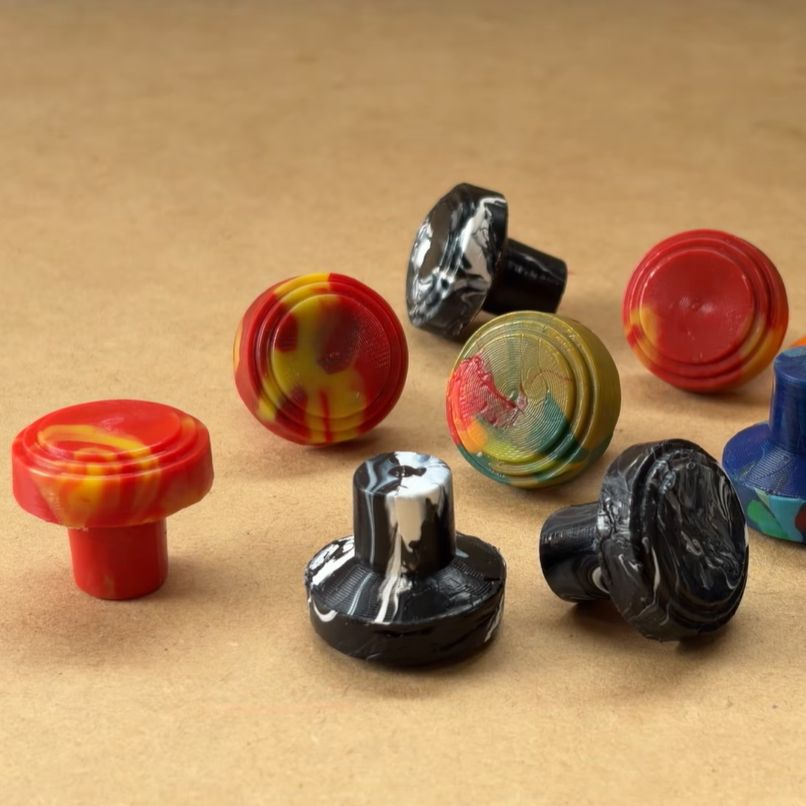
With compression molding you got two halves of a mold, of which one compresses the material inside the other half. This means that you do not require any complex devices like with injection molding, just a toaster oven or equivalent to melt the plastic, which is LDPE in this example. The scrap plastic is placed in a silicone cup before it’s heated so that it doesn’t stick to the container.
The wad of goopy plastic is then put inside the bottom part of the mold before the top part is put in place and squeezed by hand until molten plastic comes out of the overflow opening(s). After letting it fully cool down, the mold is opened and the part released. Although the demonstrated process can be improved upon, it seems to work well enough if you are aware of the limitations. In terms of costs and parts required it’s definitely hard to come up with a cheaper way to do plastic molding.
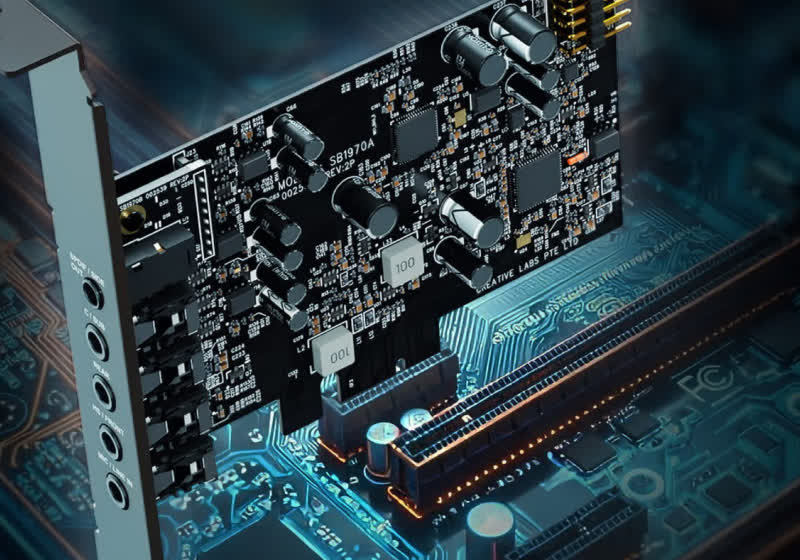
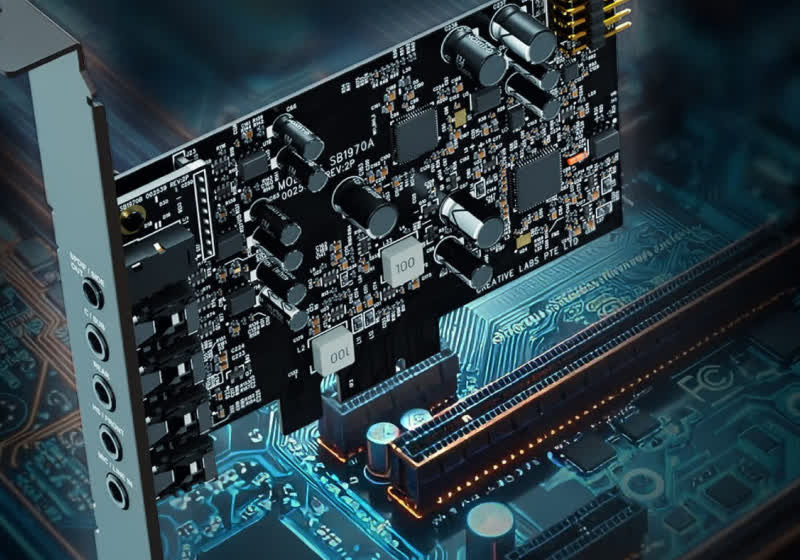
While the traditional discrete sound card has largely become a niche product for enthusiasts and hardware obsessives, Creative is attempting to attract new customers with a fresh model. The newly launched Sound Blaster Audigy Fx Pro can significantly upgrade the audio experience, the company says, and includes an additional layer… Read Entire Article Source link
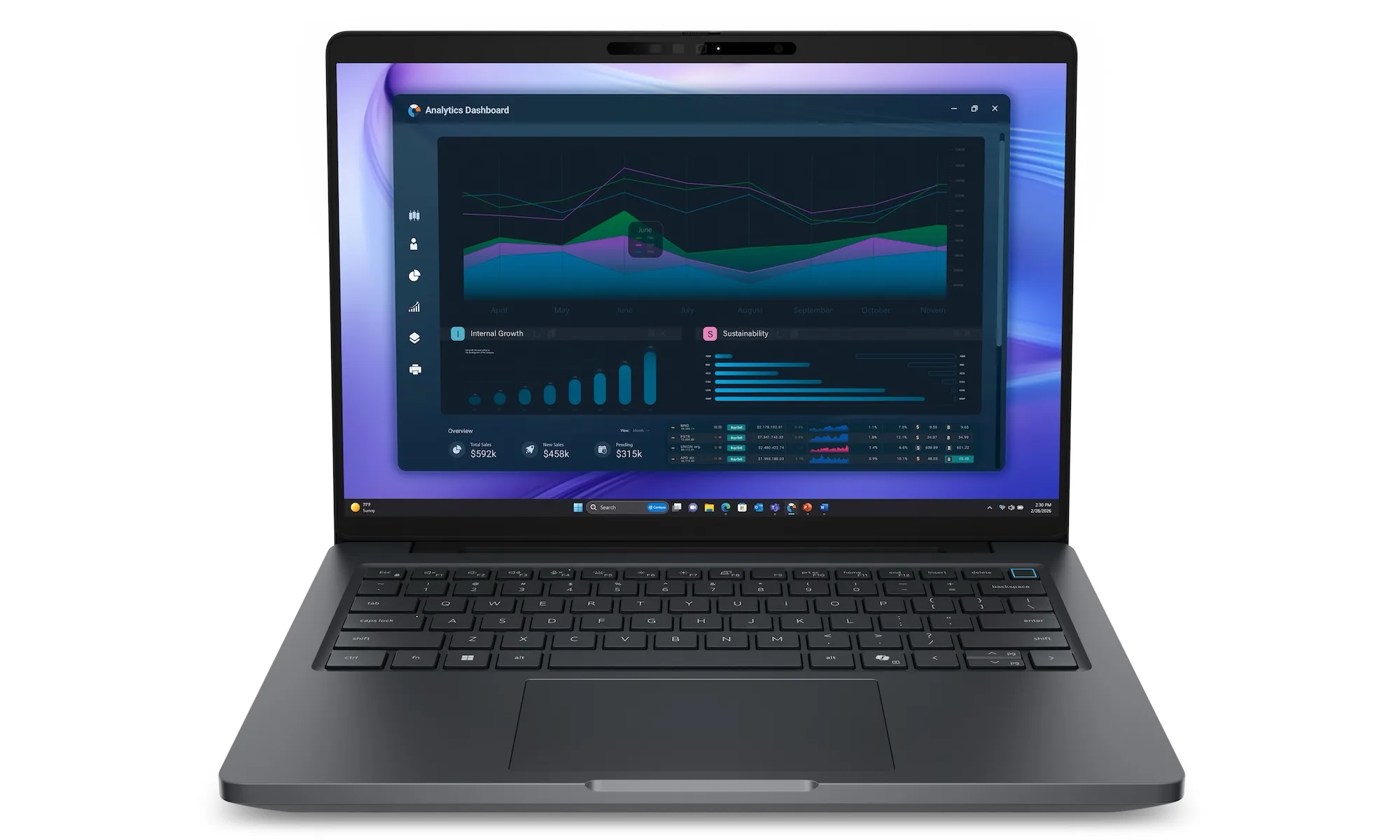
Dell has officially refreshed its Precision lineup with four new laptops, and there’s something here for every professional. The new range includes the Precision 5 Series in 14-inch and 16-inch sizes and the more powerful Precision 7 Series in the same size configurations. All four laptops are designed for users who demand more than a standard laptop can deliver.
All models are powered by the Series 3 Intel Core Ultra processors, with a built-in NPU that handles local AI tasks at up to 50 TOPS. You can spec the Precision 5 laptops with Intel Core Ultra 5, Ultra 7, and Ultra 9, and the Precision 7 laptops with Core Ultra 7, Ultra 9, and Ultra X7 processors.
Both Precision series can be equipped with up to 64GB of RAM, with the only difference being that the Precision 7 series gets onboard RAM. You also get NVIDIA RTX PRO Blackwell graphics across the range, though the top-end Precision 7 pushes all the way up to the RTX PRO 3000 with 12GB of dedicated video memory.
Which one should you pick?
The Precision 5 is the friendlier entry point. The 14-inch version weighs only 3.98 lbs and offers a QHD+ display (non-touch) option, up to 2TB of Gen5 NVMe storage, and a 72Wh battery.
Advertisement
Dell
The larger 16-inch model is essentially the same, with the only difference being an option to get a more powerful NVIDIA RTX PRO 2000 Blackwell graphics, a bigger display, and a larger 96Wh battery.
The Precision 7 is where things get serious. The 14-inch model weighs 3.51 lbs, which is impressive given what’s packed inside, including an optional QHD+ Tandem OLED display with VESA HDR TrueBlack 500 support.
Dell
The 16-inch bumps up to a 4K Tandem OLED with a 120Hz refresh rate and HDR TrueBlack 1000. If you work with color-critical content, that display alone is worth a serious look. You can also spec both these models with up to 4TB Gen5 NVMe SSDs.
Both 7 Series models feature Thunderbolt 5 ports, a significant upgrade for anyone who regularly transfers large files or relies on high-bandwidth accessories. You also get Wi-Fi 7, Bluetooth 6.0, and an 8MP IR camera on all models.
Is it worth the upgrade?
There’s no doubt that the Dell Precision laptops are packed with features and the latest hardware. However, whether they are worth buying will totally depend on their price.
The Champlain Hudson Power Express, a $6 billion, 339-mile buried transmission line, will soon deliver Canadian hydropower from Hydro-Quebec to New York City. The project could supply up to 20% of the city’s electricity and power roughly one million homes throughout the year. “This is far and away the largest project I have ever worked on,” said Bob Harrison, who has worked in infrastructure for 40 years and is the head of engineering for the Champlain Hudson Power Express. “We like to say it’s the largest project you’ll never see.” The New York Times reports: The massive power project, expected to provide energy to a million New York City customers a year, travels underground and underwater, from the northern plains at the Canadian border to the filled-in marshlands of coastal Queens, much of it loosely following the Hudson River. Its construction included the underwater installation of more than two million feet of cable imported from Sweden. It also required special boats, loaded with equipment that could shoot water jets deep into the sediment, to create trenches for the cable. Then, when it came to placing cable beneath the landscape, more than 700 land-use easements were needed, plus an additional 1.55 million feet of cable.
The Champlain Hudson Power Express has found a way to plug into the city, but it wasn’t easy. The work included 10 new manholes and more than three miles of new underground circuitry, according to Con Edison, the city’s primary electricity provider. “It was literally a hand weave under the streets of Queens,” said Jennifer Laird-White, the head of external affairs for Transmission Developers. The hydropower travels from Canada via two buried cables that are as round as cantaloupes. Those lines snake for hundreds of miles under a lake, several rivers (including the Hudson for about 90 miles) and through buried trenches alongside train tracks and roads. The cables resurface in Astoria, Queens, where a converter station shapes, filters and refines the raw power into a product that New Yorkers can consume.
In two cavernous rooms that could be mistaken for “Star Wars” sets, the electricity flows through 30 hanging structures encased in what look like metallic, dinosaurlike exoskeletons. Each one weighs about as much as a small humpback whale and contains microprocessors, thousands of valves and fiber wires. “I am still wowed when I walk into that facility,” said Mr. Harrison, the engineer. “I mean, it is just mind-boggling.”















































You must be logged in to post a comment Login