















MSI Prestige 14 AI+: Two-minute review
The MSI Prestige 14 AI+ is a sleek business-focused laptop with a premium design that manages an interesting and useful mix of the features and performance you need, but skips a lot of the bloat.
As the name suggests, it’s a 14-inch laptop, and it’s aimed at users on the go who need a thin and light machine that still offers decent performance and battery life. The Prestige 14 measures in at 31.6 x 22.2 x 1.2 – 1.4cm (12.4 x 8.7 x 0.47 – 0.55 inches) and weighs 1.32kg (2.91 lbs) — an excellent size for portability without being too small. Compared to the non-Windows competition, it’s chunkier than a MacBook Air, but is slimmer and lighter than a MacBook Pro.
The Prestige 14 AI+ D3M configuration I tested uses the Intel Core Ultra 7 355 CPU with 32GB of onboard LPDDR5x memory and a 1TB NVMe PCIe 4.0 SSD — a popular spec in laptops launched in 2026. You can also get the Prestige 14 AI+ in the same spec but with a 512GB SSD, or with a more powerful Intel Core Ultra X7 358H CPU.
While the Prestige 14 AI+ is a classic clamshell laptop, there’s also a similar 2-in-1 model. If that’s more your style, check out our MSI Prestige 14 Flip AI+ review.
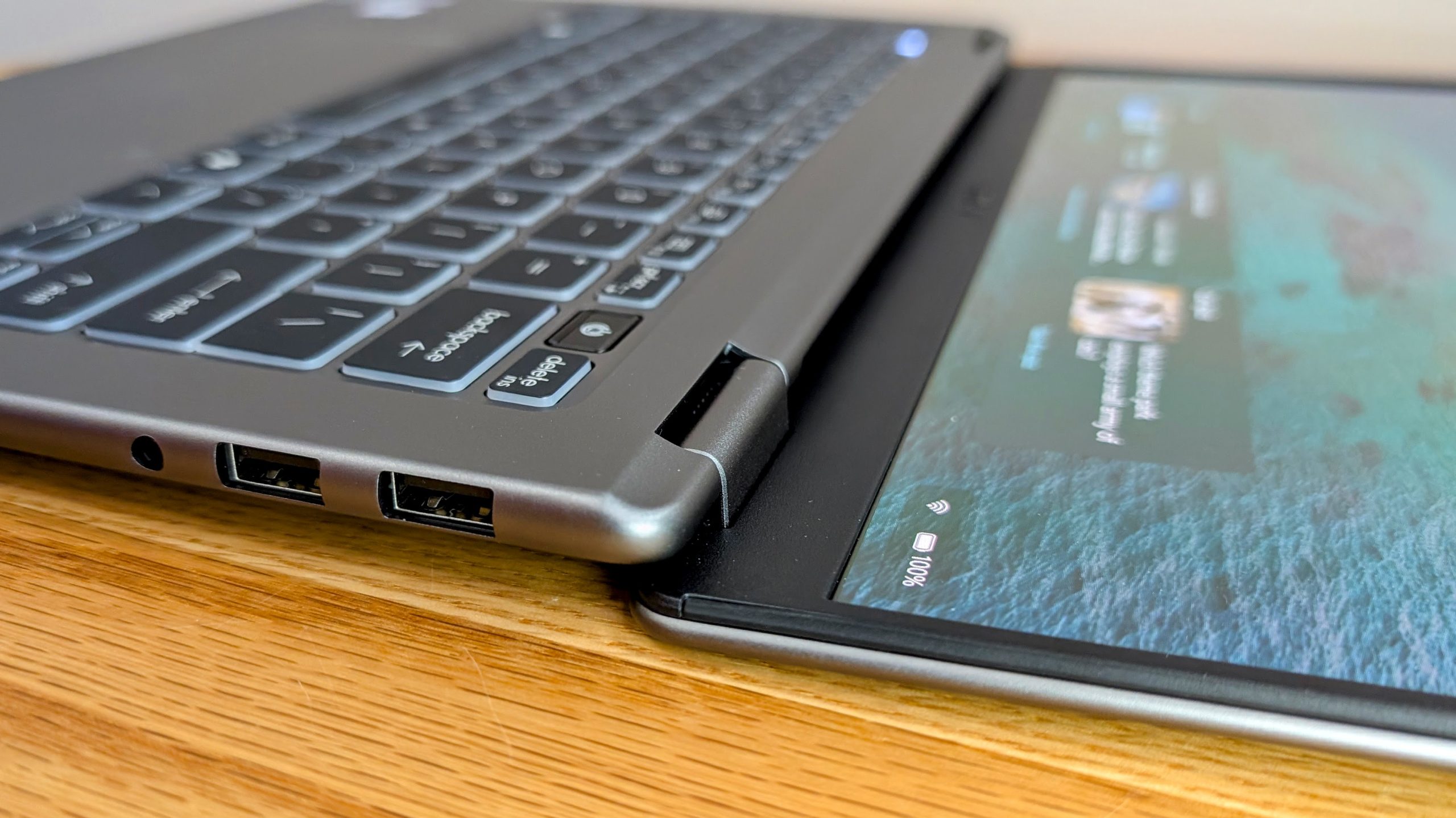
On the left side, the Prestige 14 AI+ has two USB-C / Thunderbolt 4 ports (both supporting DisplayPort and 100W charging), plus an HDMI 2.1 output. The right side features dual USB-A ports and a 3.5mm headset jack.
The pair of Thunderbolt 4 ports makes it easy to connect the laptop up to a dock or monitor, and if also using HDMI, you can drive 3 external displays. I generally like having one USB-C port on each side, but the dual left ports plus HDMI setup does make it neat on a desk.
The 14-inch OLED display has a resolution of 1920 x 1200 (a pleasing 16:10 aspect ratio) with excellent 100% DCI-P3 color. MSI doesn’t quote a specific NIT figure on the local spec sheet, but in use the glossy OLED panel is bright enough to overcome reflections in slightly glary office environments but struggles a little outdoors.

Handily, the screen folds back through a full 180 degrees, which is great for sharing content across a table or using the laptop in a vertical stand. The 1920 x 1200 resolution is perfectly fine at this size but not quite as sharp as I prefer and you will need to look at the larger 16-inch Prestige 16 AI+ if you want a higher res screen, like 2880×1800.
The IR FHD webcam gives decent quality video when well-lit and is still acceptable in tougher lower-light conditions. It supports facial recognition unlocks, plus has a physical shutter for privacy. Speaker quality is better than expected, though as is normal in a thin laptop, the sound gets a little muddy at higher volumes.
The backlit keyboard has deep key travel, very little bounce and no distracting light bleed from under the keys. The large touchpad is nice and accurate and supports gestures, though its non-haptic click mechanism has unusually deep travel, especially on right click, and can feel a little awkward at times.
The new Intel Series 3 Core Ultra 7 355 CPU is a good fit for this kind of thin-and-light machine. In daily use the Prestige 14 AI+ feels very responsive for typical office work, photo editing and even heavier multitasking. This is thanks in part to the snappy CPU, but also due to the 32GB of RAM and fast SSD. The integrated graphics are a step down from Intel Arc iGPUs but performance is plenty for accelerating lighter creative work and even some casual gaming.
The battery has an 81Wh capacity — decently large for this class of machine — and the laptop lasted an excellent 14 hours and 42 minutes unplugged when doing office tasks. Video playback is even better at 16 hours and 21 minutes in testing, meaning the Prestige will happily make it through a day unplugged.
All in all, the combination of snappy everyday performance and excellent battery life in a stylish portable laptop makes the MSI Prestige 14 AI+ easy to recommend.

MSI Prestige 14 AI+: Price & availability
- How much does it cost? $1,699 / £1,449 / AU$2,599
- When is it available? Available now
- Where is it available? Available in the US, UK and Australia
The MSI Prestige 14 AI+ is very new, so at the time of writing availability is not yet widespread and in the US, only the Ultra X7 385H variant is for sale.
The Intel Core Ultra 7 355 variant tested costs around £1,449 in the UK and AU$2,599 in Australia, though some retailers already have it a little cheaper. You can also save a little by opting for the 512GB SSD spec.
The pricing places the MSI Prestige 14 AI+ firmly in premium ultrabook territory rather than the more budget-friendly business-laptop space, but the spec and features do help justify the higher asking price — especially as the latest generation of laptops has experienced noticeable price rises compared to 2025 models. Still, I hope to see the price come down over time to help keep it competitive.
The Intel Ultra X7 358H variant is also sold in Australia and the UK with up to a 2TB SSD and is only slightly more expensive — so it’s well worth checking out if you need more storage or higher performance.

MSI Prestige 14 AI+: Specs
The Prestige 14 AI+ family includes several variants, but the configuration tested here is straightforward: an Intel Core Ultra 7 355, 32GB of onboard LPDDR5x memory, a 1TB SSD and a 14-inch 1920 x 1200 OLED display.
The other common option is a model with a more powerful Intel Core Ultra X7 358H CPU and up to a 2TB SSD.
| Header Cell – Column 0 |
MSI Prestige 14 AI+ (as tested) |
MSI Prestige 14 AI+ (top spec) |
|---|---|---|
|
Price |
£1,449 / AU$2,599 |
£1,549 / AU$2,799 |
|
CPU |
Intel Core Ultra 7 355, 8 cores (4 P-cores + 4 Low Power E-cores), 8 threads, up to 4.7GHz, 12MB cache, up to 49 NPU TOPS |
Intel Core Ultra X7 358H, 16 cores (4 P-cores + 8 E-cores + 4 Low Power E-cores), 16 threads, up to 4.8GHz, 18MB cache, up to 50 NPU TOPS |
|
GPU |
Intel Graphics |
Intel Arc B390 GPU |
|
Screen |
14-inch, 16:10, 1920 x 1200, OLED, glossy, non-touch |
14-inch, 16:10, 1920 x 1200, OLED, glossy, non-touch |
|
RAM |
32GB / 64GB LPDDR5x |
32GB / 64GB LPDDR5x |
|
Storage |
512GB – 2TB NVMe SSD |
Up to 2TB NVMe SSD |
|
Ports |
Left side: 2x Thunderbolt 4 USB-C with DisplayPort and 100W charging, HDMI 2.1 |
Left side: 2x Thunderbolt 4 USB-C with DisplayPort and 100W charging, HDMI 2.1 |
|
Wireless |
Intel Killer Wi-Fi 7 BE1775, Bluetooth 6 |
Intel Killer Wi-Fi 7 BE1775, Bluetooth 6 |
|
Camera |
IR FHD (1080p) webcam with HDR, 3DNR+, 3-mic array |
IR FHD (1080p) webcam with HDR, 3DNR+, 3-mic array |
|
Weight |
1.32 kg (2.91 lbs) |
1.32 kg (2.91 lbs) |
|
Dimensions |
31.6 x 22.2 x 1.2–1.4cm (12.4 x 8.7 x 0.47–0.55 inches) |
31.6 x 22.2 x 1.2–1.4cm (12.4 x 8.7 x 0.47–0.55 inches) |
Image 1 of 2


MSI Prestige 14 AI+: Design
- 180-degree fold-flat screen
- Dual Thunderbolt 4
- 16:10 OLED display
The Prestige 14 AI+ looks and feels like a proper premium laptop compared to MSI’s more budget-friendly office machines, and it has a sleek, understated design that easily rivals the best from other brands.
The Prestige 14 measures in at 31.6 x 22.2 x 1.2–1.4cm (12.4 x 8.7 x 0.47–0.55 inches), and its 1.32kg (2.91 lbs) weight makes it a very manageable laptop to carry around every day. The curved edges of the aluminum alloy design make it feel pleasantly slim in hand (or when slipping it into a bag) but it’s strong enough to use without any undue flexing.
The port fitout and left/right split is pretty standard on laptops these days and has everything needed for most users. It would be nice to see little extras like an SD card reader, or another USB-C port on the right, but that’s increasingly rare.
MSI says the laptop can be equipped with 64GB of RAM, but for now I have only seen 32GB variants for sale. The RAM is soldered so can’t be upgraded, but the SSD uses a M.2 slot so can be swapped out in the future if you need more space.
Image 1 of 7


The keyboard is above average, with comfortable sizing (even for my large hands), deep travel and very little bounce during a vigorous deadline-induced writing session.
The trackpad is large and accurate to use and supports gestures like adjusting volume or brightness, and has a handy shortcut to the calculator and the MSI Center S management software. You do need to turn the gestures on manually and once you get used to them they work pretty well, and they aren’t easy to accidentally trigger. You can also set up your own custom actions for gestures, like activating specific hotkeys or launching apps.
Overall I found the trackpad to be above average and my only complaint during my use was that right-clicking in the lower corner felt oddly deep, despite it working just fine.
Image 1 of 3


The 16:10 display gives that little bit of extra screen real estate that you only realize is so helpful if ever going back to a 16:9 laptop. The 1920 x 1200 resolution is lower than I usually like, but considering the 14-inch footprint, it’s quite sharp and usable day to day. That’s helped by the OLED panel with an excellent 100% DCI-P3 color rating, and while there’s no listed brightness, it’s good enough even in bright office environments, but the glossy surface shows a lot of reflections if outdoors at a cafe.
If you want a higher resolution display, then look at the larger Prestige 16 AI+ C3MG lineup. The spec is very similar overall, but you get a 16-inch 2880×1800 OLED display and the price is only slightly higher. Or for touchscreen support, the Prestige 14 Flip machines offer a comparable laptop but with a 2-in-1 design.
Image 1 of 4


My favorite feature though is that the screen uses a hinge that allows it to fold back through 180 degrees. That is very useful for using the laptop in a vertical stand next to external monitors — in my testing I had it upright and flat next to dual vertically mounted 4K 27” panels, letting me use the laptop screen as an extra workspace for things like a Slack chat. The fold-back screen also makes it easy to share content across a table, and works well in one-on-one meetings.
The Prestige 14 AI+ includes an IR webcam and fingerprint reader, so secure logins are fast and easy. Many laptops only have one or the other, but having both means you can use whatever method you prefer, or turn off facial logins if needed without resorting to using a pin or password.

MSI Prestige 14 AI+: Performance
- Great everyday performance
- Very quiet in normal use
- Fast 1TB SSD
MSI Prestige 14 AI+: Benchmarks
Here’s how the MSI Prestige 14 AI+ performed in the TechRadar suite of benchmark tests:
PCMark 10: 7,827
CrossMark: Overall 1,873
Geekbench 6 CPU: Single-core 2,745; Multi-core 11,494
Geekbench AI: Single precision 2,140; Half precision 1,083; Quantized 4,449
Cinebench 2024: CPU multi: 497 pts; CPU single: 109 pts
CrystalDiskMark: Read: 6,960.75 MB/s; Write: 6,334.84 MB/s
Blender Benchmark: Monster 63.35; Junkshop 39.15; Classroom 26.94
3DMark suite: Time Spy 3,296; Time Spy Extreme 1,511; Steel Nomad 616; Steel Nomad Light 2,496; Night Raid 28,914; Fire Strike 6,502; Fire Strike Ultra 1,597, Solar Bay 12,295; Solar Bay Extreme 1,792; Wild Life 21,587; Wild Life Extreme 5,729
Battery: Work battery 14 hours 42 minutes; Video battery 16 hours 21 minutes
The MSI Prestige 14 AI+ feels snappy in typical use, with top-notch single-core performance plus fast RAM and storage. The Intel Core Ultra 7 355 is aimed at being an efficient chip for thin and light laptops, so multicore performance is lower than you get with more powerful CPUs.
It’s still plenty for most tasks, but for anyone who runs more demanding apps, the Prestige 14 with the more powerful Intel Core Ultra X7 358H is well worth the slightly higher price. For most users though, the Ultra 7 355 is a good mix of performance and efficiency.
MSI has equipped the Prestige 14 with a very fast SSD that can approach the limits of the PCIe 4.0 interface. In my tests the drive managed 6,961 MB/s read and 6,335 MB/s writes in CrystalDiskMark, which helps ensure the laptop feels fast when launching apps and multitasking.
Of course, decent performance in a thin form factor means some fan noise is expected under heavy load. Like most laptops these days, MSI uses vapor chamber cooling and during normal office work the Prestige 14 AI+ is mostly inaudible, or very quiet when the fans do spool up a little.
It gets that characteristic laptop fan whine under heavy loads, but does ramp down quickly once the CPU isn’t working as hard. The chassis does get noticeably warm if you push the laptop for an extended period, but the keyboard, touchpad and underside never became uncomfortably hot in my testing.
Graphics performance is naturally limited by the integrated GPU, but it is still respectable for a thin business laptop. The Prestige 14 AI+ scored 3,296 in 3DMark Time Spy and 6,502 in Fire Strike, which is a bit less than last gen CPUs like the Intel Ultra 7 258V, but enough for lighter GPU work and some casual play with older or less demanding games.
If you need a laptop that can compete with low-end discrete graphics, then opting for the Prestige 14 with the Intel Core Ultra X7 358H CPU is a good call, as it has a much more powerful Intel Arc B390 iGPU, which offers over 50% higher performance.
The Intel Core Ultra 7 355 includes an NPU with up to 49 TOPs performance, but we are still in that awkward phase where it’s underutilized most of the time. Still, it’s only going to get more useful, and already offers advantages such as efficiently handling webcam backgrounds and video effects in otherwise notorious resource-hogging apps like Teams.
If your workload consists of typical office tasks — writing, handling spreadsheets, multitasking across apps, image editing and other general productivity, the Prestige 14 AI+ has more than enough performance.
If you need to handle more creator-style workloads, then it’s definitely worth looking at other models, such as the MSI Prestige 16 AI+ C3M.

MSI Prestige 14 AI+: Battery life
- 14 hours and 42 minutes work when unplugged
- 16 hours and 21 minutes of video playback
The Prestige 14 AI+ has an 81Wh battery — decently large considering the light weight and thin design meaning battery life is one of its key strengths. Connected to Wi-Fi, I managed 14 hours and 42 minutes of lighter office-style work (like writing reviews) on battery, which is more than enough to get through a long day.
If you add in some more demanding tasks like a lot of image editing, then battery life slips. But even then the CPU is efficient enough that you need to be working it pretty hard before you can’t make it through a day unplugged.
The Prestige 14 AI+ charges over USB-C using its included 65W adapter (though it supports 100W), and you can quickly add back 50% of charge in about 30 minutes, or be fully topped off in about 1.5 hours. The charger is not too bulky and you can change the AC end of the cable if going overseas.
For less demanding tasks such as video playback, the laptop lasts even longer. With Wi-Fi on and the screen at 50% brightness, it lasted 16 hours and 21 minutes.
Overall the Prestige 14 combines the large battery and efficient CPU well and is a solid choice if you need to get work done when on the go.
- Battery life score: 4 / 5
Should you buy the MSI Prestige 14 AI+?
|
Attributes |
Notes |
Rating |
|---|---|---|
|
Value |
Higher end pricing, but still competitive against alternative options. |
4 / 5 |
|
Specs |
Well-rounded for productivity, plugged in or on the go. |
4 / 5 |
|
Design |
Sleek and lightweight, but without any problematic compromises. |
4 / 5 |
|
Performance |
Quite good for a slim laptop, and it has a more powerful CPU option available |
4 / 5 |
|
Battery |
Excellent endurance overall and happily lasts a day unplugged |
4.5 / 5 |
|
Overall |
A polished productivity focused laptop with the features you need but no extra bloat |
4 / 5 |
Buy it if…
Don’t buy it if…
MSI Prestige 14 AI+: Also consider
If my MSI Prestige 14 AI+ review has you considering other options, here are three alternatives to consider…
How I tested the MSI Prestige 14 AI+
- I tested the MSI Prestige 14 AI+ for two weeks
- I used it both at a desk and when working on the go
- I tested it with benchmarking tools, battery testing and everyday workloads
I ran the MSI Prestige 14 AI+ through the usual comprehensive array of TechRadar benchmarks, as well as using it for actual day-to-day work.
I used it for office tasks, media playback, multitasking and general productivity work, while also checking battery life, thermals, noise and charging times.
First reviewed March 2026








































You must be logged in to post a comment Login