The FBI has issued a public service announcement warning that Russian intelligence-linked threat actors are actively targeting users of encrypted messaging apps such as Signal and WhatsApp in phishing campaigns that have already compromised thousands of accounts.
The FBI’s PSA is the first public attribution linking these campaigns directly to Russian intelligence services, rather than a broader description of just state hackers.
According to the FBI, the campaigns are designed to bypass the protections of end-to-end encryption in commercial messaging apps (CMAs), not by breaking encryption, but through account hijacks.
The FBI says the techniques used in these attacks can be applied to multiple CMAs but predominantly target Signal users.
Advertisement
Depending on the access they obtain, attackers can read private messages and contact lists, impersonate victims, and launch additional phishing campaigns as trusted people.
The FBI says the attacks have affected “thousands” of accounts worldwide and primarily target those with access to sensitive information.
“The activity targets individuals of high intelligence value, such as current and former U.S. government officials, military personnel, political figures, and journalists,” reads the FBI’s PSA.
The FBI’s attribution comes after earlier advisories from Dutch and French cybersecurity authorities that described similar account-hijacking operations.
Advertisement
Earlier this month, Dutch intelligence agencies warned that state-backed attackers were targeting Signal and WhatsApp users in phishing campaigns aimed at gaining access to secure communications.
The advisory highlighted that the attacks relied on tricking users into allowing attackers to add the account to their devices or link attacker-controlled devices to the account.
Today, France’s Cyber Crisis Coordination Center (C4) also published an alert about the same tactics targeting instant messaging platforms, stating the activity is widespread and ongoing across multiple countries.
Signal phishing attacks
All three advisories state that the phishing attacks follow the same tactic of bypassing the platform’s encryption by hijacking accounts or linking devices to an existing account.
Advertisement
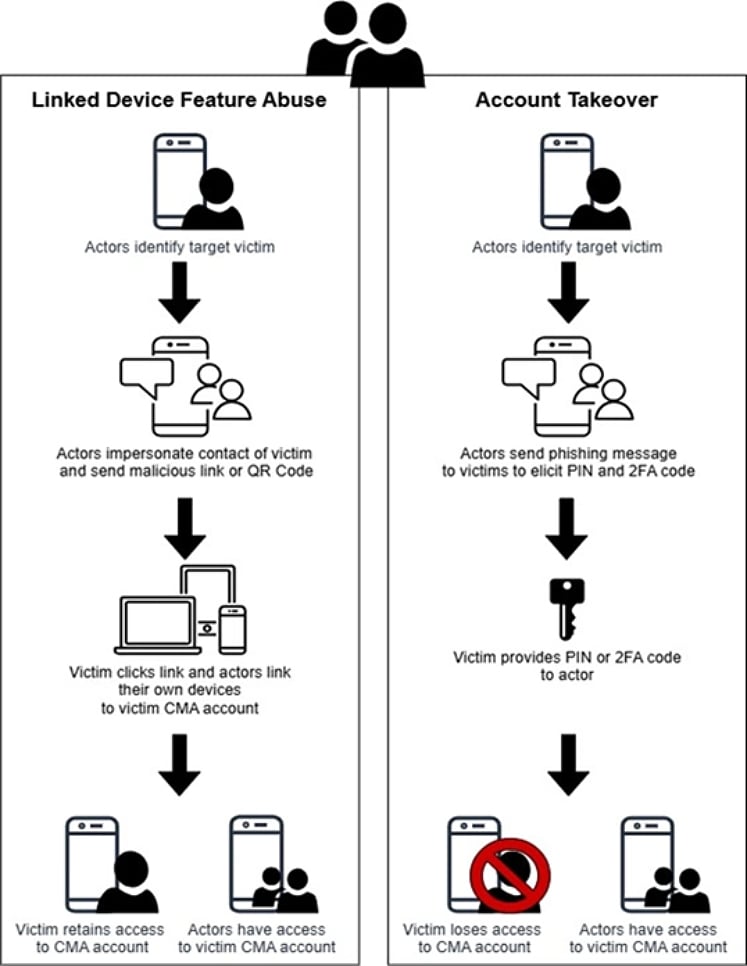
Two different phishing methods seen targeting Signal Source: FBI
The FBI says that most phishing messages impersonate support accounts, which request that the target perform an action that secretly grants threat actors access to the account.
Victims are typically tricked into sharing verification codes or scanning malicious QR codes that link their accounts (Signal and WhatsApp) to attacker-controlled devices.
Samples of Signal phishing messages used in the phishing campaign Source: France’s Cyber Crisis Coordination Center (C4)
Once the threat actors gain access to accounts, they can silently monitor communications, join group chats, and send messages as the compromised user, making detection more difficult and enabling further phishing campaigns.
The PSA emphasizes that encryption in Signal, WhatsApp, and similar platforms is not broken and no vulnerabilities are being exploited.
The FBI says the campaign has already led to unauthorized access to thousands of messaging accounts, which were then used to target additional victims.
Users are advised to remain suspicious of unexpected messages, be wary of requests to scan QR codes or link devices to their accounts, and never share verification codes with anyone, including accounts claiming to be a platform’s support personnel.
Advertisement
Malware is getting smarter. The Red Report 2026 reveals how new threats use math to detect sandboxes and hide in plain sight.
Download our analysis of 1.1 million malicious samples to uncover the top 10 techniques and see if your security stack is blinded.
The famous cuckoo clock, with its moving, chirping mechanical bird indicating various divisions of time, has been around since at least the 1600s. The most famous of them come from the Black Forest area of Germany, and are still being made worldwide even today. Other clocks with different themes take their inspiration from the standard bird-based clocks from history, and thanks to modern 3D printing and other technologies we can make clocks with almost any type of hour indicator we’d like with relative ease like [Jason]’s golf clock.
While the timekeeping mechanism is a fairly standard analog clock, the hour indicator mechanism in this build is a small figure which putts a golf ball into a hole once every hour. It uses an ESP32-C3 at its core, which controls a pair of servos. One controls the miniature golfer, and the other lifts the ball up into position on the green at the appointed time. Once the ball is in place, the figure rotates, striking the ball towards the hole. Although it looks almost like the ball is guided by a magnet of some sort at first glance, the ball naturally finds its way into the hole by the topography of the green alone.
Almost all of the parts in this build are 3D printed, including the green, the golfer, the frame, and a number of the servo components. There’s also a small sensor that detects if the ball has actually made it into the hole and back to the lifting mechanism, and to that end there’s also a number of configurations that can be made in the software to ensure that the servos controlling everything all work together to putt the ball properly.
The White House has announced a new AI policy framework that calls for Congress to craft federal regulation that overrules state AI laws. The Trump administration has made multiple attempts to overrule more restrictive state-level AI regulation, but has failed so far, most notably in the passing of the “One Big Beautiful Bill.”
The framework focuses on a variety of topics, covering everything from child privacy to the use of AI in the workforce. “Importantly, this framework can succeed only if it is applied uniformly across the United States,” The White House writes. “A patchwork of conflicting state laws would undermine American innovation and our ability to lead in the global AI race.”
In terms of child privacy protections, the framework ask for Congress to require companies to provide tools like “screen time, content exposure and account controls” while also affirming that “existing child privacy protections apply to AI systems,” including limits on how data is collected and used for AI training. The framework also says carveout states should be allowed to enforce “their own generally applicable laws protecting children, such as prohibitions on child sexual abuse material, even where such material is generated by AI.”
The energy-use and environmental impact of AI infrastructure is a going concern, but the White House’s policy proposals are primarily worried about the cost of data centers. The framework suggests federal AI regulation should make sure that higher electricity costs aren’t passed on to people living near data centers, while streamlining the process for permitting AI infrastructure construction, so companies can pursue “on-site and behind-the-meter power generation.” The framework also calls for fewer restrictions on the software-side of AI development, proposing “regulatory sandboxes for AI applications” and asking Congress to “provide resources to make federal datasets accessible to industry and academia in AI-ready formats.”
Advertisement
While a recently AI bill from Senator Marsha Blackburn (R-Ten.) attempts to eliminate Section 230, a piece of a larger law that says platforms can’t be held responsible for the speech they host, the framework appears to propose the opposite. “Congress should prevent the United States government from coercing technology providers, including AI providers, to ban, compel or alter content based on partisan or ideological agendas,” the White House writes. The framework is similarly hands-off when it comes to copyright and the use of intellectual property to train AI. “Although the Administration believes that training of AI models on copyrighted material does not violate copyright laws,” the White House writes, it supports the issue being settled in court rather than by legislation. Though, the White House does think Congress should “consider enabling licensing frameworks” so IP holders can bargain for compensations from AI providers.
The clincher in the White House’s proposal is the idea that federal regulation should preempt state law, specifically so that states don’t “regulate AI development,” don’t “unduly burden American’s use of AI for activity that would be lawful if performed without AI” and don’t punish AI companies “for a third party’s unlawful conduct involving their models.” The idea that AI companies aren’t liable for the illegal or harmful uses of their products is particularly problematic because it lies at the heart of multiple intersecting issues with AI right now, including it being used to generate sexually explicit images of children and allegedly playing a role in the suicide of users.
Ultimately, though, the framework might be too contradictory to be useful, Samir Jain, the Vice President of Policy for the Center for Democracy and Technology, writes in a statement to Engadget:
The White House’s high-level AI framework contains some sound statements of principles, but its usefulness to lawmakers is limited by its internal contradictions and failure to grapple with key tensions between various approaches to important topics like kids’ online safety. It rightly says that the government should not coerce AI companies to ban or alter content based on ‘partisan or ideological agendas,’ yet the Administration’s ‘woke AI’ Executive Order this summer does exactly that. On preemption, the framework asserts that states should not be permitted to regulate AI development, but at the same time rightly notes that federal law should not undermine states’ traditional powers to enforce their own laws against AI developers. States are currently leading the fight to protect Americans from harms that AI systems can create, and Congress has twice correctly decided not to pursue broad preemption.
President Donald Trump has attempted to have an active role in how AI is developed and regulated in the US with mixed results, primarily because, as Jain notes, Congress has been unwilling to give up states’ right to regulate the technology on their own terms. Without that, its hard to say how much of the framework will actually make it into federal law.
Somehow, the whole thing got even faster. Earlier this month, Chinese automaker BYD announced that its Flash Chargers, first rolled out a year ago, can now charge some electric vehicle batteries from around 10 to 70 percent in five minutes, and from 10 to full in about nine. That’s more than 600 miles of range in the time it takes to order a cappuccino and leave a nice tip.
The new BYD chargers can add miles super quickly because they deliver up to 1,500 kilowatts (kW) per charge. Compare that to the 350 kW “hyper-fast” chargers seen more typically in the US, which can top up 80 percent of a battery in 15 to 25 minutes, and the full thing in closer to 40.
BYD’s move brings the charging experience closer to the auto industry’s holy grail: comparable to what drivers expect when they fill up their gas tanks. Survey after surveyfinds that potential EV buyers are worried about range and charging; speeding things up might go some way toward alleviating fears and getting more drivers seriously thinking about the plug. BYD, which doesn’t sell in the US because of high tariffs and national security concerns, has built more than 4,000 of the chargers in China so far, with plans to construct some 16,000 more by the end of the year, plus 2,000 in Europe.
There is, naturally, a catch—plus a few reasons to believe that a super fast charger won’t solve all of the world’s charging issues.
Advertisement
Right now, only one car will be able to take advantage of the Flash Chargers’ hyperspeed in Europe: BYD’s Denza Z9GT, due to make its Paris debut next month. That’s because the EV comes with the newest generation of BYD’s Blade battery. Making its own cars, its own chargers, and its own batteries gives BYD a significant leg-up in charging speeds over most global competitors, as the tech works together. (Tesla has also vertically integrated the charging experience.) To charge at such high speeds, the vehicles’ software and wiring need to be built to handle that much electric current.
BYD didn’t respond to WIRED’s questions, but according to Chinese language media, the newest Blade battery uses a lithium manganese iron phosphate (LMFP) chemistry to increase energy density. (The last version used lithium-iron phosphate, or LFP, which trades some energy density for durability and fast-charging capability). BYD says it has redesigned all of its battery elements, including the electrodes that store and release energy, the electrolytes that allow for ion transfer between electrodes during charging and discharging cycles, and the separators that disconnect and then conduct ion flow.
This all ups the battery’s energy density by 5 percent compared to what it touted as the latest and greatest last year. BYD says the Denza Z9GT can hit more than 620 miles per charge. (Real-life ranges tend to be a bit lower than claims by auto companies.)
The charger itself, a slick, teal T-shaped system that evokes—you guessed it—a gas station pump, belies its complexity. Dishing out more than a megawatt from the electric grid is no small feat, both in hardware and construction involved. BYD says it will make the rollout of the new charger a little easier by incorporating them into existing BYD charging banks, so that the infrastructure isn’t starting from scratch. Beyond that, BYD says it will use storage batteries at the charging sites to supplement the electrical grid, so the grid isn’t overloaded.
Advertisement
The Limits
Despite these impressive speeds, don’t expect BYD’s new system to change the game for EVs. “It’s a good, marginal improvement in technology,” says Gil Tal, who directs the EV Research Center at UC Davis’ Institute of Transportation Studies. “It’s not something that changes most people’s daily life.”
The first reason is practical. Today, most US EV owners have access to at-home charging and only use public fast-chargers on the occasional trip that stretches their 250-mile range. For those people, the difference between charging in 20 minutes and in 5 minutes might be close to negligible.
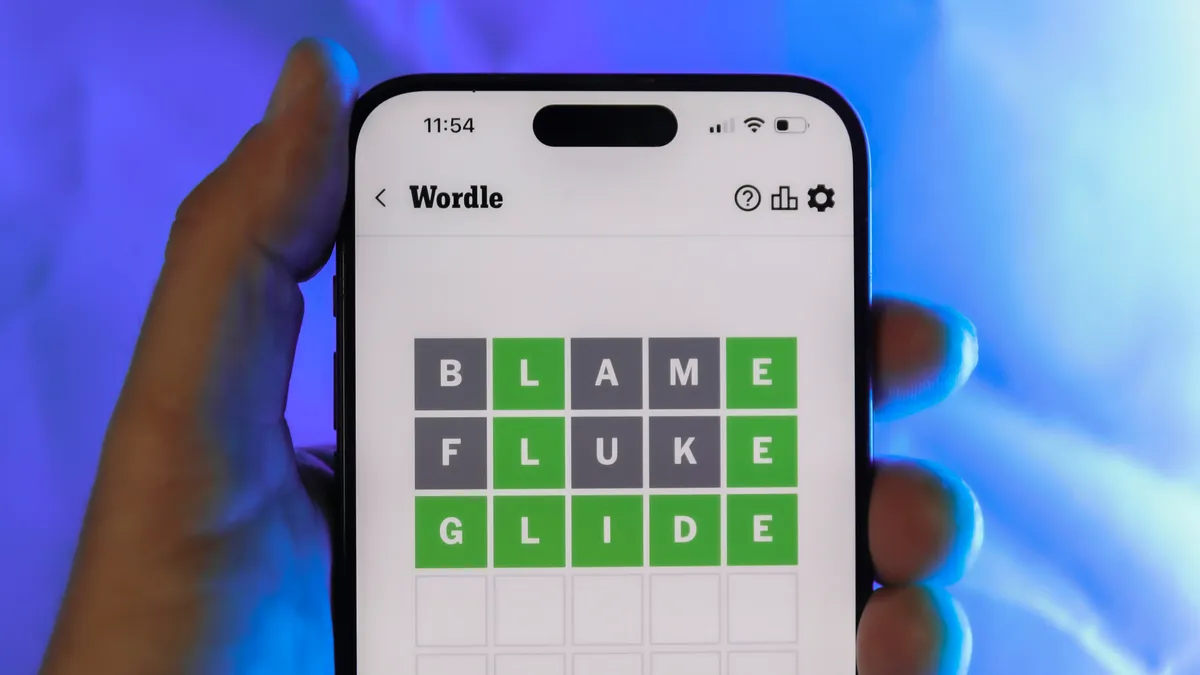
Looking for the most recent Wordle answer? Click here for today’s Wordle hints, as well as our daily answers and hints for The New York Times Mini Crossword, Connections, Connections: Sports Edition and Strands puzzles.
Some movies age gracefully. Others age into prophecy. Network did the latter and then some. When Sidney Lumet released this ferocious satire in 1976 from a venomously brilliant script by Paddy Chayefsky, audiences didn’t laugh it off as some cute exaggeration about television news. They squirmed. The film landed like a brick through the newsroom window; biting, unnerving, and uncomfortably close to the truth even then. Nearly fifty years later it feels less like satire and more like a documentary with better lighting. Cable news shouting matches. Personality driven commentary replacing journalism. A nonstop outrage cycle designed to keep viewers emotionally hooked. Chayefsky didn’t just understand television. He understood America’s appetite for spectacle long before the algorithms figured it out.
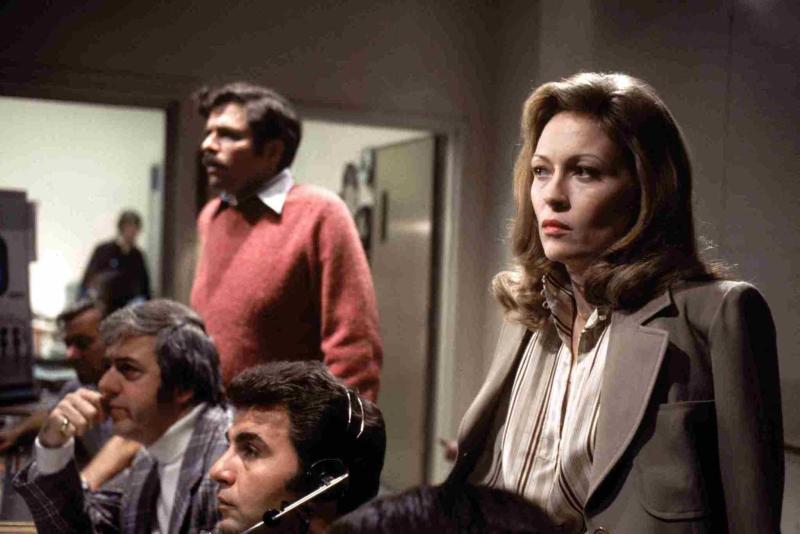
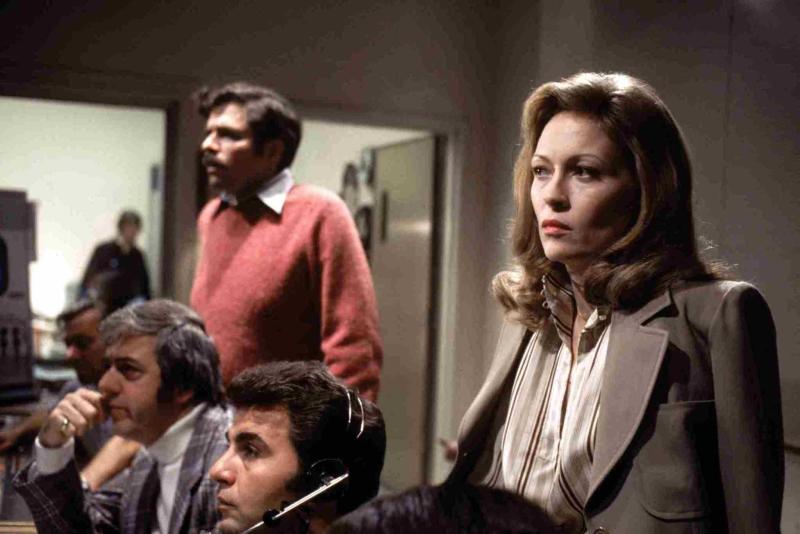
The story kicks off when aging news anchor Howard Beale, played with electrifying intensity by Peter Finch, learns he’s about to be fired because the ratings stink. Instead of fading quietly into retirement, Beale cracks on live television and promises to kill himself on the air during the next broadcast. Not exactly the sort of programming decision that wins industry awards. But something strange happens. Viewers tune in. Ratings spike. Suddenly the breakdown is good television. Enter Diana Christensen, played with ice-cold ambition by Faye Dunaway, a programming executive who sees Beale not as a problem but as a product. Soon he isn’t a journalist anymore. He’s a spectacle. A televised rage prophet urging viewers to open their windows and shout, “I’m mad as hell and I’m not going to take this anymore!” America listens. The ratings explode. The network cashes in. If this all feels familiar, it should, we’ve been living inside that feedback loop for decades.
The emotional backbone of the film belongs to William Holden as Max Schumacher, a veteran newsman clinging to the dying belief that journalism should still mean something. Poor Max. He’s the last adult in a room full of ratings addicts. One of the film’s most devastating scenes arrives when Max confesses his affair with Christensen to his wife, played by Beatrice Straight. Straight detonates with decades of frustration and heartbreak in a performance so raw it feels almost invasive to watch. The scene lasts only a few minutes but it anchors the film’s wild satire in something painfully real. Straight won an Academy Award for it, and rightly so.
Advertisement
For a moment the movie stops being about television and becomes about the collateral damage people leave behind while chasing ambition; the spouses ignored, the families sacrificed, the human wreckage left behind while the ratings climb. We’ve seen the modern version enough times: star anchors imploding, cable personalities flaming out on air, influencers chasing the next outrage clip while the cameras keep rolling. Careers burn, reputations collapse, and the audience moves on before the next commercial break. Lumet and Chayefsky knew the truth the media machine still pretends not to see or care about: behind every viral moment there’s usually someone paying the bill while the network or platform counts the clicks.
Then comes the speech that still rattles around in your skull long after the credits roll. Corporate executive Arthur Jensen, played with thunderous authority by Ned Beatty, summons Beale to a dimly lit boardroom and calmly explains how the world actually works. Nations are illusions. Democracy is window dressing. The real power belongs to multinational corporations. In 1976 Jensen name-checked IBM, Exxon, and AT&T. Today you could easily swap those out for Apple, Amazon, Google, Microsoft, and Meta and the speech would land even harder. Chayefsky understood that television news wasn’t simply reporting events anymore, it was becoming part of the corporate machine that shaped them.
And that’s where Network starts feeling downright uncomfortable in 2026. The film predicted the outrage economy decades before anyone put a label on it. Turn on the television today and it’s emotional theater twenty four hours a day. Panels yelling. Personalities performing. Headlines engineered to keep viewers angry enough to stay glued to the screen. The business model is simple: outrage drives engagement and engagement drives revenue. Diana Christensen figured that out in about thirty seconds. Calm reporting doesn’t trend. Anger does. Journalism slowly mutated into entertainment, and entertainment eventually became politics.
Watching Network today is like opening a time capsule that contains tomorrow’s headlines. It remains wickedly funny, brutally intelligent, and powered by one of the sharpest scripts ever written about American media culture. But what really hits is how little of it feels exaggerated anymore. Chayefsky saw the trajectory clearly: once outrage becomes profitable, it becomes irresistible. The cameras keep rolling. The ratings still rule everything. And somewhere in the digital noise of modern media, Howard Beale is still shouting into the void, mad as hell, begging the rest of us to wake up before the show consumes everything.
Advertisement
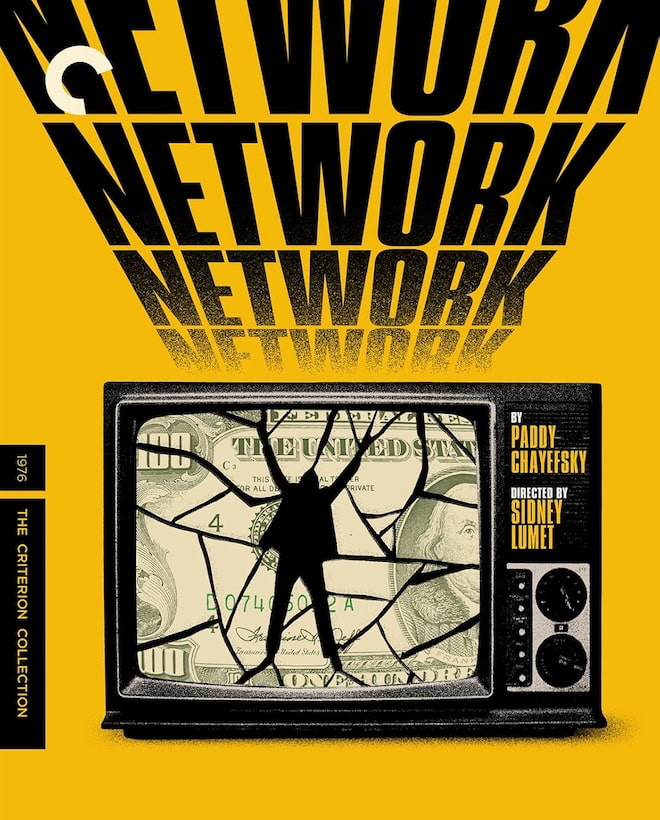
Criterion gives Network the kind of restoration treatment the film has long deserved. The new 4K digital restoration presents the movie in Dolby Vision HDR on a dedicated 4K UHD disc, with the film’s original uncompressed monaural soundtrack preserved intact. Lumet never intended this to be a sonic spectacle. This is a film powered by dialogue, and the restored mono track keeps Paddy Chayefsky’s machine gun script front and center where it belongs.
The restoration comes from a new 4K scan of the original 35mm camera negative and is presented in the film’s original 1.85:1 aspect ratio. Dolby Vision improves contrast and shadow detail, but the image still looks like film from the mid 1970s should look. Grain is intact. The newsroom lighting remains harsh and clinical. The endless televisions scattered around the sets finally reveal more texture and depth than older transfers ever managed.
Audio stays faithful to the original theatrical presentation. The uncompressed mono track is clean and focused, which matters because this movie lives and dies by the rhythm of Chayefsky’s dialogue. From Howard Beale’s televised sermons to Arthur Jensen’s thunderous boardroom lecture, every word lands with the bite Lumet intended. Criterion did not try to reinvent Network. They cleaned it up, respected the source, and delivered the sharpest home video presentation this film has ever had.
Criterion also includes a strong slate of supplemental material. Director Sidney Lumet provides a feature length audio commentary that offers insight into the film’s production, the performances, and the controlled chaos of Chayefsky’s dialogue heavy script. The set also includes Paddy Chayefsky Collector of Words (2025), a feature length documentary by Matthew Miele that explores the legendary screenwriter’s life and influence. For those who want deeper historical context, The Making of Network (2006), a six part documentary by Laurent Bouzereau, takes viewers inside the writing, casting, and cultural impact of the film.
Advertisement. Scroll to continue reading.
Advertisement
Movie Details
STUDIO: United Artists
FORMAT: Ultra HD 4K Blu-ray (February 24, 2026)
THEATRICAL RELEASE YEAR: 1976
ASPECT RATIO: 1.85:1
HDR FORMATS: Dolby Vision HDR
AUDIO FORMAT: LPCM Mono (48kHz, 24-bit)
LENGTH: 121 mins.
MPAA RATING: R
DIRECTOR: Sidney Lumet
STARRING: William Holden, Faye Dunaway, Peter Finch, Robert Duvall, Wesley Addy, Ned Beatty, Beatrice Straight
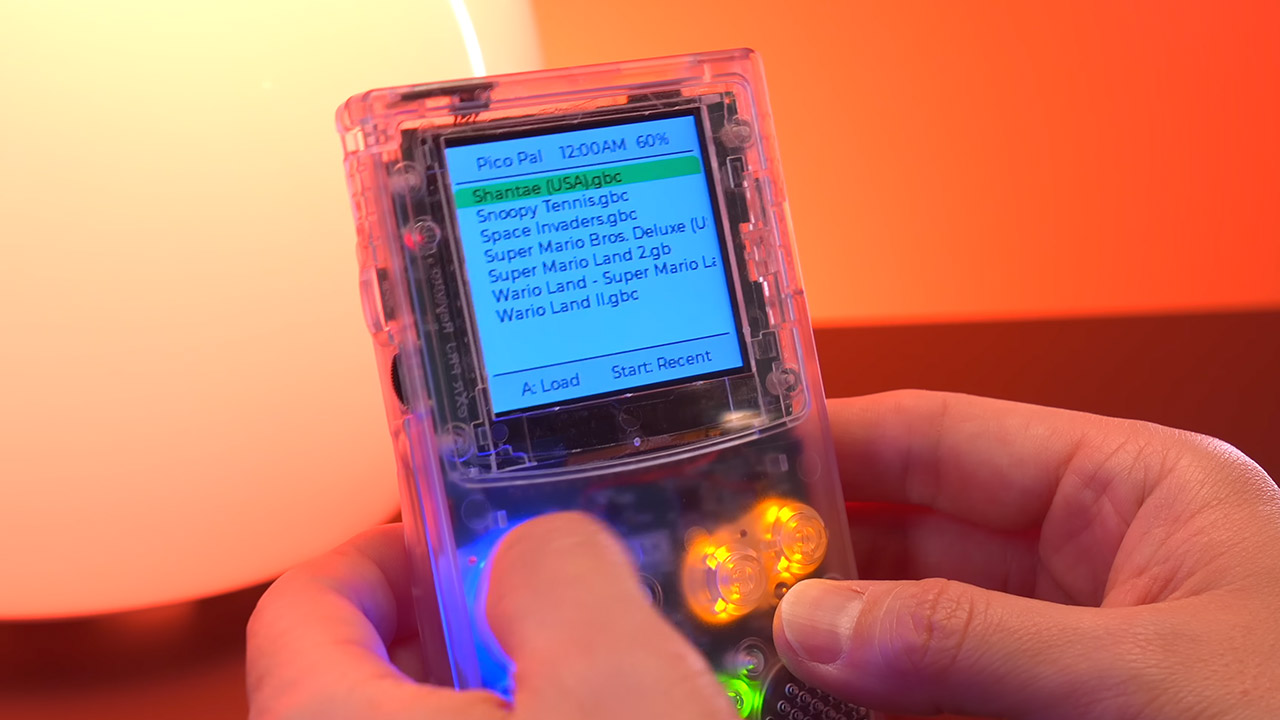
Gamers who remember sliding cartridges into their old Game Boy Color will feel right at home when they pick up the PicoPal. Its clear plastic shell displays all of the internal components while maintaining the classic shape and button layout of old. The small LEDs illuminate the directional pad and action buttons with customizable brightness, making them ideal for late-night gaming sessions when all you want to do is keep playing. And a 2.6-inch screen front and center displays lovely crisp colors on games that used to seem tiny on vintage Game Boys.
Hold the PicoPal and you’ll be surprised at how light and easy it is to slip into your pocket; it doesn’t feel like it’s going to bulge anytime soon. The buttons seem exactly right, with the firm tactile reaction that many players used to enjoy back then. The speakers are angled forward for good sound, but you can also use headphones if you prefer to be alone. A simple USB-C port on the side allows you to easily update and charge your device.
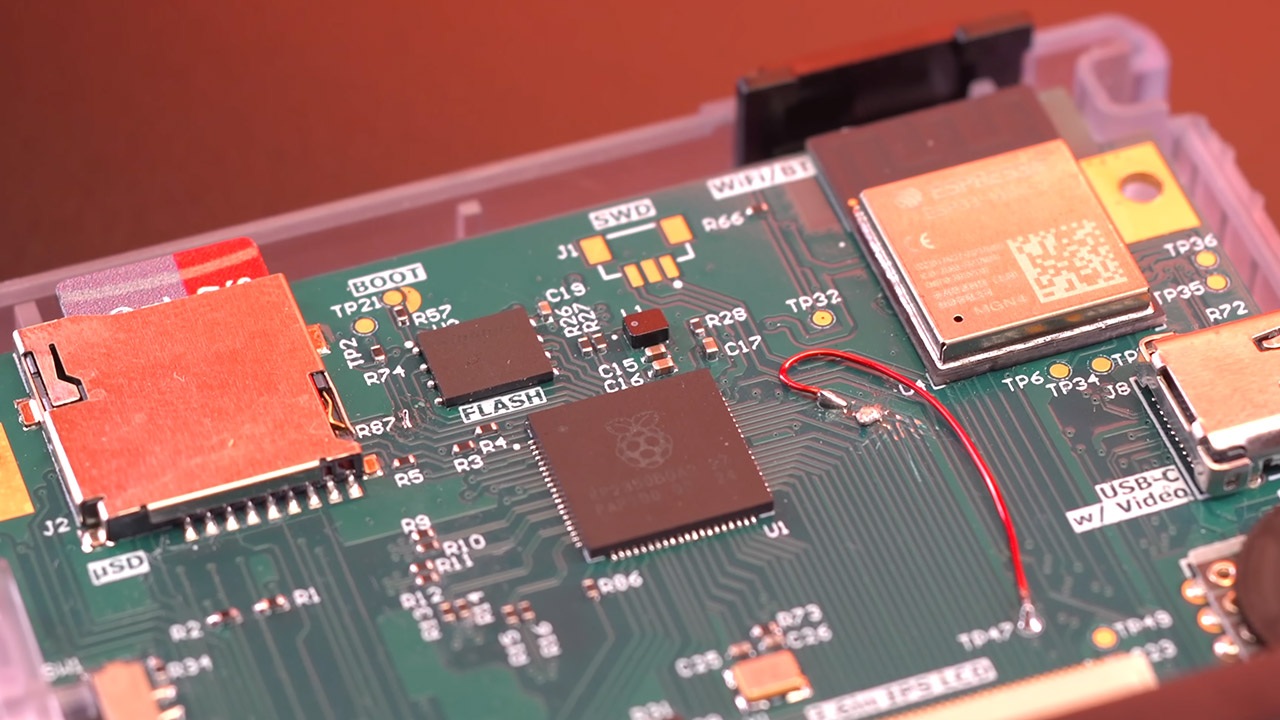
At the center of it all is a Raspberry Pi Pico 2 microcontroller. Some creative developers have managed to overclock it to 300 megahertz, allowing it to run through Game Boy and Game Boy Colour titles without lag. There’s a spare ESP32 chip ready for future wireless connections to be resolved. Games load directly from a microSD card, which can hold up to two terabytes if properly formatted, and the emulation software is based on some of the open-source projects available and appears to run everything just fine with a few tweaks to ensure it all works together smoothly across a wide range of titles.
It’s simple to navigate the menu and select a game, or to load up the last one right away, and you can even store your progress at any time and resume where you left off even if you turn the device off and on again. The deep sleep option preserves the last position you were in ready to go with little to no battery consumption. If you click one button when you turn it on, it can even function as a full-fledged MP3 player, streaming tunes directly from the same card with nice audio.
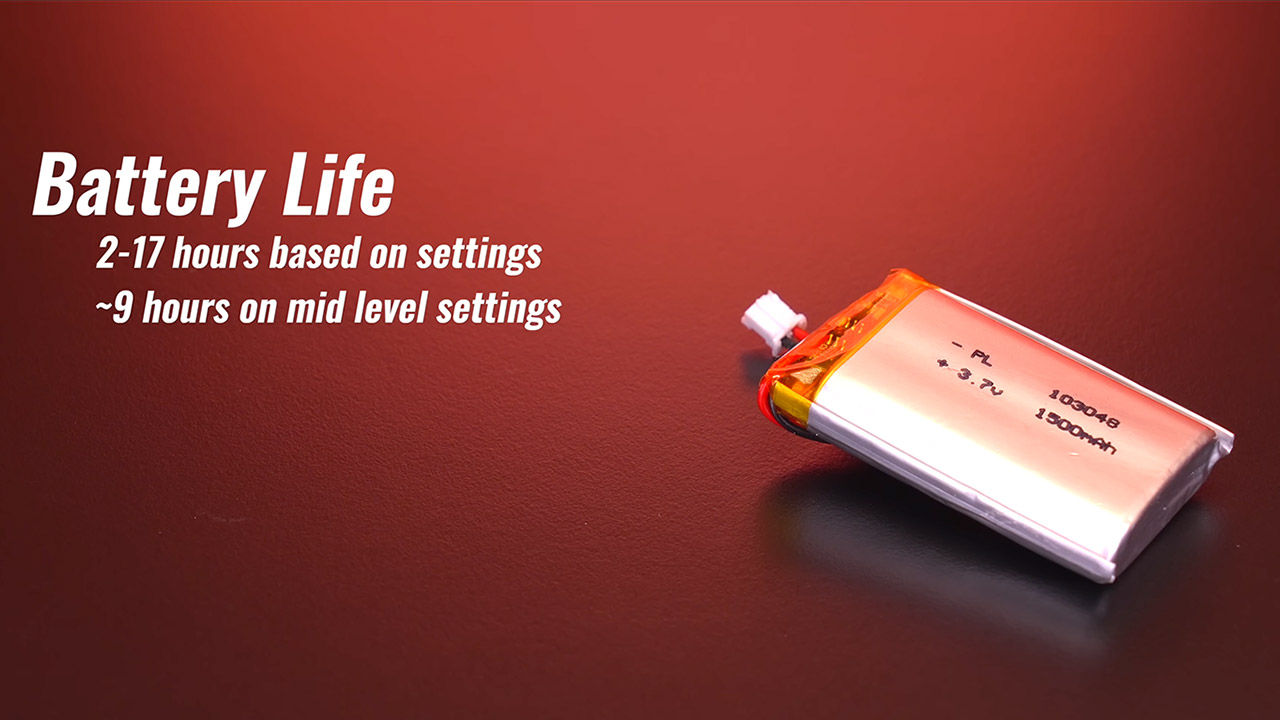
Battery life varies, however it can last anywhere from two to seventeen hours depending on screen brightness, volume, and whether the button lights are turned on or off. Most users appear to get approximately nine hours with the settings adjusted down slightly. There’s a decent solid DAC and amplifier combo that produces clean sound with no hiss or shaky bass. There’s even an IMU kicking around that can measure motion, possibly for future games or simply to show your G-forces during a vehicle journey.
Other nice touches include preserving screenshots as little files on the card and a fast-forward tool for sections that become repetitious. You may also choose from thirteen various color palettes or go with a lovely plain greyscale. With a rapid button combination, you can access the on-screen menu and change the brightness and other settings on the fly. The cartridge slot is now dormant, but there is plenty of area for future additions; you never know what they may come up with next.
For the truly dedicated makers, there are even more freebies, like a full open-source schematics firmware and a comprehensive bill of materials, allowing you to study the design, tweak the code, or even construct your own version. With future updates, you may expect the ESP32 to come to life for wireless connectivity and the like. Real-time clock support ensures that the time is kept accurate even after long interruptions.
If you’ve ever unlocked your iPhone at midnight, looking for a sleep playlist while already half asleep, Apple’s iOS 26.4 can make life easier for you.
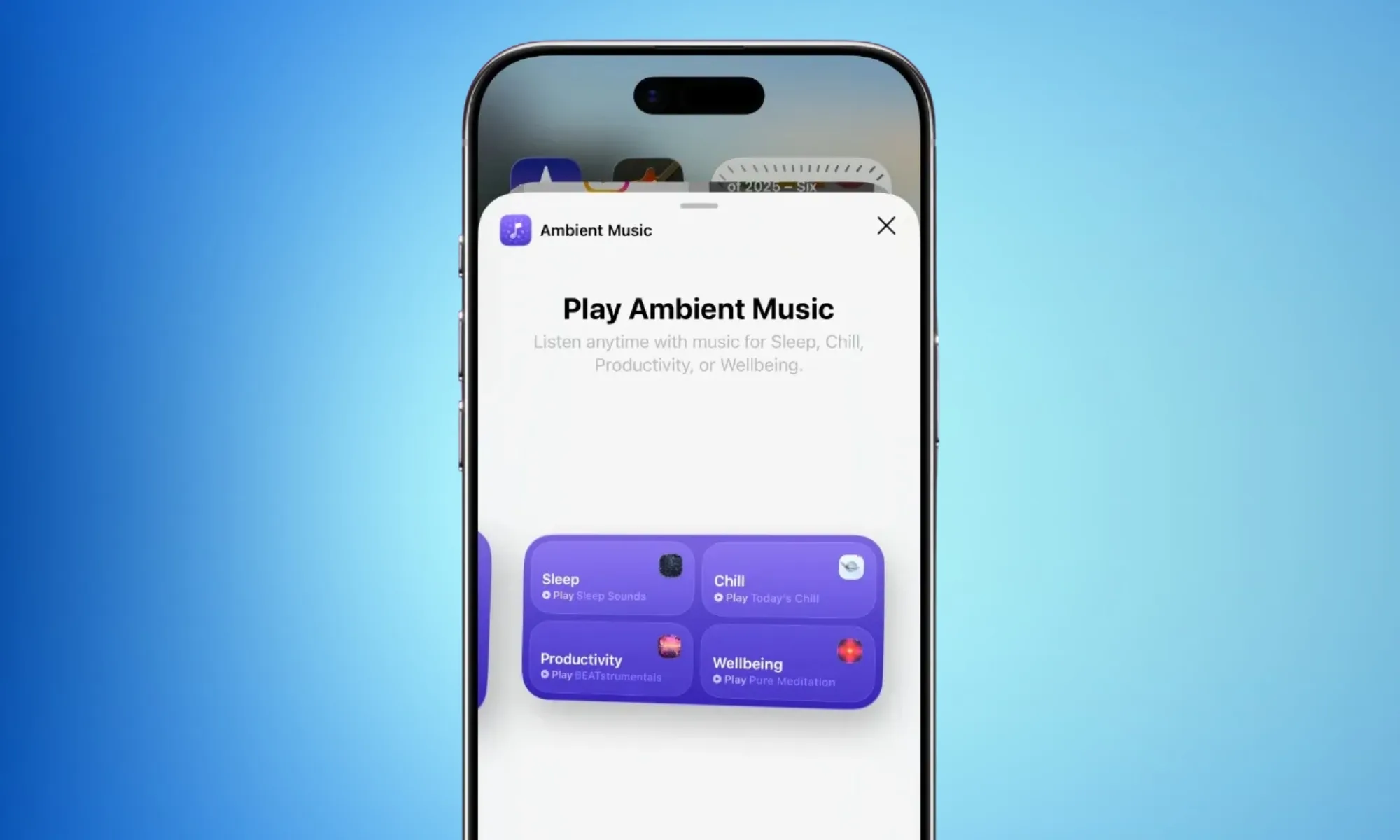
The iOS 26.4 release candidate is here, and among several additions, it introduces something called Ambient Music widgets. These are mood-based playlists that you can play with a single tap on your home screen (on the widget).
9to5Mac
What moods can you choose from?
So, from now on, you don’t have to open the app, search for the required playlist, and go through the three-step journey through Apple Music’s menus. The widgets cover four broad mood categories: Chill, Productivity, Sleep, and Wellbeing.
You also get two widget sizes to pick from: the smaller widget features just one playlist (of your choice), while the larger version gives you one-tap access to all four moods at once. Both widgets are built on the Ambient Music feature, which first appeared in the Control Center.
However, now it rests front and center on your home screen, where it’s hard to miss.
Advertisement
Rachit Agarwal / Digital Trends
Can you customize what plays?
Yes, and Apple has made the process quite seamless. Apple includes built-in playlist presets for each mood. Sleep, for instance, offers options like Sleep Sound, Bedtime Beats, Sound Bath, and Plano Sleep.
However, if the curated options aren’t your thing, you can set your own custom playlists by long-pressing the widget and tapping “Edit Widget.” And before you even ask, the Ambient Music widget only works with Apple Music; it won’t benefit Spotify users.
The Ambient Music widgets are just a tiny part of the new iOS 26.4 update. The release candidate also brings a Playlist Playground feature, eight new emojis, urgent reminder flagging in the Reminders app, and a Purchase Sharing update for family users.
Microsoft is starting to rethink how much AI it really needs inside Windows 11, and that rethink includes dialing back Copilot. As part of its broader push to improve Windows quality, the company is reducing the number of Copilot entry points across the OS and its apps.
Microsoft
According to Microsoft, this rollback will begin with apps like Photos, Notepad, Widgets, and the Snipping Tool, where Copilot integrations had started to feel excessive. The change is part of a wider shift in Microsoft’s strategy of moving away from aggressively embedding AI everywhere and toward integrating it only where it actually makes sense.
Why is Microsoft pulling back on Copilot?
Let’s be honest, most users weren’t exactly thrilled with Copilot integrations. Over the past year, Microsoft has pushed Copilot into almost every corner of Windows, from the taskbar to system apps and even experimental features like notifications. But that approach hasn’t landed well with everyone.
Critics have pointed out that Copilot often felt forced, difficult to remove, and not always useful, especially when it showed up in places users didn’t ask for. Even internally, Microsoft seems to be acknowledging the feedback. The new statement suggests the company is now aiming to be more “intentional” about where Copilot appears, focusing on genuinely helpful experiences instead of everywhere by default.
This doesn’t mean Copilot is going away. Instead, the company wants it to feel more like a useful assistant rather than a constant presence. In practical terms, that could mean fewer pop-ups, fewer forced integrations, and more optional AI features. Recent updates also show Microsoft stepping back from automatically pushing Copilot into places like the Start menu or system notifications, signaling a broader course correction.
Whether you recently got on a workout plan or you’re looking for ways to unwind after a stressful week at work, there are tons of workout apps out there that can aid you or even make your job easier. For instance, we’re all aware of the usual fitness-tracking apps that come bundled with the best smartwatches and budget fitness trackers. However, these apps are quite generic and can be overwhelming for those who are simply looking for assistance and don’t want to be shown random numbers and stats all over the screen. This is exactly why we went down the rabbit hole to find useful, interesting apps designed to help you manage your health and wellness.
These apps not only aid in improving your physical health but also prioritize your mental health. After all, both aspects are equally important. Moreover, the apps I’ve chosen make the journey fun rather than boring with attractive visuals, games, or even communities where users can interact with one another. I’ve used these apps personally for over a month to see if they had an impact on my sense of well-being. Instead of the usual bunch of apps like Strava and MyFitnessPal, I’ve included lesser-known apps with interesting and effective features. Moreover, all the apps mentioned on this list are platform-agnostic, so you can use them whether you’re on team Android or inside Apple’s walled garden.
Advertisement
Impulse
When it comes to overall wellness, we often sideline our mental health. That’s exactly where an app like Impulse (available on both Android and iOS) steps in. It is a brain-training platform designed to sharpen cognitive skills such as memory, attention, problem-solving, logic, and speed. But don’t fret, it isn’t rocket science or grueling academic work. Instead, Impulse replaces tedious study with a series of short, highly entertaining puzzle games. For instance, there are games where you arrange numbers in ascending order, memory tests asking you to recall if a particular tile had a ghost image, and various time-based challenges. Who wouldn’t like improving their brain health under the guise of fun?
The clean, user-friendly interface makes it the perfect game to play while commuting on the subway or just killing time waiting in a queue. I sometimes catch myself mindlessly scrolling on my phone, either watching TikTok or Instagram Reels. I started using Impulse to break this habit, and I can confidently say I am now much more mindful of my screen time. In an era dominated by doomscrolling and brain rot, replacing even a few minutes of that mindless screen time with something that actually keeps your mind sharp feels incredibly valuable.
Advertisement
While the app lets you play a few games for free, you’ll have to pay for the premium tier to get the full experience. The paid plan is where Impulse really shines. It completely removes ads, grants access to the entire library of games, and unlocks detailed progress-tracking so you can visualize your cognitive growth over time.
Advertisement
Hevy
While most smartwatches are good at tracking runs and other activities like cycling and swimming, they can’t log the specific weight you lifted or the number of times you repeated a certain exercise. Hevy solves that exact problem. It’s a clean, intuitive workout tracker that lets you log sets, reps, and weights with just a few taps. It even features automatic rest timers and plate calculators to take the mental math out of lifting.
I used to catch myself zoning out between sets, sometimes mindlessly refreshing my feed and losing track of time. Having Hevy open on my phone helps me focus on my workout and stops me from taking unnecessarily long breaks because I got distracted by my phone. Hevy offers a clean graphical chart of your workout, focus areas, weight lifted, and reps that you can share with your trainer or workout buddies.
The app offers a generous free tier, letting you log unlimited workouts and create a few staple routines. Most people will be happy using this, so you don’t really have to shell out any extra bucks. Hevy also has a smartwatch version, so you can use it straight from your wrist if you have an Apple Watch or a WearOS smartwatch. Among all the apps for weightlifters, Hevy stands out for its intuitive and straightforward interface. From bench presses to push-ups, this is my go-to app for logs. It’s among the best apps for health and fitness — as proven by excellent ratings on both the Google Play Store and Apple App Store.
Advertisement
Headspace
During your daily hustle, finding a quiet moment and making the most of it can be challenging. That’s where Headspace comes into the picture. It’s a beautifully designed mindfulness platform that gets rid of the intimidating, mystical elements of meditation and makes it approachable to the masses. Whether you are looking for a quick breathing exercise to improve concentration or a guided course on managing anxiety episodes, the app breaks everything down into easy-to-follow sessions.
Another issue with increasing screen time and workload is poor sleep quality. I’ve found that using Headspace’s “Sleepcasts” — which are basically soothing ambient stories — works wonders to quiet a racing mind. It acts as a much-needed buffer between staring at a screen and actually getting restful sleep.
Advertisement
The biggest catch with both the Android and iOS versions of Headspace, however, is the cost. While you can try out a handful of introductory basics for free, the app locks its best content behind a paywall. Upgrading gives you the keys to their massive library of multi-week mindfulness courses, sleep aids, and curated focus music. If you struggle to switch off your brain at the end of the day, it’s a highly polished tool that delivers.
Advertisement
Pausa
While long-term meditation is great, sometimes you just need immediate relief when you experience unexpected stress spikes. Pausa is built for exactly those moments. It is a no-nonsense breathwork app designed to help you regulate your nervous system with the help of conscious breathing patterns. Pausa uses science-backed respiratory patterns — like box breathing — to actively lower your heart rate when things get overwhelming.
The interface is minimalistic, and the instructions are easy to follow, which is exactly what you need when you are feeling anxious. I’ve noticed that during a chaotic day, especially when work notifications are piling up and I’ve reached the end of every social media feed, taking just 2 minutes to follow Pausa’s visual breathing guide has helped me feel a lot calmer. It even has an SOS button for sudden moments of panic.
Like the others, Pausa operates on a freemium model. The free tier on Android and iOS gives you access to basic breathing exercises that are perfectly fine for occasional use. However, to unlock the app’s full potential, you need the premium plan. The paid version opens up specialized breathing techniques, a mood tracker that recommends specific exercises based on exactly how you are feeling, and advanced statistics to monitor your daily stress levels over time.
Advertisement
How we picked these apps
Igor Barilo/Getty Images
Our aim was to recommend apps that are unique and not widely known. Most people are aware of the usual fitness tracking apps that can track how many calories you burn in a day or how many steps you take, but the apps mentioned on this list aren’t as popular, yet they address more than basic physical issues. I’ve also included apps available on the Apple Watch and WearOS smartwatches, so that those of you who like to leave your phones behind can also take advantage of these services. Notably, all the apps have an average rating of 4.2 or higher on their respective marketplaces, with most of them having hundreds of thousands of reviews.
Hackers have compromised virtually all versions of Aqua Security’s widely used Trivy vulnerability scanner in an ongoing supply chain attack that could have wide-ranging consequences for developers and the organizations that use them.
Trivy maintainer Itay Shakury confirmed the compromise on Friday, following rumors and a thread, since deleted by the attackers, discussing the incident. The attack began in the early hours of Thursday. When it was done, the threat actor had used stolen credentials to force-push all but one of the trivy-action tags and seven setup-trivy tags to use malicious dependencies.
Assume your pipelines are compromised
A forcedpush is a git command that overrides a default safety mechanism that protects against overwriting existing commits. Trivy is a vulnerability scanner that developers use to detect vulnerabilities and inadvertently hardcoded authentication secrets in pipelines for developing and deploying software updates. The scanner has 33,200 stars on GitHub, a high rating that indicates it’s used widely.
“If you suspect you were running a compromised version, treat all pipeline secrets as compromised and rotate immediately,” Shakury wrote.
Advertisement
Security firms Socket and Wiz said that the malware, triggered in 75 compromised trivy-action tags, causes custom malware to thoroughly scour development pipelines, including developer machines, for GitHub tokens, cloud credentials, SSH keys, Kubernetes tokens, and whatever other secrets may live there. Once found, the malware encrypts the data and sends it to an attacker-controlled server.
The end result, Socket said, is that any CI/CD pipeline using software that references compromised version tags executes code as soon as the Trivy scan is run. Spoofed version tags include the widely used @0.34.2, @0.33, and @0.18.0. Version @0.35.0 appears to be the only one unaffected.























































You must be logged in to post a comment Login