
Tech
The Raspberry Pi 500+ channels the spirit of my first home computer, and I love it

The Raspberry Pi 500+ is the latest iteration of the best-selling single-board computer with 16GB RAM and 256GB of solid-state storage, all wrapped up in a keyboard that’s beautiful to type on, and I love it.
But what I love most of all is the design from a golden era of home computing.
All keyboard, no brakes
The 500+ isn’t the first time Raspberry Pi has put a board in a keyboard and called it a computer, but it is the best iteration yet. The idea first came about in 2020 with the release of the 400, a board based on the Pi 4 that was integrated into an inexpensive membrane keyboard with 4GB of RAM. Four years later we had the 500, a Pi 5-based board with 8GB of RAM that still relied on microSD for storage.
Now, in 2025, we’ve got the 500+, and it has fixed many of the “problems” with the past versions. The board is based on the best-selling Pi 5, with double the RAM of the previous version (16GB) and a 256GB NVMe drive that’s pre-installed and loaded up with Raspberry Pi OS. This starts at $200 for the keyboard unit on its own; just bring your own USB-C power supply, micro HDMI cable, monitor, and mouse.

The keyboard itself is of the mechanical variety and features Gateron KS-33 blue low-profile switches. These have a clicky sound and tactile feel to them, and since they’re individual switches, they can be replaced or have their removable keycaps swapped out. Underneath is a set of individually-addressable LEDs, a nice if unnecessary inclusion that adds a bit of bling to what is an otherwise spartan setup.
The unit itself is weighty and solid, with a more robust feel than previous iterations. It’s not going to skate across your desktop, put it that way. The sound of the keys is loud enough to annoy the person next to you, but it will feel like ASMR for anyone who enjoys the “Blue” typing experience. There’s very little flex in the chassis, and the plastic quality feels on par with my NuPhy mechanical keyboard.
It’s an elegant little unit, the low-profile mechanical typing experience perfectly suits me (as someone who prefers the Apple keyboard experience), and the fact that everything is ready to go the moment you turn it on is a nice touch.

- Storage
-
256GB Raspberry Pi SSD
- Memory
-
16GB SD
This Raspberry Pi model is built into a mechanical keyboard, giving you everything you need in one peripheral.
Echoes of a golden era
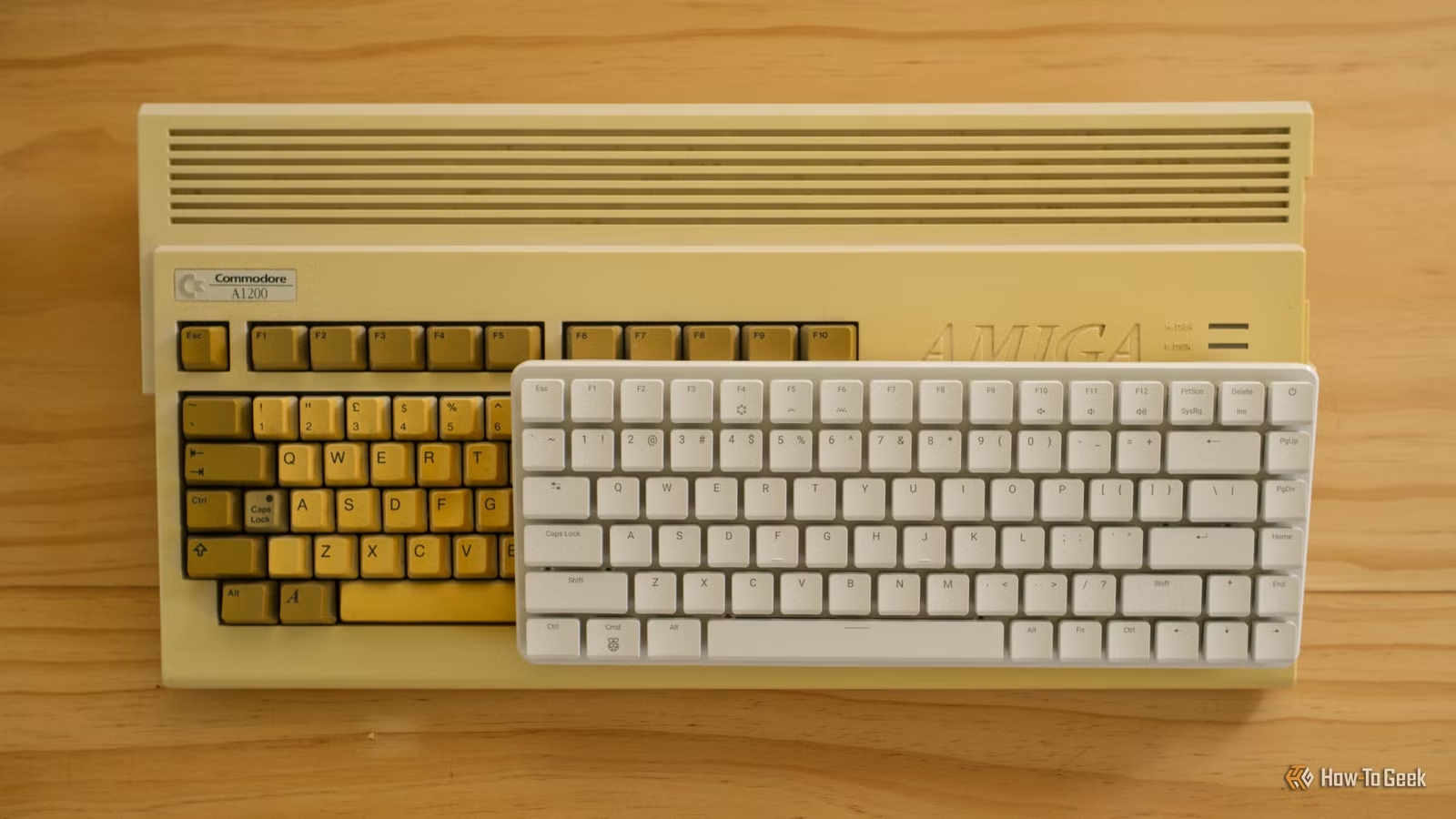
My first home computer was a Commodore Amiga 1200, a Christmas present that I received when I was (at a guess) 7 years old. Released in 1992, the A1200 typifies the kind of home computer that was so popular at the time. It’s a computer that integrates the keyboard into its design, with a built-in floppy drive, external power supply, and more ports than the average home user would ever need on the back.

The Raspberry Pi 500+ isn’t a million miles away. There’s no floppy drive, of course, and the power supply is a humble 5V USB-C affair. But the form factor is almost a perfect match: a keyboard that has everything you need to complete most at-home tasks, with add-ons like dual video outputs, a microSD card slot, gigabit Ethernet, and a 40-pin GPIO header for your “extra-curricular” projects.
There were some limitations to this design, and they still exist today. The modularity of the early IBM computers, which would eventually define the home computer, simply couldn’t be beaten. A big box gives you plenty of room to easily swap out, upgrade, and repair damaged components. Early home computer upgrades looked more like external peripherals and expansion cards.

These machines were also chunky, which certainly affected the typing experience (though at the time, ergonomics seemed to take a backseat to design and price point). Having a keyboard you could replace when you spilled coffee all over it, that didn’t also fry your computer, proved to be the more practical solution.
But the Raspberry Pi 500+ isn’t necessarily upgradeable, outside of the NVMe drive and the ability to add HATs (Hardware Attached on Top modules) via the 40-pin port on the back. The keyboard itself has user-replaceable switches, so there’s a good chance you could resurrect one from the dead if it takes a bath (though I’m not volunteering to test that out). The typing experience is a comfortable and low-profile affair, far superior to my chunky old Amiga.

Who is the Raspberry Pi 500+ for?
The Raspberry Pi 500+ and other single-board computer keyboard hybrids have some compelling use cases, and some drawbacks to boot.
This is a computer that has pretty much everything you need to get going. You can even buy a kit that includes a mouse and power supply, and there’s a relatively cheap official Raspberry Pi monitor to match for $100. But the most compelling sales pitch might be the fact that you only need to bring a monitor and a mouse.
Then there’s the tinkerer angle, which is what helped Raspberry Pi become a household name in the first place. These single-board computers are designed with learning and projects in mind. Many of these projects are built around naked boards and custom housings, but there’s no reason you can’t still have fun with a 500+.

That said, for smaller projects or areas where space is a constraint, a single-board model like the Raspberry Pi 5 Model B or earlier, or a lightweight variant like the Raspberry Pi Zero (which is far cheaper) might be a better use of your money. If you opt for the Pi 5 Model B, you’ll also get a PCI-Express port so you can use more demanding add-ons like the AI HAT+.
I’d be remiss if I didn’t mention a use case that How-To Geek’s Patrick Campanale devised: a wall of keyboards. “Oh man, I can see it now. Having a homelab full of keyboards on the wall that each run a different service, and just needing a monitor plugged in for debugging.”
For me, it’s a toy. A tool. A backup computer. Something that will sit next to the Mac on my desk that runs Linux and encourages me to experiment.
Got a Raspberry Pi or thinking about buying one? We’ve got a huge number of articles you’re going to love.



