Security teams log 54% of successful attacks and alert on just 14%. The rest move through your environment unseen.
The Picus whitepaper shows how breach and attack simulation tests your SIEM and EDR rules so threats stop slipping by detection.





Over 900 automatic tank gauge (ATG) systems across the United States, used to monitor fuel and chemical storage tanks across various critical infrastructure sectors, have been found exposed online and are vulnerable to ongoing attacks.
ATG systems are electronic monitoring devices used to remotely track fuel, chemicals, or other liquids in storage tanks, automating inventory control, environmental leak detection, and regulatory compliance. While they’re commonly used at gas stations to monitor fuel tank levels, they can also be found in industrial settings to track chemical storage tanks.
On Tuesday, the Cybersecurity and Infrastructure Security Agency (CISA), the FBI, the NSA, the Department of Energy, and other U.S. government partners issued a joint advisory warning critical infrastructure organizations to secure internet-exposed ATG systems against ongoing attacks.

The federal agencies warned that threat actors target such devices to alter system settings in command execution attacks after exploiting various security flaws, including hardcoded credentials, authentication bypasses, SQL injection vulnerabilities, OS command execution flaws, and privilege escalation weaknesses.
“The recent malicious cyber activity observed by the authoring organizations—which the U.S. government has not yet attributed to a nation-state or threat actor group—involves cyber threat actors compromising internet-exposed ATG systems and subsequently modifying them through command execution,” the joint advisory warned.
As CISA cautioned, following successful compromises, the attackers could disable system alerts, increasing the risk of leaks or equipment failures and even causing permanent damage to the targeted tank systems.
In light of CISA’s advisory, Internet security watchdog Shadowserver warned today that over 1,000 ATG systems were exposed online, with the vast majority (909 devices) in the United States.
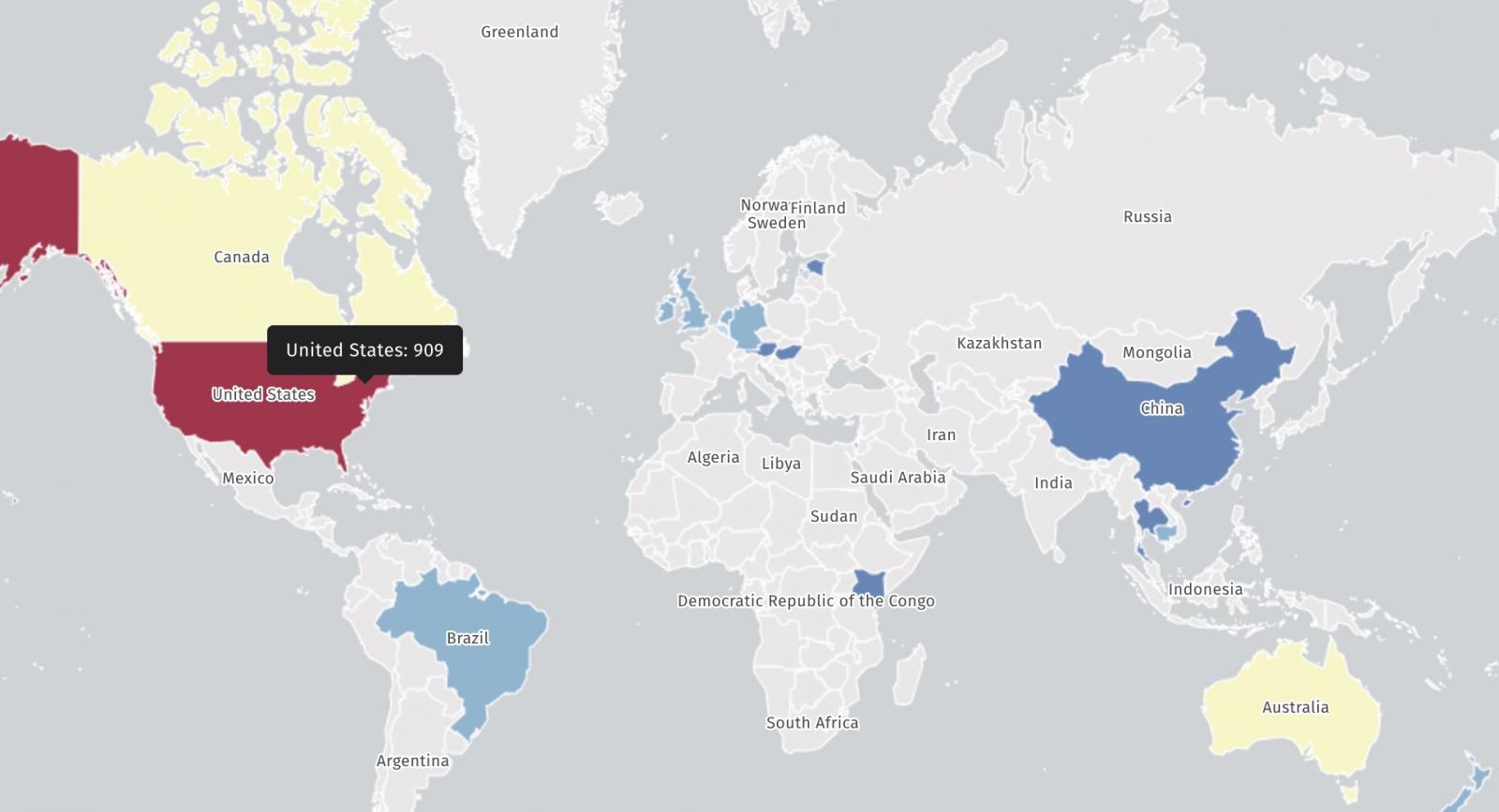
”We added scanning of Automatic Tank Gauge (ATG) systems to our Accessible ICS reporting with 1061 IPs seen on 2026-06-05 (on port 10001/tcp),” Shadowserver said. “This is after weeding out vast majority which appear to be honeypots (including ports 8001/9001).”
Critical infrastructure organizations are advised to restrict remote access to ATG systems from the Internet as soon as possible and implement controlled access through firewalls, VPNs, or access control lists.
They should also replace default passwords on vulnerable devices with strong credentials, apply security updates, monitor systems for unauthorized changes, and implement multi-factor authentication where possible.
CISA’s warning comes after a May CNN report that Iranian hackers had breached ATG systems connected to the Internet at multiple gas stations across the United States. Iranian hacking groups were linked to these incidents based on their previous history of targeting fuel management systems and other industrial control technologies.
After hacking the devices with weak or nonexistent passwords, the attackers reportedly manipulated the display readings but did not alter the actual fuel levels. Although these incidents didn’t cause any physical damage, they raise concerns that such attacks could hinder automated fuel leak detection and similar safety-related functions.
In April, another joint advisory issued by U.S. federal agencies linked Iranian state-backed hackers to attacks targeting Rockwell Automation/Allen-Bradley PLC devices since March 2026, causing financial losses and operational disruptions.
Cybersecurity firm Censys reported one day later that 74.6% (3,891 hosts) of such industrial control systems found exposed online globally were from the United States.

Security teams log 54% of successful attacks and alert on just 14%. The rest move through your environment unseen.
The Picus whitepaper shows how breach and attack simulation tests your SIEM and EDR rules so threats stop slipping by detection.

[Some online publications] are now debating whether to cut Google off entirely, as the Wall Street Journal reports, illustrating an increasingly fraught relationship between the tech giant and the publishers that are creating content its AI models are regurgitating. According to the newspaper, prominent outlets including USA Today, Politico, the Economist, People, and Reuters are all reexamining their relationship with Google. Some are debating whether to continue to work with the tech giant at all… Even Reddit executives are reevaluating the company’s $60 million-a-year contract that allows Google to train its AI models on user-submitted content on the platform. They’ve similarly watched as Google’s AI features discourage users from navigating to Reddit…
Beyond pondering whether to cut Google off, other publishers have resorted to suing the company, accusing it of illegally rehashing their intellectual property via AI summaries.
It’s an extremely undesirable position for publishers. By severing ties with the search giant, they could face even steeper declines in traffic. At the same time, there’s seemingly little to gain from having Google’s AIs crawl their content — and in the long term, it could guarantee their destruction.
Two interesting data points from the article:


TikTok might have failed to meet EU standards for child safety online.
Allowing content posted by minors to be pushed on TikTok’s ‘For You’ feed could be a violation of the Digital Services Act (DSA), the European Commission has said.
On TikTok, minors can choose to have a public-facing profile. According to EU preliminary findings, this setting enables content published by 16- and 17-year-olds to be algorithmically recommended worldwide.
Exposure like this could result in unwanted contact from bad actors or increase the risk of cyberbullying, the EU said.
The Commission launched formal proceedings into TikTok’s compliance with the DSA in early 2024, which also probed the platform’s potential addictive design and access to data, and resulted in negative preliminary results.
A different line of investigation into the company’s advertising transparency was closed through binding commitments last December.
Today’s (24 July) results are based on an analysis of TikTok’s interface, internal data and documents, as well as interviews with law enforcement officers and child protection experts, according to the Commission.
Content uploaded to the internet is rarely ever removed completely, and the EU said that minors risk lifelong consequences if their content is widely circulated online.
It further said that minors can be easily found through the ‘following’ and ‘followers’ lists of other users even when their accounts are set to ‘private’. Their profile photos also remain accessible to anyone on the internet, including users without a TikTok account.
Under the DSA, platforms accessible to minors must ensure a high level of privacy and safety. TikTok might be failing to meet these standards, the EU said.
The company is up for massive fines of up to 6pc of its global annual turnover if it is ultimately found to be in breach of the law.
The EU wants TikTok to adjust the default settings of minors’ ‘public’ accounts, so that their content is, by default, only visible to those who follow the minor user.
Older minors can have the option of a public-facing account, but their content should never be accessible to a global audience, the Commission warned, arguing that TikTok should not recommend minors’ content to other TikTok users through the For You feed.
“Minors deserve a safe experience from the moment they go online,” said Henna Virkkunen, the Commission’s executive vice-president for tech sovereignty, security and democracy. “A high level of protection should not be an opt-in – it should be the default.”
The investigation, now ongoing for more than two years, also covers the ‘rabbit-hole effect’ of TikTok’s recommender systems and the negative consequences of age-inappropriate experiences on the platform. These probes are still underway.
“Under-18 accounts are private by default and we are one of the only platforms where younger teens cannot use direct messaging or have their content eligible to appear in the For You feed,” a TikTok spokesperson told SiliconRepublic.com.
The ByteDance-owned company said it would continue to engage constructively with the Commission.
TikTok accounts of users under 18 are automatically set to private, the company said, noting that users must be at least 16 to use direct messaging or have their content eligible to appear in the For You feed.
The company also said that it does not recommend accounts belonging to teens to users over 18. It said that users can only find private accounts of minors using ‘followers’ lists if the minor has chosen to make the list public instead of private.
Governments worldwide are cracking down on social media platforms to protect children from online harms, with Australia becoming the first country to blanket-ban major platforms for children under 16.
The EU, has, for years, targeted social media giants for their addictive designs, recommender system feeds and child safety measures with its landmark DSA that carries a hefty penalty for offenders.
The bloc is now considering age-gating sites as a means to address the wider concerns surrounding social media usage by children. France, earlier this week, became the first EU country to ban social media for under-15s.
Don’t miss out on the knowledge you need to succeed. Sign up for the Daily Brief, Silicon Republic’s digest of need-to-know sci-tech news.
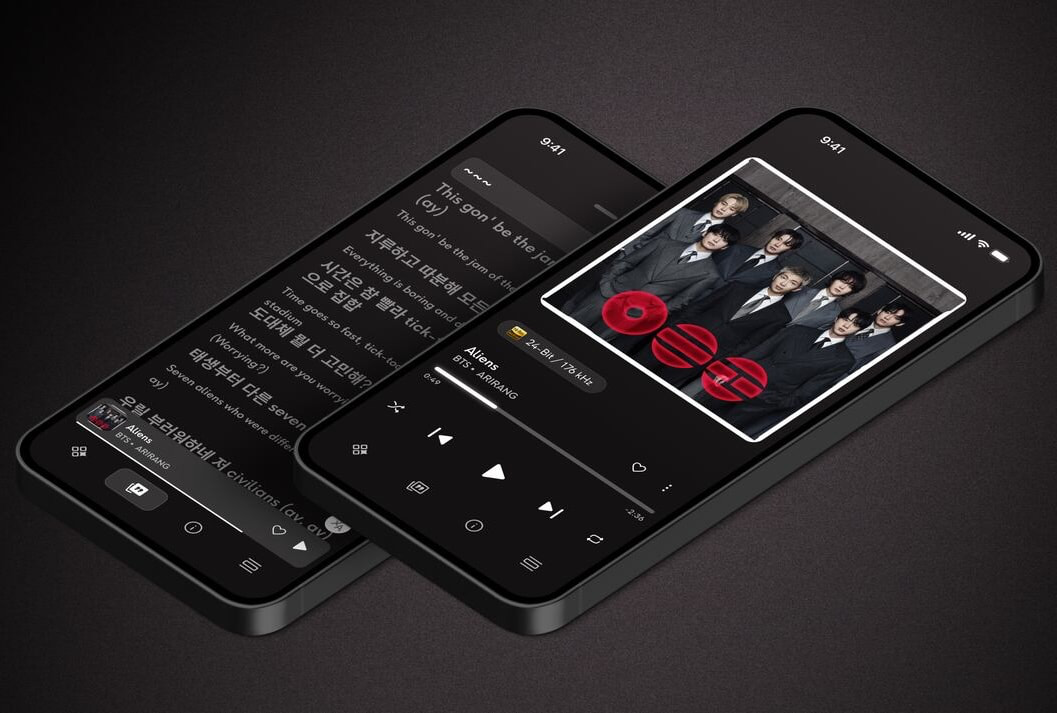
Qobuz has never had much trouble convincing audiophiles that it sounds good. Convincing them that its app was equally polished has occasionally required a more generous interpretation of the word “polished.”
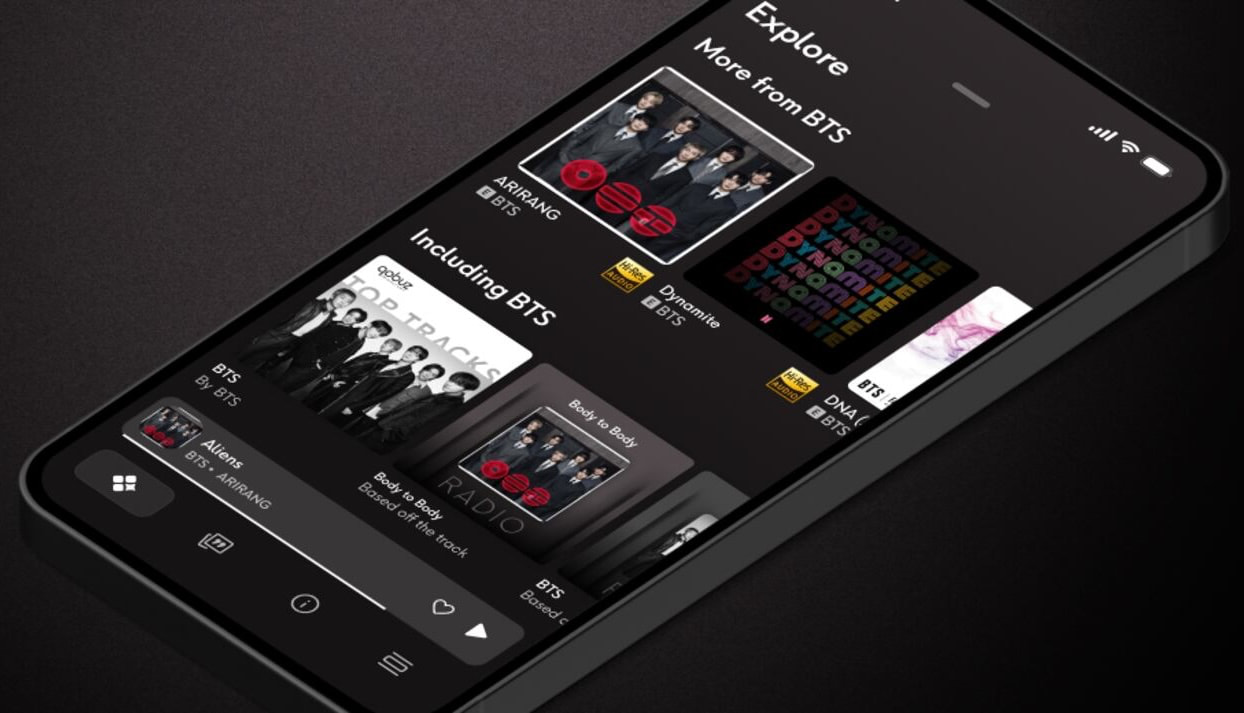
The latest Qobuz mobile update addresses that problem with a redesigned player for iOS and Android, adding synchronized lyrics, lyric translations, improved queue management and more direct access to recommendations, credits, artist biographies and album descriptions. Version 10.0 reached Apple devices this week, followed by version 10.0.1, while the same feature set is now listed through Google Play.
The redesigned player adds:
The new interface keeps more of Qobuz’s editorial and metadata features close to the music rather than sending listeners through several menus to discover who played bass, produced the album or wrote the review.
That may sound like routine housekeeping, but Qobuz users have waited a long time for built-in lyrics. Until now, anyone determined to follow along had to use a third-party service or remember the words, which becomes increasingly unreliable somewhere after the second verse.
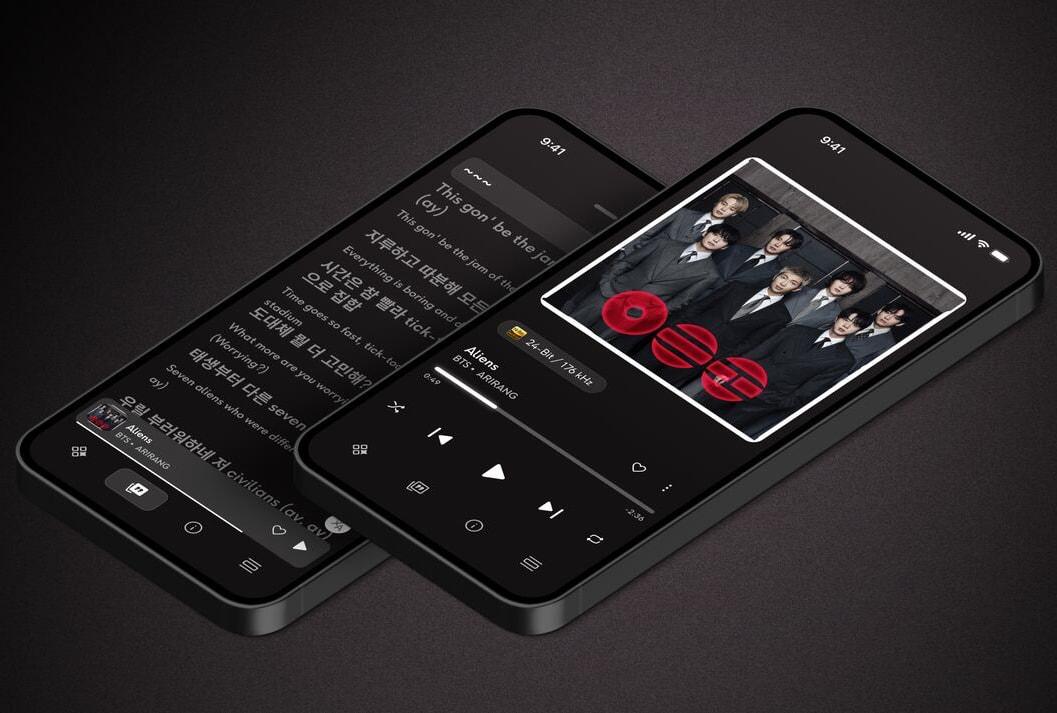
Apple Music and Spotify already offer synchronized lyrics and translations, so Qobuz is not inventing a new category.
What makes the update more interesting is how lyrics now sit beside the service’s existing editorial material, detailed credits, album reviews, biographies and high-resolution playback. Qobuz is trying to create a richer listening screen rather than merely enlarging the album cover and placing another AI button underneath it.
That approach fits the platform. Qobuz has consistently emphasized human curation and music journalism, with more than 500,000 pieces of editorial content alongside a catalog of more than 100 million lossless and high-resolution tracks.
Spotify remains stronger at social discovery and algorithmic recommendations. Apple Music integrates more naturally across Apple hardware. Qobuz’s advantage is that it still behaves as though listeners may want to know something about the album beyond whether the algorithm believes it is suitable for Tuesday afternoon.
The new player reduces friction.
Listeners can examine lyrics, translations, credits, biographies and recommendations without constantly leaving the playback screen. Better queue controls and visible autoplay settings should also make it easier to understand what the app intends to play next, which has not always been one of streaming software’s great acts of transparency.
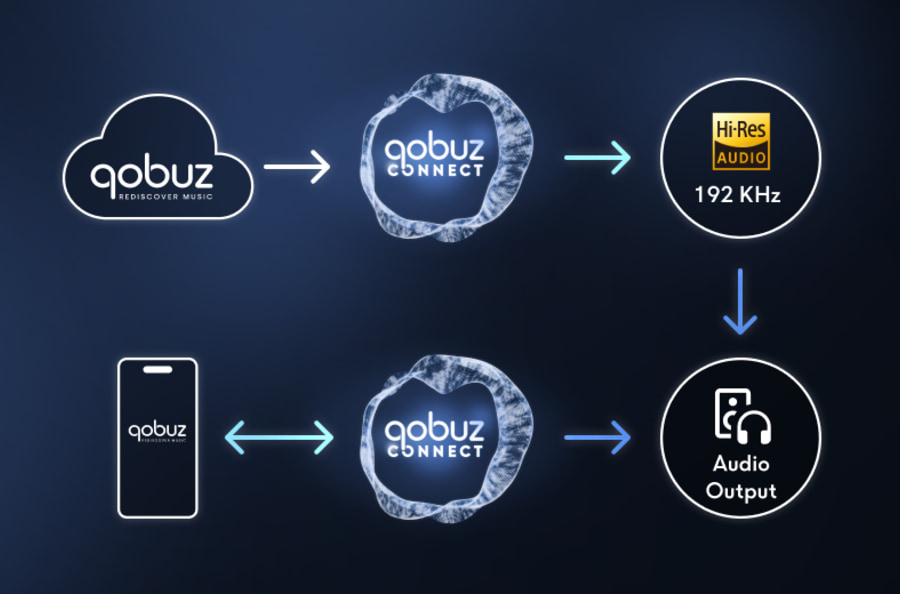
The update becomes more useful when paired with Qobuz Connect. A phone or tablet can serve as the control interface while compatible streamers, amplifiers and powered speakers pull the lossless or high-resolution stream directly from Qobuz. The mobile app therefore matters even when the phone is not the device producing the sound.
Qobuz Connect now supports more than 100 hardware and software partners, making the quality of the mobile control experience far more important than it was when listeners often had to use a manufacturer’s own app.
The update improves playback and discovery, but it does not solve every Qobuz weakness.
The service still trails Spotify and Apple Music in social features, collaborative listening and some forms of personalized discovery. Lyric availability and translations will also depend on the underlying catalog data, so users should not expect every obscure jazz pressing or regional release to suddenly become karaoke-ready.
Qobuz has also described this as a mobile redesign. Desktop and connected television users should not assume they are receiving the same interface immediately.
Qobuz did not need another audio-quality logo. It needed a better player.
Synchronized lyrics and translations bring the service closer to feature parity with Apple Music and Spotify, while the improved queue controls, credits and editorial access play directly to Qobuz’s actual strengths.
The update is not revolutionary, but it makes the app easier to use and gives subscribers more information without turning every listening session into a conversation with an AI assistant.
For a service that charges $12.99 monthly or an effective $10.83 per month with an annual Studio Solo subscription, that is a more convincing improvement than simply raising the price and blaming licensing costs.
The redesigned Qobuz player is available now through the latest Qobuz apps for iOS, iPadOS and Android. Try Qobuz for free.
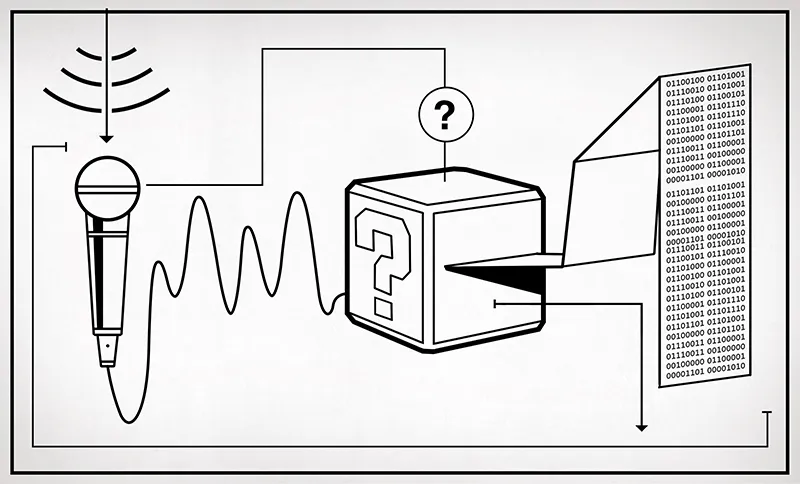
“You can’t control what you can’t measure” goes the old chestnut. But that’s a little bit negative, in my opinion. Instead, think of the benefits of sprinkling sensors around everywhere: you gain insight where you simply didn’t have it beforehand.
We were thinking about this in the context of the recent video on pressure advance in 3D printers. Essentially, the unmelted filament acts as a springy piston, and that springiness means that the pressure built up in the melted plastic lags the feedrate of new filament. We usually calibrate this out with a guesstimate constant, but it can be different for every different filament. Measuring that pressure directly with a strain gauge in the hot end makes more sense.
But then there are knock-on benefits of having a sensor in the hot end. You can use the strain gauge as Prusa does to run the nozzle gently into the bed and set the z-axis height. Or you can use over-pressure as a sign that the nozzle is clogged. It’s quite possible that you can use it to signal other things that can go wrong as well, but you can’t tell until you put the sensor on in the first place.
Of course, you don’t want to put a pressure sensor where you want to know the temperature, or vice-versa. But as a general rule, the more you can measure, the more you can discover about the way your system is running. How many strain gauges are too many?

The Playdate is a small handheld console with a dedicated fanbase. Among them is [Cristina Ramos], who recently decided to try and push the limits of the hardware by implementing a 3D renderer for the platform.
[Cristina] began by implementing a raycaster. This is a very simple way to do 3D on limited hardware, and this technique was used by some early games like Wolfenstein 3D. However, for [Cristina], it was more a test to get an idea of the performance limitations of the Playdate. After getting her feet wet with that, she stepped up to implementing a renderer that relied on binary space partitioning, which could load map files in the same format used by the classic Quake engine. There was naturally plenty of work to do to handle things like texture mapping and lighting, too, particularly given the vagaries of working with the Playdate’s 1-bit monochrome screen. Using a simplistic, cel-shaded like approach for textures gave things a good look while preserving visual readability on the low-resolution screen.
The 3D engine and associated game remain a work in progress for [Cristina] — we look forward to seeing where the project goes next. We’ve seen similar projects on resource-limited platforms before, too.
I was told you couldn’t do 3D on the Playdate, so I did it.Then I was told there was no way I could create exterior levels like those in Mirror’s Edge, so I proved them wrong again.
— Cristina Ramos (@saffroncr.bsky.social) 2026-07-22T08:57:09.594Z
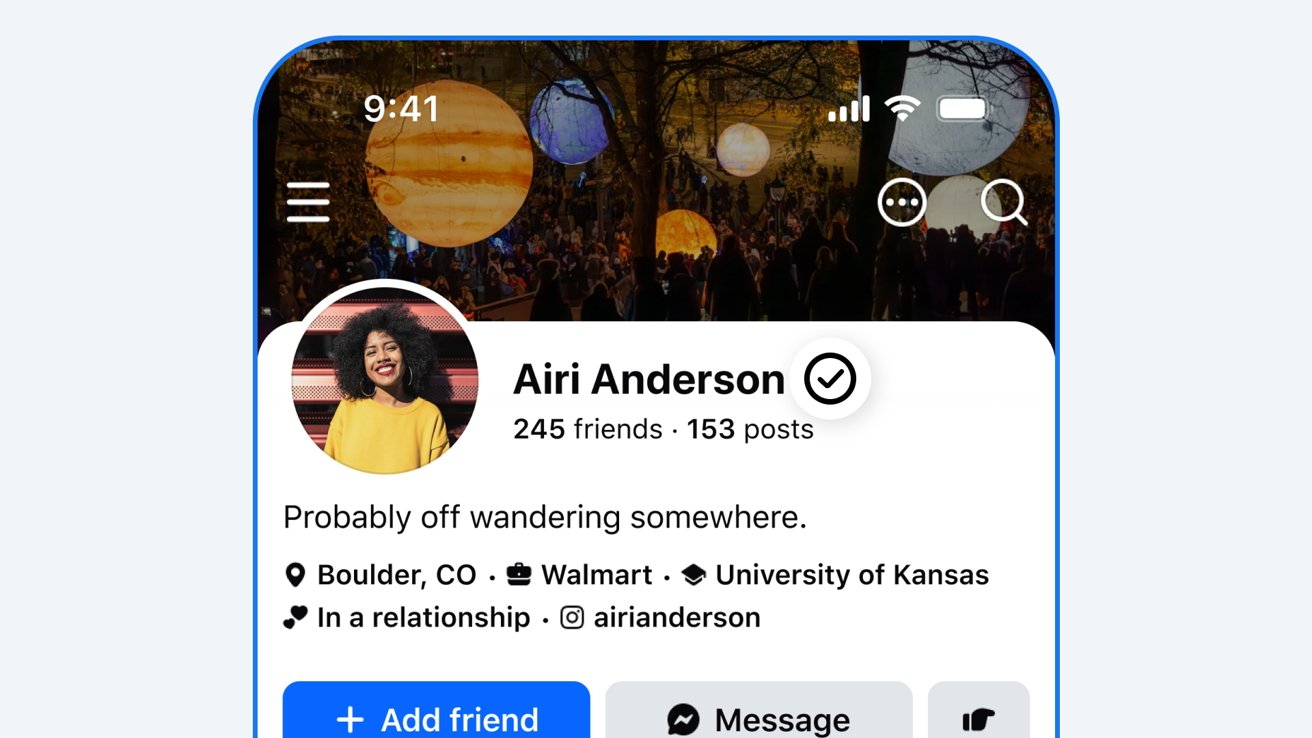
Meta has announced Facebook Verified, a free badge that will be visible on a user’s profile and is designed to confirm whether that user is a real person or an AI without actually checking that a user is who they say they are.
The new badge is separate from Meta’s existing Meta Verified program and is available to eligible Facebook users who are 18 or older. Users must also be in good standing with Facebook’s community standards before they can be verified.
Alongside profiles, Facebook users will also be able to see a person’s verified status in the Marketplace, Facebook Dating, and Facebook Groups initially. However, Meta has confirmed that it intends to bring the badges to the main feed in the future.
Importantly, unlike Meta Verified, Facebook Verified doesn’t require a subscription and is available absolutely free. Users only need to complete the verification process once.
The verification process itself requires Facebook users to record a short selfie video. Facebook then uses the video to check the person’s appearance against their existing profile photos to confirm a match. The process should take just a few minutes.
However, it’s important to know what Facebook Verified actually verifies. Meta says that it means a profile belongs to a real person, not an AI.
Facebook Verified does not necessarily mean that the person is who they say they are. That’s an important distinction to remember when using Facebook from here on out.
Meta says that Facebook Verified will roll out in phases, starting with “select markets.” Unfortunately, it hasn’t confirmed which markets those are.


A massive malvertising campaign is using fake Solana, Luno, and TradingView webpages with malicious JavaScript that instructs browsers to assemble malware directly in memory.
The operation has been active since late 2024 and is localized to 25 languages in 12 countries, primarily in Asia Pacific and Latin America.
A filtering system ensures that only real targets (retail traders and crypto investors) land on the malicious pages, while researchers, scanners, and security bots are redirected to blank pages.

Ad security platform Confiant says that the campaign’s design stands out through its use of the web browser as “a local assembly pipeline” for the malware.
Although the fake portals feature a download button, a ReactJS library on the landing page prepares the browser for a managed download flow, a process typically used for handling various types of file transfers.

According to Confiant’s analysis, the page first registers a service worker, which acts as a download manager and helps build the malware file incrementally.
In the first stage, the page sets up a shared worker that acts as an engine that assembles the malware from components received in the next steps of the attack.
The researchers say that in the second stage “the landing page uses its SharedWorker to request itself for a ‘/config’ response” with seed and size parameters that are randomized and specific for each session.
By rotating these parameters, the threat actors make sure that the resulting malware file has a unique hash to bypass static detection.
Confiant explains that “‘/config’ is an assembly response rather than a normal download response. It returns a template and the inputs the browser needs to build the file locally.”
Remote components retrieved this way and the locally generated bytes are then used to create the malicious payload from a clean version of the Bun executable.
After building the final malware executable, the fake download page hands it to the service worker at the beginning of the process and triggers a same-origin download path.
“From the browser’s point of view, the user is downloading an executable from the landing page domain,” Confiant researchers say, and the mark-of-the-web tag is added, despite some of the components originating from a different source.
The advantage of this technique is that no finished file is transmitted over the network, making detection less likely, and analysis becomes more challenging.
Confiant says that earlier variants of the SourTrade campaign used the StreamSaver project on GitHub to deliver the malicious payload. Since April, though, the operation switched to the same-origin ServiceWorker delivery method.
While Confiant researchers do not reveal the nature of the payload, they found evidence supporting a Bitdefender report in 2025 about a resilient malvertising campaign that used StreamSaver to distribute malware.
Bitdefender found that the payload had the following capabilities:
Since the SourTrade campaign targets retail traders and crypto investors, users engaged in these activities are advised to avoid downloading financial or cryptocurrency apps from social media advertisements or sponsored search results.
The researchers advise getting executable files from the company’s official website. As an added precaution, they should verify the installer’s digital signature and publisher before running it.
Security teams log 54% of successful attacks and alert on just 14%. The rest move through your environment unseen.
The Picus whitepaper shows how breach and attack simulation tests your SIEM and EDR rules so threats stop slipping by detection.

Samsung
Galaxy Z Fold 8 Ultra
The Samsung Galaxy Z Fold 8 Ultra has better camera specs and a higher-capacity battery than its smaller sibling, but its dimensions aren’t as well-suited to video streaming, and it costs more.
The Samsung Galaxy Z Fold 8 is smaller than its Ultra counterpart and lacks a telephoto camera, but it also costs less, has just as much power, and boasts a compact display that may suit some users better.
Samsung has unveiled three new foldable phones — the Samsung Galaxy Z Fold 8, the Samsung Galaxy Z Fold 8 Ultra, and the Samsung Galaxy Z Flip 8. And while the last of that trio falls into its own category, the former two phones have a lot in common.
Aside from having similar names, they’re both book-style foldables, and they also share plenty of specs. But between very different form factors and differences in their respective camera setups, there’s lots to differentiate them, too.
So, below, we’ve compared the Samsung Galaxy Z Fold 8 and Galaxy Z Fold 8 Ultra, so you can easily understand how they stack up. We haven’t reviewed either model just yet, but we have been hands-on with both, and so have been able to draw some early conclusions as to who they’re best suited to.
Latest Videos FromTechRadar
Before we look closer at the key features of these two phones, we’ve detailed their core specs below, so you can see their major similarities and differences at a glance.
| Header Cell – Column 0 |
Samsung Galaxy Z Fold 8 Ultra |
Samsung Galaxy Z Fold 8 |
|---|---|---|
|
Dimensions (unfolded): |
158.4 x 143.2 x 4.1mm |
161.4 x 123.9 x 4.5mm |
|
Dimensions (folded): |
158.4 x 72.8 x 8.9mm |
81.9 x 123.9 x 9.7mm |
|
Weight: |
215g |
201g |
|
Foldable display: |
8.0-inch 2256 x 2504 AMOLED, 120Hz |
7.6-inch 1828 x 2448 AMOLED, 120Hz |
|
Cover screen: |
6.5-inch 1080 x 2520 AMOLED, 120Hz |
5.5-inch 1248 x 1972 AMOLED, 120Hz |
|
Chipset: |
Snapdragon 8 Elite Gen 5 for Galaxy |
Snapdragon 8 Elite Gen 5 for Galaxy |
|
RAM: |
12GB / 16GB |
12GB / 16GB |
|
Rear cameras: |
200MP wide, 50MP ultra-wide, 10MP telephoto |
50MP wide, 50MP ultra-wide |
|
Front camera: |
10MP and 10MP |
10MP and 10MP |
|
Battery: |
5,000mAh |
4,800mAh |
|
Charging: |
45W wired, 20W wireless |
45W wired, 20W wireless |
|
Storage: |
256GB / 512GB / 1TB |
256GB / 512GB / 1TB |


The Samsung Galaxy Z Fold 8 Ultra and Samsung Galaxy Z Fold 8 were both announced on July 22, with pre-orders opening the same day.
General availability for both phones starts on August 7, though if you pre-order, you might get them earlier — at the time of writing, we’re seeing an August 3 delivery date in the UK, for example.
As for pricing, the Galaxy Z Fold 8 starts at $1,899.99 / £1,699 / AU$2,699. The Galaxy Z Fold 8 Ultra is more expensive, with a starting price of $2,099.99 / £1,899 / AU$2,999. In both cases, that’s with 256GB of storage, though you can pick either model up in 512GB and 1TB configurations.
So, in other words, the Galaxy Z Fold 8 Ultra starts at $200 / £200 / AU$300 more than the standard Galaxy Z Fold 8.
|
Storage |
US price |
UK price |
AU price |
|---|---|---|---|
|
256GB |
$2,099.99 |
£1,899 |
AU$2,999 |
|
512GB |
$2,299.99 |
£2,069 |
AU$3,299 |
|
1TB |
$2,699.99 |
£2,409 |
AU$3,899 |
|
Storage |
US price |
UK price |
AU price |
|---|---|---|---|
|
256GB |
$1,899.99 |
£1,699 |
AU$2,699 |
|
512GB |
$2,099.99 |
£1,869 |
AU$2,999 |
|
1TB |
$2,499.99 |
£2,209 |
AU$3,599 |


In some ways, the Samsung Galaxy Z Fold 8 Ultra and Samsung Galaxy Z Fold 8 have similar designs — after all, they’re both foldable phones that fold and unfold horizontally like a book. However, their shapes and dimensions differ a lot.
The Samsung Galaxy Z Fold 8 Ultra looks a lot like the Samsung Galaxy Z Fold 7, with a tall, narrow design, leading to dimensions of 158.4 x 143.2 x 4.1mm when unfolded, 158.4 x 72.8 x 8.9mm when folded, and a weight of 215g.
The Samsung Galaxy Z Fold 8, on the other hand, is shorter and wider, looking more like a passport than a book, with dimensions of 161.4 x 123.9 x 4.5mm when unfolded, 81.9 x 123.9 x 9.7mm when folded, and a weight of 201g.

Both phones, though, have an IP48 rating, meaning they’re water-resistant to depths of 1.5 meters for up to 30 minutes, and also resistant to dust and other objects greater than 1mm in size.
They also both have aluminum frames, and share Samsung’s Flex Titanium technology, meaning their hinges are similarly invisible (you will notice their respective hinges at certain angles, but Samsung has come a long way in this department since the days of the original Galaxy Fold).
As for colors, while the Samsung Galaxy Z Fold 8 Ultra is sold in Graphite, Cream, Green Shadow, and Violet Shadow, the Z Fold 8 can be bought in Graphite, Cream, Lavender, and Pistachio shades.


Now we get to the biggest difference between these two phones: their displays. Or rather, the shape and purpose of those displays.
The Samsung Galaxy Z Fold 8 Ultra has an 8.0-inch 2256 x 2504 foldable AMOLED screen and a 6.5-inch 1080 x 2520 AMOLED cover screen, both with a 120Hz refresh rate and around 422 pixels per inch.
The Samsung Galaxy Z Fold 8 has a 7.6-inch 1828 x 2448 foldable AMOLED screen with around 403 pixels per inch and a 5.5-inch 1248 x 1972 AMOLED cover screen with roughly 428 pixels per inch.
So, both screens on the standard Z Fold 8 are noticeably smaller, but the aspect ratios arguably make a bigger difference, with the Galaxy Z Fold 8 Ultra having an almost square 1.11:1 foldable screen and a narrow 21:9 cover screen.


The Samsung Galaxy Z Fold 8, on the other hand, has a 4:3 foldable screen, which is ideal for widescreen content, and a 10:16 cover screen, which is a bit more square than a typical phone and can be easily covered with one hand from top to bottom.
The taller, narrower Galaxy Z Fold 8 Ultra does have size benefits of its own, mind. It’s harder to stretch your thumb to the top of this phone’s display, but it’s more easily covered with one hand from left to right. And when open, the Ultra is better suited to productivity apps that display square-shaped content like spreadsheets.
For video streaming, you’ll want to go for the Galaxy Z Fold 8, since most video content is displayed in 16:9 (you’ll see smaller black bars on a 4:3 screen), and it’s arguably the better-shaped phone for gaming, too.


There are big differences between the cameras on these two phones, with the Samsung Galaxy Z Fold 8 Ultra coming out on top. This device has a 200MP f/1.7 wide camera, a 50MP f/1.9 ultra-wide with a 120-degree field of view, and a 10MP f/2.4 telephoto with 3x optical zoom. It also has a 10MP selfie camera on each screen.
The Samsung Galaxy Z Fold 8 has one fewer camera and fewer megapixels in its wide one. Specifically, you’re getting a 50MP f/1.8 wide camera, a 50MP f/1.9 ultra-wide with a 120-degree field of view, and two 10MP selfie cameras. So, it lacks the telephoto snapper found on the Ultra.
Both phones, though, are capable of recording video in up to 8K quality at 30fps, or in 4K at up to 120fps.
We haven’t had a chance to test both phones’ cameras just yet, but we’ll update this article with images when we have. The Galaxy Z Fold 8 Ultra will, for obvious reasons, be the superior zoom shooter, but there isn’t likely to be too much to choose between the phones’ 200MP and 50MP wide cameras, since both will default to smaller photo sizes anyway, as is standard practice for modern smartphones.


There’s nothing to choose here, with both the Samsung Galaxy Z Fold 8 Ultra and the Z Fold 8 having a Snapdragon 8 Elite Gen 5 for Galaxy chipset and 12GB of RAM — unless you get a 1TB model, in which case you’ll get 16GB of RAM.
This combination of specs will ensure top-end performance regardless of what you’re doing on your phone, and in our short time with both devices, they’re equally capable gaming phones and productivity powerhouses (notwithstanding their respective display sizes, which makes each better suited to different tasks).
Both the Galaxy Z Fold 8 Ultra and Galaxy Z Fold 8 also run Android 17 overlaid with One UI 9, and come with the promise of seven major Android upgrades.


Samsung has finally started putting silicon-carbon batteries in its phones, allowing for higher-capacity batteries in the same footprint. As a result, it’s managed to pack a 5,000mAh battery into the Galaxy Z Fold 8 Ultra (up from 4,400mAh in the Z Fold 7).
Unsurprisingly, the smaller Samsung Galaxy Z Fold 8 features a lower-capacity battery (4,800mAh), which should allow the Ultra to last slightly longer — but not by much.
Samsung claims you’ll get 27 hours of video playback from the Galaxy Z Fold 8 Ultra, while the standard Galaxy Z Fold 8 is rated for 26 hours. In our early anecdotal testing, we’ve managed to use both phones for multiple days without needing to charge them, so those playback estimates are likely accurate.
Both phones also support up to 45W wired charging and 20W wireless, so you won’t be losing out on charging speed by picking one phone over the other.

The Samsung Galaxy Z Fold 8 Ultra has bigger, more productivity-friendly screens than the Galaxy Z Fold 8, along with an extra camera, more megapixels in its wide camera, and a slightly higher-capacity battery. However, it also costs $200 / £200 / AU$300 more, and offers identical power.
Its larger screens also won’t be desirable for everyone — indeed, the Galaxy Z Fold 8’s screens are much more video-friendly, and may soon become the norm for foldables — so the only indisputable advantages of the pricier model are its cameras and larger battery (though on the latter, we’re talking fine margins).
Whether those extra features are significant enough to justify the Galaxy Z Fold 8 Ultra’s higher price will, of course, be subjective, but you might want to wait for our full reviews to see how these two phones compare in practice.

Follow TechRadar on Google News and add us as a preferred source to get our expert news, reviews, and opinion in your feeds.

Ripple effect: As rising memory costs push up the prices of everything from PCs and smartphones to game consoles, one key hardware supplier after another has announced that it can no longer delay price hikes. This time it’s Qualcomm, with a fast-approaching adjustment that could make smartphones, tablets, wearables, and some laptops even less affordable.
Qualcomm issued a letter to its clients on Friday warning that its chips will soon become more expensive due to rising supply costs. The company develops chips that power most Android devices, numerous wearables, automotive systems, and a rising crop of Arm-based laptops, so the impact is expected to be widespread.
Bloomberg, which obtained the letter, reports that price hikes will rise by an unspecified double-digit percentage, and will apply to components shipped after September 1. Qualcomm has been unable to escape the skyrocketing supply costs that have impacted Microsoft, Apple, Sony, and numerous other manufacturers.
Memory and storage are the biggest culprits, having quintupled in price since late last year as AI data center construction absorbs most of the available production capacity of DRAM and NAND manufacturers. RAM prices could rise by another 40% to 50% in the third quarter of this year, then an additional 30% to 40% in Q4. The ripple effect has also pushed up the prices of CPUs, printed circuit boards, and other components. Qualcomm at least partially blames its upcoming price hike on the need to find alternative suppliers.

Samsung phones, which are powered by Qualcomm’s Snapdragon processors, might be the most popular affected products. However, wearable devices like smart glasses and VR headsets also use chips from the same family. Additionally, Microsoft and various PC manufacturers are attempting to promote an alternative Arm-based version of Windows via new lineups of more powerful Snapdragon SoCs.
Qualcomm’s adjustment might also affect Google’s plans to launch a lineup of Snapdragon-based laptops using a new Android-based operating system later this year.
Qualcomm’s products even extend to the AI data centers responsible for the component shortages. The company recently unveiled ambitious plans to compete with Nvidia in the server CPU market.
The situation is expected to worsen next year due to further price hikes from the manufacturer that Qualcomm, Apple, Nvidia, Google, Amazon, Arm, and MediaTek all rely heavily upon: TSMC. Recent reports indicate that the chipmaker will raise prices for most of its semiconductor nodes at least once next year by around 10%, creating a much broader ripple effect.

“Everybody’s on their phone at my program!” joked Charlie Bailey, a librarian in South Philadelphia. He’s just asked his audience to pull out their phones so that he can walk them through the steps of disabling Apple Intelligence and Gemini.
Bailey stands at the front of a library classroom that’s outfitted for children – the focal point is the vibrant rug he’s standing on, which reminds us that M is for “moon” and Z is for “zebra.” But the 20-odd adults in the room aren’t here to learn about the alphabet. They’re at a workshop called Avoiding AI, which, in this context does not stand for “apple” and “igloo.”
“I was inspired by the feeling of people’s frustration with AI tools being kind of forced onto them, and feeling like AI tools we didn’t ask for are suddenly everywhere in our lives,” Bailey told TechCrunch.
Bailey starts the hour-long workshop with an overview of how AI chatbots and other consumer AI tools work, explaining why people might want to use these products, and why they might opt to abstain. Then, he walks through all of the most popular tech platforms and devices, showing step-by-step instructions on the projector to guide people through turning off specific features.
“As a librarian, I think it’s important to see this as advancing digital literacy and helping people reclaim their autonomy over whether they want to use AI tools,” Bailey said. “It’s important, especially when it can be so difficult not to use them, and when the design seems to force adoption.”

Bailey got the idea for the Avoiding AI workshop from Hannah Cyrus, a librarian in Maine. He was one of dozens of librarians from around the world who contacted Cyrus after she published a journal article about developing her own workshop.
“This has never happened before with anything I’ve worked on,” Cyrus told TechCrunch. “Nobody has ever been emailing me like, ‘Can you give me your Intro to Computers slides?’”
At the Bangor Public Library, patrons turn to Cyrus when they need help with anything involving technology.
“More and more, I was getting questions about, ‘How do I turn this [AI] stuff off? Why is it trying to write my emails for me? Why is it trying to summarize my one-sentence email that I can easily read?’” Cyrus said. “I just decided that with so much media hype out there about AI products, it would be a good opportunity to teach people about the basics of what is happening when you’re using this technology, and then getting into how to turn it off if you don’t want to use it.”
Usually, Cyrus’ classes like Intro to Computers get about a dozen attendees. But so many people expressed interest in her first Avoiding AI workshop that she had to cut off registration at 30 people, open a waitlist, and share the workshop on Zoom. Including the livestream, about 70 people attended each of Cyrus’ first two workshops.
When Bailey followed Cyrus’ lead to host a workshop in Philadelphia, the reception was similarly unprecedented. The library’s Instagram post about the “Avoiding AI” event got over 2,000 likes and 220 shares, whereas most of the library’s posts don’t get more than a few dozen likes. He scheduled a second program because the first got too many registrations.
“As an information professional, it feels good to see people skeptical of AI,” Bailey said. “It felt really good to see how many people share this feeling.”
There’s a sense of camaraderie among the room of strangers during the workshop. When Bailey invites attendees to share their own tips, one person explains that when you append “&udm=14” to a Google Search, it will hide AI results. Bailey writes the string of characters down on a whiteboard next to the log-in credentials for the teen Wi-Fi server.
“You have to go through all the trouble to buy a home in today’s world, and two years from now, there could be a data center next to your house,” one workshop attendee named Johnny says.
“I keep getting AI shoved down my throat at work, and every time I see it, I think about the environment,” another attendee named Gabrielle adds. But she’s also not writing off AI as a technology altogether. “I’m not against AI in terms of medical breakthroughs.”
AI naysayers know that this technology is far broader than just chatbots and deepfake apps. Cyrus mentioned how useful optical character recognition is for scanning old documents at the library. But for her and the people who go to her workshops, the anti-AI movement isn’t about rejecting technology altogether so much as it is about advocating for more control, agency, and freedom in how people use technology.
“I think the forced adoption of AI on people’s devices might be the straw that’s breaking the camel’s back in some ways,” she said. “The awareness has been growing for a long time that these products and these companies that make them have an outsized influence over us, and that we’re not really using these products in the way that we would like to.”
When you purchase through links in our articles, we may earn a small commission. This doesn’t affect our editorial independence.




Weekend Open Thread: Brooks Brothers


Democrats look to World Cup watch parties to register thousands of voters


Big Money Is Entering XRP


Grayscale Files For Worldcoin ETF, WLD Registers Sharp Rise


Sail Virtually Aboard The “Itanic” With IA-64 Emulator

Turtle Beach Command Series KB7 review: a nifty screen-equipped gaming keyboard


Unregistered fitter used Gas Safe logo on business flyers

New Jersey voter registration controversy explained: How 6,600 noncitizens got on the rolls, and what happens next

Johnny Depp’s R-Rated Gothic Cult Classic Gets New Release Ahead of Sydney Sweeney Remake


Ethics, other provisions in crypto Clarity Act to be further discussed


Watch Flock Safety CEO Garrett Langley discuss the future of surveillance at TechCrunch Disrupt 2026

Shanghai science forum photos show China’s AI and robotics advances in rivalry with US


Circle’s President Sold Over 360,000 Shares, The Filings Explain Why


Subway Sandwich Computers Get a Second Life as Gaming Machines


2026 3M Open leaderboard: Scottie Scheffler finds putter in Round 1, sits three back


The Peugeot Family: How 200 Years of an “Old Money” Dynasty Died in A Boardroom


16 Dresses for the High Summer Event

How To Use Claude’s Reflect Dashboard And Learn When It’s Time To Touch Grass


The 35 Best Board Games for Family Game Night


Stephen Colbert Returns to Social Media After Late Show End




You must be logged in to post a comment Login