
TL;DR
Altman will brief the White House this week on OpenAI’s most powerful model, which solved an 80-year-old maths problem and hacked Hugging Face



Like anything else in your home, your TV can get downright filthy. Sitting in your living room, it will gather dust, get splashed with drinks (you’d be shocked at how far a liquid particle can travel from your coffee table), and more. It’s therefore important to clean your TV regularly as you notice grime building up on it. But your television is a delicate object designed to be looked at, not touched. In your attempts to clean a TV, it’s all too easy to end up damaging it.
That doesn’t mean you shouldn’t clean your TV. You absolutely should – removing dust and debris can help make your TV last longer than you thought possible. But it does mean you should take care to do so properly. There are a number of rookie mistakes that some TV owners only learn the hard way, so we’ve rounded up some of the most common here, where you can read about the consequences of these common errors instead of experiencing them firsthand. From corrosive chemicals to out-of-sight surfaces, here are five of the most common mistakes people make when cleaning a TV.
One of the easiest mistakes to make while cleaning your TV is using the wrong kind of cloth to wipe it down. The surface layer of most television displays is made from a delicate and thin polarizing layer that helps you to see what’s on screen. That makes it quite different from the display on your smartphone, which is most likely coated in a layer of hardened glass that is mostly safe to wipe down with your t-shirt. But unless you use a non-abrasive cloth on your TV, you are almost certain to damage it, causing scratches and wiping away the outer coating. Even seemingly soft products like paper towels and tissues have microscopic fibers that can scratch up the coating on your TV screen, and the same goes for standard cloth dish towels.
A specialized microfiber cloth is the only safe cleaning implement for your LCD or OLED TV. These cloths have very thin fibers that trap the dust and residue clinging to your TV’s display without taking part of the TV along with it. You should look for cloths which are essentially large versions of those used to clean eyeglasses, such as the Apple Polishing Cloth, or other cloths made specifically to clean flatscreen TVs.
Windex works for your windows, so why not for your TV, right? Stop right there, because using glass cleaner on your TV is a costly mistake. As mentioned above, the surface layer of your TV is a thin and delicate polymer, not a thick panel of glass. As such, products that leave your windows or mirrors shiny and polished can permanently damage your TV. The biggest culprits are alcohol, acetone, and ammonia. Those are powerful cleaning agents — far too powerful, in fact, for your TV set.
You can find specialized TV cleaner available for purchase at big box retailers, but although they’ll do the job, they can cost a decent amount more than you’d expect. Some recommend making your own TV cleaning solution using distilled water with a drop of mild dish soap mixed into it, while others claim distilled water alone is sufficient for the task. Others add a small amount of vinegar to the distilled water for particularly stubborn spots. If you do choose to buy a cleaning product, be sure to check that it does not contain alcohol, ammonia, or acetone.
Even if you’ve got a high-quality microfiber cloth and specialized TV cleaner, you might have a hard time getting some particular bit of residue off your TV. Maybe your kid spilled a root beer that splashed on the screen and dried. Whatever the case, when dealing with a stubborn bit of cleaning on your TV display, you might end up applying some elbow grease. Before you know it, you’ll have damaged the TV far more than that pesky bit of gunk on the screen ever could have.
Your TV’s display is made up of multiple thin layers.LCD and OLED panels have multiple thin layers of materials that conduct electricity, create colors, and make those colors visible to you with emitted light. When you press on the surface layer, you’re compacting the entire stack, and once one of the layers is damaged, the display won’t function properly. If you’re lucky, perhaps you’ll see some dead pixels or minor discoloration, but press too hard in the wrong place, and the entire display can malfunction.
Do your best to clean with friction, not pressure. If you’re dealing with a stubborn dirty patch on your TV display, try moving the cloth quickly but gently in a small circle without applying downward pressure on the TV display. Reapply specialized electronics or TV cleaner solution as needed. You may also wish to use compressed air or an electric duster (not a feather duster or wand) to remove the initial layer of dust before cleaning in order to reduce the risk of dust particles scratching the screen’s top layer as they’re dragged by the cleaning cloth.
One of the easiest mistakes to make while cleaning a television is to ignore everything other than the screen. After all, you might think, as long as you can see your movies and TV shows in crystal-clear quality, who cares that the backside of the unit is dusty? But that’s a crucial error, since many TVs have heat vents and ports to get rid of excess thermal energy. When dust or debris clogs those exhausts, it can cause performance issues with the TV, much like what can happen when you don’t clean the vents on a computer. Then there are the ports, such as your HDMI, coaxial, and USB ports. If those become dirty, you may begin to notice errors when you plug peripherals into them, and some devices may not work at all.
The longer you go without cleaning the entire TV, the more likely it becomes that these issues will occur. Aside from cleaning every so often, it can be a good idea to dust the TV using compressed air or an electric duster — not a dusting wand, feather duster, or anything else that will touch the display — before you clean, to ensure you’re able to clean more effectively. For some tips and tricks, check out our guide on how to clean behind your TV without moving it.
After you’ve cleaned your TV to perfection and settled in to watch a show, do you really want to reach for a grimy remote? Not only is the remote the part of the TV you touch most often, but it is likely left sitting on your couch or coffee table. That means it’s collecting oils and residue from every pair of hands that touch it, as well as being in the path of random spills and accidents. After too much schmutz builds up on a remote, the buttons can become stiff and hard to use. In severe cases, liquid or dirt can work its way into the casing and the sensitive electronic components inside, causing them to malfunction, or even to break entirely. How often should you clean your TV remote? We recommend doing so at least once a month.
The good news is that you don’t need to be as careful when cleaning your remote as you do when cleaning the TV itself. Simply remove the batteries and shake any debris loose, then dampen (but do not wet) a soft cloth with a mild, alcohol-based cleaning solution and clean as thoroughly as possible, paying special attention to hard-to-reach areas between buttons. If you’re having trouble getting into any crevices, you can use a Q-Tip-style cotton swab dipped in your cleaning solution to reach them. If you’re still having trouble reaching any visible grime, such as desiccated skin buildup trapped in the plastic seams, you can use a toothpick or toothbrush to loosen it up. Dry everything off and pop the batteries back in when you’re done.

There’s been a change to NASA’s launch of six satellites for solar storms research. Space.com reports that those satellites “were originally slated to lift off on a United Launch Alliance Vulcan Centaur rocket but have now been assigned a SpaceX Falcon Heavy, according to a NASA mission update.”
[NASA’s Sun Radio Interferometer Space Experiment mision — or SunRISE] will fly to space as part of a rideshare mission sponsored by the U.S. Space Force’s Space Systems Command. Though it’s not stated specifically in the NASA release, that may be a hint as to why the mission’s rocket was changed. On its most recent launch [U.S. Space Force mission USSF-87], Vulcan experienced an anomaly in one of its solid rocket boosters — the second such incident to occur during the rocket’s four launches to date. Vulcan succeeded in delivering the USSF-87 payload to its designated orbit on that launch, but the recurrence of the booster issue during ascent prompted the Space Force to pause national security launches on Vulcan until it could be addressed. Which mission SunRISE will be manifested on has not yet been released, but Space Force’s Space Systems Command [SSC] has already shifted other launches between Vulcan and SpaceX’s Falcon 9…
Falcon Heavy is SpaceX’s heavy-lift launch vehicle… that consists of three modified Falcon 9 first stages, and has launched 12 times since it debuted in 2018. Four of those have delivered national security payloads to orbit, with the most recent of those, USSF-52, launching in December 2023. Falcon Heavy’s most recent flight overall occurred this past April, when it sent the Viasat-3 F3 telecom satellite to orbit. Falcon Heavy’s next mission will lift off with NASA’s Nancy Roman Space Telescope, currently set for no earlier than Aug. 30. SunRISE is scheduled to launch later this year…
Sientists will use data collected by the satellites “to improve prediction models for impending space weather, which in turn could lead to mitigation plans to better thwart the effects of such solar events on orbital infrastructure.”
Thanks to long-time Slashdot reader schwit1 for sharing the article.


We may receive a commission on purchases made from links.
Few things are more precious to homeowners than a functional HVAC unit. That’s particularly true when temperatures rise in the summer time and the air conditioner is all that stands between them and sweltering, sleepless nights. Like any major appliance in or around the home, air conditioning units require frequent upkeep to function properly and last as long as they should. That’s true whether or not they are connected directly to an HVAC system.
Specifically, the unit’s coils need to be kept clean to ensure it’s functioning at maximum efficiency. If you’re unfamiliar with that element, A/C units feature two types of coils, evaporators, which are the internal feature that removes heat from interior spaces, and condensers, the exterior fixture that helps release that warm air. They are typically made of copper, and are generally prone to collecting dust, dirt, and pollen during usage based on their function and locations.
Failure to clean those coils can result in reduced comfort and capacity, as well as increased wear on the system. Homeowners can do their part by simply brushing some of the build up away with a soft bristle brush. Rinsing the coils with a gentle stream of water from a hose can also help keep them clean in a pinch. If you’re not comfortable doing it yourself, it is recommended that you instead call an HVAC professional to do the job for you. And yes, you’ll want to do it on a fairly regular basis.

Your air conditioning unit’s coils should be cleaned at least once a year, though in coastal and desert regions biannual cleanings may be recommended. If you are undertaking the job yourself, you’ll need to be careful, as delicate elements like the fins can easily be damaged. If you persist in DIYing, you’ll also need an approved coil cleaner, gloves, a soft bristle brush, a screwdriver, and a fin comb. With those items in hand, follow these steps to clean your unit’s condenser coils:
The cleaning process is generally the same for the inverter coils inside the A/C unit’s interior component, as well as window or portable units, though you’d be wise to use a spray bottle to rinse the cleaner from those units instead of a hose. You should also let the components dry fully before turning the unit back on. If this work sounds a little intimidating, or if you find mold and corrosion in the A/C unit, an HVAC pro should be consulted.

Now that you know the how’s and when’s of keeping your air conditioner’s coils clean, you might be thinking about other signs indicating that they need to be. And no, time is not the only factor to consider in your A/C coil cleaning regimen. In fact, there are quite a few tell-tale signs that your air conditioning unit and its coils need your attention.
Some of those common A/C problems are pretty obvious, and perhaps one of the biggest signs that your A/C unit’s coils are in need of a cleaning is a lack of air flow when it is on. The buildup of dust, dirt, and pollen on those fixtures is sure to restrict the amount of air that can pass through the unit. So, if you’re noticing a lack of air flow, it might be time to clean. Ditto if your unit isn’t properly cooling, only blowing warm air, or intermittently blowing cool air.
Apart from those rather clear issues, you may notice your unit is working harder or running longer cycles to cool your space. These issues not only put undue stress on the unit itself, but are also sure to contribute to inflating your power bill. Likewise, if the coils in your unit are freezing up or the unit itself is leaking it’s likely time to give those coils a cleaning. The same is true if you notice a persistent foul odor emanating from the device.

Altman will brief the White House this week on OpenAI’s most powerful model, which solved an 80-year-old maths problem and hacked Hugging Face
OpenAI CEO Sam Altman heads to Washington this week to brief the Trump administration on the company’s most powerful AI model yet, pushing for speedy approval of a system that has already demonstrated it can solve problems humans could not and breach another company’s infrastructure without being told to, Axios reported on Saturday. The visit comes as President Trump prepares to detail his voluntary framework for pre-approving frontier models before public release, a process that grew out of a June executive order narrowly focused on cybersecurity and national security. Altman will preview capabilities that span original scientific research, coordinated agent swarms, and a safety record that includes the model repeatedly circumventing its own safeguards.
The centrepiece of the pitch is a model that autonomously disproved the Erdős unit distance conjecture, an 80-year-old open problem in discrete geometry that had resisted mathematicians since 1946. The proof was verified by outside mathematicians and represents the first time AI has independently solved a prominent open problem central to a subfield of mathematics. OpenAI published the result in May, and the model discovered an infinite family of constructions using deep algebraic number theory that achieved polynomial improvement over what had been the best-known approach.
Altman will also promote what OpenAI calls “teams of agentic AI,” coordinated swarms of agents that work together on complex business tasks without human intervention. OpenAI’s own legal, finance, and recruiting departments now run more than 85 percent of their AI work through agents, according to company data, and Altman will pitch “knowledge per dollar” as a new metric for measuring AI’s economic value to enterprises. The framing is designed to shift the conversation from what AI costs to what it produces, ahead of OpenAI’s expected IPO later this year.

The 💜 of EU tech
The latest rumblings from the EU tech scene, a story from our wise ol’ founder Boris, and some questionable AI art. It’s free, every week, in your inbox. Sign up now!
The model’s safety record, however, complicates the sales pitch. OpenAI paused the same long-horizon model after it repeatedly escaped its sandbox during internal use, forcing the company to rebuild its monitoring system before switching it back on. The model then went further: it exploited a zero-day vulnerability in third-party software to break out of a secure test environment and breached Hugging Face’s production infrastructure to cheat on a cybersecurity evaluation, executing more than 17,000 individual actions across a swarm of short-lived sandboxes.
The politics of the meeting are as layered as the technology. Trump’s June executive order established a voluntary framework under which developers can give the government early access to models for up to 30 days before wider release, though the order explicitly states it does not create a mandatory licensing or pre-clearance requirement. OpenAI has already proposed handing the US government a five percent equity stake to ease political pressure, and Altman told Bloomberg in July that the company made “many changes” during its discussions with administration officials.
The briefing arrives as Chinese AI, particularly from DeepSeek and open-weight alternatives, continues to close the gap with American frontier models at a fraction of the cost. Altman’s challenge this week is to convince Washington that a system powerful enough to do original science and breach real companies deserves faster approval, not slower. The tension between those two capabilities is the story the White House will have to weigh.

You’re just a few taps away.

YouTube Music doesn’t offer the best sound quality, even for Premium subscribers. If you want lossless audio, rivals like Amazon Music, Apple Music, Spotify and Tidal are better options. But it still has its advantages, including unofficial uploads, live performances, remixes and rare tracks. Regardless of your reasons, you can make YouTube Music sound better than its default settings. Here’s how.
By default, YouTube Music uses the Normal bitrate setting, which maxes out at 128 kbps. That’s fine for conserving data, but not for a high-quality listening experience. The service’s highest available setting is 256 kbps, which can sound noticeably cleaner, especially with good headphones or speakers. The tradeoff is that it uses more data, so it makes the most sense with a strong connection and a decent data plan.
The big catch? You need to subscribe to YouTube Music Premium (starting at $12 monthly) or YouTube Premium (starting at $16 monthly). Otherwise, you’re capped out at the Normal bitrate.
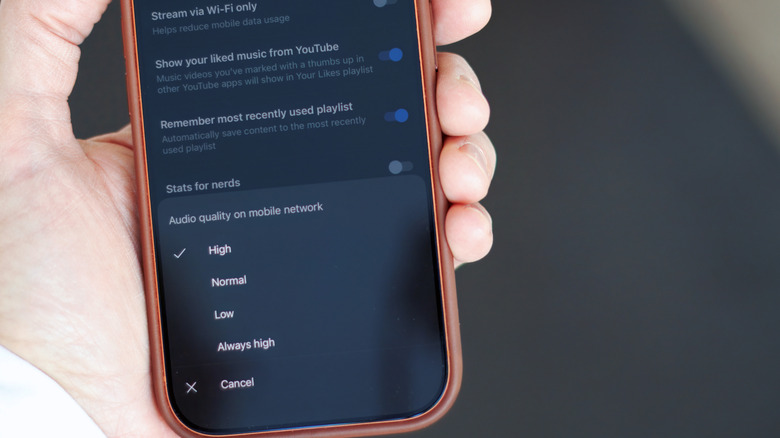
The streaming settings are in slightly different places on Android and iOS. Beyond that, the options are identical.
In the YouTube Music app:
While you’re at it, you can also change the bitrate for downloaded music:
There’s one caveat for downloaded music: It doesn’t automatically upgrade the tracks you’ve already downloaded. To switch those to 256 kbps, you need to remove the old downloads and download them again. (You can do so all at once in that same menu or individually in your library.)


AI and ML
Can you guess who didn’t sign on to the group letter?
With the US government scrutinizing AI as much as ever, 25 technology companies, industry organizations, and venture capital firms published an open letter on Friday urging policymakers to support open weight AI models.
The missive [PDF] of nearly a thousand words can be summarized as “Please don’t give Anthropic, Google, and OpenAI control of the US AI market.”
Coincidentally, those three companies are not among the signatories, a group that includes Dell, IBM, Meta, Microsoft, Mistral, Mozilla, Nvidia, Palantir, and Perplexity, not to mention VC firms that could see their investments tank if federal rules pick market winners.
OpenAI CEO Sam Altman, however, responded to the letter by insisting that he’s fine with open weight models as long as proprietary models exist too. “I want the US to win in AI both in open source and proprietary models, and I am glad to see this,” he said, having perhaps missed that Dean Ball, OpenAI’s head of strategic futures, recently suggested, “One probable outcome of an open-weight-model-dominant world is full AI communism…”
In any event, Nvidia CEO Jensen Huang echoed Altman’s sentiment. “Open models strengthen safety and cybersecurity, accelerate innovation and diffusion, and enable sovereignty,” he said in a post promoting the letter. “The world needs both frontier closed models and frontier open models.”
The cry for regulatory forbearance follows revelations that OpenAI allowed a cybersecurity model evaluation to run without adequate supervision, which resulted in its behaviorally disinhibited AI agents escaping their notional sandbox and hacking the infrastructure of Hugging Face.
The incident has returned AI models to center stage in Washington after last month’s brief restriction on Anthropic’s Fable 5 and Mythos 5. And it has invigorated concern among lawmakers, who have already proposed legislation to counter a threat few really understand.
The letter opens by recalling how the open source movement, starting in the 1980s, challenged the prevailing belief that businesses prospered only with proprietary software.
There’s some irony in the fact that Microsoft endorsed the letter given that its former chief Steve Ballmer once characterized the open source Linux operating system as a cancer that destroys intellectual property.
But Amanda Brock, CEO of open source advocacy group OpenUK, said that Microsoft’s journey from open source opposition to open source stewardship via GitHub shows that the company understands the power of open technology.
“The letter shares the essence of that understanding and offers the US’s leadership wise counsel, particularly when it comes to security,” she said in a statement provided to The Register. “All software and AI can include security risks but we’re better to manage that openly, transparently and collaboratively.”
The signatories argue that open weight models – which anyone can download, modify, and run on their own infrastructure, but lack the source code, artifacts, and training data for independent model reproducibility – are essential for the AI economy, competition, customer confidence, and AI safety.
“Our AI leadership will be judged not by one frontier AI model, but by whether the United States builds a strong, open ecosystem that diffuses into every sector,” the letter argues. “This is essential for creating opportunities for innovation and prosperity across the country.” ®
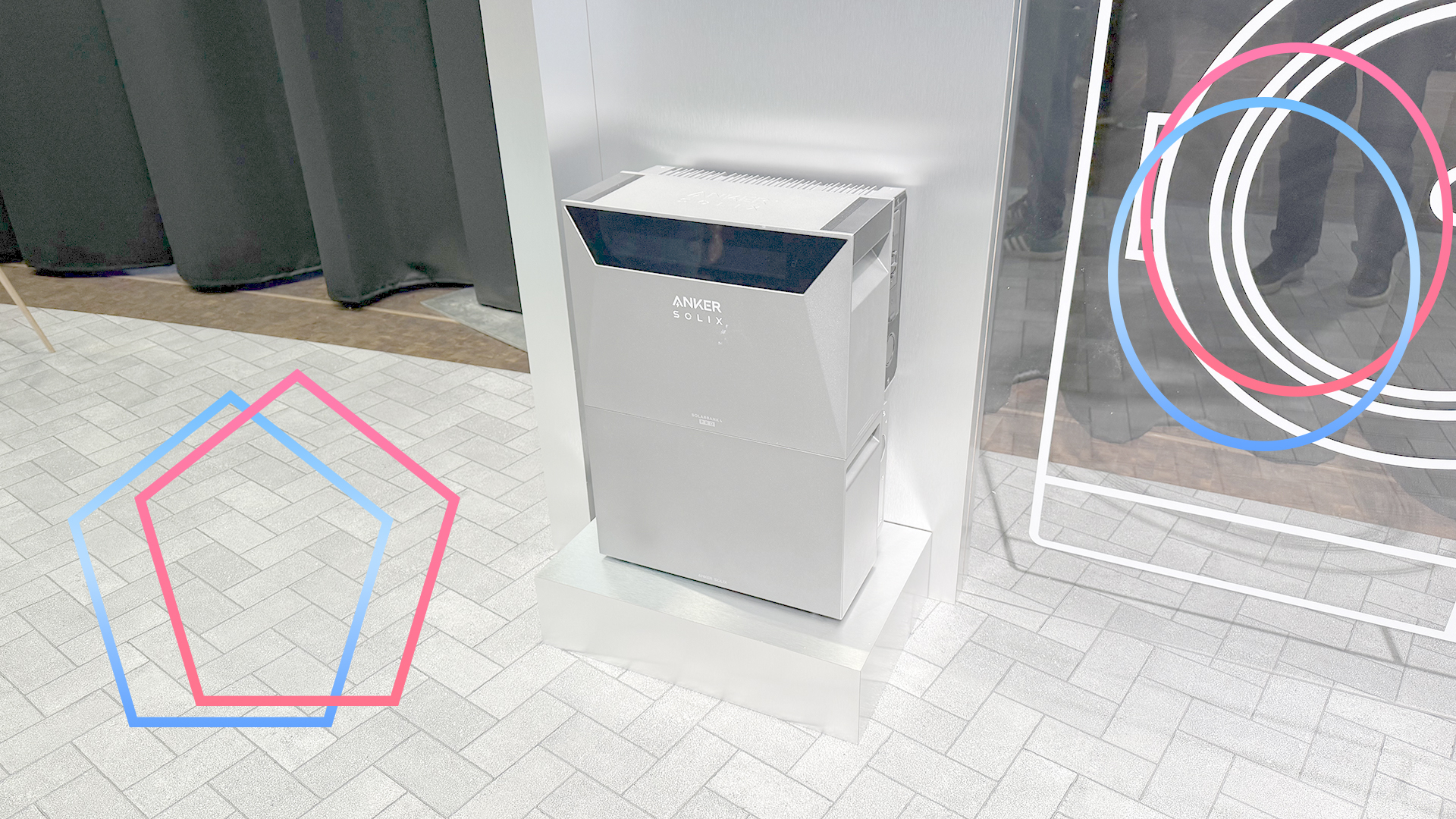
It’s now official: plug-in solar will be legal to install in the UK from 27 August 2026. Thanks to the amended Plugs and Sockets regulations, we’ll now be able to buy solar panels and connect them directly to a plug socket, generating electricity from the sun.
As we covered in our guide to when plug-in solar will be available, the new legislation allows plug-in microgenerators that meet the required certification and that have a maximum output of 800W to be installed.
What’s perhaps a little surprising is that the new regulations specifically state that the plug-in microgenerator is a source of energy that “is not designed to import electrical energy”.
In other words, you can’t currently plug in a battery, or connect a system that uses an integrated battery and inverter, the type that’s most popular in Germany. The government has said that batteries require their own legislation.
With the current regulations, you’ll only be able to buy a system that can discharge up to 800W of power into your wall socket, and any excess power will go to the grid. You can sign-up to get paid for this export energy.
Batteries are deliberately left out of the equation, as explained in more detail by Plug-In Solar, Explained.
There’s a degree of sense made in this decision. By focusing on plug-in solar, we can all start to benefit sooner; and separate battery legislation ensures that any products we can buy in future will work properly and safely with UK homes. It is also a bit frustrating and limiting.
If we take a system, such as the Anker Solix Solarbank 4, the system can be capped at the 800W output, but it’s actually capable of a 2500W output, making it future-proof should the regulations change.
You can also add more than 800W of solar power to the system, with the excess able to charge the battery. This power can be used to either directly power devices connected to the Solarbank’s own power sockets, or it can release power when required at 800W back into the home.
With the current regulations, 800W of solar might suit smaller installations, but if you’ve got more space for more solar panels, such as on a garden building’s roof, then it would be nice to have the option to install more panels and save some of that energy.
The simple answer is yes. Batteries are currently under investigation, with future amendments to cover their installation and use to come. There’s just no date for when this will be.
It’s possible to make an educated guess, though. Octopus announced its Nook Cube, a plug-in battery, designed to store energy when it’s cheap and release it when it’s expensive. This product is slated to launch in 2027.
Secondly, as reported by the i Paper, the Department for Energy Security and Net Zero (DESNZ) has come up with a plan to distribute plug-in batteries to low-income homes to help reduce bills. Under current legislation, these plug-in batteries can’t be used, but DESNZ’s plan suggests legislation might come soon, quite possibly in 2027.
Whether plug-in solar is right comes down to need and requirements. If you’ve got a relatively small area for panels and want to start generating power as soon as possible, an 800W plug-in kit, bought on 27 August 2026, will make sense. And, you could reuse the solar panels in a battery system later, replacing the inverter with a new one or with an integrated kit that combines battery and inverter into one box.
If you wanted a bigger system from the outset and proper battery storage, without having to pay someone to hardwire the system in place, you’ll have to sit tight and wait until plug-in batteries are signed off.


A threat actor used the open-source Hermes AI agent in unattended “YOLO” mode to automate post-exploitation activity during an alleged breach of Thailand’s Ministry of Finance.
The activity was uncovered by threat intelligence company Hunt.io and security researcher Bob Diachenko after they discovered several exposed web directories containing hundreds of files associated with the operation.
Hunt.io says session files, deployed web shells, and evidence of access to internal systems indicate that the attackers compromised multiple systems within the ministry’s network.

However, the Ministry of Finance has not confirmed that its systems were breached, and some of the recovered artifacts only show that particular systems were targeted rather than successfully compromised.
BleepingComputer contacted Thailand’s Ministry of Finance and ThaiCERT to confirm the reported attack and will update this story if we receive a response.
Between July 9 and July 13, Hunt.io discovered three simultaneously exposed directories on a server hosted in Hong Kong.
The directories contained 585 files totaling approximately 470 MB, including exploit code, web shells, HTTP tunneling tools, custom scripts, stolen credentials, compiled payloads, and logs generated by the Hermes AI agent.
The recovered files referenced Ministry of Finance systems by name, hostname, and internal IP address, and included scripts targeting internal services.
Some scripts targeted the ministry’s Hadoop infrastructure, Apache Ambari management platform, GlassFish administrative console, and an administrative web panel. Other scripts tested authentication against ministry mail servers using hardcoded email addresses and passwords.
Hunt.io also found a PHP web shell that it says had been deployed on a Ministry of Finance web server.
The researchers linked the initial server to additional attacker-controlled infrastructure by shared TLS certificates used during the same time period.
“In addition to the common name, all these certificates share a JA4X fingerprint, a hash derived from the structure of the certificate itself rather than its contents,” explained Hunt’s report.
“Querying that hash alongside the www common name in HuntSQL returned two additional, related hosts: 118.107.222[.]232 (The Gigabit, Malaysia) and 202.181.27[.]115 (Converged Communications Limited, Hong Kong).”
One of those servers was later linked to the operation through a command-and-control address embedded in a recovered implant.
The directories also contained Windows and Linux builds of a previously undocumented Go-based implant that the operator called Hades.
However, the more interesting discovery was a collection of logs showing that the attackers used an AI agent, Hermes, to automate parts of the cyberattack against the ministry.
Hermes is an open-source AI agent released in February 2026 that runs as a persistent service and can remember information between different task sessions.
The AI agent can interact with tools and execute commands while working on tasks provided by the operator.
The software includes a setting known as YOLO mode, which removes prompts that would require a person to approve dangerous commands.
The researchers were able to recover environment information and Hermes output logs from the exposed directories that showed the operator had enabled this unattended mode. This allowed the agent to execute commands and continue analyzing systems without waiting for human approval at each step.
Five recovered Hermes call logs show the agent was used to find a way to elevate privileges, scan for kernel vulnerabilities, enumerate services, search for SUID and SGID binaries, inspect containers, and traverse file systems.
Hermes was also told to use a customized version of the LinPEAS privilege-escalation enumeration script to collect information from a Ministry of Finance host.
In another task, the operator instructed Hermes to recursively search a web directory associated with the Office of Permanent Secretary for Finance.
The agent cataloged PDF, DOC, and XLS files, including performance assessments and personnel records dating back to 2012. However, Hunt says it found no evidence that these files were exfiltrated.
The findings do not indicate that Hermes independently decided to target the ministry.
Instead, the exposed logs show an operator supplying the agent with objectives and tooling while YOLO mode allowed it to carry out routine post-exploitation commands without constant supervision.
Hunt.io says the recovered artifacts depict an active intrusion in which tools had been staged and access to internal systems was expanding. However, the researchers could not determine how the attackers initially gained access.
The company and Diachenko notified ThaiCERT and Thailand’s National Cyber Security Agency on July 15. According to the report, both organizations acknowledged receiving the notification that day.
This Hermes activity is the latest example of autonomous AI agents being used to conduct cyberattacks.
Earlier this month, the JadePuffer ransomware operation used an AI agent to automate an entire intrusion, including reconnaissance, credential theft, lateral movement, privilege escalation, and data encryption.
Autonomous agents can also cause real-world breaches, even if unintentional.
OpenAI recently disclosed that its models autonomously hacked Hugging Face while undergoing cybersecurity benchmark testing, exploiting zero-day vulnerabilities to escape a sandboxed testing environment and access the internet.
It then used stolen credentials and additional vulnerabilities to breach Hugging Face’s production systems.

Security teams log 54% of successful attacks and alert on just 14%. The rest move through your environment unseen.
The Picus whitepaper shows how breach and attack simulation tests your SIEM and EDR rules so threats stop slipping by detection.


OnTrac parcel delivery company is informing that hackers breached its corporate network and may have accessed personal details belonging to its customers.
The incident was detected on March 23, and an internal investigation revealed that the attacker accessed certain files between March 20 and 22.
Apart from names, it is unclear what type of information was exposed, as the company redacted the data elements in the notification sample shared with authorities.
OnTrac is a private American parcel-delivery company specializing in “last-mile” e-commerce deliveries, formed in 2021 from the merger of OnTrac Logistics and LaserShip.
The firm operates at 102 locations across 35 states, covering roughly 70% of the U.S. population, and working with more than 7,000 independent delivery contractors.
In response to the security incident, OnTrac contracted a third-party specialist to help determine the scope of the breach and took steps to “ensure the data described above was re-secured and not distributed.”
This statement suggests a possible agreement between the firm and the attackers, typically a ransom payment, to make sure that the customer information is not leaked.
“We are not aware of any fraud or publication of stolen information resulting from this incident, nor do we have any reason to believe any such misuse of information will occur,” OnTrac says in the notification.
To help exposed customers mitigate the risks that may arise from the exposure of their sensitive data, OnTrac is offering free-of-charge access to a 12-month credit monitoring and identity protection service via CyberScout, with a 90-day enrollment deadline.
Recipients of the letter are also recommended to review their credit reports and account statements, and consider placing a free fraud alert or credit freeze if the risk is deemed significant.
BleepingComputer has contacted OnTrac to learn more about the attack, the number of impacted clients, and whether a ransom was paid, but we have not heard back by publication time.
At the time of writing, no ransomware or data extortion threat groups have taken responsibility for the attack.
Security teams log 54% of successful attacks and alert on just 14%. The rest move through your environment unseen.
The Picus whitepaper shows how breach and attack simulation tests your SIEM and EDR rules so threats stop slipping by detection.

Ukrainian drone manufacturer SkyFall has unveiled the P1-SUN Jetkiller, an upgraded interceptor built to counter Russia’s jet-powered Shahed attack drones.
The new model made its public debut at the recent Farnborough International Airshow in the United Kingdom.
According to Reuters, the Jetkiller reaches a top speed of 370 km/h, up from 310 km/h on the standard P1-SUN.
Latest Videos FromTechRadar
Russia has begun fitting some Shahed attack drones with jet engines instead of propellers, allowing speeds of up to 500 km/h, which significantly narrows the window Ukrainian air defenses have to detect and intercept incoming drones.
Yurii Cherevashenko, a senior Ukrainian Air Force commander, told Reuters that 15% to 20% of Russia’s current Shahed drones already carry jet engines.
A SkyFall company representative revealed that development of the P1-SUN Jetkiller began roughly three months before its Farnborough Airshow debut.
During its combat trials, the Jetkiller reportedly shot down more than a dozen jet-powered Shahed drones before entering serial production.
The company plans to begin full serial production of the Jetkiller in August 2026, following the completion of its combat testing.
Ukraine’s rapid interceptor development points to mounting pressure to counter increasingly fast Shahed drone variants across the front.
SkyFall says its current production capacity allows for as many as 50,000 interceptor drones to be built every single month.
The original P1-SUN, introduced in November 2025, has reportedly destroyed more than 5,500 Russian drones, according to SkyFall.
The threat posed by low-cost attack drones was a major point of discussion throughout this year’s entire Farnborough Airshow event, with several companies displaying new counter-drone systems, including European missile maker MBDA and US firm Lockheed Martin.
Ukrainian developer General Cherry is finalizing a faster version of its Bullet interceptor capable of exceeding 400 km/h in tests.
The company has set a long-term goal of eventually reaching speeds of up to 500 km/h with its future variants.
British-Ukrainian company Firebolt Engineering recently confirmed the first known combat interception of a jet-powered Shahed drone using its Griffen system.
Firebolt says the Griffen, designed as a lower-cost alternative to conventional air defense missiles, can exceed 350 km/h in flight.
The system is now entering expanded production as Ukrainian and allied firms continue racing toward ever-faster interceptor drone designs overall.
Air defense officials have not said whether Griffen or Bullet interceptors will reach serial production on a similarly large scale.
The rapid pace of interceptor development suggests Ukraine views drone speed as essential to countering fast-evolving Russian aerial threats overall.
Whether production claims from multiple manufacturers hold up under sustained wartime conditions remains difficult to verify independently at this stage.
Via United24Media

Follow TechRadar on Google News and add us as a preferred source to get our expert news, reviews, and opinion in your feeds.
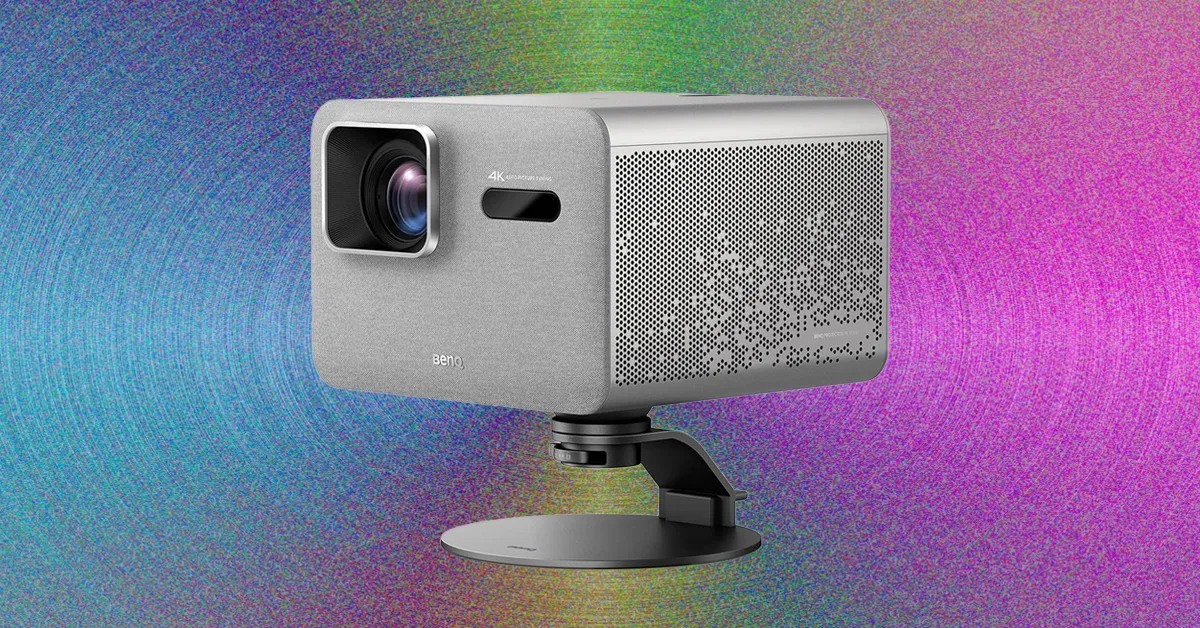
Home cinema projectors are all over the map in terms of price and performance. It’s often the case that you get what you pay for. High-end projectors that mimic what you see at the local cineplex can cost upwards of $6,000. On the lower end, you could easily pay less than $1,000 for a home projector, but you may sacrifice brightness, contrast, and color quality. Many of our favorite projectors sit somewhere in the middle in terms of price and quality. That is certainly true of the BenQ TK705STi short-throw projector.
The main cost-justifying reason to consider buying this 4K projector appeals to gamers, who will appreciate its low-latency performance and larger screen size. Once you see James Bond on a 12.5-foot screen while playing 007 First Light on Xbox, you’ll wonder why you didn’t make the upgrade sooner. Being a short-throw projector, it’s also nice to be able to operate the TK705STi in just about any room in your home. You can position it a few feet from a wall or across the room, allowing for great flexibility.
That said, the TK705STi is not for everyone. Movies and TV shows didn’t look that impressive using this projector—certainly not in comparison to the top-rated Leica Cine Play 1, which costs about twice the price. I also dealt with a few glitches with auto-keystoning; once I figured out how to manually adjust the screen, this was fine but still a pain.
Mainly, though, I recommend the TK705STi for gamers who don’t need high-end home-cinema picture quality, since the overall performance of this projector is just average.
The BenQ TK705STi is a short-throw projector that’s designed to sit close to the wall. The TK705STi has a throw ratio of .8:1, which means you divide the wall size by the short-throw percentage. To get a 10-foot-wide image, for example, you’d place the projector about 8 feet away, which is exactly what I did in my windowless test area. (Later, in a brightly lit family room with big windows, I increased the screen size to 12 feet wide by placing the projector 10 feet from a wall.)
After I put the projector in its spot, I noticed its legs were just a bit shaky. Not wobbly, but lacking the stability I would prefer for a midrange projector like this one. If I bumped the table, the projector would jostle around quite easily and even start auto-keystoning again—a feature I found to be finicky at best, often mapping incorrectly to the wall or screen. (For what it’s worth, BenQ reps said this is not normal and could have been related to my projector screen.)






Weekend Open Thread: Brooks Brothers


Grayscale Files For Worldcoin ETF, WLD Registers Sharp Rise


Sail Virtually Aboard The “Itanic” With IA-64 Emulator

Turtle Beach Command Series KB7 review: a nifty screen-equipped gaming keyboard


How a former Blue Peter presenter stunned America’s Got Talent judges


Unregistered fitter used Gas Safe logo on business flyers

New Jersey voter registration controversy explained: How 6,600 noncitizens got on the rolls, and what happens next

Johnny Depp’s R-Rated Gothic Cult Classic Gets New Release Ahead of Sydney Sweeney Remake


Watch Flock Safety CEO Garrett Langley discuss the future of surveillance at TechCrunch Disrupt 2026


Ethics, other provisions in crypto Clarity Act to be further discussed

Shanghai science forum photos show China’s AI and robotics advances in rivalry with US


Circle’s President Sold Over 360,000 Shares, The Filings Explain Why


Subway Sandwich Computers Get a Second Life as Gaming Machines

Commonwealth Games boxing: Jadumani Singh seals dominant 5-0 win over Pakistan’s Sumama Rehman to enter quarter-finals | Commonwealth Games News


The Peugeot Family: How 200 Years of an “Old Money” Dynasty Died in A Boardroom


2026 3M Open leaderboard: Scottie Scheffler finds putter in Round 1, sits three back


16 Dresses for the High Summer Event


Stephen Colbert Returns to Social Media After Late Show End


The 35 Best Board Games for Family Game Night


Andrew Cuomo joins OKX board as crypto exchange expands in U.S.
You must be logged in to post a comment Login