
TL;DR
AI tools now record conversations without announcing themselves, and users are bringing them to dates and personal chats



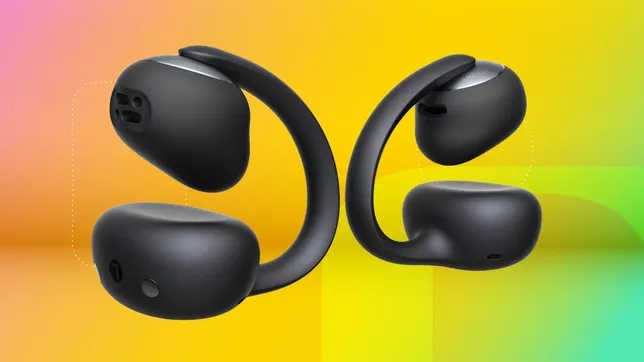

Not too long after the release of Bose’s premium-priced Ultra Open Earbuds, budget clip-on earbuds started appearing, and they sounded pretty mediocre and looked pretty cheap, too. But in the last several months, I’ve tested an increasing number of affordable versions of this new earring style of open true-wireless earbuds that sound surprisingly good. Case in point: Baseus’ Bowie MC2 buds, which list for $80 but can be had for $60 after you apply an instant $20-off coupon on their product page at Amazon or the company’s site.
Read more: The 6 Best Clip-On Earbuds I’ve Tested for 2026
The Bowie MC2 improves upon the earlier MC1 with superior sound and a design that’s a little less generic. (Don’t confuse it for the $10 cheaper MC2 Air buds, which are a slight step-down for sound and build quality.) They’re also a bit more comfortable, thanks to an upgraded “slim wave C-ring” and “air cushions” that come in three sizes.
Equipped with Bluetooth 6.0, they have an IP67 certification, which means the buds are fully waterproof and dustproof, making them suitable for runners and bikers. I also like that they have a small physical control button on each earbud to control playback and adjust volume. (You can customize the controls and adjust equalizer settings in the Baseus companion app.)
The Baseus Bowie MC2 are currently available in two color options: white or black.
The buds offer a bit better performance to the Bowie MC1 Pro. I felt they sounded a little cleaner with slightly bigger sound overall and less distortion at higher volumes. (The MC2 has slightly larger 11-millimeter drivers instead of the 10.8mm driver found in the MC1 Pro.)
The sound does change a bit depending on where you place the buds on your ears, with a little bit of adjustment yielding more bass. These buds, like other clip-on open buds, aren’t designed for critical listening. But what’s notable is that the sound is now respectable, with decent bass and treble response along with fairly natural-sounding mids (where voices live). Because they’re open earbuds — and they sound open, which is good — they do better in quieter environments because ambient sound will leak into your ears and compete with whatever you’re listening to.
The buds in their charging case. Battery life is rated at up to 11.5 hours.
As far as competing models go, Earfun has improved the sound of its Clip 2 earbuds from its original Clip buds. However, they didn’t fit my ears quite as well as the Baseus Bowie MC2 buds, and the sound ended up coming across as a little recessed (less open) by comparison because the driver sat further outside my ear canal. I also thought the MC2’s sound was noticeably cleaner overall, particularly at higher volumes. Also, the bass response was better to my ears. Again, some of these sound differences may have been affected by the fit, but I’d still rate the Baseus buds higher for sound quality. (I manually pushed the drivers closer to my ear canals to optimize the sound quality to try to eliminate fit as a variable as much as I could.)
While not quite in the same league as Bose’s Ultra Open Earbuds, Shokz’ Open Dots or Baseus’ own Inspire XC1 clip-on buds, they’re only a very small step down for sound quality but cost a lot less.
Like the MC1 Pro, these have support for the LDAC audio codec (along with AAC and SBC) for Android devices and multipoint Bluetooth pairing. A low-latency gaming mode is also available.
The buds from another angle.
Voice-calling capabilities are also good; like the MC1 Pro, they have two microphones per bud. Callers told me they heard only minimal background noise, while my voice sounded acceptably clear when I spoke to them from the noisy streets of New York.
As for battery life, the buds are rated for up to 11.5 hours at moderate volume levels with bass boost engaged. (Baseus markets this as Super Bass 3.0.) That’s superior battery life to a lot of noise-canceling earbuds, which are generally in the 6 to 8 hour range. I kept the bass boost on when I was listening to music and the volume around 60% to 70%, so I didn’t quite hit the 11.5-hour mark and registered closer to around 10 hours of playback.
Testing them in the streets of New York.
Baseus is quickly becoming a leader in value headphones and earbuds, and its Bowie MC2 buds are easily among the best budget clip-on earbuds I’ve tested as of June 2026. They cost around $60 at Amazon, and Baseus also throws in a bonus item with your purchase. As of this writing, you can get Baseus BP1 Pro noise-canceling buds, which are valued at $24. Baseus bonus items have a tendency to change over time, so that item may be different in the future or not available at all. But at the moment, getting an extra set of budget ANC earbuds with a set of top-value clip-on buds that exceeded my expectations is a pretty nice deal.

AI tools now record conversations without announcing themselves, and users are bringing them to dates and personal chats
A growing number of professionals have started using AI tools to record every conversation they have, and the people being recorded usually have no idea it is happening. The Wall Street Journal reported this week that apps like Granola, which transcribes meetings without deploying a visible bot or announcing its presence, have made ambient recording so frictionless that users are now bringing the technology out of conference rooms and into personal settings. The shift raises legal and ethical questions that neither the tools nor their users appear ready to answer.
Granola, which raised 125 million dollars earlier this year at a valuation of one and a half billion dollars, works by recording audio directly through the user’s device microphone rather than joining a call as a separate participant. That means no bot icon appears in the meeting and no automated message tells attendees they are being recorded. Michelle Lim, CEO of meeting software company Flint, told the Journal that she wishes Granola were running in every room she enters, a statement that captures both the appeal and the problem.
Some users have taken the concept well beyond the workplace, with Emmie Chang, founder of startup Yuzu Labs, telling the Journal she records first dates and sends the transcripts to Claude for feedback on how the conversation went. Others described recording therapy sessions, doctor visits, and casual dinners with friends, all without telling the other person. In the eleven US states that require all-party consent for recordings, including California, Florida, Illinois, and Pennsylvania, doing so without disclosure is a potential felony under state wiretapping laws.

The 💜 of EU tech
The latest rumblings from the EU tech scene, a story from our wise ol’ founder Boris, and some questionable AI art. It’s free, every week, in your inbox. Sign up now!
The workplace implications are already materialising. Amy Dufrane, CEO of the Human Resource Certification Institute, told the Associated Press that AI note-takers pose enormous organisational risk, arguing that companies should not use them at all. Reports have surfaced of AI notetakers remaining on video calls after employees have left, silently documenting informal conversation and gossip, and privacy law expert Alex Alben warned that automatic recording involving third parties creates liability that most users have not considered.
Researchers have raised a separate concern that goes beyond privacy, with studies on cognitive offloading finding a negative correlation between heavy AI use and critical thinking. The worry is not just that people are recording without consent, but that they are losing the ability to listen, remember, and process conversations on their own. As these tools become cheaper and more invisible, the question is no longer whether they will spread but whether anyone will bother to ask permission first.
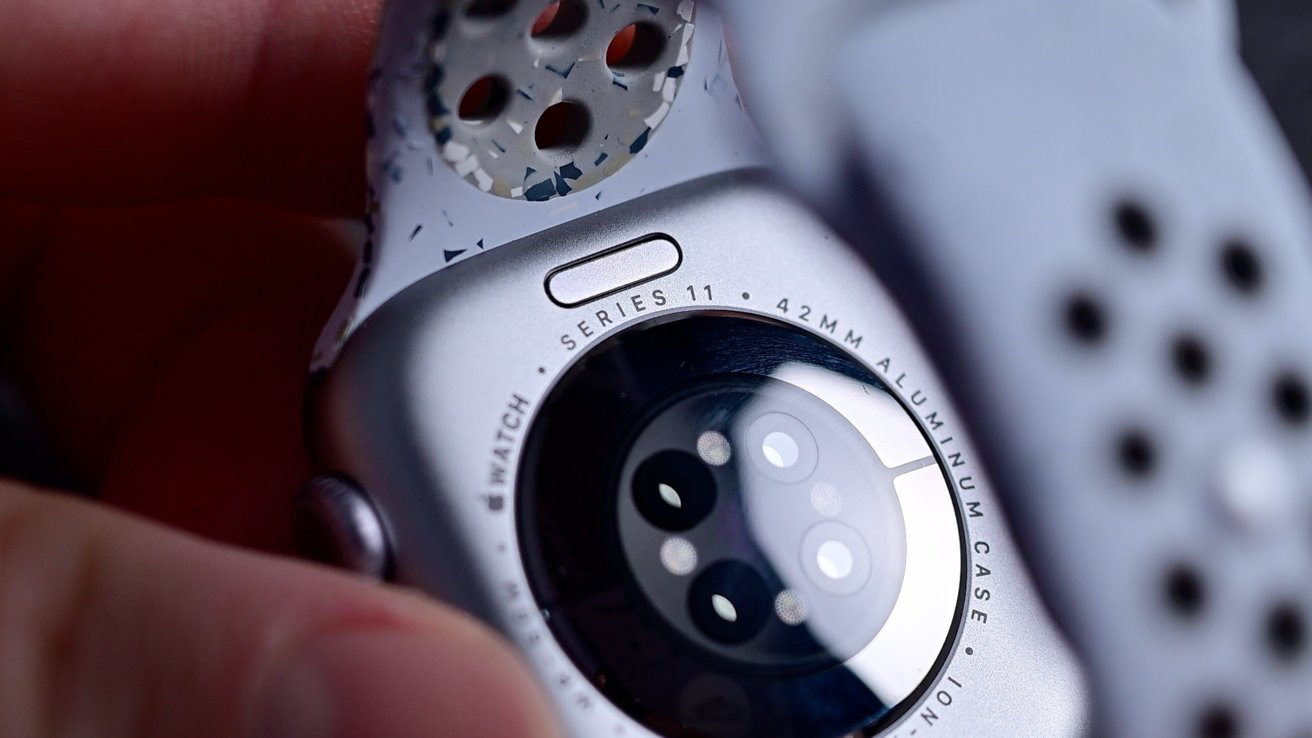
Amazon’s weekend Apple sale is going strong, with price drops of up to $150 off Apple Watch, AirTag, and iPad devices.

Save $100 on several Apple Watch Series 11 styles.
Apple Watch shoppers have plenty of reasons to take a look at Amazon, where several Series 11 styles are $100 off. The standout offer drops the 42mm GPS model to $299, within $20 of the lowest price on record.
46mm Apple Watch Series 11 deals

Get 4 AirTags for just $89 at Amazon.
Amazon’s weekend AirTag sale drops the 4-pack down to $89 after a 10% discount.
The second-generation AirTag tracker builds on the original design while adding hardware improvements aimed at helping users locate lost items from greater distances. And according to Amazon, the deal is selling fast.

Get an iPad 11 for $399 with month-end deals.
Amazon is also running discounts across Apple’s iPad line, with month-end deals delivering prices as low as $399.
A new memory cartoon is waiting for me. When I open the app, I see a multipanel strip called Big Little Moments. It appears as soon as I plug the Looki AI device back in to recharge, after almost a month not wearing it. It shows moments of me at a bar with my friend in LA, watching a stage presentation, eating a meal, seeing a demo, two women sitting across from me and then just me, walking with a phone in my hand.
These moments are from two days in June, when I wore the Looki to the Augmented World Expo in Long Beach, California. I’d been wearing it almost nonstop since April. I wore it to Apple’s WWDC, to Google I/O. I wore it to my Princeton college reunion. I wore it at home and commuting. And then I stopped.
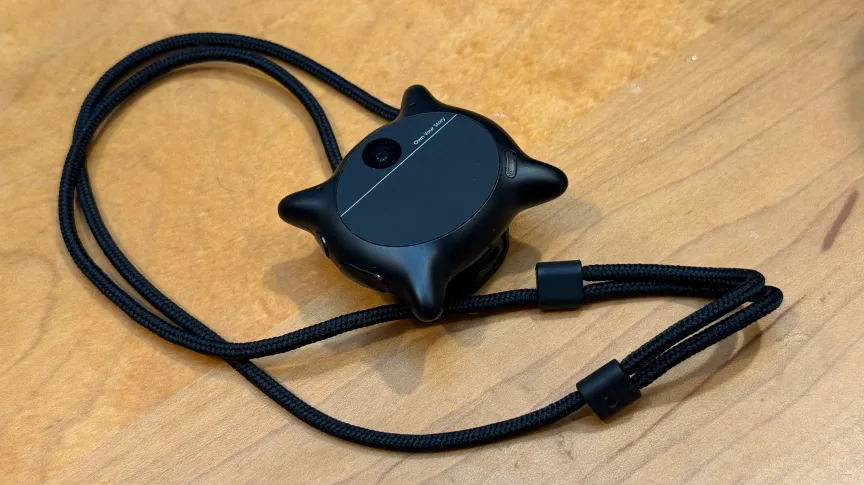
The Looki L1 is a little black pendant, sort of watch-sized, with a camera on the front and microphones hidden somewhere. It has a clip and a lanyard. It can be worn around the neck or left propped on a desk. It’s an AI wearable but, unlike smart glasses, it has a battery that can run a whole day while intermittently recording audio and video clips. My colleague Katie Collins tried it last year, but I never got to test one out until this spring and summer.

AI wearables of all shapes and forms are everywhere now. OpenAI may be next to offer one. Some of these devices come in glasses form. Some are pendants. Some are pins. Some are earbuds. As AI keeps spreading everywhere and trying to absorb more of our personal information that it can craft into patterns and narratives, wearables are the physical form of trying to give AI eyes, ears and, increasingly, memories of your own life.
Everyone feels wary of smart glasses lately, because of the outer-facing cameras, tech’s pushy AI relentlessness and Meta’s poor reputation for privacy. When I tell people I’m wearing Meta Ray-Bans, they tend to ask me, “Is it recording me now?” I say no, then point to the Looki around my neck. “But this probably is.”
The Looki device follows in a long line of lifelogging wearables that go back over a decade. In 2014, I reviewed an occasionally recording lifelogging camera called the Narrative Clip, which promised to capture our memories. I found its memory, in practice, to be full of holes. In 2026, that’s pretty much still the case.
The Looki L1 promises a fun way to remember and record life’s moments, to have a companion to travel with you and save moments without having to record them. To be an all-day wearable camera.
But when I wore one, it made me feel awkward, like I was being a jerk or a spy. At best, it’s odd; at worst, it feels like I’m a guy with, well, an always-on camera. Which, in 2026, isn’t nearly as “fun” as it was in 2014, it turns out. I tested the Looki because I was curious, and because I’m legitimately interested in the future of assisted memory tech.
Looki L1 is an odd duck product, as many AI wearables are. The $250 lifelogging camera has no subscription, although the product team I chatted with suggested that some services could be subscription-based down the road. It uses its own proprietary AI service, and can’t hook into any other platforms such as Google Gemini, ChatGPT or Anthropic’s Claude, although it borrows models from several sources.
I do like the snap-on magnetic pendant strap that doubles as a charging dongle and can serve as a desktop stand if you want to perch it somewhere to take photos or video. The magnetic clasp works through clothing, too, so the pendant could look like a clip-on pin. But I don’t like that the Looki’s active recording LEDs are small. They’re less noticeable than those on Meta’s glasses by far.
There’s a phone app that the Looki pairs with, just as a smartwatch or pair of smart glasses would. That’s how the pendant gets its firmware updates and uploads its recorded clips to your phone and the cloud.

Looki has an “AI Mode” that stays on and intermittently records short video clips (no more than about 5 seconds each), apparently picking moments of interest. In my three months of use, it didn’t seem to have any pattern. There are dedicated buttons to trigger manual audio recordings, still photos or video recordings. There’s also a front touchpad, which I could hold down to summon a voice AI to chat with for feedback on what I’d recorded, or anything else. I rarely used it.
The Qualcomm chip on the Looki is an older watch-oriented model, but it still lasts a day on a charge. The future for pendants like these is likely even longer battery life, based on the specs of Qualcomm’s newest AI-optimized chips, released this year. These types of pendants are probably going to do even more on-device without relying on the cloud at all.
But, for the most part, the Looki is a repository. It sucks up images and videos, and then syncs them over to its companion phone app (which takes several minutes) and cloud-analyzes them later (which can take up to several hours). It’s like burying a time capsule and then digging it up later that day to see what you’ve got.
And what did I get? Mostly a hot, sometimes fascinating, often awkward mess.

The best thing the Looki does is generate comic book-like generative AI images based on things it automatically captures. The results vary in style and structure, with absolutely no discrete controls to make anything turn into a comic if you’d like it to. You just have to get lucky, I guess.
A few images of people I met, comic-transformed, are fun. A few story panel-type comics tried to distill a day, or several days, into a narrative. Sometimes they were clever (one, a map of New York and New Jersey showing me commuting, seeing tech demos and going to a Princeton reunion) felt sharable. One, of my trip to WWDC, was weirdly focused on my pre-event breakfast with my colleague Bridget Carey rather than all the hours I wore it during Apple’s keynote, which was the whole point of the day.
Sometimes the Looki auto-inserted me into images, inventing a narrative. (Since I’m wearing the pendant, I was clearly not in the picture.) My comic portrait ranged from oddly accurate to something more like Marc Maron. One comic picture of me buying a coffee at a Hyatt was inexplicably done in Minecraft-style blocks.

As for the rest of the recorded memories? There are AI-made supercuts of videos, set to odd preselected music. The tone often felt generic, and the captured videos are frequently at bad angles. When I had coffee with friends, several of the clips were accidental crotch shots. Other times, faces were cut out of the picture. (Did I need to wear the pendant higher up?)
The Looki seems to take video clips but not photos automatically, which were harder to download and share with friends. Also, a lot of the captured clips were either too brief or the people in them were discussing things that nobody approved sharing in the first place. If you’re wearing a Looki, prepare to do a lot of warning, explaining and apologizing.
Do I like having them to look over? Sort of, but so few are actually good. You can just take photos and videos when you want, rather than having the intermittently recording AI mode on. But then, if you do that, the device doesn’t feel like a true lifelog.
Sadly, a lot of the captured supercuts just showed me on my phone. Which, of course, just illustrated a sad state of my own life. I am on my phone a hell of a lot. Too much. And the comics, the autocaptures, they all tended to have at least one shot capturing me looking at my phone, since the pendant was around my neck, over and over and over.
Besides keeping these lifelog videos and autocaptures and creating comic strips, it weirdly tries to analyze meals I’ve eaten (not to any true success), and also pops occasional random notifications based on location, I think, and what the camera sees. These notifications are meant to be smart and context-aware. Sometimes they’re oddly on point (telling me I’m at AWE and reminding me of the start of the opening keynote, even though I never told it I was at AWE). Other times it just noted a store or maybe someone standing nearby. Again, like everything else the Looki does, these notifications can’t be customized at all.

My son has told me to take off the Looki pendant more times than I can count. My wife shamed me about my decision to wear it in a Japanese supermarket (I didn’t). People who saw it at public events, like WWDC or Google I/O, were either mildly curious or mildly offput. I awkwardly took it off a lot and stuck it in my pocket on trains, in bathrooms and, increasingly, many other places.
At a Whole Foods, someone next to me noticed it as I was shopping for chocolate bars and asked if it was recording. I explained it might be and that I test tech products for my job. They said they weren’t that upset, they knew that people are wearing cameras more and more. I didn’t believe they weren’t upset. And that reaction, too, has stuck with me. I wear smart glasses at least half the time now. Where does that put me on the socially acceptable spectrum? Don’t tell me.
I still find smart glasses less personally embarrassing, because they look and function like actual glasses. And, in reality, Meta’s glasses very infrequently record anything. While Meta has an autocapture mode for the glasses now, running it would wear out the battery fast.
The Looki, meanwhile, does nothing at all except be a AI-enabled camera pendant on your neck. To remember to charge that up and wear it, like an odd necklace that nobody asked for… I just can’t justify it. I made myself wear it for more weeks than I thought I would. Now, it’s out of batteries and sitting in a bag somewhere. I gave up.

The Looki was really just my Memory Cartoon Generator, for the most part, as you can see from all the images I shared. They’re interesting, but I can’t choose when they happen, or how they happen. And they’re not enough to keep me wearing the Looki. As you can see above, sometimes it even captured when I went to my home bathroom. (I never kept it on in an actual public bathroom, but this is exactly the nightmare stuff that the Looki embodies.)
If devices like the Looki could be actual memory assistants, deeply aware and able to help see and guide you — Or, if they were better cameras, taking photos I’d actually use — Or, if it could hook into AI services I actually semi-trusted and recognized — well, maybe. Right now, the Looki is more like a harbinger. Of glasses that really and truly will have longer battery life, someday soon, and be able to record all day long, if intermittently. And more AI pendants.
When that day happens, then yes, maybe my glasses will truly be recording all the time. And yes, that’s concerning. But even more concerning is the lack of any tech company efforts to manage privacy and deeper control over these random AI wearables. Or to elevate them beyond just gimmicks.
What I learned is I hit my limit. The Looki is not on me anymore. But the spirit of the Looki is everywhere else, coming fast.

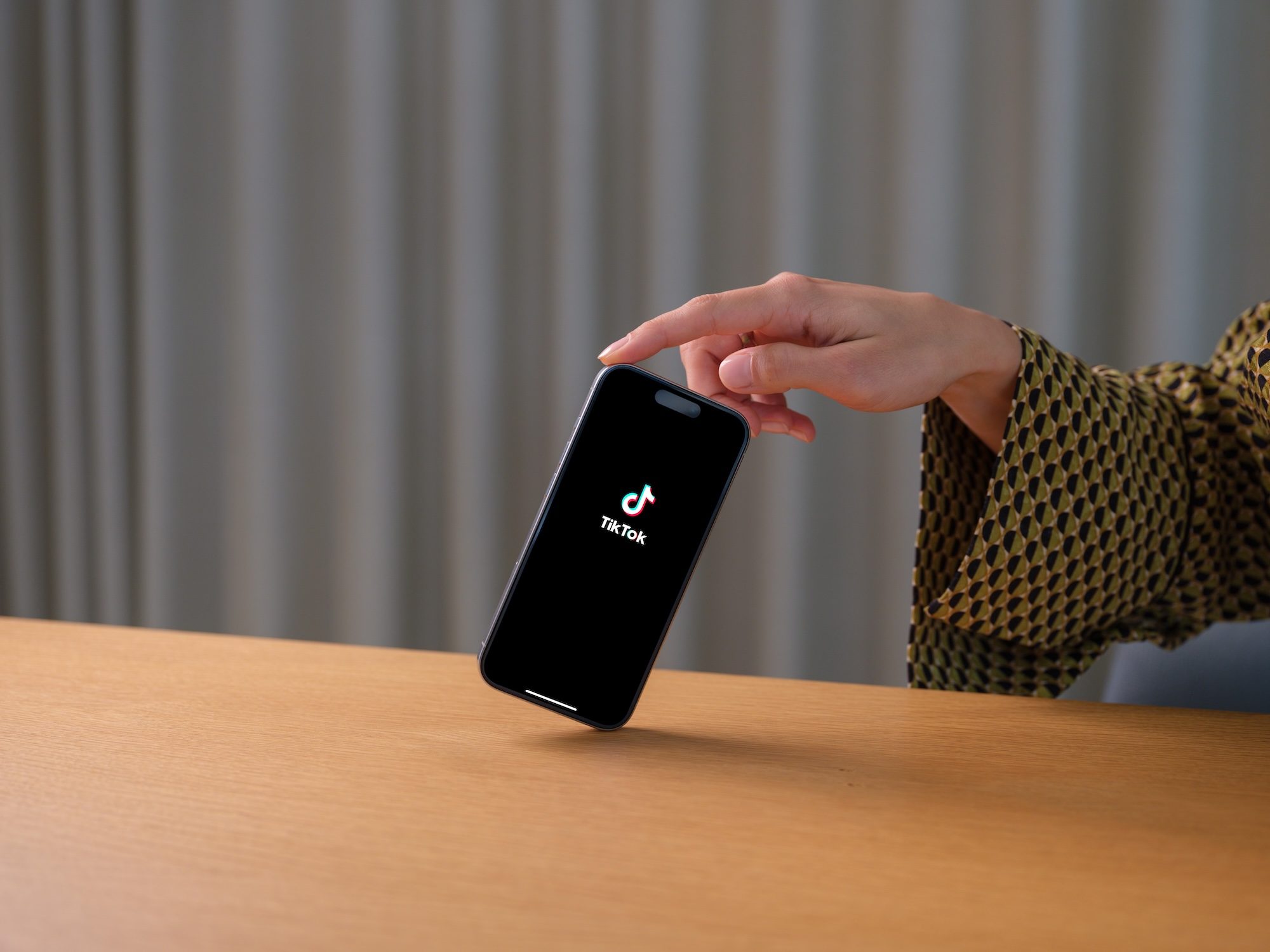
The European Commission has accused TikTok of falling short on protecting minors, saying the platform’s current account settings don’t meet the child safety standards required under the Digital Services Act (DSA). The findings are preliminary, but if upheld, TikTok could face a fine of up to 6% of its global annual revenue.
According to the Commission, TikTok allows minors to set their accounts to public, making their content visible to anyone — including people without a TikTok account. Regulators also say that content posted by older teenagers (aged 16 and 17) can still be recommended to other users through the For You feed, increasing the risk of unwanted contact, cyberbullying, or exploitation.

The Commission argues that stronger privacy protections for children should be enabled by default, rather than relying on users to change their settings manually. It also wants content from minors’ public accounts to be visible only to approved TikTok followers instead of being accessible to a broader audience, while recommending that minors’ content should not appear in the For You feed for other users.
EU Executive Vice-President for Tech Sovereignty, Security and Democracy Henna Virkkunen said protecting minors online should never be optional, adding that platforms are expected to build child safety into their services by design rather than offering it as an opt-in feature.
TikTok has pushed back against the findings, saying it shares the Commission’s goal of protecting young users and already offers more than 50 privacy and safety features for teens. As reported by Reuters, the company notes that accounts for users under 18 are private by default, while younger teens cannot use direct messaging and their content is not recommended in the For You feed. TikTok says it will review the Commission’s findings and continue working with regulators before a final decision is reached.
The Commission’s announcement represents preliminary findings, meaning TikTok now has the opportunity to formally respond before the EU decides whether the company has violated the DSA. If regulators remain unconvinced, they could issue a non-compliance decision along with financial penalties. The investigation is one of several ongoing DSA probes into TikTok as European regulators continue tightening oversight of how large social media platforms protect younger users online
Canon registered three new EOS R cameras. Rumours point to a retro-styled R8 II (digital AE-1), an R7 II with Canon’s first stacked APS-C sensor, and an R10 II. All expected H2 2026.
Canon has registered three new cameras with wireless certification agencies, a step that typically signals imminent announcements. Rumours point to updates across Canon’s mid-range mirrorless lineup: the EOS R8 II, EOS R7 II, and EOS R10 II. All three are expected in the second half of 2026. The most interesting is the R8 II, which may arrive in mid-September with retro styling inspired by the Canon AE-1, a legendary 1976 film SLR that turns 50 this year.
The AE-1 was one of the most popular cameras ever made, beloved by amateur photographers for its accessible design. Nikon already proved the retro-digital formula works with the Zf, and Canon has reportedly been working on a similar concept for years. The rumoured R8 II specs include a 32.5MP full-frame sensor, 40fps electronic shutter burst, in-body image stabilisation, oversampled 4K video, and two SD card slots, up from one on the original R8. Whether the retro styling is cosmetic or extends to film-style image processing modes remains unclear.
The EOS R7 II may be more significant technically. It is rumoured to feature Canon’s first stacked APS-C sensor, a design that moves circuitry behind the sensor for faster readout, enabling higher burst speeds and blackout-free viewfinder shooting. Currently, only Fujifilm’s X-H2S offers a stacked APS-C sensor. Resolution may increase from 32.5MP to 39MP. The EOS R10 II, Canon’s beginner model, is expected with improved autofocus and a deeper burst buffer but fewer dramatic changes.
The 💜 of EU tech
The latest rumblings from the EU tech scene, a story from our wise ol’ founder Boris, and some questionable AI art. It’s free, every week, in your inbox. Sign up now!
None of this is confirmed. Canon has not announced anything beyond the wireless certifications. The memory crisis has pushed component costs higher across consumer electronics, and Canon’s ability to price these cameras competitively will depend on how much the DRAM shortage has affected sensor and processing costs. Apple raised iPhone 17 prices 10% in Japan due to currency and component pressure, and camera manufacturers face the same headwinds. Three registrations in one batch suggests Canon is planning a coordinated launch, not a staggered rollout. The AE-1 anniversary gives them until the end of the year to make it count.

Electrolyte powders, dissolvable tablets, and trendy ready-to-drink waters have graduated from the pockets of athletes to one of wellness’s buzziest categories.
And it’s a crowded market, worth an estimated $39 billion globally in 2025 and forecast to double within the next decade. Much of the growth has been fueled by wellness trends and influencer-fronted hype cycles, like Prime Hydration, created by YouTubers Logan Paul and KSI, which the company claimed pushed past $1 billion in sales in a single year. In other internet corners, dozens of celebrity and podcaster-adjacent brands are all promising a means of optimizing your way to hydration.
These products are marketed as daily essentials for everyone—from office workers to gym regulars—promising to combat brain fog, improve skin, banish fatigue, and aid recovery. Here’s everything you need to know about the electrolyte obsession, and when these products are actually worth buying.
Electrolytes are essential minerals, among them sodium, potassium, calcium, magnesium, and chloride, that carry an electrical charge once dissolved in fluid. That charge is what lets the body do much of its basic work, such as helping muscles and nerves work correctly. They work to ensure fluid stays balanced inside and outside every cell, as a serious imbalance can cause headaches, muscle cramps, dizziness, fatigue, and weakness. In more serious cases, severe electrolyte imbalances can interfere with heart function and require medical treatment.
For most healthy adults, the body has been regulating electrolyte levels perfectly well long before trendy, flavored hydration sticks landed on supermarket shelves. In fact, if you eat a reasonably balanced diet and drink water when you’re thirsty, there’s a good chance you’re already getting everything you need.
The sachet earns its place in roughly three situations. Studies from the American College of Sports Medicine suggest that water alone is sufficient for exercise lasting less than an hour, but electrolytes become increasingly useful during longer sessions of prolonged, sweat-heavy exercise, particularly in high temperatures or humidity. They’re also useful for illness involving heavy fluid loss, which is why oral rehydration salts are a recognized medical treatment rather than a wellness trend. And you should also consider them during long stretches of fasting, when the food that usually supplies these minerals is absent.
There are many sources of electrolytes in everyday foods. If you’re eating a reasonably varied diet (fruits, vegetables, lean protein, whole grains, nuts, seeds), your electrolyte stores are continually being topped up without the need for specialist drinks or powders.
Research by the Beverage Hydration Index shows that milk-based drinks can maintain hydration for longer than plain water. The combination of protein, natural electrolytes and small amounts of fat slows the rate at which fluid leaves the stomach, helping the body retain hydration for longer. Coconut water too can replenish potassium.
The Nutrition Source from Harvard’s School of Public Health notes that, essentially, “any beverage containing electrolyte minerals may be labeled an electrolyte drink. Some are very costly yet only contain a small amount of these nutrients, while others may contain a high amount of only one nutrient such as potassium or sodium.”
For healthy adults, an occasional electrolyte drink is unlikely to cause harm. Daily consumption, however, can sometimes be counterproductive.
Many electrolyte products contain significant amounts of sodium, despite the fact that most populations already consume considerably more salt than recommended. The World Health Organization estimates the global average of sodium intake a day is more than double its recommended limit and roughly 1.89 million deaths a year can be linked to excess intake. Regularly adding extra sodium may not be ideal for anyone managing high blood pressure or cardiovascular risk. Some formulations also contain substantial amounts of added sugar, making them nutritionally closer to soft drinks than health products.
Anyone recovering from illness or sweating through an August shift outdoors has a fair case for supplementing. For everyone else, the best approach to hydration remains an unremarkable one. Electrolytes themselves are nonnegotiable. Electrolyte products are mostly just a lifestyle purchase.
This story originally appeared on WIRED Middle East.
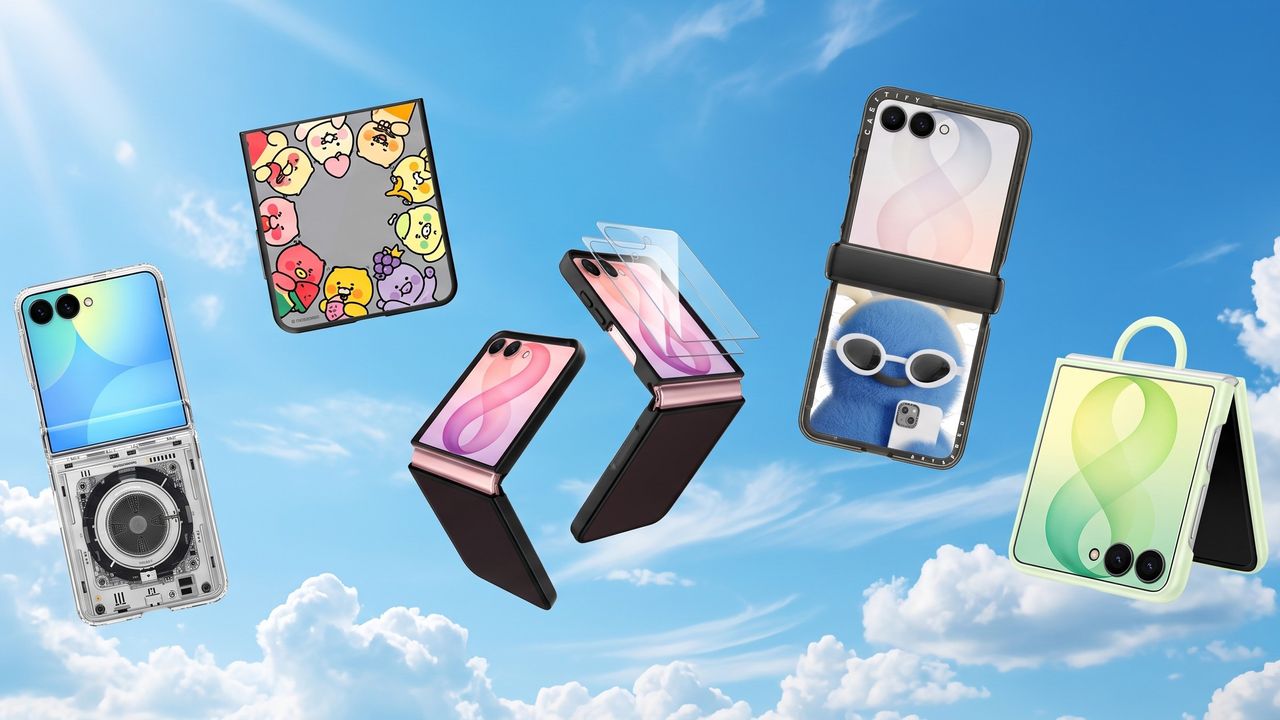
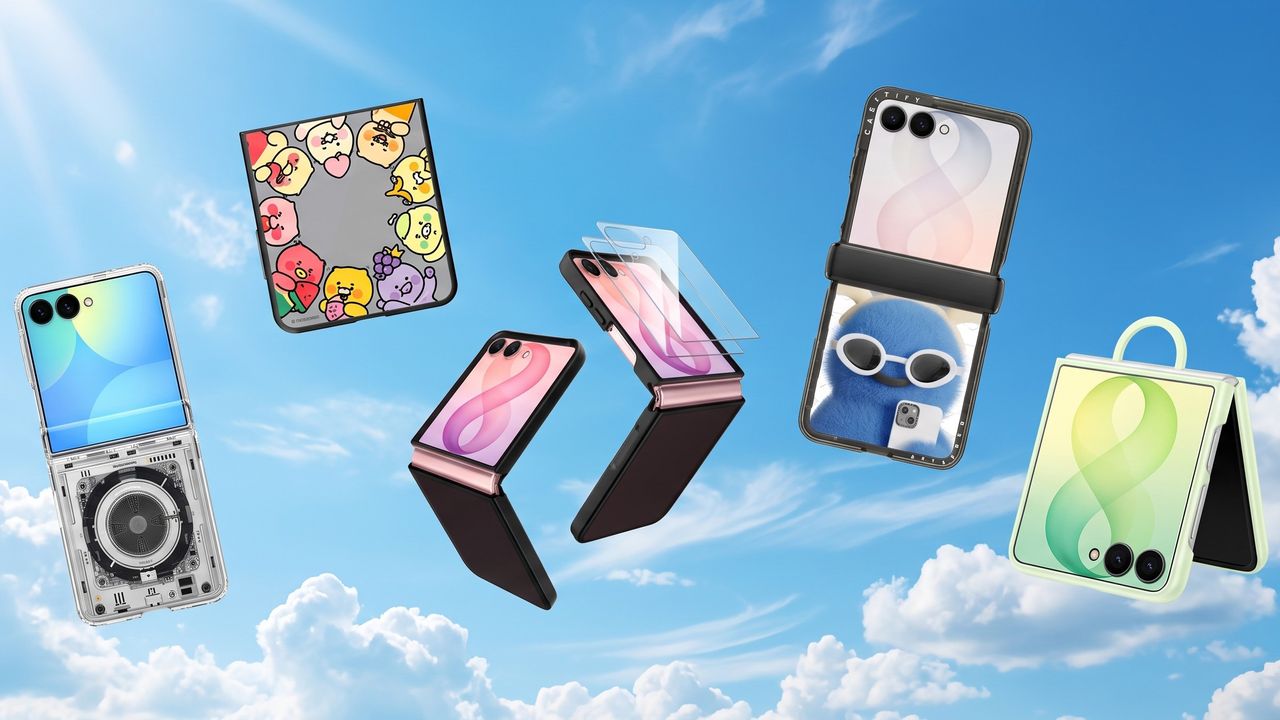
Samsung Galaxy Unpacked took place earlier in the week, and amongst the key launches we the got a look at a brand new compact foldable: the Samsung Galaxy Z Flip 8. This clamshell phone is Samsung’s slimmest and lightest Flip yet, measuring just 6.1mm thick when folded, and weighing in at 180g.
Preorders are open now, and if you’ve decided this is the phone for you, now’s a great time to get a case sorted. Below, I’ve rounded up a selection of my favorites in the US and in the UK. I’ve focused on reputable brands like Otterbox, Spigen and Casetify, alongside Samsung’s official offerings, but I’ve also mixed in a handful of Amazon options for those seeking something cheaper. As a relatively niche launch, there isn’t the usual glut of cases to choose from, but I was pleasantly surprised to see a decent range available.
When making your selection, keep in mind what you need from a case. Do you want the toughest case, with reinforced corners, to keep your foldable safe from bumps and scratches? Are you seeking a fun designs that lets you express some personality? Or do you need something minimalist that lets the phone itself take center stage? I’ve also included a number of MagSafe options.
Scroll down to browse my favorite Samsung Galaxy Z Flip 8 cases and covers, to keep your new clamshell safe and looking great.

Politico reports that in the Virginia area alone there’s dozens of data center projects “that altogether need 70 gigawatts of power — equivalent to 70 nuclear plants” — currently seeking connection to their grid. But there’s also concerns about a Virginia data center powered with natural gas and backup diesel generators:
When Virginia’s top environmental regulator received an analysis warning of data center pollution, it took him less than five minutes to forward it to seven people on his staff… Internal emails obtained by POLITICO through a public records request paint a portrait of an agency that moved quickly to defend the only data center in Virginia that is powering itself — in what former officials and environmental health advocates described as an unusual effort to shape the debate around an industry whose global epicenter is in the state. The agency’s pushback focused on the report’s findings that the facility in Loudoun County could release harmful amounts of air pollution through eight bus-sized natural gas turbines — as allowed by permits granted by the Department of Environmental Quality [DEQ] itself… The request comes as data centers are devising new ways to produce their own power as a way to temper growing public discord over rising electricity prices amid the AI construction boom.
Virginia has more than 600 data centers. The report [commissioned by Virginia’s 54-year-old environmental nonprofit Piedmont Environmental Council] raised concerns that the data center’s on-site power system, which also includes dozens of backup diesel generators, could cause tens of millions of dollars in health damages to people living around the facility, owned by Vantage Data Centers… [The analysis also argued the pollution could lead to 3.4 to 6.5 premature deaths annually.] People living near the Vantage facility in Sterling say its natural gas turbines produce constant noise and air pollution. The permits for Vantage issued by DEQ in 2023 allow cumulative emissions of seven different pollutants, including 95 tons per year of nitrogen oxides and more than 56 tons of soot. Both contribute to asthma and heart attacks.
Those figures are in line with other state permits for minor sources of pollution, but DEQ’s permits for Vantage have sparked local concerns because of the facility’s location in a residential area… [Viriginia environmental quality officials] raised questions about whether the report wrongly described the facility’s potential air pollution as dangerous, when soot levels in Loudoun County are deemed acceptable by America’s Environmental Protection Agency (EPA). Health experts, including former EPA air quality official Michael Korber, told POLITICO that soot pollution can negatively affect human health even at EPA-approved levels. The World Health Organization’s standard for ambient soot pollution is nearly half of what EPA suggests is safe.
Some current and former staffers on Virginia’s Department of Environmental Quality believe it’s inappropriate for the agency to issue aggressive statements on the healthfulness of the data centers, with one former department leader saying Virginia’s DEQ “is not the health department.”
I’ve been following the Minimal Phone since its initial crowdfunding days. The first iteration had the right idea trapped inside the wrong body, I’d say. Plastic build, no 5G, an underwhelming camera, and e-paper ghosting that frustrated early adopters; all these issues kept the phone from reaching a wider audience.
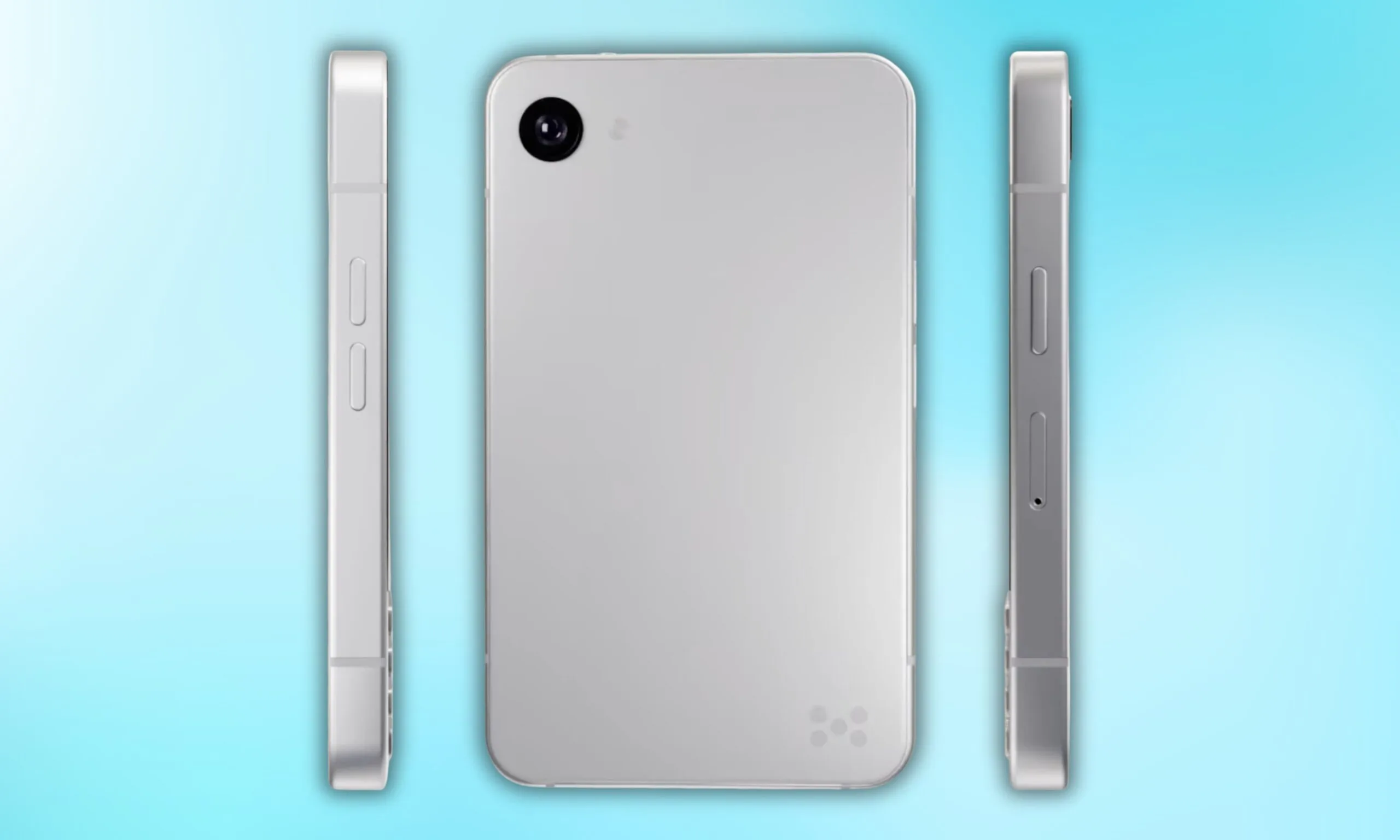
Now, founder Armen Youssefian has posted what appears to be a 360-degree render of the Minimal Phone 2 on X, and from what I can see, the team has done its homework.
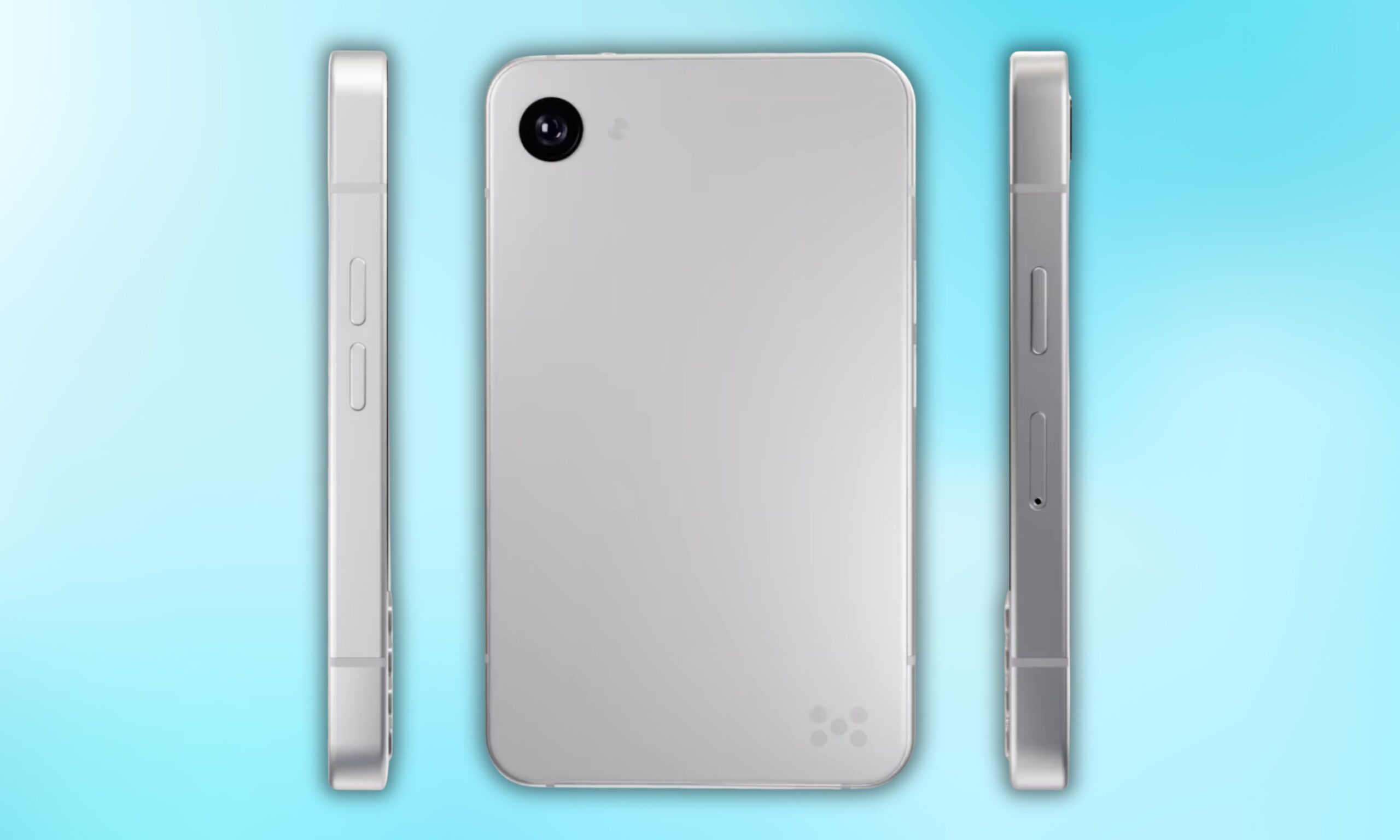
Quite a bit, actually. The phone will be available in two colors: a clean silver and a matte black. To me, the MP02 immediately looks like a more premium device. The rounded corners and the polished metallic frame running around the display give it that iPhone 5s energy, though it’s a bit wider.
Flip it over, and you get a minimal back panel with a single camera and the Minimal Company’s signature dot logo at the bottom right. No camera bump, no cluttered array, just clean, intentional design.
Up front, the iconic full QWERTY keyboard returns, which is visibly refined from the original’s 35-key layout. The keyboard section appears to sit in a slightly recessed area, which yet again reminds me of another classic: the BlackBerry phones.
Minimal Company’s co-founder Andre Youssefian also teased the next Minimal Phone on X, calling it the “world’s smallest 5G QWERTY physical keyboard phone.” That confirms the arrival of 5G cellular connectivity on the device, one of the biggest complaints surrounding the original model.
However, neither co-founder has revealed any other specifications of the Minimal Phone 2 yet. An early-access waitlist is live on the company’s official website; that’s currently the only concrete commitment the company has made, though. That’s why I’d move ahead with cautious optimism.
What Minimal Phone 2 could do differently is bring genuine Android utility to that space in a premium package. I’d say that the design ambition is there, but it will be the specs that decide whether the execution follows.

Also high on list of reasons to buy the Mission 1 Pro is that, in my experience, when properly color graded, footage from the Mission 1 Pro pairs seamlessly with footage from any other camera. This is especially true in good light, but overall the look of footage is leaps and bounds beyond the Hero 13. Some combination of the bigger sensor, better lens, 10-bit GP-Log2, and higher bit rate leads to more cinematic looking footage than I’ve seen coming out of an action camera.
Other great improvements include support for fast charging. You can get to 80 percent in about 20 minutes, fully charged in just over 30 minutes. Battery life is great too, I managed about 3 hours shooting 4K 24fps. I was also impressed to see that the battery itself, while bigger, is backwards compatible with the Hero 13 and vice versa, which is a nice touch if you happen to have quite a few extra batteries lying around (and let’s be honest, what GoPro user doesn’t).
The low light performance is also a highlight. I don’t need a camera that sees in the dark, but it’s nice to be able to shoot in twilight and get usable results. For all the ballyhoo about how bad low light performance is in older GoPros, I never found it all that limiting, but if you did, the Mission 1 Pro is your camera. I’m happy to report that GoPro has exercised considerable restraint with the new Low Light mode, there is none of the heavy processing and weird artifacts that often plague low-light modes.
Out of the box with the default color profile the Low Light mode in the Mission 1 Pro most closely matches with you get from the Insta360 Ace Pro 2, which is really solid. But don’t forget that the real power of the Mission 1 Pro comes from shooting GP-Log. When you do that in low light, and then color grade yourself, the results are better than any other action camera I’ve tried. My one gripe is that you can’t control noise reduction in Low Light mode.
There’s way too much to cover in a short review like this, but it’s worth saying that audio is improved, with more mics, the rear screen is slightly bigger, and the settings menus are more extensive and easier to customize. It’s also worth calling out that GoPro Lab has alternative firmware for the Mission 1 Pro, which enables quite a few interesting features, including up to 300 Mbps video.

Photograph: Scott Gilbertson
To get the most out of the Mission 1 Pro you’re going to want to post process your video. It needs to be edited and color graded to pull the most value out of what you can shoot with the Mission 1 Pro. This makes perfect sense given that it’s partly aimed at pro filmmakers who are naturally going to edit and color grade their footage. If you go this route, you will end up with better looking movies than what you’ll get from any other action camera. The downside is that this is a lot of work. I’ve joked in quite a few WIRED guides that I have a massive amount of video footage sitting on hard drives waiting for me to edit it. I really do, and I still haven’t got around to editing it.





Weekend Open Thread: Brooks Brothers


Democrats look to World Cup watch parties to register thousands of voters


Big Money Is Entering XRP


Sail Virtually Aboard The “Itanic” With IA-64 Emulator

Turtle Beach Command Series KB7 review: a nifty screen-equipped gaming keyboard


Grayscale Files For Worldcoin ETF, WLD Registers Sharp Rise


Unregistered fitter used Gas Safe logo on business flyers

New Jersey voter registration controversy explained: How 6,600 noncitizens got on the rolls, and what happens next

Johnny Depp’s R-Rated Gothic Cult Classic Gets New Release Ahead of Sydney Sweeney Remake


Ethics, other provisions in crypto Clarity Act to be further discussed


Watch Flock Safety CEO Garrett Langley discuss the future of surveillance at TechCrunch Disrupt 2026

Shanghai science forum photos show China’s AI and robotics advances in rivalry with US


Circle’s President Sold Over 360,000 Shares, The Filings Explain Why


Subway Sandwich Computers Get a Second Life as Gaming Machines


2026 3M Open leaderboard: Scottie Scheffler finds putter in Round 1, sits three back


The Peugeot Family: How 200 Years of an “Old Money” Dynasty Died in A Boardroom


16 Dresses for the High Summer Event


The 35 Best Board Games for Family Game Night


How To Use Claude’s Reflect Dashboard And Learn When It’s Time To Touch Grass


Stephen Colbert Returns to Social Media After Late Show End


You must be logged in to post a comment Login