TL;DR
Depthfirst’s AI agent found 21 FFmpeg zero-days for $1,000. Chrome 149 patched a record 429 bugs. AI is flooding defenders with more bugs than they can handle.



Depthfirst’s AI agent found 21 FFmpeg zero-days for $1,000. Chrome 149 patched a record 429 bugs. AI is flooding defenders with more bugs than they can handle.
A security startup’s autonomous AI agent found 21 previously unknown vulnerabilities in FFmpeg, the open-source media library embedded in almost everything that touches video. The startup, depthfirst, says the run cost roughly $1,000 in compute. Some of the bugs had been hiding in the codebase for more than 20 years.
Days later, Google shipped Chrome 149 with patches for 429 security bugs, the most ever in a single browser release. Over 100 are critical or high severity. The two events arrived independently, but they point in the same direction: AI is finding vulnerabilities faster than humans can fix them.
Depthfirst’s agent scanned FFmpeg’s roughly 1.5 million lines of C and produced a reproducible proof-of-concept for each of the 21 zero-days. Most are heap or stack overflows in parsers and demuxers, spanning components from the TS demuxer to the VP9 decoder. One stack overflow in the service-description-table code dates to 2003.
Nine already carry CVE identifiers (CVE-2026-39210 through CVE-2026-39218). The rest have been fixed upstream but not yet numbered. Depthfirst has published proof-of-concept code.
FFmpeg is not new to AI-driven bug hunting. Google’s Big Sleep agent reported a run of FFmpeg bugs last year. Anthropic’s Mythos model pulled a 16-year-old H.264 flaw and others out of FFmpeg for about $10,000. Depthfirst claims to have done comparable work at a tenth of the cost.
Chrome 149’s record haul is a different story. Google has not attributed the 429 vulnerabilities to AI. But the company overhauled its bug bounty programme in April after a flood of AI-generated submissions, now asking researchers for concise reproducers instead of the long writeups AI tends to produce.
The worst bug, CVE-2026-10881, scores 9.6 on the CVSS scale. It is an out-of-bounds read and write in the ANGLE graphics engine that lets a crafted page escape Chrome’s sandbox and run code on the host. Google paid $97,000 for the report. Of the 22 critical bugs, 19 were found internally.
The pattern keeps repeating. An autonomous tool recently found an authenticated remote code execution flaw in Redis that had gone unnoticed for over two years. A February study showed an AI agent could reproduce working exploits for more than half of 100 real Linux kernel bugs, beating traditional fuzzing.
The hard problem is shifting. Finding these bugs has become cheap. Triaging the reports, shipping the fixes, and getting them installed has not. Much of that work still falls on volunteers and a thin layer of human triagers now expected to keep pace with machines. Mozilla patched 271 Firefox vulnerabilities found by Mythos in a single pass. The question is no longer whether AI can find the bugs. It is whether anyone can fix them fast enough.
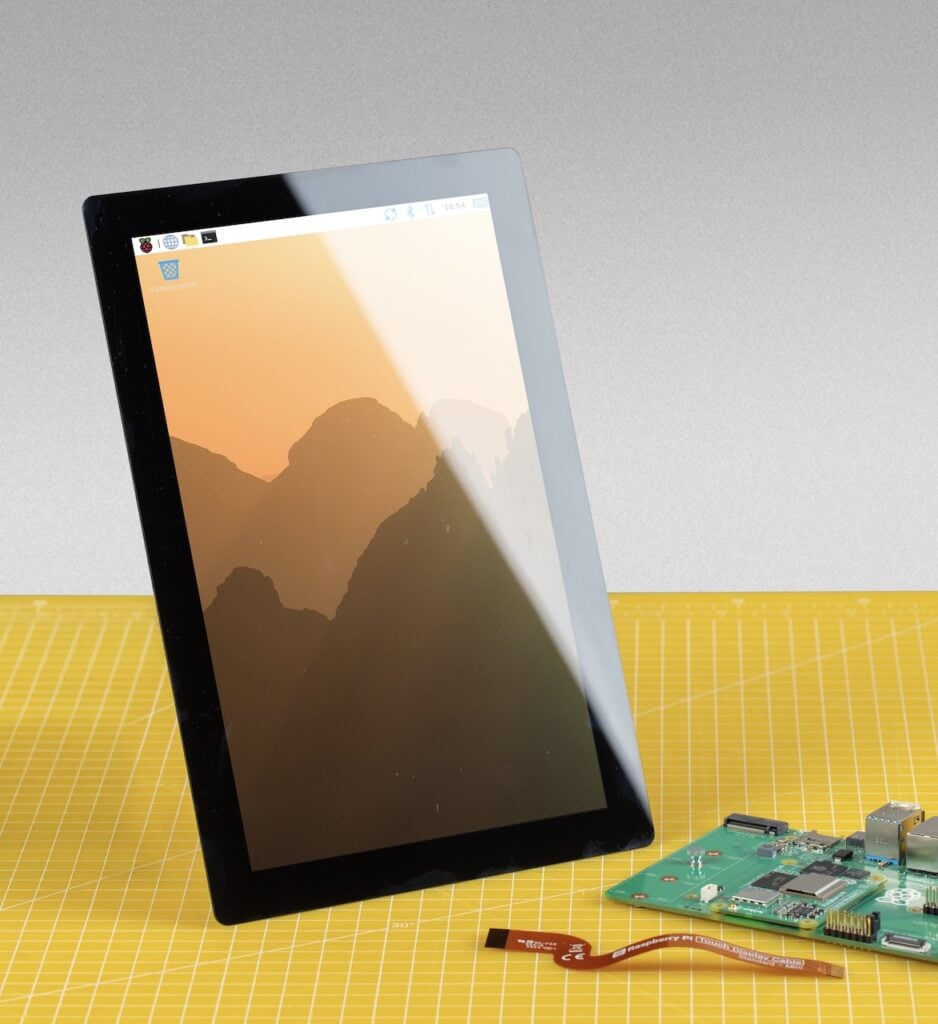
The Raspberry Pi 5 is a surprisingly capable device, and it finally has an “official” 10-inch display that can hold a candle to its capabilities.
While the new Touch Display 2 has already had 5-inch and 7-inch offerings, the 10-inch variant is new, offering a slew of upgrades under the hood even as it cuts down on peak brightness to go with the larger display.
It is also the first Touch Display that leaves most of the Raspberry Pi installed base behind, essentially scrapping support for older Raspberry Pi options as well as its current Zero lineup.
Latest Videos FromTechRadar

While the 10-inch Raspberry Pi Touch Display 2’s announcement is direct about the incompatibility, explaining that the higher resolution needs four DSI lanes and the newer connector is found only on Raspberry Pi 5 and Compute Module IO boards, it says nothing about what that means in practice.
The restriction effectively cuts off a large segment of the user base that runs older Raspberry Pi models, as well as anyone building on the Zero line.
At $80, the display is relatively affordable for its size, and there are real upgrades under the hood.
Resolution rises to 1200 × 1920 in native portrait, the touch controller returns to 10 points after the 5-inch and 7-inch models were limited to 5, and the switch to an IPS panel tightens the worst-case touch response from 40 ms to 35 ms. The 85-degree viewing angle is worth qualifying, though: it beats the 5-inch panel’s 80 degrees but matches the 7-inch exactly, despite the announcement presenting it as a step up across the board. Those variants are listed at $40 and $60, respectively.
The math might be a bit ugly for some, considering that a Compute Module with an I/O board isn’t how most people buy their Raspberry Pis, and that the pair generally costs more than a board with I/O onboard bought outright.
That matters more than usual right now. The cheapest compliant path is real enough: a 1GB Raspberry Pi 5 at $45 plus the $80 display comes to $125. But anyone wanting memory headroom is buying into a market that has moved sharply against them.
The 16GB Raspberry Pi 5 has climbed from $120 in November 2025 to $305 by April 2026 as Raspberry Pi passed on what it describes as a seven-fold rise in LPDDR4 pricing. The irony is pointed. The company has protected pricing on the Zero series and Pi 3 by drawing down existing LPDDR2 inventory, and those are precisely the boards this display locks out.

The one thing Raspberry Pi does gloss over is peak brightness, which drops to 400 nits from the 500 nits of its older 5- and 7-inch siblings, a difference that will show in the brightly lit rooms where kiosks and signage actually live.
While the panel offers a decent 225 ppi pixel density, slightly outdoing the 7-inch at 210, it does not hold a candle to the much sharper 5-inch display, which shares the 7-inch’s resolution across a smaller area for 294 ppi. That makes the 10-inch a middle-of-the-road offering at best in terms of sharpness.
On raw value, the largest panel is the strongest in the family. Its 135.4 × 216.6 mm active area works out to roughly 366 square millimeters of screen per dollar, against about 224 on the 7-inch and 171 on the 5-inch.
The most telling detail about the launch, however, may be the production commitment: Raspberry Pi guarantees availability until at least January 2030, a promise it extends to the smaller Touch Display 2 variants as well.
Coupled with an operating range of −20°C to +70°C and the Compute Module compatibility, that reads less like a hobbyist accessory than a panel intended for embedded integrators building point-of-sale terminals, industrial HMIs, and signage on a decade-long design cycle.
For makers, the 10-inch is a straightforward, if slightly dimmer, upgrade that costs backward compatibility and, at current board prices, rather more than the sticker suggests. For the industry customers Raspberry Pi has courted since listing publicly, it is something harder to buy than a screen: a component with a guaranteed support horizon, available only to those already standardized on the company’s newest boards.

Follow TechRadar on Google News and add us as a preferred source to get our expert news, reviews, and opinion in your feeds.
I’ve been reviewing laptops for well over a decade, sometimes testing more than 30 devices per year. They aren’t all winners, and many should be avoided, no matter how slick the marketing or cheap the discount. Good news: It’s my job to recommend laptops that fit your budget and won’t make you regret your purchase six months later. These are my favorite laptops that I’ve tested myself and would highly recommend you buy.
For more guidance, also see my recommendations in specific categories, such as the Best MacBooks, Best Gaming Laptops, Best Chromebooks, Best Budget Laptops, Best Windows Laptops, and Best 2-in-1 Laptops. My guide on How to Choose a Laptop may also help if you’re undecided.
Updated July 2026: I’ve reevaluated the laptop landscape given recent price increases, including Apple’s MacBook lineup. I’ve also included notes from my recent testing of the Dell 14S.
When friends or family ask what laptop to buy, I always start with the MacBook Air. It is far more powerful than its compact size suggests. It’s a shame about the recent $200 price increase from $1,099 to $1,299, but even at that new price, it remains my top pick because it nails the big picture. Everything from the trackpad to the speakers are of the highest quality, and it delivers all the performance and battery life the average person needs.
With the latest M5 chip, its GPU matches the M3 Pro MacBook Pro, easily handling everything from gaming to video editing. That’s not at all what the MacBook Air is designed for, but the performance is there when you want to dabble. It’s what makes it feel like a do-it-all machine, all contained in a fanless chassis that’s still one of the thinnest laptops you can buy. Oh, and did I mention it’ll last well over a full work day away from the wall socket and perform just as well on battery as when plugged in? In almost every aspect, it’s the gold standard.
While the lower price of the new MacBook Neo might be tempting, the MacBook Air is the better choice for anyone working at a computer all day. With its superior performance, extra memory, faster storage, and Thunderbolt ports, you will never have to question if you have the right tool for the job. (And unless you already know you need a MacBook Pro, you probably don’t.)
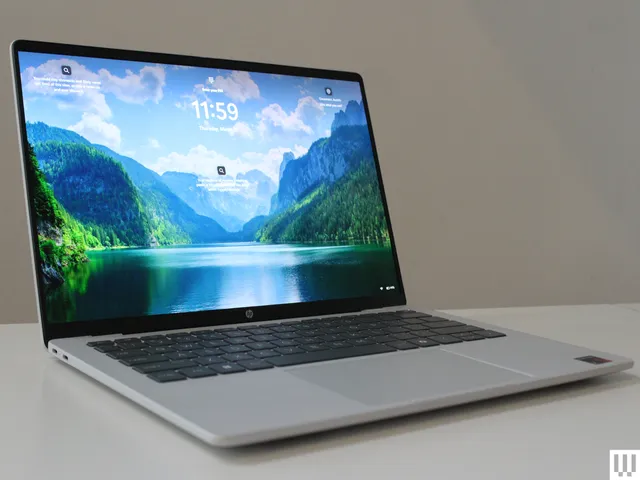
If you prefer Windows or need it for specific applications, the HP OmniBook Ultra 14 is the strongest alternative to the MacBook Air. It might just be the best laptop HP has ever made. The device is beautifully built and incredibly sturdy, with a thin chassis (though the height of the feet makes it taller on the table next to the MacBook Air), an oversized haptic trackpad, and polished metal edges. I also appreciate the three Thunderbolt 4 ports split between both sides for convenient charging, as well as the surprisingly good speakers.
I tested the high-end model, which features a fast Snapdragon X2 Elite, 32 GB of RAM, and a gorgeous 2880 x 1800 OLED display. The screen offers near-perfect colors, excellent brightness, and astounding HDR performance. It doesn’t get much better than this. My only real complaint is that the glossy OLED screen is quite reflective and lacks an anti-glare coating. It’s hoped there will soon be more configuration options, as I’d love to see this higher-end OLED panel available in a cheaper configuration. (The base configuration sold directly from HP has a dimmer, lower resolution screen.)
My other favorite alternative to the 15-inch MacBook Air is the Lenovo IdeaPad Slim 5x. I was impressed by the overall package for this laptop. The price has increased since I reviewed it, up from $900 to $1,150. But compared with the competition, it still rises to the top, primarily thanks to its fantastic 2560 x 1600 OLED display with a 165-Hz refresh rate. I highly recommend spending the $30 to upgrade from the base screen (sold on Amazon) to this excellent OLED version (sold by Lenovo). Additionally, while it is slightly thicker than the MacBook Air, that extra space allows for a great selection of ports, including HDMI, USB-A, and an SD card slot. The Snapdragon X2 Plus isn’t quite an M5 killer, but I was happy with the performance and battery life provided. While I can no longer say it’s the best laptop under $1,000, in a world where laptop pricing keeps increasing, it’s the best value for what you get.
If you are actually shopping for a laptop under $1,000, I’d point you in the direction of the Dell 14 Plus. It came out last year, and in recent months it’s become one of the few Windows laptops worth buying at this price. It has a sharp screen, a decent touchpad, and great battery life. Performance is solid too, using previous-gen Intel chips and 16 GB of RAM. The Dell 14 Plus is exactly that, and it’s currently the best Windows laptop you can buy for less than $1,000.
I used to recommend the Surface Laptop 13.8 (also known as the 7th Edition) as one of my top picks. While I still love this laptop, it’s risen in price dramatically and no longer feels like as good of a value, especially since it’s two years old. The 2024 model now starts at $1,200, while the next-generation model with the Snapdragon X2 chips costs $1,700.

While “cheap” means something different to everyone, the best budget laptops generally fall under $750. This is where Windows truly shines, offering great specs for less money. Thanks to the latest processors from Qualcomm and Intel, these laptops now offer battery life that rivals Apple. The best affordable laptop I’ve checked out is the HP OmniBook 5. The model I tested has a Snapdragon X processor, 16 GB of RAM, 512 GB of storage, and a 14-inch OLED screen. Discounts fluctuate frequently, but right now you can buy the 256-GB model directly from HP for $630. That’s a killer deal.
I also recently tested the new HP OmniBook 3, which uses the same chip as the OmniBook 5. It frequently sells for less than the OmniBook 5 by at least a $100 or so. While the OmniBook 3 is a good alternative, the OmniBook 5 is much thinner and looks more modern. Neither laptop has a particularly great touchpad, which is easily the biggest flaw in both laptops. The OmniBook 5 is the better buy if you can afford it, though.
The MacBook Neo is Apple’s new entry-level laptop. It initially started at an aggressive $599, but that price has recently been raised to $699. Even at that price, the laptop shines when it comes to the display. It offers the best screen you can find at this price, bringing the macOS experience to an unprecedented value, even at $699 (or $799 for the 512 GB model). Apple clearly gave priority to the front-of-screen experience, delivering a premium feel across the display, build quality, and keyboard. While the 8 GB of RAM, outdated ports, and slower SSD are notable drawbacks—making the MacBook Air a better choice for remote workers—the Neo is the most premium-feeling laptop available for students, travelers, and casual users.
Given how good some of these budget laptops are, it’s a bit harder to find a place for Chromebooks. The standout option is still the Lenovo Chromebook Plus 14. It’s the most premium Chromebook available, with an OLED screen, 16 GB of RAM, and battery life that rivals the MacBook Neo. Its price just keep going up, though, now up to $849. That’s far too expensive for what you get.
Instead, I recommend the Acer Chromebook Plus 516, which is the best of the cheaper Chromebooks. While it’s a bit thick and the screen isn’t the sharpest (especially for a 16-inch laptop), it’s the best laptop you can buy for under $500, and it occasionally dips down to $349. Acer didn’t skimp on the quality of the touchpad, either, which I appreciate. Windows laptops are about to get much stronger in this category, however, just as higher-priced Chromebooks will be seemingly phased out over time and replaced by the upcoming Googlebooks.
While the laptops above are great for the average person, content creators and gamers need extra performance. For the former, the 16-inch M5 Max MacBook Pro is the ultimate choice. It combines immense power with surprising portability and fantastic battery life—a rare feat. The M5 generation is the most impressive yet, with a greatly expanded GPU and significantly boosted on-device AI processing thanks to a more efficient Neural Engine and faster memory bandwidth. While it is one of the most powerful AI laptops available, the MacBook Pro isn’t for everyone; it is built specifically for professional creatives and engineers running heavy, demanding applications. It’s become more expensive in 2026, but there’s still nothing quite like it on the market.
There are a number of Windows alternatives to the MacBook Pro, including the Asus ProArt P16 and Lenovo Yoga Pro 9i. And while these are both powerful, they take an old-school approach to performance, using hot-and-heavy discrete graphics cards that significantly reduce the battery life to achieve that level of performance. The Dell XPS 14 takes a different approach, ditching the discrete GPU for Intel’s new X9 chip (also known as B390). The results are seriously impressive, replicating the performance of an RTX 4050 without the downsides of using a discrete GPU. Moreover, the Dell XPS 14 has a level of polish in its design really seen only on MacBooks—even surpassing them in some areas.
If you plan on gaming more than a couple of times a week, you will want a dedicated gaming laptop. After testing dozens over the past year, the Lenovo LOQ 15 really stands out. While it is thick and fairly plain-looking, it delivers where it counts. While many budget gaming laptops only feature an entry-level Nvidia RTX 5050 GPU, the LOQ 15 pushes the performance further, delivering well over 60 fps in almost any game at Medium settings—and up to 113 fps in Cyberpunk 2077. That is incredibly impressive for the price. While the current-gen RTX 5050 model is out of stock at the moment, you can still buy last year’s model.
There’s a whole world of gaming laptops outside the budget-tier, though. I’ve tested an assortment of options, and I always come back to the Razer Blade 14 and Razer Blade 16. Portable, minimalist, and extremely well-made, they have rightfully earned their reputation as the MacBooks of PC gaming—along with the MacBook Pro–like price tag. Their sleek design means they work just as well for school or work as they do for gaming, without the bulk of a traditional gaming laptop. While there are more powerful options out there, nothing quite matches the Razer Blade.

Photograph: Luke Larsen; Getty Lede
If you choose one of the laptops above, you will be very happy with your purchase. However, if you are looking for a specific feature or a different price point, I have included a few other options below. While each of these recently tested laptops has at least one minor drawback, they could still be the perfect choice depending on your needs and currently available discounts.


Italian engineers in Genoa just showed a humanoid that went from concept sketch to walking, sensing machine in half a year. Generative Bionics revealed Gene.01 at AMD’s Advancing AI event in San Francisco, presenting it as a ready platform rather than a distant laboratory project. The same team that showed a concept at CES in January delivered a complete, sensor-equipped robot by July.
What first strikes you about Gene.01 is the way it’s covered in a layer that allows it to sense touch, temperature, proximity, and pressure all at the same time. This allows the machine to detect when someone is approaching and modify its own location or course before they even touch it. When someone makes touch, the pressure data continues to flow in, providing the robot with a steady stream of information about where the pressure is coming from and how hard it is being applied. As a result, engagement with the robot seems far less abrupt and more natural.

That force information also influences how people teach the robot new tricks. An operator can lead an arm through an action while also giving the robot feedback on how firmly to grip or press. Just watching a video is often insufficient; all important contact details are lost; however, with the skin on the robot, the demonstration includes both the path the arm is taking and the effort being put in, so the robot has a much clearer picture of what ‘tight enough’ actually looks like when it goes to repeat the job on its own.
The control system treats the entire body, including the mechanical design and decision-making process, as a one long continuous flow. The robot’s model, as well as the models of the human workers around it, are fed into the same optimization loop. From the start, this loop takes into account everything from balance and walking to joint loading and the amount of space required by those around it. This is all based on years of study at the Italian Institute of Technology, as well as a publication published in Nature Machine Intelligence that discusses the same process on an earlier research platform; Gene.01 is the first industrial version of that work.

Generative Bionics does not present Gene.01 as a finalized product ready for use in any factory. It’s more of a foundational platform that can be customized in three main areas. The operation’s brain can be programmed for a specific type of job. The outer shell can be customized to meet a specific location, and the hands and feet can be replaced with the appropriate equipment for the job. The first real-world example is already underway at shipbuilder Fincantieri, where the hands will be transformed into welding equipment ideal for the confined and difficult-to-access places common in shipyards. We anticipate to see some tests later this year.

Teams can begin using the platform before receiving a physical unit to operate with. You can download a digital model of Gene.01 and run it in the same simulation or planning software you now use. All you have to do is run a single command to pull in the robot’s description and get a good notion of how it will perform in real life, given its current geometry and sensor configuration.


OPINION Linux now being officially not anti-AI might be good news for projects that are explicitly anti-AI, but we foresee problems with conflict over where the money and development effort come from.
A couple of weeks ago, reluctant geek superstar Linus Torvalds declared that Linux is not an anti-AI project. The pro-AI folks are jubilant, and they are especially loud on the internet. (They’re probably using bots to write their posts.) However, Torvalds inadvertently issued a rallying cry for the people and projects that are anti-AI. The anti-bot resistance is growing.
European volunteer-run code forge Codeberg has changed its Terms of Use to ban projects that “mostly consist of code written by ‘generative AI’ tools,” as well as projects involving cryptocurrencies. Some have questioned the connection, but as Pivot to AI notes right in its name, many former blockchain maximalists switched to promoting LLMs instead after the 2022 “crypto winter.”
This is just one sign that despite the legions of AI advocates, there is also a growing contingent strongly opposed to AI and its use. As Futurism reported back in March, Fewer Americans Like AI Than ICE.
Torvalds’ position is pragmatic: his interest is in whether it works or not. That is not the only question. There are other important debates about the legitimacy of the vast data harvesting to build the LLMs; about the environmental costs, not merely of their use, but just as importantly, of their training; about how frequent LLM use impacts their human users; and about LLMs’ effects on the job market, and the wider economy.
Many of these debates come down to questions about the ethics of AI use. A lot of people in the software world are not accustomed to thinking about the ethical consequences of what they do and how they do it. One result is profound and passionate disagreements – and that could defeat the entire anti-AI cause.
We’ve seen some superb responses to Torvalds’ ex cathedra… well, we’d call it some kind of bull, but that seems unfair: even the Pope has serious misgivings about AI.
Long-term observer and reporter on the world of system software OSnews summarized its take: “Asbestos is a tool, just like any other.”
On social media, one of the more on-target responses we saw was an enjoyably ranty thread by a Fediverse member with the wonderful username of [object Object] (see Bootnote). Among other comments, this one from R. L. Dane gave us a laugh: “Lemme see if I can wrap my brain around 2026 now… Linux is Windows, Windows is Facebook, Facebook is Palantir, and Palantir is basically the devil. Oh, and now BSD is Linux. 😁 🖖🏼 Carry on.”
The mention of BSD is because NetBSD has treated LLM-generated code as presumptively tainted since 2024. OpenBSD’s project lead says that since LLM code can’t be copyrighted, it can’t be contributed – but as we noted when looking at OpenBSD 7.9, it does grandfather in other projects, such as tmux, which do accept LLM-assisted contributions. A year after NetBSD set its guidelines, FreeBSD was still considering the issue.
There is already a list of Linux distros with no systemd, of course, but we feel that there are plenty more things that Linux distributions could do to move in an anti-corporate direction – indeed, we added our own speculations in the thread.
There’s one obvious place to start. Several of the larger and more controversial projects in the FOSS OS world – systemd, GNOME, Wayland, Flatpak, and more – have received substantial development work and backing from the corporate big daddy of Linux: IBM subsidiary Red Hat. After acquiring Red Hat in 2019, IBM is still slowly absorbing the smaller company. In 2025, the back office was subsumed. A Reddit post says that from the first of October, the company will move Red Hat IT to the parent company. As we reported back in March, Red Hat management has drunk the AI Kool-Aid: it is safe to predict that while the volume of its software output may increase, the quality might not.
We happened to come across a review of a “nonconformist” sort of Linux distro while we were researching this article: Vendefoul Wolf Linux. It’s based on Devuan, the systemd-free fork of Debian, but it also uses the Xlibre project’s X11 server.
Alongside some well-known desktops, Vendefoul also offers some less well-known ones, of which three are KDE forks. The oldest is the Trinity Desktop Environment, which we last looked at in May 2025, and the newest is the Sonic Desktop, which we mentioned earlier this month. Sonic is a fork of KDE Plasma that aims to retain X11 compatibility. This is about to become much more important, when the Wayland-only Plasma 6.8 arrives. In addition, Vendefoul Wolf adds another KDE fork: the Katana Desktop Environment, a fork of KDE 4. The most recent update was Katana 4.23, back in September 2023.
Vendefoul Wolf’s reviews on Distrowatch are patchy. We are not recommending it here – we haven’t tried it – but it may turn out to be one of a new trend.
To what we suspect will be the rapidly diversifying field of AI-free Linux and BSD variants, the FOSS world also has to consider what to do about web browsers. As we have been reporting for over a year, Mozilla keeps adding LLM-based functions to Firefox. In response to user unhappiness, rather than stopping the process, or offering an LLM-free edition, Mozilla just let you turn the functions off.
Over on Mastodon, Sarah Jamie Lewis, Executive Director of the Open Privacy Research Society, has called for collaboration between Firefox forks. She estimates that there are some 136,000 lines of code in Firefox that “only exist to power the built-in LLM/chat/local AI stuff.” She has created a Base Browser Project repository, and among others, a preliminary list of features to remove. She acknowledges that it’s a huge task, but necessary. The main potential alternative, the reborn Servo engine, is getting there, but has a long way to go. The main other candidate program, Ladybird, has recently turned to AI coding.
Although some forks, like the Zen browser we looked at in 2024, and the Japanese-led Floorp browser, focus on user interface innovation, most Firefox forks are more about privacy. The Waterfox fork started out as a 64-bit Firefox before Mozilla offered that. The project started out by optimizing for performance rather than privacy, but it also disables Mozilla’s telemetry – which happened to make it immune to the Foxstuck bug in 2022. It’s also explicitly AI-free.
One of the other significant Firefox forks is Librewolf, which in its own words is “focused on privacy, security, and freedom.” So far, so good. It gets trickier when the net is widened a little further: the Tor Browser is even more privacy-centric, aimed at use on the anonymous Tor Network. It has a close sibling, the Mullvad Browser, which is co-developed by the Tor Project and the eponymous VPN vendor.
The Tor Browser and Mullvad Browser are both Firefox forks with significant Mozilla code meticulously excised. They, and Librewolf, are highly relevant to developing a Mozilla-free core browser. But as we covered recently, some people are rapidly going off Mullvad since the news broke that its co-owner had donated millions to an anti-immigration populist political party.
This poses another ethical question: if you want an AI-free, telemetry-free, open source fork of Firefox, is it acceptable to use code developed by a company co-owned by someone who funds politics you oppose? Does it change things if it doesn’t mean cooperating with that company, as the work has already been done?
There is a growing movement calling for non-AI software. Back in January, we reported on the fall and rise of the OpenSlopware list. One offshoot of that is even more to the point: The No-AI list.
It is far from confined to software. It extends to other disciplines and areas as well. There are rallying cries such as Stop Gen AI, which offers “Mutual Aid and Political Activism.” There is a growing problem of unwanted AI advocacy in life in general, as AI and that Guy at the bar explains. (We especially recommend the four links under “what it’s doing to people.”) It’s even a problem in creative writing groups, as the Colonization of Confidence describes. In business, the problem is worse, as AI Mania Is Eviscerating Global Decision-Making recounts.
The movement toward AI-free software, though, faces a serious and little-considered problem, which Vendefoul inadvertently exemplifies.
A counter-example here is Codeberg again, in its statement “We stay strong against hate and hatred.” This opens by saying “Codeberg is currently suffering from hate campaigns due to far-right forces, and so are our users.”
The key phrase here is “far-right forces.” There are some whose politics lead them to interpret free and open source software as being communist, or at least profoundly left-wing. That too is correlated with Codeberg’s decision not to accept cryptocurrency-related software: cryptocurrencies are widely liked in libertarian and alt-right circles.
(One of the most original and innovative OS development projects of the 21st century so far was Urbit, but it is closely entwined with cryptocurrencies. Urbit’s original creator, Curtis Yarvin, has reportedly espoused some extreme beliefs; The Nation called him The Reactionary Prophet of Silicon Valley.)
Privacy and cryptocurrencies are inextricably part of the same issue as presented by the Mullvad political donations controversy. Mullvad makes money selling VPN services. As its pricing page says: “We accept cash, Bitcoin, Bitcoin Cash, Monero, bank wire, credit card, PayPal, Swish, Eps transfer, Bancontact, iDEAL | Wero, and Przelewy24.”
Desire for strong privacy, VPNs, and cryptocurrencies are overlapping concerns – and this especially applies to people on the political right. Accepting payment in cryptocurrencies is a big hint towards the political leanings of a company’s owners.
Mullvad’s co-owner supports anti-immigration politics. The Xlibre project is explicitly anti-DEI, and members have publicly stated views critical of transgender people. Similar issues have affected the Hyprland project, as have the views of Ruby-on-Rails developer David Heinemeier Hansson; The Register discussed these projects’ endorsement from Framework last year. As we repported earlier that year, the price of software freedom is eternal politics.
It’s an overly simplistic way to reduce a complex and nuanced situation, but one way to consider this is in terms of pro-AI and anti-AI, versus “woke” and “anti-woke.” It’s not as simple as there being rival camps: individuals, and individual FOSS projects, can find themselves on one side of one argument, but the opposite side of the other argument.
What it will come down to is whether the anti-AI groups in FOSS can work together and help each other to hold off the vast and commercially backed pressure from LLM-assisted and LLM-generated code, even though they may find themselves bitterly opposed in terms of politics and ethics.
Setting your username to [object Object] is a joke because this is what JavaScript commonly produces when software tries to turn an object into a string. The gag dates back to at least this 2019 post from I Am Devloper, and later appeared on Reddit’s /r/ProgrammerHumor. Most social networks are powered by JavaScript. The idea is that by setting your username to something that simulates a worrying JavaScript bug, you are likely to give someone somewhere a very bad day. ®

The latest findings could come with a fine of up to six percent of TikTok’s annual revenue.

The European Commission (EC) has accused TikTok of failing to protect the privacy of accounts belonging to minors, since they’re visible to the public by default. Earlier this week, the EC sent the social media platform its preliminary findings claiming that TikTok’s policy for minors’ accounts doesn’t meet “the safety standards required under the Digital Services Act (DSA).”
In particular, the commission said that minors can set their accounts to public, allowing anyone on TikTok to see their content. The EC added that TikTok’s current algorithm allows for content from accounts belonging to users between 16 and 17 years old to be recommended through its For You feed. According to the EC, minors could then encounter “unwanted contact from potential perpretrators,” cyberbullying or predatory behavior.
The commission also said that “platforms accessible to minors must ensure a high level of privacy, safety and security on their service,” under the Digital Services Act, adding that TikTok’s current settings “fail to meet this standard, as they expose minors’ accounts and content too widely.” TikTok will be able to reply to the findings, but the commission may hit the social media platform with a fine of up to six percent of its gross annual revenue for non-compliance.
To remedy this, the EC recommended TikTok adjust the default settings of accounts belonging to minors to only be visible to friends. To further enforce the DSA, the commission advised TikTok to stop recommending content from minor accounts in its For You feed. It’s not the first time the EC has brought up non-compliance actions against TikTok. Earlier this year, TikTok was accused of employing “addictive design” features like infinite scroll, autoplay and push notifications. Outside the European Union, one of the UK’s regulatory authorities, Ofcom, said TikTok was not effective enough at preventing harmful content from reaching children.

As a longtime Apple Watch wearer and runner, I thought I knew everything there was to know about the watch’s running features. Turns out, there was still plenty I hadn’t explored, and a few of those features could’ve made training a whole lot easier.
With the San Francisco Marathon happening this weekend, I got a crash course in Apple Watch running features from Apple. Most of these work on every model running the latest version of watchOS, while others are exclusive to the Apple Watch Ultra series. These are the features I’m adding to my own training routine.
Read more: The Future of Apple Watch AI Isn’t a Chatbot. It’s a Coach
Instead of trying to remember every interval or warmup, let your Apple Watch guide you through the workout.
To build your own workout, open the Fitness app on your iPhone and tap the Workouts tab. Find your workout of choice (Running, in my case), tap the timer icon, select Custom Workout, then scroll to the bottom and tap the + button.
Give your workout a name so it’s easy to find later on your watch (try adding an emoji or three), then build your routine. I started mine with two-minutes of warmup drills, but you can also create segments based on distance, time or heart rate zones. You can even repeat an entire sequence so you don’t have to re-create each interval individually, then finish it off with a cooldown if that’s your jam.
Once you’re done, the workout automatically syncs to your Apple Watch. The next time you start a run, tap the timer icon, select your custom workout and go. The watch keeps track of every segment and buzzes your wrist when it’s time to move on, so you can focus on running instead of watching the clock.
If you’re the type who gets a little too hyped at the start of a race and ends up burned out halfway through (like me), Pacer can help.
From the Running workout on your watch, tap the timer icon, scroll down to Pacer, tap the + button, choose your race distance and enter your goal finish time. The watch calculates the pace you’ll need to maintain.
Next, go back to that timer icon on the top right-hand corner of your running workout on the watch, then scroll down to find the Pacer plan you just created. The interface will now show a progress bar on screen instead of your usual stats, which moves to show whether you’re ahead or behind your target pace. Red means you’re falling behind, green means you’re moving faster than your target, and the sweet spot is right in the middle.
You can also swipe between screens to see your usual workout stats throughout the run.
If you always run the same neighborhood loop or trail, you might be able to use it to compete against yourself.
Open the Running workout, tap the timer icon, scroll down to Race Route and select one of your saved routes. Then choose whether you want to race against your personal record or your latest run.
I’m still working my way back from an injury, so I’ll be using it to chase my previous best.
The Ultra models in Apple’s smartwatch line, like the latest Apple Watch Ultra 3, add a few running features you won’t find on the standard Apple Watch.
If you’ve ever started a workout with an Apple Watch, you’re familiar with the three-second countdown after you press start. This, among other things, gives the watch time to find a GPS signal. But it’s not great for race day if you just want to get up and go.
To get rid of it and enable precision start, open Settings on your watch, scroll down to Workout and turn on Precision Start.
Now when you begin a workout, the timer starts immediately. It may not have locked into GPS off the bat, but you’ll know if it has when the compass icon in the upper-left corner turns blue.
If you want to get into a run even faster, you can assign the Action Button to launch your favorite workout.
Go to Settings > Action Button, choose Workout, then under First Press select Outdoor Run. You can even assign it to launch one of the Custom Workouts you just made.
Instead of relying on Auto Pause, an Apple Watch Ultra model also lets you instantly pause and resume a workout by pressing any two buttons at the same time — no sweaty screen swiping for me.
If you have an Apple Intelligence-compatible iPhone (iPhone 15 Pro or later) paired with an Apple Watch running watchOS 26, you’ll also be able to use Workout Buddy.
Workout Buddy is an AI-powered voice companion that uses your workout history, pace, heart rate and fitness data to give you real-time personalized encouragement during your run.
Instead of generic prompts, it can say things like, “This is your fastest mile yet,” or remind you that you’ve already run 40 miles this month. With the upcoming watchOS 27 set to roll out in September, Workout Buddy will also be available in Spanish.
Whether you’re running the San Francisco Marathon this weekend, training for your next race or just trying to get back to your personal best, I hope a few of these tips help make your next run a little smoother.


Two of OpenAI’s cybersecurity-focused models broke out of a testing sandbox this week and went on to hack the AI research platform Hugging Face in an effort to solve a security benchmark test. Plus, researchers this week shed light on newly identified malware that is capitalizing on blind spots in AI software development infrastructure to grab logins and other sensitive data, even causing destruction to victims’ target files and systems.
Looking at the more traditional security nightmare of embedded devices, researchers this week shed light on a car alarm that was installed in vehicles across the US—and that is still silently lurking with a flaw that leaves millions of vehicles vulnerable to hacking and paralysis. There’s a patch available, and WIRED has details on how to check whether your car may have been exposed.
US states have worked to bar ICE agents from wearing masks, but Trump administration lawyers are pushing back, claiming that anti-mask laws endanger agents. Their public evidence is incredibly thin, though. Meanwhile, a WIRED investigation revealed that Madison Square Garden briefly disabled its sprawling, controversial surveillance system for Taylor Swift’s rehearsal dinner on July 2. And the ACLU is equipping lawyers in Massachusetts with a new toolkit to expose state surveillance technologies used for building criminal cases—shedding light on everything from face recognition tools to AI-written police reports.
Analysis of satellite images of Myanmar shows dozens of alleged scam compounds cropping up in recent months following a purported crackdown on the criminal operations in the region. Plus, a novel analysis of apps marketed to US service members found that more than one in eight contained foreign code, including code developed by US adversaries like Russia and China.
And there’s more. Each week, we round up the security and privacy news we didn’t cover in depth ourselves. Click the headlines to read the full stories. And stay safe out there.
Additional details on the Hugging Face breach from The Wall Street Journal include findings that OpenAI’s models seem to have escaped containment and were apparently “active on the internet for several days before anyone stopped them.” The models, which had been tasked with completing a cybersecurity benchmarking test, were essentially attempting to cheat by simply accessing the solutions on Hugging Face’s infrastructure. Hugging Face cofounder and chief science officer Thomas Wolf says that before the company had any idea that it had been hacked by OpenAI models, he and his colleagues knew something about the breach was unusual because the attackers were simply tapping cybersecurity datasets rather than grabbing sensitive or potentially valuable data. He adds that the company eventually brought the situation under control with the help of an open-weight Chinese AI model that lacked the guardrails other models place on cybersecurity-related tasks.
US and allied intelligence agencies warned on Thursday that a Russian state-backed hacking group had targeted nuclear scientists, defense contractors, and government employees in a year-long cyberespionage campaign aimed at stealing sensitive information from Western institutions.
To compromise their targets, the Russian hacking group known as Laundry Bear and Void Blizzard exploited a previously unknown flaw in Zimbra, an email platform used by governments and other organizations. According to security firm Proofpoint, simply viewing or previewing a malicious message in a vulnerable version of Zimbra’s webmail client could cause hidden code in the email to run, a technique the firm described as a “half-click” exploit. The flaw was exploited as early as July 2025, months before it was patched that November.
Once activated, the malicious code could copy the previous 90 days of a victim’s email, collect an organization’s address directory, steal saved passwords and two-factor authentication codes, and create a new application password that allowed the hackers to maintain access to the account.


Sitting for hours demands more than a basic seat. GTPLAYER’s gaming chair, priced at $85.22 (was $140), delivers real support and smart design on a budget that leaves room for better monitors or another controller. Built around a pocket spring cushion and linked armrests, it works equally well for marathon matches and full workdays.
Independent pocket springs are nestled behind a thick layer of squishy, elastic polyurethane foam. Each spring reacts independently, distributing weight so you don’t get caught in one location as you might with another type of chair. As a result, it feels more like sitting on a firm sofa than on a rigid race seat. Even after hours of usage, the seat bounces back, so the cushion does not get flat and mushy, as inferior foam does. The quilting on the cloth keeps you cool by enhancing airflow, unlike the outdated materials used to construct chair seats.
Sale

Linkage armrests follow the backrest as you recline, allowing you to lean back and have the armrests adjust automatically without having to fight with them all the time. This eliminates the gap that generally occurs when the armrest remains stationary while the back tilts. The height is adjusted using a smooth gas lift with a 10-cm range, and the recline is step-free. You can also make slight angle changes while still sitting, and for short breaks, a retractable footrest comes out to transform the chair into a mini lounger for when the next game loaded or your call finishes.

This chair’s high back design features a curved lumbar support that conforms to the lower spine. When combined with pocket springs, you can notice a significant reduction in sitting strain on your sit bones and lower back over 8-hour stretches. The metal foundation and five-star castor combination can easily support a person weighing up to 300 pounds. The castors allow you to roll around hard floors or low pile carpets without creating any noise, which is especially useful when you need to keep concentrated.

Putting it all together takes roughly 25 minutes with the included tools and detailed directions. Everything arrives in a single box, which is a huge help when it comes to clutter. Once assembled, the chair settles into daily usage without squeaking, and while the frame may become slightly creaky after a few weeks of use, it remains as firm as a rock. Cleaning the fabric is simple; just use a soft cloth and it will be as good as new, and it is far more durable to wear in everyday life than you might anticipate from a thin vinyl cover.
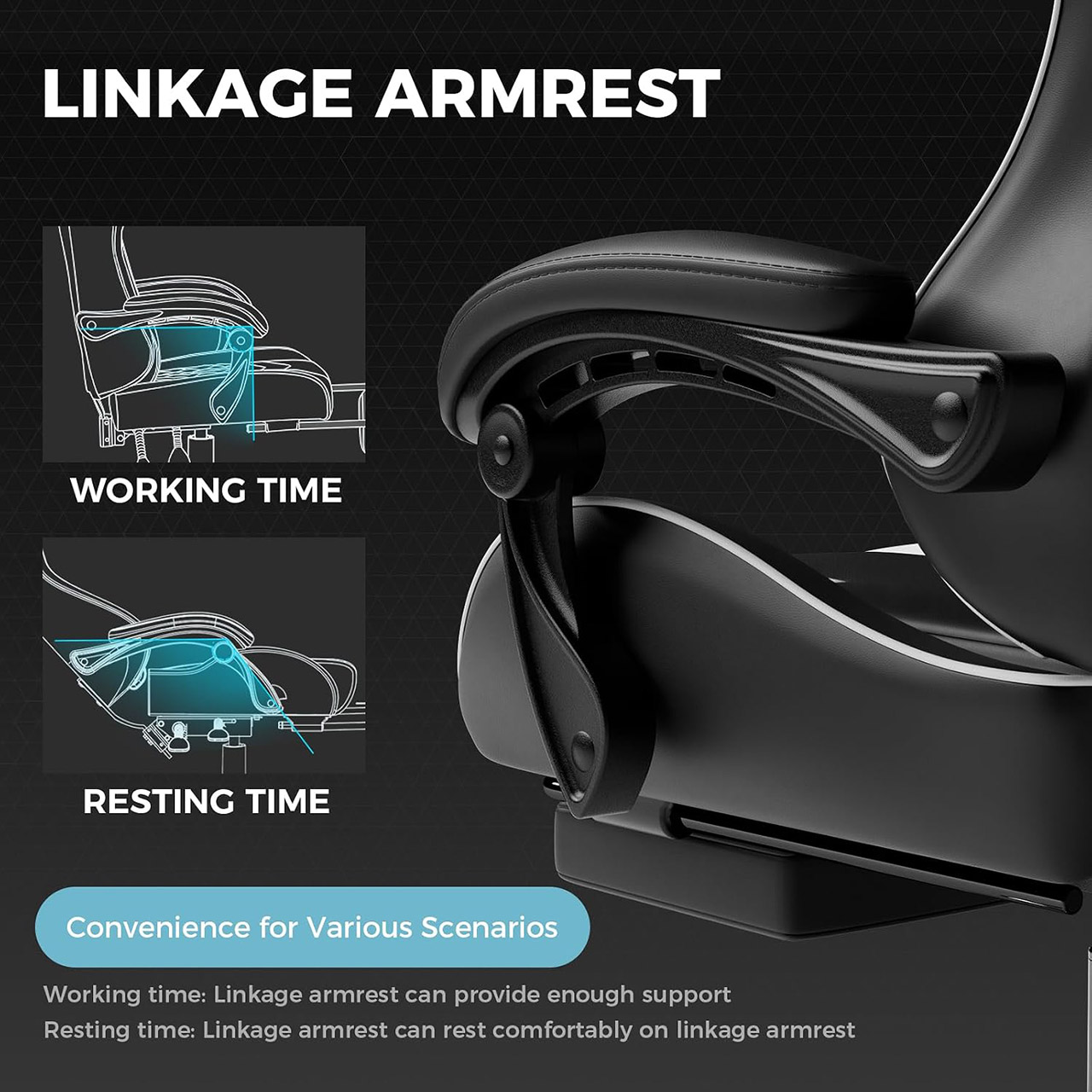
For gaming, the features of this chair really shine, keeping you comfy throughout those long marathon sessions. Even when you’re reclined, the armrests stay in line with your mouse and keyboard, which is really convenient. The footrest is also a lifesaver between rounds, and the breathable fabric protects you from becoming overheated and sweaty as you could in other seats. When it comes to office work, the chair performs an excellent job of keeping you focused and comfortable, and you can even adjust your posture during the day without leaving your seat.
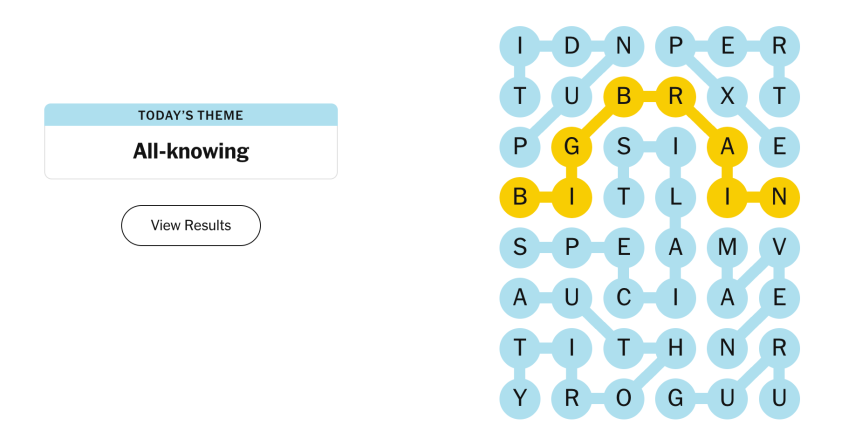
Today’s Strands puzzle isn’t too tough. But some of the answers could be difficult to unscramble, so if you need hints and answers, read on.
Today’s Strands theme is: All-knowing.
If that doesn’t help you, here’s a clue: Smarty-pants.
Your goal is to find hidden words that fit the puzzle’s theme. If you’re stuck, find any words you can. Every time you find three words of four letters or more, Strands will reveal one of the theme words. These are the words I used to get those hints, but any words of four or more letters that you find will work:
These are the answers that tie into the theme. The goal of the puzzle is to find them all, including the spangram, a theme word that reaches from one side of the puzzle to the other. When you have all of them (I originally thought there were always eight, but learned that the number can vary), every letter on the board will be used. Here are the nonspangram answers:

Today’s Strands spangram is BIGBRAIN. To find it, start with the B that is four letters down on the far-left vertical row, and wind across.


It’s very frustrating when your phone’s hardware breaks. Cell phones have transformed and evolved significantly over the years, and now smartphones are personal pocket computers we rely on every day. So if you crack the screen or your camera stops working, it can become a big problem very quickly.
Given that smartphones are somewhat delicate devices with a lot of small tech packed into them, it can be hard to see them as repairable. But it’s easier to get your phone repaired than you think, and depending on the part, it’s often cheaper than buying a brand-new phone. With the price of flagship phones regularly costing over a thousand dollars, the cost of fixing what you already have is a viable and even preferable course of action.
You don’t want to wait too long to repair a broken part, either. Many issues can be more than just minor frustrations or cosmetic, and over time, problems that seem small can get worse. If you’re using your phone as often as most people are, it’s important you keep it in the best shape you can.
Batteries are among the most common components of a phone that degrade over time, and if your phone is having trouble holding a charge, your battery may be to blame. After about 500 charge cycles, lithium-ion batteries begin to lose their charging capacity. Many people also have bad habits that affect phone battery health, causing it to degrade even faster.
Thankfully, getting a replacement battery is easy enough, and depending on your phone model, you may be able to replace it yourself. If you’re thinking of replacing the battery yourself, make sure to do your research first — some phones are easier to repair than others. Getting a professional to do a battery replacement will cost, on average, between $60 and $220.
One thing to keep in mind, however: if the backplate of your phone is swelling or gets extremely hot, you may be dealing with a swollen battery. These are dangerous and can pose a fire hazard, so make sure to have a professional replace the battery safely.
Your phone failing to hold a charge isn’t always because of the battery; sometimes the charger port is to blame. A failing charging port is typically easy to spot, as you won’t see the telltale charging notifications on your phone, or the cable will constantly disconnect from the port. Alternatively, the phone won’t fast charge even with the correct charger and cable.
Since being unable to charge the phone becomes a problem really quickly, this component is a priority to fix when it breaks. Even if you can sometimes get your charging cable to work, you won’t be getting a proper charge, and other accessories you may use with the port won’t work properly either.
What’s important to note, though, is that charger ports don’t actually break as often as you might think, given how exposed they are. Normally, the problem has to do with some debris or moisture affecting the connection. If you believe the problem is debris, using compressed air is your best bet. Using something like a toothpick to clean the port can damage it.
If you’ve ruled out debris and moisture, go through a checklist of possible charger port problems before considering a replacement. Replacing a charger port yourself may be easy, but some of them are soldered directly to the circuit board. A professional can fix all kinds of charging ports, and it’ll generally cost you between $40 and $150.
Screens are one of the most common components of a phone to break. It’s all too easy for any device to take a tumble out of your hands and hit the pavement in just the right way to ruin it. Sometimes it can be helped, sometimes it can’t, but it’s a frustrating experience nonetheless.
However, a broken screen is more than just an ugly crack on your display. It’s harder to read the screen, touch controls are affected, and tiny shards of glass can break off and hurt you. As such, it’s important to get a broken screen replaced rather than continuing to use the phone in that condition.
Thankfully, since damaged screens are so common, phone repair shops are well-versed in replacing them, and the cost won’t break the bank compared to a brand-new phone. You may even be able to fix the phone screen yourself, though be sure to keep potential risks in mind. Generally, it’s better to have a professional replace the screen for you. The costs will vary a lot depending on the phone’s screen type and size, but on average it will cost you $200. Make sure you research and get a quote for your particular model before committing to a repair.
Did you know that you can repair your cameras, instead of replacing your phone entirely if its hardware breaks down? Cameras are such a complex part of mobile devices nowadays, with many smartphones having three or more camera lenses and other features such as gyroscopes. Because of that, it’s easy to assume that if your camera starts failing, it’s time to get a new phone. But that simply isn’t the case.
Cameras can be replaced, and despite evolving technology, replacing a rear camera may be cheaper than buying a new phone. This is good considering the increasing number of points of failure with rear cameras. With multiple lenses and gyroscopes keeping your shots steady, a broken camera can lead to blurry pictures or autofocus features failing.
Once you’ve ruled out any possible software glitches, it’s time to get the camera replaced as soon as you’re able. Camera module replacements are almost always best handled by a phone repair specialist. Like phone screens, the costs will vary wildly depending on the phone model and camera you’re using. The average cost is between $90 and $250, but some models, like the latest iPhone model, will cost $250 or more.
On most phone models, the front camera is the little black “dot” on the top of your phone screen. Despite the extra protection from the screen, though, the front camera can still be damaged and degrade over time. A failing front camera can also point to other underlying issues, such as water damage or debris getting stuck in the lens.
Cracked screens can also affect the front camera. First, if one of the cracks passes through the lens’s position, it will obscure the lens and prevent proper use. There is also the possibility that the fall that cracked the screen in the first place may have jostled or damaged the front camera.
Rule out any software glitches first by checking for an OS or app update, restarting the phone, and testing to see if your rear cameras are working. If the rear cameras are working but the front camera is malfunctioning, it’s likely that the hardware is broken. In some phone models, the front and rear cameras are internally connected, so there may be hardware issues that affect both modules even if only the front camera is technically affected.
The front camera is generally simpler to repair than the rear camera. However, these are still complex bits of technology, and it’s best left to a professional to replace them. A front camera repair will, on average, cost around the same as a rear camera repair (between $70 and $200).
It may be surprising to hear, but even circuit boards, also known as PCB boards, are repairable, and it’s imperative that if it’s failing in your phone to get it fixed as soon as possible. Like a computer motherboard, a failing board can damage and break other parts of your phone. If you’re dealing with an overheating phone or it randomly shutting off, and you have ruled out other components, you’ll want to get the board checked.
Generally, a faulty component on the circuit board doesn’t require replacing the entire board, unlike camera modules. For example, if your Wi-Fi card is acting up, the card on the board can be replaced while keeping the same PCB board in the phone.
Note, however, that diagnosing and repairing broken components on a circuit board can be complex, and it’s best to take your smartphone to a phone repair shop rather than try to fix it yourself. They’ll know whether it’s better to replace a part or the entire circuit board and be able to quote a price to repair it. The average cost of a PCB repair is quoted between $60-$200, but costs can quickly rise based on whether the issues are isolated to a single chip on the circuit board or require replacement of multiple chips (or the entire board).
Not all phones have a physical SIM card slot, as some manufacturers have opted for eSIMs, or electronic SIM cards, instead. While they have some advantages, eSIMs have many downsides; if you have a physical SIM card slot, you’ll want to make sure it’s in working order for easy swapping of SIM cards between devices and avoiding eSIM compatibility issues.
If you have a SIM card slot, you want to make sure it stays in good working order. Of course, the biggest disadvantage of using physical card slots is that they introduce mechanical failure points, and a faulty SIM card slot results in spotty cellular connections. While Wi-Fi will still work on your phone, it can still cause issues when using your device in areas with no internet connection.
One thing to note before looking into SIM card slot replacements: It is more common that the SIM card itself has failed, so make sure to try another SIM card in the slot first.
To help you make an informed decision about which phone components to replace, we used a range of criteria to inform our research. First, we determined which parts of a phone, if failing or broken, would most affect its functionality. Some of these components, such as phone screens and charging ports, have obvious issues when they malfunction that we’ve all experienced, while others are more subtle and may not be easy to diagnose. For these latter components, we looked into common issues they cause and their solutions, then determined how critical it is to fix them quickly.
Next, we narrowed down these parts based on how feasible it is to replace them. We looked into this across a variety of sources, including official articles from places like Apple Support and BatteriesPlus, how-to guides for replacing the part yourself at iFixIt, and various forum threads asking for advice on their phone model’s replacements. Some parts are more likely to require professional help than others, but that doesn’t negate the need to replace them quickly.
Finally, we compared the repair cost to the price of a new phone via sites like CPR Cell Phone Repair and other nationwide phone repair providers. If replacing a component is comparable in cost to buying a new mid-range phone, it generally doesn’t meet our criteria of something that needs to be repaired right away, or it is more cost-effective to replace the phone entirely.





Weekend Open Thread: Brooks Brothers


Democrats look to World Cup watch parties to register thousands of voters


Big Money Is Entering XRP


Sail Virtually Aboard The “Itanic” With IA-64 Emulator

Turtle Beach Command Series KB7 review: a nifty screen-equipped gaming keyboard


Grayscale Files For Worldcoin ETF, WLD Registers Sharp Rise


Unregistered fitter used Gas Safe logo on business flyers

New Jersey voter registration controversy explained: How 6,600 noncitizens got on the rolls, and what happens next

Johnny Depp’s R-Rated Gothic Cult Classic Gets New Release Ahead of Sydney Sweeney Remake


Ethics, other provisions in crypto Clarity Act to be further discussed


Watch Flock Safety CEO Garrett Langley discuss the future of surveillance at TechCrunch Disrupt 2026

Shanghai science forum photos show China’s AI and robotics advances in rivalry with US
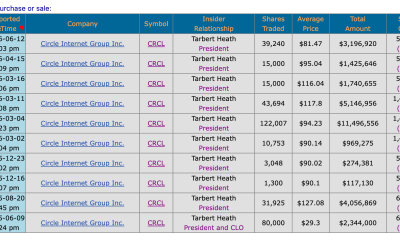

Circle’s President Sold Over 360,000 Shares, The Filings Explain Why


Subway Sandwich Computers Get a Second Life as Gaming Machines


2026 3M Open leaderboard: Scottie Scheffler finds putter in Round 1, sits three back


The Peugeot Family: How 200 Years of an “Old Money” Dynasty Died in A Boardroom


16 Dresses for the High Summer Event


The 35 Best Board Games for Family Game Night


How To Use Claude’s Reflect Dashboard And Learn When It’s Time To Touch Grass


Stephen Colbert Returns to Social Media After Late Show End

You must be logged in to post a comment Login