
TL;DR
BYD denies environmental breaches at its Szeged factory as Hungarian police probe toxic soil claims and the company scouts a second European plant.





Adobe has announced a major expansion of its “creative agent” across its flagship Creative Cloud suite and upgraded Firefly AI studio.
Available in public beta starting today across Premiere Pro, Photoshop, Illustrator, InDesign, and Frame.io, the agent is designed to serve everyone from individual creators to enterprise marketing teams.
Unlike first-generation generative AI tools that simply output flat media from a chat interface, Adobe’s embedded assistant acts as an orchestration layer.
It interprets natural language prompts and directly accesses the underlying software’s APIs to execute complex, multi-step production workflows—from batch-renaming video sequences to dynamically updating brand assets across print layouts—while leaving the final aesthetic decisions entirely in the hands of the human designer.
At the core of this release is a significant technical upgrade to how Adobe’s AI handles persistent memory and context window management. In its upgraded Firefly creative AI studio—currently in private beta—Adobe has introduced two foundational architectural components: “Elements” and “Projects”.
Elements functions as a visual variables library, allowing users to save and reuse specific characters, locations, and objects across multiple generations to ensure strict visual consistency as campaigns scale.
Projects acts as the contextual memory layer, storing assets, generations, and session history in a unified space so users can pick up where they left off without rebuilding their prompt context.
Beyond pixel generation, the system’s most critical technological leap is its ability to operate seamlessly within the complex document structures of desktop applications. “Our Adobe Creative Agent can leverage the decades of powerful features, workflows, APIs that we’ve brought into our application and exposed through tooling that can now be invoked through a creative agent,” an Adobe representative explained.
The practical application of this technology fundamentally alters standard production workflows. Adobe is positioning the human user as a “creative director” capable of delegating repetitive, labor-intensive tasks to the AI. The rollout introduces highly specific specialist agents tailored to the logic of each application:
Premiere Pro: The agent handles tedious project setup, analyzing and sorting source media into bins, batch renaming clips, identifying interview questions, and assembling a rough working starting point.
Illustrator: The assistant automates mathematical and multi-step design tasks, such as generating 50 versioned files from a spreadsheet or running pre-flight checks to flag color mode errors before printing. It can even programmatically duplicate a vector shape 100 times, randomize its position, and change its size based on its z-depth and transparency.
Photoshop & InDesign: The agent executes batch background removals, dynamic layer organization, and applies brand updates across multi-page layouts.
Furthermore, Adobe is actively integrating its creative agent into major third-party enterprise platforms, including OpenAI’s ChatGPT, Anthropic’s Claude, Microsoft 365 Copilot, and soon, Google Gemini and Slack.
Unlike open-source orchestration frameworks or models released under MIT or Apache licenses, Adobe’s creative agent operates strictly within a proprietary, commercial SaaS ecosystem. For enterprise decision-makers, this carries specific implications. Because the agent relies on Adobe’s proprietary APIs to manipulate project files, it requires an active Creative Cloud commercial license. Additionally, by bringing the “Adobe for creativity connector” to platforms like Slack and Microsoft Copilot , enterprise IT and systems architects must consider how internal chat tools will interface with Adobe’s cloud processing environments to support enterprise creative and marketing teams securely.
While Adobe’s announcements highlight a powerful user interface and deep integration within its own flagship applications, several critical questions remain for enterprise technical decision-makers tasked with building bespoke AI systems. VentureBeat has reached out to Adobe for clarification on these infrastructure-level details and will update this coverage as we learn more.
For AI system architects, the value of a creative agent lies not just in a native application UI, but in its extensibility. It remains unclear if Adobe plans to expose these new agentic capabilities via API, or if the company will support the Model Context Protocol (MCP). Without MCP support or direct API access, enterprise teams will face friction integrating Adobe’s tools into their own custom task-routing frameworks and internal LLM pipelines.
Adobe’s new “Elements” feature promises to solve the generative AI consistency problem by anchoring characters and objects across generations.
However, the backend architecture driving this persistent memory is not yet detailed. Whether Adobe is leveraging on-the-fly Low-Rank Adaptation (LoRA) based on user uploads or utilizing a form of visual Retrieval-Augmented Generation (RAG) is a critical distinction for technology leaders managing compute costs, model evaluations, and enterprise-grade inference pipelines.
As organizations build out “Projects” and define brand-specific “Elements”, security and data decision-makers require strict guarantees regarding data provenance and storage. It is currently unknown exactly where this contextual workflow and vector data lives—specifically, whether it remains strictly sandboxed within the customer’s enterprise Creative Cloud instance on Adobe servers, and how role-based permissions apply to these new agentic workflows.
Finally, as lightning-fast, developer-first, multi-model AI creative platforms like fal.ai gain significant traction among enterprises and developers, Adobe’s position in the broader developer ecosystem remains a point of interest.
Whether Adobe views these infrastructure-level API providers as direct competitors to its Firefly AI studio or as potential integration points for bespoke enterprise environments has yet to be seen.
The integration of agentic AI touches on the tension between eliminating drudgery and surrendering creative control. According to Adobe’s recent Creators’ Toolkit Report, which surveyed over 16,000 creators globally, the market is highly receptive to AI as an operational assistant rather than an autonomous creator.
75 percent of surveyed creators describe creative AI as integrated or essential to their current workflows.
85 percent emphasized that the final creative decision must always remain in human hands.
This sentiment is central to Adobe’s messaging. By focusing the agent’s capabilities on file organization, layer management, and brand compliance, Adobe aims to automate what a spokesperson called the “tedious parts of their workflow”. The goal, according to Adobe executive David Wadhwani, is to let creatives focus on the craft so they can “apply their taste and make the calls that only they can”.


This follows a smartphone and tablet ban in classrooms.
Norway is imposing a strict ban on the use of generative AI tools by elementary school kids, according to a report by Reuters. Prime Minister Jonas Gahr Stoere suggested at a press conference that AI lets children skip crucial steps in their education and that schools should focus on teaching them how to “read, write and do mathematics.”
These standards will be imposed at the start of the new school year, which begins in late August. The ban impacts students from first through seventh grade, ages six to 13. However, the policy also extends to teens, albeit in a reduced fashion. Kids aged 14 to 16 can use generative AI, but only with a teacher’s supervision. Teens 17 and above are encouraged to use AI appropriately on their own.
This isn’t the first move Norway has made to remove tech from classrooms. The country banned smartphones from schools back in 2024, which has proven to be a success. It led to a reduction in bullying, better grades and a significant decrease in the number of visits to psychologists for mental health issues. These results were especially potent with girls.
Norway is also planning a social media ban for all children under 16, which is similar to how Australia handles things. A bill will be introduced to parliament by the end of the year.
The US has also been slowly making moves to limit the amount of time kids can spend with AI chatbots. The Senate and the House have been discussing a bill that would require AI companies to implement an age-verification process and ban them from providing chatbots to minors.
The so-called Guidelines for User Age-verification and Responsible Dialogue Act, or GUARD Act, advanced past the US Senate Judiciary Committee but has yet to be voted on. The language of the bill did soften last month. When originally proposed, it was aimed at nearly every AI-powered chatbot. Now, it just refers to “AI companions”, which potentially means that products like ChatGPT, Gemini and CoPilot would be exempt.
Critics of the legislation have suggested that the bill’s narrower language could let companies exempt themselves if the chatbot function of their tools are deemed “incidental.” After all, it’s a fine-line between an “AI companion” and a “search tool” that someone happens to talk to 24/7.

You’ve probably used VLC Media Player, the free video player with the orange traffic-cone icon — it’s been downloaded more than 6 billion times. But according to its lead developer, Jean-Baptiste Kempf, robots will soon be almost as ubiquitous as his open source video software.
Convinced that “hundreds of millions of robots and drones” will be roaming the streets in a few years, this French serial entrepreneur and open-source legend has been building Kyber, an infrastructure layer for controlling remote devices in real time. Its core software is an SDK that synchronizes video, audio, sensor data, and control inputs with minimal latency.
This lines up well with the rise of physical AI, and it’s part of why the Paris-based startup was able to raise a $5 million round led by Lightspeed, which has also backed Anthropic and Mistral AI. “Physical AI is only as good as the underlying systems running it,” the American VC firm wrote in a LinkedIn post announcing its investment.
Kyber’s potential applications go well beyond AI, though. Kempf told TechCrunch the platform is built for “all the use cases where the person who’s operating is not in the same place as the compute, which is not in the same place as the action.”
Remote control is one half of the equation; speed is the other — and it’s what inspired the startup’s name, a nod to the lightsaber crystals in Star Wars. “If you control things in the real world, every millisecond matters,” Kempf said.
Kyber’s approach to eliminating lag is rooted firmly in video-streaming technology. The company started as a side project Kempf built while CTO at cloud gaming startup Shadow, and its early focus on streaming makes the VLC connection an easy one to draw. But IoT expertise matters just as much for optimization — tuning performance to a device’s available compute, at scale — the other core piece of what Kyber does.
Kempf says other companies with the resources and the need have already built similar software for their own use cases, like remote driving. “But the largest fleets today have maybe 2,000 or 3,000 vehicles. Imagine you need to manage millions of them; that’s not the same thing.”
That jump in scale also raises the stakes on observability — knowing systems are actually working will matter even more when AI agents, not people, are managing entire fleets and networks. Even at much smaller scale, though, there’s a real benefit: not needing to physically reach every device just to push a software update, for example.
That range — from a handful of devices to millions — means Kyber’s user base will likely span far more companies than will ever become paying customers. True to Kempf’s roots, the core project is open source, while the company sells a productized version to enterprise customers. And it’s not just software: like Palantir and others, Kyber also offers hands-on, custom deployment through forward-deployed engineers, or FDEs.
FDEs make up a large part of Kyber’s team, which currently numbers 25 full-time staffers. The startup is headquartered in Paris but has offices in San Francisco and Singapore to support what it expects will be a global client base across a variety of industries. The company says it is already in commercial deployment with customers in defense, telco, robotics, and AI.
To focus its efforts, Kyber has been prioritizing three segments: robotics, drones of every kind, and remote IT access, where demand has been particularly strong. In that last segment, Kempf says Kyber aspires to be more than just a Citrix challenger — but even that comparison alone points to a sizable total addressable market.
Remote IT access isn’t exactly glamorous, but Kempf seems energized by the problem — and Kyber’s careers page hints at why: “The companies that tried to solve it spent years and tens of millions building custom solutions they’ll never share. We’re building the version everyone else can use.”
When you purchase through links in our articles, we may earn a small commission. This doesn’t affect our editorial independence.
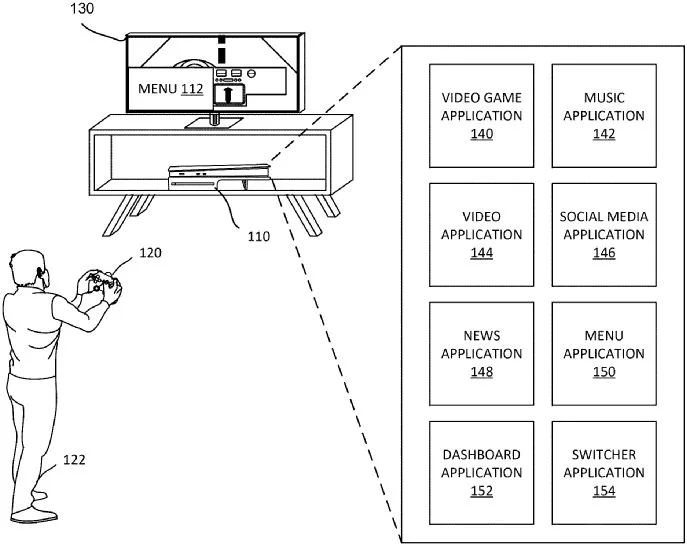
Sony has filed a PSN login patent, first spotted by RespawnFirst, that would pull the DualSense controller into the sign-in process. A PlayStation console would start the request, then the controller would help confirm that the account holder is close enough to approve access.
For players, the appeal is easy to see. PSN account abuse can lead to unauthorized purchases, lost access, and attempts to resell established accounts. Sony already offers 2-step verification and passkeys, but this idea adds a hardware check to the login chain.

The patent describes a handoff that begins at the console. A PS5 or another PlayStation system would send a sign-in request, then the controller would scan for a nearby device such as a smartphone. The diagrams show the console, controller, and account screen as separate parts of the same approval flow.
The controller could use Bluetooth, NFC, proximity sensors, light, sound, or haptic feedback to make contact. After the nearby device responds, credentials would move through the controller and return to the console so the sign-in can finish.
Passkeys already give PlayStation users a cleaner way to sign in with a stored credential, including through the PlayStation app. Sony’s patent changes the burden on an attacker. A stolen login becomes harder to use if the console also expects a specific controller to join the process.
There’s a tradeoff, and it isn’t small. A lost, broken, or unavailable DualSense could become a lockout risk unless Sony builds in another way to get back in. The filing doesn’t confirm whether current controllers would support the system, or whether it would require future hardware.

The harder PSN security problem may sit outside the console. Attackers can exploit account recovery by persuading customer support to provide sensitive account access using limited details.
That leaves Sony with two jobs if this ever becomes real. The controller check would need to be convenient enough for regular players, and account recovery would need tougher guardrails. Until then, the PSN login patent is worth watching, but it shouldn’t be treated as a full answer to account theft.


Many organizations view multi-factor authentication as one of their strongest defenses against account compromise. However, attackers increasingly use phishing techniques that don’t require stealing passwords or bypassing MFA at all.
On July 8, 2026, BleepingComputer will host a live webinar titled “Stop chasing alerts: Automating email security with behavioral AI” presented by Dan Nickolaisen, Solutions Architect Manager at Abnormal AI, and Eric Danneker, Director of Cyber Vigilance and Defense at Novant Health.
The webinar will examine how modern phishing campaigns, business email compromise (BEC), and account takeover (ATO) attacks exploit trusted services and authentication workflows to gain access to corporate accounts.
One technique receiving growing attention is Device Code phishing, where attackers trick users into authorizing access through legitimate Microsoft authentication pages. Because users complete a real login and MFA challenge, attackers can obtain persistent access without ever stealing credentials.
This shift presents a challenge for security teams. Traditional email defenses, credential monitoring, and MFA protections may not detect these attacks, leaving analysts to investigate suspicious activity only after an account has already been compromised.
Abnormal AI uses behavioral AI to identify unusual account activity, suspicious communications, and attack patterns that conventional security controls may miss.
Attendees will learn practical approaches for detecting account compromise earlier, reducing investigation workloads, and improving response times through automation and behavioral analysis.
Many phishing attacks still focus on stealing passwords, but increasingly attackers are targeting authentication workflows themselves.
By abusing legitimate authorization processes, attackers can obtain access tokens that grant ongoing access to email, cloud applications, and corporate resources without triggering many traditional security controls.
This webinar will explore how organizations can identify these attacks sooner and use behavioral AI to automate detection and response activities before compromised accounts lead to larger security incidents.
Join us to learn how organizations can better defend against modern phishing techniques that exploit trust, identity, and legitimate authentication workflows.
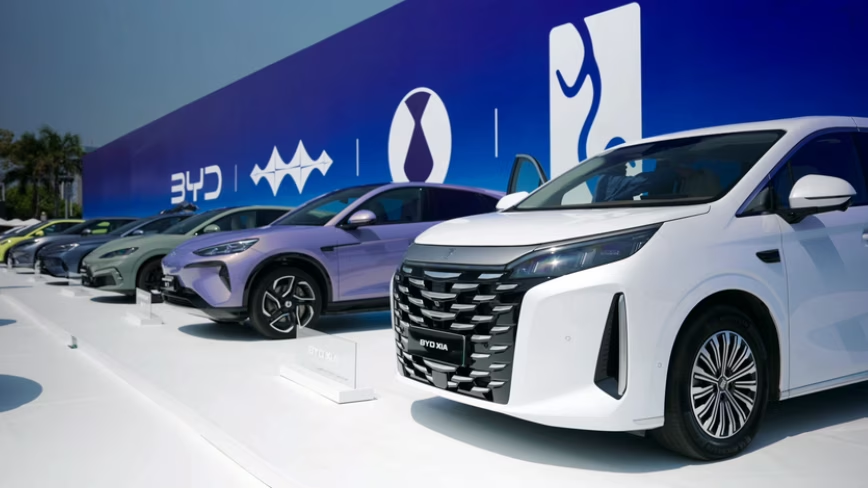
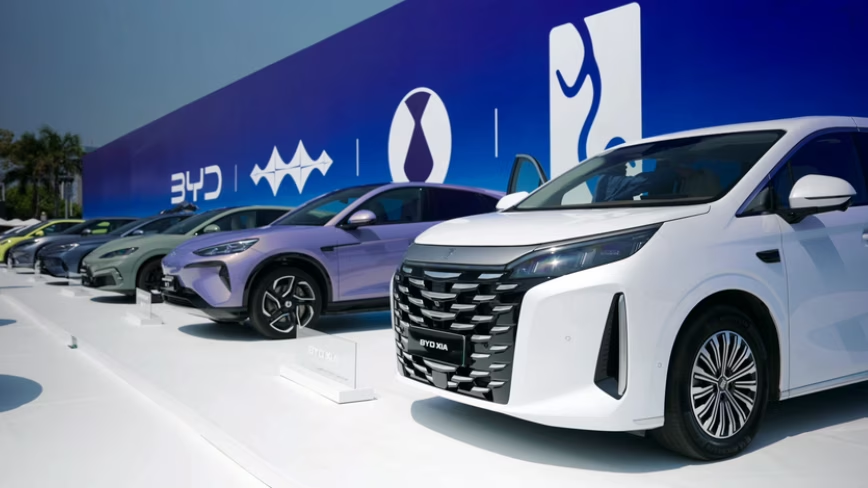
BYD denies environmental breaches at its Szeged factory as Hungarian police probe toxic soil claims and the company scouts a second European plant.
BYD executive vice president Stella Li said the Chinese automaker has complied with all environmental regulations at its Szeged factory in Hungary, pushing back against allegations that the company violated its obligations during construction. Li made the comments at a press conference in Belgrade on Friday, where she met with Serbian President Aleksandar Vucic to discuss a potential second European production site.
The denial comes after Hungary’s environment minister said in May that BYD had “seriously violated” its environmental obligations at the Szeged site, where Hungarian police are investigating whether toxic soil was improperly handled during construction work. The government imposed a fine of 10 million forints, roughly $27,000, on the company over the incident.
BYD began trial production at the Szeged plant in early 2026 and plans to start full assembly operations in the fourth quarter. The factory is the first major Chinese automaker production facility in Europe, a milestone that has drawn both investment interest and political scrutiny. Hungary positioned itself as China’s gateway into the EU under former Prime Minister Viktor Orban, capturing 44% of all Chinese foreign direct investment into Europe in 2023.
The political landscape has since shifted. Peter Magyar, who replaced Orban earlier this year, has taken a harder line on environmental and labour standards at Chinese-backed projects. The scrutiny of BYD’s Szeged site is part of a broader review that has also targeted battery manufacturers CATL and Samsung SDI, both of which operate or are building large facilities in Hungary.
However, subsequent testing has complicated the initial allegations. According to Hungary Today, later soil tests on surrounding farmlands found no contamination above regulatory limits. The distinction matters: the police investigation centres on whether soil from the construction site itself was improperly disposed of, not whether the factory is actively polluting surrounding land.
Li’s appearance in Belgrade served a dual purpose. Beyond addressing the environmental controversy, she was there to discuss BYD’s search for a second European plant. Bloomberg reported that BYD is open to buying an existing facility, partnering with another manufacturer, or building from scratch.
Vucic offered Serbia as a production site during the meeting, pitching the country’s lower labour costs and proximity to EU markets.
The second-plant search has also involved conversations with Stellantis, according to Bloomberg. The Franco-Italian automaker has excess factory capacity across Europe, and a deal would give BYD immediate production infrastructure without the multi-year timeline of a greenfield build. European EV demand has surged in 2026, with battery-electric registrations jumping 51% in March alone, creating urgency for Chinese manufacturers to localise production and avoid EU import tariffs.
The Szeged controversy sits within an even broader pattern of scrutiny. China Labor Watch and other organisations have raised separate allegations of forced labour practices at the construction site, claims that BYD has denied. The European Parliament has also flagged labour conditions at Chinese-backed projects in Hungary, adding another dimension to the political pressure on Magyar’s government to demonstrate tighter oversight.
For BYD, the stakes extend well beyond a $27,000 fine. The company overtook Tesla as the world’s largest seller of battery-electric vehicles in 2025 and is racing alongside other Chinese automakers to establish European manufacturing before tariff walls rise further. Any sustained regulatory friction in Hungary could complicate its expansion plans at a moment when the European market is its fastest-growing opportunity.
Li told reporters in Belgrade that BYD will continue to invest in Hungary and cooperate fully with the investigation. Whether that cooperation satisfies Magyar’s government, which has political incentives to distance itself from Orban’s permissive approach to Chinese investment, remains the open question.
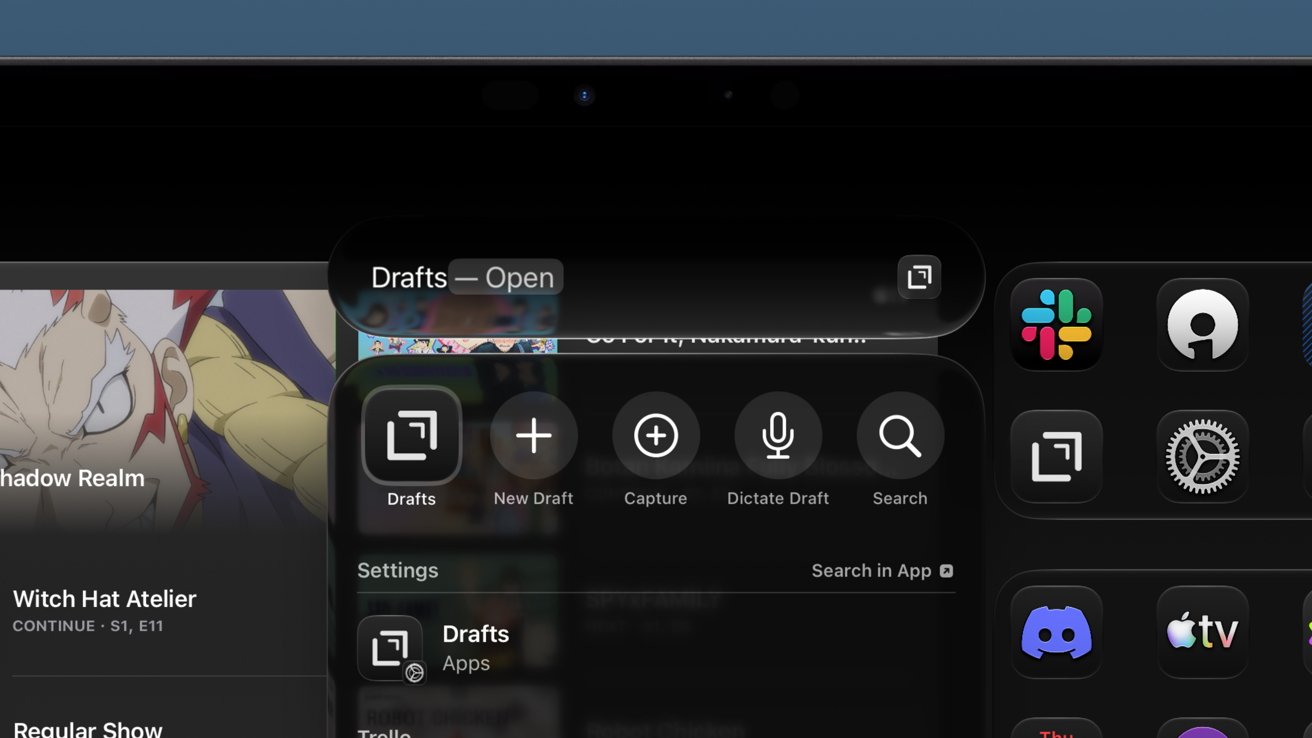
Siri AI and system optimizations are the focus of iPadOS 27, but that’s enough for iPad’s usual in-between year. Power users will notice the changes the most.
The iPad operating system has been on a predictable tick-tock upgrade cycle where one year is significant and the other minimal. Apple focused on Siri AI for its OS 27 releases, but iPadOS 27 still has a few new and useful upgrades.
As an iPad-first user, I’m most interested in how iPadOS might affect my workflows each year. I do have a Mac mini for recording a video podcast, and my Apple Vision Pro is still used regularly for focused work, but the iPad is where I live.
Of those three platforms, funny enough, the Apple Vision Pro saw the most new feature upgrades overall.
That isn’t to say what’s new in iPadOS 27 won’t affect me or my work. There are some interesting new automation and windowing features that may prove useful.
Plus, the merging of Spotlight and Siri saved the search tool from being a broken mess.
If you’re an iPad user who’s mainly using the iPad as a tablet, there’s a chance you won’t notice much new beyond Siri AI. Power users definitely got the most focus this year thanks to system optimizations, design changes, and a couple of new features.
Let’s get into it.
Apple’s WWDC keynote didn’t split up features by OS due to a focus on optimizations and child safety features. I’m not getting into the child safety stuff in this early review since it doesn’t affect me.
There are many small changes across every operating system, but when you break down exactly what’s in each, it feels small versus previous years. That’s likely because of Apple’s stability and optimization focus this year, and how nearly all the truly new features are tied to AI.
Spotlight search is vastly improved thanks to a completely rethought indexing system. Everything stored on your device, from Contacts to Journal entries, is crawled after installing iPadOS 27.

iPadOS 27 review: Spotlight is finally instant again
The process can take up to a week, depending on how much data you have saved locally. The improvements are immediately noticeable because you can actually use Spotlight without waiting for results to populate.
There’s word that the new indexing is being added in iPadOS 26.6 so people upgrading to iPadOS 27 in the fall will already have everything done day one. However, while that indexing will be done, it won’t be used until the fall releases.
That’s important because the new Siri AI relies heavily on that newly indexed data. Some queries flat out didn’t work when indexing was still going on, so keep that in mind.
While the Spotlight interface has integrated Siri AI, they are still distinct entities. If you search for an app name, hit enter, and it launches, that’s Spotlight.
In my use this past week I can say that Apple accomplished its goal. Spotlight is instant.
Quality-of-life improvements aren’t always the most exciting, especially when discussed during a keynote. However, they are felt in everything you do when implemented properly.

iPadOS 27 review: paste suggestions are helpful
One feature everyone will notice almost immediately is the new paste option in the typing suggestions. On iPad, that shows up whether you’re using the virtual keyboard or a physical one.
Not only is it convenient when using the touch interface, it’s great for verifying what is in your clipboard before pasting. So, even if you’re on a physical keyboard, there is some benefit.
Apple says that windowing actions are faster in iPadOS 27. I’m not sure if I notice faster, but they certainly feel more fluid and responsive.
Transferring files in the Files app to an external drive is five times faster. While I didn’t pull out a stopwatch, it certainly seems to be true.
I need to get photos from my camera’s SD card to my iPad, then from my iPad to an SSD later for backup, and both can be quite annoying when in progress.

iPadOS 27 review: Files app transfers to external drives are now up to 5 times faster
Family photoshoots can take ages to transfer, especially when you’re trying to transfer photos while on the move. That 5-minute transfer turning into 1 minute is a huge workflow improvement.
6GB took around 20 seconds to transfer to my external SSD I keep attached to my Studio Display. While I don’t have a good way to compare, it’s certainly faster.
The iPad menu bar is also changed, and I think for the better. Whatever your active app is, wherever it is on the display, the name is shown in the top left corner.
Hovering over that name with a cursor, or tapping with a finger, opens the menu bar items for that app. The window controls appear there too in full-screen mode, but otherwise stick with the window.
Siri AI is here and it’s deeply ingrained in Apple’s operating systems. However, I stand by the idea that the AI side of Apple is still ignorable if that’s what you want.

iPadOS 27 review: Siri AI has a home in the new Siri app
I understand the anti-AI sentiments, but I do think we shouldn’t be throwing a blanket over all AI. It’s a dumb term that applies to too many technologies.
Many of these implementations are bad, yes.
Apple’s use of AI, arguably, is one of the few that feels right. It is private and secure with a focus on local operation, though there are powerful cloud models when needed.
There are five new third-generation Apple Foundation Models.
Users don’t really need to worry about the specifics of this. And while the new Apple Foundation Models were built thanks to a partnership with Google, the Gemini Assistant and Google Search are nowhere to be found.
It’s Apple AI all the way down.
I’m conflicted on what I should talk about here in regard to an iPadOS review. The Siri AI and new Apple Intelligence features are available across Apple’s ecosystem.
The new live proofreading feature is a nice addition. If I make a silly grammatical mistake, a blue line appears in my text.
Writing Tools vanished in beta 1 a day after I installed it. However, those grammar suggestions still work, so that’s a good in-between until the Writing Tools Proofread function returns in a later beta.
I don’t generate images, text, or anything for work and don’t plan to start. Spotlight and Siri AI are useful in that it’s easier than ever to uncover an old email.
The new Photo editing tools like extend and reframe are interesting, but I don’t think this is the place to discuss them. I’ll be examining those more closely in the future.

iPadOS 27 review: world knowledge helps get things answered without using Google
I’m sure some workflows might emerge from this new Apple Intelligence, but I didn’t use AI before either. I have considered that the Siri app might be a good search alternative.
The idea would be to ask Siri if there are any gaps in my longform pieces and have it present me with some results. I’d reference the included sourcing and verify if that information indeed was missing and learn what I needed to add from there.
I can say that I will never take a Siri text response as the default answer or paste in a response into my text as fact. The results of some queries are interesting though, as Siri generally doesn’t summarize what it is sharing.
Instead, Siri shares giant clumps of data from various sources. Since the text is verbatim from the source, it can even include typos. Apple is doing this to prevent hallucinations in the output, which actually works quite well.

iPadOS 27 review: Siri is always available via Spotlight
That said, it is still AI, and I do catch it in a hallucination from time to time. So, since I know I can’t catch every bit of wrong information, I just default to it as a reference and open the link to verify.
As we said in US Navy nuclear power operations when checking each other’s work: trust, but verify.
I believe this is a great starting point for Siri AI and Apple Intelligence. Apple delivered on everything it promised in 2024, and took things even further with its new models.
I believe Apple is the only player on the market with an entire ecosystem of products and data with an AI built in at this scale. Google Gemini has some of this on Pixel, Samsung Galaxy, and a few others, but not to the depth of Apple’s AI integrations.
It can only improve from here. I’m especially excited for third-party developer support.
Shortcuts is quite the powerful tool that I’m not sure many Apple users actually know about. That, or they’ve stumbled into it and got intimidated and never came back.

iPadOS 27 review: Shortcuts are easier to generate
Either way, iPadOS 27 and the other new releases make Shortcuts much easier to use. You simply hit the plus button and type in what you want a shortcut to do, and if it’s reasonable and within the app’s abilities, it generates that shortcut.
That’s it, you’re done. Now, you’re not going to generate a 200-step shortcut using this method, but you can massage out a task with a few commands to refine what you’d like to do.
I’ll remind everyone that is experimenting with Shortcuts: simple is better. Instead of making a giant and complex shortcut with a million actions, break each section of actions out into their own shortcuts.
Then, once you’ve got your various separate tasks, you can combine the shortcuts into one action using the Run Shortcut option. But of course, that’s a bit more manual.
Now you can just voice your shortcut into being.
It is limited to Apple apps at the moment, so you won’t be making Shortcuts with third-party actions just yet. That should become available once developers can add support outside of the beta.
iPadOS 27 users got one new action that could come in handy. You can now have a shortcut run when removing or attaching a keyboard.
So, toggle between full-screen apps for tablet mode and multitasking for keyboard mode. It’s a simple automation that helps lean into iPad’s ability to be a naked robotic core and transform into the device you need in the moment.
The refinements and optimization paired with Siri AI make the 2027 release feel like it’s good enough. Had Apple ignored the platform entirely beyond the new Siri, we’d be having a very different discussion.

iPadOS 27 review: iPad continues to be whatever you need it to be thanks to a strong OS base
There’s also the chance iPadOS could see more changes through the beta and through the OS 27 cycle. Never count Apple out of introducing some big paradigm-shifting feature in iPadOS 27.3 or something.
I do wish more time could have been spent on some of the pain points, like the awkwardness of Slide Over and some windowing actions. Resizing my Safari window from the right shouldn’t reduce its size from the left too, especially when it was touching the left side before.
We’re all still waiting on features like clipboard history and system-wide extensions similar to those found on macOS. I do wonder with the continued attention on the menu bar if we won’t see menu bar apps in iPadOS eventually.
The iPad Pro continues to be my device and platform of choice. Apple Vision Pro is another great option, but there are several awkward areas there that make work a little slower versus the iPad.
My Mac mini is great for capturing our video version of the AppleInsider Podcast. I wonder if we’ll see a dedicated podcast recording and editing tool for Apple Creator Studio at some point.
Then, and only then, will I fully leave Mac behind. For now, Continuity Camera and multiple recording options are only available on Mac.
Oh, one last thing: bring Universal Control to iPad. Let me move my cursor from my iPad Pro to my iPad mini without a Mac present.
Anyway, this is an early review of iPadOS 27 conducted during the first developer beta. A lot could change in the coming months, and AppleInsider will be back to review the shipping version in the fall.
As far as in-between iPadOS years go, this is a strong offering. Siri AI is transformative to the entire ecosystem, including on iPad.
It is never a bad thing to take time to focus on optimization, speed, and design. More could have been done for multitasking and pro tools, but we’ll see what iPadOS 28 offers in that regard.

Apple’s latest explanation for Siri AI on Apple Watch identifies which models support the feature, but it still doesn’t explain why older watches are excluded despite requiring a nearby Apple Intelligence-enabled iPhone.
A June 19 interview with TechRadar offered Apple’s first public response to questions about the cutoff. Apple Watch and Health Product Marketing Manager Cait Dooley said Siri AI and other watchOS 27 features work best on newer hardware.
Apple specifically pointed to Apple Watch Series 9 and later models, Apple Watch Ultra 2 and later models, and Apple Watch SE 3.
WWDC 2026 introduced Siri AI as part of watchOS 27. The feature requires both a supported Apple Watch and a nearby Apple Intelligence-enabled iPhone, with support beginning on Apple Watch Series 9.
TechRadar asked Apple why older Apple Watch models don’t qualify. Dooley said Apple makes power and performance a priority with every software release and repeated that Siri AI works best on newer hardware.
Her answer clarified the compatibility list, but it stopped short of explaining the technical reason behind the cutoff.
Siri AI on watchOS 27 supports the following models.
Older models don’t make the cut.
Apple Watch Series 8 and the first-generation Apple Watch Ultra use the S8 chip, which includes a 2-core Neural Engine. Apple Watch Series 9 introduced the S9 system-in-package with a 4-core Neural Engine that handles machine learning tasks up to twice as fast as the S8.
 Siri AI requires both a supported Apple Watch and a nearby Apple Intelligence-enabled iPhone
The newer chip also brought on-device Siri processing and support for the double tap gesture. The hardware gap between supported and unsupported models provides one possible explanation for Apple’s compatibility cutoff.
After publishing Apple’s comments, TechRadar offered its own interpretation. The publication wrote that “it’s likely only Apple Watches running Apple’s powerful S9 and S10 chips can handle the technical demands of Siri AI.”
Apple didn’t make that claim.
The company’s explanation and TechRadar’s conclusion aren’t the same thing. Apple may have technical reasons for limiting Siri AI to newer watches, likely the on-device Siri processing, but its current public statements don’t identify what those reasons are.
Apple’s own requirements make the Siri AI cutoff harder to evaluate because the feature isn’t being presented as a standalone Apple Watch capability. A paired iPhone does the heavy lifting for computational needs.
Apple Watch owners now have a compatibility list and a broad performance explanation. A technical explanation for why Siri AI begins with the Apple Watch Series 9 generation hasn’t arrived yet.


The Chimelong Spaceship Theme Park in China’s Zhuhai region is a 750-meter-long structure that lies against green hills, like a vessel that just landed and stayed. The world’s largest indoor theme park is contained within its over 400,000-square-meter enclosed area. It began functioning in stages in late 2023 and quickly established seven Guinness World Records before most people outside the region were aware of it.
The structure itself sends a very clear message from the start, with its sleek, rounded form creating a stunning display at night thanks to the blue accent lights and blending in pretty well with the surrounding terrain during the day. The park was created by a Los Angeles company with great experience in huge marine projects at a cost of around $1.1 billion spread over more than ten years. It shares a border with an ocean-themed resort and a huge hotel, forming part of a major destination expected to attract millions of visitors each year.

However, when you enter, it becomes clear that this place is massive. The park combines a vast aquarium operation with rides, entertainment, and themed attractions spread across around 15 different zones. It’s not just big; it’s also home to over 150,000 marine animals of over 300 species. The total volume of water in all of the tanks is a staggering 75 million litres, setting yet another record. The largest single tank alone holds 56 million litres and incorporates an incredible wave system capable of producing waves as tall as 3.2 metres, gaining the Guinness World Record for the highest indoor artificial wave ever.
One of the most impressive marine attractions is the world’s largest living coral reef exhibit, spread across multiple specially designed tanks with a combined capacity that breaks all kinds of records. Visitors can walk through an environment filled with live coral, stunning fish, and well-lit displays underlining the value of reef ecosystems. There’s even a presentation that uses a giant animatronic coral monster to demonstrate reef importance in an engaging fashion, rather than just a boring lecture.
Rides are scattered throughout the park, mixing together with space themes and undersea excursions. One of the first things you’ll notice is a very gentle introduction to the park, a motion simulator called Spaceship Story in which you sit aboard a vessel that takes off, encounters a few challenges, and then returns, all using screens and movement to immerse you in the park’s story of exploration and discovery from the start.
The clear star of the show is below in the deep-sea section, where Bermuda Storm, the world’s largest seated motion simulator capacity, can accommodate 304 people on a single platform. Riders enter what appears to be a research vessel and face a giant curved projection screen that must be well over 1,600 square meters in size. The entire thing is overlaid with water effects, wind, actual set pieces, and even an animatronic character who interacts with what’s happening on screen. Many tourists believe that this is the ride that will stay with them the most at the park since it involves all of your senses at once and delivers a light and adventurous story that is never too intense.
Next to that is China’s first real underwater submarine experience. Riders enter a vessel that transports them through a genuine aquarium tank, with fish swimming straight past the windows and projections and stage pieces resulting in some very spectacular encounters with larger creatures, such as the gigantic squid scene. The entire journey unfolds at a very peaceful, observant pace, which contrasts perfectly with the high-adrenaline adventure next door.
You’d be hard pressed to find a tiny rectangle more versatile than the humble Raspberry Pi single-board computer. Since its inception in Cambridge in 2012, the Raspberry Pi has served as a springboard to an endless rabbit hole of DIY and maker projects. And while the Pi may have lost a bit of its edge over the years, to the point that we’d actually recommend a cheap mini-PC for certain Raspberry Pi projects, that doesn’t mean you can’t or shouldn’t use one.
There’s long been a central theme connecting a number of Raspberry Pi projects, and that’s how to employ them in a way that can save you a little bit of cash. The scope of this guide will lay out four self-hosted projects to replace your cloud storage, music streaming, Plex streaming, and one to help track price changes –- all in the name of saving money over the long term.
It’s worth noting that you’re going to be ahead of the game if you already own a Raspberry Pi that you can use. Maybe you have an old one sitting around that you’re not currently using or you just don’t want a mini-PC. Maybe you just love Raspberry Pi boards -– all fair. If not, consider picking up a used model to save some cash; just about any current Raspberry Pi model will work for these projects.
Plex has humble roots as a freeware port of XBMC (which would later go on to become Kodi). It quickly became the de facto self-hosted anti-Netflix: A way for users to break free of another monthly subscription and take control over their media library. You can say Plex has come full circle, as many of its users have begun looking for an alternative as the core Plex service has become unrecognizable. The slow intrusion of ads, pay walling once-free features, and rising subscription and license costs have alienated many of Plex’s power users. On the topic of costs, the platform is once again raising the price of its lifetime pass later this year –- an eye-watering $750 that is practically begging users to go elsewhere or submit to its monthly pricing.
Enter Jellyfin. This free and open source media platform is a fork of the Emby 3.5.2 codebase, and functions as a self-hosted and self-contained server. Jellyfin has a number of clients in addition to its official desktop version that you can run on a Raspberry Pi, enabling support for iOS, Android, Roku, webOS, Tizen, and others. Jellyfin also boasts a vibrant third-party development community, where you can find several supported plug-ins that add increased functionality. An example is FinAmp for music streaming on a Jellyfin server, meaning a you can use the platform as an alternative to Spotify or PlexAmp.
Between Jellyfin and its plug-ins, basic features that Plex locks behind a paywall –- like transcoding and remote access –- are covered. Jellyfin plus Tailscale is a popular combo for secure, remote access to a Jellyfin server, and another reason that Jellyfin is among a growing number of free apps that beat the expensive alternatives.
The rise of music streaming has given way to a number of ethical questions like what it really means to not own the media you’re listening to and how streaming impacts artists financially. None of these questions have an easy answer, and that says nothing of the dubious artist payment practices of companies like Spotify and others, or the deluge of AI-generated music that has infested streaming platforms. In the same way that Jellyfin serves as a money-saving alternative to Plex or services like Netflix, Navidrome can function as a self-hosted alternative to the big music streamers.
The open source music server is built on top of the Subsonic media streaming API, which means you can use any number of Subsonic compatible front end apps and players for a Navidrome server. Navidrome works out of the box behind a reverse proxy, which is recommended for accessing the server outside of your LAN, but using a gated VPN connection adds another layer of security –- again, Tailscale is a popular choice here, as is self-hosted WireGuard.
The catch here is that you need your own music collection, but that’s kind of the point. Whether it’s converting your existing CDs to FLAC or MP3 formats, or using a Spotify Premium alternative like Bandcamp or Qubuz to buy digital tracks, having your own music library on your Raspberry Pi means you’re not beholden to corporate whims or licensing agreements that could see your favorite music evaporate from a streaming service.
Using a Raspberry Pi to escape third-party, proprietary cloud ecosystems such as Google and Dropbox still remains only one of the most popular Pi projects. However, it’s also one of the most popular ways to save money with a Raspberry Pi. It’s a project that’s been done to death, so to speak, but for good reason –- it works. Aside from eliminating another subscription, you also gain control over your data and privacy, which is an important aspect of the data sovereignty discussion.
Categorically, NextCloud is the most popular choice for creating your own cloud storage. There are a number of ways you can configure NextCloud, but a hidden trick is to run DietPi, which is a lightweight Debian-based Linux distro for the Raspberry Pi. The best part about this is once you flash DietPi to your installation media, there are several apps that are already pre-configured for you, including NextCloud. DietPi can also install Syncthing for you, which is another popular and free tool for self-hosted cloud storage.
One of the best ways to save money is to spend less upfront by shopping smarter. There are a number of simple price checking tools you can use to keep an eye on things, or even Python scripts for the programmers among you. But ChangeDetection.io works particularly well on Raspberry Pi boards, and it can be used to track prices, re-stocks, and web page monitoring. Even better, it can be integrated into popular services like Discord and Slack via webhook to receive notifications, and it can also be paired with other projects on this list like Jellyfin and NextCloud.
ChangeDetection.io is a free open-source project that you can self-host on local hardware but also as a subscription service that will monitor URLs for you, though that runs counter to this guide. The easiest way to install the service is by setting up Docker, and then clone the github repository with something like Docker Compose. Beyond that, it’s then a matter of setting up filters, monitoring settings, and where notifications need to be sent.
Though self-hosting your own services takes some time and commitment, one of the best benefits is you are insulating yourself from subscription creep. This can become a serious problem; one CNET survey from 2025 found that the average adult spends as much as $1,080 per year on subscription services. And by self-hosting, you’re forced to be more judicious about what you actually need, as that same survey found that many adults are spending $200 or more on services they’re not using or forgot to cancel. Outside of saving money on recurring subscription fees, being able to track prices with a tool like ChangeDetectio.io goes a long way in making more discerning buying decisions. Those savings can definitely compound over time, depending on your shopping habits.
We can do some quick napkin math based on some popular subscriptions. Netflix is still the most popular video streaming service, and it costs a minimum of $107.88/year for the cheapest, ad-supported plan as of this writing. Tack on a couple more video streaming services, as most households have more than one, and that cost more than triples right there. Spotify’s cheapest premium (Individual) plan currently costs roughly $156 a year, and a popular cloud storage service like Google Drive will cost you $20-$100 annually, depending on how much storage you need. In this very basic example, you’d be saving between $284 and $364 every year by replacing your subscription services with open-source ones running on a Raspberry Pi.
The potential savings here will really only go up, as streaming services continue to increase their subscription costs over time. After all, when was the last time you saw a streaming service get cheaper?
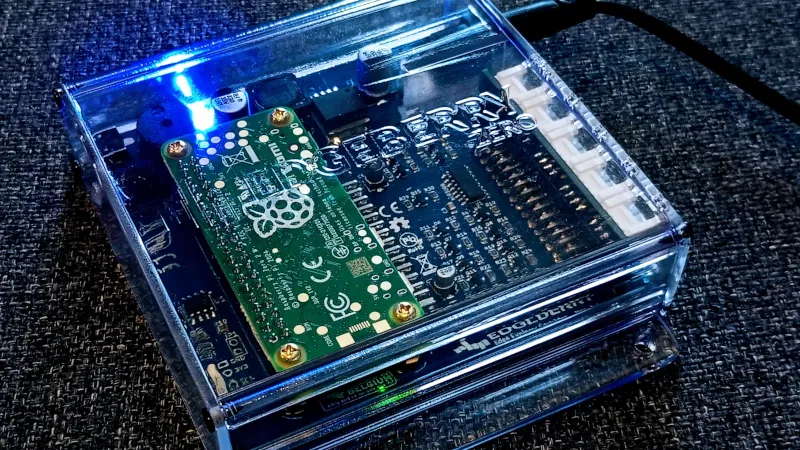
By now we’re all used to single board computers such as the Raspberry Pi Zero, but it’s likely we’ve all been frustrated at times by the number of support components required to use one. This becomes ever more annoying out in the field away from a handy HDMI, USB desktop, and power supply.
The Edgeberry Zero is an attempt to tackle this by mating a Raspberry Pi Zero with a PCB holding a robust power supply and interface connector, all together in a case. better still it comes with Edgeberry Hub, a software management interface.
It appears to be a commercially available product, but it’s Open Source Hardware Association (OSHWA) certified and everything is available in a GitHub repository. Looking at it from a Hackaday perspective it’s hardly the first power supply support board we’ve seen for a Pi, but its approach of making its own expansion module format is an interesting choice. To us they are reminiscent of Game Boy cartridges in the way they slide into a slot in the case.
We like the general idea behind the Edgeberry Zero, but whether it offers enough differentiation from packaging up a Zero with cables and duct tape is up to you.





No Jackpot Winner as $257 Million Prize Rolls Over to $269 Million Monday Draw

Zimbabwe Requires Crypto Businesses to Register Annually Under New FIU Regulations


Weekend Open Thread: Miami – Corporette.com

Matt Damon’s Viral Sci-Fi Thriller Has Taken Over HBO Max


Anthropic staff to meet White House officials next week, Axios reports


As AI companies race to go public, who else is along for the ride?

Bitcoin could crash to $48,000, if this historical pattern is triggered

what doctors are seeing in ebike crashes

Warning of disruption as Cardiff Crossrail works to start

Tributes to former deputy head teacher at Cambridge school among death and funeral notices


“Israel’s” ban on ICRC visits ruled illegal, but Knesset moves to stop them permanently


Deion Sanders Shares Powerful Post After Viral Advice To Deiondra


Financial Accounting | Last Day Revision Strategy and Booster | CMA Inter – June 2026

Kate Middleton Glare Goes Viral After Kids Booed At Royal Event


Over 400 Arch Linux packages compromised to push rootkit, infostealer


XRP ETFs Outperform As Bitcoin And Ethereum Funds Extend Outflow Trend


Invesco Quality Income Fund Q1 2026 Commentary

Market Preview: SpaceX (SPCX) IPO Record, Federal Reserve Meeting, and Iran Nuclear Agreement


Singer Oliver Tree dies aged 32 in helicopter crash in Brazil


Dick Advocaat’s Curacao scores first-ever World Cup goal against Germany


You must be logged in to post a comment Login