Graham Sykes just delivered one of the most impressive acceleration runs ever recorded on two wheels. His steam-powered Force of Nature motorcycle covered the quarter mile in 5.5 seconds while reaching 192.94 miles per hour during recent testing at Santa Pod Raceway in the UK. That performance puts the machine second only to a specialized rocket bike in outright quarter-mile times among motorcycles. It also claims the outright fastest acceleration marks over shorter distances such as the eighth mile and 1,000 feet.
Sykes, a 62-year-old precision engineer, constructed the entire project in his home workshop in North Yorkshire. The current version represents the fifth major iteration of a concept he has pursued for years with help from a small team that includes fellow rider Phil Wood and his wife Diane handling support duties. Years of experience in straight-line motorsport and an interest in historical steam rocket ideas led him to this point. Early inspirations included old attempts at steam-powered jumps and even a steam scooter sighting.
Motorcycle toy gift for kids aged 10 and up – The LEGO Technic Kawasaki Ninja H2R Motorcycle is packed with authentic features and gives boys and…
1:8 motorcycle scale model kit – Designed with amazing attention to detail, this scale model Kawasaki motorcycle toy includes a kickstand so kids…
Lots of realistic details – Features include steering, suspension, a 2-speed gearbox, a 4-piston articulated engine and turbocharger
Preparation starts with a separate support unit that heats 120 liters of specially treated water inside a pressure vessel mounted on the bike. Temperatures reach 250 degrees Celsius and pressures hit 580 psi using a small burner that runs on kerosene or vegetable oil. Once heated, the bike rolls to the starting line disconnected from the heater. The rider presses and holds a button on the handlebar to open valves. Pressurized water then rushes through two de Laval nozzles, one on each side of the machine.
Inside the nozzles the water speeds up beyond the speed of sound before expanding and flashing into steam. This process creates massive thrust that lasts about 2.9 seconds and consumes roughly 40 liters of water every second. The power arrives all at once with no way to ease into it. Sykes braces himself by pushing against the bars and lifting his feet as the forces build to 6.8 g. An average rider would feel their effective weight jump dramatically for those brief moments. Additional times from the session include a 0 to 62 mph time of just 0.4 seconds, an eighth-mile pass in 3.17 seconds at 203 mph, and a 1,000-foot run in 4.53 seconds at 193 mph. One run even dipped to 5.44 seconds for the full quarter mile. [Source]
Choosing a first smartphone or a reliable step up from an older device often comes down to practical questions. Will the screen feel good during long scrolls and videos? Will the battery carry through a full day? Will the software stay current without extra cost or hassle? Samsung built the Galaxy A27 5G around answers to those questions rather than loading it with extras that rarely get used.
New users will immediately see the impact the display has on their first impressions. The 6.7-inch Super AMOLED screen features the Infinity O design, which looks very elegant even with the small punch hole camera, and the borders are noticeably smaller than on prior models in this series. With a refresh rate of 120 Hz, you may enjoy an extremely smooth scrolling experience while surfing apps or viewing videos. Motion never feels juddery or stuttery, and it looks nice even at low frame rates.
AWESOME SCREEN. ENDLESS POSSIBILITIES: Elevate your content no matter where you are with the 6.7″ Super AMOLED display¹ of the Galaxy A37 5G. Enjoy…
LONG-LASTING BATTERY: Whether it’s family moments or important calls, stay powered without the wait with Galaxy A37 5G. Super Fast Charging…
NEVER MISS THE SHOT, EVEN IN LOW LIGHT: With effortless Nightography, you can capture clear high-quality photos and videos on your phone automatically…
The Snapdragon 6 Gen 3 processor and ample memory ensure that nothing falters even while running many apps at the same time. Opening Instagram, checking Google Maps, browsing a website, or running a few programs in the background all happen without lag. The 5000mAh battery will last you a whole day of normal use, and if you do get some video or navigation in, you’ll still have enough juice to finish work/school/errands. When you do need to top up, 25 watt charging will quickly recharge your battery and fit into your regular routine. The phone itself is quite thin, measuring only 7.8 millimeters, making it easy to use during calls, reading, or even one-handed.
Advertisement
The main camera does a decent job with most photos and movies, and the built-in stabilization is useful. The 50 megapixel sensor handles everyday light well and does a fantastic job of reducing blur, even when your hands move slightly. The ultrawide lens is good for capturing a broader picture of a gathering or a piece of terrain, whilst the macro lens is useful for photographing microscopic details. If you just want to take some decent selfies, the 12 megapixel front camera does the trick without requiring any post editing.
With microSD card support, you can easily store a large number of files. The storage starts at a comfortable 128GB and can accept cards up to 2 terabytes, which is quite big enough to hold tons of photographs, videos, music, and documents right on the phone, eliminating the need to continually juggle removals or hurry into a cloud subscription. Having some room to develop from the start eliminates one of the initial challenges for anyone gathering a collection of personal items.
Samsung’s extensive update schedule greatly enhances long-term dependability. The phone runs Android 16 with One UI features and receives six major operating system upgrades, as well as six years of security patches, to ensure its security. And that plan allows you to stretch your dollar while maintaining a consistent experience as you settle into your daily routine. All of this adds up to great value at $350 (July 14 US relaese) when you consider everything you get for the money.
The smart TV is a fixture in most houses, variously an entertainment portal, corporate data gathering tool, or sometimes an outright spy. It’s a nice monitor with a computer built in, so can that computer be released to do something else? It’s a question [Xen’on] is answering, on an Android-based TV.
The guide is not too different from many others relating to Android phones, with a few quirks. An Android Debug Bridge (ADB) connection is established, root access is gained using Shizuku, and then it’s a case of installing a more conventional Linux front end with the Openbox window manager through Termux. There are some TV-specific things to do with handling power cycles, but the TV is now a usable Linux box.
It’s always good to see someone retrieve the Linux underneath a locked-down device, but the system spec tells the real story. By the looks of things this TV is a few years old as it had an Android version that’s a bit long in the tooth, and thus it also packs an aged version 4.x kernel. Couple that with a more seat-of-your-pants experience compared to a regular distro where many of the annoyances are taken care of, this isn’t an easy route to a trouble free desktop. Instead it has a lot of potential for making the TV what it was intend to be, an entertainment device. Merely one that gives much more software freedom.
Apple’s price increases have resulted in increased demand for Amazon’s Prime Day deals, which remain unchanged. A top seller is this M5 15-inch MacBook Air for $1,149.
Amazon’s discounted prices have remained in effect this third day of Prime Day, despite Apple raising prices this morning. Save $350 on the standard 15-inch MacBook Air M5 with 16GB of RAM and 512GB of storage or $450 on the M5/16GB/1TB model before supply runs out.
15″ MacBook Air M5 (16GB RAM, 512GB SSD): $1,149 – New MSRP: $1,499
15″ MacBook Air M5 (16GB RAM, 1TB SSD): $1,349 – New MSRP: $1,799
Prime Day 13-inch MacBook Air deals
13″ MacBook Air M5 (16GB RAM, 512GB SSD): $949 – New MSRP: $1,299
13″ MacBook Air M5 (16GB RAM, 1TB SSD): $1,149 – New MSRP: $1,599
13″ MacBook Air M5 (24GB RAM, 1TB SSD): $1,387.25 – New MSRP: $1,799
You can compare prices across retailers in our M5 15-inch MacBook Air Price Guide, but the deals above are easily the most aggressive available as Amazon hasn’t implemented Apple’s price hikes that took effect earlier today.
You may not be able to use the new ChatGPT 5.6 as soon as it’s finished. According to a report in The Information, OpenAI plans to stagger the release of its new AI model, and the first users will only be parties that are approved by the federal government. The publication’s sources said that, according to a staff memo from CEO Sam Altman, federal leaders will be “approving access customer by customer during this preview period,” hopefully followed a “couple of weeks later” by a more general release of the 5.6 model.
“We’ve made clear to the US government that this is not our preferred long term model, and will work with them and others in industry to achieve a more sustainable approach for future releases,” Altman reportedly told employees in the memo.
Several agencies appear to be involved in directing the change in course from OpenAI. The Information cited interactions with the Office of the National Cyber Director and the Office of Science and Technology Policy, as well as involvement from Department of Commerce Secretary Howard Lutnick. Neither the White House’s nor the Office of the National Cyber Director’s representatives replied to the publication’s requests for comment.
Advertisement
President Donald Trump signed an executive order earlier this month asking AI companies to participate in a voluntary federal review of their more powerful models before they are publicly released. The government is expected to create a framework to standardize how it will assess new models. Shortly after, however, OpenAI rival Anthropic disabled all access to two of its recent models following a federal directive. That order didn’t provide specifics around its security concerns, only that the government wanted to block access to Anthropic’s tools for any foreign nationals. Between that instance and this additional stage to OpenAI’s latest rollout, there still appears to be a fair bit of confusion around how the review process will work and just how voluntary it is.
Its flashy new MacBook Neo is up $100, now at $699. Meanwhile, the MacBook Air gets a $200 price hike, now starting at $1,299. That still gets you a meaty configuration, with 16 GB of RAM and 512 GB of storage, but it hurts coming just a few months after the refresh of this laptop.
The MacBook Pro’s increase is the most substantial. It’s up nearly $400 with a starting price of $1,999, which is a 20 percent increase. That comes with twice the storage of the MacBook Air, but remember: It uses the same M5 chip under the hood. There hasn’t been such a wide price gap between the Pro and Air models in many years.
But there’s a bright spot in all the doom and gloom. The announcement landed right in the middle of Amazon Prime Day (which is now four days), and there are a few discounts that are now looking even more tantalizing. As of now, you can still buy the 13-inch MacBook Air for $949 on sale, which is now $350 off the price Apple is selling it for. Even the $590 MacBook Neo is looking mighty attractive now that it’s $110 off the full price.
Advertisement
Apple
MacBook Air (M5, 2026)
The craziest deal, though, is on the base MacBook Pro. It’s not even marked as on sale on Amazon, but at $1,549, it’s $450 off Apple’s price. I don’t suggest you automatically buy this for the savings alone, but if you already had your eye on this model, now’s the time.
I should mention that MacBooks aren’t the only products being affected by Apple’s price increases. While iPhones haven’t been affected yet, iMacs and Mac Studios have gone up in price, as well as the entire iPad lineup. Here are the new prices:
I’ve always favored clean, minimal phone homescreens — the fewer icons, the better, with the wallpaper fully visible. This usually means I have to delete a lot of icons and widgets after initial setup, especially with a Samsung Phone and an iPhone to achieve that look. Pixel phones are much less cluttered in comparison, though I still have to tweak some settings a bit to personalize the homescreen fully.
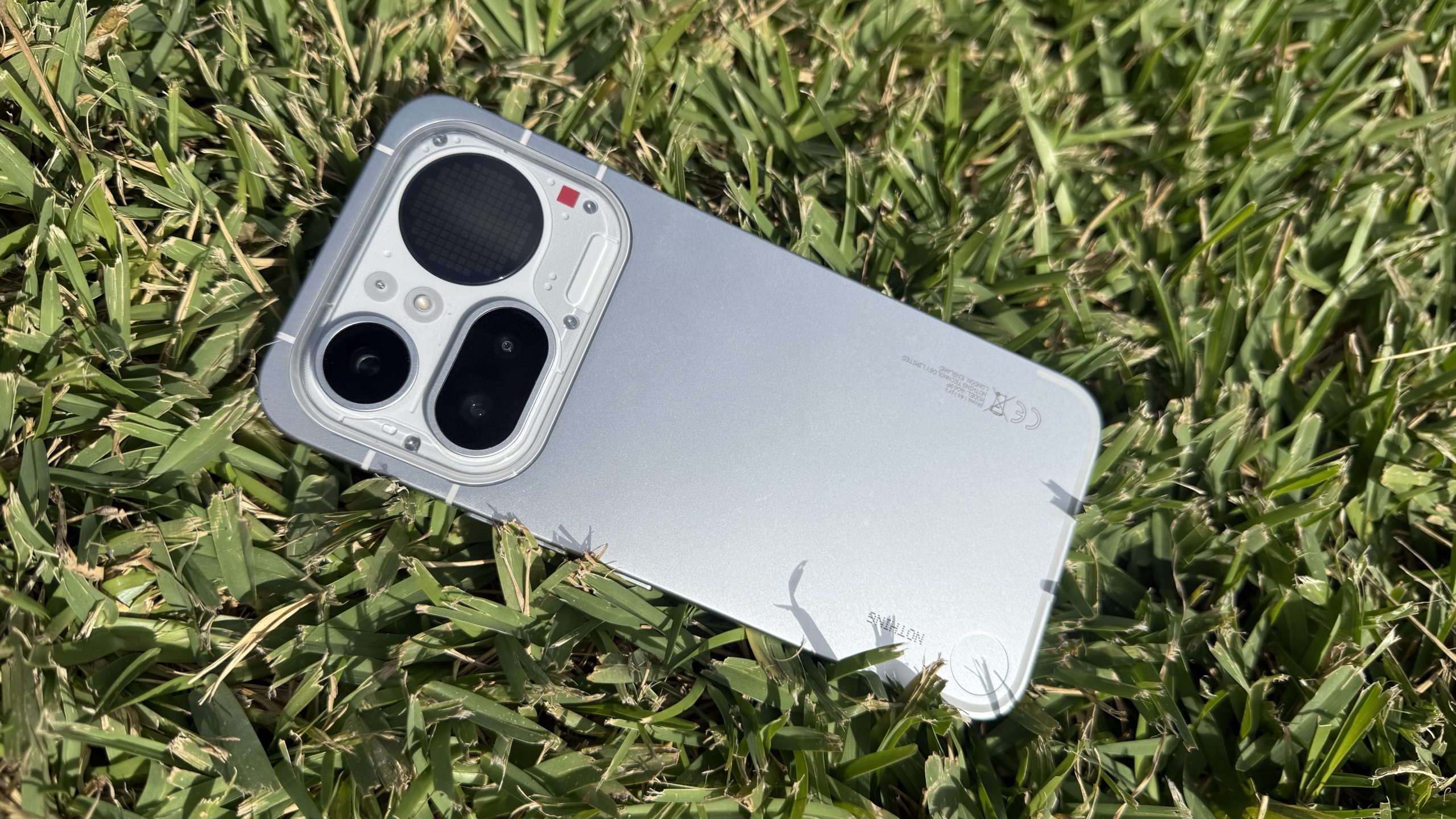
Then, a few months back, I got my hands on the Nothing Phone 4a Pro, and it was love at first sight. Not only does it look great and punch above its weight class with its hardware, but Nothing OS seemed tailor-made for me — it’s now my favourite Android skin.
The Nothing Phone 4a Pro is pretty, but it’s got so much more going for it. (Image credit: Future | Nico Arboleda)
I found the monochrome color scheme and minimal interface very appealing, reminding me somewhat of Pixel UI’s stock Android experience but with more character. The home screen widgets follow the same design philosophy, and community-made ones add extra functionality and whimsy I didn’t know I needed.
Latest Videos From
Clean, distraction-free bliss
Advertisement
My usual homescreen setup features just a single row of my most-used apps at the bottom, with icons set to a monochrome color scheme and maybe one or two widgets.
These settings are readily available on iOS and Pixel UI, and easy to apply, while Samsung’s One UI has a wide range of icon packs to choose from. But where you have to manually opt to have this minimal look, it’s the default on Nothing OS. It’s in no way a groundbreaking innovation, but it’s my favorite part of using the Nothing Phone 4a Pro.
My usual homescreen setup on Nothing OS and Pixel UI. (Image credit: Future | Nico Arboleda)
Nothing OS widgets also set themselves apart from typical Android or iOS widgets — they come in small square tiles (just enough to fit 4 icons in a 2×2 arrangement) that match the icons’ look. Even when I load up the 4a Pro’s homescreen to the brim with widgets and icons, it still looks clean and slick.
Advertisement
Don’t care for the default widgets? No problem. There are plenty of community-made ones you can download from Nothing Playground, a portal for widgets (found under Essential Apps in Settings) and equalizer profiles for audio. These are unique and can show off your personality too. Some of my favorite community-made widgets include a tic-tac-toe game, a functioning piano, and a meter that tracks CPU usage and temperature.
Sign up for breaking news, reviews, opinion, top tech deals, and more.
The latest major Nothing OS update introduced simple breathing exercise widgets — one each for Focus, Calm and Relax — with on-screen prompts that tell you when to inhale and exhale while music plays. Again, it’s not revolutionary, but I like being able to tap a widget on the homescreen instead of digging through menus in a dedicated health app.
These little things add up to making a fabulous user experience in my books.
Advertisement
Innovations and experiments
In my opinion, an even more impressive addition in that update is Essential Voice, an AI-powered speech-to-text feature that has produced the most accurate results I’ve seen on a phone so far.
Powered by Gemini 3 Flash, Essential Voice automatically removes filler words and sounds like “um”, “ah” and “basically” — something I tend to do a lot myself — and also auto-formats bullet lists. I tested this feature by dictating my rather long, rambling notes into Google Docs and it produced a neat outline to build the article I was working on.
Advertisement
There’s support for more than 100 languages and regional variants, which I tested by reciting phrases in Spanish, Italian, French and Filipino — the results were clean and accurate. While a similar feature called Rambler is coming to more phones via Android 17, it’s nice to see it already in action on Nothing OS. While I’m not quite ready to forgo keyboards just yet and talk to my phone instead, I still think it’s a fantastic shortcut to typing.
Nothing OS also lets you try experimental features like using the Glyph Matrix (the secondary screen on the 4a Pro’s back) as a progress bar for third-party apps (it only supports Uber, Zomato and Google Calendar for now) and improving Apple AirPods support — well, for an Android phone at least. They’re not the most earth-shattering features, sure, but they’re a promising sign of Nothing’s willingness to try new ideas and let users play around with them.
Nothing OS’ experimental features include limited Apple AirPods support. (Image credit: Future | Nico Arboleda)
Admittedly, Nothing OS’s quirky design won’t be for everyone, as some users will prefer more conventionally designed widgets or colorful icons that are easy to identify, but the short 3-year software support window is what’s most disappointing here, especially when Samsung and Google offer 7 years, while Apple is pushing that to 8 years in some cases.
Nevertheless, Nothing’s phones stand out as aesthetically pleasing handsets that punch above their price range, with the software experience as the unheralded star of the show — at least for me. It’s the perfect minimalist experience out of the box, without sacrificing functionality, and it includes some useful extras enhancing the experience.
Advertisement
With Nothing changing its flagship release schedule for 2027, I’m curious to see how Nothing OS will evolve alongside a potentially more powerful phone. Perhaps it will offer more ways to encourage community innovation? Either way, I’m certainly keeping my eyes peeled for what’s next.
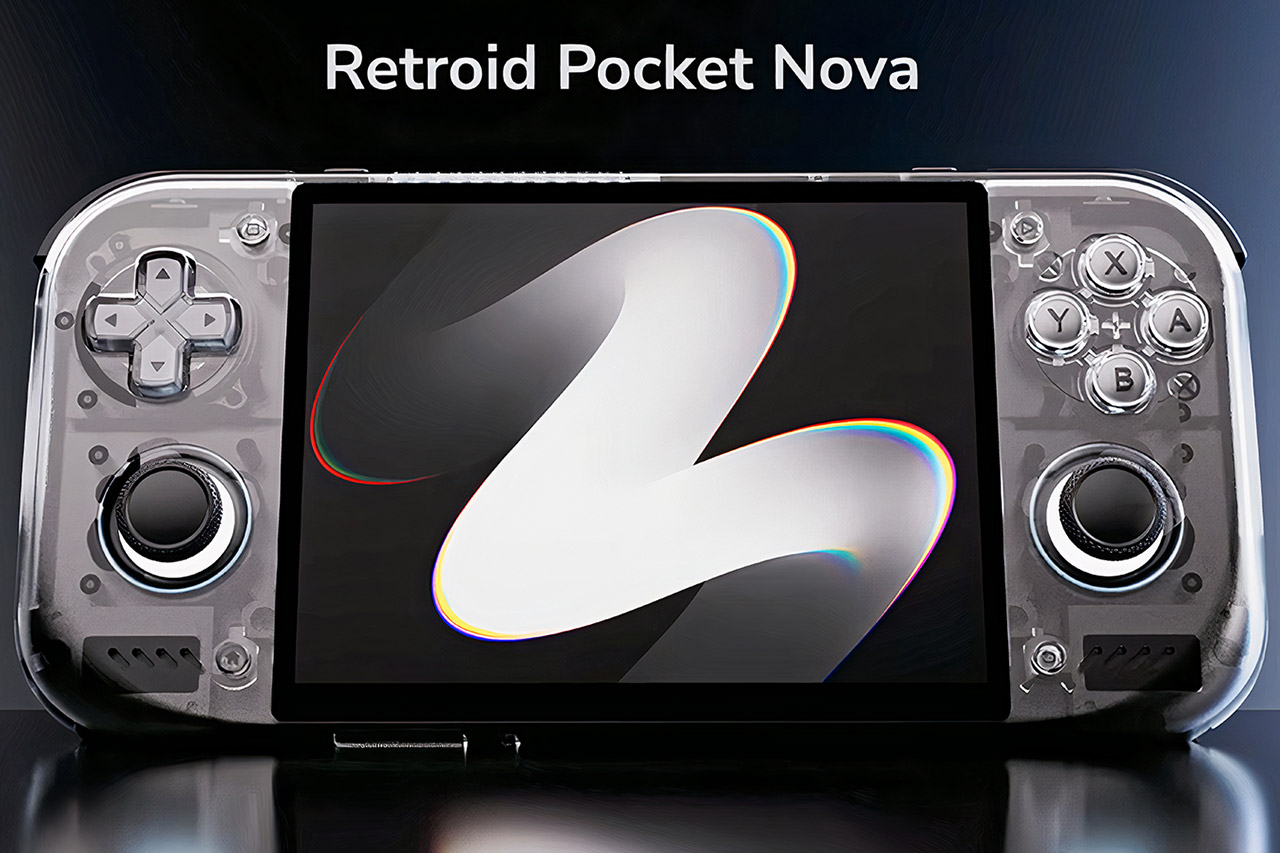
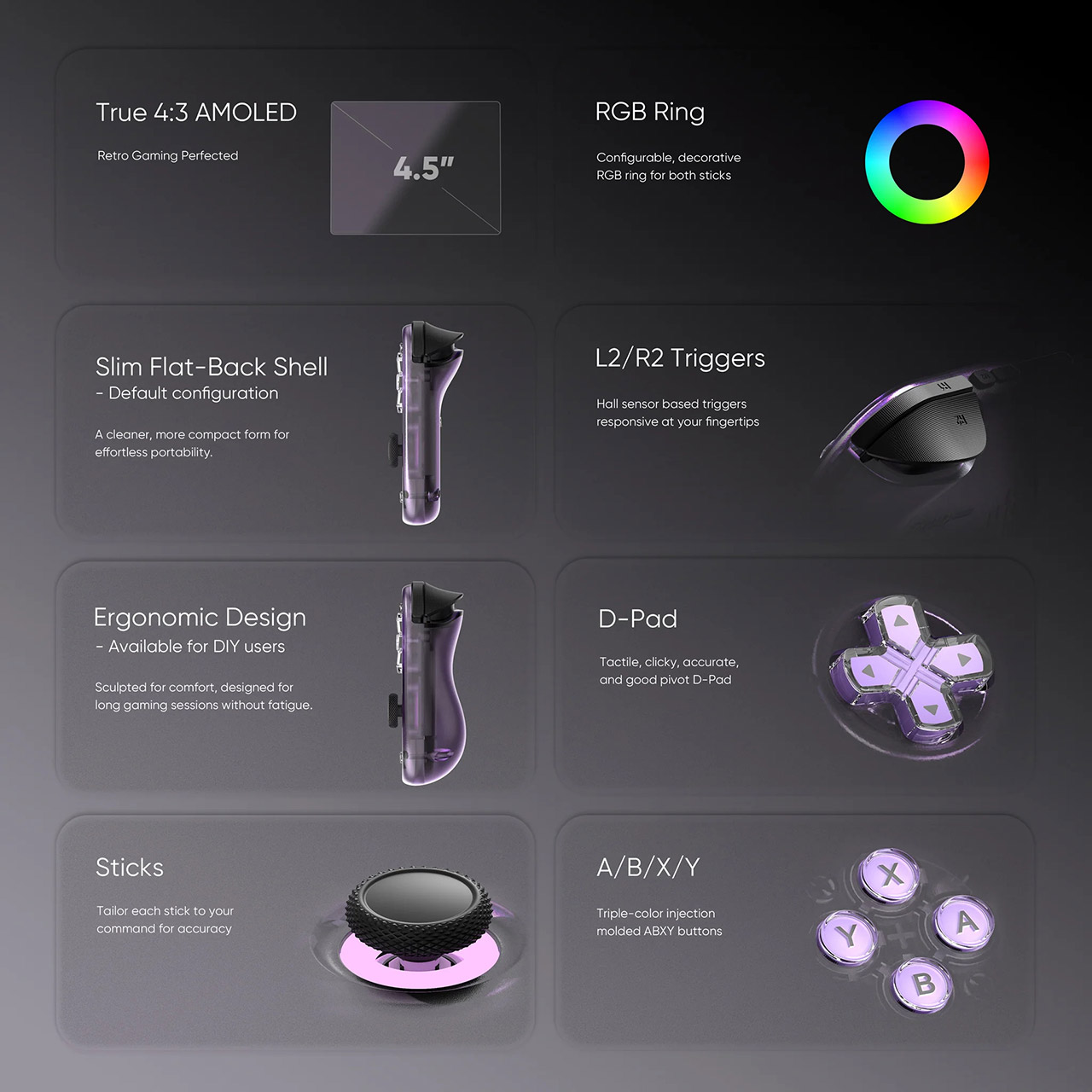
Retroid keeps refining its lineup with devices that balance size, capability, and cost. The Pocket Nova enters the scene as a compact Android handheld built around a 4.5-inch 4:3 AMOLED screen and internals that match the performance of flagship phones from a couple of years ago. Starting at $229 for the base 8GB model, it targets fans who want smooth emulation for systems up to PlayStation 2 and GameCube without moving to larger or pricier options.
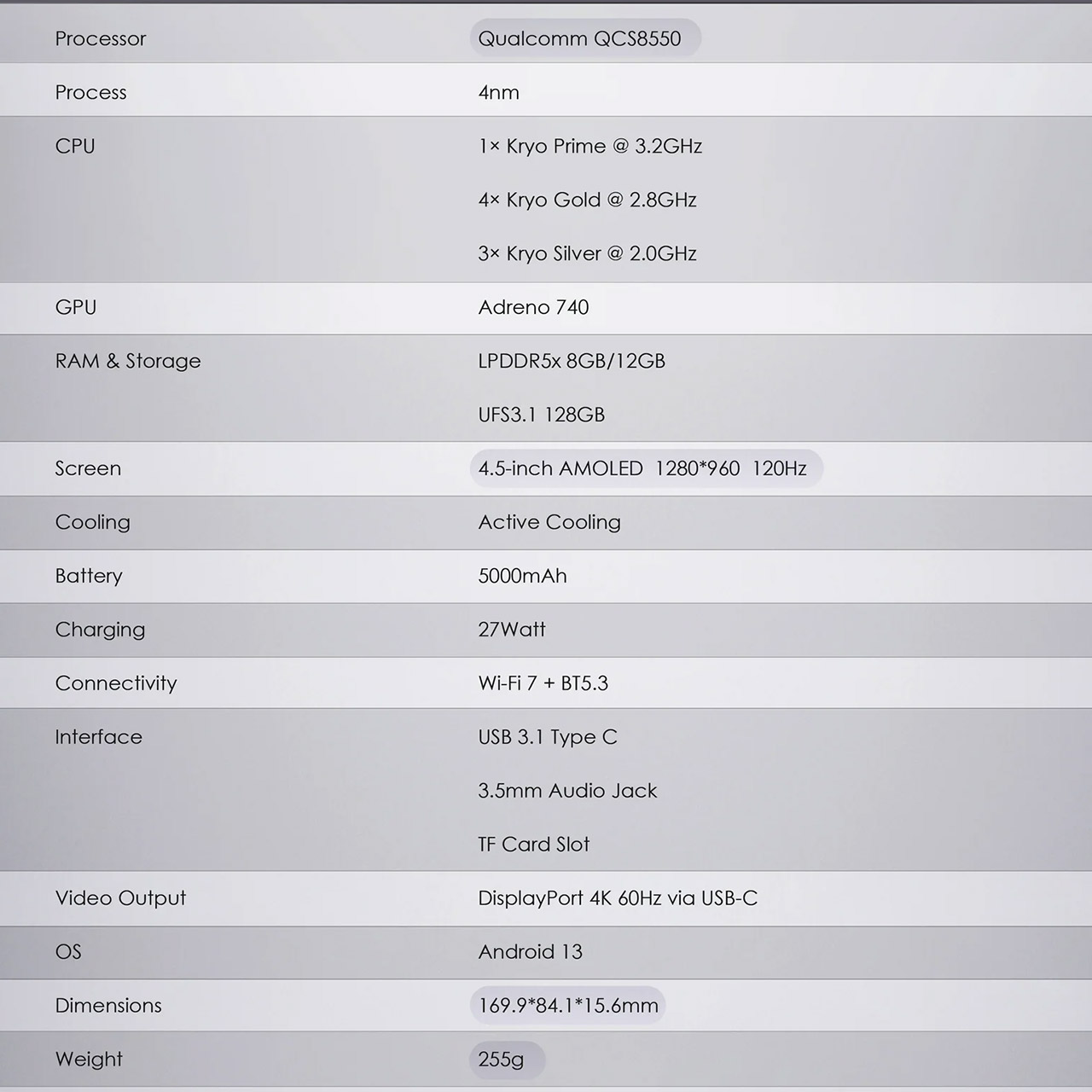
Retroid designed the Pocket Nova with everyday portability in mind. The plastic body is 169.9 by 84.1 by 15.6 millimeters and weighs 255 grams. That size fits well in the hands for extended sessions while also fitting into a jacket pocket or small purse. An active cooling fan ensures that the hardware remains consistent during strenuous games. Hall effect analog sticks with RGB rings prevent drift over time, while analog triggers sit alongside traditional shoulder buttons in a familiar arrangement. A top-left D-pad and front-facing stereo speakers round out the controls. There are several color variants available, ranging from full black and GameCube-inspired tints to translucent shells in Ice Blue, Crystal, Watermelon, and Clear Purple that let the internals to shine through.
NO PRELOAD GAMES – Please note that no games are preloaded on Retroid Pocket 5. Before first use or after a long period of inactivity, the RP5 may…
Powerful Performance – Equipped with a high-performance quad-core processor and advanced GPU, the Retroid Pocket 5 delivers smooth gameplay for…
Vibrant 5.5″ Touchscreen – Enjoy crisp, vivid visuals on the 5.5-inch HD touchscreen display, offering intuitive controls and an immersive gaming…
Many users focus on the display, which is a custom 4.5-inch AMOLED panel with a resolution of 1280 by 960 and a refresh rate of 120Hz. The 4:3 aspect ratio is completely compatible with classic home consoles and arcade games, allowing gamers to avoid black bars or stretched pictures on titles from the 8-bit to 128-bit era. Peak brightness is 500 nits, with great contrast and wide color coverage. The high refresh rate makes motion appear fluent, and the display enhances detail in both bright and dark settings.
Performance comes from the Qualcomm QCS8550 processor, a chip closely related to the Snapdragon 8 Gen 2. It has a 4nm design with one high-performance core capable of up to 3.2GHz, four more performance cores, and three efficiency cores, as well as an Adreno 740 GPU. Retroid pairs this with 8GB or 12GB of LPDDR5X RAM and 128GB of fast UFS 3.1 storage. A microSD slot enables simple extension of big game collections. The active cooling technology allows for sustained speeds, which helps with heavier emulators.
Battery life draws from a 5000mAh pack. Real-world playtime will vary depending on game demands and screen brightness, but the capacity allows for multi-hour sessions in most retro libraries. USB-C charging can reach 27W speeds, allowing for faster recharges in between games. The same connection offers video output up to 4K at 60Hz via DisplayPort, allowing users to connect to a TV or monitor as needed. Wi-Fi 7 and Bluetooth 5.3 support high-speed downloads, online functionality in emulators, and wireless devices.
The software runs on Android 13 and receives certified over-the-air upgrades from Retroid. Users can freely install their preferred emulators and frontends. The setup makes it easy to load ROM collections, customize settings for individual systems, and maintain everything up to date. A 3.5mm headphone port is located alongside the speakers for private listening.
Pre-orders will begin soon, with goodies including a swappable raised rear shell for better grip and a toughened glass screen protector. Pricing begins at $229 for the 8GB device in solid colors and increases slightly for the 12GB version with transparent finishes. The initial stock on the official site has already sold out, indicating tremendous interest in this combination of screen, power, and pricing.
Starcloud, which is building solar-powered data centers in orbit, is the biggest mover on the new GeekWire 200 — vaulting 96 spots to No. 75 after becoming the fastest Y Combinator company ever to reach unicorn status. (Starcloud Image)
The tech economy in Seattle and the Pacific Northwest has long been shaped by software, but our quarterly ranking of the region’s top startups signals the rise of companies building physical stuff: rockets, fusion reactors, military robots, and data centers bound for orbit.
Redmond, Wash.-based Starcloud vaulted 96 spots after becoming the fastest Y Combinator company ever to reach unicorn status, at a valuation of $1.1 billion, based on its vision to put solar-powered data centers in space to meet the soaring energy demands of AI.
Atop the list, fusion company Helion held its position at No. 1, now valued at $15.5 billion after raising an additional $465 million as it builds a plant for a new generation of energy.
Another company in the top 10 isn’t long for the GeekWire 200. Agility Robotics, maker of the Digit warehouse robot, is going public in a $2.5 billion deal. It’s currently No. 5, and companies graduate from the list once they go public or are acquired.
Advertisement
Software still has a big presence on the list: Bellevue-based Temporal rose to No. 2, now valued at $5 billion after raising $300 million for its platform that runs AI agents in production.
Another newly minted unicorn, XBOW, debuted at No. 35. The autonomous AI hacking platform from GitHub Copilot creator Oege de Moor raised another $35 million in May, extending a round that valued it at more than $1 billion.
Those are a few of the highlights from the latest edition of the GeekWire 200. Now in its second decade, the list pairs objective signals such as headcount, investment and followers with editorial judgment to identify and track the companies defining the region’s tech industry.
Check out the full GeekWire 200, newly updated for Q2 2026. Here’s a look at the new top 10, followed by additional notes.
Truveta (No. 3): The clinical-data company launched an AI research tool for quick insights from its database of U.S. patient records.
Zap Energy (No. 11, up 2): The Everett fusion company added a fission line to its roadmap, an industry first.
Amperity (No. 32, up 5): Co-founders Kabir Shahani and Derek Slager returned as co-CEOs, vowing to carry the startup’s “soul” forward, two years after the customer-data company brought in an outside chief executive.
Armoire (No. 33, up 7): The clothing-rental startup, led by CEO Ambika Singh, rolled out an AI feature that arrays outfit choices for shoppers like digital paper dolls.
Advertisement
Alitheon (No. 69, up 8): The optical-AI startup raised $8 million to expand technology that gives physical objects a biometric ID.
Panthalassa (debut, No. 79): The wave-powered, floating AI data center startup netted $140 million in a round led by Peter Thiel.
Possible Finance (No. 82, up 11): The Seattle consumer-lending startup returned to profitability as its founders reunited for a new chapter.
Aspect Biosystems (No. 87, up 22 spots): The Vancouver, B.C. company, which bioprints human tissue, landed a $280 million partnership with the Government of Canada.
Advertisement
Portal Space Systems (debut, No. 114): The Bothell startup raised $50 million as it preps the first launch of its orbital maneuvering vehicle.
Gradial (No. 127, up 24): The agentic enterprise-marketing startup raised $65 million amid rapid growth, the biggest rank jump on this quarter’s list.
Humanly (No. 144, up 8): The hiring-AI startup raised $25 million and acquired Anthill, aiming its tools at job seekers, not just employers.
Inflection (No. 172, up 20): The B2B-marketing startup acquired Seattle’s Keyplay, reuniting CEO Aaron Bird with Keyplay’s Adam Schoenfeld, who joins as CMO.
Notes on the GeekWire 200
Our list is not scientific, by any means, and the specific rankings should be taken with a grain of salt. But it has proven to be a valuable tool for many years. We hear regularly from readers who use the GeekWire 200 to look for jobs, prospect for customers, scout potential investments, and get a high-level view of the region’s tech community.
To make sure your Pacific Northwest technology startup is eligible for the GeekWire 200, first confirm it’s included in the broader GeekWire Startup List. If so, there’s no need to submit it separately. If your startup isn’t among the companies on that larger list, you can submit it for inclusion here, and we’ll crunch the numbers to see if it makes the next GeekWire 200 update.
Fans might be good for keeping you cool at home, but all those bulky plug-in models are no good the second you step outside the door. Thanks to improvements in battery power and motors, portable fans, handheld, wearable or simply wire-free, are as good as their fixed counterparts.
The good news is that there are a lot more products to choose from. The bad news is that many, handheld models particularly, are cheap no-brand models that are basic at best.
If you want a bit more from a portable fan, then you’re in the right place. Here, we’ve rounded up a variety of products, including handheld fans that you can take on the move, and battery-powered ones that are ideal for quickly moving around the house or taking into the garden.
It’s important to work out what you want from a portable fan before you buy. If travel is your primary objective, whether that’s sitting on the beach or stuffed into a hot train, then a handheld model is ideal.
Advertisement
Make sure you buy one with enough battery life, enough power to cool you and quiet enough operating levels.
For wider cooling of multiple people and at a greater range, a battery-powered fan is ideal as you can carry it where you need without needing a power socket. Standing fans are good where you don’t have surfaces; desktop versions are useful in bedrooms or for when you want to put a fan on a table.
Advertisement
There’s a lot to consider but our in-depth testing means that you can rely on our product choices. If you want a plug-in model, then check out our guide to the best fans.
Advertisement
Best Portable Fan at a glance
SQUIRREL_ANCHOR_LIST
Learn more about how we test fans
We test every fan using the same process so that their performance is easy to compare.
First, we measure air flow in metres per second (m/s). We take readings at two distances (15cm and 1m) to see how much the air flow drops off. We do this at both the minimum and maximum fan speeds to understand the full performance range. A good fan should offer a wide range of speeds, from a gentle breeze to a powerful blast of air.
We also measure noise levels at the lowest and highest speeds to see how loud each fan is. You can read more in our detailed guide, how we test fans.
Advertisement
Excellent build quality
Very powerful
Three cooling options
Misting Pod has a small reservoir
Expensive
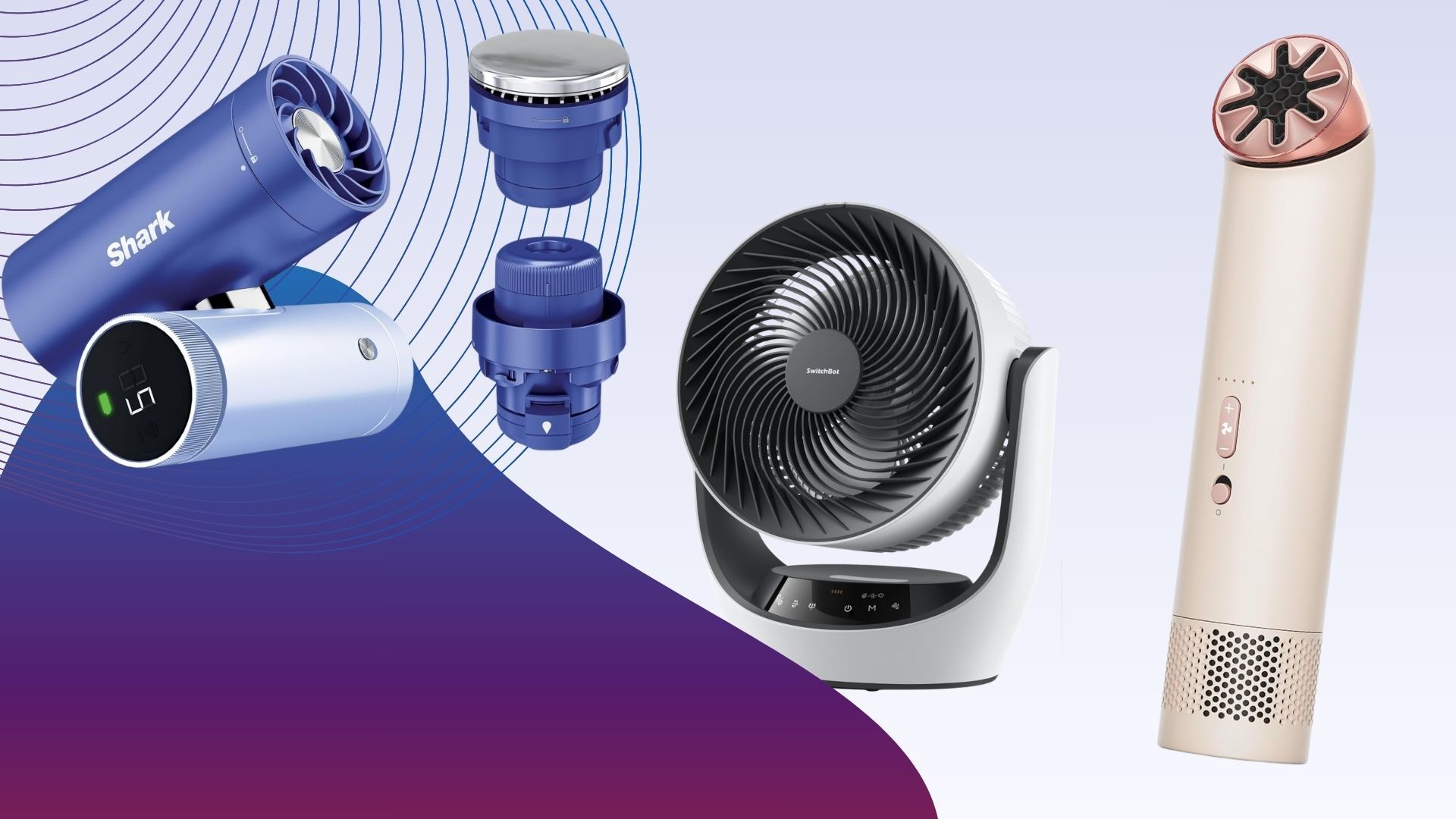
A far more flexible handheld fan than many others, the Shark ChillPill is a brilliant tool that offers three ways of cooling.
It’s smartly designed, too, and available in multiple colours. It has a body comprised of two barrels (one for the controls and battery, one for the main fan) that are hinged in the middle. This lets you twist the fan to point it where you want, or you can place it on a desk and have it point at you.
There are also optional clips and straps available if you want to wear the fan, or even have it clipped to your bike’s handlebars.
In fan mode, you can use the ChillPill while it’s charging via USB-C, or take it handheld with battery life running between 1.5 hours and 11 hours, depending on which of the ten fan speeds you use.
Controls are really smart: the LCD shows the selected speed and battery life, and a twist of the outer dial adjusts the speed.
Advertisement
When measured at 15cm, this fan ranges from 1m/s to 4.6m/s and is extremely powerful, ideal for cooling down a single person.
More than just a fan, the ChillPill also has two additional attachments. The Misting Pod takes water and blows a stream of water droplets at you for up to 10 minutes (you then need to refill the reservoir). It works brilliantly and makes a difference in places where a fan alone isn’t enough, such as on a hot train. Then, there’s the InstaChill Plate, which is a metal attachment that cools down that you can place on key parts of your body, such as your temples, wrists or neck.
It’s this overall flexibility that makes the Shark ChillPill one of the best handheld fans.
Exceptionally powerful
Lowest speed actually useful
Small and flexible
Loud on the higher settings
By taking everything the company knows about motors and fans and distilling it into a compact form, the Dyson HushJet Mini Cool is the most powerful handheld fan available.
Available in a wide range of colours, it’s also one of the smallest, with the fan measuring just 38mm in diameter, making it easy to store in a bag, slip into a pocket or even wear with the provided neck strap.
Advertisement
At the top is the air outlet, which rotates so that you can direct air where you want it. There’s then a power switch to turn the fan on, and up/down buttons to cycle through the five fan speeds. And, hold the plus button down to turn on the Boost mode.
Air speeds are incredible, running between 2.6m/s and 8.1m/s on standard power modes, and an incredible 11.3m/s on Turbo. At high speeds, the fan gets loud, but it can blast so much air that on a hot day, you won’t care.
Battery life runs between one hour and six hours, so there’s enough juice to last for a long commute. When charging via USB-C, the fan can be used on fan speed one; with the provided desk mount, it’s a handy workstation cooling solution, too.
Excellent value
Powerful
Integrated battery
Smart app control
Remote is a bit basic
Can need a nudge to get oscillation working
Circulator fans, which have vertical and horizontal oscillation, are great in hot weather, as they can push stuffy air around and improve airflow through your home. With the SwitchBot Standing Circulator Fan, you get all of these benefits, plus the built-in battery means you can put the fan where you want it, whether that’s a different room or out in the garden.
There’s a choice of assembly, and the fan can be put together with no stand parts to make a desktop version, one segment for a mid-sized version, and two for the full standing effect. That’s neat, but it does mean that conversion from one mode to another is quite slow.
Advertisement
Controls are via the buttons on the base or the slightly cheap-feeling remote that clips into the back of the fan’s head. As the IR sensor is on the fan’s base, it can be tricky to get the line of sight you need.
Fortunately, the SwitchBot Standing Circulator Fan is also a smart product and you can control it via Bluetooth or, if you have a SwitchBot hub, Wi-Fi.
This fan is powerful. Measuring from 1m away, the fan outputs a gentle breeze at fan speed one, up to 3.8m/s at fan speed nine. It’s also relatively quiet, running at between 35.9dB and 57.2dB.
Battery life is impressive, and the fan can last between two and 12 hours, depending on settings. Opt for a mid-level fan speed and you’ve got enough juice to last for a night’s sleep.
Advertisement
To top it all off, this fan even has a nightlight, which makes it ideal for use in a kid’s bedroom. Well priced and flexible, this is a very good multi-purpose fan.
Pedestal or desktop modes
Integrated battery
Very quiet
Mister helps cool you down
Hard-to-read LCD
Basic fan speed control
A brilliant and flexible fan, the Shark FlexBreeze Portable Fan FA220UK is designed with indoor and outdoor use in mind.
This fan looks like a regular standing fan, but it also has a clever trick. Press the button on the stand, and you can slip out the top section, fold out the feet and you’ve got a desktop model.
Controls are on the top and via the remote, which attaches magnetically to the back. This fan has five fan speeds to choose from, and 180° horizontal oscillation. The fan head can be tilted vertically manually.
It’s a little hard to see which fan speed you’re on, as one LED lights up per speed and they’re hard to see in sunlight.
Advertisement
For outdoor use, this fan has a clip-on mister, which attaches to a hose. This blasts a shower of cooling water at you, but it’s for outdoor use only: there’s too much water for inside and you will get a bit damp if you sit too close. However, for those very hot days, this fan provides a nice way to cool down.
The Shark FlexBreeze Portable Fan FA220UK is powerful, running at between 0.8m/s and 3.6m/s, when measured from 1m away. With sound peaking at 50dB, this fan is also quite quiet.
Fully charged, the internal battery will last between two and 24 hours, depending on the fan speed. For cooling during a BBQ or coming inside for the night, there’s enough battery power to get through the hottest periods.
Redesigned neckband makes it more comfortable and improves cooling effectiveness
Can get cooler than its predecessor
Useful app control
Rather than a fan, the Sony Reon Pocket Pro Plus is a personal cooling device that you wear. This updated version has a redesigned neck band that makes it more comfortable to wear, and a new algorithm to adjust its cooling.
With the cooling pad on your back, the Sony Reon Pocket Pro Plus can cool down to 20°, which is 2° cooler than with the previous model. That’s a bigger difference than it seems, and this device certainly improves comfort levels in hot environments.
Advertisement
App control makes it easy to use this device on the move. This device also ships with the Pocket Tag 2, which takes in external environmental information, including temperature and humidity, allowing the device to adjust its cooling (or heating) to suit.
It works brilliantly, helping your body maintain a more comfortable temperature. It is expensive, but if you want something smarter to keep you cool, the Sony Reon Pocket Pro Plus is a great product.
Verstatile
Integrated battery
Powerful at close range
Directional at distance
Loud on higher power settings
A more standard handheld fan, the VersionTECH Hand Held Fan is much cheaper than everything else on this list, but it also has some clever features.
The best thing about this fan is that its handle can fold back 180°, making the fan easier to transport. But, place it on a desk, and the hinge turns this into a desktop fan. Fold the handle out, and you’ve got a standard handheld model.
With a built-in clip, so you can attach the fan to the underside of an umbrella, or similar, the VersionTECH Hand Held Fan is very flexible.
Advertisement
It charges via microUSB and will last between two and six hours, depending on which fan speed you use. There’s a choice of three fan speeds, which is a little limiting, but they cover enough range to suit most uses.
Fan speeds range between 2.3m/s and 3.9m/s, which good but you do have to hold the fan close to you to really feel its effect; the other handheld models here are much more powerful but also more expensive.
If you want something simple and cheap to travel with, the VersionTECH Hand Held Fan is a good option.
One of the quietest desk fans around
Slick design
Replaceable battery
Magnetic holster for the remote
Not the most portable desk fan
No USB-C charging
The MeacoFan Sefte 8″ Portable Battery Air Circulator combines all of the features that we’ve come to love from the company and adds a battery for additional portability.
Extremely well-made, this fan is a desktop model designed to sit next to you while you work, on a table or a bedside table for sleep.
Advertisement
Although an air circulator, it has motorised horizontal oscillation only, although you can manually tilt the fan head up to get air where you want it.
For ease, a remote control attaches to the front of the fan, giving you quick access to all of the fan’s functions.
On its lowest fan speed, the MeacoFan Sefte 8″ Portable Battery Air Circulator pushes out a gentle breeze, but at full power (setting 12), air speed increases to 3.1m/s at 15cm. Even at 1m the air speed is 2.6m/s, so you can cool multiple people in a room when you need to. It’s also very quiet, never going above 54dB, so this fan fades into the background.
Battery life is rated at up to 17 hours, so even on moderate fan speeds, you can get this to last through the night.
Advertisement
Powerful and quiet
Smart app control
Neat and well made
Nowhere to store the remote
The SwitchBot Battery Circulator Fan is similar to the company’s standing fan, but the desktop body is better built and this fan feels quite a bit more premium, even if it is quite chunky.
As an air circulator, this fan has both horizontal and vertical oscillation, so can really push air around a room.
Controls are on the front, but there’s also a handy remote control that gives you access to all of the fan’s features. It’s a shame that the remote can’t stick magnetically to the fan’s body, though.
Alternatively, as this is a SwitchBot product, you can remote control the fan using the app via Bluetooth. Add a SwitchBot Hub in and you can remote control of the fan, too.
And, like its Standing version, the SwitchBot Battery Circulator Fan also has a nightlight built in, making it a good choice for a child’s bedroom.
Advertisement
This is a powerful fan, running at between 0.9m/s on the lowest fan speed up to 3.8m/s on the highest setting of nine, measured from 15cm away. From 1m away, on maximum, the fan managed a powerful 2.5m/s. That’s a bit less than the standing version, but enough power to cover a few people in a room.
Slightly lower fan speeds are good for battery life, and the SwitchBot Battery Circulator Fan can last between six hours on maximum up to 12 hours on minimum speed.
If you want the benefits of an air circulator mixed with a desktop fan that you can take anywhere, this is a good choice.
Advertisement
Advertisement
Test Data
Shark ChillPill
Dyson HushJet Mini Cool
SwitchBot Standing Circulator Fan
Shark FlexBreeze Portable Fan FA220UK
Sony Reon Pocket Pro Plus
VersionTECH Hand Held Fan
MeacoFan Sefte 8″ Portable Battery Air Circulator
SwitchBot Battery Circulator Fan
Sound (low)
42.1 dB
60.6 dB
35.9 dB
32.1 dB
–
38.7 dB
34.8 dB
33.9 dB
Sound (medium)
–
72.7 dB
44.8 dB
38.1 dB
–
45.8 dB
43.5 dB
42.1 dB
Sound (high)
67.9 dB
78 dB
57.2 dB
50 dB
–
50.9 dB
54.0 dB
54 dB
Air speed 15cm (low)
–
2.6 m/s
0.9 m/s
1.1 m/s
–
2.3 m/s
0.0 m/s
0.9 m/s
Air speed 15cm (medium)
–
5.5 m/s
3 m/s
3.2 m/s
–
3.2 m/s
2.0 m/s
2.5 m/s
Air speed 15cm (high)
4 m/s
8.1 m/s
5.1 m/s
4.6 m/s
–
3.9 m/s
3.1 m/s
3.8 m/s
Air speed 1m (low)
–
–
–
0.8 m/s
–
0 m/s
0.0 m/s
–
Air speed 1m (medium)
–
–
2.1
2.4
–
1
1.8
2
Air speed 1m (high)
–
–
3.8 m/s
3.6 m/s
–
1.2 m/s
2.6 m/s
2.5 m/s
Full Specs
Shark ChillPill Review
Dyson HushJet Mini Cool Review
SwitchBot Standing Circulator Fan Review
Shark FlexBreeze Portable Fan FA220UK Review
Sony Reon Pocket Pro Plus Review
VersionTECH Hand Held Fan Review
MeacoFan Sefte 8″ Portable Battery Air Circulator Review
SwitchBot Battery Circulator Fan Review
UK RRP
–
–
£99.99
£199.99
£199
£25.99
£79.99
–
USA RRP
–
–
$99.99
$199.99
–
–
–
–
EU RRP
–
–
–
–
€229
–
–
–
Manufacturer
Shark
Dyson
SwitchBot
Shark
Sony
–
Meaco
SwitchBot
Quiet Mark Accredited
–
–
–
–
–
–
No
–
Size (Dimensions)
84 x 45 x 112 MM
38 x 38 x 180 MM
335 x 290 x 1000 MM
35 x 35 x 94 CM
125 x 175 x 60 MM
11 x 14 x 10 CM
261 x 211 x 384 MM
173 x 384 x 334 MM
Weight
350 G
210 G
3.45 KG
5.67 KG
259 G
150 G
2.3 KG
2.4 G
ASIN
–
–
–
–
–
B07BT18FFP
–
–
Release Date
2026
2026
2026
2024
2026
2021
2025
2025
First Reviewed Date
10/03/2026
22/05/2026
11/06/2026
25/06/2024
24/06/2026
21/08/2023
23/06/2025
16/06/2026
Model Number
Shark ChillPill
Dyson HushJet Mini Cool
SwitchBot Standing Circulator Fan
Shark FlexBreeze Portable Fan FA220UK
–
VersionTECH Small Portable Personal Mini Desk Table Folding Fan with USB
–
SwitchBot Battery Circulator Fan
Remote Control
–
–
Yes
Yes
Yes
–
Yes
Yes
App Control
–
–
Yes
–
Yes
–
–
Yes
Number of speeds
10
5
9
5
5
3
12
9
Fan Type
Portable fan, mister and cooling pad
Handheld
Battery/mains air circulator
Battery or mains powered, desktop or pedestal fan
Wearable air conditioner
Portable
Desk fan
Portable air circulator
Oscillation
No
–
Yes (Vertical -10° to 90°, Horizontal -45° to 45°)
The purchase price reflected its negative net asset position, according to Ohmyhome
Singapore property portal Ohmyhome has sold its core real estate brokerage business and will now focus entirely on digital marketing.
According to the Business Times, Jun 18 filings lodged with the US Securities and Exchange Commission showed that the Nasdaq-listed company had sold its wholly owned subsidiary, Ohmyhome (BVI), to a corporate vehicle called Sterling Oat for US$1 (S$1.30).
Ohmyhome BVI is the holding company for Ohmyhome Singapore and its subsidiaries, which provide real estate brokerage and property-related services in Singapore and Malaysia.
These services span property brokerage and management, renovation and home improvement, mortgage and legal referrals, and other ancillary property-related offerings.
Advertisement
Ohmyhome said it decided to sell the subsidiary after evaluating its declining revenue and persistent operating losses.
The purchase price, US$1, reflected Ohmyhome BVI’s negative net asset position. As of Mar 31, liabilities exceeded assets by S$14.77 million, filings showed.
Disclosures by Ohmyhome also showed that the sale came after it had unconditionally waived S$19 million in debt owed to it by the subsidiary before the sale.
The company’s board said the debt waiver was in the best interests of the company and was meant to strengthen Ohmyhome BVI’s financial position.
Advertisement
Following the sale, Ohmyhome will exit the real estate brokerage and property services entirely. The new focus will be on digital marketing: strategy, content creation, online advertising, and performance monitoring.
For now, there is no information provided on the new ownership structure, or whether Singapore customers were adequately informed of the restructuring.
When the Business Times contacted Rhonda Wong, the CEO of Ohmyhome, she noted that the property business continues to operate as usual under a private business structure, and that its app and website, property agents, and renovation and property management business are still operating and clinching new deals.
There will be no retrenchments, she added.
Advertisement
The move marks a significant strategic shift for the company, which was founded as an online property agency in Singapore in 2016 by Rhonda Wong and her sister Race Wong.
The pair listed Ohmyhome on Nasdaq in Mar 2023, raising US$15.1 million (S$19.57 million) to expand into Thailand, the Philippines, Indonesia, and Vietnam, and to repay loans.
The company’s shares, priced at US$4 (S$5.18) at IPO, fell sharply soon after. In Mar 2025, Ohmyhome announced a reverse stock split of its shares to consolidate every 10 existing shares into one new share.
The move aimed to lift Ohmyhome’s share price to meet Nasdaq’s US$1 minimum bid requirement, reducing outstanding shares from roughly 24 million to 2.4 million.
Advertisement
Ohmyhome’s shares closed at US$0.64 (S$0.83) on Jun 25.
Read other articles we’ve written on Singapore’s current affairs here.











































































You must be logged in to post a comment Login