Rheya combines emergency battery power with software designed to predict sewage spills
Power failures at pumping stations can turn routine blackouts into environmental pollution
Rheya battery will predict the underlying causes of spills before they occur
UK startup Rheya Labs has developed backup batteries designed specifically to keep sewage pumping stations running during power failures across Britain.
The company was named one of 20 finalists in Ofwat’s £7.5 million Water Discovery Challenge, run by the Water Innovation Fund.
Each finalist receives up to £100,000 in seed funding, forming part of a wider £7.5 million pot distributed over 20 months.
Latest Videos From
A different approach to an old problem
Sewage spills are a longstanding, common issue, often blamed on overloaded systems or heavy rainfall.
Advertisement
England recorded around 290,000 sewage discharges from storm overflows during 2025, lasting roughly 1.9 million hours combined across the network.
Power failures at pumping stations are widely recognised as one trigger for these spills, alongside heavy rainfall and ageing infrastructure
Rheya Labs is now working on a system that pairs instant battery backup with software designed to flag faults before they cause spills.
Advertisement
Sign up to the TechRadar Pro newsletter to get all the top news, opinion, features and guidance your business needs to succeed!
When power cuts strike, Rheya’s batteries instantly take over the pumps, preventing raw sewage from spilling into rivers and streets.
The system also applies machine learning to pump data, aiming to predict the underlying causes of spills before they occur.
Co-founder Ben Taylor said sewage pollution remains an ever-growing crisis across the UK, calling power resilience at pumping stations a hidden but major cause.
Advertisement
Predictive analytics may give Rheya the edge
Elsewhere, Sydney Water has trialled sodium-ion battery packs at its Bondi pumping station, offering a cheaper alternative to lithium-ion systems.
That Australian project, backed by a $10.6 million grant, pairs a 30-kWh sodium-ion pack with rooftop solar generation for backup power.
Advertisement
In New York, Viridi’s 150 kWh lithium-ion battery system replaced diesel generators, supplying backup power for between 32 and 90 hours.
Unlike those systems, Rheya’s technology reportedly combines instant power backup with predictive analytics, potentially spotting faults before failures actually happen.
“With our rapidly changing climate, it is more vital more than ever that we double down on our efforts to create a water system able to support lives and livelihoods,” said Jo Jolly, Ofwat’s Director of Innovation.
“The array of new ideas from new players is astounding. The challenge is getting these ideas delivering impact on the ground, with the sense of urgency these times need.”
Advertisement
Whether Rheya’s approach genuinely outperforms established sodium-ion and lithium-ion systems remains unproven outside controlled trials and early pilot deployments so far.
Independent verification of Rheya’s spill-prediction claims has not yet appeared in public trials, leaving the early results largely anecdotal for now.
Up to ten finalists, potentially including Rheya, will share £550,000 each next April, funding further testing before wider rollout across the water network.
The success of this project will ultimately depend on whether predictive software matches the reliability already demonstrated by simpler sodium and lithium alternatives.
The Ring Wired Video Doorbell Elite (2nd-gen) is easily the best video doorbell Ring has ever produced. The Retinal 4K footage is superb, low-light performance is genuinely impressive, and the native PoE setup delivers the kind of reliability Wi-Fi doorbells still struggle to match.
This is a proper premium smart home device aimed squarely at high-end installs, luxury homes and serious smart home enthusiasts. If you already have a PoE setup in place, or you’re upgrading from the now very long-in-the-tooth original Ring Elite, this feels like a huge leap forward.
But there’s no getting around the fact that it’s wildly expensive. And, as is so often the case with Ring products, many of the best features sit behind a subscription paywall that pushes the overall cost even higher.
The hardware is excellent. The ongoing costs are far less appealing.
Excellent video quality
Neat installation with PoE
Flexible motion detection
Key Features
Advertisement
Review Price:
£449.99
PoE
Advertisement
Power and data from one Ethernet cable.
3D Motion Detection
Advertisement
Uses radar to only detect motion at a set distance.
4K resolution
Advertisement
Sharp video day and night.
Introduction
It has taken Ring a very long time to properly revisit its Elite line. The original Ring Elite launched around eight years ago and, while the Power over Ethernet setup made it popular with professional installers and smart home enthusiasts, the actual camera hardware had long since been overtaken by cheaper Ring doorbells further down the range.
For anyone wanting all the latest Ring features, using genuine PoE power, there had been a huge waiting game. The new Ring Wired Video Doorbell Elite (2nd-gen) changes that.
Ring has finally thrown its best camera tech, radar-powered motion detection, Low-Light Sight colour night vision and its new Retinal 4K branding into a proper PoE doorbell.
Advertisement
Advertisement
There’s also remote gate access support for higher-end properties, alongside the sort of flush-mounted installation that looks far cleaner than most battery-powered video doorbells stuck onto brickwork.
The catch, naturally, is the price. Not just the upfront cost either, but the continuing subscription fees needed to unlock much of what makes this doorbell feel “elite” in the first place.
Design and installation
Requires Ethernet
Backbox provided
The Elite (2nd-gen) still looks unmistakably like a Ring product, but it feels far more purpose-built than the company’s mainstream doorbells.
Image Credit (Trusted Reviews)
In the box you get two mounting options. One is designed for in-wall mounting for the neatest possible finish, while the other works as a surface mount option. Both include rubber cushioning to help keep moisture out and give the installation a reassuringly solid fit once secured.
Advertisement
Advertisement
Interestingly, the blue backbox is the same as the previous-generation Ring Elite, which will be very handy for anyone upgrading from the original model.
Image Credit (Trusted Reviews)
This time around Ring has ditched the old security screw setup too. Instead, there’s a removal tool included for releasing the unit from the mount.
Despite the “Elite” branding, this actually sits a little less flush than the original Ring Elite. Presumably Ring simply couldn’t squeeze all the 4K hardware and upgraded internals into such a slim body.
Image Credit (Trusted Reviews)
Even so, it still looks excellent once mounted and feels extremely solid and the main button and front facing unit is just much more premium than the usual array of Ring devices.
Advertisement
Image Credit (Trusted Reviews)
One thing worth stressing is that this is proper native PoE, not the USB-converter approach Ring used on the Battery Doorbell Pro with optional PoE accessories. That means cleaner power delivery, more reliable connectivity and no bulky adapter hanging around somewhere nearby.
Image Credit (Trusted Reviews)
You do still have the option to connect it to a traditional chime system too, although PoE remains mandatory for the overall setup.
Installation itself is refreshingly straightforward considering this is very much a pro-level product.
Advertisement
Advertisement
After scanning the QR code in the Ring app, the setup process walks you through motion zones, smart alerts and privacy areas.
Thankfully, the Ring app remains one of the better smart home security apps around for tweaking settings after installation.
You don’t need to stress too much about getting everything perfect first time because it’s easy to go back in and endlessly tinker to your heart’s delight.
Features
Requires subscription for main features
Flexible motion settings
Advertisement
Out of the box, the Elite (2nd-gen) covers the basics very well. You get live view, two-way audio, notifications and motion alerts without paying extra.
But the moment you start looking at the more advanced features, the subscription prompts arrive thick and fast.
24/7 recording requires the higher-tier Ring Home Pro subscription, otherwise recordings are motion-based only. Smart search features are locked away too, alongside AI-powered tools like Video Descriptions, Familiar Faces beta and enhanced event filtering.
Ring’s Smart Responses feature is here as well and remains one of the more useful additions to the ecosystem, particularly if you miss deliveries regularly.
Advertisement
Advertisement
The actual event management system is excellent. Ring’s Event History page presents clips in a clean thumbnail-based timeline with adjustable thumbnail sizing and genuinely useful filtering options.
Combined with the live timeline view, it’s quick and painless to find, review and download specific footage.
The problem is that Ring increasingly feels like a platform where you’re buying expensive hardware first and then renting many of the standout features afterwards.
That becomes especially noticeable when brands like Reolink and Aqara now offer local storage, strong AI detection and excellent image quality for far less money and without such aggressive subscription dependency.
Advertisement
Ring clearly knows this Elite model is aimed at wealthier buyers and professionally installed smart homes, but even by those standards the paywalling feels excessive.
Advertisement
Video quality and performance
Very sharp daytime video
Full colour night vision
Video performance is where the Elite (2nd-gen) really earns its keep.
The Retinal 4K footage looks fantastic. Daytime video is exceptionally sharp, colours look rich without appearing overprocessed, and there’s enough detail here to genuinely take advantage of the 10x zoom feature.
That zoom initially sounds like one of those specs designed mainly for marketing slides, but it actually proved surprisingly useful during testing.
Advertisement
I was able to zoom far enough to check whether it was our cat hopping over a wall across the road, and also clearly make out the number plate on a delivery van that dropped a parcel without ringing the bell.
Low-Light Sight is equally impressive. The colour night vision produces bright, detailed footage in lighting conditions where many rival doorbells would already have switched over to muddy monochrome infrared.
Advertisement
I did notice occasional flickering between the infrared mode and colour mode at night though. I suspect using the larger wedge mount to alter the viewing angle slightly could help reduce that behaviour.
Ring also offers a Retinal Tuning AI feature designed to reduce juddering, pixelation and other visual artefacts. During testing though, the combination of native Ethernet connectivity and the already excellent 4K feed meant I rarely felt it was actually necessary.
Unsurprisingly, this feature also sits behind the subscription paywall.
Advertisement
Motion detection is excellent too. The radar-powered 3D Motion Detection system delivered very accurate alerts during testing, with far fewer false triggers than older Ring doorbells.
Advertisement
Call quality is another strong point. Ring continues to deliver some of the clearest two-way audio in the video doorbell market and conversations through the Elite sounded crisp and natural on both ends.
Should you buy it?
You want the absolute best
PoE for neatness and reliability, the full suite of motion detection, and incredible image quality make this doorbell stand out.
Advertisement
You want something cheaper
Advertisement
This doorbell is super expensive and you can find similar features on Ring’s cheaper doorbells.
Final Thoughts
The Ring Wired Video Doorbell Elite (2nd-gen) is a seriously impressive video doorbell. From the excellent Retinal 4K image quality to the rock-solid PoE connectivity, almost every part of the experience feels premium.
Advertisement
For existing Ring users upgrading from the original Elite, the improvement is massive. That old model had fallen badly behind Ring’s newer hardware, whereas this finally feels like a flagship again.
But this is also a product that feels unapologetically aimed at affluent smart home buyers who won’t blink at the upfront cost or the continuing subscription fees.
Without a Ring Home plan, the experience feels stripped back compared to what rival brands now offer locally and for free. With the subscription added in, this quickly becomes one of the most expensive video doorbell ecosystems around.
Still, if money is less of a concern and you want one of the best professionally installed PoE video doorbells currently available, Ring has absolutely delivered the goods here.
Advertisement
How We Test
We test every security camera we review thoroughly over an extended period of time. We use industry standard tests to compare features properly. We’ll always tell you what we find. We never, ever, accept money to review a product.
Find out more about how we test in our ethics policy.
Used as our main security camera for the review period
We test compatibility with the main smart systems (HomeKit, Alexa, Google Assistant, SmartThings, IFTTT and more) to see how easy each camera is to automate
We take samples during the day and night to see how clear each camera’s video is
Advertisement
FAQs
Do you need PoE to use the Ring Wired Video Doorbell Elite (2nd-gen)?
Yes, PoE is required for this doorbell.
Advertisement
Can the Ring Wired Video Doorbell Elite (2nd-gen) sound an internal chime?
Yes, you can wire this doorbell to a chime, but you still need PoE.
As AI tools proliferate and become deeply ingrained in software development around the world, new research from the cybersecurity firm Crowdstrike shows how attackers are actively targeting the AI toolchain to steal access credentials, gain deeper access to a target environment, exfiltrate sensitive data, and even destroy target files and systems—all while finding new ways to cover their tracks.
Researchers discovered a worm in the wild while investigating AI software supply chain attacks. Adam Meyers, CrowdStrike’s senior vice president of counter adversary work, says that the company has not yet attributed the activity to a specific actor, but that it fits into larger evolutions in how attackers like TeamPCP (which Crowdstrike tracks as “Altered Spider”) and North Korean groups are targeting the AI software supply chain.
“This is one of the campaigns that we’ve seen showing that this is an emerging attack class,” Meyers tells WIRED. “As AI coding agents become the development standard, supply chain threats are evolving to exploit those trust relationships. For the first time we’re experiencing how much AI and the AI toolchain has played into the broader tech ecosystem.”
The worm CrowdStrike identified works in phases. First it does reconnaissance to assess the target environment. Then it looks for access tokens and other sensitive data, like cryptographic keys and server access credentials that it can deliver to attackers. As the malware gains privileges, it further unpacks itself and continues to grab credentials, particularly “npm” tokens that give access to key software package management servers and other development capabilities like pull requests.
Advertisement
The deeper the malware bores into the system, the more sensitive data it can grab. At this point, the malware can also deploy its destructive capability, or what Meyers calls a “death switch,” to destroy files or block legitimate access to the compromised infrastructure.
The key finding, though, is that much of the worm’s malicious activity takes place in what are essentially blind spots, because so much of its behavior mimics legitimate actions. “It’s like a needle in a haystack, except this is a needle in a needle stack,” Meyers says. “This looks very much like a lot of the automation organizations are using to build code, so it’s very difficult to detect.”
Meyers adds, too, that in these AI software development pipelines, it is harder to gather the data points that security scanners and analysis tools traditionally use to detect potentially suspicious activity.
“There’s a lot of telemetry overlap because legitimate AI coding systems are operating the same way as this worm, so it becomes very difficult to discern from the telemetry you have available to you what is legitimate and what is illegitimate,” Meyers says.
Advertisement
To hide in plain sight even more insidiously, the authors of the worm included time delays where various capabilities will execute hours or even days after the groundwork is laid, making it even harder for defenders to establish a cause and effect of certain events leading to certain outcomes.
Meyers says that Crowdstrike has been working on strategies to connect more of the dots, but he emphasizes that as AI software development explodes, there is a pressing need for all players to collaborate on structural solutions.
“It’s a limited detection surface because only so much of this activity is actually going to produce any sort of telemetry signal for us to look at,” Meyers says, “so it becomes extremely onerous to determine what is legitimate and what is illegitimate behavior.”
What if you want to do something in Linux for a lot of files? [Numerator] was tired of using xarg and other ways to handle this job and created bashumerate.
Some examples in the post of the “other ways” include:
You can, also, use a for loop, and if you are a programmer at heart, you may well do this:
Advertisement
for f in *.txt; do
  wc -l "$f"
done
Bashumerate handles all of the common cases in one tool and uses the same syntax for multiple kids of enumerations.
For example, the above translates to:
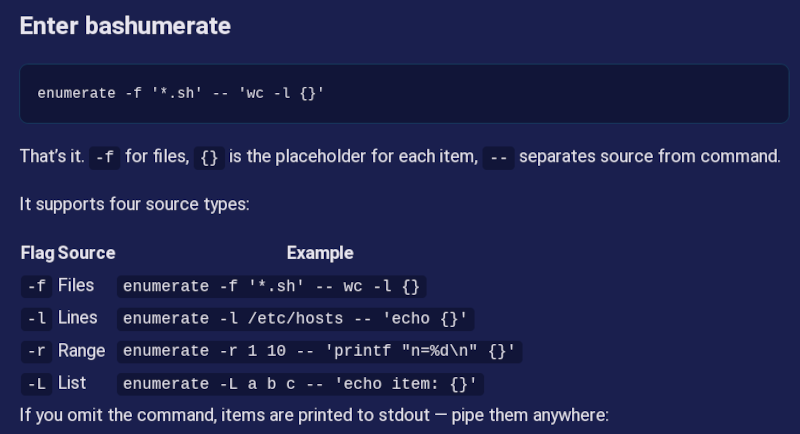
enumerate -f '*.sh' -- 'wc -l {}'
The -f means enumerate files. You can also enumerate lines, numbers in a range, or lists. What’s even more interesting is that you can add your own source. As an example, there’s an add-in function that enumerates running docker containers.
The source is all in bash, so it should be very portable. Will you try it? What’s your favorite way to enumerate in shell? Let us know in the comments. You know how we love strange bash tricks.
The financing is the largest-ever Series A round for a humanoid-first robotics company in Europe, the company said.
UK-based AI and robotics company Humanoid has secured a $152m Series A financing round at a post-money valuation of $1.35bn.
The funding was led by Prime Movers Lab, a venture capital firm focused on investments in breakthrough scientific start-ups, with participation from Schaeffler, Bosch, Fubon Financial Holding Venture Capital and Aglaé Ventures – the investment firm of LVMH chairman Bernard Arnault.
The financing represents the largest-ever Series A for a humanoid-first robotics company in Europe, according to Humanoid, and brings its total funding to date to $270m.
Advertisement
“In just two years, we’ve gone from an idea to becoming Europe’s first pure-play humanoid robotics unicorn, partnered with some of the world’s leading industrial companies and built one of the strongest pipelines in the industry,” said CEO and founder Artem Sokolov.
“This funding gives us the resources to move even faster and to turn humanoid robots from breakthrough technology into everyday industrial tools.”
The 2024-founded company builds humanoid robots for industrial use in ways that are “commercially viable, scalable and safe”, it said. It employs more than 250 people between London, Boston, Vancouver and San Diego.
“Humanoid robotics will be one of the defining technologies of the next decade, reshaping how commercial and industrial work gets done. We expect the field to consolidate around a handful of category leaders across the US, Europe and China,” said Zia Huque, general partner at Prime Movers Lab.
Advertisement
Humanoid said the new capital would be used to fund its next phase of growth, accelerate commercial deployments and business expansion, and further develop its wheeled robots and related proprietary AI platform, ‘KinetIQ’.
According to the company, it has ongoing partnerships with Fortune 500 companies such as SAP, Nvidia, Bosch and Siemens, and recently secured an agreement with Schaeffler for the large-scale deployment of thousands of humanoid robots in manufacturing environments.
“By combining our decades of industrial expertise and manufacturing excellence with Humanoid’s breakthrough physical AI platform, we are actively backing one of the most exciting frontiers in technology,” said Klaus Rosenfeld, CEO of Schaeffler.
Bosch CTO Mathias Pillin said that his company would “act as Humanoid’s contract manufacturing partner while also providing strategic consulting and technical expertise in hardware design, production and supply chain”.
Advertisement
Meanwhile, Asian corporate giants have made significant moves around robotics in recent days. Samsung Electronics is establishing a new robotics division, while Hyundai Motor Group is acquiring full control of Boston Dynamics.
Don’t miss out on the knowledge you need to succeed. Sign up for the Daily Brief, Silicon Republic’s digest of need-to-know sci-tech news.
Stihl is a brand name that is no doubt familiar to most DIYers and landscaper who use power tools to help them maintain green spaces around their home. The company is, arguably, best known for its powered chainsaws, which are often ranked among the top of the major manufacturers. Stihl does make a range of powered tools outside of its well-regarded line of cutters, including leaf blowers.
If you’re looking for a tool to manage the leaves, debris, and grass clippings that collect around your home, Stihl may be a brand worth checking out. Still, one visit to the blower section of the brand’s website will show you quite a few options to choose from, and that could make it difficult for some home owners to discern which best suits their needs. Thankfully, Stihl itself has taken some of the guesswork out of the equation for shoppers, with the company naming its BG 50, BG 56 C-E, BGA 60, BG 86, BG 86 C-E, BR 200, and BR 450 C-EF models as the best blowers to use around the house.
Advertisement
That’s a fairly extensive list of blowers in and of itself, of course. And yes, you’d be correct in assuming that there are quite a few differences between those various makes and models of Stihl blowers. Here’s how Stihl says those various blowers might best be deployed by home owners.
Advertisement
Which Stihl blower is best for your property
Money is one of the more notable variances in the listed Stihl blowers, with models ranging in price from $179.99 to $549.99 for the BG 50 handheld blower and the BR 450 backpack blower, respectively. This is a higher price than what is offered by some market competitors, and the wide price range is largely due to variances in design and on-the-job capabilities. Ultimately, the size of the space you are clearing will be the biggest deciding factor between which model best suits your needs.
According to Stihl, folks looking to use their blower on smaller yards, patios, and sidewalks should consider either the BG 50, BG 56 C-E, or BGA 60. The last model listed there is the lone battery-powered blower on the list. Each blower offers similar capacities in terms of performance and airflow, though the battery-powered BGA 60 bests the others in terms of noise. Per Stihl, folks with slightly larger spaces to clear may need to simply deal with the noise of a combustion engine, with the company recommending the BG 86 or BG 86 C-E.
Those handheld blowers offer upgrades in power and airflow over the small space models, maxing out with air speeds of 190 mph and reportedly offering full-yard coverage for the removal of leaves and debris. Stihl’s heavy-duty recommendations for large yards, the BR 200 and BR 450, do as well. Those blowers’ backpack designs also improve comfort, and the additional fuel capacity means they’ll likely increase your runtime to boot. This could be a major factor when you’re clearing a larger space.
Last week, Nvidia invited a handful of journalists to a briefing about AI infrastructure to help convey the physical reality behind simulated intelligence.
“Infrastructure is physical, it’s real,” said Ian Buck, general manager of Nvidia’s hyperscale and HPC computing business. “You can touch it, you can see it, and it’s what helps bring AI to life. So that is part of the goal here.”
The briefing included a tour of a working Nvidia lab – a mini-datacenter – nestled in a residential district of Sunnyvale, a Silicon Valley suburb. Attendees were asked not to reveal the location – which is one of four such facilities – though they’re easy enough to discover with a bit of online sleuthing.
AI infrastructure is indeed real – or at least realized as revenue when equipment is booked under a bill-and-hold arrangement – and you can touch it if your job involves handling tech gear.
Advertisement
It’s also controversial as the AI tsunami crests over a society that’s uncertain if the technology will bring bounty or harm. Just one day after the press event, Dutch activists peppered a data center serving Microsoft workloads with chemical-filled balloons to protest climate and political concerns. Nvidia presumably would prefer not to have neighbors grousing about power and water consumption at its facilities, though such concerns may be muted in an area so in thrall to the tech sector.
In any event, Nvidia’s latest data center hardware should require significantly less human intervention than its older kit. During the lab tour, Andrew Bell, a senior VP of hardware engineering, showed off how the company’s Vera Rubin NVL72 compute tray is vastly faster to install than prior hardware. “With automation assembly, the compute tray inside the Vera Rubin NVL72 can be assembled in one minute, compared to GB200 compute tray assembly that typically takes 90 minutes. This represents a 90x improvement,” he said.
The Nvidia event focused on how the company’s Vera Rubin platform, announced at Computex 2024 and detailed at CES in January, advances its vision of AI Factories, a type of computing infrastructure dedicated to running AI workloads.
Inside the Nvidia labTom Claburn
The platform consists of six chips: the Vera CPU, Rubin GPU, NVLink 6 switch, ConnectX-9 network interface, BlueField-4 data processing unit (DPU), and Spectrum-6 Ethernet switch.
Advertisement
Nvidia claims Vera Rubin is said to deliver 10x more tokens per watt than GB200 NVL72 in initial CoreWeave results on DeepSeek-R1.
These appear in five rack-mountable systems designed for data centers: the Vera Rubin NVL72 compute tray, Vera Rubin NVL72 NVLink switch tray, the Groq 3 LPX inference accelerator tray, the Vera CPU tray, the BlueField-4 STX storage tray, and the Spectrum-6 SPX switch tray.
Nvidia’s pitch for all this hardware is that agentic workloads – running AI agents – require a different approach. AI agents work best, the company claims, with sustained inference and low latency across multiple reasoning steps, high decoding throughput, efficient reasoning over long contexts, large key-value cache capacity, and the ability to scale models across linked GPU domains. The company’s AI Factory calls for unified compute capability that spans the data center.
It’s an architectural gambit based on the business of selling tokens. And while GPUs are the star of the show for training and inference, CPUs play a critical role in data processing, networking, scheduling, and storage. Vera represents a bet that making the core faster is better for agentic workloads than increasing the number of cores.
Advertisement
Nvidia claims that the Vera CPU Olympus Core accelerates agents 2x, offers 3x core-to-core bandwidth, and delivers 40 percent lower latency via LPDDR5X memory. And to the extent Nvidia’s data center customers can move more tokens for their AI inference operations, they should be able to capture more revenue.
Nvidia rack systemTom Claburn
“Every AI factory is power-constrained,” said Buck. “And frankly the most important metric is your delivered performance in a fixed watt data center, your perf-per watt. All that comes together in your AI factory revenue. You may rent infrastructure … for dollars per hour but you generate revenue with profitable tokens now, in the hundreds of dollars per hour. Your AI Factory revenue is a function of how many tokens you can generate in a fixed watt data center.”
It’s also a function of the market price of tokens. As the supply of tokens increases – through new hardware that makes token generation more efficient and competing AI providers – there’s downward pressure on the cost of tokens. The hope at Nvidia, and more acutely at the frontier AI labs, is that demand for tokens will increase as prices decline, at a rate that leaves enough of a profit margin to recoup the capital expenditures funding the current datacenter construction boom.
But given reports of companies capping employee token budgets, it’s not clear that every organization is seeing the productivity increases touted by Nvidia and its peers.
Advertisement
Buck offered a back-of-the-envelope calculation to suggest that AI makes developers more productive, but it was more of a thought experiment than a verifiable claim.
Pointing to the surge in GitHub code commits – which haven’t been great for GitHub’s stability – he posited there are about 30-40 million software developers active in the world, which translates to about $3 trillion in salaries.
“They’re now producing three times the output or effectively nine trillion dollars of productivity,” Buck said. At Nvidia, he added, “the number of [code] check-ins and developer productivity has tripled as a result” of AI coding tools.
Buck said that Nvidia uses AI agents for pretty much all of its software development processes. “We use agents also for our chip development,” he added. “Our entire chip bug database is all watched and reviewed by agents.”
Advertisement
The leading AI company uses AI to make its AI software and hardware. Flog AI enough and you can bring it to life. ®
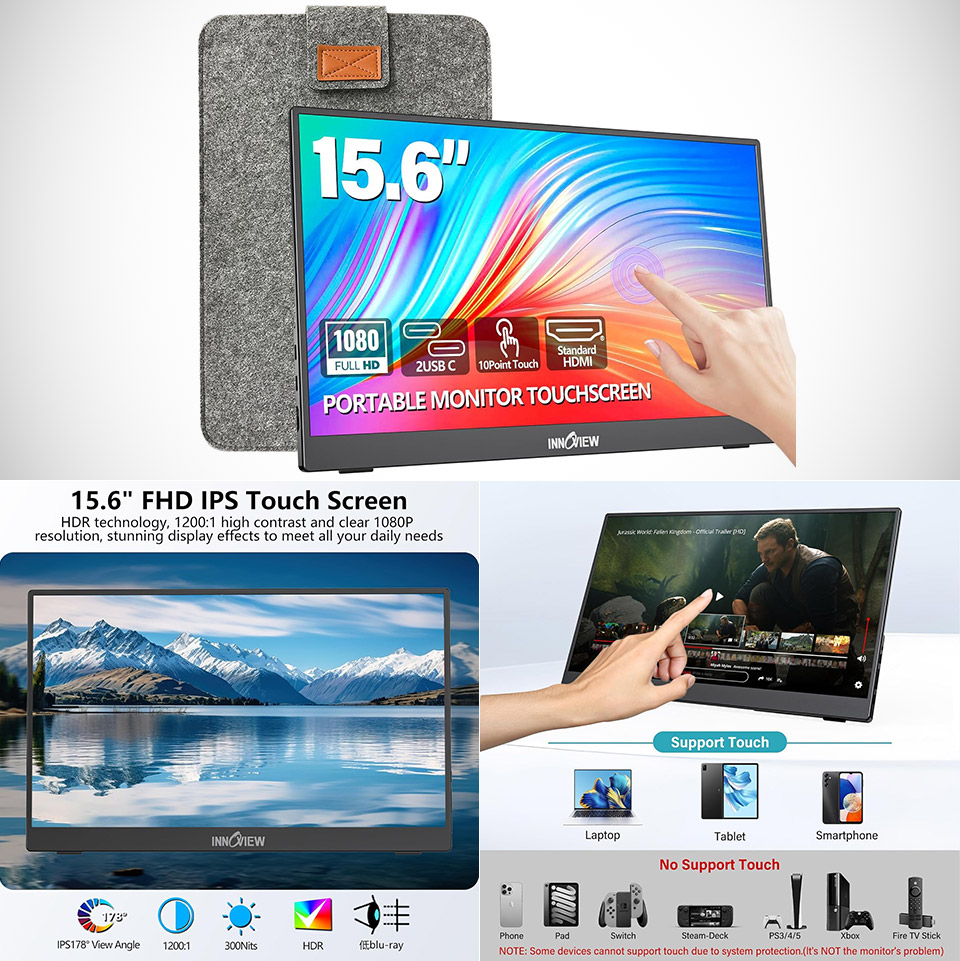
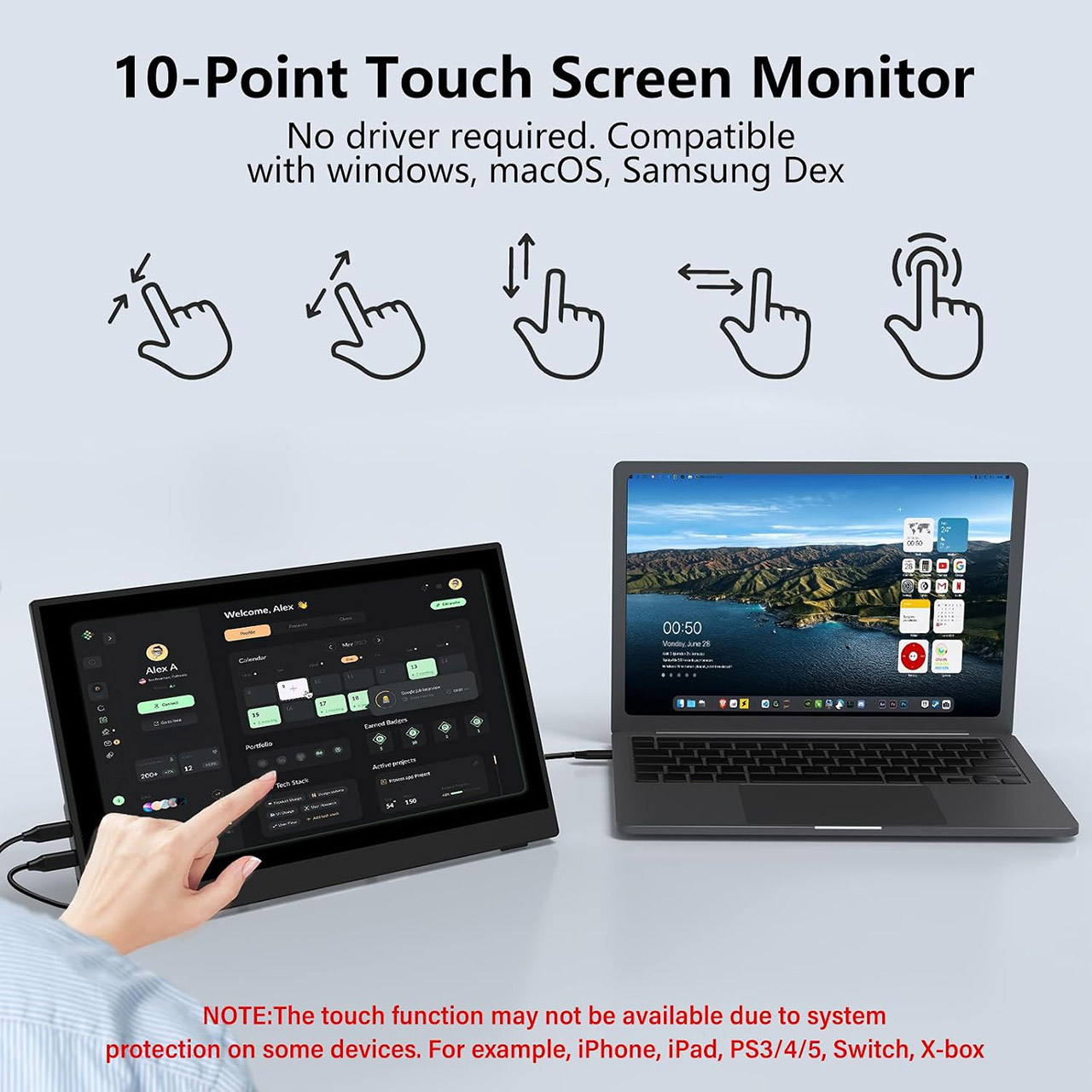
InnoView put together a 15.6-inch portable monitor, priced at $99.99 (was $160), that aims to solve the constant space problem for people who work or create away from a desk. This model adds a full HD touchscreen, a built-in stand, and a protective sleeve so the whole package stays useful without adding much bulk to a bag.
The panel in question is an IPS screen with a 1920 by 1080 resolution and a 16:9 aspect ratio. It operates at a constant 60 Hz and has a response time of under 3 milliseconds. Contrast ranges up to a respectable 1200:1, and with a matte finish, glare is kept to a minimum in areas with ample of light, such as an office or a window. You can achieve a reasonably wide viewing angle of 178 degrees, and colors remain rather steady even when the screen is put slightly to the side of a laptop. Other image features include HDR capability, a low-blue-light mode, and flicker-free options. The brightness is roughly 300 nits, which should be adequate for most indoor use, however it will not be ideal in direct sunlight. Color coverage is a decent 80 percent of sRGB, which is adequate for casual use with common documents, web pages, and video.
[10-Point Touchscreen Portable Monitor]: Portable screen compatible with Windows and MacOS systems. You can get touch function for your laptop by…
[Get a Monitor Protective Sleeve]: The case is tailor-made for your portable laptop monitor, lightweight and durable, easy to carry, a perfect…
[FHD IPS Portable Display]: 15.6 inch 1080P portable screen for laptop adopts a real reliable IPS screen with a viewing angle of 178°. Compared with…
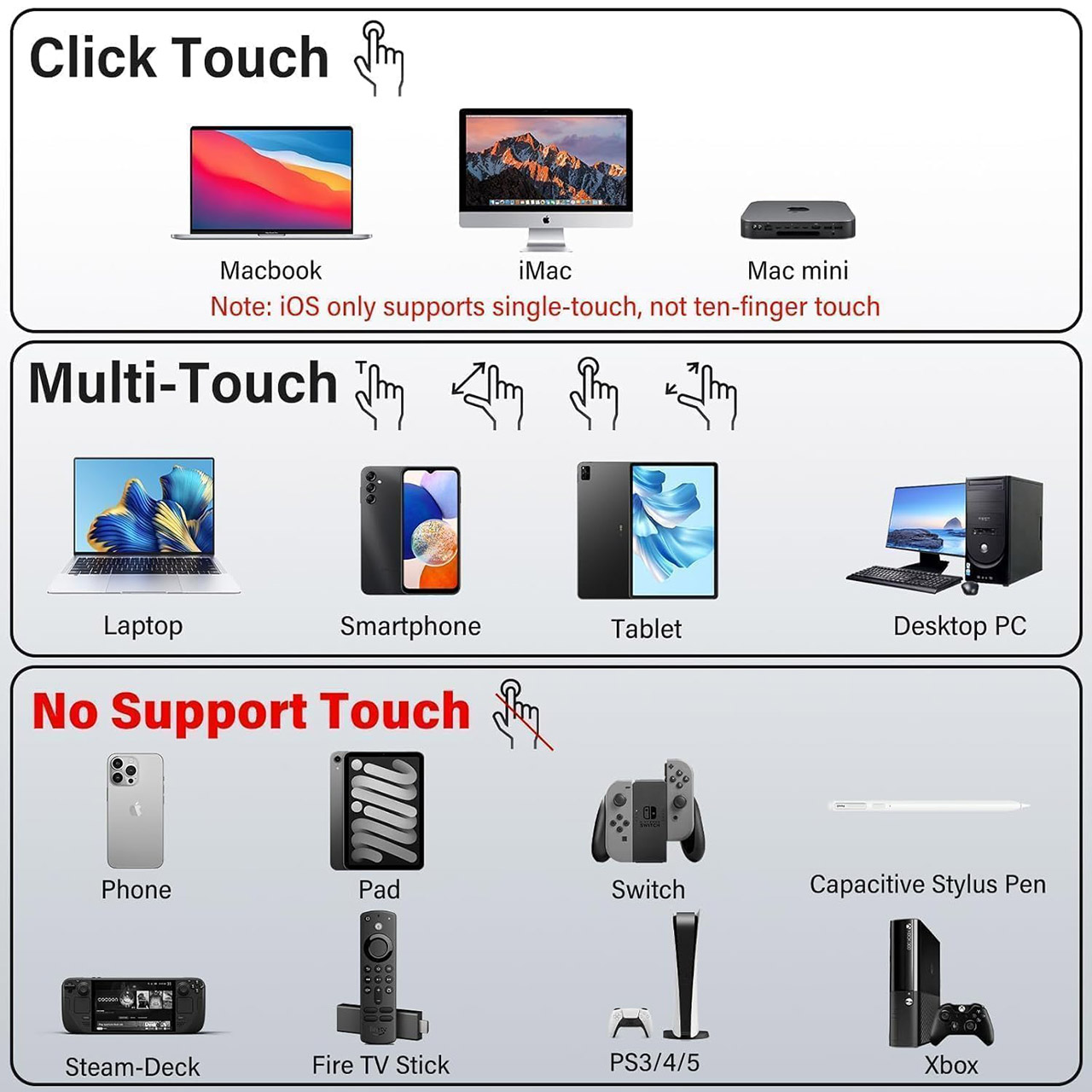
The touch interface uses a 10-point system. On Windows machines, you can utilize the entire set of gestures once you’ve plugged in the correct cable, but on Macs, you’re limited to basic click support due to how the OS handles external touch. Other devices, such as game consoles and the Switch, will simply disregard the touch layer due to their own rules.
Advertisement
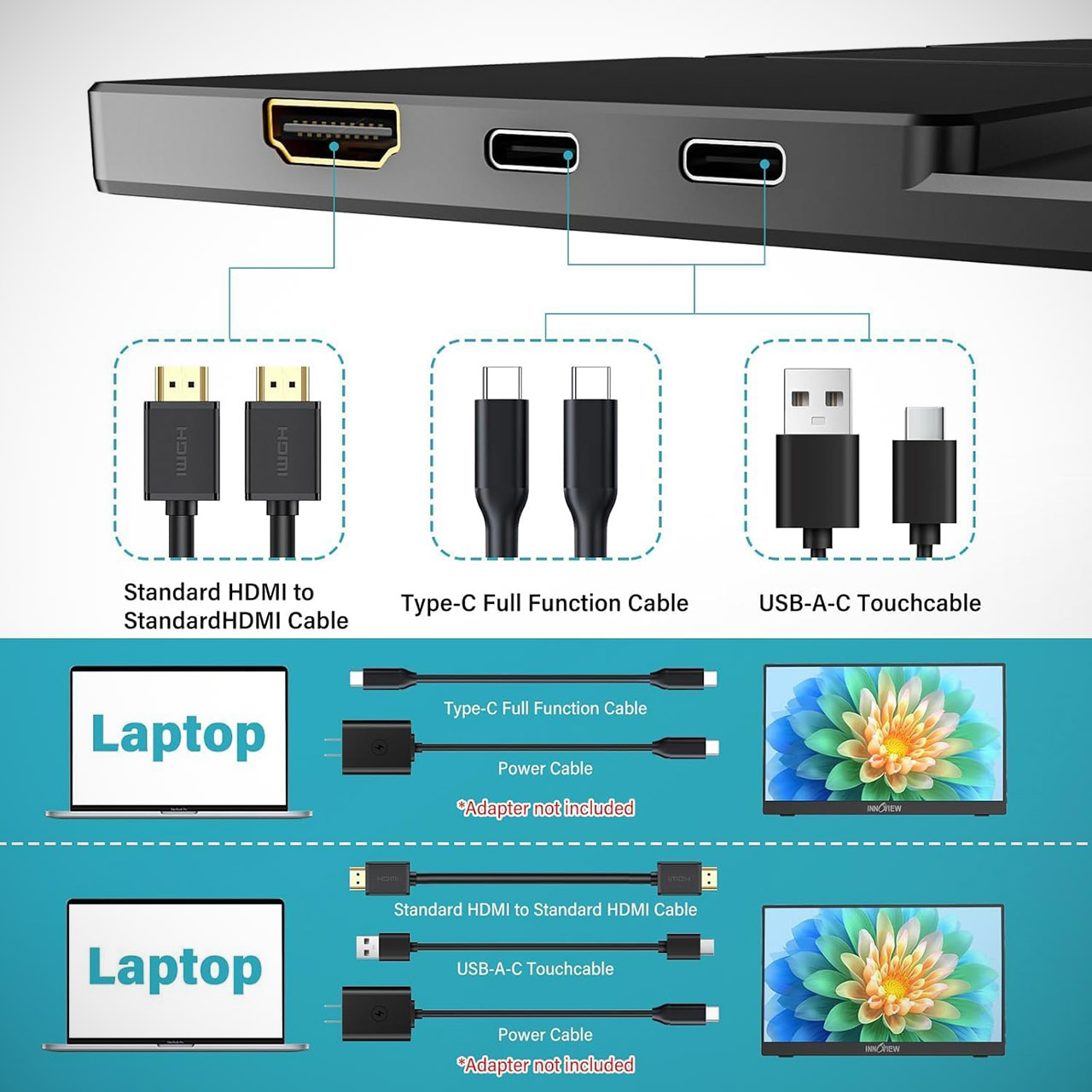
The port configuration is straightforward: two full-function USB-C ports can handle video, power, and touch data on machines that support DisplayPort Alt Mode or Thunderbolt. There’s also a standard port for older devices, as well as any other gadgets with only HDMI. As an added bonus, there’s a spare USB-A-to-USB-C connection included so you can still use touch even if your display is HDMI. In terms of audio, the display includes twin speakers, allowing you to avoid constantly carrying a second pair of headphones.
The physical design of the device is focused on portability. It weighs 1.37 kg and is small enough to slip into a laptop sleeve or backpack pocket. The built-in stand can be tilted from flat to 90 degrees, allowing you to position the screen perfectly on a hotel desk, café table, or aircraft tray. The supplied protective sleeve is especially useful, as it not only protects the screen from damage during travel, but it can also be folded out to serve as a small base when the kickstand is not accessible. You can also use it in portrait mode if necessary, and with a frameless design, the active area appears to be quite large in comparison to the overall size of the device.
Most systems have a straightforward setup procedure. Simply attach the full USB-C connection, and the second display should appear within seconds. If you’re using HDMI, just plug it in along with a power source, and you’re done. Even better, you can modify brightness and volume without having to visit settings, and this device supports FreeSync and G-Sync, so if your source does, you won’t have to worry about motion blur.
Most companies are approaching AI adoption backwards by optimizing how individuals use AI instead of how teams work together, said Dr. Molly Sands, head of the Teamwork Lab at Atlassian, during a fireside chat with VentureBeat senior technology contributor Sam Witteveen at VB Transform 2026.
Sands leads a team of behavioral scientists and psychologists who study how AI is reshaping the way people work together, using those findings to help organizations redesign how work gets done.
“We don’t just study it, we also actively go in and change it,” she explained. Her teams teach new ways of working and remap how work flows across companies, a challenge that many organizations are still struggling with, she said.
Advertisement
Why AI speed isn’t translating into ROI
Atlassian’s annual State of Teams Report, which this year surveyed 12,000 global knowledge workers and interviewed roughly 200 Fortune 1000 executives, found a significant disconnect between activity and value, showing that everyone is using AI, while very few can yet locate where it pays off.
“89% of those executives told us that individuals are speeding up in their companies, and only 6% of them said they could point to specific examples of clear ROI,” Sands said.
But roughly 14% of teams had translated AI usage into real value — meaning a single organization could contain a handful of high-performing teams surrounded by others seeing no return at all.
Those leading teams shared three characteristics: context, workflows and culture. The teams pulling ahead were building what Atlassian calls a context graph by capturing goals, decisions, and organizational knowledge in shared digital records rather than leaving them in individual memory. Across products such as Jira and Confluence, the graph connects work items, goals and the people doing them, giving AI access to the organizational context it needs.
Advertisement
On workflows, the winning teams redesigned entire end-to-end processes rather than simply accelerating isolated tasks. Otherwise, speeding up individuals who are pointed in slightly different directions only causes them to “very quickly start to crash into each other,” as Sands puts it.
On culture, the fastest-moving teams worked under leaders who explicitly encouraged learning and experimentation, while making it clear that some experiments would fail.
How leaders can move AI from individual hack to team advantage
Experimentation and constraints are the fastest route to learning, Sands said. The teams seeing the biggest gains were deliberately imposing constraints on how they worked, from breaking every task into the smallest practical unit of work (a single story point) to committing to write no code by hand for a week.
“Most of it is not sustainable to do forever, but it is a really, really fast way to learn,” she said.
Advertisement
Sands argued that another obstacle isn’t the technology itself but the fact that employees are figuring out AI on their own. Every worker develops different prompts, agents and assumptions, creating another layer of unspoken knowledge inside teams that rarely translates into organizational performance.
To counter that, Atlassian experimented with AI working agreements at the start of projects, asking teams to decide not only what they would use AI for, but what they would deliberately avoid using it for, which agents they would share and what common skills would keep everyone working from the same context. Teams that adopted the practice used AI more, moved faster, made better decisions and ultimately produced higher-quality work.
The broader lesson, Sands said, is that AI isn’t creating entirely new management problems so much as exposing old ones. Teams have always struggled with hidden assumptions and different mental models of their work. AI simply makes those gaps more consequential, increasing the importance of shared context and explicit ways of working.
Sponsored articles are content produced by a company that is either paying for the post or has a business relationship with VentureBeat, and they’re always clearly marked. For more information, contact sales@venturebeat.com.
When I started looking closely at the learning platforms schools ask families to use, I noticed something easy to miss if it doesn’t affect you: almost all of them are built in English first.
For families who speak Spanish at home, that one fact quietly changes everything. A child might be able to follow along in class, but the parent often can’t — and a parent who can’t understand the material can’t sit beside their kid and help them with it. The language barrier becomes an opportunity barrier. And it’s invisible to the people who never have to think about it.
For me, the English-first technology trend was never abstract. My own children use the technology I’ve built, and I built it for families like the ones all around me — so that the opportunity to understand money, technology, and how to build something of your own doesn’t depend on which language gets spoken at the dinner table. I’m tired of watching the same families get left a step behind — not because their kids are any less capable but because no one built the on-ramp in a language they could use.
That language gap is what I set out to close.
Advertisement
It matters now more than ever because a growing number of states are starting to require students to take a personal finance course to graduate. For example,California’s Assembly Bill 2927 requires students to complete a stand-alone personal finance course to graduate high school starting with the class of 2030-31, with schools required to offer it by 2027-28. But if the lessons exist only in English, many households that need that knowledge are also the ones least able to access and reinforce it at home. A mandate built that way doesn’t close the gap. It can widen it.
I’ve spent the past three years building a bilingual K-12 learning platform, and the single most important thing I’ve learned is this: there is a world of difference between a product that has been translated and a product that is bilingual. Most edtech tools that advertise Spanish support only translate the interface — the menus, the buttons, the navigation — but the instruction itself stays in English. To a district evaluating the tool in a demo, it looks bilingual. To a parent sitting down with their child at the kitchen table, it isn’t.
This is the part I think edtech keeps getting wrong. We tend to treat language as the last step: build the English version and then add Spanish later if the budget allows. But a lesson a family can’t understand together hasn’t really been delivered — it’s just a box that got checked.
So, what does taking this seriously actually look like? Having sat on the builder’s side of these conversations, here is the concrete guidance I’d offer.
Advertisement
Five Questions for Edtech Vendors
When a vendor says their product “supports Spanish,” ask the following questions to differentiate true bilingual instruction from a translated menu bar:
Is the instructional content itself available in Spanish — for every lesson and at every grade level — or only the interface? Ask them to open a mid-unit lesson in Spanish during the demo, not the homepage.
Is the audio in Spanish or only the text? Many parents are stronger listeners than readers in either language. Text-only translation still excludes them.
Are parent-facing communications translated? Progress reports, dashboards and notification emails are how parents actually use the platform. If these features are in English, the parent is cut out of the loop no matter what the student sees.
Was the Spanish content written or reviewed by educators or was it machine translated? Machine translation of math word problems and financial terms produces errors that would confuse a struggling reader.
When new content is released, are both languages released together? If Spanish content is released a semester after the English content, Spanish-speaking families are permanently a step behind — by design.
A vendor with a truly bilingual platform will answer these questions in 30 seconds. A vendor with a translated interface will pivot to their roadmap.
Small Changes Keep Parents in the Loop
Teachers can’t rewrite their district’s software, but they can keep Spanish-speaking parents in the learning loop with the tools they already have.
Send the “what we’re learning this week” note home in both languages. Even if the learning platform is only in English, a two-line bilingual summary tells a parent what to ask their child about at dinner. Free translation tools are imperfect, but a two-line note reviewed by parents is achievable weekly.
Show parents the language toggle if one exists. Many families never discover a product’s Spanish mode because nobody walked them through it at back-to-school night. A five-minute demonstration in the fall can change a family’s entire year.
Assign homework with the parent in mind. When assigning homework on an English-only platform, include one question the student must explain to their parent in the family’s home language. This makes the parent a participant instead of a bystander. Plus, explaining a concept in another language is one of the best comprehension checks there is.
Flag the gaps upward. District procurement teams rarely hear which tools are failing bilingual families because the feedback doesn’t travel that far. A teacher noting that “the educational unit has no Spanish audio and my students’ parents can’t understand it” is exactly the evidence a district needs at renewal time.
Requirements Don’t Create Access
Taking access seriously isn’t complicated. It means treating a second language as a design requirement, not a stretch goal. It means making the platform bilingual from the first line of code, in the text and the audio, so a parent and child can move through a lesson together. It means making sure the highest value subjects — the ones tied to a student’s economic future — are the ones that exist in both languages first, not last. None of this is exotic. It’s just a decision about who you’re building for, made early enough to matter.
He left the industry behind to build his own hypercar. He said it’d have an output of 1,070 horsepower. He was wrong. The bespoke V12 powering this upcoming hypercar, the NILU, actually ended up exceeding its original performance target during its first dyno testing. It’s a major milestone for ex-Lamborghini designer Sasha Selipanov’s startup Nilu27, especially as they move closer to building their first drivable prototype with New Zealand-based Hartley Engines. The naturally aspirated 6.5-liter V12 even revved to an 11,000-rpm redline: a number the company called “spine-tingling.” It’s up there with some of the highest-revving engines ever released.
The powertrain uses an unusual “Hot V” configuration that puts the exhaust headers between the cylinder banks. This improves packaging and thermal management, for one, but it also shows off the engine through the vehicle’s fully exposed rear engine bay. Pair that with a Porsche-style seven-speed manual transmission, Nilu27 is going out of their way to double down on a traditional driving experience. At a time when so many other high-performance automakers are shifting toward electrification and digital controls, it’s a decision that stands out.
Advertisement
What it means for the future of the startup
Selipanov spent nearly twenty years working with Lamborghini, Bugatti, and Koenigsegg before launching his startup in 2024. That’s when he unveiled the Nilu27, his analog-focused hypercar. (“Analog” meaning it bucks the electrification trend with a carbon-fiber tub, an open-gate manual gearbox, and that “spine-tingling” bespoke V12.) Simply put, he just wants to deliver a more mechanical and driver-focused experience using an all-new engine architecture. If he succeeds, it could become one of the best V12 engines ever made.
Advertisement
As far as next steps are concerned: There’ll be some additional calibration and refinement work in New Zealand, at which point the completed engine will be shipped to Nilu27’s research, development, and production facility in Lahr, Germany. Once it arrives, it’ll be installed in the company’s first driving prototype. If the NILU succeeds, Nilu27 and partner Hartley Engines expect to open the doors to broader commercial ventures beyond Selipanov’s hypercar. They’re not opposed to designing and manufacturing road-certified engines for third-party customers. For the time being, it’ll cost you $3.7 million to own one of the first 15 units on the way.






























































You must be logged in to post a comment Login