Microsoft announced that it removed the Windows Management Instrumentation Command-line (WMIC) tool from Windows 11 24H2 and 25H2, as well as from Windows 11 beta builds released this week.
WMIC is a legacy built-in Windows command-line utility that helps interact with the Windows Management Instrumentation (WMI) system using text commands.
This move is part of a process announced in September, when the company said that WMIC will be removed after upgrading to Windows 11 25H2 and later.
Microsoft deprecated WMIC in Windows Server 2012 (in 2016) and Windows 10 21H1 (in 2021), and it converted it into a Feature on Demand (FoD) starting with Windows 11 22H2 (in 2022), and announced in January 2024 that it would be removed altogether after first disabling it by default.
“Windows Management Instrumentation Command-line (WMIC) has been removed in this release. This change is part of the ongoing deprecation and removal of WMIC from Windows,” Microsoft noted on Monday.
Advertisement
Three days earlier, on Friday, it also revealed that the tool is “already removed by default in new installations of Windows 11, versions 24H2 and 25H2, and is no longer available as a Feature on Demand (FoD).”
However, these changes apply only to the legacy WMIC component, as Windows Management Instrumentation (WMI) itself remains unaffected. Further guidance for IT administrators who use WMIC is available in this support document, which recommends using PowerShell and other modern tools (e.g., WMI’s COM API, .NET libraries, or scripting languages) for tasks previously done with WMIC.
WMIC’s removal aims to improve the operating system’s overall security by thwarting a wide range of malware and attack tactics that will no longer work.
The tool has long been considered a LOLBIN (living-off-the-land binary), a built-in Microsoft-signed executable that threat actors have abused for a wide range of malicious activities during attacks targeting Windows devices.
As popular as the Nintendo Switch and its sequel are, it’s hard to argue that its click-on Joy-Con controllers are ergonomic, barring you having very uniquely shaped hands. This thought and a stack of Wii controllers led [KOUZEX] to the mad project of merging Joy-Cons and WiiMotes into what can affectionately be called Wii-Cons, or perhaps JoyMotes.
Suffice it to say that it’s not a very clean or easy mod, and you could definitely make the point that a custom PCB and 3D-printed shell would have been a lot easier. Making space for the Joy-Con’s side rail, thumb stick and PCB without simply tossing the WiiMote’s PCB was a tough ask, and these are two WiiMotes that will never connect to a Wii again.
With the WiiMote-shaped Joy-Cons working pretty well after all that work, the issue of remapping Joy-Con buttons that have no match on WiiMotes was probably the biggest headache. Here having said custom version could be rather helpful to have more control over the button layout, also to not have to keep harvesting the dwindling supply of WiiMotes to make WiiCons. It might even be possible to keep all the WiiMote functionality that way, to really blow people’s minds when you use your fancy Joy-Cons to next play a game on an original Wii.
Watch England vs Pakistan live streams as the 1st Test from Headingley, Leeds, begins a three-match series full of intrigue. Joe Root returns as England captain as the backlash from the hosts previous series continues, while Babar Azam’s visitors seek a rare away series victory.
“Bazball” is finally over, with coach Brendon McCullum let go from the Test gig days after Ben Stokes announced a shock international retirement after England’s 2-1 defeat by New Zealand in June. Stephen Fleming, another Kiwi, doesn’t take the reins as the new Test coach until the winter so Marcus Trescothick is in interim coaching charge here.
Root’s return as skipper – having resigned in 2022 after 27 wins in 64 Tests with the job weighing too heavily – is largely down to a distinct lack of alternatives. After all, Harry Brook, vice-captain under Stokes and the white-ball skipper, has had notorious incidents similar to that which precipitated Stokes’ exit. Wins over entertainment appears the new mantra.
Advertisement
England must trim their in-form bowling unit of Jofra Archer, Gus Atkinson, Josh Tongue, Ollie Robinson and the returning Brydon Carse, while working out how to deal with the loss of their principal all-rounder in Stokes. Jordan Cox will bat at three in absence of the injured Jacob Bethell.
Pakistan, meanwhile, are coming off a hard-fought victory in their tour game against a Professional County Club Select XI. Despite trailing by 67 in the first innings, they won the match, chasing 264 on the last day thanks to Saud Shakeel’s unbeaten century. But they’re currently 7th in the ICC’s Test rankings and have only just won their first away Test – in West Indies – after three long years.
New-ball bowler Mohammad Abbas is ideally suited to English conditions, with Mohammad Ali, Khurram Shahzad, and Aamer Jamal to maintain their bite through the series. Abbas faces a late fitness test after injuring a finger in that warm-up game.
Pakistan won the last Test series against England 2-1, albeit in home conditions. Can they start this overseas series well with a win?
Advertisement
You can catch all the England vs Pakistan 1st Test action live and free. Read on to find out how.
Can I stream England vs Pakistan 1st Test for free?
Cricket fans in Pakistan are in luck!
Digital streaming service Tapmad is showing the England vs Pakistan test series completely free, albeit with ads playing during over breaks and fall of wickets.
Those still tied to the cord can also watch the match free in Pakistan, thanks to the PTV Sports TV channel.
Advertisement
Cord-cutters in Australia, meanwhile, have a sneaky trick they can use to watch the Test match live: Kayo Sports offers a 7-day free trial to new users, letting you catch all five days of action live and free.
Outside any of these countries right now? No worries, you can still stream the action by using a VPN. More details below…
Use a VPN to watch England vs Pakistan 1st Test from anywhere
If you’re keen to watch cricket but you’re away from home and your preferred coverage is geo-blocked, you could always use a VPN to access it (assuming you’re not breaching any broadcaster T&Cs, of course). You may be surprised by how simple it is to do.
Advertisement
The best VPN right now? We recommend NordVPN – it does everything and comes with a 75% discount, and three months for free.
Quick start: Using a VPN to watch the 1st Test between England and Pakistan from anywhere
Using a VPN is incredibly simple, just follow these steps.
1. Install the VPN of your choice. As we’ve said, NordVPN is our favorite.
Advertisement
2. Choose the location you wish to connect to in the VPN app. For instance if you’re visiting the U.S. and want to view a Pakistani streaming service, you’d select a location from Pakistan (like Karachi) from the server list.
3. Sit back and enjoy the action. Head to Tampad and watch England vs Pakistan 1st Test just like you would at home.
How to watch England vs Pakistan 1st Test live streams in the US
(Image credit: Other)
Cricket streaming service Willow TV is the place to watch the England vs Pakistan 1st Test in the US.
Advertisement
If you don’t have it as part of your cable package, you can watch Willow coverage through your choice of Sling TV’s Desi Binge Plus or Dakshin Flex plans – starting from $10 per month.
Alternatively, you can add Willow TV to your Prime Video subscription and watch cricket live streams from there.
Outside the US right now? You can make use of NordVPN to catch the action.
Advertisement
How to watch England vs Pakistan 1st Test live streams in the UK
The England vs Pakistan 1st Test is being shown on Sky Sports on the Cricket and Main Event channels.
Sky Sports plans start from £35/month or £22 if you’re an existing Sky subscriber. Alternatively, grab a NOW Sports subscription from £14.99/day or £34.99/month.
If you’re on holiday outside the UK, you can use NordVPN to access Eng vs Pak coverage.
Advertisement
How to watch England vs Pakistan 1st Test live streams in India
(Image credit: Wikimedia Commons)
Unfortunately for cricket fans in India, the England vs Pakistan 1st Test hasn’t yet been picked up by any streaming service. We’ll update you here if that changes!
If you’re currently travling in India but want to watch the matches live, you’ll need to get yourself a VPN to access streaming services back home.
How to watch England vs Pakistan 1st Test live streams in Australia
(Image credit: free)
The England vs Pakistan Test series is being shown on Fox Cricket via Foxtel in Australia, with live streaming available via Kayo Sports.
Advertisement
Kayo Sports starts at AU$30 per month after a 7-day free trial. Or you can get your first month for AU$1.
Remember if you’re out of Australia at all during the match, get NordVPN to stream Eng vs Pak from anywhere in the world.
How to watch England vs Pakistan 1st Test live streams in Pakistan
In India, England vs Pakistan First Test is free-to-air on PTV Sports (TV) and on Tapmad for cord-cutters.
Advertisement
That said, the free tier on Tapmad will have a lower-quality stream with ads playing during over breaks and fall of wickets. There’s a premium tier, too, at PKR 499 per month, which unlocks an ad-free, high-definition (HD) stream.
If you’re currently out of Pakistan but want to watch an England vs Pakistan 1st Test live stream, you’ll need to get yourself a VPN, as per the instructions above.
England vs Pakistan 1st Test Q+A
Advertisement
Squads
England: Joe Root (c), Jamie Smith (wk), Harry Brook, Jordan Cox, Ben Duckett, Emilio Gay, Dan Lawrence, Ollie Pope, Brydon Carse, Jofra Archer, Gus Atkinson, Sam Cook, Matthew Fisher, Ollie Robinson, Shoaib Bashir, Josh Tongue.
Pakistan: Babar Azam (c), Mohammad Rizwan (wk), Ghazi Ghori (wk), Awais Zafar, Azan Awais, Imam-ul-Haq, Shan Masood, Abdullah Fazal, Aamer Jamel, Salman Ali Agha, Khurram Shahzad, Mohammad Abbas, Mohammad Ali, Sajid Khan, Ubaid Shah, Ali Usman
England vs Pakistan Test series schedule
1st Test: 19-23 August, Headingley (11am BST)
Advertisement
2nd Test: 27-31 August, Lord’s (11am BST)
3rd Test: 9-13 September, Edgbaston (11am BST)
We test and review VPN services in the context of legal recreational uses. For example: 1. Accessing a service from another country (subject to the terms and conditions of that service). 2. Protecting your online security and strengthening your online privacy when abroad. We do not support or condone the illegal or malicious use of VPN services. Consuming pirated content that is paid-for is neither endorsed nor approved by Future Publishing.
As the resident NBN and home-internet expert for TechRadar Australia, I spend much of my time looking out for the best internet deals, and there are almost invariably a number of compelling options at every different speed tier — and these can be a great way to sense-check if you’re overpaying for your current NBN service.
When choosing deals, much of my decision-making revolves around two easily identifiable metrics: price and typical evening speed (TES). Typical evening speed is something all internet service providers (ISPs) have to disclose before you sign up for a plan. In essence, it tells you the download speed you can realistically expect to achieve during the busier evening hours of 7pm to 11pm. Being able to view the TES also means you can easily identify which ISPs ultimately offer better value — i.e. the ones advertising fast evening speeds at competitively low prices.
With almost all of the best NBN 500 plans promising to deliver their maximum 500Mbps speeds even during the peak evening period, it’s a tier where direct price comparisons make sense. However, things get a bit wobblier when you’re shopping for faster speeds, such as NBN 750 and NBN 1000.
Advertisement
Most plans on these tiers make more conservative promises when it comes to typical evening speed — for example, rather than the 1,000Mbps you might expect from NBN 1000, on these gigabit plans, most providers only promise evening speeds in the 820-860Mbps range. With that TES figure closer to 750Mbps than 1,000Mbps, it prompted me to ask a simple question: Is NBN 1000 actually worth it, or should you save yourself some moolah every month and opt for NBN 750 instead?
Cue a whole load of number crunching!
So average
First, I calculated the current average monthly cost of NBN 750 and NBN 1000 plans, alongside the average TES advertised by the providers I monitor. After crunching the numbers on NBN 750 plans from 14 providers and NBN 1000 plans from 20, the final results were:
Advertisement
Swipe to scroll horizontally
Measure
NBN 750
NBN 1000
Average price
Advertisement
AU$105.98
AU$114.95
Average TES
730.2 Mbps
Advertisement
835.4 Mbps
As expected, the results show that NBN 1000 plans do not, on average, get as close to their nominal 1,000 Mbps tier speed as NBN 750 plans get to 750 Mbps. The gigabit gap was quite substantial, falling 164.6Mbps shy of the tier’s nominal 1,000 Mbps tier, compared to a shortfall of just 19.8 Mbps for NBN 750.
Sign up for breaking news, reviews, opinion, top tech deals, and more.
With the average monthly cost less than AU$10 difference between the two tiers — specifically AU$8.97, or 8.5% — the question then became whether the NBN 1000’s typical evening speeds are worth it from a value perspective. For that, we of course needed to do some more maths:
Advertisement
Swipe to scroll horizontally
Measure
NBN 750
NBN 1000
Shortfall from theoretical maximum
Advertisement
19.8 Mbps
164.6 Mbps
TES as share of maximum
97.36%
Advertisement
83.54%
Cost per advertised TES Mbps
14.5 cents
13.8 cents
Advertisement
Next steps
With NBN 1000 plans falling far short of 1,000Mbps in their typical evening speed promises (averaging just 83.5%), intuitively they seemed like they’d come out second fiddle to NBN 750. Surprisingly, however, NBN 1000 is slightly ahead when comparing cost per megabit for typical evening speeds: 13.8 cents for NBN 1000 versus 14.5 cents for NBN 750. There are a couple of NBN 750 plans that come in below that average at 13 cents per megabit — Kogan Internet and Spintel — which I’ve listed below.
In other words, NBN 1000 might cost more in absolute terms, but it does offer slightly better value per advertised megabit. If you need some recommendations as to which NBN 1000 plans are worth checking out, look no further than Dodo and Superloop. The cost per megabit on these two works out to be 13 cents, placing them among the cheapest for the tier.
Advertisement
Is there a third option?
The NBN 750 and 1000 plans don’t exist in a vacuum, however, and NBN Co has been pretty clear that it considers NBN 500 — introduced last September — to be the current sweet spot for most Australian households. So how does the golden child stack up, you ask? I’ve also made it no secret that I consider it the best option for most Australian households, but admittedly, that’s been without these recent calculations.
As we alluded to above, unlike NBN 750 and 1000 plans, most providers do advertise maximum plan speeds for NBN 500, with an average typical evening speed of 499.3 Mbps across 22 providers — equivalent to 99.9% of its potential 500 Mbps maximum.
On a cost-per-megabit basis, however, things don’t look as pretty for my personal fave. With an average monthly price of AU$95.75, the average megabit cost works out to around 19.2 cents, making it substantially more expensive than both NBN 750 and NBN 1000.
With that being said, it still remains the cheapest option in outright monthly terms, with the average NBN 500 plan costing AU$95.75 — AU$10.23 less than NBN 750 and AU$19.20 less than NBN 1000.
Advertisement
As for my top recommendations for an NBN 500 plan, look no further.
Decisions, decisions
So, where to go from here? What these numbers helpfully confirm is that if you do opt for a faster plan, you are getting good value from a purely cost-per-megabit metric — so if you were looking to justify jumping up to NBN 750 or NBN 1000, you can probably stop reading here.
These facts and figures can’t take into account all the subjective-but-important real-world factors that come into play when choosing an internet plan — they can’t, for example, help you determine how much speed your household actually needs.
Advertisement
While it’s now been proven that NBN 1000 plans offer the cheapest cost-per-megabit, that’s only really useful if you actually need gigabit speeds regularly. What you’re ultimately paying extra for, most of the time, is time — specifically, less time waiting for large files (like video games or OS updates) to download.
For me personally, I’ve decided I can stand to wait a little longer on the one or two occasions a month when that extra speed would be noticeable. It’s hard to justify paying more if the extra megabits are going unused 95% or more of the time.
The creator of Deus Ex, the action role-playing game franchise originally developed by Ion Storm, has announced his retirement. In a LinkedIn post, Warren Spector said he was a month away from his 44th year as a developer and had worked on tabletop games, 17 digital games, ran small and large teams and helped people with their careers. Now, his age and health are catching up with him, and it was time to “write some books, do a lot of reading, do some lecturing, maybe do some consulting.”
Spector also said that there are still three games he would like to make, but that the business has changed and it’s not as fun for him anymore. While he admitted that he tried to retire in the past but changed his tune, he said he thinks he means it this time. He is typically regarded as a founding father of immersive sim games, characterized by giving players the freedom to solve problems in a variety of ways.
On Deus Ex, wherein you play an anti-terrorism agent in a dystopian cyberpunk setting, Spector also served as director and producer. He worked on several Ultima titles as producer and writer, as well as on Disney’s Epic Mickey for the Wii as director. His latest game was Thick As Thieves, a stealth-action heist game, released just a few months ago. He also worked on System Shock 3, but Tencent took over that project and its status remains unclear.
It seems like Nvidia’s not getting back into the Middle Kingdom anytime soon
Chinese web giant Baidu yesterday told investors it sees good days ahead for its Kunlunxin chip biz, because local buyers won’t have alternatives.
Baidu has previously said it plans to spin out and float Kunlunxin, which makes CUDA-compliant inferencing chips that it uses for its own cloud services and has sold to the likes of Huawei and ZTE, who use them in kit they sell to Chinese telcos.
Advertisement
Speaking on the company’s Q2 earnings call, Dou Shen, executive veep of Baidu’s AI Cloud Group, said Baidu is working to list Kunlunxin and will have concrete info to share soon.
“From a business perspective, we remain very confident in Kunlunxin’s long-term growth and commercial potential for a few reasons,” he said. One of those reasons is that demand for inferencing continues to rise, and Baidu thinks that trend will continue for the long term.
His second reason was that China’s domestic market has “significant growth potential” because supply of AI chips is “likely to remain constrained for some time.”
“Against this backdrop, customers are increasingly seeking high performance, reliable, and cost-efficient domestic AI chips.”
Advertisement
Those remarks are notable in the context of the US government’s policy to allow Nvidia to resume sales of its products into China, and Beijing’s response of giving itself a veto over any purchases by local companies.
After Washington banned Nvidia from selling its products in China, the company said that decision cost it $10.5 billion in six months. In its most recent results announcement the GPU giant said it had not won any revenue in China after the USA’s policy reversal, and is “uncertain whether any imports will be allowed into the country.”
And now Baidu is saying Chinese buyers are looking to local chips due to supply challenges.
Nvidia CEO Jensen Huang has argued that the Trump administration should encourage chip sales to China, to cement the USA’s dominance of AI. Beijing has encouraged adoption of local tech, in part to reduce dependence on US products.
Advertisement
Baidu’s earnings included strong growth for its AI business, which saw revenue from cloud infrastructure rental rise 50 percent year over year to almost $1.1 billion, and revenue from the company’s GPU cloud surge 283 percent year-over-year, trumping the 184 percent growth in the last quarter.
Those numbers are modest compared to the likes of AWS, Google, and Microsoft – and also a fair way down the charts among Baidu’s Chinese competitors. The company believes owning its own stack of models, infrastructure, and chips will mean it can deliver AI services at keen prices and give it a market advantage. Alibaba makes similar claims and is arguably far ahead of Baidu in terms of model-making capabilities.
But Baidu has the robo-cab field to itself with the Apollo Go service, which execs said provided over one million fully autonomous rides around the world in Q2.
Back on the web, execs enthused about low hallucination rates for the company’s consumer-AI services, and an 83 percent year-over-year increase in the number of daily active users for Baidu’s ERNIE assistant – which saw the number of conversations users stage daily more than triple.
Advertisement
Overall revenue grew just four percent year-over-year to $3.9 billion, meaning Baidu’s AI cloud is the company’s growth engine. ®
I haven’t played Pokemon since I was a kid. I remember it being fun, playing on the floor at my local video game store. I remember all of the original 151 Pokemon — blade-armed mantis Scyther was my favorite. I played Pokemon Snap on my N64. That is about where my current knowledge ends.
I don’t know how many Pokemon exist now. But I do know Pikachu. More importantly, Polaroid knows I know Pikachu — and that you know Pikachu.
The main attraction is a bright yellow Pikachu version of the compact Polaroid Go Generation 3 instant camera. It costs $100 and includes a hand strap shaped like Pikachu’s lightning-bolt tail.
Advertisement
A pink, white and blue Sylveon camera is also available for the same price. I couldn’t tell you what a Sylveon was, so I looked it up. It debuted in Pokemon X and Y in 2013, meaning this collection is apparently designed to exploit several generations of childhood memories at once.
The final camera is a larger $140 Polaroid Now Generation 3, designed to look like a Poke Ball. All three cameras have Poke Ball-shaped shutter buttons, just in case the bright colors and familiar characters weren’t already doing enough.
None of this is new camera technology. These are existing Polaroid cameras wearing Pokemon costumes. And honestly, that’s probably all it takes.
Plenty of adults are still into Pokemon because they play the games, collect the cards and genuinely enjoy the community around it. But companies know there’s another audience too: people like me, who moved on years ago but can still be pulled back by wrapping a product in a memory from when we were too young to have bills.
Advertisement
Nostalgia is bad for your wallet
A 2014 study published in the Journal of Consumer Research examined whether nostalgia makes people more willing to part with their money. Across six experiments, researchers found that people who felt nostalgic were willing to pay more for products and valued money less than people in a neutral emotional state.
The researchers concluded that nostalgia may often appear in marketing because it encourages consumers to spend.
In other words, thinking about your childhood can make you financially stupid.
That doesn’t mean Polaroid assembled a team of psychologists in a dark room and ordered them to weaponize Pikachu. Pokemon is celebrating a major anniversary, and branded merchandise is inevitable. But this collection does feel like a particularly clean demonstration of how nostalgia marketing works.
Advertisement
The target isn’t necessarily someone currently obsessed with Pokemon. It can also be someone like me, an adult who hasn’t played in years but still immediately recognizes that yellow face and remembers when Pokemon was a game instead of a multibillion-dollar machine designed to appear on every object I own.
Kids will probably want these cameras too. But kids generally don’t have $100. Adults do, and adults are increasingly spending that money on toys, collectibles and other products connected to the things they loved growing up.
An instant camera isn’t technically a toy, but it lives in that same world — it’s a familiar character, and there’s limited availability. It’s a collectible, and its price is just low enough to make an unnecessary purchase feel defensible.
It checks all the boxes.
Advertisement
The camera is only the beginning
The Pikachu and Sylveon cameras are versions of the Polaroid Go Gen 3, a small analog camera that takes pocket-size instant photos. It has a selfie mirror, built-in flash, self-timer and double-exposure mode.
The Poké Ball model is on the larger Polaroid Now Gen 3, which shoots full-size Polaroid pictures and has a two-lens autofocus system.
Polaroid isn’t just selling the cameras, though.
There are also $25 double packs of Pikachu and Sylveon film, along with $23 i-Type film featuring Pokemon designs around the borders of each printed photo. Even the darkslide, which is the protective card ejected when you insert a fresh pack of film, comes printed with a Pokemon silhouette.
Advertisement
Beginning Sept. 29, Polaroid will let customers log in and track which darkslides they have collected. So even the piece of plastic you would normally throw away has now become a collectible.
Add in a $25 Poke Ball camera case, a $25 photo album and a $15 shoulder strap, and buying one of every item in the nine-piece collection would cost $477.91 before tax.
Apparently, you really can catch them all. You just need a credit card.
Preorders open Aug. 25 through the Polaroid website, while supplies last, followed by a general release on Oct. 5. The collection will also be available through the Pokemon Center website in the US, the UK and Canada. Polaroid says everything will be sold in limited quantities, adding a little artificial urgency to the childhood memories it’s already dangling in front of us.
Advertisement
I’m probably not going to buy one. I haven’t played Pokemon in years. But I did look through every picture of the Pikachu model. And there’s a Snorlax film pack? It’s kinda cute…
So yes, this nostalgia shit is as catchy as a well-thrown Poke Ball.
With more than a decade of experience, Nelson covers Apple and Google and writes about iPhone and Android features, privacy and security settings, and more.
See full bio
In iOS 27, Apple is bringing a welcomed set of changes to the stock Camera app. Here’s how it has evolved, what you can now do, and what we didn’t see.
There are hundreds of changes throughout iOS 27, and the Camera app has its fair share. It’s both easier to use and more powerful than before, so let’s walk through it.
Jumping into the app, it still looks very familiar. The general layout, color scheme, and functionality have all remained.
The shutter button is centered at the bottom, with the gallery button to the lower-left and one to flip the camera around on the right. Along the top you have all of your current settings, such as resolution, exposure, and more.
Advertisement
Updated controls
The first big change has to do with those controls. With iOS 27, Apple is making it easier to find and adjust them.
The stock Camera app looks very similar to before
Instead of hiding them at the top of the app in a little icon, there is a new grid icon for in-app controls just to the right of the shutter.
This opens a popover at the bottom with all the various controls you can change. These are relative to your current shooting mode, so you’ll see different options when you’re in video versus photo mode.
Advertisement
Controls have been moved into a redesigned popover
Because Apple is surfacing these controls more, it seems it is also trying to simplify things. Some of these controls, like resolution, have been removed from the Camera section within Settings.
So, if you’re looking for something, be sure to check first in the Camera app itself before digging into the Settings app.
Dedicated Siri mode
The second big change is a new shooting mode. Swipe left in the app to go to Video mode and swipe right to go to the new Siri mode.
Advertisement
A new Siri mode has been added to the Camera app
Siri mode is both new and old. It’s new in the sense that the Camera app didn’t have a dedicated mode in the past, but it’s old because the functionality just lived in a different place.
Prior to iOS 27, you could long-hold the Camera Control to launch Visual Intelligence. This is an AI mode to perform all sorts of different visual tasks, like translating text, looking up an outfit you like, and more.
Siri mode, or Visual Intelligence, can do many things, including looking up what type of tomatoes these are randomly growing in my garden. I did not plant them!
Advertisement
Siri mode, is just Visual Intelligence baked into the Camera app. This will make it far easier for users to find and take advantage of the newfound AI abilities in iOS 27.
Some other tasks we’ve used it for recently including looking up the variety of tomatoes that was growing in our garden, calculating the number of calories in an entire container of raspberries, and scanning a wedding invite to add it to our calendar.
Visual Intelligence in the new Siri mode can tell you how many calories in this container of raspberries
To be clear, the Camera Control can still be used to launch Visual Intelligence. A long-hold of the Camera Control in iOS 27 just launches the Camera app straight into Siri mode.
Advertisement
More changes
In other changes, Apple is introducing RAW 9. This is its RAW processing pipeline that will apply to RAW images taken with both iPhone and other cameras.
The new version of RAW has much better definition and its easier to make out the colors
Apple is calling this its biggest update yet for RAW support and drastically improves the rendering of RAW files. It uses a new CoreML model and combines demosaic with denoise for the best image quality and runs entirely on device using the Apple Neural Engine cores.
The new version of RAW has much better definition
Advertisement
In a developer session, Apple highlighted a few images to show the improvement in both color separation and noise reduction. Compared to RAW 8, which was excellent, RAW 9 is significantly better.
In the fifth developer beta of iOS 27, it was leaked that Apple is working on a new reference mode. It’s essentially a way to authenticate where images came from, which is increasingly important with the prevalence of generative AI.
A new Reference Image setting may be coming to iOS 27
Code shows that iOS 27 would use unique camera hardware information to verify an image is real. This would leverage Apple’s Private Cloud Compute architecture.
Advertisement
The feature will be user-enabled and an uncovered splash screen provides some details on how the feature works. Apple is clear that if you enable it, your photo and its metadata will be sent to Private Cloud Compute, though nothing sent there is ever saved.
What we didn’t see
Surprisingly, what we didn’t see was a more drastic change to the Camera app. Early rumors pointed to a new Camera app with a completely customizable layout.
Instead, we got the more modest design change that Apple previewed at WWDC. Even though the changes seem largely positive, it’s disappointing Apple didn’t do more.
As is often the case, camera upgrades sound like they may be a big focus of the new iPhone 18 announcement
Advertisement
One possibility is that Apple will highlight the new Camera app alongside the iPhone 18 Pro and iPhone 18 Pro Max. It could then theoretically bring the app to the older models as well, similar to how it has launched Apple Watch faces in the past.
It could lean into the camera hardware changes with a big app upgrade to match. This may just be wishful thinking, and fortunately there are a lot of great third-party camera apps like Moment Pro Camera or Halide.
Canon owners who once pointed their EOS 550D at landscapes or family gatherings can now point it at the forces of Hell. A new software module lets the 2010 Rebel T2i (known as the Kiss X4 in some markets) run the original Doom, complete with movement, shooting, sound, and save files, all controlled by the camera’s own buttons and dials.
キャノンの一眼レフデジカメ『EOS Kiss X4』(EOS 550D)に、あの「Doom」が勝手移植!!
Bas Lichtjaar, using the alias lauris-nl, created the DOOM port as a Magic Lantern Module. Magic Lantern is a long-running open firmware add-on that allows users to unlock additional capabilities on specific Canon bodies. The Doom module simply happens to function on the 550D running firmware 1.0.9; it appears in the camera’s Games menu, and everything is fine. Users must supply their own IWAD files, such as DOOM, DOOM II, or Freedoom, and store them on the SD card. The game then begins to load directly on the camera.
DOOM 2099 COMICS-INSPIRED: Thrust into a strange alternate future seemingly devoid of the Fantastic Four, this Doctor Doom 2099 is inspired by the…
ASSEMBLE EARTH’S MIGHTIEST HEROES: Magic: The Gathering | Marvel Super Heroes has arrived in full force! Discover an exciting new way to experience…
PREMIUM DESIGN, DECO, & ARTICULATION: This officially licensed Hasbro Marvel Legends action figure set features comics-inspired design and deco. with…
The directional pad controls movement and aim. Pressing the zoom in button causes the player to run. Pressing zoom out while pressing left or right allows you to strafe. The SET button launches the weapon and confirms menu options. The PLAY button opens doors and triggers switches. The back control wheel allows you to cycle through your weaponry. DISP displays the automap or exits menus, whereas MENU brings you directly to the main choices screen. If you click the delete button three times quickly, you will be sent to a hidden menu where you can enable several old-school cheats as well as select your favorite music and level warp choices. The ISO, depth-of-field preview, and shutter controls are set to the sidelines to avoid interfering with the camera’s typical overlays.
The rear LCD displays at the proper 720 by 480 resolution. If you want a larger view, you can choose the alternative mode that scales the image into larger 2-by-2 pixel blocks. The audio comes from a homemade synthesizer that plays the original song and incorporates classic 8-bit sound effects. It outputs 48 kHz mono through the camera’s built-in speaker or headphone jack. You have distinct save slots for each WAD file, and the system saves all of your configuration settings so that when you turn it off and back on, your volume levels and preferences remain unchanged.
The performance is actually rather good, since it remains fluid enough for you to actually play. The audio engine is hardly used, thus there is plenty of processing power available for game logic. They appear to have eliminated the music dropouts that plagued previous editions. Changing WAD files still requires a camera restart, therefore the port is still limited to the 550D with the appropriate Magic Lantern build. Multiplayer, external mods, and DEHACKED fixes will all have to wait a bit longer.
The source code and modules are all available on Github under the name doom550d. Installation is the standard Magic Lantern procedure: copy the files to the card, load the module, then select your game from the menu. Anyone who has previously used Magic Lantern on a 550D can try it again after backing up their card.
The U.S. Cybersecurity and Infrastructure Security Agency (CISA) has confirmed that ransomware gangs are also exploiting a high-severity Windows Task Host vulnerability that was flagged as actively exploited in April.
Task Host is a core Windows system component that allows DLL-based processes to run in the background and prevents data corruption by ensuring they close properly during shutdown.
Tracked as CVE-2025-60710, this Windows privilege escalation security flaw was patched by Microsoft in November 2025 and stems from a link following weakness that affects Windows 11 and Windows Server 2025 devices.
Following successful exploitation, local attackers with basic user permissions can gain SYSTEM privileges and take full control of unpatched devices.
While it didn’t share any details regarding ongoing attacks and Microsoft has yet to update its security advisory to confirm in-the-wild exploitation, CISA added CVE-2025-60710 to its list of actively exploited vulnerabilities on April 13 and gave Federal Civilian Executive Branch (FCEB) agencies two weeks to secure their systems.
Advertisement
On Friday, CISA updated its Known Exploited Vulnerabilities Catalog (KEV) again, flagging the security vulnerability as being abused by ransomware gangs.
The U.S. cybersecurity agency has not yet shared any information about attacks targeting CVE-2025-60710, and a Microsoft spokesperson was not immediately available for comment when BleepingComputer reached out earlier today.
“This type of vulnerability is a frequent attack vector for malicious cyber actors and poses significant risks to the federal enterprise,” CISA warned. “Apply mitigations per vendor instructions, follow applicable BOD 22-01 guidance for cloud services, or discontinue use of the product if mitigations are unavailable.”
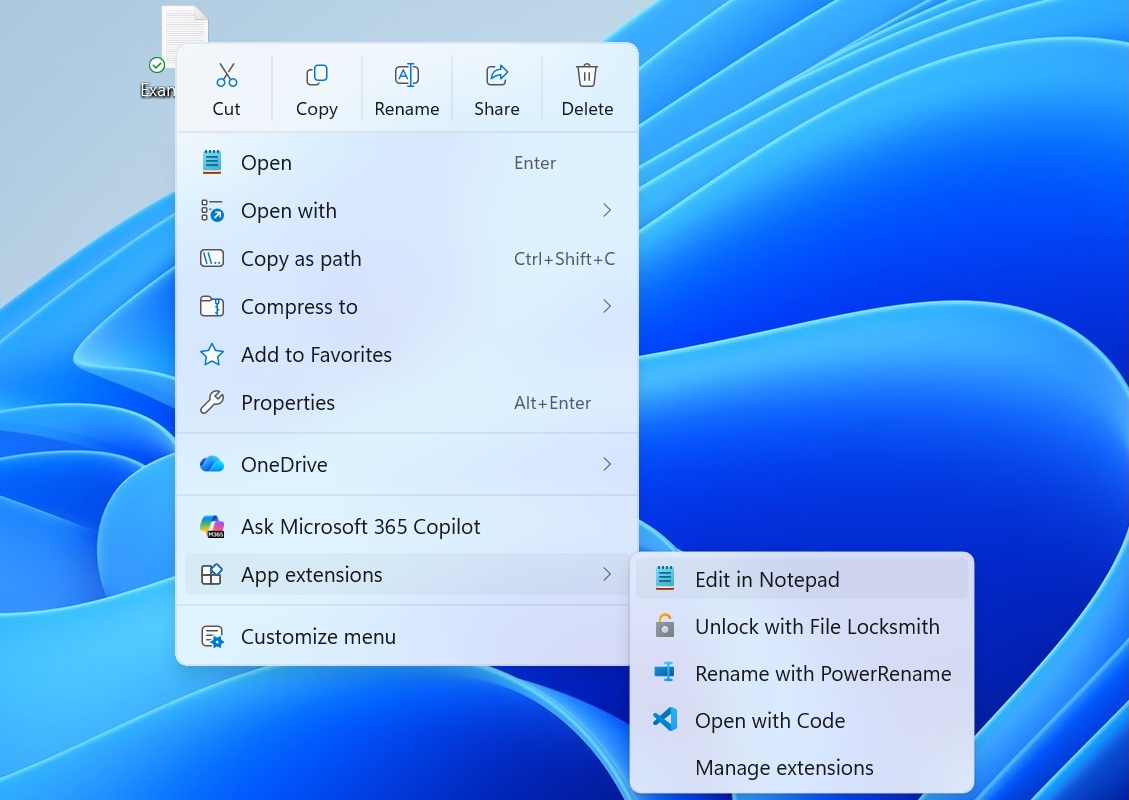
Microsoft has started testing a faster File Explorer and a less cluttered and more customizable context menu in Windows 11 preview builds rolling out to Insiders this week.
As the File Explorer team explained in a Monday blog post, the changes focus on improving File Explorer speed, performance, and reliability and addressing customer-reported issues.
The redesigned context menu experience also aims to make it faster, reduce clutter, and make it more customizable than ever before.
At the bottom of the new right-click menu, Microsoft also added a “Customize menu” shortcut to the Settings page, where users can tweak the context menu to suit their preferences.
“We’ve continued refining File Explorer based on that feedback, removing friction and improving the details that help make everyday tasks feel more natural and predictable. For example, file renames no longer get interrupted by background file synchronization, and case-only filename changes now appear immediately,” Microsoft said.
Advertisement
“Today, we’re [also] excited to announce an updated context menu that delivers a faster, simpler, and more customizable experience. The new design reduces top-level clutter, keeps commonly used actions easy to access, and introduces a new Settings experience that gives you more control over what appears in the menu.”
New Windows 11 context menu (Microsoft)
These changes follow a broader effort to improve Windows Explorer speed and performance for Windows 11 users, with the most recent changes including another set of File Explorer improvements that rolled out in April.
However, that was optional, allowing users who wanted to disable preloading to uncheck “Enable window preloading for faster launch times” in File Explorer’s Folder Options under the View tab.
These File Explorer changes follow the May 2025 rollout of Startup Boost, a similar optional feature for Microsoft Office apps that launches a Windows scheduled task in the background during system logon to help launch Office apps faster.
Advertisement
On Monday, Microsoft also announced that it is removing the Windows Management Instrumentation Command-line (WMIC) tool, a known LOLBIN (living-off-the-land binary) abused by cybercriminals, starting with Windows 11 24H2 and 25H2, as well as the Windows 11 beta builds released this week.
Overall prevention scores can hide what happens after initial access. Once attackers are using valid credentials, prevention drops sharply.
The Blue Report 2026 measures defenses technique by technique across 338 million simulations run in customer production environments.








 As popular as the Nintendo Switch and its sequel are, it’s hard to argue that its click-on Joy-Con controllers are ergonomic, barring you having very uniquely shaped hands. This thought and a stack of Wii controllers led [KOUZEX] to the mad project





























































You must be logged in to post a comment Login