If getting the most bang for your buck is your biggest priority, you could do much, much worse than splurging on the Poco F9 Ultra.
Far cheaper than mainstream ‘Ultra’ phones
Fantastic, immersive audio performance
Battery life is among the best on the market
Up to 185fps performance in gaming
HyperOS remains a confusing software experience
Processor is the same as last year
Cameras can let it down in some situations
SQUIRREL_PLAYLIST_10208723
Advertisement
Key Features
Introduction
The Poco F9 Ultra is a special phone. At a very tempting price.
It has an incredible display, up to 185fps gaming performance, the same main camera as the Galaxy S26 Ultra, a triple-speaker system powered by Bose, and a really big battery, all in a device that costs only a little more than the standard Pixel 11.
So what’s the catch?
Advertisement
Advertisement
Design
Premium Dark Cherry finish
Big, heavy iPhone 17 Pro Max rival
Rear speaker notification trick
At arm’s length, you could be forgiven for mistaking the Poco F9 Ultra for leaks of the burgundy-coloured iPhone 18 Pro Max. In truth, it’s a bit of a refinement and a tweak on last year’s Poco F8 Ultra design.
Image Credit (Trusted Reviews)
The Dark Cherry finish replaces the divisive blue denim model from the previous generation and, in doing so, gives it a much more luxurious or premium look. There is, of course, the usual black finish if you want that, but no Poco Yellow anywhere to be seen.
It’s a pretty hefty phone, which is to be expected from a phone with a huge screen and a huge battery. Still, for context, it weighs just 2 grams more than an iPhone 17 Pro Max at 235g, and is just marginally thinner and narrower than Apple’s biggest phone. In other words, it’s basically the same size, shape and weight as the Pro Max.
Image Credit (Trusted Reviews)
Advertisement
Poco’s ability to squeeze so much into that same space as the iPhone is what’s impressive here, then.
Where it doesn’t quite meet the standards of more expensive phones is in materials. Rather than Gorilla Glass Ceramic or Victus 2, it uses the slightly less durable Gorilla Glass Victus 7i on the front, and a glass-fibre-infused plastic-like back.
Despite that, it doesn’t look or feel cheap at all. And it has elevated Poco’s design language to do a pretty good job of imitating much more high-end brands. It looks and feels good. It is quite heavy, and far from being an easy one-handed phone though.
Advertisement
There is something of a trick up its sleeve too. On that large rectangular camera island on the back, you’ll notice the Bose logo on its own circular island. This isn’t just decorative; it features the third speaker (a subwoofer to be specific) and has an LED ring light around that you can program to pulse and flash for notifications, or have it pulse and beat in time with music or video in your favourite apps.
Image Credit (Trusted Reviews)
Poco being Poco, finding the setting for it is a bit more complicated than it needs to be, but it’s a pretty cool little feature. If you happen to place your phone down on its front a lot and need to know when you have notifications, you’ll get a subtle but easy-to-see visual alert. The only downside is that it seems to only pulse in white; you can’t change or customise the colour for different apps.
Advertisement
Apart from that, it’s got IP68 water and dust resistance – so despite its slightly cheaper build materials, it should survive any downpours or getting dropped in the sink or bath.
Screen
Huge, bright 6.9-inch panel
Superb colour and contrast
185Hz gaming support
Look at the Poco’s display spec sheet, and it’s easy to get excited when you see it has a 10,000 nit peak brightness level. That is miles above what most other manufacturers offer, but there is some marketing language going on here.
Dig further into the specs and you’ll see that only 1% of the screen can hit that level at a time – and that will typically be just bright spots in HDR videos. In fact, the whole screen can’t even hit half the 10,000nit claim, or even a quarter of it. In high brightness mode, the entire panel can get to 2,200 nits at once, and a quarter of it can get to 4500 nits at a time. Otherwise, its typical brightness is about 850 nits.
Advertisement
Image Credit (Trusted Reviews)
In other words, most of the time, you won’t notice those epic high brightness claims. But what it does mean is that the display is more than bright enough to be clearly visible in most situations – even outdoors under bright daylight. Its anti-reflective properties aren’t amazing – certainly nowhere near the levels of the Samsung Galaxy S26 Ultra – but it will cut through reflections pretty well.
Advertisement
What matters more in most indoor conditions is how that big display marries with the sound system to deliver a superb immersive experience in movies, TV shows and games.
It measures 6.9 inches diagonally with iPhone-esque rounding of the corner radii, but has great support for various colour gamuts. You’ll get 12-bit colour depth with this phone, and the ability to tune it largely how you want. By default, its Pro setting strikes a good balance between natural and vibrant colour presentation, but you can make it more or less saturated if you want, or tweak the warmth.
With its really high contrast ratio and the ability to hit as low as 1-nit brightness, it’s exceptionally versatile. And it even works pretty well when it gets wet.
Advertisement
Its biggest talking point is undoubtedly the refresh rates. Poco has enabled it to reach up to 185Hz in games that support it. I’ll talk more about that in the performance section, but it means a screen that can stay sharp, smooth and clear even when animations are really fast.
Like I said, though, it’s the combination with the sound that really elevates things. Like the Poco F8 Ultra, this phone boasts three speakers. There are the two stereo, symmetrical speakers – one on either end of the phone – and the subwoofer on the back for adding a bit more bass presence and rumble.
Image Credit (Trusted Reviews)
Advertisement
With those three combined, you get audio that’s loud, immersive and rich. It gives you the kind of versatility and range you’d typically need headphones to achieve. Or rather, it’s the kind of ability that means when you go to watch music videos on YouTube, you won’t be reaching for your earbuds to hear the musical layers properly. That is, of course, as long as you’re not in a public space where everyone else is going to have to share it with you.
It’s no exaggeration to say I haven’t used a phone with this kind of combination of audio and visual performance in a long time. Maybe never.
Advertisement
Cameras
Flagship-grade camera hardware
Heavy-handed image processing
Strong zoom versatility
You could also make the argument that the camera system is something of a downside to the F9 Ultra. And not necessarily because the hardware is poor – it’s not. It’s got the same 200MP main camera as the Samsung Galaxy S26 Ultra, has a 5x telephoto zoom with a 50MP sensor and a 50MP ultrawide camera. Technically, it’s got a lot going for it.
Image Credit (Trusted Reviews)
The zoom camera lets you punch pretty far into scenery and get a sharp photo that’s in focus. Where the ultrawide – which is safely the weakest of the three – means expanding the view to fit more in.
Advertisement
Its weakness, I’d argue, is in Poco’s processing of the scenery. There were times on bright sunny days where the computational processing takes over and does a lot too much work for my liking. So you’ll see some details almost look too clean and soft – almost painting-like in its presentation on things like bright pebbles on a beach, or any flat surface like a building wall, or the side of a boat.
Image Credit (Trusted Reviews)
In these same situations where there are dark shadows in the scene, it attempts to tame highlights and lift shadows a bit aggressively, leaving the darker parts of what it thinks is the subject looking a little foggy.
It does also have the tendency to make images, in general, a little too warm and a little too saturated and contrasty for my liking in its default, out-of-the-box auto setting. Most of the time though, I was left with the feeling that it’s a more than capable system in most situations, regardless of lighting levels.
The zoom camera has an equivalent optical zoom level of 5x, but can still take pretty sharp images at 10x, giving you a lot of range to punch into those scenes. Whether you’re shooting a building in the distance or a boat on the horizon. Just be prepared that oftentimes the texture doesn’t look entirely authentic, like the AI processing has taken over a little too aggressively.
Advertisement
Advertisement
Even though the ultrawide isn’t as strong as the other two, it’s not the obvious weak point I’ve found on a lot of other phones. Colours don’t always match the main and zoom lenses, but there’s no excessive distortion or warping at the edges, and it doesn’t suffer as much from grain and poor light capture as I’ve found in a lot of other ultrawide lenses.
It struggles a little more than the primary lens does in the nighttime, when the automatic night mode algorithm kicks in. Sometimes struggling to focus at times, and it’s not quite as crisp and clean as the main sensor – but that’s to be expected from the poorer sensor quality. And the colour and contrast levels are worlds apart when compared to the main camera, which, like in daytime shots, eggs up the warmth, saturation and contrast a bit too aggressively at night.
As for the zoom – at night – that exaggerates its daytime tendency to oversoften details to make them a bit too clean and paint-like.
Advertisement
Still, a lot of this is nit-picking, because for a phone in the current market where prices are inflated, it more than holds its own against some pretty expensive phones. So if you wanted to save a little money – and have a great camera – you’re really not losing out on much, if anything, if you go with the Poco for its performance and media experience.
Performance
Snapdragon flagship power
Smooth high-end gaming
Limited 185fps game support
Advertisement
The F9 Ultra is every bit a flagship under the hood; it sports the top-end Snapdragon 8 Elite Gen 5, coupled with a fairly generous 256GB, 512GB and 1TB and either 12- or 16GB of RAM in today’s inflated market. Of course, it needed a beefy processor to hit that magic 185fps claim.
It can, but the caveat to this support for up to 185fps is that the game itself needs to support those levels in order to get them. And, as of right now, there aren’t many games that do. Poco told us there were more than 20 titles that are able to hit those levels, which means most do not.
Still, it does mean that it won’t have any trouble hitting 120fps in the games you do play. It can cope with Genshin Impact, Wuthering Waves, Call of Duty or Destiny Rising in their higher settings.
Advertisement
Image Credit (Trusted Reviews)
I mostly played Destiny Rising with the graphics rendering set to Max and the frame rate set to 90fps, which was no trouble at all for the Poco F9 Ultra. I did feel it start to get a little warm after about 10/15 minutes of constant gameplay, but not uncomfortably hot. And it didn’t seem to drop frames significantly.
Combined with the superb touch response rate and 200Hz gyro sampling rate for motion sensing, it’s a great phone for gaming on. Layer the epic audio on top, and it’s hard to imagine you could get a much better gaming experience on a smartphone.
Advertisement
Software
Feature-rich but cluttered
Bloat needs clearing out
Six years of security support
If there’s a catch to any of this, you could make the argument that it’s Poco’s iteration of Xiaomi’s HyperOS software. It’s very feature-rich, but often arranged and implemented in a way that can be confusing and obstructive. You’ll find lots of Xiaomi-made bloat, redundant apps and features – like the lock screen carousel – enabled by default.
So, as with every Poco phone I’ve used, I spend the first little bit of time taming all the features I don’t like, disabling them, hiding them and trying to keep my Home Screen and software experience as clean as I can. And while there, also familiarising myself with where the features have been hidden in the Settings menu.
Image Credit (Trusted Reviews)
One of its strengths is in customisation, in that you can change every aspect of the main experience. There are loads of always-on display, wallpaper and fingerprint effects to choose from.
There’s an entire section in the Settings menu for AI features too, including the usual speech recognition, translation, search and subtitle features you’d find on most Android phones. So there’s lots to do here if you’ve got the time to sit down and figure it all out.
Advertisement
Advertisement
As for software updates, this is another area Poco falls a little behind some of the more mainstream brands. You’ll get 4 generations of OS updates with the F9 Ultra, and 6 years of security patches.
Battery life
Massive 8050mAh battery
Two-day use is realistic
50-minute charging claim
Just as an example of the kind of battery performance you’d get from the mega-capacity 8050mAh found in the F9 Ultra, streaming an hour of The Gentlemen on Netflix with the screen set to 50% brightness only dropped 2% of the battery level. Conceivably then, you could stream fifty hours of video on a full battery.
Doing anything more graphically demanding will, of course, drain it more quickly. So around 17 minutes of Destiny Rising was enough to drain about 4% of the battery, with the game set to 90fps and Max render quality settings. So, as always, the amount of battery life you get from this beefy cell will largely depend on the type of tasks you use it for.
Still, for someone like me who mostly uses their phone quite casually and barely tops 3 hours of screen time in a day – and mostly uses it for social media, WhatsApp and video – it’s not even hard to get to the end of a second day with this thing. Three days isn’t out of the question.
Advertisement
Image Credit (Trusted Reviews)
Advertisement
More demanding users can take solace in the fact that even if you put it through the wringer, constantly using it all day for everything, you should still comfortably end the day with the battery level higher than the dreaded red zone below 20%.
And when you want to charge it up again afterwards, it’s pretty speedy for a battery of this size. Poco claims you can do a full refill in just 50 minutes, which is a pretty astonishing speed for an 8050mAh battery. To achieve that, you’ll need a 100W charger – preferably a proprietary Xiaomi HyperCharge one for the very fastest speeds – and to enable the fastest charging speeds in the settings.
SQUIRREL_PLAYLIST_10208723
Should you buy it?
Advertisement
You want fantastic value for an Ultra phone
You’re getting premium design, flagship performance, a brilliant display, excellent speakers and a huge battery for significantly less than rival Ultra-branded phones.
Advertisement
You want the best software experience
Poco’s software is feature-rich, but it’s also cluttered with bloat, confusing menus and default settings you’ll likely want to spend time switching off.
Advertisement
Final Thoughts
In an era of increasing smartphone prices, the Poco F9 Ultra stands out as a phone that offers very few compromises and even – in some ways – outperforms the mainstream brands, but does so at a price point that’s significantly cheaper.
As an example, in the UK, the base-level RRP is £300 less than the entry-level Galaxy S26 Ultra. And if you wanted to go all-out and get the top-tier 1TB model, you’d end up paying about the same as what Samsung charges for 256GB.
Considering you’re still getting premium design, phenomenal performance, a huge battery, great speakers and a brilliant display: I’d argue that pound-for-pound, it’s the best value Ultra phone on the market. The catch, if you can even call it that, is that it has the same processor as last time, and software that does – at times – make me want to tear my hair out. But that’s about it.
Advertisement
If getting the most bang for your buck is your biggest priority, you could do much, much worse than splurging on the Poco F9 Ultra.
FAQs
Does the Poco F9 Ultra have good battery life?
Yes, the Poco F9 Ultra has excellent battery life thanks to its huge 8050mAh battery. With lighter use, it can comfortably last two days, and even heavier users should make it through a full day with charge to spare.
Advertisement
How fast does the Poco F9 Ultra charge?
Poco claims the F9 Ultra can fully charge in around 50 minutes, but you’ll need a compatible 100W Xiaomi HyperCharge charger and the fastest charging mode enabled in the settings to reach those speeds.
from the when-you-it-it-that-way,-it-seems-bad dept
Even as Donald Trump regularly uses mail-in ballots himself, he has decided that mail-in ballots are a system by which voting fraud occurs. To be quite clear, this is bullshit. There is astoundingly little evidence of significant voter fraud, and that’s equally true between in-person and voting-by-mail. And there’s zero evidence that mail-in voter fraud has ever even come close to swinging a federal election. Indeed, what little voter fraud there is often involves mixups of people who thought they were eligible to vote accidentally trying to vote when they were ineligible.
Either way, a few years back, Trump started blaming mail-in ballots for the completely mythological “rigged elections” he keeps insisting are happening, and of course the MAGA establishment quickly fell into line. We just recently wrote about how the Fifth Circuit appeals court has been working overtime to pretend that it’s well-established that mail-in ballots are insecure. But the bigger issue is that earlier this year, Trump issued an executive order to try to limit the use of mail-in ballots.
Specifically, the executive order tells the US Postal Service to engage in a “rulemaking” that is designed to make it much more difficult for states to offer mail-in ballots. And, on top of that, it demands that states that offer mail-in ballots must hand over their voter rolls to the federal government. The White House has been demanding voter rolls from a bunch of states, and so far every state that has engaged in litigation over this issue has won (it’s now over 20 cases, all of which have gone against the administration).
On its face, the executive order should be seen as pure nonsense, given that the states get to run elections, not the federal government. And even if it were the federal government, that’s not what executive orders are for. But given that the same Supreme Court that insisted no Democratic president could do literally anything without explicit congressional approval now treats Donald Trump as the very special birthday boy who gets whatever he asks for, we have to take even his most ridiculous demands seriously.
Advertisement
A district court judge, Indira Talwani, who is overseeing two of the cases challenging that executive order has issued injunctions in both cases, blocking the US government from putting it into effect. As Talwani notes, the states get to determine how their elections are run, per the Constitution.
Article I of the Constitution alsoempowers the States to prescribe the “Times, Places, and Manner of holding” congressional elections.U.S. CONST. art. I, § 4, cl. 1. “[T]hese comprehensive words embrace authority to provide a complete code for congressional elections, not only as to times and places, but in relation to notices, registration, supervision of voting, protection of voters, prevention of fraud and corrupt practices, counting of votes” among other issues. Smiley v. Holm, 285 U.S. 355, 366 (1932).
The President is elected by vote of the Electoral College. See U.S. CONST. amend. XII. The Electors Clause empowers each State to appoint electors to the Electoral College “in such Manner as the Legislature thereof may direct.” U.S. CONST. art. II, § 1, cl. 2. The States require their electors be appointed by popular vote of qualified voters. See Chiafalo v. Washington, 591 U.S. 578, 584 (2020).Accordingly, the States alone determine voter-eligibility requirements, subject only to the outer limits of the Constitution. See, e.g., U.S. CONST. amend. XIX (“The right of citizens of the United States to vote shall not be denied or abridged . . . on account of sex.”); U.S. CONST. amend. XXVI (“The right of citizens of the United States, who are eighteen years of age or older, to vote, shall not be denied or abridged . . . on account of age.”). For presidential elections, the Electors Clause gives States the primary authority to decide how electors are chosen.
As a result, the court ordered (among other things) the USPS to not take any steps to implement the executive order.
Furthermore, in the latter injunction, Talwani pointed out that the federal government failed to present literally any evidence of mail-in voting fraud:
Advertisement
The record is devoid of any declarations or other proffered evidence to suggest that mailin voting has resulted in voting by non-citizens.
In other words — the DOJ, despite the president insisting that non-citizen voting was happening all the time with mail-in ballots — didn’t even try to present evidence of that to the judge.
But this week, a USPS whistleblower revealed that the Postal Service has been building the machinery to implement the order anyway — issuing a final rule on August 26 and, per the disclosure, restarting development around July 29 even though the very clear injunction against doing anything was still in force. The whistleblower went to Senator Richard Blumenthal who released the whistleblower’s report, along with a letter to the Postmaster General demanding an explanation.
My office is in receipt of an alarming whistleblower disclosure (the “Disclosure”) outlining the United States Postal Service’s (“USPS”) perilously rushed and potentially unlawful implementation of President Trump’s Executive Order seeking to restrict mail-in voting. The whistleblower’s allegations make clear that USPS lacks the technical or operational capability needed to effectively implement the EO’s provisions in a way that safeguards every citizen’s right to vote in the upcoming midterm elections. Despite this, the Trump Administration appears intent on USPS moving forward with its flawed plans, no matter the chaos they may create. The whistleblower’s allegations also provide disturbing information suggesting that USPS may have violated a court order by continuing to implement the EO despite being ordered to cease all such work. We urge you to abandon this ill-conceived, unconscionable plan and ensure that all Americans can exercise their constitutional right to vote, including by mail, without interference by USPS.
The USPS’s defiance of the court order here is pretty direct. The judge issued an injunction on Section 3 of the executive order on June 25th. USPS did, in fact, stop work on the portal, while the DOJ appealed. On July 25th, the appeals court upheld the injunction, noting that the executive order “directs unprecedented levels of involvement by federal officials in how states administer elections.”
But just four days later, on July 29th, the whistleblower says that USPS leadership told the IT team to start building a tool to enforce the executive order, in direct and obvious defiance of the injunction against it. Then on August 11th, the district court expanded the injunction, which should have made it even clearer to USPS to stop. But USPS appears to have completely ignored that. While the Supreme Court put a stay on the injunction on August 24th, two days later the district court issued a temporary restraining order. But it appears that basically none of that mattered, as USPS leadership had the IT team continue to work on the thing they were explicitly barred by multiple courts to do.
Advertisement
As Blumenthal’s letter summarizes, the USPS rushed to build a portal whose main job appeared to be to block the mailing of mail-in ballots to voters (i.e., this is not them swiping already completed ballots, just refusing to send them to voters in the first place). And because USPS is now run by people whose main qualification is loyalty to Donald Trump, the execution is exactly as incompetent and slapdash as you’d expect:
The whistleblower’s Disclosure describes an unprecedented process that allows USPS to decide whether ballots issued by state election officials should be mailed. To do so, USPS is building an entirely new online system, the USPS Federal Ballot Mail Portal and related IT systems (the “Portal”), which will be used to screen ballots submitted by state election officials prior to USPS agreeing to mail them to voters. The Disclosure identifies problems at every stage of USPS’s development of the Portal, demonstrating deeply flawed plans for implementation. According to the whistleblower, USPS’s effort to develop and deploy the Portal has been “rushed,” “risky and haphazard” because leadership has demanded an impossible timeframe. In an effort to meet impossible deadlines, USPS has eliminated standard and needed testing, thereby creating substantial risk of a “catastrophic failure” of the system that could “derail the midterm elections.”
What could possibly go wrong:
USPS began work building the Portal on or around June 15, 2026 just three months before the date USPS planned to launch the system and just five months before the November 2026 midterm elections. On or about June 25, 2026, USPS ordered work on the Portal to cease due to a court order enjoining implementation of the EO. That work stoppage persisted for approximately a month, further reducing the time that USPS had to build the new system. According to the whistleblower, building the information technology infrastructure necessary to complete the Portal could take a year or more. Yet, USPS leadership demanded that the Portal be completed for a launch date of September 1, 2026, less than six months after the EO was issued. As a result of this rushed process, USPS has been unable to conduct tests of the Portal to ensure its proper functioning, troubleshoot problems, or distribute instructions on use to state election officials. According to the whistleblower, the Portal “violates standard principles of testing and debugging new software before launch.” Normal procedures at USPS for such systems include internal testing, customer acceptance testing, and a final development stage before release to public facing users. The Portal has gone through none of these basic checks.
Going beyond just Blumenthal’s summary, the actual whistleblower report has some astounding details about how the bosses at USPS working on this seem to have no clue how to build reliable software (one wonders if they’re ex-DOGE folks):
Throughout the development of the project, those giving guidance to tech developers lacked understanding of project parameters. Different team members continued to have different understandings of how the system is supposed to function which caused ongoing and greater confusion among the group.
While there continued to be no clear written requirements for the software and IT system, those developing the new election ballot mail IT system were placed in the position of trying to glean requirements from opaque comments at meetings. It continued to be clear that those giving directions did not understand exactly what was to be built. There was a growing concern that many were grasping at straws, trying to do their best to decipher cryptic instructions, and likely missing important details. Elements as basic to the project as whether a validation issue was a “warning” or an “error” continued to be unclear as leadership provided inaccurate information about these issues. To clarify, a warning allows a ballot to continue through the process while an error stops it. These occurrences reinforced the need for written requirements and the ongoing failures in communication.
Advertisement
Even so, the team was told that the system had to be ready to launch… by yesterday. They were given less than a month to figure it out. If you know anything about software development, project management, or… just about how anything works, these paragraphs are concerning:
Around this time at least one senior USPS official seemed to up the stakes by becoming a more active voice pushing for project completion on the new deadline. For example, when IT workers expressed concerns about the quality of the product under USPS leadership’s compressed timeline, the senior official stated that they (the official) “were not trying to stop anyone from getting their ballots and what is the problem?” Employees went on to reiterate concerns that many teams were still missing details of how systems were supposed to work and that written requirements could ensure that everyone was on the same page. The senior official was dismissive of these concerns. The conversation continued with others repeating the need for clear requirements; while leadership insisted that it was easy to understand what was needed and also that there was no time to write down the requirements. The contradiction was obvious that it should not take a great deal of time to write down something that is easily understood.
Concern continued to grow and the Whistleblower became aware that IT teams referred to the largely oral requirements as a “moving target.”
By the third week in August “user stories” – short, plain-language descriptions of a software feature written from the perspective of an end-user (focused on what a user wants to achieve and why) – were described as unusable “garbage”. User stories that had been generated had incorrect information and needed to be updated.
Throughout this project, the Whistleblower understood that IT teams were siloed and not communicating with one another. Teams had so little understanding what other teams were working on such that when elements were brought together, the teams were unaware of various developments, creating more work to utilize even the completed portions of the work.
Advertisement
By August 20, there was a massive rush as teams tried to get “everything committed” – in order to meet the goal of getting the ballot mail systems ready for customer testing on August 24. The resulting chaos caused work to be overwritten. By this point IT workers were resigned that even if they could get the portal put together and working in the internal development environment, there would not be enough time to test and fix any issue that would inevitably arise in customer testing.
The system was designated a grand total of four (FOUR!) days of user testing (and it’s not even clear if the testing actually happened):
By August 24 the expectation was that if somehow everything was accomplished on Monday the 24th, the code would end up in internal testing on Tuesday, August 25, then move to customer testing on Wednesday, August 26 allowing only four work days to test. For a system that manages something as important as handling voting and ballots, 4 days of user testing is entirely unreasonable. Only leadership seemed to express hope that the September 1 deadline was viable. If a problem was found during testing, which was almost certain, the IT workers would need to fix it and that fix would need to move back to internal testing and then into customer testing again. If a problem wasn’t found in the first 2 days, the fix could not make it back to the customer testing environment in time to meet the deadline.
In just the week prior to September 1, 2026, the Whistleblower learned that ITworkers have described the election ballot mail development process as “a shit show.”
Very confidence building!
Advertisement
The whistleblower notes that a similar internal tech project that the USPS IT team built in the past “set aside 47 working days for testing.” And this one gets four.
Perhaps an even bigger problem than the slapdash hand-wavey “build a complex system in weeks with no written requirements, and no time for testing,” was the demand for a “zero percent failure rate.” That means that if a single barcode won’t scan — whether because of bad connectivity or a voter got married and changed their name — USPS bounces the entire batch back to the state. And these batches can run to tens of thousands of ballots. Back to Blumenthal’s summary:
Not only is this system astonishingly untested, USPS has simultaneously implemented an impracticable zero percent failure rate. When ballots are submitted to USPS in large-volume batches, if any one ballot in the batch cannot be verified against the Portal, all ballots in that batch will be rejected. For example, if a state election official brings a batch of 10,000 ballots to USPS and USPS is unable to match just one of those ballots against the Portal – because, for example, someone has recently changed their name after marriage or they’ve moved – then USPS would refuse to mail the remaining 9,999 ballots as well. As the whistleblower notes, “USPS expects the state to take back the entire batch to cure the issue with the single ballot…” Should the slapdash Portal mistakenly mark a ballot as unverified, there is no clear process by which state election officials or voters themselves can challenge the rejection. The Rule simply vaguely states that they “will be informed of the escalation procedures should they decide to challenge a rejection.” Voters intending to cast ballots by mail may not even be aware that their ballots have been rejected, or were part of a rejected batch, until it is too late to secure an alternative ballot or vote in person. Expecting a well-built, thoughtful Portal to return an accurate result 100 percent of the time is already a stretch—expecting a “rushed,” “risky and haphazard” Portal to do the same is a recipe for disaster.
A zero percent failure rate means that a single bad scan (which could happen for any reason) could block thousands of ballots (literally all of which could be legit and fine) from being sent out. Given that eight states already run elections entirely by mail, this could mean significant percentages of voters just not receiving their ballots at all.
And, we’re relying on a hastily built system with barely any testing not to have any bad scans that lead to thousands of ballots being blocked.
Advertisement
Of course, what Blumenthal and the whistleblower call “risky and haphazard” most others might call “deliberately designed to suppress votes and create chaos that will allow MAGA to call into question the validity of an election.”
Look, this is just terrifying: the president and his administration are building a system designed to guarantee that fewer people receive their ballots, in a manner designed to create obvious chaos around an election they don’t expect to win. Whatever you want to call the intent, that’s an executive branch actively degrading the machinery of free and fair elections.
That should be the biggest story in the country.
Donald Trump has made it abundantly clear that he thinks the federal government works for him, and him alone. It does not. It works for the American people, and a court has already told USPS exactly that, twice. One postal employee understood the assignment well enough to risk their job and blow the whistle over it. It’s about time that more started to do so as well.
Infostealer logs have evolved from an underground commodity into an operational security problem. For defenders, finding an exposed credential is only the beginning. In today’s reality many security analysts start their morning with an alert: an employee’s corporate email address has appeared in a newly collected infostealer log.
The log contains a username and password for a corporate SaaS application. There are browser cookies, meaning live sessions that can be exploited, and several other saved, in files, credentials.
A personal employee computer got infected by Vidar located hundreds of miles from the company’s offices. Now what?
Resetting the exposed password seems obvious. But that may not solve the problem. If the stealer captured an authenticated session cookie, an attacker may already have a way into the application without needing the password or another MFA prompt. If the employee reused corporate credentials on a personal computer, the endpoint that created the exposure may not even be managed by the organization.
Advertisement
And somewhere in an underground Telegram channel, the same information may already be available to an initial access broker, ransomware affiliate, or opportunistic attacker.
This is the operational challenge security teams increasingly face with infostealer logs.
According to Flare Research’s Practitioner’s Guide to Monitoring Stealer Logs, approximately 46% of stealer logs containing corporate credentials originate from likely unmanaged or personal devices. Flare also estimates that exposure involving credentials and sessions for major productivity SaaS and cloud services is growing approximately 29% annually.
For defenders, the question is no longer simply whether they should monitor infostealer logs.
Advertisement
The harder question is: How do you separate a meaningless old password from an identity compromise that could be happening right now?
The needle among millions of needles
Infostealers such as RedLine, Lumma, Vidar and other malware families are designed to harvest information stored on infected systems.
Depending on the malware and configuration, that can include saved browser passwords, cookies, autofill information, cryptocurrency wallets, system information, VPN configurations and other authentication artifacts.
These are packaged to be sold under as an infostealer log, when a single infection can produce hundreds or thousands of individual records. Multiply that across a global malware ecosystem and defenders quickly encounter a scale problem.
Advertisement
While defenders need to process and validate everything, the attackers only need one valid valuable set of credentials. As Flare describes the problem, this isn’t finding a needle in a haystack. It is finding a specific needle among millions of needles in millions of haystacks.
While stealer logs historically circulated through underground forums and marketplaces, Flare’s research estimates that roughly 90% of logs now appear on Telegram, where public channels can advertise samples and private subscription channels can provide access to fresher datasets.
Infostealer logs can hand attackers a live, authenticated session that skips the password and MFA prompt entirely.
Flare monitors stealer logs across the dark web and Telegram in real time, so you can flag exposed corporate identities and sessions before they turn into account takeover.
A password isn’t always the most dangerous thing in the log
With the vast amount of data in multiple channels, it’s hard to prioritize the risk level. If you work for a large corporate you are working with thousands of employees, if you start your day with two alerts, how can you establish what is riskier?
The first alert may involve employees’ old password for a consumer website appears in a six-month-old stealer log, whereas the second alert may have been collected yesterday and contains the employee’s corporate identity credentials and an authenticated browser session for the organization’s identity provider.
While both may be labeled as employee credential exposures, they are completely different.
This is why practitioners should prioritize monitoring around assets that tell them something about the potential impact, for instance corporate domains and subdomains, enterprise identity providers, session cookies, VPN and RDP endpoints, and cloud consoles.
Advertisement
Identity providers deserve particular attention, since a compromised SSO identity (Microsoft Entra ID, Okta, Google Cloud Identity, etc.) can open a path to multiple connected applications. Where possible, automated verification and mitigation further strengthen this protection.
The peril in session cookies
When a user successfully authenticates, an application can issue a session cookie, so they don’t have to authenticate with every request.
If malware steals that authenticated session, an attacker may potentially replay it.
So, if the attackers get ahold of a session cookie, and an infostealer collects them, they don’t necessarily need to log in. Stolen credentials alone still require authentication, creating an opportunity for defenders to detect or block the login, however, a valid session cookie may remove that step entirely. This effectively bypasses MFA.
Advertisement
The first 60 seconds
Flare recommends an initial assessment immediately after discovering potentially relevant stealer data, followed by risk scoring and validation.
The objective isn’t to conduct the entire incident investigation in the first few minutes. It is to determine how quickly the organization needs to react.
A useful first question is: What exactly was stolen? An analyst should determine when the infection occurred, what system produced the log, how many corporate credentials are present, and whether authenticated sessions were captured.
Then add business context.
Advertisement
A credential for testserver.company.com shouldn’t necessarily receive the same priority as one for finance.company.com.
Similarly, an exposed identity belonging to a marketing intern shouldn’t automatically be handled identically to an administrator with access to the identity provider, cloud console and production infrastructure.
The illustrative framework in Flare’s guide therefore places enterprise identity credentials combined with session cookies at critical severity, with a suggested response target of under one hour. VPN/RDP access combined with multiple corporate credentials is classified as high severity because of its lateral movement potential.
From exposure to investigation
Suppose our hypothetical employee’s log contains an Entra ID credential, corporate SaaS passwords and browser cookies, the next question is whether someone has already used them.
Advertisement
Defenders can correlate the exposed identity with authentication telemetry: successful and failed logins, unexpected geographies, unusual devices, unfamiliar IP addresses and access to resources outside the employee’s normal behavior.
They should also determine whether the stolen information is still usable. Has the password changed since the infection? Has the session expired? Is the account still active?
Flare’s recommended investigation workflow expands the analysis to include browser fingerprint information, the complete saved-credential inventory, information about the infected system, and additional artifacts such as VPN configurations or SSH keys.
Who is the employee? What can their identity access? Was the infected machine corporate or personal? Was this one infection or evidence of a broader campaign?
Advertisement
Authentication logs should then be examined across the systems accessible to that identity, prioritizing the most sensitive resources first.
Defenders should specifically look for behaviors indicating that exposure has progressed into account takeover: authentication from unexpected locations, access inconsistent with the user’s role, unusual downloads, password-reset activity, and enrollment of new MFA devices. This is how a stealer log becomes an early-warning sensor for identity compromise.
Treat stealer logs as an identity problem
Once a high-risk exposure is confirmed, speed matters. Defenders should invalidate compromised sessions, reset affected credentials, and increase monitoring around the identity.
Beyond individual incidents, organizations should track recurring exposures, affected applications, and whether stolen credentials lead to attempted access.
Advertisement
Ultimately, infostealer monitoring has become an essential layer of identity security, enabling organizations to identify exposed credentials and sessions, understand the access they provide, determine whether they remain exploitable, and disrupt potential account takeover before it develops into a broader compromise.
Apple and Google’s quick decision to rename the Gulf Of Mexico at the behest of a mad and racist king was a lovely example; and now we’re back again with both companies quickly moving to rename Lake Ontario “Lake America” just because the increasingly unpopular U.S. President had a brain fart during his pointless and harmful trade war with Canada.
These are, so we are clear, active choices — their mapping systems aren’t just innately and automatically following the lead of the authoritarian U.S. government’s GNIS data. Google (and the company’s defenders) had initially tried to insist they were following automated GNIS protocols, but that wasn’t actually the case:
Advertisement
“Google began rolling out this change for US users on Saturday. The company posted a brief update on its Google Maps blog, noting that it follows the US Geographic Names Information System (GNIS) for its maps, so the company implies it had no choice but to rename Lake Ontario in Google Maps, which is the most popular mapping platform in the US by a wide margin.
However, Google was even quicker to switch over to Lake America than the US government. While the GNIS database acknowledges the name change in a summary report, the base map layer still reflects the internationally recognized name of Lake Ontario. A message across the top of the USGS-operated website notes that the change to official maps is still pending.”
Even then, there’s nothing saying Google couldn’t have ignored the GNIS changes for the sake of product quality. As it is, both Apple and Google are still ensuring that U.S. users of both mapping products see King Trump’s pointless change, while everybody else in the world sees material reality.
This lightning-fast choice to quickly buckle to the incoherent whims of a tyrant over something this stupid certainly raises questions about what kinds of subservience we don’t know about yet by these titans of U.S. innovation. There was some hope that Apple, with new CEO leadership and no shortage of “fuck you money,” would demonstrate some sort of ethical leadership here, but alas.
Amusingly Mapquest (and I guess TomTom) used Apple and Google’s abject fecklessness to market “having the slightest hint of a backbone” as a market branding differentiator:
Advertisement
“The company said its mobile app received hundreds of thousands of downloads after it announced Thursday that the name Lake Ontario would remain on its apps, despite Trump directing the Interior Department to update the lake’s name in the Geographic Names Information System (GNIS).”
This is still somehow occurring despite the fact that Trump’s support is cratering due to pointless wars, high oil prices, sagging polling, and clearly waning health. Even on these peripheral issues where taking a stand could be easily defended by an ocean of highly paid lawyers, executives can’t even muster the vaguest outline of some sort of meaningful backbone.
I’m sure they’d argue that it’s their fiduciary responsibility to shareholders to not “antagonize” the U.S. government. But where’s the fiduciary responsibility to the continued existence to functional markets, industry autonomy, and democracy in a country under assault by some of the dimmest, most incompetent and corrupt autocrats the American experiment has ever seen?
The spirit forms of The Warrior of Light, Terra, Zidane, and Cloud bob up and down behind each character in my party as I get into battle in an early dungeon in Final Fantasy Resonance.
When the trio of monsters is briefly staggered in front of me, I’m given a choice of which iconic character’s power to unleash to end the battle, and I promptly pick the spiky-haired and Buster Sword-wielding hero of Final Fantasy 7. My reward is a flashy CG cutscene of Cloud obliterating everything on screen in a visual display that seems strangely at odds with the rest of the game’s HD-2D style.
But this clash is perhaps to be expected when you learn that Final Fantasy Resonance adapts parts of an old 2015 mobile game, Final Fantasy Brave Exvius, to create a brand-new entry in the traditional turn-based style of Final Fantasy’s NES/SNES golden era.
Latest Videos FromTechRadar
Advertisement
(Image credit: Square Enix)
For players like me whose formative gaming years were spent playing those classics and who long for more old-school turn-based RPGs, it’s the kind of pairing that should shoot Resonance right to the top of the must-play list. And even in just the brief hour I spent with the game, I could feel myself getting sucked into its combat and presentation style almost immediately.
I can’t speak much on the story that frames this fan-service-heavy premise, given I got to experience so little of it, but it feels very much in the vein of a Final Fantasy of old. There are warring factions, a party of adventurers, and crystals to protect in temples dotted around the world.
However, it didn’t matter that I had very little exposition to set up my time with Resonance, given that I immediately saw so much to dig into with the characters and combat.
(Image credit: Square Enix)
Alongside the four that were already assigned to my party, there are signs that many more familiar faces from across the full history of the series will make an appearance as Visions that you can equip to your characters.
Sign up for breaking news, reviews, opinion, top tech deals, and more.
These provide a vast number of active and passive abilities that can be brought together to create particular builds or strengths that you want characters to focus on.
Advertisement
For example, The Warrior of Light has several physical attacks and defensive magic that work together to make the equipped character a strong frontline warrior or damage-mitigating tank. You can further build upon that with abilities learned and masteries gained from other Visions to perhaps buff your health or offer other worthwhile passives.
(Image credit: Square Enix)
I enjoyed tinkering with the makeup of my party to create the classic areas of expertise across all four members — the tank, the physical damage dealer, the mage, and the healer — and I’m sure you’ll be able to create more interesting hybrids as more Visions and their classes become available.
And like the best turn-based RPGs, it was even more fulfilling to see those builds succeed in combat. It led to a satisfying rhythm where you exploit the elemental or physical weaknesses of an enemy to stagger them, earn bonus turns for your characters to create an even bigger advantage in battle, and then unleash a Vision’s special attack once all opponents are in a staggered state.
Advertisement
(Image credit: Square Enix)
It’s nothing hugely revolutionary in the world of turn-based combat, but it does add some flair to a familiar formula.
Throw in summons, limit breaks, and more abilities that are exclusive to each Vision, and you have the makings of an exciting and dynamic battle system that still retains some old-school charm.
And that sums up how it felt to play Resonance. Anyone with a hankering for some classic Final Fantasy will find a lot to love here — even beyond the fan service with its large cast of well-known characters from across the series. If that sounds like you, a demo is available to try right now.
Final Fantasy Resonance launches on PlayStation 5, Xbox Series X and Series S, Nintendo Switch 2, Nintendo Switch, and PC on October 22.
Our rebranded Boston event, TechCrunch Founder Summit (formerly All Stage), is back on November 4th! And we are looking for some incredible volunteers to help us make this event happen. If you are interested in finding out what goes into building tech events, apply to volunteer. If you are selected, not only will you get a behind-the-scenes look at how events are produced, but you’ll also earn a ticket to enjoy the event before or after your shift. On top of that, you’ll get a free pass to experience Disrupt in 2027. Talk about added value!
Whether you dream of becoming a startup founder, marketer, or event coordinator, this is a great way to see what it takes to produce a world-renowned startup event. Plus, you can attend all of the expert-led workshops covering essential topics like accelerating user growth, finding funding, and building your brand after you volunteer.
We expect around 1,100 people at Founder Summit, and volunteers will handle a variety of tasks to help make this event a worthwhile experience for everyone. At any given time, you might help with registration, wrangle speakers, direct attendees, scan tickets, or help with general event setup.
Lend us a helping hand and gain valuable event experience and still have plenty of time to take in all the goodness TechCrunch Founder Summit has to offer.
TikTok’s comments section is getting an upgrade. The social network announced on Thursday that it’s rolling out new features for its comment sections, including voice comments, comment polls, photo carousel comments, and Live Photo comments.
With the additions, the app is borrowing features from messaging apps as it looks to deepen engagement on its platform. By bundling voice, polls, and photo comments, the company aims to make comment sections places where people linger and interact with each other, rather than simply leave feedback underneath a video.
“Sound and music have shaped TikTok from the very beginning, turning songs into trends and audio clips into jokes shared across the app,” TikTok wrote in a blog post. “Now, we’re bringing that same energy to the comment section with Voice Comments, a new way to post and listen to audio messages directly under any video.”
Image Credits:TikTok /
To leave a voice comment, users need to tap the microphone icon in the comment box and record a message up to a minute long. Once the voice comment is posted, anyone can tap to listen.
A TikTok spokesperson told TechCrunch that voice comments are subject to the same Community Guidelines as other content on the platform. The company uses a combination of human and automated detection tools, including speech-to-text transcription, to identify and remove content that violates its policies.
Advertisement
Voice comments are rolling out globally over the next month to users 18 and older.
Additionally, creators can now add a poll when commenting on their own videos, a feature that had been previously available to some, but is now available globally.
TikTok says the polls can be used for things like voting on the next video idea, picking an outfit, deciding what to cook, and more. Creators can choose up to five options for viewers to vote on and then set a timeframe for the poll. As votes come in, creators can follow results directly in the comment section.
Image Credits:TikTok /
With photo carousel comments, people can now add up to nine photos in a single comment, after previously only being able to add one at a time. Plus, users can now upload Live Photo comments, which TikTok says will allow for “a brief burst of motion” that allows others to see a quick preview of the moment before viewing the full image.
Live Photo comments are now available globally, while photo carousel comments are rolling out globally over the next month.
Advertisement
When you purchase through links in our articles, we may earn a small commission. This doesn’t affect our editorial independence.
A factory-unlocked phone has no carrier restriction built in. It works with any compatible network the moment you turn it on. Buying one safely comes down to two checks. First, does it support your carrier’s network bands? Second, if it’s used, is it free of any blacklist or unpaid-balance flag?
People use different terms for this loosely: factory unlocked, SIM-free, carrier unlocked. They mean almost the same thing. Factory unlocked means the phone left the manufacturer with no carrier lock at all. Carrier unlocked usually means a phone that started locked to one carrier and was unlocked through a carrier request or code later.
Either way, the result is the same for you as a buyer: no carrier restriction, so the phone works with any network that physically supports it. That’s why people choose this route. You can switch carriers to save money whenever a better deal shows up, without buying a new phone each time.
Quick Take
Two checks matter most. Before you buy, confirm the phone supports your carrier’s network bands. If you’re buying used, check its IMEI for a blacklist or unpaid-balance flag before you pay anyone. Beyond that, unlocked phones typically get software updates faster than carrier-branded phones, since updates don’t have to pass through carrier testing first. One current gotcha worth knowing upfront: some recent iPhone models sold in the US have no physical SIM tray at all, so “unlocked” doesn’t always mean “takes any SIM card.”
Advertisement
What to Check Before You Buy
Do this before you hand over money, not after.
Know your budget model. Factory-unlocked phones are usually paid in full or through the manufacturer’s own financing, not a carrier subsidy. Expect to pay the phone’s real price upfront instead of a discounted price tied to a contract.
Know which carrier and network type you’ll use. Your carrier’s network bands need to match the phone’s. A phone bought for use overseas, or an older import, may not have the bands your carrier uses in your area. Compatibility checkers often ask for your location along with your IMEI, since band coverage varies by area, not just by phone model.
Check the SIM type. Some current phones use a physical SIM card, others use eSIM only, and some support both. Confirm which one the specific model and region use before you buy. A eSIM and physical SIM comparison is worth reading if you’re not sure which your carrier needs.
Confirm the exact model and region match your carrier. The same phone name can ship in different regional versions with different bands or features. Check the model number, not just the marketing name.
Find the IMEI before you buy, or right after. Dial *#06# on the phone, or check the box or listing, to get the IMEI. You’ll need it for both the compatibility check and, if buying used, the blacklist check below. A full IMEI lookup walkthrough covers this if the listing doesn’t show one.
New or Used: Which Path Applies to You
Once you’ve checked the basics above, your path depends on how you’re buying.
Path A: buying new or factory-sealed. Lower risk. The phone has no history to check, just compatibility. Go straight to checking bands and buying from a trusted source.
Path B: buying used or secondhand, even if the listing says “unlocked.” Real savings, but real risk too. You need to verify the phone’s history before you pay, not just take the seller’s word for it.
If you’re not sure which applies, treat the purchase as used. It costs nothing extra to check, and it protects you if the seller is wrong or dishonest about the phone’s status.
Path A: Buying New From the Manufacturer or an Authorized Retailer
Check compatibility before you buy, not after: Most carriers offer a free compatibility checker that uses the phone’s IMEI or model number. T-Mobile’s Bring Your Own Device checker is a good example of how these tools work: enter the IMEI, get a compatible, partially compatible, or incompatible result. Run the same kind of check with your own carrier before buying, since results are carrier-specific.
Buy directly from the manufacturer or an authorized retailer: Apple, Samsung, and Google all sell phones factory unlocked directly through their own stores. Apple’s own store, for example, sells iPhones unlocked when you pay in full or use the manufacturer’s own financing, separate from any carrier deal. Buying this way skips the gray-market risk entirely.
Confirm the SIM type and region match before checkout: Double-check the listing states the exact model number for your region, and confirm whether it uses a physical SIM, eSIM, or both.
Complete the purchase and save your records: Keep the receipt and note the IMEI. If anything goes wrong with activation later, you’ll need both.
Buying new costs more upfront if you pay in full, but manufacturer financing still results in an unlocked phone. It’s carrier-subsidized financing specifically that comes with a lock, not financing in general. There’s no seller history to verify and no blacklist risk, since the phone has never been activated on any account.
Path B: Buying Used or Secondhand Unlocked
This is where real savings happen, and where most problems happen too.
Get the IMEI from the seller before you pay. A legitimate seller will give you this without hesitation. If they won’t, walk away.
Check the IMEI against an official blacklist database.GSMA Device Check is the industry’s own registry for devices reported lost or stolen. A clean result there is a real signal, not a guarantee, since not every case gets reported.
Ask directly whether the phone is fully paid off. A carrier lock and a financing lock are different problems. As Swappa’s guide to unlocked phones explains, a phone bought on an installment plan that still has a balance owed can get blacklisted later, even if it looks unlocked and works fine today. This is a separate check from the blacklist lookup above, and sellers don’t always know to mention it unless you ask.
Buy through a marketplace with buyer protection, or inspect in person. A platform that holds payment until you confirm the item, or refunds a bad IMEI, removes most of the risk. Buying from an unknown individual with no protection removes your recourse if something’s wrong.
Test with a SIM before you finalize, if buying in person. Insert a SIM and confirm it connects before handing over cash.
Watch for the signs of a counterfeit or improperly refurbished phone too: a price far below every other listing for the same model, missing or mismatched IMEI stickers, or a seller who won’t answer specific questions about the phone’s history. None of these prove a problem by themselves, but more than one together is a real warning sign.
Verify It Actually Works
InfoiOnce you have the phone, confirm it works with your carrier before you consider the purchase done.
Insert your SIM card, or add your carrier’s eSIM if the phone doesn’t have a SIM tray. Power the phone on and check for a signal. Open Settings and look for your carrier’s name under network or cellular settings, not a “no service” or “SIM not supported” message.
Advertisement
Make a test call and send a text, then try mobile data somewhere you know you’d normally have coverage. If everything connects normally, the phone is genuinely working on your network, not just technically unlocked. If you bought the phone used, a full factory reset before you sign into your own accounts clears out the previous owner’s data completely.
Troubleshooting
No signal after activation
This usually means a band mismatch, not a bad unlock. The phone may be a regional model built for a different country’s networks. Check the band compatibility for your specific model against your carrier’s requirements. A partial band match can also show up as weak signal or dropped calls in specific areas, rather than no service everywhere.
eSIM won’t activate
This is especially common on current US iPhone models, which ship without a physical SIM tray at all. Double-check you’re using your carrier’s current eSIM setup process, not an old QR code or a physical SIM meant for a different phone. If the phone came from a different country, its eSIM profile slot may be tied to a different carrier’s activation system entirely.
The IMEI comes back blacklisted after you bought it
Contact the seller or marketplace immediately and request a refund. If you bought through a marketplace with buyer protection, this is exactly the situation that protection exists for. Don’t attempt to resell a blacklisted phone to someone else. It won’t work for them either, and you’d be passing the problem along.
Advertisement
Signs you bought a counterfeit or bad refurbishment
Inconsistent build quality, a missing or non-matching IMEI between the box and the phone’s settings, or software that looks slightly different from the manufacturer’s real interface are all warning signs. If you’re within a return window, use it.
Where This Approach Has Limits
Buying unlocked doesn’t remove every risk or fit every situation.
An imported phone built for a different region’s networks may simply lack the bands your carrier needs, no matter how “unlocked” it is. No amount of unlocking adds a radio band that isn’t physically in the phone.
Older phones without eSIM support won’t work at all on a carrier or plan that requires eSIM activation. Check this before assuming any old unlocked phone will work with a newer prepaid or MVNO plan.
Advertisement
Marketplace purchases without a return window carry the most risk. If there’s no way to test the phone and get a refund if something’s wrong, you’re relying entirely on the seller’s honesty.
An employer-owned or company-issued phone isn’t yours to resell or reassign as “unlocked,” even if it technically has no carrier lock.
Key Takeaways
Factory unlocked means no carrier restriction from the start, but it doesn’t guarantee the phone has the network bands your carrier needs.
Check compatibility with your carrier’s own IMEI-based checker before you buy, not after.
Buying used means checking two separate things: blacklist status through GSMA Device Check, and whether the phone is actually paid off.
A financing lock is a bigger risk than a carrier lock. It can blacklist a phone that looks fine today.
Some current phones, including recent US iPhones, have no physical SIM tray. Confirm SIM type before buying if that matters to you.
FAQs
Does it matter to me as a buyer whether a phone is factory unlocked or carrier unlocked?
Not for how it works day to day. Both let you use any compatible network. It matters more for which checks apply. A carrier-unlocked phone was activated on someone else’s account first, so it’s worth treating it like a used phone and running the checks in the used-phone section above, even if the seller says it’s brand new.
Are unlocked phones always more expensive than getting one through a carrier?
Not always, but the sticker price is usually higher since there’s no subsidy built in. A carrier deal can look cheaper upfront but often spreads the phone’s real cost across your monthly bill through a higher plan price or a device payment. Compare the total cost over the time you’d actually keep the phone, not just the price on day one.
Will an unlocked phone work if I travel internationally?
Often yes, if it has the right bands for the country you’re visiting, which is worth checking before you go. Being unlocked means you can add a local SIM or eSIM instead of paying for international roaming. It doesn’t automatically mean the phone supports every country’s networks, so check band compatibility for your destination the same way you’d check it for a US carrier.
Advertisement
Does buying unlocked mean I lose the manufacturer’s warranty?
No. Warranty coverage comes from the manufacturer and generally follows the device itself, not how you bought it or which carrier it’s connected to. Buying unlocked directly from the manufacturer is often the clearest way to confirm full warranty coverage, since there’s no reseller in between.
Will an unlocked phone work with Verizon or other carriers that used to require CDMA?
Most current phones and carriers have moved away from CDMA-only networks, so this matters less than it used to for recent phones. It’s still worth confirming through your carrier’s own compatibility checker rather than assuming, especially for an older or imported device.
Forum regulars who had sold and played the GP32 and GP2X decided those machines left too much on the table, so Craig Rothwell, Fatih Kilic, Michael Mrozek (known as EvilDragon), and Michael Weston started sketching a successor, called Pandora, that mixed a proper Linux desktop with real game controls. Dave Cancilier shaped the clamshell case and keymat.
Pre-orders opened on September 30, 2008, while the first units reached buyers on May 21, 2010 after years of missed dates, frozen bank accounts, LCD shortages, and a Texas board house that delivered oxidized, high-failure PCBs. Production later moved to Germany, RAM jumped from 256 MB to 512 MB on later batches, and the UK company eventually folded while the German one kept assembling units. Roughly 7,500 machines left the line before a Wi-Fi chip shortage ended the run.
ALL GAMES, ALL PLACES, ALL YOURS – Get ready to game on the 8″ 120Hz Lenovo PureSight display and launch any title using Legion Space. The AMD Ryzen…
SEE EVERY DETAIL – Make every scene pop with 500 nits of stunning brightness and 100% sRGB color accuracy. And with 10-point touch support, your…
PLAY YOUR WAY – Play hundreds of high-quality PC games with your complimentary 3 months of PC Game Pass and EA Play. With new games added all the…
A clamshell measuring approximately 140mm x 83mm x 28mm and weighing slightly more than 320 grams, which is a relatively compact size, opens to reveal a 4.3 inch 800 by 480 resistive touchscreen that handles the sun well and with little smearing. The dual concave sticks are located above a D-pad that rolls smoothly, four face buttons, and shoulder triggers. The lowest half of the unit features a 43-key QWERTY and number row, making it ideal for typing without the need to couple anything. Two SD card slots accept large capacity cards, a full-size USB connector powers peripherals, an OTG port charges the device, and composite and S-Video outputs allow you to connect to a TV. Wi-Fi 802.11b/g and Bluetooth 2.0 handle the rest. A 4200 Mah battery pack will provide you with 10 hours of mixed use, including gaming, video, and surfing, and even longer if you put it into suspend mode.
Texas Instruments OMAP3530 silicon, subsequently DM3730 on these 1GHz variants, integrates a 600 Mhz cortex A8, a 430 Mhz C64x+ DSP, and a PowerVR SGX530 GPU into a single package. Official specifications stated the clock speeds at 600 Mhz and 110 Mhz, although several users were able to increase them slightly. Internally, it has 512 MB of NAND to work with. Ångström Linux with XFCE desktop provides a netbook-like experience, including a file manager, terminal, browser, and LibreOffice-style utilities. The package system, known as PND, allows you to easily put software onto SD cards. Some people took risks and installed alternative Linux distributions or even Android Gingerbread. SuperZaxxon firmware was released in 2012 and quickly became the preferred everyday driver for many people.
Emulation is where Pandora’s users got the most out of the hardware, and the community stepped in to help. SNES, Mega Drive (including the CD and 32X), NES, Neo Geo, Amiga (several UAE variations), C64, DOSBox, ScummVM, and even PS1 titles usually work well; PCSX-ReARMed provides some good frame rates on many disks. The N64 is a bit more hit-or-miss, with some games being completely playable and others being a little laggy. You also have some native ports, such as Quake III Arena, which runs rather nicely on the twin sticks, as well as a slew of homebrew and even some older PC games that have been recompiled to work on Pandora. The same machine can function as a low-power Linux desktop on a desk or as a pocket computer during a long train travel. The subsequent 1GHz machines, which included 512 MB of RAM and a better GPU, simply made everything run more smoothly.
Community boards, a huge wiki, and two software repositories kept the community busy building new PNDs until the hardware was no longer manufactured. In 2014, the Pandora schematics and case data were made available for noncommercial use. Not long after, a spiritual successor, the DragonBox Pyra, was released and is still available in the world. Even today, Pandora owners can be found at estate auctions, and the device still works, although most of the time, these units are viewed as finished items rather than experimental prototypes. When you throw in a real keyboard, analog sticks, a bright 800 by 480 screen, ten hours on the battery, and a completely unmodified Linux desktop on a device smaller than most netbooks in 2010, you’d think no major company would bother, but that’s exactly what a few people got. [Source]
The housing markets in San Francisco, left, and Seattle have been diverging for the past year. Prices started falling in Seattle on an annual basis about a year ago, while prices in San Francisco have been rising since November. (BigStock, GeekWire File Photos)
While a fresh wave of AI-generated wealth is pouring fuel on San Francisco’s housing market, Seattle’s real estate scene is getting left out in the cold, stuck in a slump driven by ongoing local tech layoffs, soaring costs, and persistent worker anxiety.
A new report published Wednesday by Seattle-based Redfin illustrates just how dramatically the housing markets in the West Coast’s top two tech hubs have split.
In July, San Francisco’s median home-sale price jumped 6% year-over-year to $1.6 million as home sales rose 8.5%, fueled by an 18.4% drop in active listings—the largest inventory contraction in the country.
By contrast, Seattle’s median sale price dropped 3.6% to $809,479 as home sales fell 9.1% and active listings surged 16.7%, the nation’s steepest inventory increase, leaving local sellers outnumbering buyers by 65%. Redfin detailed the drop in pending sales in the city in an earlier report.
San Francisco’s resurgence is fueled by a concentrated wave of AI wealth. Driven by big salaries, six-figure signing bonuses, and anticipation of massive IPOs for Bay Area giants OpenAI and Anthropic, affluent buyers are aggressively bidding up homes, frequently paying hundreds of thousands over asking price.
Advertisement
The frenzy mirrors findings from The New York Times, which reported in May that cash-flush AI startup employees and secondary stock sales are fueling hyper-concentrated bidding wars across the Bay Area.
In Seattle, the dynamic is reversed. While local tech giants pour billions into AI infrastructure, corporate belt-tightening and lingering layoff fears at companies like Amazon and Microsoft have squelched buyer confidence, leaving prospective buyers cautious, job mobility low, and listings piling up.
Click to enlarge. (Redfin Graphic)
Ground-level real estate agents in the Seattle area are feeling that buyer hesitation firsthand.
“Layoffs in the tech world are dampening homebuying demand in the entire area,” said Sheryl Wingate, a Redfin Premier agent, noting that return-to-office policies are further squeezing demand in outlying suburbs as tech workers avoid long commutes amidst job uncertainty.
Advertisement
Seattle-area real estate isn’t just feeling the squeeze from the heavyweights. Job cuts have hit nearly every tier of the regional tech ecosystem this year, sweeping through engineering hubs for Meta, Google, and Salesforce, consumer brands like Zillow, T-Mobile, and Starbucks, corporate divisions at Expedia and TikTok, and startups including Qualtrics and Amperity.
The chill is hitting the region’s high-end neighborhoods hardest. According to Bloomberg, pending luxury home sales in the Seattle area plummeted 15%, driven by a double hit of tech-sector layoffs and Washington state’s higher taxes on top earners. Once-frenzied markets in Eastside suburbs like Bellevue and Sammamish have stalled, with homes priced over $2 million sitting for an average of 44 days as affluent tech buyers pull back.
By comparison, high-end buyers in San Francisco are doubling their budgets as AI confidence surges. Redfin noted that luxury pending sales in the Bay Area jumped 46% year-over-year, with local agents reporting tech clients doubling their price points — in some cases expanding from $2 million budgets to nearly $4 million — and placing offers as much as $900,000 over asking price.
The shift is also severing a key migration pipeline that long fueled Seattle’s housing boom. While high-earning Bay Area transplants historically moved north to stretch their tech compensation, Redfin migration data shows the net inflow of home shoppers moving from San Francisco to Seattle plummeted to just 369 people in the first quarter — down from over 5,100 five years ago.
Advertisement
Looking ahead, Redfin economists expect these diverging trends to play out across other tech hubs as artificial intelligence reshapes the labor market.
“AI is reorganizing the tech labor market, with San Francisco and Seattle representing two sides of that transition,” said Chen Zhao, Redfin’s head of economics research, adding that while AI creates rapid wealth in some markets, it drives corporate restructuring and caution in others.
Roborock, one of the flashiest home robot makers, is taking the plunge. The Beijing-based brand, known for its super-smart robot vacuums, including models with robotic grabbing arms and stair-climbing capabilities, has launched its first-ever robotic pool cleaner.
We saw it first at IFA Berlin.
On a crowded showroom floor, we got a look at Roborock’s small and colorful new pool cleaner. Dubbed the RockAqua P1, this autonomous underwater vacuum is engineered to clean pool floors, walls, waterlines and shallow platforms.
Roborock has entered the pool-care conversation with the launch of the RockAqua P1 at IFA.
Its adaptive cleaning path, a feature prominent in Roborock’s indoor vacuums, allows the robot to navigate pools of different shapes and depths. Vision-based obstacle avoidance identifies obstacles such as drain covers and steps, helping reduce interruptions during cleaning.
8 Best Robot Pool Cleaners, All Tested by CNET
Advertisement
While obstacle avoidance is useful, the ability to track down debris in a pool using AI cognition, as our top-rated Aiper Scuba V3 does, is even more impressive. So far, it doesn’t look like Roborock’s entry into the pool-cleaner category offers a comparable debris-detection feature.
What the RockAqua P1 lacks in proactive leaf, bug, and stone hunting, it makes up for with a lot of suction power. The robot delivers a suction rate of 6,800 gallons per hour, placing it in the same class as some of the most powerful pool-cleaning robots from well-established brands. Still, our lab testing shows that raw power doesn’t necessarily translate to better cleaning.
Roborock’s first-ever pool vac can adjust its suction strategically to better capture debris.Tara Brown/CNET
One particularly interesting feature is the robot’s ability to adjust its suction depending on the situation. According to Roborock, when it encounters larger debris, the robot reduces suction to prevent the water flow from disturbing the debris and pushing it out of the cleaning path. As it gets closer, it increases suction to capture the debris.
Roborock’s first pool cleaner runs for up to 3.5 hours on a full charge, which is average for high-end models. When a cleaning cycle is complete, the robot rests on the water’s surface. That’s a useful touch, since some pool cleaners remain at the bottom and have to be hauled out manually. The surface-resting design should make the RockAqua P1 easier to retrieve for emptying and recharging.
Advertisement
As of now, the RockAqua P1 is set for release in the European market only, with a rollout to the US still in question.
David lives in Brooklyn where he’s spent more than a decade covering all things edible, including meal kit services, food subscriptions, kitchen tools and cooking tips.
David earned his BA from Northeastern and has toiled in nearly every aspect of the food business, including as a line cook in Rhode Island where he once made a steak sandwich for Lamar Odom.
Right now he’s likely somewhere stress-testing a blender or tinkering with a toaster. Anything with sesame is his all-time favorite food this week.
See full bio


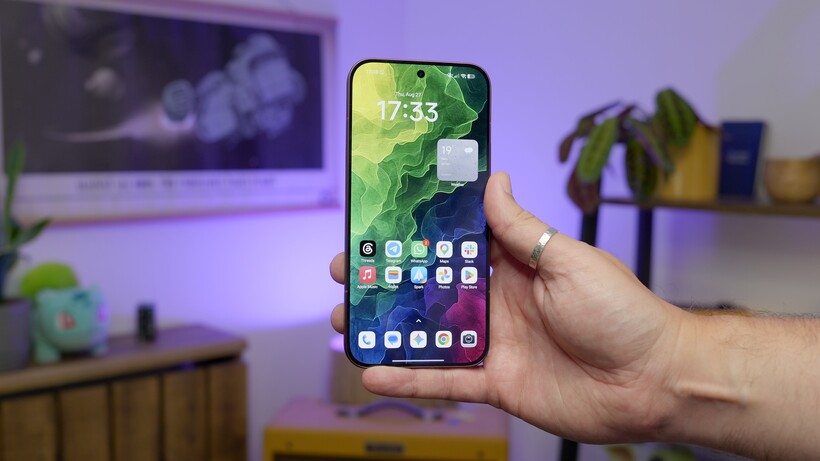











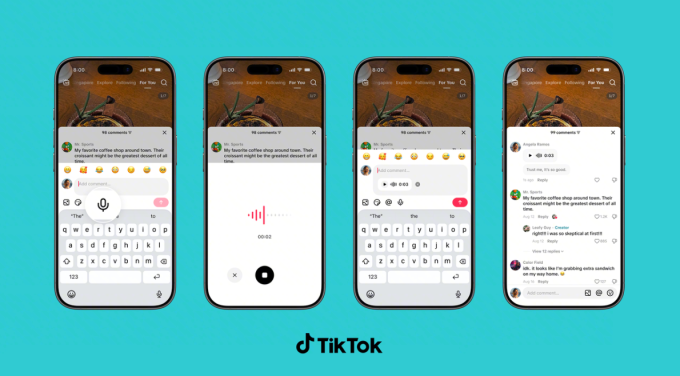


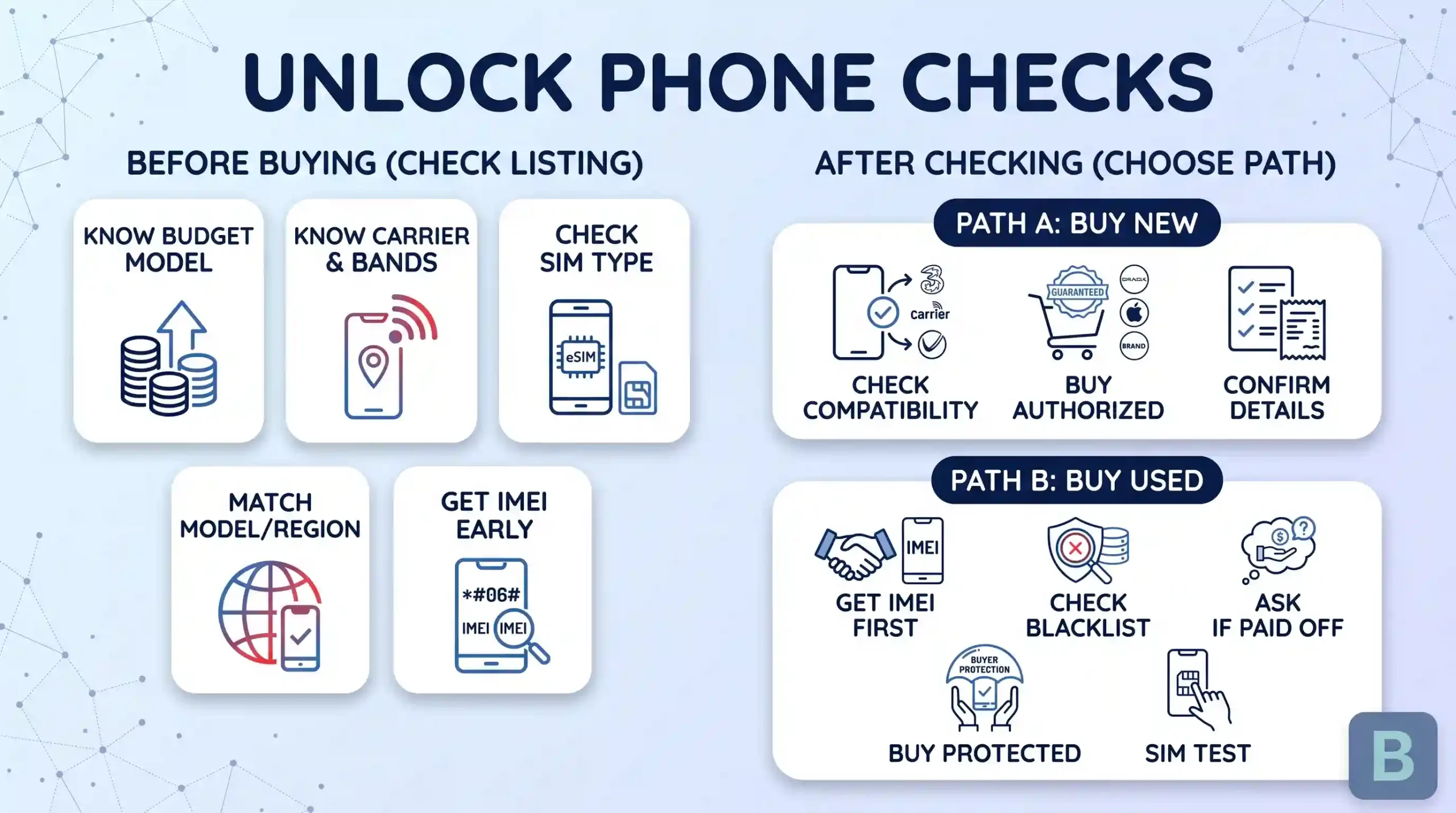
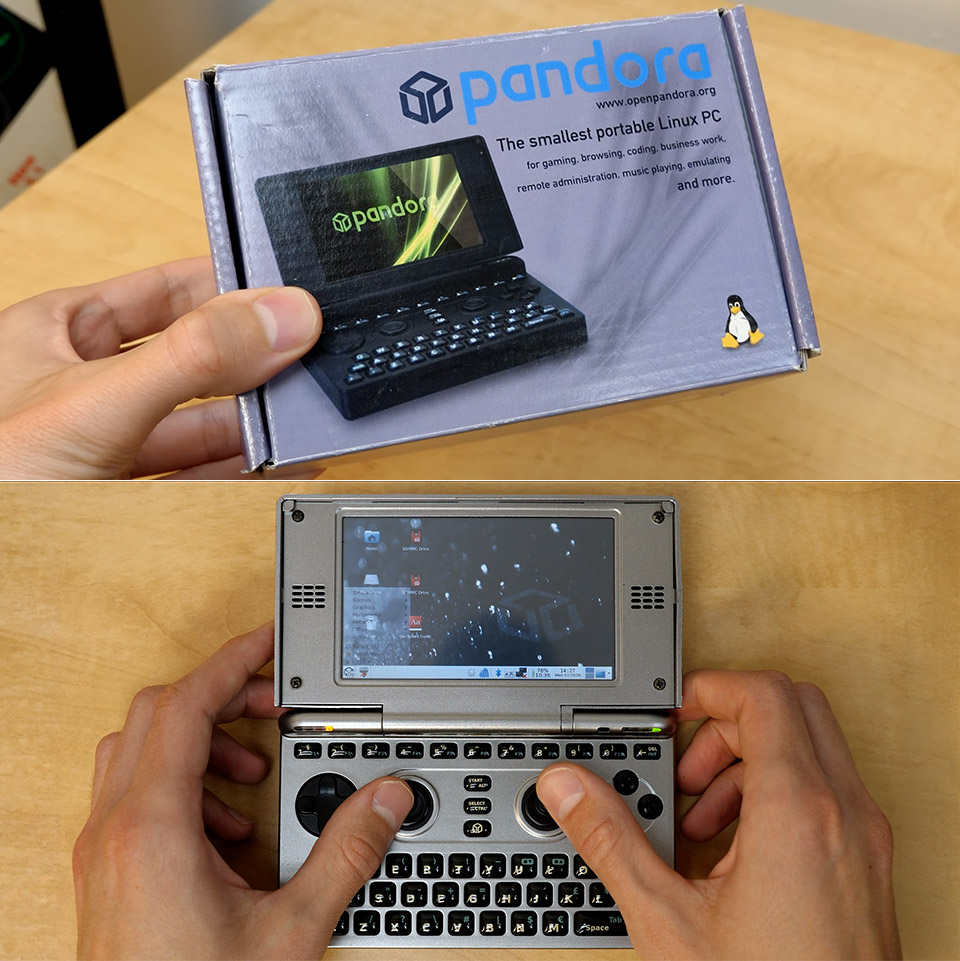
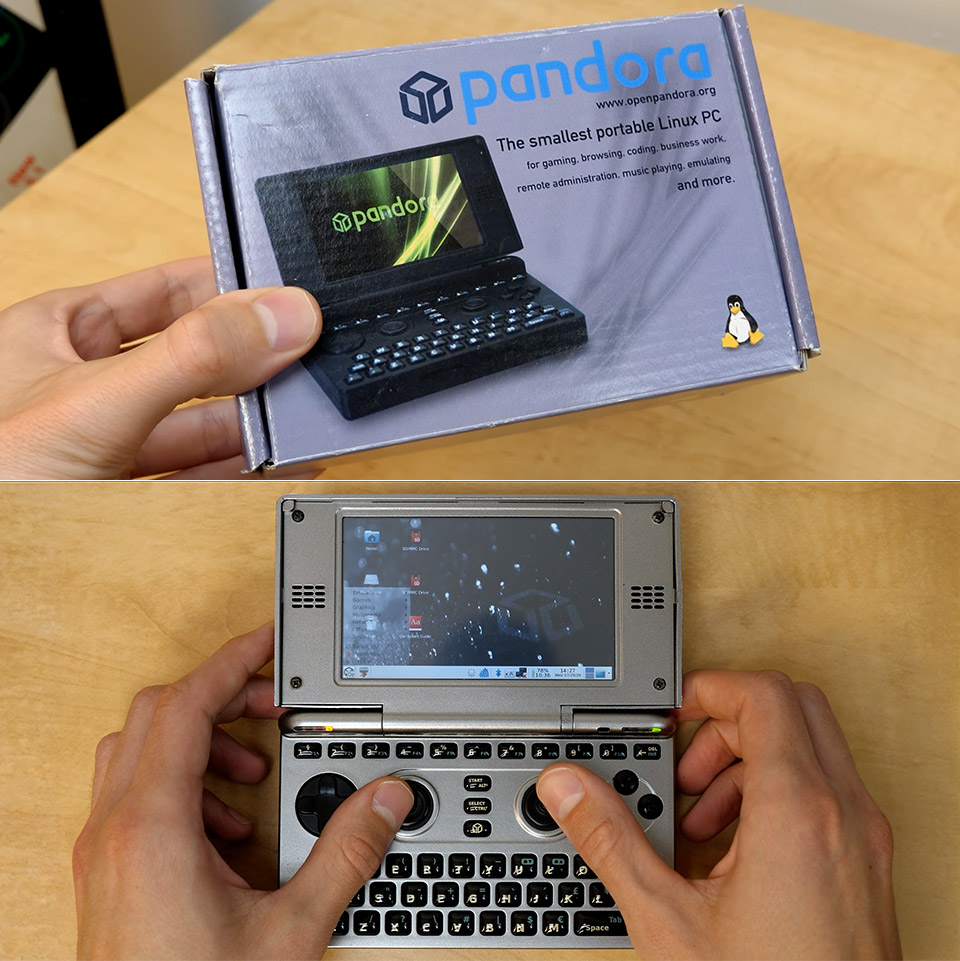

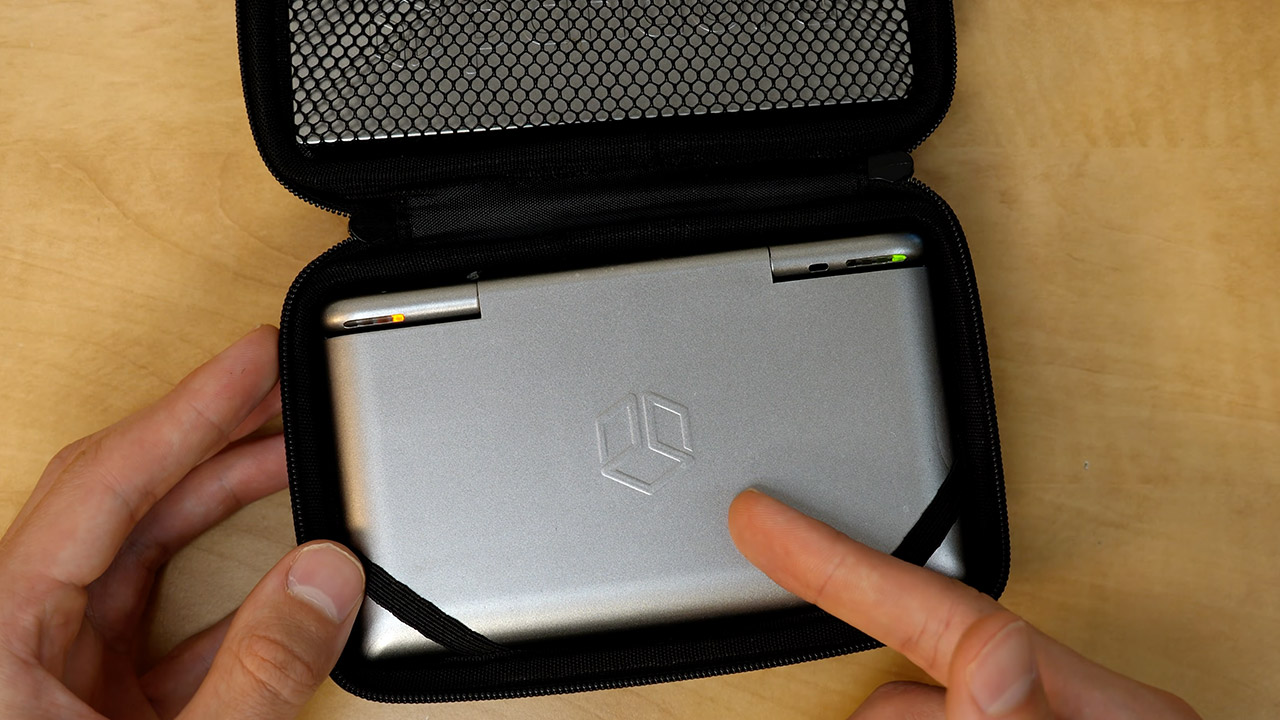
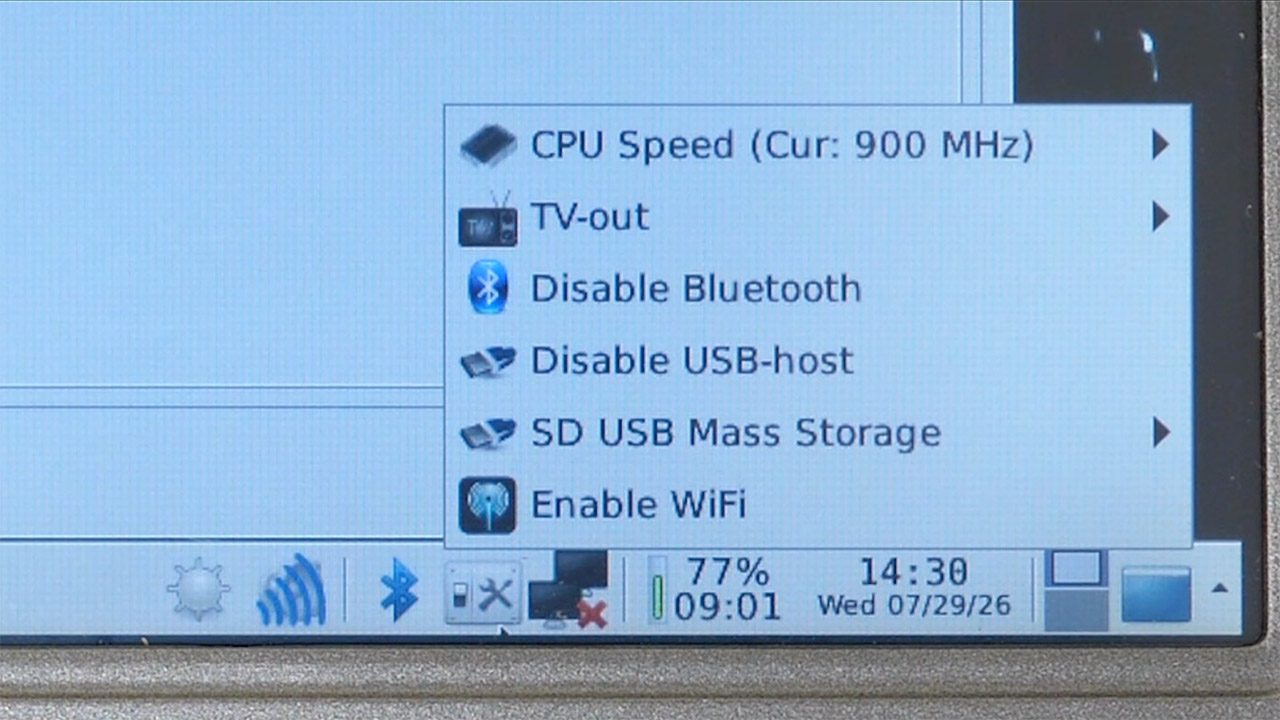
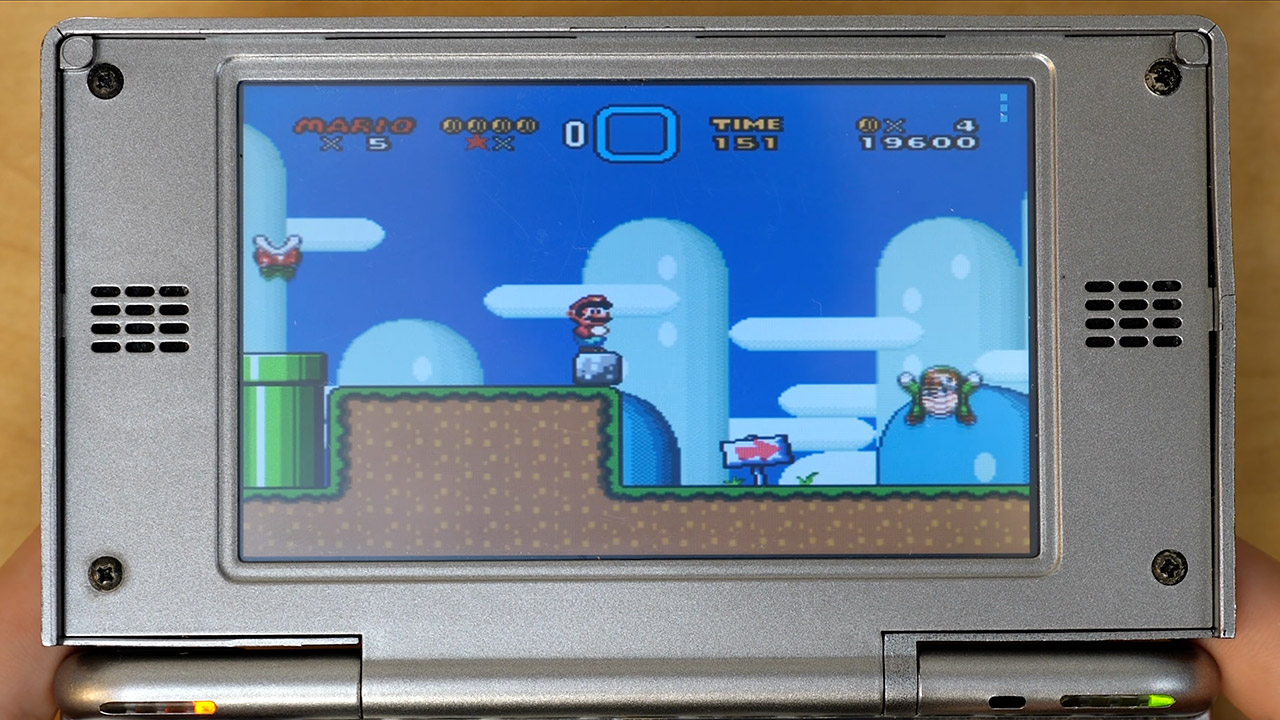
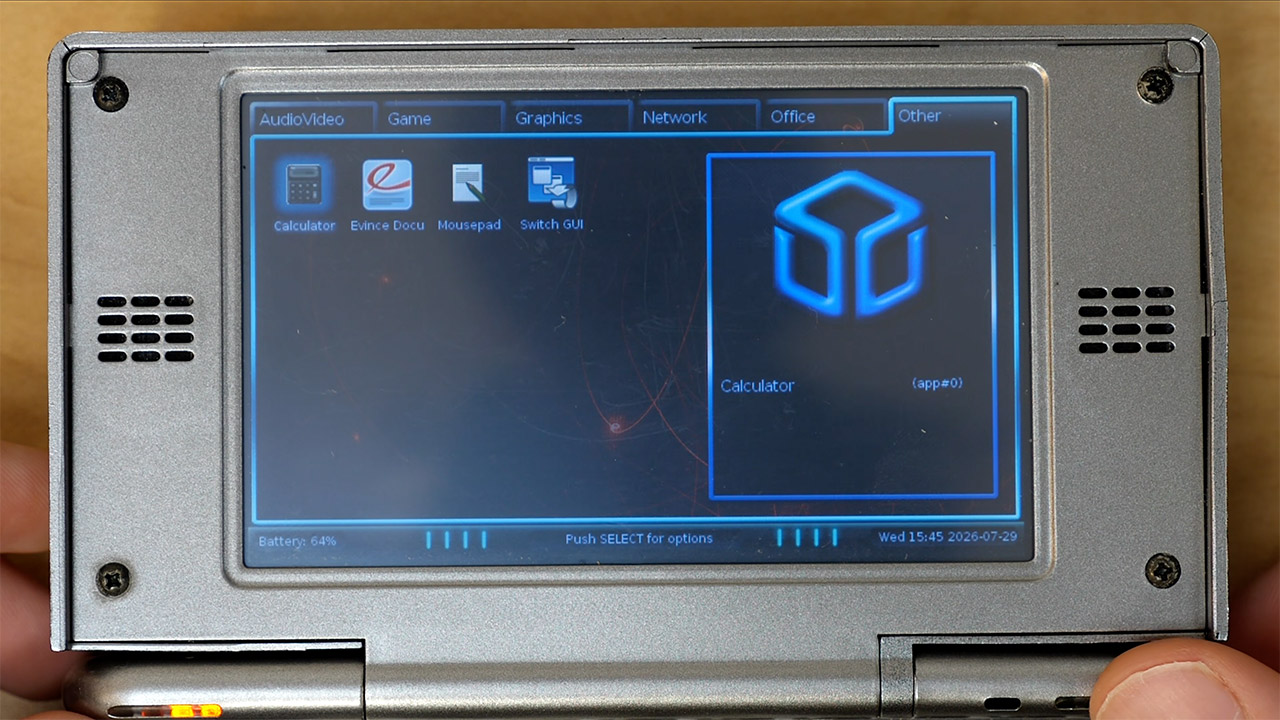

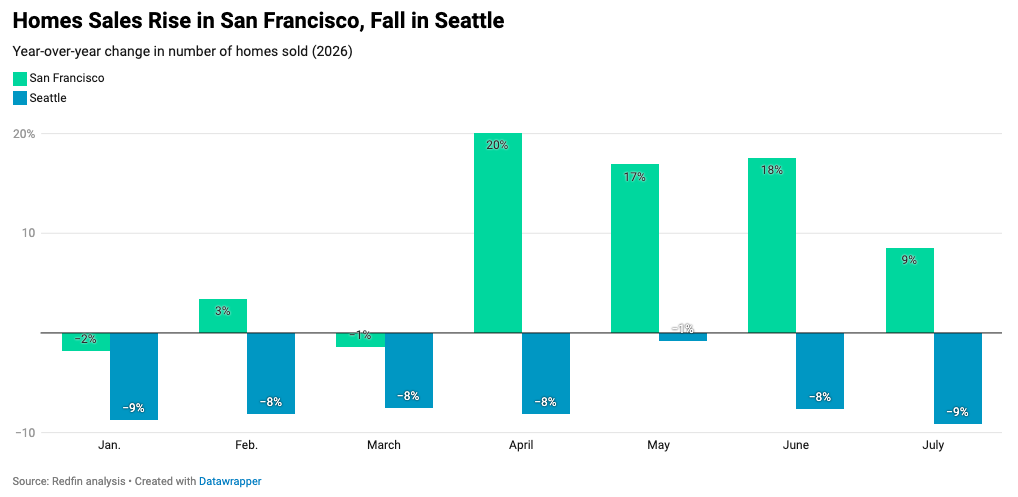












































You must be logged in to post a comment Login