Connect with us

Tech

“Free” Surveillance Tech Still Comes At A High And Dangerous Cost

Published

on

from the no-such-thing-as-a-free-surveillance-tech dept

Surveillance technology vendors, federal agencies, and wealthy private donors have long helped provide local law enforcement “free” access to surveillance equipment that bypasses local oversight. The result is predictable: serious accountability gaps and data pipelines to other entities, including Immigration and Customs Enforcement (ICE), that expose millions of people to harm.

The cost of “free” surveillance tools — like automated license plate readers (ALPRs), networked cameras, face recognition, drones, and data aggregation and analysis platforms — is measured not in tax dollars, but in the erosion of civil liberties. 

The collection and sharing of our data quietly generates detailed records of people’s movements and associations that can be exposed, hacked, or repurposed without their knowledge or consent. Those records weaken sanctuary and First Amendment protections while facilitating the targeting of vulnerable people.   

Cities can and should use their power to reject federal grants, vendor trials, donations from wealthy individuals, or participation in partnerships that facilitate surveillance and experimentation with spy tech. 

Advertisement

If these projects are greenlit, oversight is imperative. Mechanisms like public hearings, competitive bidding, public records transparency, and city council supervision aid to ensure these acquisitions include basic safeguards — like use policies, audits, and consequences for misuse — to protect the public from abuse and from creeping contracts that grow into whole suites of products. 

Clear policies and oversight mechanisms must be in place before using any surveillance tools, free or not, and communities and their elected officials must be at the center of every decision about whether to bring these tools in at all.

Here are some of the most common methods “free” surveillance tech makes its way into communities.

Trials and Pilots

Police departments are regularly offered free access to surveillance tools and software through trials and pilot programs that often aren’t accompanied by appropriate use policies. In many jurisdictions, trials do not trigger the same requirements to go before decision-makers outside the police department. This means the public may have no idea that a pilot program for surveillance technology is happening in their city. 

Advertisement

In Denver, Colorado, the police department is running trials of possible unmanned aerial vehicles (UAVs) for a drone-as-first-responder (DFR) program from two competing drone vendors: Flock Safety Aerodome drones (through August 2026) and drones from the company Skydio, partnering with Axon, the multi-billion dollar police technology company behind tools like Tasers and AI-generated police reports. Drones create unique issues given their vantage for capturing private property and unsuspecting civilians, as well as their capacity to make other technologies, like ALPRs, airborne. 

Functional, Even Without Funding 

We’ve seen cities decide not to fund a tool, or run out of funding for it, only to have a company continue providing it in the hope that money will turn up. This happened in Fall River, Massachusetts, where the police department decided not to fund ShotSpotter’s $90,000 annual cost and its frequent false alarms, but continued using the system when the company provided free access. 

In May 2025, Denver’s city council unanimously rejected a $666,000 contract extension for Flock Safety ALPR cameras after weeks of public outcry over mass surveillance data sharing with federal immigration enforcement. But Mayor Mike Johnston’s office allowed the cameras to keep running through a “task force” review, effectively extending the program even after the contract was voted down. In response, the Denver Taskforce to Reimagine Policing and Public Safety and Transforming Our Communities Alliance launched a grassroots campaign demanding the city “turn Flock cameras off now,” a reminder that when surveillance starts as a pilot or time‑limited contract, communities often have to fight not just to block renewals but to shut the systems off.

 Importantly, police technology companies are developing more features and subscription-based models, so what’s “free” today frequently results in taxpayers footing the bill later. 

Advertisement

Gifts from Police Foundations and Wealthy Donors

Police foundations and the wealthy have pushed surveillance-driven agendas in their local communities by donating equipment and making large monetary gifts, another means of acquiring these tools without public oversight or buy-in.

In Atlanta, the Atlanta Police Foundation (APF) attempted to use its position as a private entity to circumvent transparency. Following a court challenge from the Atlanta Community Press Collective and Lucy Parsons Labs, a Georgia court determined that the APF must comply with public records laws related to some of its actions and purchases on behalf of law enforcement.
In San Francisco, billionaire Chris Larsen has financially supported a supercharging of the city’s surveillance infrastructure, donating $9.4 million to fund the San Francisco Police Department’s (SFPD) Real-Time Investigation Center, where a menu of surveillance technologies and data come together to surveil the city’s residents. This move comes after the billionaire backed a ballot measure, which passed in March 2025, eroding the city’s surveillance technology law and allowing the SFPD free rein to use new surveillance technologies for a full year without oversight.

Free Tech for Federal Data Pipelines

Federal grants and Department of Homeland Security funding are another way surveillance technology appears free to, only to lock municipalities into long‑term data‑sharing and recurring costs. 

Through the Homeland Security Grant Program, which includes the State Homeland Security Program (SHSP) and the Urban Areas Security (UASI) Initiative, and Department of Justice programs like Byrne JAG, the federal government reimburses states and cities for “homeland security” equipment and software, including including law‑enforcement surveillance tools, analytics platforms, and real‑time crime centers. Grant guidance and vendor marketing materials make clear that these funds can be used for automated license plate readers, integrated video surveillance and analytics systems, and centralized command‑center software—in other words, purchases framed as counterterrorism investments but deployed in everyday policing.

Advertisement

Vendors have learned to design products around this federal money, pitching ALPR networks, camera systems, and analytic platforms as “grant-ready” solutions that can be acquired with little or no upfront local cost. Motorola Solutions, for example, advertises how SHSP and UASI dollars can be used for “law enforcement surveillance equipment” and “video surveillance, warning, and access control” systems. Flock Safety, partnering with Lexipol, a company that writes use policies for law enforcement, offers a “License Plate Readers Grant Assistance Program” that helps police departments identify federal and state grants and tailor their applications to fund ALPR projects. 

Grant assistance programs let police chiefs fast‑track new surveillance: the paperwork is outsourced, the grant eats the upfront cost, and even when there is a formal paper trail, the practical checks from residents, councils, and procurement rules often get watered down or bypassed.

On paper, these systems arrive “for free” through a federal grant; in practice, they lock cities into recurring software, subscription, and data‑hosting fees that quietly turn into permanent budget lines—and a lasting surveillance infrastructure—as soon as police and prosecutors start to rely on them. In Santa Cruz, California, the police department explicitly sought to use a DHS-funded SHSP grant to pay for a new citywide network of Flock ALPR cameras at the city’s entrances and exits, with local funds covering additional cameras. In Sumner, Washington, a $50,000 grant was used to cover the entire first year of a Flock system — including installation and maintenance — after which the city is on the hook for roughly $39,000 every year in ongoing fees. The free grant money opens the door, but local governments are left with years of financial, political, and permanent surveillance entanglements they never fully vetted.

The most dangerous cost of this “free” funding is not just budgetary; it is the way it ties local systems into federal data pipelines. Since 9/11, DHS has used these grant streams to build a nationwide network of at least 79–80 state and regional fusion centers that integrate and share data from federal, state, local, tribal, and private partners. Research shows that state fusion centers rely heavily on the DHS Homeland Security Grant Program (especially SHSP and UASI) to “mature their capabilities,” with some centers reporting that 100 percent of their annual expenditures are covered by these grants. 

Advertisement

Civil rights investigations have documented how this funding architecture creates a backdoor channel for ICE and other federal agencies to access local surveillance data for their own purposes. A recent report by the Surveillance Technology Oversight Project (S.T.O.P.) describes ICE agents using a Philadelphia‑area fusion center to query the city’s ALPR network to track undocumented drivers in a self‑described sanctuary city.

Ultimately, federal grants follow the same script as trials and foundation gifts: what looks “free” ends up costing communities their data, their sanctuary protections, and their power over how local surveillance is used.

Protecting Yourself Against “Free” Technology

The most important protection against “free” surveillance technology is to reject it outright. Cities do not have to accept federal grants, vendor trials, or philanthropic donations. Saying no to “free” tech is not just a policy choice; it is a political power that local governments possess and can exercise. Communities and their elected officials can and should refuse surveillance systems that arrive through federal grants, vendor pilots, or private donations, regardless of how attractive the initial price tag appears. 

For those cities that have already accepted surveillance technology, the imperative is equally clear: shut it down. When a community has rejected use of a spying tool, the capabilities, equipment, and data collected from that tool should be shut off immediately. Full stop.

Advertisement

And for any surveillance technology that remains in operation, even temporarily, there must be clear rules: when and how equipment is used, how that data is retained and shared, who owns data and how companies can access and use it, transparency requirements, and consequences for any misuse and abuse. 

“Free” surveillance technology is never free. Someone profits or gains power from it. Police technology vendors, federal agencies, and wealthy donors do not offer these systems out of generosity; they offer them because surveillance serves their interests, not ours. That is the real cost of “free” surveillance.

Originally posted to EFF’s Deeplinks blog.

Filed Under: alpr, dhs, drones, facial recognition, grants, law enforcement, surveillance

Companies: flock, flock safety, lexipol, motorola

Advertisement

Source link

Continue Reading
Click to comment

Leave a Reply

Your email address will not be published. Required fields are marked *

Tech

Tech for Secure Internet Access (2026 Layered Playbook)

Published

on

Travelling Abroad: Tech for Secure Internet Access

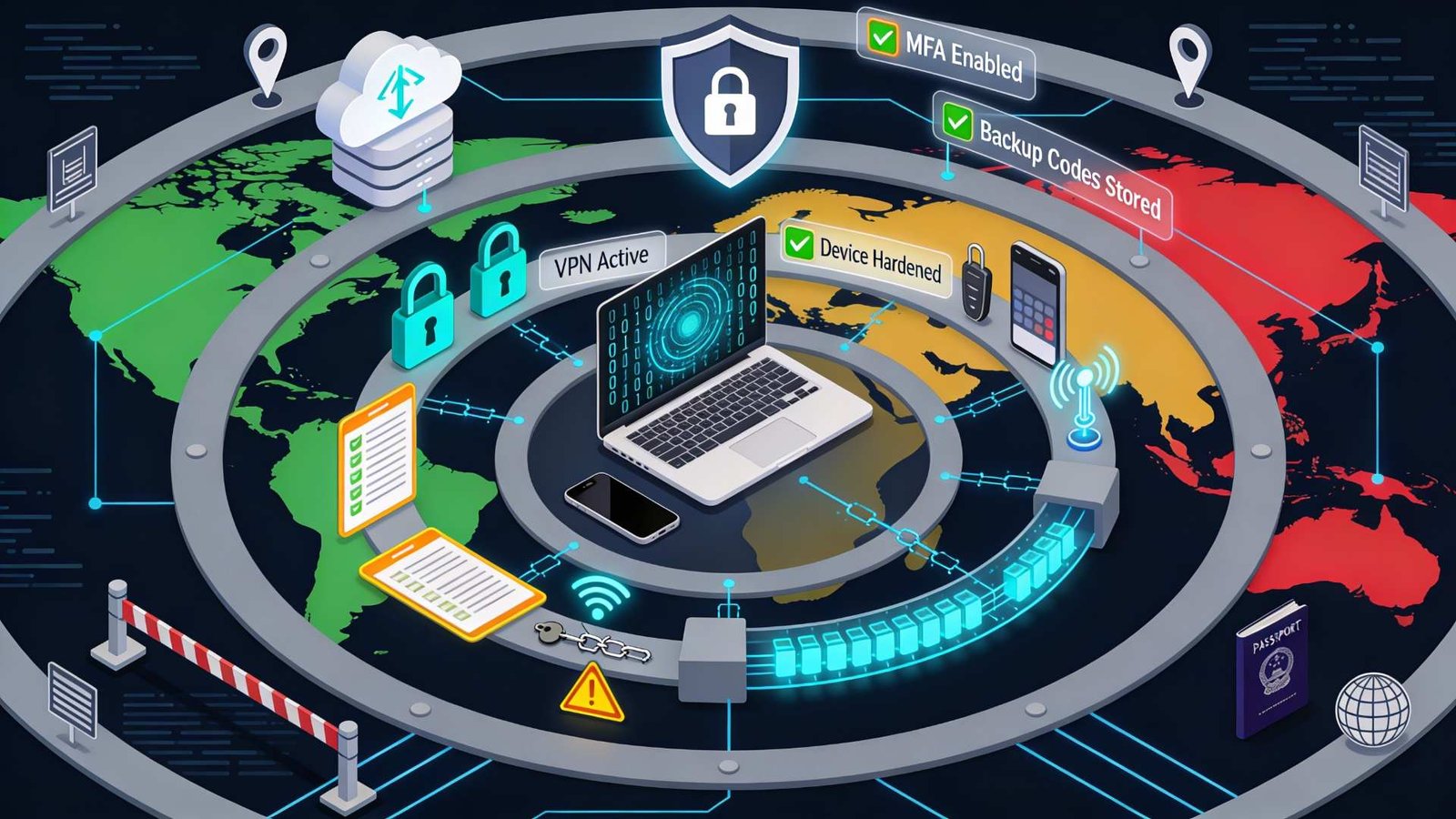
International travel pushes you into networks you don’t control, jurisdictions you may not understand, and recovery paths that fail at the worst time. Secure access abroad is engineered through layers: reduce exposure, encrypt what you must transmit, and pre-stage recovery so you can recover from lockouts or device loss without improvising.

1) Start with a travel threat model (5 minutes, worth hours)

Before you pack, decide which profile you’re in:

Advertisement
  • Low risk: tourism + casual accounts (streaming, social, personal email).
  • Medium risk: business travel (corporate email, client files, admin panels).
  • High risk: journalism/activism, sensitive IP, or destinations with aggressive filtering.

This choice determines how far you go (e.g., one device vs two, hardware keys vs app MFA, and whether you bring a “clean” travel laptop).

Field rule

If losing your phone would lock you out of email, you’re not ready to travel.

2) Account resilience (the layer most people skip)

Most travel “security failures” are availability failures: you get locked out when your bank flags a foreign login, your SIM stops receiving texts, or your authenticator is on the phone you just lost.

Do this before you leave

  • Enable MFA on primary accounts (email first, then password manager, then banking).
  • Add at least two independent second factors (e.g., authenticator app + hardware key, or authenticator app + backup codes).
  • Print or securely store backup codes for critical accounts.

Google’s own account recovery option guidance is explicit: create backup codes specifically for cases where you lose your phone, change numbers, or can’t receive codes via text/call/Google Authenticator. Google also states that backup codes are one-time use, and that generating a new set of 10 codes automatically deactivates the old set.

Backup codes: operational best practice

  • Store one copy with the physical travel documents and another in a secure vault accessible offline.
  • Treat backup codes like cash: Google explicitly warns against sharing them and notes That It never asks for a backup code except at sign-in.

When NOT to rely on SMS MFA

SMS can fail abroad for mundane reasons (roaming, SIM replacement, blocked messaging), and it creates fragile recovery chains; use it only as a fallback, not your primary plan.

3) Device hardening (reduce what can be stolen, not just what can be sniffed)

Think “travel device = elevated-risk endpoint.”

Minimum viable hardening (fast, high impact)

  • Update the OS, browsers, and security tooling before departure (don’t perform major upgrades mid-trip unless necessary).
  • Remove unused apps; revoke tokens/sessions for apps you don’t need.
  • Turn off auto-join for Wi‑Fi; disable Bluetooth/NFC when you’re not using them.
  • Use full-disk encryption and a strong passcode; avoid “easy unlock” shortcuts that trade away physical security.

If you handle sensitive work

  • Use a dedicated travel profile or device with minimal data.
  • Keep “source of truth” documents in encrypted storage with explicit offline copies for travel essentials (IDs, itinerary, emergency contacts).

4) Networks: prefer “known-good paths,” not “free Wi‑Fi”

Public Wi‑Fi is convenient, but it is also the most common place to encounter rogue access points, captive portal manipulation, and opportunistic monitoring.

NSA guidance explicitly recommends avoiding public Wi‑Fi and using a personal/corporate hotspot with strong authentication/encryption when possible; if you must use public Wi‑Fi, use a VPN to encrypt traffic.

Advertisement

Practical network priority order

  1. Your phone hotspot (or a dedicated travel router with a trusted SIM/eSIM)
  2. Corporate-managed connectivity (if provided)
  3. Hotel Wi‑Fi only when necessary
  4. Airports/cafés as a last resort

Wi‑Fi hygiene that prevents dumb losses

  • Confirm the SSID with staff (don’t guess).
  • Don’t install “helper apps” required by a captive portal.
  • After connecting, forget the network when you’re done (prevents silent auto-reconnect later).

5) VPNs as a core layer (configured like an engineer, not a tourist)

A VPN is useful because it reduces what local networks can observe or tamper with, but it doesn’t magically make unsafe behavior safe.

What to look for (2026 buyer/operator criteria)

  • Modern protocols (WireGuard/OpenVPN), stable clients on your OS, and predictable reconnect behaviour.
  • Kill switch / “block without VPN” mode to prevent accidental cleartext if the tunnel drops.
  • Obfuscation/stealth options if you expect active filtering.
  • Multi-region redundancy and a plan B provider (because “it worked yesterday” is not a plan).

VPN pitfalls (common, expensive)

  • Split tunnelling can leak DNS or app traffic if misconfigured; only use it when you have a tested reason.
  • “Always-on VPN” can break banking apps or corporate SSO flows; test your critical apps before departure.
  • If a country restricts VPNs, blindly installing random VPNs can create legal and personal risk—research your destination’s rules and your organisation’s policy. If you’re travelling to heavily filtered regions, review destination-specific guidance, such as this breakdown of the best VPN for China, to understand which providers consistently operate under active network controls.

6) Cloud + data access (design for partial failure)

Assume at least one of these will fail: your VPN, a cloud provider, your authenticator, or your ability to receive SMS.

Resilience patterns that work

  • Keep encrypted offline copies of critical documents (IDs, tickets, insurance, emergency numbers).
  • Pause automatic sync for sensitive work folders on untrusted networks.
  • Separate “travel comms” from “admin access” (e.g., don’t manage production systems from café Wi‑Fi).

Security tools live inside law and policy. Some jurisdictions regulate the use of encryption and VPNs, and some border environments involve device searches.

Practical stance

  • Know what tools are permitted where you’re going (and what your employer allows).
  • Reduce what you carry: fewer accounts signed in, fewer sensitive files locally, and a clear plan for what happens if a device is confiscated or wiped.

FAQ

  • Do I really need a VPN when travelling?
    If you must use public Wi‑Fi, NSA guidance recommends using a personal/corporate-provided VPN to encrypt traffic and avoiding public Wi‑Fi when more secure options are available.
  • What’s the #1 thing to do before an international trip?
    Make account recovery work without your phone—Google explicitly recommends creating backup codes for cases where you lose your phone or can’t get verification codes.
  • How should I store backup codes safely?
    Google warns not to share backup codes and states that Google never asks for a backup code other than at sign-in, so treat them as highly sensitive secrets.
  • Why not just rely on SMS MFA abroad?
    SMS can fail during travel (roaming, number changes, blocked services), so it’s best treated as a fallback rather than a primary factor.

Key takeaways

  • Design for resilience, not perfection: assume lockouts and partial connectivity failure, and pre-stage recovery.
  • Prefer hotspots/cellular over public Wi‑Fi when possible, and use a VPN if you must use public Wi‑Fi.
  • Use layered controls: accounts (MFA + backup codes), devices (hardening), networks (selection discipline), and legal awareness.

Source link

Continue Reading

Tech

Dyson announces the PencilWash wet floor cleaner

Published

on

Last year Dyson introduced the , which it immediately declared the “world’s slimmest vacuum cleaner.” Presumably, then, the title of world’s slimmest wet floor cleaner goes to the newly unveiled PencilWash.

Promising a “lighter, slimmer and smaller solution to wet cleaning without compromising on hygiene,” the PencilWash is designed to let you clean everywhere you need to with minimal hassle. Like the vacuum cleaner with which it shares the first part of its name, the handle measures just 1.5 inches in diameter from top to bottom, and the whole thing weighs little more than 2kg.

The ultra-thin design allows the cleaner to lie almost completely flat, allowing you to get into tight corners or under low furniture, where more traditionally bulky devices might struggle. Its slender proportions also make it easier to store if your home is on the smaller side.

Dyson says the PencilWash only applies fresh water to floors, and after swiftly eliminating spills and stains it should dry up pretty quickly. Its high-density microfiber roller is designed to tackle both wet and dry debris in one pass, and because it doesn’t have a traditional filter, you won’t have to worry about trapped dirt or lingering smells.

Advertisement

Above the power buttons there’s a screen displaying remaining battery level, and the handle can be slotted into a charging dock when not in use.

The Dyson PencilVac will cost $349, with a release date yet to be announced.

Source link

Advertisement
Continue Reading

Tech

How Close Can AI Get To Writing A Techdirt Post?

Published

on

from the man-vs.-machine dept

I’ve talked on Techdirt about just a few of my AI-related experiments over the past few years, including how I use it to help me edit pieces, which I still write myself. I still have no intention of letting AI write for me, but as the underlying technology has continued to level up, every so often I’ll run a test to see if it could write a better Techdirt post than I can. I don’t think it’s there (and I’m still not convinced it will ever get there), but I figured I can share the process with you, and let you be the judge.

I wanted to pick a fairly straightforward article, rather than a more complex one, just to see how well it works. In this case, I figured I’d try it with the story I published last week about Judge Boasberg ruling against the Trump administration and calling out how the DOJ barely participated in the case, and effectively told him to “pound sand” (a quote directly from the judge).

I know that just telling it to write a Techdirt article by itself will lead to pretty bland “meh” content. So before I even get to the prompt, there are some steps I need to include. First, over time I continue to adjust the underlying “system prompt” I use for editing my pieces. I won’t post the entire system prompt here as it’s not that interesting, but I do use it to make it clear its job is to help me be a better writer, not to be a sycophant, not to try to change things just for the sake of change, and to suggest things that will most help the reader.

I also have a few notes in it about avoiding recommending certain “AI-style” cliches like “it’s not this, it’s that.” Also, a specific one for me: “don’t suggest changing ‘fucked up’ to ‘messed up.’” It does that a lot for my writing.

Advertisement

But that’s not all. I also feed in Techdirt samples, which are a collection of ten of my favorite articles, so it gets a sense of what a “Techdirt article” looks like. On top of that, I give it a “Masnick Style Guide” that I had created after feeding a bunch of Techdirt articles into three different LLMs, asking for each to produce a style guide, and then having NotebookLLM combine them all into a giant “Masnick style-guide.”

Then, I feed it any links, including earlier stories on Techdirt, that are relevant, before finally writing out a prompt that can be pretty long. In this test case, I fed it the PDF file of the decision. I also gave it Techdirt’s previous stories about Judge Boasberg.

Finally, I gave it a starting prompt with a fair bit of explanation of what angle I was hoping to see a Techdirt post on this topic. So here’s my full prompt:

Can you write a Techdirt style first draft of a post (see the attached Techdirt post samples, as well as the even more important Masnick style guide, which you should follow) about the attached ruling in the JGG v. Trump case by Judge James Boasberg. I have also attached a page of previous articles about Judge Boasberg which you should consider, especially as some reference this same case.

You may also want to highlight that Judge Boasberg just was vindicated after the DOJ filed a vexatious complaint against him because of earlier rulings in this case, but that complaint has been easily dismissed. The crux of this article, though, should be on the very strong language Boasberg uses, including the astoundingly candid statement that he felt the government “apparently was no interested in participating in this process” and how he read their response as telling “the Court to pound sand.” There are other parts of the ruling that are useful as well. It should also call out the specific remedy here, and how weak it feels, given the situation explained in the ruling and the DOJ’s actions. Yes, they lost the case, but this still feels like a slap on the wrist with no real consequences for the DOJ.

Advertisement

As always with Techdirt posts, instead of doing in-line quotes, we usually do blockquotes, often of one or even multiple paragraphs from the original sources, so please adhere to that style. Take all of this info and draft the best Techdirt post you can regarding the topic.

And… you can see the results embedded below. I’ve also embedded my original article (though you can just go read it on the site directly). I’m amused that it added a “from the such and such dept” line as well as tags, both of which are core parts of Techdirt posts, but not things I asked it for.

I’m extremely biased, as this is a question of who writes better, me or the machine, and I still think I’m better than the machine. But, I also have to admit it’s not bad. It’s decent. If I had that submitted by another writer, there are definitely changes and edits I’d make, especially to the crappy cliche’d ending. But it’s way better than what most people think of as traditional ChatGPT output, in part because of all the context and detailed instructions I fed it.

Just for fun, I then also asked my editing tool to do its own edit on its own writing (usually not a good idea to let it grade its own homework), but here’s what it had to say:

Advertisement

solid draft. the “pound sand” framing works well and the frustration comes through. few things:

the tension setup: you flag “frustratingly toothless” in graf 3 then say “on one level this is a win” much later. that’s the right editorial instinct—there IS genuine tension here—but you’re burying the lede on your own argument. consider setting up that complexity earlier so readers know they’re getting nuance, not whiplash.

missing a key detail from the ruling: Boasberg notes that “even Plaintiffs’ counsel could not represent how many of the 137 are still in Venezuela and how many wish to proceed with habeas.” that’s devastating. the chaos is so complete that the lawyers literally don’t know where everyone is. worth including.

the numbered remedies block: you cut it off mid-list. the 5th point actually matters—there’s a March 13 deadline for the government to file a Status Report explaining how/when they’ll transport people back. that’s your next milestone. either include it or acknowledge you’re excerpting.

the Venezuela carve-out: you mention it but undersell it. the ruling specifically says it’s “mindful” of the “situation in Venezuela remains in flux” given “the United States’s recent law-enforcement action there.” that’s pretty ominous language from a federal judge about whatever the hell the administration is doing in Venezuela right now. might be worth a parenthetical noting this deserves its own article.

Advertisement

the closer: “I wouldn’t hold my breath” is fine but feels like boilerplate. you’ve got stronger material to end on—maybe the March 13 deadline, or something that points forward rather than just shrugging.

one small thing: “a complaint that was summarily dismissed” in graf 2—might want “recently dismissed” or similar since it was just last week. “summarily” suggests procedure when really the story is how embarrassing the dismissal was.

overall structure is good. the piece does what Techdirt does well: walks through the actual document, quotes liberally, and doesn’t pretend the “win” is bigger than it is.

You’ll note that it also calls out its own weak ending, just like I did. It is kind of wild to see the AI call out its own weaknesses, while making you wonder—if that’s the case—why did it not catch those earlier and fix them? And that then makes you wonder if it’s just coming up with a critique for the sake of giving one (though, that ending really is weak).

Advertisement

The other thing I’ll note is, again, this actually was still a fair bit of work. It was less than writing the whole thing myself, but even just writing out the prompt itself took time, and this piece would still need a fair bit of editing anyway for publication which would probably take away any time benefit.

Overall, though, you can see how the technology is certainly getting better. I still don’t think it can write as well as I do, but there are some pretty good bits in there.

Once again, this tech remains quite useful as a tool to assist people with their work. But it’s not really good at replacing your work. Indeed, if I asked the AI to write articles for Techdirt, I’d probably spend just as much time rewriting/fixing it as I would just writing the original in the first place. It still provides me very good feedback (on this article that you’re reading now, for example, the AI editor warned me that my original ending was pretty weak, and suggested I add a paragraph talking more about the conclusions which, uh, is what I’m now doing here).

I honestly think the biggest struggle with AI over the next year or so is going to be between the people who insist it can totally replace humans, leading to shoddy and problematic work, and the smaller group of people who use it as a tool to assist them in doing their own work better. The problems come in when people overestimate its ability to do the former, while underestimating its ability to do the latter.

Advertisement


Filed Under: ai, prompting, writing

Companies: techdirt

Source link

Advertisement
Continue Reading

Tech

Vinay Prasad: The One Man Roadblocking An mRNA Flu Vaccine

Published

on

from the one-flu-over-the-cuckoo’s-nest dept

Dr. Vinay Prasad is currently the FDA’s top vaccine regulator. He’s also one of many medical goons hand-picked by RFK Jr. to help lead his decidedly anti-vaxxer movement. In fact, the last time we discussed Prasad, it was over his selective censorship attempts at avoiding public criticism for his anti-vaxxer nonsense. If you show clips of Prasad spewing his anti-vaxxer views to critique them, he’ll have your YouTube channel axed. If you show those same clips to praise his nonsense, you get to continue on unmolested.

He’s an asshat, in other words. An anti-science, anti-medicine asshat. And he’s also someone who is unilaterally keeping us from making progress on vaccines, apparently out of pure joy in exercising such power.

Moderna is producing a new influenza vaccine, this one utilizing mRNA technology, a la the COVID vaccine. Moderna sent an application to the FDA for a review of the vaccine it has produced, as well as the data from the trials the company conducted to demonstrate its efficacy. We learned last week that the FDA flatly refused to review any of this data.

In a news release late Tuesday, Moderna said it was blindsided by the FDA’s refusal, which the FDA cited as being due to the design of the company’s Phase 3 trial for its mRNA flu vaccine, dubbed mRNA-1010. Specifically, the FDA’s rejection was over the comparator vaccine Moderna used.

In the trial, which enrolled nearly 41,000 participants and cost hundreds of millions of dollars, Moderna compared the safety and efficacy of mRNA-1010 to licensed standard-dose influenza vaccines, including Fluarix, made by GlaxoSmithKline. The trial found that mRNA-1010 was superior to the comparators.

Advertisement

Moderna said the FDA reviewed and accepted its trial design on at least two occasions (in April 2024 and again in August 2025) before it applied for approval of mRNA-1010. It also noted that Fluarix has been used as a comparator vaccine in previous flu vaccine trials, which tested vaccines that went on to earn approval.

This looks for all the world like Moderna did what it was supposed to do in getting the proper sign-offs from the FDA to conduct its trials. Prasad himself sent the refusal notice to Moderna, however, and cited within it that the trials Moderna conducted, which were signed off on by the FDA, were not appropriate. The letter didn’t bother to indicate why.

But in a letter dated February 3, Vinay Prasad, the FDA’s top vaccine regulator under the Trump administration, informed Moderna that the agency does not consider the trial “adequate and well-controlled” because the comparator vaccine “does not reflect the best-available standard of care.”

In its news release, Moderna noted that neither the FDA’s regulation nor its guidance to industry makes any reference to a requirement of the “best-available standard of care” in comparators.

Everyone at Moderna was understandably confused. The company has already reached out asking to meet with the FDA, ostensibly to sit down in a conference room with them, look them in the eye, and ask “wut?”.

Advertisement

The answer is unlikely to be satisfying. And it should be quite alarming to the rest of us. That’s because the rejection of a review of all of this data reportedly came from Prasad and Prasad alone, over the objections of his own scientists at the FDA.

Vinay Prasad, the Trump administration’s top vaccine regulator at the Food and Drug Administration, single-handedly decided to refuse to review Moderna’s mRNA flu vaccine, overruling agency scientists, according to reports from Stat News and The Wall Street Journal.

Stat was first to report, based on unnamed FDA sources, that a team of career scientists at the agency was ready to review the vaccine and that David Kaslow, a top career official who reviews vaccines, even wrote a memo objecting to Prasad’s rejection. The memo reportedly included a detailed explanation of why the review should proceed.

According to those same sources, Prasad’s reason for refusing to review Moderna’s vaccine makes little sense. The story goes like this. As Moderna was seeking guidance for its trials for the vaccine, it chose a currently licensed flu vaccine against which to compare its own vaccine. At one point, the FDA suggested a different comparative vaccine be used. Moderna declined that suggestion and moved forward with the comparative vaccine it originally chose. Despite that difference the FDA reviewed the company’s plans for its trial on several occasions and at no point suggested its choices were a show-stopper.

That’s it. That’s the whole thing. Prasad is claiming that the choice Moderna made for a comparative vaccine, for which the company received only mild feedback from the FDA, is why the FDA is refusing to review this mRNA flu vaccine entirely.

Advertisement

Because that reasoning is almost certainly bullshit. As evidence of that, these same sources from within the FDA offered up this:

This wasn’t enough for Prasad, who, according to the Journal’s sources, told FDA staff that he wants to send more such refusal letters that appear to blindside drug developers. The review staff apparently pushed back, noting that such moves break with the agency’s practices and could open it up to being sued. Prasad reportedly dismissed concern over possible litigation. Trump’s FDA Commissioner Marty Makary seemed similarly unconcerned, suggesting on Fox News that Moderna’s trial may be “unethical.”

The explanation here is remarkably simple. This current government is being run by anti-vaxxers. And these anti-vaxxers are particularly anti-vaxxer-y about mRNA vaccines. And so folks like Prasad are throwing up every roadblock they can dream up to make it as difficult as possible to get new vaccines utilizing new technology approved. Or, as in this case, even reviewed.

Now, if that reads like the opposite of scientific progress to you, give yourself a gold star, because you’re right. Thomas Jefferson once said “I tremble for my country when I reflect that God is just” when, hypocritically, discussing slavery in America. I think we should tremble for our country as well when I reflect that we are getting sicker as a nation, given that we have morons at the helm of the nation’s health.

Filed Under: fda, flu, flu vaccine, health & human services, mrna, rfk jr., science, vaccines, vinay prasad

Companies: moderna

Advertisement

Source link

Continue Reading

Tech

TSA Allows You To Add Your Passport To This Apple Wallet Alternative

Published

on


The airport is most likely not your favorite place to be, but the Transportation Security Administration (TSA) is hoping to make things a little less tedious by allowing you to upload your passport to CLEAR ID. However, not every traveler feels it’s worth doing. 

CLEAR ID is a mobile app that lets you upload your passport, so you can use it at TSA checkpoints in the airport instead of taking out a physical copy. CLEAR states that you must still bring a REAL ID with you while traveling, but you can keep it in your bag. Meanwhile, the CLEAR will send your information out to a partner to verify what you’ve submitted on the app is accurate and to ensure there was no device fraud while uploading. 

While it’s an officially accepted form of ID by the TSA, it’s not recognized at every airport. It’s currently accepted at 60 airports — you can double-check which airports recognize CLEAR on the official website, which also includes over 150 stadiums and arenas. 

Advertisement

Is it worth getting CLEAR+? Here are what travelers are saying

While the CLEAR ID app is free, a CLEAR+ membership is a little over $200 a year. CLEAR+ members get access to designated CLEAR lanes, called CLEAR Pods, at 150 locations across the country, including at major airports. The idea of having your own lane sounds enticing for some, but current CLEAR users have mixed feelings about the membership. 

Advertisement

Even though many travelers have experienced the CLEAR+ line being shorter than the main security checkpoint, the line tends to move a lot slower. This has led a lot of frequent fliers to prefer pre-check instead. “I travel a ton and have had CLEAR for years,” said one user on Reddit. “[…] It takes almost as long to go through three people at CLEAR as it does 25-50 at Pre-Check.” Other CLEAR users noted that you still have to remove your shoes and other time-consuming procedures if you don’t have TSA Pre-Check, which also has its own digital ID system.

However, CLEAR+ can still come in handy if the other lines are extremely long. If there are hundreds of passengers in line, skipping to the front of the line with CLEAR+ can save a lot of time even if the Ambassadors are a bit slower. We recommend CLEAR+ if you are a very frequent flyer, since $200 or so a year for a few trips can be quite pricey. 

Advertisement


Source link

Continue Reading

Tech

Diamond Age-Inspired Pocket Watch Has ESP32 Inside

Published

on

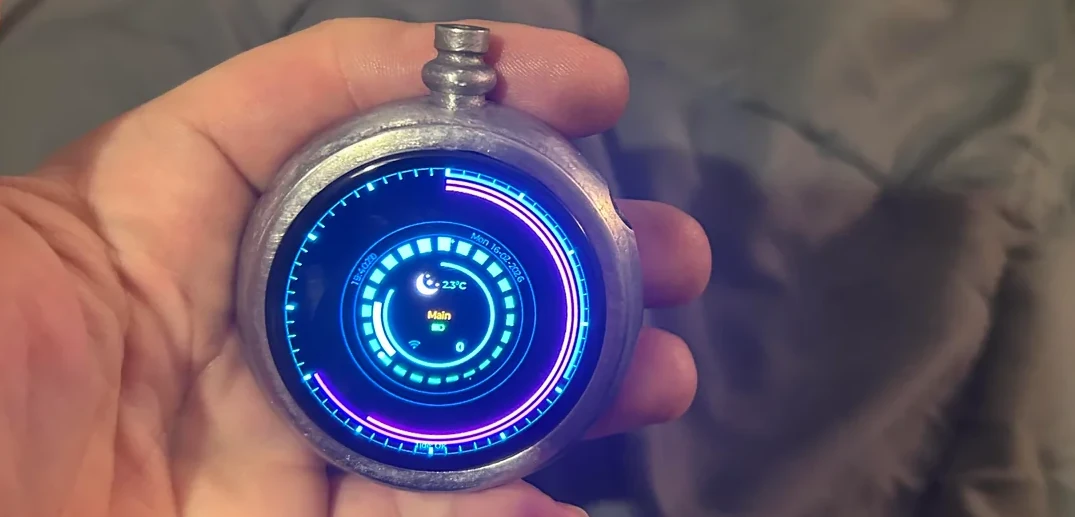
A lot of hacks get inspired by science fiction. When that inspiration is taken from the boob tube or the silver screen, the visual design is largely taken care of by the prop department. If, on the other hand, one seeks inspiration from the written word– like [Math Campbell] did for his smart pocket watch inspired by The Diamond Agethe visuals are much more up to the individual hacker. Though no nanotechnology was involved in its creation, we think [Math] nailed the Victorian High-Tech vibe of [Neil Stephenson]’s cult classic.

The build itself is fairly simple: [Math] started with a Waveshare dev board that got him the 1.75″ round touch display, along with an ESP32-S3 and niceties such as a six-axis IMU, an RTC, microphone, speaker, and micro SD card reader. That’s quite the pocket watch! The current firmware, which is available on GitHub, focuses on the obvious use case of a very stylish watch, as well as weather and tidal display. Aside from the dev board, [Math] needed only to supply a battery and a case.

[Math] designed the case for the watch himself in Fusion360 before sending it off to be 3D printed in stainless steel. That might not be molecular-scale manufacturing like in the book, but it’s still amazing you can just do that. Ironically, [Math] is a silversmith and will be recreating the final version of the watch case in sterling silver by hand. We’d be tempted to include a door–making it a “hunter’s case” in pocket watch lingo–to protect that amoled display, but far be it for us to tell an artist how to do his work. If you’re not a silversmith, [Math] has stated his intent to add STLs to the GitHub repo, though they aren’t yet present at time of writing.

We’ve featured smart pocket watches before, some with more modern aesthetics. Of course a watch doesn’t have to be smart to grace these pages.

Advertisement

Thanks to [Math Campbell] for the tip! If you’ve got time on your hands after ticking done on a project, send us a tip and watch for it to appear here.

Source link

Advertisement
Continue Reading

Tech

Apple May Be Adding Support for Conversational AI in CarPlay

Published

on

If you’ve ever dreamed of talking with your car, Apple may have good news for you. Within the latest CarPlay developer guide is support for “voice-based conversational apps,” a sign that Apple could be about to open the doors to AI chatbot apps like ChatGPT, Gemini and Claude right on your dashboard.

The guidelines indicate that AI companies like Google or OpenAI will need to create an interface that shows the conversational AI is listening in CarPlay, and then “appropriately respond to questions or requests and perform actions.”

Advertisement
AI Atlas

Support is expected to arrive in March with the release of iOS 26.4, which is currently in beta. Companies that want to participate will have to jump through all the usual Apple hoops to qualify for CarPlay.

An Apple representative didn’t immediately respond to a request for comment.

How will talking to AI while driving work?

apple wwdc 2025

Conversational AI will have limitations in CarPlay.

Apple/Screenshot by Joe Maldonado/CNET

Apple has limited what apps work with CarPlay, partially to help keep drivers focused and undistracted. Siri commands were enabled under certain circumstances, but that was all.

Advertisement

With iOS 26.4 and the new conversational AI support, drivers could potentially have more in-depth conversations, but with a few significant limitations. First, Apple won’t be enabling wake words, meaning drivers will have to use their dashboard controls to open the AI app before they start talking.

CarPlay apps must also be designed for “voice interaction in the driving environment,” and can’t show text or images in response to your questions, unlike your usual use of AI chatbots.

Also, Apple makes it clear that these apps won’t be able to control your vehicle, your iPhone or related devices. So you’re limited to the basic chatbot conversation, which could let you brainstorm ideas for dinner, vent about your work day or ponder the great questions of the universe. Just don’t ask for home security advice and never use them for therapy, medical diagnoses, financial advice, tax planning and more

And always double-check that and AI chatbot hasn’t hallucinated while giving you information it says is true.

Advertisement

Source link

Continue Reading

Tech

Inside A Dutch Street Organ: The Art Of Mechanical Music-Making

Published

on

[James]’ Mechanical Organ of Dutch origin has been around longer than he has, but thanks to being rebuilt over the years and lovingly cared for, it delivers its unique performances just as well as it did back in the day. Even better, we’re treated to a good look at how it works.

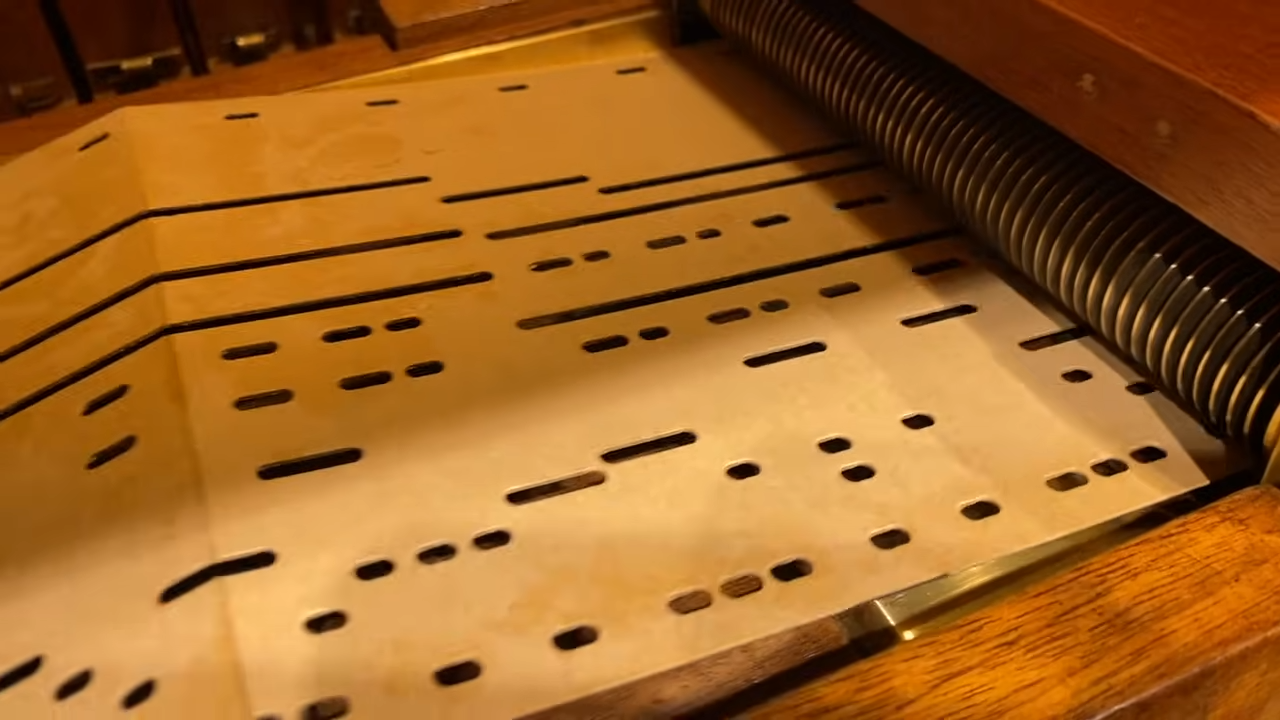
The organ produces music by playing notes on embedded instruments, which are themselves operated by air pressure, with note arrangements read off what amounts to a very long punch card. [James] gives a great tour of this fantastic machine, so check it out in the video embedded below along with a couple of its performances.

The machine is mobile and entirely self-contained. It would be wheeled out to a venue, where it would play music as long as one could keep cranking the main wheel and the perforated cardboard book containing the chosen musical arrangement hasn’t reached its end. As perforations in the card scroll by inside the machine, each hole triggers valves that operate pipes, percussion hits, and even operate animatronic figures.

Folded stacks of perforated cardboard make up the musical arrangement.

The air pressure needed to do all this comes from a reservoir fed by two bellows operated by continuous rotation of a large wheel, a job that requires a fair bit of effort. Turning that crank would likely have been the responsibility of the lowest-ranking person within reach. Today, the preferred method is a belt drive and electric motor.

The perforated cardboard arrangements mean that the machine is just as programmable today as it ever was, and happily plays classics as easily as Lady Gaga, Daft Punk, and Queen. [James] has an enormous library of music, so take a moment to listen to it play “Night Fever” by the Bee Gees and Daft Punk’s “Get Lucky”.

Advertisement

One interesting tidbit [James] shares is that there is a bit of artistry and skill involved in arranging music for the machine. Some instruments play immediately when triggered (such as the pipes) while others trigger after a delay (like percussion), so one needs to take all this into account when punching the cardboard. There’s a bit more info on [James]’ website about his machine and its history.

In addition to being a fascinating piece of musical and mechanical history, it is another example of just how effective of a technology punched card was. Many of us might think of early computing or even music when we think of punched cards, but the original use was in running looms and knitting machines.

Advertisement

Thanks [Keith Olson] for the tip!

Source link

Advertisement
Continue Reading

Tech

RCSI experts develop 3D implant that stimulates spinal cord healing

Published

on

TERG scientists also developed a different 3D-implant innovation to heal spinal injuries last year.

Researchers from the RCSI University of Medicine and Health Sciences have developed a new 3D implant solution that helps heal spinal cord injuries.

Their study, published in the journal Bioactive Materials, shows how a 3D implant designed to copy the structure and stiffness of the spinal cord – combined with tiny, growth-promoting particles engineered to carry RNA – can help regrow nerve cells.

The study was led by researchers at RCSI’s Tissue Engineering Research Group (TERG) and Amber, the Research Ireland Centre based in Trinity College Dublin.

Advertisement

It was supported by the Irish Rugby Football Union Charitable Trust and Research Ireland, with additional funding from the UK’s Anatomical Society and the Irish Health Research Board.

Spinal cord injuries can often result in permanent paralysis caused by damaged neurons in the central nervous system that have a very limited capacity to regrow. According to RCSI, while implants can provide physical support at the site of the injury, nerve cells generally face molecular barriers that prevent regrowth.

RCSI scientists are trying to overcome this with a multifunctional implant that supports regenerating tissue while also delivering RNA-based signals that encourage neurons to switch their growth mechanisms back on. These signals target and silence a gene called PTEN that suppresses neuron regrowth after injury.

“We’ve created an environment that both physically and biologically re-enhances the regenerative capacity of injured neurons, which is a key requirement for restoring function after spinal cord injury,” said Prof Fergal O’Brien, the deputy vice-chancellor for research and innovation at RCSI.

Advertisement

“In laboratory models of spinal cord injury, neurons exposed to the RNA-activated implant showed significantly enhanced growth,” he added. O’Brien is a professor of bioengineering and regenerative medicine, and the head of TERG.

Dr Tara McGuire, who carried out the research as a PhD student in TERG, added: “While this study focused on laboratory models, the next steps will to be to test the approach in vivo and explore how RNA-activated biomaterials could help bridge damaged spinal cord tissue and restore lost connections.”

TERG scientists came up with a different innovation to heal spinal injuries last year, integrating nanomaterials into a soft, gel-like structure to stimulate neuron and stem cell growth.

Don’t miss out on the knowledge you need to succeed. Sign up for the Daily Brief, Silicon Republic’s digest of need-to-know sci-tech news.

Advertisement

Source link

Continue Reading

Tech

Taking Photos With Scotch Tape Instead Of A Lens

Published

on

Typically, when we want to take images, we use an image sensor paired with some sort of lens assembly to make a picture that’s sharply in focus. However, [okooptics] is here to show us there’s another way—using Scotch tape in place of a typical lens element.

If you just put Scotch tape over an image sensor without a lens, you’ll just get a blurry image, whatever you point it at. With the right algorithms, though, it’s possible to recover an image from that mess, using special “lensless imaging” techniques. In particular, [okooptics] shows how to recreate the so-called coded aperture techniques which were previously demonstrated in [Laura Waller]’s DiffuserCam paper.

It’s complicated stuff, but the video does a great job of breaking down the optics into understandable chunks. Armed with a Raspberry Pi HQ camera covered in a small amount of Scotch and electrical tape, [okooptics] is able to reconstruct a viable image from what initially looks like a blurry mess of nothingness, with the aid of the right deconvolution maths. It’s all about understanding the point spread function of the tape versus a regular lens, and figuring out how to fight off noise when reconstructing the image.

Advertisement

We’ve featured previous work from [okooptics] before, too, like this impressive demonstration of light transport and reconstruction. Video after the break.

Advertisement

Source link

Continue Reading

Trending

Copyright © 2025