Pie charts are perhaps the most common data visualisation tool, especially when illustrating comparisons or percentages. They allow you to easily see how each of the slices contributes to the total. Google Sheets gives you an immediate and simple way to create one. This is how you make a pie chart in Google Sheets.
How To Make a Pie Chart in Google Sheets?
The process to make a pie chart is fairly simple. Here’s how:
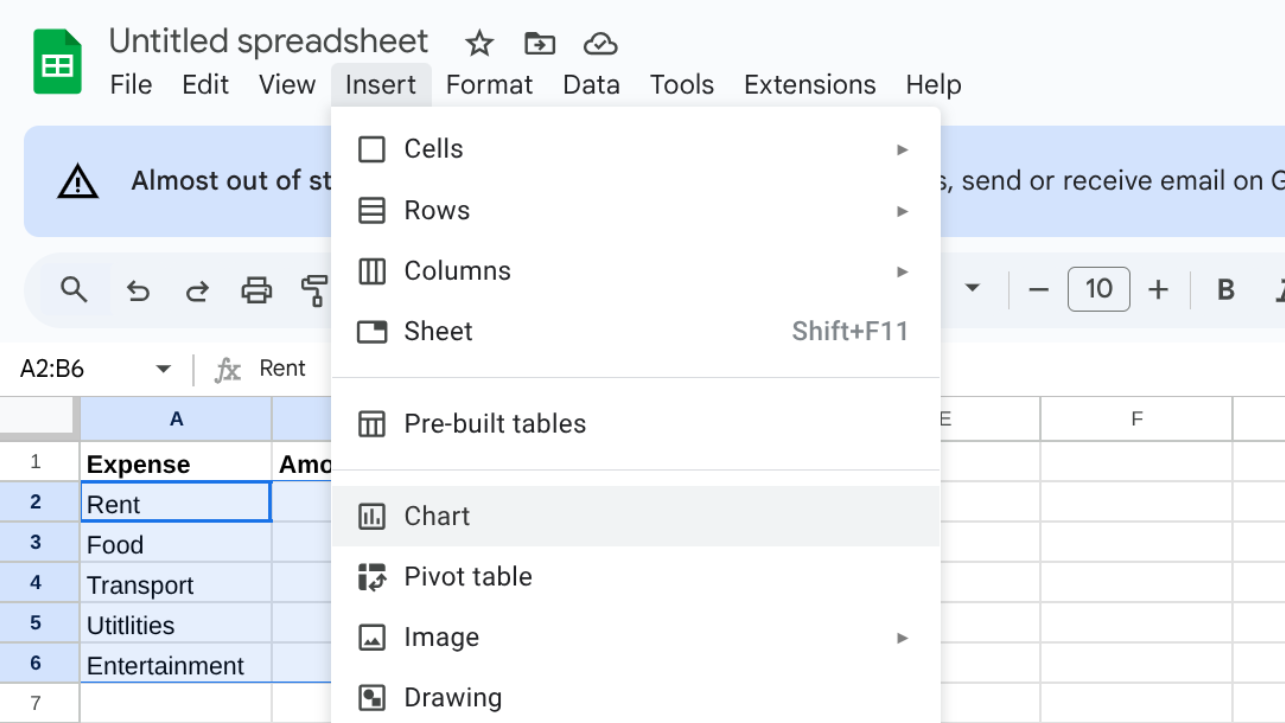
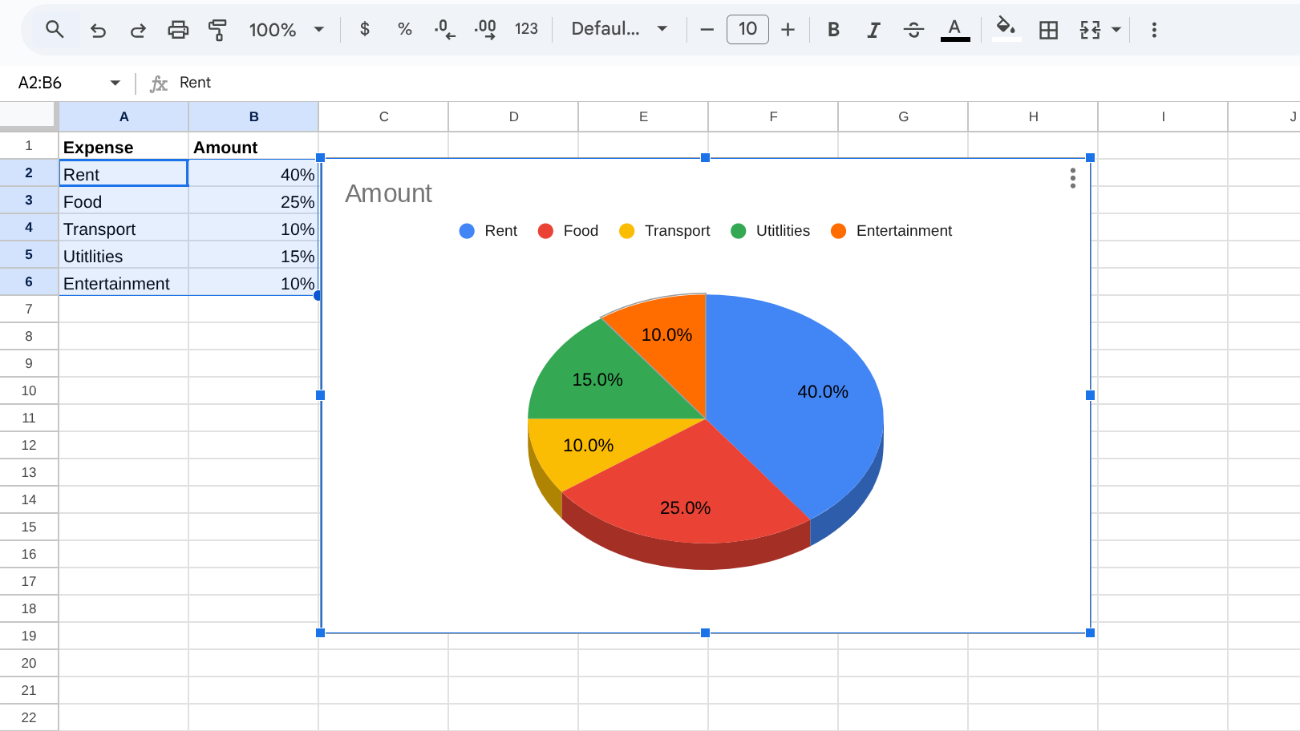
Choose the columns and rows you want to add to the chart.
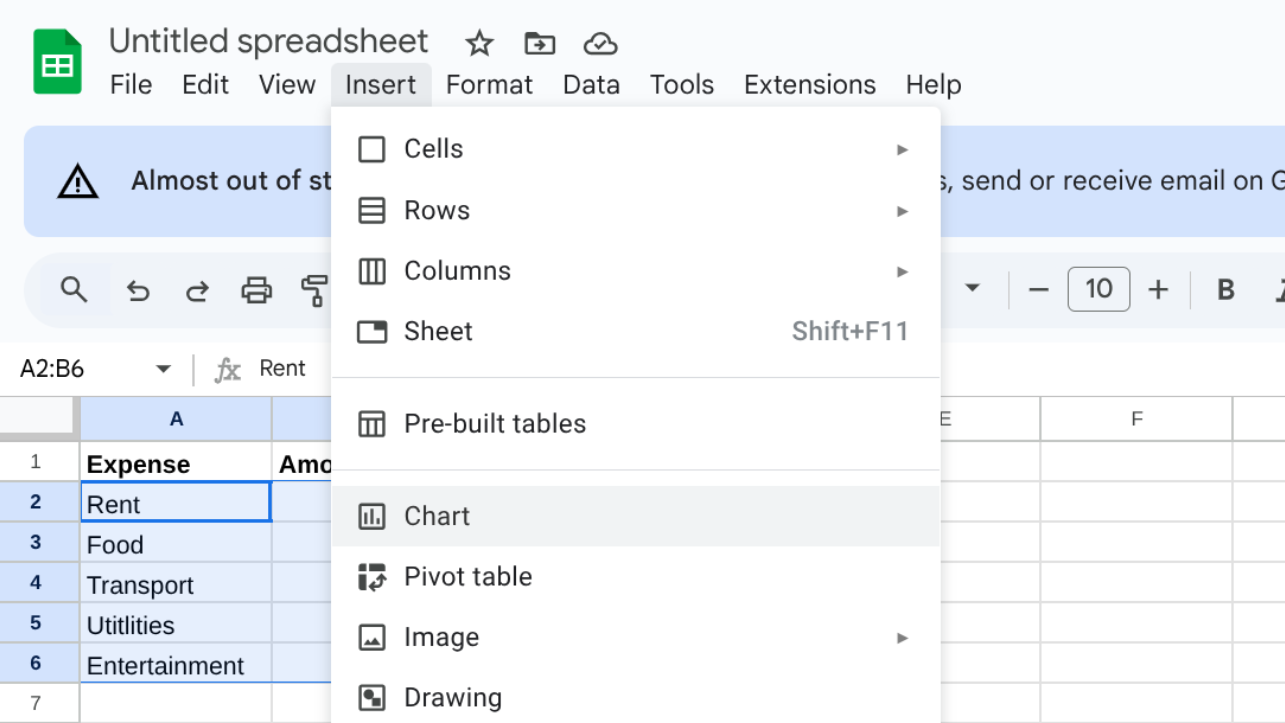
Click on the Insert menu at the top.
Choose Chart from the dropdown.
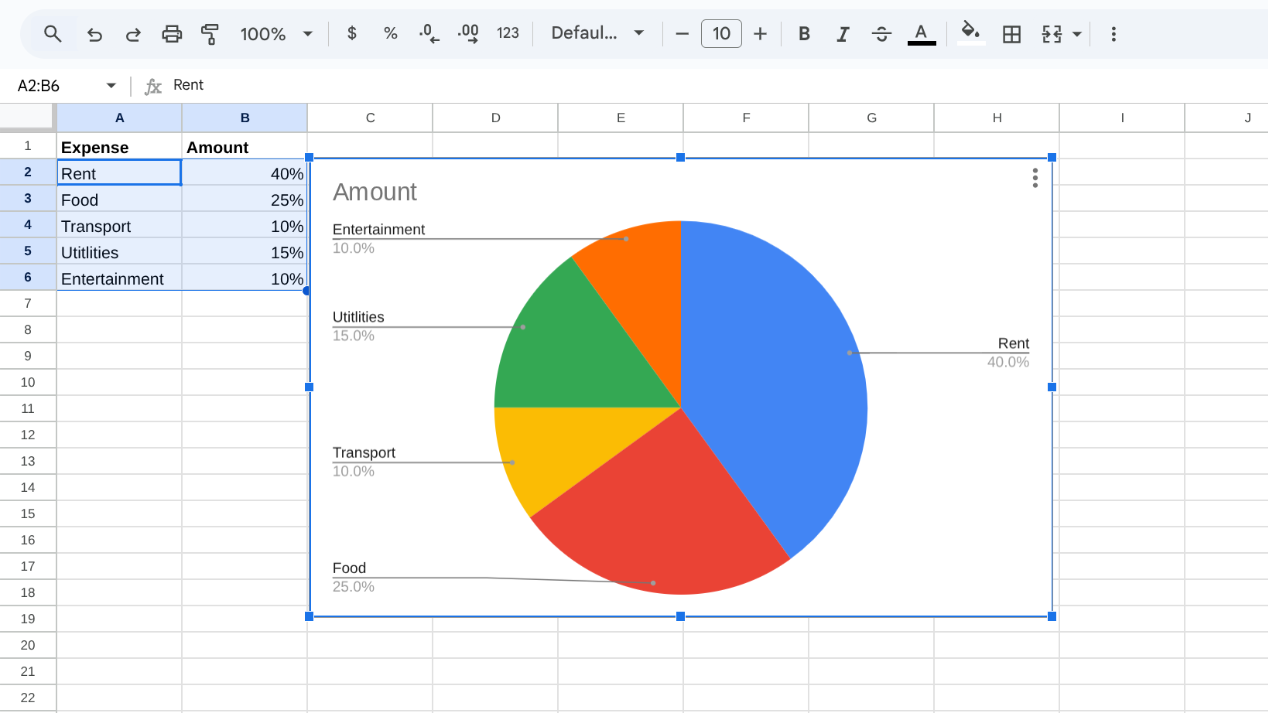
Then, Google Sheets may display a different type of chart.
Switch to Chart Editor on the right-hand side and convert it into a Pie chart.
Include personal touches within the text, design, and color spaces to make the text more readable.
How To Make a 3D Pie Chart in Google Sheets?
Here’s how you can continue the steps after making the regular pie chart to turn it into a 3D one:
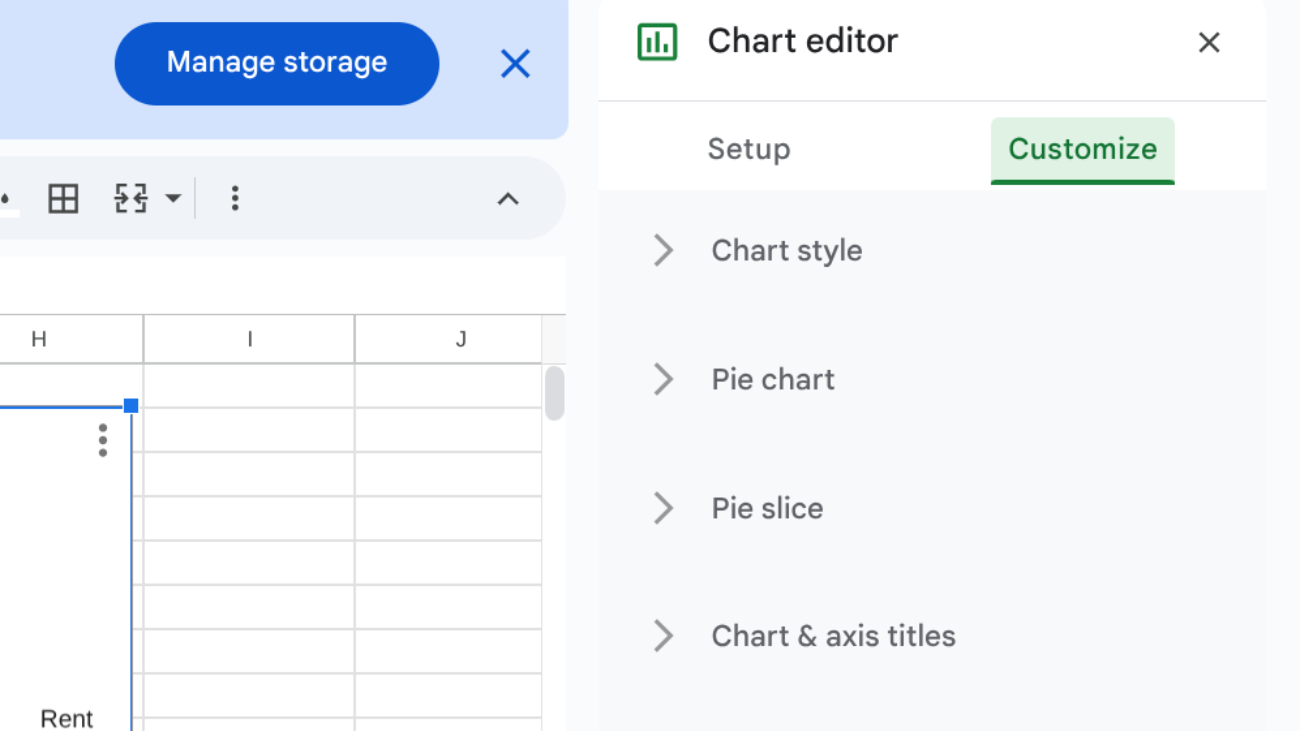
Once your pie chart is ready, open the Chart Editor on the right.
Go to the Customize settings.
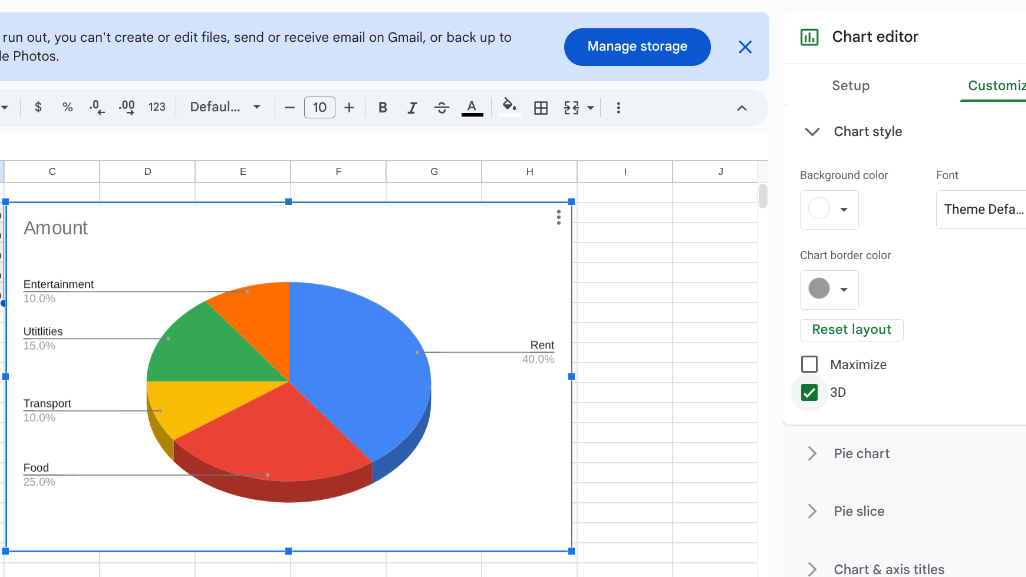
Under Chart style, select the 3D box.
Edit text, design, or colours as needed.
How To Make a Pie Chart with Percentages in Google Sheets?
Here are simple steps to make a pie chart with percentages:
Click on your pie chart to open the Chart Editor on the right side.
Go to the Customize tab and expand the Pie chart section.
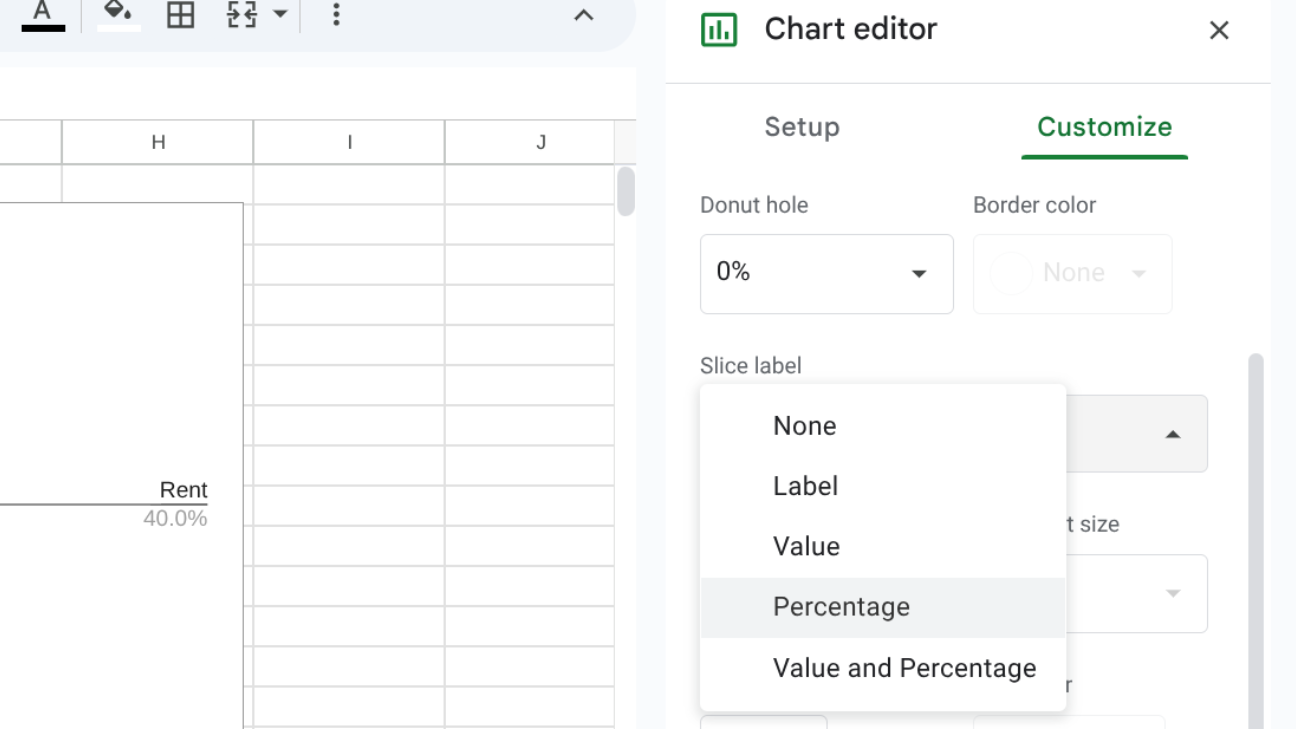
Under the Slice label, choose Percentage from the dropdown list.
Now, percentages will appear inside the slices, so you don’t need them in the legend.
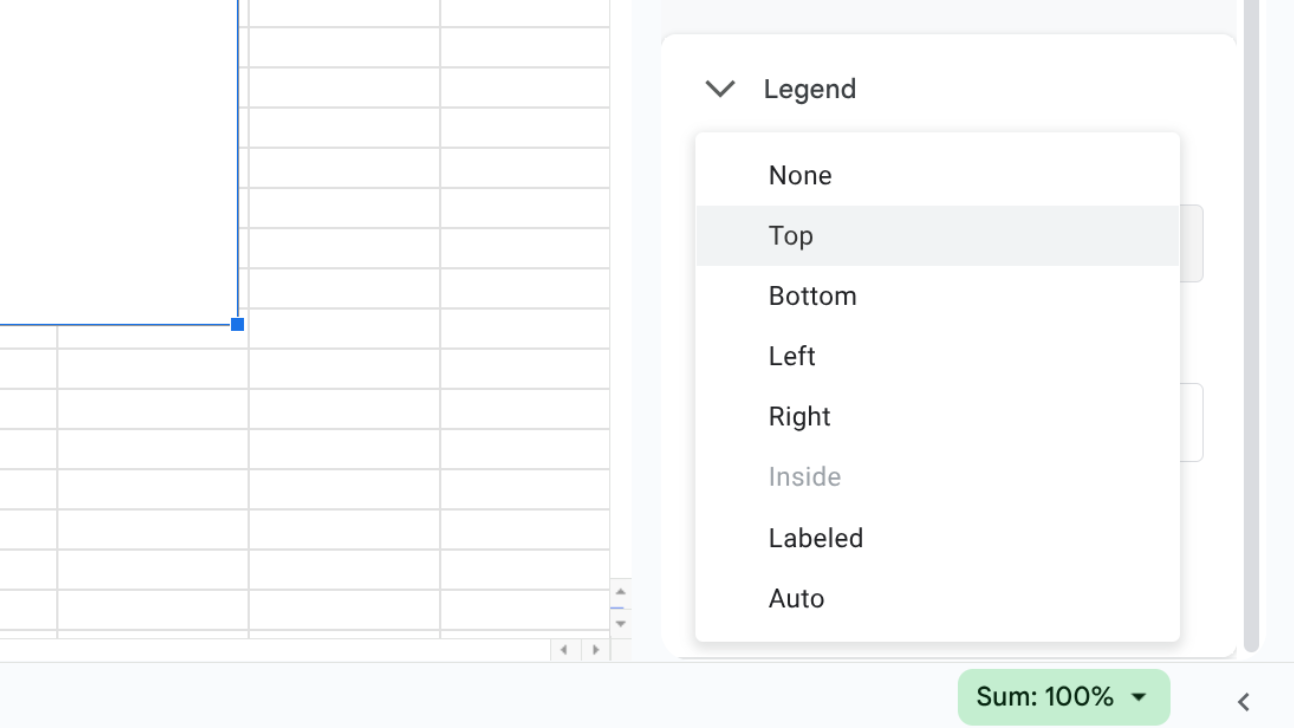
If you want to keep a legend, open the Legend section under Customize.
From the Position dropdown, select where you’d like the legend to appear (top, bottom, left, or right).
Your chart will subsequently display both percentages in the slices, along with a legend to quickly identify them.
By following these steps, you can create a pie chart in minutes using Google Sheets. It’s a useful feature for anyone who wants to present data in a clearer way. With labels, colours, and design options, your chart can look both smart and professional.
An anonymous reader quotes a report from Ars Technica: The Trump administration has stepped up an effort to unmask a Reddit user who criticized Immigration and Customs Enforcement (ICE). After failing to obtain information through a summons issued (PDF) to Reddit, the government reportedly issued a subpoena demanding that Reddit provide the information and appear before a grand jury in Washington, DC. The Intercept described the subpoena today. “According to a subpoena obtained by The Intercept, Reddit has until April 14 to provide a wide range of personal data on one of its users, whom US Immigration and Customs Enforcement agents have been trying unsuccessfully to identify for more than a month,” the article said.
The legal saga began in US District Court for the Northern District of California. On March 12, the anonymous Reddit user whose information is being sought filed a motion (PDF) to quash a summons seeking a host of information from Reddit. The summons was issued by the Department of Homeland Security and directed Reddit to turn information over to an ICE senior special agent. The summons cited authority under 19 U.S. Code 1509, which is part of the Smoot-Hawley Tariff Act of 1930. The motion to quash said the summons is not authorized by the law, which deals with imports of boats, alcoholic drinks, and animals, among other things.
“J. Doe is a US citizen who has not traveled out of the country, is not engaged in any international commerce, has no business concerns outside the United States, and primarily uses their Reddit account to engage in political speech relevant to their local community,” said the filing by the Civil Liberties Defense Center (CLDC), which represents the Reddit user. “Yet the government claims the right to obtain Doe’s name, telephone number, home address, banking and credit card information, IP addresses, telephone model number(s), and the names of any other accounts associated with their Reddit account. The information sought by the government in no way pertains to customs or importing or exporting merchandise, and is clearly intended to chill free speech.” “We should be very, very, very concerned that they’ve now taken one of these to a grand jury,” said David Greene, senior counsel for the Electronic Frontier Foundation. “It’s something to be taken very seriously.”
A Reddit spokesperson told Ars today that “we seek to inform users of any legal process compelling disclosure of their data, as we did in this case, because users should have the agency to protect their own information and are often better positioned to challenge requests that impact them.”
Advertisement
“We do not voluntarily share information with any government, especially not on users exercising their rights to criticize the government or plan a protest. We review every inquiry for legal sufficiency and routinely object to requests that are overbroad or threaten civil rights. When legally compelled to disclose data, we provide only the minimum required and notify the user whenever possible so they can defend their interests.”
NASA’s Artemis II crew of four astronauts from the United States and Canada are set to return to Earth on Friday after their historic trip to the far side of the moon.
Reid Wiseman, Victor Glover, Christina Koch, and Jeremy Hansen have spent 10 days aboard the Orion spacecraft. They are expected to begin re-entry at 7:33 p.m. ET with a splashdown of 8:07 p.m.
NASA has a live feed for when the crew lands in the Pacific Ocean later today. The Orion spacecraft is expected to splash down off the coast of San Diego, California.
Advertisement
The Artemis II mission marks the first time humans have ventured to the moon’s orbit in more than 50 years. The crew traveled farther from Earth than any humans have before, reaching an estimated 252,760 miles from our planet. That’s the same distance as traveling between New York City and Los Angeles around 100 times, only the astronauts are inside a capsule with 330 cubic feet of habitable space, which is about the size of two minivans.
The objective of the Artemis II mission is to collect data and insights that will help NASA prepare for future lunar missions and landings — the astronauts put the Orion spacecraft through planned tests to evaluate how it performs with a crew in deep space. This involves testing communication systems with colleagues on Earth, making trajectory adjustments, and making a safe re-entry and splashdown.
The splashdown could be one of the most dangerous moments of the whole mission. On the Artemis I mission in 2022, which did not have a crew, Orion’s protective heat shield was unexpectedly damaged upon its return to Earth. The heat shield is made of AVCOAT — a material designed to slowly dissipate and protect the crew from temperatures approaching 5,000 degrees as it penetrates Earth’s atmosphere — but the shield was charred and cracking in places, which was not supposed to happen.
If humans had been aboard Artemis I, they would’ve still returned safely, NASA said. The agency has also conducted extensive research on how the heat shield was damaged in the first place. Still, the heat shield remains top of mind as people around the world hope to see these four astronauts return safely.
Advertisement
Techcrunch event
San Francisco, CA | October 13-15, 2026
Advertisement
The crew left Earth on April 1, and the astronauts quickly encountered some mundane mishaps, including issues with Microsoft Office and their toilet. But these early moments were easily overshadowed by the wonder of the images and information that the crew sent back from the moon. You can already see new photos from the lunar flyby on the dark side of the moon.
The astronauts also named new craters, including one that was named after mission commander Wiseman’s late wife Carroll, who died of cancer in 2020 at age 46.
The crew was also able to witness a total solar eclipse from just a few thousand miles away from the moon, a unique vantage point that no astronaut had experienced before.
“It wasn’t just an eclipse with the Sun hidden behind the Moon,” Koch, the crew’s mission specialist, explained. “We could also see earthshine, the Sun’s light reflecting off Earth, wrapping the Moon in a soft, borrowed glow.”
An anonymous reader quotes a report from the New York Times: As the Trump administration seeks to fill a national shortage of air traffic controllers, officials are targeting a new talent pool: gamers. The Federal Aviation Administration on Friday is making a recruiting push aimed at avid players of video games, as the agency strives to fill thousands of vacancies that lawmakers have said leave the traveling public less safe. In a new YouTube ad, the agency is using flashy graphics and the promise of six-figure salaries to convince video game enthusiasts to apply their trigger fingers in service of air safety.
In recent years, video gamers have emerged as a target demographic for recruiters at a number of federal agencies, including the military and the Department of Homeland Security. They are welcomed for their hand-eye coordination, quick decision-making in complex environments and ability to remain focused on screens for hours on end. “To reach the next generation of air traffic controllers, we need to adapt,” Transportation Secretary Sean Duffy said in a statement. Focusing recruiting efforts on gamers, he added, “taps into a growing demographic of young adults who have many of the hard skills it takes to be a successful controller.”
[…] The F.A.A. plans to begin prioritizing recruiting gamers over more traditional avenues like college fairs, officials said, pointing out that only 25 percent of controllers have a traditional college degree, while the vast majority appear to have logged hours gaming. During the presidential transition in 2024, incoming Trump administration officials polled about 250 new air traffic academy graduates over six weeks. Only two of those interviewed were not gamers, according to F.A.A. officials […]. Students who failed out of the training academy were not similarly queried, officials said, though they have plans to conduct more comprehensive exit interviews in the future. Still, the overwhelming presence of gaming habits among graduates tracked with what they were hearing anecdotally from controllers already certified to work in towers and other air traffic facilities, the officials said, many of whom liked to play video games during breaks in their shifts.
Amazon is ending support for third-party integrations on its Luna cloud gaming service. The most immediate changes mean that it’s no longer possible to buy Ubisoft+ and Jackbox Games subscriptions or standalone games through Luna.
Amazon will automatically any cancel active subscriptions bought through Luna at the end of customers’ next billing cycle. If you have a Ubisoft+ subscription that you bought directly from Ubisoft instead, you’ll still be able to access games on that service through Luna until June 10.
The Bring Your Own Library option — which allows users to play games they own on the likes of EA, GOG and Ubisoft on Luna — is going away too. You won’t be able to access games from on those storefronts via Amazon’s streaming service after June 3.
If you bought any games outright on Luna, you’ll still be able to play them there until June 10. Unlike Google did when it shut down Stadia, Amazon isn’t offering refunds for those purchases. However, you’ll still have access to them through the respective third-party platform that’s linked to your account, be it the EA App, GOG Galaxy or Ubisoft Connect.
Advertisement
That doesn’t exactly help folks who don’t have powerful-enough systems to play more demanding games and were relying on Luna. As such, some people might need to turn to the likes of GeForce Now in order to keep playing games they bought through Luna (and they’ll need to hope GFN actually supports their specific games).
Amazon has been reshaping Luna over the last several months. It rolled out a revamped version of the service back in October, with more of a focus on GameNight party games that you can play with a smartphone.
Prime subscribers will still be able to claim PC games and stream games on the Luna Standard tier at no extra cost. The Luna Premium subscription, which includes a wider range of third-party games, is still available too.
“We’re doubling down on a broad range of gaming experiences, including strong third-party titles, delivered in ways that make great games more accessible, as well as new and unique gaming experiences like GameNight,” Amazon wrote in an email to Luna users. The company also said it will offer some folks a free Luna Premium subscription.
Claude creator Anthropic is considering designing its own chips as advanced AI systems cause a shortage, sources told Reuters.
Anthropic continues to grab the headlines this week, as it fights the US administration in the courts and the power of its unreleased Claude Mythos model strikes fear into the hearts of much of the industry, given its ability to exploit security vulnerabilities.
Now Reuters is citing sources that say Anthropic is looking closely at the possibility of building its own chips, amid industry concerns that the supply of sophisticated chips required for new AI systems from itself and its competitors may not keep pace. Rivals Meta and OpenAI already have such projects underway.
Earlier this week, Anthropic announced a new expanded agreement that will allow it to tap 3.5GW of Google’s tensor processing unit (TPU) capacity from Broadcom.
Advertisement
In a regulatory filing on 6 April, Broadcom said that Anthropic’s consumption of TPU capacity is dependent on its continued commercial success. The multi-gigawatt capacity is expected to come online in 2027.
Last October, Anthropic and Google announced a deal worth “tens of billions of dollars” for 1m of Google’s TPUs. The deal is expected to bring more than 1GW of AI compute capacity online for Anthropic this year. The new agreement deepens that relationship, Anthropic said. Broadcom said that it is in a long-term agreement with Google to develop and supply custom TPUs.
Anthropic already has multibillion-dollar deals for compute capacity with companies such as Nvidia and Microsoft. It runs Claude on a range of AI hardware, including Amazon Web Sevices’ Trainium, Google TPUs and Nvidia GPUs. Amazon is Anthropic’s primary cloud provider and training partner.
Anthropic said that a vast majority of the new compute will be situated in the US, expanding on its $50bn commitment to strengthening the country’s computing infrastructure.
Advertisement
Demand for Anthropic’s AI tools has accelerated in 2026. Recent data shows that Anthropic is now capturing more than 73pc of all spending among companies buying AI tools for the first time, while its rival OpenAI is down to around 27pc.
According to the company, revenue run rate has already surpassed $30bn, up from around $9bn at the end of 2025. More than 1,000 of Anthropic’s business customers spend more than $1m on an annualised basis, doubling in less than two months, it added.
Given the growing fight for compute power, and the well-reported chips shortage, it would not be a surprise for Anthropic to look into the albeit extremely costly business of designing its own chips, but the sources admitted that no project team has yet been set up, and plans have not yet been set in place.
Don’t miss out on the knowledge you need to succeed. Sign up for the Daily Brief, Silicon Republic’s digest of need-to-know sci-tech news.
In short:Estonia and Belgium are the only two EU member states to have declined the Jutland Declaration, an October 2025 pan-European commitment to restrict children’s access to social media. Estonia’s ministers argue that age-based bans are unenforceable, that children will find ways around them, and that the correct approach is to enforce the GDPR against the platforms themselves and invest in digital literacy rather than restricting young people’s participation in the information society.
The declaration most EU countries signed
On 10 October 2025, digital ministers from 25 of the European Union’s 27 member states signed the Jutland Declaration at an informal gathering in Horsens, Denmark. Norway and Iceland also signed. The declaration is a non-binding political commitment to introduce privacy-preserving age verification on social media platforms, protect minors from addictive design features and dark patterns, and work toward what the document describes as a “digital legal age” for access to online services. Estonia and Belgium were the two EU members that declined. Belgium’s refusal came from a veto by Flemish Media Minister Cieltje Van Achter, who described the declaration’s age verification requirements as disproportionate and objected to requiring children to use national identity systems such as Itsme to access services like YouTube or Instagram. Estonia’s refusal was substantively different: principled rather than procedural, and rooted in a broader argument about where Europe’s regulatory effort should be directed. The political momentum the declaration reflects is considerable.Europe’s social media age shift accelerated through 2025 and into 2026, with Australia implementing the world’s first ban on under-16s from December 2025, France passing legislation in January 2026 to prohibit under-15s, Spain enacting restrictions for under-16s in February 2026, and Austria moving to restrict children under 14.Greece announced it would ban under-15s from social media from 2027, part of a six-country EU grouping that also includes Denmark, France, Austria, Portugal, and Spain. On 20 November 2025, the European Parliament backed a non-binding resolution calling for an EU-wide digital minimum age of 16 by 483 votes to 92, with 86 abstentions, and called on the European Commission to incorporate the measure into the forthcoming Digital Fairness Act.
Why Estonia said no
Estonia’s dissent is articulated by two ministers who have approached the question from different but complementary angles. Kristina Kallas, Minister of Education and Research, has been the more outspoken critic of the ban consensus. At a Politico forum in Barcelona, Kallas argued that age restrictions place responsibility on the wrong party. “The way to approach this, to me, is not to make kids responsible for that harm and start self-regulating,” she said. Her corresponding argument is that the responsibility should fall on the platforms. “Europe pretends to be weak when it comes to big American and international corporations,” she told the forum, challenging the EU to “actually take this power and start regulating the big American corporations.” She was also direct about the practical limits of ban-based approaches: “kids will find very quickly the ways to go around and to still use social media.” That argument connects toEurope’s broader effort to assert its regulatory power over American technology companies, a project that has gathered considerable momentum since 2025 but has not yet been applied with comparable force to social media content governance. Liisa-Ly Pakosta, Minister of Justice and Digital Affairs, has framed the positive case for Estonia’s preferred approach. “Estonia believes in an information society and including young people in the information society,” she has said, emphasising digital participation rather than exclusion. Pakosta has pointed to the General Data Protection Regulation as the enforcement mechanism already available: the GDPR prohibits platforms from processing children’s personal data without appropriate consent and carries fines of up to 4% of global annual turnover for violations. Estonia’s argument, in essence, is that Europe has not exhausted its existing tools before reaching for a new and unproven one.
The enforcement problem Estonia is pointing to
Estonia’s critique of the ban model has a concrete reference point. Australia became the first country in the world to enforce a social media ban for minors on 10 December 2025, prohibiting anyone under 16 from holding accounts on platforms including Instagram, TikTok, YouTube, Snapchat, X, and Facebook. Platforms face fines of up to approximately A$50 million for failing to take reasonable steps to prevent underage access. In the months after the ban came into force,the eSafety Commissioner found Meta, TikTok, and YouTube were not complying with the ban, with the regulator proceeding to court action against the platforms. The compliance picture was bleak: seven in ten children who had held social media accounts before the ban still had active accounts after it took effect. Workarounds including VPNs, false birth dates, and the transfer of accounts to adult relatives proved straightforward and were widely adopted. Whether the Australian experience represents the definitive verdict on the ban model, or merely an early implementation struggle that stricter enforcement will eventually resolve, remains contested. What is not contested is that the world’s first and most closely watched age ban produced a high rate of non-compliance within months of introduction, and that this outcome was predicted in advance by critics who argued the compliance burden would be met by creative circumvention rather than by genuine restriction.
Advertisement
What comes next in Brussels
The practical arena for the contest between Estonia’s platform-enforcement approach and the ban-majority’s position is the Digital Fairness Act, the European Commission’s forthcoming legislation targeting addictive design, dark patterns, and manipulative commercial practices in digital services. The European Parliament’s November 2025 vote made explicit that it wants a 16-plus digital minimum age incorporated into the DFA text, along with bans on engagement-based recommender algorithms for users who are minors, restrictions on loot boxes, and a default-off requirement for infinite scroll, autoplay, and pull-to-refresh mechanisms on services used by young people. The Commission is expected to table the DFA proposal in the fourth quarter of 2026. That timeline gives Estonia a legislative window in which to argue for a platform-accountability framework to sit alongside, or in place of, an age-based access restriction. The two approaches are not necessarily mutually exclusive, but they reflect genuinely different theories of where regulatory leverage is most effectively applied: against the commercial platforms that build and profit from the systems in question, or against the young people who have grown up treating social media as ordinary infrastructure.2025 established AI as the defining technology of the decade, and as AI-powered recommendation systems become the primary mechanism by which young people encounter content online, the question of who bears legal and regulatory responsibility for what those systems serve to a 14-year-old is one that Europe will have to answer in law, not just in declarations.
Apple Pay is a quick and safe way to make purchases in person and online, but a new type of scam may use your faith in the system to steal thousands of dollars from you.
Apple Pay is safe and secure, but scammers still target it
That’s the warning from consumer advocacy outfit Consumer Affairs following a spate of Apple Pay-related scams. Fraudsters know that people trust Apple and the Apple Pay system, and they’re using that trust as the basis for their scams. The goal, as ever, is to confuse people to such an extent that they can be convinced to hand over their money. How that happens can vary from scam to scam, but there’s one constant: Apple Pay. Continue Reading on AppleInsider | Discuss on our Forums
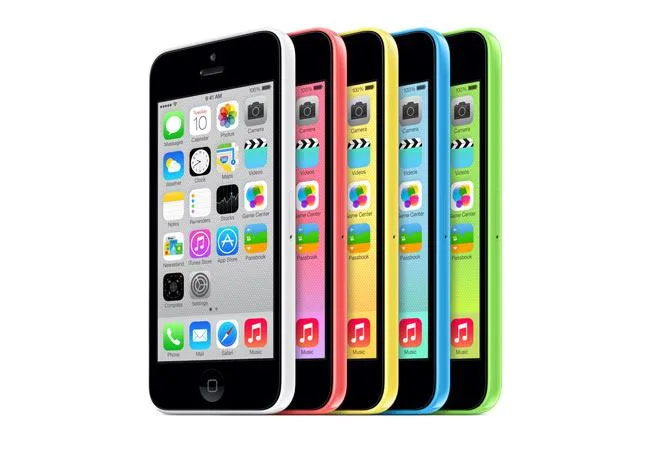
Apple’s iPhone 5C is apparently getting a second life, and this time it is not because it was a hidden gem that was slept on.
In an NBC News segment, the network highlights a small but noticeable social media comeback for Apple’s old iPhone 5C. The sudden popularity is largely driven by Gen Z users who seem drawn to its colorful design, “throwback” camera quality, and overall retro charm.
The story is less about raw utility and more about the vibes. So after the iPod, the colorful iPhone is the next to get a revival.
Apple
Why Gen Z is suddenly into the iPhone 5C again
The appeal behind the iPhone 5C is pretty simple. Gen Z is drawn to how different it feels from modern phones. Today’s smartphones mostly look like polished slabs of metal and glass. The iPhone 5C, on the other hand, is bright, plastic, cheerful, and a little awkward in a way that now reads charming rather than cheap.
NBC notes that another reason for the renewed interest is the camera. One of the on-screen captions specifically notes that the iPhone 5C is trending thanks to its grainy photo quality. The softer and lower image quality fits neatly into the broader social media obsession with imperfect digital aesthetics, particularly with older digital cameras.
Advertisement
So what used to feel outdated now reads as character.
Apple
Nostalgia plays a big role
Back when it was first released in 2013, the iPhone 5C failed to meet sales expectations because it failed to be affordable, despite its “budget iPhone” pitch. It lacked the popular Touch ID, and the plastic was perceived as “cheap”.
The segment brought in Clay Routledge, an existential psychologist and author of Past Forward, to explain the deeper pull behind retro tech. He also gives the story a broader cultural frame. The comeback is not just about one old iPhone model. It is about how younger users are increasingly drawn to gadgets that feel less optimized, less overwhelming, and less trapped in today’s hyper-polished digital culture.
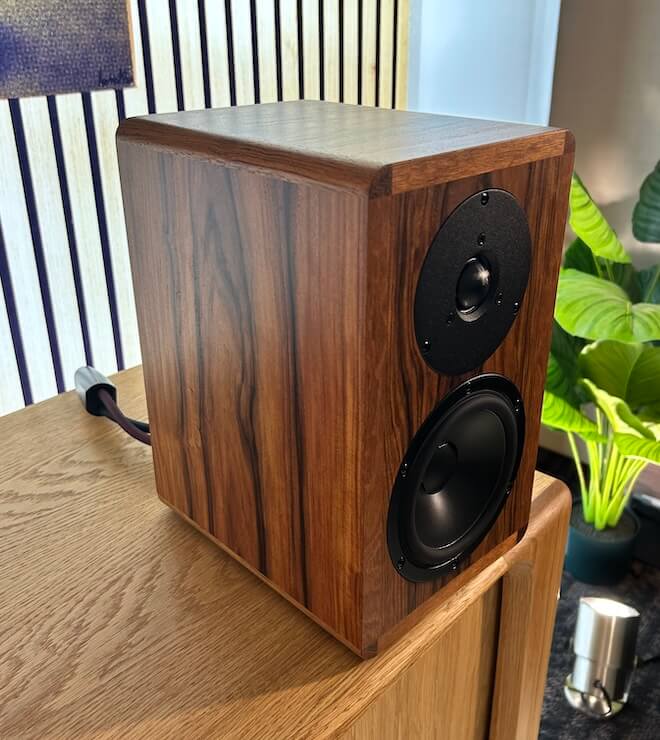
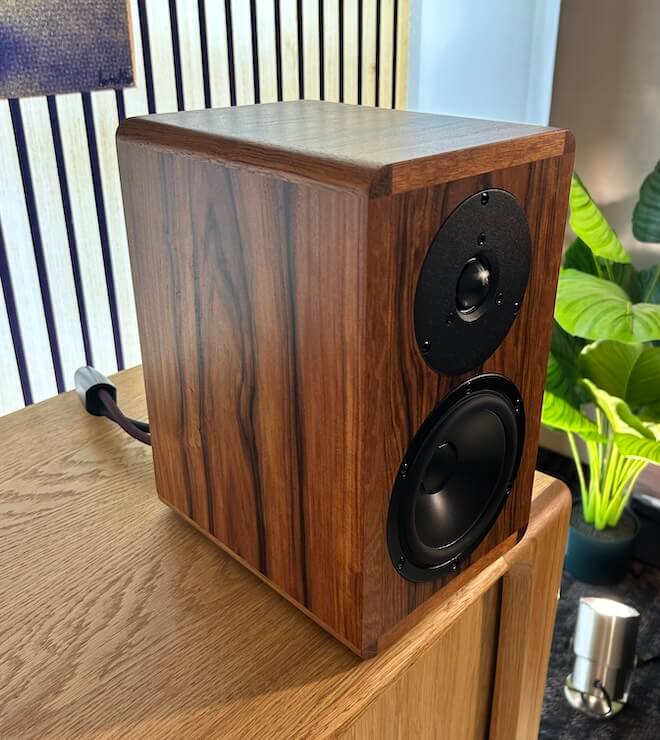
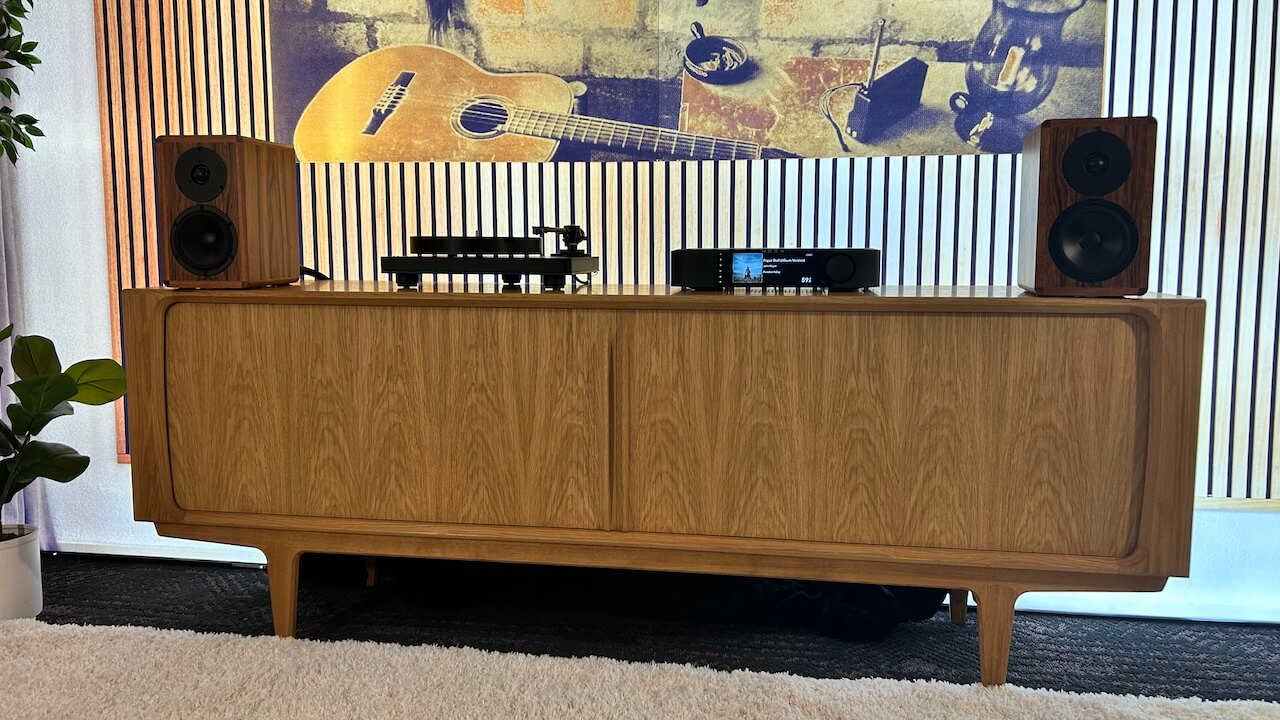
At AXPONA 2026, where six-figure systems are aplenty and it’s not unusual to stumble into rooms pushing past $500,000 or even flirting with $1 million, most of what’s on display exists for a very small slice of the population. That’s part of the spectacle, but it’s not always where the story is. The Dynaudio Legend bookshelf speakers stopped me cold because they don’t rely on excess to make their point. Compact, handcrafted in Denmark, and built around real-world usability, they deliver the kind of scale, detail, and physical presence that makes a lot of those megabuck systems feel like overkill. In a show full of gear chasing perfection at any cost, this is the rare product that actually makes you question where that line should be drawn — which is $7,000 in this particular case.
Danish Craft, No Shortcuts: Why the Dynaudio Legend Stands Out
Listening to music should feel like a break from everything else. At a busy show, that’s harder than it sounds—but the Dynaudio Legend made a convincing case without trying too hard. That was clear before I even realized they’re using Dynaudio’s best tweeter here, which explains a lot about the control and refinement I was hearing.
Dynaudio doesn’t cut corners. It never has. That shows up here in a straightforward way: consistent parts, consistent tuning, and a compact design that doesn’t try to overreach. What changes from pair to pair is the finish.
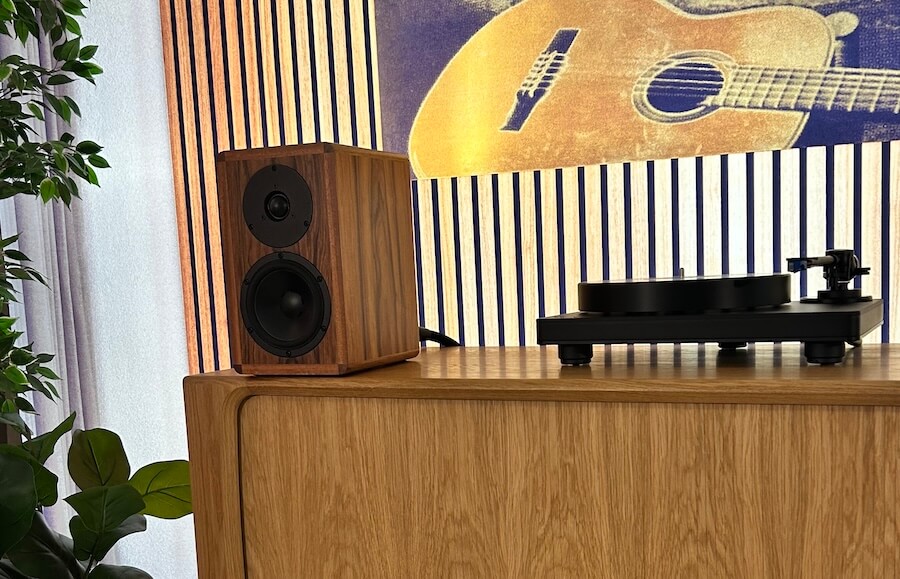
Each cabinet uses natural rosewood veneer that’s selected and matched by eye, paired with Jatoba hardwood corner pieces that complement the grain. Final assembly is done by hand in Denmark. No two pairs look exactly the same, but they’re all built to the same standard.
The finish deserves mention because it’s noticeably better in person than in photos—more depth, more texture, less “factory uniform.” It’s the kind of detail you notice up close, not from across the room. And for those losing their minds online because they don’t look like $7,000 loudspeakers—the reality is they look sensational in person, and that’s what actually matters.
Advertisement
I’ll admit they got my attention for practical reasons as well. As I think about building out a home office and splitting time between New Jersey, Florida, and Texas; this is the type of speaker that makes sense: compact, well-built, and visually distinct without being over the top.
There’s nothing complicated about the pitch here. Every pair is unique in appearance, but the approach is consistent. And that consistency is really the point.
Specifications and System Context
The Dynaudio Legend is a compact two-way, rear-ported bass reflex bookshelf speaker designed for smaller spaces and more focused listening setups. It uses a 28mm Esotar 3 tweeter with Hexis; Dynaudio’s top-tier high-frequency driver paired with a single 15cm MSP (magnesium silicate polymer) mid/bass unit. The crossover is set at 3,500Hz with a second-order topology, and the rated impedance is 6 ohms.
On paper, the sensitivity is a modest 83 dB (2.83V/1m), with frequency response specified from 60Hz to 28kHz. Power handling is rated at 150 watts, which tells you everything you need to know: these are not speakers you throw on the end of a budget integrated and call it a day. They need current, and they respond to it.
That explains the rather serious MOON by Simaudio network amplifier used in the demo system. Even in a relatively small room: think den, bedroom, or office, the pairing made sense. This wasn’t about filling a cavernous space; it was about control, headroom, and getting the most out of that low sensitivity.
Advertisement
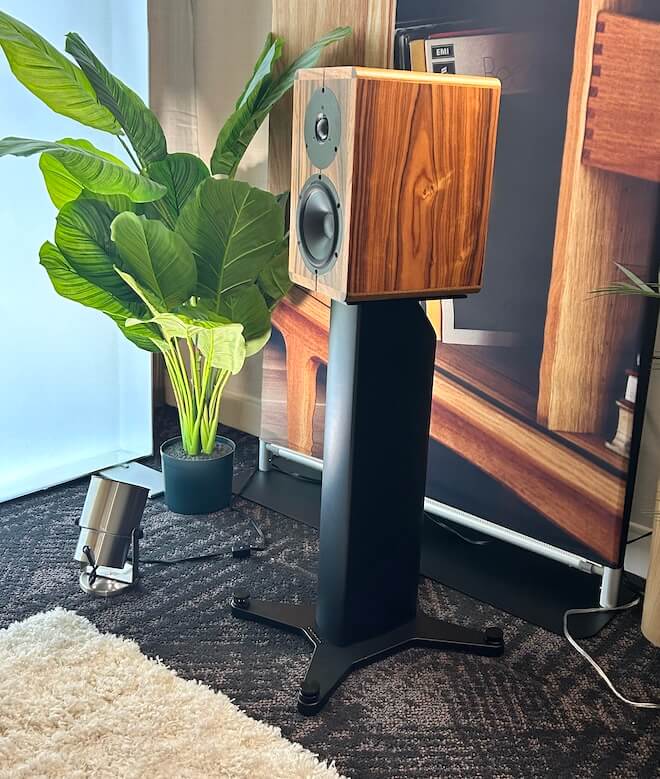
Physically, the Legend measures 31.1 cm (12 1/4 inches) tall, 18.6 cm (7 1/3 inches) wide, and 27.1 cm (10 2/3 inches) deep, with a weight of 6.3 kg (14 lbs) per speaker. In practice, that translates to an easy fit on proper stands or a solid shelf setup.
Advertisement. Scroll to continue reading.
The system I heard leaned into nearfield listening from a leather sofa positioned fairly close to the speakers. In that context, the Legend’s scale and control made a lot of sense—this is a speaker designed to work in real rooms, not just showrooms pushing six figures.
The Danes Heard the Internet Naysayers and Carried On Anyway
Right off the bat, what stood out was how composed they stayed at higher listening levels. These are passive bookshelf speakers, and while Dynaudio offers a dedicated stand, it felt a bit too low in this setup. I preferred them on a media credenza, which brought the drivers into a better position and made the overall presentation more convincing.
Advertisement
You can push these harder than you probably should. Not that you need to because they’re engaging at lower levels, but when the volume goes up, they don’t lose their grip. With electronic tracks that lean on impact and control, the Legend held together without sounding strained or thin.
That also puts to rest one of the louder online takes floating around from people who haven’t actually heard them: that there’s no meaningful bass below 60 or 70 Hz. That’s not what I heard. In-room, with proper amplification, there’s usable, convincing low-end extension. No, they’re not replacing a subwoofer on paper, but the idea that they fall off a cliff down low doesn’t line up with reality.
In fact, I found them to be rather hard hitting. For my listening; electronic, metal, new wave, and progressive synth rock, I wouldn’t feel the need to add a subwoofer.
The midrange leans warm, but it’s controlled and doesn’t drift into thickness. Vocals have weight, instruments have body, and nothing feels pushed forward just to grab attention. It sounds intentional, not romanticized.
Advertisement
Up top, this is where things separate quickly. Dynaudio is using its best tweeter here, and it shows. The treble is open and extended with real air, plenty of energy, and strong detail retrieval, but it never turns hard or brittle. You get resolution without edge, which is harder to pull off than it sounds.
What caught me off guard was the overall sense of scale. These don’t sound like small bookshelf speakers. The presentation is wider than expected, with a soundstage that stretches well beyond the cabinets and holds together even when things get busy.
And yes, there were moments where I actually laughed out loud with familiar tracks. Not because I forgot my meds, though thanks for the reminder, but because they delivered something I wasn’t expecting. These are better than they have any right to be based on size alone, and they make that point pretty quickly.
In the context of AXPONA 2026, where it’s easy to get desensitized by six-figure systems, the Dynaudio Legend stands out for a simpler reason: it makes sense. Solid engineering, real-world size, and performance that holds up under scrutiny. At $7,000, it’s not inexpensive, but most certainly one of the few speakers that I listened to so far that I would consider buying.
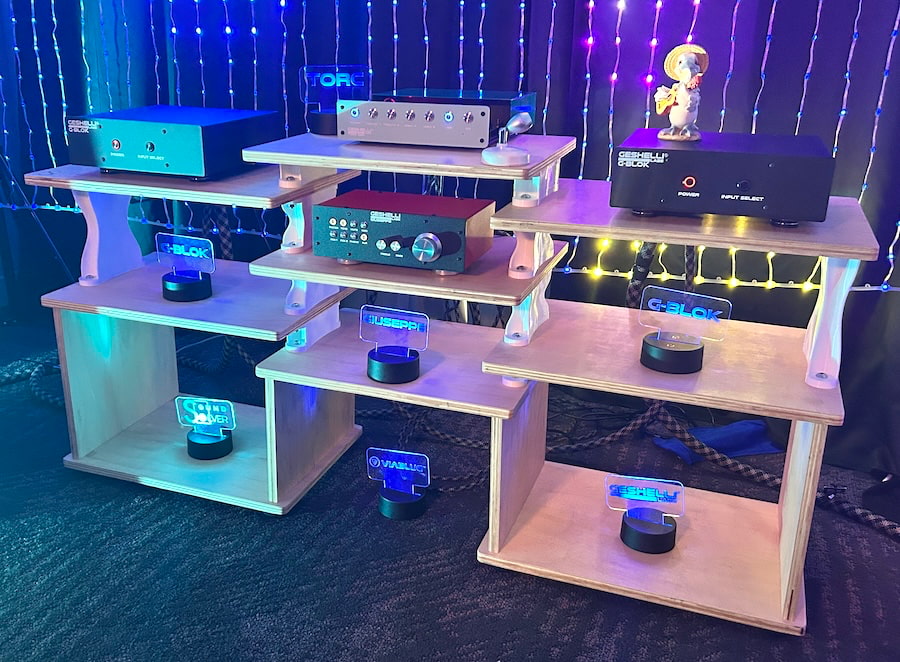
Geshelli doesn’t do “launch hype.” Maybe a little. They build something, tear it apart, rebuild it again, and only then let it out into the world. The $699.99 TORC DAC that showed up at AXPONA 2026 isn’t some carryover from last fall; it’s the version that survived that process. And it shows. After spending time with their gear at CanJam NYC 2026, we were already paying attention. The TORC gave us a reason to stop and then stay while it took control of the room with some Metallica and a rather large pair of SVS floorstanders. Add one of the most colorful setups at the show and it felt less like a demo and more like a full-blown music party under the sea.
Which is impressive, considering we’re in Schaumburg. Closest thing to an ocean here is Lake Wazzapamani and even that’s a rather heavy ask.
Because this isn’t just another DAC with a new chip and a slightly shinier faceplate. The TORC is Geshelli doubling down on what they do best: practical engineering, modular thinking, and pricing that doesn’t assume you just sold a kidney to be here.
And here’s the part that makes some of the room a little uncomfortable; it’s a family operation, it’s built in the U.S., you can actually afford it, and it’s not cutting corners to get there. That combination isn’t supposed to exist. But here we are.
Advertisement
Finally a DAC That Doesn’t Expire the Second a New Chip Drops
The TORC is built around a genuinely modular architecture and not the usual marketing version where “upgradeable” really means “buy the next model.” At its core is a swappable DAC module (the GDAC card), which lets you choose between different conversion paths; AKM, ESS, Burr-Brown, even R2R, and change them later without replacing the entire unit. Each module has its own onboard power regulation, so you’re not just swapping chips, you’re changing how the DAC behaves at a fundamental level.
Geshelli didn’t stop there. The TORC uses four socketed mono op-amps instead of the typical dual configuration, which improves channel separation and gives you direct control over the output stage. If you want to tweak the sound, you physically swap op-amps. No menus. No DSP tricks. Just hardware doing the work.
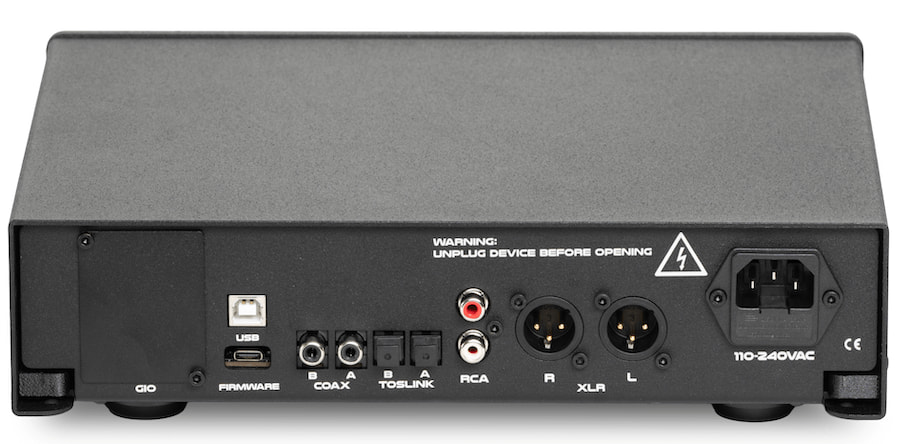
On the digital side, inputs are relay-switched—an old-school approach that physically disconnects unused inputs to reduce noise. It’s more complex to implement, but it works better than the shortcuts most DACs take. You get a solid baseline of connectivity with dual coaxial and dual Toslink inputs supporting up to 24-bit/192kHz PCM, and there’s an optional Amanero USB interface that pushes things much further; up to 32-bit/768kHz PCM and DSD512, depending on the DAC module installed.
Power is handled internally with a 20W AC/DC supply using a standard IEC connection, and it’s not just a single rail feeding everything. The TORC separates digital (7V, 5V, 3.3V) and analog (±11V) power rails, each with its own filtering, plus an isolated supply for the optional expansion card. That kind of separation keeps noise where it belongs—away from the signal path.
Advertisement
Output options are equally flexible, with both RCA (unbalanced) and XLR (balanced) connections standard. And if that’s not enough, the optional GIO (Geshelli Input/Output) expansion adds AES input, additional SPDIF connections, extra RCA output, and even a 4.4mm balanced output.
Which brings us to the part most companies conveniently ignore longevity. The TORC is designed to evolve. You can swap DAC modules, change op-amps, upgrade inputs and outputs, and update firmware as needed. At $699.99, it’s not trying to be disposable and it doesn’t behave like it either.
Most DACs are a dead end. New chip drops, new box shows up, and your “investment” becomes a paperweight.
Advertisement. Scroll to continue reading.
Advertisement
What Is This Going to Cost Me?
The Geshelli Labs TORC starts at $699.99, and that gets you a fully functional DAC with your choice of standard DAC modules; AKM4493, Burr-Brown PCM1794, or ESS ES9039Q2M along with OPA1655 or OPA1641 op-amps. At that price, you’re not getting a stripped-down entry point; you’re getting the core experience with balanced (XLR) and unbalanced (RCA) outputs, multiple SPDIF inputs, and the modular platform already in place.
Where things get interesting—and more expensive—is when you start customizing. Upgraded DAC modules range from about $128.99 to $259.99 if installed at purchase, including options like the ESS ES9026PRO, ES9039PRO, AKM4499 (single or dual mono), and even the AD1862R R2R module at $249.99. If you want to own multiple DAC boards to swap later, those run separately between $178.99 and $309, depending on the configuration. That’s the whole point of the TORC—you’re not replacing the DAC, you’re swapping its personality.
Op-amp rolling is another rabbit hole. Since the TORC uses four mono op-amps and all four must match, your upgrade cost lands between roughly $159.60 and $240 depending on whether you go with Sparkos, Sonic Imagery, Staccato, or Burson options. It’s not mandatory, but if you’re chasing a specific sound signature, it’s part of the appeal.
Add-ons are relatively painless by comparison. The optional Amanero USB input is $50, and the GIO expansion board, adding AES, additional SPDIF, RCA, and even 4.4mm balanced output—is another $50. Cosmetic choices like case color, LED ring, and feet don’t appear to impact pricing, but they do let you personalize the unit far more than most gear in this category.
Advertisement
So where do you land? Stick with the base unit and you’re in at $699.99. Add a better DAC module and USB, and you’re realistically in the $850 to $1,000 range. Go all-in with multiple DAC boards, premium op-amps, and expansion options, and you can push past $1,200 without trying too hard. The difference here is that you’re building one DAC that evolves with you and not replacing it every time something new drops.
For Whom the DAC Tolls and It Hits Hard
Nothing like some older Metallica requested by a couple of listeners in their 20s to get things moving. The TORC was feeding a pair of G-BLOK monoblocks, each a fully balanced Class A/B differential design rated at 200 watts into 8 ohms, and they didn’t exactly ease into For Whom the Bell Tolls. The presentation was robust, clean, and tight right out of the gate, with real grip in the low end and no sense of strain as the volume climbed. If there was a slight dryness to the overall balance, it was hard to pin on one culprit; the amps were clearly in control, but the TORC wasn’t adding any extra warmth to soften the edges either.
What makes the TORC unique is simple; it doesn’t expire. Modular DAC boards, swappable op-amps, and expandable I/O mean it evolves instead of getting replaced.This is a platform, not a dead end. And after hearing it here, we’re absolutely down to get one into the home system and see what it can really do.
























































You must be logged in to post a comment Login