Entropy gaps in AI passwords expose structural weaknesses in AI logins
Large language models (LLMs) can produce passwords look complex, yet recent testing suggests those strings are far from random.
A study by Irregular examined password outputs from AI systems such as Claude, ChatGPT, and Gemini, asking each to generate 16-character passwords with symbols, numbers, and mixed-case letters.
At first glance, the results appeared strong and passed common online strength tests, with some checkers estimating that cracking them would take centuries, but a closer look at these passwords told a different story.
LLM passwords show repetition and guessable statistical patterns
When researchers analyzed 50 passwords generated in separate sessions, many were duplicates, and several followed nearly identical structural patterns.
Most began and ended with similar character types, and none contained repeating characters.
This absence of repetition may seem reassuring, yet it actually signals that the output follows learned conventions rather than true randomness.
Advertisement
Using entropy calculations based on character statistics and model log probabilities, researchers estimated that these AI-generated passwords carried roughly 20 to 27 bits of entropy.
Sign up to the TechRadar Pro newsletter to get all the top news, opinion, features and guidance your business needs to succeed!
A genuinely random 16-character password would typically measure between 98 and 120 bits by the same methods.
The gap is substantial — and in practical terms, it could mean that such passwords are vulnerable to brute-force attacks within hours, even on outdated hardware.
Advertisement
Online password strength meters evaluate surface complexity, not the hidden statistical patterns behind a string – and because they do not account for how AI tools generate text, they may classify predictable outputs as secure.
Attackers who understand those patterns could refine their guessing strategies, narrowing the search space dramatically.
The study also found that similar sequences appear in public code repositories and documentation, suggesting that AI-generated passwords may already be circulating widely.
Advertisement
If developers rely on these outputs during testing or deployment, the risk compounds over time – in fact, even the AI systems that generate these passwords do not fully trust them and may issue warnings when pressed.
Gemini 3 Pro, for example, returned password suggestions alongside a caution that chat-generated credentials should not be used for sensitive accounts.
It recommended passphrases instead and advised users to rely on a dedicated password manager.
A password generator built into such tools relies on cryptographic randomness rather than language prediction.
Advertisement
In simple terms, LLMs are trained to produce plausible and repeatable text, not unpredictable sequences, therefore, the broader concern is structural.
The design principles behind LLM-generated passwords conflict with the requirements of secure authentication, thus, it offers protection with a lacuna.
“People and coding agents should not rely on LLMs to generate passwords,” said Irregular.
“Passwords generated through direct LLM output are fundamentally weak, and this is unfixable by prompting or temperature adjustments: LLMs are optimized to produce predictable, plausible outputs, which is incompatible with secure password generation.”
Apple has invited the tech press to a “special Apple experience” on March 4, but it might unfold a bit differently than the company’s standard press event.
Bloomberg’s Mark Gurman reports that instead of announcing everything at a single keynote, Apple is planning a “three-day flurry of announcements” — presumably announced online, and culminating in the March 4 “experience” that will consist of be three events in New York, London, and Shanghai, where the press will be offered a chance to get hands-on with the upcoming products.
Apple will reportedly be announcing at least five new products during that time, including a low-cost MacBook. Other reported possibilities: the iPhone 17e, an iPad Air with an M4 chip, a new entry-level iPad, and an upgraded MacBook Air and new MacBook Pro models. Gurman said all of those products are due this spring, but he sounded less certain about which ones will be announced when.
Six weeks after the increasingly popular show premiered, fans — including you, I bet — have fallen in love with its underdog pairing of Dunk and Egg. So, HBO would be silly to call time on their Westerosi adventures, right?
If you want answers on what the future holds for the fan-favorite Game of Thrones characters, you’ve come to the right place. Below, I’ll walk you through what happened in the HBO Max show’s season 1 finale, titled ‘The Morrow’ and reveal whether more seasons are in the pipeline. Full spoilers immediately follow for AKotSK episode 6, so make sure you’ve seen it before you read on.
Advertisement
What happens to Dunk in A Knight of the Seven Kingdoms episode 6?
Picking up where A Knight of the Seven Kingdoms‘ brutal and tragic fifth episode left off, ‘The Morrow’ reunites us with an injured Dunk. With a little ‘help’ from Lyonel Baratheon and his so-called useless Maester, Dunk is recovering from the wounds he sustained during the Trial of Seven.
Advertisement
Wracked by guilt over Baelor Targaryen’s death, Dunk declines Lyonel’s offer to join him at Storm’s End. He further infuriates Lyonel by suggesting House Baratheon’s commander-in-chief should show some respect for Baelor’s untimely demise after Lyonel claims the only good Targaryen is a dead one.
Dunk is wracked by guilt over Baelor’s death in episode 5 (Image credit: HBO Max)
Anyway, deeply ashamed of his part in Baelor’s death, Dunk arrives late to the Iron Throne heir’s funeral. There, he exchanges words with Baelor’s first-born son, Valarr, who asks why the Gods let Dunk live instead of Baelor — something Dunk vehemently agrees with.
On the way back to camp, A Knight of the Seven Kingdoms‘ titular character runs into one of his new besties, Raymun. Consoling Dunk with some kind words and a long hug, Raymun reveals he’s not only hooked up with local sex worker Rowan, but that she’s now pregnant and the pair plan to marry. As a surprised Dunk tries to process the news, two Targaryen soldiers interrupt them, demanding that Dunk accompany them to meet with Prince Maekar.
Sign up for breaking news, reviews, opinion, top tech deals, and more.
Advertisement
Maekar isn’t an innocent party in Baelor’s demise (Image credit: HBO Max)
After telling Dunk that he’s sending Aerion to the Free Cities in the hope that the excursion will “change him for the better”, Maekar and Dunk’s chat soon becomes a terse one as they discuss their respective roles in Baelor’s death.
But playing the blame game isn’t the reason Maekar has summoned Dunk; in fact, he wants Egg to become Dunk’s official squire. The conditions? The duo takes up residence at Summerhall, Dunk swears fealty to House Targaryen, and he teaches Egg how to squire. Maekar’s master-at-arms will also train Dunk to become an actual knight.
To Maekar and the eavesdropping Egg’s surprise, though, Dunk declines the invitation and departs.
What does Egg do in A Knight of the Seven Kingdoms’ sixth episode?
Aegon V Targaryen, aka Egg, isn’t happy with Dunk in season 1’s final episode (Image credit: Steffan Hill/HBO)
As Dunk limps away, he crosses paths with Egg. Sitting his young protégé down, Dunk tells Egg he can’t teach him how to squire, presumably because of the bad luck he brings. This makes a disappointed Egg leave.
Upset over Dunk’s decision and quietly seething over Aerion’s decision to request the Trial of Seven that killed Baelor, Egg grabs a fish knife and heads to his older brother’s chamber. There, he plans to murder Aerion, who’s bed-bound and recovering from his injuries received in the aforementioned battle.
Did anyone else get emotional when Egg started crying? (Image credit: HBO Max)
Before Egg can commit the act, though, he’s spooked by his father, Maekar, who’s watching over his middle child. Getting up from his chair, Maekar walks over to Egg and silently comforts him: a move that leads Egg to drop the knife.
Advertisement
As the pair stand quietly, they’re interrupted by a guard, who informs Maekar that Dunk requests another audience with him.
How does A Knight of the Seven Kingdoms’ season 1 finale end?
Well, that didn’t go well… (Image credit: HBO Max)
Meeting Maekar once more, Dunk informs him he’s had a change of heart. The reasons? A memory of Dunk’s deceased mentor, Ser Arlan, telling him “a knight always finishes his story”, and a pivotal conversation with Prince Daeron, Aerion and Egg’s alcoholic older brother, who claims Egg won’t grow up to be a righteous man if his family continues to sink their claws into him.
Dunk reveals he’ll only take on Egg if Maekar agrees to one condition, though. Rather than the pair relocating to Summerhall, Dunk wants Egg to travel the world with him as Dunk did with Ser Arlan.
Advertisement
Unsurprisingly, Maekar rejects the proposal. Lamenting that Egg is “my last son” — a comment that suggests Maekar is well aware of how he’s failed Daeron and Aerion as a father — Maekar leaves.
I wonder if this penny will still be there if Dunk ever returns to Ashford Meadow (Image credit: HBO Max)
Dunk returns to his camp outside Ashford Meadow and packs up to leave it for good. Before he does, he gifts Ser Arlan’s white horse, Sweetfoot, to Raymun, who had returned her to Dunk after he’d sold the horse to raise funds for his tournament armor in episode 2.
After the duo part ways, Dunk nails a penny to the tree he’s rested under since he arrived to compete in the tourney. It’s a small but significant gesture, too, as it harks back to the Ser Arlan memory I touched upon earlier, in which Dunk’s mentor tells him the reason behind the ‘Pennytree’ title that hedge knights give themselves.
D’aww, look at his heart-warming smile! (Image credit: HBO Max)
Dunk prepares to depart with his remaining horses, Thunder and Chestnut, but Egg suddenly appears and tells Dunk that Maekar has permitted him to accompany Dunk. Hooray!
Advertisement
As the duo set off for pastures new, they debate where to go first. The conversation leads to Egg amusingly educating Dunk on the fact that there are nine kingdoms, not seven (remember this for later). The last we see of Dunk and Egg is them riding past a golden wheatfield, with the poignant memory of Ser Arlan temporarily accompanying them on Sweetfoot before he does a 90-degree turn and symbolically heads off in a different direction. You know, because Dunk no longer needs him. I’m not teary-eyed, you are!
Does A Knight of the Seven Kingdoms season 1 end differently from The Hedge Knight?
Where next for Egg and Dunk? (Image credit: HBO Max)
In a way, yes. AKotSK‘s first season has been a near-flawless adaptation of the story depicted in The Hedge Knight, aka the first entry in the ‘Tales of Dunk and Egg’ novella trilogy. However, ‘The Morrow’ does make a subtle, but important, change to The Hedge Knight‘s tale before it ends.
In the source material, Maekar actually agrees with Dunk that Egg needs to experience the outside world, and consents to Egg roaming across Westeros and beyond as Dunk’s squire. That’s different from what happens in ‘The Morrow’, which, as I’ve already discussed, sees Maekar refuse to let Egg travel with Dunk.
Advertisement
Initially, it seems that Maekar has had a change of heart when Egg shows up at Dunk’s camp. In that sense, AKotSK does seem to end the same way The Hedge Knight does.
However, episode 6’s final scene reveals the truth, with Maekar discovering that Egg is missing from the Targaryen caravan that’s leaving Ashford Meadow. Clearly, Egg has not only run away from home but also lied to Dunk about his father letting him journey across the continent with Dunk. I’m sure that’s not going to come back and bite them in the ass at some point…
Does A Knight of the Seven Kingdoms episode 6 have a mid-credits or post-credits scene?
Judging by Dunk’s face, Lyonel just told him there isn’t an end credits scene to stick around for (Image credit: HBO Max)
Nope. Once this season’s final end credits sequence has run its course, there are no additional scenes to stick around for.
Advertisement
Has HBO announced A Knight of the Seven Kingdoms season 2 yet?
Considering AKotSK season 2 is slated to arrive sometime in 2027, principal photography would need to be underway now — or in the very near future — for it to be ready in time for release next year. Thankfully, while chatting to The A.V. Club, showrunner Ira Parker confirmed the cameras are already rolling, so we’ll definitely see season 2 in 2027.
Advertisement
Will A Knight of the Seven Kingdoms season 2 be called A Knight of the Nine Kingdoms?
Is it A Knight of the Seven Kingdoms season 2 or A Knight of the Nine Kingdoms, then, Dunk? (Image credit: HBO Max)
Of all of this season’s big finale questions, this is the one I’m the least confident about answering.
Why? Because the title card that appears before episode 6’s end credits crawl — you know, the one bearing the words A Knight of the Nine Kingdoms (AKotNK) — can be interpreted in one of two ways.
The first and most obvious is that AKotSK season 2 will be called AKotNK. That could cause confusion among viewers, though, who might expect the show’s next installment to retain its original title, albeit with ‘season 2’ tagged on.
The other option is that A Knight of the Nine Kingdoms is just a humorous nod to the fact that Dunk didn’t know that the Thrones universe comprises nine kingdoms. AKotSK has been the funniest Thrones show by far, so this reference might be a way for Parker to get in one more joke before season 1 ended.
Advertisement
I’m sure one of the Hollywood trades will ask Parker about this in a post-season 1 finale interview, so maybe we’ll know the answer by the time this article goes live. If not, I guess it’ll continue to be an interesting talking point among viewers. Oh, and make writers like me refer to next season as both AKotSK season 2 and A Knight of the Nine Kingdoms until it’s eventually released. I can’t wait…
Government-backed funding gives Chinese firms significant operational advantages
Lower-cost AI models from China appeal to developing nations worldwide
Microsoft is investing billions to strengthen AI tools and infrastructure globally
Microsoft President Brad Smith has warned American technology companies may face growing challenges from Chinese competitors that benefit from substantial state subsidies.
Beijing has provided multi-billion-dollar support, including a national AI fund and energy vouchers, to reduce operational costs for domestic companies.
Smith compared the situation to China’s earlier success in telecommunications, noting how state-backed firms like Huawei and ZTE disrupted the global market and pressured European and US companies.
Rising competition is fueled by government support
“I do think we always have to think about, maybe even worry a little bit about, Chinese subsidies. Some American companies disappeared. European companies like Ericsson and Nokia were thrown on the defensive,” Smith told CNBC.
“I think for the rest of us, we have to compete with that, and we have to be good at competing with that, with the support of our governments.”
He also emphasized similar strategies could make lower-cost AI offerings from Chinese companies attractive in developing nations, where affordability is often key.
Advertisement
Chinese AI companies have quickly expanded their international presence, often relying on partnerships instead of building wholly owned data centers outside China.
Sign up to the TechRadar Pro newsletter to get all the top news, opinion, features and guidance your business needs to succeed!
Alibaba, for instance, provides cloud-based AI services across multiple regions but frequently collaborates with local infrastructure providers.
Smith pointed out that existing Chinese data centers worldwide could be leveraged with government support, giving Chinese firms a potential cost advantage in deploying AI models at scale.
Advertisement
China’s approach includes both direct funding and operational incentives – a national AI fund worth roughly $8.4 billion was established to support early-stage projects, while local governments provide vouchers to reduce computing costs.
Low energy prices in many Chinese regions further reduce barriers to building and operating power-intensive AI infrastructure.
These measures create a competitive landscape where US firms may face pricing pressures and constraints in emerging markets.
Advertisement
Microsoft is responding with its own investment strategy, aiming to spend $50 billion by 2030 on AI initiatives in developing countries, efforts which combine infrastructure development, training programs, and support for AI tools designed to enhance local productivity.
Smith argued American companies must compete effectively while leveraging their advantages, including access to high-performance chips and leading-edge technology, to maintain influence in global AI markets.
Analysts suggest that Chinese AI models could become dominant in regions with limited resources, forming a “China tech sphere” over the next five to ten years.
For governments and companies in developing nations, cost efficiency may outweigh national origin when choosing AI tools.
Advertisement
Microsoft’s response involves deploying AI and productivity tools that are scalable, reliable, and capable of operating in the same environments targeted by Chinese competitors.
Two years ago, I got my first taste of the Six Nations watching Wales fall to France at the Principality Stadium. But this year I’m potentially missing the Six Nations 2026 entirely.
Fortunately, Norton VPN is currently on offer. Two-year plans start at $2.49 per month, paid upfront as $59.76 for the Standard plan, while the Plus and Ultimate plans now cost $83.76 and $107.76, respectively.
With a VPN, you’re able to securely connect to servers in your home country wherever you are. So, if you’re traveling, you can connect back home and watch all your favorite shows on your usual subscriptions. For me, that means catching up on the Six Nations with BBC iPlayer seamlessly.
Norton VPN recently got a bunch of improvements. Its speeds are similar to the very fastest VPNs, it’s got super-simple apps, and it unblocks content as well as many of the best streaming VPNs. What’s more, our exclusive TechRadar deal means you get more simultaneous connections than ever: 10 for Standard and Plus plans, and 20 on Ultimate.
Advertisement
While Norton VPN isn’t ranked among the best VPNs quite yet, a Standard plan is cheaper than most of the best providers, particularly since ExpressVPN’s deal has now ended. You’ll hardly notice the performance difference, but if you’re keen on getting the very best, then definitely check out NordVPN.
Norton also comes with a huge 60-day money-back guarantee. This is double what you get from top VPNs such as Surfshark or Proton VPN.
Although Norton VPN isn’t quite breaking into our top 5 VPNs yet, it’s getting close. It’s also currently around 50 cents a month cheaper than the likes of Proton and NordVPN, though Surfshark remains the best cheap VPN.
Advertisement
If you’re new to VPNs and are unlikely to push it to its limits, you’ll rarely notice the difference, though ExpressVPN and NordVPN are faster if you’re focused on performance.
What Norton does bring is potential. The rate at which the provider is adding features and improving its performance is unmatched. So, by signing up now, you could be getting a bargain deal on a VPN that’s surpassing the very best in a matter of months.
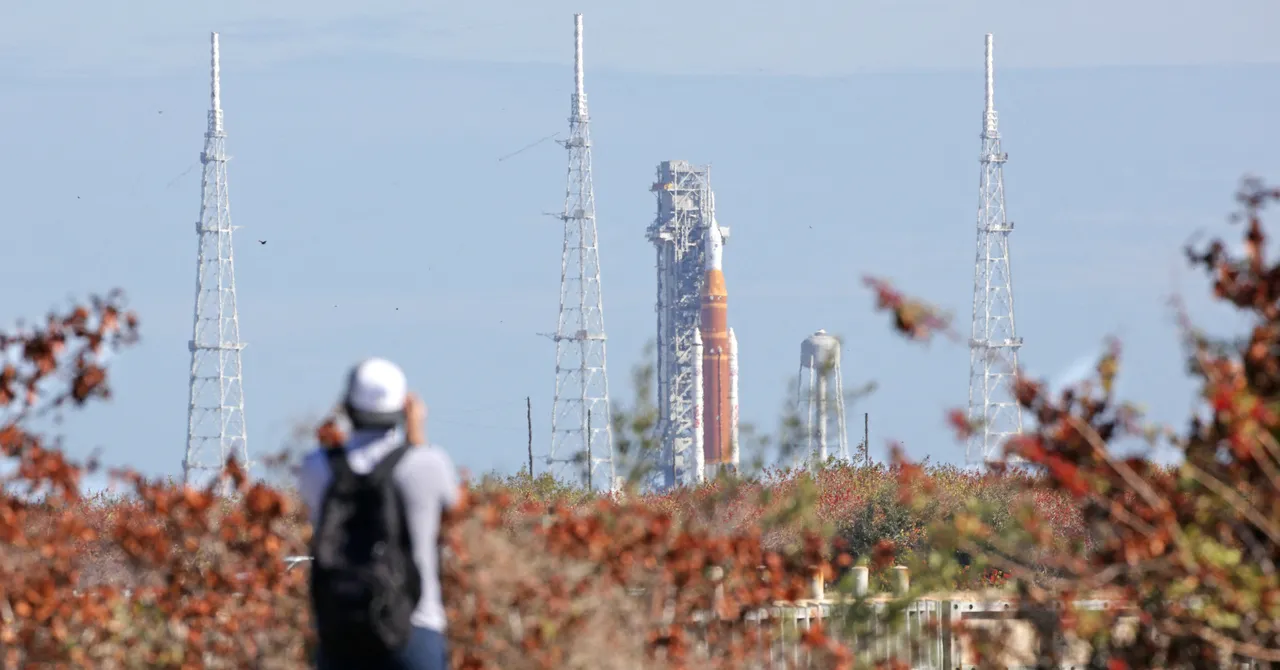
We’ll start things off this week with some breaking news from NASA: just days after the space agency announced the Artemis II crew was preparing to blast off towards the Moon as soon as March 6th, a new problem with the Space Launch System rocket has pushed the launch back indefinitely. According to NASA Administrator Jared Isaacman, problems encountered while loading helium into the Interim Cryogenic Propulsion Stage (ICPS) necessitate rolling the massive rocket back to the Vehicle Assembly Building (VAB) for diagnosis and repair.
The logistics of shuffling the vehicle 6.8 kilometers (4.2 miles) from the pad to the VAB is going to eat up at least a week, and sending it back the other way is naturally just as much of a production. Add in the time they’ll need to actually figure out what’s wrong with the ICPS and make the necessary repairs, and it’s easy to see why a March launch is almost certainly off the table. It’s frustrating to see the Artemis II mission get delayed this close to launch, but sending humans into space isn’t the sort of thing you can cut corners on.
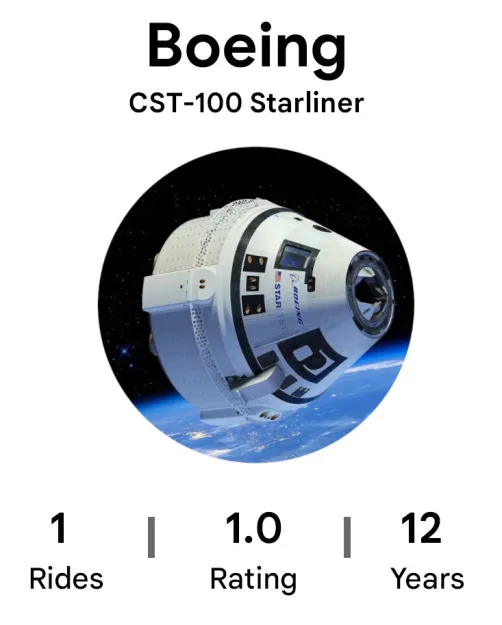
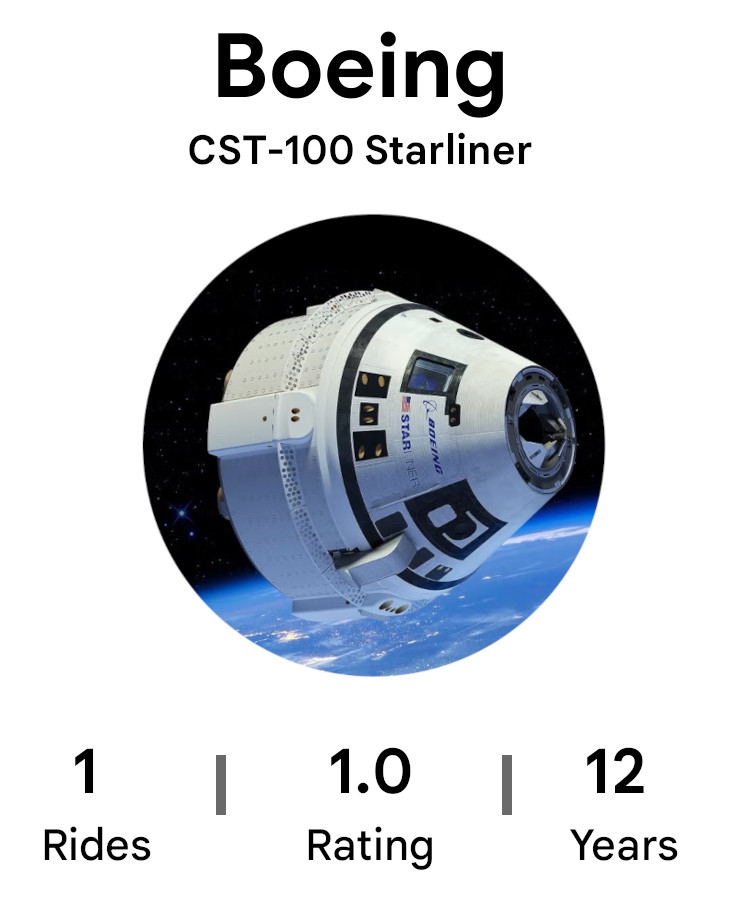
Boeing’s Uber rating is in shambles.
Well, you’d think so at least. This week NASA also released a scathing report detailing the multitude of technical issues that came up during the 2024 test flight of Boeing’s CST-100 Starliner spacecraft. While astronauts Butch Wilmore and Suni Williams eventually made it back home safely aboard a SpaceX Dragon, the space agency has still categorized it as a Type A mishap — their highest incident classification and the same rating given to the losses of Apollo 1, Challenger, and Columbia.
On the subject of companies we love to hate, a recent post by Brian Merchant on his blog Blood in the Machine (awesome band name, called it) points out the precipitous rise in Flock attacks. That is, folks are taking matters into their own hands and destroying the surveillance devices all over the US. Now Hackaday certainly isn’t condoning the destruction of anyone’s property, but we definitely appreciate the rebellious cyberpunk vibe.
Before you go out hunting for Flocks, keep in mind that at least one person has caught a charge already. In fact Jefferey Sovern picked up thirteen charges, as that’s how many Flock cameras he managed to bag before the law caught up to him. According to reports, he also admitted to “keeping some of the wiring, batteries and solar panels taken from the cameras.” Sounds like Jeff would fit in just fine around these parts.
Advertisement
Looking for some new wheels? Got a handy source of hydrogen? If so, you might be in luck. According to CarBuzz, the resale value of Toyota’s Mirai has absolutely cratered. When they were sitting on the lot a new Mirai would have cost you a bit more than $50,000, but on the second-hand market you can get last year’s model for as little as $15,000. If you’re not too picky, you can get one even cheaper. We did a little searching of our own, and found a 2021 Mirai with less than 40K miles for just $9,000. That’s an insane price for a mid-size luxury car, but of course it doesn’t really matter how cheap the car is if you can’t find anywhere to fill the thing up.
Finally, the folks at F-Droid have sounded the alarm about some concerning changes Google has planned for Android. As we first covered back in October, anyone looking to develop applications for the world’s most popular mobile operating system will soon have to register with Google through a process which is still not entirely clear. Although the search giant has hinted that the system will feature some special consideration for students and hobbyists, F-Droid isn’t convinced. Until there is more transparency, they are urging developers and Android users to push back via keepandroidopen.org.
See something interesting that you think would be a good fit for our weekly Links column? Drop us a line, we’d love to hear about it.
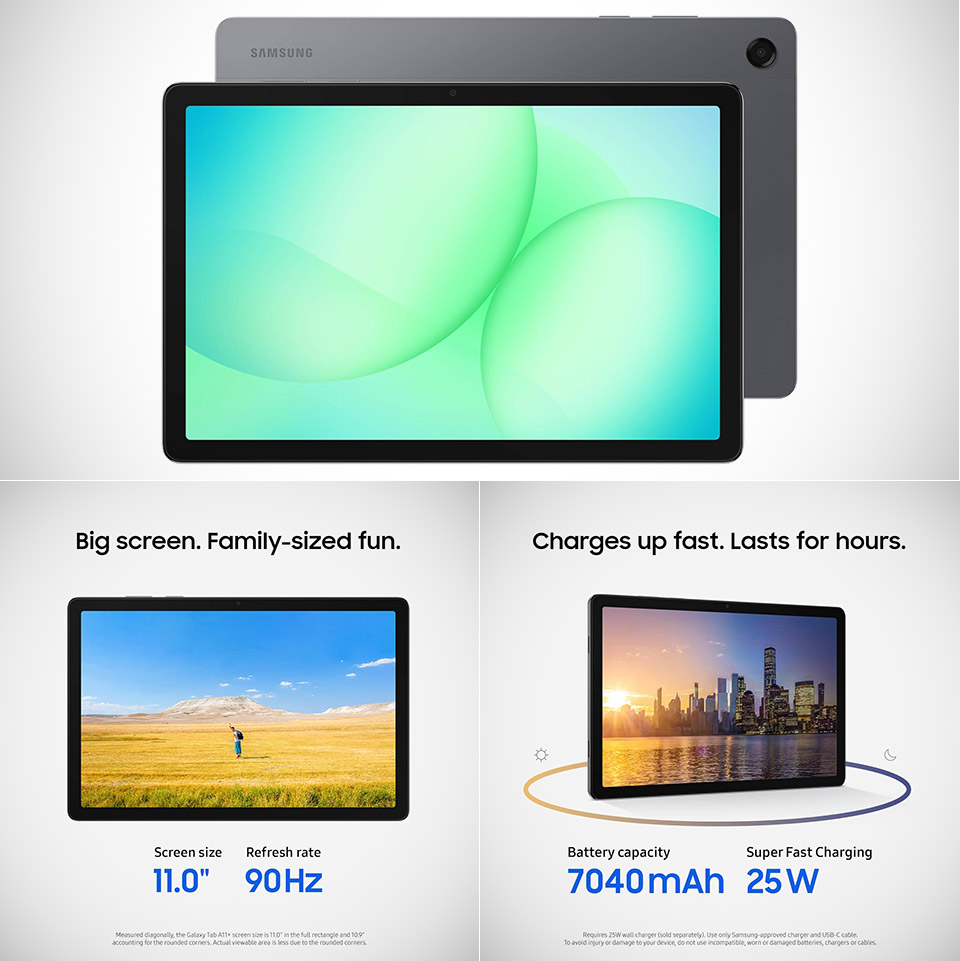
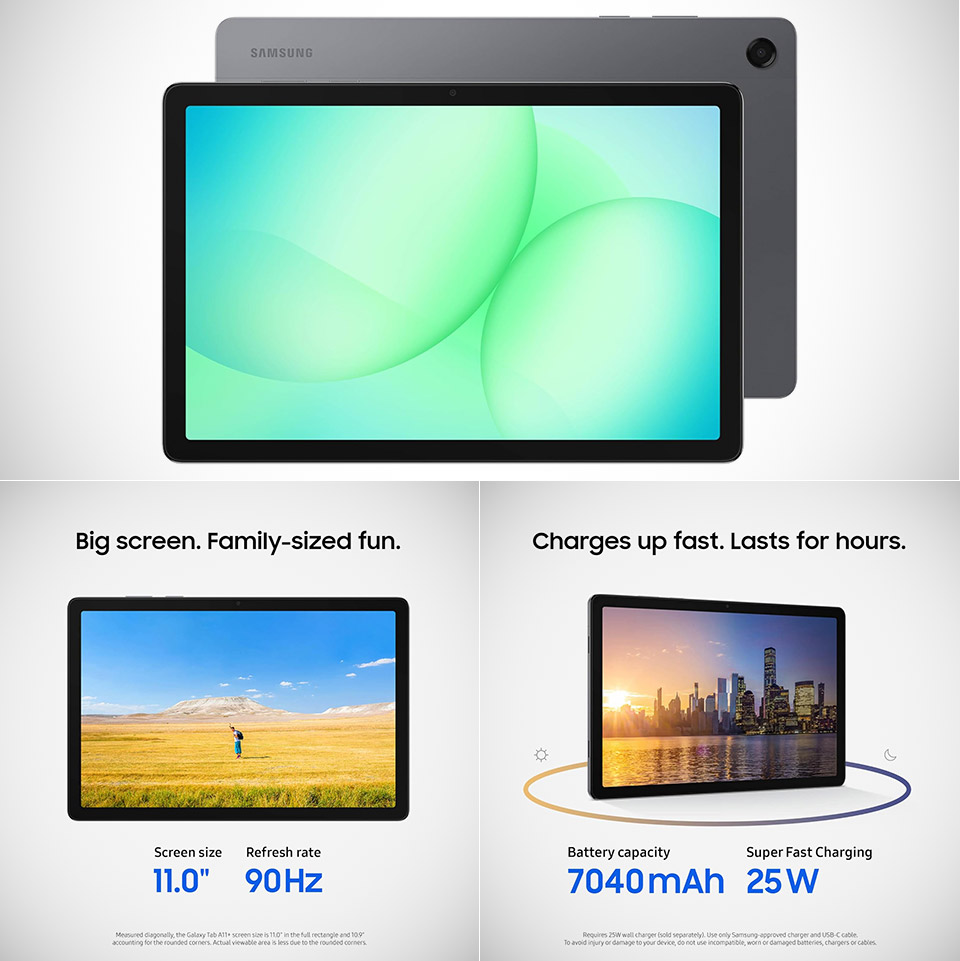
Samsung released the Galaxy Tab A11+ late last year, and it quietly exceeded people’s expectations with what it does at a reasonable price for an Android tablet. Priced at $210 (was $250) for the 6GB RAM and 128GB storage edition, this 11-inch slate includes a slew of enhancements that feel like a game changer in a market where corners are typically cut.
Let’s start with the basics: an 11-inch display with 1920 x 1200 resolution and a refresh rate of up to 90Hz. Scrolling is smooth as silk, movies play without judder or stutter, and the larger screen is ideal for binge watching, reading, or light surfing, which is far superior to many other low-cost options with smaller screens that do not refresh as quickly. The brightness and colors remain decent for indoor use, even if the LCD screen can never equal the deep contrast of the more expensive AMOLED devices.
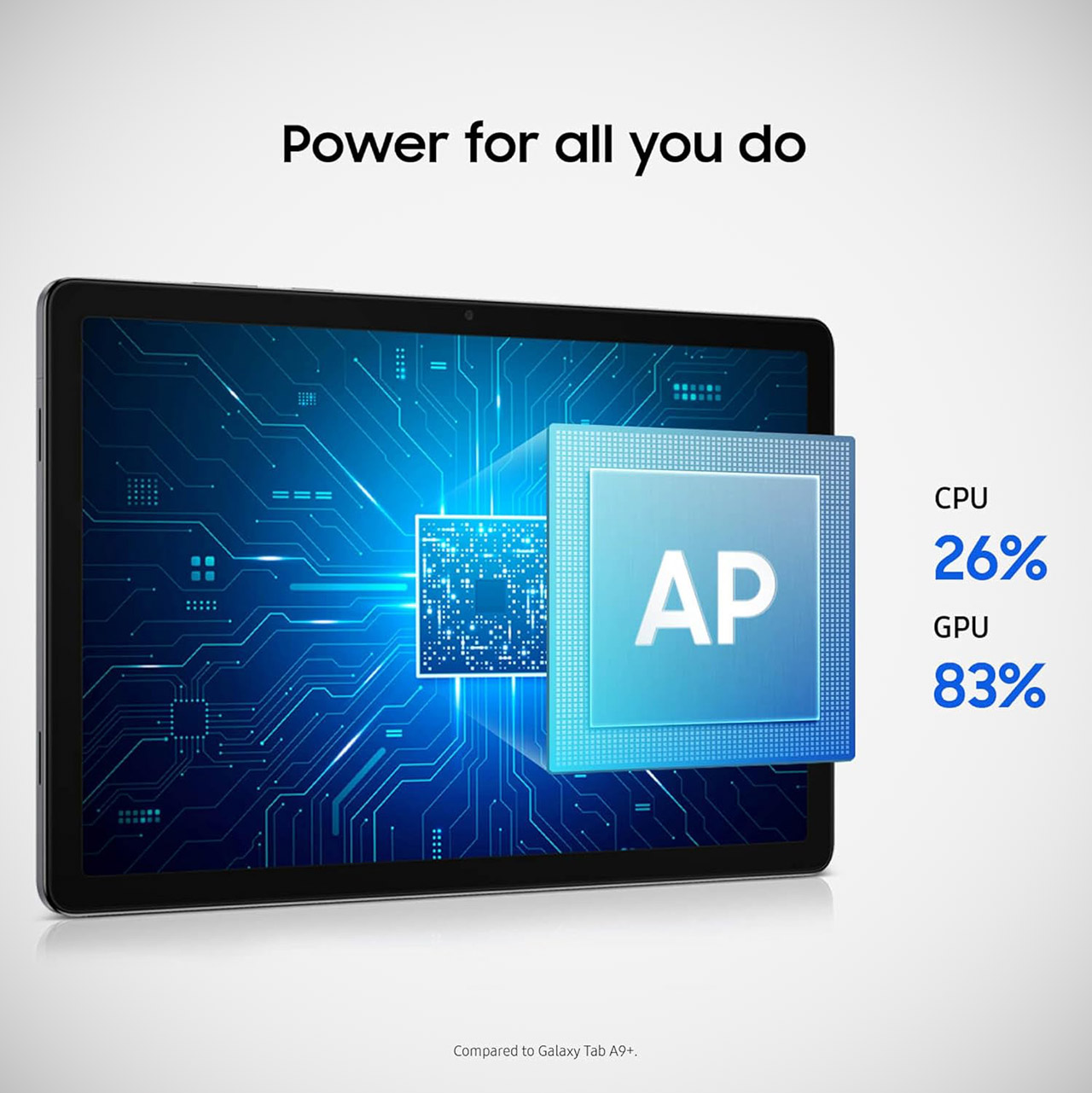
POWER FOR ALL YOU DO: Galaxy Tab A11+ gives your family the optimal performance they need for all their day-to-day activities. Power through tasks…
CHARGES UP FAST. LASTS FOR HOURS: Galaxy Tab A11+ keeps your family going with a long-lasting battery that’s perfect for browsing, streaming and…
MEMORY AND STORAGE THAT KEEP UP: With up to 8GB of memory and 256GB⁶ of storage, Galaxy Tab A11+ gives your family the space and speed to multitask…
Performance is centered around a MediaTek Dimensity 7300 chipset, which is paired with 6GB of RAM. The benchmarks indicate significant improvements over prior budget Samsung tablets, and as a bonus, you get 128GB of storage that can be upgraded by microSD card up to a whopping 2TB. This alleviates much of the worry of running out of space for images, apps, or downloaded information.
Advertisement
Another factor that contributes to the tablet’s appeal is its battery life; the 7,040mAh cell will last you a full day of mixed use and, if you’re lucky, 15 hours of video playback or light use. When you run out of power, you can put it in and get 25W fast charging. Samsung’s quad speakers, which are calibrated with Dolby Atmos, offer rich, room-filling sound that truly outperforms the tablet’s weight class. So you can fully enjoy your movies or music sessions without feeling the need to plug in your headphones.
Samsung has also included some thoughtful features that truly enhance the experience. Google Gemini integration adds a great AI assistant that allows you to perform rapid searches, get summaries, and receive creative prompts directly on the device. Circle to Search allows you to circle anything on the screen to obtain instant context. To top it all off, you get security updates for a full 7 years, which is a rather unusual offer at this price point and a major deal for keeping your tablet safe and up to date long after you’ve purchased it.
NASA has once again postponed the launch of Artemis II, the crewed lunar flyby mission, setting a new launch window for April. Although March 6 had been tentatively planned as the launch date, the US space agency revealed that a problem with the rocket has caused further delay.
According to NASA administrator Jared Isaacman, the failure was due to an interruption in the helium flow in the interim cryogenic propulsion stage of the Space Launch System (SLS). The helium flow is essential for purging the engines and pressurizing the fuel tanks. This system had functioned correctly in the two dress rehearsals conducted this month, but the failure occurred during a routine operation.
Due to the nature of the problem, NASA engineers will have to fix it from the Vehicle Assembly Building (VAB), so there’s no way to proceed with the March launch window. The rocket is on its way back to the hangar.
“I understand people are disappointed by this development,” the official stated on his X account. “That disappointment is felt most by the team at NASA, who have been working tirelessly to prepare for this great endeavor. During the 1960s, when NASA achieved what most thought was impossible, and what has never been repeated since, there were many setbacks.”
Advertisement
Will Artemis II be able to embark on its mission in April? NASA reported that rapid preparations have allowed it to potentially preserve the April launch window in the event of a reversal. It all depends on what the data, the repair efforts, and how the schedule comes together in the coming days.
Artemis II: The Setbacks
The mission had its first launch window between February 6 and 11. However, during the wet dress rehearsal (WDR), which is a full rehearsal with fuel, the team detected small hydrogen leaks during refueling and some minor technical glitches. After analyzing the situation, NASA concluded that the risk was considerable and could endanger the lives of the astronauts, so it decided to postpone the launch.
A second dress rehearsal, conducted on February 19, was successful. In a statement, the space agency explained that it loaded 700,000 gallons of liquid propellant with no leaks. “During the test, teams closely monitored liquid hydrogen fueling operations, which proved challenging during previous tests. Hydrogen gas concentrations remained under allowable limits, giving engineers confidence in new seals installed in an interface used to route fuel to the rocket,” NASA said.
At a subsequent press conference, mission representatives confirmed to the media that the new tentative liftoff date would be March 6. However, on February 20, the team failed to get helium to flow through the vehicle, a failure that also occurred during testing of the Artemis I mission. Isaacman noted that the cause could be due to a faulty filter, valve or connector plate.
Advertisement
“There are many differences between the 1960s and today, and expectations should rightfully be high after the time and expense invested in this program,” Isaacman said in his post. “I will say again, the President created Artemis as a program that will far surpass what America achieved during Apollo. We will return in the years ahead, we will build a Moon base, and undertake what should be continuous missions to and from the lunar environment.”
When it eventually launches, the Orion capsule will travel farther than any other manned spacecraft during its 10-day mission, surpassing on the sixth day the record of 400,171 kilometers set by Apollo 13. The return will conclude with Orion’s landing in the Pacific Ocean off the coast of San Diego, California.
Although there will be no lunar landing—that feat will fall to the Artemis III mission—the second launch is of crucial importance. Its success will demonstrate that NASA has the technical capabilities to return to the moon and begin a new phase of space exploration.
This story originally appeared in WIRED en Español and has been translated from Spanish.
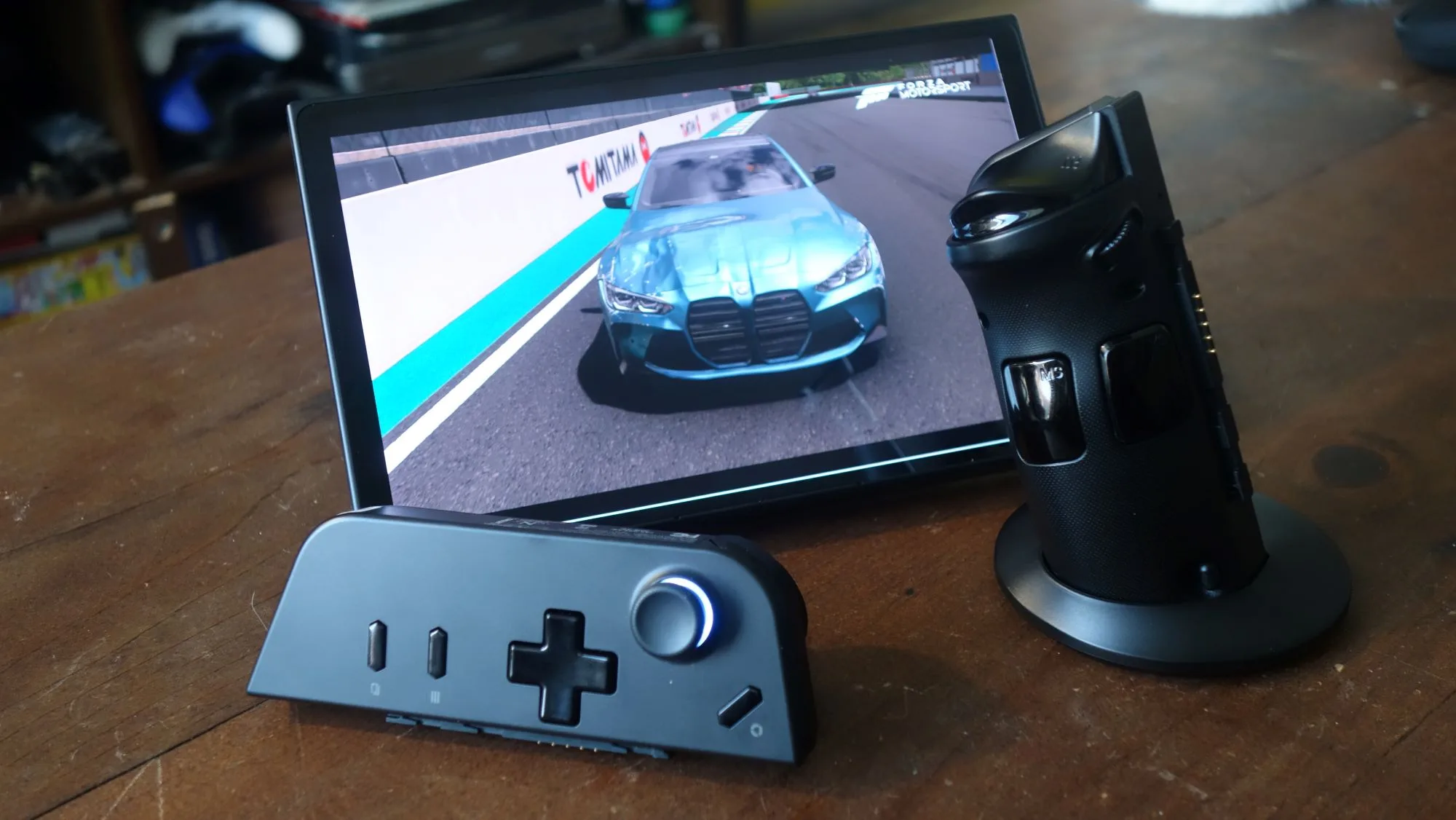
Owners of handheld gaming PCs powered by AMD’s Ryzen Z1 chips may have reason to feel uneasy. What started as a support message regarding the Lenovo Legion Go has quickly turned into a broader concern that driver updates for the Ryzen Z1 and Z1 Extreme platform may have slowed or even paused across multiple devices.
Giovanni Colantonio / Digital Trends
The situation first came to light when Lenovo Korea reportedly informed customers that the original Legion Go would not receive further BIOS or driver updates. Instead, users were advised to rely on Windows Update and generic AMD drivers, where compatible. Now, additional reports suggest the issue may extend to ASUS’s popular ROG Ally, another flagship Ryzen Z1 Extreme handheld. According to user reports, the device appears to be stuck on graphics drivers dating back to August 2025, with no newer releases despite several major game launches since then.
Is handheld driver support quietly stalling?
This detail matters because the ROG Ally and Legion Go are the two most recognizable Windows gaming handhelds powered by AMD’s custom Z1 silicon. If both devices are relying on older drivers, it suggests the slowdown could be happening at the platform level rather than being isolated to a single manufacturer.
Jacob Roach / Digital Trends
Adding to the confusion, Lenovo forum posts also warn users not to install Legion Go S drivers on the original Legion Go. Interestingly, the Legion Go S uses the Z2 Go chip based on the older Zen 3 architecture, while the Z1 Extreme, whose updates now appear to have stalled, is built on the newer Zen 4 architecture. The generational mismatch makes cross-installation risky and further limits options for affected users.
Driver updates play a crucial role in handheld gaming performance. They often bring game-specific optimizations, power management refinements, and bug fixes tailored to each device’s thermal and battery constraints. Without consistent updates, handheld PCs risk gradually falling behind newer games and evolving Windows builds. For handheld gamers, the uncertainty is the biggest concern. While nothing has been officially confirmed by AMD yet, with both Legion Go and ROG Ally owners noticing stalled updates, the conversation around long-term handheld support is clearly gaining momentum.
We may receive a commission on purchases made from links.
The Steam Machine promises to be an interesting gaming console, delivering the flexibility and performance of an entry-level gaming PC without the complexity of Windows. Note that isn’t the first time that Valve made a Steam Machine, as this console’s first iteration arrived in 2014. Unfortunately, the first-generation console flopped hard, and the gaming company pulled the last of the Linux consoles from its platform in 2018.
Advertisement
One of the reasons that the original Steam Machine didn’t take off was the lack of gaming developer support for the Linux-based SteamOS that it used. This has changed, however, with the arrival of the Steam Deck and the Proton compatibility layer, which allows non-Linux native titles to run on the handheld console. This meant that, slowly but surely, gamers can ditch Windows (which has its fair share of bugs and other issues) while enjoying titles primarily made for PC.
Steam Deck’s success led Valve to announce a second-generation Steam Machine in late 2025, with the console originally expected to arrive in early 2026. Unfortunately, the company announced that it will delay the launch of the gaming PC console. So, if you cannot wait for the new Steam Machine to arrive and instead want to build your own, these are the components that you should look at.
Advertisement
A comparable CPU
Alberto Garcia Guillen/Shutterstock
The Steam Machine will come with a 6-core AMD Zen 4 x86 processor that can hit up to 4.8 GHz and comes with a 30-watt TDP. This means that it won’t be based on the newer Ryzen 9000 series, which uses the newer Zen 5 architecture. So, we will look at processors that use the older Zen 4 architecture without an integrated GPU, have six cores, and has a boost clock speed of around 4.8 GHz that you can purchase from Amazon or Newegg.
That limits us to the following options: the Ryzen 5 8400F, the Ryzen 5 7500F, and the Ryzen 5 7400F. These chips all have 6 cores (12 threads), have a 4.7 GHz boost clock (except for the Ryzen 5 7500F which can hit 5.0 GHz), and 32 MB of L3 Cache (except for the Ryzen 5 8400F which only has 16 MB). All of them also have a TDP of 65 watts, which is the lowest that we could find. The Ryzen 5 8400F is currently priced at $143.92 on Amazon, making it the cheapest option. The Ryzen 5 7400F, which was initially launched as a China exclusive, is now available on Newegg for $147.59, while the slightly faster Ryzen 5 7500F costs $163.99.
Given these options, we suggest picking up the Ryzen 5 7400F, which is priced at the middle of the pack. It only has a slightly lower boost clock than the 7500F while costing about $15 less. And even though the 8400F is more affordable, you’re going to appreciate the 32 MB L3 Cache of the 7400F, which helps improve minimum frame rates to deliver smoother gameplay.
Advertisement
Which AMD GPU should you get?
tinhkhuong/Shutterstock
Valve said that its latest gaming PC console will come with a semi-custom GPU, meaning we won’t be able to find a 1:1 analog for it. Nevertheless, the company specced the Steam Machine with an AMD RDNA 3 graphics card with 28 CUs (or Compute Units), 8GB GDDR6 VRAM, a maximum sustained clock speed of 2.45 GHz, and a 110-watt TDP. Since Valve uses an RDNA 3 GPU, that means we’re limiting our options to AMD Radeon RX 7000-series GPUs.
If we look at all the discrete GPUs under the 7000 desktop series family, there are two models that are close to Valve’s specifications: the AMD Radeon RX 7600 and the RX 7600 XT, both of which have 32 CUs. The latter has a 2.47 GHz Game Frequency, nearly matching what the Steam Machine has, but has a maximum memory size of 16 GB. On the other hand, the non-XT version matches the semi-custom GPU’s 8 GBs of VRAM but has a much lower 2.25 GHz Game Frequency. Both GPUs also require a higher TDP — 190W for the RX 7600 XT and 165W for the RX 7600.
However, the 7600 XT is quite expensive, with the cheapest model we can find costing well over $500. Because of this, we’re picking the $274.99 Asus Dual Radeon RX 7600 EVO OC GPU on Amazon, which has a similar 8GB of VRAM and a lower TDP. While it’s possible that Valve will choose a laptop GPU, we’re not going to go in that direction because most consumers cannot purchase that as a standalone unit.
Advertisement
Finding compatible memory, storage, and motherboard
Den Rozhnovsky/Shutterstock
Valve said that the Steam Machine will come with 16 GBs of SO-DIMM DDR5 laptop memory, although it’s unclear if it will have one or two RAM sticks. But because we’re using desktop components, we will just stick with two 8GB DDR5 RAM sticks. Since memory modules are prohibitively expensive at the moment, we’ll get the most affordable unit we can find — the Patriot Viper Venom 16 GB (2 x 8 GB) DDR-6000, which costs $199.99 on Newegg.
For storage, the Steam Machine is available with either a 512 GB or 2 TB SSD — since we’re trying to keep our costs down, we’ll stick with a 512GB SSD. The console also uses the smaller 2230 form factor for its storage, but we’re going with the larger 2280 instead, because it’s cheaper. So, for our storage, we picked the Patriot P400 Lite M.2 PCIe Gen 4 x4 500 GB SSD, which will set us back $80.99 on Newegg. If you can afford to spend a little bit more, it’s wiser to get at least 1TB so that you don’t run out of space for installing all your favorite titles.
Advertisement
Finally, we need to get a motherboard that will accommodate all our chosen components so far. Unfortunately, the smaller Mini ITX motherboards are out of our budget, so we’ll stick with the most affordable compatible Micro ATX motherboard instead. But even though we’re on a budget, we’re avoiding the most basic chipsets like the A620 because we’re still building this for gaming. For that reason, we’re picking the ASRock B650M-HDV/M.2, which costs $99.99 on Amazon.
Advertisement
Which PSU, case, and cooler should we get?
Dikushin Dmitry/Shutterstock
AMD recommends a minimum 550-watt power supply for the AMD Radeon RX 7600, so we’ll stick with that for safety. Even though we want a compact build, SFX power supplies built for small form factor (SFF) PCs are quite expensive and will cause us to go overbudget. So, we’ll instead go for the MSI MAG A550BN, which is a cheap but reliable PSU, costing only $54.99.
Now that we have power, we need to put everything inside a case. While we’d love to stick with an SFF case, these are just too expensive. So, we’re going one size up with the Cooler Master MasterBox Q300L, which just costs $39.99 on Amazon and Newegg. It can accommodate a PSU up to 160 mm, ensuring that the MSI MAG A550BN will fit inside it. It also gives us the option to install a 240mm radiator for an AIO liquid cooler, but since we don’t want to spend too much on any component, we’re sticking with air cooling.
Speaking of cooling, we still need to get a CPU cooler because the AMD Ryzen 5 7400F is a tray processor, meaning it doesn’t come with a stock cooler. We also deliberately kept it last so that we know how much clearance we need with the PC case. Cooler Master says that the MasterBox Q300L has 159 mm of space for an air cooler, meaning one of the best air coolers on the market, the Thermalright Peerless Assassin 120 SE, with its 155 mm height, would fit in the system. More importantly, it’s quite affordable at just $38.90.
Advertisement
How much will the full build cost?
Our build comes out at a total of $937.43. This might surprise you, especially as we tried to keep our costs down, but that is difficult with the current cost of RAM and storage. In fact, PCPartPicker shows that our RAM module’s price increased by 300% since 2025, while our SSD’s cost doubled in the same period. If we bought these components at their original prices, our cost would just be around $750. Nevertheless, you can still get some savings if you catch a sale on all the other parts. Alternatively, you can buy some of these PC parts in the used market to save money, as long as you know what to look for when doing so.
Valve said that it will not subsidize the cost of the console (unlike PlayStation and Xbox), but it claims that it’s aiming for “great value” on “the entry-level side of things.” This will be difficult, though, with RAM and SSD prices out of control. Leaks from third-party retailers suggest prices from $949 to $1,070, although some analysts have suggested a lower price. The company still hasn’t confirmed what the final cost of the console will be, but we expect it to be higher than early estimates.
Although the savings you get when you go through the DIY route is quite small, it still offers a couple of advantages. For one, you can set your own specs — if you have extra cash, you can opt for more powerful components that will allow you to enjoy faster frame rates and play more demanding games on your living room TV. Another bonus of a custom build is that you can update it later, allowing you to enjoy your DIY Steam Machine for longer.
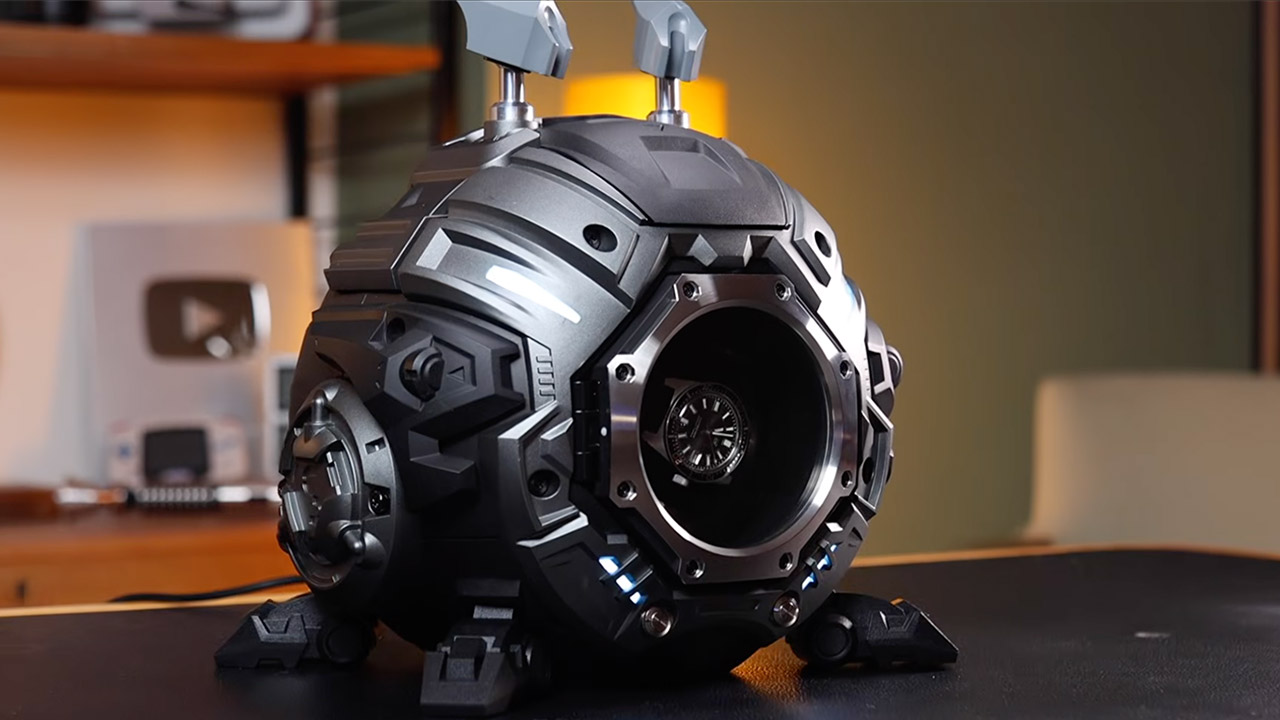
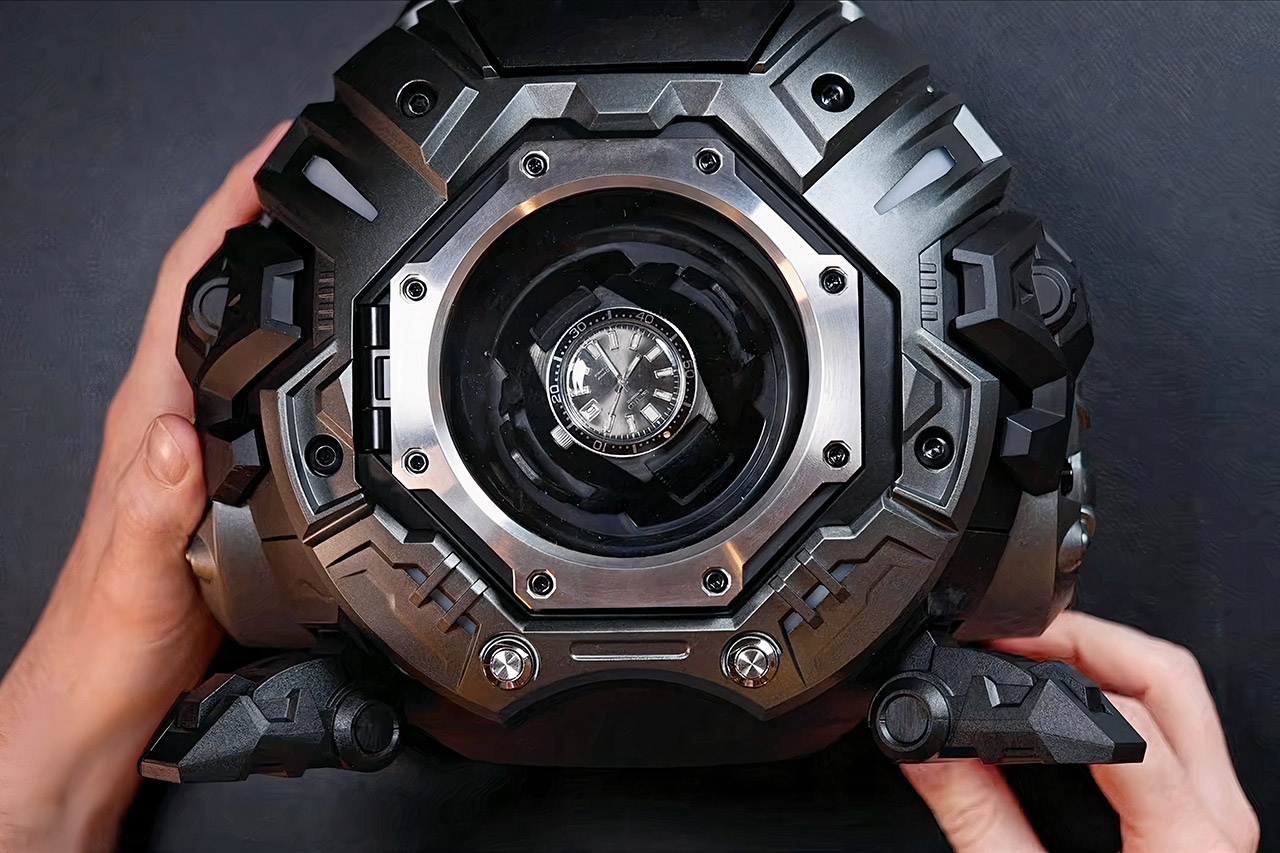
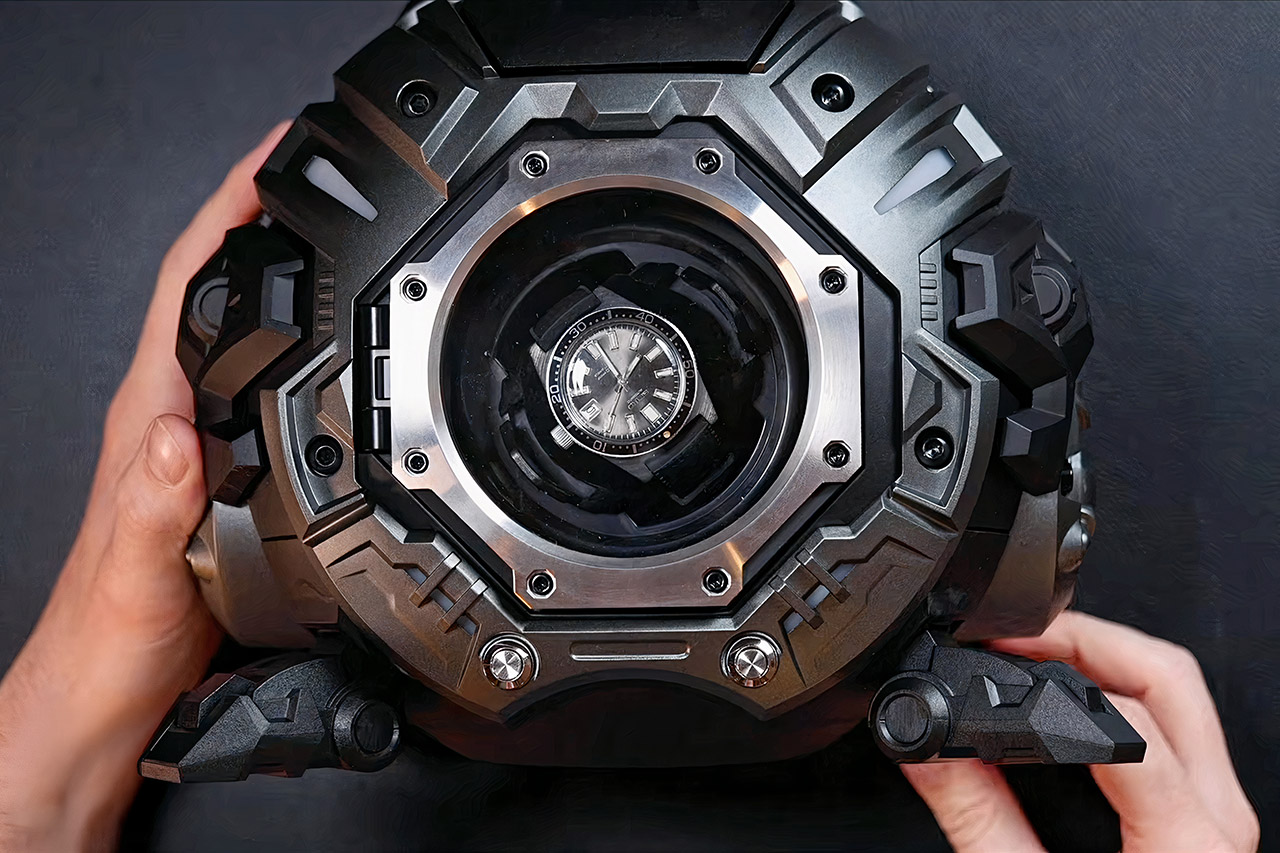
A gravity-wielding winder appears, which resembles a sci-fi gadget rather than something you’d want on your desk. Metilis refers to it as the Gravity Furnace, which will come as no surprise. This single-watch winder spins automatic watches with the precision of a Swiss watchmaker, but instead of a boring wooden box, it resembles a chunky robot from an old-school anime.
Collectors of automatic watches will understand that you have to keep these bad boys moving when they’re not on your wrist or it just stops working. Standard winders do the work quietly inside an oak case, rotating the watch in smooth cycles, but the Gravity Furnace is unique. It’s designed around a robot arm that wraps around and rotates the watch, all encased in a full-metal shell with sharp pieces and modular panels that can be swapped out for a new look. It has an industrial air, as in, “I’ve got a garage full of tools.” There are adjustable side plates, odd antenna-like pieces, and even swappable metal or rubber feet to give it a unique look.
HEALTH ESSENTIALS — Temperature sensing enables richer insights in the Vitals app* and retrospective ovulation estimates.* You’ll also get a daily…
GREAT BATTERY LIFE — Enjoy all-day, 18-hour battery life. Then charge up to twice as fast as SE 2* and get up to 8 hours of battery in just…
ALWAYS-ON DISPLAY — Now you can read the time and see the watch face without raising your wrist to wake the display.
You have to open the large metal door by hand; there are no finicky buttons for this thing, and when you do, it clicks shut with this delightfully satisfying sound. The touch screen comes to life in a deep blue tone, and from there you can play with the settings. It’s very simple: do you want to wind the watch every day, every now and then, or just let it run on its own? You can even give it a manual spin if it needs some extra TLC. The UI is a little rough around the edges, and I’m sure there are some spelling errors in there, but once you get the feel of it, you’re golden.
Advertisement
The power comes from two USB-C ports, which are useful for charging your phone, and there’s an internal battery that’s coupled with a real-time clock, so it keeps nice and accurate even when not plugged in. The motors are also extremely quiet; you don’t want a noisy humming object to distract you as you work. When it’s finished, it returns the watch to its proper position, allowing you to read the time.
The Gravity Furnace costs $800, which is a lot for a watch winder, especially since there are cheaper multi-watch winders available. The weight is also an issue, as moving it to your desk is similar to moving a little boulder. There are still certain parts of the prototype that don’t look finished, but that’s part of the appeal.


















![Apple Watch SE 3 [GPS 40mm] Smartwatch with Starlight Aluminum Case with Starlight Sport Band - S/M...](https://m.media-amazon.com/images/I/31YiTby0pOL._SL160_.jpg)