




Connect with us

Tech

Colorado is working on a bill that would make it illegal to 3D print firearms and gun parts

Published

on

A collective of Colorado lawmakers wants to put an end to “ghost guns” and their rising popularity. Earlier this week, the state’s House Judiciary Committee voted in a 7-4 majority to pass the bill, HB26-1144, along for a decision with the full House of Representatives. The proposed law would “prohibit the use of a three-dimensional printer, or similar technology, to make a firearm or a firearm component.”

Ghost guns are typically made from 3D printers or similar machines without serial numbers, making them virtually impossible to trace and allowing users to skirt the federal requirements for purchasing a firearm. While the bill targets using a 3D printer to make guns, large-capacity magazines and other related components, it even bans possessing and distributing the instructions to manufacture guns in this way. However, these rules would be exempt for federally licensed firearm manufacturers.

“These ghost guns are increasingly found at crime scenes, making it harder for law enforcement to track down a suspect because the gun isn’t traceable,” the bill’s sponsor, Lindsay Gilchrist, said in a press release.

Prior to this proposal, Colorado passed a law in 2023 that banned owning ghost guns or making frames for them. While SB23-279 laid the groundwork, HB26-1144 can be seen as the next step since it’s much more encompassing by targeting ghost guns even before they’re made. According to the bill, first-time violations will be treated as a misdemeanor, while repeat offenses will be upgraded to a felony charge. Looking ahead, HB26-1144 still has to secure a vote from both the Colorado Senate and House of Representatives before being delivered to the governor to be signed into law.

Advertisement

Source link

Continue Reading
Click to comment

Leave a Reply

Your email address will not be published. Required fields are marked *

Tech

Government Docs Reveal New Details About Tesla and Waymo Robotaxis’ Human Babysitters

Published

on

Are self-driving vehicles really just big, remote-controlled cars, with nameless and faceless people in far-off call centers piloting the things from behind consoles? As the vehicles and their science-fiction-like software expand to more cities, the conspiracy theory has rocketed around group chats and TikToks. It’s been powered, in part, by the reluctance of self-driving car companies to talk in specifics about the humans who help make their robots go.

But this month, in government documents submitted by Alphabet subsidiary Waymo and electric-auto maker Tesla, the companies have revealed more details about the people and programs that help the vehicles when their software gets confused.

The details of these companies’ “remote assistance” programs are important because the humans supporting the robots are critical in ensuring the cars are driving safely on public roads, industry experts say. Even robotaxis that run smoothly most of the time get into situations that their self-driving systems find perplexing. See, for example, a December power outage in San Francisco that killed stop lights around the city, stranding confused Waymos in several intersections. Or the ongoing government probes into several instances of these cars illegally blowing past stopped school buses unloading students in Austin, Texas. (The latter led Waymo to issue a software recall.) When this happens, humans get the cars out of the jam by directing or “advising” them from afar.

These jobs are important because if people do them wrong, they can be the difference between, say, a car stopping for or running a red light. “For the foreseeable future, there will be people who play a role in the vehicles’ behavior, and therefore have a safety role to play,” says Philip Koopman, an autonomous-vehicle software and safety researcher at Carnegie Mellon University. One of the hardest safety problems associated with self-driving, he says, is building software that knows when to ask for human help.

Advertisement

In other words: If you care about robot safety, pay attention to the people.

The People of Waymo

Waymo operates a paid robotaxi service in six metros—Atlanta, Austin, Los Angeles, Phoenix, and the San Francisco Bay Area—and has plans to launch in at least 10 more, including London, this year. Now, in a blog post and letter submitted to US senator Ed Markey this week, the company made public more aspects of what it calls its “remote assistance” (RA) program, which uses remote workers to respond to requests from Waymo’s vehicle software when it determines it needs help. These humans give data or advice to the systems, writes Ryan McNamara, Waymo’s vice president and global head of operations. The system can use or reject the information that humans provide.

“Waymo’s RA agents provide advice and support to the Waymo Driver but do not directly control, steer, or drive the vehicle,” McNamara writes—denying, implicitly, the charge that Waymos are simply remote-controlled cars. About 70 assistants are on duty at any given time to monitor some 3,000 robotaxis, the company says. The low ratio indicates the cars are doing much of the heavy lifting.

Waymo also confirmed in its letter what an executive told Congress in a hearing earlier this month: Half of these remote assistance workers are contractors overseas, in the Philippines. (The company says it has two other remote assistance offices in Arizona and Michigan.) These workers are licensed to drive in the Philippines, McNamara writes, but are trained on US road rules. All remote assistance workers are drug- and alcohol-tested when they are hired, the company says, and 45 percent are drug-tested every three months as part of Waymo’s random testing program.

Advertisement

Source link

Continue Reading

Tech

A $185 motherboard discount is a great way to start a SFF PC build

Published

on

Small-form-factor PC builds are awesome when they’re done right, but they can get expensive fast. Between DDR5 memory, SSD pricing, and GPU costs that still feel higher than most people want, the budget can disappear before you even finish the parts list. That’s why this clearance deal stands out.

The GIGABYTE B850I AORUS PRO WIFI7 is down to $124.99, which is a huge drop from the $309.99 comp value. That’s $185 off, and for an AM5 mini-ITX board with Wi-Fi 7 support, it’s the kind of discount that can meaningfully shift your build math. Instead of blowing your budget on the motherboard, you can redirect that savings toward the parts that usually sting more, like RAM, storage, or your GPU.

What you’re getting

This is a mini-ITX AM5 motherboard built for AMD systems, with support for DDR5 memory and Wi-Fi 7. The mini-ITX form factor is the big story here because it’s aimed at compact builds where space is tight and every component choice matters.

Boards in this category usually carry a premium just because they’re small and feature-packed. You’re paying for size efficiency, connectivity, and the ability to build something clean and powerful without a full tower. Getting one at a clearance price changes the equation.

Advertisement

If you’ve been planning a compact gaming PC, living-room build, or just want a cleaner desk setup, this is the type of part that lets you start with a strong foundation without immediately overpaying.

Why it’s worth it

The best angle on this deal is simple: it gives you breathing room.

PC builders are still dealing with expensive upgrade paths in a few key areas, especially DDR5 and GPUs. Saving $185 on the motherboard is not a tiny coupon. That’s real money you can use to step up your graphics card, grab a larger SSD, or avoid settling for the cheapest memory kit.

It also helps that this is a current-platform board. AM5 gives you a more modern base to build on, which matters if you’re trying to build once and upgrade parts over time instead of rebuilding everything next year.

Advertisement

The bottom line

At $124.99 on clearance, the GIGABYTE B850I AORUS PRO WIFI7 is an unusually good price for a mini-ITX AM5 motherboard. The biggest value here is not just the board itself, it’s what the discount lets you do with the rest of your budget. If you’re building compact and trying to manage rising component costs, this is a very smart place to save.

Source link

Advertisement
Continue Reading

Tech

The heavy “portable” Toshiba T100 helped define early mobile business computing

Published

on


Long before laptops became thin metal slabs you could slip into a backpack, portable computing meant something very different – in the early 1980s, portability was measured less by weight than by the simple fact that a machine could be moved from one desk to another at all.

Source link

Continue Reading

Tech

Perplexity's Comet AI browser is coming to iPhone soon

Published

on

Perplexity has confirmed that its AI-powered web browser Comet will finally come to the iPhone in March 2026. Expect to have to make significant in-app purchases to maybe make it better than Safari.

Perplexity AI search interface on a light background, showing a text box with the typed question When will Comet come to iPhone and controls for model selection, voice, and submit button
Perplexity’s Comet browser comes to iPhone on March 11, 2026

The browser, which is already available to Mac users, is available for preorder from the App Store. However, while the iPhone version is set to release on March 11, the iPad version doesn’t appear to be ready just yet.
While Comet can be used to browse the web just like Safari and other browsers, Perplexity believes its built-in AI makes its app more powerful. Users will be able to open a webpage and ask Perplexity’s AI questions around its content, ask for a summary, and more.
Continue Reading on AppleInsider | Discuss on our Forums

Source link

Continue Reading

Tech

Samsung Galaxy S26 Ultra Gets First Hands-On Unboxing Before Official Reveal

Published

on

Samsung Galaxy S26 Ultra Unboxing
Photo credit: Karoul Sahil
The surprise arrival of the Samsung Galaxy S26 Ultra in some stores has got people really excited, with one very good unboxing video from a customer that allegedly shows the device in hand a good few days before the official Unpacked event on February 25, 2026.


The S25 Ultra’s elevated camera module replaces the flat camera layout, bringing back some of the concepts seen in previous Samsung phones but with a more modern feel this time. The corners are slightly rounded, making the enormous phone easier to hold. Despite its substantial size and weight, it feels the same as before, with only a few small changes to the measurements. It’s still a huge phone, but you wouldn’t notice.

Sale


Motorola Moto G 5G | 2024 | Unlocked | Made for US 4/128GB | 50MP Camera | Sage Green
  • Immersive 120Hz display* and Dolby Atmos: Watch movies and play games on a fast, fluid 6.6″ display backed by multidimensional stereo sound.
  • 50MP Quad Pixel camera system**: Capture sharper photos day or night with 4x the light sensitivity—and explore up close using the Macro Vision lens.
  • Superfast 5G performance***: Unleash your entertainment at 5G speed with the Snapdragon 4 Gen 1 octa-core processor.

The build still utilizes premium materials, thus it’s most likely the same titanium frame as in previous models, providing more durability without adding bulk. As for colors, we have the white variant from the leaks, as well as the black units seen in some of the early film. Despite the large camera housing on the back, the rear panel features a rather clean design that manages to include all of the extra gear without dominating the phone’s appearance.

Advertisement


The screen size remains at 6.9 inches, but it is still a top-of-the-line Dynamic AMOLED 2X panel with QHD+ resolution and a 120Hz refresh rate. The M14 10-bit display has replaced the M13 version from the S25 Ultra, and it has an even better anti-reflective coating, allowing you to see what you’re doing in bright conditions. They have added a new feature called Privacy Display mode. When you switch it on, the screen goes dark from the side, so you can’t see what’s on it unless you stare directly at it.

Samsung Galaxy S26 Ultra Unboxing
The camera layout is a familiar quad setup similar to the last few Ultras. The 200MP primary sensor remains the star of the show, but it now has a larger aperture, which should allow it to produce better low-light shots. The periscope telephoto lens has also been redesigned, and it is now a bit rounder than previously; it will provide 5x optical zoom. The other two sensors on the back are the 50MP ultra-wide and 10MP 3x telephoto, while the selfie camera has a wider lens, making it simpler to capture everyone in a group image. The hardware modifications aren’t exactly revolutionary, but the improvements to optics and processing should make a visible impact, particularly in zoomed photographs and video. Samsung has also hinted at doing something clever with video zoom, which might let you to move even further away from your subject without compromising quality.

Samsung Galaxy S26 Ultra Unboxing
The Snapdragon 8 Elite Gen 5 will handle processor duties across all markets, earning the ‘For Galaxy’ badge in the process, however there are some rumored minor clock speed increases as well. The RAM has also been increased to 16GB in the top-tier versions, while storage starts at 256GB and goes all the way up to 1TB, eliminating the old 128GB base models in the process. As you’d expect from a high-end Ultra device, all of this should provide you with the performance you need to tackle whatever demanding tasks come your way, from gaming to AI features that are now integrated into One UI 8.5.

Samsung Galaxy S26 Ultra Unboxing
Battery capacity should remain at 5,000mAh, but the real change is charging, as wired speeds have finally begun to receive the upgrade we’ve been waiting for, jumping from 45W to a whopping 60W, which must be a welcome relief for anyone tired of slow top-ups. Meanwhile, wireless charging has reportedly increased to 25W.
[Source]

Source link

Advertisement
Continue Reading

Tech

How to watch Paradise season 2 online from anywhere

Published

on

Xavier (Sterling K Brown) ventures out into the world beyond the bunker in search of his wife Teri (Enuka Okuma), and things start to take a distinctly sci-fi turn. The sophomore season of a planned trilogy introduces two key characters: former Graceland tour guide Annie (Shailene Woodley) and clued-up outsider Link (Thomas Doherty).

Swipe to scroll horizontally

Three years on from The Day, pockets of people are still clinging on – which is about as much that can be said about Sinatra (Julianne Nicholson) in the wake of her shooting by Xavier’s fellow Secret Service agent Jane (Nicole Brydon Bloom). She’s alive, but in her severely weakened state she’s going to struggle to maintain her grip on the bunker’s precarious social order.

Source link

Continue Reading

Tech

Today’s NYT Connections: Sports Edition Hints, Answers for Feb. 23 #518

Published

on

Looking for the most recent regular Connections answers? Click here for today’s Connections hints, as well as our daily answers and hints for The New York Times Mini Crossword, Wordle and Strands puzzles.


Today’s Connections: Sports Edition is a tough one. The purple category requires you to twist the spelling of certain team names. If you’re struggling with today’s puzzle but still want to solve it, read on for hints and the answers.

Connections: Sports Edition is published by The Athletic, the subscription-based sports journalism site owned by The Times. It doesn’t appear in the NYT Games app, but it does in The Athletic’s own app. Or you can play it for free online.

Advertisement

Read more: NYT Connections: Sports Edition Puzzle Comes Out of Beta

Hints for today’s Connections: Sports Edition groups

Here are four hints for the groupings in today’s Connections: Sports Edition puzzle, ranked from the easiest yellow group to the tough (and sometimes bizarre) purple group.

Yellow group hint: “You stink!”

Advertisement

Green group hint: 1996 movie.

Blue group hint: Sunshine state.

Purple group hint: Football teams, with a twist.

Answers for today’s Connections: Sports Edition groups

Yellow group: Heckle.

Advertisement

Green group: Characters in “Space Jam.”

Blue group: Florida college teams.

Purple group: NFL teams, with the first letter changed.

Read more: Wordle Cheat Sheet: Here Are the Most Popular Letters Used in English Words

Advertisement

What are today’s Connections: Sports Edition answers?

completed NYT Connections: Sports Edition puzzle for Feb. 23, 2026

The completed NYT Connections: Sports Edition puzzle for Feb. 23, 2026.

NYT/Screenshot by CNET

The yellow words in today’s Connections

The theme is heckle. The four answers are boo, hiss, hoot and jeer.

The green words in today’s Connections

The theme is characters in “Space Jam.” The four answers are Bugs, Jordan, Lola and Tweety.

Advertisement

The blue words in today’s Connections

The theme is Florida college teams. The four answers are Bulls, Gators, Owls and Seminoles.

The purple words in today’s Connections

The theme is NFL teams, with the first letter changed. The four answers are bolts (Colts), crowns (Browns), hackers (Packers) and paints (Saints).

Source link

Advertisement
Continue Reading

Tech

How to Tell If Content Was Written by AI (A Simple, Reliable Guide for Everyday Internet Users)

Published

on

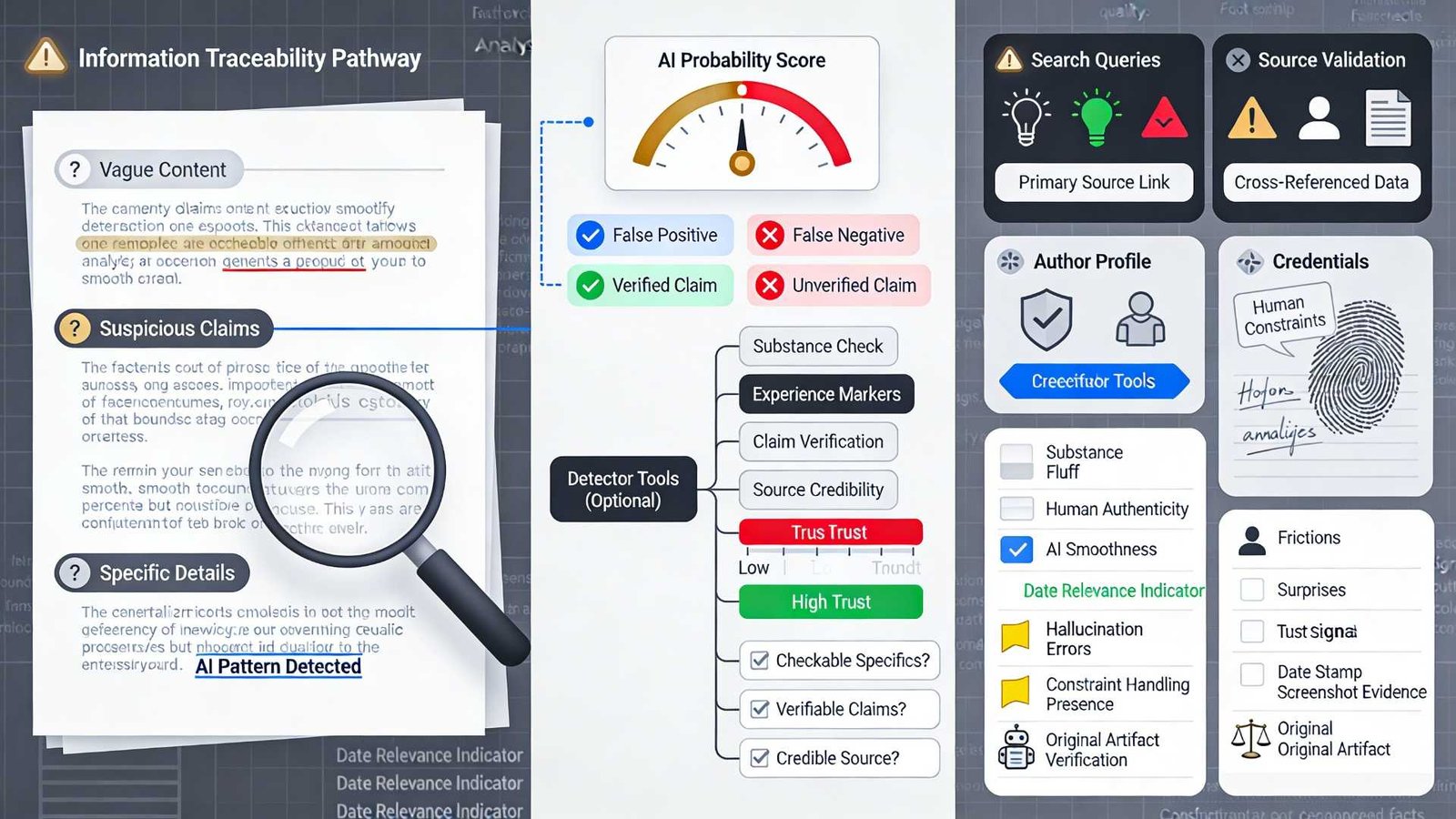
You usually can’t prove something was written by AI just by reading it—you can only estimate likelihood and then verify the claims. AI detectors also aren’t definitive: they can misclassify text (false positives and false negatives), so treat any score as a clue, not a verdict.

A useful mindset: “Is this content trustworthy?” is often a better question than “Was this made by AI?”

The 2-minute AI-content triage (works on posts, emails, reviews)

Follow this in order—each step catches a different failure mode.

Advertisement
  1. Scan for substance in 20 seconds
    Look for specific, checkable details: names, dates, numbers, locations, screenshots, first-hand constraints, or citations. AI-written fluff often sounds complete while staying vague.
  2. Check for “experience fingerprints.”
    Humans usually include small frictions: what went wrong, what surprised them, what they tried first, what they’d do differently. AI text often skips the messy middle and jumps to a neat conclusion.
  3. Do a single claim-verification search
    Pick one concrete claim and search it (or search a unique sentence in quotes). If you can’t corroborate anything meaningful, lower trust.
  4. Look at the source, not just the words
    Is there an author? An about page? A real profile history? A site with contact details and editorial standards? Provenance beats vibes.
  5. Only then use a detector (optional)
    Use tools as a second opinion—especially when you’re deciding whether to spend money, share the post, or follow advice. Remember: detectors are probabilistic and inexact.

Common “tells” in AI-written content (and what they really mean)

These signals aren’t proof. They’re patterns that should push you toward verification.

1) Over-structured, over-smooth writing
AI text often reads like it was optimized for clarity: tidy headings, balanced bullet points, and evenly paced sentences. That’s not inherently bad—some humans write that way—but if it’s paired with low specificity, be cautious.

2) Generic certainty without evidence
Watch for strong claims with no sources, no data, and no “how we know.” A trustworthy human post usually signals uncertainty where appropriate (“in my case,” “depends on,” “I couldn’t verify X”).

3) Repetition without adding new information
A classic pattern is to rephrase the same point 3–4 times to appear comprehensive. If each paragraph could be deleted without losing meaning, you’re likely reading generated filler.

4) “Perfectly neutral” tone in emotionally loaded contexts
Customer complaints, medical scares, legal advice, and crisis updates written in flat, generic language can be a red flag. People typically exhibit context-specific emotion or urgency.

Advertisement

5) Hallucination-shaped errors (confident but wrong details)
AI systems can produce plausible-sounding details that don’t exist. This is why verifying one claim is so powerful: it quickly distinguishes “well-written” from “reliable.”

Stronger signals than writing style: information quality checks

If you want one upgrade that beats most “AI detectors,” it’s this: evaluate the information.

  • Source traceability: Are there links to primary sources, and do they actually support the claim (not just “related reading”)?
  • Date relevance: Does the post clearly match the current year/version/product model?
  • Constraint handling: Does the advice mention prerequisites, edge cases, and failure modes—or does it pretend everything works smoothly?
  • Original artifacts: screenshots, logs, benchmark tables, photos, and code snippets with context (not just copy-and-paste blocks).

Using ZeroGPT (and other detectors) responsibly

If you decide to use an AI detector, use it like you’d use a spell-checker: helpful, but not authoritative.

ZeroGPT offers features such as sentence highlighting, an “AI percentage” gauge, multi-language support, file uploads, and reports—useful for reviewing where a detector identifies AI-like patterns, not for “proving” authorship.

Its site also describes a multi-stage detection approach intended to optimize accuracy while minimizing false positives/negatives, but it’s still making an estimate—not establishing ground truth.

Advertisement

A practical way to use a detector score

  • Low score: Don’t assume it’s human; still verify important claims.
  • Medium score: Treat as “uncertain”; rely more on provenance and claim-checking.
  • High score: Assume it might be AI; verify before sharing/acting, and avoid using it as the sole basis for accusations.

Why you shouldn’t rely on one tool
Even major AI detection efforts have struggled with accuracy—OpenAI discontinued its own AI text classifier in 2023, citing low accuracy. More broadly, AI detection is not foolproof; false positives and negatives are possible, and results should be treated as probabilities rather than proof.

What to do when content seems AI-written

Your response should match the risk.

  • Low stakes (entertainment, casual opinions): Ignore the authorship question and focus on whether it’s enjoyable or useful.
  • Medium stakes (product recommendations, “how-to” guides): Cross-check key claims, prefer sources with transparent authorship, and look for primary documentation.
  • High-stakes (health, finance, legal, safety, security): Don’t act on it without independent verification; prefer official sources and credentialed experts; consider consulting a professional.

When not to accuse someone of using AI
If you don’t control the platform (e.g., social media) or the decision has consequences (employment, education, reputation), don’t treat detector scores as evidence. AI detectors can misclassify human writing, and overreliance can cause unfair harm.

A simple decision framework (bookmark this)

Ask three questions:

  1. Does it contain checkable specifics? (If no → suspicious)
  2. Can I quickly verify one key claim? (If no → lower trust)
  3. Is the source credible and transparent? (If no → treat as untrusted)

If 2 out of 3 fail, assume it’s low-trust content—whether it’s AI-written or just low-effort human writing.

Source link

Advertisement
Continue Reading

Tech

How to View the ‘Blood Moon’ Total Lunar Eclipse on March 3

Published

on

The first major astronomical event visible in 2026 is a total lunar eclipse, or “blood moon.” This phenomenon is highly prized by stargazers because the entire lunar disk takes on a reddish color for a few moments.

The total lunar eclipse will occur on March 3. It will be clearly visible in North and Central America, while in Central and South Asia it will only be partially visible. It will not be visible in Europe or Africa.

Although the eclipse will begin in the early morning, totality will occur almost at dawn on March 3. A few hours before sunrise, the full moon will take on its characteristic reddish color for just 12 minutes.

Times of the Total Lunar Eclipse or “Blood Moon”

  • Los Angeles: 3:04 am
  • Denver: 4:04 am
  • Chicago: 5:04 am
  • St. Louis: 5:04 am
  • New York: 6:04 am
  • Washington, DC: 6:04 am

It’s safe to view a total lunar eclipse, unlike a solar eclipse. You don’t need any special equipment; just go to a high vantage point and dress warmly. Keep in mind that at the time of totality, the moon will be almost touching the horizon, about to disappear. That’s why it’s necessary to view it from a high place, with no buildings or trees blocking your view.

Explicación sobre la Luna de Sangre.

The little light from the sun filters through the Earth’s atmosphere and impacts the moon, giving it its orange color.

Advertisement

NASA

Why Does the Moon Turn Red?

During a total lunar eclipse, the moon does not lose its brightness completely, but takes on a dull red hue. This happens because the Earth is positioned between the sun and the moon and casts its shadow on the lunar surface.

Unlike the moon, the Earth is surrounded by an atmosphere, which filters sunlight. Thanks to it, we see the blue sky, the orange sunset, or distant objects in opaque tones. The light coming from the sun and passing through the Earth’s atmosphere manages to reach the moon, although in a smaller proportion. Those already filtered rays impact the satellite, painting it red. “It’s as if all the world’s sunrises and sunsets are projected onto the moon,” NASA explains.

Total lunar eclipses are slightly rarer than total solar eclipses. A blood moon occurs every 2.5 years on average, while a total solar eclipse happens about every 18 months, according to NASA’s astronomical catalogs.

Total lunar eclipses seem more frequent because they can be observed from anywhere it is nighttime. In contrast, to see a total solar eclipse it is necessary to be exactly in the narrow band of totality. For example, an observer can see a total lunar eclipse every two to three years, but might have to wait about 375 years to see a total solar eclipse from his or her city.

Advertisement

This story originally appeared on WIRED en Español and has been translated from Spanish.

Source link

Continue Reading

Tech

The Bosch Series 6 7.2L air fryer is now priced just shy of its Black Friday low

Published

on

The Bosch Series 6 Air Fryer XXL is an incredibly versatile piece of kit that can make meal prep a breeze, and it’s on offer today.

While it might seem like a great idea to fill your kitchen cupboards with as many different appliances as possible, it’s far more sensible to make use of a single great device that can save you a lot of time, cooking a wide array of dishes.

If that sounds like a change you want to make, then this Bosch air fryer is the one to buy right now, as it’s just £89.99 (was £140.25), with 36% off.

It was just £5 less on Black Friday, so if you missed out back then, the £50.26 saving today will be most welcome.

Advertisement
Deal Bosch Series 6 Air Fryer XXLDeal Bosch Series 6 Air Fryer XXL

The Bosch Series 6 7.2L air fryer is now priced just shy of its Black Friday low

The Bosch Series 7.2L air fryer has dropped to a price that’s edging remarkably close to its Black Friday low, making it a strong moment to upgrade your kitchen setup.

View Deal

Not only is it perfect for whipping up some crispy chips with a steak to the side, but it’s also great for frying off some burgers or grilling a few skewers for a more traditional barbecue feel when the summer hits.

Advertisement

Advertisement

It can even roast a whole chicken, so you can indulge in a hearty Sunday roast without having to rely on the oven all weekend.

Beyond the multifunctionality, Bosch’s air fryer also has a gigantic 7.2-liter capacity, which is more than enough to cater for larger families.

There are a total of seven preset programmes to make things even easier, plus features like an illuminated viewing window and a shake alarm (let’s just say, it’s best not to read too deeply into this one).

The Whatsapp LogoThe Whatsapp Logo

Get Updates Straight to Your WhatsApp

Join Now

Advertisement

You can toggle between functions via the appliance’s intuitive digital touchscreen, but for a quick look at what’s going on inside the fryer, Bosch has included a handy illuminated viewing window, so you don’t even need to open anything up mid-cycle to know whether or not your food is looking good.

It’s also worth mentioning that when compared to an oven, air fryers can cook your food up to 65% faster, meaning you save on time and potentially energy costs in the process.

Advertisement

For those who would prefer to peruse some other options for the time being, here are the best air fryers we’ve tested and tracked for ourselves.

Advertisement

SQUIRREL_PLAYLIST_10148964

Source link

Continue Reading

Trending

Copyright © 2025