The clearance puts Apple in an exclusive position – no other consumer smartphone or tablet maker has ever reached the same security threshold under the alliance’s information assurance standards. Read Entire Article Source link
We may receive a commission on purchases made from links.
Generally, garage tools fall into one of two categories. The first covers tools used by most DIY mechanics — this includes tools like socket sets, adjustable wrenches, floor jacks, and power drills. These are essentials that prove their value over years of use, although you still need to know where to splurge and where to skimp on a mechanic’s tool kit.
The other category is tools that effectively pay for themselves the first time you use them. To understand how such tools perform such a feat is simply a case of breaking down the math. The critical part of the equation we need to look at is the cost of taking your car to the workshop. In 2026, average labor rates for mechanics are generally between $120 and $159 per hour, although in some parts of the country, it can cost less than $100, while it can fetch over $200 in others.
Advertisement
In many cases, the service that you pay for covers something relatively simple, like reading a fault code, retracting a brake caliper piston, or checking the cooling system. The point is that, in some of these instances, the cost of the correct tool is less than a single garage visit, and if you’re willing and able to put in a bit of elbow grease, it’s at this stage that the economics become hard to ignore. In the right situations, each of the following garage tools can pay for themselves in a single use.
Advertisement
An OBD-II scanner
BLKstudio/Shutterstock
Few dashboard warnings cause car owners’ anxiety levels to rise and their wallets to flutter more nervously quite like the check engine light. In many cases, the first step a repair shop takes is to hook the vehicle up to a diagnostic tool and retrieve a code that points them towards the fault. While garages charge a wide range of fees for this service, and some even offer it for free, you can generally expect to pay from about $65 to potentially hundreds.
This is where a consumer-grade OBD-II scanner like the ANCEL BD310 can come into play. You can expect to pay about $80 for one of these, although at the time of writing, it was on offer for $59.99 on Amazon. Even arming the equation with the higher of these two figures, there are multiple scenarios where owning a scanner can pay for itself in a single use.
For example, it could identify a cheap and easily identifiable problem, like a loose fuel cap or a failing battery. In cases like this, most home mechanics with moderate skills will be able to perform the work themselves and save on costly garage bills. Another way that such tools could pay for themselves is by identifying serious problems early enough to avert costly repair bills. Finally, you can also use this tool to check the status of used cars before purchasing them, and this could potentially save you from buying a dud.
Advertisement
Brake caliper wind-back tool
Depending on driving style and vehicle type, your brake pads will need replacing every 30,000 to 70,000 miles. Learning how to replace brake pads can reduce garage bills, but there’s a potential stumbling block with rear brake pads.
Front brakes are relatively straightforward; compress the caliper piston, install new pads, and reassemble. Rear brakes introduce a complication that can catch the unwary DIYer off guard. On vehicles with an integrated mechanical parking brake, the rear caliper piston doesn’t simply push back into place. Instead, it must be rotated and compressed simultaneously. This is due to a threaded adjustment mechanism, and trying to force this back with a clamp can damage the caliper.
This complexity can be enough to send owners heading towards garage professionals to get the job done. This, depending on location and vehicle type, can be a costly operation, potentially running to several hundred dollars. For mechanically confident DIYers who fancy tackling brake pad change, a wind-back tool can save the cost of a visit to a professional repair shop.
Advertisement
It’s designed specifically for the task, by applying a steady pressure to the piston while turning it at the same time. The price of these tools varies, but a decent set that doesn’t “break” the bank and certainly won’t cost the equivalent of a mechanic’s time is the Orion Motor Tech 24-piece brake caliper tool. This normally sells on Amazon for $35.39, but you can find it at lower prices as well.
Advertisement
Coolant pressure tester
Diagnosing a coolant system leak can be difficult. However, it’s important that even small leaks are identified and remedied, or major engine damage can potentially happen. Aging hoses, plastic fittings, and water pump gaskets can all develop small leaks over time. Many such leaks only appear under pressure, i.e., when the engine is running. Turn it off, pop the hood, and everything may look fine.
This is why repair shops will often use a coolant pressure tester to diagnose the problem. The cost of this will vary, and some garages won’t charge if subsequent repair work is sanctioned. Depending on the shop and region, charges for coolant system repairs can run from under $100 for a simple hose replacement, to thousands for a head gasket repair.
While replacing a head gasket is a step too far for most DIYers, with minor leaks or issues, a coolant pressure testing kit is another tool that’s kind to your wallet. The tool connects to the radiator or expansion tanks and uses a hand pump to pressurize the system and highlight leaks. For owners comfortable replacing hoses or components, this tool can turn a potentially expensive repair shop visit into a few-dollar driveway task.
The price of such tools can vary from about $30 up to hundreds of dollars. For most home users, however, a system like the Orion Motor Tech coolant pressure test kit, which costs $59.99 on Amazon, is more than adequate and works with a wide range of models.
Advertisement
A compression tester
The car engine is a complex machine that can become temperamental. Finding the root cause of its temperamentality can be tricky; persistent misfires, unexplained power loss, or excessive oil consumption can lead us down a diagnostic trail that is often just an exercise in expensive and frustrating guesswork. Spark plugs, ignition coils, fuel injectors, and sensors all list among the usual suspects that are often replaced one after another to try to solve the problem.
Advertisement
However, before doing a guesswork-led parts shuffle, one critical question should be addressed: Is the engine mechanically healthy? This is the question that a compressor tester can answer.
What a compression tester does is to test each cylinder’s performance in terms of the combustion process and how much energy is produced in the combustion cycle. The pressure tester is used on a cylinder-by-cylinder basis, with each cylinder’s compression measured. If carried out by a repair shop, the cost of such a test can run into hundreds of dollars, and often that’s just for the test.
A model like the JIFETOR compression tester kit costs $18.99 and is suitable for most gas-powered engines. Of course, to make it onto this list, the tool has to be more than just cheap; it also has to pay for itself in a single use. It does this because it can prevent the cost of unnecessary part replacements. Additionally, if a problem is found that a DIY mechanic can repair, it has already saved the cost of a repair shop compression test.
Advertisement
Methodology
Bohdan Bevz/Getty Images
To determine whether each tool could reasonably “pay for itself” in a single use, we compared typical costs using national repair estimators and other listings. Because rates vary by vehicle and region, the figures referenced are commonly reported ranges rather than fixed national averages. We also assumed an average DIY-level mechanic would be manning the tool.
Specific products were chosen based on a combination of professional automotive reviews and customer feedback. Each tool chosen had to have an Amazon rating of between four and five stars, with a decent amount of reviews. Finally, while we’ve tried to pick tools that are broadly compatible across most common vehicle types, and this should always be checked before making any purchase.
Looking for the most recent regular Connections answers? Click here for today’s Connections hints, as well as our daily answers and hints for The New York Times Mini Crossword, Wordle and Strands puzzles.
Today’s Connections: Sports Edition features a diverse range of categories. If you’re struggling with today’s puzzle but still want to solve it, read on for hints and the answers.
Connections: Sports Edition is published by The Athletic, the subscription-based sports journalism site owned by The Times. It doesn’t appear in the NYT Games app, but it does in The Athletic’s own app. Or you can play it free online.
Hints for today’s Connections: Sports Edition groups
Here are four hints for the groupings in today’s Connections: Sports Edition puzzle, ranked from the easiest yellow group to the tough (and sometimes bizarre) purple group.
Yellow group hint: Put money on one option.
Advertisement
Green group hint: Happenings on an NFL field.
Blue group hint: Think Billie Jean King.
Purple group hint: Not a meadow, but …
Answers for today’s Connections: Sports Edition groups
Both IDC and Gartner are warning of declines of more than 10pc in smartphone and budget PC shipments in 2026 due to memory chip shortages.
Global smartphone shipments could decline by nearly 13pc year-on-year in 2026 to 1.1bn units, IDC warns in its quarterly mobile phone tracker, representing the biggest decline in more than 10 years.
Meanwhile, Gartner is warning that “soaring memory costs” could see a decline of 10.4pc in PC shipments worldwide, and it estimates smartphone shipments could fall by 8.4pc year-on-year.
Gartner is forecasting a 130pc surge in combined DRAM and solid-state drive (SSD) prices by the end of 2026, which it says could raise PC prices by 17pc and smartphone prices by 13pc compared to 2025.
Advertisement
“This is the steepest contraction in device shipments witnessed in over a decade,” said Ranjit Atwal, senior director analyst at Gartner. “Higher prices will narrow the range of devices available, prompting buyers to hold on to devices for longer, fundamentally altering upgrade cycles.”
Indeed, Gartner expects PC lifetime to increase by 15pc for business buyers and 20pc for consumers by the end of 2026, and warns that the challenge of managing older devices could increase security vulnerabilities. It also warns that any projected surge in AI PCs will now be delayed.
IDC points out that its current forecast sees a sharp decline from its November forecast amid the “intensifying memory shortage crisis”.
“What we are witnessing is not a temporary squeeze, but a tsunami-like shock originating in the memory supply chain, with ripple effects spreading across the entire consumer electronics industry,” Francisco Jeronimo, VP for worldwide client devices at IDC, warned. “The global smartphone market, particularly Android manufacturers, faces a significant threat.”
Advertisement
Jeronimo goes on to say that it is the vendors at the lower end of the market that will suffer most, particularly in the Android space, while higher end makers like Apple and Samsung are better positioned to navigate the crisis. In fact, it could even allow them to expand their market share while others struggle, he said.
“We expect consolidation as smaller players exit, and low-end vendors face sharp shipment declines amid supply constraints and lower demand at higher price points,” said Nabila Popal, senior research director with IDC’s Worldwide Quarterly Mobile Phone Tracker.
“Ultimately, we expect the sub-$500 entry-level PC segment will disappear by 2028,” said Gartner’s Atwal. “In addition, rising AI PC prices will delay the projected 50pc market penetration of AI PCs until 2028.”
Don’t miss out on the knowledge you need to succeed. Sign up for the Daily Brief, Silicon Republic’s digest of need-to-know sci-tech news.
MWC 2026 officially gets underway on March 2 and will continue through March 5, but the announcements are already coming ahead of its start. We can always count on the annual tech event to bring tons of new phones, laptops and tablets, and we’re expecting to see some robots and other gadgets too — plus plenty of AI news, of course. In addition to the announcements, MWC is our chance to get hands-on time with some of the most interesting new devices, like the Xiaomi 17 Ultra.
Engadget’s Mat Smith is on the ground in Barcelona, and we’ll be updating this story as the week goes on to keep you in the loop on everything that caught our attention. Keep checking back here for the latest MWC news.
Xiaomi x Leica
Mat Smith for Engadget
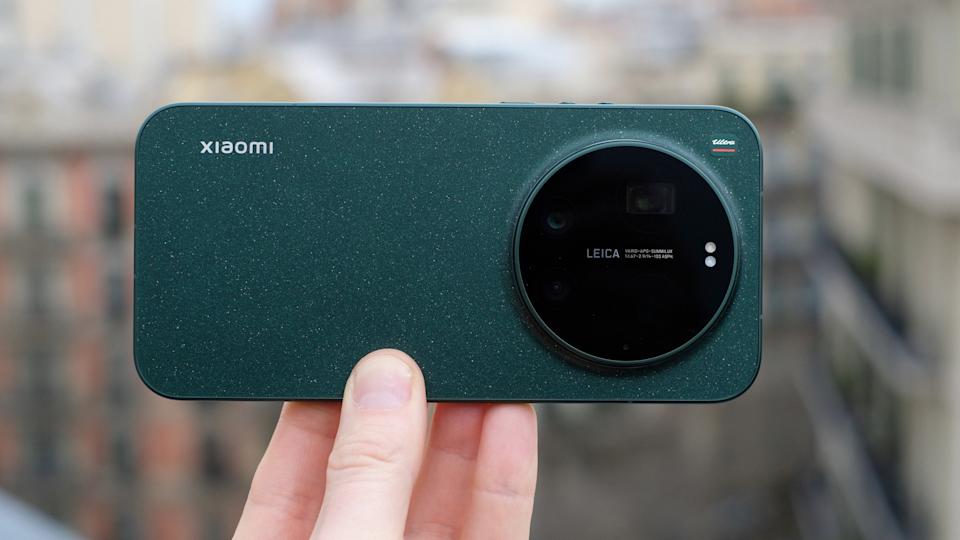
Xiaomi kicked off MWC this year by announcing the global launch of its 17 Ultra smartphone, which debuted first in China back in December. It’s unclear if the phone will ever come to the US, but it’s now rolling out in Europe. Xiaomi teamed up again with Leica to make a photography-focused smartphone, and the 17 Ultra sports a 1-inch 50-megapixel camera sensor with a f/1.67 lens, a telephoto setup with a 200MP 1/1.4-inch sensor, and a 50MP ultrawide camera. There’s also a manual zoom ring around the camera.
Check out our hands on for our first impressions of what it’s like shooting with the Xiaomi 17 Ultra. And there’s more to it than just the camera. The 17 Ultra has a 6.9-inch OLED 120 Hz display that peaks at 3,500 nits of brightness, and a 6000mAh silicon-carbon battery. The Xiaomi 17 Ultra starts at £1,299 (roughly $1,750).
Advertisement
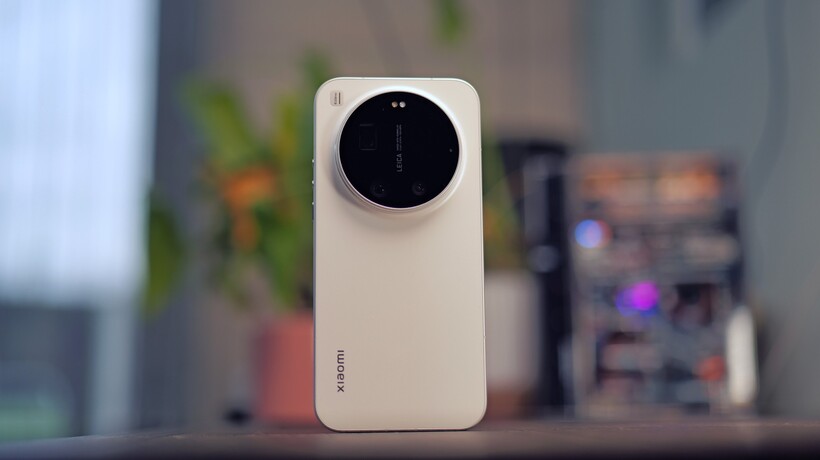
Leica also announced a new phone made in partnership with Xiaomi at MWC. It looks a whole lot like Xiaomi’s 17 Ultra, but isn’t the 17 Ultra, exactly.
Leica Leitzphone by Xiaomi hands-on at MWC 2026 (Image by Mat Smith for Engadget)
Like the 17 Ultra, Leica’s Leitzphone by Xiaomi has a 1-inch camera sensor and physical controls for zoom and other settings, using a mechanical ring around the camera unit. It features a Leica-designed intuitive camera interface with the option to show just the essentials when you’re shooting, hiding all the modes and labels. There’s a monochrome shooting mode and Leica filters.
The Leica branding is splashed all over it in design and wallpapers, but it’s otherwise pretty similar to the 17 Ultra, with the same specs. Like the 17 Ultra, it has a Snapdragon 8 Elite Gen 5 chip and a 6.9-inch 120Hz display. This one’s priced at €1,999 (roughly $2,362).
The Xiaomi Pad 8 Pro (Xiaomi)
In addition to the 17 Ultra, Xiaomi announced two new tablets at MWC this year: the Xiaomi Pad 8 and Xiaomi Pad 8 Pro. There’s nothing revolutionary here, but they’re lightweight and thin, with both being 5.75mm thick and weighing 485g, and have a 9200mAh battery. The Pro model is powered by a Snapdragon 8 Elite chip, while the regular Pad 8 uses the Snapdragon 8s Gen 4 chipset.
Advertisement
Xiaomi also unveiled a new 5000mAh powerbank, the UltraThin Magnetic Power Bank 5000 15W. The 6mm thick power bank comes in three colors with an aluminum alloy shell: orange, silver and charcoal gray. Along with that, the company introduced the Xiaomi Tag, its own take on the Bluetooth item tracker. The Xiaomi Tag has a built-in hanging loop so it can be attached directly to a keyring, and the company says it will work with both Apple Find My and Google’s Find Hub for Android.
Honor MagicPad 4
Honor
Ahead of MWC, Honor announced what it claims is the thinnest Android tablet in the world: the 4.8mm thick MagicPad 4. We’re expecting to hear more about this at Honor’s press conference on Sunday, but so far we know it features a 12.3-inch 165Hz OLED display and weighs just 450g. It comes with up to 16GB of RAM and 512GB of storage, and is powered by Qualcomm’s Snapdragon 8 Gen 5 chipset. The thinness doesn’t count the camera bump, Honor notes. The MagicPad 4 has 13MP rear and 9MP front cameras. It also boasts spatial audio, with eight speakers.
Just as the display is slightly smaller than the previous MagicPad, the MagicPad 4 has a smaller battery at 10100 mAh. It comes with a 66W fast charger. The MagicPad 4 will run Honor’s MagicOS 10. We don’t yet know how much it will cost, but we’ll update this after Honor’s press conference (where we’re also expecting to see the company’s robot) with any new details.
Tecno
Tecno
We can always expect to see some wild phone concepts at MWC, and this year we’re starting with one from Tecno. The company unveiled a modular concept smartphone design that can be as thin as 4.9mm in its base configuration. There’d be 10 modules to choose from based on the announcement, including various camera lenses, a gaming attachment and a power bank, relying on magnets to keep it all together — or Modular Magnetic Interconnection Technology, as Tecno is calling it.
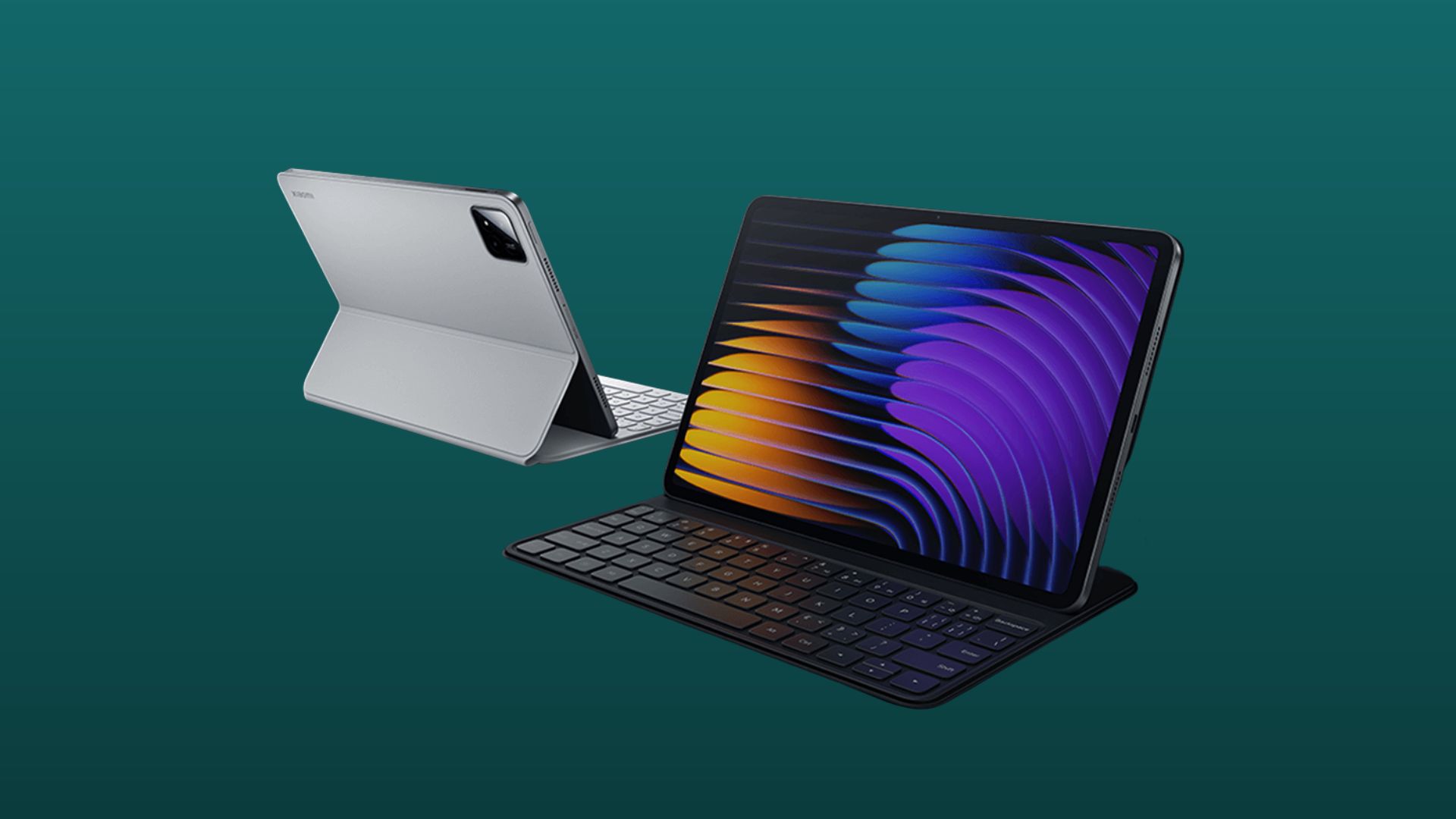
Xiaomi has unveiled the Pad 8 Pro, and on paper at least, it looks like one of the strongest Android answers to Apple’s iPad Pro yet.
With a high-end Snapdragon chip, a 3.2K 144Hz display and a redesigned productivity-focused OS, this is clearly more than just a media tablet.
The headline upgrade is performance. The Pad 8 Pro runs on Qualcomm’s Snapdragon 8 Elite Mobile Platform, built on a 3nm process with clock speeds reaching 4.32GHz. Xiaomi claims major gains across the board, including an 81% CPU boost and 103% GPU uplift compared to the previous generation.
In practical terms, that should translate to smoother multitasking and more stable frame rates in demanding games.
Advertisement
Advertisement
It’s also impressively slim. At just 5.75mm thick and weighing 485g, the all-metal tablet remains portable despite housing a sizeable 9,200mAh battery. Fast charging comes via 67W HyperCharge, while Wi-Fi 7 and fingerprint unlocking round out the flagship credentials.
The 11.2-inch 3:2 display is another standout. It offers a sharp 3,200 x 2,136 resolution, up to 144Hz refresh rate, 800-nit peak brightness and Dolby Vision support. TÜV Rheinland certifications for low blue light and flicker-free viewing suggest Xiaomi is also targeting longer work and reading sessions.
Software is where Xiaomi is pushing hardest. The tablet runs Xiaomi HyperOS 3, which introduces PC-style multitasking features including a 5:5 vertical split-screen view and a new 1:9 layout option. There is also an upgraded Workstation Mode and a desktop-style browser complete with tabbed browsing and right-click support.
Advertisement
There’s also a new Xiaomi Focus Pen Pro, featuring a button-free design, hover preview and gesture controls. It is designed for note-taking and creative work. Optional keyboard accessories further underline its productivity ambitions.
Audio comes via quad speakers with Dolby Atmos and Hi-Res support. Meanwhile, cameras include a 50MP rear sensor and 32MP front-facing camera for video calls.
With this level of performance, display quality and software refinement, the Pad 8 Pro positions itself firmly at the premium end of the Android tablet market. It sits closer than ever to Apple’s top-tier iPads.
For one thing, the streaming giant’s shareholders appeared deeply skeptical that the acquisition was a good deal — Netflix’s share price declined 30% since announcing the deal, while the subsequent news that it was backing down sent Netflix stock up nearly 14%.
For another, Netflix’s commitment to the deal reportedly wavered after Paramount came in with an increased offer and seemed willing to go several more rounds in a bidding war.
Advertisement
By the time Sarandos met with Trump administration officials on Thursday, he may already have decided to concede. In fact, since President Donald Trump had previously warned him not to overpay, Sarandos reportedly told him, “I took your advice.”
The Xiaomi 17 Ultra is an excellent all-rounder with incredible cameras, speedy performance, an excellent screen and speakers, solid battery life, and speedy charging. There’s something for everyone here, but photographers are sure to love it the most.
Brilliant cameras
Lightning quick
Great display and speakers
Not so good for macro photography
On the pricey side
Squirrel Widget
Key Features
Top-of-the-line cameras
With three 50MP cameras, including a 1-inch main camera and an innovative new spin on the 200MP telephoto, the Xiaomi 17 Ultra’s camera system is second to none.
A real optical zoom
Advertisement
Rather than relying on two separate telephoto cameras, the Xiaomi 17 Ultra sports a real optical zoom that can mechanically shift from 3.2x to 4.3x.
Super speedy
With the latest flagship Qualcomm silicon at its core, the Xiaomi 17 Ultra is one of the fastest phones around. Whether you’re interested in gaming or productivity, this handset has the muscle for it.
Introduction
Xiaomi’s top-of-the-line camera-focused flagship for 2026 has finally arrived. It’s time to get acquainted with Xiaomi 17 Ultra.
Advertisement
To save any confusion, you haven’t missed anything. Xiaomi decided to skip 16 and jump straight to 17 for this series. It seems the brand finally got tired of Apple having the larger model number.
Other than the naming oddity, the Xiaomi 17 Ultra brings with it plenty of goodies. There’s a brand new optical zoom and selfie camera, an improved screen, the latest Snapdragon chip, and a bigger battery.
The Xiaomi 17 Ultra doesn’t look too dissimilar to its predecessor. The overall shape is similar, and you still get the same large centrally-placed camera hob on the rear panel.
Image Credit (Trusted Reviews)
What’s changed this time, though, is that it’s much less curvy. The micro curves on the edge of the display and rear panel are both gone, replaced with completely flat panels. This is great when it comes to screen-protector compatibility, and I think I prefer it generally speaking, but some are sure to miss those curves.
Advertisement
It’s a sizable and fairly weighty device, but this is an “Ultra” after all, and that tends to come with the territory. It’s less than 2 grams heavier than its predecessor, and while that was no featherweight, I appreciate that it hasn’t bulked up further.
Image Credit (Trusted Reviews)
This time around, the IP rating has been bumped up to dual IP68/IP69K, rather than just IP68. Supposedly, it can now withstand immersion at up to 6m for 30 mins, rather than just 1.5m. It’s also immune to blasts from jets of hot water, which could prove useful for hot tub-related mishaps.
The Xiaomi 17 Ultra comes with a basic clear case in the box, but it’s not the usual flexible TPU number. This one’s much more rigid and shouldn’t turn yellow quite as readily. I suspect scuffs might be an issue in the long term, though.
Image Credit (Trusted Reviews)
Unlike some rivals, there are no extra buttons on the Xiaomi 17 Ultra, just the usual power button and volume combo. However, that changes if you spring for the Leica LeitzPhone edition, which adds a rotary control around the camera island that can be used to control your zoom.
Advertisement
Advertisement
I have the standard model in for testing, so I can’t speak to how well this control wheel works. In theory, it seems like a great idea, but in practice, I can imagine it being quite easy to knock it accidentally.
The Xiaomi 17 Ultra is available in three colours for the global market: black, white, or green. I have the white model in for testing, and it’s rather understated, with a uniform matt finish on the rear and matt aluminium side rails. The black model takes a similar approach, only with dark colour-matched side rails and a subtle red ring around the camera housing.
Image Credit (Trusted Reviews)
If you want to make a statement, though, you’ll certainly want to check out the green model. It has a flecked finish on the rear panel that makes it stand out from the pack, and matching siderails to finish it off.
If you opt for the Leica edition, you’ll be able to choose between black and white versions, both featuring a vegan leather rear panel, two-tone detailing, and the iconic circular red Leica badge. There’s also an optional photography grip kit, which looks to be quite similar to the previous generation.
Screen
6.9-inch 120Hz 1200×2608 OLED
Flat screen, 2160Hz PWM
3500 nits peak brightness
Advertisement
The Xiaomi 17 Ultra boasts a spacious 6.9-inch OLED display with a 120Hz refresh rate and a peak brightness of 3500nits, up from 3200 on the previous model.
Advertisement
The other big change is that the panel now supports 2160Hz PWM dimming, up from 1920Hz. I’m not someone who is sensitive to flicker, so I can’t say I noticed the difference, but for some, that could be a big deal.
Image Credit (Trusted Reviews)
What made more of an impact, for me, is the change from curved edges to a fully flat display. It seems to be the general trend at the moment, and I think I’m on board. I do like the way gesture controls feel on curved displays, but the durability, lack of glare, and screen protector compatibility might make flat displays the outright winner in my eyes.
Otherwise, the screen is as fantastic as you’d expect with specs like these. The colours are vivid and accurate, it’s plenty bright enough to see outdoors, and HDR content really pops. There are plenty of options if you prefer to tweak the colour balance, too, but I was fine with the default settings.
Image Credit (Trusted Reviews)
Advertisement
Cameras
50MP main camera (1-inch sensor)
50MP ultrawide (1/2.76-inch)
200MP 3.2x – 4.3x telephoto (1/1.4-inch sensor)
50MP selfie camera (AF)
Xiaomi has shaken things up in the camera department. Instead of four separate sensors on the rear, you now get three. Rather than two separate periscope telephotos, you now get a single 200MP unit that can optically zoom between 3.2x and 4.3x.
Image Credit (Trusted Reviews)
We’ve seen similar tech from Sony and its Xperia flagships, but the difference here is with the sensor size and resolution. This zoom camera has a massive 1/1.4-inch sensor and a 200MP resolution, matching the likes of the Vivo X300 Pro and Honor Magic 8 Pro.
It’s super impressive technology, but I was a little disappointed when I realised how small the zoom range is. In full-frame terms, you can zoom from 75mm to 100mm, and honestly, that’s not a dramatic difference in framing.
Advertisement
Advertisement
Beyond that, you’ll be digitally cropping, but a combination of the extremely high-res sensor and very clever image processing means that you get shockingly good results when doing so.
What I found really disappointing, though, were the telemacro capabilities. This optical zoom configuration means that the Xiaomi 17 Ultra telephoto can’t focus as close as the Xiaomi 15 Ultra could – and it lags behind the rivals like the Magic 8 Pro and X300 Pro, too. You can still get decent macro shots, but you’ll need to digitally crop more to achieve the results, whereas with the previous model, you could just get closer.
Aside from the new telephoto setup, the main camera and ultrawide have similar specifications to their predecessors. That’s no bad thing, as they both produce fantastic results. Especially the main camera, which excels in low-light conditions and produces lovely bokeh with its 1-inch type sensor.
Around the front, the selfie camera has been upgraded, too. It’s now 50MP, up from 32MP, and it has a larger sensor, which makes it more usable in dim conditions. Selfies on this phone are sharp, detailed, and have excellent dynamic range.
Advertisement
Advertisement
Overall, I have been really pleased with the images I was able to take with the Xiaomi 17 Ultra. It feels like Xiaomi has refined its image processing with this generation, and I’m no longer seeing the slight overexposure or heavy-handed sharpening that I normally associate with the brand. Images from this phone look wonderfully natural, more like what I would expect from a professional mirrorless camera.
Video performance is also excellent. You can shoot at up to 4K 120fps on both the main and telephoto cameras, while the selfie camera and ultrawide shoot at up to 4K 60fps. There’s a very decent Log profile, and the ability to record in Dolby Vision HDR, too.
I have no doubts that this is one of the best smartphone camera systems on the market right now. Whether it’s portraits, sports, landscapes, or long-range zooms, you name it, the 17 Ultra can hang with the best. It’s really only the lack of telemacro capabilities that holds this phone back – and how much that matters will depend on what you like to shoot.
Advertisement
Accessories
Slimmed-down Photography Kit
Full-featured Photography Kit Pro
Tactile buttons, Wirst Strap, and 67mm filters compatibility
Xiaomi’s Ultra phones have come with optional photography grips for the last few years, so it’s not too surprising that Xiaomi has released anequivalent accessory for the 17 Ultra. What surprised me, though, is that there are now two different kits to choose from.
Advertisement
The design that we’re most familiar with, featuring a removable battery grip and separate phone case is now called the Photography Kit Pro, while the standard Photography Kit is a much slimmer all-in-one package.
Image Credit (Trusted Reviews)
Starting with the new addition, it’s basically a phone case with a sculpted grip towards the base. It has a two-stage shutter button and a video record button, and it connects to the phone via Bluetooth. There’s a built-in battery, but that’s only to power the Bluetooth buttons; it doesn’t charge the phone itself.
The video record button can be programmed to activate almost anything within the camera app, but the shutter button is limited to single photo or burst mode. It’s a two-stage button, though, so you can half-press to focus before taking your shot.
Image Credit (Trusted Reviews)
The styling is similar to the Leica edition phones, with a two-tone textured vegan leather lower and smooth upper. It looks great, in my opinion, but it’s not as functional as the Pro grip. For instance, you can’t attach filters over the lenses, and there’s no way to access the control ring on Leica edition handsets.
Advertisement
Advertisement
Other than some aesthetic tweaks, the Pro grip functions almost identically to the last few generations, incorporating a 2000mAh battery that charges the phone in use, as well as a tactile shutter button, video button, zoom rocker, and control dial.
Image Credit (Trusted Reviews)
What’s new this time, though, is that the case has MagSafe-compatible magnets built in (and it works with Qi chargers). There’s also a clever new 67mm filter mounting ring that rotates, so you can add something like an ND filter or a mist filter, and still be able to use the zoom ring on Leica edition phones.
Image Credit (Trusted Reviews)
The Pro kit is definitely superior in terms of functionality, but if you never use filters, and you want something cheaper and more compact, it’s really nice that Xiaomi is providing an additional option.
Performance
Qualcomm Snapdragon 8 Elite Gen 5
12GB/16GB RAM, 512GB/1TB storage
Dual stereo speakers
Advertisement
The Xiaomi 17 Ultra has Qualcomm’s latest and greatest flagship SoC at its core, the Snapdragon 8 Elite Gen 5, along with either 12GB or 16GB of RAM and 512GB or 1TB of storage. I’m testing the 16GB+512GB version.
As you might expect, with specs like these, the Xiaomi 17 Ultra is a bit of a rocket. Whether you want to edit complex videos, run AI models, or play the most graphically demanding games, this phone will take it in its stride.
Image Credit (Trusted Reviews)
I played a couple of hours of Genshin Impact with the settings maxed out, and of course, the Xiaomi 17 Ultra took it in its stride. After a good 45 minutes of playing, the phone barely heated up, and there wasn’t a frame drop in sight. This phone clearly has a very impressive cooling system on the inside.
There’s a fairly full-featured game overlay built in, too. You can use it to boost performance, block notifications, lock your screen brightness, and even open messaging apps as a floating window.
Advertisement
The speakers on this phone are also very impressive. The bass is much stronger than that of most Android flagships, and it’s more controlled and less boomy than the Honor Magic 8 Pro. There’s plenty of detail and a decent stereo effect, too.
Advertisement
Software & AI
HyperOS 3, based on Android 16
4 OS upgrades, 6 years of security patches
Loads of AI features
The 17 Ultra runs HyperOS 3, Xiaomi’s latest custom software built on top of Android 16. Functionally, it’s very similar to HyperOS 2, but this version comes with some significant aesthetic changes, and the iOS influence is more apparent than ever.
Image Credit (Trusted Reviews)
There are some very iOS-looking lock screen options, including the ability to have a massive clock, depth effects, so that the clock interacts with your wallpaper, and even the ability to animate your wallpaper with generative AI.
Image Credit (Trusted Reviews)
There’s also a fresh new Dynamic Island clone, which Xiaomi calls Hyper Island. It’s nothing particularly creative or new, but it’s super handy. Personally, I love having a way to quickly access the music that’s playing, my timers, or navigation.
Advertisement
Of course, there are plenty of AI features littered throughout the system, including the usual translation tools and writing assistance. One that I found particularly handy is the ability to add AI-generated subtitles to anything you’re watching, regardless of the app it’s playing in.
Advertisement
Image Credit (Trusted Reviews)
There are plenty of AI features for photo editing, too, and they all work quite well. There’s outpainting, which I always find useful, as well as object removal and the ability to add background blur to a photo without having to have shot it in Portrait mode.
Xiaomi is promising 4 major OS upgrades and 6 years of security patches for this model. It fails to match the likes of Google and Samsung, but it’s not a bad commitment.
Battery life
6000mAh battery
90W wired charging
50W wireless charging
The battery situation with the Xiaomi 17 Ultra is a bit of a strange one. The global model gets a 6000mAh cell, which is a healthy increase over last year’s 5410mAh battery, but pales in comparison to the Chinese version of this phone, which gets a 6800mAh battery.
Advertisement
Image Credit (Trusted Reviews)
There’s nothing too strange about that; shipping regulations in Europe often mean the global versions of Chinese phones have their batteries nerfed. What makes this so peculiar, though, is that the global version of the smaller and cheaper Xiaomi 17 sports a larger 6300 mAh battery.
Regardless, for my needs, the battery life of the Xiaomi 17 Ultra has been more than sufficient. It’ll get me through the day with ease. I’ll usually end the day with around 30% or more remaining, but it’s not a two-dayer like the Oppo Find X9 Pro is.
Image Credit (Trusted Reviews)
When it comes to charging, the Xiaomi 17 Ultra is lightning quick. It supports up to 90W speeds with a wire and 50W wirelessly. There’s no charger in the box, though, so you’ll need to budget for an appropriately quick wall adapter.
I found that just 30 minutes on the charger would take me well over 60% charged, while a full charge took just over an hour. I should note, though, that I was using a third-party charger; it may be even quicker using an official Xiaomi adapter.
Advertisement
Advertisement
Squirrel Widget
Should you buy it?
You want one of the best camera phones around
The Xiaomi 17 Ultra is pretty great at everything, but the cameras steal the show. If you’re looking for a device that blurs the lines between smartphone and professional camera, look no further.
Advertisement
You love macro photography
Advertisement
The only letdown with this camera system is that the telephoto isn’t as good for close-up shots. It’s still decent, but the competition fares better in this area.
Final Thoughts
The Xiaomi 17 Ultra is a well-rounded flagship that has something to offer in every area. Whether you’re looking for high-end gaming performance, a superb screen and speakers, solid battery life and speedy charging, or an incredible camera system, the 17 Ultra has you covered.
Advertisement
It’s really those who are into photography and videomaking that will enjoy this phone the most, though. The camera system is truly excellent, and at times, this feels more like a camera than a phone.
Of course, no product is perfect, and there are a few areas where Xiaomi is bested by the competition. For instance, both the Oppo Find X9 Pro and Honor Magic 8 Pro have better battery life (in my experience), and they’re better for macro photography, too.
But does that mean they’re better choices? Not necessarily. Xiaomi’s image processing and filter selection mean I often prefer the shots from the 17 Ultra, and it has plenty to offer elsewhere, too. One thing’s for certain, this is among the best camera phones available right now.
How We Test
We test every mobile phone we review thoroughly. We use industry-standard tests to compare features properly and we use the phone as our main device over the review period. We’ll always tell you what we find and we never, ever, accept money to review a product.
Advertisement
Used as a main phone for over a week
Thorough camera testing in a variety of conditions
Tested and benchmarked using respected industry tests and real-world data
FAQs
Does the Xiaomi 17 Ultra support eSIM?
Yes, the global version of the Xiaomi 17 Ultra has full eSIM support.
Does the global version of the Xiaomi 17 Ultra have a smaller battery?
Yes, the global version has a 6000mAh battery, rather than a 6800mAh battery.
Xiaomi has officially unveiled the Xiaomi Pad 8 Pro, and it’s immediately clear that this is the company’s boldest attempt yet to compete with the iPad Pro. With a design unmistakably inspired by Apple’s premium tablet and a strong focus on keyboard-centric productivity, Xiaomi is signalling that the Android tablet segment is ready to take pro-level computing more seriously.
At the core of the Xiaomi Pad 8 Pro is the Snapdragon 8 Elite platform
A chipset that brings the kind of performance usually reserved for high-end smartphones and some laptops. This makes the tablet capable of handling demanding apps, complex multitasking, heavy design workloads, and high-frame-rate gaming without hesitation. HyperOS provides the accompanying software layer, giving the interface a level of speed and fluidity that matches the hardware’s ambitions.
The display is an immediate standout. The 3.2K resolution combined with a 144Hz refresh rate creates a fluid and visually rich experience that supports everything from entertainment and reading to design work and motion graphics. The screen’s brightness and color accuracy further elevate its appeal for artists, students, and professionals who depend on visual clarity. Powering this is a 9,200mAh battery that provides enough endurance for long working hours, extended travel use, and continuous content consumption without frequent recharging.
A keyboard and stylus that reshape how the tablet is used
What makes the Xiaomi Pad 8 Pro a genuine iPad Pro challenger is not just its hardware but the ecosystem around it. Xiaomi’s new magnetic keyboard case turns the tablet into a laptop-style machine, complete with a comfortable key layout and a responsive touchpad. This accessory transforms the character of the tablet, allowing it to handle more serious tasks such as long writing sessions, office work, productivity apps, and messaging with far greater ease.
Advertisement
Alongside the keyboard is the Xiaomi Focus Pen Pro, which introduces low-latency writing, improved pressure sensitivity, and more natural tilt recognition. Together, these enhancements make the stylus feel accurate and responsive, enabling everything from precise sketching and illustration to handwriting and markup work. This combination of tools positions the Pad 8 Pro as a versatile device that can shift between creative expression and productivity without effort.
A meaningful shift in the premium tablet landscape
The Pad 8 Pro arrives at a time when Android tablets are rapidly evolving. For years, the premium space has been dominated by Apple, but Xiaomi’s approach shows that an Android tablet can offer a polished, pro-grade experience if the company commits to performance, display quality, and accessory support. Users who prefer Android now have an option that does not force compromise and integrates smoothly with their existing ecosystem of phones, wearables, and laptops.
The tablet’s appeal extends further to students, hybrid workers, and creators. Anyone who wants a powerful but portable device will find the Pad 8 Pro compelling because it merges laptop-like typing, stylus precision, fast processing, and an immersive display in one device. It also serves as an option for users who want more openness and flexibility than what Apple’s closed ecosystem offers.
Cross-device integration is the future
Xiaomi’s direction with the Pad 8 Pro suggests a future where its tablets will receive deeper cross-device integration and more productivity-oriented features within HyperOS. As the company continues refining its ecosystem, the Pad 8 Pro stands as one of the clearest signals that Android tablets are entering a new era—one where performance, accessories, and software all work together to create a true alternative to the iPad Pro.
Someone jumped at the opportunity to steal $4.4 million in crypto assets after South Korea’s National Tax Service exposed publicly the mnemonic recovery phrase of a seized cryptocurrency wallet.
The funds were stored in a Ledger cold wallet seized in law enforcement raids at 124 high-value tax evaders that resulted in confiscating digital assets worth 8.1 billion won (currently approximately $5.6 million).
When announcing the success of the operation, the agency released photos of a Ledger device, a popular hardware wallet for crypto storage and management.
However, the images also showed a handwritten note of the wallet recovery phrase, which serves as the master key that allows restoring the assets to another device.
Images released by the South Korean tax authority Source: mk.co.kr
The authorities failed to redact that info, allowing anyone to transfer into their account the assets in the cold wallet.
Reportedly, shortly after the press release was published, 4 million Pre-Retogeum (PRTG) tokens, worth approximately $4.8 million at the time, were transferred out of the confiscated wallet to a new address.
Advertisement
“On-chain data (Etherscan) analysis shows that the attacker first deposited a small amount of Ethereum (ETH) into the wallet to pay transaction fees (gas fees), and then meticulously transferred the 4 million PRTG tokens to their own wallet in three separate transactions,” reports Korean media.
Blockchain data analysis expert Cho Jae-woo, a professor at Hansung University in Seoul who observed the transfer, commented on the authorities’ blunder by comparing it to leaving a wallet open and advertising it to the entire nation for people to take the money.
The professor attributed the mistake to the tax authorities’ “lack of basic understanding of virtual assets,” which effectively cost the national treasury tens of billions of won that had been successfully confiscated.
The press release has now been removed from the NTS website, and it is unclear if authorities started an investigation to determine where the stolen funds ended.
Advertisement
The case is a reminder for hardware wallet owners that their seed phrase gives complete access to their wallet without any additional protections. Anyone who has it can recreate the wallet anywhere without their device, PIN, or permission.
It is recommended to avoid digitizing seed phrases, store them in electronic notes, photos, in email messages, cloud storage, or send them over messaging apps. If a seed is exposed, all funds should be moved to a new wallet as soon as possible.
Modern IT infrastructure moves faster than manual workflows can handle.
In this new Tines guide, learn how your team can reduce hidden manual delays, improve reliability through automated response, and build and scale intelligent workflows on top of tools you already use.
Watch Knights vs Cowboys live streams as the NRL 2026 season kicks off with a Newcastle vs North Queensland banger from Allegiant Stadium in first of the season-opening Rugby League Las Vegas games. Plenty has changed in the off-season, too, with Kiwi star Dylan Brown joining the former, and Tom Chester returning for the latter after a serious knee injury.
After propping up the ladder last year, the Knights also have a new coach for the 2026 campaign, with Justin Holbrook coming in to take change. Talismanic five-eighth Sandon Smith has arrived from the Roosters, with fellow newbie Brown set to form a tantalizing halfback pairing with fit-again Fletcher Sharpe. Star fullback Kalyn Ponga is also raring to go after recovering from a foot injury to feature in what will be his first game since Round 17 last year.
After a disappointing 2025 in which they failed to reach the finals series, the Cowboys will be delighted to welcome back second-rower Heilum Luki for his first NRL game since the 2024 finals following an ACL injury before the start of last term. Luki joins young gun Chester in recovering from the serious knee injury to return to the North Queensland lineup, with the latter replacing the suspended Zac Laybutt in the centers. Hooker Reed Mahoney will make his debut after arriving in the off-season from the Bulldogs.
The Knights haven’t beaten the Cowboys since 2021 – can they bag an early upset? Here’s where to watch Knights vs Cowboys NRL 2026 live streams online from anywhere – including options to watch with 7-day FREE trials!
Advertisement
Can I watch Knights vs Cowboys for free?
Three NRL games are on free-to-air Channel 9 and 9Now in Australia during each week of the regular season, but unfortunately season opener Knights vs Cowboys isn’t one of them.
Use a VPN to watch Knights vs Cowboys from anywhere
This handy piece of software can make your device appear as if it’s back in your home country and let you watch your usual streaming services. The best VPN right now? We recommend NordVPN – it does everything and comes with a 74% discount and a free Amazon Gift Card.
Advertisement
Using a VPN is incredibly simple:
1. Install the VPN of your choice. As we’ve said, NordVPN is our favorite.
2. Choose the location you wish to connect to in the VPN app. For instance, if you’re visiting the US and want to view your usual Australian service, you’d select a server in Australia from the list.
3. Sit back and enjoy the action. Head to your usual local streaming service and watch the footy.
Advertisement
How to watch Knights vs Cowboys live streams in the US
In the US, three NRL games are shown on Fox Sport each week during the regular season, plus the entirety of the State of Origin and Finals Series. Knights vs Cowboys will be on FS2.
Cord cutters will be able to watch on the network’s Fox One streaming platform, which costs from $19.99 a month after a 7-day free trial. Or go for a full OTT cable replacement service such as Sling TV (in selected cities), Fubo, YouTube TV and Hulu + Live TV.
Only bothered about the rugby? You can see every single game on the dedicated Watch NRL streaming platform, from $20 per week.
Advertisement
If you’re traveling outside of the US, you can make use of NordVPN to catch the action on any of the above services.
How to watch Knights vs Cowboys live streams in Canada
NRL 2026 coverage goes out on Sportsnet in Canada, with three matches per week, State of Origin and Finals Series. Knights vs Cowboys is one of them.
That means you can also watch online thanks to its Sportsnet+ streaming service (from $29.99 a month / $249.99 a year). And the Watch NRL platform will show every single fixture.
Advertisement
If you already subscribe to these services but find yourself outside Canada, download a VPN and watch NRL games as if you were back at home.
How to watch Knights vs Cowboys live streams in the UK
NRL 2026 action, including Knights vs Cowboys, is covered bySky Sports in the UK. Its channels will show three games per week, together with all Final Series, State of Origin and Grand Final matches.
Knights vs Cowboys will be shown on Sky Sports Action.
Advertisement
Sky Sports packages start from £22 per month or you can get a more flexible Now Sports membership starting from £14.99 for a day pass.
Alternatively, die-hard fans might want to check out Watch NRL, which costs £16 a week, £39 a month month or £143 for the whole season and will unlock access to every single NRL game of the 2026 season.
Outside the UK? You’ll might need to download a VPN, as detailed above, to watch your usual stream from abroad.
Advertisement
How to watch Knights vs Cowboys live streams in Australia
As mentioned above, Knights vs Cowboys isn’t one of the three NRL games per week are on free-to-air Channel 9 in Australia.
Don’t worry, though, because every single NRL 2026 game will be shown on Fox League via Foxtel. Kayo Sports, meanwhile, is a much more cost-efficient option, with plans starting from $30 a month after you’ve taken advantage of its first month for $1 offer or 7-day free trial.
If you’re currently out of Australia but want to watch Knights vs Cowboys live streams, you’ll need to get yourself a VPN, as per the instructions above.
Advertisement
How to watch Knights vs Cowboys live streams in New Zealand
Sky Sport NZ is the NRL rights holder in New Zealand, with Knights vs Cowboys set to be shown.
You can access Sky Sport through satellite TV or get a live stream with the Sky Sport Now subscription service starting at $29.99 per day or $54.99 per month.
Overseas? NordVPN will give you access to your home streaming service.
Advertisement
How to watch NRL 2026 live streams in Rest of World
Every single match of the 2026 NRL Premiership season, including Knights vs Cowboys, will be shown on the dedicated Watch NRL streaming platform, which is available in all territories except for Australia, New Zealand, the Pacific Islands and other selected sanctioned jurisdictions (e.g. Russia, Belarus, Cuba, Iran, North Korea).
Subscriptions cost $20 per week, $39 per month or $182 for a whole year. Check the website for pricing in your region.
Many countries also show games on TV and online through their domestic broadcasters:
Advertisement
How to watch Knights vs Cowboys – FAQ
What is the date and time of Knights vs Cowboys?
📅 Saturday, February 28
Knights vs Cowboys | 9.15pm ET / 6.15pm PT (local time) / 2.15am GMT (Sunday) / 1:15pm (Sunday) AEDT Allegiant Stadium, Las Vegas, Nevada 📺 7-day FREE trials –Fox One (US) / Fox Sports via Kayo Sports (AUS)
Can I watch Knights vs Cowboys on my mobile?
The vast majority of broadcasters mentioned in this article have streaming services that you can access through mobile apps or via your phone’s browser. For example, Watch NRL, 9Now, Fox One and Sky Go all have mobile apps.
You can also stay up-to-date with the latest NRL news on the official social media channels on X (@NRL), Instagram (nrl), Facebook (NRL) TikTok (@nrl) and YouTube (@NRL).
Advertisement
We test and review VPN services in the context of legal recreational uses. For example: 1. Accessing a service from another country (subject to the terms and conditions of that service). 2. Protecting your online security and strengthening your online privacy when abroad. We do not support or condone the illegal or malicious use of VPN services. Consuming pirated content that is paid-for is neither endorsed nor approved by Future Publishing.