We are all familiar with the subscription economy, and it certainly works as a reminder of the COVID-19 pandemic, when we were all hooked on our TVs watching Netflix or listening to our favorite music artist on Spotify. Despite how modern it seems to be, the truth is that the subscription economy has been around for some time, surprisingly dating back to around 1800, with the first magazine subscriptions, or the subscriptions for fresh British milk, around 1860. Over the years, the of subscription-based companies has turned the subscription model into an ideal business strategy since it provides unique benefits.… This story continues at The Next Web
Not long after the thin and light iPhone Air was launched in September, we crowned it the Phone of the Year for 2025 — not because it was the best phone ever, but because it was the most talked about handset at the time (and, arguably, I think it’s still the case today).
True enough, we’ve run a slew of stories on the iPhone Air that either heaped praise or criticised the phone to varying degrees — our full iPhone Air review called it “a new kind of Pro” handset, another of my colleagues called it “baffling”, while a third said they were conflicted about it (after using it for six months).
One major sticking point of the iPhone Air across our coverage was its steep AU$1,799 RRP relative to the specs, as it’s meant to replace the previous iPhone Plus models. My colleagues’ concerns were centred around the single camera lens and small 3,149 mAh battery.
But at a discounted price, especially if it’s as low as this deal I’ve spotted on Amazon Australia for AU$1,297 or 28% off, a current-generation iPhone that looks this good while also packing a powerful A19 Pro chipset would be a hard one to pass up if you’re on the market for a new Apple handset. At this discounted price, the 256GB iPhone Air is cheaper than the equivalent iPhone 17 that currently isn’t seeing any price drops when purchased outright.
Advertisement
How thin and light is the iPhone Air exactly? It measures just 5.64mm, which is a far cry from the iPhone 17’s 8mm thickness and the 17 Pro’s 8.8mm. Even the budget iPhone 17e is still much thicker at a substantial 7.88mm. It also weighs 165g, much lighter than the iPhone 17’s 177g and the Pro’s 206g.
Does its size affect its performance is the real question here.
As mentioned earlier, the iPhone Air is powered by the Apple A19 Pro chipset that’s similar to the processors of the iPhone 17 Pro and Pro Max, with benchmarks scoring better than the base iPhone 17. And given it’s now cheaper than the latter, surely that’s a no-brainer.
Advertisement
My favourite iPhone Air spec is its titanium chassis, similar to my iPhone 16 Pro Max, which can be an attractive option if you’re not a fan of the iPhone 17 Pro and Pro Max reverting back to aluminium.
Like my colleagues, I have reservations about the iPhone Air’s single camera setup, as I do like having the flexibility of having at least a second ultrawide lens (and a telephoto is always handy). If you’re not too fussed about cameras, the iPhone Air still has a solid enough 48MP shooter to take the odd photo here and there.
If you’ve been itching to get your hands on the thin and light iPhone Air but have been put off by the steep RRP, then don’t let this opportunity pass you by.
Governments around the world have been struggling to address the rise of industrial-scale scamming operations based in countries like Laos, Myanmar, and Cambodia that have cost victims billions of dollars over the past few years. The operations often have ties to Chinese organized crime, use forced labor to carry out the actual scamming, and rely on vast money laundering networks to collect a profit. They have become so widespread and ingrained in the region that even major international law enforcement collaborationstargeting individual scam centers or kingpins haven’t been able to stem the tide.
The FBI said this week that “cyber-enabled” scam complaints from Americans totaled more than $17.7 billion in reported losses last year—likely a major undercount of the real total, given that many victims don’t report their experiences. Some US officials say that a major barrier to comprehensively addressing the issue is the lack of collaboration with Chinese authorities. China’s efforts to address industrial scamming, they argue, appear aimed at reducing the number of Chinese citizens being impacted rather than comprehensively stopping the activity to protect all victims around the world.
“To its credit, China has cracked down on these operations, but it has done so selectively, largely turning a blind eye to scam centers victimizing foreigners,” Reva Price, a member of the US-China Economic and Security Review Commission said at a Senate hearing last month. “As a result, the Chinese criminal syndicates have been incentivized to shift toward targeting Americans.”
According to research the commission published in March, Beijing’s selective strategy has helped embolden some Chinese scammers, even those working within China, to continue operating so long as they exclusively target foreigners.
Advertisement
Other US-based researchers have come to similar conclusions. From 2023 to 2024, China reported a 30 percent decrease in the amount of money its citizens lost to scams, while the US suffered a more than 40 percent increase, according to congressional testimony last year by Jason Tower, who was then the Myanmar country director for the US Institute of Peace’s Program on Transnational Crime and Security in Southeast Asia. In response to Beijing’s enforcement dynamics, Tower said at the time, “the scam syndicates are increasingly pivoting to target the rest of the world, and especially Americans.”
The United Nations Office on Drugs and Crime noted last year that scam centers have been diversifying their worker pools, shifting from predominantly trafficking Chinese nationals and other Chinese speakers to entrapping people from a broader array of countries and backgrounds who speak various languages. UN researchers attributed this change in part to attackers broadening their targets to include different populations around the world. But they added that the dynamic also seemed to be a reaction to Chinese enforcement and Beijing’s efforts to protect Chinese citizens.
“China is doing more to fight fraud—like orders of magnitude more—than any other country,” says Gary Warner, a longtime digital scams researcher and director of intelligence at the cybersecurity firm DarkTower. “But I would agree that the crackdown by China on people scamming China has squeezed the balloon so to speak and led to more international and American targeting.”
The Chinese government has spent years investing in national safety campaigns warning citizens about the threat of scams and how to avoid falling victim to them. Some of the public discourse attempts to appeal to a sense of national solidarity. There’s a common meme in China, 中国人不骗中国人, literally, “Chinese people don’t deceive Chinese people” that is used to signal trust when swapping restaurant recommendations or job leads. In the context of digital scams, a variant has emerged: “Chinese don’t scam Chinese.”
Marvel Television just dropped the first trailer for The Punisher: One Last Kill, and it is exactly as intense as you would expect from a character who has never been particularly interested in playing it safe.
Jon Bernthal returns as Frank Castle this month on Disney+, and based on what the trailer shows, he is carrying a lot of weight going into this one.
The official synopsis describes Frank as someone who “searches for meaning beyond revenge, when an unexpected force pulls him back into the fight.” That is about as much as Marvel is giving away for now.
Punisher: One Last Kill trailer breakdown hints at major villain reveal
Advertisement
The trailer opens with Frank in a raw, vulnerable state, and clearly wrestling with his past. His old friend Curtis Hoyle appears and tries to get Frank to open up about what is going on in his life.
The way Curtis flashes in and out of the scene leaves his exact status a little ambiguous, though he survived the events of the Netflix Punisher series and is presumed to still be alive.
Frank is shown isolated, sitting in what looks like a lockdown situation surrounded by guards, suggesting he may be in custody or under surveillance at some point in the story.
Marvel / Disney+
The trailer then cuts through a series of intense moments. Flashback scenes show Frank’s young daughter in their family home, revisiting the tragedy that led to his transformation into the Punisher in the first place.
There is also a shot of Frank leaving a red flower at a grave marked for Lisa Barbara, his daughter, with a watch resting on the stone beside it. These are the first looks at Frank’s family in years within this version of the character’s story. Curtis’s voiceover cuts through all of this with a blunt warning, telling Frank he has no chance at what lies ahead.
Advertisement
Marvel / Disney+
From there, the trailer shifts into full Punisher mode. Frank tears through enemies using high-powered weapons and sheer physical force, jumping from buildings and shooting his way through anyone in his path.
The trailer’s final image is the one fans have been waiting for. Frank stands in his full Punisher gear and skull vest, outside a location called Gnucci’s Restaurant. This little detail is not an accident because the villain in Punisher: One Last Kill is most likely Ma Gnucci.
Who is Ma Gnucci in the Punisher comics?
Marvel Comics
For those who are not into Punisher comics, Ma Gnucci is one of Frank Castle’s most memorable adversaries. In the comics, she is the ruthless head of the Gnucci crime family, a powerful organized crime figure who operates out of New York City.
After Frank kills her sons, she declares all-out war on him, and what follows is one of the most chaotic and violent storylines in Punisher history. She is also notable for being depicted in a wheelchair, which makes her physically vulnerable but in no way diminishes how dangerous she is.
Her willingness to throw the full weight of her criminal empire at Frank makes her a credible and personal threat. No actor has been assigned the role as of writing, but the Gnucci’s Restaurant sign in the trailer’s final shot makes her involvement feel like a near certainty.
Who is in the cast of Punisher: One Last Kill?
Marvel / Disney+
Jon Bernthal leads the special as Frank Castle, a role he first took on in the Netflix Daredevil series before getting his own two-season Punisher show. Returning alongside him is Jason R. Moore as Curtis Hoyle, Frank’s closest friend and a former US Navy personnel.
Curtis appeared in both seasons of the original Netflix Punisher series, and his return here adds important emotional continuity to the story. The special is directed by Reinaldo Marcus Green, who co-wrote the script with Bernthal himself. Jon Bernthal also serves as an executive producer on the project.
Advertisement
When does Punisher: One Last Kill release on Disney+?
The Punisher: One Last Kill will debut on Disney+ on May 12, 2026, at 6 p.m. PT and 9 p.m. ET. The special presentation lands one week after the finale of Daredevil: Born Again Season 2.
Marvel / Disney+
This is not the last you will see of Frank Castle this year. The Punisher is set to appear in Spider-Man: Brand New Day, the Marvel Studios and Sony Pictures collaboration arriving on July 31, 2026.
Whether Frank plays a major role or shows up as a supporting presence in Spider-Man BND is still unknown. But the idea of the Punisher and Spider-Man occupying the same story is genuinely exciting, and after seeing what One Last Kill appears to be setting up, I am very much looking forward to finding out.
Amid customer dissatisfaction around Broadcom’s VMware takeover, rivals have been trying to lure customers from the leading virtualization firm. One of VMware’s biggest competitors, Nutanix, claims to have swiped tens of thousands of VMware customers.
Speaking at a press briefing at Nutanix’s .NEXT conference in Chicago this week, Nutanix CEO Rajiv Ramaswami said that “about 30,000 customers” have migrated from VMware to the rival platform, pointing to customer disapproval over Broadcom’s VMware strategy, SDxCentral, a London-based IT publication, reported today.
“I think there’s no doubt that the customer sentiment continues to be negative about Broadcom,” Ramaswami said, per SDxCentral.
Broadcom’s strategy has made VMware unaffordable or impractical for most small- to medium-size businesses (SMBs) and narrowed VMware’s focus to enterprise-size customers.
Nutanix hasn’t specified how many of the customers that it got from VMware are SMBs or enterprise-sized; although, adoption is said to be strongest among mid-market customers as Nutanix also tries wooing larger customers, often by starting with partial deployments.
During this week’s press briefing, Ramaswami reportedly said that some of the customers that moved from VMware to Nutanix during the latter’s most recent fiscal quarter represented Nutanix’s “strongest quarterly new logo additions in eight years.”
“Most of the logos came from our typical VMware migrations on to the [hyperconverged infrastructure] platform,” he said.
Advertisement
During the Nutanix conference, Brandon Shaw, Nutanix VP and head of technology services, said that Western Union has been migrating from VMware to Nutanix for six months, The Register reported. The financial services company is moving 900 to 1,200 applications across 3,900 cores.
Shaw said that Western Union has been exploring new IT suppliers to help it become more customer-focused. Despite Broadcom’s history of “decent lines of communication” with Western Union, Shaw said that Western Union had “challenges partnering with them.”
Register now free-of-charge to explore this white paper
A chip-to-cloud assurance architecture enabling secure, resilient, and safe autonomy across robots, sensors, and humans.
ZTASP is a mission-scale assurance and governance platform designed for autonomous systems operating in real-world environments. It integrates heterogeneous systems—including drones, robots, sensors, and human operators—into a unified zero-trust architecture. Through Secure Runtime Assurance (SRTA) and Secure Spatio-Temporal Reasoning (SSTR), ZTASP continuously verifies system integrity, enforces safety constraints, and enables resilient operation even under degraded conditions.
ZTASP has progressed beyond conceptual design, with operational validation at Technology Readiness Level (TRL) 7 in mission critical environments. Core components, including Saluki secure flight controllers, have reached TRL8 and are deployed in customer systems. While initially developed for high-consequence mission environments, the same assurance challenges are increasingly present across domains such as healthcare, transportation, and critical infrastructure.
Learning Outcomes for Audience
Advertisement
Explain the limitations of perimeter-based security models in governing distributed autonomous systems, and articulate why zero trust principles—particularly continuous verification and least-privilege access—are essential for multi-agent environments operating at the edge.
Describe the role of Secure Runtime Assurance (SRTA) in enforcing safety constraints on autonomous agents in real time, drawing on approaches from runtime monitoring, formal verification, and safety-wrapper architectures.
Evaluate how Secure Spatio-Temporal Reasoning (SSTR) enables context-aware decision-making across heterogeneous systems such as drones, ground robots, sensors, and human operators, and compare this with conventional coordination approaches.
Identify the key engineering trade-offs involved in designing chip-to-cloud assurance architectures—including latency, computational constraints on edge devices, communication resilience under degraded conditions, and trust propagation across distributed networks.
Click on the cover to download the white paper PDF and explore how continuous assurance enables trusted autonomy at mission scale.
In this week’s roundup of the latest news in online speech, content moderation and internet regulation, Ben is joined by Fadza Madzingira, a digital policy expert with a decade of experience at Meta, Salesforce, Ofcom and currently Twitch, where she leads the policy, outreach and education teams. Together, they discuss:
Advertisement
We’re still yet to find a Ctrl-Alt-Speech 2026 Bingo Card winner — could this week be your lucky day? Play along.
Apple is closing three of its retail stores this summer, including its first location to unionize. The tech company said it plans to permanently close Apple Store in Trumbull, CT, Escondito, CA, and Towson, MD. The Apple Store location in Towson, was the first where unionized workers and Apple reached a contract agreement back in 2024.
MacRumors published a statement from Apple confirming the closures. The company credited noting “the departure of several retailers and declining conditions” at the shopping centers where this trio of stores are housed as the reason for ending operations. “Our team members at Trumbull and North County will continue their roles at nearby Apple Retail stores,” the statement reads. “Towson employees will be eligible to apply for open roles at Apple in accordance with the collective bargaining agreement.” We reached out to the company for additional comment, and were sent the same statement.
The International Association of Machinists and Aerospace Workers, which leads the union the Towson workers had joined, released a statement about the closure. “Apple’s claim that the collective bargaining agreement prevents relocation is simply false and raises serious concerns that this closure is a cynical attempt to bust the union,” the organization said. “We are exploring all legal options and will work with elected officials and allies to hold Apple accountable.”
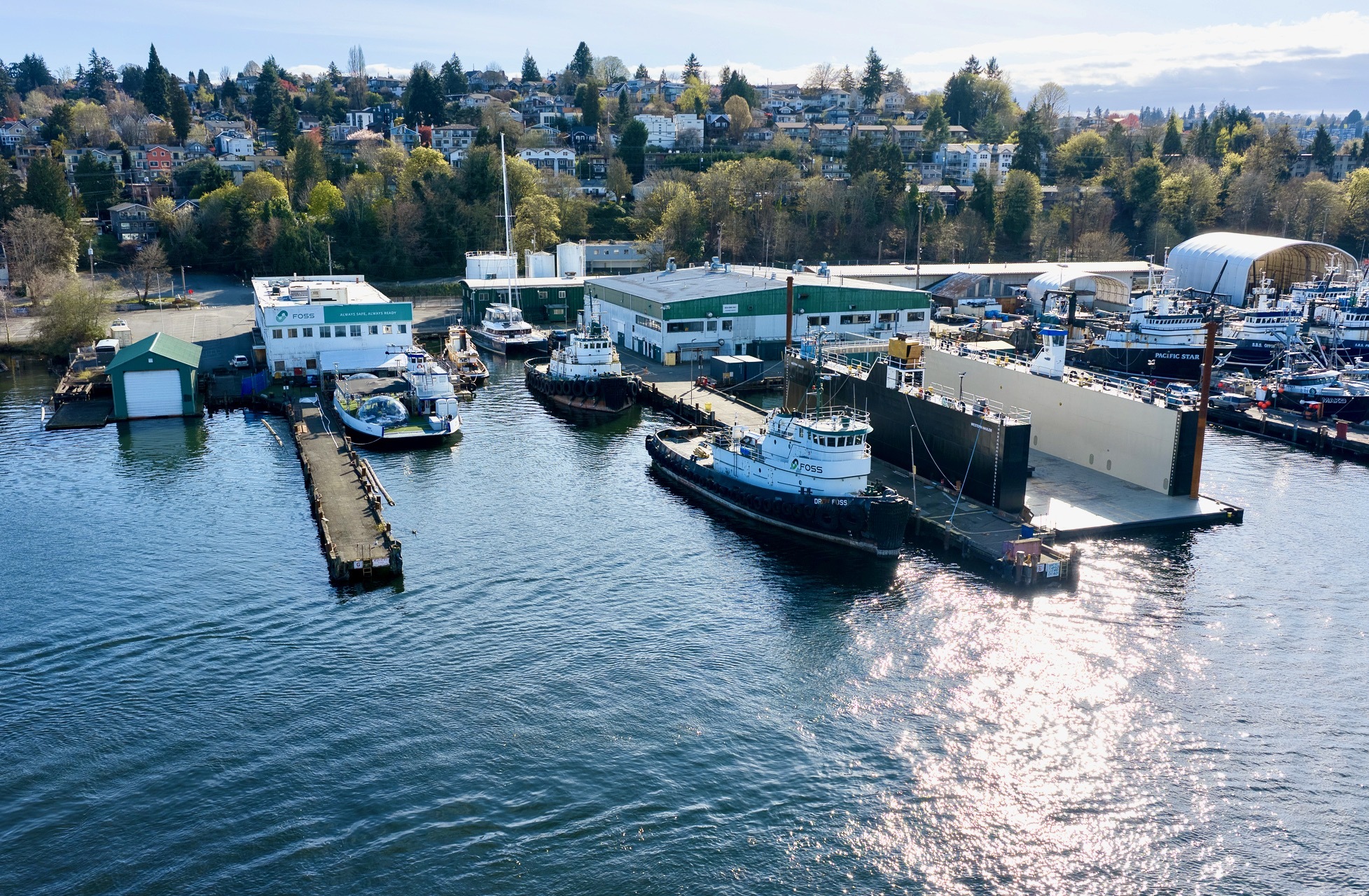
The old Foss Shipyard on Seattle’s Lake Washington Ship Canal, where defense giant Anduril Industries is building a new class of autonomous warships. (GeekWire Photo / Kevin Lisota)
There was no noticeable activity at the old Foss Shipyard in Seattle when I visited last week. No signs, and no visible presence of any workers. Behind the barbed-wire fencing, it looked like a ghost shipyard: rusting siding, fading Foss logos and old marine equipment.
But a person on site confirmed that the facility’s new tenant — defense giant Anduril Industries — was up and running, even if the top brass was nowhere in sight on a quiet Friday.
With little fanfare and no attention from local press, Anduril said last fall that it had spent tens of millions of dollars to revamp the historic Seattle shipyard, tucked along the southern side of the Lake Washington Ship Canal just west of Seattle Pacific University.
As you can see from the photo above, it’s a short aerial drone flight from GeekWire’s Fremont headquarters — hidden in plain sight yet quietly signaling the city’s emerging role in the next wave of naval technology.
Anduril calls what it’s building in Seattle a new class of dual-use autonomous surface vessels.
Advertisement
In non-military speak, that translates to drone warships.
Over the past week, I’ve been looking into this defense manufacturing powerhouse and its presence along the ship canal. But it’s actually not the story I started chasing. Here’s the reporting journey that led me to Anduril’s drone shipyard, and what I discovered in the process.
A strange oversight
My curiosity about this industry was piqued when news broke last week that Austin-based Saronic Technologies had raised $1.75 billion and was scouting sites for a next-generation shipyard focused on autonomous naval vessels and AI-driven maritime technologies.
Washington state is a maritime powerhouse, with deep ports, a skilled technical workforce and one of the largest concentrations of U.S. Navy personnel in the country. It’s also a leader in artificial intelligence. That led me to ask whether Washington state was being considered for the high-tech shipbuilding facility.
Advertisement
At first glance, the state seemed to be entirely off Saronic’s radar.
Saronic — founded four years ago by former Navy SEAL Dino Mavrookas — is seriously considering Brownsville, Texas for its $3.2 billion shipbuilding facility. That makes sense given the proximity to the company’s landlocked headquarters in Austin and existing manufacturing facility in Louisiana, and the high-tech workforce near SpaceX’s operations on the Gulf Coast.
But Fast Company recently reported that Saronic — which calls its yet-to-be-launched, 180-foot self-navigating vessel the Marauder — was considering sites in Oregon, California, Louisiana, Mississippi, Alabama, Florida, Virginia, North Carolina and South Carolina for its next-generation Port Alpha autonomous warship manufacturing facility.
Basically, that means Saronic is considering every state on the continental west coast, except Washington, and nearly every state with coastline south of Maryland. The mayor of San Diego, where the company recently established a significant presence, even declared last Oct. 21 “Saronic Day” — a nifty political play to try to woo even more defense jobs.
Advertisement
In the press release announcing Saronic’s new funding, Mavrookas said it’s creating a “fundamentally new model of American shipbuilding” that integrates advanced manufacturing and software-driven production to deliver autonomous vessels at speed and scale.
A mashup of AI, defense and maritime fits perfectly for the Seattle area. It’s a region that helped birth the aviation and software industries, and is sandwiched between the freshwater Lake Washington and saltwater Puget Sound, with ready access to the Pacific Ocean.
So as you might expect, when I reached out to economic development officials in Washington state last week, they were familiar with Saronic and its ambitious plans.
The 380-acre hurdle
Rebecca Lovell, the interim president and CEO of Greater Seattle Partners, said they received a request last summer from the Washington State Department of Commerce that appeared to match Saronic’s requirements for its so-called “Port Alpha” autonomous shipbuilding facility.
Advertisement
Lovell, an economic development veteran, was blown away by the scale of the request. At 380 acres, the new port facility would span the equivalent of roughly 290 football fields. No available qualifying sites or facilities in King County would meet the demand, she said.
Hulls being constructed at a Louisiana shipyard for Saronic’s autonomous naval vessels. (Saronic Photo)
“The query otherwise matches our criteria. It’s squarely in our key sectors,” Lovell said, citing factors including the wealth of talent in maritime and advanced manufacturing. She called the region a unique hub that brings together legacy industries and innovation.
Could Everett be an option? Just 30 miles north of Seattle, its deepwater port sits beside Naval Station Everett, and last year it hosted the launch of the experimental autonomous vessel USX-1 Defiant.
However, the Port of Everett and surrounding areas in Snohomish County simply did not have a big enough real estate footprint to meet the vast needs of Saronic’s Port Alpha project.
Daniel Tappana, director of economic development for the Economic Alliance Snohomish County, said they received a confidential request via the Washington State Department of Commerce last year for a facility that had many characteristics of Saronic’s Port Alpha project. He could not say for certain whether it was Saronic, but the attributes of the proposal did seem to mirror what he’s read about the maker of autonomous warships.
Advertisement
At more than 300 acres, Tappana said the confidential request was about six times bigger than anything Snohomish County could reasonably offer.
Saronic did not respond to requests for comment. A spokesperson for the Washington State Department of Commerce declined to answer specific questions posed by GeekWire.
But in the process of trying to solve that riddle, I learned something else: another heavily funded builder of autonomous war machines had already planted its flag in the region.
Anduril’s drone shipyard
Anduril said in a Nov. 2025 press release that its Seattle facility will serve as the U.S. hub for vessel assembly, integration and testing of Autonomous Surface Vessels as part of the U.S. Navy’s Modular Attack Surface Craft (MASC) program.
Advertisement
The news was reported in trade publications like Breaking Defense and The Maritime Executive, with Anduril citing the historical legacy and innovation of Kaiser Shipyards and noting that the region provides “the ideal conditions to re-energize American shipbuilding and grow the maritime workforce.”
The U.S. Navy’s appetite for autonomous vessels is rapidly increasing, especially in light of the war in Iran. Drone warfare has disrupted shipping through the Strait of Hormuz, spiking global oil prices and creating uncertainty in the global economy.
A strong autonomous naval program is critical for the U.S. given the rapidly changing dynamics of warfare, with low-cost drones wreaking havoc on warships that cost hundreds of millions of dollars. Anduril is positioned to benefit from this transformation.
The U.S. Navy introduced a new rapid procurement program on March 26 — replacing the MASC autonomy program. The new effort is designed to more quickly test prototypes on the open water later this year, and then deploy the vessels by September 30, 2027.
Advertisement
Defense giant Anduril is operating its autonomous naval vessel manufacturing facility at the old Foss Shipyard on the Lake Washington Ship Canal. (GeekWire Photo / John Cook)
That’s an extremely fast turnaround in defense circles, and speaks to the importance that the Navy is placing on launching autonomous systems on the open seas. It also means that Anduril will likely be very busy at its new Seattle manufacturing hub.
Anduril is clear on its mission when it comes to its new class of Seattle-built drone boats, constructed in a partnership with South Korea-based shipbuilder HD Hyundai Heavy Industries.
“Traditional, manned warships cannot meet that demand alone,” the company said in its announcement last fall. “The Navy needs autonomous, modular vessels that can be produced at speed, deployed in volume, and upgraded continuously with iterative engineering, software updates, and new mission payloads to augment the manned fleet.”
Seattle’s Drone Canal?
Joshua Berger, the founder and CEO of Washington Maritime Blue, a non-profit alliance dedicated to supporting innovation and economic development in the maritime industry, has closely tracked Anduril’s redevelopment of the Foss Shipyard. He understands that dozens of defense workers are already building the next-generation autonomous vessels on the property.
A naval vessel passes through the Ballard Locks in 1924. Photo from Wikimedia Commons via Seattle’s Museum of History and Industry.
Anduril’s facility is located in fresh water just east of the Ballard Bridge and Ballard Locks, an important sea route that connects Seattle’s historic maritime industry to the Puget Sound and Pacific Ocean.
“Part of what’s unique here is that you’ve got fresh water with access to salt water, which is significant for that kind of construction,” said Berger.
Advertisement
And the Anduril operation is not alone along the ship canal.
A short hop away, Brinc — a heavily-funded drone manufacturer — is opening a 35,000 square foot facility in a former fish cannery at West Canal Yards. On the north side of the canal in the Fremont neighborhood, Snow & Company is building electric boats and components for a new class of vessels, holding contracts with the U.S. Navy.
In that regard, a mini “autonomous alley” appears to be emerging along the ship canal.
Signs for Kidder Matthews flank the Foss Shipyard, and the commercial real estate brokerage’s website indicates that three buildings totaling more than 50,000 square feet are available for lease. Jeff Loftus of Kidder Matthews declined to comment, and referred questions to Anduril.
Advertisement
An Anduril representative responded to my inquiry, but as of publication time, the company had not followed up on my request for more specific information.
“We sort of have the perfect storm,” said Berger, pointing to the region’s advanced manufacturing capabilities, prime marine acreage, a high-tech workforce with specialization in autonomous systems and relative proximity to key suppliers in Asia.
The company behind the project
Anduril Industries is led by the Hawaiian-shirt and sandal wearing Palmer Luckey, the 33-year-old creator of Oculus VR, whom the New York Times recently described as the “It Guy of the booming defense-technology industry.”
Palmer Luckey, Anduril CEO. (Anduril Photo)
Anduril is a colorful (some say polarizing) startup in the buttoned-up world of defense. Lord of the Rings fans also will likely recognize the Anduril name as the reforged sword wielded by Aragorn and said to symbolize leadership, destiny and — interestingly in light of the U.S. shipbuilding industry — the reclaiming of lost glory.
The 9-year-old company has rapidly risen in the defense industry ranks. It is partnering with Boeing on a new missile defense system, and has won recent contracts with the U.S. Navy and Royal Australian Navy to develop long-range autonomous underwater vehicles with the goal of changing “the balance beneath the waves.”
Advertisement
Luckey is also a close confidante and respected force in the Trump administration.
Axios reported last month that Anduril was raising a $4 billion round of financing at a $60 billion valuation. That’s more than Ford Motor Company and Alaska Airlines, combined.
A portion of Anduril’s vast capital resources are going towards its autonomous boat-building operations, including the facility in Seattle. Last summer, GeekWire reported that the company sublet 39,851 square feet of prime downtown Bellevue office space from Meta, bringing its headcount in the region at the time to about 375 people.
Anduril also is rapidly expanding its operations in California. And it is building a massive facility just south of Columbus, Ohio that it dubs Arsenal-1, described by the company as “the future of American defense manufacturing.”
Advertisement
Political crosscurrents
Revitalizing the nation’s battered shipbuilding industry is a key priority of the Trump administration.
An executive order signed by President Trump last April was designed to counter shipbuilding gains by China, with a goal to “revitalize and rebuild domestic maritime industries and workforce to promote national security and economic prosperity.”
Of course, building autonomous warfighting machines in the heart of a progressive city like Seattle may come with its own set of political challenges.
But Maritime Blue’s Berger, for one, is hopeful that the region can navigate those thorny issues, especially as states such as Texas and Louisiana roll out huge economic incentives. And he’s excited by the innovation taking shape along the ship canal, tying the region’s maritime past to a new future.
Advertisement
“There’s still a lot of work to do to connect the tech, autonomy, climate and clean energy innovation ecosystem, with our legacy, traditional maritime sector,” Berger said. “But we’ve seen significant movement in the last five to 10 years.”
In short:OpenAI has paused its Stargate UK data centre project, citing the high cost of industrial electricity in Britain and an unfavourable regulatory environment around AI copyright. The project, announced in September 2025 alongside Nvidia and Nscale, had planned to deploy 8,000 GPUs at sites in north-east England, scalable to 31,000 over time. OpenAI says it will move forward “when the right conditions” allow, though it has given no timeline. The pause is a significant setback for the UK government’s AI Growth Zones initiative and arrives as OpenAI prepares for a public listing.
What Stargate UK was supposed to be
Stargate UK was announced in September 2025 as a sovereign AI infrastructure project: a partnership between OpenAI, Nvidia, and British cloud provider Nscale to build data centre capacity in north-east England that would allow OpenAI’s models to run on local computing power. The sites earmarked were Cobalt Park near Newcastle and Blyth, both within the UK government’s designated AI Growth Zones, a framework the government had positioned as a centrepiece of its industrial strategy for artificial intelligence. The project was unveiled during US President Donald Trump’s state visit to Britain, giving it diplomatic as well as commercial significance. The initial phase involved off take of approximately 8,000 Nvidia AI processors, with an ambition to scale that to 31,000 GPUs over time, capacity that would have enabled OpenAI to serve critical public services, regulated industries such as finance, and national security partnerships without routing data through US-based infrastructure. OpenAI never disclosed the total investment figure associated with the UK project. The broader US Stargate project remains on track with data centre construction under way across the United States,backed by a $40 billion bridge loan SoftBank secured to finance its participation, making the UK pause a geographic exception rather than a signal of retreat from AI infrastructure spending overall.
The energy cost problem
The most concrete obstacle OpenAI identified is the cost of electricity in Britain. UK industrial electricity prices are among the highest of any IEA member state, more than four times those in the United States, Finland, Norway, and Sweden. For a data centre drawing 100 megawatts, that differential is not a line-item concern but a structural one: the economics of running large-scale AI inference workloads at a site where power costs four times as much as they do in Virginia or Texas are fundamentally different, and that gap compounds as capacity scales. The problem is not simply a matter of electricity tariffs. Grid connection requests in the UK surged from 41 gigawatts in November 2024 to 125 gigawatts by June 2025, with an estimated 75 gigawatts of that queue attributable to data centre projects. Buildings can be constructed in 18 to 24 months; grid connections take three to eight years. That mismatch means that even if a project clears the financial hurdle, it faces an infrastructure queue that the current regulatory and planning framework has not been designed to process at AI-infrastructure speeds. The UK government’s AI Growth Zones policy, published in November 2025, was intended in part to address exactly this bottleneck, but the zone designations do not resolve the underlying grid constraints, and OpenAI’s decision to pause suggests that the policy framework has not yet translated into the conditions that would make the investment viable.
The copyright sticking point
The regulatory concern OpenAI cited alongside energy costs points to a separate and more politically charged problem: the UK’s unresolved approach to AI copyright. UK lawmakers have been working to update the rules governing how AI models are trained on copyrighted material. The government’s preferred approach, a broad text and data mining exception with an opt-out mechanism for rights holders, was rejected by the majority of respondents to the government’s own consultation, with creative industries, publishers, and news organisations arguing that a broad exception would allow generative AI companies to train on their works without compensation or meaningful consent. The consultation produced no consensus, and the government has since delayed any legislative change. For OpenAI, which trains large language models on text scraped from the internet, the uncertainty about whether that training will be lawful, and on what terms, is a material business risk. A UK data centre is not simply a power facility, it creates legal jurisdiction. If the UK eventually adopts a copyright framework that restricts training data use more tightly than the US, operating infrastructure in Britain could expose OpenAI to liability or compliance costs that do not apply to its US operations. The pause allows OpenAI to wait for that regulatory picture to clarify before committing capital.
Advertisement
A pause, not a cancellation, and the IPO context
The 💜 of EU tech
The latest rumblings from the EU tech scene, a story from our wise ol’ founder Boris, and some questionable AI art. It’s free, every week, in your inbox. Sign up now!
OpenAI’s statement was calibrated to leave the door open. “We continue to explore Stargate U.K. and will move forward when the right conditions such as regulation and the cost of energy enable long-term infrastructure investment,” the company said, framing the decision as contingent rather than final. The timing, however, is notable.OpenAI closed a $122 billion funding round at an $852 billion valuation in late March 2026, extending participation to retail investors for the first time in a move widely interpreted as groundwork for a public offering analysts expect as early as the fourth quarter of 2026. Companies approaching an IPO typically tighten their capital allocation discipline, avoid open-ended international commitments that could weigh on reported cash burn, and reduce exposure to projects with uncertain timelines. Pausing a data centre project that faces both energy cost headwinds and an unresolved copyright regime fits that pattern. The UK government, which had promoted Stargate UK as a signal of international investor confidence in Britain’s AI ambitions, described the decision as disappointing and said it remained in dialogue with OpenAI. OpenAI’s international Stargate expansion has not been without complications elsewhere either,its Abu Dhabi data centre plans drew an explicit threat from Iranian authoritiesamid escalating regional tensions, suggesting that sovereign AI infrastructure projects carry geopolitical risk profiles that are becoming a distinct factor in OpenAI’s site selection calculus. Meanwhile,Oracle appointed a new CFO this week to manage its $50 billion data centre construction programmeas the central operating partner in the US Stargate project, a contrast that illustrates where AI infrastructure spending remains active and where it is being reconsidered.The year 2025 established infrastructure access and energy as the primary competitive variables in AI, and for the UK, OpenAI’s pause is a signal that it has not yet solved either.
Gemini is getting a new feature in the form of notebooks, further integrating with NotebookLM, Google announced on Wednesday.
NotebookLM is easily one of Google’s best AI tools available. It allows you to add sources to a notebook and ask questions or generate a series of outputs, based only on the material you’ve given it, making it self-contained.
It’s different from the Gemini chatbot on its own, which will search the entire internet for an answer. NotebookLM’s answers are grounded only in your sources. It’s great for studying for school, getting prepped for work and even creative inspiration. There’s no wrong way to use it, and its flexibility lends itself to be explored, so it comes as no surprise that it’s getting further integrated into Google’s own chatbot.
Late last year, Google allowed you to add a NotebookLM notebook into Gemini so it would have all the context you added. Google says to look at notebooks as personal knowledge bases. You can add files, past chats and documents on a particular subject, and you can always jump back into that conversation with Gemini and pick up where you left off. Having a dedicated space to keep things in one place is great on its own for Gemini, but you can use those notebooks in NotebookLM, too.
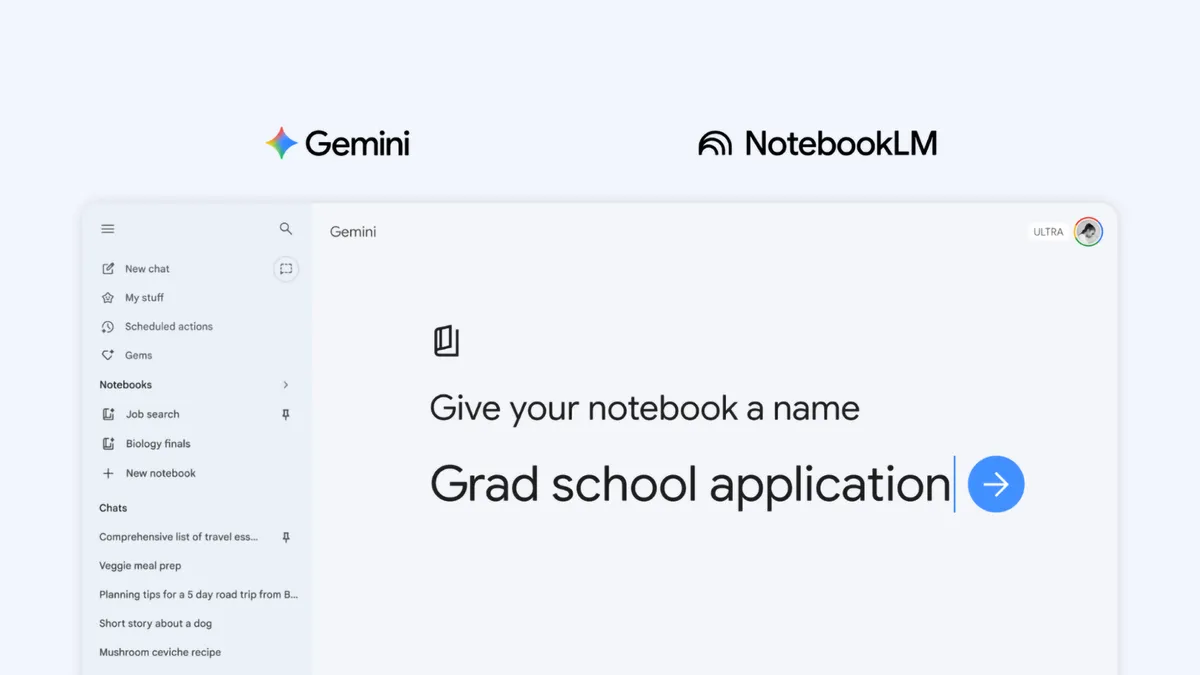
Notebooks make it easier to keep all the information on a particular subject in one place and give Gemini everything it needs without having to manually add details all over again. Now, that integration goes even further, and you can create notebooks directly in Gemini.
Notebooks can be synchronized between Gemini and NotebookLM, making the data in one tool instantly available in the other. This means you can add artifacts to the notebook in Gemini and immediately have the option to create a Video Overview, Infographic or other outputs within NotebookLM. Having the same synced notebook in both tools allows you to use each tool in its own way with the same database.
When the feature is available, you’ll see a new notebooks section in the side menu bar of Gemini, allowing you to quickly create one or access others you’ve made in the past.
Advertisement
Google is rolling out Notebooks in Gemini to AI Ultra, Pro and Plus plans on the web, and will expand access to mobile, more countries across Europe and free users in the coming weeks.
























































You must be logged in to post a comment Login