Manna was founded in 2019 and operates mostly in Dublin.
Irish drone delivery company Manna, which operates suburban air delivery of food and other goods, is to partner with Uber as the US transportation company makes its first moves into the European drone delivery space.
The new strategic partnership will be tested in Ireland before being launched in cities elsewhere in Europe. Manna said that integrating its drones with the “vast network of restaurants, merchants and consumers on the Uber platform will unlock faster, safer and more cost-efficient last-mile logistics at scale”.
Manna founder Bobby Healy told SiliconRepublic.com: “Uber is a worldwide brand synonymous with innovation and disruption. It’s a huge win for indigenous Irish tech and I’m particularly proud for our 170-strong team in north county Dublin.
Advertisement
“It represents everything that is great about building ambitious start-ups right here in Ireland.”
The new service will integrate Manna’s flight-proven autonomous drone delivery system with Uber’s global platform and logistics expertise, creating a fully integrated, end-to-end experience engineered for speed, safety and reliability at scale, the Irish company said.
Manna was founded in 2019 and claims to have made over 250,000 successful deliveries to date. It already works with food delivery platforms such as JustEat and Deliveroo, primarily in areas of Dublin. Uber, founded in 2010, focuses on moving people, food and things through cities.
Sarfraz Maredia, Uber’s president of autonomous mobility and delivery, said: “Autonomous technology is shaping the future of delivery, whether it’s on the streets or in the skies. By combining Uber’s scale with Manna’s proven aerial expertise, we’re bringing fast, efficient and sustainable delivery to consumers and merchants alike.
Advertisement
“We’re proud to launch in Europe and excited to introduce this technology to more Uber Eats customers over time.”
Manna has faced some opposition to its services at a local level over factors such as noise pollution, but claims its delivery service is cleaner and faster than comparable local deliveries by road while being safe and sustainable, with an ideal flight radius of around 5km.
“Our focus remains simple: build the safest, fastest and most sustainable delivery infrastructure in the world,” said Eoghan Huston, Manna’s COO.
Last year, it began operating in Cork, and has raised over $60m of funding in its lifespan to date.
Advertisement
Don’t miss out on the knowledge you need to succeed. Sign up for the Daily Brief, Silicon Republic’s digest of need-to-know sci-tech news.
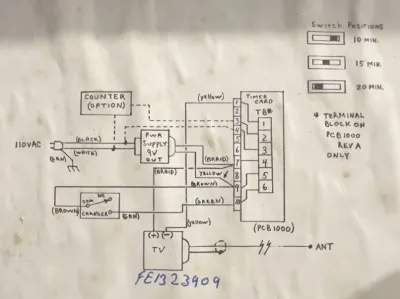
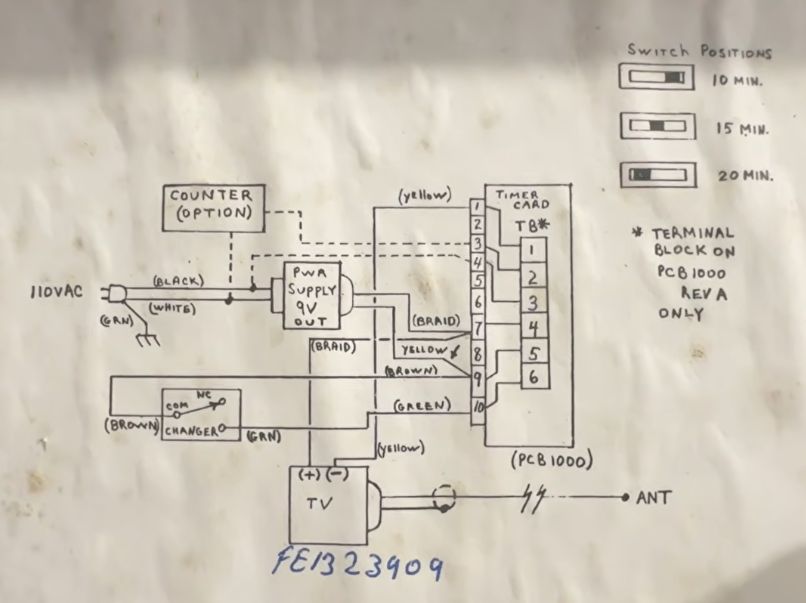
The timer mechanism of the Vend-o-Vision. (Credit: SpaceTime Junction, YouTube)
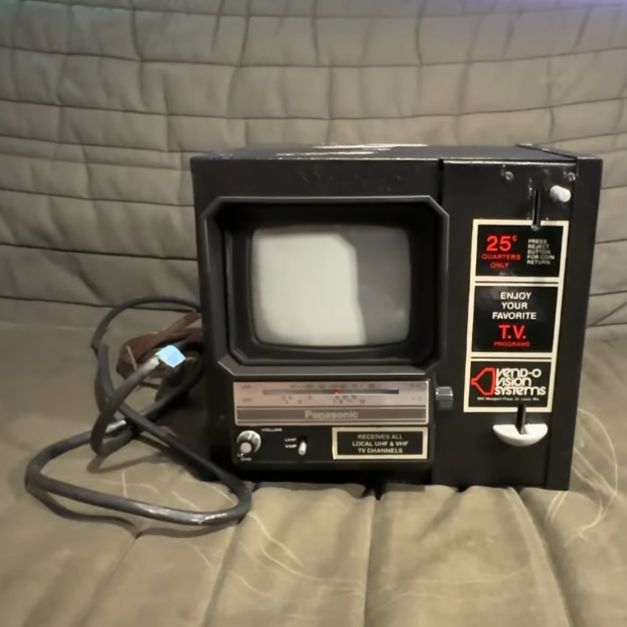
There was a time before portable TVs and personal media players when the idea of putting coin-operated TVs everywhere, from restaurants to airports and laundromats, would have seemed like a solid business model. Thus was born the Vend-o-Vision by Mini-TV USA, which presented itself as a cash earner for businesses and a way to make their customers even happier. One of these new-in-box units recently made its way over to [Mark] of the SpaceTime Junction YouTube channel.
This unit is very simple, with what appears to be an off-the-shelf Panasonic black-and-white TV with UHF and VHF reception capability, inside a metal box that contains the timer mechanism, which is linked to the coin mechanism. Depending on a physical slider with three positions, you get anywhere from 10 to 20 minutes per quarter, with the customer having to tune into the station themselves using the TV’s controls. A counter mechanism is provided as an option.
Time to enjoy your favorite TV shows. (Credit: SpaceTime Junction, YouTube)
As would be expected from a new-in-box unit, after chiseling off the 30-odd-year-old Styrofoam packaging, it fires right up and works fine. Of course, it’s a small black-and-white TV, so it’s not incredibly useful, and clearly wasn’t even back in 1989 when the Vend-o-Vision first appeared.
After some finagling with adapters, [Mark] gets everyone’s favorite movie playing on the tiny screen, giving us the first glimpse of what it would have been like to gaze at this miracle of technology back around the early 1990s in a noisy laundromat or restaurant. One can hardly imagine why it didn’t catch on.
We can see a patent for this appear in a 1990 scan of the USPTO’s gazette, where it’s listed as being first in commercial operation on the 29th of November 1989. The system was short-lived, however, with in 1995 the FTC settling with the company for deceptive practices, as the company had overinflated the projected earnings per TV when it started flaunting it at tradeshows in 1990. A few years prior, Mini TV USA appears to have already ceased operations, making these remaining Vend-o-Vision quite rare indeed. These types of coin-operated TVs were usually in public places or hotels. But we’ve seen coin-operated TVs that briefly appeared in homes, too.
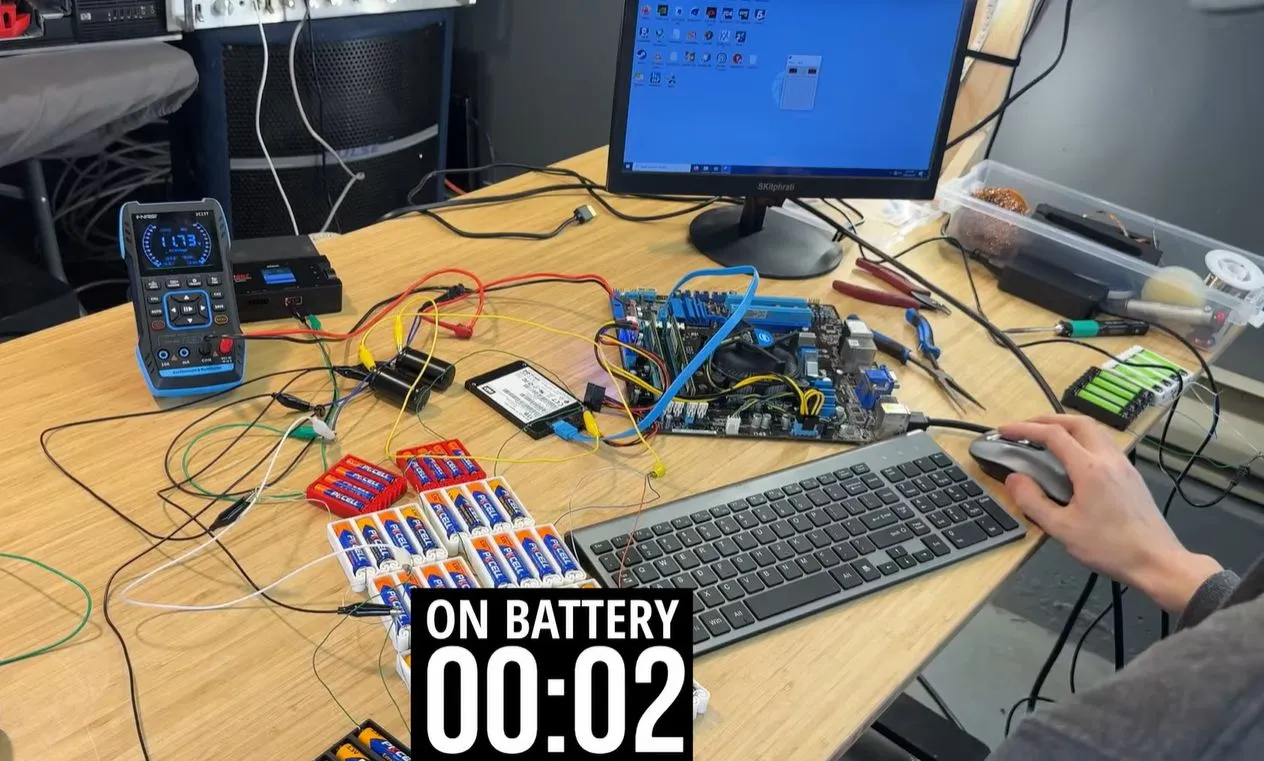
Everyone is probably familiar with the concept of battery-powered devices, but generally, this involves a laptop with a beefy battery pack and hardware optimized for low power draw. You could also do the complete opposite and try to run a desktop PC off alkaline AA cells, as [ScuffedBits] recently did out of morbid curiosity. Exactly how many alkaline cells does it take to run a desktop PC for any reasonable amount of time?
One nice thing about using batteries with a desktop PC is that you can ditch the entire AC-DC power conversion step and instead use a DC-DC adapter like the well-known PicoATX and its many clones. These just take in 12 VDC and tend to have a fairly wide input voltage range, which is useful when your batteries begin to run out of juice. In this case, just above 10 VDC seemed to be the cut-off point for the used DC-DC adapter.
In the end, [ScuffedBits] used what looks like 56 alkaline AA cells connected in both parallel and series, along with two series-connected 6,800 µF, 40V electrolytic capacitors to buffer the spikes in power demand, after early experiments showed that the cells just cannot provide power that quickly. Although admittedly, the initial thin wiring didn’t help either. With alkaline rather than carbon AA cells, improved wiring, and some buffer capacitors, it turns out that you can indeed run a desktop PC off AA cells, if only just about long enough for a small game of Minesweeper.
Advertisement
Amusingly, the small LCD monitor used in the experiment drew so little power that it happily ran on eight NiMH cells for much longer, highlighting just how important power conservation is for battery-powered devices. We wonder if you could marry this project to a battery project we saw and end up with something practically portable?
There’s Cluely founder Roy Lee. (“His grand contribution to the world was a piece of software that told people what to do.”) And the Rationalist movement’s Scott Alexander, who “would probably have a very easy time starting a suicide cult…”
Alexander’s relationship with the AI industry is a strange one. “In theory, we think they’re potentially destroying the world and are evil and we hate them,” he told me. In practice, though, the entire industry is essentially an outgrowth of his blog’s comment section… “Many of them were specifically thinking, I don’t trust anybody else with superintelligence, so I’m going to create it and do it well.” Somehow, a movement that believes AI is incredibly dangerous and needs to be pursued carefully ended up generating a breakneck artificial arms race. There’s a fascinating story about teenaged founder Eric Zhu (who only recently turned 18):
Clients wanted to take calls during work hours, so he would speak to them from his school bathroom. “I convinced my counselor that I had prostate issues… I would buy hall passes from drug dealers to get out of class, to have business meetings.” Soon he was taking Zoom calls with a U.S. senator to discuss tech regulation… Next, he built his own venture-capital fund, managing $20 million. At one point cops raided the bathroom looking for drug dealers while Eric was busy talking with an investor. Eventually, the school got sick of Eric’s misuse of the facilities and kicked him out. He moved to San Francisco.
Eric made all of this sound incredibly easy. You hang out in some Discord servers, make a few connections with the right people; next thing you know, you’re a millionaire… Eric didn’t think there was anything particularly special about himself. Why did he, unlike any of his classmates, start a $20 million VC fund? “I think I was just bored. Honestly, I was really bored.” Did he think anyone could do what he did? “Yeah, I think anyone genuinely can.” The article concludes Silicon Valley’s investors are rewarding young people with “agency”. Although “As far as I could tell, being a highly agentic individual had less to do with actually doing things and more to do with constantly chasing attention online.” Like X.com user Donald Boat, who successfullybaited Sam Altman into buying him a gaming PC in “a brutally simplified miniature of the entire VC economy.” (After which “People were giving him stuff for no reason except that Altman had already done it, and they didn’t want to be left out of the trend.”)
Shortly before I arrived at the Cheesecake Factory, [Donald Boat] texted to let me know that he’d been drinking all day, so when I met him I thought he was irretrievably wasted. In fact, it turned out, he was just like that all the time… He seemed to have a constant roster of projects on the go. He’d sent me occasional photos of his exploits. He went down to L.A. to see Oasis and ended up in a poker game with a group of weapons manufacturers. “I made a bunch of jokes about sending all their poker money to China,” he said, “and they were not pleased….”
Advertisement
“I don’t use that computer and I think video games are a waste of time. I spent all the money I made from going viral on Oasis tickets.” As far as he was concerned, the fact that tech people were tripping over themselves to take part in his stunt just confirmed his generally low impression of them. “They have too much money and nothing going on…” Ever since his big viral moment, he’d been suddenly inundated with messages from startup drones who’d decided that his clout might be useful to them. One had offered to fly him out to the French Riviera. The author’s conclusion? “It did not seem like a good idea to me that some of the richest people in the world were no longer rewarding people for having any particular skills, but simply for having agency.”
The device in many automobiles that warns drivers when their tire pressure is low transmits the data in unencrypted cleartext and carries a unique identifier for each vehicle. Researchers from IMEDA Networks and several European universities recently discovered that relatively inexpensive wireless devices can track Tire Pressure Monitoring System (TPMS)… Read Entire Article Source link
Alaska’s House of Representatives unanimously passed HB47, a bill that imposes sweeping limits on when and how minors use social media apps, along with bans on generating or distributing harmful deepfakes of children.
The bill’s original form was focused on prohibiting the possession and distribution of sexually explicit images of children using AI, but Alaska lawmakers decided to add amendments that would impose social media restrictions. The proposed limitations include a statewide curfew on using social media between 10:30 PM and 6:30 AM, banning “addictive design features” and requiring social media platforms to verify user ages and get parental consent if they are minors.
While the House bill saw 39 votes in favor and zero against, the amendments offered some hints at potential upcoming revisions. Before the bill went to a vote, some of the House representatives expressed concern about adding such broad rules on social media without consulting the companies behind them first.
The bill still has to make its way through the Alaska State Senate, which already has presented a companion bill, and the governor. Alaska is following the footsteps of many other states, and the House even modeled its social media amendments in the HB47 bill after Utah. While Utah was the first to propose social media restrictions for kids, it was later met with a preliminary injunction.
The move comes amid Google’s strategy to move further into the physical AI space.
Intrinsic, an Alphabet-owned software and AI company, is joining Google. The platform, which was established in 2021 as one of Alphabet’s ‘other bets’ under the ‘moonshots’ research and development segment X Development, builds AI models and software designed to make industrial robots more accessible.
In joining Google, Intrinsic will continue to operate as a distinct entity, however, it will work closely with Google DeepMind and will tap into Google’s Gemini AI models and cloud services. Thus far, Alphabet has declined to share information regarding funding or the purchase price.
Commenting on the news, Wendy Tan White, the CEO of Intrinsic said: “The Intrinsic team has been working for years to enable access to intelligent robotics through a democratised platform, so more people can build and benefit from robotics applications.
Advertisement
“Combined with Google’s incredible AI and infrastructure, we’re going to unlock the promise of physical AI for a much broader set of manufacturing businesses and developers. This will fundamentally shift production, from its economics to operations and enable truly advanced manufacturing.”
Hiroshi Lockheimer, the chief product officer of Other Bets, added: “At Google, we see the immense opportunity in bridging the gap between the digital and physical world, that is also true for intelligent robotics in industries like manufacturing and logistics. We’re excited to welcome the Intrinsic team to Google, so we can bring breakthrough AI to more businesses and industries, at scale.”
In other Alphabet news, Alphabet and Google were in hot water earlier this month as both were at the centre of a new antitrust complaint filed by the European Publishers Council with the European Commission on 10 February.
The complaint alleged that Google and Alphabet are abusing their dominant position in general search services via the use of AI overviews and AI mode embedded within Google Search.
Advertisement
Don’t miss out on the knowledge you need to succeed. Sign up for the Daily Brief, Silicon Republic’s digest of need-to-know sci-tech news.
Picture this: you have an irregular opening you need to fabricate a piece to fill. Maybe it’s the stonework of a fireplace; maybe it’s the curved bulkhead of a ship. How do you get that shape? The most “Hackaday” answer would be to 3D scan the area, create a CAD model based on the point cloud, and route the shape with CNC. Of course, none of those were options for the entirety of human history. So how do you do it if you don’t have such high-tech toys? With a stick, as [Essential Craftsman] takes great pains to show us in the video below.
It’s not just any stick, of course. Call it a “tick stick”, a “speil stick”, or a “joggle stick” — whatever you call it, it’s just an irregularly shaped piece of wood. The irregular shape is key to the whole process. How you use it is simple: get some kind of storyboard — cardboard, MDF, whatever — that fits inside your irregular void. Thanks to the magic of the stick, it need not fit flush to the edges of the hole. You put the tick stick on the storyboard, press the pointy end against a reference point on the side of the hole, and trace the stick. The irregular shape means you’re going to be able to get that reference point back exactly later. Number the outline you just made, and rinse and repeat until you’ve got a single-plane “point cloud” made of tick stick outlines.
Your storyboard is probably going to look mighty confusing, but that’s what the numbers are for. Bring your storyboard and your tick stick onto the workbench and whatever you want to cut out– plywood, cardboard, 1/4″ steel armor plate, you name it–and simply repeat the process. Put the tick stick inside outline #1 and mark where the pointy end lands on the material. Then do it again for the other outlines, reproducing the points you measured on the original piece. After that, it’s just a game of ‘connect the dots’ and cutting with whatever methodology works for your substrate. A sharp knife will work for cardboard, but you’ll probably want something more substantial for steel plate.
It’s not often you’re going to need the tick stick– the [Craftsman] reports only needing it a few times over the course of a decades-long career, but when you need it, there’s not much else that will do the job. Well, unless you have a 3D scanner handy, that is.
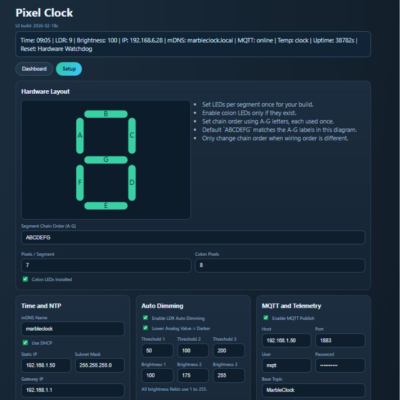
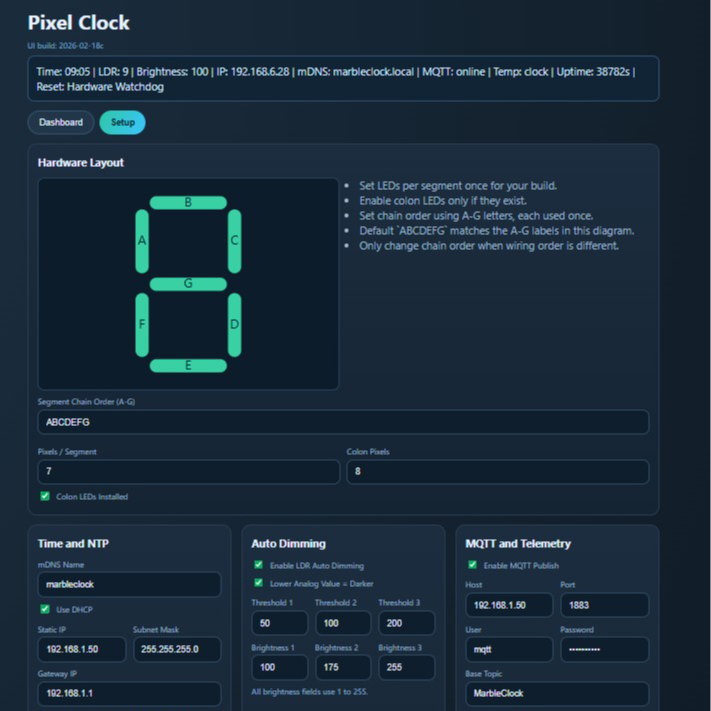
At first glance, it may look like [Rybitski]’s 7-segment RGB LED clock is something that’s been done before, but look past the beautiful mounting. It’s not just stylishly framed; the back end is just as attentively executed. It’s got a built-in web UI, MQTT automation, so Home Assistant integration is a snap, and allows remote OTA updates, so software changes don’t require taking the thing down and plugging in a cable.
A slick web interface allows configuring which LEDs belong to which segments without code changes.
Pixel Clock is code for the Wemos D1 Mini microcontroller board and WS2812/WS2812B RGB LED strips, but it’s made to be flexible enough to support different implementations. For example, altering which LEDs in the strip belong to which segments on which digits can be configured entirely from the web interface. Naturally, one could build an LED strip clock using the same layout [Rybitski] did and require no changes at all — but it’s very nice to see that different wiring layouts are supported without needing to edit any code. There’s even automatic brightness adjustment if one adds an LDR (light-dependent resistor), which is a nice touch.
[Rybitski]’s enclosure is CNC-routed MDF, framed and given a marble finish. The number segments are capped with laser-cut frosted white acrylic, which serve as both diffuser for the LEDs and an attractive fit with the marble finish at the front. MDF is dense and opaque enough that no additional baffles or louvers are needed between segments.
With this code and an RGB LED strip, you can implement your own 7-segment clock any way you like, focusing on an artful presentation instead of re-inventing the wheel in software. Of course, there’s nothing that says one must use 7-segment numerals; some say your LED clock need not display numbers at all.
JapanNext 31.5-inch 6K panel increases pixel density for sharper interface elements
60Hz refresh and 8ms response focus on productivity usage
500 nit brightness and 1500:1 contrast suit standard office lighting
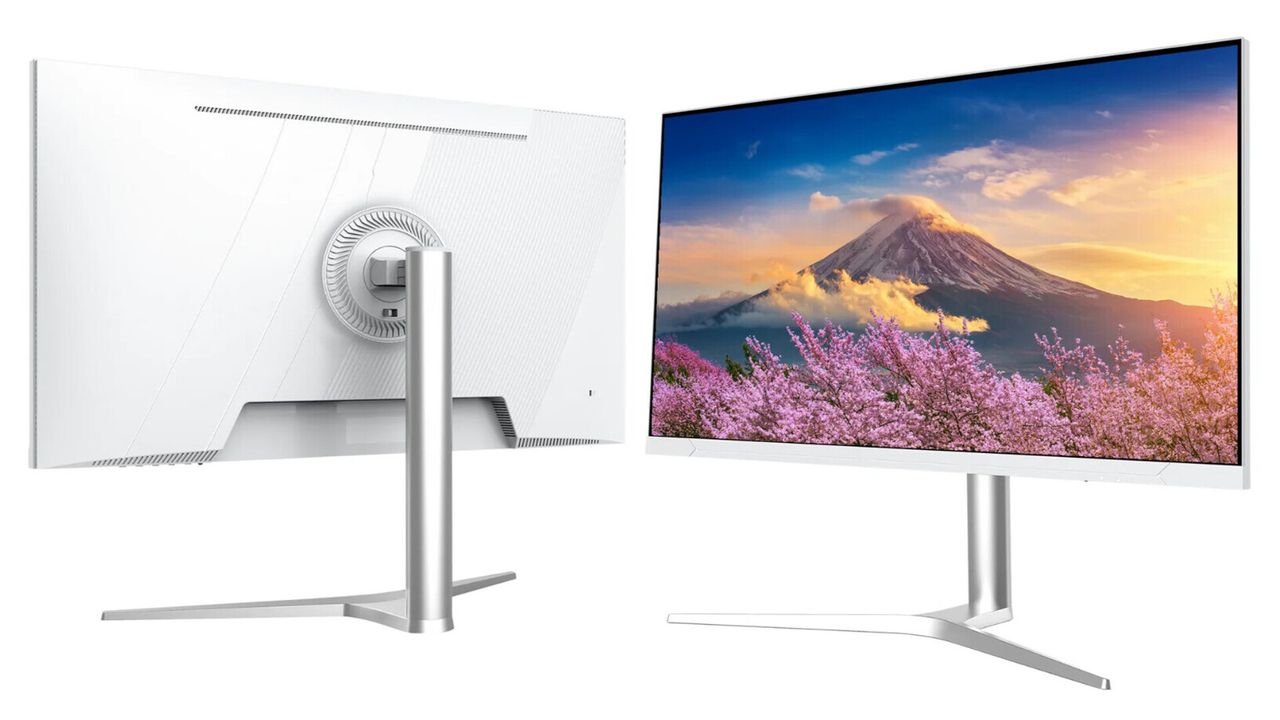
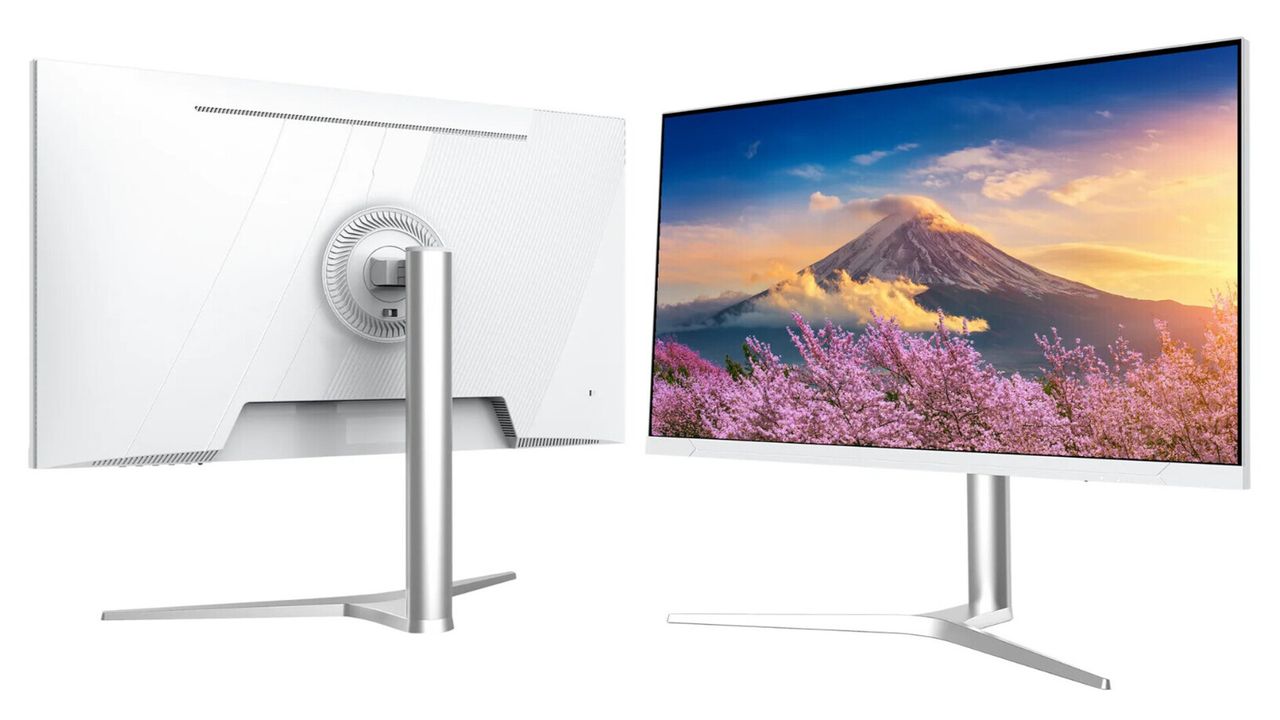
JapanNext has released the JN-IPS326K-HSPC9, a 31.5-inch IPS monitor with a 6016 x 3384 resolution aimed primarily at home and office users.
This resolution exceeds the 3840 x 2160 pixel count commonly associated with 4K displays, resulting in a pixel pitch of 0.1159mm on this panel size.
In practical terms, that density means text and interface elements can appear finer, although the benefit depends largely on scaling settings and viewing distance.
Designed for office environments
This business monitor operates at 60Hz with an 8ms response time, specifications that indicate a focus on routine productivity rather than competitive gaming performance.
Brightness is rated at 500 nits and contrast at 1500:1, figures that align with upper mid-range IPS office displays currently available, and the panel covers 100% of the sRGB color space and 96% of DCI-P3, with support for HDR10 content.
While those numbers suggest suitability for photo or video editing, HDR performance on edge-lit IPS panels can vary depending on content and environmental lighting conditions.
Advertisement
This device supports a 178-degree horizontal and vertical viewing angle, which is consistent with IPS technology and helps maintain stable colors across wider seating positions.
Sign up to the TechRadar Pro newsletter to get all the top news, opinion, features and guidance your business needs to succeed!
The monitor includes Picture-in-Picture and Picture-by-Picture modes, allowing two input sources to be displayed simultaneously within a single-screen workspace.
Flicker-Free and Low Blue Light settings are available for extended sessions, and HDCP support is provided across HDMI, DisplayPort, and USB-C connections.
Advertisement
Connectivity options include two HDMI 2.1 ports, one DisplayPort 1.4 connection, and a USB-C 3.1 interface capable of delivering up to 90W of power.
A built-in KVM switch allows users to control multiple connected systems with one keyboard and mouse, which may simplify desk arrangements involving separate devices.
Additional features include an audio output, integrated 2W speakers, compatibility with AMD FreeSync and Nvidia G-Sync, and support for 75 x 75mm VESA mounting.
Advertisement
The stand supports tilt, swivel, height adjustment, and pivot functions, offering flexibility for different seating positions and workspace layouts.
At €899, about $1,061, on JapanNext’s website, the JN-IPS326K-HSPC9 sits among the more affordable 6K monitors currently available.
For comparison, Asus offers the ProArt Display 6K PA32QCV at $1,289.99 through Best Buy, with specifications that include dual Thunderbolt 4 ports and broader stated color coverage.
At a higher price point, Dell lists the UltraSharp 32 6K U3224KB for $2,499.99 on its United States online store.
Advertisement
Given JapanNext sells its own 27-inch 5K monitor for under €700, it’s not surprising that its latest monitor seriously undercuts the competition.
I’ve been reviewing robot vacuums professionally for a couple of years now, and as a result I’ve been drawn into conversations about these handy home helpers on a regular basis. Everyone I’ve met outside of a work context seems intrigued by the idea of a robot vacuum, but there are some misconceptions about what they can and can’t do. In many cases, people are underestimating modern robot vacuums’ capabilities.
So let’s set the record straight. Here are eight common robot vacuum misunderstandings, and some information on what you can actually expect…
1. They’re just for vacuuming
Advertisement
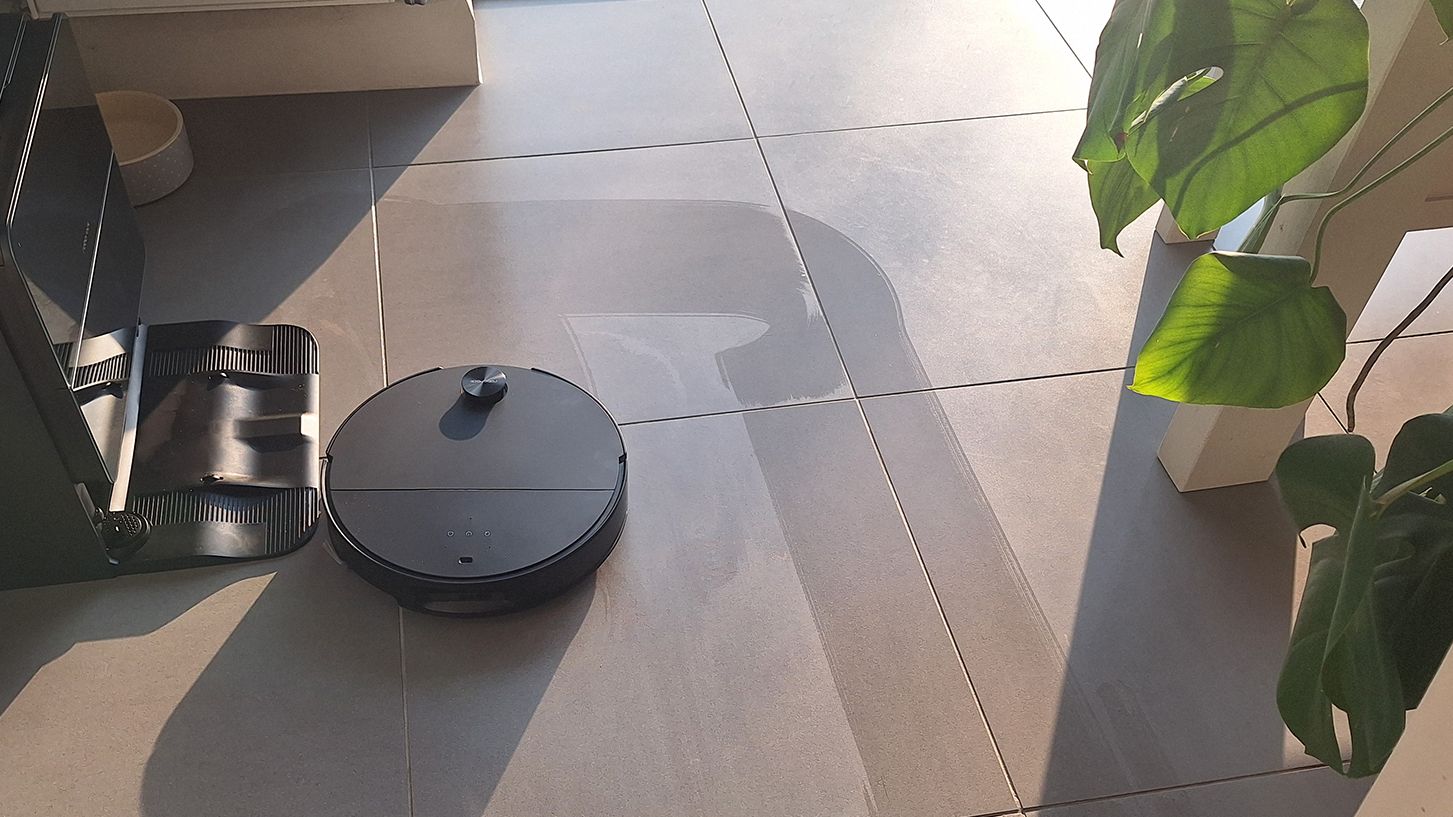
Newsflash: modern robot vacuums can mop, too. In fact, I’d go as far as to say that these days, you’d be hard-pressed to find a robovac that doesn’t have mopping functionality built in.
The level of mopping varies quite considerably, however. Cheap, basic machines such as the Dreame D9 Max Gen 2 will have a large, flat water tank with a mop pad mounted to the bottom. You’ll need to fill it up and attach it to the machine every time you want to mop your floors. In some cases, having the tank attached automatically means water will be coming out, so you’ll need to carry the robovac into any target room unless you want your carpets mopped too.
(Image credit: Future)
Pricier robovacs have really quite advanced mop setups. You’ll almost always be able to set no-mop zones, many robot vacuums can lift their mop pads when traversing carpet, and some will even drop their mop pads off in the dock when they’re not needed. Some premium robot vacuums have docks that will refill water tanks, dispense detergent, and wash and dry the mop pads for you.
Advertisement
2. They can’t be used on multiple floors
Autonomous stair-climbing is off the cards (for the moment, at least… more on that in a sec) but that doesn’t mean your robovac is confined to one floor only. You’ll just need to carry it up and down the stairs yourself.
The vast majority of robot vacuum apps can store multiple floorplans, so you can map each floor, then place the robotic on the floor that needs cleaning. It won’t be able to return to its dock mid-clean to charge or empty its bin; but otherwise, it will just operate as usual. Cliff sensors mean it won’t take a tumble down any stairs, either.
Sign up for breaking news, reviews, opinion, top tech deals, and more.
Advertisement
(Image credit: TechRadar / Carrie-Ann Skinner)
3. Roomba is still the best brand to buy
Roomba is still kicking around (although for a while, it was touch-and-go for parent brand iRobot) – but it hasn’t been top of the bot charts for some time now. Brands such as Roborock, Dreame, Ecovacs and Eufy have leapfrogged Roomba in terms of features, and in my experience the latter bots are generally more reliable, capable, and offer better value for money too. I’m not writing off Roomba completely just yet, but it isn’t currently troubling my best robot vacuum roundup.
4. They’re not for pet hair
Pet hair is notoriously “sticky”, so pulling it up from carpet is a challenge for any vacuum — let alone one of the robo-variety. However, robot vacuums can still be very useful for owners of shedding pets, simply because they can clean as regularly as you want them to, without you even needing to be awake, or in the house.
Advertisement
These regular, light cleans can help stop hair from building up, so when you do go in for a deep clean with a manual vacuum, you aren’t dealing with enough hair to stuff a king-sized duvet. Robot vacuums are also great at cleaning in hard-to-access places — under the bed, for example — where flurries of fur can easily collect.
(Image credit: Future)
There are some key things to look for if you’re seeking the best robot vacuum for pet hair. Decent suction specs (around 6,000Pa or more) are a must, as is a self-empty bin, unless you constantly want to be pulling hair out of the small onboard dust cup. On that latter point, it’s worth spending more for a higher-end dock, since cheaper units can become jammed with fur during the self-empty process.
Advertisement
5. They’re super technical
If you want to understand how robot vacuums work, you’ll need to get quite technical. However, if you pick a good one, using it will be pretty straightforward. Any decent, modern robot vacuum will walk you through the set-up process, which is typically no more involved than downloading the correct companion app and connecting the robot to the internet (I’ve never had issues with this, but here are some things to try if your robot vacuum is losing internet connection).
Most will then prompt you to do a quick mapping run, where the bot will wander into each room and build a basic map for you to edit. You could tidy up, lift chairs and so on for this bit; but even if you don’t, your bot will likely discover any previously inaccessible areas on a later run.
Generally, with robot vacuums there’s plenty to dig into if you are tech-savvy — precisely editing your maps, setting up complex schedules, tweaking settings and so on. However, if you don’t want to get into all that, most will have a big Go button that you can press and the vacuum will make a good fist of cleaning your home with no more information required than that.
Advertisement
6. They can’t cope with clutter
Modern robot vacuums arrive with navigation tech that means they’ll be able to skirt around any obstacles. The most advanced options can also accurately identify the exact type of clutter, and figure out what needs a wide berth and what doesn’t. In short, a little bit of clutter will generally not be a problem.
That said, there are some limits. In particular, shallow obstacles often get missed — I’ve never met a robot vacuum that wasn’t desperate to chow down on charge cables like spaghetti. And I’d never trust a robovac’s object avoidance enough that I’d let it loose in a home with a non-house trained pet, either.
(Image credit: Future)
7. They can replace a manual vacuum
Robot vacuums can be great, but they are unlikely to replace a manual vac. There are some things that even the priciest, most advanced robot vacuums can’t do. An obvious one is vacuuming the stairs (although there are various prototypes in the works from Eufy and Dreame, and most recently Roborock, that look to change that). Bungalow-dwellers aren’t in the clear, either — a robovac can’t vacuum your sofa, your mattress, or be used to dust away the cobwebs on your room coving.
Advertisement
In addition, I’ll make it clear that robot vacuums still can’t really rival the best manual vacuums in terms of suction. They’re excellent at taking care of regular, light cleans, but for a proper deep dust-busting session, you’ll need to roll up your sleeves.
8. They cost a fortune
This depends on your definition of “a fortune”. You’re unlikely to find the top-end flagship robot vacuums for less than four figures, and for features such as automatic mop cleaning and water dispensing, you’ll need to shell out over $600 / £600. However, there are plenty of capable, basic models under the $400 / £400 mark — my best cheap robot vacuum guide has more information. That’s still an investment, but perhaps not as ruinous as you might expect.
Discounts aren’t hard to come by, either. Robot vacuums almost always feature in shopping events such as the Black Friday sales, and when you consider the rate at which the market is moving, it’s common to see relatively new models discounted to make space for an even-newer range-mate.
And of course, you can also follow TechRadar on YouTube and TikTok for news, reviews, unboxings in video form, and get regular updates from us on WhatsApp too.