The portable USB dongle DAC market is no longer niche. It is overflowing with options and not in a good way. There are dozens of sub-$200 models promising better sound than your phone or laptop, and most of them look nearly identical on paper. More power. Smaller chassis. Higher sample rate support. Rinse and repeat. Differentiation in 2026 isn’t easy. That’s the reality facing the new iFi GO link 2.
When you strip away the marketing copy, what matters with any dongle DAC comes down to practical questions: How portable is it really? Does it deliver enough output for demanding headphones or just efficient IEMs? What Hi-Res formats are supported — and do you even need them? Does it drain your phone’s battery? Do you need Bluetooth with aptX Lossless or LDAC, or is a wired-only solution the smarter move?
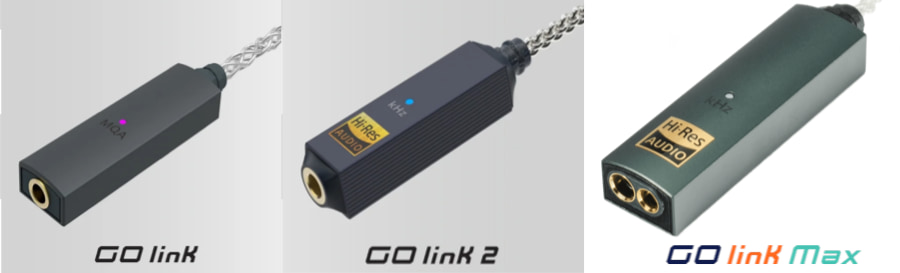
The iFi GO link 2 enters that conversation at $59, which replaces the previous iFi GO link (2023 model) that we quite liked from our testing for the same price. Although the $79 iFi GO link MAX (2025 model) adds a 4.4mm input, the GO link 2 is positioned as a wired, ultra-portable upgrade for listeners who want better sound from their smartphone, tablet or laptop without any bulk. In a segment this crowded, clarity of purpose matters. Most dongle DACs will outperform the internal audio circuitry in a smartphone or tablet, but being physically tethered to a small device that hangs off your charging port isn’t always the most elegant or practical solution.
iFi GO link 2 Key Features
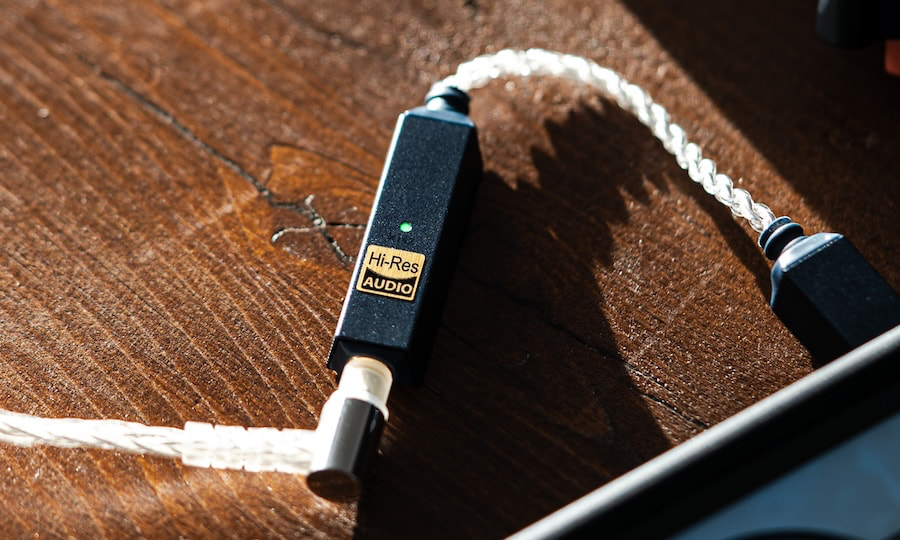
The GO link 2 is built around an ESS Sabre DAC chipset with support for PCM up to 384kHz and native DSD256, ensuring compatibility with high-resolution downloads and major streaming platforms. It is a fully wired USB-C dongle DAC with no internal battery and no Bluetooth functionality. Power is drawn directly from the connected source device, whether that’s a smartphone, tablet, or laptop.
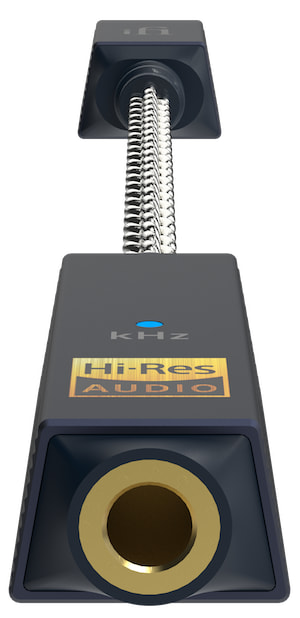
The iFi GO link 2 features a 3.5mm S-Balanced headphone output. Rated output is ≥1.59V/79mW into 32Ω and ≥2.0V/14mW into 300Ω, with an output impedance below 0.4Ω. That level of voltage and current is well suited to efficient IEMs and most portable headphones, while the low output impedance helps maintain stable frequency response with sensitive multi-driver earphones. iFi’s S-Balanced design applies balanced circuit principles to a single-ended 3.5mm output to reduce channel crosstalk, though it is not a true balanced configuration.
Advertisement
According to the published specifications, the GO link 2 offers a dynamic range of ≥125dBA, signal-to-noise ratio of ≥125dBA, THD+N of ≤0.0015% (at 1.27V into 32Ω), and a frequency response of 10Hz-80kHz (-0.5dB). These figures place it squarely within the competitive range for sub-$100 USB dongle DACs and suggest low distortion and wide bandwidth performance within its intended use case.
Power consumption is rated at approximately 0.2W with no signal and up to roughly 1W at maximum signal, meaning it will draw modest but noticeable battery power from a connected mobile device. Physically, the unit measures 137 x 12 x 7.6mm (5.4 x 0.47 x 0.31 inches) and weighs just 7.8g (0.30oz). Its compact dimensions and minimal weight make it one of the smallest DACs in its category, designed to remain unobtrusive when connected to a phone or laptop.
The GO link 2 is the first model in the series to support the iFi Nexis app, allowing over-the-air firmware updates and access to two selectable digital filters (Hybrid and Linear). App-based features, including firmware updates and filter selection, are currently exclusive to Android devices. There is no word yet on when it will be available for Apple OS or iOS.
100mW @ 32Ω; 2V @ 300Ω via 3.5mm 241mW @ 32Ω; 4V @ 300Ω via 4.4mm
SNR
≥125dBA (2.05V)
≥125dBA (2.05V)
≥125dBA via 3.5mm ≥130dBA via 4.4mm
THD+N
≤0.004% (1.27V @ 32Ω)
≤0.0015% (1.27V @ 32Ω)
≤0.0015% @ 32Ω 1.27V via 3.5mm ≤0.0016% @ 32Ω 2.4V via 4.4mm
Nexis App Support
–
Yes
–
iFi GO link 2
The Bottom Line
The iFi GO link 2 is a focused, wired-only USB dongle DAC for listeners who simply want better sound than their phone or laptop’s internal audio without adding bulk, batteries, or wireless complexity. It supports PCM up to 384kHz and DSD256, offers a low output impedance suitable for sensitive IEMs, and keeps power draw modest. Its S-Balanced 3.5mm output and Android app support for firmware updates and filter selection add some differentiation in a crowded sub-$100 category. What makes it stand out isn’t feature overload — it’s size, simplicity, and a clean wired signal path in an extremely lightweight form factor.
What it lacks is just as clear. There’s no Bluetooth, no LDAC or aptX Lossless, no balanced 4.4mm output, and limited power for demanding headphones. If you want wireless flexibility and broader codec support, the iFi GO Blu Air makes more sense. The GO link 2 is for wired-first listeners using efficient headphones or IEMs who value portability and straightforward Hi-Res decoding over extra features.
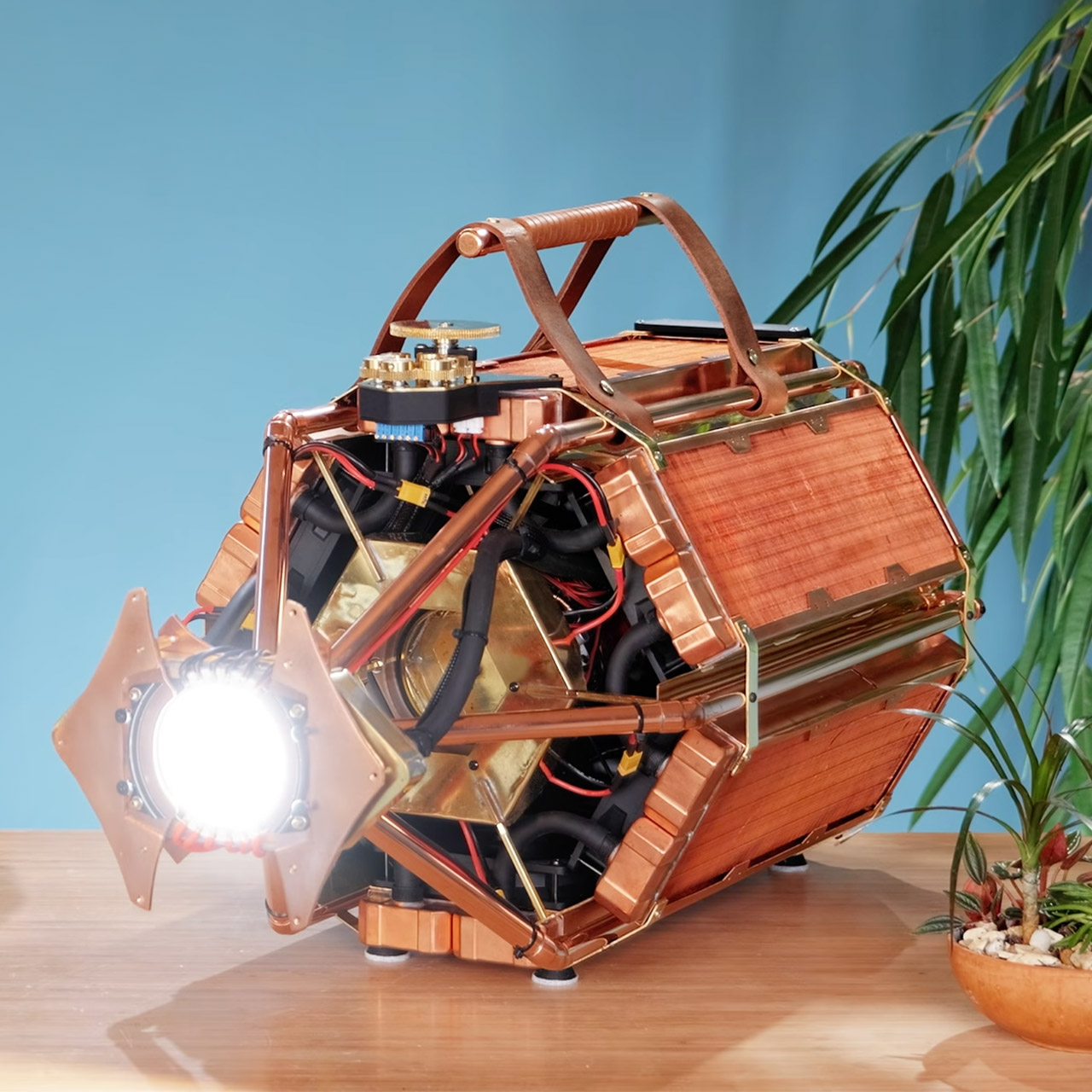
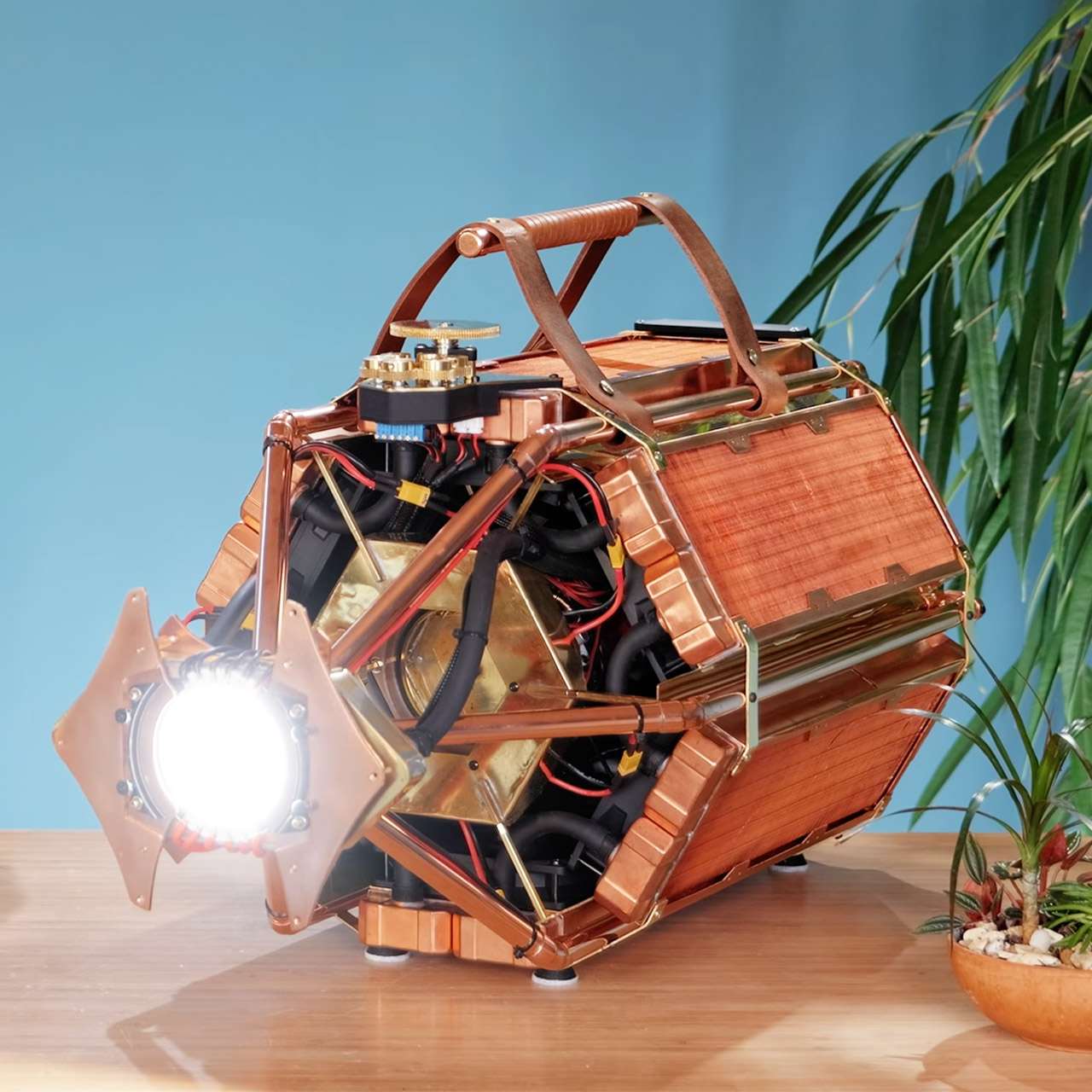
Matthew Perks has truly outdone himself with his new invention, a highly portable powerhouse surrounded by one of the world’s brightest LEDs. The device, known as the LED supernova, takes 1.5 kilowatts of power and converts it into a dangerously eye-searing 120,000 lumens, all in a compact box weighing only 25 kg and remaining (amazingly) portable.
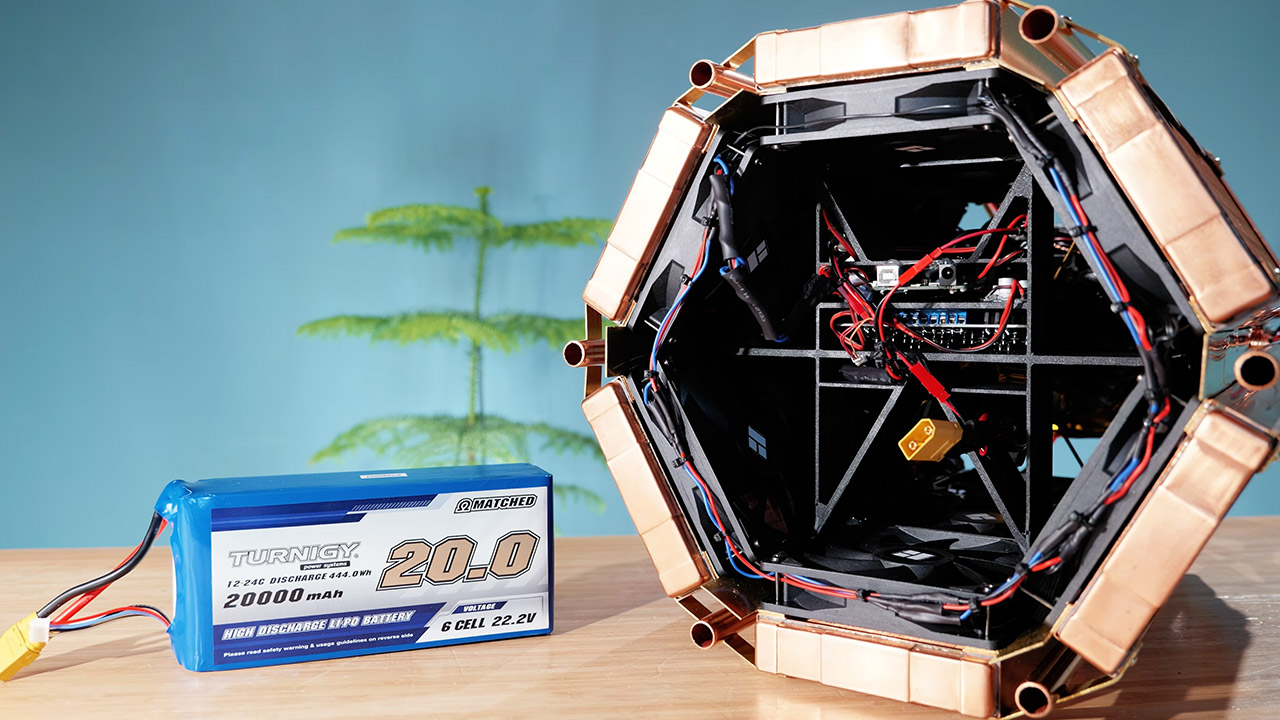
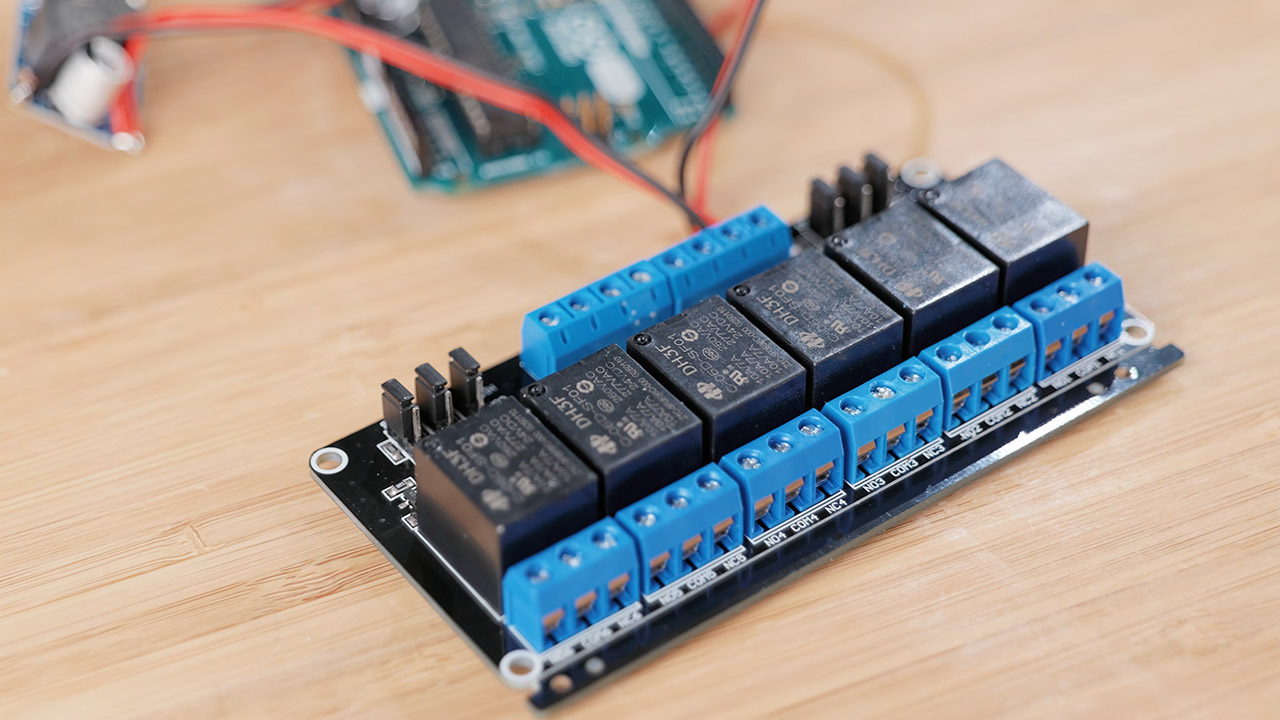
Perks’ idea begins with a large LED array that can produce light so bright that it’s like staring directly into the face of a rushing car; standard car headlights simply can’t compete. The difficulty is that any standard power system would have destroyed the light source long ago, so Perks had to design and build a completely new cooling / power system from scratch. This beast is made up of six copper radiators, each with three fans, resulting in a hexagonal structure with an astonishing 18 fans tied together with rubber tubing.
Super Bright Large Flashlight Spotlight Main light& High lumens Flood work light side light with Red&blue light warning function: 1000000 lumens…
New Design Switch&Aerospace Aluminum Alloy Shell: Bigger size and softer material makes our new switch easier to press and gives us a comfortable hand…
Life-Time Guarantee &24-Hrs online after-sale service:Our BUYSIGHT rechargeable searchlights are tested to be up to the standard of 1000 cycles…
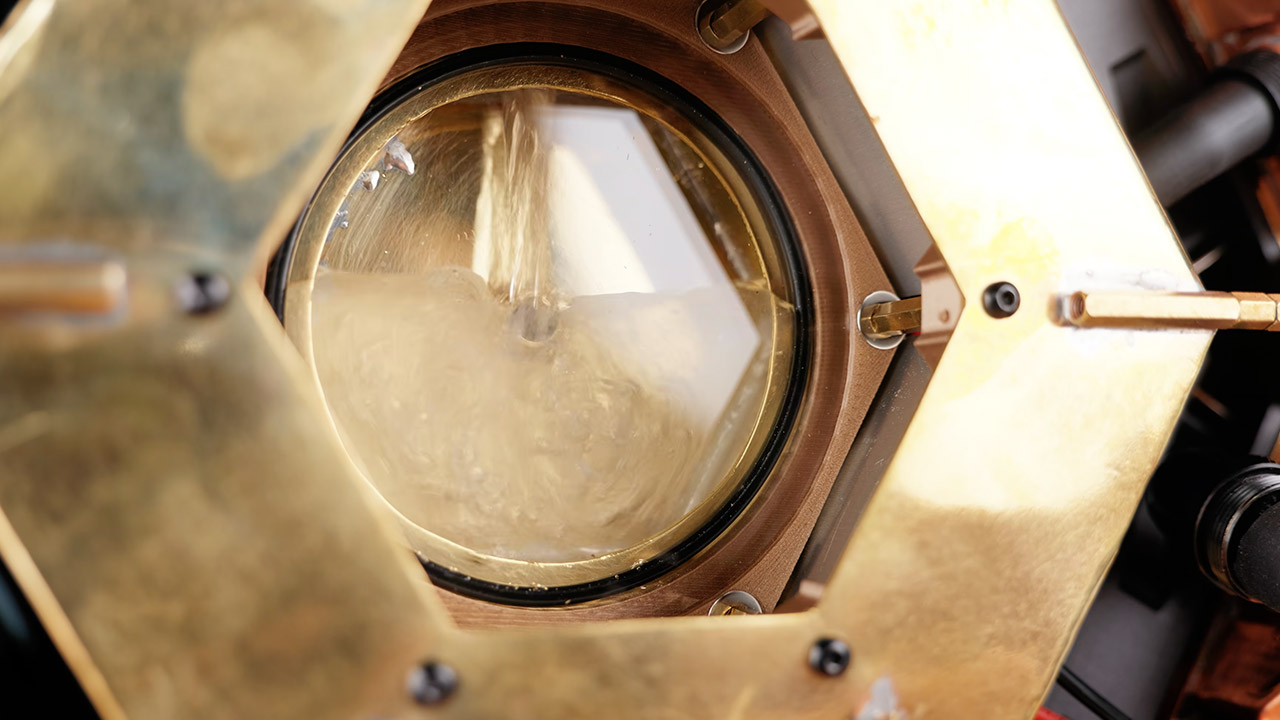
The action revolves around a handcrafted hexagon-shaped metal reservoir. This item is quite adaptable; its external casing serves as a mounting platform for voltage regulator boards, allowing for rapid heat dissipation via thermal pads. The pump draws liquid from a central chamber, and a glass window provides a good view of the flow. Perks has gone above and above to ensure that all of the joints are waterproof, that there is a bleed valve to release any air pockets, and that it does not leak when the pressure is applied.
Advertisement
The LED is connected to a massive copper water block via soldered pipes and brackets that also function as supports, much like creating a unique suspension system for the light source. The half sphere lens and Fresnel lens function well together, capturing stray photons and directing them into the spotlight as a tight beam. The external potentiometer allows you to change the brightness using a large brass gear, and the other dial (which controls temperature) isn’t far behind.
Power comes from a huge lithium-polymer battery pack capable of producing up to 5.3 kilowatts, similar to those used in high-draw RC applications. There is a built-in management system that monitors everything and prevents negative things from happening, such as shorts, over-discharging, and excessive current. The battery pack is housed in a very handsome polished brass enclosure that not only keeps things secure but also adds some serious beauty, and six different regulator boards split the load in a way that keeps the heat at bay, with each capable of managing a surprisingly high 250 watts.
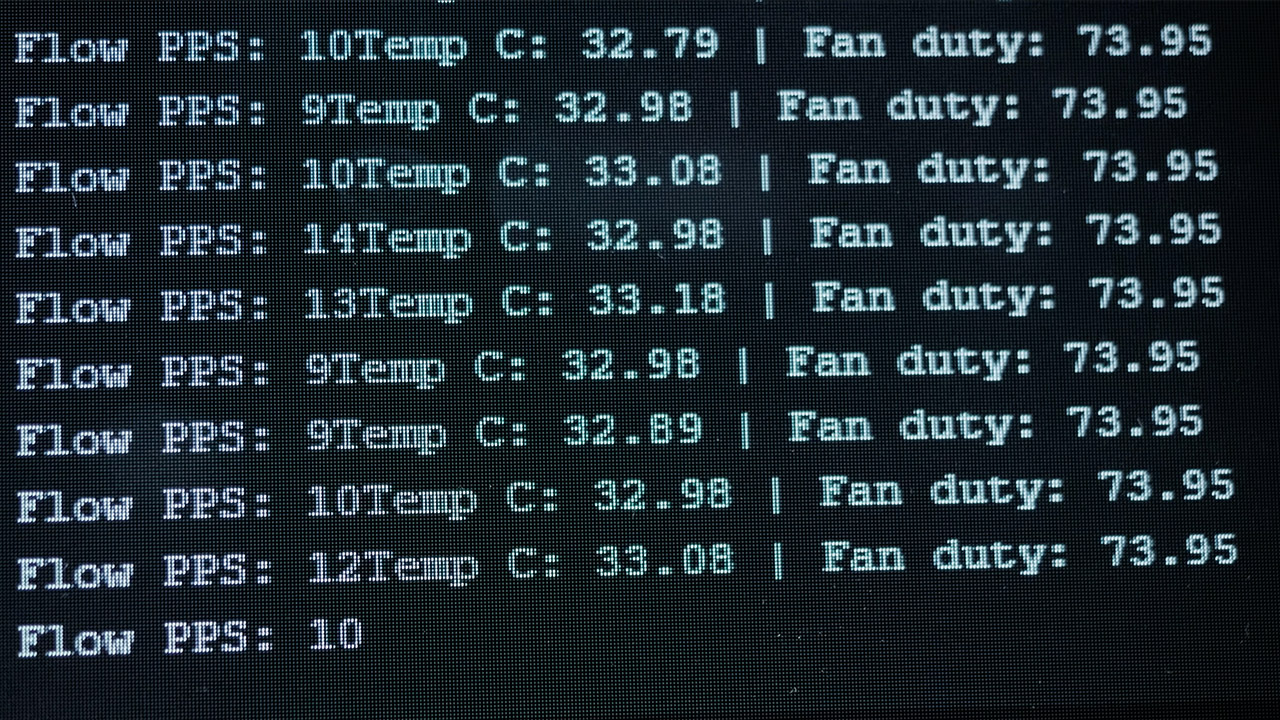
An Arduino board ensures safety by monitoring coolant flow, temperature, and pump speed. Everything operates great until it reaches its limits, at which point the entire system shuts down, cutting power quickly to save that expensive LED from blowing out in the middle of a run. He was able to put it all together using only simple hand tools such as a jigsaw for cutting brass, a vise to bend it into shape, and some careful soldering to ensure it was securely fastened. There are also 3D printed templates available to assist you mark up sheet material correctly. He even added additional straps made of leather and copper piping with handles to make the 25 kg monster more movable.
The tests show the system functioning as smoothly as a well-oiled machine, full power or not; the coolant only reaches 32 degrees Celsius, the fans spin at a cool 74%, and the LED substrate remains nice and cool at 65 degrees, well below its danger zone. No matter what strain you put on the battery, it will run for 15 minutes without blinking. That leaves plenty of time for longer demonstrations. Let’s just say that the light is very spectacular; it can light a match from 20 feet away simply by emitting photons, eliminating the need for any infrared.
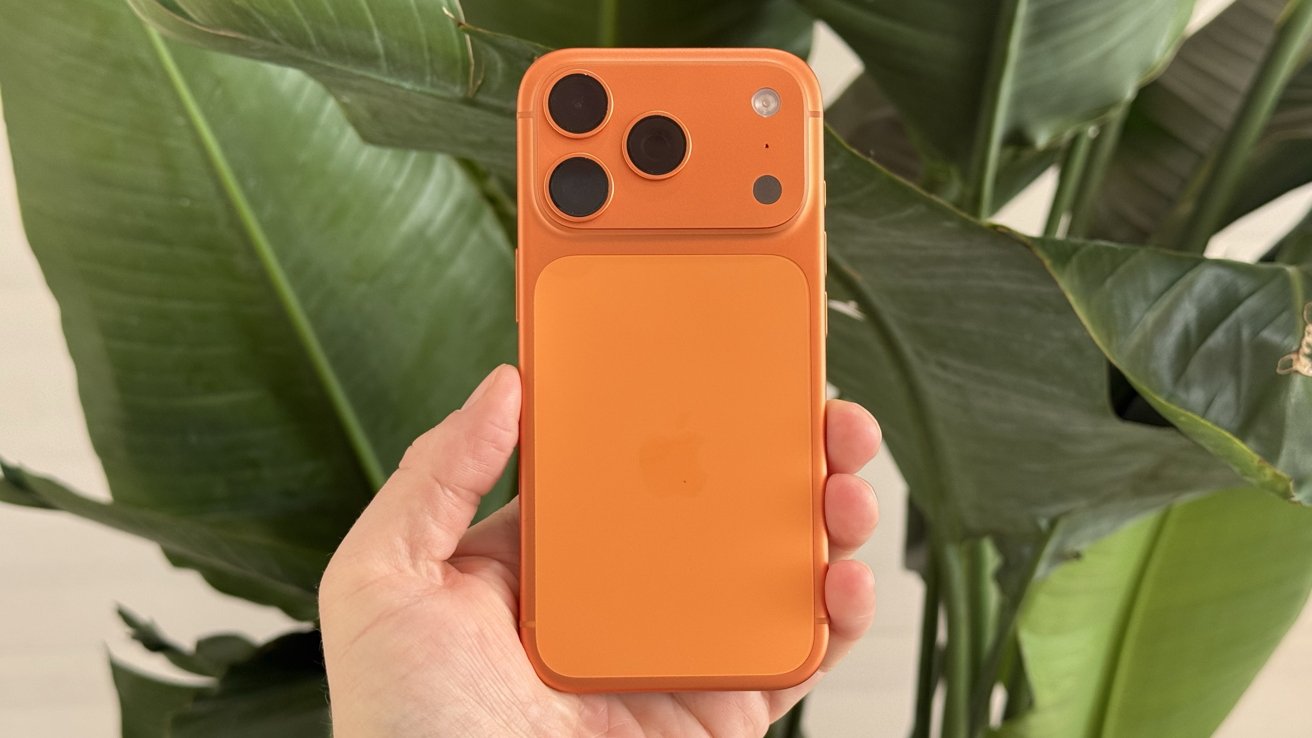
In a press release largely devoid of details as you’d expect given the topic, Apple has announced that the iPhone and iPad are the only consumer-grade devices that comply with NATO classified data safeguard guidance.
IPhone 17 Pro Max in Orange
The certification doesn’t allow the iPhone to either put in-motion or store at-rest any level of classified data. Specifically, the devices, properly managed, are allowed to handle classified information up to the NATO restricted level without requiring special software or settings. Apple says that on the whole, no other consumer mobile device has met this standard. Continue Reading on AppleInsider | Discuss on our Forums
When you think wearables from the likes of Google, Motorola and Samsung, you probably think earbuds and maybe watches. But in the age of AI, a whole new world of wearable tech is coming to life, and we could see these companies soon branch out to make AI-powered pins, pendants and other unexpected gadgets too.
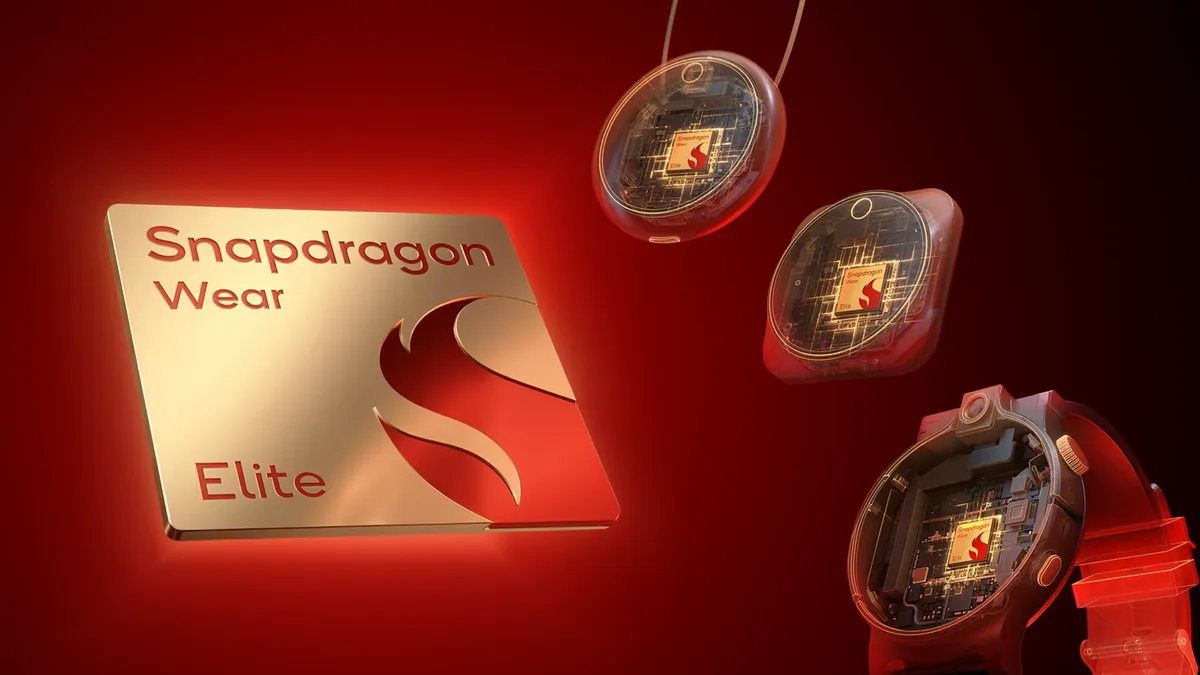
This new generation of wearable tech will be made possible by Qualcomm, which on Monday announced the latest version of its wearables chip, the Snapdragon Wear Elite, at Mobile World Congress in Barcelona. This new platform will be used by a range of partners, including Google, Motorola and Samsung to design a constellation of new devices.
Qualcomm’s philosophy toward wearables is very much “build it, and they will come.” It makes the underlying technology that will power devices and will then encourage companies to build on top of it how they see fit.
Advertisement
When I attended the company’s Snapdragon Summit in Hawaii last year, Qualcomm Chief Marketing Officer Don McGuire painted me a picture of how he imagines the convergence of AI and wearables playing out.
“AI is going to be ambient in a lot of ways,” he told me. It might not even be called a “device” if it’s something woven into your clothing or worn on your person. “There’s lots of ideas out there floating around,” he said.
At the same event, Dino Bekis, who runs Qualcomm’s wearables business, introduced me to the Looki L1 — a life-logging camera created with the company’s W5 Gen 2 chip. This is the wearables platform Qualcomm introduced last year, which was designed to work with Google’s Wear OS and launched with the Pixel Watch.
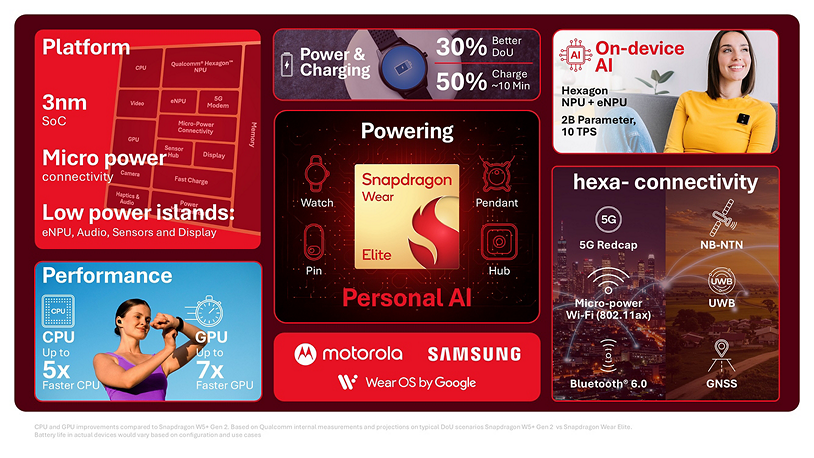
Unlike its predecessor, the new Wear Elite chip will work across Google’s Wear OS, Android and Linux, with a neural processing unit that enables on-device AI with low power consumption. This is key for wearable devices, which you don’t necessarily want to charge every day. Qualcomm says the Wear Elite’s advanced power management enables 30% longer battery use, compared to the previous version, with rapid charging bringing devices to 50% in around ten minutes.
Advertisement
“The Snapdragon Wear Elite platform opens new possibilities, delivering the performance, battery life and connectivity essential for the next generation of Wear OS,” said Bjørn Kilburn, general manager of Wear OS by Google, in a statement.
The first devices powered by the Wear Elite chip should be available in the coming months, with Motorola saying it will use the platform to build more AI wearable devices like AI concept Project Maxwell, which it showed at CES in January, and Samsung saying it will integrate Wear Elite into the next Galaxy Watch. This will make the watch into “an even more holistic wellness companion,” said InKang Song, EVP and head of tech strategy at Samsung.
Samsung and Google might be focused on watches, but Snapdragon Wear Elite points to a future halo of personal wearables, which CNET Editor at Large Scott Stein has explored in more detail. The possibilities stretch beyond what we’ve seen so far as this latest platform is embraced by companies big and small. I’ll be looking for demos making use of the new chip this week at MWC, so stay tuned for more.
The Klipsch Flexus Core 200 ($549) is about as sensible as soundbars get. If you’re wondering what I mean by that, the Core 200 offers up all the essentials; Dolby Atmos processing, up-firing speakers for height effects, and HDMI eARC connectivity in a reasonably compact and powerful package. And by stripping out the things that not everyone needs in a soundbar – specifically, extra HDMI ports and built-in Wi-Fi for streaming music, Klipsch managed to hit an affordable price point with the Flexus Core 200. They don’t call it Core for nothing.
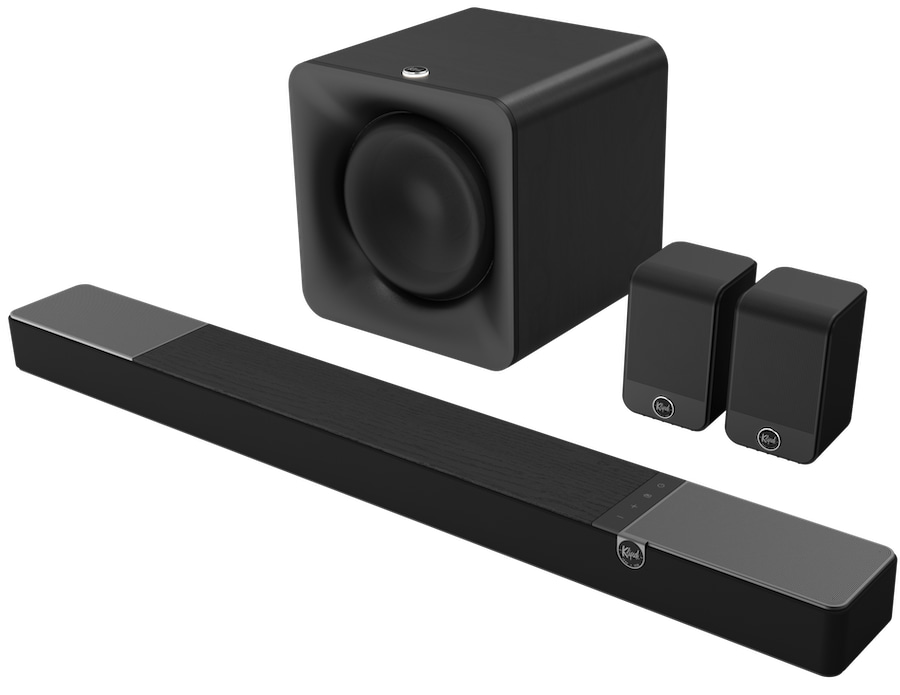
Sandwiched between the 2.1-channel Core 100 ($349) and 5.1.2-channel Core 300 ($1,199) in the Flexus soundbar lineup, the Core 200 walks the line between basic TV sound enhancement and full-on Atmos immersion. It can also be scaled up to a 5.1.2- or even a 5.1.4-channel configuration by adding an optional Klipsch wireless subwoofer and surround speakers. For this review, I paired it with the Flexus SUB 100 subwoofer ($349 each) and Flexus SURR 100 rear speakers ($249/pair). Total system price: $1,175.
What Is It?
The Klipsch Flexus Core 200 is a 3.1.2-channel powered soundbar that decodes Dolby Atmos and legacy Dolby Digital and PCM formats. DTS:X is not supported, an omission some may find disappointing now that support for that format has been added to movies on the Disney+ streaming service.
As I mentioned above, there’s no Wi-Fi onboard for music listening via TIDAL Connect, Spotify Connect and other services, though Bluetooth is on-board for basic streaming of music, internet radio and podcasts. Bluetooth is also used by the Klipsch Connect setup app and for wireless hookup between the soundbar, subwoofer and rear speakers.
Advertisement
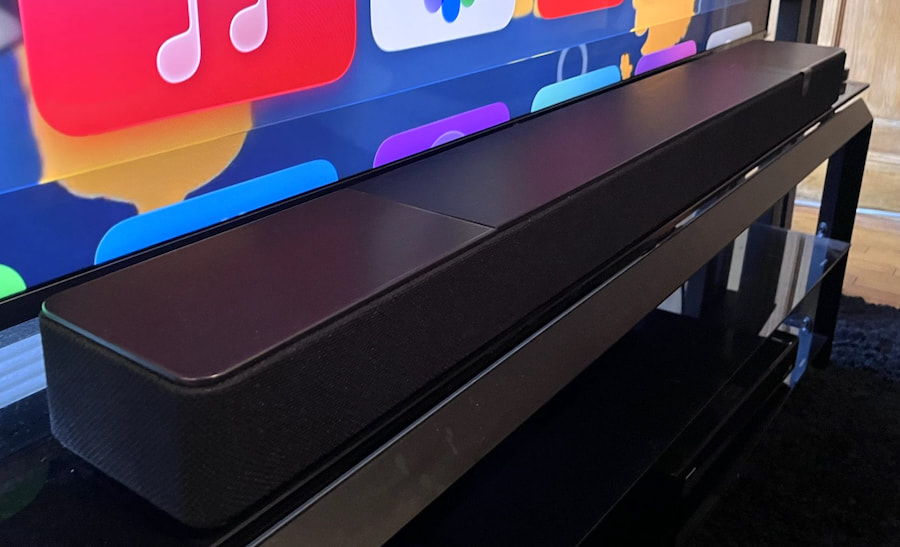
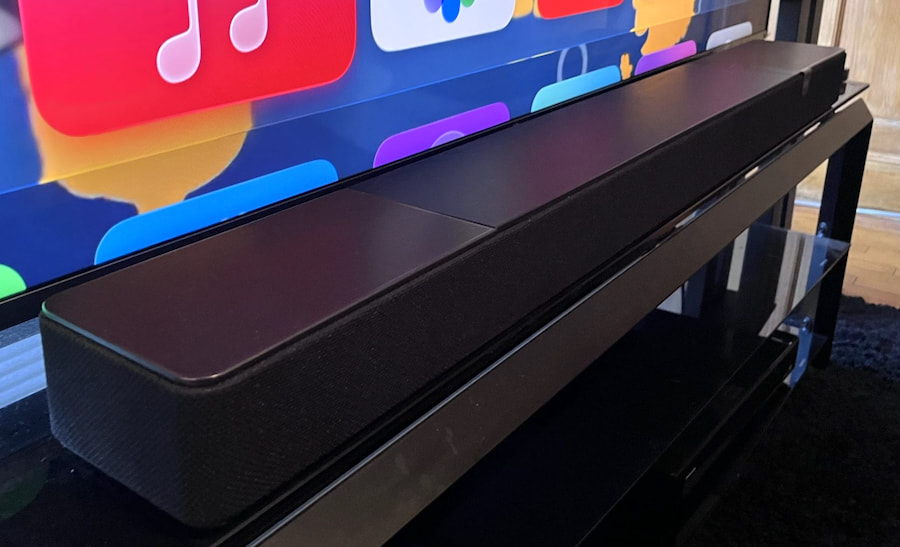
The 44-inch-wide Flexus Core 200 soundbar is a good fit for 55-inch and larger TVs.
At 44 inches (111.8 cm) wide, 3 inches (7.8cm) high, and 5 inches (12.6cm) deep, the Core 200 mates well visually with 55- or 65-inch TVs, though its somewhat chonky 3-inch height means you may need a TV with an adjustable stand to provide sufficient screen clearance. The soundbar’s attractive cabinet is made of plastic, wood, and metal, and there are black and walnut finish options.
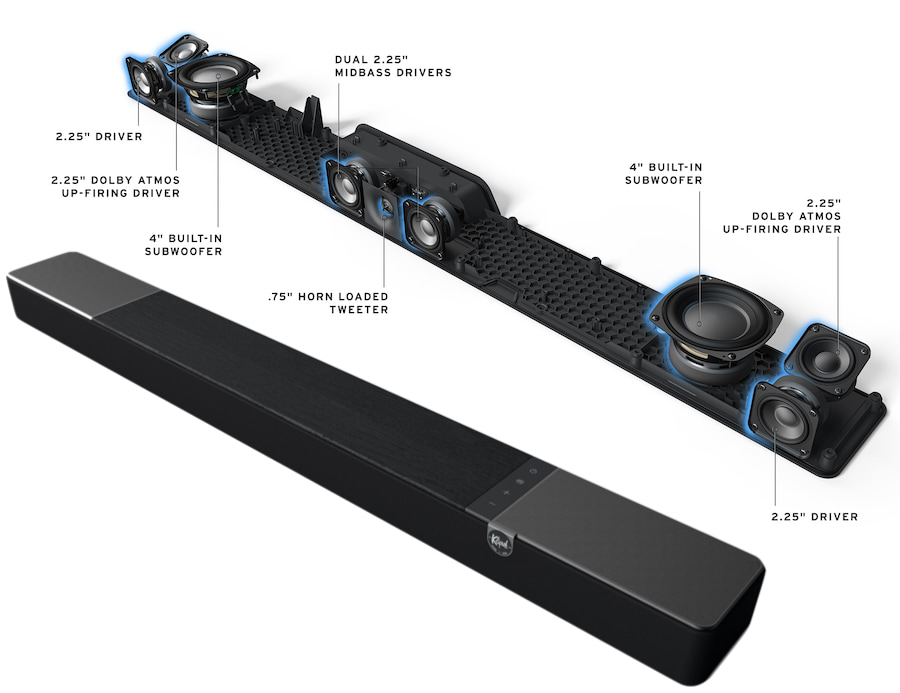
Being a Klipsch soundbar, there’s going to be a horn somewhere, and in this case it’s the center speaker’s 0.75-inch horn-loaded tweeter, which is flanked by two 2.25-inch aluminum cone drivers. The same 2.25-inch drivers are also used for the left and right speakers and up-firing elevation speakers, while a pair of 4-inch paper cone woofers bring the bass. Onboard power for the Onkyo-designed amplifier section is specified at 185 watts (RMS) and frequency response at 43Hz-20kHz.
The Flexus Transport USB transmitter (at right) is included with Klipsch’s Flexus SUB subwoofers and Flexus Surr rear speakers.
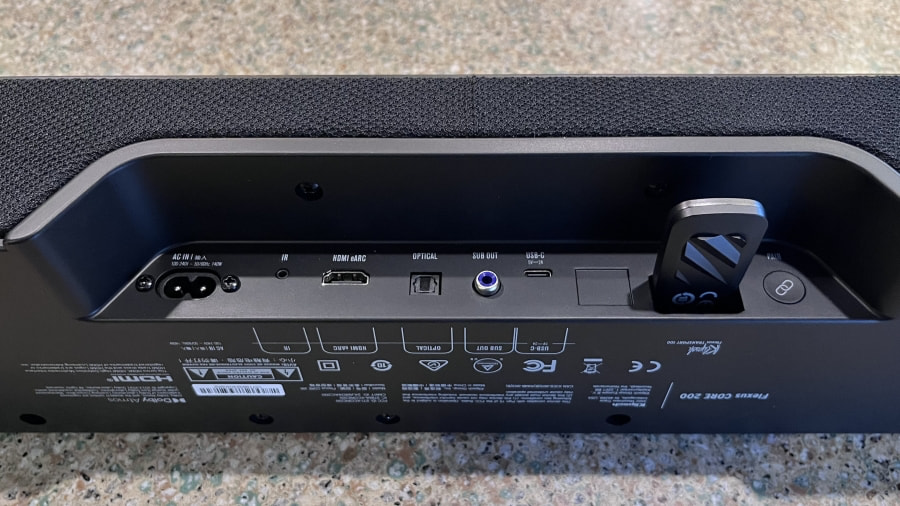
Along with the Core 200’s HDMI eARC port, there’s an optical digital input, an RCA output for a hardwired subwoofer connection, a USB-C port (service only) and a USB Type-A port to plug in the wireless dongle that connects the SUB 100 subwoofer and SURR 100 rear speakers.
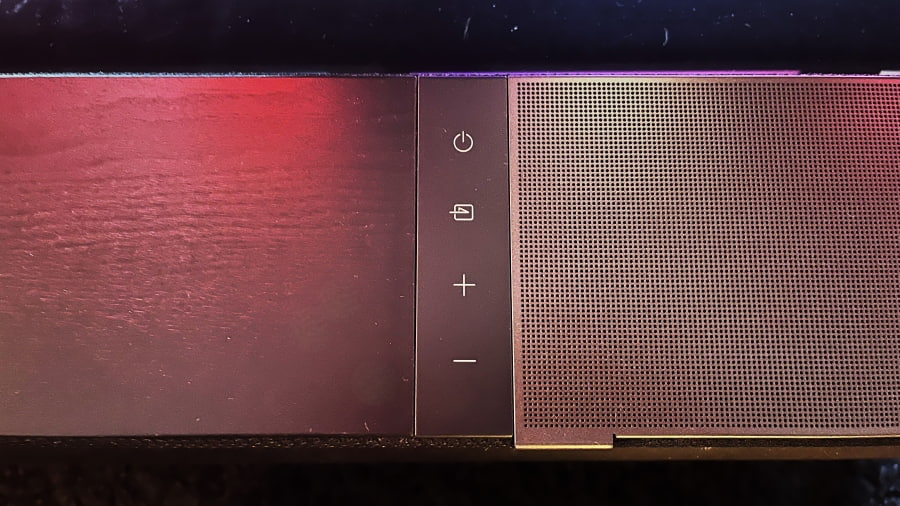
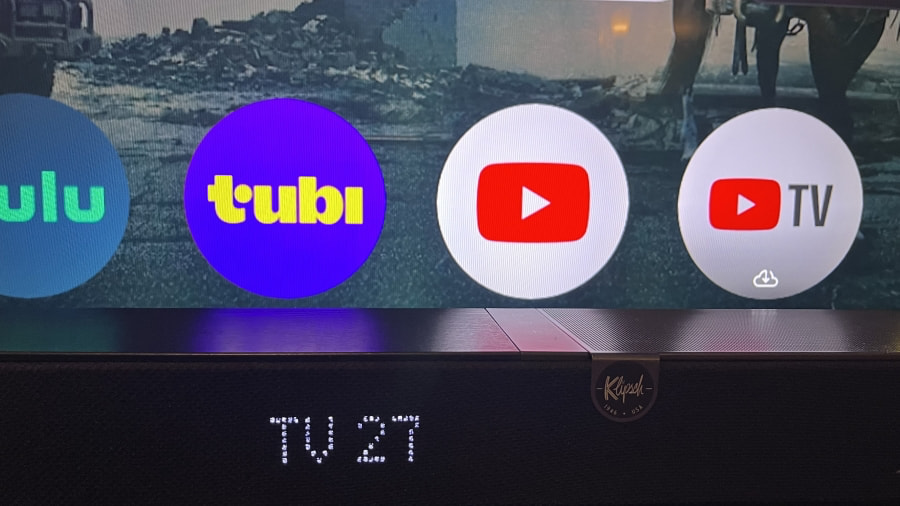
Controls located on the Core 200’s top surface let you toggle power on and off, switch inputs and adjust the volume level. A large alphanumeric LED display located on the front provides visual feedback when making adjustments using the Klipsch Connect app or the included remote control – a useful and very welcome feature that’s not always provided on soundbars, including ones priced significantly higher than the Core 200.
Advertisement
Basic touch-sensitive controls are located on the Core 200 soundbar’s top surface.
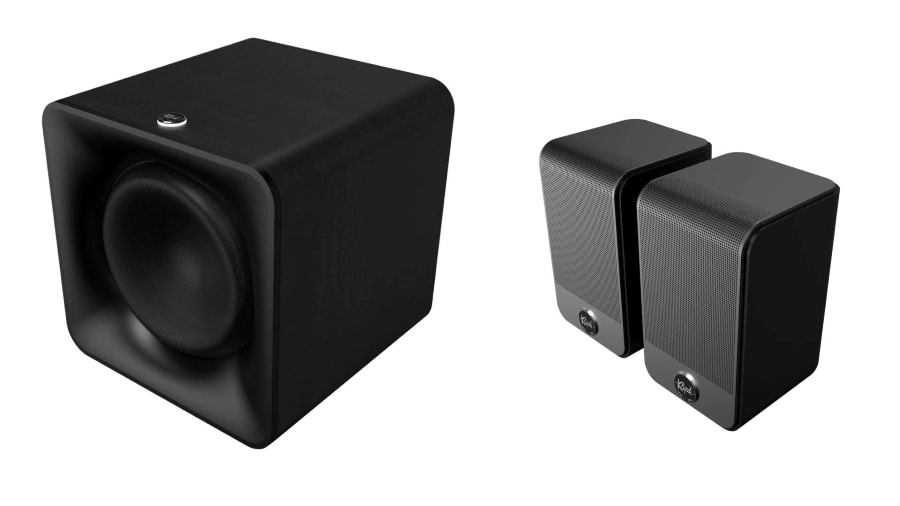
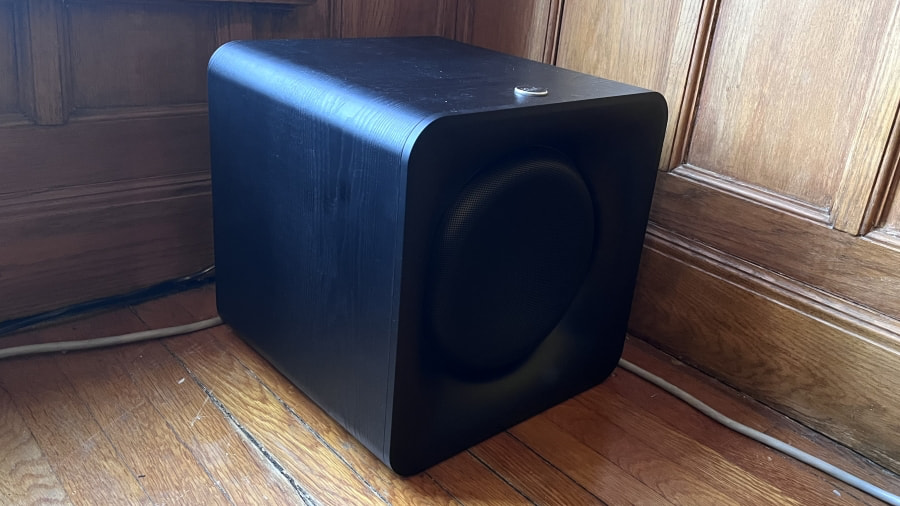
The Klipsch Flexus SUB 100 I used for my test packs a 10-inch paper cone woofer powered by an 80-watt (RMS) class D amplifier in a sealed enclosure. It comes with the Flexus Transport USB transmitter used for the soundbar’s wireless connection, and it also has an RCA input for a hardwired hookup. At 13.25 inches (33.7cm) wide x 13.3 inches (33.8cm) high x 13.75 inches (35cm) deep, it’s a relatively compact cube and makes for a good visual match with the Core 200 soundbar.
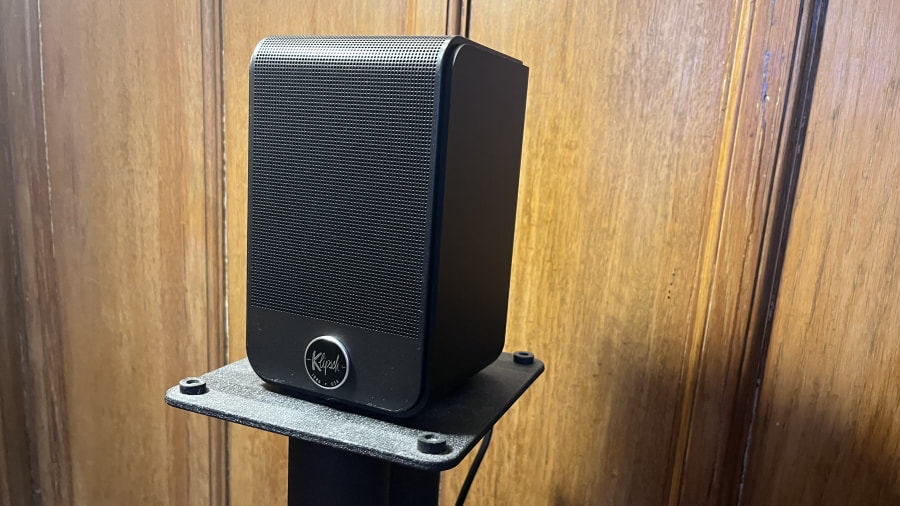
The Klipsch Flexus SURR 100 speakers I used for rear channels are tiny, almost toy-like at 4.25 inches (10.8cm) wide x 6.75 inches (17.1cm) high x 4.25 inches (10.8cm) deep. Each speaker uses a 3-inch paper cone driver powered by 25 watts (RMS) and the package also comes with the Flexus Transport USB transmitter. Klipsch offers a beefier rear speaker option in the Flexus SURR 200 ($499/pair), a model that adds a 2.25-inch up-firing driver to the 3-inch front-facing one to convey Dolby Atmos height effects.
Klipsch Flexus SUB 100 Subwoofer (left) and SURR 100 Wireless Rear Speakers (right)
Setup and Use
I found setting up the Core 200 with Klipsch’s optional subwoofer and rear speakers to be super easy compared to other soundbar-based wireless surround systems I’ve tested. If you’re using just the Core 200, all that’s needed is to run a cable from your TV’s HDMI eARC/ARC port to the soundbar’s HDMI port. Connect it to power and you’re done – even the Klipsch Connect app is optional and not needed for setup.
Advertisement. Scroll to continue reading.
Advertisement
If, like me, you’re extending the system with a wireless sub and speakers, you’ll need to insert one of the included USB transmitters into the soundbar’s USB type-A port and then press the Connect button located on the rear panel of both the subwoofer and rear speakers. An audio tone confirms that a wireless connection has been made and an LED indicator light, also located on the back, changes from a pulsing to a solid white.
For my setup, I had the Core 200 placed on a stand beneath a 75-inch TV in my 9 x 12 x 16 (H x W x D) foot viewing room, the SUB 100 in the front right corner, and the Surround 100s on stands to the right and left and slightly behind my sofa.
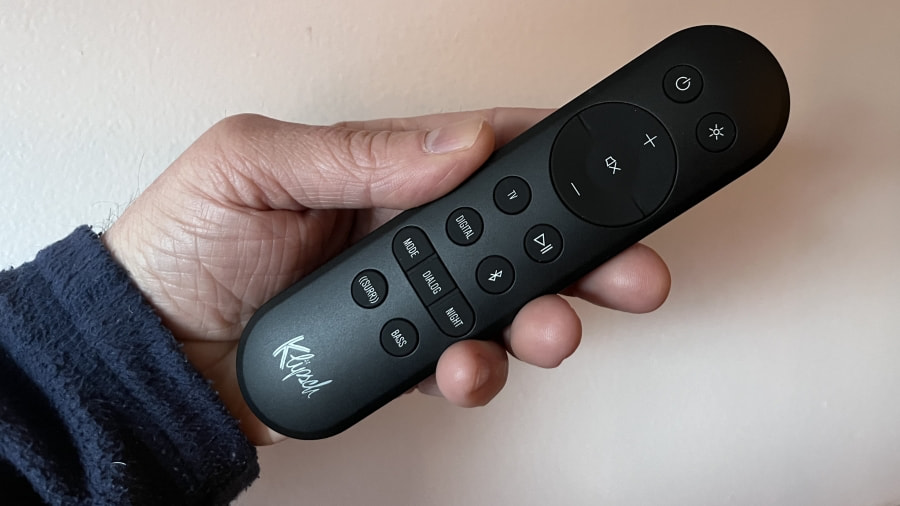
The Core 200 soundbar’s full-featured remote control.
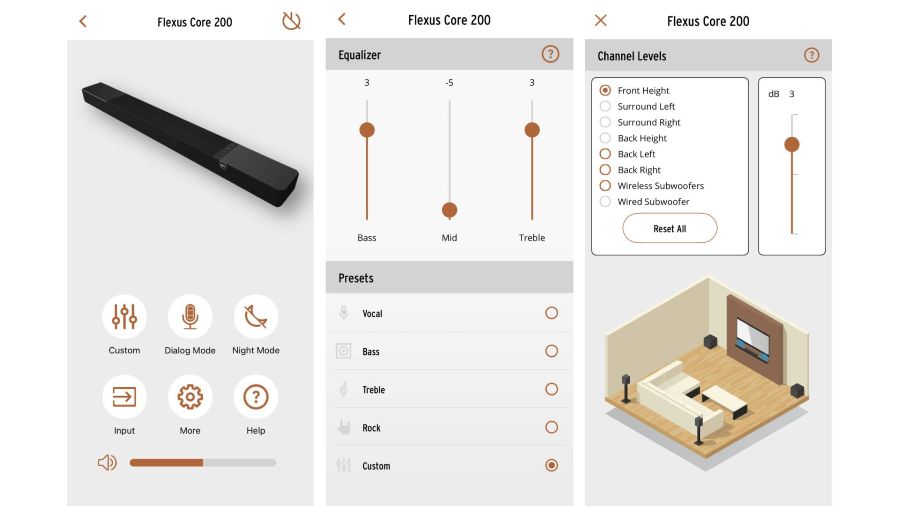
Klipsch’s remote control provides access to most adjustments for tuning the soundbar for your viewing environment or whatever content you’re listening to or watching. There are buttons to select the Sound (Movie or Music) and Night (volume levelling) modes, and to configure Dialog level (1-3 or Off) plus front height, back left and right, and subwoofer level. All of these adjustments are indicated on the Core 200’s big, beautiful front LED display, and you can also adjust the display’s brightness using the remote.
The Klipsch Connect app features all the same adjustments, but further provides a three-band EQ with multiple presets plus a Custom setting. EQ may get scoffed at by audio purists, but I find it to be highly necessary for soundbars, where you regularly need to make adjustments for the differences in TV and movie soundtracks, as well as for any music you listen to.
Advertisement
The Core 200’s large alphanumeric LED display provides easy to read visual feedback.
Movie Performance
I started out my evaluation with the Klipsch soundbar alone before adding the subwoofer and rear speakers to the mix. The Core 200 had a nicely balanced presentation overall, with full bass and clear, natural-sounding dialogue. Atmos effects were also pronounced, especially with the soundbar’s height adjustments edged up toward maximum level.
These qualities served F1 well when I streamed it on Apple TV via my Apple TV 4K. In the movie’s opening scene, Sonny Hayes (Brad Pitt) races at Daytona to the strains of Led Zeppelin’s “Whole Lotta Love.” The roar of the car engines was vivid and clean, and I could easily hear a shifting level of spaciousness to the commentator’s voice as the action cut between interior and exterior shots. John Paul Jones’ bass came across as muscular and deep, with a level of dynamic power that was impressive for a standalone soundbar.
The Klipsch Control app duplicates all the remote control functions and adds EQ adjustments (center).
Watching F1 revealed the Core 200’s ability to cast a tall and wide soundstage, especially when a fireworks display lit up the night sky during the race, but the presentation was mainly locked to the front of the room. This was evident when I watched the scene from the Dune: Part II 4K Blu-ray where Paul Atreides (Timothée Chalamet) hitches a ride on a giant sandworm – as worm and rider plowed through the desert landscape, the spray of sand was cast high and wide, but I didn’t feel overly immersed in the action.
It was the same deal when I watched the scene from the Twisters 4K Blu-ray where the doomed young meteorologists flee a monster tornado only to get sucked up one by one into the deadly funnel. The sound of the storm was powerful and dramatic, but I didn’t feel like I was in the eye of the storm. Dialogue in this complex and chaotic sequence also tended to get obscured, but a few hits of the Dialog button on the remote successfully boosted it to the point where I could hear it.
Movies with SUB & SURR
Watching the same clips with the SUB 100 and SURR 100 speakers added to the mix elevated the Core 200’s game to the point where I’d deem them indispensable. It’s not that Klipsch’s soundbar isn’t effective on its own; for the price, I’d even say it’s an overachiever. But adding those optional extras brought about a surprisingly effective increase in both dynamic range and surround immersion. I was actually caught off guard by it.
Advertisement
The Klipsch Flexus SURR 100 proved surprisingly potent for compact rear speakers.
Giving F1 another spin, the SUB 100 created a deep foundation of bass that added dimension to engine sounds and emphasis to John Bonham’s kick drum. The little SURR 100 speakers lit up as the cars circled the track, providing a strong sense of being positioned in the driver’s seat.
The Dune: Part II worm rodeo scene also benefited greatly from the speaker additions, with the sand now seeming to spray to the back of the room. Twisters, too, took on a new dimension: the trajectory of wind sounds now seeped from the front to the rear speakers, creating a much more vivid sense of being caught inside the storm.
Music Performance
For music, I decided to leave the full 5.1.2 configuration intact since I was mostly listening to Dolby Atmos music tracks on Apple Music (played via the Apple TV 4K). Also, the Core 200 automatically upconverts stereo tracks in both Music and Movie mode, so everything I listened to ended up being in surround sound format anyway.
With the Core 200 soundbar’s streaming options limited to Bluetooth, you’ll need to rely on an external streamer for lossless music listening.
I’m a fan of Ryan Ulyate’s Atmos mix of Tom Petty’s Wildflowers, which manages to subtly expand the stereo original while maintaining a rock-solid presentation of vocals and instruments. Heard on the Flexus Core 200 system, Petty’s voice on “It’s Good to be King” had the same dry, natural quality I’m used to hearing on higher-end setups, The piano maintained its clean, well rounded tone and the Atmos mix spread subtly towards the rear of the room in a way that added warmth to the sound.
Advertisement
Advertisement. Scroll to continue reading.
Beck’s “She’s Gone,” also in Atmos, further confirmed my impression of the Core 200’s neutral, and mostly transparent, handling of music. Beck’s vocals sounded natural, with just a slight touch of reverb, and the acoustic guitar and harmonica had a crisp, clean tone. The bass guitar had a similar level of depth and punch as on “Whole Lotta Love” when I watched F1, but it gained a deeper, more authoritative foundation with the addition of the SUB 100 subwoofer.
To see how far I could flex that sub, I next played Deadmau5’s “Imaginary Friend” in stereo via the Apple TV 4K’s TIDAL app. For a compact sub with a 10-inch driver, the SUB 100 did an impressive job pressurizing the room and fleshing out the electronic beats. I could literally feel the bass hit in my chest. Upconverted for surround, the track gained a compelling sense of spaciousness, and the addition of a height dimension via the soundbar’s up-firing speakers gave it a nice wall of sound effect.
The Klipsch Flexus SUB 100 delivered impressive bass power for a compact sealed subwoofer with a 10-inch driver.
Shifting back to Atmos, I dug out my Pink Floyd Wish You Were Here (50th Anniversary) Blu-ray, which features a fantastic Dolby Atmos mix by the band’s longtime producer and engineer, James Guthrie. I had been a bit underwhelmed by the Core 200’s Atmos presentation of this disc when I had listened to it without the SUB 100 and SURR 100 speakers, but hearing “Welcome to the Machine” on the full system was a very different experience. The up-front vocals and guitar had a full, monolithic quality, floating well above the physical confines of the soundbar, while the synths stretched out well into the room and around my head. To me, “Welcome to the Machine” is about as good as Atmos music gets, and the Klipsch system did it justice.
Advertisement
Klipsch Flexus Core 200 Soundbar System with SUB 100 Subwoofer and SURR 100 Wireless Rear Speakers for 5.1.2 Dolby Atmos
The Bottom Line
If I haven’t already made this clear enough, the Klipsch Flexus Core 200 soundbar’s performance takes a big leap forward when augmented by the Flexus SUB 100 subwoofer and Flexus SURR 100 rear speakers. That’s not to knock the Core 200, which performs very well for a 3.1.2-channel soundbar, especially one priced at $549. I’m sure many folks would be more than satisfied with its standalone sound, and also with its ease of setup and use.
Are there crucial features missing from the Core 200? Aside from DTS:X support, it would be nice to have built-in Wi-Fi for streaming, so you could use your phone to cue up music without having to rely on lossy Bluetooth for playback. Wi-Fi is a feature found on the Sonos Beam Gen 2 ($499), which lets you stream lossless music from a wide range of apps, and also brings support for AirPlay 2. In my case it was easy enough to use my Apple TV 4K for lossless and Dolby Atmos music streaming, but not everyone will want to deal with an external streamer.
Even without Wi-Fi for music streaming, the Klipsch Flexus Core 200 is a great value. I was very impressed with its performance for the price, and at $1,175 for the full package with subwoofer and rear speakers, it’s a very affordable way to dive into Dolby Atmos surround sound. I’ve regularly found that companies with a long history making speakers also do a great job with soundbars, and the Klipsch Flexus Core 200 system proves that to still be the case.
Pros:
Dynamic sound with clear dialogue
Powerful bass and good immersion with optional subwoofer and rear speakers added
Full-featured remote control
Dialog boost and EQ adjustments
Simple setup
Large, alphanumeric LED display
Great value
Cons:
No built-in Wi-Fi for music streaming
No DTS:X or DTS support
Standalone Core 200 soundbar has limited immersive effect
I’ve been steeling myself for a coming wave of AI-infused wearables that could be worn all over the place, based on reports on gadget plans at Meta, Google and Apple — a halo of connected tech with cameras onboard, streaming to AI services. Qualcomm’s latest chip, announced Monday at Mobile World Congress in Barcelona, is built for it, and the first devices using it are coming this summer. Samsung, Google and Motorola are already building hardware with it.
I sat down with John Kehrli, senior director of product management for Qualcomm, to discuss the newest wearable chip push, and it caught my attention on several levels. The reason you should care is that this is a clear preview of tech products to come: Qualcomm’s chips power almost all of the non-Apple watches, VR headsets and smart glasses out there.
While Qualcomm has had separate chip lines for smartwatches and for smart glasses and VR headsets, the new Snapdragon Wear Elite chip aims to bridge across categories. It’s a higher-powered watch chip filled with different wireless connection capabilities, but it is also made to support video input and streaming for AI, even 1080p video output to displays. That could include AI-infused smart glasses.
Advertisement
“It’s not just the watch: for sure that’s a focus for us, but the portfolio [of devices] has expanded dramatically,” Kehrli says.
Here’s the news about Snapdragon Wear Elite that stood out for me.
Qualcomm’s new chip design is meant to be flexible in form. It could end up many places.
Advertisement
Qualcomm
A lot more onboard processing for offline AI
A big part of Qualcomm’s push on these chips is to do more generative AI and LLM work on device, a trend I expect to grow. The Snapdragon Wear Elite looks a lot more powerful than previous Qualcomm watch chips. Some of the offline, on-device functions could be voice-based AI, for fitness or, according to Qualcomm, for “life logging.”
I’m not sure I need life logging, but I’d be interested in having more AI-based controls for wearables. The extra power looks to also drive video on displays and run onboard cameras, including video streaming. The whole idea behind next-wave multimodal AI is to have AI services be aware of what you’re doing — that’ll mostly happen via camera access.
Kehrli says the processing cores for the neural processing unit on the Snapdragon Wear Elite could support AI models of up to 2 billion parameters on device, at about 10 tokens per second to process. He sees that being good enough for a lot of offline needs, with cloud-connected AI kicking in when needed otherwise.
Kehrli sees a lot of local AI needs for the extra sensors, including cameras, that are going to be on these wearables. “There’s so many exciting inputs coming in [to the devices]. Location, sound, voice, text, all the sensors — we’re really seeing a lot of medical-grade sensors come into the retail space. What do I do with that data?”
Advertisement
Qualcomm’s concept for a wearable pendant is like a smartwatch, but with outward-facing camera.
Qualcomm
Cameras everywhere?
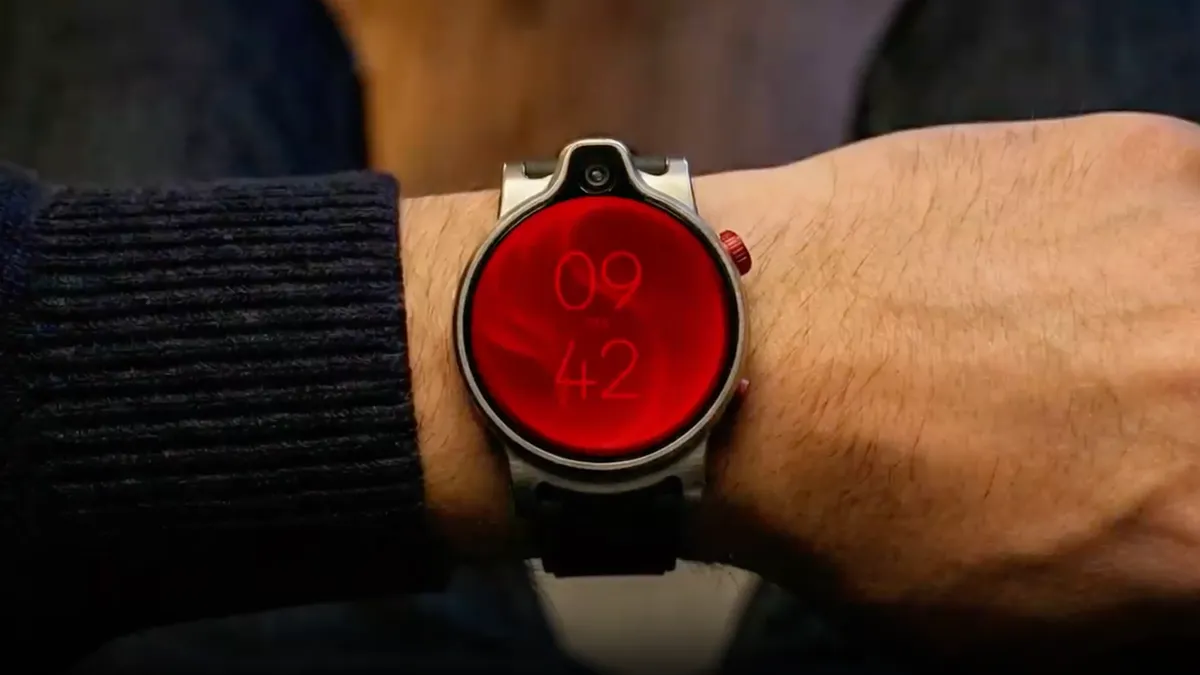
In Qualcomm’s sizzle video for the new chip, we can see a glimpse of a watch with a camera on its top edge. Most smartwatches don’t have cameras right now, but that could be changing soon. While it’s not necessarily a great way to take photos, the onboard cameras are likely more an additional way to tap into AI, like for face recognition biometrics for tap-to-pay, using a watch like a smart key for cars or other connected things, or maybe to use for other AI-based controls.
Another concept shot of a pendant, which looks basically like a neck-worn smartwatch, has its camera facing out. All the AI pins and pendants that have been trickling in these last few months are showing similar ideas. Like smart glasses, the outer-facing cameras could be another way to see things without putting something on your face. But you’d have to wear some pin or pendant.
It also sounds like devices with these new chips will last longer on a charge. Qualcomm’s promising 30% better battery life than with its previous watch chip — potentially “days” of use. I’d still expect more or less a full day, considering these chips might also be supercharging more camera-based and AI features.
The faster charging sounds promising, though. The chips could charge devices up to 50% on 10 minutes of charging. That’s key because a lot of these wearables are being designed to be worn all the time, and some while you’re sleeping. It’s like companies are trying to find ways to do a quick recharge pit stop without spending too much time off your body.
Advertisement
The most interesting part could be the boosted wireless features. Qualcomm’s got six different protocols on-chip: support for Redcap 5G (a protocol to support high-speed and low-power connected tech), Bluetooth 6.0, ultra wideband, GPS, satellite-connected NB-NTN for messaging, and micropower Wi-Fi 802.11ax.
The micropower Wi-Fi support could allow these new wearables to stay Wi-Fi connected continuously, says Kehrli, letting them work in the background longer. On Meta’s Ray-Ban glasses, for instance, right now, they’re mainly Bluetooth-connected and don’t stream video by default; switching to that mode kills battery life fast. Streaming always-on AI modes could last longer on Elite-powered devices.
Qualcomm’s plans for this chip extends to nearly every wearable territory.
Advertisement
Qualcomm
Where they could show up: Watches, glasses, headphones, pendants, more
Qualcomm’s aiming to put its new chip across a wide range of wearables, from camera-enabled headphones and earbuds like Razer’s Motoko concept (which I tried at CES in January) to next-gen smartwatches and AI pendants, to smart glasses, and even sensor-connected bands. Devices like Meta’s neural band, which uses EMG (electromyography, using skin contact sensors) for hand gestures that control its smart glasses, could see upgrades with this chip. Maybe that’s exactly the sort of territory Meta could be exploring with its reported smartwatch debut this year.
It’s also clear that everyone, Qualcomm included, isn’t entirely sure where people prefer to wear these future AI gadgets. Is it glasses? Pendant? Watch? Headphones? All of the above? Kehrli feels people will have different preferences and will choose what works. Will that sort of redundancy make sense or settle itself down into clearer categories in another year or two?
Glasses, Kehrli adds, could be a landing spot for this chip because of the cellular-connecting possibilities, saying he expects adoption of wearables with their own data connections will keep rising, especially with AI services. “We’re seeing, on-wrist, up to 50% of customers taking connected [wearables] with a service plan. We’re seeing that dramatically increase, especially with this AI on device/off device type of experience in the cloud.”
It’s clear that halos of wearables are on deck from several big companies. How it all shakes out and works, though, is still unclear. And while these new wearables should be a lot more powerful, the focus right now isn’t on improving how they could stay connected and communicate with each other, something I got a glimpse of in a demo of a personal mesh network made by startup Ixana at CES. Maybe that’s next on deck.
Advertisement
For now, wearables are trying to be better extensions of your phone, first, and act better as standalone devices too.
We’ll start this week off with a bit of controversy from Linux Land. Anyone who’s ever used the sudo command knows that you don’t see any kind of visual feedback while entering your password. This was intended as a security feature, as it was believed that an on-screen indicator of how many characters had been entered would allow somebody snooping over your shoulder to figure out the length of your password. But in Ubuntu 26.04, that’s no longer the case. The traditional sudo binary has been replaced with a one written in Rust, which Canonical has recently patched to follow the modern convention of showing asterisks on the password prompt.
As you might expect, this prompted an immediate reaction from Linux greybeards. A bug report was filed just a few days ago demanding that the change be reverted, arguing that breaking a decades-old expectation with no warning could be confusing for users. The official response from a Canonical dev was that they see it the other way around, and that the change was made to improve the user experience. It was also pointed out that those who want to revert to the old style of prompt can do so with a config change. The issue was immediately marked as “Won’t Fix”, but the discussion is ongoing.
Speaking of unexpected changes, multiple reports are coming in that the February security update for Samsung Galaxy devices, which is currently rolling out, removes several functions from the Android recovery menu. After the update is applied to phones such as the S25 and Fold 7, long-standing features, such as the ability to wipe the device’s cache partition or install updates via Android Debug Bridge (ADB), disappear.
Just like with the change to sudo, this is the sort of thing that will aggravate veteran users the most. There’s been no official explanation for these changes, and it’s not immediately obvious why Samsung would fiddle with the recovery menu that’s remain largely unchanged since Android’s introduction. As 9to5Google mentions, it could be an attempt to prevent users from installing leaked firmware builds — a practice that’s gotten the attention of the electronic giant’s legal department.
Advertisement
These days, software updates are just one of the things you need to keep track of. Add in emails, RSS feeds, and incoming chat messages, and keeping up with the notifications on your computer or smartphone can be a challenge. But that’s nothing compared to the 800,000 alerts fired off earlier this week by the Vera Rubin Observatory. The observatory uses a 3.2 gigapixel camera to take long exposure images of the night sky, which are then compared with earlier shots to detect visual changes. Astronomers create filters to narrow down what they’re after, and can be notified when the automated system detects a match. A preview image is available in just seconds, while the full-resolution imagery takes around 80 hours to process. It’s still early days, but once the VRO gets up to speed, it’s expected that as many as seven million alerts will be generated each night.
While on the subject of large-scale engineering projects, this week, Google announced that its new data center in Minnesota will be hooked up to the world’s largest battery. The 300 megawatt array built by Form Energy will use iron-air technology, which essentially uses a reversible rusting process to store energy produced by renewable sources such as wind and solar. When those sources aren’t available, the data center can run off of battery power for up to 100 hours.
While heavier and less efficient than lithium-ion, iron-air batteries have the advantage of being substantially cheaper to produce. So while it’s unlikely you’ll see the technology in smartphones anytime soon, it’s perfect for static installations like this.
Finally, some sad news from the world of retro computing/games: a very rare copy of Tsukihime Trial Edition was apparently destroyed while in transit from one collector to another. It might not look like much — the game was distributed by the indie developers on unbranded floppies at a Japanese convention in 1999 — but it represents one of only 50 copies known to exist. While the occasional damaged package is all but unavoidable, this one is particularly egregious as it appears that someone at US Customs intentionally ripped the disk to pieces. The purchaser has filed a complaint with Customs, and we’re interested in hearing what their version of the story sounds like.
See something interesting that you think would be a good fit for our weekly Links column? Drop us a line, we’d love to hear about it.
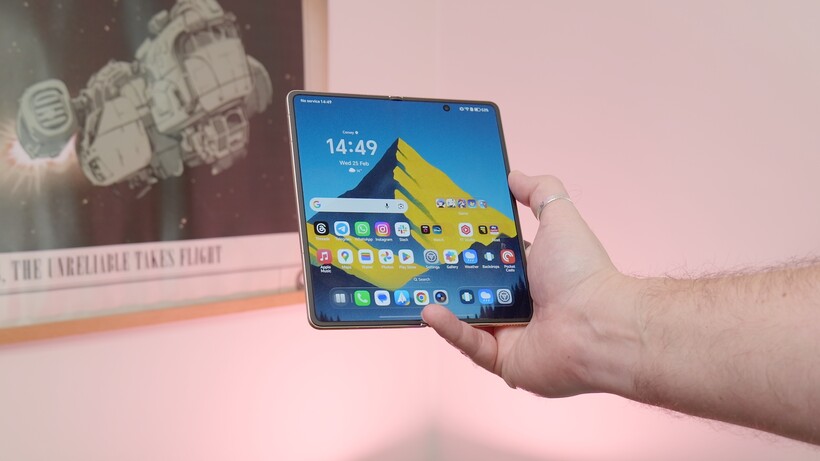
Honor isn’t reinventing its book-style foldable this year, but with the Magic V6, it doesn’t really need to.
Instead, the company has delivered what feels like a careful refinement of an already accomplished formula. It is thinner in places and tougher where it matters. Moreover, it packs meaningful internal upgrades without upsetting the balance that made its predecessor so compelling.
On paper, the Magic V6 looks familiar. It retains the slim, symmetrical profile that has become a hallmark of Honor’s foldables. It measures 8.75mm when folded on the White model and just 4.0mm when unfolded. Even the heavier colourways tip the scales at a very reasonable 224g. Meanwhile, the White model comes in at 219g.
For a device with a near eight-inch internal display, that’s impressive engineering restraint, especially one with a huge 6600mAh battery that would shame many conventional flagships.
Advertisement
Advertisement
Durability has been pushed further this time around. The handset carries IP68 and IP69 ratings, offering resistance to dust and water under controlled conditions, which is still a rarity in the foldable space.
Honor also doubles down on display protection, pairing its Super Armored Inner Screen with an anti-reflective coating, while the outer display sports an Anti-scratch NanoCrystal Shield. It’s clear the company is targeting everyday usability, not just spec-sheet bragging rights.
Image Credit (Trusted Reviews)
Open the device and you’re greeted by a 7.95-inch LTPO 2.0 internal panel with a variable 1–120Hz refresh rate and a peak brightness rated at up to 5000 nits. Resolution lands at 2352 x 2172, with 1.07 billion colours and full DCI-P3 coverage.
The external 6.52-inch screen mirrors much of that ambition. It stretches to an even higher quoted peak brightness of 6000 nits and a sharp 2420 x 1080 resolution. Both displays support stylus input, but you’ll need to buy the Magic Pen separately.
Advertisement
Honor continues to make a strong play around eye comfort too. The Magic V6 supports 4320Hz PWM dimming on both screens. It also has features such as AI Defocus Eyecare 2.0, Circadian Night Display and hardware-level low blue light. These aren’t headline-grabbing upgrades, but they reinforce the brand’s focus on long-term usability. This is important on a device designed for extended reading, streaming and multitasking sessions.
Advertisement
Powering the show is Qualcomm’s Snapdragon 8 Elite Gen 5 Mobile Platform, paired with 16GB of RAM and 512GB of storage. That’s flagship territory by any metric, and it’s backed by a substantial 6660mAh silicon-carbon battery. Fast charging remains a strength, with support for 80W wired SuperCharge and 66W wireless charging using compatible chargers. There is also wireless reverse charging.
Image Credit (Trusted Reviews)
Cameras are led by the Honor AI Falcon system, headlined by a 50MP ultra-light-sensitive main sensor with OIS, a 64MP periscope telephoto (also with OIS) and a 50MP ultra-wide. Honor quotes up to 6.5 stops of CIPA-rated image stabilisation.
Around the front, there are dual 20MP cameras – one on each display – ensuring consistent selfie and video call quality whether folded or unfolded. Video capture tops out at 4K across both rear and front cameras.
Advertisement
Artificial intelligence plays a prominent role, but it feels more integrated than ornamental. The AI Image Engine includes tools such as AI Super Zoom, AI Enhanced Portrait and Harcourt Portrait. Editing features span AI Eraser, AI Upscale and AI Outpainting. Beyond imaging, users get AI Writing, Call Translation, AI Meeting Agent and even AI Deepfake Detection. Google Gemini support is also baked in, signalling Honor’s intent to compete not just on hardware, but on smart software experiences too.
Image Credit (Trusted Reviews)
Advertisement
Connectivity is equally modern. The Magic V6 supports Wi-Fi 7, Bluetooth 6.0 and USB-C with USB 3.2 Gen 1 speeds. It also includes features such as Mac Screen Sharing and file transfer compatibility with iOS devices. This is a nod to cross-platform users who may not live entirely within Android ecosystems.
In truth, the Magic V6 isn’t a radical reinvention. But that’s precisely the point. Honor has taken one of the most well-rounded foldables on the market and tightened the screws. They have trimmed millimetres, boosted brightness, increased battery capacity and layered in more AI functionality. It’s an evolutionary update, not a revolution. Yet in a maturing foldable category, refinement may well be the smarter move.
If the previous generation proved Honor could build one of the best foldables around, the Magic V6 is about proving it can sustain that position.
Qualcomm’s Snapdragon Elite chips are reserved for the best Android phones and laptops, and now the company has introduced the first in the Elite series for wearables. The Snapdragon Wear Elite processor is designed for smartwatches and AI devices like pendants and promises up to a fivefold increase in single-thread CPU performance, Qualcomm announced.
The new processor is built on a 3nm process to improve speed and efficiency over previous models, while boosting the number of cores to five (one big core at 2.1GHz and 4 little cores at 1.9GHz). With those changes, the company is promising up to five times faster single-threaded performance, with GPU speeds boosted up to seven times.
Qualcomm
The Snapdragon Wear Elite is also equipped with a new NPU that allows low-power AI use cases like keyword recognition along with noise cancellation. It’s also the first Snapdragon wearable processor with a dedicated Hexagon NPU supporting AI models with two billion parameters. That will allow new “personal AI experiences,” the company said, like context-aware recommendations, natural voice interactions, life logging and AI agents that can orchestrate tasks on your behalf.
Wear OS devices with the chip should see up to 30 percent improved battery life and charging speeds of up to 50 percent in ten minutes. It also allows for more types of connectivity, including 5G reduced capability, micro-power Wi-Fi, NB-NTN for satellites, Bluetooth 6.0, GNSS and UWB. However, manufacturers will be able to source versions of the chip without some of those wireless features.
Advertisement
Whether the Snapdragon Wear Elite will give Wear OS watch manufacturers a better chance to chip into the 50-plus percent market share of Apple’s Watch remains to be seen. The first devices using the chip will start to ship in the “next few months,” Qualcomm said. “Leading global partners are supporting the platform including Google, Motorola and Samsung.”
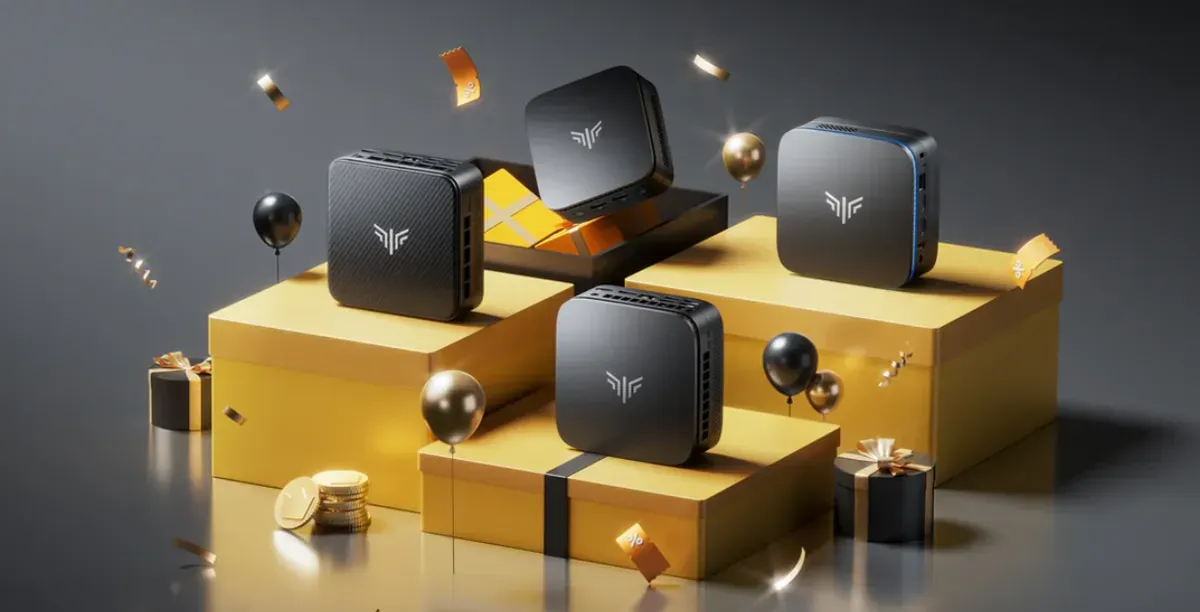
I’m a big fan of my Mac Mini, but it’s not the only option when it comes to buying one of the best mini PCs. Sure, it looks fantastic and boasts powerful hardware, but you have to pay for the privilege, and not everyone has that kind of budget.
To take advantage of the 42% discount, you’ll just need to enter the code R6VSNOOY at checkout. The deal expires March 31, though so don’t hang around.
With this spec you’ll be covered for office tasks, remote working, light content creation, gaming, and more. It’s not the only deal at Kamrui, though. Check out their Kamrui Amazon Shop, where you’re sure to find a mini PC that suits you.
Advertisement
Today’s best KAMRUI deal
The Hyper H2 Mini PC is powered by an Intel Core 14450HX with 10 cores and 16 threads (up to 4.8GHz). This delivers fantastic stability and sustained multi-core performance under heavy workloads and is the superior choice compared to Ryzen 7 alternatives, perfect for high-intensity scenarios, such as 3A gaming, 3D rendering, and video editing.
The CPU is backed up by 32GB of RAM, which Kamrui claims is 50-70% faster than 16GB RAM. It’s also equipped with a 1TB NVMe PCIe4.0×4 SSD, which significantly improves loading times. This can also be expanded to 4TB if you run out of space.
Advertisement
One of the best things about the Hyper H2 is that the integrated Intel UHD Graphics supports up to three 4K displays simultaneously. This is ideal for multitasking, data analysis, or multi-window design workflows.
This is the mini PC that just keeps on giving, and at just $478.39 at Amazon, we recommend it highly.
If you’re going to give your vehicle a good clean inside and out, it’s generally agreed that microfiber towels are the way to go. They’re gentle yet effective and, as long as you’re washing your microfiber towels properly, they can be used repeatedly. However, not all microfiber towels are fit for all surfaces, as different car materials call for different towel types. When cleaning glass, for instance, you want to use low-pile towels with shorter, more tightly-woven fibers. Unfortunately, what makes these good for glass makes them risky to use on paint.
Low-pile towels have more fibers, which means more points of contact with a surface. This can help remove fingerprints effectively and reduce the likelihood of streaks. However, this strong point can become a weakness when used on paint. More points of contact mean a stronger possibility of grabbing and dragging dirt particles across paint, thus creating scratches. This is an even bigger concern if the car hasn’t been effectively cleaned beforehand and there’s excess dirt on the paint. Thus, plush, high-pile towels are better suited for paint cleaning.
Of course, the matter of pile size is just one element of microfiber cloth selection. Material blend and weave types are key too; much like pile size, glass and paint cleaning don’t call for the same varieties.
Advertisement
Material blend and weave type are also important
Vasyl Mykhailenko/Getty Images
When looking for microfiber towels, you’ll likely see material ratios indicating the towel’s blend of polyester and polyamide, also known as nylon. Polyester is for scrubbing, while polyamide covers absorption. An 80/20 polyester-polyamide split is typically recommended for cleaning glass, prioritizing the removal of smudges, grime, and dirt while still being able to suck up residual water and cleaning products. However, a 70/30 blend is typically recommended for potentially scratch-prone vehicle paint jobs, as this composition reduces abrasion and increases absorption and softness.
Aside from the cloth’s blend, you should also pay attention to the type of microfiber towel you’re using. The material’s weave will affect the towel’s cleaning attributes, making some towels better for specific surfaces than others. For glass, common popular weave types include pearl, diamond, and waffle, for their blend of cleaning ability and softness. Meanwhile, plush and twist cloths, for example, are more paint-friendly. These offer increased softness, reduced friction, and high absorption.








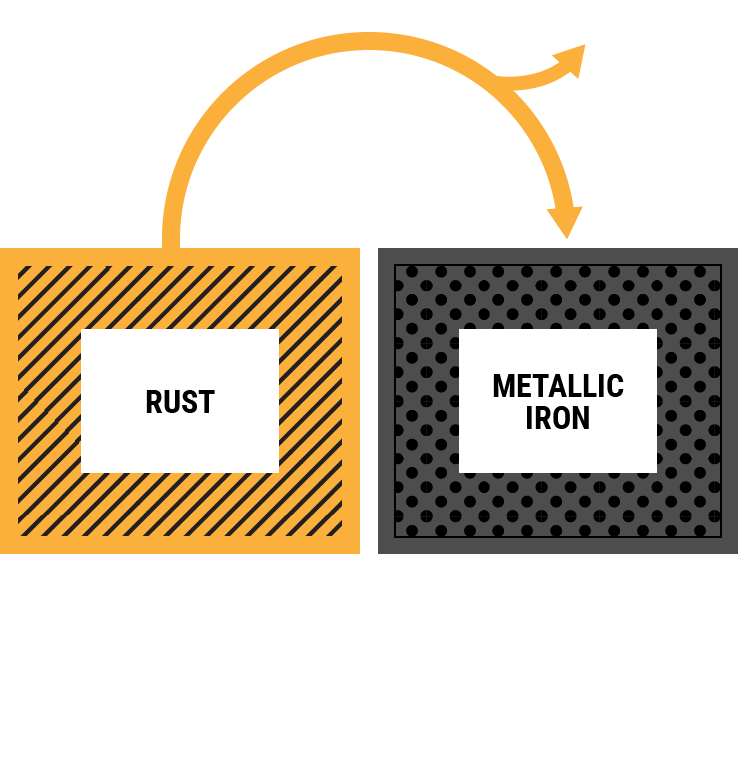 While on the subject of large-scale engineering projects, this week, Google announced that its new data center in Minnesota will be hooked up to the world’s largest battery. The 300 megawatt array built by Form Energy will use iron-air technology, which essentially uses a reversible rusting process to store energy produced by renewable sources such as wind and solar. When those sources aren’t available, the data center can run off of battery power for up to 100 hours.