Connect with us
DAPA Banner

Tech

9 Projects To Upgrade Your Workshop Without A Major Renovation

Published

on


Workshops can be a touchy subject for the average homeowner, especially if you also happen to be a procrastinator. There’s always some project that needs attention no matter how small, and associating that tiny (and often stuffy) environment with hard work can be off-putting. That’s not even accounting for the actual maintenance needed for you to exist in the workshop’s space — if you avoid visiting your workshop until it’s absolutely necessary, we see you, we hear you, and we understand you.

Despite the discomfort, it doesn’t have to be a chore to be in your garage or workshop. However, it’s true that the average workshop configuration leaves much to be desired in terms of comfort. That means you’re going to have to get your hands dirty to bring it up to your tastes.

Now, workshop upgrades don’t necessarily come cheap, especially considering the level of renovation required to bring a debilitated one up to standard. However, you don’t have to break the bank to upgrade your workshop. In this article, we’ll delve into nine projects you can embark on, any of which will significantly improve your quality of life in the garage. Similarly, SlashGear’s list of gadgets to upgrade your workshop can also help you get started. 

Advertisement

Install better grade lighting

You kind of need to see what you’re doing to complete workshop projects. You wouldn’t trust yourself to drill holes into planks with your eyes closed, and but that’s essentially what you’re doing in a poorly-lit workshop: You’re running the risk of not just making mistakes in whatever craft you’re involved in, but also as possibly injuring yourself. You don’t even need to make mistakes to be affected by poor lighting, as eye strain is going to take its toll over time.

These effects could manifest in the form of headaches, fatigue, or even decreased concentration — none of which are ideal for working in a workshop. So, instead of consigning yourself to squinting each time you have some handiwork to do, invest in lighting up your work area. There’s more to this process than simply buying as many lightbulbs as you can get your hands on; it requires careful consideration of the type of environment you currently have and the one you’re trying to build. For instance, we have a list of ideal work lights for mechanics that offer some great starting points.

Advertisement

Factors such as brightness, color temperature, ceiling height, and energy efficiency have to be taken into account. Overall, you want a lighting system that’s just right — not too bright, not too dim — especially if your garage has any degree of natural lighting seeping through the windows. 

Advertisement

Invest in a proper workbench setup

A common garage workshop problem to run into is the lack of a dedicated workbench. It’s not out of the ordinary to see DIYers using the bare floor as a work surface for whatever project they’re working on. That can happen for one of two reasons: They don’t have a workbench, or the workbench they do have is cluttered with all sorts of items. If you fall into the latter category, SlashGear has a DIY solution in the form of a custom pegboard to help you conquer that clutter.

Not to exaggerate, but having a good workbench could make or break your experience in the workshop. It’s not a good idea to use just any old makeshift surface — you need a sturdy base to clamp things down you’re working on. No matter your project scope and experience, you’d need a dedicated work area that can cater to your specific needs. 

Workbenches come in various forms: stationary, portable, and even those with adjustable heights. If you already have a designated space, you’d probably be better off going for a stationary setup. Otherwise, portable setups are good for smaller areas to preserve space. Also, workbenches can pull double-duty as mini storage units — you can never have too many of those. Models equipped with built-in drawers, power strips, and pegboards are great ways to keep your workshop tidy without undergoing wholesale renovations.

Advertisement

Set up a drill shelf

There are few moments worse than not being able to remember where you put your favorite power tool. That can happen easily when you’re not properly organized. If you leave your tools strewn all over your workshop, it shouldn’t be too much of a surprise when a handful of them start to turn up missing.

An obvious solution to the tool organization paradigm is to construct a cabinet and holistically dump all your equipment in it. That is, if you’re working with drawers, you can say that one drawer holds your hammers, another is for your drills, and yet another holds your nail stash. 

However, there’s an even more efficient method for keeping your drills properly lined up. Instead of laying the drills horizontally, you could set up a wall-mounted drill shelf to let them hang. If you make adequate electrical arrangements, you could even charge your while they’re being stored — a two-in-one fix for organization and efficiency.

Advertisement

Change your flooring

Workshops floors are often unique. More than a few may feature concrete flooring, while others might favor epoxy, interlocking tiles, or rubber. I’ve even been around a few that used hardwood for some reason. However, just because you met your workshop in one configuration doesn’t mean it has to stay that way.

The flooring you use in your workshop should be determined by the type of work you do there. If you work on cars, for example, you won’t have the same flooring setup considerations as someone who only works with wood. You need to take the weight of objects in the workshop into consideration — ceramic may be sufficient for mundane repair tasks, but it will crack under the weight of car tires if you ever tap into your mechanic inclinations.

Your floor’s ability to carry weight isn’t the only factor to account for. Other variables like the material’s resistance to chemicals and oils, as well as general slip resistance, should also play a role in your decision-making. Ideally, you’ll want a floor that’s both aesthetically pleasing and lasts the test of time under the conditions you put it under, so you’ll need to do lots of research. The more time you spend, however, the better the potential end result.

Advertisement

Invest in a dedicated safety station

Nobody wants them to, but emergencies happen. When you consider the type of daily activity that goes on in the average workshop, you can see why it’s standard practice for these spaces to have safety codes. Whether this manifests in wearables such as personal protective equipment (PPE) or simply having tools like a fire extinguisher on standby, the importance of safety cannot be overstated.

Now, your garage or basement workshop may not be up to industry standards, but that doesn’t mean you shouldn’t follow those same practices to keep you and your surroundings safe. The first step to doing this is to have all the necessary safety equipment at hand, and the next is to build a station where they permanently reside within your workshop. You can’t dump your safety gear just anywhere; imagine frantically looking around your garage for your fire extinguisher in the event of an emergency. 

Advertisement

So, how do you decide where to build this permanent stand? First, you should take note of your regular workflow (or if you haven’t started using the workshop yet, visualize what your ideal workflow looks like). Note zones for different activities, and factor in proximity when considering where you want to situate your safety station. Have some chemicals that may be a little too reactive and unbalanced? You probably want your safety equipment stationed as close to them as possible.

Advertisement

Install climate control systems

Let’s face it: Garages and workshops can be unpleasant environments. Factors like temperature and humidity can make working in one highly uncomfortable. If you don’t have proper ventilation or climate control, a trip to your workshop probably ends in a shirt soaked with sweat. This can be a major nuisance when you’re trying to focus on the task at hand.

Heat is just one end of the spectrum. In winter, your workshop can be rendered unusable without adequate heating. That’s not just inconvenience for you, either; some tools and materials can react negatively to extreme temperature changes. So, how do you ensure you keep your work area human-friendly and usable throughout the year? It’s pretty straightforward: Get a climate control system installed. 

Admittedly, this is easier said than done. If your workshop is attached to your home, extending existing climate control configurations to cover the area can prove to be expensive. However, you don’t need to go over the top; a portable air conditioner in the summer is a good idea. Likewise, a space heater could go a long way in the winter. Don’t want to use one of those? SlashGear also has ideas on alternative ways to heat your garage like adding in-floor radiant heating. You might also want to consider adding a dehumidifier to reduce dampness and improve air circulation, as well as looking into door materials that provide better insulation.

Advertisement

Install acoustic panels to reduce noise

If your workshop is situated in a residential area, you’re bound to run into noise pollution problems. Whether workshop noises end up bothering your neighbors, your partner, or even worse, your own ears, you could end up reducing the quality of life of those nearby whenever you’re working on a project. At varying degrees of noise, you and your neighbors can experience raised stress levels, lowered focus, and even hearing damage.

Nobody likes being in a noisy area, and you’re certainly not making any friends while you’re working on a loud project. The first step to making your workshop habitable in this regard is to invest in soundproofing. Ideally, this is a project you’d want to carry out before the building is fully constructed, but you can soundproof your workshop without tearing the whole structure apart by installing acoustic panels.

This solution isn’t perfect for holistic soundproofing; they won’t stop external sounds from seeping into your work area, for example. However, they are good at absorbing sounds that come from within. That’s significant when you consider all the clanging that goes on in a workshop, especially since you don’t need to tear down any walls or reconfigure your existing layout with acoustic panels. You may want to take the cost and material type into account — some panels have fire rating issues that could pose a hazard if you’re working with flammable chemicals.

Advertisement

Create a dust collection setup

It’s unavoidable: Your workshop is going to gather dust and grime. If you’re into woodworking, you probably know that sawdust and wood filings can be particularly stubborn to clean up. It can seem like you’re fighting an uphill battle to keep your garage free from dust; you could run your vacuum nonstop and still observe stray specks lying around.

Sometimes the grime isn’t even directly as a result of your efforts. Other factors also come into play,  like dust infiltration from cracks in windows and stagnant airflow if the workshop isn’t properly ventilated. Left unchecked, beyond the untidy aesthetic that a dusty environment brings, a workshop without a proper dust management system could trigger allergies and lead to respiratory issues.

To keep your workspace dust free, you’ll need to create a dedicated cleaning setup. This should include a garage dust extractor — they’re more effective than regular vacuum cleaners at picking up finer specks — a dust filter for your vents, and a floor mat to catch fine particles before they become airborne. With these upgrades, your workshop will be less of a pain for you to manage. You’ll also want to deep clean every couple of months for this setup to be fully effective. 

Advertisement

Organize your power systems

Workshops can be a challenge to organize, even when you’re at the top of your game. There are so many tools to put away. With that in mind, one of the biggest problems you will run into in keeping your workshop clean and tidy is managing your power cords. It’s all too easy to drop one tool here, funnel a wire from an extension cable there, and before you know it, your layout resembles a rat’s nest of electrical cords.

Beyond the obvious visual eyesore, there’s also the topic of tripping hazards. You could be walking normally and suddenly take a tumble because a power cord wasn’t kept out of your walking path. That poses serious risks for your physical health, especially with so many tools and other potentially sharp objects lurking about.

Advertisement

To keep your floor clear of trailing wires, you have to be a bit intentional about your means of storage. For instance, instead of leaving your corded drills on counters or shelves with their wires dangling, you could use the drill shelf we suggested earlier to keep those cords safely tucked away — the simple act of keeping them suspended in the air eliminates the problem. The same logic applies to power cables — you could invest in an extension cord organizer to keep them coiled and easily accessible, or you could think up a more elaborate solution if you have designated work zones where your power tools reside.


Advertisement

Source link

Continue Reading
Click to comment

You must be logged in to post a comment Login

Leave a Reply

Tech

Police take down 373,000 fake CSAM sites in Operation Alice

Published

on

Police take down 373,000 fake CSAM sites in Operation Alice

An international law enforcement action called Operation Alice has shut down over 373,000 dark web sites that offered fake CSAM packages.

The investigation, led by Germany and supported by Europol, began in mid-2021 and focused on a platform called “Alice with Violence CP,” operated by a 35-year-old suspect based in China.

These sites advertised child sexual abuse material (CSAM) and cybercrime-as-a-service offerings, including stolen credit card data and access to compromised systems.

Seizure banner on one of the scam sites
Source: Europol

According to Europol, the sites used showed previews of claimed CSAM “packages” to trick users into entering their email addresses and paying between EUR 17 and EUR 250 in Bitcoin, receiving nothing in return.

“Each package had an estimated cost of between EUR 17 and EUR 215, and promised data volumes ranging from a few gigabytes to several terabytes of CSAM,” explains Europol.

Advertisement

“However, these were purely fraudulent sites where CSAM was advertised and previewed but never delivered.”

The fraudulent CSAM platform fooled around 10,000 users into paying roughly $400,000 to the operator of the sites. Of those, the authorities have identified 440 users in 23 countries, and are currently investigating 100 of them.

Although these people never received the illegal material, they still tried to purchase CSAM, financially supporting child abuse and demonstrating criminal intent. Even attempting to buy such material is prosecuted in many jurisdictions.

At its peak, the scam network’s infrastructure comprised 287 servers, with a significant portion (105) located in Germany, all of which have now been seized. German authorities have also issued an international arrest warrant for the Chinese operator.

Advertisement

Europol highlights its broader child protection work, including the Help4U support platform launched in November 2025, and its “Stop Child Abuse – Trace an Object” initiative, which invites people to identify the origin of objects seen in CSAM material that may lead to the identification of perpetrators, and the saving of children from abuse.

Malware is getting smarter. The Red Report 2026 reveals how new threats use math to detect sandboxes and hide in plain sight.

Download our analysis of 1.1 million malicious samples to uncover the top 10 techniques and see if your security stack is blinded.

Source link

Advertisement
Continue Reading

Tech

Crimson Desert won't work on Intel Arc GPUs, developer suggests users ask for refunds

Published

on


Following a slew of mostly average to quite good pre-launch reviews for Crimson Desert, Pearl Abyss’ stock price fell almost 30%. It seems many had expected the game to receive Baldur’s Gate 3-level praise.
Read Entire Article
Source link

Continue Reading

Tech

The 3DFX Voodoo Lives Again In An FPGA

Published

on

The 3DFX Voodoo was not the first dedicated 3D graphics chipset by any means, but it became the favourite for gamers among the early mass-market GPUs. It would be found on a 3D-processing-only PCI card that sat on the feature connector of your SVGA card. The Voodoo took any game that supported its Glide API into the world of (for the time) smooth and beautiful 3D. They’re worth a bit now, but if you don’t fancy forking out for mid-’90s silicon in 2026, there’s another option. [Francisco Ayala Le Brun] has implemented the 3DFX Voodoo 1 in SpinalHDL for FPGAs.

The write-up goes into the Voodoo’s architecture. Where the parts of a modern GPU are programmable for the various functions it can do, in this part they are dedicated hardware functions for the various graphics tricks the chip can perform. Implementing such an architecture on an FPGA led to bugs and timing problems, and the write-up deals with that in detail.

The whole thing can be found in a GitHub repository if you’re curious, and is definitely worth a read for anyone interested in 1990s retrocomputing. 3DFX themselves would eventually be swallowed by Nvidia, a rival whose offerings would overtake them at the end of the ’90s, but they still represent a somewhat special moment. Don’t forget, if you have the real thing, you can probably upgrade its memory.

Advertisement

Header image: Konstantin Lanzet, GFDL.

Source link

Advertisement
Continue Reading

Tech

Microsoft Azure Monitor alerts abused for callback phishing attacks

Published

on

Microsoft

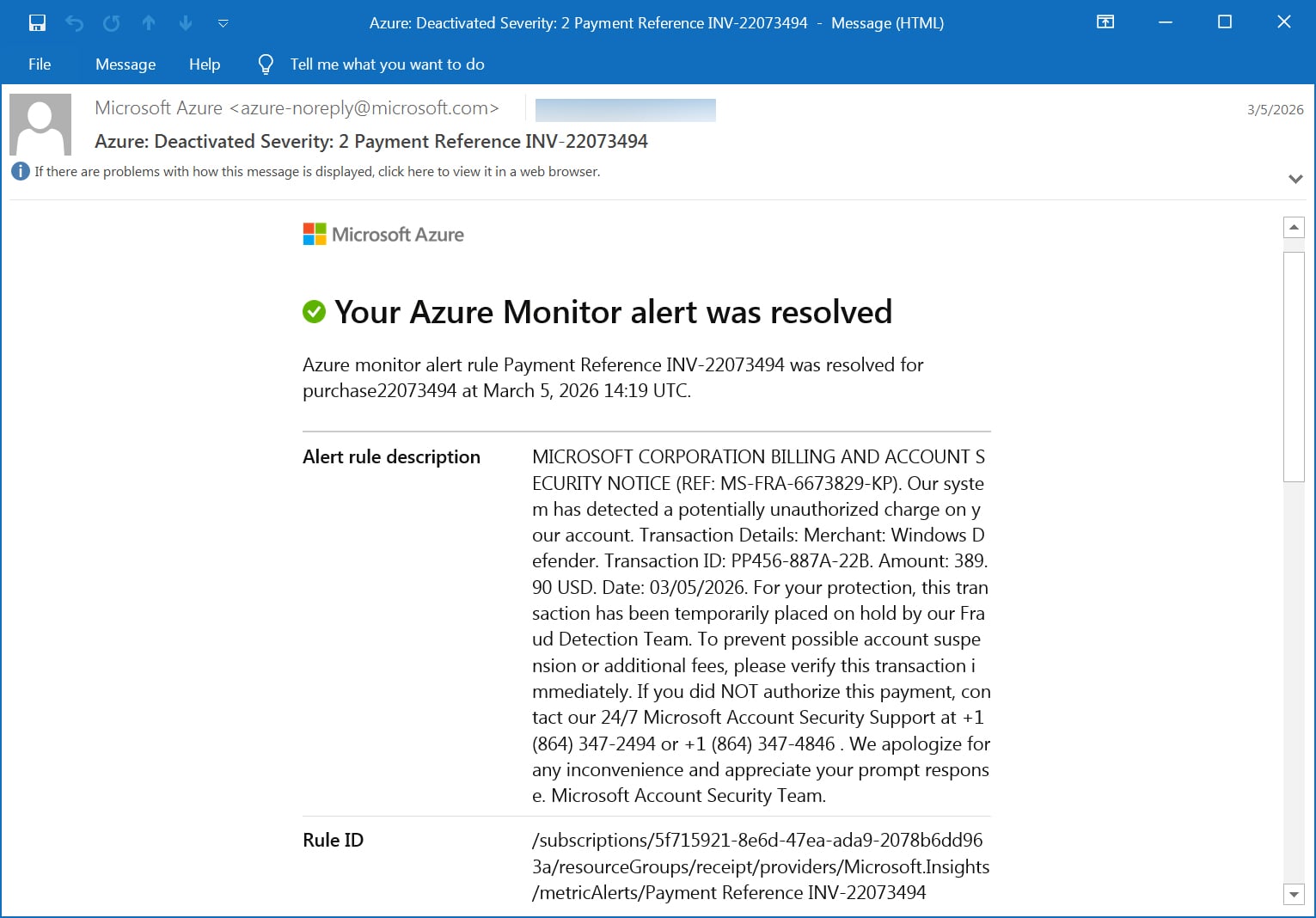
Microsoft Azure Monitor alerts are being abused to send callback phishing emails that impersonate warnings from the Microsoft Security Team about unauthorized charges on your account.

Azure Monitor is Microsoft’s cloud-based monitoring service that collects and analyzes data from Azure resources, applications, and infrastructure. It enables users to track performance, notify about billing changes, detect issues, and trigger alerts based on various conditions.

Over the past month, numerous people have reported receiving Azure Monitor alerts warning of suspicious charges or invoice activity on their accounts, urging them to call an enclosed phone number.

“Alert rule description MICROSOFT CORPORATION BILLING AND ACCOUNT SECURITY NOTICE (REF: MS-FRA-6673829-KP). Our system has detected a potentially unauthorized charge on your account. Transaction Details: Merchant: Windows Defender. Transaction ID: PP456-887A-22B. Amount: 389.90 USD. Date: 03/05/2026l,” reads the fake billing alert.

Advertisement

“For your protection, this transaction has been temporarily placed on hold by our Fraud Detection Team. To prevent possible account suspension or additional fees, please verify this transaction immediately. If you did NOT authorize this payment, contact our 24/7 Microsoft Account Security Support at +1 (864) 347-2494 or +1 (864) 347-4846.”

“We apologize for any inconvenience and appreciate your prompt response. Microsoft Account Security Team.”

Microsoft Azure Monitor alert used in a callback phishing scam
Source: BleepingComputer

Unlike other phishing campaigns, these messages are not spoofed, but are sent directly by the Microsoft Azure Monitor platform using the legitimate azure-noreply@microsoft.com email address.

As the emails are sent through Microsoft’s legitimate email platforms, they pass SPF, DKIM, and DMARC email security checks, making them appear more trustworthy.


Authentication-Results: relay.mimecast.com;
	dkim=pass header.d=microsoft.com header.s=s1024-meo header.b=CKfQ8iOB;
	arc=pass ("microsoft.com:s=arcselector10001:i=1");
	dmarc=pass (policy=reject) header.from=microsoft.com;
	spf=pass (relay.mimecast.com: domain of azure-noreply@microsoft.com designates 40.107.200.103 as permitted sender) smtp.mailfrom=azure-noreply@microsoft.com

The threat actors are conducting this campaign by creating alerts in Azure Monitor for easily triggered conditions, such as new orders, payments, generated invoices, and other billing events. 

Advertisement

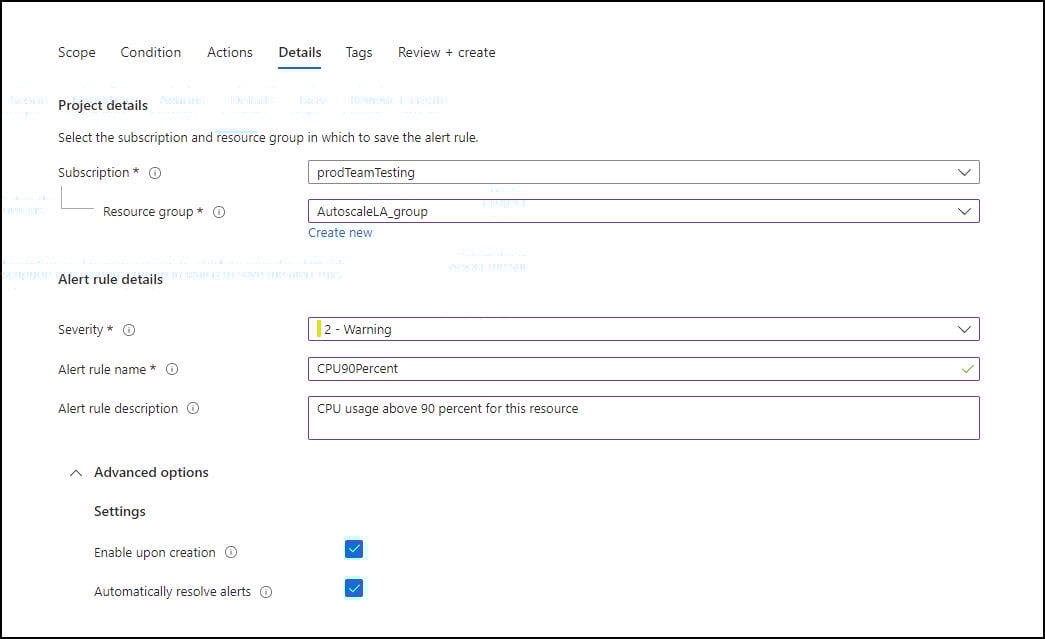
When creating alerts, you can enter any message you want in the description field, which the attackers use to put their callback phishing message.

Creating an Azure Monitor alert
Description field when creating an Azure Monitor alert
Source: Microsoft

These alerts are then configured to send emails to what is believed to be a mailing list under the attacker’s control, which forwards the email to all the targeted people in the attack.

This also preserves the original Microsoft headers and authentication results, helping the emails bypass spam filters and user suspicion.

BleepingComputer has seen multiple alert categories used in this campaign, mostly using invoice and payment-themed rules designed to resemble automated billing notifications:

  • Azure monitor alert rule order-22455340 was resolved for invoice22455340
  • Azure monitor alert rule Invoice Paid INV-d39f76ef94 was resolved for invd39f76ef94
  • Azure monitor alert rule Payment Reference INV-22073494 was resolved for purchase22073494
  • Azure monitor alert rule Funds Successfully Received-ec5c7acb41 was triggered for subec5c7acb41
  • Azure monitor alert rule MemorySpike-9242403-A4 was triggered
  • Azure monitor alert rule DiskFull-3426456-A6 was triggered for locker3426456

The campaign relies on creating a sense of urgency, which in this case is the unusual $389 Windows Defender charge, to trick the users into calling the listed phone number.

While BleepingComputer did not call the number in this scam, previous callback phishing campaigns led to credential theft, payment fraud, or the installation of remote access software.

Advertisement

As these emails use a more enterprise or corporate theme, they may be intended to gain initial access to corporate networks for follow-on attacks.

Users should treat any Azure or Microsoft alert that includes a phone number or urgent request to resolve billing issues with suspicion.

Malware is getting smarter. The Red Report 2026 reveals how new threats use math to detect sandboxes and hide in plain sight.

Download our analysis of 1.1 million malicious samples to uncover the top 10 techniques and see if your security stack is blinded.

Source link

Advertisement
Continue Reading

Tech

Mexico City’s ‘Xoli’ Chatbot Will Help World Cup Tourists Navigate the City

Published

on

The Government of Mexico City has launched Xoli, a chatbot that will provide information on services, tourism, and cultural offerings. It’s available now via WhatsApp in both English and Spanish.

The platform was designed to meet the demand of the millions of visitors expected to arrive during the 2026 FIFA World Cup. However, the authorities assure that the tool will remain active once the sporting event is over, with the aim of promoting economic activities and facilitating access to public services in the capital.

In a press conference, Clara Brugada, head of the Mexico City government, stated that Xoli “will be the technological instrument that will allow us to link culture, tourism, recreation, and entertainment with the population.”

Chat With Xoli

The tool was developed entirely by the capital’s government, as a result of the collaboration between the Digital Agency for Public Innovation and the local Ministries of Tourism and Culture.

Advertisement

The chatbot is already available on mobile devices and will operate continuously, seven days a week, 24 hours a day. To use it, just open WhatsApp, start a chat with the number 55 6565 9395, and send the word “Hola.”

Xoli (pronounced sho-lee) will immediately ask if you want to continue in English or Spanish. After selecting the preferred language, users will be able to access a menu with various categories of information, including culture, tourism, gastronomy, and mobility, or just ask a question about anything in the city.

In the context of the 2026 World Cup, there will be a specific section with information about the competition, including special events, match details, broadcasts of games in public places, and ticket purchase options.

Xoli chatbot Mundial Mxico

Screenshot of Xoli, Mexico City’s tourist chatbot for the 2026 World Cup.

Advertisement

Cortesía Xoli

The capital’s government highlighted that this technology contributes to the city’s consolidation as “a more innovative and accessible city,” by speeding up access to official information, offering timely responses and strengthening tourism promotion strategies.

Alejandra Frausto, head of Mexico City’s Ministry of Tourism, pointed out that close to 3,000 tourist, recreational, and cultural activities are carried out daily in the capital. In seasons of high demand, this figure can increase to 5,000 events a day. “Translating this data into reliable and accessible information involves a great effort, but it is now possible thanks to this chatbot,” he says.

A Good Sport

The launch of Xoli adds to the technological efforts driven by the federal government to turn the upcoming World Cup into an engine of development for commerce, sports, tourism, and culture throughout the country.

Late last year, Mexican president Claudia Sheinbaum presented the Mexico 2026 Social World Cup plan, which calls for more than 177 festivities and 5,000 activities linked to the tournament, as well as 74 tournaments and soccer cups aimed at students, workers, and the general public. The program also includes around 1,500 actions within the Vive Saludable (Live Healthy) initiative, aimed at promoting healthy lifestyles, as well as the rehabilitation of 4,200 public sports fields and spaces.

Advertisement

Among the actions announced is the creation of the Conoce México app developed jointly by the Agency for Digital Transformation and Telecommunications (ATDT) and the Ministry of Tourism. This app will allow fans, both national and foreign, to get updated information on matches, venues, routes, services, and cultural activities.

Source link

Continue Reading

Tech

Airlines Are Already Preparing for an Oil Crisis

Published

on

The war with Iran and ensuing blockade in the Strait of Hormuz, a critical shipping lane, has spiked oil prices and sent governments scrabbling for their reserves. How high will prices go, and how bad could it get?

On Friday night, United Airlines CEO Scott Kirby published a memo to his employees showing that his very fuel-dependent business is prepping for a very long fallout. “Our plans assume oil goes to $175/barrel and doesn’t get back down to $100/barrel until the end of 2027,” he wrote.

Jet fuel accounts for between a quarter and a third of airlines’ operating costs. Prices have doubled from $70 a barrel since the war started four weeks ago, threatening to seriously cut into airlines’ profitability. Kirby said that his airline has a strategy: United will cut some 5 percent of its planned flight schedule during the second and third quarters of this year, with trims coming especially in off-peak periods like red-eyes and less popular travel days: Tuesdays, Wednesdays, and Saturdays.

“Honestly, I think there’s a good chance it won’t be that bad,” Kirby wrote in the memo, “but … there isn’t much downside for us to prepare for that outcome.”

Advertisement

United’s moves are significant for not only the travel industry but the wider global economy, analysts say. If it all plays out the way Kirby predicts, “this would be incredibly unwelcome news to everyone who is not in the oil refining business,” says Jason Miller, a professor of supply chain management at Michigan State University’s Eli Broad College of Business.

Airlines might be a particularly notable canary in the economic coal mine because their business leans even more heavily on oil prices, and especially refined oil prices, than most. Air transportation ranks just below asphalt paving as the US industry that spends the greatest share of its non-labor costs on refined petroleum products, Miller has calculated. Kirby’s predictions, while dire, are in line with what others in the commodity market are predicting, Miller says.

“Economically, this energy shock is hitting at the worst time possible,” Miller says. Add its effects to a sluggish job market and a global economy shaken by the US’s erratic tariff regime, and economists start to think about recession. The Iran war and the ensuing energy crisis “have played out longer than many expected it to,” Miller says. Kirby’s memo is an acknowledgment that “Hormuz may not be open for business very quickly.”

The effects of the fuel price spikes are already affecting the travel industry. Last week, American Airlines CEO Robert Isom said the company had spent an additional $400 million on fuel. Airlines have reported strong demand in the past weeks, with United’s Kirby noting in his memo that the past 10 weeks had seen the airline take in the most revenue on bookings ever. But it remains to be seen whether lots of people are actually enthusiastic about travel, or flyers spooked about geopolitics and fears of high ticket prices moved early to lock in their plans before oil costs got higher. Isom noted that, if oil prices remain high, “we’re certainly going to be nimble in terms of capacity, to make sure that supply and demand stay in balance.”

Advertisement

How bad it could get for airlines—and its passengers—depends not just on how long oil prices stay elevated, but how long the businesses’ questions about the crisis remain unanswered.

“If we stay in this uncertainty for a long time, this is adding to the complexity,” says Ahmed Abdelghany, who studies airline operations as a professor in Embry-Riddle Aeronautical University’s College of Business. “The longer it goes, the more problematic to the airlines that remain.”

Source link

Advertisement
Continue Reading

Tech

Delve accused of misleading customers with ‘fake compliance’

Published

on

An anonymous Substack post published this week accuses compliance startup Delve of “falsely” convincing “hundreds of customers they were compliant” with privacy and security regulations, potentially exposing those customers to “criminal liability under HIPAA and hefty fines under GDPR.”

Delve is a Y Combinator-backed startup that last year announced raising a $32 million Series A at a $300 million valuation. (The round was led by Insight Partners.) On Friday, the startup attempted to refute the accusations on its blog, calling the Substack post “misleading” and saying it “contains a number of inaccurate claims.”

The Substack post is credited to “DeepDelver,” who described themselves as working at a (now former) Delve client. In response to emailed questions from TechCrunch, DeepDelver said that they and their collaborators “chose to remain anonymous out of fear for retaliation by Delve.”

In their post, DeepDelver recounted receiving an email in December claiming the startup had “leaked a spreadsheet with confidential client reports.” While Delve CEO Karun Kaushik apparently assured customers in a subsequent email that they were in compliance and that no external party gained access to sensitive data, DeepDelver said they and other customers had become suspicious.

Advertisement

“Having the shared experience of being underwhelmed with the Delve experience, and having the overall sense that something fishy was going on, we decided to pool resources and investigate together,” they wrote.

Their conclusion? That Delve “achieves its claim of being the fastest platform by producing fake evidence, generating auditor conclusions on behalf of certification mills that rubber stamp reports, and skipping major framework requirements while telling clients they have achieved 100% compliance.”

DeepDelver went into considerable detail about those claims, accusing the startup of providing customers with “fabricated evidence of board meetings, tests, and processes that never happened,” then forcing those customers to “choose between adopting fake evidence or performing mostly manual work with little real automation or AI.”

Techcrunch event

Advertisement

San Francisco, CA
|
October 13-15, 2026

DeepDelver also claimed that virtually all of Delve’s clients seem to have gone through two audit firms, Accorp and Gradient, which they described as “part of the same operation,” one that operates primarily in India, with only a nominal presence in the United States.

Advertisement

Those firms, they said, are just rubber-stamping reports that were generated by Delve. As a result, DeepDelver said the startup “inverts” the normal compliance structure: “By generating auditor conclusions, test procedures, and final reports before any independent review occurs, Delve places itself in the role of both implementer and examiner. This is not a technicality. It is a structural fraud that invalidates the entire attestation.”

In addition to accusing Delve of misleading its customers, DeepDelver said the startup is helping those customers “mislead the public by hosting trust pages that contain security measures that were never implemented.” 

DeepDelver said that while their company was discussing its issues with Delve, the startup “sent us multiple boxes of donuts […] to keep us happy.” Nonetheless, DeepDelver’s employer supposedly unpublished its trust page and no longer relies on the startup for compliance.

Delve responded to the accusations by saying it does not issue compliance reports at all. Instead, it’s an “automation platform” that ingests information about compliance, then provides auditors with access to that information.

Advertisement

“Final reports and opinions are issued solely by independent, licensed auditors, not Delve,” the company said.

Delve also said that its customers “can opt to work with an auditor of their choosing or opt to work with one from Delve’s network of independent, accredited third-party audit firms.” Those auditors, the startup said, are “established firms used broadly across the industry, including by other compliance platforms.”

In response to the accusation that it’s providing customers with “fake evidence,” Delve countered that it’s simply offering “templates to help teams document their processes in accordance with compliance requirements, as do other compliance platforms.”

“Draft templates are not the same as ‘pre-filled evidence,’” the company said.

Advertisement

Delve added that it is “actively investigating any leaks” and is “still reviewing the Substack.”

When asked about Delve’s response, DeepDelver told TechCrunch that they were “baffled by the laziness, clumsiness and brazenness of it.”

“They are trying to snake their way out [of] being held accountable by denying having ‘pre-filled evidence’ but calling it ‘templates’ instead, effectively shifting the blame to customers for adopting the ‘templates’ as is,” DeepDelver said. “They’re claiming they are not the ones to ‘issue’ the report, which is easy to claim if you define issuing a report as providing the final stamp.”

They added that there are “a number of very serious allegations” that Delve did not address at all: “The India accusation, the lack of AI (they only talk about ‘automations’), and the trust (lol) page containing controls that were never implemented.”

Advertisement

Apparently DeepDelver isn’t done with its criticism, as it promised, “Part II will follow soon.”

In addition, following the initial Substack post, an X user named James Zhou said they were able to gain access to sensitive information from Delve, such as employee background checks and equity vesting schedules. Dvuln founder Jamieson O’Reilly shared more details from what O’Reilly said was a conversation with Zhou about “several gaping security holes in Delve’s external attack surface.”

TechCrunch sent an email seeking additional comment to the media contact address listed on Delve’s website. The email bounced, but after this article was published, I received a calendar invite for a “Delve demo” later this week.

This post was initially published on March 21, 2026. It has been updated with emailed answers from DeepDelver, additional information about purported security vulnerabilities provided by Jamieson O’Reilly, and additional details about Delve’s response to TechCrunch.

Advertisement

Source link

Continue Reading

Tech

5 Cheap Harbor Freight Alternatives To Expensive Milwaukee Products

Published

on


If you want professional-grade power tools, you’re going to have to pay a premium price. At least, that’s how it goes with many of the top power tool brands. And of that bunch, few brands come with higher prices than Milwaukee. The brand certainly has its fans, but there’s no way around it: Milwaukee leverages its good reputation to justify charging high-end prices for its power tools. As tool prices climb across the industry, more and more people would probably appreciate a way to get Milwaukee power tool performance without Milwaukee power tool prices.

If that’s you, you might want to check out Harbor Freight. In recent years, this hardware store has greatly expanded its lineup of professional-grade equipment through its in-house brands like Hercules. In fact, their Hercules line is meant to compete directly with higher-end tools sold by brands like Milwaukee… all while keeping prices much, much lower than the big-name brands. To show you what we’re talking about, we’ve found five of the best Harbor Freight alternatives to Milwaukee’s more expensive versions.

Advertisement

1. Hercules random orbit sander

No matter if you’re doing some woodworking, a home renovation, or finishing a furniture project, you’re probably going to need to do some sanding. Cordless random orbit sanders are one way to do so. The Hercules 20V Brushless Cordless 5-inch Random Orbit Sander sells for $54.99 at Harbor Freight, which undercuts the price of the Milwaukee Tool M18 brushless 5-inch random orbit sander, priced around $149 at Home Depot.

And even with that cost difference, the Hercules model is still built with many of the same modern performance features expected of a Milwaukee-type tool. Its brushless motor gives you variable-speed control capable of delivering up to 12,000 orbits per minute. When paired with a Hercules 5 amp-hour battery or larger, the sander can deliver up to 40 minutes of continuous operation. The sander also includes an ergonomic rubberized grip to reduce vibration, and it uses an eight-hole dust collection system paired with a dust bag to help keep your work surface cleaner.

Advertisement

2. Hercules hammer drill/driver

Hammer drills are a cornerstone tool for both construction professionals and home renovators, especially when projects involve drilling into masonry, concrete, or other dense materials. And while Milwaukee has options for you (like the M18 FUEL hammer drill), you can expect to pay upwards of $229 at places like Home Depot. Meanwhile, Harbor Freight has the Hercules 20V Brushless 1/2-inch Compact Hammer Drill/Driver for $79.99 instead.

Advertisement

This tool can give you up to 1,200 inch-pounds of maximum torque, so you can drive large fasteners or drill holes into dense materials like it’s nothing. It’s also capable of up to 32,000 blows per minute in hammer mode. That rapid percussive action helps the drill break through concrete and masonry more efficiently than a standard drill ever could. Under typical conditions, Harbor Freight says the Hercules can drill up to 110 holes in concrete on a single charge.

Advertisement

3. Hercules trigger-grip angle grinder

Angle grinders are another popular power tool that people might look to Milwaukee for. For example, the 15-amp large-angle grinder from Milwaukee Tool sells for $299 at Home Depot. Compare that to the Hercules 15-amp 7-inch/9-inch Trigger-Grip Angle Grinder going for $129 at Harbor Freight. That’s more than 50% savings if you’re willing to swap the popular red tool for this lesser-known blue one.

The Hercules grinder is powered by a 15-amp motor that can produce speeds up to 6,500 revolutions per minute. You also get a trigger-grip handle for more leverage and control compared with traditional side-handle-only grinders. The handle includes an optional lock-on function that lets the tool run longer without you constantly applying pressure to the trigger. The Hercules grinder also includes tool-free guards for both 7-inch and 9-inch grinding wheels. It’s all protected by an all-metal aluminum gear case with a reinforced plastic housing to reduce that annoying vibration.

Advertisement

4. Hercules reciprocating saw

Reciprocating saws are a must-have for demolition, remodeling, or rough-cutting applications. Milwaukee’s M18 FUEL reciprocating saw costs $249 at Home Depot. That’s not the brand’s most expensive power tool, to be clear, but it’s still not cheap. The Hercules 20V Brushless Cordless Reciprocating Saw, however, is priced at $79.99 at Harbor Freight, which is quite a steep price drop.

The saw can deliver up to 3,000 strokes per minute via its variable-speed trigger. It also uses a pivoting shoe with three depth adjustment positions to give you more control over the cut. (Beyond the extra control, adjusting the shoe means extending the blade life by exposing different parts of the blade during repeated cuts.) Blade changes are nice and easy thanks to a keyless single-action mechanism that lets you swap things out without any additional tools. The reciprocating saw also includes a super safe electric brake that stops the blade immediately after the trigger is released.

Advertisement

5. Hercules right angle drill

Right angle drills are great for working in those tight spaces where traditional drills just won’t fit. But if you want one from Milwaukee, you’ll have to pay $329 for it at Home Depot. On the other hand, Hercules can get you a 20V Brushless Cordless 1/2-inch Variable-Speed Right Angle Drill for only $94.99 at Harbor Freight. It’s one of the most dramatic differences between Milwaukee and Hercules pricing that we’ve seen.

It comes with a variable-speed trigger for adjustable drilling speed based on the material you’re drilling. (That’ll also help prevent the drill from overheating and avoid any bit damage that can come from switching between softer materials and denser wood or construction lumber.) It also includes a built-in LED work light that shines on the drilling area. All in all, you’re looking at more than 120 holes drilled per battery charge. Combine that with the fact that it’s a third of the price of the Milwaukee version, what’s not to like?

Advertisement


Source link

Advertisement
Continue Reading

Tech

Elon Musk announces Terafab project he claims will be the ‘largest chip manufacturing facility ever’

Published

on

Elon Musk has announced the Terafab project, a joint venture between Tesla, SpaceX and xAI, to build the “largest chip manufacturing facility ever.” In his usual grandiose fashion, Musk claims Terafab is the next step towards harnessing the power of the sun and creating a “galactic civilization.”

Musk, CEO of all three companies, announced plans for the Terafab in a livestream on X. As the name implies, the project’s ultimate goal is to produce a terawatt of computing power each year so that it can match the companies’ growing demand for chips. Musk explained during the livestream that he’s grateful to existing supply chain partners like Samsung, TSMC and Micron, but the current capacity of chip manufacturers only adds up to about two percent to what Tesla and SpaceX needs in terms of future computing power needs.

“We either build the Terafab or we don’t have the chips,” Musk said during the event. “And we need the chips so we’re going to build the Terafab.”

The Terafab project, estimated to cost at least $20 billion, will start with the Advanced Technology Fab in Austin, Texas, where Tesla is already headquartered. Musk said that the two types of chips will be produced in the Terafab: one for terrestrial purposes, like to power Full Self-Driving or Optimus robots, and another more high-powered, durable chip to be used in space. If you’re wondering what Musk has in store for space, the SpaceX CEO filed an application with the Federal Communications Commission to launch a million satellites to create an “orbital data center” earlier this year. As promising as this sounds, it’s worth noting that Musk has previously overpromised and underdelivered on other projects, like the Hyperloop, a $40,000 Cybertruck and fully autonomous driving.

Advertisement

Source link

Continue Reading

Tech

Cursor admits its new coding model was built on top of Moonshot AI’s Kimi

Published

on

AI coding company Cursor launched a new model this week called Composer 2, which it promoted as offering “frontier-level coding intelligence.” 

However, an X user posting under the name Fynn soon claimed that Composer 2 was “just Kimi 2.5” with additional reinforcement learning — Kimi 2.5 being an open source model recently released by Moonshot AI, a Chinese company backed by Alibaba and HongShan (formerly Sequoia China). 

As evidence, Fynn pointed to code that seemed to identify Kimi as the model.

“[A]t least rename the model ID,” they scoffed.

Advertisement

It was a surprising revelation, since Cursor is a well-funded U.S. startup that raised a $2.3 billion round last fall at a $29.3 billion valuation, and is reportedly exceeding $2 billion in annualized revenue. Also, the company didn’t mention anything about Moonshot AI or Kimi in its announcement.

However, Cursor’s vice president of developer education Lee Robinson soon acknowledged, “Yep, Composer 2 started from an open-source base!” But he said, “Only ~1/4 of the compute spent on the final model came from the base, the rest is from our training.” As a result, he said Composer 2’s performance on various benchmarks is “very different” from Kimi’s.

Robinson also insisted that Cursor’s use of Kimi was consistent with the terms of its license, a point the Kimi account on X repeated in a subsequent post congratulating Cursor, where it said Cursor used Kimi “as part of an authorized commercial partnership” with Fireworks AI.

Techcrunch event

Advertisement

San Francisco, CA
|
October 13-15, 2026

“We are proud to see Kimi-k2.5 provide the foundation,” the Kimi account said. “Seeing our model integrated effectively through Cursor’s continued pretraining & high-compute RL training is the open model ecosystem we love to support.”

Advertisement

So why not acknowledge Kimi upfront? Beyond any potential embarrassment in not creating a model from scratch, building on top of a Chinese model might feel particularly fraught right now, with the so-called AI “arms race” often framed as an existential battle between United States and China. (See, for example, Silicon Valley’s apparent panic after Chinese company DeepSeek released a competitive model early last year.)

Cursor co-founder Aman Sanger acknowledged, “It was a miss to not mention the Kimi base in our blog from the start. We’ll fix that for the next model.”

Source link

Advertisement
Continue Reading

Trending

Copyright © 2025