
Tech
Anthropic’s Claude Opus 4.6 brings 1M token context and ‘agent teams’ to take on OpenAI’s Codex

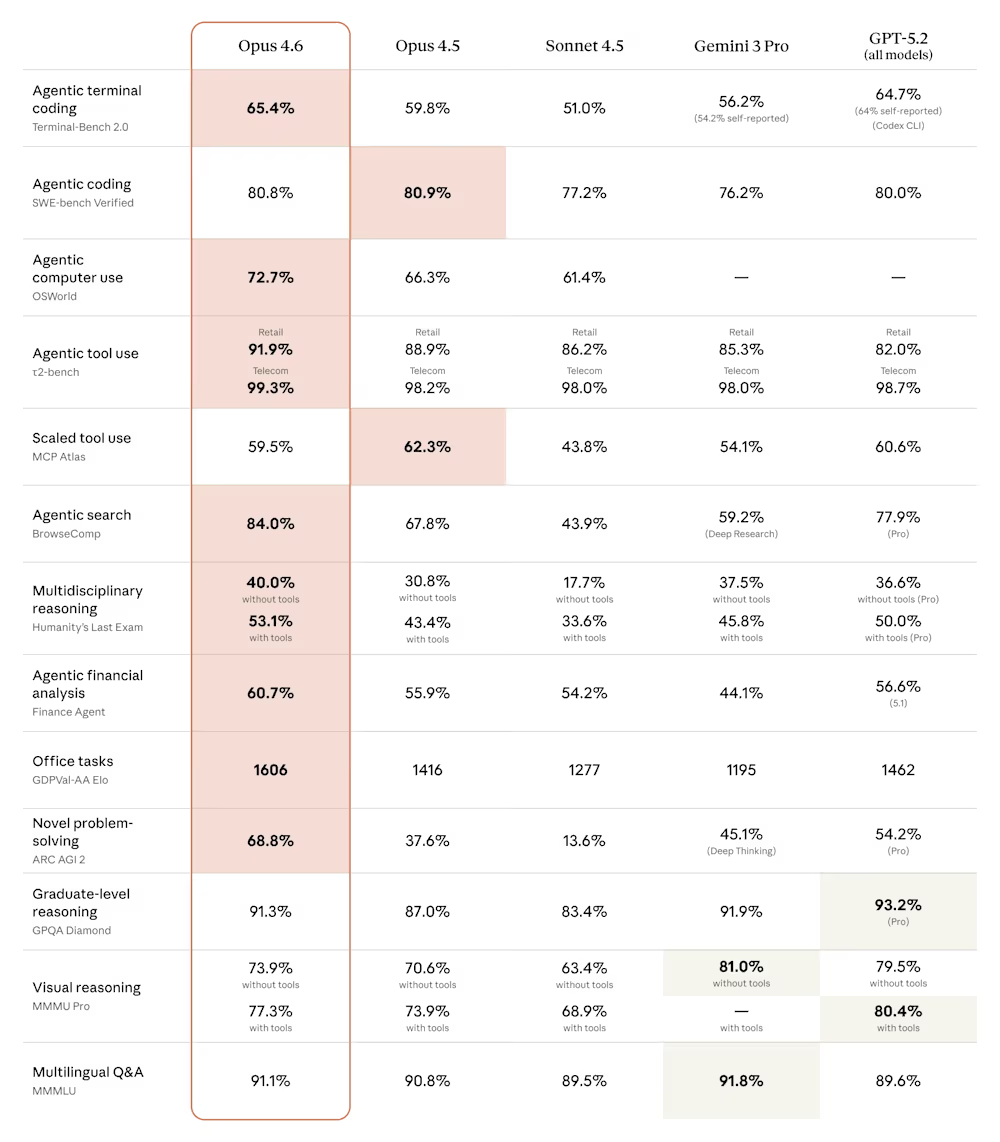
Anthropic on Thursday released Claude Opus 4.6, a major upgrade to its flagship artificial intelligence model that the company says plans more carefully, sustains longer autonomous workflows, and outperforms competitors including OpenAI’s GPT-5.2 on key enterprise benchmarks — a release that arrives at a tumultuous moment for the AI industry and global software markets.
The launch comes just three days after OpenAI released its own Codex desktop application in a direct challenge to Anthropic’s Claude Code momentum, and amid a $285 billion rout in software and services stocks that investors attribute partly to fears that Anthropic’s AI tools could disrupt established enterprise software businesses.
For the first time, Anthropic’s Opus-class models will feature a 1 million token context window, allowing the AI to process and reason across vastly more information than previous versions. The company also introduced “agent teams” in Claude Code — a research preview feature that enables multiple AI agents to work simultaneously on different aspects of a coding project, coordinating autonomously.
“We’re focused on building the most capable, reliable, and safe AI systems,” an Anthropic spokesperson told VentureBeat about the announcements. “Opus 4.6 is even better at planning, helping solve the most complex coding tasks. And the new agent teams feature means users can split work across multiple agents — one on the frontend, one on the API, one on the migration — each owning its piece and coordinating directly with the others.”
Why OpenAI and Anthropic are locked in an all-out war for enterprise developers
The release intensifies an already fierce competition between Anthropic and OpenAI, the two most valuable privately held AI companies in the world. OpenAI on Monday released a new desktop application for its Codex artificial intelligence coding system, a tool the company says transforms software development from a collaborative exercise with a single AI assistant into something more akin to managing a team of autonomous workers.
AI coding assistants have exploded in popularity over the last year, and OpenAI said more than 1 million developers have used Codex in the past month. The new Codex app is part of OpenAI’s ongoing effort to lure users and market share away from rivals like Anthropic and Cursor.
The timing of Anthropic’s release — just 72 hours after OpenAI’s Codex launch — underscores the breakneck pace of competition in AI development tools. OpenAI faces intensifying competition from Anthropic, which posted the largest share increase of any frontier lab since May 2025, according to a recent Andreessen Horowitz survey. Forty-four percent of enterprises now use Anthropic in production, driven by rapid capability gains in software development since late 2024. The desktop launch is a strategic counter to Claude Code’s momentum.
According to Anthropic’s announcement, Opus 4.6 achieves the highest score on Terminal-Bench 2.0, an agentic coding evaluation, and leads all other frontier models on Humanity’s Last Exam, a complex multi-discipline reasoning test. On GDPval-AA — a benchmark measuring performance on economically valuable knowledge work tasks in finance, legal and other domains — Opus 4.6 outperforms OpenAI’s GPT-5.2 by approximately 144 ELO points, which translates to obtaining a higher score approximately 70% of the time.

Inside Claude Code’s $1 billion revenue milestone and growing enterprise footprint
The stakes are substantial. Asked about Claude Code’s financial performance, the Anthropic spokesperson noted that in November, the company announced that Claude Code reached $1 billion in run rate revenue only six months after becoming generally available in May 2025.
The spokesperson highlighted major enterprise deployments: “Claude Code is used by Uber across teams like software engineering, data science, finance, and trust and safety; wall-to-wall deployment across Salesforce’s global engineering org; tens of thousands of devs at Accenture; and companies across industries like Spotify, Rakuten, Snowflake, Novo Nordisk, and Ramp.”
That enterprise traction has translated into skyrocketing valuations. Earlier this month, Anthropic signed a term sheet for a $10 billion funding round at a $350 billion valuation. Bloomberg reported that Anthropic is simultaneously working on a tender offer that would allow employees to sell shares at that valuation, offering liquidity to staffers who have watched the company’s worth multiply since its 2021 founding.
How Opus 4.6 solves the ‘context rot’ problem that has plagued AI models
One of Opus 4.6’s most significant technical improvements addresses what the AI industry calls “context rot“—the degradation of model performance as conversations grow longer. Anthropic says Opus 4.6 scores 76% on MRCR v2, a needle-in-a-haystack benchmark testing a model’s ability to retrieve information hidden in vast amounts of text, compared to just 18.5% for Sonnet 4.5.
“This is a qualitative shift in how much context a model can actually use while maintaining peak performance,” the company said in its announcement.
The model also supports outputs of up to 128,000 tokens — enough to complete substantial coding tasks or documents without breaking them into multiple requests.
For developers, Anthropic is introducing several new API features alongside the model: adaptive thinking, which allows Claude to decide when deeper reasoning would be helpful rather than requiring a binary on-off choice; four effort levels (low, medium, high, max) to control intelligence, speed and cost tradeoffs; and context compaction, a beta feature that automatically summarizes older context to enable longer-running tasks.

Anthropic’s delicate balancing act: Building powerful AI agents without losing control
Anthropic, which has built its brand around AI safety research, emphasized that Opus 4.6 maintains alignment with its predecessors despite its enhanced capabilities. On the company’s automated behavior audit measuring misaligned behaviors such as deception, sycophancy, and cooperation with misuse, Opus 4.6 “showed a low rate” of problematic responses while also achieving “the lowest rate of over-refusals — where the model fails to answer benign queries — of any recent Claude model.”
When asked how Anthropic thinks about safety guardrails as Claude becomes more agentic, particularly with multiple agents coordinating autonomously, the spokesperson pointed to the company’s published framework: “Agents have tremendous potential for positive impacts in work but it’s important that agents continue to be safe, reliable, and trustworthy. We outlined our framework for developing safe and trustworthy agents last year which shares core principles developers should consider when building agents.”
The company said it has developed six new cybersecurity probes to detect potentially harmful uses of the model’s enhanced capabilities, and is using Opus 4.6 to help find and patch vulnerabilities in open-source software as part of defensive cybersecurity efforts.

Sam Altman vs. Dario Amodei: The Super Bowl ad battle that exposed AI’s deepest divisions
The rivalry between Anthropic and OpenAI has spilled into consumer marketing in dramatic fashion. Both companies will feature prominently during Sunday’s Super Bowl. Anthropic is airing commercials that mock OpenAI’s decision to begin testing advertisements in ChatGPT, with the tagline: “Ads are coming to AI. But not to Claude.”
OpenAI CEO Sam Altman responded by calling the ads “funny” but “clearly dishonest,” posting on X that his company would “obviously never run ads in the way Anthropic depicts them” and that “Anthropic wants to control what people do with AI” while serving “an expensive product to rich people.”
The exchange highlights a fundamental strategic divergence: OpenAI has moved to monetize its massive free user base through advertising, while Anthropic has focused almost exclusively on enterprise sales and premium subscriptions.
The $285 billion stock selloff that revealed Wall Street’s AI anxiety
The launch occurs against a backdrop of historic market volatility in software stocks. A new AI automation tool from Anthropic PBC sparked a $285 billion rout in stocks across the software, financial services and asset management sectors on Tuesday as investors raced to dump shares with even the slightest exposure. A Goldman Sachs basket of US software stocks sank 6%, its biggest one-day decline since April’s tariff-fueled selloff.
The selloff was triggered by a new legal tool from Anthropic, which showed the AI industry’s growing push into industries that can unlock lucrative enterprise revenue needed to fund massive investments in the technology. One trigger for Tuesday’s selloff was Anthropic’s launch of plug-ins for its Claude Cowork agent on Friday, enabling automated tasks across legal, sales, marketing and data analysis.
Thomson Reuters plunged 15.83% Tuesday, its biggest single-day drop on record; and Legalzoom.com sank 19.68%. European legal software providers including RELX, owner of LexisNexis, and Wolters Kluwer experienced their worst single-day performances in decades.
Not everyone agrees the selloff is warranted. Nvidia CEO Jensen Huang said on Tuesday that fears AI would replace software and related tools were “illogical” and “time will prove itself.” Mark Murphy, head of U.S. enterprise software research at JPMorgan, said in a Reuters report it “feels like an illogical leap” to say a new plug-in from an LLM would “replace every layer of mission-critical enterprise software.”
What Claude’s new PowerPoint integration means for Microsoft’s AI strategy
Among the more notable product announcements: Anthropic is releasing Claude in PowerPoint in research preview, allowing users to create presentations using the same AI capabilities that power Claude’s document and spreadsheet work. The integration puts Claude directly inside a core Microsoft product — an unusual arrangement given Microsoft’s 27% stake in OpenAI.
The Anthropic spokesperson framed the move pragmatically in an interview with VentureBeat: “Microsoft has an official add-in marketplace for Office products with multiple add-ins available to help people with slide creation and iteration. Any developer can build a plugin for Excel or PowerPoint. We’re participating in that ecosystem to bring Claude into PowerPoint. This is about participating in the ecosystem and giving users the ability to work with the tools that they want, in the programs they want.”

The data behind enterprise AI adoption: Who’s winning and who’s losing ground
Data from a16z’s recent enterprise AI survey suggests both Anthropic and OpenAI face an increasingly competitive landscape. While OpenAI remains the most widely used AI provider in the enterprise, with approximately 77% of surveyed companies using it in production in January 2026, Anthropic’s adoption is rising rapidly — from near-zero in March 2024 to approximately 40% using it in production by January 2026.
The survey data also shows that 75% of Anthropic’s enterprise customers are using it in production, with 89% either testing or in production — figures that slightly exceed OpenAI’s 46% in production and 73% testing or in production rates among its customer base.
Enterprise spending on AI continues to accelerate. Average enterprise LLM spend reached $7 million in 2025, up 180% from $2.5 million in 2024, with projections suggesting $11.6 million in 2026 — a 65% increase year-over-year.

Pricing, availability, and what developers need to know about Claude Opus 4.6
Opus 4.6 is available immediately on claude.ai, the Claude API, and major cloud platforms. Developers can access it via claude-opus-4-6 through the API. Pricing remains unchanged at $5 per million input tokens and $25 per million output tokens, with premium pricing of $10/$37.50 for prompts exceeding 200,000 tokens using the 1 million token context window.
For users who find Opus 4.6 “overthinking” simpler tasks — a characteristic Anthropic acknowledges can add cost and latency — the company recommends adjusting the effort parameter from its default high setting to medium.
The recommendation captures something essential about where the AI industry now stands. These models have grown so capable that their creators must now teach customers how to make them think less. Whether that represents a breakthrough or a warning sign depends entirely on which side of the disruption you’re standing on — and whether you remembered to sell your software stocks before Tuesday.


Soft plastics are notorious for jamming sorting machines, slipping through processing lines, and wreaking havoc on the environment. They’re also not accepted in most municipal curbside recycling programs.
Facilities for recycling these types of plastic exist, but getting waste to these locations clean and free of what some call “wishful recycling” items (compostable cups, plastic utensils) is such a challenge that the majority of soft plastics, even the bags recycled at the front of grocery stores, end up in the trash. The SPC is what Arbouzov calls a “pre-recycling device,” designed to simplify this stream and deliver plastic that’s contained, traceable, and more likely to make it through the system.
I tried to envision how the blocks would turn into patio furniture, as advertised, but didn’t learn exactly how until months later, when Arbouzov sent me a video of the blocks at their final destination—a facility in Frankfort, Indiana, that specializes in processing polyethylene and polypropylene films. The blocks get shredded into crumbles resembling, at least on video, handfuls of wet newspaper, which are then compressed into composite decking, chairs, garden edging, and more.
Courtesy of Clear Drop
Courtesy of Clear Drop
“The full cycle from mailing a block to it entering recycling processing typically takes a few weeks,” Arbouzov said, “depending on shipping time and batching schedules.” Right now, the Frankfort location is the only facility processing the blocks, but Arbouzov said he hopes this is only temporary.
“Our goal is to shift more of this processing closer to where the material is generated, so blocks can move in bulk through regional recycling infrastructure rather than through mail-based logistics,” he said. “The mail-back system is essentially a bridge that allows the material to be captured today while that larger infrastructure develops.”
Recycling, Rewired
I found that my household of three was able to produce a block every couple of weeks, which quickly outpaced the provided supply of mailers. As the blocks started piling up on the floor of my office, I found myself wishing the SPC made something useful for consumers. Spoons, straws, 3D-printing filament … anything that could be used at home.
However, a 2023 Greenpeace report found that recycling plastic can actually make it even more toxic than it already is—heating it can not only cause existing chemicals to escape into the air and water supply, but even create new ones, like benzene. Would I want this in my house? Does recycled plastic actually belong in a circular economy? I asked Arbouzov what he thought.
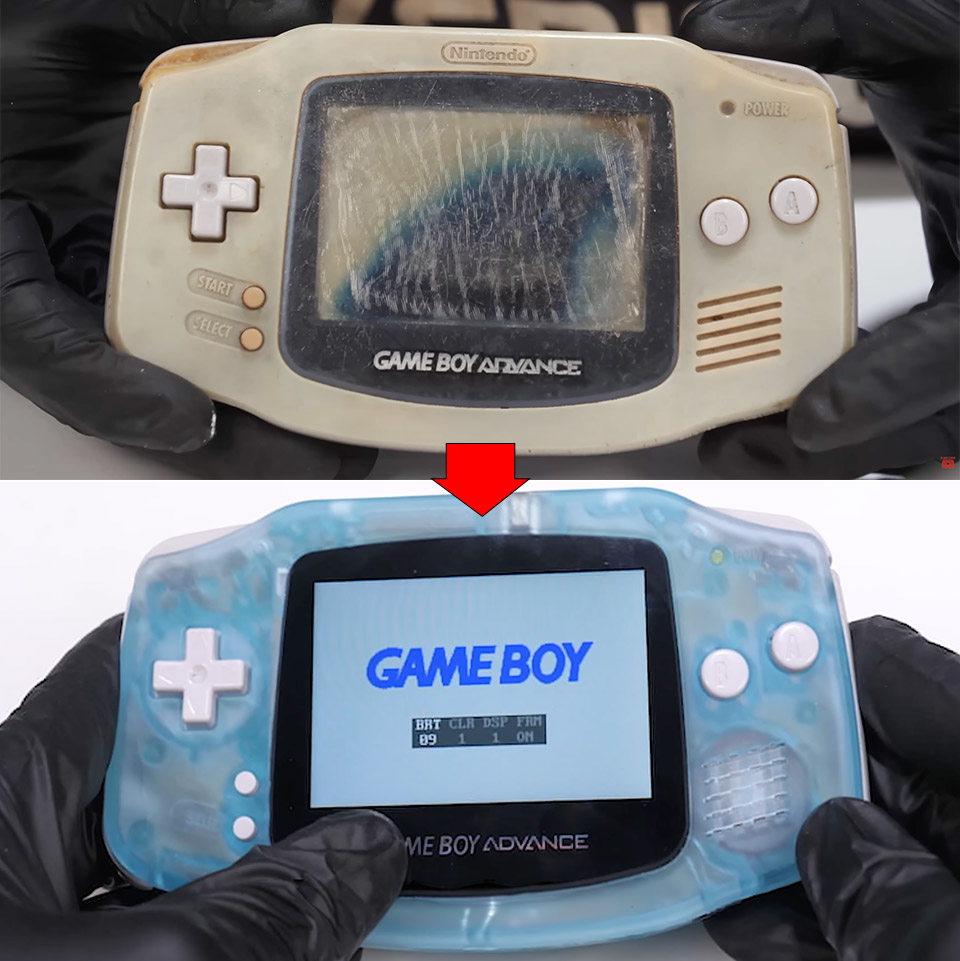
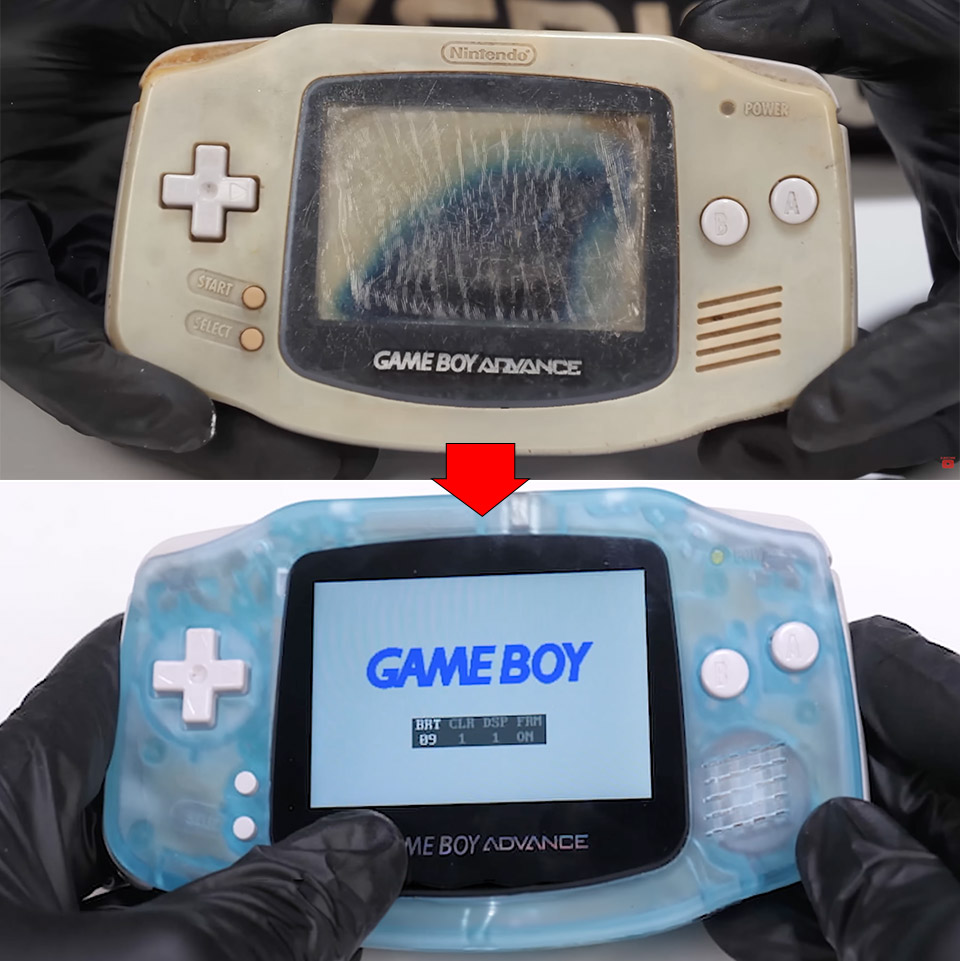
Plenty of old handhelds spend their retirement gathering dust in a box somewhere, and this Game Boy Advance was no exception. Abandoned, completely dead, and sporting a screen that had burned out from years of neglect, it was not an obvious candidate for a comeback. Odd Tinkering took it apart piece by piece anyway, worked through every problem methodically, and brought it back to life with a handful of modern upgrades that breathe new life into the hardware without losing any of what made it special in the first place.
From the start it was completely dead, just a dark screen and no response when you tried to power it on. Some thorough cleaning got the electricity flowing again, and original Game Boy and Game Boy Color titles loaded up without complaint. GBA games were a different story though, refusing to run no matter what. The small mode detection switch inside the cartridge slot got a good wipe, which seemed like it should have done the trick, but the games still wouldn’t cooperate. The real culprit turned out to be oxidation sitting on the pins of the main chip. One more cleaning session and the problem disappeared entirely, with the system reading every cartridge thrown at it without a single issue.

The screen was in rough shape, covered in dark blotches from years of burn in. New polarizing film cleared that up, though the display was still noticeably dim by modern standards, so an IPS panel went in next and solved the brightness issue immediately. Colors are vivid and the viewing angles are excellent, exactly what you want from a handheld you are actually going to use. The upgraded screen meant the original shell no longer fit, so the team scanned it with a 3D scanner and printed a new one in resin, a deep blue that nods to the classic aesthetic while hiding the modern hardware inside. The fit is perfect, with no gaps or wobble anywhere.

The toolkit was refreshingly basic, a set of screwdrivers for disassembly, a soldering iron and desoldering tool for any stubborn connections, and hydrogen peroxide with UV light to lift the yellowing from the plastic. No specialty equipment, no secret techniques, just a clean and methodical process from the first screw to the last.


The Tycoon2FA phishing-as-a-service (PhaaS) platform that Europol and partners disrupted on March 4 has already returned to previously observed activity levels.
Microsoft led the technical disruption, which involved seizing 330 domains part of Tycoon2FA’s backbone infrastructure that included control panels and phishing pages used in attacks.
However, the disruption caused by the law enforcement was short-lived, as CrowdStrike noticed the cybercrime service return to normal operational volumes within days.
“Falcon Complete observed a short-term decrease in the volume of Tycoon2FA campaign activity following the takedown, with daily volumes on March 4 and March 5, 2026, reducing to 25% of pre-disruption levels,” reads CrowdStrike’s report.
“However, this volume subsequently returned to pre-disruption levels, with daily levels of cloud compromise active remediations returning to early 2026 levels.”
First documented by Sekoia roughly two years ago, Tycoon2FA appeared online as a PhaaS platform dedicated to targeting Microsoft 365 and Gmail accounts, featuring adversary-in-the-middle mechanisms that enable bypassing two-factor authentication (2FA) protections.
A month later, Trustwave reported that Tycoon2FA’s operators were actively improving the platform, adding new, advanced features, and enticing more cybercriminals to purchase access.
Tycoon2FA is a significant actor on the phishing scene, with Microsoft reporting that it generated 30 million phishing emails per month, accounting for 62% of all emails blocked by the tech giant.
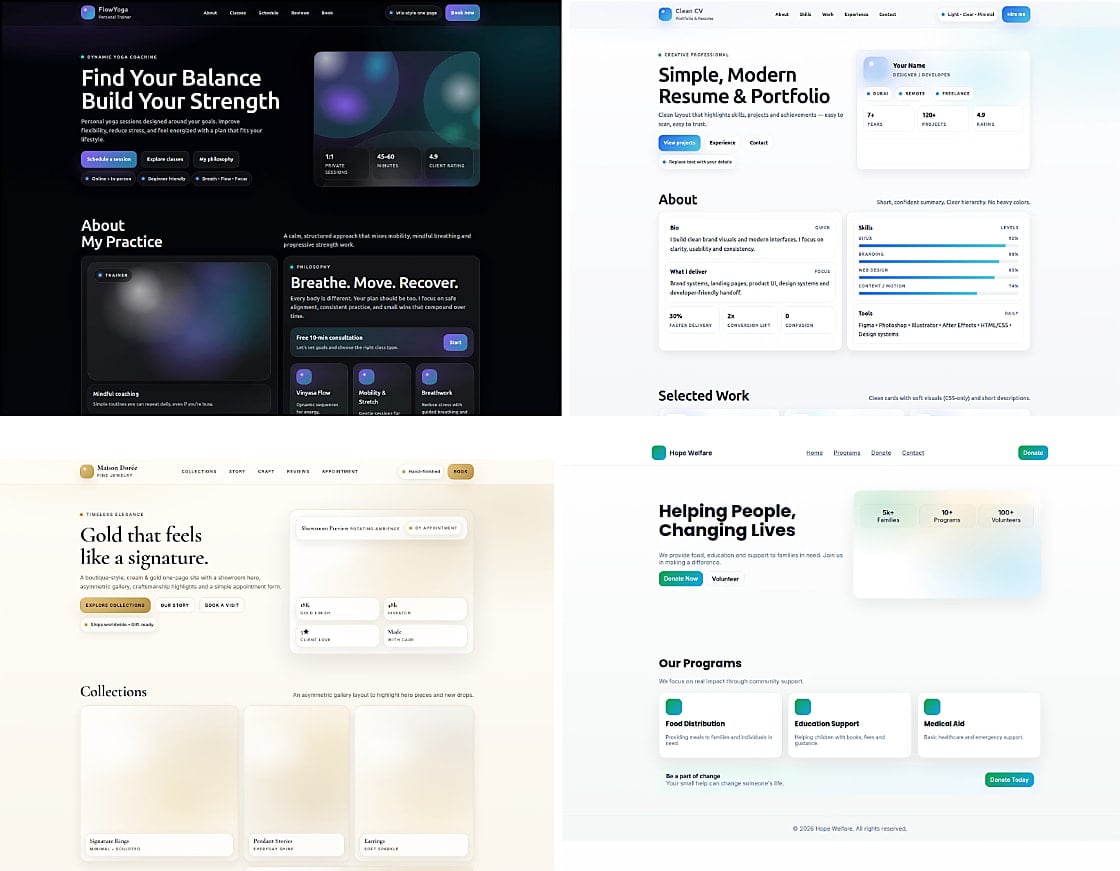
According to CrowdStrike, Tycoon2FA is back in business using largely unchanged techniques, tactics, and procedures (TTPs), and supported a diverse set of illegal activities, like business email compromise (BEC), email thread hijacking, cloud account takeovers, and malicious SharePoint links.
After the disruption action, Tycoon2FA has been used in malicious email campaigns that relied on malicious URLs and shortener services, legitimate platforms such as presentation tools, where redirection mechanisms are abused, and also compromised domains.
Source: CrowdStrike
Interestingly, some of the old infrastructure remained active, indicating that the disruption was incomplete, while new phishing domains and IP addresses were registered quickly following the law enforcement operation.
Regarding the observed post-compromise activity, this includes the creation of inbox rules, hidden folders for fraud emails, and preparation for BEC operations.
Ultimately, CrowdStrike comments that, without arrests or physical seizures, it’s easy for cybercriminals to recover and replace the impacted infrastructure. As long as the demand from the phishing ecosystem is high, the motive for PhaaS platform operators remains unchanged.

Malware is getting smarter. The Red Report 2026 reveals how new threats use math to detect sandboxes and hide in plain sight.
Download our analysis of 1.1 million malicious samples to uncover the top 10 techniques and see if your security stack is blinded.
The Kubernetes community retired Ingress NGINX this month after years of under-resourcing. The migration scramble it triggered is now consolidating around one open source beneficiary, and Traefik Labs announced that convergence at KubeCon today.
For years, the kubernetes/ingress-nginx project ran on borrowed time. Maintained largely by one or two volunteers working evenings and weekends, it had accumulated technical debt that the community couldn’t sustainably address.
In November 2025, Kubernetes SIG Network made it official: ingress NGINX would retire in March 2026. No more releases, no more bug fixes, no more security patches. The Kubernetes Steering Committee followed up in January 2026 with language that left little interpretive room: organisations remaining on ingress NGINX after retirement “are vulnerable to attack.”
Ingress NGINX was not a minor component. Depending on the analysis, between 41 and 50 percent of internet-facing Kubernetes clusters used it. It shipped as the default ingress controller in RKE2 (SUSE’s enterprise Kubernetes distribution), IBM Cloud Kubernetes Service, and Alibaba ACK, among others.
The retirement deadline created a near-simultaneous migration event across the industry, and at KubeCon CloudNativeCon Europe in London today, Traefik Labs announced the outcome of that scramble: IBM Cloud, Nutanix, OVHcloud, SUSE, TIBCO, and additional platform vendors have each independently selected Traefik Proxy as their replacement.

The 💜 of EU tech
The latest rumblings from the EU tech scene, a story from our wise ol’ founder Boris, and some questionable AI art. It’s free, every week, in your inbox. Sign up now!
The technical case for Traefik’s selection rests primarily on compatibility. Most ingress controllers require teams to rewrite their Ingress resources when migrating away from ingress NGINX, because each controller interprets annotations differently. Traefik built a specific NGINX Provider that translates ingress NGINX annotations into Traefik configuration at runtime, meaning teams can swap the controller without modifying a single Ingress resource.
The company claims coverage of more than 90 percent of annotations actively used in real migrations, a figure it arrived at by instrumenting migration tooling and analysing actual annotation usage patterns rather than attempting to support every annotation in the specification.
The vendor quotes collected in the announcement reflect the range of use cases these platforms cover. Nutanix’s Dan Ciruli noted that K3s has used Traefik as its default ingress controller for years, and that the retirement “validates the decision we made years ago.”
SUSE’s Peter Smails confirmed that Traefik will become the default in RKE2 starting with v1.36, replacing ingress NGINX as the distribution default. OVHcloud’s Jacques Murez positioned the choice around Gateway API readiness. TIBCO’s Devu Heda described Traefik as already powering ingress for both customer deployments and TIBCO’s own SaaS control plane infrastructure.
This last point matters for how Traefik Labs frames its commercial opportunity. The company’s open source product, Traefik Proxy, is MIT-licensed and accounts for the migration wave being announced today. But Traefik Labs is also selling Traefik Hub, an enterprise platform that adds API Gateway, AI Gateway, MCP Gateway, and API lifecycle management on top of Traefik Proxy, deployable via a single Helm chart upgrade.
The ingress NGINX retirement is, from the company’s perspective, not just a migration event but an entry point: engineering teams that are already updating their networking layer are positioned to evaluate whether to extend that investment into API management.
Traefik Proxy has 3.4 billion Docker Hub downloads and 62,000 GitHub stars, making it one of the most widely deployed open source networking projects in cloud-native infrastructure. Traefik Labs was founded in 2016 by Emile Vauge, who now serves as CTO, with Sudeep Goswami appointed CEO in February 2024.
The company is headquartered in both France and the United States. It has raised $11.1 million across two funding rounds, with Balderton Capital, Kima Ventures, and Elaia among its backers, a relatively modest capital base for a company whose open source software sits in front of a substantial fraction of the world’s containerised production workloads.


Jay Leno climbed into the cab of a Tesla Semi, settled into the center seat, and eased the truck forward with a fully loaded trailer in tow, right there on the tarmac outside his garage. The 500 mile range variant, and by all accounts it felt planted and composed from the moment it started moving, even with another Semi trailing behind it.
The drive was as smooth as you could ask, with no clunks or pauses during gear changes. Three motors pushing all of that torque straight to the rear axles, and the vehicle performed like a dream, with no difficulty or drama. Leno commented on how normal the center driving position felt after he was settled in, despite the fact that the cab does taper in little as you go up for optimal airflow. He just glided through several easy curves and straight stretches, and the cabin was quiet enough for normal conversation.
Sale

Amphibious Remote Control Car, 1:18 Monster Truck Toys for Boys RC Cars, 2.4 GHz Waterproof RC Trucks…
- 2.4 GHz Remote Control Car – 1:18 scale cool design, waterproof RC truck toys made of premium material and sturdy, with LED lights, waterproof remote…
- High Quality & DIY Removable Toys RC Cars – This remote control monster truck structure design quality, flexibility and strength in one. The rc truck…
- All Terrain Amphibious Monster Truck – 4-wheel drive off-road design rc trucks for kids, with high-quality tires (shock absorption, strong grip…

Dan Priestley, Director of Semi Truck Engineering at Tesla, rode along and walked Leno through some of the finer details as they drove. The front axle does the heavy lifting during hard pulls and climbs before stepping back at highway speeds to reduce drag and conserve energy, a smart piece of engineering that keeps efficiency high without any unnecessary mechanical overhead. Leno put his foot down more than once and the response was immediate, yet the ride stayed completely composed throughout. Braking on the downhill sections was handled almost entirely by regeneration, keeping the air brakes quiet the whole way down.

Weight is central to how the Semi stacks up against its diesel competition. The Long Range model comes in at around 23,000 pounds curb weight with a gross rating of 82,000 pounds, helped along by a federal allowance that lets electric Class 8 trucks run up to 2,000 pounds heavier than conventional diesel rigs to account for the battery mass. That gives it enough headroom to hit its advertised 500 mile range with a competitive payload on board, though that payload does fall somewhat short of the 70,000 pound figure that diesel tractors can typically manage once trailer weight is factored in.

The long range pack covers 500 miles, while the shorter 325 mile variant drops a battery module to shed weight and tighten the turning circle to something closer to a passenger car. Charging peaks at 1.2 megawatts and gets the truck back to 60 percent in around half an hour, which lines up neatly with the rest breaks drivers are already taking. Priestley mentioned a projected million mile battery life built around the same 4680 cells Tesla uses across its lineup, and the Semi has already racked up more than 13 million miles in real world fleet use to back that claim up.
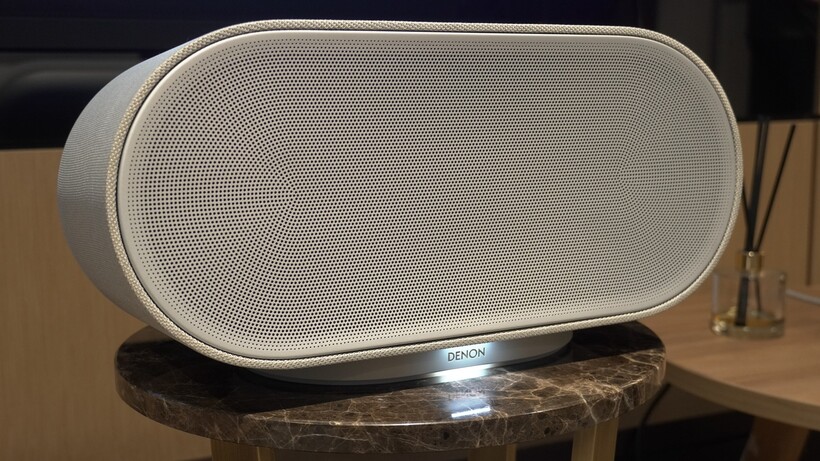
After several years where didn’t hear much from Denon’s Home speaker series, the Japanese brand has whipped up a brand new range, and it’s got Dolby Atmos support across the entire range.
The range is made up of the Home 200, Home 400, and Home 600; which sort of but not quite replace the previous models. The Denon Home 150, Home 250 and Home 350 haven’t been wiped from existence, but they’ll be bundled in their own group, dubbed the Home 1.0.
You’ll be able to operate the Home 1.0 and Home 2.0 systems through the same app, unlike some rivals who decided to cordon off their older products from their more recent models (cough, Sonos, cough).
You’ll be able to play music to the old and new speakers within the same Denon HEOS ecosystem, though of course you won’t be able to stereo pair models across generations. You can, however, pair the speakers with the Denon Home 550 Soundbar to create a surround system.
In fact, the you can use a sole Home 600 speaker, which can split the audio signal into left and right channels to create the sense of two rear speakers.
Almost the same price across all speakers

Pricing for the new models is as follows
- Denon Home 200 — $399 | £299 | €349
- Denon Home 400 — $599 | £449 | €499
- Denon Home 600 — $799 | £599 | €699
Which is better than expected given that it’s been almost seven years since the Home 1.0 launched, and the prices are still relatively in a similar ballpark.
The Home 400 is the same price (in the UK at least) as the Home 250, and it’s the same case for the Home 350. The Home 200 is the one where the price has shot up, from £219 to £299. These aren’t necessarily equivalent devices with the Home 200 featuring virtual Dolby Atmos support.
New look, new sound

The new Denon Home series share a “unified design and performance philosophy” that Denon says is built for modern living. There’s a choice of Stone of Charcoal finishes (we do like the Stone look), with physical controls used (depending on the device, they’re either on the side or top surface); and there’s support for Wi-Fi, Bluetooth, USB-C audio, aux-in.
What ties the experience together is Denon’s HEOS app, through which you can connect up to 64 HEOS products (AV receivers, mini systems, etc) across 32 zones in your home. High-resolution audio support is provided from Tidal, Amazon Music and Qobuz; while you can stream audio with Spotify Connect as well.

We’ve heard the new speakers in the flesh and they sounded good, with an emphasis on rich, warm sound, decent bass thump and a wide soundstage. We also heard how they play with Dolby Atmos music, the soundstage stretching quite high with the Home 600 to create a sound bigger than the speaker itself.
It remains to be seen how well this new era of Denon’s Home speakers with Sonos set to release new speakers in 2026, and Bluesound releasing more models. But you can find out for yourself how good the Denon Home 2.0 serie is, as they’re on sale now from Denon and authorised retailers.
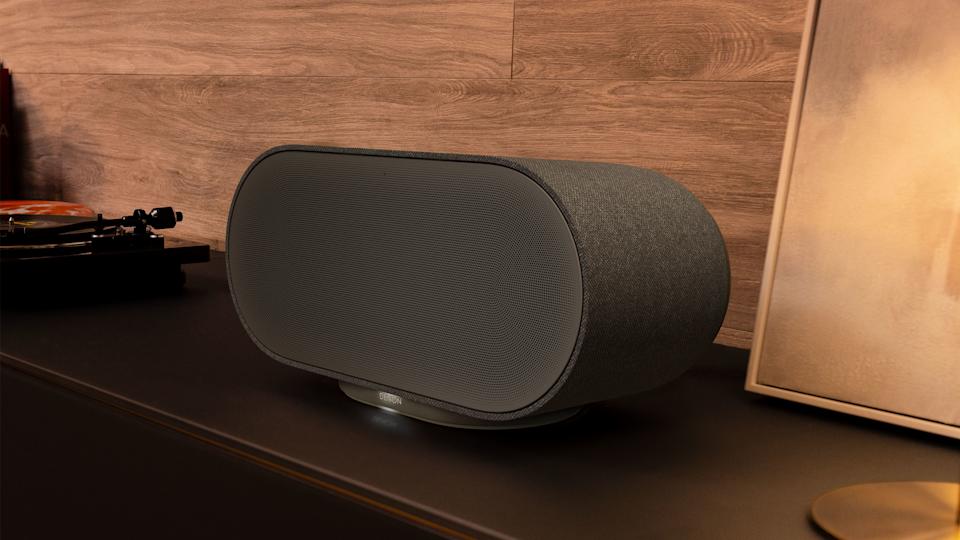
If the Sonos app saga still has you down, Denon has three new multi-room speakers that give you some fresh alternatives. The company’s Home 200, Home 400 and Home 600 offer audio flexibility with other HEOS-enabled products. These new devices were also designed so that they blend in with home decor better than most speakers, coming in stone and charcoal color options for that purpose. As you progress up in number, the speakers not only get physically larger, but their sonic output is also more robust.
The Denon Home 200 houses three drivers and three amplifiers for “natural, room-filling sound” in a compact speaker. More specifically, you get two 0.98-inch tweeters and a single 4-inch woofer. The Home 200 looks a kind of like the Sonos Move 2, although Denon’s new compact unit isn’t portable. However, you can use a pair of them for a stereo setup, or connect two 200s to Denon’s Home Sound Bar 550 and Home Subwoofer for a 5.1 home theater system.
Next up is the Home 400, which carries two 0.75-inch tweeters, two 4.5-inch woofers and six amplifiers, in addition to two 1-inch up-firing drivers. Here, Denon says you can expect “a wide, airy soundstage” that provides room-filling audio coverage. What’s more, those upward-facing drivers project sound overhead, so there’s a greater sense of dimensionality and immersion here.
Denon Home 600 speaker (Denon)

The Home 600 is the largest speaker in the new trio, with dual 6.5-inch woofers alongside two tweeters, two midrange units and two up-firing drivers. Denon explains that this configuration offers “deep, authoritative bass” that provides more depth in your tunes than other two models.
All three of the new Home speakers have Wi-Fi, Bluetooth USB-C and aux connectivity with the wireless streaming powered by Denon’s HEOS tech. As such, you can connect these Home speakers with up to 64 other HEOS devices — including A/V receivers and Denon’s new DP-500BT turntable — and arrange your audio gear in up to 32 different zones. You’ll have access to tunes from Tidal, Amazon Music HD and Qobuz in the HEOS app, and all three new Home speakers support Dolby Atmos Music where available.
The Home 200, Home 400 and Home 600 speakers are available today for $399, $599 and $799 respectively. They’re available from Denon directly or other authorized retailers.


We don’t really know anything concrete about PlayStation 6 just yet (it’s not even official at the time of writing), but you can be sure it’ll face considerable competition when it finally drops. That competition, however, may not be spearheaded by one of Sony’s traditional industry rivals.
According to Peter Dalton of Bluepoint Games, a subsidiary of PlayStation Studios, which is sadly closing its doors in March 2026, it’s a historically very different gaming heavyweight that Sony really needs to fear: Valve. Steam is one of the biggest names in the medium, powering an immense storefront that’s essentially a one-stop shop for many customers’ gaming needs. According to Dalton, a system such as the Steam machine could herald a paradigm shift in the industry. He noted in a post on X, “If Valve releases a new Steam console that provides a console-like experience while still giving players access to the entire PC game library, that could become a very compelling option.”
The resulting blend of “console simplicity with the full breadth of PC gaming,” Dalton goes on, could be a very potent one-two punch. It’s certainly possible that this could be a major threat to Sony, perhaps more so than Microsoft’s Xbox family or Nintendo’s Switch and Switch 2. However, some important factors could limit its reach.
Steam Machine poses a potent new threat, with some caveats
The Steam Machine is a system with set specs out of the box, and with 16GB of DDR5 RAM, 8 GB GDDR6 VRAM, and a 4.8GHz CPU (AMD Zen 4), Digital Foundry‘s first conclusion was that it would offer “performance at some mid-way point between Xbox Series S and the standard PlayStation 5.”
Unfortunately, tied into that, potential leaks about the Steam Machine’s price back in January 2026 suggest it could be pricier than we’d hoped. Here, then, are two significant potential barriers to a Valve console/PC hybrid taking off to the extent it could: Its all-important price, which has yet to be officially confirmed for the Steam Machine at the time of writing, and the fact that its specs are so comparable to both Sony and Microsoft’s existing systems. On top of that, of course, the PlayStation brand has generations of successful consoles behind it, and the latest is available from other retailers, while the Steam Machine may only be available from Valve itself. Loyalty to a brand is a powerful force.
At the same time, it’s about establishing a foothold in a space dominated by more traditional consoles. A Valve device, fully integrated with the Steam ecosystem, gives access to an enormous library of games (there are more than 125,000 games on Steam as of early 2026, according to SteamDB) in a potentially more user-friendly package. This new iteration of a Steam Machine has potential, building on what the Steam Deck achieved. While you might want to consider building your own Steam Machine alternative and saving some money, it’s also worth keeping an eye on what Valve is cooking up.
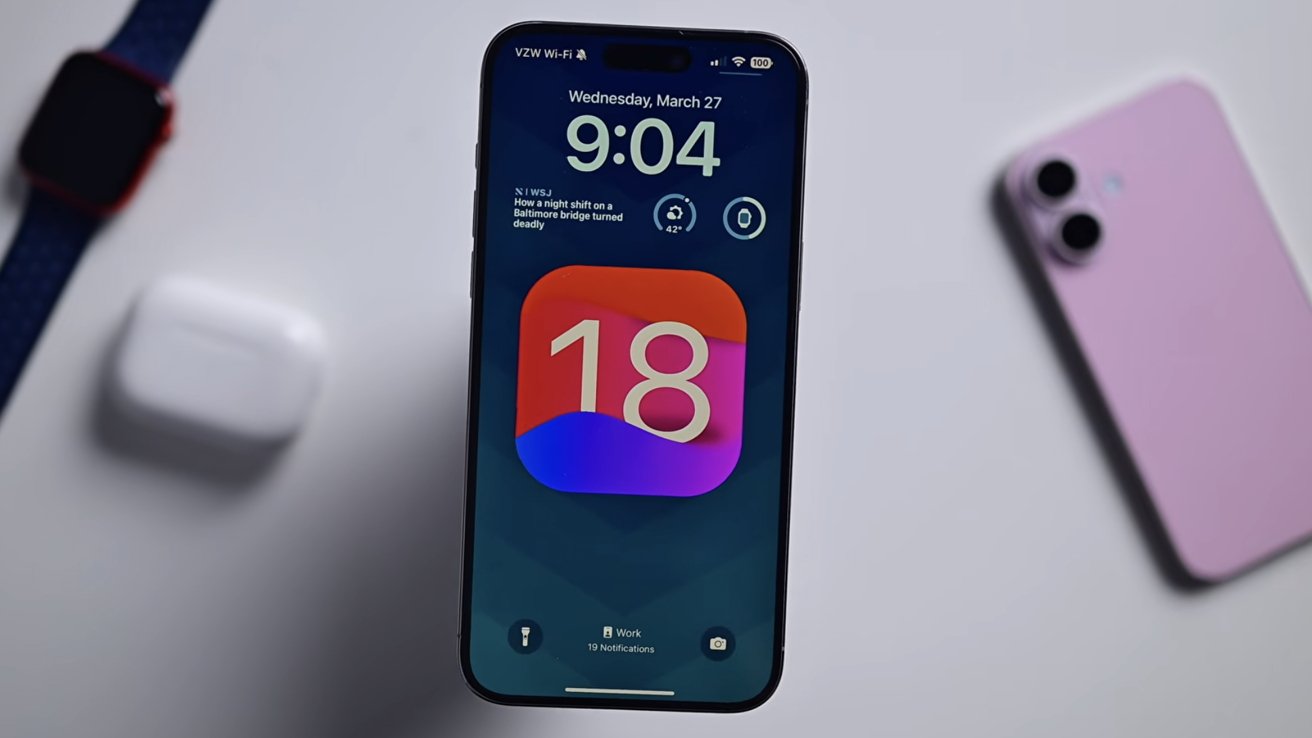
The DarkSword exploit, which primarily targets devices running older iOS versions, has unfortunately made its way to GitHub. It has been patched, so update now.
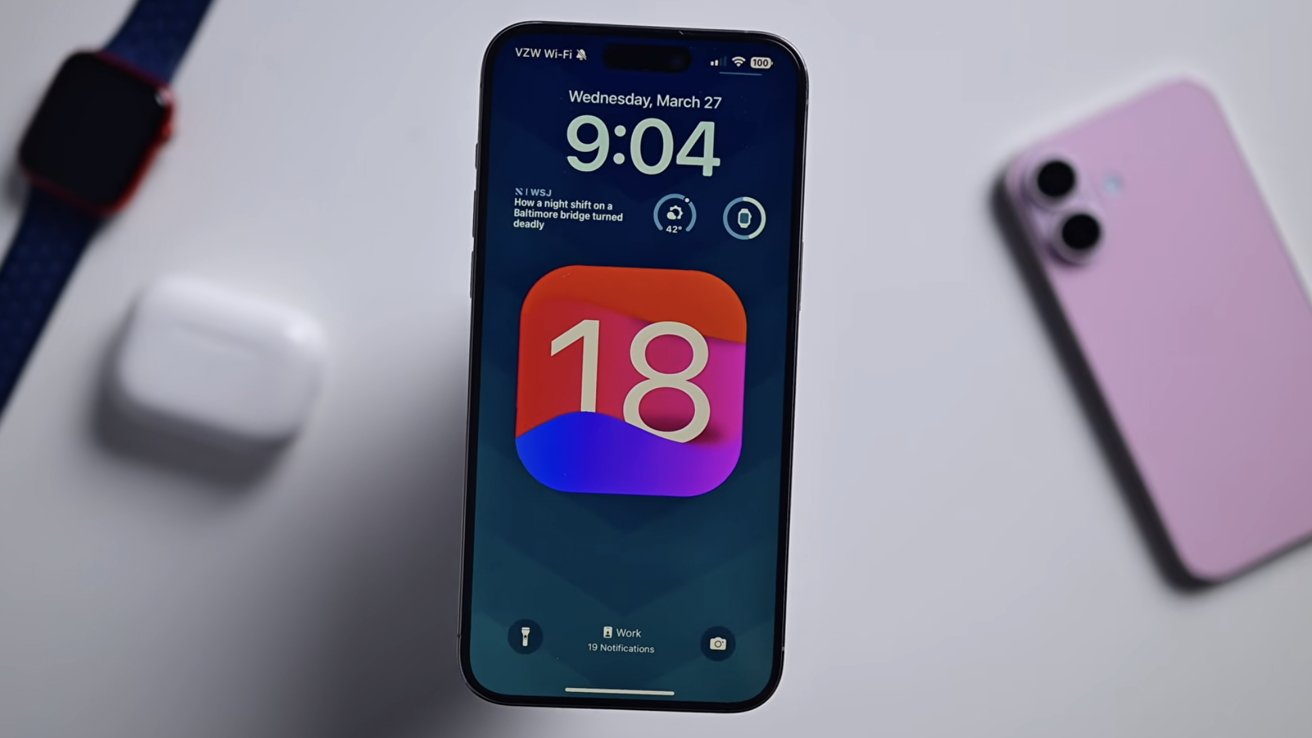
The DarkSword exploit targets devices running older versions of iOS 18 and below.
After Coruna, an exploit tool potentially developed by the US government, surfaced on the black market, the same thing happened with another tool, dubbed DarkSword. Now, DarkSword has been made publicly available on GitHub.
DarkSword primarily targeted iOS 18.4 through iOS 18.7, though older versions of iOS were vulnerable as well. The exploit relied on Safari and WebKit for initial code execution, after which it escaped multiple sandbox layers before fully compromising an iPhone or iPad.
Continue Reading on AppleInsider | Discuss on our Forums

Nvidia CEO Jensen Huang says he understands the concerns about “AI slop” with DLSS 5 but insists the feature preserves a game’s underlying geometry and artistic intent. “I think their perspective makes sense, ” said Huang during a recent appearance on the Lex Fridman podcast. “And I could see where they’re coming from because I don’t love AI slop myself. You know, all of the AI-generated content increasingly looks similar, and they’re all beautiful… so I’m empathic toward what they’re thinking. That’s just not what DLSS 5 is trying to do.” Tom’s Hardware reports: Although Huang is striking a more conciliatory tone, much of his response is similar to what we heard at GTC [where Huang said gamers were “completely wrong.”] The artist determines the geometry, we are completely truthful to the geometry… so every single frame, it enhances, but it doesn’t change anything.” There was some confusion about how DLSS 5 worked when it was first announced, and although the inner workings of it still aren’t clear on a technical level, Huang has said that it isn’t a general-purpose generative AI model. He describes it as “content-controlled generative AI.” On the other end of the spectrum, Huang also said that it isn’t a post-processing filter. The technical details of DLSS 5 live somewhere between that space, and we likely won’t know them until later this year when the feature is set to release.
“The question about enhancing, DLSS 5… in the future, you could even prompt it. You know, I want it to be a toon shader. I want it to look like this, kind of. You could even give it an example and it would generate in the style of that, all consistent with the artistry, the style, the intent of the artist,” Huang continued. “All of that is done for the artist so they can create something that is more beautiful but still in the style that they want.” Although the talking points about DLSS 5 remain unchanged, it seems that Huang has at least heard the criticism. “I think that they got the impression that the games are going to come out the way the games are… and then we’re going to post-process it. That’s not what DLSS is intended to do.”
Huang also made assertions that DLSS is “integrated” with the artist, and suggested that it would put the power of generative AI in the hands of artists working in game development […]. Although DLSS 5 looks like it’s doing a lot, Huang said that it’s just another tool, not an essential feature. “The gamers might also appreciate that, in the last couple of years, we introduced skin shaders to game developers, and many of those games have skin shaders that include sub-surface scattering that makes skin look more skin-like… [DLSS 5] is just one more tool. They can decide what to use,” Huang ended the conversation about DLSS 5. Immediately after, without missing a beat, he said 1993’s Doom was the most influential video game ever made.

Dillian Whyte makes KO prediction for Fabio Wardley vs Daniel Dubois: “He will stop him”

World Cup 2026: Fifa ticket prices excessive, says FSA in formal complaint

Up to 3 Hours Amid Government Shutdown Chaos


-
 Crypto World4 days ago
NIO (NIO) Stock Plunges 6.5% as Shelf Registration Sparks Dilution Worries
-

 Fashion4 days ago
Weekend Open Thread: Adidas – Corporette.com
-

 Politics4 days ago
Jenni Murray, Long-Serving Woman’s Hour Presenter, Dies Aged 75
-
 Tech7 days ago
Are Split Spacebars the Next Big Gaming Keyboard Trend?
-

 Crypto World3 days ago
Best Crypto to Buy Now: Strategy Just Spent $1.57 Billion on Bitcoin During Fear While Early Investors Quietly Enter Pepeto for 150x Potential
-

 News Videos6 days ago
RBA board divided on rate cut, unusually buoyant share market | Finance Report | ABC NEWS
-

 Crypto World3 days ago
Bitcoin Price News: Bhutan Sells $72 Million in BTC Under Fiscal Pressure, but the Smart Money Entering Pepeto Sees What the Market Does Not
-

 Politics6 days ago
The House | The new register to protect children from their abusers shows Parliament at its best
-

 Tech4 days ago
inKONBINI Lets You Spend Summer Days Behind the Register
-
 Politics7 days ago
Real-time pollution monitoring calls after boy nearly dies
-

 Crypto World6 days ago
Canada’s FINTRAC revokes registrations of 23 crypto MSBs in AML crackdown
-

 Sports1 day ago
Remo Stars and Kano Pillars Strengthen Survival Hopes in NPFL
-
 NewsBeat6 days ago
Residents in North Lanarkshire reminded to register to vote in Scottish Parliament Election
-

 News Videos6 days ago
PARLIAMENT OF MALAWI – PAC MEETING WITH REGISTRAR OF FINANCIAL ON AMARYLLIS HOTEL – INQUIRY LIVE
-

 Politics5 days ago
Gender equality discussions at UN face pushbacks and US resistance
-

 Business2 days ago
No Winner in March 21 Drawing as Prize Rolls to $133 Million for Next
-

 Business6 days ago
Who Was Alex Pretti? 5 Key Facts About the ICU Nurse Killed by Federal Agents in Minneapolis
-

 Sports23 hours ago
Gary Kirsten Accuses Pakistan Cricket Board Of ‘Interference’, Mohsin Naqvi Responds
-

 Tech2 days ago
Give Your Phone a Huge (and Free) Upgrade by Switching to Another Keyboard
-

 Sports4 days ago
2026 Kentucky Derby horses, odds, futures, preview, date: Expert who nailed 12 Derby-Oaks Doubles enters picks
You must be logged in to post a comment Login