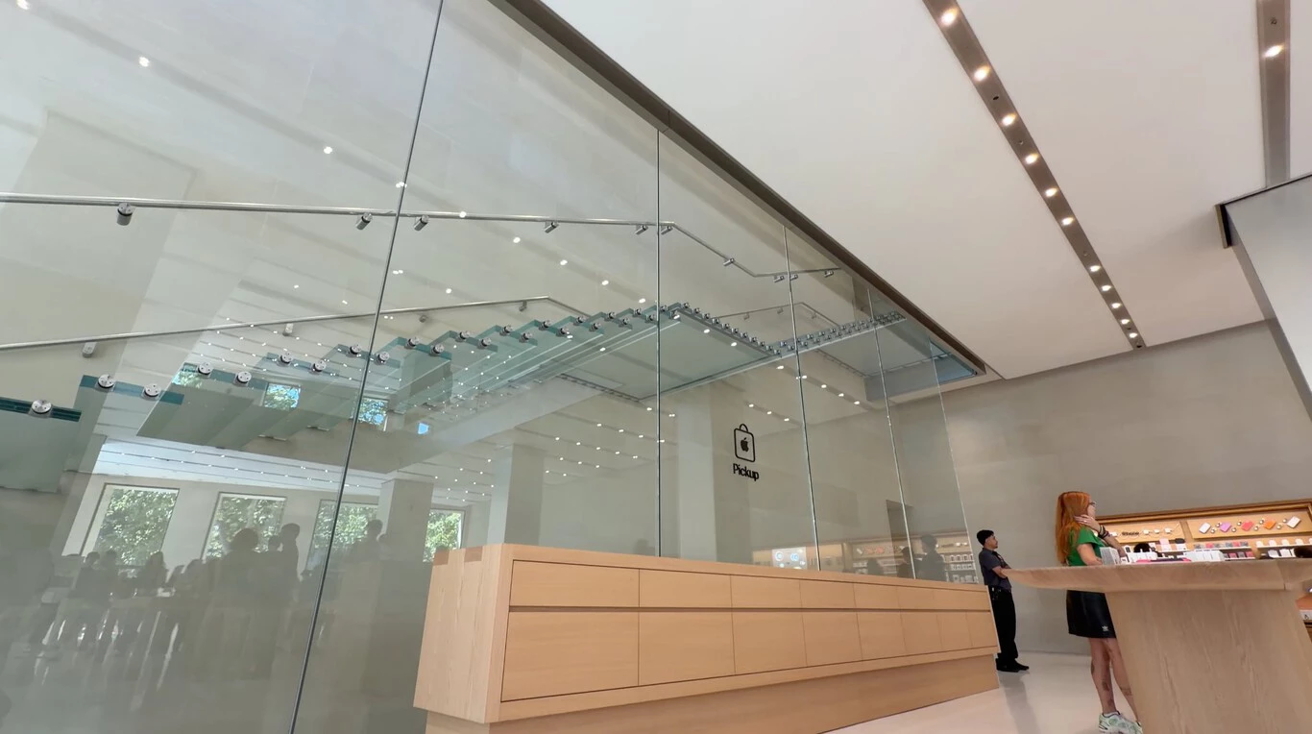
Apple’s Passeig de Gracia Store in Barcelona has been updated with a new pickup area for online orders. Image Credit: AppleSfera
After more than three months of renovations, the doors of the Passeig de Gracia Apple Store in Barcelona are open, with updated interior, bigger Genius Bar, and a dedicated online order pickup area.
Opened in 2012, Apple’s Passeig de Gracia store is the company’s second retail location in Barcelona. It’s located in a historic 32,000-square-foot five-story building, dating back to the 1800s. The building itself is near the Mandarin Oriental hotel, and is on one of Barcelona’s most expensive commercial streets.
Though the stone exterior of the store location remains unchanged, Apple has made significant updates to the interior of its Barcelona store. The ground floor is more spacious, as the Forum area has been removed. The store’s iconic staircase is also more visible.
Advertisement
The Passeig de Gracia Apple Store has a new online order pickup area. Image Credit: AppleSfera
As AppleSferapoints out, underneath the glass staircase is a new area where customers can pick up the Apple products they’ve ordered online. The area is easy to identify, with an Apple Store logo on the glass and the word “pickup” displayed beneath it.
This pickup area replaces the store’s video section, previously known as the Forum. Instead of large groups sitting in front of a screen, Apple customers in need of information can now participate in workshops held on the first floor.
The Forum area has been moved to the first floor of Apple’s Passeig de Gracia store. Image Credit: AppleSfera
Advertisement
Other changes include custom-made white flooring, which appears seamless, and is built to reduce ambient noise in the store. The metal walls of the store remain unchanged, though.
The Apple Store at Passeig de Gracia in Barcelona is open Monday to Saturday from 9:30 AM to 9:00 PM CEST.
Product lead Ashraf Alkarmi is taking over as CEO, handing his role to Chrome’s Mike Torres.
File storage platform Dropbox founder Drew Houston is stepping down as CEO after 19 years in the role, handing over the reigns to company senior vice-president of core products Ashraf Alkarmi.
Houston and Alkarmi will head the company as co-CEOs for a transitionary period, following which Houston will take up the role of executive chairperson, and Alkarmi, the sole CEO.
“Our business is in a stronger position than it’s been in years, and a lot of that is because of Ashraf,” Houston said, explaining the company’s decision behind the move.
Advertisement
Dropbox announced the transition on 21 May in a security filing with the US government. Shares at the company fell nearly 3.5pc at market close yesterday (26 May), following a wider announcement.
Alkarmi, a Harvard graduate, previously led the products segment in companies including Motorola, Nokia, Meta, Amazon and Brightcove.
Prior to joining Dropbox in 2024, he spent a number of years as Vimeo’s chief product officer, as well as the general manager for Amazon’s Freevee. Alkarmi also founded audience engagement platform PresAsk in 2013.
For his new role, Alkarmi will be receiving an annual base salary of $825,000 in addition to bonuses and stock options.
Advertisement
The outgoing SVP of core products is handing his role to Chrome’s VP of product Mike Torres, effective 7 July. Torres has spent more than a decade each at Amazon and Microsoft in executive roles.
Dropbox, with more than 700m registered users, announced a revenue of $629.5m in the quarter past, marking a marginal growth of less than 1pc quarter to quarter. The company plans to shut down FormSwift, a platform for generating legal documents, later this year.
The file storage platform cut 20pc of its workforce in 2024, amounting to more than 500 employees. The layoffs followed a previous round a year prior that led to 500 job losses.
Don’t miss out on the knowledge you need to succeed. Sign up for the Daily Brief, Silicon Republic’s digest of need-to-know sci-tech news.
Canopii’s team among its robotic system and basil plants. CEO and co-founder David Ashton is tossing greens. (Canopii Photo / Bryan Aulick)
A running joke in the agricultural field is the average age of a U.S. farmer is 58 today, but that will tick up by one next year. The trouble is, it’s not so funny when the people who grow our food are aging out with no one to replace them.
An Oregon startup aims to address that with an environmentally sustainable, scalable farming solution.
“We’re trying to create the future job for local farmers, where essentially you franchise a robotic farm, you have almost no employees, and you can provide organic produce to your community,” said David Ashton, CEO and co-founder of Canopii.
The company has built a greenhouse system with a footprint smaller than a tennis court that requires little power or water and can be installed in urban settings to produce 40,000 pounds of greens per year — enough to supply roughly 20,000 people.
Canopii plans to kick off a WeFunder campaign this week to raise $1.5 million to build a commercial greenhouse in Portland and demonstrate its franchise model. The startup launched in 2021 and has received $3.6 million in funding, primarily through grants from the National Science Foundation and the U.S. Department of Agriculture, along with investments from Elevate Capital, Onami and Vertue Labs.
Advertisement
The team designed an automated conveyor system that takes specialty lettuces, herbs, Asian broccoli and other greens from seed to boxed produce. A robotic arm inserts seeds into soil pucks the size of mini cupcakes; once seedlings develop leaves, the system transplants them into larger containers and, at harvest, clips and deposits the greens into bins.
The company is pursuing a grant to develop AI-powered plant monitoring to further reduce labor, with conveyors routing trays to stationary cameras rather than outfitting the entire facility.
Ashton’s inspiration traces back to his time at California Polytechnic State University, situated in a rural stretch between San Francisco and Los Angeles. In the early-to-mid 2010s, California was enduring a record drought.
As part of his agricultural engineering program, “we traveled to all the different farms, and everyone was talking about water,” he said. Ashton was struck by the water demands of high-volume outdoor farms and the impacts of shipping produce over long distances.
Advertisement
He set out to build the smallest, most efficient greenhouse possible. The result is Canopii’s structure: 2,500 square feet and 30 feet tall, capable of producing in one-twentieth of an acre what would require 3 to 4 acres in a typical field.
A Canopii greenhouse has a footprint of 2,500 square feet and measures 30 feet tall. (Canopii Photo)
The six-person Canopii team currently has a prototype greenhouse operating in Hubbard, Ore., supplying greens to customers including Ōkta Farm and Kitchen, a nearby high-end restaurant.
The indoor farming sector has struggled in recent years. Well-funded ventures including Plenty, AppHarvest, Bowery Farming and Kalera have gone bankrupt, though others such as Oishii and Gotham Greens continue to operate. Ashton noted that most of those failures involved large-scale operations.
A Wyoming-based startup called Vertical Harvest is also building smaller urban greenhouses, differentiated by its use of soil-free hydroponic technology. Other Pacific Northwest players in the space include IUNU and Koidra.
Canopii is pursuing a franchise model in which it oversees the greenhouse installation, trains the owner and provides ongoing service and support, while the franchisee funds and runs the site. Each unit costs approximately $600,000. Target customers for the produce include independent grocery stores and restaurants, and the company has a letter of intent with the Confederated Tribes of the Umatilla Indian Reservation for an installation.
Advertisement
The startup partners with GK Machine, which helped build its robotics and is opening a facility capable of producing the systems at scale, and two construction companies for building installation.
For Ashton, the deeper appeal is about reconnecting communities with where their food comes from.
“It can be in a downtown, it can be a school yard, it can be at a restaurant, or at a supermarket — people can actually see it and understand where their food is actually coming from,” he said. “Local becomes less of just a brand, but actually an experience.”
Apple says testing missed flaws in new encryption designed to protect against future attacks from quantum computers, so it turned to mathematical proofs to make sure the code works correctly before wider rollout.
New research and source code published May 22 detail how Apple verified parts of its post-quantum cryptography stack. The research argues conventional software testing is good, but no longer provides sufficient guarantees for encryption systems used across more than 2.5 billion active devices.
The effort centers on corecrypto, Apple’s low-level cryptographic library used across iPhone, iPad, Mac, and other platforms. Future quantum computers could eventually break many of today’s public-key encryption systems, hence the effort.
Technology companies are racing to replace older encryption methods before practical attacks become possible.
Advertisement
Apple built a custom formal verification system that checks its post-quantum implementations against official NIST specifications. Mathematical proofs also verify that Apple’s ML-KEM and ML-DSA code matches the standards for those algorithms.
Post-quantum protections have already reached iMessage. Apple is also expanding the technology into VPN services, TLS networking, and developer-facing CryptoKit APIs.
Cryptography that will defend against quantum computers is becoming foundational infrastructure inside Apple’s security stack. Security framework, CryptoKit, and CommonCrypto all rely on corecrypto, which gives the library a central role across Apple’s platforms and developer tools.
Apple says mathematical proofs caught bugs traditional testing missed
Formal verification work uncovered flaws that conventional testing missed during development. Engineers found a missing step in an early ML-DSA implementation that could produce incorrect cryptographic output in rare cases.
Advertisement
The research also identified and repaired an error in a third-party proof used during the project.
The missing-step issue could have silently corrupted cryptographic computations without triggering existing test suites. Cryptographic implementation bugs can weaken encryption without producing obvious crashes, warnings, or visible failures.
Corecrypto underpins encryption, hashing, digital signatures, and random number generation across Apple’s platforms. A critical flaw inside the library could affect nearly every app or service that depends on Apple’s security frameworks.
Post-quantum cryptography creates unusual implementation risks compared to older public-key systems. ML-KEM and ML-DSA rely on large polynomial arithmetic and deep mathematical operations that can produce subtle carry and borrow errors.
Advertisement
The paper notes the industry’s limited experience with newer post-quantum algorithms compared to older elliptic curve cryptography systems. Earlier elliptic curve deployments had subtle implementation flaws that later created exploitable vulnerabilities.
Apple verified optimized Apple silicon code
Apple verified optimized production code for Apple Silicon rather than limiting the work to simplified academic models. Formal proofs cover portable C implementations and hand-optimized ARM64 assembly routines designed to improve performance and reduce timing leaks.
Apple verified its quantum-secure ML-KEM and ML-DSA implementations by proving its portable C and ARM64 assembly code matched official specifications.
Post-quantum cryptography increases implementation complexity and expands the attack surface inside heavily optimized code paths. Apple also uses Apple silicon security features including Data Independent Timing, or DIT, and Pointer Authentication, known as PAC, to reduce some of those risks.
DIT reduces timing side-channel leakage, while PAC hardens software against certain memory corruption attacks. Engineers also rewrote sensitive cryptographic routines to gain tighter control over processor behavior during encryption operations.
Apple built a custom verification pipeline with Galois
Apple built a custom workflow combining Isabelle, SAW, Cryptol, and a new Cryptol-to-Isabelle translator developed with security firm Galois. The verification process translates implementations into formal mathematical models.
Advertisement
The resulting proofs required more than 50,000 individual proof steps. Apple also released updated corecrypto source code and several formal verification tools alongside the paper.
Published materials include Isabelle libraries, verification frameworks, ARM64 models, and the Cryptol-to-Isabelle translator used during development.
Formal verification isn’t a complete solution to cryptographic security problems. Apple admitted that it still assumes compiler correctness and that some ML-DSA verification relies on conventional testing due to tooling limitations.
Mathematical verification is becoming crucial as post-quantum cryptography moves into global production systems. Apple is using formal proofs to verify its post-quantum encryption before deploying the technology more broadly across its platforms.
Instead of using cutting-edge Hall Effect switches with adjustable actuation points and features like Rapid Trigger, this keyboard comes with standard mechanical switches. This means the actuation point cannot be changed, and some performance and customization are left on the table.
The benefit of mechanical switches is that there is more physical customization. Underneath each key is a hot-swap socket, meaning these switches can be replaced with any MX-style switch. While this allows for extensive fine-tuning of the typing feel, the feature won’t objectively increase gaming performance.
Considering the switches and the size of this keyboard, it’s really not meant to be a fully performance-oriented gaming keyboard. Instead, it strikes a middle ground of high performance paired with open-ended customization options.
Shipshape Typing Experience
The Galleon is made using a gasket mount assembly, which means the entire internal assembly is suspended inside the case using rubberized gaskets instead of screws. This creates a softer typing feel. I found this to be very comfortable. When you bottom out on a key press, it feels like landing on a trampoline instead of a hard surface.
Advertisement
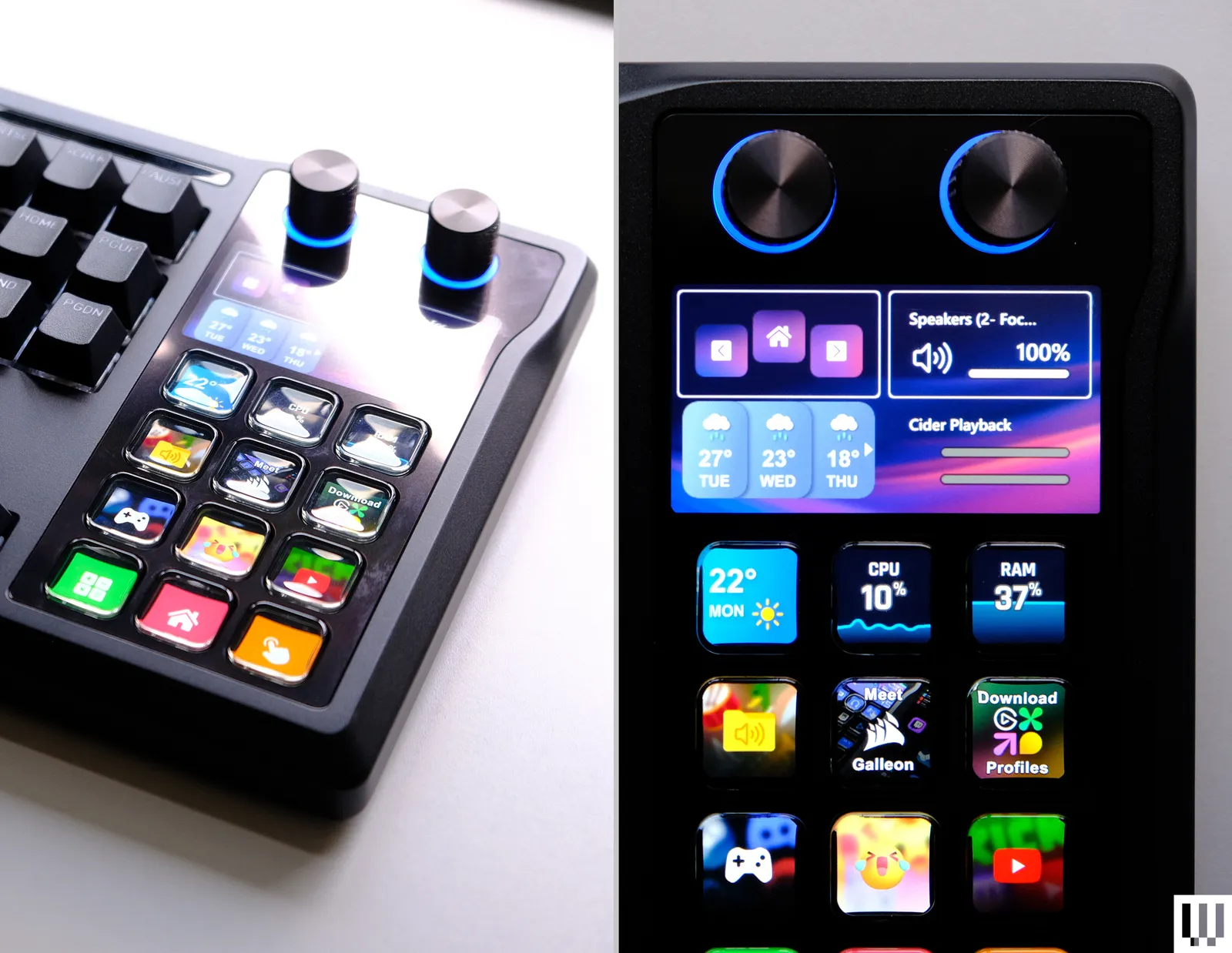
A small bonus of the integrated Stream Deck, as opposed to a normal number pad, is the resulting internal packaging and assembly. In this design, the PCB of the keyboard area is separated from the Stream Deck area, resulting in consistent rigidity over the alphabet keys for typing. This delivers the same feel as a Tenkeyless (TKL) keyboard for typing.
The gasket mount, which provides some cushioning without being overly flexible, finds a middle ground between gaming and typing that’s comfortable without losing accuracy. Beyond that, I’m also impressed by the stabilizers. Instead of the typical plate-mount stabilizers, which can be prone to rattling, Corsair instead opted for PCB-mount stabilizers that are really well-tuned from the factory.
All Fingers on Deck
The integrated Stream Deck is practically identical to a standalone version, with four rows of three buttons, two knobs, and a customizable screen. Each button can be freely programmed, remapped to display any feature or macro, or used to display live data.
I’ve also seen some people integrate their Stream Deck directly into games. One of my favorite uses is setting up macros for different Stratagems in Helldivers 2, where the displays on the buttons show the icon for each ability. Another obvious example is setting up an auto-buy for Counter-Strike 2, or programming dedicated for commands like Alt+Tab, Ctrl+Alt+Del or muting the microphone.
Advertisement
There are a few small issues with the Stream Deck. My biggest gripe is that the buttons are designed around a direct viewing angle. Since the keyboard is far more horizontal, viewing them from this non-ideal angle results in the outer edge of the display being cut off. If there is any text at the top or bottom of the button, you might not be able to see it during regular use.
The AWOL Vision Aetherion Max takes the company’s previous projector and improves everything. Its lower throw ratio means it can sit closer to a wall, while still giving you a huge image, and its higher brightness makes it even easier to watch during the day, while maximising HDR content. A new lens and PixelLock technology deliver rock-solid, super sharp image, with this projector capable of delivering that true cinematic experience when you want it, although it can work as a simple TV replacement in all other cases. It’s a little fiddly to set up, but that aside if you want a massive screen in your home and don’t want the hassle or routing cables to a long-throw projector, the AWOL Vision Aetherion Max is quite brilliant
Bright image
Very sharp image
Excellent contrast, perfect for HDR
Slightly fiddly to set up
Anti-RBE mode causes a high-pitched sound
Key Features
Advertisement
Review Price:
£3199
Low throw ration
Advertisement
With a throw ratio 0f 0.2:1 this projector can display a 100-inch image from 6.2-inches away
Very bright
Advertisement
At 3300 ISO Lumens, this projector can be watched duringt he day
Introduction
I’m a big fan of UST projectors, having swapped out a TV for a 100-inch screen and the AWOL Vision LTV-3500 Pro. As good as that set-up is, there are a few little niggling things about it, so I was keen to give the replacement, the AWOL Vision Aetherion Max, a try.
Smaller, sharper and able to sit closer to the screen, the new projector has fewer compromises while delivering a stunning viewing experience. Is it time you ditched a TV? Read my full review to find out.
Advertisement
Advertisement
Design
Motorised lens cover
Three HDMI 2.1 inputs
As good as the LTV-3500 Pro was, it was quite a large, box-like projector. More functional than a slick modern device designed to sit in a living room. The AWOL Vision Aetherion Max immediately fixes that: it’s sleeker, smaller and lighter than its predecessor, taking up a lot less room.
Image Credit (Trusted Reviews)
There’s a brand-new lens assembly, too, with a throw ratio of just 0.2:1 vs the 0.25:1 of the LTV-3500 Pro. It might not sound like much, but the difference is big in my living room. With the LTV-3500 Pro, I had to pull the TV cabinet out quite a way from the wall to fill a 100-inch screen; with the Aetherion Max, the cabinet is just a couple of inches from the wall.
With this throw ratio, the projector needs to be 6.2 inches from the screen to get a 100-inch image. Overall, that lets the Aetherion Max fit more naturally into the living room without it protruding into everyday life (metaphorically and literally).
Looking around the projector, there are a few other big changes. First, there’s now a mechanical lens cover that slides over the glass when the projector turns off. That’s good, as this cover prevents hair and dust from settling on the lens.
Advertisement
Advertisement
With UST projectors, anything that settles on the lens is dramatically enhanced on screen, and I’d often find odd distortion patterns on the LST-3500 Pro thanks to cat hair. Now, I have fewer problems like this, and I only occasionally need to clean the lens.
At the back of the projector are the inputs, with three HDMI 2.1 inputs, one of which supports eARC. There’s also a USB-C DisplayPort input for connecting a laptop or tablet.
Image Credit (Trusted Reviews)
I would have preferred one more HDMI input, as I ran out of ports: Sky Q, Sonos ARC and a 4K Ultra HD Blu-ray player are my fill, so I have to swap cables around when I want to use the PS5.
This level of ports is pretty standard for a projector of this type, but TVs generally have more.
Advertisement
Advertisement
With the previous projectors, AWOL Vision provided media streaming via a supplied Amazon Fire TV Stick that plugged into a hidden compartment at the back. With this new model, you get Google TV built in. Overall, it’s a neater solution, although there is a restriction that I’ll come to later.
The power button has been moved to the side, replacing the touch-sensitive button on top of the old one. That’s a little change that may seem of no significance to most, but it’s one that I appreciate: I have a cat that loves to jump up onto the projector, and would turn the LTV-3500 Pro on by accident.
Image Credit (Trusted Reviews)
Most of the time, you’ll use the Bluetooth remote, which has an integrated microphone for activating Google’s voice assistant. It’s a nice remote: clean and simple, backlit, and with shortcut buttons to launch YouTube, Netflix, Disney+ and Prime Video.
Image Credit (Trusted Reviews)
Features
Runs Google TV
Needs to be manually aligned
Advertisement
Rather than running a basic operating system for image adjustment, with streaming handled by a Fire TV Stick, the AWOL Vision Aetherion Max runs Google TV. That’s not a huge surprise, and Google TV powers the majority of smart projectors that I’ve reviewed, including AWOL Vision’s sister brand’s Valerion VisionMaster Pro 2.
The advantage is a simpler setup process with everything in one place, and you can even use your phone to connect your Google Account. Google TV works here as it does elsewhere: it has a large, simple interface with apps neatly laid out, and it works smoothly on this projector.
Advertisement
Image Credit (Trusted Reviews)
You get all of the apps that you’d expect, except BBC iPlayer. There’s a licensing issue between the BBC and Google, and nothing that AWOL Vision (or, indeed, other projector manufacturers) can do about it. It’s a frustrating problem, and means you’ll need another source if you want these apps (I have to use my Sky Q box when I want to watch iPlayer).
Most smart projectors have automatic setup routines to get a square picture, but the AWOL Vision Aetherion Max does not. Instead, you need to manually get a square picture by physically adjusting the image, with manual keystone correction available if you do need to finetune the image.
Image Credit (Trusted Reviews)
Advertisement
Avoiding digital correction makes for a better picture overall, even if it is more fiddly. And, it is more fiddly.
With the keystone correction box on-screen, acting as a guide, the projector needs to be rotated left and right to line it up, and its feet can be adjusted to tilt the projector to get a square picture.
Image Credit (Trusted Reviews)
It’s worth paying attention to the screen, too. I’ve got a fixed 100-inch screen, but the wall of my Victorian home it’s mounted on is far from straight, so the screen needs to be adjusted on its mounts to level it, and I need a small wedge in the centre to keep the screen from bowing. It’s a lot of manual fiddling and gentle moving to get everything lined up.
With everything square, there’s then manual focus to take care of. The on-screen display has concentric boxes in each corner, and your job is to get each one in focus. As the projector sits so close to the screen, the focus is slightly harder to get right than on the LTV-3500 Pro, and needs some finetuning to get it spot on.
Advertisement
Image Credit (Trusted Reviews)
Advertisement
There’s quite a bit of time involved in getting the main image right, and should someone knock the projector, the image gets thrown off, and you’ll need to manually readjust the AWOL Vision Aetherion Max again.
I think it’s worth it, but if you don’t want any hassle and just want a perfect, aligned image from the start, a UST projector is not for you.
The AWOL Vision Aetherion Max takes many of its menus and features from the Valerion line-up. There are multiple picture modes including Standard, Sports, Game, Cinema and Filmmaker modes, plus HDR content gets its own modes.
For HDR10 there’s HDR Standard, HDR Bright and HDR Dark, while Dolby Vision gets Dolby Vision Custom, Dolby Vision Bright and Dolby Vision Dark. I found that the standard or custom versions were best, with the Dark and Bright options causing the projector to omit a high-pitched buzz.
Advertisement
Image Credit (Trusted Reviews)
Apparently, this is caused by the Anti-RBE (rainbow effect) technology, which is activated in certain modes. A firmware update that will allow this feature to be turned off is being developed, but for now, it’s a curious and slightly annoying bug.
Advertisement
Once a mode has been selected, there are loads of additional options to cycle through. Enhanced Black Level is worth turning on; it adjusts the laser power based on the current scene to improve contrast.
Image Credit (Trusted Reviews)
There’s also an option to adjust the iris. The default mode has the iris fully open for maximum brightness, but I like the first setting, which adjusts the iris to enhance dark scenes at the expense of a bit of brightness.
Dolby Vision content is adjusted on a per-scene basis, according to the metadata, but if you have other HDR content, there’s an option to use the tone mapping option, which really helps bring out detail in the mid-range. For completeness, there’s also IMAX Enhanced built in.
There are dedicated Filmmaker and IMAX modes built in. With the Content Type Auto Detection, the projector can switch to the right mode if the content has the corresponding tags.
Advertisement
Image Credit (Trusted Reviews)
Advertisement
I’d skip the Brightness Enhancer option; it adds an odd colour cast to the image without really making it brighter. Plus, it comes with a warning that this can reduce laser backlight life.
I quite like the Low options for AI Contrast and AI Super Resolution. The former brings out a bit more detail across the image, and the latter gently sharpens without overprocessing the image.
There’s then a full colour tuner to go through, so you can have this projector fully calibrated.
Image Credit (Trusted Reviews)
As with the Valerion range, there’s an AI menu, which brings up the option for AI Scene, which adapts picture quality automatically (I’m not a huge fan and turned it off); Dark Detail, to enhance dark parts of the image; and Super Resolution to boost sharpness (I left both on, but see how you get on).
Image Credit (Trusted Reviews)
Advertisement
Finally, there’s motion compensation, which I left on on its lowest setting, as it can just take out a bit of jerkiness from some footage.
Advertisement
Picture Quality
Very bright image
Super sharp
Excellent colour reproduction
The AWOL Vision LTV-3500 Pro was bright (3000 ISO Lumen), but the AWOL Vision Aetherion Max is even brighter at 3300 ISO Lumen. That’s the kind of brightness that means this projector can be watched in the day, with curtains open, making it a real TV replacement.
But, as I’ll come to, this level of brightness is also built for the searing highlights of some HDR content: something that projectors often struggle with.
As is common for a projector like this, it’s a DLP model, using a 0.47-inch DMD chip, which has a native resolution of 1920×1080 (Full HD). XPR technology is used to shift the sensor four times per second to build up a 4K image.
With a good base resolution, XPR works perfectly, and the final image looks as sharp here as it does on a TV with a native 4K resolution. Even small text is sharp.
Advertisement
Advertisement
Overall sharpness is better here than with the LTV-3500 Pro. That’s down to a new DLP controller, the new sapphire glass lens assembly, and AWOL Vision’s PixelLock that maintains individual pixel stability.
New to this model is the anti-RBE technology, which helps reduce the rainbow effect. As noted above, this turns on automatically for some picture modes, but causes the projector to emit a high-pitched buzz. I haven’t particularly noticed a bad rainbow effect even with the feature turned off.
Image quality is beautiful across the board, and a step up from even that of the LTV-3500 Pro. With the brightness on offer here, HDR scenes that thrive on peak brightness work well here.
In Deadpool vs Wolverine, the ‘flame on’ scene bursts off the screen and almost hurts your eyes, as it should. But, the level of detail in the Human Torch’s face is spot on. This is the cinematic experience that a projector should be able to deliver.
Advertisement
Image Credit (Trusted Reviews)
In purely dark scenes, the level of detail that the projector can resolve is impressive, with a claimed 6000:1 native contrast ratio (up from 1500:1 on the LTV-3500 Pro). The baby ape’s face from the start of Kingdom of the Planet of the Apes is resolved perfectly, with each line visible and even strands of air.
Advertisement
Image Credit (Trusted Reviews)
As the funeral progresses, there is a high-contrast scene, which the AWOL Vision Aetherion Max handles brilliantly. The flames of the funeral pyre burn bright, but the apes in the foreground can all be seen clearly; cheaper projectors tend to be able to show one or the other, but not both.
Image Credit (Trusted Reviews)
This scene also shows what a good job the image processing does. Look carefully at the ash flying from the fire, and it’s sharp and clear; most projectors end up slightly blurring this detail.
Image Credit (Trusted Reviews)
Similarly, the running wheel scene in Guardians of the Galaxy Vol. 3 is shown with the brightness of the wheel, but the shadow detail is resolved right to the back of the frame.
Advertisement
Image Credit (Trusted Reviews)
Colours are brilliant: rich where needed but clean and realistic, giving a refined appearance.
Fast motion and panning prove to be no issue, as you can tell from the image below of the eagle grabbing a fish. There’s intentional motion blur but no judder or tearing in the image.
Image Credit (Trusted Reviews)
When used for regular TV, the AWOL Vision Aetherion Max will have to deal with some lower-quality images. For example, rewatching Poirot, the projector had to deal with a 4:3, SD image.
This kind of content makes you realise how far TV has come, but the AWOL Vision Aetherion Max does a pretty good job with it. There’s noise in the image (from the source), but the upscaling is pretty good, all things considered.
Advertisement
Advertisement
Image Credit (Trusted Reviews)
I did find that Sky Q UHD images, in particular, benefited from the colour enhancement feature; they looked a little washed out. With this mode turned on, content, such as football, looked great.
Image Credit (Trusted Reviews)
The AWOL Vision Aetherion Max supports Variable Refresh Rate (VRR), with support for AMD FreeSync. Turning this feature on locks the projector to 1080p and disables 4K inputs, but gives you a refresh rate of up to 240Hz.
It’s really a question of what you want. For me, on my PS5, I’d rather have a 4K image, which is smooth enough for the types of games I’m playing, rather than dropping down resolution.
There’s also Auto Low Latency Mode (ALLM). Turn this on in your games console and the projector will automatically switch to its Game mode (input lag of 1ms at 4K, according to AWOL Vision).
Advertisement
Advertisement
Sound Quality
Loud, clear audio
Expandable to full surround sound
Audio is provided by two 25W full-range drivers and two 20W tweeters. It’s a decent mix, and firmly pushes the AWOL Vision Aetherion Max into high-end TV quality. There’s enough bass to do soundtracks justice, and clear audio for speech.
Stereo separation isn’t quite there, as there’s not enough space between the speakers, but that’s to be expected. At this price, I’d definitely pair the projector with a full surround sound system.
You can do this via the HDMI eARC output, but the AWOL Vision Aetherion Max is also compatible with the AWOL Vision ThunderBeat 4.1.2 system, with the projector taking over centre speaker duties.
Should you buy it?
You want a projector to replace a TV
Advertisement
Sitting where your TV would go, this projector can give you a huge screen with full cinematic quality.
Advertisement
You want something easier to set up
If you don’t want to fiddly around with manual adjustment, a long-through projector with automatic setup may be more for you.
Advertisement
Advertisement
Final Thoughts
A bold and brilliantly designed UST projector, the AWOL Vision Aetherion Max sits closer to the wall than its predecessor and its competition, giving you a bigger picture without sacrificing floor space.
Impressively, it does this while maintaining sharpness, producing a super detailed 4K image. With brightness high enough to let you watch in daylight, while making the most of HDR, this projector can replace your TV for daily viewing while still delivering a full cinematic experience.
If you want something you can move around, or you have a dedicated cinema room that needs a long-throw projector, read our guide to the best projectors.
Advertisement
How We Test
We test every projector we review thoroughly over an extended period of time. We use industry-standard tests to compare features properly. We’ll always tell you what we find. We never, ever, accept money to review a product.
Find out more about how we test in our ethics policy.
Tested for more than a week Tested with real-world use
FAQs
Does the AWOL Vision Aetherion Max support VRR?
Yes, you can use Variable Refresh Rate, but only at 1080p, and 4K mode is disabled.
Nvidia is retiring its classic Control Panel for GeForce Game Ready and Studio Driver users after 20 years, as it pushes users to a newer, more unified “NVIDIA” app. Longtime Slashdot reader BrendaEM first shared the news, commenting: “Nvidia seems to no long want you to have control over your own video card that you paid your hard-earned money for? WTF!?” VideoCardz.com reports: Existing Control Panel installs will remain on users’ systems. NVIDIA says the old panel will only disappear after a clean driver installation. Users who still need it can continue to download it from the Microsoft Store, but NVIDIA will no longer add new features, fixes, or other changes.
The retirement currently applies to Game Ready and Studio Drivers. NVIDIA RTX PRO users will continue to receive Control Panel support until the company moves professional features to the NVIDIA app. For GeForce users, NVIDIA says the app now includes the modern functionality previously available through Control Panel. […] The classic panel is therefore not being removed from every system overnight. It is being moved into maintenance mode for GeForce users…
Not so long ago, Unreal Engine 5 felt like the future of gaming. We got hyper-realistic lighting, movie-level textures, and open worlds so detailed that even your GPU started sweating. Well, Epic Games has already decided it’s time to move on. During the Rocket League Championship Series Paris Major 2026, the company unexpectedly revealed Unreal Engine 6 for the very first time. The short teaser showed off Rocket League running on UE6 with shinier car models, improved lighting, and smoother effects. Epic also hinted at future plans focused on connected gaming ecosystems and creator-driven experiences.
Unreal Engine 6 Officially Revealed
Rocket League became the first major game shown running on Unreal Engine 6. The short trailer featured glossy vehicles, advanced graphics, and quick action to showcase some of the features that are possible with the engine. Epic even hinted at how Rocket League might be used to test UE6 networking technology in the future.
Although graphics enhancements are still crucial, this game aims at many other things beyond graphics. Epic is seeking ways to make game development, as well as its related tools, more connected in the future. Such an approach could enable content and gameplay sharing among various projects.
The engine also introduced new technologies such as Lumen and Nanite, which helped generate more realistic worlds and lighting. Most AAA titles nowadays use Unreal Engine 5 for its advanced graphics technology and ability to create larger game worlds.
Advertisement
Several major gaming studios have begun relying on Unreal Engine 5 for next-generation game development. Unreal Engine 5 has become a popular choice for major game studios. Halo developers reportedly use UE5 for future titles, while CD Projekt Red develops The Witcher 4 and Cyberpunk 2 on the engine. This trend shows the strong industry adoption of Epic’s technology.
Release Date and Future Updates
Epic Games is keeping most details about this game under wraps for now. The company has not confirmed release dates for either the engine or Rocket League’s UE6 update. Still, future showcases are expected to reveal more features, and many gamers believe Epic’s major titles, including Fortnite, will eventually shift to Unreal Engine 6.
Rippling is hiring across sales, finance, legal, compliance, implementation, customer support, marketing and operations.
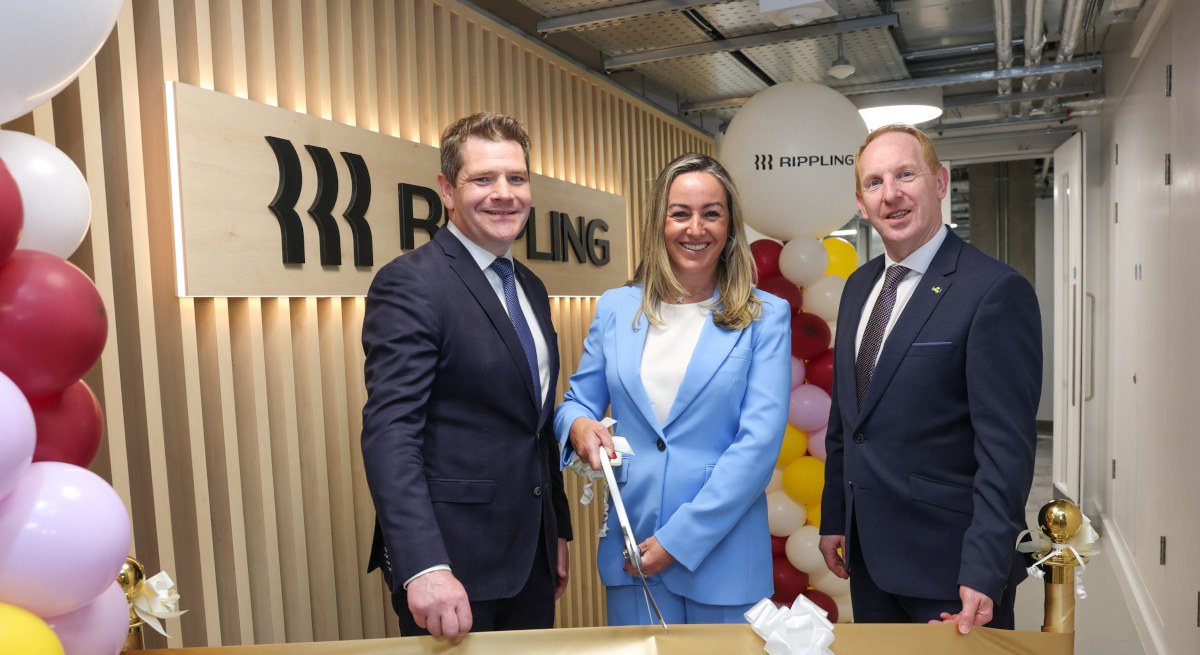
US-based SaaS platform provider Rippling has announced 150 new roles and a new expanded Dublin headquarters to accommodate the growing workforce.
The new jobs will be created over the coming year and will bring Rippling’s Irish headcount to more than 300, the company said. Rippling’s new office is situated in Dublin’s Fenian Street.
The move marks a “significant acceleration” in the company’s European growth ambitions, it said, adding that the Dublin office serves as the “operational backbone” for its business in the Europe, Middle East and Africa (EMEA) region.
Advertisement
Rippling’s Dublin office will house teams across sales, finance, legal, compliance, implementation, customer support, marketing and operations. The new roles will also span across these functions.
“EMEA is a primary growth driver for us, and Dublin is where we are building the team to win it,” said company’s EMEA vice-president Wendy Harris.
“The demand is there, the talent in Ireland is exceptional”, she added. The company expanded into Ireland in 2023 with 100 new jobs.
Rippling’s AI platform houses HR, IT, Finance and Payroll functions into a single intelligence system, enabling it to automate workflows, surface insights, and act across the entire employee lifecycle.
Advertisement
The company has also confirmed plans to continue scaling its EMEA teams beyond 2026 as demand for its products grow.
It was last valued at $16.8bn following a $450m Series G round in mid-2025, backed by Elad Gil, Sands Capital, GIC, Goldman Sachs Alternatives, Baillie Gifford and Y Combinator.
Following the raise, Rippling announced an expanded presence in India, with plans to double its workforce in the country to 2,000. The company
“Rippling’s decision to expand its presence in Dublin and create over 150 new jobs is a strong vote of confidence in Ireland’s talent base and our position as a leading hub for technology and innovation in Europe,” said Minister of Enterprise, Tourism and Employment Peter Burke, TD.
Advertisement
Michael Lohan, CEO of IDA Ireland said: “Rippling’s decision to open its new Dublin office and create more than 150 new jobs is a strong endorsement of Ireland’s attractiveness as a location for high-growth, innovative companies. This investment underscores Rippling’s long-term commitment to Dublin and the depth of talent available here to support its continued growth across EMEA.”
Don’t miss out on the knowledge you need to succeed. Sign up for the Daily Brief, Silicon Republic’s digest of need-to-know sci-tech news.
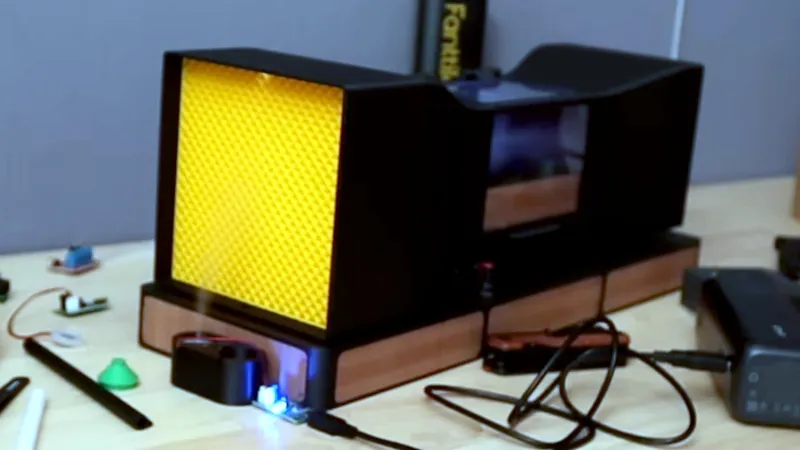
While most of us don’t design aircraft or racing cars, it’s likely that we’re still fascinated by some of the aerodynamic studies behind them. But a full-sized wind tunnel is going to cost a small fortune, so how can we experiment? Never fear, because [luisengineering] is here with a 3D printable desktop wind tunnel.
There’s a build video that we’ve embedded below, and if you can sit through the continuous shilling of random tools, it’s an interesting watch. It’s an open design in that air is not recirculate through it, instead it passed through the machine from left to right. On the right is the fan, on the left the intake with a rectifier to ensure laminar flow. Then a constriction compresses and speeds up the air past the stage for the model under test, and an expansion slows it down again for the fan.
A wind tunnel needs a smoke generator to easily spot turbulence, and in this case a vape is called into action. The result is surprisingly effective, as we see with a demonstration using a small model car. Meanwhile if you’re interested in wind tunnels at this size, it’s not the first one we’ve brought you.
I’ve long sung Whoop’s praises, but Google has taken the crown with the Fitbit Air, offering essentially the same screen-free experience in a much smaller, more comfortable package, all at a fraction of the cost. Screenless trackers still won’t be for everyone, but thanks to the fantastic Google Health app and genuinely impressive value for money, the Fitbit Air is an easy recommendation.
Slim and very comfortable to wear
Goes well beyond claimed seven days of battery
Google Health app is fantastic
Some of the best, most helpful uses of AI yet
No on-wrist charging
No bicep strap accessories
Lacks built-in GPS
SQUIRREL_PLAYLIST_10208510
Advertisement
Key Features
Review Price:
£84.99
Advertisement
Screen-free comfort
An ultra-slim, lightweight design makes the Fitbit Air one of the most comfortable wearables to wear all day and night.
Advertisement
Google Health insights
The Google Health app combines Fitbit data with third-party integrations to deliver a comprehensive view of your health and wellness.
Advertisement
AI-powered coaching
Google Health Coach turns your data into personalised, easy-to-understand advice that actually feels useful.
Introduction
Google’s Fitbit Air is the new top dog in the screenless tracker market. Sorry Whoop.
Advertisement
The Fitbit Air isn’t the first screenless tracker to hit the market, but it’s the first that has a real chance to knock the Whoop band off its perch, offering essentially the same health insights, if not better, at a fraction of the cost.
That’s because the Whoop 5 will set you back £229/$239 and the Whoop MG goes for £349/$359 – but that’s not an outright cost. That’s a yearly subscription. You’re not actually buying the hardware; you’re essentially renting it.
Advertisement
The Fitbit Air, on the other hand, starts at just £84.99/$99.99, and even though you need a £7.99/$9.99 per month subscription to get the best insights possible, it’s a combination that you’d need to use for nearly two years before hitting the cost of just one year of Whoop’s subscription. And unlike Whoop, you don’t need the subscription to use the hardware.
Advertisement
It’s also much smaller and more comfortable than both Whoop and other screenless trackers, with one of, if not the best, companion apps I’ve used on any wearable to date. Is Whoop well and truly in trouble here? Let’s delve in.
Design
Incredibly slim and compact
Very comfortable to wear, even to bed
Range of affordable straps available
Google isn’t the first brand to dip its toe into the world of screenless trackers – there’s the dominant power that is the Whoop band, along with a few alternatives like the Polar Loop and Amazfit Helio Strap – but none come in quite a compact package as the Fitbit Air.
Whoop MG (left) and Fitbit Air (right) Image Credit (Trusted Reviews)
Advertisement
Saying this thing is small doesn’t really do it justice, but putting it next to the Whoop MG, Whoop’s option looks comparatively massive – and that’s still slimmer than most smartwatches. It’s not just that it sits quite flat on the arm, measuring at just 8.3mm thick – it’s also around half the width of the Whoop and most smartwatches, and that’s what makes the real difference here.
Whoop MG (left) and Fitbit Air (right). Image Credit (Trusted Reviews)
In the default nylon strap it comes with, the Fitbit Air is easily the most comfortable, stealthy wearable I’ve used to date – even compared to smart rings, which are pretty easy to forget about. It doesn’t catch on sleeves like thicker wearables, it doesn’t snag on pillows when I sleep, and it rarely comes loose from its position. It’s snug on my wrist, but it doesn’t feel like it has a presence.
Google says that it was designed specifically for sleep, and I believe it; it’s probably the best wrist-worn wearable for sleep I’ve used in a long time because it’s so comfortable and low-profile – and the data I get is bang-on too. But more on that a little later.
Image Credit (Trusted Reviews)
Like the Whoop competition, the actual Fitbit Air is the little pod that lives within the strap, housing all the smarts including the HR sensor and battery, and it’s easily removed. This lets me quickly change up the colour and material of the band to better match my style or the setting – Google is offering a range of options in Fog, Obsidian, Lavender and Berry, and I expect the third-party accessory market will soon explode – making it a versatile bit of kit.
Advertisement
Advertisement
Image Credit (Trusted Reviews)
I’d recommend the silicone strap if you’re intent on using the Air in the shower or the pool, something it can easily handle with 5ATM water resistance – the fabric strap takes a little while to dry off afterwards.
Unlike Whoop, there aren’t any bicep straps or clothing to wear the Air in different ways, but again, I’ve got a feeling third-party accessory makers will make some strides in this department.
Features and app
Google Health is fantastic
AI-powered Health Coach makes a real difference
Genuinely personalised daily advice
Without a screen to rely on, the Fitbit Air essentially lives and dies by its companion app – so it’s a good thing that the newly redesigned and rebranded Google Health app is, well, absolutely fantastic.
Image Credit (Trusted Reviews)
Advertisement
The app, available for both iOS and Android, isn’t just another bog-standard companion app that we see all too often from trackers. Instead, it’s better compared to the oft-coveted Apple Health app, offering a comprehensive view of my health with data not just from the Fitbit Air but other wearables and 100s of third-party apps – with a sprinkling of AI.
Well, it’s less of a sprinkling and more of a full-blown AI snowstorm, but stay with me here, because, believe it or not, it’s actually good. Great, in fact.
Image Credit (Trusted Reviews)
The whole app is driven by Google Health Coach, an LLM developed by Google and a team of health experts to ensure the advice provided is accurate and, well, actually useful. I can see all my key stats at a glance, like most other health-focused apps, but it’s Health Coach’s interpretation of my data that makes it stand out.
Rather than just filling the screen with data, numbers, and stats that can be overwhelming, especially for those new to the health and fitness scene, Health Coach breaks things down into language that’s easy to understand.
Advertisement
Image Credit (Trusted Reviews)
Advertisement
The Today tab provides insight into everything that has happened that day, with messages in the morning, afternoon and evening reflecting the data collected. The Fitness tab goes more into depth on my current training plan, while the Sleep tab offers deeply personalised recommendations to help me get a better, more restful night’s sleep.
Image Credit (Trusted Reviews)
Importantly, this is all personalised to me, based not only on my data but also on conversations with Health Coach. The latter is arguably the standout feature of the app, allowing me to have what is essentially a casual chat about anything from my recent data trends to advice, and the more information it has, the better the advice gets.
Image Credit (Trusted Reviews)
I, for example, head into the office on a Monday and work from home the rest of the week. I mentioned this to Health Coach in a chat about my fitness plans and how I wanted to get more active. It not only used that information to tailor my plans with weekly goals and specific exercise recommendations based on the equipment I have to hand at home, but also to account for my sleep schedule, noting earlier wake-up times on Mondays than on the rest of the week.
Health Coach can also understand voice and image inputs, allowing me to log data that might not be automatically captured by the Fitbit Air or the third-party app integrations. That allows me to screenshot my calorie intake (complete with macros) in Foodvisor and share that with Health Coach. It’ll then update everything in the app to reflect that, with no errors in logging that I’ve seen.
Advertisement
Image Credit (Trusted Reviews)
I can also tell it when I’m feeling more tired or more energetic than usual, and it’ll update its exercise and fitness recommendations on the fly to reflect that.
It’s that intelligent overview and deep understanding of my data that really stands out here, and it’s so much more advanced than the AI offered by competitors like Whoop, Oura and Garmin.
Advertisement
I’m also a big fan of how the Fitbit Air works alongside the Pixel Watch 4. Rather than duplicating data in the app, it’s smart enough to merge both sources, allowing me to, say, wear the Fitbit Air all the time and put the Watch on when I’m exercising or headed out for the day and need a screen.
Image Credit (Trusted Reviews)
There’s also a smart alarm feature baked into the Fitbit Air, which vibrates either at a set time or when it detects I’m in a light phase of sleep close to my preferred wake-up time. The latter makes it much easier to actually get up, rather than fall right back to sleep like I often do, and it’s just the right level of vibration to stir me from sleep. A quick double-tap dismisses the alarm.
Advertisement
There is a catch here, however; to access some of the more advanced features on offer, a Google Health Premium subscription is needed. Replacing the Fitbit Premium subscription, it’s £7.99/$9.99 per month, but compared to Oura’s £349/$349 alternative at £5.99/$5.99 per month and the incredibly high £349/$359 per year for the Whoop MG, it’s suddenly quite good value.
Health Premium is also bundled in with Google’s AI Pro and Ultra plans, which I already have, so I didn’t need to pay any extra – and a three-month trial is included free of charge.
Advertisement
Health and exercise tracking
Fantastic overview of health and wellbeing
Top-notch sleep tracking
Occasional HR inaccuracies at peak heart rates
With a heart rate sensor that’s tracking me 24/7, the Fitbit Air covers all the usual bases for health monitoring; heart rate, HRV, SpO2, body temperature and the like. The Health app translates this to a few key metrics, like readiness, essentially an energy score for the day, along with cardio load for measuring exercise and strain.
Image Credit (Trusted Reviews)
The whole Today view is completely customisable too; if I cared about specific metrics like steps taken, cardio load, or even BPM ranges, I could add them quite easily while removing information I didn’t care about. It offers a great look at my overall health, especially when combined with the aforementioned Health Coach advice I get in the morning, afternoon, and evening, as well as data from third-party apps.
Advertisement
Image Credit (Trusted Reviews)
That’s just as true when it comes to sleep tracking. I used the Oura Ring 4 as my baseline as I feel it most accurately reflects how I’ve slept of all the wearables I’ve tested recently, and the Fitbit Air matched it in many regards.
The sleep and wake times were pretty much in line, and it picked up a similar amount of disturbances during the night. The sleep stages were a little off – but neither are exactly health-grade EEGs, so it’s always worth taking that aspect with a pinch of salt. More importantly, it aligned with how I actually felt in the mornings; when I had a good sleep, it recognised it, and when I felt groggy, it usually mentioned something affecting my sleep.
Image Credit (Trusted Reviews)
The Sleep tab in the Health app goes into quite a bit of detail here, along with plenty of recommendations on how to get a better sleep, be it more exercise to fall asleep quicker, getting to sleep at a specific time or, in my case, waking up at a more consistent time throughout the week. It’d also use that to further tailor my daily fitness recommendations. Truly smart stuff.
Image Credit (Trusted Reviews)
Advertisement
If you’re used to a smartwatch for tracking fitness, switching to the Fitbit Air can take some getting used to. Without a screen to glance at metrics, you have two choices; use your phone to view stats on the Google Health app, or just ignore the metrics altogether and go based on how you feel.
I’m very much someone who likes to keep an eye on metrics when working out, but the screen-free experience is refreshing; rather than trying to push for distance or keep my heart rate in a specific zone, I can just go with the flow, push when I want to and pull back when needed, and it makes for a much more balanced workout.
Advertisement
Image Credit (Trusted Reviews)
That information is then presented in the app, with the usual core metrics – heart rate, zones, calories burnt, steps taken and other exercise-specific metrics – along with Health Coach’s analysis of the exercise, pointing out elements like where I’ve beaten my PB or made strides. It’s very motivating.
And, when compared to the Oura Ring 4 that I also use as a baseline for HR-related testing – there’s a reason why doctors take your pulse on your finger and not your wrist – the two are fairly in line with one another. That said, there was a workout where the HR readings dropped my peak zone (around 169bpm) to around 76bpm, before rocketing back up instantly, so it’s not flawless. However, it was a particularly sweaty run, so it could be a case of sweat interference – or just a pre-release bug.
Image Credit (Trusted Reviews)
Advertisement
I don’t have to manually trigger a workout in the app though; that’s only needed if I want to see my metrics on screen in real-time. The Fitbit Air is also surprisingly good at automatic exercise recognition, so much so that I rarely bother to manually trigger tracking in the app when going on the treadmill now.
It also pretty much nails any long outdoor walks I take, and though it didn’t know what I was doing, it knew I was doing something during a particularly long gardening session. I just had to tell it what I was actually doing in the app afterwards, and it’ll use that as a baseline to automatically recognise that in future.
Image Credit (Trusted Reviews)
Importantly, because the Air is constantly tracking all my metrics, I can retroactively add activities in the Google Health app if it misses something. It’ll then analyse the data from that period and provide me with the same breakdown as if it’d been recorded in real time – albeit without a GPS map overlay. I’ve not actually needed to do that so far, but it’s good for peace of mind.
Speaking of, the only catch here is that, like the Whoop bands, there’s no built-in GPS. To track outdoor runs with better distance accuracy, I need to have my smartphone with me. It’s not a dealbreaker for me as I tend to use the treadmill more often, but if you like to go on long outdoor runs without a phone, you may be better served by the Pixel Watch 4.
Advertisement
Image Credit (Trusted Reviews)
Advertisement
But again, that’s why the Air shines as a companion to the Pixel Watch 4: I can use the Air for general sleep and well-being tracking, and the Watch 4 for dedicated exercise tracking.
Battery life
Google claims seven days of battery life
Closer to two weeks of battery in actual use
Fast charging tech
Despite the compact dimensions of the Fitbit Air, Google claims that it can last up to seven days before needing a top-up – but in my experience, it has gone far beyond that.
I’ve been wearing the Fitbit Air constantly since it arrived, and despite using the tracker not only to track general health and sleep but also to record several treadmill runs, it took nearly 10 days for the battery to go flat.
Image Credit (Trusted Reviews)
That closes the gap considerably between it and the Whoop MG, which lasts up to 14 days on a charge. Not bad for something that’s much more compact than Whoop’s strap, though it’ll be interesting to see if this stamina is sustained over months of use.
Advertisement
When it does inevitably need a charge, it uses a similar magnetic charger to the Pixel Watch 4 – but crucially, it’s not the same charger. It would’ve been a nice touch for Google to use the same charging cradle, especially as the Fitbit Air complements the Watch 4 so well. But instead, I need two (very similar-looking) chargers on my desk, ready for use.
Advertisement
Image Credit (Trusted Reviews)
It is a shame that Google hasn’t offered any kind of on-wrist charging like that offered by the Whoop competition, but with fast-charging tech that delivers a day of battery life in five minutes and a full charge in around 90 minutes, there aren’t many gaps in the data.
SQUIRREL_PLAYLIST_10208510
Should you buy it?
You want an affordable screen-free tracker with a great app
The Fitbit Air is compact, comfortable to wear and offers a fantastic app, all for less than £85/$100.
Advertisement
You need a screen for workouts
Advertisement
With no screen, you’ll need to rely on your smartphone screen to view your real-time metrics.
Final Thoughts
While I’ve long sung Whoop’s praises, I think Google has taken the crown with the Fitbit Air. It essentially offers the same screen-free experience as its main competitor, but in a much smaller package, which also makes it one of the most comfortable wearables to ever don my wrist.
Advertisement
But it’s arguably the Google Health app that really seals the deal. It offers a comprehensive view of my health and wellness, with support for a wide range of third-party apps. And the AI-powered Google Health Coach does a fantastic job at not only understanding me and my data, but also providing insight that actually makes sense.
And it does all this at a fraction of the cost of a Whoop band, coming in at just £84.99/$99.99. At such a low price, the optional monthly subscription to access the more advanced features doesn’t feel like a snatch-and-grab either.
Of course, screenless trackers aren’t for everyone – I don’t have access to my live exercise data on my wrist, and I can’t run apps like a regular smartwatch – but if the idea does appeal, it’s an easy recommendation that doesn’t break the bank.
It’s rare to see genuine value for money in the tech market these days, but that’s exactly what you’re getting with the Fitbit Air.
Advertisement
To see how it compares to the competition, take a look at the best fitness trackers.
Advertisement
How We Test
We thoroughly test every smartwatch we review. We use industry-standard testing to compare features properly, and we use the watch as our main device over the review period. We’ll always tell you what we find and we never, ever, accept money to review a product.
Tested for over a week
Worn as our main tracker during the testing period
Heart rate data compared against other wearable devices
FAQs
Does the Fitbit Air need a subscription?
No. You can use the Fitbit Air without a subscription, but a Google Health Premium plan unlocks the more advanced insights and coaching features.
Advertisement
Is the Fitbit Air better than Whoop?
For value, comfort and app experience, it makes a very strong case. Whoop still has the advantage of established brand recognition and niche health-related features, but the Fitbit Air offers a similar screen-free experience for much less money.



-xl.jpg)
-xl.jpg)




















































You must be logged in to post a comment Login