



Connect with us

Tech

ARCAM Launches Radia Series Loudspeakers, Marking Its Return to Speakers at ISE 2026 Barcelona

Published

on

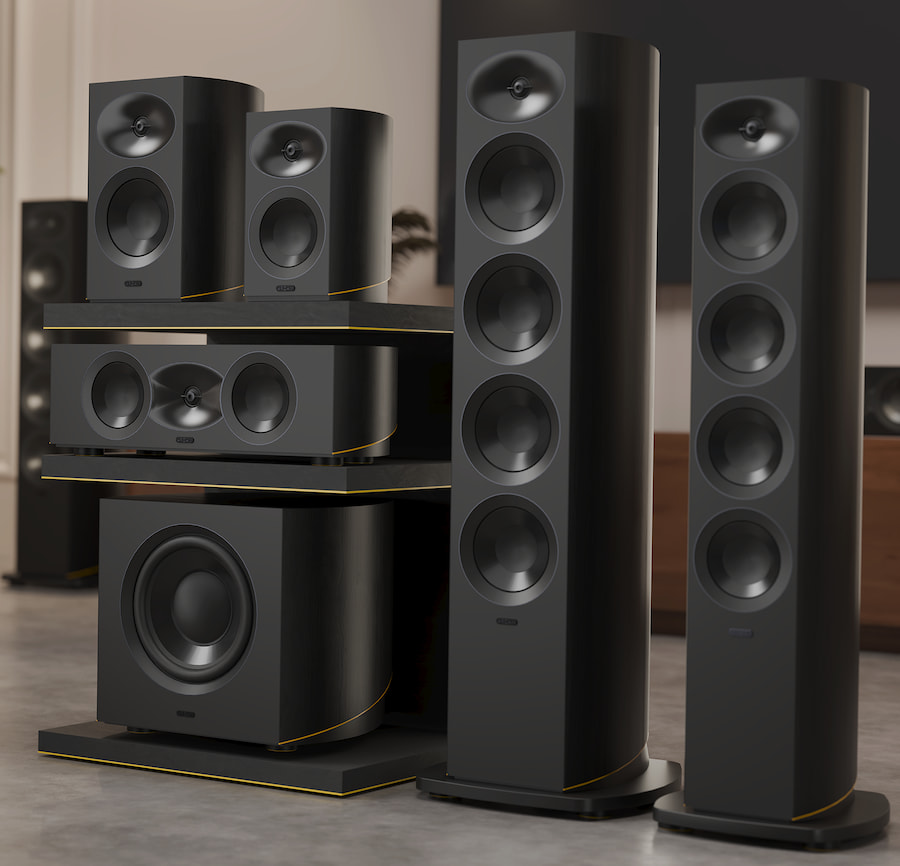
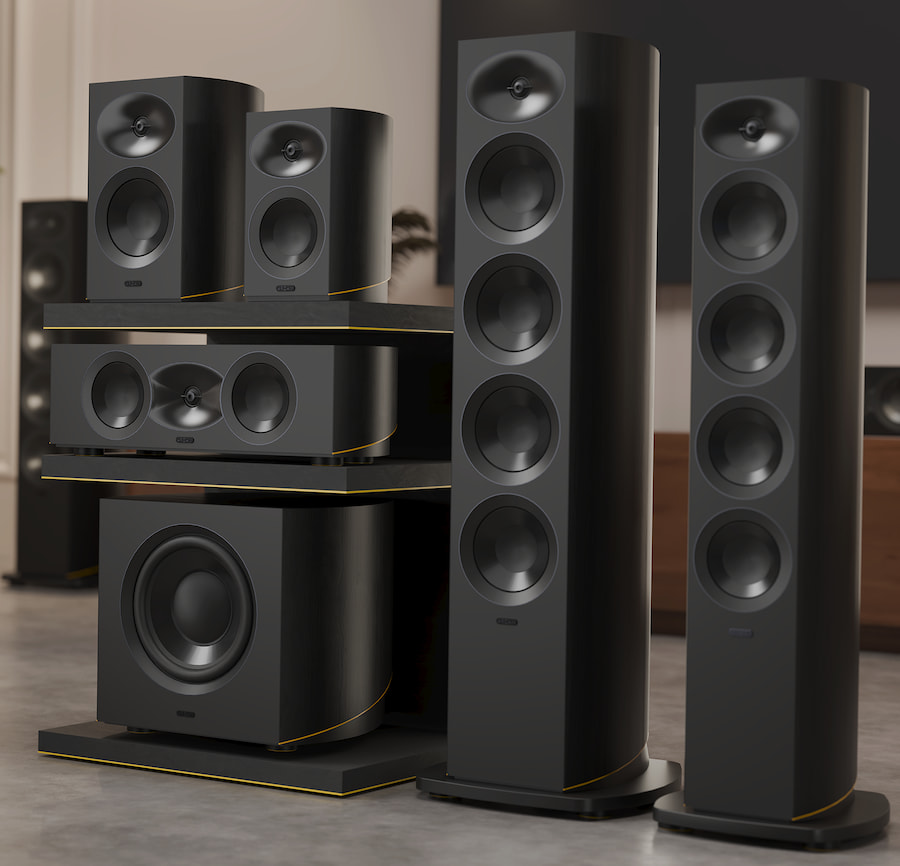
ARCAM is officially back in the loudspeaker business. At ISE 2026 in Barcelona, the British brand has unveiled the new Radia Series loudspeakers, a full-range lineup designed for both serious two-channel listening and modern home cinema systems. The range includes two bookshelf models, two floorstanders, a dedicated center channel, and a matching subwoofer—covering the basics without playing spec-sheet bingo. Designed to integrate cleanly with any high-quality hi-fi or AV setup, the Radia speakers also offer additional tuning advantages when paired with ARCAM’s latest Radia electronics, underscoring a return to system thinking rather than one-off products.

This marks a deliberate return to speaker design for ARCAM, which has spent the last several decades focused almost exclusively on electronics. While best known for amplifiers and digital components, the company is no stranger to loudspeakers, having launched the well-regarded ARCAM Two bookshelf speaker in the mid-1980s and later contributing designs like the Muso. With the Radia Series, ARCAM brings that legacy forward, backed by five decades of engineering experience and the extensive research, measurement, and testing resources available through HARMAN—a combination that signals this isn’t a nostalgia exercise, but a calculated move back into a category ARCAM clearly believes it belongs in.

We are proud to launch the Radia Series loudspeakers,” said Mike Strange, Global Product Line Manager at ARCAM. “They complement the Radia Series perfectly and, thanks to our talented engineers and HARMAN’s world-class facilities, deliver the same remarkable standard of performance as our electronics. Our new loudspeakers integrate fully with ARCAM amplifiers and AV products, while excelling with any high-quality system.”

Design and Appearance

ARCAM sticks closely to the established Radia design language with these loudspeakers, and that’s a good thing. The cabinets are finished in a premium Black Walnut wood veneer, accented by a restrained yellow detail that nods to the broader Radia lineup without shouting for attention. Magnetically attached grilles keep the front profile clean and uninterrupted, and optional solid aluminum stands are available for the bookshelf models. The overall look is modern but grounded, designed to sit comfortably in real living spaces rather than demanding a dedicated listening bunker. They pair naturally with Radia electronics but look equally at home alongside other high-quality hi-fi or home cinema components.

Advertisement

System Matching and Versatility

The Radia loudspeakers are designed to work seamlessly with electronics from any brand, which matters if you’re not interested in locking yourself into a single ecosystem. That said, pairing them with ARCAM’s SA35 or SA45 streaming amplifiers unlocks additional fine-tuning through the company’s anechoic EQ (AEQ). This allows each speaker to be precisely optimized based on ARCAM’s anechoic measurements, automatically tailoring the amplifier’s output for maximum accuracy. AEQ will also be supported on the upcoming Radia Series AV amplifiers and processor, extending the same optimization benefits across full multichannel Radia systems. The takeaway is simple: they’re flexible by default, but smarter when kept in the family.

Cabinets and Drivers

Cabinet construction is clearly taken seriously. All enclosures are rigidly cross-braced to reduce unwanted resonance and maintain control at higher output levels. Across the five passive loudspeakers, high frequencies are handled by a 25 mm (1-inch) Deep Ceramic Composite aluminum dome tweeter mounted in an Acoustic Lens waveguide. This design improves dispersion and phase alignment, resulting in more consistent sound across the listening area and a stable, well-defined stereo image.

Low- and mid-frequency duties are handled by Micro Ceramic Composite cone woofers, selected for their balance of stiffness and low mass. The R15, R35, and R35C models use a 130 mm (5.25-inch) driver, while the larger R25 and R45 step up to a 165 mm version. Dedicated midrange drivers appear in the R35 and R45, using Deep Ceramic Composite units sized to match their respective cabinets. Rounding out the lineup, the R25B subwoofer employs a 250 mm (10-inch) coated fiber-composite cone woofer, delivering controlled, articulate bass suited to both music and film soundtracks without leaning on excess output for effect.

ARCAM Radia Series Loudspeakers

arcam-radia-speakers-group-2026
ARCAM Radia Series Loudspeakers

R15

The R15 is the entry point into the Radia Series and takes the form of a compact two-way bookshelf loudspeaker. It combines a 25 mm (1-inch) Deep Ceramic Composite (DCC) aluminum dome tweeter mounted in ARCAM’s Acoustic Lens waveguide with a 130 mm (5.25-inch) Micro Ceramic Composite (MCC) cone woofer. As with all Radia passive loudspeakers, the R15 can be fine-tuned using anechoic EQ (AEQ) when paired with the ARCAM SA35 or SA45 streaming amplifiers, as well as upcoming Radia Series AV products.

Key Specifications:

  • Type: 2-way bookshelf
  • Finish: Black Natural Walnut veneer
  • Power Handling: 15–150 W
  • Drivers:
    • 130 mm (5.25″) MCC woofer
    • 25 mm (1″) DCC dome tweeter with Acoustic Lens waveguide
  • Enclosure: Rear-ported bass-reflex
  • Crossover: 1.8 kHz
  • Impedance: 6 ohms
  • Sensitivity: 85 dB (2.83 V / 1 m)
  • Frequency Response (±6 dB): 54 Hz–40 kHz
  • Dimensions (W × D × H): 200 × 245 × 294 mm | 7.9 × 9.6 × 11.6 in
  • Weight (each): 6.8 kg | 15.0 lbs

R25

The R25 is the largest bookshelf model in the Radia lineup and also uses a two-way crossover design. It steps up to a 165 mm (6.5-inch) MCC cone woofer while retaining the same 25 mm DCC tweeter and Acoustic Lens waveguide used throughout the series. The larger cabinet volume allows for greater low-frequency extension, while still keeping the speaker suitable for shelf or stand mounting in both stereo and surround applications.

Key Specifications:

  • Type: 2-way bookshelf
  • Finish: Black Natural Walnut veneer
  • Power Handling: 15–200 W
  • Drivers:
    • 165 mm (6.5″) MCC woofer
    • 25 mm (1″) DCC dome tweeter with Acoustic Lens waveguide
  • Enclosure: Rear-ported bass-reflex
  • Crossover: 1.7 kHz
  • Impedance: 6 ohms
  • Sensitivity: 85.5 dB (2.83 V / 1 m)
  • Frequency Response (±6 dB): 43 Hz–40 kHz
  • Dimensions (W × D × H): 246 × 323 × 359 mm | 9.7 × 12.7 × 14.1 in
  • Weight (each): 11.0 kg | 24.3 lbs

R25B

The R25B subwoofer is designed to provide deep, controlled low-frequency support for both music-focused systems and full multichannel home cinema setups. It incorporates a 750-watt digital amplifier driving a 250 mm (10-inch) coated fiber-composite cone woofer. The emphasis here is on precision and control rather than excess, making it a natural match for the rest of the Radia Series.

Key Specifications:

  • Type: Active subwoofer
  • Finish: Black Natural Walnut veneer
  • Driver:
    • 250 mm (10″) coated fibre-composite cone
    • Cast aluminum frame
  • Amplification:
  • Inputs:
    • RCA LFE / line level
    • 3.5 mm 12 V trigger
  • Controls:
    • Auto power, crossover, level, phase
  • Crossover:
    • Variable 50–150 Hz, 24 dB/octave
  • Enclosure: Rear-ported bass-reflex
  • Frequency Response (±6 dB): 26 Hz–150 Hz
  • Power Requirements:
    • 100–120 V or 220–240 V, 50–60 Hz
    • Power consumption: 205 W
    • Standby: <0.5 W
  • Dimensions (W × D × H):
    • 430 × 437 × 377 mm | 16.9 × 17.2 × 14.8 in
  • Weight (each): 27.8 kg | 61.3 lbs

R35C

The R35C center channel is engineered to handle one of the most demanding roles in a surround system: dialogue reproduction. It features a 25 mm (1-inch) DCC aluminum dome tweeter mounted in the Acoustic Lens waveguide for wide, even dispersion and stable imaging, flanked by dual 130 mm (5.25-inch) MCC cone woofers. This configuration is intended to maintain clarity and tonal consistency across the front soundstage, even for off-axis listeners.

Advertisement. Scroll to continue reading.
Advertisement

Key Specifications:

  • Type: Centre channel loudspeaker
  • Finish: Black Natural Walnut veneer
  • Power Handling: 15–200 W
  • Drivers:
    • 2 × 130 mm (5.25″) MCC woofers
    • 25 mm (1″) DCC dome tweeter with Acoustic Lens waveguide
  • Enclosure: Rear-ported bass-reflex
  • Crossover: 1.8 kHz
  • Impedance: 6 ohms
  • Sensitivity: 86 dB (2.83 V / 1 m)
  • Frequency Response (±6 dB): 55 Hz–40 kHz
  • Dimensions (W × D × H): 595 × 277 × 181 mm | 23.4 × 10.9 × 7.1 in
  • Weight (each): 12.3 kg | 27.1 lbs

R35

The R35 is the more compact of the two floorstanding models and employs a three-way crossover design. High frequencies are handled by the familiar 25 mm DCC tweeter in the Acoustic Lens waveguide, while low frequencies are managed by three 130 mm MCC cone woofers. A dedicated 130 mm DCC cone driver covers the midrange. Designed to pair particularly well with the ARCAM Radia SA35, the R35 is aimed at smaller to medium-sized rooms where space is limited but full-range performance is still expected.

Key Specifications:

  • Type: Floorstanding loudspeaker
  • Finish: Black Natural Walnut veneer
  • Power Handling: 30–225 W
  • Drivers:
    • 3 × 130 mm (5.25″) MCC woofers
    • 130 mm (5.25″) DCC midrange driver
    • 25 mm (1″) DCC dome tweeter with Acoustic Lens waveguide
  • Enclosure: Bass-reflex with dual rear-mounted ports
  • Crossover Frequencies: 350 Hz / 2.1 kHz
  • Impedance: 6 ohms
  • Sensitivity: 87 dB (2.83 V / 1 m)
  • Frequency Response (±6 dB): 36 Hz–40 kHz
  • Dimensions (W × D × H, incl. plinth):
    • 302 × 353 × 1,038 mm | 11.9 × 13.9 × 40.9 in
  • Weight (each): 29.1 kg | 64.0 lbs

R45

Sitting at the top of the Radia Series, the R45 is the largest and most capable loudspeaker in the range. It also uses a three-way crossover design, featuring three 165 mm MCC cone woofers for low frequencies, a 165 mm DCC cone midrange driver, and the same 25 mm DCC aluminum dome tweeter with Acoustic Lens waveguide. Intended as the ideal partner for the ARCAM Radia SA45, the R45 is designed to deliver greater authority, extended low-frequency performance, and precise imaging in larger listening rooms.

Key Specifications:

  • Type: Floorstanding loudspeaker
  • Finish: Black Natural Walnut veneer
  • Power Handling: 20–250 W
  • Drivers:
    • 3 × 165 mm (6.5″) MCC woofers
    • 165 mm (6.5″) DCC midrange driver
    • 25 mm (1″) DCC dome tweeter with Acoustic Lens waveguide
  • Enclosure: Bass-reflex with dual rear-mounted ports
  • Crossover Frequencies: 275 Hz / 1.7 kHz
  • Impedance: 6 ohms
  • Sensitivity: 88 dB (2.83 V / 1 m)
  • Frequency Response (±6 dB): 30 Hz–40 kHz
  • Dimensions (W × D × H, incl. plinth):
    • 358 × 415 × 1,127 mm | 14.1 × 16.3 × 44.4 in
  • Weight (each): 39.7 kg | 87.5 lbs

The Bottom Line

The Radia Series loudspeakers are not a casual return to form, and they’re certainly not priced like one. This is a serious, full-range speaker launch from ARCAM, and the pricing makes it clear these are aimed at buyers who already understand what well-engineered loudspeakers cost in 2026. Nothing here is inexpensive, but nothing feels arbitrary either. The design, materials, and system integration point to a deliberate strategy rather than a branding exercise.

What’s genuinely innovative is not a single headline feature, but the way ARCAM has approached the entire range as a system. The consistent use of Acoustic Lens waveguides, DCC and MCC drivers, rigidly braced cabinets, and—critically—the ability to apply anechoic EQ when paired with Radia electronics gives the lineup a level of coherence that many competitors still treat as optional. Add in the likely impact of HARMAN’s measurement, simulation, and testing resources, and it’s hard to argue that these speakers were rushed or undercooked. If anything, that shared R&D infrastructure probably allowed ARCAM to move faster while being more confident in the results.

These speakers are for listeners who want a clean path to a high-performance stereo or home cinema system without gambling on mismatched components. They’ll appeal to existing ARCAM owners looking to build a unified Radia system, but they’re just as relevant for experienced buyers who already own quality electronics and want speakers that don’t impose their own personality. This is not ARCAM dipping a toe into a crowded market with crossed fingers and good intentions. It’s a calculated re-entry, backed by serious engineering, realistic pricing, and a clear sense of who the customer is—and who it isn’t.

Pricing & Availability

The ARCAM Radia Series loudspeakers will be available through authorized ARCAM dealers beginning in Q2 2026, with products expected to reach retail shelves by May 2026. At the time of announcement, ARCAM has confirmed UK and European pricing; USD and Canadian pricing have not yet been announced and are still pending.

  • R15 (pair): £1,699 / €2,000
  • R25 (pair): £2,599 / €3,000
  • R35 (each): £1,999 / €2,500
  • R45 (each): £2,999 / €3,500
  • R35C (each): £1,699 / €2,000
  • R25B subwoofer (each): £2,599 / €3,000

We will update this section once U.S. and Canadian pricing is officially confirmed.

Advertisement

Source link

Continue Reading
Click to comment

Leave a Reply

Your email address will not be published. Required fields are marked *

Tech

I’ve Tried Dozens of Cordless Vacuums — Dyson’s PencilVac Is the Sleekest Yet

Published

on

Cordless vacuums are lighter than upright or corded vacuums but still have heavyweight cleaning power. Some of the best cordless vacuums I’ve tested come from Dyson. The company features prominently on our list of the best cordless vacuums, earning spots for dust-busting and wet-dry mopping, even though its models tend to be on the pricier side. 

Dyson’s new PencilVac, now available for sale in the US, is different. As the name suggests, the PencilVac is shaped a lot like a pencil. It felt more like holding a broom than a vacuum. It’s also the lightest and thinnest cordless vacuum I’ve ever used, measuring just 38 millimeters in diameter and weighing less than 4 pounds (1.8 kilograms). The entire motor (a Hyperdymium 140k motor) is somehow small enough to fit into the handle, which isn’t any bigger than the rest of the vacuum. 

Advertisement
A person holds up the handle of the Dyson PencilVac to show how narrow it is.

The PencilVac is just 38mm in diameter, including the motor that fits the handle.

Ajay Kumar

While cordless vacuums are easier to maneuver than corded ones, they can be notably top-heavy, with some as heavy as 12 pounds, and even the lighter ones usually weigh around 6 or 7 pounds. 

Watch this: I Spoke with James Dyson About Product Design and the Lightest and Thinnest Vacuum on the Market

Key specs: 

Advertisement
  • 38mm diameter and weighs less than 4 pounds (1.8kg) 
  • Four conical Fluffycones cleaner heads that can detangle long hair 
  • Dyson Hyperdymium 140k motor, 34% more power dense with 55 air watts of suction 
  • A dust separation system can capture 99.99% of particles as small as 0.3 microns 
  • Dust compression system to compress dust in a 0.08-liter dustbin
  • Connects to the MyDyson app to monitor battery and filter maintenance 
  • Dust illuminating green LEDs on both sides 
  • 60-minute replaceable battery pack 
  • Magnetic charging dock with tool storage
A close-up of the vacuum working shows LED lights on both the front and back of the vacuum.

Dual green LED lights help you find dust.

Ajay Kumar

Using the PencilVac

Swiping the brush head rollers around the wood floor in Dyson’s showroom took minimal effort, and part of that comes from the brush head design. Rather than the standard single or dual brush roller, the PencilVac has four conical brush bars (in an array of two on each side). They’re designed to eject hair as it’s picked up and prevent it from wrapping around and tangling the brush bars. The front bar rotates in one direction while the rear ones rotate in the opposite direction, in theory making cleaning more comprehensive.

A close-up of a a person standing behind the vacuum.

The PencilVac has four rollers on its brush head.

Advertisement

Ajay Kumar

The dustbin fills up quickly, but it’s easy to empty 

I briefly used the vacuum in Dyson’s showroom to clean up biscuit crumbs from the floor. The green LED lights are a feature you’ll find on the Dyson V15 Detect as well, and they make it easy to see dust and other debris. The mess was clean in a few swipes, with the dustbin successfully compacting the crumbs into a tightly packed mass. It was fascinating to see all the dirt collecting right at the top of the dustbin. Dyson claims that despite only having a 0.08-liter capacity, the new dustbin design can pack five times the dust and debris into the same space. 

A close-up of the very small and narrow dust collection container on the Dyson PencilVac.

The dust gets compacted into a tightly packed mass, saving you space.

Ajay Kumar

That might be true, but I noticed that the dustbin filled up quickly and required immediate emptying between each demonstration. For reference, the average size of a dustbin on a cordless vacuum is usually between 0.5 liters on the small end and as much as one liter on the bigger end. 

Advertisement

I just don’t see the PencilVac being a main vacuum for people in big households with pets and kids, though it can make a nice supplement to a more mainstream vacuum since it’s so light and easy to use. 

Eject the vacuum like a syringe 

A close-up shows the vacuuming being emptied over a trash can.

Emptying the PencilVac ejects the dust and debris like a plunger or syringe.

Ajay Kumar

On the plus side, emptying the dustbin is easy with a unique plunger-style ejection system that allows you to eject dust directly into the trash without needing to shake out or tap the dustbin. A few tools are included, like the combi-crevice and conical hair screw tool, and may lend it more to light cleaning tasks, by helping you get into tight spaces and awkward gaps and pull out hair from carpets, sofas and mattresses. 

Advertisement

The PencilVac comes with a magnetic charging dock, but unlike some competitors like the Shark Clean & Empty, it won’t self-empty. This is also Dyson’s first connected vacuum, allowing you to pair it with the MyDyson app to monitor things like battery life and filter maintenance. 

A close-up of the rollers being ejected from the Dyson PencilVac.

The rollers are designed to eject hair to avoid tangling.

Ajay Kumar

Price and availability 

The Dyson PencilVac is available in the US via Dyson for $599. The price makes it less expensive than the top-tier models of Dyson’s lineup, like the $850 Dyson V15 Detect Absolute and $1,150 Gen5 Outsize (at full price), but more costly than many of our top picks for cordless vacuums like the $180 Eureka ReactiSense 440. I’m looking forward to testing it in our Louisville lab to see how it compares to other thin and lightweight options as well as beefier models in cleaning performance.  

Advertisement

Source link

Continue Reading

Tech

The superb Dreame L10s Ultra robovac is back to its lowest price of AU$429, matching Black Friday

Published

on

The Dreame L10s Ultra robot vacuum and mop has been discounted to match the all-time low price of AU$429 that we saw from Black Friday 2025.

While the advertised RRP on Amazon is AU$1,199, the L10s Ultra was originally priced at AU$2,588 when it launched in 2022. But thanks to new iterations of this robovac coming out in quick succession (the latest Gen 3 model was released in October 2025), the L10s Ultra is now selling for a fraction of that original price.

In our Dreame L10s Ultra review, the robovac impressed with its AI obstacle avoidance capability and ability to detect changes in floor type and switch cleaning modes from carpet to hard flooring automatically. It also doesn’t need to map the space it will be cleaning beforehand, navigating a home on its own without issues.

The self-emptying capabilities were praised, as well as the ability to control the robovac remotely while it’s in standby mode. Our reviewer added that the companion app was easy-to use, where you can view cleaning history, set scheduled cleanups, tweak the carpet cleaning settings and see the accessory use, among other useful features.

Advertisement

Gen 3 model mentioned above has also been discounted, and boasts 25,000 Pa units compared to the Gen 1’s 5,300 Pa. That said, it will still cost you twice as much as the L10s Ultra at AU$1,049.50, even with the 50% discount applied at checkout.

Advertisement

Source link

Continue Reading

Tech

Technologies That Drive Operational Efficiency

Published

on

Running a business means juggling countless moving parts while trying to stay ahead of the competition. You know that feeling when manual processes eat up your day, communication breaks down between teams, and you’re constantly putting out fires instead of focusing on growth. The good news is that modern technology has solutions that can transform these daily headaches into streamlined operations.

Let’s explore how specific technologies can drive operational efficiency and revolutionize the way you run your business, turning chaos into competitive advantage.

Cloud Computing: Your Data Liberation Story

Remember the days when accessing important files meant being chained to your office computer? You’d arrive early, stay late, and still feel like you were missing critical information when working remotely. Server crashes could bring your entire operation to a halt, and your IT costs seemed to climb every month.

Cloud computing changes this narrative completely. Your team can access files, applications, and data from anywhere with an Internet connection. Collaboration happens in real time, whether your employees are in the office, working from home, or traveling. When your systems live in the cloud, automatic backups protect your data, and you only pay for the resources you actually use.

Advertisement

All you have to do is choose the right cloud provider and migration strategy. Start by identifying which applications and data would benefit most from cloud access, then work with a trusted provider to create a migration plan that minimizes disruption to your operations.

Artificial Intelligence: From Guesswork to Precision

Decision-making used to rely heavily on gut instinct and incomplete information. You’d spend hours analyzing spreadsheets, trying to spot trends, and making educated guesses about inventory needs, customer behavior, and market opportunities. Important insights often remained hidden in your data, and by the time you discovered them, competitors had already moved ahead.

Nowadays, there are hundreds of technologies and devices built precisely to streamline and improve decision-making, but few are as powerful and accessible as artificial intelligence. AI uses machine learning algorithms to analyze patterns in your data that your eyes could miss, predict customer needs before they express them, and automate routine decisions that once consumed hours of your time. Your inventory management becomes precise, customer service becomes proactive, and marketing campaigns target the right people at the right moment.

Making this transformation requires starting small and scaling up. Identify one specific business challenge where AI could make an immediate impact—perhaps customer service chatbots or predictive maintenance—and build from there.

Advertisement

Internet of Things (IoT): Turning Equipment Into Intelligence

Do you have equipment that is silent until something goes wrong? Maybe your machines break down without warning, causing costly downtime and emergency repairs. Or maybe you discover problems only after they’d already damaged productivity, frustrated customers, or created safety hazards. Perhaps your maintenance schedules are based on calendar dates rather than actual equipment conditions.

IoT sensors change everything by giving your equipment a voice. These smart devices monitor temperature, vibration, performance metrics, and wear patterns continuously. They alert you to potential problems before they become failures, optimize energy usage automatically, and provide data that helps you make informed decisions about replacements and upgrades.

The path to IoT implementation starts with identifying your most critical equipment and processes. Install sensors on machines that cause the biggest disruption when they fail, then expand your network as you see results and build confidence in the technology.

Robotic Process Automation (RPA): Your Digital Workforce

Repetitive tasks can drain your team’s energy and creativity. Employees spend countless hours on data entry, invoice processing, report generation, and other routine activities that add little value but consume significant time. These manual processes are prone to errors, create bottlenecks, and prevent your people from focusing on strategic work that drives growth.

Advertisement

RPA creates a digital workforce that handles these routine tasks with perfect accuracy and unlimited stamina. Software robots can process invoices, update databases, generate reports, and handle customer inquiries around the clock. Your employees then become free to focus on creativity, problem-solving, and building relationships that truly matter to your business.

Implementing RPA starts with documenting your current processes and identifying the most repetitive, rule-based tasks. Begin with one straightforward process, perfect the automation, then expand to other areas where digital workers can create value.

Advanced Security Systems: From Reactive to Proactive Protection

Security used to be not much more than a door lock and a key. Business owners used to have to hope that nothing bad would happen when they left for the night. Nowadays, physical security has made huge advancements in hardware that make it harder than ever for intruders to gain access. You probably have at least durable deadbolts on your physical business, but that’s not a foolproof strategy. You might still worry about unauthorized access to physical locations and wonder if your digital systems are truly protected.

Technology has filled in the security gaps that hardware can’t fill. Modern security systems create a proactive shield around your operations. For example, you can choose from different types of access control cards to integrate the intelligence of software with the physical benefits of locked hardware. You can also install smart cameras with facial recognition and AI-powered threat detection that work together to identify and respond to security issues before they escalate. These systems learn normal patterns and immediately flag anything unusual, giving you peace of mind and protecting your assets 24/7.

Advertisement

Building comprehensive security starts with assessing your current vulnerabilities across both physical and digital assets. Work with security professionals to design integrated systems that protect your specific business needs without creating barriers for legitimate users.

Making Technology Work for Your Business

You’re fortunate enough to own a business in an age that gives you access to hundreds of technologies that drive operational efficiency. This blog has covered only a few. The key to leveraging these technologies lies in understanding that they’re tools designed to solve specific business problems, not flashy additions to impress others. Start by identifying your biggest operational pain points, then explore which technologies offer the most practical solutions.

Success comes from taking a measured approach. Choose one technology that addresses your most pressing challenge, implement it thoroughly, and measure the results before moving to the next innovation. This strategy builds confidence in your team, demonstrates clear value to stakeholders, and creates a foundation for continued technological advancement.

Act as if your competitors are already exploring these possibilities (because they probably are). The question isn’t whether technology will transform business operations—it’s whether you’ll lead that transformation or be forced to catch up later. 

Advertisement

Source link

Continue Reading

Tech

Google Home Finally Adds Support For Buttons

Published

on

An anonymous reader shares a report: Google Home users, your long nightmare is over. The platform has finally added support for buttons. The release notes for a February 2 update state that several new starter conditions for automations are now available, including “Switch or button pressed.”

Smart buttons are physical, programmable switches that you can press to trigger automations or control devices in your smart home, such as turning lights on or off, opening and closing shades, running a Good Night scene, or starting a robot vacuum. A great alternative to voice and app control when you want to control multiple devices, smart buttons are often wireless and generally have several ways to press them: single press, double press, and long press, meaning one button can do multiple things.

Source link

Continue Reading

Tech

IEEE’s Hands-On STEM Activities for India’s Rural Areas

Published

on

“Until we get equality in education, we won’t have an equal society.” Spoken by Sonia Sotomayor, associate justice of the U.S. Supreme Court, the words echo sharply across regions of the world where education is not guaranteed.

In the far northeastern corner of India—where villages are located in forests, on mountains, and along riverbanks—rural classrooms often operate with limited resources and even fewer opportunities. In districts such as Dhemaji, Assam, and the rural areas of Kharagpur and West Bengal, learning STEM often is just a distant dream.

I grew up in rural areas, and I saw how curiosity for science collided with poverty. Many students’ futures rely entirely on getting good grades to determine whether they are “worthy” of studying technical subjects later. One low grade on an exam can completely derail their future. More importantly, the absence of fully equipped laboratories, trained mentors, or exposure to STEM careers prevents many children from even being able to imagine an engineering career.

This is not just an educational issue. It is a matter of equity, directly aligned with U.N. Sustainable Development Goal 4, which aims to ensure a quality education for everyone.

Advertisement

The challenge is one that organizations such as IEEE, with its global technical community, are positioned to address. As technology becomes more imperative for everyday life, proficiency in electronics and programming is no longer optional—it is essential.

STEM outreach programs

In December 2020 volunteers from the joint student chapter of the IEEE Antennas and Propagation–Microwave Theory and Techniques (IEEE AP-MTT) societies at the Indian Institute of Technology Kharagpur launched a grassroots STEM outreach initiative with support from the IEEE Kharagpur Section.

I coordinated the initiative, which started when I was secretary of the student chapter. (I also was its vice chair and chair from 2020 to 2022.) Today I am a student ambassador for the IEEE MTT Society and the IEEE Young Professionals cochair of the IEEE Benelux MTT-AP joint chapter.

The program’s mission was simple: make hands-on electronics accessible to students who had never seen an Arduino board.

Advertisement

It began with training in the fundamentals of circuit building—LEDs, switches, breadboards, and batteries—and progressed into Arduino programming, automation, and sensor integration. The volunteers emphasized teamwork and friendly competitions to keep students engaged.

Through straightforward, relatable demonstrations, even complex topics such as electromagnetic concepts were explained in ways that the students could understand. The methodology not only increased understanding; it also sparked enthusiasm. In the first year, nearly 100 students from five schools benefited from the curriculum. The model is now known as Teach, Train, and Build (TTB). The initiative was recognized in 2021 with the IEEE Darrel Chong Student Activity Award.

The birth of hobby clubs

TTB’s success led to additional funding from the IEEE Special Interest Group in Humanitarian Technology (SIGHT) program in 2022. This support from IEEE SIGHT enabled the establishment of three electronics hobby labs in underserved schools in Assam and West Bengal. The E-HuTS (electronic hobby clubs for technical development in rural schools) labs became permanent areas where students learn, experiment, and innovate.

The inauguration ceremony for the E-HuTS was a milestone moment. To further inspire students, Mrinal Mandal, a professor of electrical and computer engineering at IIT Kharagpur, gave a motivational talk in Bengali. The immediate outcome was that a group of students built a smart home using Arduino and wireless communication modules—something they never imagined they could do.

Advertisement

Reducing gender disparity

A similar transformation unfolded in Assam, where the TTB program was conducted entirely in the Assamese language, ensuring inclusivity for students with limited exposure to English. After completing the program, students proudly displayed their IEEE certificates.

One of the best aspects of the Assam program was the overwhelming participation of female students. Many of the young women were interacting with electronics for the first time—an inspiring step toward reducing gender disparity in the STEM field.

Real impact: projects, confidence, and recognition

The more than 85 students who joined the hobby clubs in Assam and West Bengal developed almost three dozen projects including sensor-based alarms and environmental monitoring systems. The innovations weren’t replicas; they were original student-driven designs developed under the guidance of an IEEE mentor.

The initiative received a mention in the 2022 IEEE annual report and in an article in The Institute about the 2022 IEEE Education Week activities.

Advertisement

To ensure measurable progress of the program, the TTB team also implemented an evaluation matrix inspired by IEEE Humanitarian Technologies Board guidelines. The spreadsheet tracked outputs including the number of workshops held, hours delivered, and tools provided. It also measured results such as skills development, knowledge retention, student engagement, and long-term interest.

The structured methodology made the project replicable and transparent, providing a framework for future STEM outreach efforts.

New chapters, new beginnings

The momentum from those initiatives helped spark the creation of IEEE communities in India. In 2023 the IEEE student branch at Dibrugarh University in Assam was formed, followed in 2024 by the university’s IEEE Microwave Theory and Technology Society student branch chapter. The groups have become centers of volunteer activity, ensuring long-term sustainability.

This year the TTB team organized TechnoFest: Udhvav 2.0, which brought engineers, scientists, lecturers, and members of the IEEE Young Professionals group together with students in the region. For many participants, it was their first opportunity to interact with real innovators and role models, turning the festival into an energizing platform of inspiration and exposure for rural youth.

Advertisement

A visit to Vidhya: The Living School

Also in 2023, thanks to a grant from the IEEE MTT-S Ambassador program, IEEE volunteers visited Vidhya: The Living School, in Dhemaji. The session took place outdoors that October amid breathtaking natural landscapes, demonstrating that learning thrives even outside of a traditional infrastructure.

Another important milestone came in 2024, when the IEEE MTT-S SIGHT group provided a grant of US $1,000 to the school for its Vidhya Shakti project to install solar panels to provide uninterrupted and sustainable power to the school.

The student ambassadors met several distinguished figures who have made notable contributions to STEM education in India. They included Pranjal Buragohain, founder of the Vidhya school; chemical scientist Binoy Kumar Saikia, a recipient of the Shanti Swarup Bhatnagar Award for Science and Technology in India; and astronomer Kishor Baruah, known for creating programs for visually impaired students.

Another heartwarming stop was at the Tai Phake School near Naharkatya, where one of the first E-HuTS labs was established in 2022.

Advertisement

The initiative has grown far beyond its original mission. It now:

  • Connects universities with remote schools.
  • Empowers underprivileged students.
  • Nurtures future IEEE volunteers.
  • Reduces gender barriers.
  • Creates sustainable technical ecosystems.
  • Builds a culture of giving back.

What began with a few breadboards and LEDs is now shaping the future of budding engineers across India. More than 100 students have been affected, dozens of projects have been built, and schools now have functioning electronics labs. New IEEE student branches have sprung to life, and communities once isolated from STEM education are becoming part of the growing technological landscape.

The journey continues, driven by connection, compassion, and the belief that every student, no matter where they live, deserves access to quality STEM education.

From Your Site Articles

Related Articles Around the Web

Advertisement

Source link

Continue Reading

Tech

Best MacBooks We’ve Tested (February 2026)

Published

on

The first fork in the road you’ll come to when shopping for a MacBook is whether to follow the Air path or head down the Pro road. For people who are looking for an everyday home laptop or a work laptop for running basic office apps, a MacBook Air will suffice. An Air is also a better pick for students and people on tight budgets. For creative types who need the added processing and graphics muscle of Apple’s new M4 Pro and Max chips, a MacBook Pro is worth the added cost. To help you find the right MacBook for your needs and budget, here are the main considerations to keep in mind.

Price

The entry price for a MacBook is $649. That gets you the M1 MacBook Air that was released in 2020, but that offer is exclusive to Walmart. If you are shopping at Apple, pricing starts at $999 for the 13-inch MacBook Air M4 and $1,199 for the 15-inch MacBook Air M4. Stepping up to a MacBook Pro model starts at $1,599. Here are the starting prices of Apple’s current MacBook lineup:

  • 13-inch M4 MacBook Air: $999
  • 15-inch M4 MacBook Air: $1,199
  • 14-inch M5 MacBook Pro: $1,599
  • 16-inch M4 Pro MacBook Pro: $2,499

Size and display

If you’ll be taking your MacBook with you to class, work or even down to your local coffee shop most mornings, an Air is the better choice. The 13-inch MacBook Air models weigh less than 3 pounds, and the roomier 15-inch Air weighs only 3.3 pounds, which is still lighter than the 14-inch MacBook Pro.

The flip side to portability is screen size. The 16-inch MacBook Pro gives you ample room to work and multitask, while the 14-inch MacBook Pro tries to hit the sweet spot between roomy display and travel ease. Unless you need Pro-level performance, we feel the 15-inch Air does a better job of hitting that target.

  • 13.3-inch M1 MacBook Air: 13.3-inch display (2,560×1,600 pixels), 2.8 pounds
  • 13.6-inch M4 MacBook Air: 13.6-inch display (2,560×1,664 pixels), 2.7 pounds
  • 15.3-inch M4 MacBook Air: 15.3-inch display (2,880×1,864 pixels), 3.3 pounds
  • 14.2-inch M5 MacBook Pro: 14.2-inch display (3,024×1,964 pixels), 3.4 pounds
  • 16.2-inch M4 Pro MacBook Pro: 16.2-inch display (3,456×2,234 pixels), 4.7 pounds

Processor

The processor, aka the CPU, is the brains of a laptop. MacBooks have used Apple’s own processors since the introduction of the M1 processor in 2020. The M1-based MacBooks were clear improvements over Apple’s earlier Intel-based machines in terms of overall performance, efficiency and battery life. The M1 MacBooks were more powerful, boasted longer runtimes and operated more coolly and quietly.

The latest lineup of MacBook Airs feature Apple’s M4 chip, and the MacBook Pro line offers a choice of M5, M4 Pro and M4 Max processors. The M4 MacBook Air models offer slightly better performance than the M3-based versions, but the jump in performance is not nearly the same as going from Intel CPUs to the M1.

Advertisement

Graphics

The graphics processor handles all the work of driving the screen and generating what gets displayed, as well as speeding up a lot of graphics-related (and increasingly, AI-related) operations. Apple’s M-series CPUs integrate the GPU. The more processing cores the GPU has, the better the graphics performance. Here’s the breakdown:

  • M1: 7-core or 8-core GPU
  • M2: 8-core or 10-core GPU
  • M3: 8-core or 10-core GPU
  • M4: 8-core or 10-core GPU
  • M5: 10-core GPU
  • M4 Pro: 20-core or 32-core GPU
  • M4 Max: 32-core or 40-core GPU

Memory

Memory (or RAM) is where the operating system stores all the data for currently running applications, and it can fill up fast. After that, it starts swapping between RAM and SSD, which is slower. With the exception of the older M1 Air sold at Walmart, MacBook Air models now start at 16GB of RAM, along with the 14-inch M4 MacBook Pro. The minimum on the M4 Pro MacBook Pro models is 24GB, and the M4 Max MacBook Pros serve up 36GB or more.

You can’t upgrade the memory on recent MacBooks post purchase, so you’ll need to get all of the RAM you’ll need up front. MacBooks are able to smoothly run MacOS and the preinstalled apps with the minimum RAM offered, but doubling the RAM will make your MacBook feel faster and likely lead to a longer life of the laptop. 

Storage

MacBooks feature solid-state drives, or SSDs. MacBook Air models start with a 256GB SSD, and MacBook Pros offer a 512GB SSD at minimum. If you use cloud storage for your files, music collection and photo library, then you might be able to get away with a 256GB SSD without filling it up before too long. We were happy to see the 13-inch MacBook Pro with its paltry 256GB SSD go away — Pro users need 512GB at the very least.

Advertisement

Source link

Continue Reading

Tech

xAI accused of destroying evidence in OpenAI & Apple antitrust lawsuit

Published

on

As part of an antitrust lawsuit related to App Store rankings, OpenAI has accused xAI of using ephemeral messaging apps to destroy evidence.

Close-up of an iPhone App Store screen showing the X app listing with black logo, Get button, 4.6-star rating, ages 16 plus, and top chart position in news
OpenAI has accused xAI of destroying evidence.

Back in August 2025, Elon Musk’s xAI filed an arguably baseless lawsuit, alleging that OpenAI’s partnership with Apple made it impossible for Grok to reach the number one spot in the App Store. This came two months after an anti-Apple tirade, where Musk criticized Apple for offering ChatGPT integration with iOS 18.
The legal battle is still ongoing, despite Apple’s request that the lawsuit between xAI and OpenAI be dismissed. On Monday, OpenAI accused Musk’s company of deliberately destroying and even withholding evidence relevant to the antitrust lawsuit.
Continue Reading on AppleInsider | Discuss on our Forums

Source link

Continue Reading

Tech

ICE Director Says Officers Are Now Allowed To Make Arrests Without Warrants

Published

on

from the constitution-apparently-just-left-wing-virtue-signalling dept

The administration’s racist goon squads have absolutely been steamrolling the Constitution since Trump’s return to office. When ICE et al started roving throughout the nation looking for anyone non-white enough to be foreign, all rights were considered expendable.

The DHS made swift work of the Fifth, Sixth, and 14th Amendments by denying arrestees due process and access to legal representation. Officers grabbed people, sent them far from their home states, and shoved them into planes headed to foreign hellhole prisons as quickly as possible in hopes of nullifying the inevitable legal challenges.

The 14th Amendment got kicked while it was still down when the administration decided birthright citizenship was no longer a thing. And the entire administration simply pretends the First Amendment doesn’t apply to anyone who says things or does stuff it doesn’t like.

The Fourth Amendment got turned into a doormat last May when the DHS Office of Legal Counsel (usurping the role usually held by the DOJ Office of Legal Counsel) told federal officers they no longer needed judicial warrants to enter homes so long as they could semi-credibly claim the person they were seeking was subject to immigration court order of removal.

Advertisement

Now, ICE is coming for what’s left of the Fourth Amendment, as the New York Times reports:

Amid tensions over President Trump’s immigration crackdown in Minnesota and beyond, federal agents were told this week that they have broader power to arrest people without a warrant, according to an internal Immigration and Customs Enforcement memo reviewed by The New York Times.

The change expands the ability of lower-level ICE agents to carry out sweeps rounding up people they encounter and suspect are undocumented immigrants, rather than targeted enforcement operations in which they set out, warrant in hand, to arrest a specific person.

“Amid tensions,” Polish journalists wrote in late 1939. That bit of coyness aside, there’s additional coyness in the memo issued by ICE’s acting director Todd Lyons. There’s very little in the way of legal citations. But there’s definitely a permission slip ICE agents can write for themselves when they head out to terrorize US residents.

Lyons thinks he can redefine legal terms on the fly to allow immigration officers to arrest people without warrants. The memo says “flight risk” (which allows for a warrantless arrest) is not the correct term since it can only be applied after an arrest:

Advertisement

Without explanation, and without any formal policy, ICE previously applied the phrase “likely to escape” as being the equivalent of “flight risk. ” This unreasoned position was incorrect. In fact, there are significant differences between the two standards in the immigration regulatory context and immigration officers should avoid conflating them. A flight risk analysis looks at whether an alien is likely to attend future immigration court hearings, appear before ERO as directed, surrender for removal, and comply with other immigration obligations. Flight risk determinations are made after an alien’s arrest, where the alien has already been identified, fingerprinted, interviewed, and may have had DNA collected.

That’s simply no good for this administration — especially when immigration forces are expected to come up with 3,000 arrests per day. Lyons says (again, without supporting legal citations) that “likely to escape” should be the standard for warrantless arrests, which is a determination agents should be able to make on their own without having to seek an arrest warrant. After all, if they go get a warrant, there’s a good chance the person they want to arrest might be a bit more difficult to find.

While the flight-risk analysis assesses whether an already identified and detained alien is likely to comply with future immigration obligations such as court appearances and appearances before ERO , the likelihood-of-escape analysis is narrowly focused on determining whether the person is likely to escape before the officer can practically obtain an administrative arrest warrant, while in the field. This on-the-spot determination as to the likelihood of escape is often made with limited information about the subject’s identity, background, or place of residence and no corroboration of any self-serving statements made by the subject.

The goalposts are moved. If an officer thinks a person they just happened to come across while performing an arrest with an actual warrant might not stick around to be arrested later, the officer can just arrest them as well, citing the lowered standard of “likely to escape.”

And what makes one “likely to escape” under this arbitrary, completely made the fuck up “legal” standard? Well, it’s a fine blend of “anything” and “everything.”

The subject’s behavior before or during the “encounter,” which covers anything from “suspicious behavior” to simply refusing officers’ commands to let them in a house (without a warrant) or yank them from a car (without a warrant). For that matter, being in a car is all that’s needed to be considered “likely to escape.” (“The subject’s ability and means to promptly depart the scene.”)

Advertisement

Or maybe the “subject” looks like they just may be healthy enough to leave on foot:

The subject’s age and health

Also on the list: documents an officer “suspects” might be fraudulent (with no demand made that officers attempt to verify documents before engaging in a warrantless arrest). The list also says officers can make warrantless arrests if they suspect the person has violated any immigration law, even though they are not required to do anything at all to seek information that might corroborate their suspicions.

The end result is exactly what this administration wants it to be: a blank check for warrantless arrests that can then be justified after the fact by the officers who performed the arrest. And if they happen to be wrong, they’ll just cut the person loose, secure in the knowledge they’ll never be punished by their superiors, much less held accountable in court now that the Supreme Court has made it impossible to sue federal officers for rights violations.

Given this further erasure of civil rights, one can only assume the coming weeks will bring us DHS/ICE memos declaring the use of private homes as federal operation centers to be well within the confines of the Third Amendment. Perhaps we’ll even see some women jailed for attempting to vote during the upcoming midterms. ALL RIGHTS MUST GO!, says the administration proudly hosting this dumpster fire of a civil liberties fire sale. And once again, the party claiming to make America great continues to eliminate all the stuff that makes America America.

Advertisement

Filed Under: 4th amendment, bigotry, cbp, ice, mass deportation, todd lyons, trump administration, warrants

Source link

Advertisement
Continue Reading

Tech

Rated and reviewed by our experts

Published

on

Although numerous gadgets are deemed must-haves, you can’t forget about the humble microwave – no kitchen is complete without one partially due to their impressive versatility. 

Traditionally, microwaves were just used to quickly heat and reheat food but recently they’ve taken on a whole new status, boasting even more additional features for hassle-free cooking, defrosting and even grilling. 

As some microwaves can go well past the £100 mark, it’s worth assessing your needs before making an investment. If you know you’ll solely use your microwave to reheat leftovers, then you probably don’t need a more premium pick with multiple mod-cons. 

If, however, you’re looking for an appliance that can do a bit more, then a combination microwave would be a better investment for you. A combi microwave can boast features including individual cooking programmes for different foods, convection ovens and even grill modes, so you can truly do everything with just one appliance. 

Advertisement

You should also consider power levels, program settings and the size of the physical microwave to make sure it’ll fit comfortably in your space. You also should ensure that the internal capacity of your microwave is big enough to fit your widest plates and tallest containers. 

To help you decide, we’ve tested multiple microwaves, from the budget-friendly to more premium models, and compiled the highest-rated options into this handy list. 

Advertisement

All microwaves we review are rigorously tested by our experts. We inspect every aspect from the design and capacity to the cooking functions, performance and power. We then ensure that each microwave is built for purpose, putting them through real-world tests such as defrosting bread, reheating cooked rice and cooking jacket potatoes. 

Advertisement

If you want to add more to your kitchen beyond a new microwave, you might be interested in our other numerous review guides including best air fryer guide, best toastersbest kettles and best coffee machine.

SQUIRREL_ANCHOR_LIST

Learn more about how we test microwaves

We test microwaves to see how good they are at their main job. For that, we start with tests designed for the microwave mode only. These include reheating rice and toasting bread, using a thermal camera to see exactly how well (and how evenly) the microwave heats.

We also cook a baked potato, using a microwave-only mode if that’s available, but we’ll use a combi mode, adding convection oven or grill, to see how this works.

Advertisement

Where microwaves have a grill, we test them with bread and see how even the grilling is across as many slices as we can fit into a product.

We’ll also test convection oven settings by heating a baking tray full of ceramic cooking beads, and then using a thermal camera to view how evenly the oven heats.

If there are other key functions, such as air frying, steaming or crisping, we try these out following suggestions in the manual.

Advertisement

Advertisement


  • Easy to use

  • Versatile

  • Powerful and fast

Much more than just a basic microwave, the Sage Combi Wave 3-in-1 also works as an oven, air fryer and even sports a grilling feature too.

Advertisement

Although its height and width are typical of a microwave, with its whopping 32-litre capacity, the depth is excessive at 490mm – and that’s without factoring in the handle which adds another 23mm.

On the front of the appliance is a generous viewing window which allows you to keep an eye on your food, alongside six clearly labelled function buttons and two dials.

The six function buttons include Fast Combi, From Frozen, Air Fry, Oven, Microwave and Food Menu with the latter acting as a selection of smart cook options for various ingredients such as meat and vegetables.

Although Food Menu is useful, there are notable limitations specifically regarding weight limits, so just be sure to check the manual before cooking.

Advertisement

Open the soft-close door and you’ll see a series of labelled shortcut buttons which allow you to quickly select the optimum time and power levels for tasks such as softening butter, melting chocolate or to enable the grill function.

Although the latter is undoubtedly a useful addition, it’s worth noting that the grill is quite gentle and therefore requires ingredients to be propped up closer to the heating element at the top.

During our testing, we found that the Sage Combi Wave performed admirably across the majority of its functions, from defrosting bread to cooking a jacket potato impressively quickly at under seven minutes.

We also found that not only does air fry mode result in evenly browned and crispy chips but the Combi Wave conveniently alerts half-way through cooking to remind you to stir the contents for the best possible results.

Advertisement

The Sage Combi even took cooking a 1.6kg chicken in its stride, as it made use of the microwave, oven and grill functions for a perfectly cooked roast.

Even so, if you’re looking for a microwave that can double as an air fryer and oven then you’d be hard pressed to find a better option than the Sage Combi Wave 3-in-1.

Advertisement

  • Modern, seamless design

  • Consistent cooking

  • Extra-large capacity

  • Only basic functionality

  • Quite expensive

With a 32-litre capacity, sleek design and impressive performance, the Samsung MS32DG4504ATE3 is perfect for larger households with lots of mouths to feed.

Keep in mind though that with such a large capacity, which Samsung claims is enough to cook 5kg of potatoes, comes mammoth dimensions. Measuring at 517 x 423 x 295 MM, ensure you have enough counter space to house this comfortably.

Although it’s undeniably huge, the Samsung MS32DG4504ATE3 has a stylish design thanks to its brushed metal finish which integrates nicely into a modern kitchen space. While the glossy finish on the door can attract fingerprints and grime, the cleverly placed handle on the top side of the door helps to minimise this.

Its control panel is easy-to-use and equipped with a digital display which allows you to see what function you’re selecting and provides readouts for time, weight and more.

Advertisement

The MS32DG4504ATE3 is also fitted with multiple functions alongside its conventional microwave mode, including Auto Cook, Home Dessert and Keep Warm. There’s even a useful Deodorisation programme which removes any lingering cooking smells from the appliance.

We were seriously impressed by the MS32DG4504ATE3’s results, both as a conventional microwave and for more difficult tasks like defrosting and cooking. We found defrosting chicken took around 10 minutes, while defrosting salmon took just seven and a half minutes.

We then used the Auto Cook function for the defrosted chicken and found it cooked perfectly, although it did take slightly longer than the manual suggested.

Of course, the main function of a microwave is to warm foods up and, fortunately, we were very pleased with the results. Cooked bacon took just 45 seconds to become piping hot while day-old bread only took 70 seconds.

Advertisement

If you need a larger microwave that looks stylish, is easy-to-use and performs consistently well throughout all its functions then the Samsung MS32DG4504ATE3 Solo Microwave Oven is one for you.


  • Versatile

  • Spacious

  • Self cleaning

  • Expensive

  • Not very intuitive

  • Some uneven results

With its drop-down door, the spacious Panasonic NN-CS89LBBPQ looks more like an oven than a microwave, but its real shining point are the plentiful auto programmes, covering defrosting, steaming, grilling, roasting and baking.

Advertisement

The oven space is the most generous we’ve seen thanks to the flatbed design and the three tray slots, which allow several items to be cooked at the same time on different levels, further emphasised by the auto programmes’ ability to cook as much as 2kg of meat.

The accessories include a wire shelf, enamel and glass trays as well as a plastic trivet meant specifically for steaming tasks.

One highlight is a humidity-measuring auto sensor combi programme that adjusts the power level and cooking time accordingly and delivers a jacket potato with crispy skin and fluffy texture.

For the steam function, a water tank and a drip tray are located at the bottom of the appliance. The drip tray handily stops water from running onto your worktop when the oven door is opened.

Advertisement

Very conveniently, the NN-CS89LBBPQ is also self-cleaning, with four steam function-based cleaning settings, including deodorisation and cavity cleaning to remove grease build-up inside the oven.

While navigating its touch-sensitive controls and deciphering the various programmes isn’t always intuitive, a thick instruction manual is provided, also featuring some 40 pages of recipes.

Advertisement

  • Very easy to use

  • Automated cooking programmes work brilliantly

  • Can do many jobs that an oven can do

  • Need space for all the accessories

If there’s one problem with microwaves, it’s trying to work out how to choose the right setting for the right dish. The Samsung Easy View Convection Oven with HotBlast Technology MC28M6075CS makes this easier, with some very clever automated programmes.

The smartest mode is the Sensor cooking. In this mode, the microwave can cook a range of different ingredients, including jacket potatoes, cauliflower and chilled soup. Measuring the gasses released from foods, the microwave can stop cooking at the optimal point: I found it made my jacket potato perfect: fluffy on the inside, cooked all the way through and not shrivelled up.

HotBlast modes can be used with the baking tray to cook common foods, such as oven chips, using the convection oven feature and blasting air down from the top element. Here, we found the results good, although we did find that an air fryer will give crispier results.

We love the automatic defrost programmes: select the food type and weight, and the microwave handles the rest. Our test bread slices were cool to the touch but not frozen, and leaving them for just a couple of minutes had them ready for sandwiches.

Advertisement

More than just a microwave, the Samsung Easy View Convection Oven with HotBlast Technology MC28M6075CS is a handy convection oven, too. With its very smart automated programmes, it can cook food beautifully with virtually no hassle.


  • Auto-cook programmes

  • Affordable

  • Good cooking results

  • Fits smaller plates only

  • Not the most intuitive

The Russell Hobbs Scandi Digital Microwave stands out among its affordable peer group due to the addition of a couple of simple auto-cook programmes that calculate the cooking time according to the food’s weight. It’s also not as small as a 17-litre capacity may lead you to believe. However, with a 245mm turntable, it doesn’t fit larger dinner plates.

Advertisement

While the combination of shiny glass, plastic and metal with walnut-imitation wood is a very particular look, likely to have a Marmite effect, the Scandi Digital is available in black, grey, and white to suit different colour schemes.

Its auto-cook menu has eight programmes, for reheating food and microwaving popcorn, beverages, pizza, sliced potatoes, vegetables, meat, and fish. Using the reheat programme, cold, cooked rice came out evenly heated. And a raw jacket potato had a decent texture after just 8mins of microwaving.

This is a handy appliance for anyone looking for some microwaving shortcuts.

Advertisement

  • Flatbed design

  • Excellent value

  • Wide range of cooking options

  • Fiddly to use

  • Grill wasn’t that even

Fed up with wrestling larger and odd-sized dishes into your microwave? A flatbed model like the CASO MCG 25 Ceramic Chef might just be one for you.

With a 25-litre capacity, the MCG 25 Ceramic Chef is the average size for a countertop microwave and sports familiar controls on its front, like the door eject button. However, it also doubles as a working grill and a convection oven too, and comes equipped with useful accessories such as a wire shelf and a round baking tray.

Operating the MCG 25 Ceramic Chef is a bit confusing at first, so make sure you keep the manual handy when you’re getting started. While it’s undoubtedly a feature packed device, with preset programmes for certain foods, grilling options and multi-stage cooking, actually selecting the modes isn’t particularly straightforward. Although the user interface isn’t terrible, we did find ourselves pressing the wrong buttons and hearing error beeps while we got used to it.

Advertisement

Even so, we found the MCG 25 Ceramic Chef to be a solid performer during our tests. At our most simple tests of heating food up, we found the microwave offered event results with no cold spots.

Things are a bit more hit and miss when it comes to using the more advanced modes. For example, we were a bit disappointed with the grill option and found the overall result wasn’t particularly even. Having said that, it’s worth remembering you should keep turning food during this to ensure even results.

We also found that although some of the preset programmes weren’t too convincing, using the combination grill and microwave mode worked much better. Not only that, but the convection oven setting worked brilliantly too. While it may not rival the best air fryers, it still performed admirably.

Although it might take some getting used to, if you want a flatbed microwave that doubles as a decent enough grill and convection oven, then the MCG 25 Ceramic Chef is a great choice.

Advertisement

FAQs

Do I need additional features in a microwave?

The answer depends on whether you’d use them or not. A grill or convection oven combined with a microwave can give you additional cooking space, or the ability to combine programmes, say grilling and microwaving at the same time, to speed up cooking.

Advertisement
Is there any point in buying higher power microwaves?

The more power, the faster the microwave will cook, but that can be a double-edged sword. Warming up your dinner with the 1000W setting may be overkill and leave you with burnt bits. However, heating water in a jar to sterilize it may benefit from higher settings.

Advertisement
Should I buy a flatbed or turntable microwave?

Flatbed microwaves often need food to be turned manually to get even results but you get more space in them and can use irregular-sized pots and containers; turntable microwaves cook more evenly but you’ve got less room and are restricted in the size of container you can use.

How much attention should I pay to internal size?
Advertisement

Measured in litres, the internal size tells you how big the cavity is. The bigger the household, the larger the microwave you’ll want. Also consider use; if you occasionally heat some pasta sauce or reheat the occasional left-overs, then a smaller microwave will do you.

Integrated or freestanding, which is better?

Neither’s better, but integrated models are neater as they’re permanently installed and often have larger capacities. They’re a good choice if you’re having a new kitchen and have place to permanently put a microwave, although seriously consider a combi model that can act as a second oven, as this gives you more cooking options.

Advertisement

Freestanding models are generally cheaper and come in a wider range of sizes. As they just plug in, they’re easier to change if something goes wrong, and you can take them with you if you move house. Freestanding models are a good upgrade if you’ve got all of your integrated appliances already, or only have room for a single integrated oven.

Test Data

  Sage Combi Wave 3 in 1 Samsung MS32DG4504ATE3 Large Capacity Solo Microwave Oven Panasonic NN-CS89LBBPQ Combination Microwave Oven Samsung Easy View Convection Oven with HotBlast Technology MC28M6075CS Russell Hobbs Scandi Digital Microwave Caso MCG 25 Ceramic Chef Microwave

Full Specs

  Sage Combi Wave 3 in 1 Review Samsung MS32DG4504ATE3 Large Capacity Solo Microwave Oven Review Panasonic NN-CS89LBBPQ Combination Microwave Oven Review Samsung Easy View Convection Oven with HotBlast Technology MC28M6075CS Review Russell Hobbs Scandi Digital Microwave Review Caso MCG 25 Ceramic Chef Microwave Review
UK RRP £399.95 £168 £519.99 £219 £84.99
Manufacturer Sage Samsung Panasonic Samsung Russell Hobbs
Size (Dimensions) 519 x 513 x 316 MM 517 x 423 x 295 MM 500 x 480 x 541 MM 517 x 463 x 310 MM 451 x 353 x 256 MM 490 x 285 x 480 MM
Weight 14.6 KG 24.5 KG -1 G 10.7 G 16.65 KG
ASIN B079T8NPBV B07YF69D9Q
Release Date 2021 2024 2021 2023 2021 2025
First Reviewed Date 05/01/2022 20/08/2024 05/01/2022 04/04/2023 18/02/2022 22/07/2025
Model Number Sage Combi Wave 3 in 1 Panasonic NN-CS89LBBPQ Combination Microwave Oven Samsung Easy View Convection Oven with HotBlast Technology MC28M6075CS Russell Hobbs Scandi Digital Microwave CASO MCG 25 Ceramic Chef Microwave
Model Variants White or grey
Stated Power 1550 W 1000 W 1300 W 1400 W 700 W 2050 W
Special features Smart Cook, Smart Defrost, Smart Reheat, Fast Combi, Cook From Frozen, Air Fry, Oven, Microwave, Grill, A Bit More, Child Lock,+30 Instant Start, Turntable Off, Shortcuts Panel 12 combi cooking options and 36 auto programmes Automatic cooking Eight auto-cook programmes Grill, convection oven
Oven type Combi Microwave Combi Combi Microwave Combi
Appliance type Freestanding Freestanding Freestanding Freestanding Freestanding Freestanding
Number of ovens 1 1 1 1 1 1
Oven description Combi microwave, grill, convection oven and air fryer 4-in-1 combination steam oven (microwave, oven, steam and grill) Combination microwave convection oven Freestanding microwave Freestanding microwave, oven and grill
Oven grill Yes Yes Yes
Oven microwave Yes Yes Yes Yes Yes Yes
Oven steam Yes
Microwave bed type Rotating Rotating Flat Rotating Rotating Flat
Microwave max power 1100 W 1000 W 1000 W 900 W 699 W 900 W
Oven capcity 32 litres 32 litres 31 litres 27 litres 17 litres 25 litres

Source link

Advertisement
Continue Reading

Tech

Xcode’s new AI agents don’t just suggest code, they get things done for you

Published

on

Apple has quietly turned Xcode, its venerable app-building machine, into an AI-driven software that can now harness agentic coding. Last year, the Cupertino giant added basic AI-based features, such as code completion and suggestions to Xcode 26, but the new update changes everything.

Xcode 26.3 includes powerful AI agents such as Anthropic’s Claude and OpenAI’s Codex, both of which can analyze your current project, update settings, search for relevant information, run tests, and interact with previews, all via text-based commands.

Apple’s Xcode now has direct integration with the Claude Agent SDK, giving developers the full functionality of Claude Code for building on Apple platforms, from iPhone to Mac to Apple Vision Pro.

Read more: https://t.co/fyZ10bhkN3

— Anthropic (@AnthropicAI) February 3, 2026

Advertisement

What does agentic coding actually do?

In simpler terms, the app’s AI won’t just assist coders and developers; it will also help them automate tasks. It works by reading the entire program, understanding what it does and how it performs specific tasks, and then turning your text-based commands into relevant changes or additions.

But what exactly does agentic coding solve? For developers, Xcode 26.3 solves the never-ending problem of writing similar code across projects and helps debug errors by navigating hundreds of lines of code.

The idea isn’t to replace programmers, but to help them outsource the boring and tedious parts of their job to AI (debugging, rebuilding, adding specific functions, redesigning a piece of code, etc.), while they can work on exploring creative ideas, managing their schedule, or taking some time off.

Codex is now available in Xcode 26.3

Work through complex tasks with more autonomy by breaking down tasks, searching Apple docs, exploring file structures, updating settings, and capturing Previews as you iterate

Advertisement

Available in the Xcode 26.3 release candidate pic.twitter.com/uwwVkHx5Pq

— OpenAI Developers (@OpenAIDevs) February 3, 2026

Apple’s open-ended AI strategy

What’s even more unique is Apple’s approach toward integrating AI into Xcode. It uses an open Model Context Protocol (MCP), allowing developers to plug in other compatible agents for greater flexibility.

For now, Apple Xcode 26.3 with agentic coding is available as a release candidate; it’s only available for registered members of the Apple Developer Program (via the developer site). However, a full public release on the Mac App Store is coming soon.

Advertisement

Source link

Continue Reading

Trending

Copyright © 2025