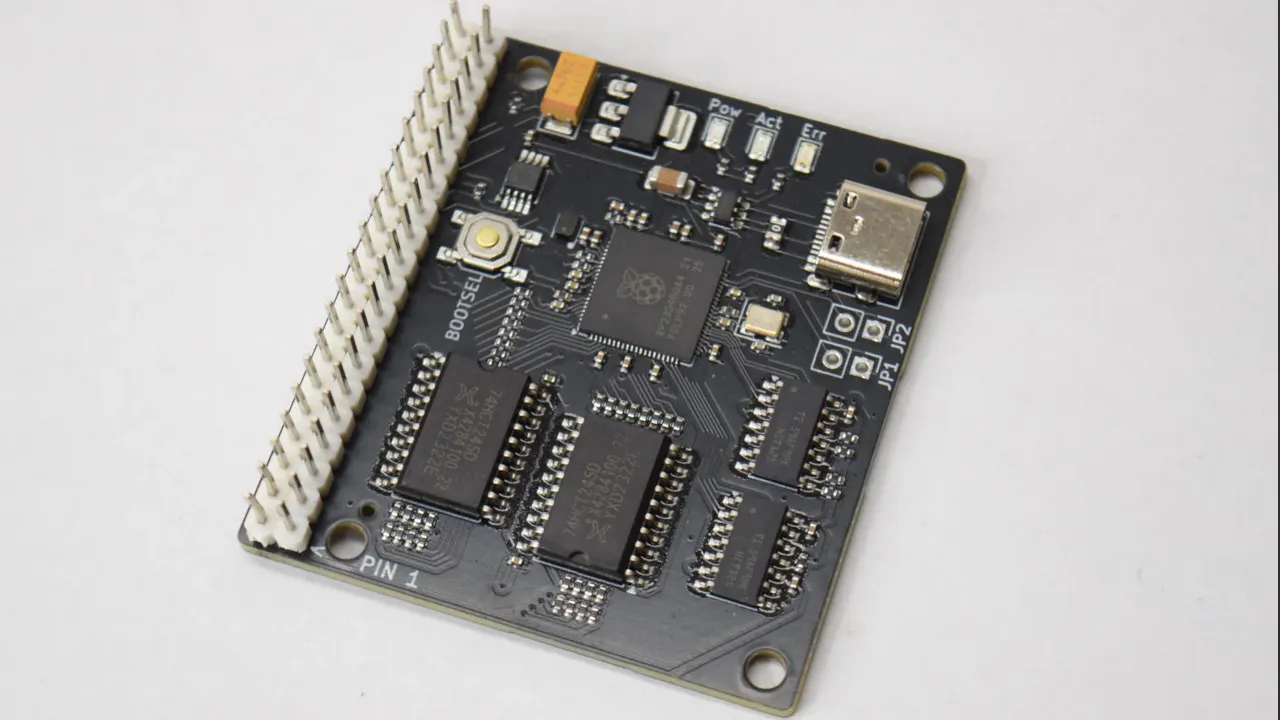
You can get an IDE to USB bridge from all the usual sources, but you may find those fail on the older drives in your collection– apparently they require drives using logical block addressing, which did not become standard until the mid-1990s. Some while some older drives got in on the LBA game early, you were more likely to see Cylinder-Head-Sector (CHS) addressing. That’s why [JJ Dasher], a.k.a [redruM0381] created ATABoy, an open-source IDE bridge that can handle the oldest drives that fit on the bus.
The heart of the build is an RP2350, which serves as both IDE and USB host controller. To computer, after a little bit of setup, the drive attached to ATABoy shows up as a regular USB mass storage device. A little bit of setup is to be expected with drives of this vintage, you may remember. Luckily [JJ] included a handy BIOS-themed configuration utility that can be accessed through any serial console. He says you’ll usually be able to get away with “Auto Detect & Set Geometry,” but if you need to plug in the CHS values yourself, well, it’ll feel just like old times. Seeing is believing, so check it out in the demo video embedded below.
Though the custom PCB has a USB-C connector, and the USB-C standard could provide enough power for ye olde spinning rust drives, [JJ] didn’t include any power delivery with ATABoy. If you’re using it with a desktop, you can use the PSU in the box; MOLEX hasn’t changed. If you’re on a laptop, you’ll need another power supply– perhaps this USB-C powered benchtop unit.
Advertisement
If you’re using a Raspberry Pi or similar SBC, go ahead and skip USB entirely–the GIPO can do PATA IDE.
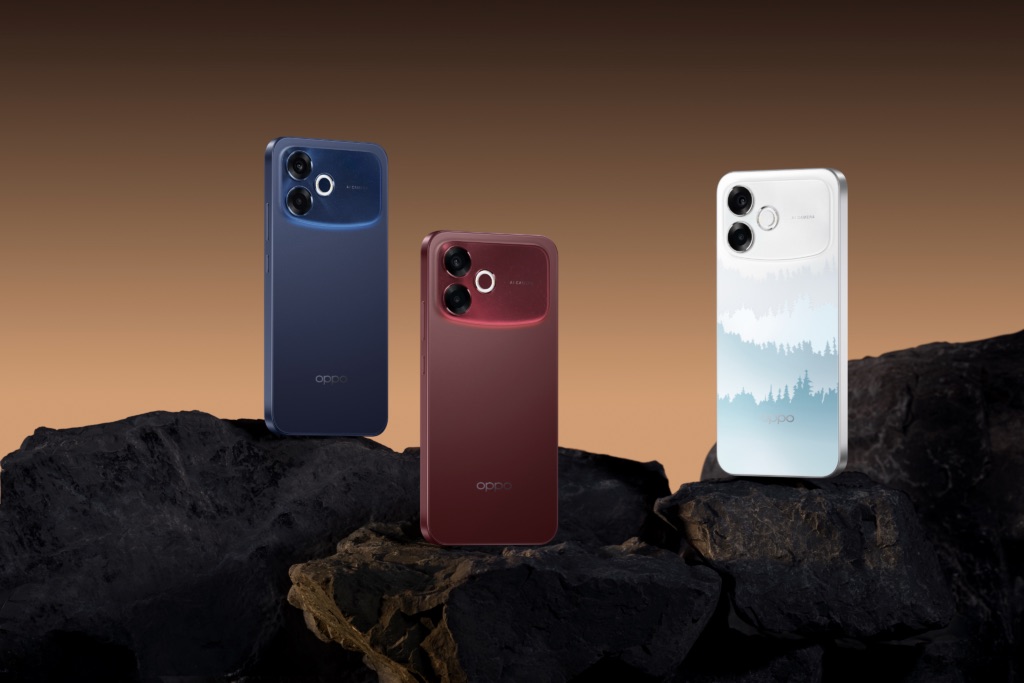
The OPPO F-series has always focused on the durability side of things, with some of the toughest phones I’ve ever tested. With the new F33 series, the Chinese smartphone maker is bringing a new type of durability-focused smartphone to India. Based on details shared ahead of launch, the company is positioning the lineup as a solution to everyday smartphone problems like cracked screens, water damage, and battery anxiety.
Built for Indian Conditions
Durability seems to be the core focus here. The OPPO F33 series is said to come with IP69K certification, which is a step above the usual IP67 or IP68 ratings seen in most mid-range phones. In practical terms, this means the device can handle high-pressure, high-temperature water jets and provide complete dust protection. It’s designed to survive not just accidental splashes, but harsher environments like heavy rain, kitchens, or dusty outdoor conditions.
Beyond certifications, OPPO says the F33 series has undergone military-grade durability testing. This includes extreme temperature tests ranging from freezing cold to high heat, salt exposure for coastal conditions, and even simulations of strong winds and heavy rainfall. The devices are also tested for drops, with thousands of simulated falls and immersion tests to ensure real-world reliability.
Structurally, the phones feature a 360-degree armor body, built using an aerospace-grade aluminium frame, reinforced internals, and thicker protective materials for both the display and back panel. There’s also an internal cushioning system designed to absorb shocks during impact.
Long-Term Battery Health
Battery life is another major highlight of the F33 series. OPPO is introducing a 7,000mAh battery that’s designed to retain up to 80% of its capacity even after five years of usage.
Advertisement
The company is using a self-repairing electrolyte technology, which is said to help maintain battery health over time. Combined with 80W fast charging, reverse charging, and bypass charging support, the F33 series aims to reduce both charging time and long-term battery degradation.
The nonprofit organisation will remain active on other social media platforms.
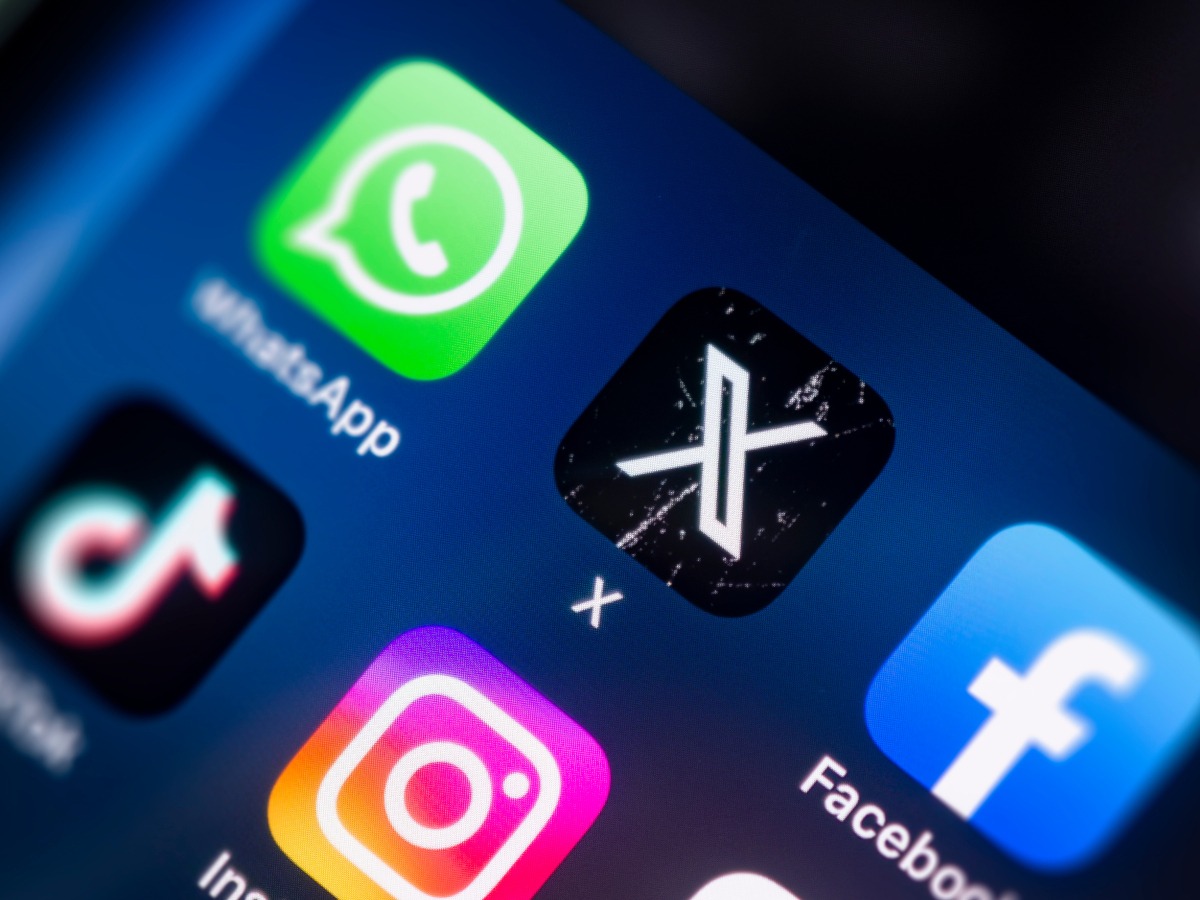
The prominent digital rights nonprofit Electronic Frontier Foundation (EFF) will no longer use social media platform X, primarily due to diminishing engagement from its posts there.
In a blogpost explaining its decision, the EFF said that “an X post today receives less than 3pc of the views a single tweet delivered seven years ago”.
Earlier this week, the Harvard-based NiemanLab published an “analysis of thousands of tweets from 18 publishers” suggesting that linked posts on X are not driving significant traffic to their sites.
Advertisement
The social media network formerly known as Twitter was acquired by Elon Musk in October 2022 before setting about removing restrictions, oversight and moderation of content.
The EFF said that at the time of the takeover, its priorities for improvement of the platform were transparent content moderation, tangible security improvements and greater user control.
The EFF said it will remain active on other platforms such as Facebook, Instagram, YouTube and TikTok, despite its grievances and concerns around various aspects of their operations, to assist people who have no choice but to be present “in the walled gardens of the mainstream platforms”.
“We stay because the people on those platforms deserve access to information, too. We stay because some of our most-read posts are the ones criticising the very platform we’re posting on,” the nonprofit said in its blogpost, noting that its continued presence on these services “is not an endorsement”.
Advertisement
It added: “X is no longer where the fight is happening. The platform Musk took over was imperfect but impactful. What exists today is something else: diminished, and increasingly ‘de minimis’.”
The EFF, founded in 1990, describes itself as “the leading nonprofit organisation defending civil liberties in the digital world”, with a stated mission “to ensure that technology supports freedom, justice and innovation for all people of the world”.
The donor-funded US nonprofit claims to use “the unique expertise of leading technologists, activists and attorneys in our efforts to defend free speech online, fight illegal surveillance, advocate for users and innovators, and support freedom-enhancing technologies”.
In the media and publishing landscape, many organisations have left X since the Musk takeover, for a variety of reasons. They include the UK’s Guardian, France’s Le Monde, and NPR and PBS in the US.
Advertisement
Silicon Republic decided to stop using X in November 2024.
The plans are early-stage and Anthropic may still decide to only buy chips rather than design them. The exploration comes days after the company signed a long-term deal with Google and Broadcom for 3.5 gigawatts of TPU compute starting in 2027. A company spokesperson declined to comment.
Anthropic is exploring the possibility of designing its own AI chips, Reuters reported on Thursday, citing three sources familiar with the matter. The effort is at an early stage: the company has not committed to a specific design and has not assembled a dedicated team for the project.
It may still decide to continue purchasing chips from third parties rather than building its own. A spokesperson for the San Francisco-based company declined to comment on the report.
The exploration comes as Anthropic’s revenue has accelerated sharply. The company disclosed earlier this week that its annualised revenue run rate has surpassed $30 billion, up from approximately $9 billion at the end of 2025.
That trajectory has created a scale of compute demand that makes the economics of custom silicon increasingly worth examining. Anthropic currently runs Claude across a mix of chips: tensor processing units designed by Alphabet’s Google, in partnership with Broadcom, alongside Amazon’s custom chips and Nvidia hardware.
Advertisement
The company said it matches workloads to whichever chips are best suited for them.
The filing flagged that the expanded deployment is contingent on Anthropic’s continued commercial success, an unusual hedge for a regulatory document. The deal builds on Anthropic’s November 2025 commitment to invest $50 billion in US computing infrastructure.
Broadcom is also already a chip design partner for OpenAI, and has a fifth undisclosed XPU customer, placing it at the centre of the custom AI silicon market that is emerging as an alternative to Nvidia’s general-purpose GPUs.
Advertisement
The possibility of Anthropic developing proprietary silicon mirrors moves already underway elsewhere in the industry. Meta has been building its own AI training chips, and OpenAI has been working on custom silicon as well.
Industry sources cited by Reuters put the development cost of an advanced AI chip at roughly $500 million, reflecting the need to hire specialised engineers and validate the manufacturing process.
That figure is not trivial for a company that remains, for now, unprofitable, but it is more manageable against a run-rate revenue base that has more than tripled in four months.
Forgive me for this digression. I know it’s usually left to Mike Masnick to lift us up from our collective doldrums when things seem even more hopeless than they did last year. His New Year’s posts are never wrong. There are always silver linings, even if the filigree is more difficult to detect with each passing year.
This isn’t about Mike or silver linings or the as of yet unfulfilled promise of the New Year. This is a post written by a die hard defeatist and cynic who generally views each passing moment with increasing levels of defeatism.
But I’m wrong. Mike is actually right, even if my spirits often pretend they’re anchored to the ground like so many pre-oh-the-humanity German-built dirigibles.
I will tell you why I’m wrong. And it’s embarrassing. I have plenty to say about lots of stuff but I rarely convert my words into action. Recently, however, I did. And it has made all the difference.
Advertisement
At the request of my oldest kid, we attended the recent “No Kings” rally in Sioux Falls. I was clad in my finest Da Share Zone anti-ICE gear:
He was wearing my protest alternate, a Black Sabbath-inspired bit of rhetoric sure to piss off white Christian nationalists:
Suitably suited, we headed to the protest with a friend of mine and his wife.
Long story short, it was life-affirming. It was exactly what anyone who feels they are losing hope needs. I feel I’m pretty good with word stuff, but I think Will Bunch absolutely nailed it in his post-No Kings column for the Philadelphia Inquirer. Quoting Marlon Brando’s mantra in The Wild One (“What are you rebelling against? Whaddya got?”), Bunch moves on to quote real people engaged in protests against something both nebulous and evil… and finding solace in being around people just like them.
“You feel less isolated when you see everybody here, and then they feel less isolated,” Nancy Harris, a 62-year-old retired mental-health crisis counselor from Prospect Park, told me over the steady car honks from supportive motorists. “And I think it just motivates people in general…just putting good vibes out into the universe.”
There’s more. Here’s a 75-year-old protester who not only knows what’s at stake, but knows why you should never give up:
“I’ve been going up against the establishment my whole life,” said [John] Coia, speaking for a generation that grew up exercising its all-American right of free speech and, now in old age, is determined to keep using it while they still can. I asked him what was the last straw with Trump that convinced him to join “No Kings.”
“There is no last straw,” he said over the car honks. “It just keeps going. There’s a new straw every day.”
Advertisement
Both of these things can be true.
You can find hope in being with people who share your beliefs. You can also feel the fight is never-ending because the current administration just won’t stop being abjectly evil.
But the first thing is what matters: the government may never stop being evil, no matter who’s currently sitting behind the Resolute Desk. And people who want the government to serve the people and be less evil will always exist. The ebb and flow of these constants may shift the prevailing narrative, but it can’t undermine the actual truth — something Mike highlighted in a recent post about the horrors perpetrated by the administration in Minneapolis, Minnesota.
Here’s the quote from the Atlantic’s Adam Serwer that Mike highlighted in a long, must-read post that pointed out everything that’s right about America, even when everything seems to be going wrong:
Advertisement
The secret fear of the morally depraved is that virtue is actually common, and that they’re the ones who are alone.
This is where we come together. Until recently, I believed that “coming together” was just a meeting of the minds. But that’s just preaching to the converted, which doesn’t really do much, even if my “converted” are objectively better people than the MAGA “converted.”
What really matters is that people are resisting in increasingly large numbers. We often consider the word “community” to be a cliche because that’s how the government uses it (for example, “Intelligence Community”). We view it with the same (healthy!) suspicion as we would statements delivered by company officials claiming they treat employees like “family.”
It never means anything until you’ve actually experienced (firsthand) a good one. “Family” isn’t a compliment if yours sucks. The same can be said for any “community.”
Unlike families, you can choose your community. You don’t have to align yourselves with empty mouths spewing even emptier platitudes. You just need to go out and see for yourself. Sure, I’m my own anecdata in this post. But trust me, if things feel hopeless, all you really need is the company of people who do this day in and day out, despite the table being stacked against them.
Advertisement
I’m sure many (if not nearly all) of you have already had this experience. My greatest regret is that I put it off for so long. No one who truly believes in the cause will care one way or another about your day-to-day devotion. They’ll welcome you and stand beside you. Participation can be its own reward. And you’ll leave feeling more inspired to be the change we need in this world.
I just wish I had done this sooner. The world is ours. Let’s go take it.
Email apps have spent years trying to make inbox management feel faster, smarter, and less soul-crushing. But Avec seems to have looked at all that and decided the real answer was right in front of us. Just make the emails behave like a dating app.
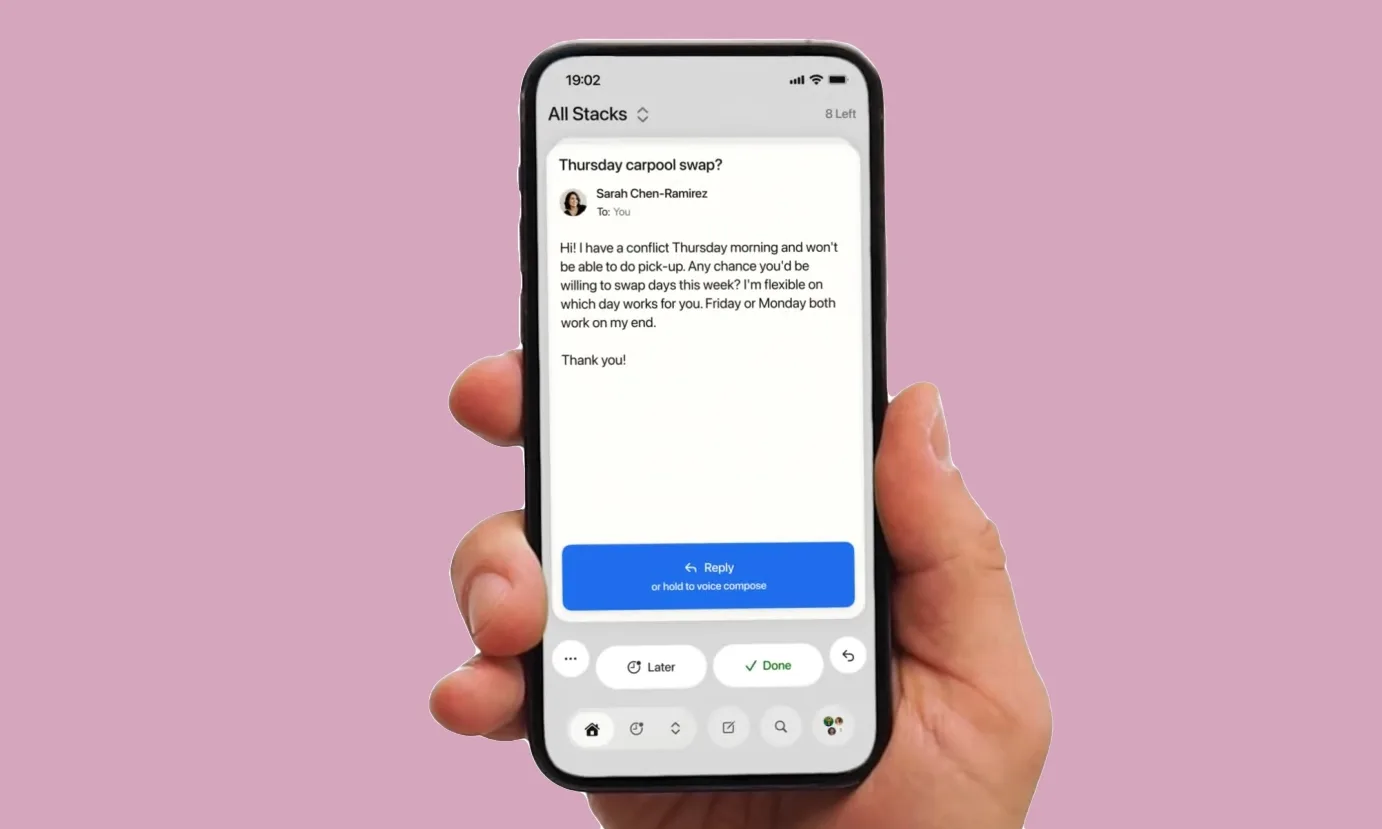
Avec is a new mobile email app that presents your inbox to you as a stack of swipeable cards instead of the usual list view. While it may sound like a big change, the idea is pretty simple in terms of functionality. Swipe left to deal with an email later, swipe right to mark it done or archive it, and swipe down to throw less important messages into an “unimportant” pile that the app can later group together for easier cleanup.
Avec
Why this is such an interesting solution
The card-based interface is the headline here, and yes, the Tinder comparison is doing a lot of the marketing work. But Avec is aiming to reduce in-box fatigue on mobile phones, where email usually feels cramped, tedious, and too easy to ignore. The app includes a regular list-based inbox for people who aren’t ready to fully make the jump to a swipe-card style.
But this design alone could’ve made Avec into just another quirky email client. Instead, it is also leaning into voice inputs and AI.
How does AI play into this?
Avec lets users hold a button to dictate an email reply by voice. And once you stop speaking, the app turns that recording into a draft that you can review, edit, and send. This, according to founder Jonathan Unikowski, gives Avec an edge over separate keyboard-based dictation tools because the app can see the full email context, understand names, and better match tone and writing styles.
Advertisement
Avec
But there’s a catch.
For now, Avec is only available in the US, and it is exclusive to the iPhone. Though it is free to use for Gmail users. Outlook support is reportedly in the works, and the company says paid tiers will come later. However, what these premium features will offer has yet to be finalized.
Humanly’s job seeker-facing product offers AI-powered coaching on interview preparation, resume writing, salary negotiation and more. (Humanly Image)
The market for recruiting software — tools that help companies find and screen candidates — is worth $14 billion. The market for actually placing people in jobs is worth $500 billion.
Humanly just raised $25 million to chase the bigger number.
The Bellevue, Wash.-based company, which makes AI-powered interviewing tools for employers, is using its new Series B funding to reposition itself as what CEO Prem Kumar calls a “service-as-a-software” company — one that doesn’t just give recruiters tools to find candidates, but delivers pre-vetted, ready-to-hire job seekers on demand. It’s less recruiting software, more staffing agency replacement.
The round included participation from SEEK Investments, Drive Capital, Zeal Capital Partners, Converge and others. Humanly has raised $52 million to date.
“I wouldn’t call it pivoting, but we’re reinventing ourselves,” Kumar said. “Instead of a tool to go out and find profiles of job seekers, we’re just giving you the candidate themselves.”
Advertisement
The goal is to build a continuously refreshed database of pre-interviewed job seekers, essentially like LinkedIn’s profile network, but everyone in it has already been vetted and is ready to place.
Founded in 2018, Humanly uses automation software to help companies screen job candidates, schedule interviews, automate initial communication, run reference checks, and more. It targets customers with high volume hiring needs.
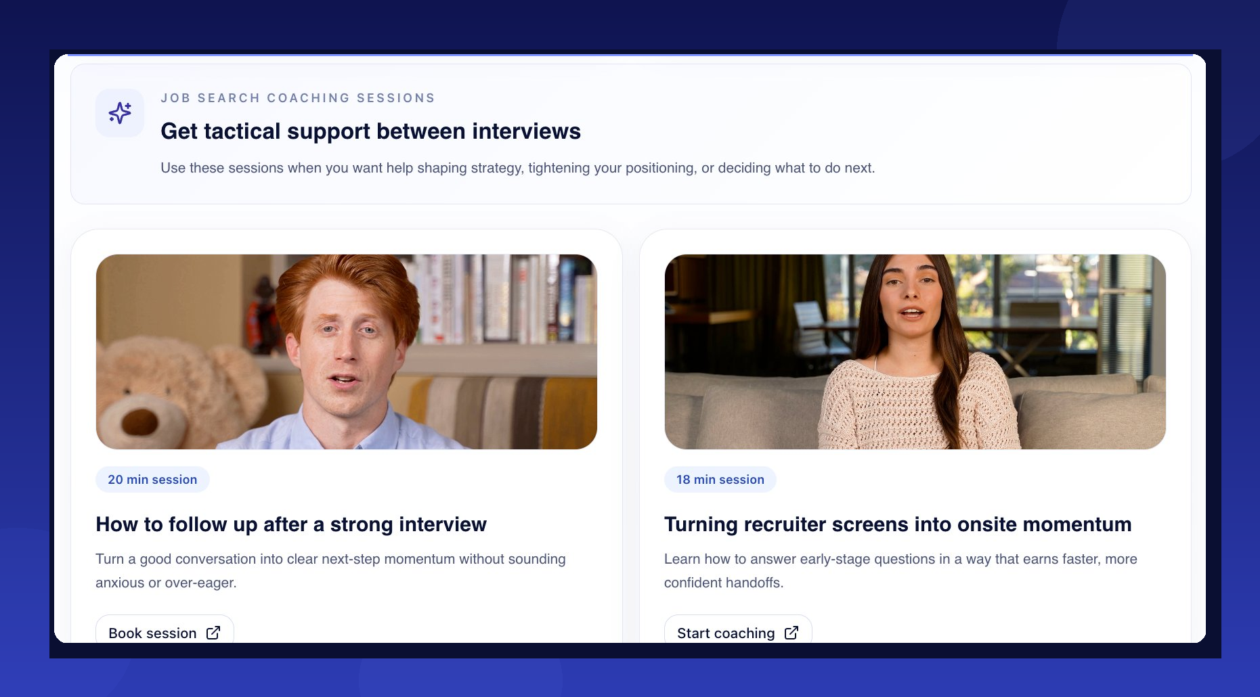
Humanly is also launching a job seeker-facing product, offering AI-powered coaching on interview preparation, resume writing, and salary negotiation — giving the company a direct relationship with candidates rather than relying solely on employer clients to funnel people into its system.
The timing may be working in Humanly’s favor. A difficult job market means more applicants chasing fewer openings, which Kumar says only amplifies the problem his company is trying to solve. AI-powered application tools have made it easier than ever for candidates to blast out applications en masse, turning virtually every open role into a high-volume hiring event. That puts more pressure on employers to filter smarter — and faster.
Advertisement
Prem Kumar, CEO of Humanly, during an episode of the GeekWire series “Elevator Pitch.” in 2022. He won Startup CEO of the Year honors at the 2023 GeekWire Awards.(GeekWire File Photo)
To build out its candidate database at scale, Humanly is striking partnerships that give it access to job marketplaces where job seekers go to find work and access training. Humanly is currently conducting around 9,000 interviews per day and could gain access to an estimated 20 million job seekers over the next 12 months.
Humanly is also working with Microsoft on its neurodiversity hiring program, using AI to help neurodiverse candidates practice for technical and behavioral interviews in a structured, low-pressure environment. The partnership addresses a gap Kumar says traditional hiring processes often miss — that interview performance frequently measures communication under pressure rather than actual capability.
Through the program, candidates use Humanly’s AI avatar coach to practice explaining their thinking, walking through trade-offs, and building confidence before facing a real interviewer. Kumar has ADHD and his son was recently diagnosed, and he said the tool may also help reduce a subtler problem.
“We have a lot of data around some of the bias in human interviews,” Kumar said. “We feel an AI interviewer, interviewing someone neurodiverse, might bias against them less than humans in some cases.”
Humanly, which is No. 152 on the GeekWire 200 ranked index of the Pacific Northwest’s top startups, counts Microsoft, Domino’s, Massage Envy, Worldwide Flight Services, and MGM Resorts and Casinos among its more than 120 customers. Kumar said the company’s revenue has grown 3.9 times over the past seven months and the startup now employs about 50 people.
Advertisement
Overall, Kumar sees Humanly’s shift as bigger than just its own reinvention — it’s a fundamental change in what enterprise software can now deliver.
“You no longer need to hire a big team to run a bunch of tools to get the outcome,” he said. “The tools can begin to do that themselves.”
Longtime Slashdot reader fahrbot-bot shares a report from NewScientist: According to quantum chromodynamics (QCD) — widely considered to be our best theory for describing the strong force, which binds quarks inside protons and neutrons — even a perfect vacuum isn’t truly empty. Instead, it is filled with short-lived disturbances in the underlying energy of space that flicker in and out of existence, known as virtual particles. Among them are quark-antiquark pairs. Under normal conditions, these fleeting pairs vanish almost as soon as they appear. But if enough energy is injected into a vacuum, QCD predicts they can be promoted into real, detectable particles with measurable mass. Now, the STAR collaboration — an international team of physicists working at the Relativistic Heavy Ion Collider in Brookhaven National Laboratory in New York state — has observed this process for the first time.
The team smashed together high-energy protons in a vacuum, producing a spray of particles. Some of these particles should be quark-antiquark pairs pulled directly from the vacuum itself, but quarks can never exist alone and immediately combine into composite particles. Quarks and antiquarks are born with their spins correlated — a shared quantum alignment inherited from the vacuum. The researchers found that this link persists even after the quarks and antiquarks become part of larger particles called hyperons, which decay in less than a tenth of a billionth of a second. Spotting these spin-aligned hyperons in the aftermath of the proton collisions allowed the researchers to confirm that the quarks within them came from the vacuum. The findings have been published in the journal Nature.
Google has removed popular psychological horror game Doki Doki Literature Club! from the Play Store. According to Dan Salvato, who led its development team, and publisher Serenity Forge, Google told them the visual novel was removed because it violated its Terms of Service in its depiction of sensitive themes. The game is “widely celebrated for portraying mental health in a way that meaningfully connects deeply with players around the world,” they said in their announcement. Its free version, which came out first, has been downloaded at least 30 million times, while the paid “Plus” version has had at least one million downloads. The visual novel has repeatedly made Engadget’s lists of favorite games over the years.
Doki Doki Literature Club! has the drawing style and the makings of a typical dating sim, but players find themselves confronted with serious themes, including depression and suicide, soon after starting. Its Play listing was appropriately marked as “Mature 17+,” which means that children won’t be able to download it if their devices have parental controls. In addition, the developers clearly communicate that the game tackles serious issues. “This game is not suitable for children or those who are easily disturbed” is the first line of the game. “In-game content warnings for such material can be enabled in the Settings menu at any time,” it also warns players. In settings, there’s link to a page that lists content warnings that apply to the visual novel.
We’ve asked Google for a statement on why the game was removed, and we’ll update this post when we hear back. Salvator and Serenity Forge said they’re doing everything they can to “find a path forward for getting DDLC reinstated on the Google Play Store.” They’re also looking at other methods of distribution for Android devices. At the moment, the game’s Play listing shows that it’s still not available, but it’s still out on Steam, PlayStation, Switch eshop and iOS.
Google has rolled out Device Bound Session Credentials (DBSC) protection in Chrome 146 for Windows, designed to block info-stealing malware from harvesting session cookies.
macOS users will benefit from this security feature in a future Chrome release that has yet to be announced.
The new protection has been announced in 2024, and it works by cryptographically linking a user’s session to their specific hardware, such as a computer’s security chip – the Trusted Platform Module (TPM) on Windows and the Secure Enclave on macOS.
Since the unique public/private keys for encrypting and decrypting sensitive data are generated by the security chip, they cannot be exported from the machine.
This prevents the attacker from using stolen session data because the unique private key protecting it cannot be exported from the machine.
Advertisement
“The issuance of new short-lived session cookies is contingent upon Chrome proving possession of the corresponding private key to the server,” Google says in an announcement today.
Without this key, any exfiltrated session cookie expires and becomes useless to an attacker almost immediately.
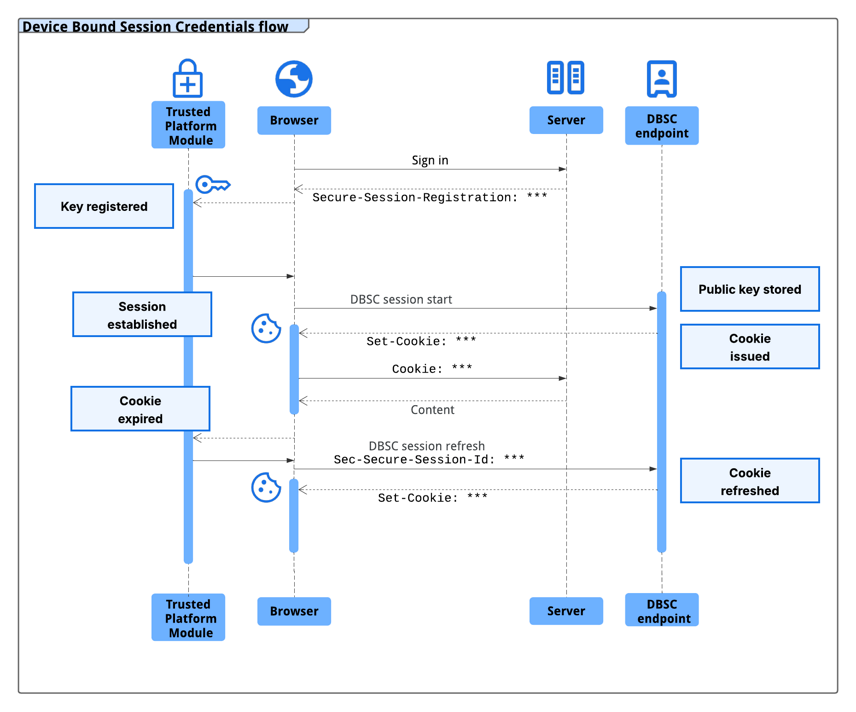
Browser-server interaction in the context of the DBSC protocol source: Google
A session cookie acts as an authentication token, typically with a longer validity time, and is created server-side based on your username and password.
The server uses the session cookie for identification and sends it to the browser, which presents it when you access the online service.
Advertisement
Because they allow authenticating to a server without providing credentials, threat actors use specialized malware called infostealer to collect session cookies.
Google says that multiple infostealer malware families, like LummaC2, “have become increasingly sophisticated at harvesting these credentials,” allowing hackers to gain access to users’ accounts.
“Crucially, once sophisticated malware has gained access to a machine, it can read the local files and memory where browsers store authentication cookies. As a result, there is no reliable way to prevent cookie exfiltration using software alone on any operating system” – Google
The DBSC protocol was built to be private by design, with each session being backed by a distinct key. This prevents websites from correlating user activity across multiple sessions or sites on the same device.
Advertisement
Additionally, the protocol enables minimal information exchange that requires only the per-session public key necessary to certify proof of possession, and does not leak device identifiers.
In a year of testing an early version of DBSC in partnership with multiple web platforms, including Okta, Google observed a notable decline in session theft events.
Google partnered with Microsoft for developing the DBSC protocol as an open web standard and received input “from many in the industry that are responsible for web security.”
Websites can upgrade to the more secure, hardware-bound sessions by adding a dedicated registration and refresh endpoints to their backends without sacrificing compatibility with the existing frontend.
Advertisement
Web developers can turn to Google’s guide for DBSC implementation details. Specifications are available on the World Wide Web Consortium (W3C) website, while an explainer can be found on GitHub.
Automated pentesting proves the path exists. BAS proves whether your controls stop it. Most teams run one without the other.
This whitepaper maps six validation surfaces, shows where coverage ends, and provides practitioners with three diagnostic questions for any tool evaluation.
Grado didn’t exactly drop this out of nowhere. When we spoke with the team at CanJam NYC 2026, there were enough hints to read between the lines, but nobody was about to say it out loud. Loose lips and all that. So we kept it quiet. Nobody wanted to end up in the East River. Now it’s official.
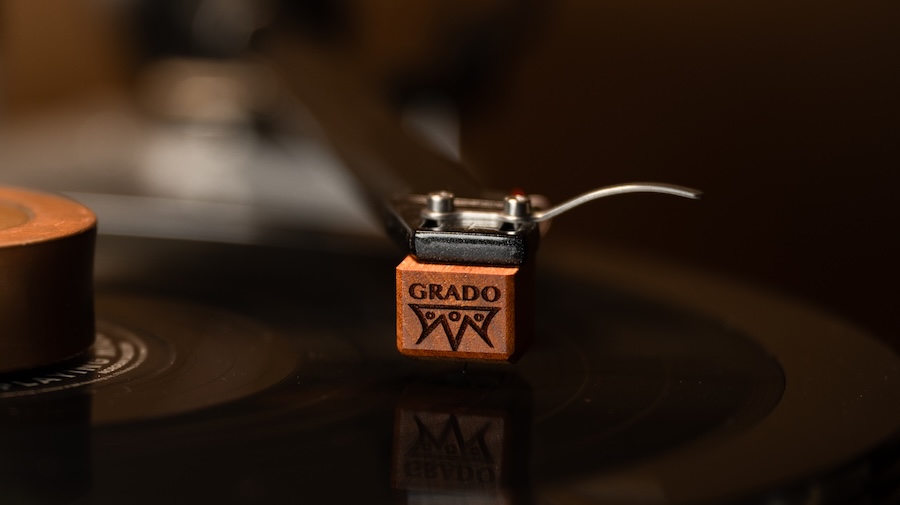
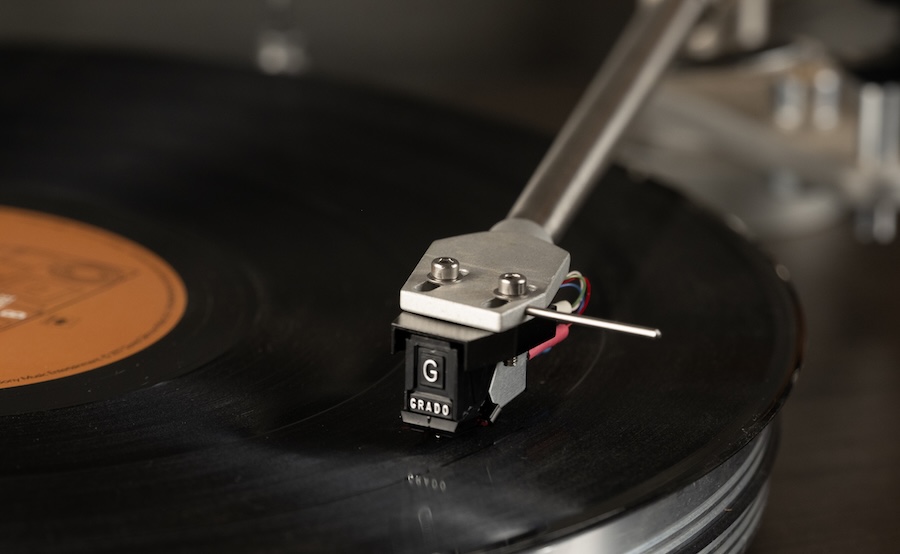
Grado Labs is rolling out an updated phono cartridge lineup across its Lineage, Timbre, and Prestige Series, built around targeted refinements to the stylus assembly, coil composition, and housing geometry. No reinvention, no marketing circus, just a clear effort to improve how these cartridges track, resolve detail, and behave in real-world setups.
The timing isn’t accidental. Vinyl’s resurgence has been very good to Grado’s cartridge business, but it’s also brought a flood of competition from legacy brands tightening their game to newer players looking to grab market share. Standing still isn’t an option when Ortofon, Audio-Technica, Denon, Hana, and Dynavector keep rolling out new cartridge models with every product cycle.
That’s what makes this update matter. They’re going back to the core elements that define cartridge performance and refining them across the board—better materials, tighter tolerances, and more consistency from model to model.
Advertisement
And let’s be clear—John Grado and Rich Grado didn’t build this brand by coasting. This is what staying relevant looks like when you’ve been doing it since 1953.
In other words, the vinyl boom may have kept the lights on, but this is Grado making sure nobody else walks in and starts rearranging the furniture.
What’s Actually Changed: Stylus, Coils, and Housing Get Real Upgrades
The stylus assembly has been refined across the lineup, with diamond profiles and cantilever materials more carefully matched to each specific model. That matters. You’re not getting a one-size-fits-all approach anymore. Some models step up to nude Shibata diamonds, which offer better groove contact and improved tracking compared to the elliptical profiles used throughout much of the previous generation—but not every cartridge gets that upgrade, and Grado isn’t pretending otherwise.
Coils have been updated across the board with OCC copper, with purity levels scaled depending on the model. The goal is pretty straightforward: cleaner signal transmission, better channel balance, and fewer inconsistencies from unit to unit.
Advertisement
On the mechanical side, the wood-bodied cartridges see revised housing geometry. This isn’t just cosmetic. The updated shapes are designed to improve stability during playback and make setup less of a headache—something anyone who has wrestled with cartridge alignment will appreciate.
Lineage Series: Grado’s Top Shelf, No Apologies
The Lineage Series sits at the top of Grado’s cartridge lineup and uses the company’s low-output moving iron, flux-bridger architecture across all three models. All three get Brazilian Ebony wood bodies, nude Shibata styli, and stereo/mono options, but the cantilever material, frequency range, resistance, and weight are not identical across the range. That’s where the pecking order starts to show.
Grado Epoch4 — $9,995
The Epoch4 is the flagship. It uses a Brazilian Ebony wood body, sapphire cantilever with Shibata diamond, 1.0mV output at 5 CMV (45 degrees), 5 Hz to 75 kHz controlled frequency response, average 35 dB channel separation from 10-30 kHz, 10-47k ohm input load, 8mH inductance, 95 ohms resistance, 10.5 gram cartridge weight, 1.6-1.9 gram tracking force, and 20 μm/mN compliance. Grado also says the internal signal path uses ultra-high purity OCC copper with gold plating, and that the cartridge undergoes cryogenic treatment during component prep and final assembly.
Advertisement. Scroll to continue reading.
Grado Aeon4 — $4,995
The Aeon4 keeps the Brazilian Ebony body and sapphire/Shibata combo, with the same 1.0mV output, 10-47k ohm input load, 8mH inductance, 10.5 gram weight, 1.6-1.9 gram tracking force, and 20 μm/mN compliance. Where it differs from the Epoch4 is the controlled frequency response, which is listed at 5 Hz to 70 kHz, and resistance, which drops to 74 ohms. Grado specifies ultra-high purity 7N OCC copper here. In other words, still serious, just not wearing the full tux.
Advertisement
Grado Statement4 — $3,500
The Statement4 is the entry point into the Lineage family, but it is not a stripped-down tourist model. It uses a Brazilian Ebony wood body and swaps to a machined boron cantilever with Shibata diamond. Specs include 1.0mV output at 5 CMV (45 degrees), 5 Hz to 65 kHz controlled frequency response, average 35 dB channel separation from 10-30 kHz, 10-47k ohm input load, 8mH inductance, 74 ohms resistance, 10 gram cartridge weight, 1.6-1.9 gram tracking force, and 20 μm/mN compliance. Like the Aeon4, it uses ultra-high purity 7N OCC copper and cryogenic treatment.
Timbre Series: Where Grado Dials It In for the Real World
The Timbre Series is where Grado Labs hits the balance point—high-end analog performance without drifting into Lineage-level pricing. This is the middle of the lineup, but it’s not a compromise. It’s a deliberate tuning exercise.
Across the range, Grado sticks with elliptical diamond styli and its moving iron, flux-bridger design. The emphasis here isn’t on any single upgrade—it’s on how everything works together. Stylus profile, cantilever material, coil composition, and housing are treated as a system, not a checklist. The result is a presentation that leans into tonal balance, coherence, and musical flow rather than hyper-detail for its own sake.
Material choices define the hierarchy. The Reference3 and Master3 use American Osage wood bodies with boron cantilevers for greater control and resolution, while the Sonata3 and Platinum3 move to Mediterranean Olive wood paired with aluminum cantilevers. The Opus3, built from American Maple, rounds things out with a simpler aluminum cantilever configuration. Same core design philosophy throughout, just scaled in execution.
Grado Reference4 — $1,500
The Reference4 sits at the top of the Timbre Series. It uses an American Osage wood body, machined boron cantilever with Shibata diamond, 4.0mV high output or 1.0mV low output at 5 CMV (45 degrees), 10 Hz to 60 kHz controlled frequency response, average 30 dB channel separation from 10-30 kHz, 10k-47k ohm input load, 55mH inductance in high output and 6mH in low output, 660 ohms resistance in high output and 70 ohms in low output, 9.6 gram cartridge weight, 1.6-1.9 gram tracking force, and 20 μm/mN compliance. Grado also specifies ultra high purity 6N OCC copper in the internal signal path, along with cryogenic treatment and internal damping.
Advertisement
Grado Master4 — $1,000
The Master4 uses an American Osage wood body, machined boron cantilever with elliptical diamond, 4.0mV high output or 1.0mV low output at 5 CMV (45 degrees), 10 Hz to 60 kHz controlled frequency response, average 30 dB channel separation from 10-30 kHz, 10k-47k ohm input load, 55mH inductance in high output and 6mH in low output, 660 ohms resistance in high output and 70 ohms in low output, 9.6 gram cartridge weight, 1.6-1.9 gram tracking force, and 20 μm/mN compliance. It is offered in high output, low output, and mono versions.
Grado Sonata4 — $600
The Sonata4 uses a Mediterranean Olive wood body, special aluminum cantilever with elliptical diamond, 4.0mV high output or 1.0mV low output at 5 CMV (45 degrees), 10 Hz to 60 kHz controlled frequency response, average 30 dB channel separation from 10-30 kHz, 10k-47k ohm input load, 55mH inductance in high output and 6mH in low output, 660 ohms resistance in high output and 70 ohms in low output, 9.4 gram cartridge weight, 1.6-1.9 gram tracking force, and 20 μm/mN compliance. It is also offered in high output, low output, and mono versions.
Grado Platinum4 — $400
The Platinum4 uses a Mediterranean Olive wood body, aluminum cantilever with elliptical diamond, 4.0mV high output or 1.0mV low output at 5 CMV (45 degrees), 10 Hz to 60 kHz controlled frequency response, average 30 dB channel separation from 10-30 kHz, 10k-47k ohm input load, 55mH inductance in high output and 6mH in low output, 660 ohms resistance in high output and 70 ohms in low output, 9.4 gram cartridge weight, 1.6-1.9 gram tracking force, and 20 μm/mN compliance. It is available in high output, low output, and mono versions.
Grado Opus4 — $300
The Opus4 is the entry point into the Timbre Series. It uses an American Maple wood body, aluminum cantilever with elliptical diamond, 4.0mV high output or 1.0mV low output at 5 CMV (45 degrees), 10 Hz to 60 kHz controlled frequency response, average 30 dB channel separation from 10-30 kHz, 10k-47k ohm input load, 55mH inductance in high output and 6mH in low output, 660 ohms resistance in high output and 70 ohms in low output, 8.3 gram cartridge weight, 1.6-1.9 gram tracking force, and 20 μm/mN compliance. Grado says the internal signal path uses ultra high purity 5N OCC copper, with cryogenic treatment and internal damping as part of the build process.
Advertisement
Prestige Series: Where Grado Keeps It Simple and Affordable
The Prestige Series is the foundation of what Grado Labs has been doing for decades and it hasn’t survived this long by accident. This is the entry point into the lineup, but it’s built on a design that’s been refined over more than fifty years, not reinvented every product cycle. Those paying attention will notice that the lineup has been trimmed down.
Across the range, Grado sticks with elliptical diamond styli, aluminum cantilevers, and its moving iron, flux-bridger design. The goal here isn’t to chase ultimate resolution—it’s consistency. Strong tracking, a balanced tonal presentation, and performance that doesn’t drift over time. These are cartridges designed to work, not impress on spec sheets.
Advertisement. Scroll to continue reading.
One of the biggest advantages in the Prestige Series is the user-replaceable stylus system. When the stylus wears out, you don’t toss the cartridge, you swap the stylus and keep going. It’s practical, cost-effective, and a big part of why these have remained popular with both newcomers and long-time vinyl listeners.
No exotic wood bodies here, no sapphire cantilevers, just a straightforward design that prioritizes reliability and ease of use without abandoning the Grado house sound.
Advertisement
Grado Prestige Gold4 — $260
The Prestige Gold4 sits at the top of the current Prestige Series. It uses a four piece OTL cantilever with a Grado specific elliptical diamond stylus mounted on a brass bushing, 4 mV output at 5 CMV (45 degrees), 10 Hz to 55 kHz frequency response, average 25 dB channel separation from 10-30 kHz, 10k-47k ohm input load, 50 mH inductance, 660 ohms DC resistance, 6 gram cartridge weight, 1.6-1.9 gram tracking force, and 20 um/mN compliance. Grado also says the Gold4 uses a machined turned generator for lower distortion and greater transparency, along with ultra high purity copper wire and its twin magnet / Flux-Bridger moving iron design.
Grado Prestige Red4 — $190
The Prestige Red4 uses a bonded elliptical diamond mounted to an aluminum cantilever, 4 mV output at 5 CMV (45 degrees), 10 Hz to 55 kHz frequency response, average 25 dB channel separation from 10-30 kHz, 10k-47k ohm input load, 50 mH inductance, 660 ohms DC resistance, 6 gram cartridge weight, 1.6-1.9 gram tracking force, and 20 um/mN compliance. Grado describes it as a high output moving iron cartridge and notes that the stylus assembly is user-replaceable, with Prestige Series styli interchangeable across models.
Grado Prestige Green4 — $140
The Prestige Green4 uses a bonded elliptical diamond mounted to an aluminum cantilever, 4 mV output at 5 CMV (45 degrees), 10 Hz to 55 kHz frequency response, average 25 dB channel separation from 10-30 kHz, 10k-47k ohm input load, 50 mH inductance, 660 ohms DC resistance, 6 gram cartridge weight, 1.6-1.9 gram tracking force, and 20 um/mN compliance. Grado also describes it as a high output moving iron cartridge with a user-replaceable stylus assembly, available in both standard mount and P-mount versions.
Trade-In Program: Grado’s Answer to Cartridge Burnout
Grado takes a different approach to long-term ownership, and it’s one that actually makes sense if you’ve been around analog long enough to know how this usually goes.
Advertisement
For its wood-bodied models, Grado Labs offers a cartridge trade-in program that lets you send back your existing cartridge; no matter how worn, and apply it toward a new one at a reduced cost. No drama, no “must be in mint condition” nonsense.
The idea is simple: keep people in the ecosystem without forcing them to start from scratch every time their stylus wears down or their system evolves. Instead of treating cartridges as disposable, Grado treats them like part of a longer-term upgrade path.
That flexibility cuts both ways. You can move up the range if you’re chasing more performance, or step sideways or even downward if your system changes or priorities shift. Either way, you’re getting a current production model with the latest refinements baked in. You won’t get that from Denon, Hana, or Clearaudio.
The Bottom Line
Grado didn’t reinvent anything—they refined the parts that actually matter. Across Lineage, Timbre, and Prestige, the updates focus on improved stylus assemblies, higher-purity OCC copper coils, and revised housing geometry, all aimed at better tracking, consistency, and easier setup.
Advertisement
On paper, the lineup is clearly tiered: Lineage pushes materials and resolution at the top, Timbre balances performance and design choices in the middle, and Prestige continues as the accessible, user-friendly foundation with its replaceable stylus system. Each range sticks to the same moving iron DNA, just executed at different levels.
Who should pay attention? Anyone with a vinyl setup who hasn’t looked at Grado in a while—and especially those watching how established brands respond to a more competitive cartridge market.





























































You must be logged in to post a comment Login