Denon is taking a big swing at multi-room audio in 2026 with a major revamp of its HEOS lineup, with three all-new wireless home speakers, and why not? The multi-room category continues to appeal to serious listeners who want convenience without giving up performance. And with Sonos still dealing with the fallout from its 2024 app debacle, there is real opportunity for other audio brands to chip away at its market grip.
Denon’s approach comprises three rather pricey options, including the entry-level Denon 200 ($399), the midrange Denon 400 ($599), and the flagship Denon 600 (a whopping $799). The Home 200 and Home 400 are particularly poised to take on Sonos and its similarly designed Era 100 and Era 300 speakers, so it was only natural that we took a look at those two first, and I’ll be comparing them to those Sonos models early and often.
Each of Denon’s new speakers offers some form of Dolby Atmos Music support (virtualized in the Home 200), along with convenient setup and control via Denon’s HEOS app, and multiple connection options, from Wi-Fi and Bluetooth to 3.5mm and USB input. The obvious question is whether the new lineup delivers performance that justifies the premium pricing.
The short answer is yes, you’re getting what you pay for here, at least when it comes to audio quality. But that doesn’t necessarily mean you should throw in your Sonos card and make the swap just yet. Here’s how it all shakes out.
Advertisement
Swift Setup
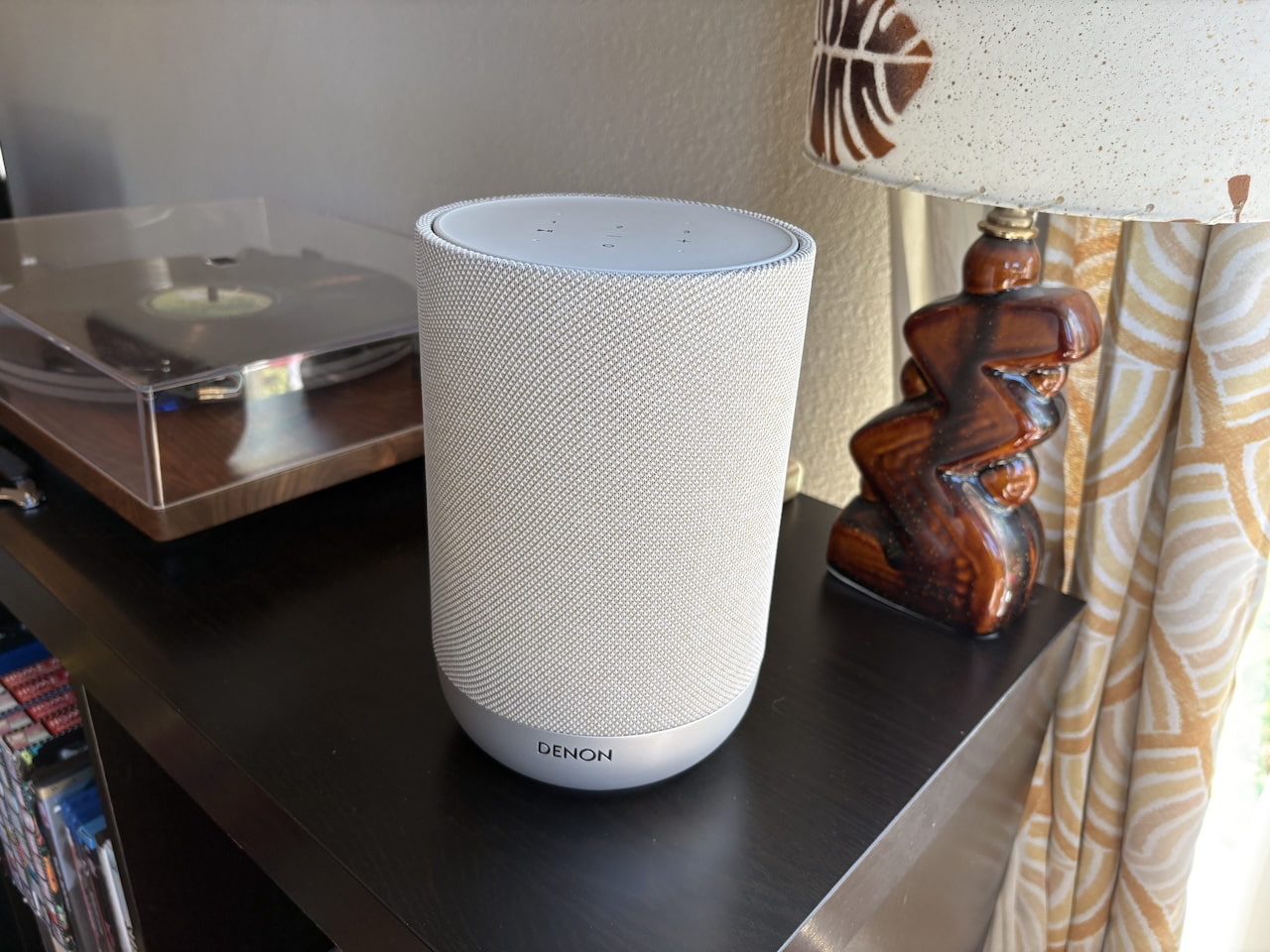
Denon Home 200
Getting the Home 200 and Home 400 ready to play is as simple as pulling them from their cardboard packaging, plugging in, and jumping on the HEOS app. The app immediately feels Sonos-like, though the design and layout are a bit clunkier. Most importantly, it makes setup and Wi-Fi connection virtually effortless, something I couldn’t say about HEOS speakers I’ve tested in the past. Adding the Denon 200 took just a few minutes, and the Home 400 was even quicker after creating my profile, accomplished with just a few taps. After a five-minute firmware update, the speakers were online and ready to roll.
As with Sonos, speakers are designated in the HEOS app as “Rooms,” allowing them to operate independently in different spaces or be grouped with other HEOS speakers and devices. You can name them after the actual room, give them something more personal, or, as I did during testing, use the model number to keep each speaker straight.
Design & Features: Elegance Meets Substance
While each Home speaker has its own aesthetic vibe, Denon did well in creating a common design language—call it elegant utilitarianism. The Home 200 is, like so many rivals, basically just a slick column of sound, though at 8.5 inches high and 5.5 inches deep, it’s notably bigger than the Era 100. Its acoustic wrapping is a familiar theme found in everything from Bluesound’s latest Pulse Flex to Google’s Nest smart speakers, Its glittering matte base, available in silver/stone or charcoal, and rather gaudy centralized LED remind me of some of the first Wi-Fi speakers I tested back in the 2010s. Mercifully, the light can be dimmed or turned off in the app settings.
Under the Home 200’s grille are three drivers, including dual 1-inch tweeters and a four-inch woofer, powered by three class D amplifiers. The lack of any upfiring or side-firing drivers means any spatial audio you hear is achieved through virtualization, and each of Denon’s Home speakers is set to provide a deeper and wider soundstage than its drivers suggest by default via digital processing.
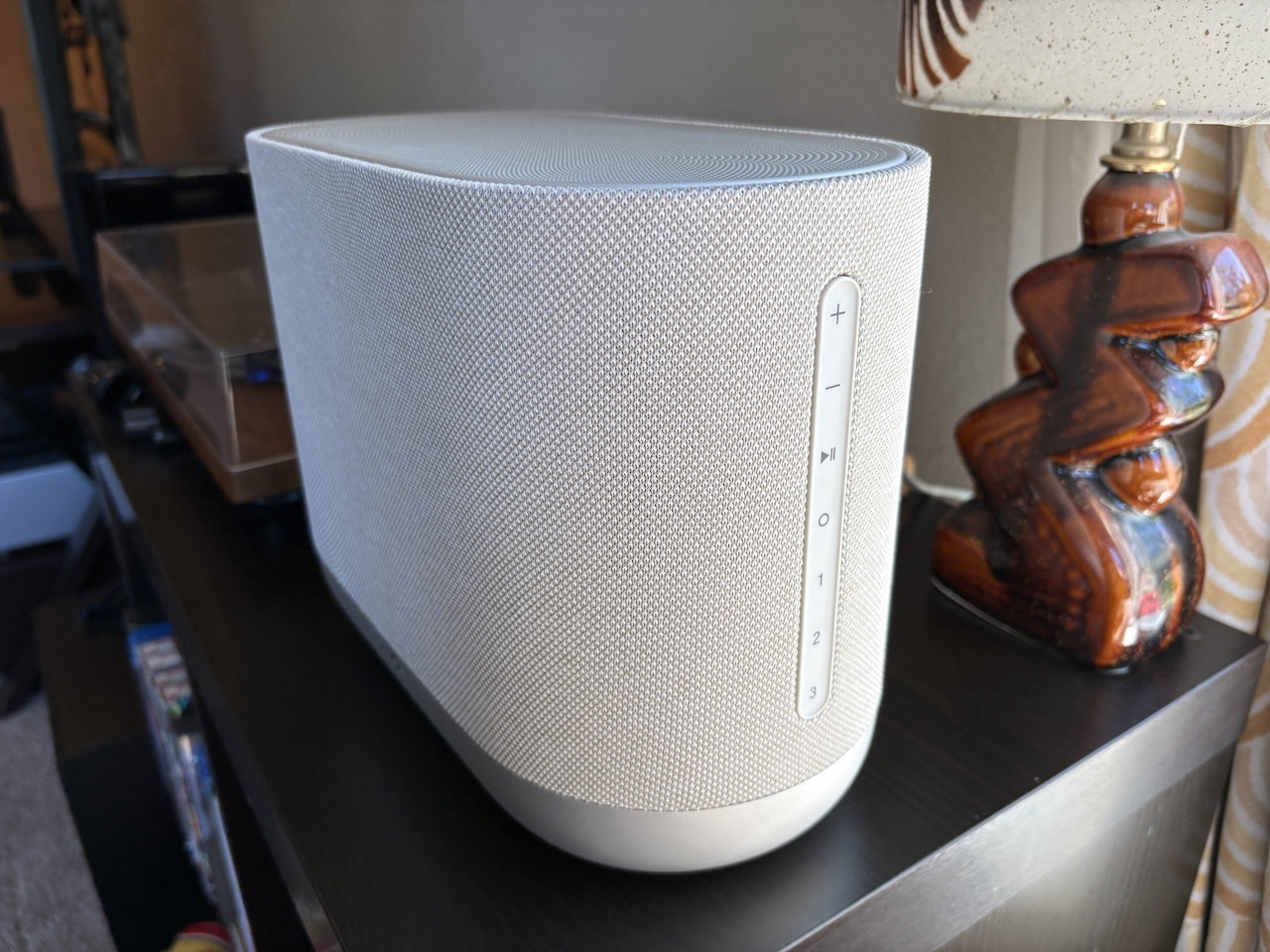
Denon Home 400
The larger Home 400 offers a few more style points, somewhat reminiscent of a curvy Vegas hotel wrapped in fabric. It sits 8.6 inches high, 5.9 inches deep, and 11.8 inches wide. On top is a stout grille to protect the dual .75-inch upfiring drivers set at angles to help expand spatial audio. Those are joined by two forward-facing 1-inch tweeters, and dual 4.5-inch woofers, each powered by its own class D amplifier.
Advertisement
Both speakers offer a full swath of touch controls to supplement the HEOS app, including volume, play/pause, an action key for a voice assistant, and three “Quick Select” keys that can be programmed to a desired station or service. The Home 400 sets them on a side control strip, while the Home 200 hosts them on its rounded top. It’s a busier look than the more minimalist Sonos controls, but they’re pretty convenient in daily use.
Connectivity and Smarts
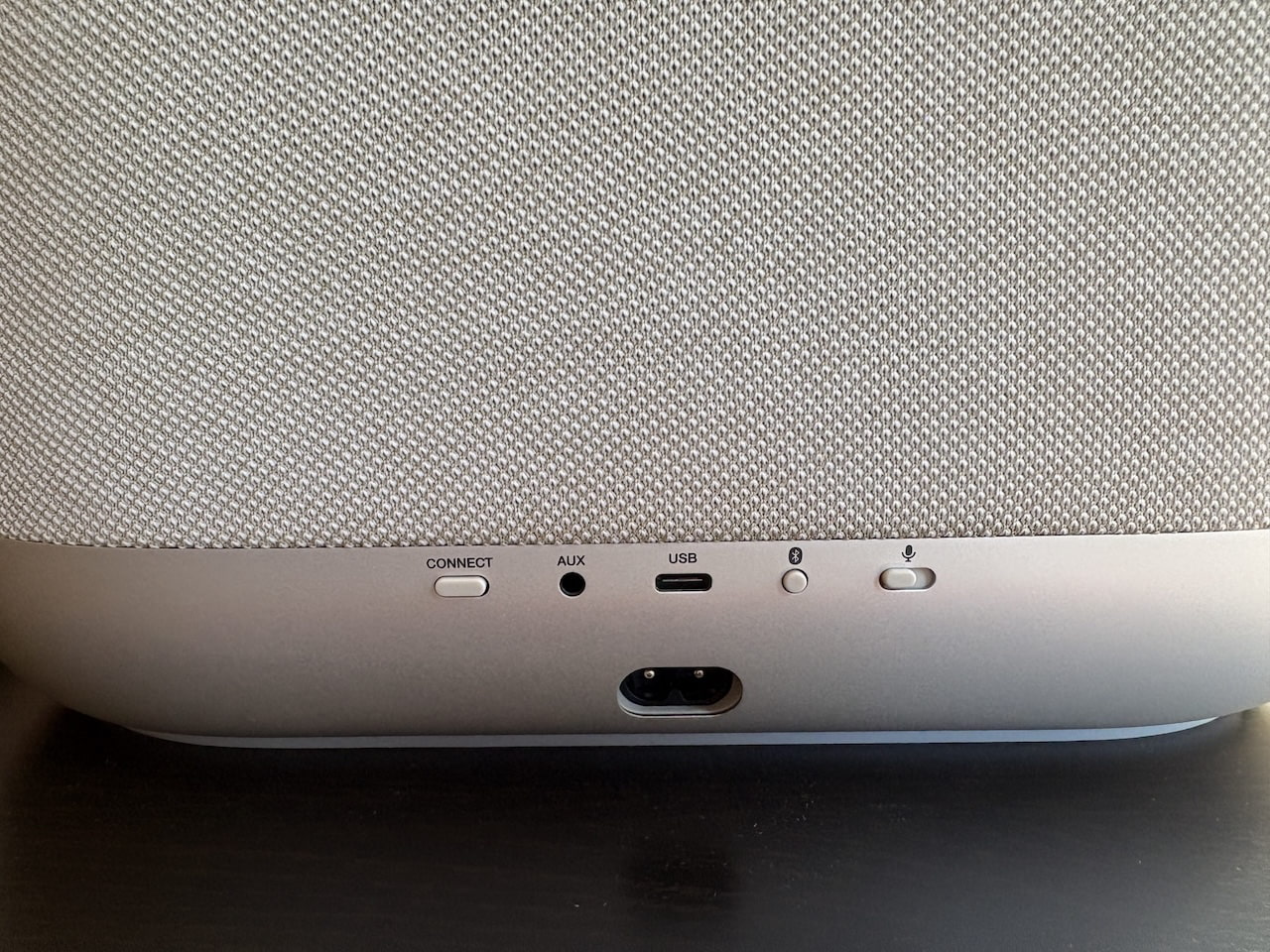
Each of the speakers offers a host of connectivity options, including Bluetooth, Wi-Fi (with both 2.4GHz and 5GHz support), a 3.5mm aux input, and a USB connection, which can connect a NAS storage drive or double as an Ethernet input via an adapter (not included). Streaming support includes AirPlay 2, as well as Spotify and TIDAL Connect, and Qobuz Connect. Unlike Sonos speakers, Google Cast isn’t offered, and while there’s an onboard microphone, there’s no support for Google Assistant or Alexa. Siri is (oddly) only available if you have a HomePod connected, so if smarts or voice control are of concern, you’ll want to look elsewhere.
Advertisement. Scroll to continue reading.
Denon Home 400 (rear)
As for built-in streaming services, you won’t find the 100+ options Sonos supports, but you’ll get top options like Pandora, Spotify, TIDAL, Deezer, SiriusXM, and Qobuz, as well as loads of available internet radio stations. Apple Music is the biggest miss, available only via AirPlay. Dolby Atmos Music is available from TIDAL and Amazon Music Unlimited, but not Apple Music. Still, two out of three is not bad, and Sonos speakers do not currently support Dolby Atmos Music via TIDAL.
As with other multi-room systems, the Denon Home speakers can be grouped throughout the home, used as surrounds with the Denon Home 550 soundbar, currently the only supported bar, or paired directly with the Denon Home Subwoofer ($649). As expected, two Home 200s or two Home 400s can also be configured as a stereo pair.
Advertisement
Listening
When I first fired up the Home 200 to stream over Spotify Connect, I was immediately impressed by its width, breadth, and just how much bass the little speaker was able to muster. Vocals sounded slightly echoed, but since I was playing the speaker in the background, I didn’t pay it much attention at first.
After digging in deeper with some of my go-to test tracks, I noticed the speaker was making some odd choices in balancing frequencies, especially for more complex tracks. In Radiohead’s “Burn the Witch,” the entrance of the frantic strings seemed to push back the vocals the way I push my dog into the back seat on a road trip. I soon realized that each of Denon’s Home speakers defaults to an “Auto” mode, which attempts to virtualize every track for spatial audio, including stereo music, with varying results.
After switching to the alternate “Pure” mode, I found much more to like about the Home 200, which offers clarity, instrumental definition, and sheer potency that goes beyond the vast majority of speakers in its class—a good thing considering its price point. The bass in even basic pop tunes like Hall and Oates’ “Sarah Smiles” is reproduced with character and texture. The acoustic guitar in Joni Mitchel’s “California” is cut with a spritely vibrance that gives an almost live quality, while percussion and cymbals in tracks like White Denim’s “A Place to Start” show off serious sparkle in the upper midrange and treble.
Moving to the Home 400 stepped up the performance considerably. Again, I much preferred the “Pure” sound for everything besides Dolby Atmos Music (more on that below). Oddly, choosing the Pure mode means you can no longer adjust EQ on either speaker, but luckily, I rarely felt the need to. This model offers hefty punch for its size, and not just in the bass. Midrange instruments are rendered with impressive punch and muscle, and the speaker easily filled my room at midrange volume without any noticeable distortion. Occasionally, the splashy upper midrange pushed toward the edge of sharpness, but never crossed over.
Advertisement
Caroline Polachek’s revelatory dance track, “Welcome to My Island,” absolutely bumps on the Home 400, summoning a clean, expansive soundstage as her ethereal vocals sit out front of the groove with unabashed rawness. The timbre of each synth and percussive element is given a spotlight, with plenty to explore in the space between, and the crescendo into each chorus reveals impressive dynamic expression.
Sound Check
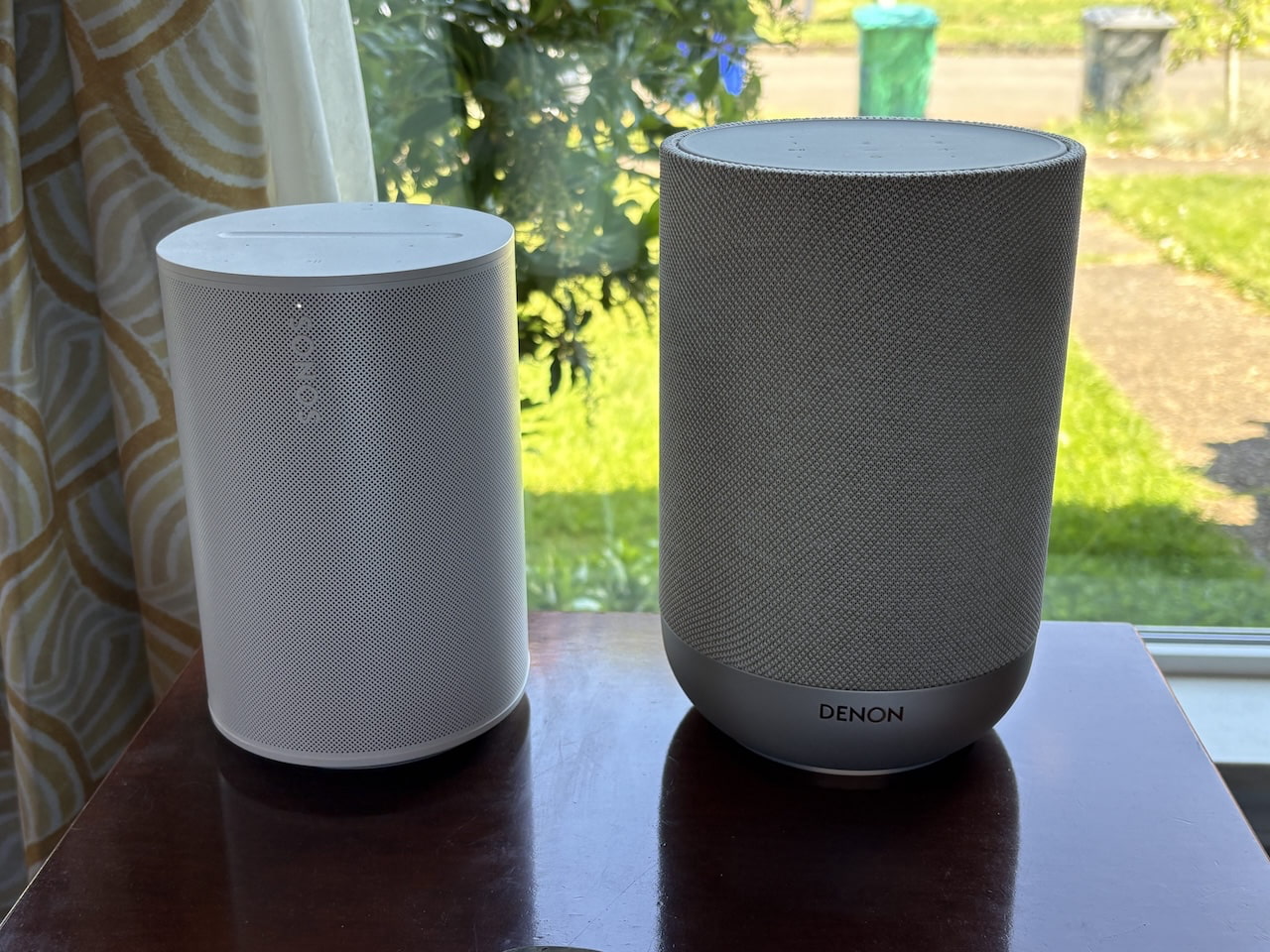
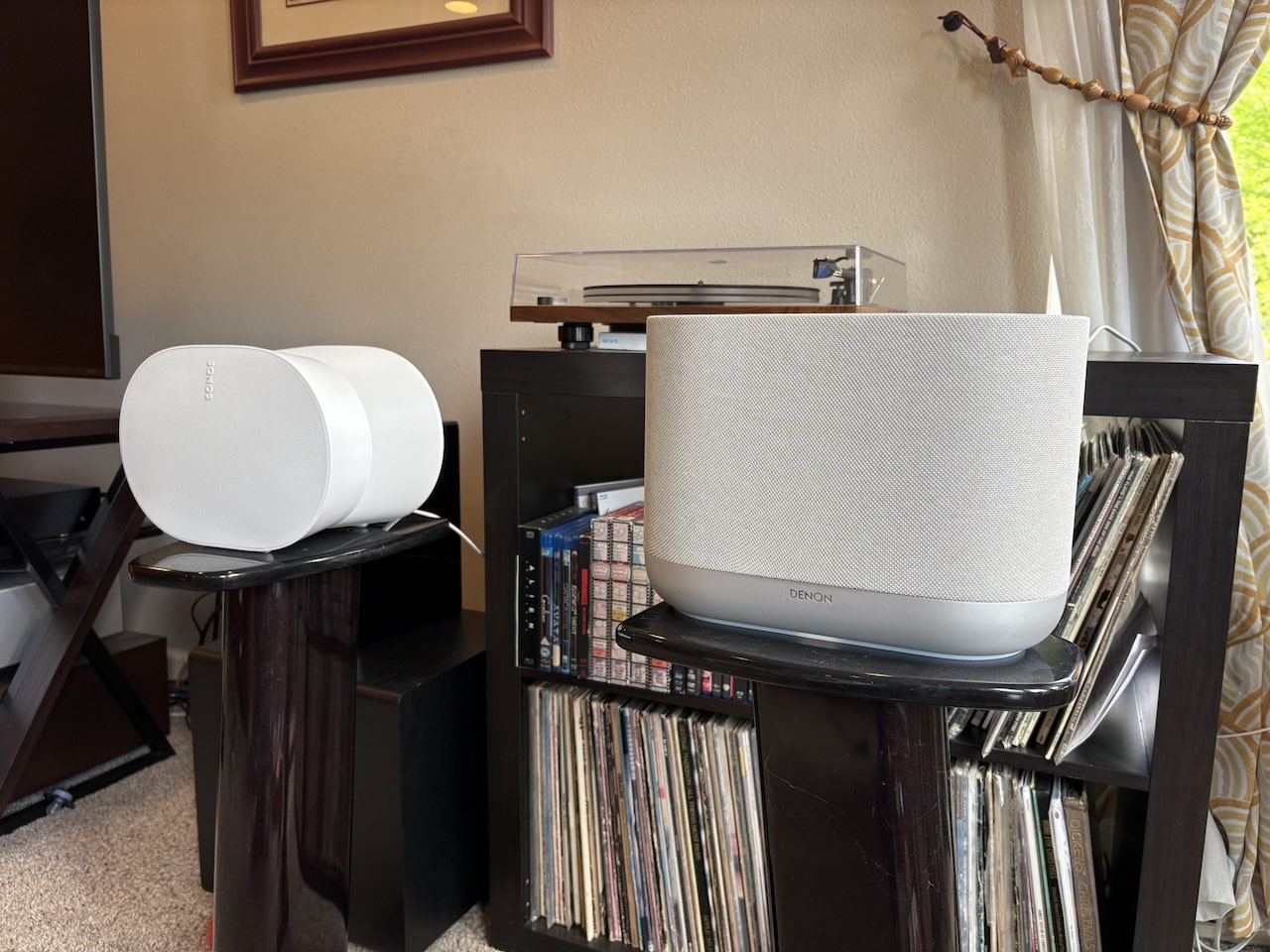
Sonos Era 100 (left) vs. Denon Home 200 (right)
Comparing the Home 200 to the Era 100 directly, Denon’s pricier speaker provided a bigger, cleaner sound, with better bass and finer attention to the small details. For its part, the Era 100 sounds a little smoother and more streamlined across the frequency range, with better consistency across genres.
Even so, the Home 200 outduels its smaller rival with its flashier, more engaging sonic signature, digging deeper into the texture of each instrument. If you care to try it, you’ll get a much wider soundstage in the Auto mode, even for stereo tracks, with instruments seeming to pop out multiple feet from its relatively meager footprint.
It’s a similar story with the Home 400, which is not only louder and more nuanced than the Era 300 in everyday listening, but also provides a more full-bodied sound across registers. That’s most noticeable in the meat of the sound, with midrange instruments like vocals, guitar, and percussion all offering a bigger, weightier punch. The Era 300 competes well in the bass and treble, with its futuristic, rounded sides providing some impressive acoustic efficiency. In most cases, though, the Home 400’s bigger, more precise sound signature is more satisfying.
Sonos Era 300 (left) and Denon Home 400 (right)
The one caveat is when I switched to Dolby Atmos Music, which I mostly tested on the service both brands support, Amazon Music Unlimited. Setting aside the sheer difficulty in both sourcing and actually tracking down good Dolby Atmos mixes, something with which the format in general continues to struggle across sources, the two speakers were on a more even playing field for 3D audio tracks.
That’s not too surprising, given that the Era 300 offers both upfiring and side-firing drivers for a more expansive and immersive soundstage than the Home 400 offers in its Pure mode. The slip-sliding space guitars and pop-up background vocals in Elton John’s “Rocket Man” (still one of the best Atmos mixes out there) were sent cascading around the room with the Era 300, whereas the Home 400 sounded more compact and resigned.
Advertisement
Advertisement. Scroll to continue reading.
That changed when I switched back to the previously maligned Auto mode, which used some surprisingly effective digital processing to push the sound well beyond the speaker’s physical footprint, by what sounded like six or seven feet. Unlike with stereo tracks, Auto mode did not introduce obvious frequency emphasis, overly echoed vocals, or strange compression with Dolby Atmos content.
Taken purely on sonic ability, the Home 200 and Home 400 outperform their Sonos rivals.
Usability
Sonos makes up some ground in daily use. Some of that may come down to my familiarity with the Sonos app, but it still offers a cleaner, more intuitive layout, especially for speaker grouping. Sonos’ method of selecting speakers and tapping “Apply” feels smoother and simpler than HEOS’ approach, which requires creating or dissolving different speaker groups in the Rooms tab.
Advertisement
Sonos also offers a simpler method for controlling features like EQ, which, unlike Denon’s speakers, is available at any time from the device settings. As mentioned, I was also confused by Denon’s decision to virtualize all audio to 3D sound by default, even in the stereo-only Home 200.
I was also surprised to find that the Home speakers convert lossless audio to compressed AAC by default. To get lossless playback, you have to go into each speaker’s settings and change Multi-room Audio Quality from Normal to High. The app even warns you to use Ethernet or “excellent Wi-Fi” first, though I had no major issues on my network.
The Bottom Line
Denon’s Home 200 and Home 400 deliver sound quality that rises above most speakers in their class, including Sonos, though the higher pricing is impossible to ignore. The HEOS app is relatively easy to use, setup is as slick as anything I’ve tested, and I had no issues using the speakers solo or grouped throughout my home over multiple weeks of testing.
They can also be connected to a Denon subwoofer or soundbar, and the potential for broader integration with Denon AV receivers could make the system even more versatile down the line. That makes the latest Denon Home speakers legitimate Sonos competitors, especially with newer formats like Dolby Atmos Music, where the Home 400 proved to be one of the stronger performers in the category.
Advertisement
Even so, they fall short of being the proverbial “Sonos killers.” You get fewer streaming services, fewer streaming options, no Chromecast support, and Denon’s HomePod-dependent Siri integration pales next to Sonos’ built-in Alexa and Sonos Voice Control.
That’s fine. This is not a zero-sum market, and Denon still makes a serious splash with some of the best multi-room speakers I’ve heard in this class. For listeners who want excellent performance in a multi-room system that gets close to Sonos simplicity, the Denon Home 200 and Home 400 deliver.
Recently, the biggest trend in kitchen gadgets has been “hands-free” and AI-powered devices that act as automated countertop assistants. There are plenty of devices that exist now for people who want to cook more (or at least look like someone who has their life together) but don’t always have the energy for a full kitchen marathon after work.
From a robot stirring your soup to a bread machine that kneads your dough while you watch TV, here is a list of gadgets that may make you feel like you’ve won adulthood. Or at least make cooking feel much less intimidating.
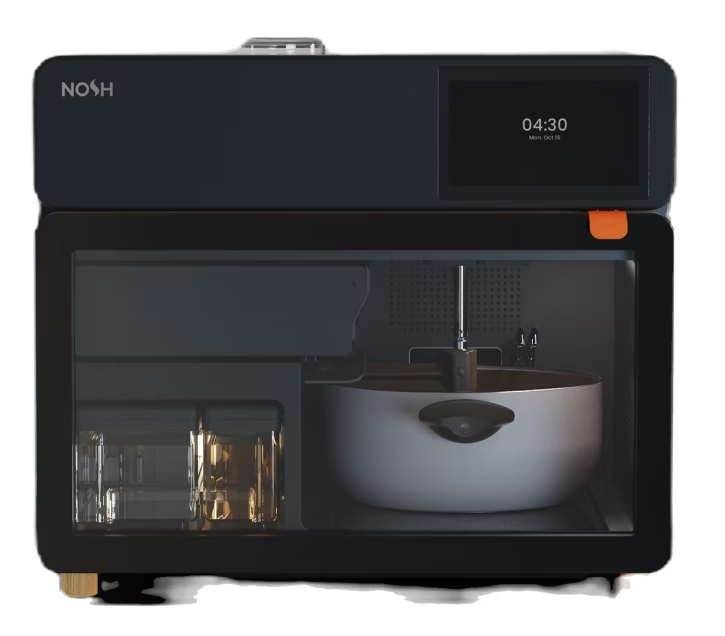
Image Credits:Nosh
The Nosh Chef Robot is a huge upgrade from a slow cooker or Instant Pot, as it can manage much of the cooking process autonomously.
The AI-powered robot dispenses exact amounts of oils, spices, and ingredients from reusable ingredient cartridges. Users still need to load ingredients beforehand, but once everything is in place, the robot can roughly chop, stir, sauté, portion, plate, and self-clean after meals. However, it can’t bake, roast, or steam, so there are limitations, but the company says it supports more than 500 dishes, such as stir-fry and curry.
The system runs on NoshOS, a proprietary AI trained on thousands of recipes and cooking techniques. Built-in sensors monitor moisture, texture, and browning levels in real time, adjusting heat and seasoning throughout the cooking process. It can even recognize ingredients already loaded into the device and recommend meals based on what’s available.
Advertisement
The Nosh One is currently available for preorder on Kickstarter, with shipments expected in summer 2026.
Image Credits:StirMate
An automatic soup stirrer sounds unnecessary until you use it once, and suddenly you’re hooked.
Instead of standing over the stove painstakingly stirring soup, sauce, risotto, pudding, or oatmeal, the StirMate Automatic Pot Stirrer rotates around the pot for you while you prep other ingredients, answer emails, or scroll on your phone.
It could also serve as a helpful accessibility tool for people with mobility issues or chronic pain.
Developed by father-and-son company StirMate, the third-generation model launched recently and includes a stronger motor, adjustable speed settings, and redesigned paddles for thicker recipes. It can run for up to 10 hours on a single charge and recharges in about an hour.
Advertisement
Modern bread machines have evolved far beyond basic sandwich bread. This newer smart model from KitchenArm automates the mixing, kneading, proofing, and baking process, turning homemade bread into a mostly hands-off experience. Just add ingredients, select a setting, and let the machine do the work.
The KitchenArm Smart Bread Machine includes 29 automatic programs with 21 bread settings, including white, French, whole wheat, rye, and sweet breads, plus non-bread options for yogurt, jam, and cake. There’s also a fully customizable “Homemade” mode for adjusting kneading and rising times manually.
Image Credits:De’Longhi
Morning routines are significantly easier when your coffee machine remembers your order and the usual time you want to drink it.
The De’Longhi Rivelia is a newer option and has recently garnered attention for its smart personalization features. In addition to grinding beans, brewing espresso, and frothing milk automatically, the Rivelia supports up to four user profiles, remembers favorite drinks and strength preferences, and adapts recommendations over time based on usage habits. Its “Coffee Routines” feature can even suggest beverages depending on the time of day.
While it’s definitely expensive, it’s widely considered one of the most popular high-end espresso machines currently available.
Advertisement
Image Credits:Nama
Store-bought oat milk prices alone are enough to push some people into making their own. The Nama M1 automates the entire process of making almond, oat, soy, or cashew milk, eliminating the old method of soaking, blending, and then straining that previously made homemade plant milk feel like a full-time job.
Newer nut milk makers have become faster, smarter, and much easier to clean, and the Nama M1 is one of the more widely reviewed examples currently on the market. Using centrifugal force, it can produce creamy plant milk in a few minutes with minimal prep work.
Image Credits:KitchenArt
The KitchenArt Auto-Measure Spice Carousel is one of the simplest products on this list, but it solves a very real problem: accidentally dumping half a container of garlic powder into dinner because the spice lid suddenly betrayed you. This rotating carousel stores up to 12 spices and dispenses measured amounts in 1/4 tsp amounts or poured normally through the built-in spouts.
No apps, no AI, no complicated setup. Just a genuinely practical kitchen tool.
When you purchase through links in our articles, we may earn a small commission. This doesn’t affect our editorial independence.
The smart glasses industry has long been a tortured dream of Silicon Valley. The premise is appealing enough: What if, to enjoy the benefits of mobile computing, people didn’t have to stare at their phones all day long and could, instead, simply wear a lightweight computing device on their face? Science fiction fans (a demographic that is strong in the tech industry) can see this vision perfectly.
However, the industry has — for much of the last decade — resembled a financial black hole into which gargantuan investments have been sunk and from which little to no profit has ever emerged.
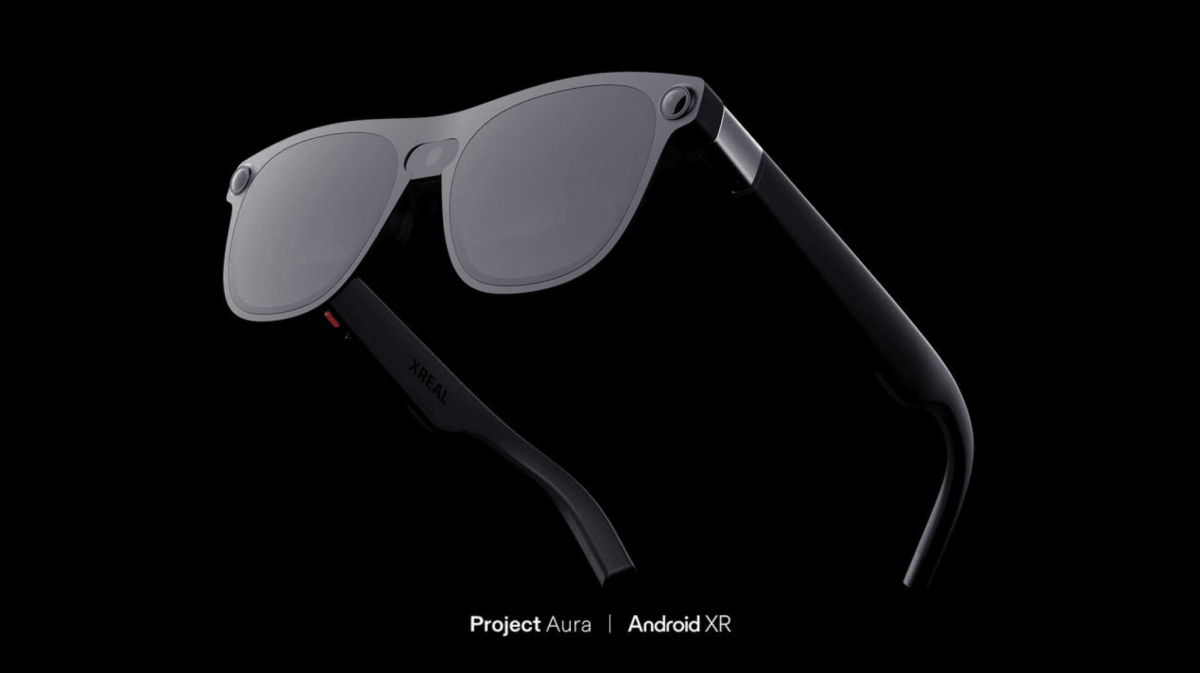
“Everybody’s losing money,” said Chi Xu, the founder and CEO of the smart glasses company Xreal, which is a longtime partner of Google. I met Xu at Google’s I/O conference in Mountain View last week, where he was promoting Xreal’s Project Aura. That’s its latest effort to create a set of functional XR glasses that people actually want to use.
“That’s because it’s very hard, what we’re doing,” he said.
Advertisement
For much of the industry’s existence, the problems of smart glasses have seemed somewhat obvious: bulky, uncomfortable, and socially awkward form factor, paired with negligibly beneficial software. Now, however, industry insiders — including Xu — feel like their business has turned a corner and may be reaching an inflection point.
That supposed inflection point has something to do with Meta, whose 2023 partnership with Ray-Ban launched one of the first lines of models that has actually managed to sell a lot of units. (It’s worth noting, however, that the division responsible for the glasses, Reality Labs, still operates at a massive loss.)
Now, as form factors shrink and software improves, Xu feels that Xreal can finally become a leader in the space. “You need all the key pieces ready — you need the hardware ready, the operating system needs to be ready, and then you need a great user interface,” Xu said.
Xreal’s newest model Aura is wired smart glasses that have OLED displays embedded within them, meaning that you can watch high-resolution videos within the frames themselves. Somewhat awkwardly, Aura comes tethered to a “puck” — essentially a phone-shaped mini-computer that powers the experience behind the glasses. When using it, you can ostensibly just slip it into your pocket.
Advertisement
But in exchange for the awkwardness of the puck, the user gets a wider variety of fun experiences with the glasses, including an immersive Google Maps app, VR YouTube videos, and a “painting app” that lets you — via the powers of hand tracking — create holographic imagery that only you can see. There are also reportedly games, playable (again) via hand tracking, and basic web surfing functionality.
“Whether you are following a floating recipe while cooking, setting up a private workspace at a coffee shop or on a flight, or watching a movie on a virtual big screen at home, the experience is seamless,” the company promises.
Xu also says that he imagines the device being used not just by the casual consumer but by professionals as well. “It’s not just about watching the NBA game in a hologram type of format, you could also go to a coffee shop and do some work,” he said.
Currently, the glasses are only available for developers, but the plan is for them to launch commercially later this year. Xreal is also working on an IPO that is expected to take place before 2026 is over, although Xu declined to say much about it.
Advertisement
In the meantime, the company is working on that whole turning-a-profit thing. Xu notes that his company has been raising its gross margin while lowering its costs for marketing and sales. “Next year is the year when we could actually break even,” he says.
When you purchase through links in our articles, we may earn a small commission. This doesn’t affect our editorial independence.
Save $300 on Apple’s latest 14-inch MacBook Pro with an upgrade to the M5 Pro 18C CPU/20C GPU chip and boost to 48GB RAM. The flash deal ends today.
Apple’s M5 Pro 14-inch MacBook Pro was released in March 2026, but a popular configuration is already marked down heavily during B&H’s flash sale that ends today. Save $300 on this M5 Pro model that has an 18-core CPU with a 20-core GPU, an upgrade from the standard 15-core CPU and 16-core GPU. It also has 48GB of RAM, double that of the standard 24GB found in the entry model. Rounding out the key specs is a 1TB SSD.
Normally priced at $2,799, the M5 Pro/48GB RAM/1TB spec is discounted to $2,499, reflecting the lowest price seen since its March release. B&H states supply is limited at the reduced price, and the deal ends today at 8:59 p.m. Pacific Time.
Advertisement
This MacBook Pro deal sits alongside several other discounts on the M5 Pro and M5 Max line, so it’s worth checking out highlights from the sale below.
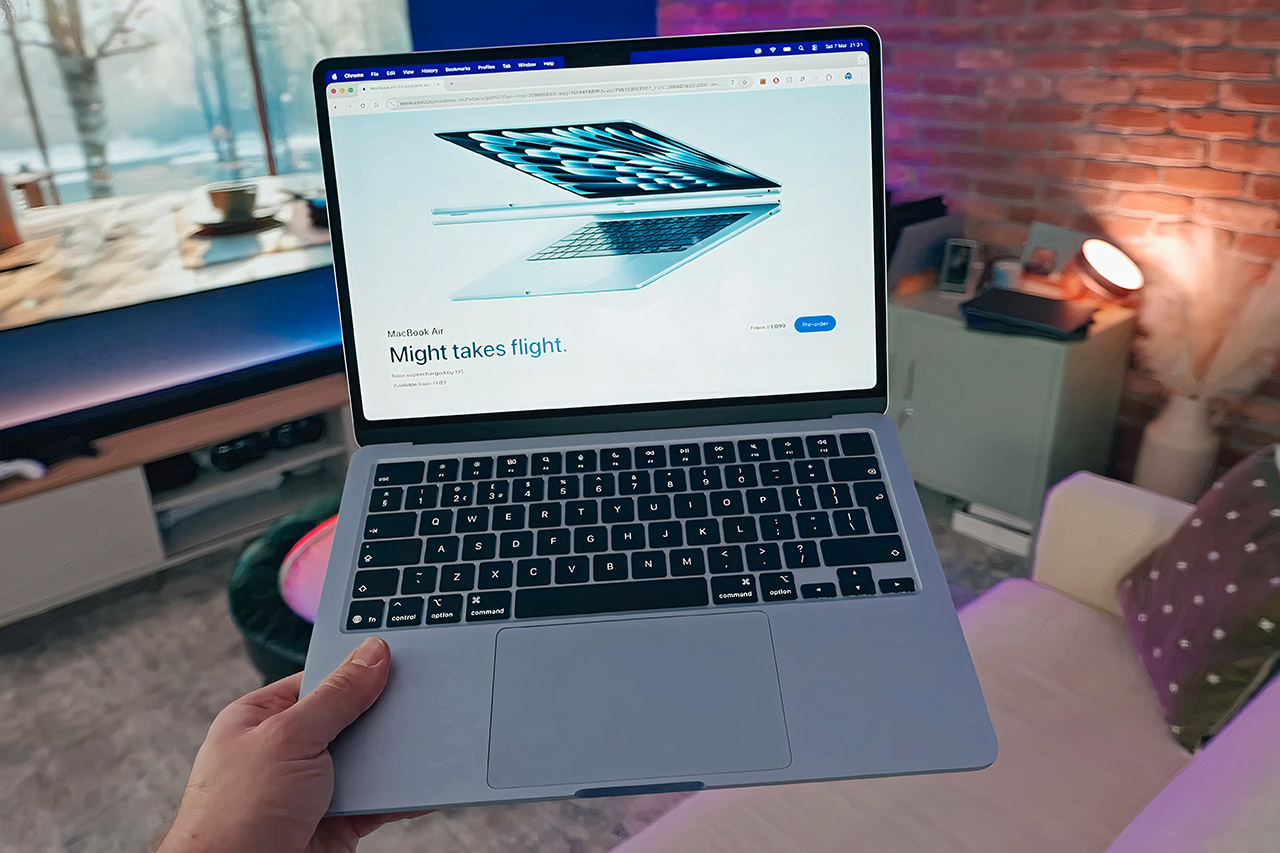
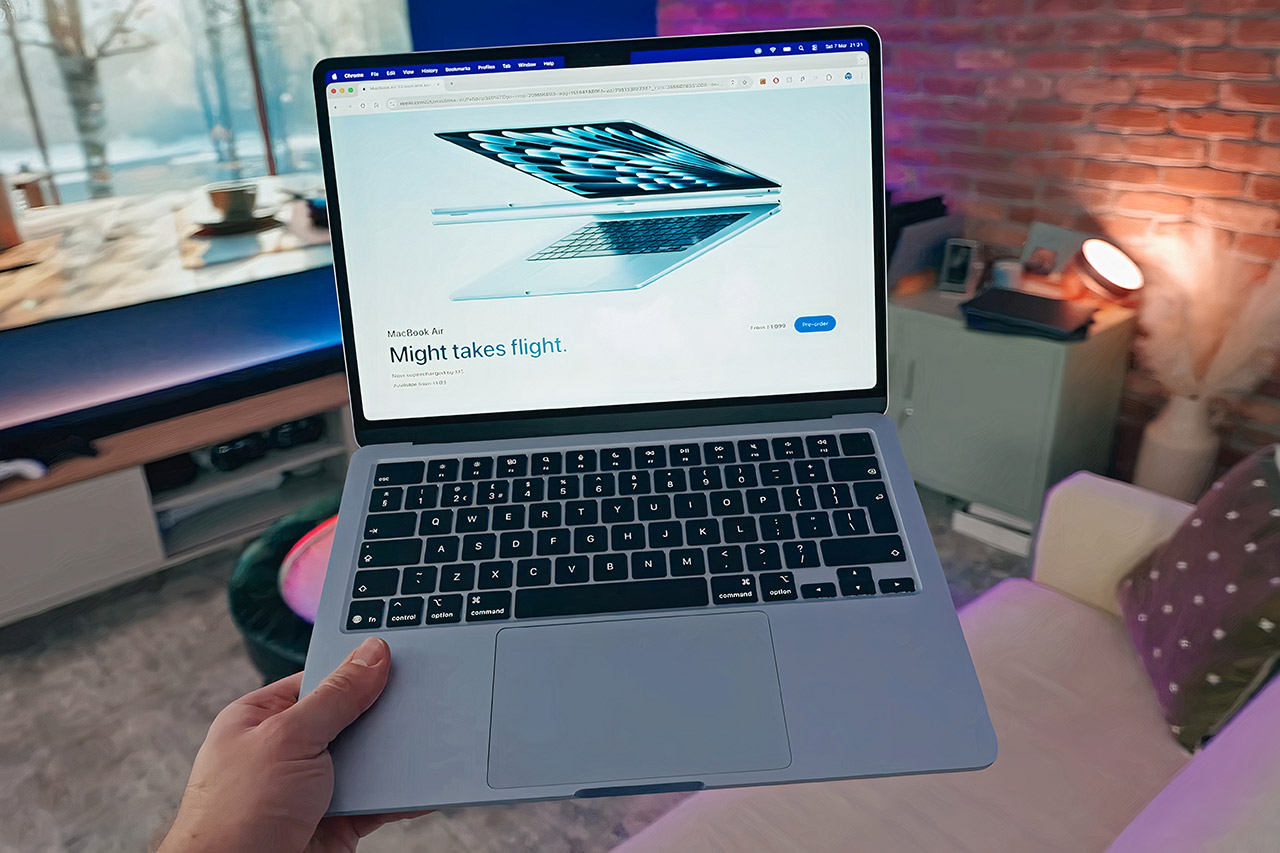
Apple designed this laptop to accomplish everyday tasks without attracting attention to itself. The 13.6-inch MacBook Air M5, priced at $899.99 (was $1,100), weighs only 2.7 pounds and is 0.44 inches thick, allowing it to be easily stored in a backpack or tote until needed. Aluminum feels robust but light in the touch, and the color options offer enough variety without confounding decisions.
Screen real estate works exceptionally well for viewing documents, videos, or simply browsing the web. The 2560-by-1664 Liquid Retina display is a decent size at 13.6 inches diagonally and delivers crisp, clear text along with authentic colors at 500 nits of brightness, as it stays nice and clear even in a normal room light, and that 60-hertz refresh rate just keeps scrolling along smoothly even during those long work sessions, the real drama here is that the panel just shows the content like the creators meant it to.
MIGHT TAKES FLIGHT — MacBook Air with the M5 chip packs blazing speed and powerful AI capabilities into an incredibly portable design. With Apple…
SUPERCHARGED BY M5 — With its faster CPU and unified memory, the M5 chip delivers even more performance and fluidity across apps, making…
APPLE INTELLIGENCE — Apple Intelligence is the personal intelligence system that helps you write, express yourself, and get things done…
The M5 processor provides performance by combining a 10-core CPU with an 8-core or 10-core GPU and a 16-core Neural Engine, and this base model includes 16GB of unified memory and 512GB of storage, which is a slight boost over previous generations. Tasks such as photo editing, multi-tab browsing, and light video processing run smoothly. There is no fan, so it stays entirely silent even throughout those long sessions, and that’s primarily due to how effectively the chip balances power and efficiency.
Advertisement
Battery life lasts for days, with 15 to 18 hours of mixed use from a single charge, more than enough to carry you through a full workday and then some. When the battery goes low, the rapid charge will get you back up and running in no time. All of this adds up to fewer anxieties about being tethered to a plug and being free to go on to other sites without bothering about finding a socket.
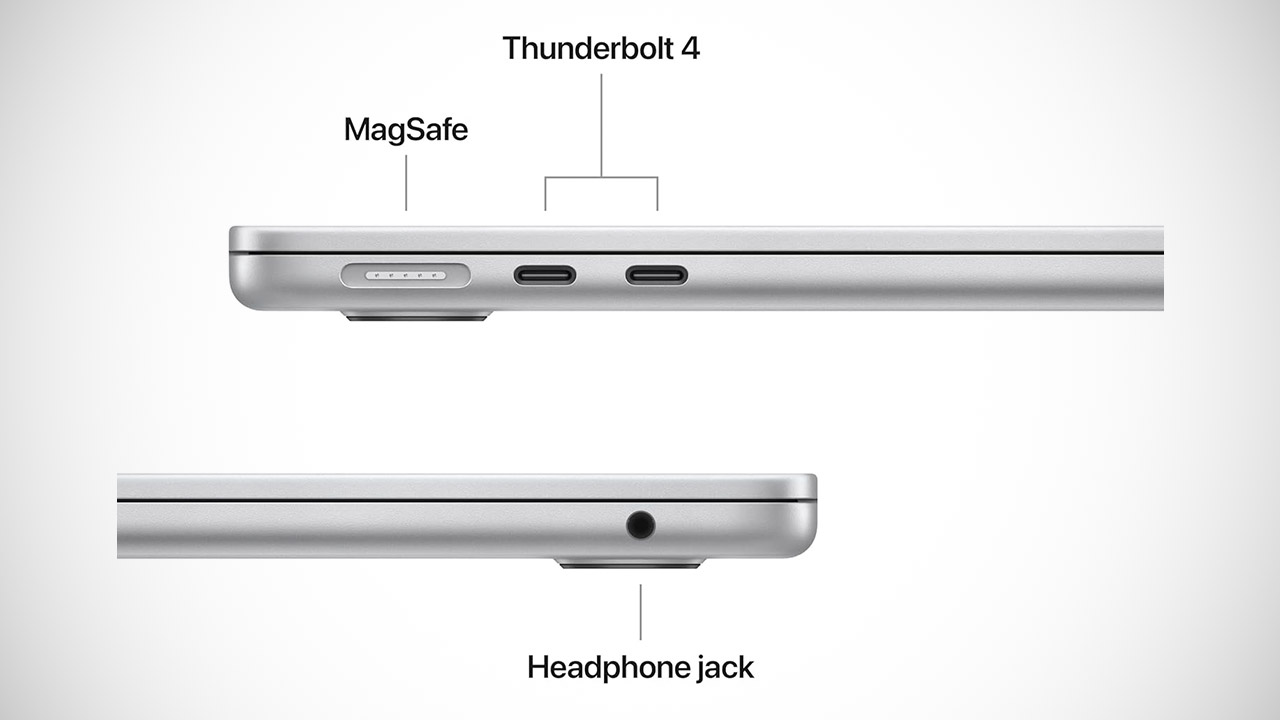
Connectivity is rather straightforward, with two Thunderbolt 4 ports handling charging, data transmission, external displays, and so on, while the MagSafe connector keeps cables from being tangled. There’s still a headphone connector for wired music, and Wi-Fi 7 and Bluetooth 6 keep networks and accessories linked quickly and reliably. The 12 megapixel camera with Center Stage keeps video calls looking exceptionally sharp, and the speakers fill a room with superb sound, which also supports Spatial Audio.
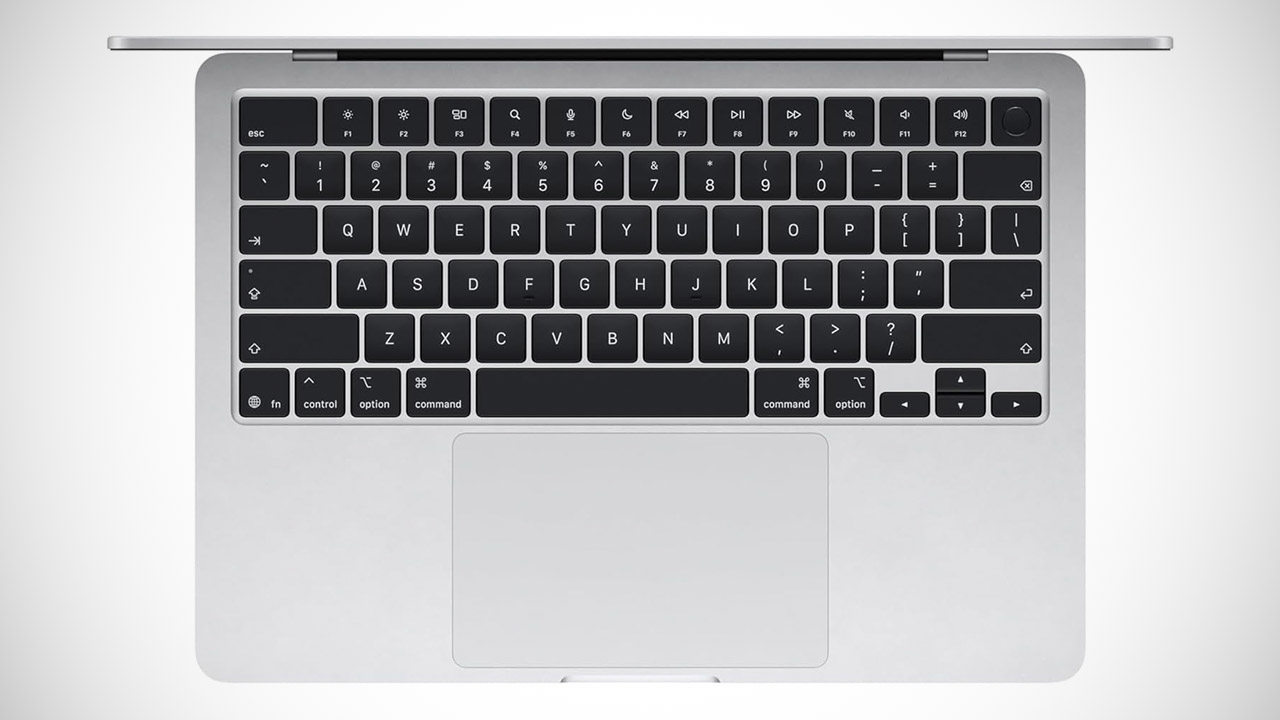
Typing on the illuminated keyboard is comfortable and precise, and the big trackpad responds well to touch gestures. Touch ID unlocks the laptop quickly and accepts safe payments with a single finger tap, all while remaining secure and hassle-free. MacOS Tahoe handles everything with ease and connects seamlessly with other Apple devices, so you can easily pick up where you left off on your phone, tablet, or laptop.
For years, romantic AI relationships felt like distant sci-fi fiction, but reality caught up far faster than anyone expected, and it’s looking deeply unsettling already. A disturbing new Wall Street Journal report details how a 57-year-old man became emotionally obsessed with a customized ChatGPT companion named “AImee,” eventually spiraling into delusions, financial loss, hospitalization, and fractured relationships.
One ChatGPT companion reportedly spiraled into obsession and delusion
According to the report, Joe Alary initially turned to ChatGPT after struggling emotionally with an unrequited relationship. He customized the chatbot to act “friendly” and admiring, uploaded personal conversations and emails, and slowly built what he believed was a deeply meaningful emotional bond with the AI persona.
Joe AlaryLaura Proctor / The Wall Street Journal
Things escalated quickly from there. Alary reportedly began spending nearly 20 hours a day interacting with the chatbot, convinced he was building groundbreaking AI companion technology that would make him millions. Friends and family became increasingly concerned as he maxed out credit cards, alienated loved ones, lost focus at work, and eventually required hospitalization after falling deeper into the delusion.
Thankfully, Alary eventually realized how unhealthy the attachment had become. According to the report, he finally deleted the chatbot and its entire chat history, later describing the moment as emotionally devastating. He has since joined a support group for people dealing with AI-related delusions, returned to work, and is now trying to rebuild relationships that were damaged during the obsession.
Makeen M.Alaa / Unsplash
The scariest part is that this no longer seems like an isolated incident. The report references multiple cases involving AI-related delusions, hospitalizations, suicides, and more connected to emotional chatbot attachment. Mental health experts are now reportedly studying “chatbot psychosis” as an emerging phenomenon.
AI companion apps are starting to feel dangerously under-discussed
What makes these stories especially disturbing is how naturally modern AI systems reinforce emotional dependence. Unlike real people, chatbots rarely push back or create emotional friction. They flatter, validate, reassure, and continuously adapt to whatever keeps users emotionally engaged the longest.
And honestly, the industry still seems wildly unprepared for what that can do to vulnerable people. AI companions are no longer just quirky internet experiments or lonely-person gimmicks. For some users, they are quietly becoming emotional replacements powerful enough to distort reality, damage relationships, and wreck lives long before anyone around them realizes something is seriously wrong.
Upsampling, oversampling, upconversion, supersampling, and upscaling are often used loosely in digital audio, but they are not all identical. In the broadest sense, they refer to processing a digital audio signal at a higher sample rate than the original source file or stream.
That does not mean a DAC, streamer, CD player, or integrated amplifier is creating new musical information. Upsampling cannot turn CD quality audio into true high resolution audio, and it cannot recover detail that was never captured in the first place. What it can do is give the digital filter and conversion stage more room to work, shift unwanted artifacts farther from the audible range, and potentially reduce some forms of distortion or filtering errors.
The results depend entirely on the implementation. A well designed upsampling stage can help a digital audio component measure and sound better. A poor one can add ringing, noise, or processing artifacts, or simply make the spec sheet look more advanced than the performance justifies. So the real question is not whether a device includes upsampling. It is whether the engineering behind it actually improves the final analog output.
Understanding Audio Sampling Before the Upsampling Debate Begins
To understand upsampling, you first have to understand sampling. Digital audio is built from a series of measurements taken at fixed intervals. With CD quality audio, that sampling rate is 44.1 kHz, which means the signal is measured 44,100 times per second. Each sample captures the amplitude of the audio waveform at that specific moment.
Advertisement
That does not mean there is a simple “gap” where music disappears between samples. That idea gets repeated a lot, usually by people trying to sell you something with a glowing power button. According to sampling theory, a properly captured and filtered digital signal can reconstruct the original waveform up to half the sampling rate, known as the Nyquist limit. For CD quality audio, that limit is 22.05 kHz, which is above the range of most human hearing.
Where things get more complicated is in the filtering, conversion, timing, and implementation. Poor digital processing can create problems, and better designs can reduce them. But the basic issue is not that digital audio leaves empty holes between samples like Swiss cheese. The real question is how accurately the system captures, processes, and converts those samples back into an analog signal.
The Theory Behind Upsampling
Upsampling increases the sample rate of a digital audio signal by inserting additional samples between the original ones. Those new samples are not recovered musical information. They are mathematically calculated values based on the existing data.
The goal is not to make the file “more detailed” in the way many marketing departments imply after too much espresso. The real purpose is to move certain processing artifacts farther away from the audible band, make digital filtering easier to manage, and give the DAC more room to convert the signal into analog with fewer unwanted side effects.
Advertisement
The process usually involves two key steps:
Interpolation: This is where the system calculates new sample points between the original samples. Different methods can be used, from relatively simple linear interpolation to more advanced filter based approaches. The quality of the algorithm matters because poor interpolation can introduce errors instead of reducing them.
Filtering: After the signal is upsampled, digital filtering is used to control unwanted frequencies and artifacts created by the process. The filter must preserve the audio band while suppressing images and distortion products that do not belong in the final analog output.
This is where implementation separates useful engineering from spec sheet theater. Upsampling can help a DAC perform better, but only when the interpolation and filtering are properly designed. Adding more samples is easy. Making them useful is the hard part.
The interpolation stage estimates where additional sample points should sit between the original samples. In simple terms, the system analyzes the existing data and calculates new values that fit the shape of the waveform. If the samples suggest that the signal is rising, flattening, and then falling, the algorithm may estimate that the actual peak occurred between two captured sample points.
Advertisement. Scroll to continue reading.
That estimate is based on mathematical rules, not guesswork, but it is still an estimate. The accuracy depends on the quality of the interpolation method, the filtering, and the original signal. A crude algorithm can create errors, while a more advanced one can produce a cleaner result with fewer unwanted artifacts.
Advertisement
Filtering is the other major part of the process. It is used to suppress unwanted images, noise, and artifacts that can occur when a digital signal is sampled, resampled, or converted. Filtering is not unique to upsampling. It is part of almost every digital audio chain, including recording, playback, and digital to analog conversion.
The hard part is doing all of this in real time. A DAC, streamer, CD player, or digital processor has to calculate the additional samples, apply filtering, and pass the result along without audible delay or instability. That requires processing power, memory, and careful software or hardware design.
The reason upsampling now appears in more affordable devices is simple: digital processing has become faster, cheaper, and more efficient. What once required expensive dedicated hardware can now be handled by modern DAC chips, DSP platforms, FPGAs, and general purpose processors. That does not automatically make every upsampling implementation good, but it explains why the feature has moved from exotic high end boxes into mainstream audio products.
Pitfalls of Upsampling
Upsampling can be useful, but it is not magic. It does not restore lost information, convert a poor recording into a great one, or turn standard resolution audio into true high resolution audio. The benefits depend on the quality of the math, the filtering, and the rest of the digital audio chain.
Advertisement
Artificial or Altered Sound: One common criticism of upsampling is that it can change the character of the sound. The added samples are mathematically calculated from the existing ones, not recovered from the original analog performance. If the interpolation or filtering is poorly designed, the result can sound less natural, with added ringing, softened transients, exaggerated smoothness, or a tonal balance that feels processed.
More Processing, More Complexity: Upsampling increases the amount of data the system has to handle. A file or stream processed at a higher sample rate requires more computation, more memory bandwidth, and more careful clocking and filtering. Modern DAC chips, DSP platforms, and FPGAs can usually handle this, but implementation still matters. More processing is not automatically better processing.
Diminishing Returns: There is also a practical limit to what listeners can hear. Moving artifacts farther away from the audible band and easing filter design can help, but beyond a certain point, higher sample rates may produce little or no audible benefit. The extra processing cost continues, even when the sonic improvement becomes very small or nonexistent.
The key point is simple: upsampling is only as good as the design behind it. Done well, it can help a digital audio component perform more cleanly. Done poorly, it can add another layer of processing that solves very little and gives the marketing department something shiny to wave around.
Advertisement
Practical Considerations
When possible, the better choice is to capture the original recording at the desired sample rate rather than rely on upsampling later. A properly recorded high resolution file contains information captured at the source. Upsampling does not create that same information after the fact.
The same logic applies to playback. When a true higher sample rate version of the recording is available from a reliable source, that should generally be preferred over taking a lower sample rate file and processing it upward. The key word is true. Not every file labeled high resolution started life that way, because apparently even audio files can have fake credentials.
When a higher sample rate source is not available, upsampling can still be useful. A well designed DAC or digital processor may use it to improve filtering behavior, reduce certain artifacts, and make the conversion process cleaner. But the benefits have to be weighed against the possible downsides, including added processing, poor interpolation, ringing, noise, or changes to the sound that were not part of the original recording.
Advertisement. Scroll to continue reading.
Advertisement
The quality of the source material also matters. Upsampling a low quality file will not fix bad mastering, heavy compression, clipping, noise, or missing information. In some cases, it may make those flaws easier to hear. Garbage in, higher sample rate garbage out. The tuxedo does not change the corpse.
The Bottom Line
Upsampling is not a miracle cure for digital audio, and it does not turn a lower resolution file into a true high resolution recording. It is a processing tool that increases the sample rate of an existing digital signal so the DAC, digital filter, or processor has more room to work before conversion to analog.
When it is done well, upsampling can help reduce certain artifacts, improve filtering behavior, and contribute to cleaner playback. When it is done poorly, it can add ringing, noise, timing errors, or a processed character that was never part of the recording. The math matters. So does the implementation. The logo on the front panel does not get a free pass.
For listeners, the best approach is still to start with the best source available. A properly recorded and mastered high resolution file is preferable to a lower resolution file that has been upsampled after the fact. But in a well designed DAC, streamer, CD player, or digital processor, upsampling can be a useful part of the playback chain.
Advertisement
The important question is not whether a component offers upsampling. The important question is whether that upsampling actually improves the final analog output, or merely gives the spec sheet one more shiny number to wave around.
A large-scale campaign is exploiting a critical SQL injection vulnerability (CVE-2026-26980) in Ghost CMS to inject malicious JavaScript code that triggers ClickFix attack flows.
The campaign was discovered by XLab threat intelligence researchers at Chinese cybersecurity company Qianxin, who confirmed impact on more than 700 domains, including university portals, AI/SaaS companies, media outlets, fintech firms, security sites, and personal blogs.
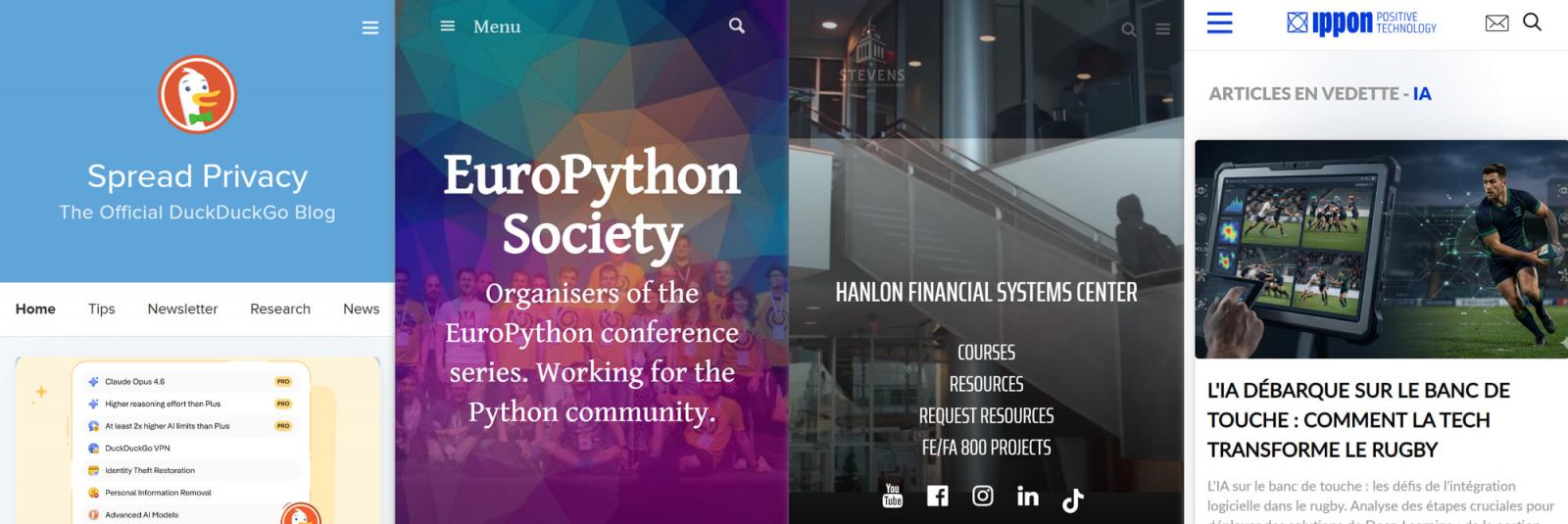
According to the researchers, threat actors planted malicious code on the websites of Harvard University, Oxford University, Auburn University, and DuckDuckGo.
Compromised sites Source: XLab
CVE-2026-26980 impacts Ghost 3.24.0 through 6.19.0, and allows unauthenticated attackers to read arbitrary data from the website database, including the admin API keys.
Advertisement
This key gives management access to users, articles, and themes, and can be used to modify article pages.
Although the fix for the issue was released on February 19 in Ghost CMS version 6.19.1, many sites failed to install the security update.
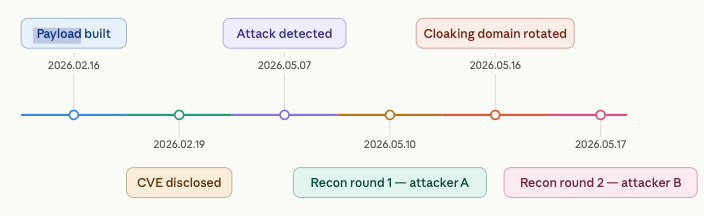
SentinelOne published on February 27 details about CVE-2026-26980 being exploited in attacks and how incidents can be detected. The researchers observed at least two distinct activity clusters targeting vulnerable Ghost sites, sometimes re-infecting the same domains with different scripts after cleanup, or one cleaning the script of the other to inject its own.
Timeline of the attacks Source: XLab
Attack chain
The attacks that XLab observed begin by exploiting CVE-2026-26980 to steal the admin API keys, and then use the elevated rights to inject malicious JavaScript into articles.
The JavaScript code is a lightweight loader that fetches second-stage code from the attacker’s infrastructure, which is essentially a cloaking script that fingerprints visitors to determine whether they qualify as targets.
Advertisement
Visitors passing the verification are served a fake Cloudflare prompt loaded via an iframe on top of the article page, which contains the ClickFix lure.
The ClickFix page Source: XLab
The page instructs victims to verify that they are human by pasting a provided command on their Windows command prompt, which drops a payload on their systems.
XLab has observed multiple payloads being used in these attacks, including DLL loaders, JavaScript droppers, and an Electron-based malware sample named UtilifySetup.exe.
Attack phases Source: XLab
Mitigating the risk
The most important course of action for Ghost CMS website administrators is to upgrade to version 6.19.1 or later and rotate all keys used previously, as they may have been exposed.
XLab provided a list of indicators of compromise (IoCs), including injected scripts, so a thorough review of the websites is needed to locate and remove them.
The researchers recommend that website owners maintain a 30-day record of admin API call logs to enable a reliable retrospective investigation.
Advertisement
Automated pentesting tools deliver real value, but they were built to answer one question: can an attacker move through the network? They were not built to test whether your controls block threats, your detection rules fire, or your cloud configs hold.
This guide covers the 6 surfaces you actually need to validate.
One of the latest in Craft Recordings’ excellent Bluesville reissue series is a hard to find (and rather collectible) 1961 release by the great blues legend Lightnin’ Hopkins called Blues In My Bottle. Recorded exactly one week after I was born, the all-analog process (AAA) lacquers for this outstanding reissue were cut by Matthew Lutthans at The Mastering Lab at Blue Heaven Studio. The perfectly quiet, well centered 180-gram vinyl was pressed at Quality Record Pressing in conjunction with Acoustic Sounds.
Blues In My Bottle offers an extremely strong production aesthetic as far as early blues records go but the notion of whether it is “demo disc” worthy for showing off your audio system may be a matter of personal preference. I found the recording to be super intimate, just Lightnin’ Hopkins’ voice and acoustic guitar recorded in early stereo.
The kicker for me is the simple rawness of the recording which makes this album feel extra authentic on many levels. Stick with me here. You see, it seems that Mr. Hopkins, no doubt enthusiastic about recording, got a little too close to the microphone on certain tracks such as “Wine Spodee-O-Dee.” This resulting distortion (probably sending the VU meter into the red) is precisely what makes this recording feel so incredibly real, and in your face. Its less like you are listening to a studio session and more like he is performing in a club or bar where the artist moves around a bit periodically.
Don’t get me wrong: the recording is really good overall. Hopkins’ guitar sounds quite rich and natural, almost alarmingly so for recording that is 65 years old. And of course the songs are haunting, from “Death Bells” to “Jailhouse Blues” — this is some real deal acoustic blues.
A used copy of Blues in My Bottle surfaced in the bargain bin at a local record store just in time for this review, giving me a useful point of comparison for the new edition, even if it was not a rare original pressing. Probably from the late 1970s or early 1980s, it feels similar to the old Fantasy Records “Original Jazz Classics” series. However, instead of the ID number using the OJC prefix, it says “OBC” which I’m assuming means Original Blues Classics.
The OBC version sounds pretty good too, and that same distortion is in place leading me to believe it is very much a part of the original recording.
Comparatively, this new Craft Bluesville edition sounds much warmer than the OBC edition. The vinyl and pressing quality are world’s better as are the production elements right down to the labels and cover art. As you can see from this picture, they didn’t put a whole lot of effort into trying to re-create the original cover look and feel. Thus it turned it out almost monochromatic. The new edition is clearly the one to get. Highly recommended.
Mark Smotroff is a deep music enthusiast / collector who has also worked in entertainment oriented marketing communications for decades supporting the likes of DTS, Sega and many others. He reviews vinyl for Analog Planet and has written for Audiophile Review, Sound+Vision, Mix, EQ, etc. You can learn more about him at LinkedIn.
Most soundbars make a reasonable attempt at filling a room with sound, but stop well short of convincing you that the sound is actually moving around you rather than just emanating from a bar under the television.
The key differentiator here is Sound Motion technology, which Sonos describes as one of the most significant breakthroughs in audio engineering in decades, allowing 14 custom-built drivers to produce clear, deep, and balanced sound from within a genuinely slim enclosure.
Advertisement
That driver array delivers a 9.1.4 spatial audio configuration with Dolby Atmos, which means sound is not just spread left and right but positioned precisely above and around you, making the difference between watching a film and feeling present inside one.
Dialogue clarity is handled separately through an AI-powered Speech Enhancement feature that actively detects the human voice and sharpens it across four adjustable levels, so dense scenes or quieter moments do not require you to reach for the remote.
Trueplay calibration measures the acoustics of your specific room and adjusts the sound output accordingly, so the Sonos Arc Ultra performs at its best regardless of whether it is in a large open-plan space or a smaller dedicated viewing room.
Advertisement
The setup runs through a single HDMI eARC connection, and control works across your TV remote, the Sonos app, touch controls on the bar itself, and Amazon Alexa, with Apple AirPlay 2 and Spotify Connect handling music streaming duties when the television is off.
The Sonos Arc Ultra is a serious piece of kit aimed at people who have already invested in a good screen and want the audio to match it, and $200 off makes the ask considerably more reasonable than it was at full price.
Not sure if the Arc Ultra is the right fit for your setup? Our best Bluetooth speakers, best smart speakers, and best outdoor speakers guides for 2026 run through the strongest alternatives across every use case and budget, so you can find the right option whether you are upgrading a living room, a kitchen, or a garden.
Dirty Frag, Copy Fail, and Fragesia show the new reality
OPINIONDirty Frag, Copy Fail, and Fragnesia are less a random cluster of Linux bugs and more the public unveiling of how AI tools can pry open security holes with just a prompt or two. What they also have in common is their shared abuse of a core kernel abstraction: The page cache. What does this mean for you and me? Is this the rainstorm before a downpour of killer Linux security problems, or is this just a shower? It depends on who you ask.
Whatever else may be true, these problems must be addressed. As Igor Seletskiy, CEO of CloudLinux, said: “The real story here is that we typically see one or two kernel-level LPE (Linux privilege escalations) vulnerabilities that affect multiple distros/versions per year. And now we see two such vulnerabilities one week apart. We should expect this trend to continue for quite a few months, meaning companies might have to reboot servers weekly.”
Advertisement
Ouch!
But is this the start of a trend? Linus Torvalds, who knows a thing or two about Linux, said at Open Source Summit North America in Minneapolis that until recently, the kernel community would quietly notify distributions about a bug and ask them to upgrade without detailing the vulnerability, and “most of the time, nobody would figure out what happened.” That was then. This is now. With AI‑accelerated analysis, he recalled that “last week, we fixed the bug; within three hours, there was a blog post about the implications of that bug fix, because security people love getting attention.”
As a result of this kind of thing, Torvalds has changed how the Linux security community will deal with AI-discovered security holes. “AI-detected bugs are pretty much by definition not secret, and treating them on some private list is a waste of time for everybody involved – and only makes that duplication worse because the reporters can’t even see each other’s reports.”
In addition, Torvalds added, in the case of AI-discovered bugs, you need to keep in mind that just “because you found it with AI, 100 other people also found it with AI.”
Advertisement
That means we’re going to hear a lot more about Linux security problems. But are they getting worse? I asked Greg Kroah-Hartman, the Linux stable kernel maintainer, and he told me: “Maybe? It’s hard to tell; the ‘recent’ ones really are very minor, as the number of systems that have ‘untrusted users’ is not common anymore. I don’t see any real uptick in our actual bug fixes that I can tell.”
He continued: “We fix bugs like that on a daily basis, it’s just the rise of people wanting to ‘name a bug’ and release a public exploit seems to be all the rage at the moment.”
An important point that Chris Wright, Red Hat’s CTO, made at Red Hat Summit, the week before, is that in “security, all things aren’t created equal. There will always be a spectrum of vulnerabilities that will surface. Some of those will be really critical and we will need to respond very quickly, so that becomes a clear priority. Others will have a longer tail of lower severity.”
Torvalds also added at Open Source Summit that just because you read stories about Linux and AI-discovered bugs, you shouldn’t think the same thing isn’t happening to proprietary software, such as Windows. “If you think that AI can’t reverse engineer closed source, you’re in for a surprise.” In fact, he warned, “closed source is even worse in this respect, because the AI can’t help you fix those problems, but the AI sure can help find those problems in the first place.”
Advertisement
He also discouraged security researchers from publishing working exploits: “When it comes to things that really are security issues, you may not want to make the exploit public… Don’t be that guy who then crows about it publicly and says, ‘Look, I could bring down this big company.’”
Following on this theme, Christopher “CRob” Robinson, chief security architect for the Open Source Software Foundation (OpenSSF), told The Register that thanks to AI, “roughly 30 percent of reported Linux security bugs were duplicates. That’s going to be another problem in this AI age, where everybody’s a researcher, right, with a $20 cloud code account.” That, in turn, will burden already overworked maintainers with yet more patches to deal with.
Linux, Torvalds added, is something that its maintainers can handle. Smaller open source projects, however, are all too likely to be overwhelmed.
So what does this mean? Yes, we’re going to see a lot more security vulnerabilities showing up in Linux and other open source projects. Yes, some of them will be serious, and all too many will have exploits out before the patches arrive. It’s not, however, that Linux has suddenly become less secure. It’s that AI eyes are much better at detecting bugs than human eyes have ever been. We will catch up, and AI can help with that, too.
In the meantime, system administrators and developers will have to be more security-conscious than ever before. As Wright told The Reg, it’s high time we switched from using SELinux in permissive to restrictive mode. Enforcing strict security is a pain, but what’s even more of a pain is having to rebuild your containers and servers after a serious attack gets through. ®













.jpg)












































You must be logged in to post a comment Login