
Tech
Driverless freight hits a new milestone with Aurora's 1,000-mile route



The journey takes Aurora’s autonomous trucks roughly 15 hours, or about half the time a human operator could legally drive under federal hours-of-service rules. Existing regulations limit truck drivers to 11 hours of driving within a 14-hour window, require a 30-minute break after eight hours, and mandate a 10-hour rest…
Read Entire Article
Source link

Anthropic has acquired Coefficient Bio, a stealth biotech AI startup founded barely eight months ago, in an all-stock deal worth just over $400 million. The acquisition brings a team of fewer than 10 people, nearly all former Genentech computational biology researchers, into Anthropic’s healthcare and life sciences division, and it signals something larger than a talent grab: the maker of Claude is staking real capital on the idea that general-purpose AI can accelerate drug discovery.
The deal, first reported by The Information on Thursday, values a company that had no publicly known product, no disclosed revenue, and no conventional traction metrics. What it did have was a founding team with rare credentials. Samuel Stanton and Nathan C. Frey, Coefficient Bio’s co-founders, both came from Prescient Design, Genentech’s computational drug discovery unit, where Frey led a multidisciplinary group working on biological foundation models and novel machine learning approaches to biomolecule design. Frey’s publication record spans more than 20 papers in journals including Science Advances and Nature Machine Intelligence, and he won an ICLR Outstanding Paper Award in 2024 for work on generative modelling for drug candidate discovery.
The startup’s stated ambition was nothing modest: artificial superintelligence for science. In practice, Coefficient Bio had built a platform enabling AI to draft drug research and development plans, manage clinical regulatory strategies, and identify new drug candidates. It was, by all accounts, a research-heavy operation that never left stealth mode.
Dimension, the New York-based venture firm founded in 2023 by former Lux Capital and Obvious Ventures partners Adam Goulburn, Zavain Dar, and Nan Li, held roughly half the company. The firm, which focuses on companies at the intersection of technology and life sciences, is now reporting a 38,513 per cent internal rate of return on the investment, a figure that says less about Coefficient Bio’s commercial viability than about the speed at which AI valuations are repricing early-stage science bets. Against Anthropic’s $380 billion post-money valuation, set in its $30 billion Series G round in February, the acquisition represents roughly 0.1 per cent dilution.

The 💜 of EU tech
The latest rumblings from the EU tech scene, a story from our wise ol’ founder Boris, and some questionable AI art. It’s free, every week, in your inbox. Sign up now!
The Coefficient Bio team will join Anthropic’s Health Care Life Sciences group, led by Eric Kauderer-Abrams, who was hired in 2025 with an explicit mandate to make Claude the dominant AI model in biology. “We want a meaningful percentage of all of the life science work in the world to run on Claude, in the same way that that happens today with coding,” Kauderer-Abrams told CNBC when Anthropic launched Claude for Life Sciences in October 2025. That platform, which integrates with tools including Benchling, PubMed, and 10x Genomics, was designed to assist researchers across the entire drug discovery pipeline, from literature review and hypothesis generation to data analysis and regulatory submissions.
The acquisition deepens that push considerably. Where Claude for Life Sciences offered a generalised research assistant, Coefficient Bio’s team brings the kind of domain-specific expertise, particularly in protein design and biomolecule modelling, that could help Anthropic build specialised tools for pharmaceutical companies willing to pay enterprise prices for AI that understands their workflows at a molecular level.
Anthropic is not entering a vacuum. Google DeepMind spun off Isomorphic Labs to pursue AI-designed drug candidates now entering clinical trials, and Nvidia announced a five-year, $1 billion partnership with Eli Lilly in January to build an AI co-innovation lab for accelerated drug discovery. OpenAI, meanwhile, has been working with Moderna to speed the development of personalised cancer vaccines. The competitive logic is straightforward: whichever foundation model becomes embedded in biopharma R&D workflows will capture an enormous and recurring revenue stream in a market where a single approved drug can generate billions.
The venture capital appetite for AI-biology crossovers is reflecting this calculus. Breakout Ventures closed a $114 million fund in March explicitly targeting early-stage biotechs that treat AI and biology as inseparable. Dimension itself is reportedly raising a $700 million third fund to double down on the same thesis. The investor conviction is that the agentic AI wave will hit life sciences as forcefully as it has hit software engineering, and the acqui-hire economics of deals like Coefficient Bio suggest the large model builders agree.
For Anthropic, the strategic arithmetic is clear enough. The company’s run-rate revenue has reached $14 billion, growing more than tenfold annually for three consecutive years, and the customer base spending over $100,000 a year on Claude has grown sevenfold. But that growth is overwhelmingly concentrated in coding, enterprise search, and general productivity. Healthcare and life sciences represent a vast adjacent market where Anthropic has laid the groundwork with Claude for Life Sciences but has not yet achieved the kind of deep integration that generates sticky, high-margin revenue.
Paying $400 million in stock for a pre-revenue team of fewer than 10 people will, understandably, invite scepticism. The price looks less like a valuation of what Coefficient Bio had built and more like a statement about what Anthropic believes it can build with the right researchers on the payroll. Whether that bet pays off depends on something the current frenzy of AI startup valuations has not yet been forced to answer: whether frontier AI models can generate genuine scientific breakthroughs, or whether they will remain very expensive literature review assistants that happen to speak the language of molecular biology.


A recent edict from the Federal Communications Commission has security experts bracing for the worst. On March 23, the agency announced a sweeping ban on all new “consumer-grade” routers produced outside the United States. The decision sent shockwaves through boardrooms and living rooms alike: Because no major wireless router brands manufacture in the U.S. – including those headquartered stateside, such as Netgear – a ban on foreign routers is difficult to differentiate from a ban on routers, period.
But while the logistics will likely be worked out, security experts have more concerns. As pointed out in a Technology Policy Institute (TPI) white paper, the ban is ostensibly meant to improve national cybersecurity, preventing incidents such as the Volt Typhoon attack, which saw Chinese state-sponsored threat actors gain access to the networks of U.S. agencies such as the DoE, EPA, and TSA. It’s worth noting that Volt Typhoon primarily targeted routers from Netgear and Cisco, both American companies. Moreover, that attack was made possible not because of any meddling or intentional backdoors, but rather because Netgear and Cisco did not maintain a timely security update schedule for routers they had deprecated.
Wi-Fi is much less secure than many people assume, and a router with known vulnerabilities that have not been patched is like putting a sign on your front door that says, “The spare key is under the mat.” Here’s why the FCC has cyber experts flummoxed, and how these issues might affect your own network security.
The FCC is allowing updates for now, but security could degrade over time

There’s an inherent contradiction in the FCC’s ban on new foreign-made routers. These routers are now on the agency’s Covered List of products and equipment, which allegedly pose severe risks to national security. If it is indeed the case that foreign-made routers pose a clear and present danger to national interests, then why has the FCC stated that existing routers already installed in businesses and homes are exempt? “If the threat were urgent enough to justify bypassing all deliberation, one would expect the FCC to be taking emergency action on the installed base,” wrote the TPI’s Scott Wallsten. Instead, the ban seems set to create a looming cybersecurity catastrophe.
The FCC is currently allowing updates to existing routers for one year, but there’s no telling what will happen when that grace period expires in 2027. As noted above, a lack of security updates creates significant vulnerabilities in a router over time. Thorin Klosowski, a security and privacy expert at the Electronic Frontier Foundation, told Wirecutter, “While it’s true that consumer routers have had some issues in the past, those often proliferate because router manufacturers don’t issue patches or they don’t bother to notify people when their router is end of life and no longer receiving security updates.”
If you’re like the average consumer, you probably use the router that your internet service provider provided, and you’ve likely never thought about voluntarily upgrading it. When the grace period ends, millions of routers will stop receiving updates, and many owners will never notice. That means an untold number of networks will become easy targets for the exact sort of attacks the ban is ostensibly intended to prevent.
Should you worry about the routers in your home and workplace?

One of the things they don’t teach you about Wi-Fi is that it’s an inherently vulnerable technology, like any wireless standard. For all but the most security-hardened networks, the only thing stopping pretty much anyone with a Raspberry Pi and some free time from hacking your network is the fact that you’re probably not a very tempting target.
In the long term, it’s unclear whether the average internet user will face increased security threats as a result of the FCC’s ban. It is also unclear whether American manufacturing can ramp up to meet the national demand for new routers in time for the FCC’s one-year deadline. Although companies can apply for “Conditional Approval” from the FCC to continue selling routers, it requires companies to disclose manufacturing and financial details to the U.S. government and outline plans to start building routers in the U.S. It would be unsurprising if many router makers declined to participate in such a process. It’s hard to imagine a scenario in which the new policy does not lead to fewer choices and higher prices for American consumers.
Scarcity could compound the security dilemma described above, as noted by antimalware software company Malwarebytes. If American-made routers cannot be produced affordably or at the necessary scale, and if new routers from companies like TP-Link and Asus are not available in the U.S., users could end up holding onto old routers past the end of their support cycles. For now, make sure you’ve secured your network with a unique password and that none of the devices on your network have known vulnerabilities.
Tech
Google Vids Gives Everyone a Straightforward Way to Make and Share Videos, Direct Avatars Included


Video making has long required breaking the bank or devoting hours to learning complex software. Google Vids eliminates all of those hassles at once. If you already have a Google account, you can create, edit, and share videos right from your browser, no downloads or subscriptions required.
Things start when you enter a brief description of what you wan to show. Google Vids creates a storyboard for you, with sequences arranged in order and ready to go. You can add any photographs or documents from your Google Drive to fill out the scenes, or let the service recommend some appropriate stock video. Then it’s just a matter of dragging clips about on a simple timeline to get the timing correct, removing any unnecessary sections, and layering in text to appear at the appropriate time.
Sale

Google Pixel 10 – Unlocked Android Smartphone – Gemini AI Assistant – Advanced Triple Rear Camera…
- Google Pixel 10 is the everyday phone unlike anything else; it has Google Tensor G5, Pixel’s most powerful chip, an incredible camera, and advanced…
- Unlocked Android phone gives you the flexibility to change carriers and choose your own data plan[2]; it works – Google Fi, Verizon, T-Mobile, AT&T…
- The upgraded triple rear camera system has a new 5x telephoto lens – up to 20x Super Res Zoom for stunning detail from far away; Night Sight takes…
Audio work is also rather simple, since you can just record a voiceover using a built-in teleprompter that scrolls along at your desired speed. The editor even has your back when it comes to filler words, detecting them automatically and allowing you to remove them with a single click. Soundtracks and sound effects are simply dropped in from a collection of alternatives that match the mood of each scenario. New video clips can be created directly from a prompt entered into the editor. Veo 3.1 creates eight-second segments with motion and native music; you receive ten of them per month for free, but higher-tier members get far more, up to a thousand per month.
On top of that, avatars add a really personal touch. You choose a character or design one from yourself, and then simply spell out the instructions, such as “take up the product and demonstrate how it works while smiling at the camera.” The avatar then follows those directions, maintaining the same face and attire throughout each shot, and interacting naturally with any accessories or backgrounds you’ve selected. You can alter the entire thing using plain text, so the same character can appear in training videos, product demos, and team updates without ever having to face a real camera.
A new Chrome addon makes screen recording incredibly simple. With one click, whatever is on your desktop, including audio, is recorded and dropped directly into the editor for chopping and assembling. Finished videos export directly to YouTube as private drafts, allowing you to review them before sharing them with the world. Google announced all of these enhancements on April 2, 2026, adding on capabilities previously launched for enterprise users and offering the service accessible to anybody who wants to turn a concept into a shareable film in minutes rather than days.

The European Union’s cybersecurity agency said Thursday that a recent hack and data breach at the EU’s executive body was the work of a cybercriminal group known as TeamPCP.
In a new report, CERT-EU also reported that the hackers stole around 92 gigabytes of compressed data from a compromised Amazon Web Services (AWS) account used by the bloc’s executive, the European Commission, which included personal data containing names, email addresses, and the contents of emails.
The breach affected the cloud infrastructure of the Commission’s Europa.eu platform, which member states use to host websites and publications of the bloc’s institutions and agencies.
CERT-EU wrote that the data of at least 29 other EU entities may be affected, and that dozens of internal European Commission clients could have had data stolen as well.
The stolen data was then posted online by another hacking group, the notorious ShinyHunters.
While the size of the data breach is itself notable, the hack and subsequent leak of the European Commission’s data by two separate hacking groups highlights a growing trend of cybercriminals working together to extort their victims.
CERT-EU said that the breach originated on March 19 when hackers acquired a secret API key associated with the European Commission’s AWS account, following an earlier hack targeting the open-source security tool Trivy. The Commission inadvertently downloaded a copy of the compromised Trivy tool following the project’s recent breach, allowing the hackers to steal its secret API key and use that access to pivot to obtain data stored in the Commission’s AWS account.
While the service said it’s still analyzing the data published online, close to 52,000 files contain sent email messages. CERT-EU said the majority of these emails are automated with little to no content, but emails that bounced back with an error “may contain the original user-submitted content, posing a risk of personal data exposure.”
CERT-EU said it is already in contact with affected organizations.
Contact Us
Do you have more information about this breach? Or other cyberattacks? From a non-work device, you can contact Lorenzo Franceschi-Bicchierai securely on Signal at +1 917 257 1382, or via Telegram and Keybase @lorenzofb, or email.
A spokesperson for the European Commission told TechCrunch that the body is closed until next week, and would respond to a request for comment then.
A member of ShinyHunters did not respond to requests for comment.
Besides the Trivy beach, TeamPCP has been linked to ransomware attacks and crypto-mining campaigns, says Aqua Security, which develops Trivy. The hackers have more recently been behind a systematic campaign of supply chain attacks compromising other open source security projects, according to Palo Alto Networks Unit 42.
By targeting developers with keys to access sensitive systems, the hackers “then have the ability to hold compromised organizations for ransom, demanding extortion payments,” Unit 42 wrote.
Tech
Flat tire? Dead battery? Speedy’s serves stranded Seattle riders as a quicker e-bike picker-upper


If you’ve ever tried to lift and fit a big, heavy e-bike into the back of a car, Tyler Swartz feels your pain, and went to work on a solution.
Swartz, a Seattle native and cycling enthusiast, is the founder of Speedy’s, a roadside service for e-bike owners who are stranded by a flat tire, dead battery, or some other breakdown and need their bike transported to a shop for repair.
Speedy’s doesn’t do the fixing, but it does the heavy lifting, promising a 90-minute emergency response time.
The idea came to Swartz after he was laid off from his product manager job at Reddit in 2023 — during parental leave with his third child. While using his e-bike as the family errand and adventure wagon, he realized how hard it was to get the bulky machine to a bike shop if it stopped working. His brother pitched the idea of AAA for e-bikes — all he would need is a truck.
“My initial reaction was, ‘Wow, that sounds like driving a truck around,’” Swartz told GeekWire. “Doesn’t sound fun. Doesn’t sound like a sexy software solution.”
But the more he wrapped his head around the problem, the more he liked the idea of serving a community of e-bike enthusiasts in a city that values sustainability.
He launched Speedy’s in 2024 after purchasing an electric cargo van outfitted inside for e-bike transport and wrapped in pink outside with his branding. Two years later the bootstrapped service has attracted more than 325 active members and completed 384 trips across 1,900 miles with a team of five drivers.

Speedy’s is partnering with several Seattle-area bike shops, which are offering a free trial of the service with a new bike purchase. Swartz said it was important to him to convey that he was not out to steal the shops’ business — he wanted to help get customers back to shops.
The service costs $99 per year — covering all bikes in a family — and is good for up to six pickups. Speedy’s handles emergency calls and scheduled ones which can be arranged 24 hours in advance with the company’s calendar tool.
Speedy’s covers a big area across Seattle, Bellevue, Kirkland, Redmond, Bothell, and surrounding communities. And it guarantees its 90-minute response from 8 a.m. to 8 p.m. It’s been on time for every call it’s received so far.
Beyond the website, the user-experience is mostly text-based. Swartz did create a feature where he sends customers a link that tracks the location of the Speedy’s van, for an Uber-like experience as they wait.
Swartz is excited about Seattle’s robust e-bike market, especially with Washington state’s e-bike rebate program, which started accepting applications this week and will begin random selections on April 13.
His goal is to get to 600 customers this year so he can start paying himself. His long-term vision is to be in 30 cities across North America, serving 225,000 members.
“It’s just slow and steady growing,” Swartz said. “In software you’re used to nothing, nothing, and then it really accelerates. With local services, it’s slow and steady.”


Even over 20 years after its launch, there are still surprises surrounding the Xbox 360. There are numerous hidden features Xbox 360 players should know about, and there are discoveries made now and then pertaining to the console’s history. One that recently came to light stemmed from a garage sale of all places, where someone purchased what many might perceive as just an ordinary Xbox 360 for $5. This would be a solid deal on its own, but it’s even better with the knowledge that this was an Xbox 360 development kit — one with some remarkable stuff within it for “Grand Theft Auto” enthusiasts.
Word of the discovery hit the Internet via the GTAForums, where user janmatant revealed their incredible $5 score to the community. The console itself is the classic “fat” Xbox 360 model that has an Xbox 360 XDK label on the back and features the developer-used operating system Xshell. The only thing on the hard drive was a copy of “Grand Theft Auto IV,” specifically a 2007 pre-release version. That’s to say that it differs greatly from the official release of the game that hit shelves in 2008, including things that were cut before release or were previously only seen sparingly in gameplay trailers and cutscenes.
Not only is an Xbox 360 for $5 an incredible deal, but the treasure trove of previously unknown or considered possibly lost “GTA IV” content is staggering. As the fandom has combed through the files, some pretty stellar discoveries have been made.
This dev kit is a GTA IV unreleased content goldmine
With this story coming to light, the files from this dev kit were dumped online to the Internet Archive for “Grand Theft Auto IV” fans to dig through. In the aforementioned GTAForums thread dedicated to the “GTA IV” beta, some pretty incredible finds were churned up shortly after the file dump. Environmental assets, unused character models, all kinds of textures, voice lines, vehicles, weapons, and more were revealed, but none of these were quite the biggest discovery of them all. That honor went to an unfinished mini-game mode centered around zombies.
Yes, the same year fellow gaming giant “Call of Duty” brought its zombies mode to life for the first time, the minds behind the “GTA” franchise sought to explore this horror theme. The “GTA IV” beta find revealed bloodied assets of hospital beds and corpses, as well as weapon and health pickups that would presumably be scattered around to aid players’ survival. According to longtime Rockstar North technical director Obbe Vermeij, however, this mode didn’t get too far and was more a product of the “put zombies in everything” craze of the late 2000s into the early 2010s.
With “GTA VI” delayed yet again, this is all a nice bit of excitement to keep the fanbase engaged while the wait continues. Unfortunately, it seems like the fun might not last much longer.
Rockstar may have already stepped in
As thrilling as it is to finally have so much new “GTA IV” material to sift through almost two decades after its release, such a high-profile story was bound to reach the ear of the folks at Rockstar Games and its parent company, Take-Two Interactive. The two have built a collective reputation as particularly litigious and incredibly protective of their games, of what players do with them in terms of modding, and of how they’re actually played. Therefore, it wouldn’t be too surprising if they took legal action over this “GTA IV” discovery.
At the time of publication, the Internet Archive post for the dev kit file drop appears to have been removed, suggesting that Rockstar and Take-Two may have stepped in. Strangely, though, currently, no action has been taken against the GTAForums thread discussing all of the found materials, with no thread lock or post deletion. Neither Rockstar nor Take-Two has spoken on the matter, leaving some, like GTAForums user Glenni91, to theorize that perhaps the main issue wasn’t the unreleased material, but putting a complete build of “GTA IV” onto the Archive, which would bring the situation into copyright-violating territory.
No matter where it ends up going from here, this “GTA IV” beta drop was a welcome surprise. All these years, franchise expansions, and console generations after its release, it’s cool to see what the game could’ve been on top of what was ultimately offered.

NASA’s Artemis II successfully , with its crew on a 10-day mission to circle the Moon. It’s the and a major step toward humanity returning to our little neighbor in the future. Since launch, the vehicle has separated from its launch system and been manually piloted, testing how the Orion capsule will dock with future lunar landers. There have been some snags, however: The onboard toilet went awry, and .
Jokes aside, there is something magnificent about seeing humanity taking to the stars once again. That, for all of our worst instincts, we can still come together to solve problems and explore beyond our own horizons.
— Dan Cooper
The other big stories (and deals) this morning
The company is long on promises, short on evidence.
Donut Lab
At CES 2026, a Finnish–Estonian startup claimed to have invented a world-changing solid state battery. Rather than explain how it did so, it engaged in a lengthy campaign teasing out data that didn’t quite support its explosive claims. to separate truth from hype and found there’s little of the former and far, far too much of the latter.
It’s pricier than other portable mixers, but for good reason.
James Trew for Engadget
As James Trew says, $300 is a lot for a portable mixer in this class, but Roland’s brand new justifies its price. Unlike its predecessor, the Pro-X, it gets a second XLR port, MIDI connectivity and a display offering visible VU meters. That you can also use it as a desktop interface adds another layer of icing on an already sweet cake.
I’m actually rather excited about this one.
Sam Rutherford for Engadget
WWDC 2026 isn’t until the summer, but we’re already collating enough rumors from the mill to bring you the inside skinny. Early reports suggest , tidying up after itself inside its software rather than going hard on new features. Hopefully, that will see the gaudier excesses of Liquid Glass dialed down, a lot of trimmed cruft and stability improvements. Oh, and some guff about AI.
Who cares about sound quality when your speaker transforms!?
Sam Rutherford for Engadget
There are some things in life that would normally be a hard sell, a $1,400 boombox that could just about move around with poor sound quality being one of them. Dress it up as , however, and suddenly Sam Rutherford is racing for their wallet.
On the subject of expensive things…
Steve Dent for Engadget
Nebula’s built quite the track record for making projectors you’re actually proud to show off. Its latest is , which combines a beefy 4K projector with a 400-watt Dolby Atmos 7.1 speaker system. That’s a hell of a lot of tech in a single package and is clearly at home at the center of a backyard movie night under the stars. But is it worth the $5,000 asking price? For that, you’ll need to read Steve Dent’s review.

An anonymous reader quotes a report from Ars Technica: Perplexity’s AI search engine encourages users to go deeper with their prompts by engaging in chat sessions that a lawsuit has alleged are often shared in their entirety with Google and Meta without users’ knowledge or consent. “This happened to every user regardless of whether or not they signed up for a Perplexity account,” the lawsuit alleged, while stressing that “enormous volumes of sensitive information from both subscribed and non-subscribed users” are shared.
Using developer tools, the lawsuit found that opening prompts are always shared, as are any follow-up questions the search engine asks that a user clicks on. Privacy concerns are seemingly worse for non-subscribed users, the complaint alleged. Their initial prompts are shared with “a URL through which the entire conversation may be accessed by third parties like Meta and Google.” Disturbingly, the lawsuit alleged, chats are also shared with personally identifiable information (PII), even when users who want to stay anonymous opt to use Perplexity’s “Incognito Mode.” That mode, the lawsuit charged, is a “sham.”
“‘Incognito’ mode does nothing to protect users from having their conversations shared with Meta and Google,” the complaint said. “Even paid users who turned on the ‘Incognito’ feature still had their conversations shared with Meta and Google, along with their email addresses and other identifiers that allowed Meta and Google to personally identify them.” “Perplexity’s failure to inform its users that their personal information has been disclosed to Meta and Google or to take any steps to halt the continued disclosure of users’ information is malicious, oppressive, and in reckless disregard” of users’ rights, the lawsuit alleged.
“Nothing on Perplexity’s website warns users that their conversations with its AI Machine will be shared with Meta and Google,” Doe alleged. “Much less does Perplexity warn subscribed users that its ‘Incognito Mode’ does not function to protect users’ private conversations from disclosure to companies like Meta and Google.”

OpenAI is acquiring tech news podcast TBPN, a fast-growing daily show hosted by John Coogan and Jordi Hays. OpenAI says TBPN will keep its editorial independence, even though the acquisition is widely viewed as part of a broader effort to influence public discourse around AI. CNBC reports: In the announcement, OpenAI CEO of AGI Deployment Fidji Simo wrote that their mission of bringing artificial general intelligence comes with a responsibility to have a space for “constructive conversation about the changes AI creates.” Altman has appeared on TBPN multiple times and is a frequent presence across media and podcasts, even hitting NBC’s “Tonight Show Starring Jimmy Fallon” in December.
The announcement says TBPN will maintain editorial independence and continue to choose its own guests. “TBPN is my favorite tech show. We want them to keep that going and for them to do what they do so well,” Altman wrote in a post on X. “I don’t expect them to go any easier on us, am sure I’ll do my part to help enable that with occasional stupid decisions.” OpenAI did not disclose the terms of the deal but said TBPN will be housed within its strategy organization. “While we’ve been critical of the industry at times, after getting to know Sam and the OpenAI team, what stood out most was their openness to feedback and commitment to getting this right,” wrote Hays in a statement. “Moving from commentary to real impact in how this technology is distributed and understood globally is incredibly important to us.”


Ransomware’s Real-World Impact Across Industries
In February 2026, the University of Mississippi Medical Center (UMMC) fell victim to a ransomware attack. The incident took the Epic electronic health record system offline across 35 clinics and more than 200 telehealth sites, forcing the cancellation of chemotherapy appointments and the postponement of non-emergency surgeries. Medical staff were required to revert to paper-based workflows, leaving countless patients to bear the consequences.
UMMC is far from an isolated case. According to recent data, 93% of U.S. healthcare organizations experienced at least one cyberattack in 2025, and 72% of respondents reported that at least one incident directly disrupted patient care.
The manufacturing and financial sectors are equally exposed. In February 2026, payment processing network BridgePay suffered a ransomware attack that took its APIs, virtual terminals, and payment pages completely offline. Across all industries, publicly disclosed ransomware attacks surged 49% year-over-year in 2025, reaching 1,174 confirmed incidents.
As hospitals halt treatments, financial institutions freeze transactions, and manufacturers shut down production lines, ransomware has firmly established itself as a direct business risk with tangible operational consequences.
The Evolution of Ransomware: Double Extortion
Early ransomware operated on a straightforward premise: infiltrate a system, encrypt files, and demand payment in exchange for the decryption key. As organizations began countering this tactic by restoring from backups rather than paying ransoms, threat actors responded by developing a more lucrative model — double extortion.
In a double extortion attack, adversaries first exfiltrate sensitive files — such as patient records and billing data — before encrypting the target system. Victims are then pressured on two fronts: pay to receive the decryption key, or face public exposure of the stolen data.
Backups alone are insufficient against this model. Since attackers already possess the data, refusing to pay the ransom can result in the public release of sensitive files, exposing organizations to significant business losses and regulatory consequences.
The threat landscape has continued to escalate, with triple extortion cases on the rise — a tactic in which attackers directly contact a victim organization’s customers or partners to apply additional pressure.
As of 2025, 124 active ransomware groups have been identified, 73 of which are newly emerged.
The proliferation of AI-powered tools has lowered the barrier to entry for cybercrime, making ransomware capabilities increasingly accessible to less sophisticated actors.
D.AMO makes stolen data unreadable.
See how D.AMO defends against every stage of a ransomware attack.
A Defense Architecture for Multi-Extortion Threats
The rise of multi-extortion ransomware fundamentally changes the assumptions underlying traditional defense strategies. Perimeter-based prevention alone is no longer sufficient.
Organizations need a security posture that protects data from being weaponized after a breach — rendering exfiltrated data unreadable, blocking ransomware from accessing files in the first place, and enabling rapid recovery even when an attack succeeds.
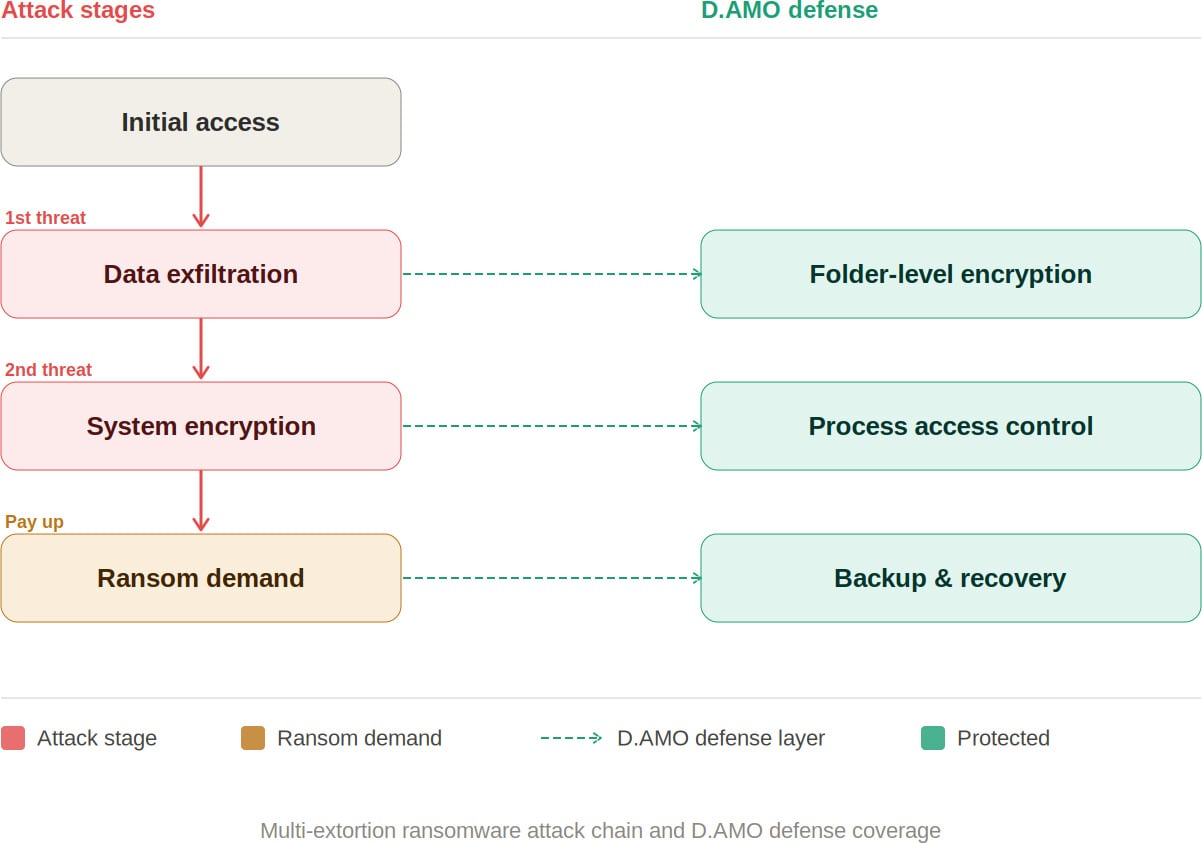
D.AMO: Blocking Every Stage of a Ransomware Attack
D.AMO, developed by Penta Security, is an encryption-based data protection platform designed to address every phase of a multi-extortion ransomware attack. It delivers integrated encryption, access control, and backup recovery across on-premises and cloud environments.
By applying file encryption and process-based access control technologies, D.AMO protects critical data stored on servers and PCs — safeguarding sensitive information against malicious programs through robust access enforcement. D.AMO’s key capabilities are as follows:
Folder-Level File Encryption
D.AMO KE encrypts all files within administrator-designated folders at the OS level. Deployable via an installer without source code modification, it operates using kernel-level encryption technology, enabling fast and secure encryption on existing systems with no disruption to the user experience.
Encryption policies are applied at the folder level, ensuring consistent protection with minimal operational overhead. Critically, even if an attacker exfiltrates sensitive data, the files remain encrypted — neutralizing the data exposure threat that is central to double extortion.
Access Control
D.AMO KE enforces strict access control over processes and OS users, permitting only explicitly authorized access. Ransomware and other malicious applications are automatically blocked from accessing encrypted folders, preventing unauthorized file manipulation.
All blocked activity is recorded through an audit log function and can be reviewed centrally via D.AMO Control Center.
Backup and Recovery
Even in the event of a successful attack, organizations can resume operations through an independently managed recovery system. With D.AMO in place, the ability to restore from backup significantly reduces dependence on decryption key negotiations with threat actors.
As multi-extortion tactics become the norm, neutralizing the data attackers seek to exploit has become a strategic priority. Organizations need the ability to render exfiltrated data unreadable, prevent ransomware from accessing files, and recover rapidly when incidents occur.
D.AMO addresses each stage of a ransomware attack within a single integrated platform — combining encryption, process-based access control, and backup recovery into a unified line of defense.
Want to learn more? Download the D.AMO Data Sheet.
Sponsored and written by Penta Security.

South Korean Regulators Challenge Dunamu’s Upbit-Naver Merger Transparency

This Protein Coffee Helps Keep You Full, Energized and Calm

Chippy lovers queue for their Good Friday fix in Darlington


-

 NewsBeat7 days ago
The Story hosts event on Durham’s historic registers
-

 NewsBeat22 hours ago
Steven Gerrard disagrees with Gary Neville over ‘shock’ Chelsea and Arsenal claim | Football
-

 Sports7 days ago
Sweet Sixteen Game Thread: Tide vs Michigan
-
Entertainment4 days ago
Fans slam 'heartbreaking' Barbie Dream Fest convention debacle with 'cardboard cutout' experience
-

 Business17 hours ago
No Jackpot Winner and $194 Million Prize Rolls Over
-

 Crypto World2 days ago
Gold Price Prediction: Worst Month in 17 Years fo Save Haven Rock
-
 Entertainment6 days ago
Lana Del Rey Celebrates Her Husband’s 51st Birthday In New Post
-

 Tech5 days ago
The Pixel 10a doesn’t have a camera bump, and it’s great
-
Crypto World3 days ago
Dems press CFTC, ethics board on prediction-market insider trades
-

 Sports3 days ago
Tallest college basketball player ever, standing at 7-foot-9, entering transfer portal
-

 Tech5 days ago
Avatar Legends: The Fighting Game comes out in July and it looks pretty slick
-

 Tech3 days ago
EE TV is using AI to help you find something to watch
-

 Fashion6 days ago
Amazon Sundays: Soft Spring Layers
-

 Business2 days ago
Login and Checkout Issues Spark Merchant Frustration
-

 Fashion7 days ago
When Evening Dressing Gets Colorful for Spring
-

 Tech5 days ago
Elon Musk’s last co-founder reportedly leaves xAI
-

 Tech3 days ago
How to back up your iPhone & iPad to your Mac before something goes wrong
-

 Tech4 days ago
Apple will hide your email address from apps and websites, but not cops
-

 Politics4 days ago
Should Trump Be Scared Strait?
-

 Crypto World4 days ago
U.S. rule change may open trillions in 401(k) funds to crypto
You must be logged in to post a comment Login