Connect with us
DAPA Banner

Tech

ElevenLabs hits $11bn valuation with $500m series D funding round

Published

on

Once somewhat of an outcast in Hollywood, today ElevenLabs counts some big stars on its roster, and it has just raised a $500m series D round.

ElevenLabs has raised $500m in a Series D funding round led by Sequoia Capital with partner Andrew Reed joining the board. Existing investors Andreessen Horowitz and Iconiq participated, with new investors coming on board including  Lightspeed Venture Partners, Evantic Capital and Bond.

The new round gives ElevenLabs an $11bn valuation, more than tripling its valuation in the space of a year. ElevenLabs started out in 2022, developing a human-like AI text to speech model that got it into hot water in the early days with various Hollywood stars like Emma Watson. Voice actors took them to court at the time and ElevenLabs subsequently settled the lawsuit.

These days some of Hollywood’s elite are fully on board. In November 2025 it launched its Iconic Marketplace, adding actors Michael Caine and Matthew McConaughey to its roster. Having been burnt early on, the company today describes Iconic Marketplace as solving “a key ethical challenge in AI-driven media creation by enabling the ethical sourcing and licensing of some of the world’s most recognisable voices”.

Advertisement

“We started by building a voice that could sound human – and we did,” said said Piotr Dabkowski, co-founder of ElevenLabs. “Today we are building foundational models across the full audio stack – text to speech, transcription, music, dubbing and conversational models with a world-leading research team.”

“This funding helps us go beyond voice alone to transform how we interact with technology altogether. We plan to expand our Creative offering – helping creators combine our best-in-class audio with video and Agents.”

ElevenLabs says the funding will help it to continue its international expansion across London, New York, San Francisco, Warsaw, Dublin, Tokyo, Seoul, Singapore, Bengaluru, Sydney, São Paulo, Berlin, Paris and Mexico City, where they plan to have “go-to-market teams” to support enterprise adoption.

Don’t miss out on the knowledge you need to succeed. Sign up for the Daily Brief, Silicon Republic’s digest of need-to-know sci-tech news.

Advertisement

Source link

Continue Reading
Click to comment

You must be logged in to post a comment Login

Leave a Reply

Tech

Xiaomi stuns with new MiMo-V2-Pro LLM nearing GPT-5.2, Opus 4.6 performance at a fraction of the cost

Published

on

Chinese electronics and car manufacturer Xiaomi surprised the global AI community today with the release of MiMo-V2-Pro, a new 1-trillion parameter foundation model with benchmarks approaching those of U.S. AI giants OpenAI and Anthropic, but at around a seventh or sixth the cost when accessed over proprietary API — and importantly, sending less than 256,000 tokens-worth of information back and forth.

Led by Fuli Luo, a veteran of the disruptive DeepSeek R1 project, the release represents what Luo characterizes as a “quiet ambush” on the global frontier. Furthermore, Luo stated in an X post that the company does plan to open source a model variant from this latest release, ” when the models are stable enough to deserve it.”

By focusing on the “action space” of intelligence—moving from code generation to the autonomous operation of digital “claws”—Xiaomi is attempting to leapfrog the conversational paradigm entirely.

Prior to this foray into frontier AI, Beijing-based Xiaomi established itself as a titan of “The Internet of Things” and consumer hardware.

Advertisement

Globally recognized as the world’s third-largest smartphone manufacturer, Xiaomi spent the early 2020s executing a high-stakes entry into the automotive sector. Its electric vehicles (EVs), such as the SU7 and the recently launched YU7 SUV, have turned the company into a vertically integrated powerhouse capable of merging hardware, software, and now, advanced reasoning.

This pedigree in physical-world engineering informs MiMo-V2-Pro’s architecture; it is built to be the “brain” of complex systems, whether those systems are managing global supply chains or navigating the intricate scaffolds of an autonomous coding agent.

Technology: The architecture of agency

The central challenge of the “Agent Era” is maintaining high-fidelity reasoning over massive spans of data without incurring a prohibitive “intelligence tax” in latency or cost. MiMo-V2-Pro addresses this through a sparse architecture: while it houses 1T total parameters, only 42B are active during any single forward pass, making it roughly three times the size of its predecessor, MiMo-V2-Flash.

The model’s efficiency is rooted in an evolved Hybrid Attention mechanism. Standard transformers typically face a quadratic increase in compute requirements as context grows; MiMo-V2-Pro utilizes a 7:1 hybrid ratio (increased from 5:1 in the Flash version) to manage its massive 1M-token context window. This architectural choice allows the model to maintain a deep “memory” of long-running tasks without the performance degradation usually seen in frontier models.

Advertisement

The analogy: Think of the model not as a student reading a book page-by-page, but as an expert researcher in a vast library. The 7:1 ratio allows the model to “skim” 85% of the data for context while applying high-density attention to the 15% most relevant to the task at hand.

This is paired with a lightweight Multi-Token Prediction (MTP) layer, which allows the model to anticipate and generate multiple tokens simultaneously, drastically reducing the latency required for the “thinking” phases of agentic workflows. According to Luo, these structural decisions were made months in advance, specifically to provide a “structural advantage” for the unexpected speed at which the industry shifted toward agents.

Product and benchmarking: A third-party reality check

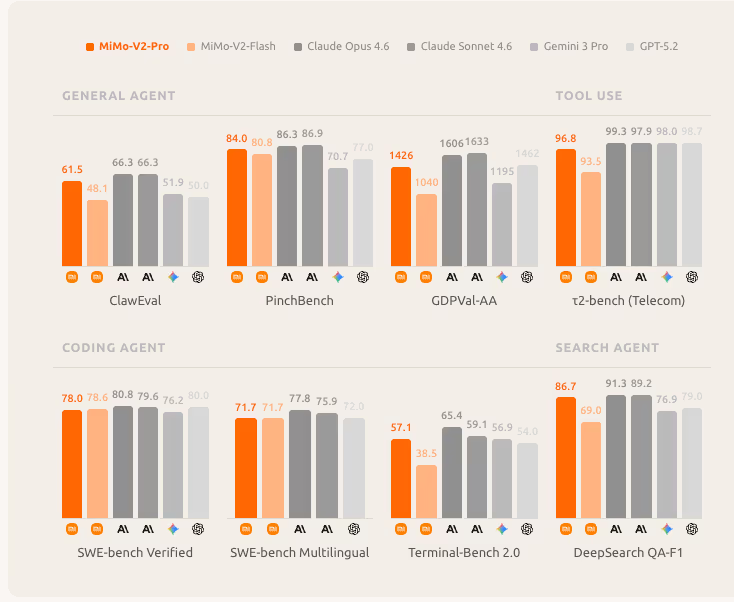
Xiaomi MiMo-V2-Pro benchmarking chart

Xiaomi MiMo-V2-Pro benchmark comparison chart vs. other leading models. Credit: Xiaomi

Xiaomi’s internal data paints a picture of a model that excels in “real-world” tasks over synthetic benchmarks. On GDPval-AA, a benchmark measuring performance on agentic real-world work tasks, MiMo-V2-Pro achieved an Elo of 1426, placing it ahead of major Chinese peers like GLM-5 (1406) and Kimi K2.5 (1283).

Advertisement

While it still trails Western “max effort” models like Claude Sonnet 4.6 (1633) in raw Elo, it represents the highest recorded performance for a Chinese-origin model in this category.

The third-party benchmarking organization Artificial Analysis verified these claims, placing MiMo-V2-Pro at #10 on its global Intelligence Index with a score of 49. This places it in the same tier as GPT-5.2 Codex and ahead of Grok 4.20 Beta. These results suggest that Xiaomi has successfully built a model capable of the high-level reasoning required for engineering and production tasks.

Xiaomi MiMo-V2-Pro benchmarking comparison chart by Artificial Analysis

Xiaomi MiMo-V2-Pro Artificial Analysis Intelligence index benchmarking comparison chart by Artificial Analysis

Key metrics from Artificial Analysis highlight a significant leap over the previous open-weights version, MiMo-V2-Flash (which scored 41):

Advertisement
  • Hallucination rate: The Pro model reduced hallucination rates to 30%, a sharp improvement over the Flash model’s 48%.

  • Omniscience index: It scored a +5, placing it ahead of GLM-5 (+2) and Kimi K2.5 (-8).

  • Token efficiency: To run the entire Intelligence Index, MiMo-V2-Pro required only 77M output tokens, significantly less than GLM-5 (109M) or Kimi K2.5 (89M), indicating a more concise and efficient reasoning process.

Xiaomi’s own charts further emphasize its “General Agent” and “Coding Agent” capabilities. On ClawEval, a benchmark for agentic scaffolds, the model scored 61.5, approaching the performance of Claude Opus 4.6 (66.3) and significantly outpacing GPT-5.2 (50.0). In coding-specific environments like Terminal-Bench 2.0, it achieved an 86.7, suggesting high reliability when executing commands in a live terminal environment.

How enterprises should evaluate MiMo-V2-Pro for usage

For the personas outlined in contemporary AI organizations—from Infrastructure to Security—MiMo-V2-Pro represents a paradigm shift in the “Price-Quality” curve.

Infrastructure decision-makers will find MiMo-V2-Pro a compelling candidate for the Pareto frontier of intelligence vs. cost. Artificial Analysis reported that running their index cost only $348 for MiMo-V2-Pro, compared to $2,304 for GPT-5.2 and $2,486 for Claude Opus 4.6.

For organizations managing GPU clusters or procurement, the ability to access top-10 global intelligence at roughly 1/7th the cost of Western incumbents is a powerful incentive for production-scale testing.

Advertisement

Data decision-makers can leverage the 1M context window for RAG-ready architectures, allowing them to feed entire enterprise codebases or documentation sets into a single prompt without the fragmentation required by smaller context models.

A systems/orchestration decision-maker should evaluate MiMo-V2-Pro as a primary “brain” for multi-agent coordination. Because the model is optimized for OpenClaw and Claude Code, it can handle long-horizon planning and precise tool use without the constant human intervention that plagues earlier models.

Its high ranking in GDPval-AA suggests it is particularly well-suited for the workflow and orchestration layer needed to scale AI across the enterprise. It allows for the creation of systems that can move beyond simple automation into complex, multi-step problem solving.

However, security decision-makers must exercise caution. The very “agentic” nature that makes the model powerful—its ability to use terminals and manipulate files—increases the surface area for prompt injection and unauthorized model access.

Advertisement

While its low hallucination rate (30%) is a defensive boon, the lack of public weights (unlike the Flash version) means internal security teams cannot perform the deep “model-level” audits sometimes required for highly sensitive deployments. Any enterprise implementation must be accompanied by robust monitoring and auditability protocols.

Pricing, availability, and the path forward

Xiaomi has priced MiMo-V2-Pro to dominate the developer market. The pricing is tiered based on context usage, with competitive rates for caching to support high-frequency reasoning tasks.

  • MiMo-V2-Pro (up to 256K): $1 per 1M input tokens and $3 per 1M output tokens

  • MiMo-V2-Pro (256K-1M): $2 per 1M input tokens and $6 per 1M output tokens

  • Cache read: $0.20 per 1M tokens for the lower tier and $0.40 for the higher tier

  • Cache write: Temporarily free ($0)

Here’s how it stacks up to other leading frontier models around the world:

This aggressive positioning is designed to encourage the high-intensity application flows that define the next generation of software. The model is currently available via Xiaomi’s first-party API only, with no current support for image or multimodal input—a notable omission in an era of “Omni” models, though Xiaomi has teased a separate MiMo-V2-Omni for those needs.

Advertisement

The “Hunter Alpha” period on OpenRouter proved that the market has a high appetite for this specific blend of efficiency and reasoning. Fuli Luo’s philosophy—that research velocity is fueled by a “genuine love for the world you’re building for”—has resulted in a model that ranks 2nd in China and 8th worldwide on established intelligence indices.

Whether it remains a “quiet” ambush or becomes the foundation for a global realignment of AI power depends on how quickly developers adopt the “action space” over the “chat window”. For now, Xiaomi has moved the goalposts: the question is no longer just “can it talk?” but “can it act?”

Source link

Advertisement
Continue Reading

Tech

25% Off Dyson Promo Code | March 2026

Published

on

If you’re hunting for a new vacuum, Dyson has surely come up in one way or another. The brand is famous for its powerful vacuum cleaners, but its air power also extends to other parts of the home, including hair care and air purification. It’s a dream household staple; I lugged around an old Dyson vacuum for years until I could upgrade to one of the newer stick models rather than buying something that wouldn’t be as powerful or last as long.

But the cost can make it a hard investment to make, even if it’s worth it. If you’re shopping for one of Dyson’s long-lasting gadgets but have a limited budget, fear not: we’ve got coupon codes to make it a better buy, plus tips on how to get discounts on Dyson’s website. Read on to get all of our Dyson promo codes and coupons, and learn the best ways to shop for a Dyson.

Get a 15% Off Dyson Promo Code When You Register

Usually, you need to be a new customer to get a great discount, but Dyson actually rewards you for being a repeat customer. You can get 15% off your next order by registering your current Dyson product’s serial number.

Sign Up to Unlock a 10% Off Dyson Coupon Code

You can also get 10 percent off your next Dyson purchase without needing a device to register. You’ll want to sign up your mobile number using a pop-up on Dyson’s homepage. That will get you a text, and you’ll have to reply with “Y” to officially register. After you reply, you’ll get a message with a link that will reveal a single-use code for 10 percent off your next purchase at Dyson.

Advertisement

You can also sign up for texts or Dyson’s email newsletters (like this hair care newsletter) to get access to exclusive Dyson sale events, more coupon codes, and new product releases (and several new vacuums are due out this year).

Save up to $600 With This Week’s Dyson Coupons

Dyson always has sales going on its website at the Dyson Deals Hub. The discounts rotate weekly, and there’s always different active coupons in different categories of Dyson products. You might find a nice discount on the V12 vacuum, for instance, or the Dyson Airstrait.

Save 30% When You Shop the Dyson Outlet

Looking for a bigger discount? Try Dyson’s outlet of refurbished vacuums, hair tools, and air purifiers. Youl’l find discounts of up to 30 percent off the original price, and each one is inspected, restored to like-new condition, and backed by Dyson’s official warranty. It’s a good way to get a great discount on products like the Supersonic hair dryers, which you can find for under $200 when refurbished, and Dyson’s multi-stylers can be found for under $300. These do have a shorter warranty period than new products, though; it’ll only be six months to a year rather than two to five years.

Dyson Discount: 20% Off

During the Dyson owner savings event, Dyson owners get rewarded by getting 20% off Dyson technology purchases. When you choose one of the qualifying floorcare or air purifiers, you’ll add your one-time-use code at the payment section when you checkout online at Dyson. Or if you’d rather, you can simply log in and your Dyson discount will automatically be applied at checkout. Plus, if you’d rather, you can also shop at your nearest Dyson Demo Store or make a purchase over the phone. And if you don’t have a Dyson discount code automatically, you can register your machine by calling 1-866-693-9766 to speak to a Dyson expert about Owner Rewards.

Advertisement

Source link

Continue Reading

Tech

A new iPhone hacking tool puts anyone still on iOS 18 at risk

Published

on

Google and cybersecurity companies Lookout and iVerify have detailed a new hacking technique that potentially puts a significant portion of iPhone users in danger, just by visiting the wrong web page. The hack is called “DarkSword” and since it specifically targets several different versions of iOS 18, it could affect “close to a quarter of iPhones,” Wired writes.

DarkSword is a “fileless” hack that leverages a collection of exploits to access sensitive data when an iPhone visits an infected website. Rather than install spyware that hangs around on a user’s phone after messages and other private information are stolen, fileless hacks like DarkSword take control of “the legitimate processes in an iPhone’s operating system to steal data,” according to Wired. Even more troubling, DarkSword deletes any evidence it was running on an iPhone after it finishes stealing your information.

The hack starts as soon as an iOS device encounters an “malicious iframe embedded in a web page,” after which it works its way through your iPhone, gathering sensitive information like passwords before deleting itself. DarkSword can abscond with things like messages and iCloud content, but it’s also specifically designed to access crypto currency wallets, Lookout says, which could indicate who was using DarkSword before it became widely available.

DarkSword has reportedly been used in Ukraine, Saudi Arabia, Malaysia, Turkey and Russia, and its origins could be tied to a different hacking toolkit called Coruna that TechCrunch reports may have been created for the US government by a company called Trenchant. Regardless of where DarkSword came from, the tool didn’t become widely available until its Russian users left DarkSword’s source code on a website for anyone to access, “complete with explanatory comments in English that describe each component and include the ‘DarkSword’ name for the tool,” Wired writes.

Advertisement

Apple patched the exploits that DarkSword and Coruna used in recent updates to iOS 26, the yearly software release from 2025 that followed iOS 18. The problem is that not everyone is using Apple’s latest update. DarkSword targets iOS 18 releases between iOS 18.4 and iOS 18.6.2, and according to Apple’s latest iOS usage stats for developers, around 24 percent of iOS devices are still on iOS 18. Without more detail, it’s hard to know how many people that leaves exposed, but as a rule of thumb, if your iOS device can update to a newer software release, you should do so as soon as possible to stay secure.

Source link

Continue Reading

Tech

Google Is Trying To Make ‘Vibe Design’ Happen

Published

on

With today’s latest Stitch updates, Google is trying to make “vibe design” happen, reports The Verge’s Jay Peters. The AI-native design platform encourages users to describe goals, feelings, or inspiration in “natural language,” rather than starting with traditional blueprints.

In a blog post, Google Labs Product Manager Rustin Banks says that Stitch can turn those inputs into interactive prototypes, automatically map user flows, and support real-time iteration. It introduces voice capabilities that allow users to “speak directly to [the] canvas” for feedback or changes. Tools like DESIGN.md also help users create reusable design systems across various projects.

Source link

Continue Reading

Tech

This Boeing Prototype Pioneered The Aerial Refueling Tech America Still Uses Today

Published

on


The Boeing KC-135 Stratotanker is a widely used aerial refueling plane that’s been in continuous service with the United States Air Force for over 60 years. The Stratotanker looks a lot like a Boeing passenger plane, and its set of CFM 56 engines are identical to what powers a 737. But the development of the Stratotanker is more of a case of divergent evolution than militarizing a passenger plane. 

In 1954, Boeing was developing the 367-80 prototype that, if you see it in person at the Air and Space Museum’s Udvar-Hazy Center (like I have), looks a lot like a modern airliner. Boeing had a dual-purpose with what would be called the “Dash 80.” Not even a decade after World War II ended and in the thick of the Cold War, Boeing first showed the Dash 80 to military personnel, and then to the air travel business.

To the businesspeople in charge of the airlines the Dash 80 was impressive. Boeing would eventually develop the prototype into the Boeing 707, a legend in aviation history.

Advertisement

The sales pitch worked

The military was also impressed. 29 aircraft that would eventually become KC-135s were ordered that year in 1954. 732 Stratotankers would eventually leave the assembly line. The Air Force wanted the Dash 80 widened by a foot to accommodate more flexibility as both a tanker and transport aircraft. In 1955, as the Dash 80 was getting shown to the world, test pilot Tex Johnston managed to perform a few barrel rolls in the prototype to get more buyers hyped and to show off what the plane was capable of.

The rest, as they say, is history. 72 years later and the Air Force and Air National Guard are flying the cousin of one of the first ever jet airliners. The current iteration of Stratotanker is a bit different. Namely, it is much more powerful at 86,536 pounds of thrust compared to the Dash 80’s 40,000, and the avionics are firmly in the 21st century, given the Stratotanker’s sometimes dual role as a command center or reconnaissance plane.

Advertisement


Source link

Advertisement
Continue Reading

Tech

Popular Chrome extension "Save Image as Type" was hijacked, impacting over 1 million users

Published

on


Google delisted the image conversion tool earlier this month, but not before it had likely been modifying thousands of users’ browsers for several weeks. The group behind the compromise has also been linked to dozens of other hijacked Chrome and Edge extensions.
Read Entire Article
Source link

Continue Reading

Tech

How Online Astrology Apps Can Make Life Easier

Published

on

Convenience — that’s the whole pitch. A well-built horoscope platform can cut out the noise of scattered websites, manual bookings, and messy screenshot folders, putting your daily ritual right where you need it most. A 2025 Pew Research Center report found that 3 in 10 U.S. adults engage with star-sign guidance at least yearly, though most say they do so mainly for fun rather than for major life decisions.

That distinction matters more than people give it credit for. The most useful tools work best as prompts for self-reflection, scheduling sessions, tracking themes, or anchoring a daily ritual — not as replacements for professional support, and definitely not as certainty machines.

Quick take: A good horoscope platform saves time, centralises your cosmic check-ins, and makes it effortless to stay consistent. A poor one drowns you in generic output, aggressive upsells, vague predictions, or subscription terms that were clearly written to confuse.

Advertisement

What These Platforms Actually Make Easier

The biggest win is convenience — full stop. Instead of bouncing between scattered sites, old screenshots, and manually scheduled calls, everything lives in one place: birth-chart details, daily summaries, personal notes, consultations.

Honestly, for a lot of readers, the practical payoff isn’t “knowing the future.” It’s having a structured nudge for reflection — a recurring habit, a simple way to think through mood, timing, and priorities alongside tools like journaling apps for self-reflection.

What that usually looks like in practice:

  • Daily check-ins: short horoscope summaries, transit alerts, or reminders
  • Faster access to live sessions, especially via chat, call, or appointment booking
  • One dashboard for birth details, saved reports, payment history, and past consultations
  • Variety — because some services mix cosmic guidance with tarot, numerology, or reflection prompts

Primary Functions That Matter Most

Not every platform is built the same way, so separating genuinely useful capabilities from filler saves a lot of frustration later. These are the ones that tend to make or break the experience.

1. Birth-chart setup

Advertisement

Most platforms start by asking for your birth date, time, and place. That’s standard. When the service supports deeper chart-based work, that initial setup usually shapes how personalised everything feels going forward.

2. Daily or weekly material

This is what most casual users care about first — no two ways about it. A well-designed platform makes short updates easy to skim while still giving enough context for people who want more than one-liners.

3. Live consultation options

Advertisement

Some services include live chat with an astrologer, voice calls, or bookable sessions with practitioners. That’s genuinely useful if you’d rather get a direct answer than wade through a general library. Honestly, that alone makes it worth trying for a lot of people.

4. Saved history and notes

Good tools reduce friction by keeping previous sessions, favourite practitioners, and your record of past interactions in one spot. Jumping between messages, old screenshots, and scattered websites? Nobody’s got time for that.

5. In-app learning material

Advertisement

Some platforms also publish explainers, FAQs, and introductory guides. When done well, this helps beginners understand chart terminology, compatibility language, and why personalised sessions feel so different from the generic daily stuff.

Before installing anything, check the Google Play Data safety section if you’re on Android — then compare it with the privacy language inside the listing itself. This site’s guide to how to choose safe mobile apps is worth reading before committing to any paid service.

Busy schedule, phone in hand, no interest in travelling anywhere — this format just fits. People who live far from in-person practitioners, or who prefer handling everything digitally, tend to get the most out of it.

Does your goal lean more toward regular reflection than constant prediction? Pairing one of these platforms with habits from digital wellbeing and screen-time guides keeps the whole thing purposeful rather than obsessive.

Advertisement

Good signs you’ll get real value from one:

  • Quick access during a commute, break, or evening wind-down
  • Wanting written summaries before deciding whether to book a live session
  • Comparing styles — chart-based depth versus short daily prompts
  • Keeping everything (reminders, personal notes, saved reports) in one spot

Where They Fall Short

Consistency is the problem. Some platforms deliver thoughtful, well-structured material; others recycle copy, lean on weak personalisation, or push pressure-based upsells until you want to throw your phone across the room.

They’re also a poor match if you want strictly evidence-based planning. Treating these tools as reflective prompts — rather than substitutes for financial, medical, legal, or mental-health guidance — keeps expectations somewhere realistic.

Then there’s the overuse issue. If checking in starts making you delay decisions, second-guess perfectly normal plans, or feel more anxious than settled, stepping back makes sense. Lighter alternatives like mood tracking or simple diary tools might serve you better at that point.

How to Choose the Right Platform

Branding doesn’t matter nearly as much as fit. Start with the workflow you actually want, then judge the service against privacy, cost, clarity, and usability.

Advertisement

Android users should keep Google Play Protect enabled and avoid sideloading unknown packages just to access premium tiers. If a service asks for broad permissions that don’t match its core function, review those carefully against your own standards for understanding app permissions on phones.

Simple decision tree

Run through these before downloading anything:

  • Only want a daily check-in? Go lightweight — clear free options, minimal notifications
  • Want detailed sessions? Prioritise chart depth, readable reports, and transparent pricing
  • Want live consultations? Check availability windows, session length, refund rules, and whether practitioner profiles feel specific rather than generic
  • Privacy matters more than variety? Pick the platform with the clearest data disclosures and the smallest permission footprint

Implementation Checklist Before You Pay

Read the free experience first — before starting any trial.

  • Check how often the platform pushes upgrades or timed offers
  • Review the listing for data handling, permissions, and support options
  • Confirm whether charges are per session, monthly, or tied to in-app credits
  • Look for a visible cancellation path before subscribing
  • Save receipts and session history if you plan to compare value over time

Cost, Privacy, and Trust Trade-Offs

Free tiers often feel convenient at first. But they tend to hide the best material behind subscriptions, per-minute calls, or in-app credits. That doesn’t automatically make them bad — it just means judging value based on how often you’ll genuinely use the service.

On iPhone, Apple explains that users can manage or cancel eligible subscriptions through account subscription settings, which is worth reviewing before starting any trial that renews automatically. If the charge runs through a third-party provider rather than Apple, the cancellation path may differ — so read the billing terms carefully before you commit.

Advertisement

Troubleshooting Common Frustrations

The sessions feel too generic

Try a different platform style. Some services are built for broad daily material; others focus on chart-based depth or live practitioner access. Worth shopping around.

The platform is useful but too distracting

Cut notifications, remove widget clutter, and limit usage to one daily check-in. The goal should be clarity — not constant interruption.

Advertisement

You’re unsure whether a paid plan is worth it

Stick with the free tier for at least a week or two, then honestly compare what you actually used against what the subscription adds. Simple as that.

You’re worried about privacy

Re-check the listing, permissions, and account settings. If the data request feels excessive for a horoscope service, skip it and pick something simpler.

Advertisement

Skip it entirely if you want strictly evidence-based planning with zero interpretive layer. Smart move, too, to avoid these platforms when they increase anxiety, drive impulsive spending, or start replacing your own judgement in decisions that need qualified professional help.

Key Takeaways

  • These platforms work best as convenience tools for reflection, routine, and easier access
  • The right pick depends on whether you want quick daily material, deeper chart interpretation, or live sessions
  • Privacy checks, subscription terms, and permission requests matter as much as the sessions themselves
  • If a platform adds pressure, confusion, or overspending, it’s the wrong fit — no matter how polished it looks

FAQ

Are astrology apps accurate?
Depends what you mean by accurate. As a reflective tool or themed guide, some users find real value in them; as a certainty machine, the experience is likely to disappoint.

Do I need my exact birth time?
For chart-based functions, an exact or near-exact time can matter. For simple daily horoscope use, it’s often less critical.

Are free tiers enough?
They can be, especially if you only want short daily material. Paid plans make more sense when you genuinely use deeper reports or live sessions.

Can these platforms replace an in-person astrologer?
For convenience, sometimes yes. For depth, it depends on whether the service offers strong practitioner access — and whether you actually prefer digital communication.

Advertisement

How do I know if a horoscope service is safe?
Check the listing, privacy disclosures, permissions, billing terms, and support options before installing or paying.

Do these platforms usually include more than horoscopes?
Some do. Combinations like tarot, numerology, compatibility tools, or general self-reflection prompts aren’t unusual.

What’s the biggest red flag?
Vague material paired with aggressive upsells. If a platform keeps pushing urgency, extra credits, or murky renewals — move on.

Can I cancel a subscription easily?
Usually, but the exact process depends on whether billing runs through Apple, Google Play, or the provider directly. Always check that before starting a trial.

Advertisement

Source link

Continue Reading

Tech

Microsoft will no longer auto-install M365 Copilot app on Windows PCs

Published

on

Microsoft has stopped automatically installing the Microsoft 365 Copilot app on Windows PCs with M365 apps, after initially planning to roll it out to users by default.

The app was supposed to act as a central hub for Copilot, consolidating AI features across tools like Word, Excel, and PowerPoint into a single location.

However, instead of letting users choose, Microsoft had planned to push it directly onto devices, something many users have opposed in the past.

What changed with Microsoft’s Copilot rollout

Microsoft has now temporarily disabled the automatic installation of the Microsoft 365 Copilot app on eligible devices. This update was confirmed through the company’s Microsoft 365 message center, though no clear reason was shared for the sudden pause.

Earlier, the rollout had already started in December and was expected to expand to more users outside the European Economic Area. Even then, IT admins had the option to opt out, while users in the EEA were excluded by default.

Advertisement

If the rollout resumes in the future, the app will show up in your Start Menu and be enabled automatically. For now, that plan is on hold.

What if the app is already on your PC

If you already have the Microsoft 365 Copilot app installed, nothing changes. Microsoft is not removing it from your system, but you can uninstall it yourself if you want.

Admins can still deploy the app manually using other methods, and Microsoft is expected to share more updates before restarting the rollout.

Microsoft has not explained why it paused the rollout, but the move comes as the company faces growing pressure to be more careful about how it introduces AI features into Windows.

This pause also comes after a few awkward Copilot moments for Microsoft. In one instance, a Windows 11 bug ended up uninstalling the app on its own, which some users actually welcomed.

Advertisement

In another case, Copilot even showed up on LG TVs with no clear way to remove it, highlighting how aggressively Microsoft has pushed the feature.

For now, this is a rare step back because Microsoft is giving you more control over whether Copilot stays on your PC or not.

Source link

Advertisement
Continue Reading

Tech

Confessions of the ICE Agent Whisperer

Published

on

As immigration became one of the defining focuses of Donald Trump’s second administration, the Department of Homeland Security (DHS) has taken center stage. Under the 2025 One Big Beautiful Bill Act, DHS, which oversees Immigration and Customs Enforcement (ICE), Customs and Border Protection (CBP), US Citizenship and Immigration Services (USCIS), and several other agencies, received more than $80 billion in additional funding, and in January the agency announced that it had hired more than 12,000 new agents.

Even as cities like Los Angeles and Minneapolis have seen a surge of immigration officers descend upon them, DHS has maintained a high level of opacity around its operations. Officers carrying out raids and arrests are often masked and driving in unmarked cars. As enforcement has pulled in federal law enforcement personnel from across the government, it has become difficult to tell what agency a given officer works for, let alone who they actually are. Though DHS has been combative with the media, ICE agents themselves have been mostly quiet, even if some have mixed feelings about their work and where the agency is headed.

Karl Loftus, an independent journalist who runs the Instagram account @deadcrab_films, started a new project following the immigration surge in Minneapolis called Confessions of an ICE Agent. There, he publishes interviews with people who work in immigration enforcement across DHS. This includes agents and officers with the two main divisions of ICE—Homeland Security Investigations and Enforcement and Removal Operations—as well as CBP officers. He offers them anonymity and a place to speak their minds outside the structures of traditional media, and in return gets a glimpse of what the people inside the agency are experiencing, creating an archive of this moment in its history.

In one post, a biracial agent speaking shortly after Trump announced that he would be replacing DHS Secretary Kristi Noem told Loftus he believed Noem was a “DEI” hire. In another, an HSI agent called the people leading the US government “imbeciles,” saying they were “disgusted by nearly all of them.” Another HSI agent expressed concerns about DHS colleagues violating the law, and complained of having to pause investigation into child sexual abuse cases to focus on immigration work. “If they gave child exploitation cases a fraction of the attention, funding, resources, personnel, analytical support, etc. that they’re now giving immigration enforcement, we could do so much good,” they said.

Advertisement

WIRED spoke to Loftus about the public response to a polarizing topic, how he vets his sources, and the pressure to pick a side. A DHS spokesperson responded to WIRED’s request for comment saying that they cannot verify anonymous interviews but that DHS and its Homeland Security Investigations unit “is not slowing down and remains committed to all aspects of its mission, leveraging a whole-of-government approach to address threats to public safety and national security.”

This conversation has been edited for length and clarity.

WIRED: Before this project, your account mostly focused on things like disaster recovery after Hurricane Helene and similar topics. How did you start working on ICE?

Karl Loftus: In 2018 I was a volunteer in North Carolina during Hurricane Florence. I was there during the hurricane for four days doing search and rescue. That kind of started my passion for disaster response. I had been in Jamaica for seven weeks responding to Hurricane Melissa, working with a handful of different NGOs. I worked with Global Empowerment Mission repairing roofs of hospitals and medical centers to try to get the medical infrastructure back on track. I worked with World Central Kitchen. I was there documenting. I had planned to go to Wisconsin for the holidays, which is where I’m from, to visit some family, but I ended up staying in Jamaica. In early January, I finally made it up to the Midwest to see some family, and that’s when the Renee Good shooting happened. I was like, “Man, I know shit’s about to go insane the following day, and there’s going to be protests and riots and all this stuff.” So I decided to make the trip to Minneapolis.

Advertisement

Source link

Continue Reading

Tech

5 Home Depot Finds Worth Checking Out In March 2026

Published

on


We may receive a commission on purchases made from links.

As we settle into March and the gray skies finally start to clear up a bit, many of you might be looking to take on a few of the projects that have been sitting on the back burner during the icy winter months. Maybe you want to tackle some home DIY projects like making a few repairs or replacing some fixtures, whip your yard into shape by cleaning up your lawn and getting rid of those pesky weeds, or browse appliances and home furnishings for ideas to give your living areas a little refresh. Whatever the project might be, you’ll likely find that Home Depot has the tools and supplies you need to get it done.

Advertisement

Home Depot is easily one of the largest home improvement retailers in North America. Most of the company’s brick-and-mortar outlets house roughly 35,000 products at any given time, while its digital marketplace is home to more than a million. On top of that, the company is adding new inventory and replacing old stock all the time, with several new Home Depot products coming out in 2026 outside of its usual power tool turnover.

Home Depot’s warehouse-style stores are absolutely massive, though, so there are a lot of goodies that you might miss when you browse the aisles of your local outlet. So, it’s definitely worthwhile to take a look at some of the more unique and interesting products that are available in March 2026.

Advertisement

Ryobi 18V One+ HP Brushless 8-inch Pruning Chainsaw

It’s hard to make a list of Home Depot products without checking out at least one tool from Ryobi. The store’s officially partnered power tool brand is broadly known for its blend of performance and affordability, with many of its new battery-powered outdoor tools being lighter, quieter, and much easier to maintain than conventional gas-powered alternatives.

The Ryobi 18V One+ HP Brushless 8-inch Pruning Chainsaw is a prime example of this. For just $149 for the bare tool or $179 for a kit that comes with a 2.0 Ah battery and charger, you can get a small, one-handed chainsaw that you can use to cut limbs up to 6 inches in width. This makes it the perfect size for pruning and limbing those dangerous branches that start to hang precariously or get a little too close to the windows, while still allowing you to keep one hand on the ladder for stability. It has an oil-free design, on-board tool storage, a tooled chain tensioning system, a variable speed trigger, and a chain guard to protect against kickback. It’s also part of Ryobi’s HP system, which promises both more power and more efficient battery life than its standard tools. In fact, Ryobi claims you can get up to 65 cuts per charge on a single 2.0 Ah battery.

Users seem to like this tool as well. It currently has a 4.8 out of 5 on the Home Depot website, with 97% of customers stating that they would recommend it. Reviewers regularly claimed that the chainsaw is lightweight, quiet, easy to use, and that it is able to cut through large branches of hardwood with relative ease.

Advertisement

Mammotion Luba 2 AWD 5000HX 15.8-inch Robot Lawn Mower

Hate mowing your lawn? Good news! Home Depot sells several robot lawnmowers that can take that chore off your hands. Many of the older versions of these required you to use a perimeter wire, which added expense, and installing it could be a sizable chore in and of itself. But many of the newer models are different, which is a big part of the reason robotic lawn mowers took the CES spotlight this year. One prime example is the Mammotion Luba 2 AWD 5000HX 15.8-inch Robot Lawn Mower.

Advertisement

This handy little robot costs a pretty penny, at $2,999. But for that price, you get a mower that’s able to cover up to 1 ¾-acres of lawn via a real-time kinematic (RTK) navigation system that is assisted by the company’s UltraSense AI Vision. This allows it to map your yard while also avoiding trees, fences, edges, and other obstacles. The company also promises the ability to navigate steep slopes (up to 38 degrees), rough terrains, potholes, and thick grass without getting stuck. It’s powered by a 165 W motor with four-wheel-drive, coverage up to 13,000 square feet per charge, app control and monitoring systems, GPS tracking, and the ability to differentiate and manage up to 50 different mowing areas.

Buyers have given this mower a 4.6 out of 5, with 95% of them suggesting that they would recommend it. The robot was regularly praised for the ease of setting it up, the low volume of its operation, its ability to manage steep hills, and the stripe pattern that it leaves on the lawn. It’s worth noting, however, that a handful of customers have reported connectivity issues.

Advertisement

Rachio R3 Smart Sprinkler Irrigation Controller

Another clever way to automate your lawn and garden care is to invest in a smart sprinkler system. There are a few different models out there with varying feature sets, but one of the cooler ones you can find on the shelves at Home Depot is the Rachio R3 Smart Sprinkler Irrigation Controller, which is frequently hailed as one of the best smart sprinkler controllers you can buy.

This device is sold in two configurations: an 8-zone model and a 16-zone model. Both versions of the R3 connect to an app that allows you to set schedules, monitor water usage, and make adjustments whenever you like. That’s all well and good, but a particularly nice feature is its Weather Intelligence Plus tech, which allows the device to monitor local weather and automatically skip watering sessions during rain, heavy wind, or freezing temperatures. This combination of capabilities promises to save users 30% to 50% of their water usage while keeping their plants healthy by preventing overwatering. The Rachio app can also help you create custom-tailored schedules based on the specific needs of whatever you’re watering, the kind of soil it’s growing in, and the amount of sun exposure in the area.

This device has a 4.7 out of 5 on the Home Depot site with an 80% recommendation rate. Buyers generally appear to like the app itself, the device’s scheduling capabilities, and the amount of water it’s saved them over other systems. Once again, the primary complaint seems to be that a relatively small number of users experience connectivity issues.

Advertisement

Samsung Bespoke Ventless Ultra Capacity All-In-One Washer Dryer Combo

Do you hate having to switch your laundry from the washer to the dryer? The Samsung Bespoke Ventless Ultra Capacity All-In-One Washer Dryer Combo is a 5.3 cubic foot unit that, as the name suggests, performs the tasks of a washer and a dryer. Now, there are a lot of stacked units that are called washer/dryer combos, but this one only uses a single basket and promises to wash and dry a load of laundry in 98 minutes without the user needing to do anything in between. 

Advertisement

It has an AI-powered system that uses sensors in the basket to monitor things like the dryness of your clothes and make adjustments accordingly, an auto door opening feature that keeps the internal air from stagnating, a power steam setting for stain removal, an auto-clean system that automatically washes the heat exchanger to prevent lint build up, and compatibility with the SmartThings app, which opens the door to a whole host of other features, such as voice control. It retails for $3,299, but Home Depot currently has it on a Special Buy sale for $1,999 at the time of writing.

This appliance has a 4.2 out of 5 on the Home Depot site with a 79% recommendation rate. Customers generally seemed to like how quiet it is, how much laundry it can tackle in a single load, its energy efficiency, and the general convenience of its features. The biggest complaint most people seem to have is that it takes a long time to do a single load, though others have reported difficulties with the drainage and the sheer complexity of trying to fix the machine when something goes wrong.

Advertisement

Walker Edison Furniture Company Rustic Industrial Wood Hall Tree Bench

Keeping your halls and entryways organized can be a challenge as the spaces are often narrow and not overly accommodating to the things you might want to leave at the door, such as shoes, hats, coats, pet leashes, and handbags. That said, there are several pieces of furniture out there that are designed for this exact purpose.

One option that you might consider for these spaces is the Walker Edison Furniture Company Rustic Industrial Wood Hall Tree Bench, which retails for $81.99. This is a moderately small and narrow bench (40-inch W x 17-inch D) with an undershelf for you to store your shoes. From the rear of the bench sprouts the hall tree, a simple metal frame with wooden slats that host seven double hooks. The rails are made of black powder-coated metal, while the wooden elements consist of high-density MDF that is covered in a gray-brown “driftwood” veneer, giving it a clean, yet industrial aesthetic.

The Rustic Industrial Wood Hall Tree Bench has a 4.7 out of 5 on the Home Depot page with an astounding 100% recommendation rate. People generally seem to like the style and functionality of the piece, claiming that it adds an abundance of storage and is easy to assemble. Some have noted minor build issues, such as hooks being slightly misaligned, though these appear to be a relative minority.

Advertisement


Source link

Advertisement
Continue Reading

Trending

Copyright © 2025