Tesla has made a bold pricing move on its long-anticipated Cybertruck, offering one of its more affordable trims at a price that finally starts to feel within reach for a broader range of buyers. For a limited time, the dual-motor all-wheel-drive Cybertruck is listed at $59,990 in the U.S. – the lowest price yet for the futuristic electric pickup and a significant shift from the vehicle’s previously high price tags.
The discounted price, which CEO Elon Musk says will only be available for 10 days, represents a rare opportunity for prospective buyers who have been turned off by the Cybertruck’s historically premium cost and slower-than-expected sales.
Tesla’s typical strategy of incremental price cuts and new configurations has been on full display with the Cybertruck, a model that faced considerable delays and a long lead-up since its 2019 unveiling. Originally pitched with a target base price closer to $40,000, the production version has consistently landed well above that figure.
This latest offer is not just a response to consumer feedback on pricing
It’s a tactical move to stimulate demand after the Cybertruck’s sales performance lagged significantly behind early expectations. With sales dropping nearly 48% in 2025 compared with the previous year, and overall electric vehicle deliveries softening across markets, Tesla is using the price reduction as a short-lived incentive to boost interest.
Advertisement
Epic Games
The $59,990 version of the Cybertruck isn’t a stripped-down work truck – it retains significant features like all-wheel drive, an estimated EPA range near 325 miles, a powered tonneau cover, bed power outlets, and other functional elements that matter to buyers. However, compared to higher-priced trims, there are compromises: textile seats instead of premium seating, reduced towing capacity, and fewer luxury amenities.
This temporary price drop could be Tesla’s most aggressive bet yet to broaden the Cybertruck’s appeal
Since its market debut, the Cybertruck has battled challenges including quality control issues, recalls, and a pricing strategy that many viewed as out of step with mainstream pickup buyers. By offering a sub-$60K entry point – even if only briefly – Tesla is signalling that it still believes in the Cybertruck’s potential as a serious competitor in the electric truck space.
Electric pickups are quickly gaining traction thanks to growing consumer interest and increasing competition from legacy automakers. A more attainable price may help Tesla attract customers who might otherwise opt for rivals like the Ford F-150 Lightning or Rivian R1T, both of which offer compelling alternatives in similar segments.
CybertruckUnsplash
If you’re in the market for an electric pickup, this 10-day pricing window could be one of the few chances to secure a Cybertruck at a cost that doesn’t demand a premium luxury-vehicle budget. The deal makes the Cybertruck competitive with other EV trucks on price, but you’ll need to act quickly – Tesla has made it clear this isn’t a long-term price change.
For buyers on the fence about waiting for future price reductions or alternative models, this limited price promotion underscores how fickle EV pricing can be and how strategic timing might save thousands. Whether the Cybertruck will become a mainstream choice remains to be seen, but for now, this brief dip in price offers one of the best opportunities to own Tesla’s electric pickup without paying top dollar.
Pie charts are perhaps the most common data visualisation tool, especially when illustrating comparisons or percentages. They allow you to easily see how each of the slices contributes to the total. Google Sheets gives you an immediate and simple way to create one. This is how you make a pie chart in Google Sheets.
How To Make a Pie Chart in Google Sheets?
The process to make a pie chart is fairly simple. Here’s how:
Choose the columns and rows you want to add to the chart.
Click on the Insert menu at the top.
Choose Chart from the dropdown.
Then, Google Sheets may display a different type of chart.
Switch to Chart Editor on the right-hand side and convert it into a Pie chart.
Include personal touches within the text, design, and color spaces to make the text more readable.
How To Make a 3D Pie Chart in Google Sheets?
Here’s how you can continue the steps after making the regular pie chart to turn it into a 3D one:
Once your pie chart is ready, open the Chart Editor on the right.
Go to the Customize settings.
Under Chart style, select the 3D box.
Edit text, design, or colours as needed.
How To Make a Pie Chart with Percentages in Google Sheets?
Here are simple steps to make a pie chart with percentages:
Click on your pie chart to open the Chart Editor on the right side.
Go to the Customize tab and expand the Pie chart section.
Under the Slice label, choose Percentage from the dropdown list.
Now, percentages will appear inside the slices, so you don’t need them in the legend.
If you want to keep a legend, open the Legend section under Customize.
From the Position dropdown, select where you’d like the legend to appear (top, bottom, left, or right).
Your chart will subsequently display both percentages in the slices, along with a legend to quickly identify them.
By following these steps, you can create a pie chart in minutes using Google Sheets. It’s a useful feature for anyone who wants to present data in a clearer way. With labels, colours, and design options, your chart can look both smart and professional.
This 1959 Bell Labs film provides a glimpse into a world where computers were little more than a collection of clever mechanical and magnetic tricks for storing anything in memory. It’s the story of engineers seeking to develop a solution to store binary data that was fast, reliable, and non-volatile, and could be accessed at any time without having to wait for a drum to spin or a tape to scan. One segment stands out for its innovative solution: the Twistor memory.
Engineers at the time were stuck with inefficient storage systems. Magnetic core memory was the best they had, with small ferrite rings threaded with wires holding magnetic states representing 0s and 1s. When they sent a pulse over the wires, it reversed the state and wrote some data, but reading it required slamming a little voltage through it and quickly erasing it. Access times were reasonable at 10 microseconds, but reading erased all data.
Then the brilliant minds at Bell Labs created the Twistor. Essentially, it is a device that substitutes all of the individual rings with a long, thin ribbon of magnetic material wrapped around a fine copper wire. Each twistor works as a small linear storage element. The current flowing through the wire and the surrounding solenoid generates a magnetic field that aligns the domains along the ribbon in one way or the other, allowing a bit to be stored right there. Its name comes from the helical wrap, which allows for quite thick packaging in sheets or modules.
Twistor memory would be demonstrated with 26 wires, all of which were part of a large array. They could access it in around 5 microseconds and store thousands of bits per module. Larger versions simply employed broader bands to create even larger grids. Data remained stable even after the power was turned off, just as core memory. The concept claimed to be easier to build than manually threading all of those tiny little rings. One of the best features is that you can just slide a card in with a magnet on it to prevent writing to specific bits, preserving your data.
Now, we see in the film how the researchers were able to squeeze a lot of information onto just one plane of twistors, which is significantly less area than a drum or tape. Compare this to drum memory, which would spin a coated cylinder at thousands of revolutions per minute, storing only a thousand 20-bit words with access delays of about a millisecond while you waited for the proper location to spin under the head. Tapes provided a lot of space, but only sequential access, which was acceptable for backups but not good for running a program quickly.
Ferrite sheet variations also emerged, some with holes pressed into thin magnetic plates to approximate difficult-to-replicate core designs but in a far more compact form, as well as stacking modules capable of storing 50,000 words or more. People were particularly drawn to the Twistor because of its ability to combine speed, density, and relative simplicity. Its beginnings stretch back to 1957, and by the mid-1960s, it had made its way into real-world applications, such as 1ESS telephone switching systems. In call routing tables, reliable semi-permanent storage was especially important.
Semiconductors appeared a little later and dramatically changed everything; memory shrunk down to small silicon chips that were much cheaper and could hold a lot more data. The Twistor only had a brief commercial presence before fading away, along with other contenders such as bubble memory and magnetic storage. Still, technology first appeared in 1959, and it gave us a true taste of what it was capable of, downsizing equipment to minuscule sizes that could one day fit in your pocket. [Source]
We may receive a commission on purchases made from links.
What kind of AA batteries do you use at home? Based on sales numbers, there’s a good chance it’s one of the best battery brands you can buy, like Energizer or Duracell. Considering Kirkland is the house brand of one of the largest retailers around, Costco, you may keep Kirkland AA batteries in your junk drawer or emergency kit. While the more common question might be if Energizer batteries are better than Duracell, let’s take a closer look at how the pink bunny brand compares to Kirkland batteries.
Advertisement
Kirkland only offers one type of AA battery, whereas Energizer sells several different models that cater to the various needs of users, such as price point, power output, or cold-weather performance. The most common are standard Energizer and Energizer Max alkaline batteries, with Max explicitly designed to offer longer runtime but at a higher cost. After testing several major brands — though not Kirkland — with a custom battery testing rig measuring voltage output and drop, CNET determined Energizer Max outperforms the others.
Consumer Reports found that Kirkland’s alkaline batteries significantly outperformed Energizer Max, which had a middling score overall. Consumer Reports tested more brands overall and used two different devices — a flashlight and a toy — though the organization doesn’t get into specifics when it comes to how it tested these brands. However, some YouTube channels show exactly how they tested AA batteries. With all this data in mind, Kirkland AA batteries appear to be the better option over Energizer — if you’re factoring in price and if you’re looking at alkaline batteries only, that is.
Advertisement
When it comes to alkaline, Kirkland AA batteries have an edge over Energizer
One of the most extensive tests of AA batteries currently on YouTube comes from Project Farm, which tried out 16 different models on identical fans. Standard alkaline Energizer batteries only lasted for 4 hours and 43 minutes. Both Kirkland and Energizer Max were in the top 25% of runtimes, with Kirkland running for 7 hours and 29 minutes and Energizer Max going another half hour with 8 hours and 3 minutes.
Project Farm also ranked over two dozen battery models by combining runtime with other metrics, including capacity, voltage output, and subfreezing performance. Based on the scoring system, Energizer Max just edged out Kirkland, though both were in the middle of the pack. Standard Energizer batteries were further down the list. However, when price was factored into the equation, Kirkland ended up two spots higher than Energizer Max for having slightly better value.
YouTube channel Lumencraft used a T3 flashlight to test many different brands, judging runtime by how long a battery could keep the device at 55% of its maximum brightness. Like Consumer Reports, but unlike Project Farm, Lumencraft found Kirkland to be superior, as the T3 lasted 30.45 minutes with its battery, whereas both Energizer Max and standard AAs lasted only 22.2 minutes. While it wasn’t the longest-running alkaline battery overall, Lumencraft recommends Kirkland as the best in its class because it came relatively close while offering the most value. That’s because Kirkland AA batteries are pretty cheap — they’re exclusively available in a 48-pack that costs $16.99. That’s a dollar less than what you’d pay for just half the number of Energizer’s standard industrial batteries, while a 48-pack of Energizer Max costs $25 — $8 more than Kirkland’s AAs.
Kirkland may have an edge over Energizer, but only for traditional alkaline batteries. When other technologies like lithium and nickel are included in the mix, Energizer becomes the clear standout. That’s because Kirkland doesn’t offer either of these types of batteries. Energizer does, and its lithium batteries outperform pretty much all alkaline models, including its own Energizer Max as well as those from Kirkland.
Advertisement
The difference between lithium and alkaline batteries is the chemicals and mechanisms used to generate current. Nickel batteries also use different technology, but all of these types of AAs are the same shape and can be used for some — but not all — of the same products. Some lithium batteries (like smartphones, tablets, and EVs) are obviously rechargeable, including AA types. However, disposable AA lithium batteries are also available, so it’s important to know which type you have.
Though Kirkland scores much better than Energizer Max in Consumer Reports’ rankings of AA batteries, Energizer Advanced Lithium outperforms Costco’s brand, while Energizer Ultimate Lithium AA tops every other battery tested. Energizer lithium batteries also tied for the second-longest lasting batteries in the fan tests conducted by Project Farm, significantly outperforming the alkaline batteries from Energizer and Kirkland.

Lumencraft names Kirkland its best alkaline battery but also notes that alkaline, as a whole, is an inferior technology. The reviewer included Energizer NiMH and Energizer Lithium batteries in its tests and found that, alongside Rayovac, Energizer’s NiMH had the worst performance in its class, though it still outlasted all alkaline models. Energizer Lithium batteries were close to the best but had similar results to more affordable brands, so Lumencraft did not recommend them — just as it ranked Kirkland AA batteries higher than Energizer Max because of the value.
As of February 2026, the safest way to track a phone’s location is to use built-in location sharing (iPhone/Android) or a family safety app where everyone knows it’s enabled.
If you’re here because you want to track someone “without them knowing,” pause for a second: apps designed for secret monitoring are a common abuse vector, and regulators have taken action against “stalkerware” providers that enable covert surveillance.
Best for finding a lost Android phone: Google Find Hub / Find My Device (android.com/find).
Best for supervised kids on Android: Google Family Link (parent view of child’s device location).
Best cross-platform family circles: Life360 (opt-in location sharing + place alerts).
Best for Samsung Galaxy households: SmartThings Find.

Also useful: Google Location Sharing controls (easy to stop/review who can see you).
Selection criteria (what we’re recommending and why)
Consent-first: The tools below are designed for opt-in location sharing, family supervision, or finding your own lost device.
Official support: We prioritize Apple/Google/Samsung documentation when the feature is built into the OS ecosystem.
Easy off switch: You should be able to stop sharing quickly (and know where that setting lives).
1) Apple Find My (iPhone): best for Apple families
Apple’s Find My can share your location with specific people and lets you manage sharing from the Find My app (People tab) once “Share My Location” is enabled.
You can also choose how long to share your location (for an hour, until end of day, or indefinitely), which is ideal for school runs and trips.
Advertisement
How to verify on your iPhone: Open Find My → Me (enable Share My Location) → People (share with a contact).
Tradeoffs: Everyone needs Apple devices/Apple IDs for the smoothest experience, and location accuracy still depends on signal, battery, and permissions.
2) Google Find Hub / Find My Device (Android): best for lost-phone recovery
Google’s help docs say you can locate an Android device on the web at android.com/find (and you’ll need the Google Account that’s on the device).
Google also positions “Find Hub” as the way to find supported Android devices, which is useful when a phone is misplaced or stolen (this is different from tracking a person day-to-day).
Advertisement
How to verify: Visit android.com/find on a computer, sign in, and see whether your device appears.
Tradeoffs: If the phone is offline, results depend on which find/offline settings were enabled beforehand.
3) Google Family Link: best for parents managing a child’s Android device
Google’s Family Link help explains that parents can find a child’s Android (and compatible Fitbit) device location in the Family Link app once location sharing is turned on.
The documented setup path is Family Link → Location → Set up location (then choose the child and turn it on), and Google notes it may take time to show a location.
Advertisement
How to verify: In Family Link, open Location and confirm you can see the child’s device on the map after setup.
Tradeoffs: This is for supervised family use; it’s not a stealth tool, and that’s a good thing.
4) Life360: best for mixed iPhone + Android households (opt-in “circles”)
Life360’s Google Play listing describes real-time location sharing, place alerts, and location history as core features, plus an SOS option depending on plan/features.
Internet Matters (a UK-focused online safety org) describes Life360 as a location-sharing app for parents and notes that members can turn off live tracking.
Advertisement
How to verify: Before relying on it, check the app’s permissions (Location) and test a Place Alert (home/school) with a family member.
Tradeoffs: Features can vary by subscription tier and platform, so confirm what your plan includes inside the app store listing and in-app settings.
5) Samsung SmartThings Find: best for Galaxy users
Samsung’s UK support page says SmartThings Find can locate registered Galaxy phones, tablets, and wearables using Samsung accounts (and it replaced/absorbed “Find My Mobile”).
Samsung also describes additional features, such as location sharing and geofencing-style notifications, in its support documentation, which can be helpful in a Samsung-heavy household.
Advertisement
How to verify: Confirm the device is signed into a Samsung account and SmartThings Find is enabled in the relevant Samsung settings/app.
Tradeoffs: Best experience is inside the Samsung ecosystem, and setup must be done before you need it.
6) Google Location Sharing controls: best for “who can see me?” cleanup
If you’ve shared your location in Google’s ecosystem before, Google Help documents a way to review and stop sharing via your Google Account settings (myaccount.google.com → People & sharing → Location Sharing).
This is handy when you’re troubleshooting why someone can still see you, or you just want to revoke access quickly.
Advertisement
How to verify: Open Location Sharing in your Google Account and confirm the list of people you’re currently sharing with.
How to choose (quick decision guide)
If the goal is “find a lost phone,” start with Apple Find My (iPhone) or android.com/find (Android).
If the goal is “keep tabs on a kid’s device with supervision,” use Family Link (Android) or Find My family sharing on iPhone.
If your household mixes iPhone and Android, consider an opt-in family app like Life360, then test alerts before you rely on them.
FAQ
Can I track someone without them knowing?
For parents/guardians, the safer approach is to use built-in family features or a family safety app that lets you see and control location sharing, not “hidden.” it.
Regulators have taken action against providers accused of enabling covert surveillance (“stalkerware”), so “secret tracking” isn’t just a tech decision—it can be a legal and safety problem.
How do I stop sharing my location on iPhone?
Apple’s Personal Safety guidance says you can stop sharing with a specific person in Find My by selecting them under People and tapping “Stop Sharing My Location.”
How do I stop sharing my location with someone through Google?
Google Help documents stopping location sharing through your Google Account’s Location Sharing page by selecting the person and choosing Stop.
Advertisement
Why is the location inaccurate or delayed?
Even with the right app, location can lag due to permissions, battery saving, device connectivity, and whether the phone is currently online (Google notes offline behavior depends on settings).
What if I suspect my phone is being monitored?
TechCrunch outlines common Android settings abused by spyware/stalkerware (like Accessibility, Notification access, and device admin) and suggests reviewing unknown access and apps.
Be careful: removing monitoring software can alert whoever installed it, so think about personal safety before making changes.
Do I need to install anything on the other person’s phone?
With built-in tools (Find My, Find Hub/Find My Device, Family Link), the “other device” typically needs the feature enabled and the right account/family setup—there isn’t a legitimate shortcut that avoids that.
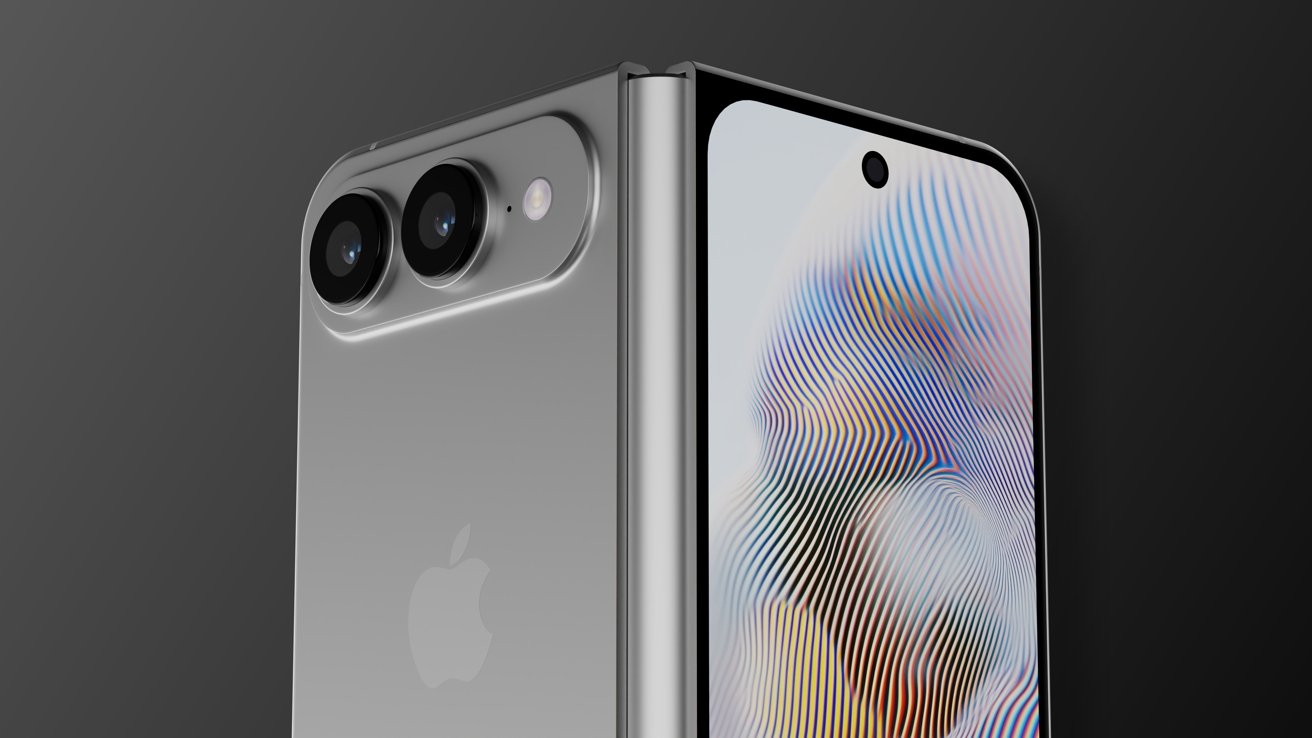
Every time I pick up a modern book-style foldable, I have the same thought: this is brilliant, but not perfect.
For years, the foldable market has settled on tall, skinny designs that technically tick the ‘big inner screen’ box but never quite nail the experience of having a genuine tablet in your pocket – recent additions like the Galaxy Z TriFold aside, anyway.
That’s why the sudden rush back to passport-style foldables – led, somewhat ironically, by Apple – feels like a course correction. And as someone who still pines for the Oppo Find N and has a soft spot for the original Pixel Fold, I couldn’t be more on board.
Apple’s set to bring back my favourite style of foldable
The long-rumoured iPhone Fold is shaping up to be exactly the kind of device I’ve wanted foldables to evolve into.
Advertisement
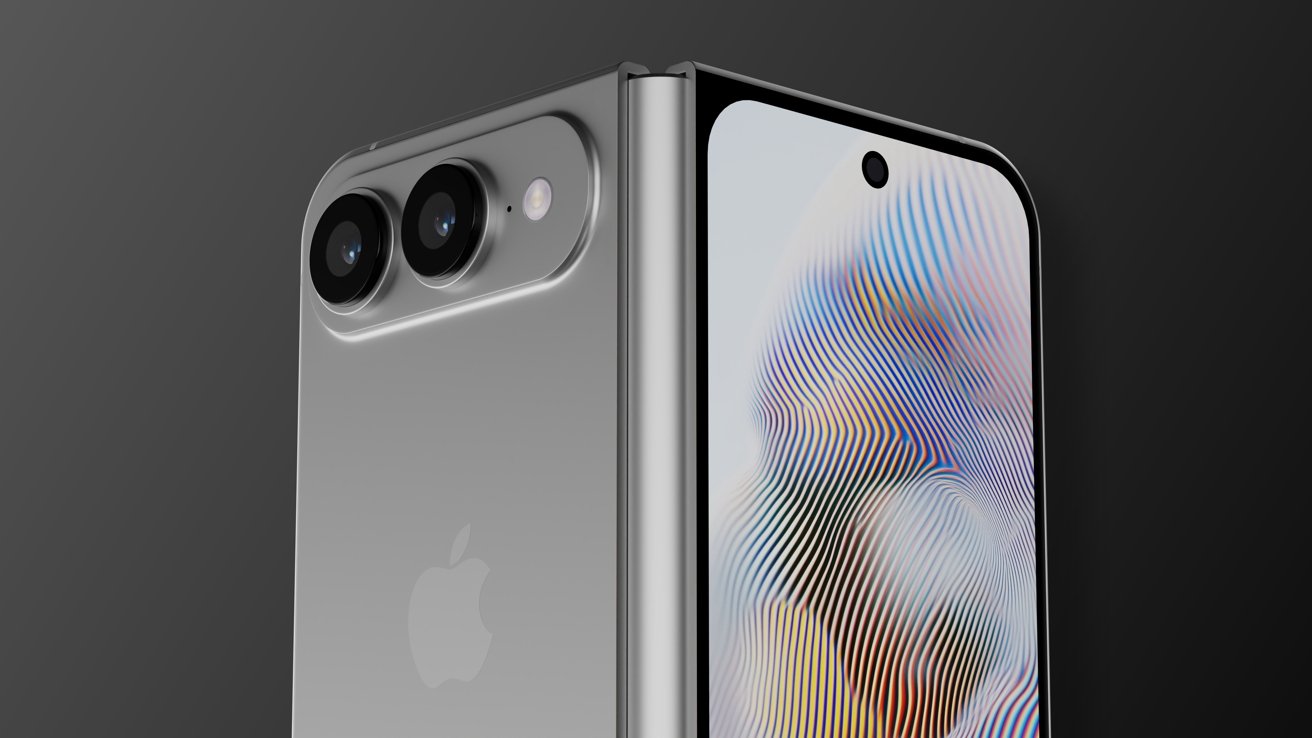
According to reports, Apple’s first foldable iPhone will pair a 5.3-inch outer display with a 7.7-inch inner screen, using a wide aspect ratio that’s closer to an iPad than a stretched-out phone – essentially, an iPhone that unfolds into a small-screen iPad.
Advertisement
That’s exactly the form factor I fell in love with when Oppo launched the first Find N.
By today’s standards, it’s undeniably thick and heavy, but the proportions were spectacular. The outer screen was a sensible width, not a painfully narrow strip, and the inner display’s roughly 4:3 ratio made everything from split-screen multitasking to big-screen gaming feel natural.
Advertisement
It looked and behaved more like a mini tablet than a stretched phone, and that made the world of difference in everyday use.
Google clearly saw the appeal too. The OG Pixel Fold copied the compact and scaled it up with a wider, shorter outer display that opened into a broad canvas perfect for tablet-style layouts. It was flawed in other ways, and Android apps weren’t ready for that wide in-between aspect ratio, but the core idea was solid.
Advertisement
With the Pixel 9 Pro Fold stepping away from that iconic design, it looked like the design was dead and buried. But Apple looks set to dig it back up and breathe new life into it.
Advertisement
If the reports are right and the iPhone Fold really is going for a wide, almost iPad-like inner screen, that could be a huge win for usability. I can easily imagine iPad-style apps running on the inside, with proper sidebars, multi-column layouts, and real tablet UIs, while the outside gives you a traditional iPhone experience that’s neither absurdly tall nor awkwardly wide in the hand.
Crucially, Apple is one of the few companies that can actually drag the app ecosystem along with it. Where Android makers had to bend around whatever third-party apps were willing to support, Apple can largely do the opposite; ship a new form factor, provide the tools to developers and watch them fall in line.
Image Credit (Trusted Reviews)
If anyone can make the ‘iPhone that unfolds into an iPad’ dream actually work in terms of software, it’s Apple. And that’s a huge part of why this passport-style revival suddenly feels like it has a shot.
Android manufacturers are gearing up to compete
Of course, the moment Apple even looks at a new form factor, the rest of the industry snaps to attention.
Advertisement
Advertisement
Samsung is already preparing its answer in the form of the unofficially dubbed ‘Galaxy Wide Fold’.
Various reports suggest that Samsung is working on a passport-style foldable with a 5.4-inch outer OLED and a 7.6-inch inner display, using a 3:4 aspect ratio when unfolded. It’ll sit alongside the more traditional, taller Galaxy Z Fold 8, with Samsung allegedly planning to mass-produce around half a million units and launch it in the second half of 2026.
Image Credit (Trusted Reviews)
Oppo, meanwhile, looks like it’s coming full circle. According to the latest leaks, Oppo is said to be planning not one but two foldable launches in 2026: the Find N6 in February and the Find N7 in September. The N6 is said to stick fairly close to the book-style formula, with a 6.62-inch cover screen and an 8.12-inch inner panel, but things get more interesting with the Find N7.
It’s tipped to keep much of the Find N6’s hardware, but pivot back to a wider, passport-like aspect ratio – explicitly positioned to compete not only with Apple’s iPhone Fold but Samsung’s Wide Fold, while also nodding back to Oppo’s original Find N design.
In other words, the company that arguably did the ‘pocket tablet’ concept best the first time around is taking another stab at it, just as Apple and Samsung are jumping in.
Advertisement
Advertisement
Foldables of all shapes and sizes on the horizon
The thing that excites me most isn’t any one phone – it’s that foldable design finally seems to be loosening up again.
For the past few years, the category has felt oddly conservative considering it’s on the bleeding edge of technology. You either get a compact flip phone that unfolds into something resembling a regular phone, or you get a book-style foldable that opens up into a vaguely square-ish tablet.
Image Credit (Trusted Reviews)
Of course, year-on-year updates leaned on better hinge designs, thinner chassis, nicer cameras and a reduction of the foldable screen crease, but it’s hardly the sort of thing that makes you sit up and think “wow, this is the future of phones”.
2026 looks like it’ll finally be different, and as a foldable fan, that’s exactly what I’ve been waiting for. I don’t want every device to chase the same silhouette forever – I want choice, I want weird experiments, I want some phones to unapologetically prioritise media, others to double down on multitasking, and a few to basically be tiny tablets that just so happen to fit in my pocket.
Advertisement
Image Credit (Trusted Reviews)
Advertisement
And it just so happens that passport-style foldables happen to sit right at the intersection of all that; it’s big enough inside to feel like a tablet, compact enough outside to work like a normal phone, and now finally backed by an app ecosystem that’s far better equipped to handle unconventional displays than it was during the early days of foldables.
So yes, I’m absolutely delighted they’re coming back – and this time, with Apple, Samsung and Oppo all throwing their weight behind the idea, it feels like they might stick around.
Samsung’s next flagship devices will offer Perplexity as part of an expansion to support multiple AI agents in Galaxy AI. Perplexity’s AI agent will work with apps including Samsung Notes, Clock, Gallery, Reminder and Calendar, according to the announcement. And, some third-party apps will support it, though Samsung hasn’t yet said which. The news comes just a few days before Samsung’s Galaxy Unpacked event, so we can expect to find out more about that integration and how it fits in with Samsung’s revamped Bixby very soon.
What we know so far is that the Perplexity agent will respond to the wake phrase, “Hey Plex” (not to be confused with the streaming service Plex). It can also be initiated by quick-access physical controls. In a statement, Samsung’s Won-Joon Choi, President, COO and Head of the R&D Office for Samsung’s Mobile eXperience Business, said the expansion of Galaxy AI is aimed at giving users more choice and flexibility in getting their tasks done. “Galaxy AI acts as an orchestrator, bringing together different forms of AI into a single, natural, cohesive experience,” Choi said.
OpenAI could be developing a ChatGPT smart speaker
A price point of $200-$300 has been reported
It seems as though multiple devices are being developed
We know OpenAI is working on hardware, but what form will its first gadgets take? According to a new report, the first official ChatGPT device to see the light of day will be a smart speaker with an integrated camera.
As per The Information (via The Verge), the device will come in at $200-$300 (around £150-£225 / AU$285-AU$425), and will be able to recognize objects around it – as well as offering facial recognition to authorize purchases.
If the device sees the light of day at some point during 2026, it will arrive 12 years after the original Amazon Echo showed up with Alexa on board. While the on-board AI might be vastly different, the form factor endures.
We don’t get too many details in this latest report, though it does also say that smart glasses and a smart lamp are under consideration at OpenAI, as the company looks to push ChatGPT into more areas of our daily lives.
Multiple form factors
AI devices haven’t worked out particularly well to date (Image credit: Humane)
There’s been a lot of speculation around what OpenAI could be working on, in partnership with ex-Apple design chief Jony Ive. In January, we heard that the company could be planning to launch a behind-the-ear wearable, always on and ready to assist you.
We’ve also heard talk that an AI-powered ChatGPT pen could be on the way, perhaps enabling you to record voice notes and handwritten text, and get the on-board AI assistant to give you some kind of help that way.
Advertisement
The overall impression is that quite a few devices are being considered, if not actively developed, and OpenAI is going to have to strike the right balance between functionality, price, battery power, and user privacy.
Sign up for breaking news, reviews, opinion, top tech deals, and more.
We know that dedicated AI devices haven’t fared terribly well to date, and even with ChatGPT attracting millions of users each day, it remains to be seen whether any of us want to carry the AI chatbot around with us at all times.
And of course, you can also follow TechRadar on YouTube and TikTok for news, reviews, unboxings in video form, and get regular updates from us on WhatsApp too.
Updated February 2026: I’ve added Onnit Creatine to our Honorable Mentions. We also updated links and prices.
Creatine, Explained
Creatine is a compound your body produces in the liver, kidneys, and pancreas, according to Federica Amati, a medical scientist and registered public health nutritionist. Most of it ends up in your skeletal muscles, where it’s stored as phosphocreatine and used to regenerate adenosine triphosphate (ATP), the molecule that powers muscle contractions, nerve signals, and protein synthesis for tissue repair. The rest—less than 5 percent—is found in brain tissue and the testes.
You make about a gram of creatine a day from three amino acids: arginine, glycine, and methionine. You also get more from animal-based foods like red meat, fish, and poultry. For most healthy people, that’s enough. So creatine supplements aren’t essential for general health, but they can boost performance and recovery under the right conditions.
Advertisement
How Creatine Works in the Body
ATP is your cells’ main energy source. High-intensity exercise drains it fast, breaking ATP down into adenosine diphosphate (ADP). Creatine phosphate donates a phosphate group to ADP, recycling it back into ATP almost immediately. The more phosphocreatine stored in your muscles, the faster you can regenerate ATP and the more power you can produce in short bursts.
The Best Form of Creatine
Photo by Steve Mitchell/EMPICS via Getty Images
Nowadays, step into any GNC, and you’ll find several forms of creatine: creatine hydrochloride, magnesium creatine chelate, creatine citrate, creatine nitrate, creatine ethyl ester, and buffered creatine. But creatine monohydrate is the most studied, the most effective, and usually the cheapest, according to the International Society of Sports Nutrition. No other form has shown any additional benefits, confirms Amati.
Advertisement
Creatine monohydrate is typically sold as a flavorless, white powder that you can mix into water or a shake. According to Amati, the standard dose is 3 to 5 grams per day. Some athletes may “load” with higher doses, but studies show that this offers no long-term benefits and can put unnecessary stress on the kidneys.
Muscle Growth and Exercise Performance
Creatine is most useful for activities that demand short, intense effort: sprinting, weightlifting, and high-intensity interval training, to name a few. It’s far less relevant for endurance sports like marathons. Some evidence suggests creatine also increases muscle glycogen storage, which could help with recovery and energy replenishment between sessions.
Creatine doesn’t directly build muscle, but paired with resistance training and adequate nutrition, it can help preserve muscle strength and lean body mass. It’s particularly important if you’re recovering from an injury, or as you age, when sarcopenia (age-related muscle loss) becomes a risk, as it activates specialized stem cells known as satellite cells. Zimmermann points out that women, especially in perimenopause and menopause, may see health benefits. “As women get older—starting in our forties—we lose body mass 1 to 2 percent a year, and that can affect bone health later on in life,” says Zimmermann. “Creatine [supplements] support keeping and building lean muscle mass.”
Advertisement
Zimmermann adds, “Women tend to have lower muscle mass than men, just naturally, so I think women may actually respond better to supplementation, because they’re at baseline.”
Creatine and Brain Health
While the effects of creatine supplementation on athletic performance are well-documented, its effects on mental performance are still emerging. Early findings are promising. Studies suggest it may reduce mental fatigue, especially during high-stress situations, such as sleep deprivation or exhaustive exercise. It may also improve certain aspects of memory, particularly in groups with lower baseline creatine levels, such as vegetarians and older adults.
Some preliminary research even suggests it could help with symptoms of depression by supporting brain energy and boosting the production of feel-good neurotransmitters like dopamine and serotonin. That’s particularly relevant for women experiencing perimenopause and menopause, says Zimmermann. “Estrogen shifts affect brain health, our mood, brain fog, and our ability to think clearly.”
Advertisement
Is Creatine Safe?
For most healthy adults, creatine is a safe and well-tolerated supplement for months or even years of use. Short-term and long-term clinical trials have found no significant health risks. The main side effects are minor: weight gain from temporary water retention in the first week of supplementation, bloating, and mild gastric discomfort, usually from oversized doses.
However, there are a few considerations to keep in mind:
Arnold (Arnov) Sharma grew up playing Mega Man X on an ancient Windows 98 computer. Years later, he turned those hazy memories of his childhood into something he could wear on his forearm. It’s not just a replica but a functional Mega Buster, also known as the Rock Buster. Every detail on this replica stays true to the original, thanks to accurate measurements made in Fusion 360, which started with a reference image scaled to 330 mm in length.
Sharma broke down his design into components that could be printed separately, including the body, front nozzle, handle, and side panel. He ensured that all of the components fit together flawlessly, much like a jigsaw puzzle. He created the entire thing on his 3D printer using standard PLA filament, although it’s worth noting that he left opportunity for experimenting with variables like layer height and speed, which you’ll most likely need to alter depending on your printer.
High-Speed Precision: Experience unparalleled speed and precision with the Bambu Lab A1 3D Printer. With an impressive acceleration of 10,000 mm/s…
Multi-Color Printing with AMS lite: Unlock your creativity with vibrant and multi-colored 3D prints. The Bambu Lab A1 3D printers make multi-color…
Full-Auto Calibration: Say goodbye to manual calibration hassles. The A1 3D printer takes care of all the calibration processes automatically…
A Raspberry Pi Pico within the Rock Buster controls the lights, music, and power. Sharma created a new PCB from scratch, soldering on SMD parts and applying SnPb 63/37 paste before reflowing everything at 200 degrees Celsius. The Type-C port and vertical push button allow you to charge it or start firing, while a dedicated power circuit powers a 3.7-volt, 1000 mAh lithium-polymer battery.
When you press the button, the front red LED begins to flicker like an in-game shot, while the internal speaker emits a recognizable whine via a PAM8403 amp, increasing the Pico’s output. When you release the button, the light bursts, the sound effect plays, and one bar drops from the six-LED side meter. After six shots, the meter is empty and you’re locked out for a 10-second cooldown, just like in the game.
Advertisement
Assembling the Rock Buster begins with the PCB; simply spread some solder paste on the pads, insert the Pico and small components, and heat until they melt. Next come the port and button, then the battery terminals. Test the 5V rail with a voltmeter before encasing everything. Wiring the PAM8403 is rather simple: right input to Pico GPIO 26, ground to ground, power to 5V, and speaker to output. Any small speaker will do, but he rescued an 8-ohm 2-watt device from an old laptop, which works perfectly.
Mounting the LEDs is simple; the nozzle holds the firing LED, while the side panel houses the power meter. Sharma used available libraries for sequencing and kept things simple. Put everything together, secure with screws or whatever, and voilà! You’ve acquired a fully functional Mega Buster. [Source]
“I have a lot of demands upon my life, and I find that my peace and happiness are way too attached to my circumstances and what is happening around me. I would like to feel calmer and not be so impacted by my circumstances.” So went my journal entry on February 16, 2026.
I’m sure many of us can relate to these feelings of stress when life is throwing more at us than we think we can handle. Over the years, the practice of journaling has provided me with an invaluable space for thought, reflection, and calm. That blend of a quiet space, a Moleskine notebook, and a quality pen is all I need to get into the journaling zone.
But, as much as I love the tactile feeling of putting my thoughts down on paper, it doesn’t allow for any voices (other than my own) to speak to my life. If I’m not careful, I can end up getting lost in my own thoughts, and not in a good way. That’s why I’ve recently turned to Life Note, an innovative app for reflection, learning, and clarity that, according to the developers, “channels humanity’s most creative minds to awaken the wisdom within you.”
Advertisement
Homescreen heroes
This is part of a regular series of articles exploring the apps that we couldn’t live without. Read them all here.
Life Note provides personalized guidance by simulating mentors modeled after history’s greatest thinkers, such as Carl Jung or Marcus Aurelius. It uses sentiment analysis and long-term memory to track your emotional patterns and offers a council of mentors so you can gain multiple perspectives on a single journal entry.
Advertisement
(Image credit: Future / Paul Hatton)
It all begins with a journal entry
At the heart of the Life Note app is an easy-to-use journal functionality that simply asks, “How are you feeling now?” It recommends writing 150 words, but more is absolutely fine. The important thing is to write what is on your mind without censoring. Don’t edit, analyze, or overthink. The words you enter should be an extension of your thought life rather than a curated and carefully crafted set of words.
If you’d like some help, then Life Note offers different types of journal entries, including ‘Evening reflection’, ‘Morning intention’, and ‘Letter to future self’. Each one helps focus the brain and increases the chances of creating a helpful journal entry. For example, with the ‘Gratitude journal’ option, the app will ask you, “What warmed your heart today?” and takes the pressure off you by saying, “It doesn’t have to be big or special – even something small counts.”
If, like me, you find it easier to access your thoughts through named emotions, then Life Note is a great fit. Simply select from one of the listed emotions: fear, anger, jealousy, criticism, or defensiveness, and the app will guide you with your journal entry.
Advertisement
Sign up for breaking news, reviews, opinion, top tech deals, and more.
Getting in the habit of journal writing takes time and discipline, but as Dr. James Pennebaker of UT Austin says, “Writing about your thoughts for 15 minutes daily can boost your immune function, lower stress hormones, and reduce doctor visits.” Sounds like it’s worth the effort.
(Image credit: Future / Paul Hatton)
Mentors that are surprisingly empathetic
Journaling is of some value, but when paired with world-class wisdom, it becomes infinitely more beneficial. This is what sets Life Note apart. With AI content trained on writings from over 1,000 of the greatest human minds, Life Note applies the very best wisdom to your specific circumstances.
Advertisement
By way of example, I made a note about an anxious feeling I was having, and Life Note gave me some words from a scientist named Joseph E. LeDoux. The three-paragraph response was impressively applicable, surprisingly empathetic, and also included some questions for further reflection.
After a series of interactions with a variety of wise people, I found timely wisdom, broadening of my perspectives, and improved my mental health. It’s never going to beat seeing a real-life therapist, but for daily help, it’s pretty good, not to mention a whole lot cheaper!
(Image credit: Future / Paul Hatton)
Advertisement
Journal like a pro
Other Life Note features include daily notification reminders, encrypted data, and goal setting. The last of these lets you set short-term and long-term intentions, providing the app with specific information needed to tailor the wisdom you’re given.
The free tier of Life Note is very good, but to take full advantage of all features, you’ll need to upgrade to premium for $8.99 / £8.99 per month or $79.99 / £79.99 per year (save 26%). The subscription includes lifetime mentor journals and chats, multiple perspectives per journal, and weekly reflection letters and art.
Get your mental health back on track, strengthen your memory, and achieve your goals by downloading Life Note on iOS and Android.