The HP EliteBook X G1a is a very capable business laptop with potent power from its AMD Strix Point processor, plus a dazzling high-res OLED display, solid battery life and a capable port selection. Against similarly-sized rivals from Lenovo and Dell, it is a little bit heavy, though.
Beefy Strix Point processor inside
Excellent battery life
Great port selection
Quite expensive
Heavier than its rivals
Squirrel Widget
SQUIRREL_PLAYLIST_10208246
Key Features
AMD Strix Point processor:
The EliteBook X G1a isn’t short of power with a potent 12 core AMD chip that makes it a very beefy business laptop.
Advertisement
14-inch 2.8K OLED screen:
It also has a high-res and refresh rate OLED screen for slick, smooth output.
All-day battery life:
The EliteBook X G1a has a big battery inside which allows it to last for between one and two working days on a charge.
Advertisement
Introduction
The HP EliteBook X G1a is one of the brand’s more upmarket and powerful business laptops – the kind that’s more designed for the C-suite than for middle management.
That’s reflected both in its spec sheet, which packs in an AMD Ryzen AI 9 HX 370 Pro processor plus 64GB of RAM and a 1TB SSD, plus a 14-inch 2880×1800 120Hz touch-enabled OLED screen and a versatile port selection in the top spec model I have. It’s going to run you £2099.99.
Advertisement
While that may seem expensive, enterprise-grade laptops are usually around that area, and this laptop’s key rivals, such as the Lenovo ThinkPad X1 Carbon Gen 13 Aura Edition and Dell 14 Premium are comparably priced and specced in some regards.
Advertisement
I’ve been putting this HP option through its paces for the last couple of weeks to see if it can come out on top of some rather stiff competition and emerge as one of the best laptops
Design and Keyboard
Sturdy, but hefty, aluminium frame
Capable port selection
Tactile keyboard and comfortable trackpad
The EliteBook X G1a features a slick aluminium frame that feels solid and sturdy in hand, and certainly plays more into this laptop’s MacBook Pro lookalike credentials. For a machine designed for business professionals, it definitely looks the part.
With this in mind, the aluminium frame contributes to it being quite a hefty 14-inch laptop. It tips the scales at 1.49kg, which isn’t unreasonable in a general sense, and means this HP option is still quite portable. That’s especially thanks to it being a more compact choice.
Advertisement
Image Credit (Trusted Reviews)
It’s around 18mm thick at its thickest point, which technically classifies the EliteBook X G1a as an ultrabook of sorts. It packs in an excellent set of ports, too. On the left side, you’ll find a full-size HDMI, a Thunderbolt 4-capable USB-C port, a 10Gbps USB-C port and a headphone jack. On the right, there’s a Thunderbolt 4-capable USB-C port, a USB-A and a Kensington security lock.
Opening up the lid reveals a contrasting darker grey keyboard tray against the lighter aluminium finish – another MacBook Pro nod, you could argue. It’s a more compact layout, ditching the number pad, but it keeps a function row and arrow keys. As laptop keyboards go, it’s one of the best I’ve tested in a long time, with a snappy and tactile feel plus a solid amount of travel. It’s also white backlit for when you’re working in the dark.
Advertisement
Image Credit (Trusted Reviews)
The trackpad here is of a decent size and provides a decent, dampened feel to its clicks that makes it comfortable and easy to use for extended periods.
Display and Sound
Gorgeous OLED screen
Brilliant colours, black level and contrast
Decent speakers
Advertisement
HP offers a couple of different screen options for the EliteBook X G1a, with my option coming with the 14-inch 2.8K (2880×1800) 120Hz OLED panel that provides a detailed and responsive experience with excellent clarity and generally crisp and responsive images.
This panel has some deep blacks and excellent contrast, as you’d expect from an OLED, with measured levels of 0.01 and 27680:1 using my trusty colorimeter.
Image Credit (Trusted Reviews)
A peak SDR brightness of 379.2 nits makes this laptop suitable for indoor and outdoor use, and there is a decent punch to on-screen action. It’s about average for an OLED screen at this price, and you can get brighter with more creative-focused laptops such as the Asus ProArt P16 (2025), although that is more expensive than this HP choice.
As is typical with OLEDs, colour accuracy is particularly excellent, with perfect 100% of both the sRGB and DCI-P3 gamuts, as well as 93% Adobe RGB. This makes this display a marvellous choice for mainstream and creative workloads.
Image Credit (Trusted Reviews)
Advertisement
The speakers on the EliteBook X G1a are surprisingly capable, with decent body and volume for general media consumption. Helpfully, they’re also upwards-firing, so don’t suffer from being muffled if the laptop is placed on a softer surface, such as a desk.
Advertisement
Performance
Boosted AMD Strix Point APU inside
Potent multi-threaded and graphical performance
Lots of RAM, and a decently brisk SSS
As much as this is a business-oriented laptop, what’s inside the EliteBook X G1a makes it one of the more interesting laptops in its class. The top model I have features an AMD Ryzen AI 9 HX Pro 375 processor, which is a more enterprise-grade version of the HX 370 chip we’ve seen in more consumer-oriented laptops in the last year.
To make it more suitable for enterprise use, this chip has an extra 5 TOPS of AI horsepower on the XDNA2 NPU that these chips have, plus it supports ECC (or error correcting RAM) memory in some configurations, and has a higher potential RAM speed of up to 8000MT/s.
Image Credit (Trusted Reviews)
The actual core of the Ryzen AI 9 HX Pro 375 is identical to the HX 370, though, with 12 cores (four Zen 5, eight Zen 5c) and 24 threads, plus a boost clock of up to 5.1GHz. As with other laptops with the HX 370 chip inside, the EliteBook X G1a provides some beefy raw performance in the Geekbench 6 and Cinebench R23 tests, benefitting from added cores and threads over its Intel Lunar Lake counterparts.
Advertisement
Moreover, the Radeon 890M integrated graphics in the chip has its 16 RDNA 3.5 compute units, which provides some potent results in the 3DMark Time Spy test in my testing. This is roughly on par with the Lunar Lake chips you’ll find in key rivals, with the Arc 140T or 140V integrated graphics in those chips. In essence, it’s close on graphics, although this HP laptop wins on raw processing power with AMD at the helm.
Image Credit (Trusted Reviews)
This particular configuration leans heavily into RAM, coming with 64GB of headroom for creative tasks such as video editing or even running local AI models, which can be quite RAM-intensive. The 1TB SSD here is of a good capacity and is one of the brisker PCIe 4.0 options out there on a business laptop, with tested read and write speeds of 7105.48 MB/s and 6818.25 MB/s, respectively.
Software
Little bloatware in Windows 11
Some HP-specific apps
Copilot+ PC functionality is here
The EliteBook X G1a comes running full-fat Windows 11, and with a decently clean install, too. There isn’t much in the way of additional bloatware or unneeded third-party software, although you will find some HP-specific apps to greet you on startup.
Chief among these is MyHP, which is their catch-all system app where you can check on vitals such as system utilisation and configure settings such as power modes and energy optimisation. There is also HP’s own AI Companion nestled in the taskbar, along with the Support Assistant app for troubleshooting.
Advertisement
Advertisement
Image Credit (Trusted Reviews)
As well as having HP’s software, this is a Copilot+ PC, so it comes with Microsoft’s usual AI gubbins built into Windows, such as generative powers and filters in the Photos and Paint app, as well as the clever Windows Studio webcam effects for background blurring, auto framing and maintaining eye contact.
Battery Life
Lasted for 12 hours 44 minutes in the battery test
Capable of lasting for between one and two working days
The EliteBook X G1a comes with a decently large 74.5Whr cell inside, which should provide decent endurance, even if AMD’s existing crop of laptop chips isn’t as efficient as the Intel Lunar Lake models inside this laptop’s rivals.
When dialling the brightness down to the requisite 150 nits and running the PCMark 10 Modern Office test, this laptop lasted for 12 hours and 44 minutes. That beats our ten-hour target for all laptops comfortably and provides you with between one and two working days of runtime away from the mains.
Image Credit (Trusted Reviews)
Advertisement
With this in mind, as good as this result is, the Dell Pro 14 Premium will keep going for another six or so hours against the EliteBook X G1a. Moreover, the adjacent Lunar Lake-powered HP EliteBook G1i model can go for another three hours.
HP has also bundled this laptop with a reasonably-sized 100W power brick that does a decently speedy job of putting charge back into the cell, with a charge to 50% taking 30 minutes, and a full charge taking 82 minutes.
Advertisement
SQUIRREL_PLAYLIST_10208246
Squirrel Widget
Should you buy it?
You want a beefy business laptop:
This HP laptop impresses with its potent AMD Strix Point processor that beats its Intel Lunar Lake-powered rivals quite convincingly, where it matters without sacrificing much in the way of battery life.
Advertisement
You want a lighter laptop:
Advertisement
The EliteBook X G1a isn’t as light and portable as its rivals, with key choices from Dell and Lenovo being easier to carry around.
Final Thoughts
The HP EliteBook X G1a is a very capable business laptop with potent power from its AMD Strix Point processor, plus a dazzling high-res OLED display, solid battery life and a capable port selection. Against similarly-sized rivals from Lenovo and Dell, it is a little bit heavy, though.
Advertisement
It ticks pretty much all of the boxes that folks could ask for out of a reliable, enterprise-grade laptop at a very similar price to the Lenovo ThinkPad X1 Carbon Gen 13 Aura Edition and Dell 14 Premium, while offering beefier performance thanks to its AMD Strix Point chip. The chink in this laptop’s armour is quite minor, with it being heavier than the competing Lenovo and Dell choices, and the battery life isn’t as strong as Dell’s option by several hours.
With this in mind, the HP EliteBook X G1a is a fantastic laptop for business users who want a powerful choice with a lovely OLED screen, solid endurance, ports and more besides. For more choices, check out our list of the best laptops we’ve tested.
Advertisement
How We Test
This HP laptop has been put through a series of uniform checks designed to gauge key factors, including build quality, performance, screen quality and battery life. These include formal synthetic benchmarks and scripted tests, plus a series of real-world checks, such as how well it runs popular apps, and also extended gaming benchmarking.
Advertisement
FAQs
How much does the HP EliteBook X G1a weigh?
The HP EliteBook X G1a weighs 1.49kg, making it quite heavy for a 14-inch laptop.
Advertisement
Test Data
Full Specs
HP EliteBook X G1a Review
UK RRP
£2099.99
CPU
AMD Ryzen AI 9 HX Pro 375
Manufacturer
HP
Screen Size
14 inches
Storage Capacity
1TB
Front Camera
1080p webcam
Battery
74.5 Whr
Battery Hours
12 44
Size (Dimensions)
312.2 x 214.6 x 18 MM
Weight
1.49 KG
Operating System
Windows 11
Release Date
2025
First Reviewed Date
20/01/2026
Resolution
2880 x 1800
HDR
Yes
Refresh Rate
120 Hz
Ports
(2) Thunderbolt 4 with USB Type-C ports; 40 Gbps signaling rate (USB Power Delivery, DisplayPort 2.1) Note: One on each side. (1) USB 3.2 Gen 2.0 Type-A powered port; 10 Gbps signaling rate (right side) (1) USB 3.2 Gen 2.0 Type-A port; 10 Gbps signaling rate (USB Power Delivery, DisplayPort™ 2.1) (left side) (1) HDMI 2.1 port (1) Headphone/microphone combo jack (left side)
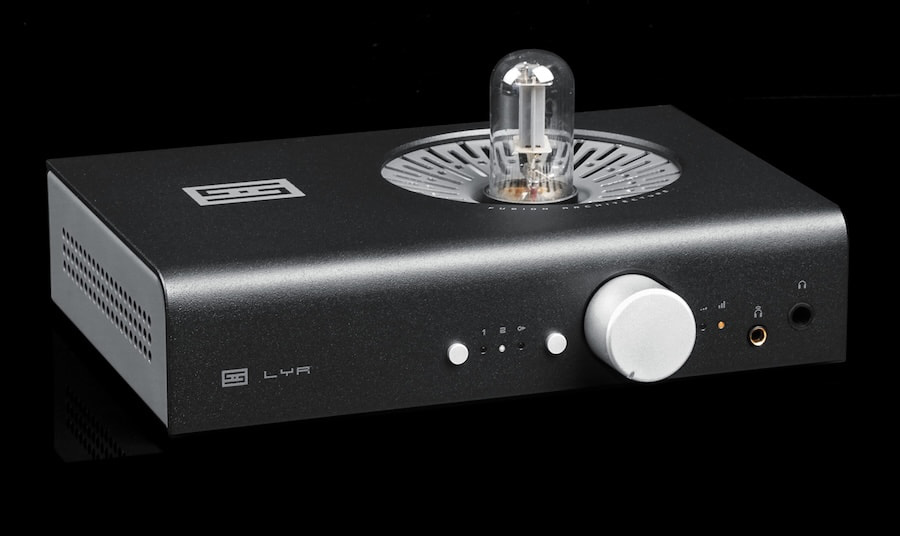
Schiit Audio doesn’t do nostalgia for the sake of it, but it does know when to keep a good thing alive and sharpen the edges based on what the market actually needs right now. At $799, the new Lyr 5 is the latest stop on a line that started with the Lyr 3, got more serious with the Schiit Lyr+, and now lands somewhere between old-school tube romance and app-controlled reality. Same idea, cleaner execution.
The formula hasn’t changed for those in the Head-Fi crowd who might be looking through its tube stash at this exact moment; it’s still a hybrid headphone amp that lets you run a real tube or ditch it entirely for MOSFET gain. The Lyr 5 adds Schiit’s Forkbeard control system, which means this thing actually tells you what it’s doing instead of leaving you to trust your ears and your mood.
Class A, Class A/B, output levels; it’s all visible, adjustable, and perfect for those within the headphone community who change headphones more frequently than they change their clothes; based on CanJam NYC 2026 last weekend, not often enough.
Power isn’t the problem. With up to 6000mW on tap from both balanced 4.4mm and single-ended outputs, Lyr 5 will drive pretty much anything short of a small refrigerator. The relay ladder volume control keeps channel balance tight, the linear power supply keeps things stable, and the Fusion setup lets you flip between tube and solid state without committing to either lifestyle full time. Not that there’s anything wrong with that.
Advertisement
Schiit Lyr 5 Specs That Actually Matter: Power, Noise, and Why It Drives Anything
On paper, the Lyr 5 is overbuilt in all the right ways. It delivers up to 6 watts per channel into 32 ohms, which is more than enough for demanding planar magnetics, while still offering 900mW into 300 ohms and 450mW into 600 ohms—right in the wheelhouse for high-impedance models from Beyerdynamic and Sennheiser. In other words, it’s not running out of gas no matter what you plug into it, short of electrostatics. This is not that kind of party.
Noise is essentially a non-issue. In low gain, the amp is quiet enough for most IEMs, with a signal-to-noise ratio above 110dB, and distortion levels so low (as little as 0.002% or lower) that your headphones will introduce far more character than the amp ever will. Output impedance stays low; around 0.4 to 0.6 ohms—which means better control and consistent performance across different headphones.
The hybrid design gives you flexibility. You can run tube mode for a bit of harmonic texture or switch to solid state MOSFET gain for cleaner, more linear output, and when you do, the tube shuts off completely to extend its lifespan. Gain is switchable between low and high, so it works with everything from sensitive IEMs to power-hungry over-ears.
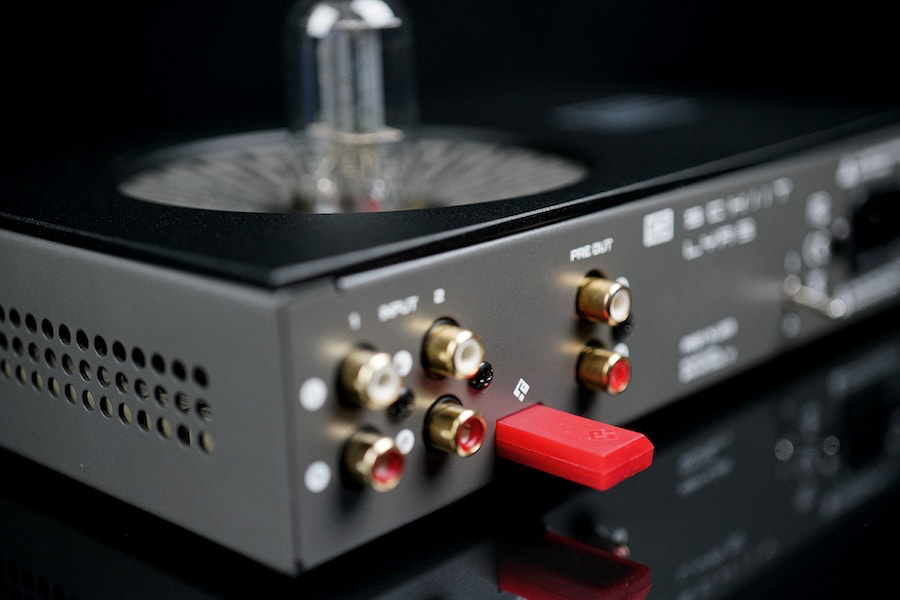
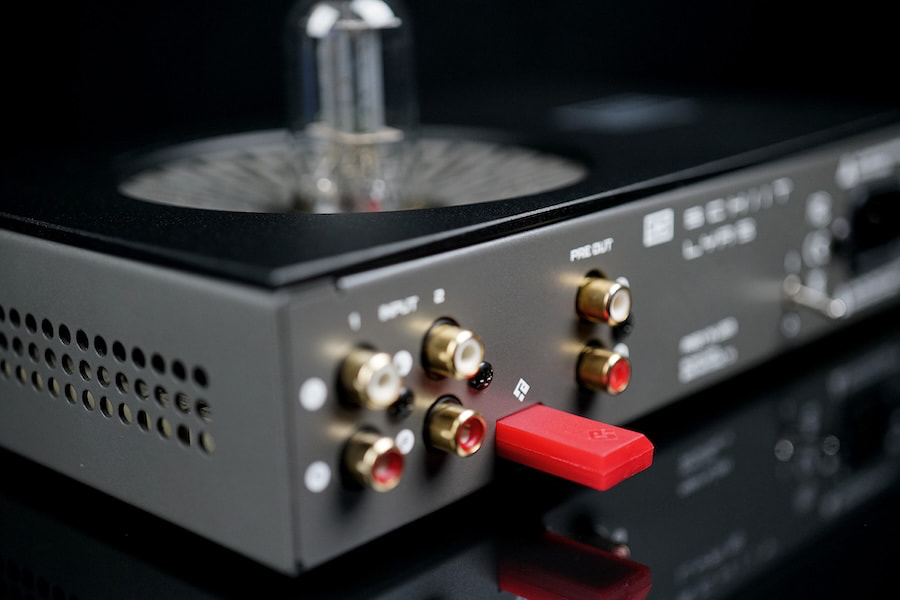
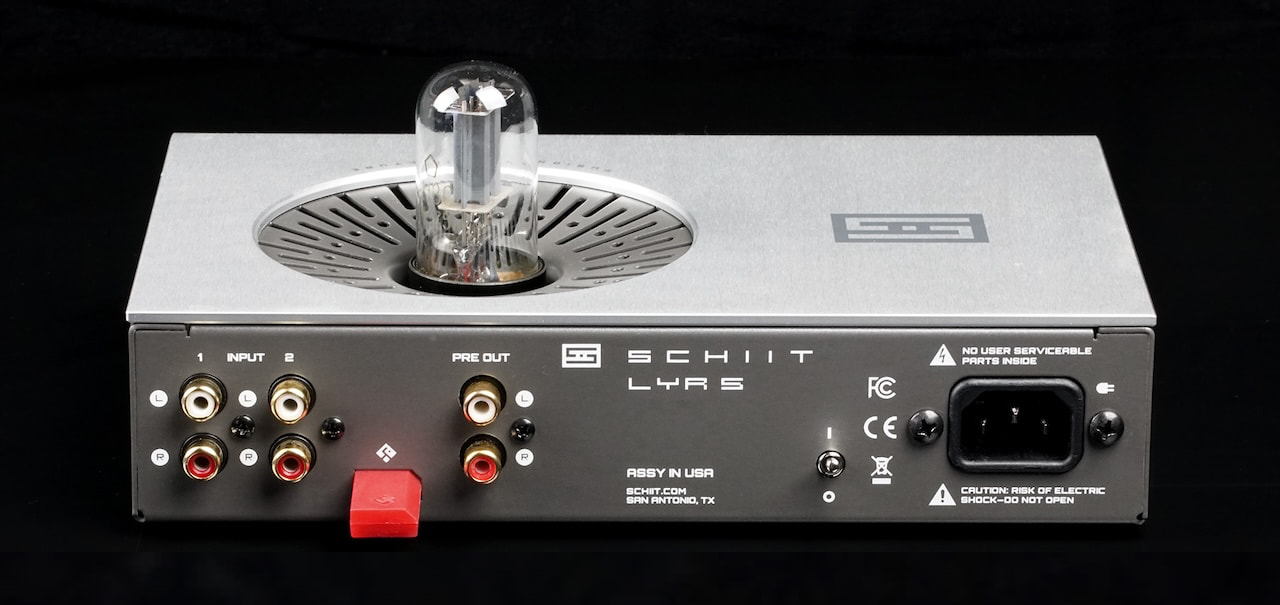
Connectivity is straightforward but useful. You get two single-ended inputs and a preamp output, so yes, this can pull double duty as a preamp in an active speaker system or with an external power amplifer, not just a headphone amp sitting on your desk.
Advertisement
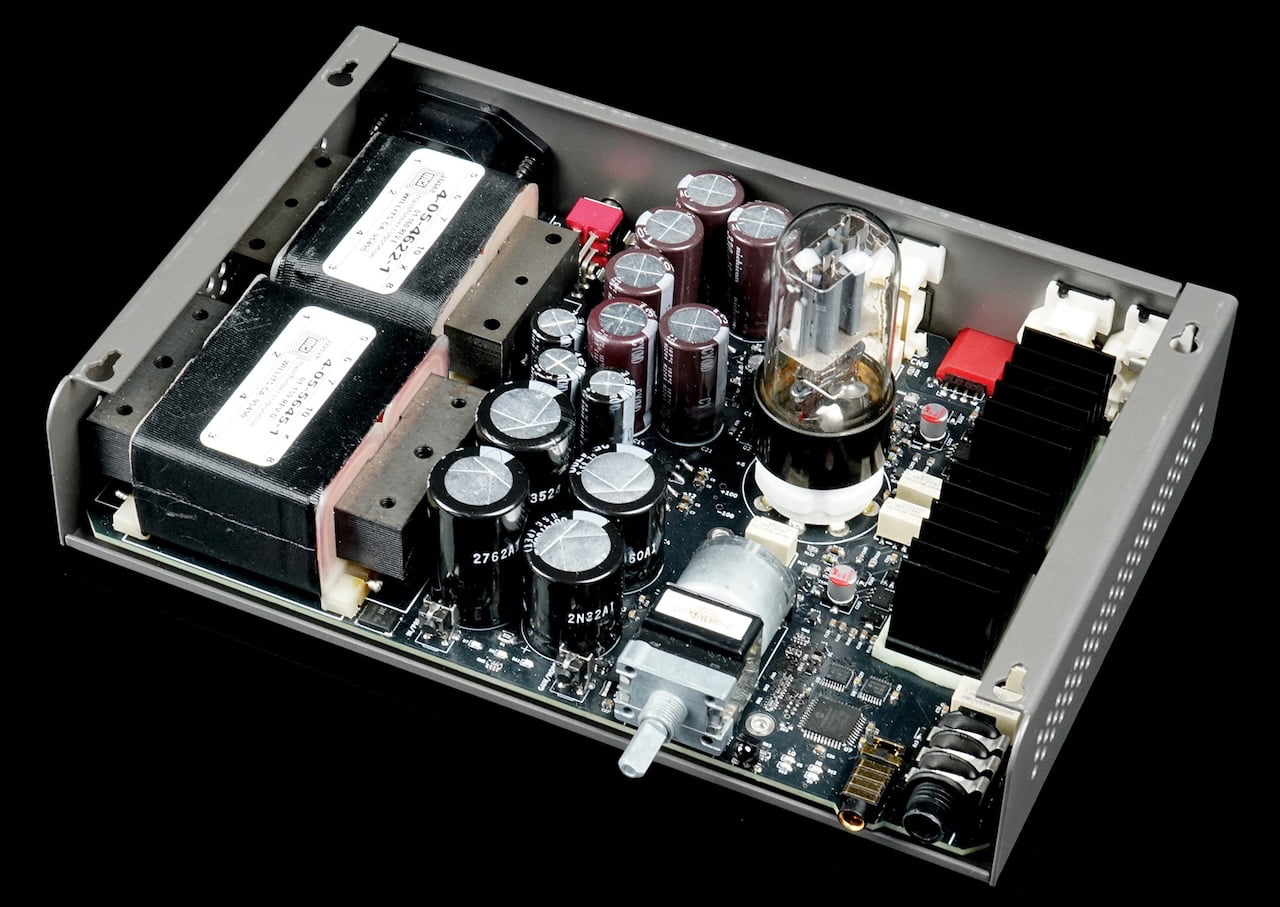
Under the hood, Schiit leans into a fully discrete design with a relay-based volume control, which keeps channel balance tight even at low listening levels. The dual-transformer linear power supply and substantial internal filtering keep things stable, while built-in protection monitors temperature, current, and tube status so nothing goes sideways.
Physically, it’s compact enough for a desk at 9 x 6 x 2 inches and about 6 pounds, though it does run moderately warm—no surprise given the power on tap. Add in full remote control and Forkbeard app integration, and you’ve got an amp that’s not just powerful, but actually tells you what it’s doing while it does it.
The Bottom Line
The Lyr 5 offers a practical choice between tube and solid state operation in one amp, with the ability to switch between them without changing your setup. It combines strong output power, relay based volume control, a linear power supply, and Forkbeard system monitoring in a single design.
Advertisement. Scroll to continue reading.
Advertisement
It does not include balanced inputs, a built in DAC, or support for electrostatic headphones, so it is not intended for fully balanced systems or all in one use.
It is best suited for listeners using a range of headphones, including high impedance models from Beyerdynamic and Sennheiser, who want one amplifier that can handle different use cases without needing multiple components.
Epic Games has released a huge Fortnite Unreal Editor update that lets you design your own Star Wars islands, and now I’m yearning for Battlefront 3 even more than before
A new Fortnite Unreal Editor update has been released
The update adds all-new Star Wars-inspired assets and tools
Creators can design their own Star Wars islands and publish them from May 1
Epic Games has released a huge FortniteUnreal Editor update that lets players create their own Star Wars islands.
As of today, Fortnitedevelopers can access a curated collection of assets and tools from Epic Games’ “largest IP toolset to date” and build Star Wars-inspired maps in Unreal Editor forFortnite (UEFN) and FortniteCreative.
The toolset includes all-new Star Wars templates and gameplay features, which also means players get access to all available Star Wars characters, like Luke Skywalker, Rey, Princess Leia, and The Mandalorian‘s Din Djarin, several locations, licensed music, vehicles, and 25 weapons from past Fortnite Battle Royale seasons.
Article continues below
Advertisement
The trailer demonstrates just how creative fans can get, and it looks like you can even go as far as creating a worthy Star Wars Battlefront2 successor if you know what you’re doing.
FourUEFN starter islands are currently available to start with, including the planets Hoth, Tatooine, and Nevarro. Two new Star Warsflat grid islandsare also available for Fortnite Creative.
“Bring your island to the next level with Niagara-powered visual effects, making it easier to create large-scale moments from dogfights in asteroid fields to dramatic hyperspace entrance and exit sequences,” Epic said.
Advertisement
Create Your Galaxy – STAR WARS™ Tools Now Live for Fortnite Developers – YouTube
Developers can also expand environments by adding iconic Star Wars locations, like the Death Star, Tatooine Cantina, and Resistance Base, and use background assets like a Star Destroyer to add scale to their scenes.
Sign up for breaking news, reviews, opinion, top tech deals, and more.
You can also customize lightsabers with Scene Graph and access Force powers for gameplay abilities like Push, Heal, and Mind Trick by using a special crafting workbench where players can modify their characters’ Force powers, as well as the appearance of their lightsabers.
There are also Team Conquest and narrative roleplaying templates to try out before building your own island.
Although the tools are available now, creators won’t be able to publish their designs until May 1. Until then, Epic Games will continue to introduce more functionality to the toolkit, including first-person support for weapons and custom items and inventories in Beta.
Google has rolled out a fresh Android Canary build, and it looks more complete than you might expect from an experimental release. The catch is simple. This version exists to test ideas, not to promise them.
Android Canary 2603 bundles practical additions like app lock, chat bubbles, and a redesigned screen recorder. It’s available across a wide range of Pixel devices, but this update is meant for developers rather than everyday use
That context matters when reading into any of these changes. Features shown here can still be removed before a stable release, even if some eventually appear in beta builds.
Even so, this build offers a useful snapshot of where Android may be heading next.
Advertisement
New features worth watching
App lock is one of the most practical additions. You can now long press an app and secure it directly, which adds a layer of privacy without digging through settings menus
That same menu also activates bubbles more fully. Conversations can float on screen as overlays, making multitasking feel more natural than before
In Depth Tech Reviews
The screen recorder has also been reworked into a floating pill interface. It lets you quickly choose between recording the full screen or a single app, then moves you into a preview flow where you can edit, delete, or share the clip
Google has even refined smaller details. The long press menu now groups shortcuts into a cleaner layout that expands only when needed.
Why this update isn’t final
There’s a reason none of this should be taken as final. This channel exists for developers to explore early features and APIs, not as a preview of what will ship next
Advertisement
That gap between polish and certainty is important. Some features already feel complete, but they can still be adjusted or dropped before Android 17 reaches stability. Even changes that move into beta are not guaranteed to stick.
There’s also a tradeoff to consider. Canary builds aren’t designed for daily use, so most people won’t try them unless they’re comfortable dealing with bugs or manual installs.
In Depth Tech Reviews
What you’re seeing here is Android in an active state of change, with ideas being tested in public before decisions are locked.
What to expect next
Some of the smaller changes hint at a broader direction. The return of separate Wi-Fi and mobile data toggles suggests a rethink of earlier design decisions, while heavier use of blur points to ongoing visual refinement
There’s still no clear timeline for what carries forward. Google hasn’t confirmed which of these features will land in Android 17 or when they might reach stable devices, even on supported Pixel models.
Advertisement
If you’re tracking Android’s evolution, the next step is to watch what shows up in beta builds. That’s usually where experimental ideas start turning into features you’ll actually use.
There is an old axiom you will have heard of before: don’t let the perfect be the enemy of the good. If we wanted to boil this down to a math equation, it might be described as something like: 0 < any positive integer. It’s not a difficult concept to grasp, typically, until you add in a dash of near-religious ideology into the equation. And that’s where the anti-AI crowd comes in.
Dustin Hubbard heads up Gaming Alexandria, a site dedicated to the preservation of obscure corners of video game history. Focused less on the actual games themselves, Gaming Alexandria instead focuses its efforts on media surrounding those games, such as manuals, box art, and old gaming journalism outputs. To that end, Hubbard’s group has amassed an impressive number of Japanese magazine scans throughout the years. To make this content useful to researchers elsewhere, he built a low-footprint app to make those scans searchable and, more importantly, to translate them. A Patreon page and subscriptions partially funded all of this.
A day after that project went public, though, Hubbard was issuing an apology to many members of the Gaming Alexandria community who loudly objected to the use of Patreon funds for an error-prone AI-powered translation effort. The hubbub highlights just how controversial AI tools remain for many online communities, even as many see them as ways to maximize limited funds and man-hours.
“I sincerely apologize,” Hubbard wrote in his apology post. “My entire preservation philosophy has been to get people access to things we’ve never had access to before. I felt this project was a good step towards that, but I should have taken more into consideration the issues with AI.”
Advertisement
And this is where we enter the realm of the silly. I’m not some AI evangelist. I fully recognize that there are error and other problems with AI… and I imagine there always will be, to some extent. AI is not always, or perhaps even mostly, the right tool to use. Nor will it always have benefits that outweigh problems it creates for we human beings.
But a positive number is greater than zero. This was a tool that suddenly made all of this culture content accessible to a wider range of people. Before it was not available to anyone that didn’t have a high-level of knowledge on the Japanese language. Translation errors also happen with human translators, too. We need only look at the ancient religious texts, and the very real wars started over their translations, to understand that.
Hubbard himself attempted to make this point over the weekend.
Writing on Patreon this weekend, Hubbard said he has long been tinkering with an improved automated OCR and translation process that could help turn more of those magazine scans into useful tools for Western researchers. And when he put Google Gemini AI model to the task recently, he said he was “blown away” by the results. While he still recommended using a professional human translator before citing these magazines in any scholarly research, he said the output from the Gemini AI tool “gets you a large percentage of the way there quickly.”
Inspired by those results, Hubbard set to work on a self-described “vibe coded” interface to view the original PDF scans alongside their AI-generated text translations for easy comparison and editing. The result was the Gaming Alexandria Researcher tool, posted to GitHub on Friday and shared with the site’s Patreon backers as a “beta” on Saturday. The tool, which runs locally on Windows, Mac, or Linux, can search, download, and edit Gaming Alexandria’s files from the cloud or sort through local files stored on your own machine.
Advertisement
“This app has been something I never would have dreamed could exist,” Hubbard enthused. “Now I can finally read and enjoy these Japanese magazines I’ve been scanning for years. A large part of that is due to your believing in my work and funding me so thank you so much for that.”
The negative responses he got for all of this are wild. There were calls to boycott the project. Calls to rescind Patreon subscriptions. Max Nichols, a game designer, cancelled his own Patreon membership and decried the project as “worthless and destructive”, likening any output generated using AI-based translations as “looking at history through a clownhouse mirror.”
I would argue that I’d rather get that look than get no look at all. I’d also argue that we need to see very specific examples of AI-created translation errors to understand just how grounded these criticisms are in reality, versus all of this being a case of overstating the case.
Some fans of the site, at least, managed to understand the context here.
Advertisement
For some supporters, though, using machine translations—including ones aided by AI models—is a practical necessity given the size of the task at hand. “There’s no world in which they could ever get hundreds of thousands of pages translated by hand,” game preservationist Chris Chapman wrote on social media. “Error-prone searchability is more useful to more people than none at all.”
“Famitsu alone is over 1,900 issues, each with [a hundred-plus] pages,” journalist and author Felipe Pepe noted. “That’s one magazine from one country. [Human translation] would be ideal, but it’s impossible.”
On the Gaming Alexandria Discord, user asie wrote that people who use tools like Google Lens or DeepL are already using AI-powered OCR and translation tools. At this point, these kinds of tools are “just a fact of reality,” they added.
Again, any positive number is greater than zero. Don’t let the perfect be the enemy of the good. Something is better than nothing.
I don’t know how to explain the negative responses here as anything other than a ideological commitment to disliking anything that even remotely touches upon artificial intelligence. Absolute moral stances certainly have their place, but they sure ought to be used sparingly.
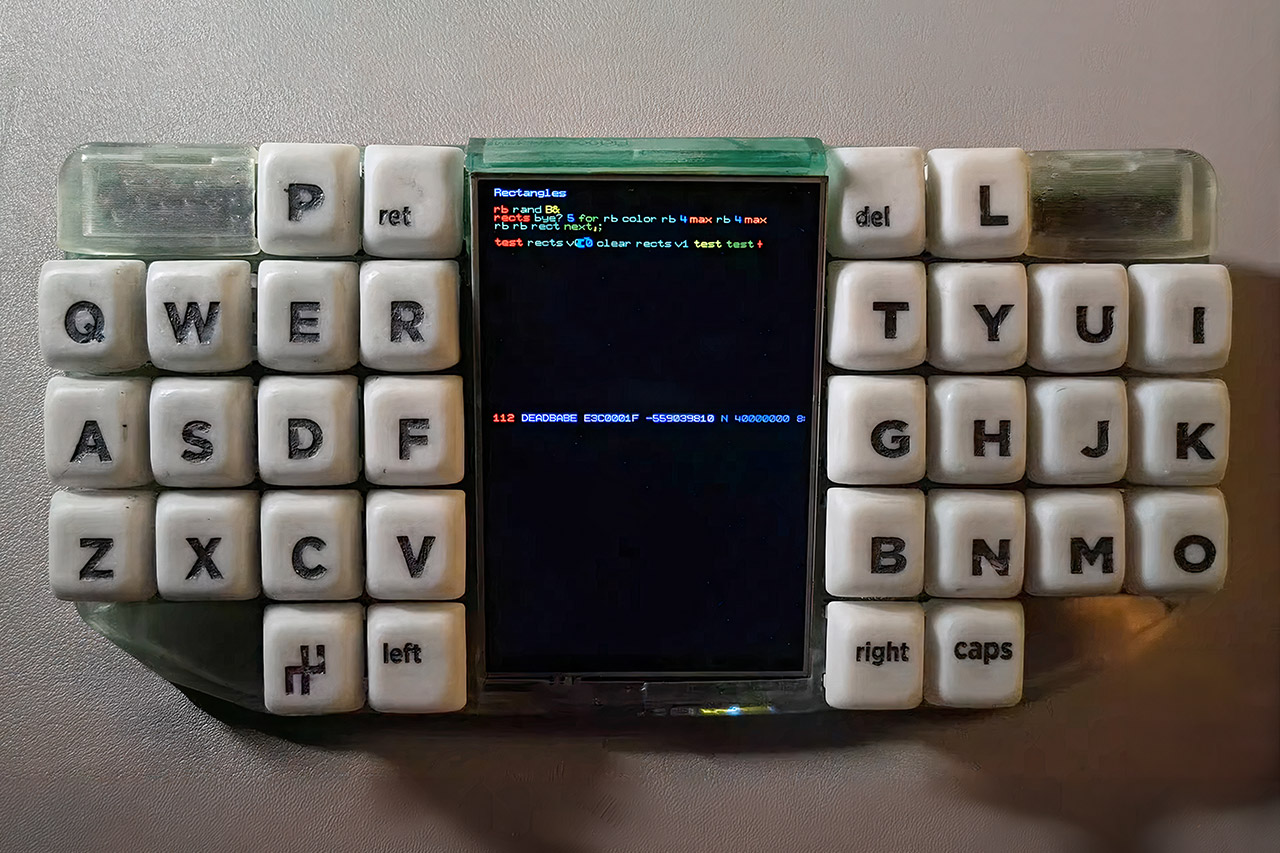
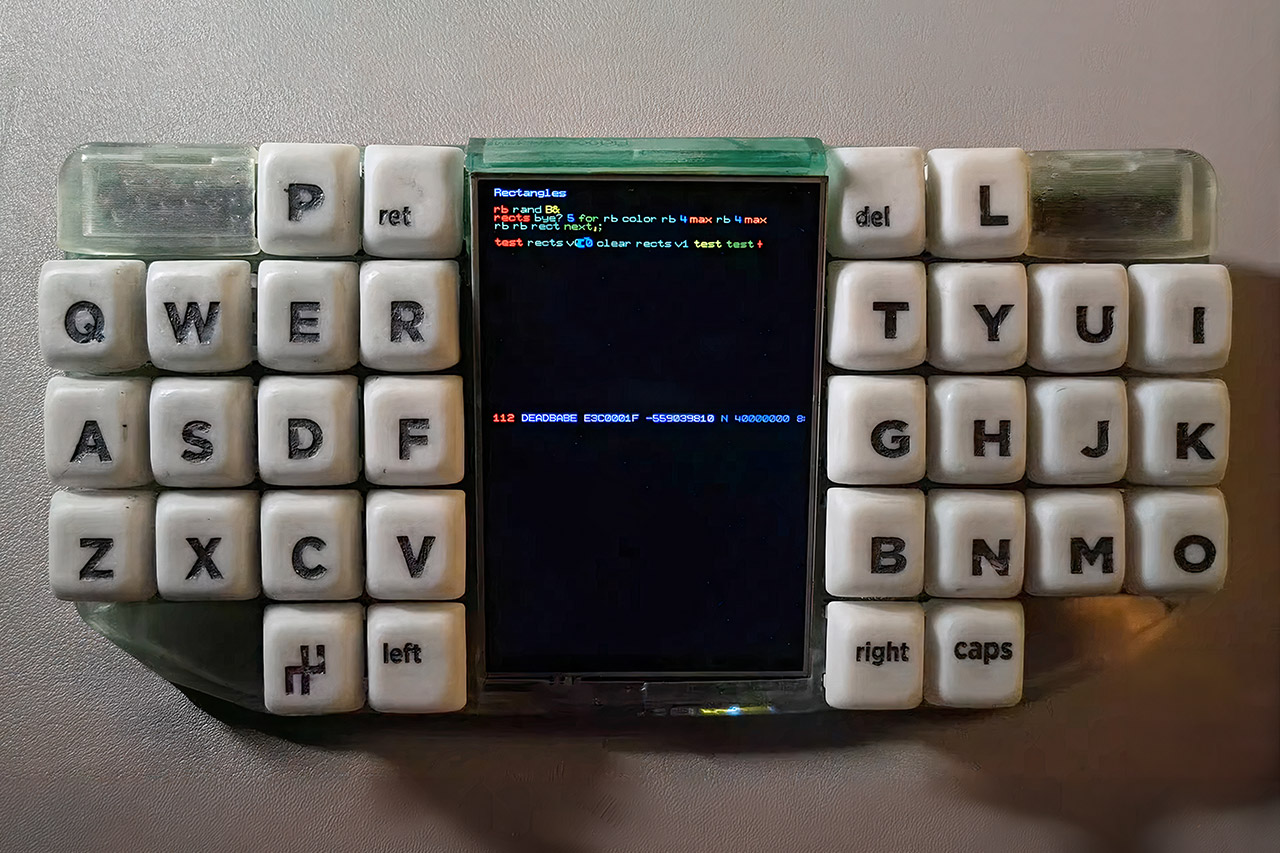
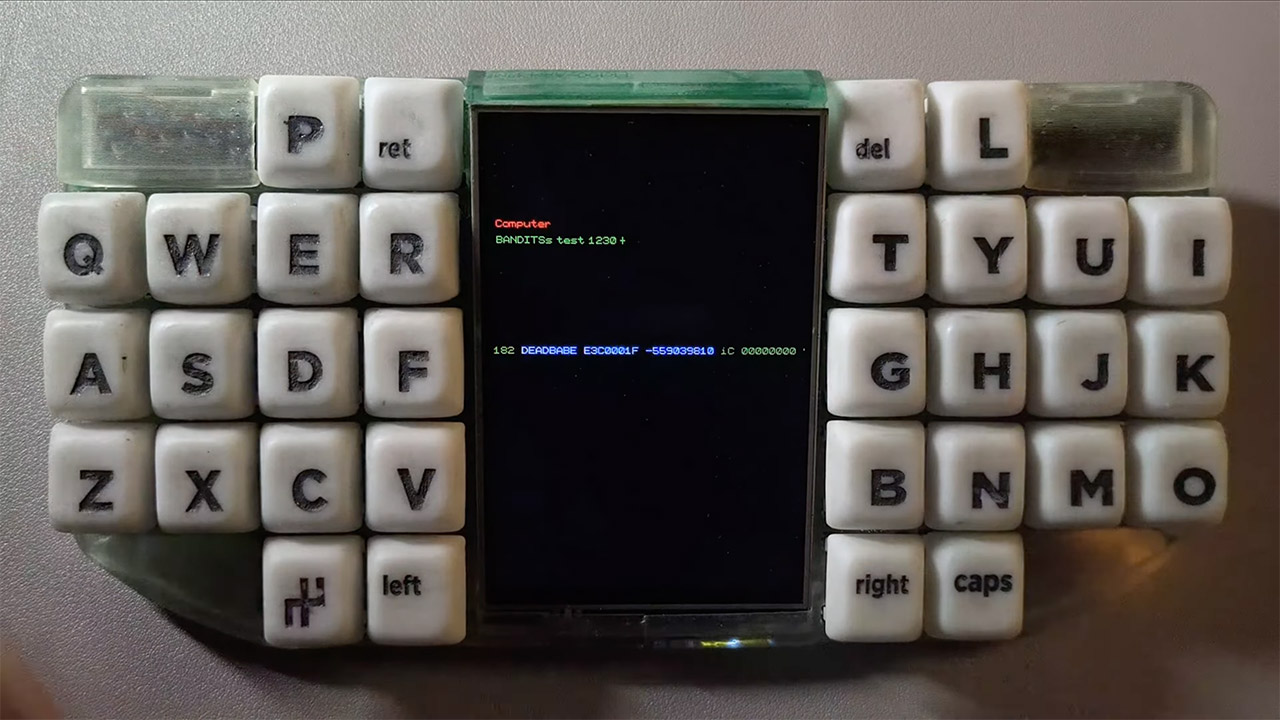
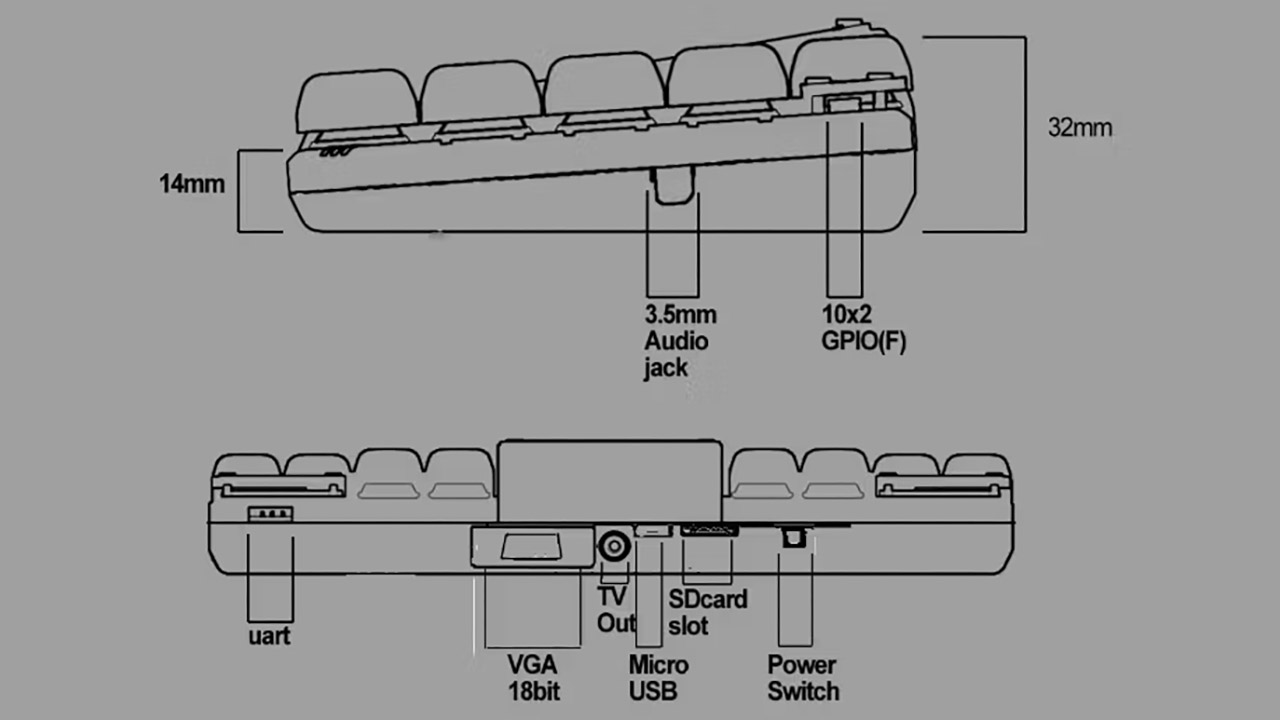
BANDIT is a fully functional computer that sits comfortably in both hands and is ready to go the moment you power it on. The keys are split across each side with a color display sitting in the middle, and rather than typing one character at a time, the whole thing runs on a chording system where pressing multiple keys simultaneously produces complete letters or commands. Every possible combination the keyboard can produce is mapped to a single clean number within the system, keeping things elegantly simple under the hood.
Pick it up, flip it open, and you are straight into it with no waiting for anything to load or update. The four inch color display is touch sensitive and can be divided into multiple regions handling different functions simultaneously. If you need more screen real estate, plugging in an HDMI cable will push the same output to a larger monitor or television without any extra setup required.
XBOX EXPERIENCE BROUGHT TO LIFE BY ROG The Xbox gaming legacy meets ROG’s decades of premium hardware design in the ROG Xbox Ally. Boot straight into…
XBOX GAME BAR INTEGRATION Launch Game Bar with a tap of the Xbox button or play your favorite titles natively from platforms like Xbox Game Pass…
ALL YOUR GAMES, ALL YOUR PROGRESS Powered by Windows 11, the ROG Xbox Ally gives you access to your full library of PC games from Xbox and other game…
Power comes from a 700 megahertz Allwinner processor, which is backed up by 32 megabytes of RAM. Storage options include a microSD card or shared folders via the built-in wireless connectivity. Two regular battery cells are sufficient to keep everything running for several hours away from the power source. If you have a project in mind that requires additional input, 35 convenient pins provide direct access to external circuits or sensors through easy connectors.
The beauty of BANDIT is that it does not require a regular operating system to function. ColourForth runs the entire show, creating, compiling, and executing code in a single fluid motion. Built-in editors cover source text, pixel graphics, tile layouts, music patterns, assembly, and live debugging, and the greatest part is that your work is never lost because the system remains awake and resumes precisely where it left off.
On the performance side, the display handles over three thousand sprites at sixty frames per second without breaking a sweat, and the audio engine generates six channels of FM sound on the fly with full support for high resolution digital samples. It sounds complicated, but the learning curve is more forgiving than you might expect. Chording takes a little getting used to, though once it clicks you can move surprisingly fast, and the system is deep enough to build fully fledged games or tools if you want to go that far.
Wireless connectivity lets you link up with phones, laptops, or other BANDIT units and move files between them without any fuss. Preorders are open right now at $170 with a handful of casing colors to choose from, and units will ship as soon as the team finishes their final inspection. Every BANDIT arrives fully assembled and tested, keyboard switches, screen, and wireless module included, so you can get straight to it out of the box. [Source]
It’s no secret that Google really doesn’t like it that people are installing Android applications from any other source than the Play Store. Last year they proposed locking everyone into their official software repository by requiring all apps to be signed by verified developers, an identity which would be checked against a Google-maintained list. After a lot of pushback a so-called ‘advanced flow’ for installing even unsigned APKs would be implemented, and we now know how this process is supposed to work.
Instead of the old ‘allow installing from unknown sources’ toggle, you are now going to have to dig deep into the Developer Options, to tap the Allow Unverified Packages setting and confirm that nobody is forcing you to do this. This starts a ‘security delay’ of twenty-four hours after you restart the device, following which you can finally enable the setting either temporarily or permanently. It would seem these measures are in place to make it more difficult for a scammer to coerce a user into installing a malicious app — whether or not that’s a realistic concern or not, we’re not sure.
When we last covered this issue this ‘advanced flow’ had just been introduced as an appeasement option. In addition to this a limited free developer account was also pitched, which now turns out to allow for up to only 20 device installations. If you want more than this, you have to pay the $25 fee and provide your government ID.
Advertisement
Although Google’s public pitch is still that this is ‘for user security’, it will also mean that third-party app stores are swept up in these changes, with developers who publish on these stores subject to the same verification rules. This means that Android users will have to learn quickly how to enable this new option as it will be rolled out to more countries over the coming months.
The reality is that scammers will simply work around this issue by buying up already verified developer accounts. At the same time, it’ll cripple third-party app stores and indie developers who had intended to distribute their Android app by simply providing an APK download.
Amazon has acquired Rivr, a startup focused on autonomous robotics. Rivr is based in Zurich and was valued at $110 million in a funding round from August 2024, which both Amazon and its CEO’s Bezos Expeditions participated in. Financial details of the acquisition were not disclosed.
Rivr’s robots have four legs and wheels that allow it to maneuver on stairs and other potentially uneven surfaces. The company just released its second generation of the robot. The purchase will likely further Amazon’s capabilities for ever-faster and more efficient package deliveries.
“This acquisition reflects our commitment to a continued investment in research, which we believe has the potential to further improve safety outcomes and the overall delivery experience for delivery service partners and their delivery associates,” a representative from Amazon told The Information.
Amazon has been working toward introducing automations and robotics at various stages of its shopping business. It deployed its 1 millionth robot last summer and has future goals for automating 75 percent of all its operations.
Rising prices caused by AI’s seemingly insatiable need for memory chips is also expected to create a sharp fall in global smartphone shipments this year, and according to Counterpoint research, as might the US-Israel ongoing strikes on Iran. Similar changes are expected to affect other chip-needing consumer electronics as well.
Advertisement
Amidst all this, however, Vienna-based refurbished electronics seller Refurbed is seeing its business grow. The 2017-founded company recently reported a gross merchandise volume (GMV) growth of more than 40pc year-on-year, with more than €3bn in cumulative sales since launch.
The company operates in 11 EU countries and has plans to expand into 12 more. Last year, it hit profitability and raised €50m to support that expansion.
Aside from phones, the company sells other refurbished gadgets, including computers and kitchen electronics.
Refurbed believes there is an overall shift in consumer behaviour toward refurbished goods, and according to co-founder Kilian Kaminski, that change is mostly a result of tightening economic conditions. Environmental concerns play a consistent, but minor role, in comparison.
Advertisement
“What we see specifically [is] if the price difference between new and refurbished [goods is] bigger, automatically much more consumers are buying [refurbished].”
Ireland, in particular, is making a shift to “smarter consumption choices” in recent times, he says, compared to 2021, when Refurbed launched its services in the country.
In its five years in Ireland, Refurbed has created around €146m in GMV, with more than 200,000 customers and more than 400,000 products sold. A neat 17m kg of CO2 equivalent has also been saved as a result of these second-hand purchases. Plus, more than 50pc of customers have returned, Kaminski says.
Cheaper alternative
There are a few factors working for Refurbed. One, a general price rise in consumer gadgets means second-hand is effectively the cheaper choice, regardless of whether a user is environmentally conscious. Two, a general and continued growth in the first-hand gadgets market means there’s always parts available to use.
Advertisement
“The majority of sustainable products are always more expensive”, Kaminski says, pointing to fair fashion items, for example. But refurbished electronics are cheaper. Plus “you do something positive for the environment, and you get a similar good product like a new product”, he argues.
The company gets a steady supply of old devices from corporations, parts from which get passed around from product to product until they’re back in the circular economy. There’s generally only a few parts that need to be replaced to refurbish a phone anyway, Kaminski notes.
Plus, a relatively recent trade-in program also allows the general consumer to send in some of their old devices. Currently though, this only makes up a small portion of devices they use for refurbishing, something Kaminski wants to expand.
He says that there’s around 7.6m unused electronic items kept idle in Irish homes. These are “valuable resources which are just lying around”, he says, which contain gold, silver, copper, lithium, and other precious materials. “We just started now to motivate customers of really thinking about the value of this device…and bring them back.”
Advertisement
Do you even need a new smartphone?
It is a truth, not yet universally acknowledged, that the most sustainable item you can get is the one you already have (here’s a nifty site to estimate your digital carbon footprint). But why would you even want something new if the upgrade is not what you hoped for?
For years now, research has speculated that consumers are deferring smartphone upgrades on account of slowed innovation. Despite this, smartphone shipments have continued to grow over the years, and manufacturers don’t seem to want to slow down on releasing newer products.
Kaminski says that consumers are “really questioning” whether it makes sense for them to upgrade to a newer model, which is creating a “[huge] growth into the refurbished market”.
This is still only a part of the wider issue that needs to be supplemented with better device design and better support for repair.
Advertisement
During our conversation, Kaminski recalled how even he is unable to repair his own devices, a hobby he once had as a child. “I couldn’t repair my own device because it’s so complex[ly] designed and glued and everything”.
Kaminski is a board member with the European Refurbishment Association, a lobby group advocating for EU’s refurbished market. Refurbed is also a member of the association.
Together, they are working to demand regulatory changes to ensure software updates don’t unnecessarily reduce a smartphone’s lifespan, he says.
Plus, the EU’s so called “right to repair” aims to ensure that manufacturers provide timely and cost-effective repair services.
Advertisement
Don’t miss out on the knowledge you need to succeed. Sign up for the Daily Brief, Silicon Republic’s digest of need-to-know sci-tech news.
The new app comes at a time when OpenAI’s popularity is being challenged by Anthropic.
OpenAI is planning to combine its AI chatbot, coding tool and web browser into a desktop “superapp”, multiple news publications have reported.
According to sources, the move is meant to counter fierce competition from the AI giant’s rivals, including Anthropic, which is fast encroaching into OpenAI’s customer base.
As of November 2025, Anthropic had more than 300,000 enterprise customers, while OpenAI had more than 1m. However, recent data shows that Anthropic is now capturing more than 73pc of all spending among companies buying AI tools for the first time, while OpenAI is down to around 27pc.
OpenAI’s new desktop app will combine ChatGPT, Codex and Atlas, an AI-powered web browser launched last October, sources say. It is unclear when the app is expected to launch.
According to sources, OpenAI’s head of applications Fidji Simo will be leading this effort. While company president Greg Brockman will work with Simo on the new product. ChatGPT will continue to be provided as a standalone app.
OpenAI is also attempting to strengthen Codex with its latest acquisition. Astral is a start-up that makes python tools for developers. It is behind popular tools such as ‘uv’, ‘Ruff’, and ‘ty’.
Advertisement
With the acquisition, OpenAI plans to bring Astral’s tools and expertise to accelerate work on Codex and expand its capabilities across the software development lifecycle.
Codex has already seen considerable user growth since the start of the year, with more than 2m weekly active users, OpenAI said. It competes with Anthropic’s widely popular Claude Code and its new tool Cowork, designed to be a simpler version of Claude Code.
Astral is the latest in a string of acquisitions OpenAI has made in recent months. Earlier in March, the company agreed to buy AI security start-up Promptfoo. In January, it purchased AI health-tech Torch. Last month, the company poached the founder of the viral OpenClaw project, Peter Steinberger, to help innovate AI agents.
Don’t miss out on the knowledge you need to succeed. Sign up for the Daily Brief, Silicon Republic’s digest of need-to-know sci-tech news.
Looking for the most recent Strands answer? Click here for our daily Strands hints, as well as our daily answers and hints for The New York Times Mini Crossword, Wordle, Connections and Connections: Sports Edition puzzles.
Today’s NYT Strands puzzle could be tricky for some. First off, it’s an unusual topic. And some of the answers are difficult to unscramble, so if you need hints and answers, read on.
If that doesn’t help you, here’s a clue: A resilient, metal device.
Clue words to unlock in-game hints
Your goal is to find hidden words that fit the puzzle’s theme. If you’re stuck, find any words you can. Every time you find three words of four letters or more, Strands will reveal one of the theme words. These are the words I used to get those hints but any words of four or more letters that you find will work:
These are the answers that tie into the theme. The goal of the puzzle is to find them all, including the spangram, a theme word that reaches from one side of the puzzle to the other. When you have all of them (I originally thought there were always eight but learned that the number can vary), every letter on the board will be used. Here are the nonspangram answers:
COIL, GYRE, HELIX, SPIRAL, CURLICUE, CORKSCREW
Today’s Strands spangram
The completed NYT Strands puzzle for March 20, 2026.
NYT/Screenshot by CNET
Today’s Strands spangram is TWISTANDTURN. To find it, start with the T that is the bottom letter on the far-right vertical row, and wind up.
Advertisement
Toughest Strands puzzles
Here are some of the Strands topics I’ve found to be the toughest.
#1: Dated slang. Maybe you didn’t even use this lingo when it was cool. Toughest word: PHAT.
#2: Thar she blows! I guess marine biologists might ace this one. Toughest word: BALEEN or RIGHT.
#3: Off the hook. Again, it helps to know a lot about sea creatures. Sorry, Charlie. Toughest word: BIGEYE or SKIPJACK.



























































You must be logged in to post a comment Login