
Tech
These 6 vintage handheld PCs were decades ahead of their time

While the modern handheld PC market revolves around gaming handhelds that rose to prominence only a few years ago with the Steam Deck, handheld PCs have a surprisingly rich history spanning nearly four decades. Below you’ll find six handheld PCs that moved the needle in one way or another.
1
Atari Portfolio
The Atari Portfolio was the first proper handheld PC, as it packed an Intel x86 CPU (80C88) and was MS-DOS compatible. It came out in June 1989, just a month before I was born. The device was developed by DIP Research, made up of former Psion employees, which was at the forefront of handheld computing at the time.
The retail version of the Portfolio featured a full QWERTY keyboard, a modified DOS operating system, a speaker, and an 8-row LCD. While humble in computing power even when compared to the machines of the time, the Portfolio showed just what handheld PCs are capable of.
Software-wise, the Portfolio included a text and spreadsheet editor, a calculator, and a diary app that supported alarms. Thanks to its compatibility with the Bee Card memory card standard, you could expand its storage up to 4MB, but also bestow it with new apps such as file and finance manager, and even a few games.
While short-lived—it was discontinued in 1994—the Atari Portfolio showed it’s possible to build a full-fledged x86 handheld PC with a full QWERTY keyboard capable of running more or less the same software as regular PCs.
2
HP 300LX

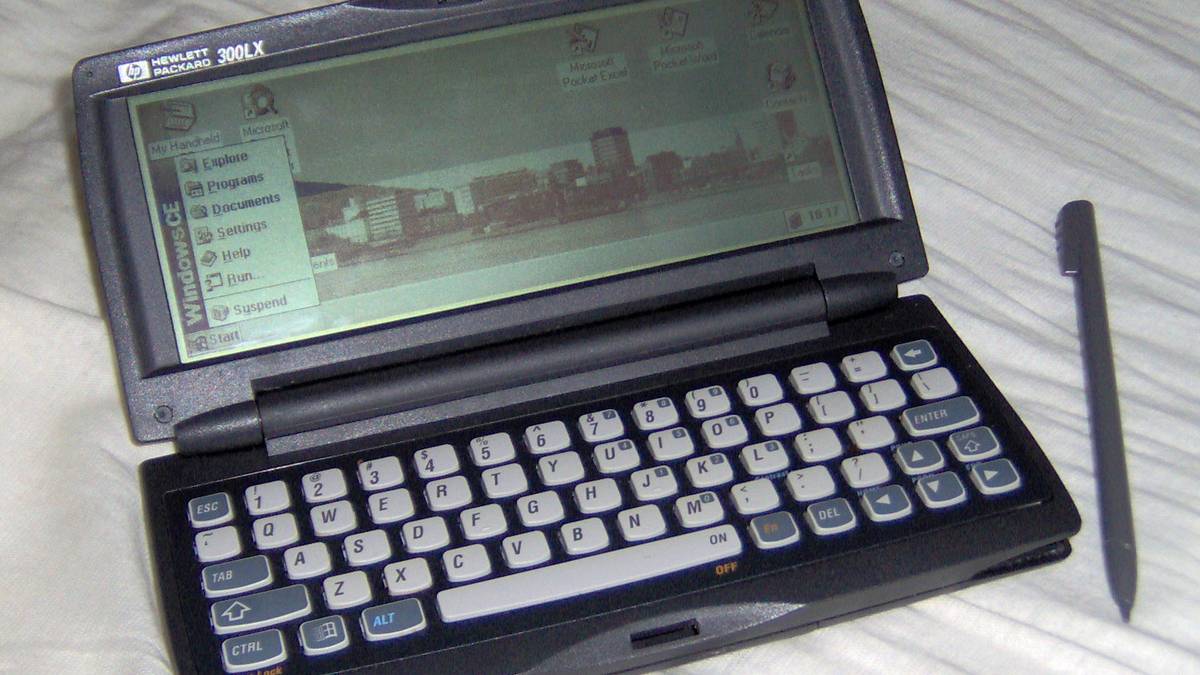
For the first half-decade or so of their life, handheld PCs were limited to DOS. But with the release of the HP 300LX, we got the first Windows handheld PC. The version of Windows on the 300LX was a fairly limited initial release of Windows CE. The operating system was purpose-built for handheld PCs, but still included software found in regular Windows versions.
The 300LX featured pocket versions of Microsoft Word and Excel, allowing owners to be fully productive while commuting. The apps were actually usable thanks to 300LX’s giant screen, which featured a 640×240 resolution, and the full QWERTY keyboard.
Windows CE also included a rudimentary version of Internet Explorer that, while fairly limited, did allow browsing the web and reading emails, as long as you had a modem in the form of an expansion card, which you could slot inside the 300LX’s expansion card slot.
Said expansion card slot supported the then-popular PC Card format, allowing the HP 300LX not only to use memory cards, but also modems and network cards, as well as hard disk drive cards.
The HP 620LX succeeded the 300LX, offering a much more capable Windows CE 2.0, along with a 640×240 backlit color display, a CompactFlash card slot, and a whopping 16MB of memory.
3
Toshiba Libretto 20
While Microsoft and its partners were trying to develop a bespoke handheld PC ecosystem based on Windows CE, Toshiba charted its own course with the company’s Libretto series of subnotebooks that blew every Windows CE-powered handheld PC out of the water.
The first model, the Toshiba Libretto 20, which launched in April 1996, was a proper beast, despite weighing only 1.85lbs (around 840 grams). It packed a version of the x86 486 CPU made by AMD, a 6.1-inch TFT LCD with 65K colors, a thin hard drive with a capacity of 270MB, and full-fledged Windows 95.

It came with a bunch of preinstalled software, such as Microsoft Works (a sort of mini Microsoft Office) and a software guide to Japanese rail routes—early Libretto models were exclusive to Japan, and were designed for Japanese businessmen who often commuted on trains.
To allow easy one-handed use, the first Toshiba Libretto model introduced a joystick-like nub similar to the one used in ThinkPad laptops, which emulated mouse input surprisingly well. The PC also included an excellent 88-key keyboard.
The Libretto 20 was compatible with floppy and CD-ROM drives via its PC Card slot, which also enabled it to access the web via an appropriate PC Card modem.
The Libretto lineup of devices offered a prototype blueprint that gaming handheld PCs would eventually embrace. Instead of running custom versions of Windows and being powered by exotic hardware, the Toshiba Libretto handheld PC family featured fairly common, off-the-shelf components and support for regular Windows.
4
Sony VAIO PCG-U1
Whereas the Toshiba Libretto 20 and its successors pioneered the modern handheld PC design philosophy, the Sony VAIO U lineup perfected it.
Just a quick glance at the first member of the VAIO U family, the Sony VAIO PCG-U1, is enough to recognize where GPD got the inspiration for the design of its first PC gaming handheld, the 2016 GPD Win. The PCG-U1 also heavily influenced the looks of the first handheld gaming PC ever, the Pandora.

Like modern handheld PCs, the Sony VAIO PCG-U1 was designed to be held like a controller. You would wrap your fingers around its sides and use your thumbs to control the mouse pointer via the nub located on the right side of the device, above the keyboard. The two buttons serving as left and right clicks were located across the mouse pointer nub, on the upper left side of the device. You also had access to a small wheel to the right of the joystick, used for scrolling.
Thanks to the handheld’s humble footprint, the keyboard was compact enough to only be used with the thumbs, making the VAIO PCG-U1 the last common ancestor of the keyboard-laden family of modern handheld PCs.
Even though the VAIO PCG-U1 featured an almost perfect design for handheld use, Sony didn’t stop there. The company iterated on the design, with future members of the VAIO U family of devices ditching the keyboard altogether.

While the VAIO PCG-U1 was a masterclass in industrial design, my favorite Sony VAIO design is the VAIO UX Micro PC from 2006. The thing looks like it comes from the future, even in this day and age, and was the inspiration for the slider-style handheld gaming PCs such as the GPD Win 3, Win 4, and AYANEO SLIDE.
5
Samsung Q1
The Samsung Q1 had so much promise. It was part of Microsoft’s 2006 UMPC initiative (known as Project Origami), which took cues from Japanese handheld PCs such as the Sony VAIO U and the Toshiba Libretto series. Devices that were part of the initiative were powered by Intel x86 processors and included full-fledged versions of Windows XP and Vista.
While the end product was impressive in more than one way, the device fell short of expectations sparked by Microsoft’s Project Origami ad, which showed Halo running on a handheld PC, among other things.
While you could play PC classics on the Ultra version of the device, the Q1 and its variants weren’t made for gaming in mind. Despite gamers’ best wishes, the hardware of the time simply wasn’t powerful enough to run anything other than lightweight games and some PC classics.
Despite this, devices such as the Samsung Q1, Sony VAIO U UX, and Pepper Pad 2 were prototypes of the modern handheld gaming PC: touch-screen devices running a full-fledged version of Windows, capable of emulating mouse input and designed to be used while held with both hands.
6
Pepper Pad 2

Before I wrap this list up, I want to share one quite exotic yet very important handheld PC. The Pepper Pad 2 (the first model didn’t move beyond the prototype stage) was the first Linux handheld PC. In a way, the Pepper Pad is the Steam Deck’s great-great-grandfather.
The second generation of the handheld, the first one to be offered for sale, was introduced in 2004. It was very similar to what Sony and Samsung would offer with their VAIO UX and Q1 handhelds a few years later. In other words, one small company—Pepper Computer—managed to create a modern-looking handheld PC years before the industry giants would take a stab at the form factor.
Not only was the Pepper Pad 2 ahead of its time in terms of design and form factor, the handheld also offered a UI that was very similar to iOS and Android, which would see the light of day years later.
The device ran a customized version of Montavista Linux with the home screen featuring large, touch-friendly icons and other elements. You also had access to an app store that included a slew of productivity apps as well as games. Another breakthrough feature we now take for granted was automatic software updates, yet another thing that mobile operating systems such as iOS and Android would later embrace.
In addition to its surprisingly rich software collection, the Pepper Pad 2 was a genuine powerhouse. The handheld was powered by a 624MHz ARM CPU, 20GB of storage, 256MB of RAM, and a massive 8-inch touch-screen. It also included a webcam and mic, Wi-Fi and Bluetooth connectivity, a d-pad, a scroll wheel, a QWERTY keyboard, stereo speakers, and an SD card slot.
Pepper Computer would later introduce the Pepper Pad 3, powered by an x86-compatible CPU and running Fedora Linux. Despite being arguably the best handheld PC of the time, the Pepper Pad family of devices ended with it.
Handheld PCs have an intriguing history despite long being niche. Overshadowed for decades by laptops, PDAs, and smartphones, they’ve only recently become mainstream thanks to the rise of handheld gaming PCs. While I’m not enamored with the recent developments in the handheld gaming PC market, I still believe handhelds are the future of gaming and can’t wait to see how the category evolves over the coming years and decades.



