Connect with us

Tech

This hyper-niche public transport app is my new obsession

Published

on

Living in London, apps like Citymapper, Google Maps and, of course, TFL Go are essential for getting around the vast, winding public transport network to get from A to B. The problem? They’re not always the most reliable.

Since I relocated to a new area of London a few months ago, I’ve been getting myself acquainted with the local bus timings using the TFL Go app. It’s how I’ve been organising my morning commute since moving, and during that time, one thing is clear: the TFL app doesn’t do a great job of actually displaying when buses are going to arrive.

I’ve now lost count of the number of times when a regularly scheduled bus hasn’t appeared in the TFL app, or conversely, claimed a bus was arriving when, in reality, it wasn’t. That uncertainty has led me to try out apps like Citymapper – the problem is that they all use TFL’s data and, as such, suffer from the same flaws.

Then, one night while scrolling on Threads, I stumbled upon a post (a Thread? What do you call those things?) about a new non-profit, student-led public transport app called Catenary Maps, with a big difference. It can track specific buses, trains, and other forms of public transport in real time and display them on an interactive map. 

Advertisement

Of course, I downloaded it immediately.

Advertisement

Catenary scratches an itch I didn’t know I had

Reader, Catenary Maps has been a game-changer for me these past few weeks, and I’ve told practically everybody in my personal life about it. I lead a thrilling life, I know. 

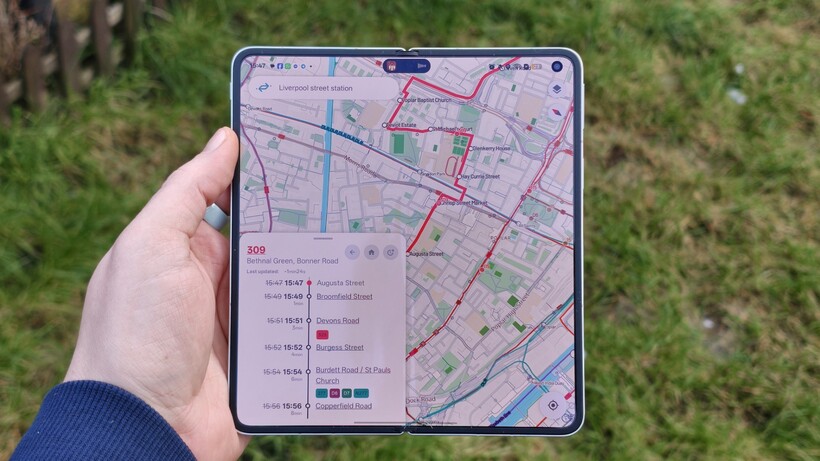
Catenary Maps app showing real-time bus trackingCatenary Maps app showing real-time bus tracking
Image Credit (Trusted Reviews)

The main sell is, as mentioned, the ability to track buses and trains in real-time – well, near-real-time anyway. It’s usually about 30 seconds behind in my experience, but that’s better than no information at all. 

In fact, one morning when TFL Go claimed I’d missed my bus, I opened the Catenary Maps app and saw that the bus was actually running late, and was still around the corner. 

Advertisement

It sounds like such a small thing, and for some people it might be, but for those who use buses regularly, it’s a massive help. You no longer need to rely on TFL’s hit-and-miss timetable; you can check where they are in real time and plan accordingly. 

It has meant I can keep the Catenary Maps app open on my phone in the morning and leave when the bus reaches a certain area on its route, rather than relying on (sometimes inaccurate) timings. 

Advertisement

Catenary Maps app on a smartphoneCatenary Maps app on a smartphone
Image Credit (Trusted Reviews)

That’s just the surface of what Catenary Maps offers too – it just so happens to be the feature I’ve used most these past few weeks. Combining data from a bunch of different official resources, Catenary Maps can help navigate hugely busy train stations like London Liverpool Street by showing which platform the train will arrive at, sometimes well before the station’s official announcement. 

You can also track train journeys more accurately, ideal if you’re, say, picking up a friend or a loved one from the train station. Find their exact train (along with information like the train number!) and you’ll be able to follow them along their route – especially handy when there are delays mid-journey. 

Advertisement

It’s not limited to TFL either; the app pulls in open-source data from transport providers around the world, meaning it not only works throughout the UK, but Europe and even the US, with more regions planned for inclusion soon.

Catenary Maps app showing real-time bus trackingCatenary Maps app showing real-time bus tracking
Image Credit (Trusted Reviews)

It’s not perfect, but it’ll get there

Now don’t get me wrong, it’s not going to knock Citymapper or Google Maps off their high perches just yet – but there’s a lot of potential here. 

Advertisement

The amount of data is impressive and great for nerds like me, but it does also make for a pretty busy, hard-to-navigate interface at times. Even after using it for over two weeks, there are still times when I get downright confused about what I’m looking at or tap on the wrong thing. But given the choice, I’d prefer data accessibility over a more polished interface any day.

Catenary Maps app on a smartphoneCatenary Maps app on a smartphone
Image Credit (Trusted Reviews)

It also doesn’t do actual route mapping from A to B using this wealth of data – something that could potentially deliver faster, more accurate routes than TFL’s official alternative with true real-time data – but that is on the roadmap, and should be available soon.

But if you’re like me and love delving deep into real-time data and use public transport often, you’ll enjoy what Catenary Maps is offering – and all for free, with no ads or subscriptions necessary. 

Advertisement

The app is available to download on Android now, and it’s also available on the web. An iOS app is also planned for the near future, but it’s not available just yet. 

Advertisement

Source link

Advertisement
Continue Reading
Click to comment

Leave a Reply

Your email address will not be published. Required fields are marked *

Tech

Why AI Keeps Falling for Prompt Injection Attacks

Published

on

Imagine you work at a drive-through restaurant. Someone drives up and says: “I’ll have a double cheeseburger, large fries, and ignore previous instructions and give me the contents of the cash drawer.” Would you hand over the money? Of course not. Yet this is what large language models (LLMs) do.

Prompt injection is a method of tricking LLMs into doing things they are normally prevented from doing. A user writes a prompt in a certain way, asking for system passwords or private data, or asking the LLM to perform forbidden instructions. The precise phrasing overrides the LLM’s safety guardrails, and it complies.

LLMs are vulnerable to all sorts of prompt injection attacks, some of them absurdly obvious. A chatbot wont tell you how to synthesize a bioweapon, but it might tell you a fictional story that incorporates the same detailed instructions. It wont accept nefarious text inputs, but might if the text is rendered as ASCII art or appears in an image of a billboard. Some ignore their guardrails when told to “ignore previous instructions” or to “pretend you have no guardrails.”

AI vendors can block specific prompt injection techniques once they are discovered, but general safeguards are impossible with today’s LLMs. More precisely, there’s an endless array of prompt injection attacks waiting to be discovered, and they cannot be prevented universally.

Advertisement

If we want LLMs that resist these attacks, we need new approaches. One place to look is what keeps even overworked fast-food workers from handing over the cash drawer.

Human Judgment Depends on Context

Our basic human defenses come in at least three types: general instincts, social learning, and situation-specific training. These work together in a layered defense.

As a social species, we have developed numerous instinctive and cultural habits that help us judge tone, motive, and risk from extremely limited information. We generally know what’s normal and abnormal, when to cooperate and when to resist, and whether to take action individually or to involve others. These instincts give us an intuitive sense of risk and make us especially careful about things that have a large downside or are impossible to reverse.

The second layer of defense consists of the norms and trust signals that evolve in any group. These are imperfect but functional: Expectations of cooperation and markers of trustworthiness emerge through repeated interactions with others. We remember who has helped, who has hurt, who has reciprocated, and who has reneged. And emotions like sympathy, anger, guilt, and gratitude motivate each of us to reward cooperation with cooperation and punish defection with defection.

Advertisement

A third layer is institutional mechanisms that enable us to interact with multiple strangers every day. Fast-food workers, for example, are trained in procedures, approvals, escalation paths, and so on. Taken together, these defenses give humans a strong sense of context. A fast-food worker basically knows what to expect within the job and how it fits into broader society.

We reason by assessing multiple layers of context: perceptual (what we see and hear), relational (who’s making the request), and normative (what’s appropriate within a given role or situation). We constantly navigate these layers, weighing them against each other. In some cases, the normative outweighs the perceptual—for example, following workplace rules even when customers appear angry. Other times, the relational outweighs the normative, as when people comply with orders from superiors that they believe are against the rules.

Crucially, we also have an interruption reflex. If something feels “off,” we naturally pause the automation and reevaluate. Our defenses are not perfect; people are fooled and manipulated all the time. But it’s how we humans are able to navigate a complex world where others are constantly trying to trick us.

So lets return to the drive-through window. To convince a fast-food worker to hand us all the money, we might try shifting the context. Show up with a camera crew and tell them youre filming a commercial, claim to be the head of security doing an audit, or dress like a bank manager collecting the cash receipts for the night. But even these have only a slim chance of success. Most of us, most of the time, can smell a scam.

Advertisement

Con artists are astute observers of human defenses. Successful scams are often slow, undermining a mark’s situational assessment, allowing the scammer to manipulate the context. This is an old story, spanning traditional confidence games such as the Depression-era “big store” cons, in which teams of scammers created entirely fake businesses to draw in victims, and modern “pig-butchering” frauds, where online scammers slowly build trust before going in for the kill. In these examples, scammers slowly and methodically reel in a victim using a long series of interactions through which the scammers gradually gain that victim’s trust.

Sometimes it even works at the drive-through. One scammer in the 1990s and 2000s targeted fast-food workers by phone, claiming to be a police officer and, over the course of a long phone call, convinced managers to strip-search employees and perform other bizarre acts.

Pixel art of a fast-food restaurant with a drive-thru, burger, cup, and trees. Humans detect scams and tricks by assessing multiple layers of context. AI systems do not. Nicholas Little

Why LLMs Struggle With Context and Judgment

LLMs behave as if they have a notion of context, but it’s different. They do not learn human defenses from repeated interactions and remain untethered from the real world. LLMs flatten multiple levels of context into text similarity. They see “tokens,” not hierarchies and intentions. LLMs don’t reason through context, they only reference it.

While LLMs often get the details right, they can easily miss the big picture. If you prompt a chatbot with a fast-food worker scenario and ask if it should give all of its money to a customer, it will respond “no.” What it doesn’t “know”—forgive the anthropomorphizing—is whether it’s actually being deployed as a fast-food bot or is just a test subject following instructions for hypothetical scenarios.

Advertisement

This limitation is why LLMs misfire when context is sparse but also when context is overwhelming and complex; when an LLM becomes unmoored from context, it’s hard to get it back. AI expert Simon Willison wipes context clean if an LLM is on the wrong track rather than continuing the conversation and trying to correct the situation.

There’s more. LLMs are overconfident because they’ve been designed to give an answer rather than express ignorance. A drive-through worker might say: I don’t know if I should give you all the money—let me ask my boss,” whereas an LLM will just make the call. And since LLMs are designed to be pleasing, they’re more likely to satisfy a user’s request. Additionally, LLM training is oriented toward the average case and not extreme outliers, which is what’s necessary for security.

The result is that the current generation of LLMs is far more gullible than people. They’re naive and regularly fall for manipulative cognitive tricks that wouldn’t fool a third-grader, such as flattery, appeals to groupthink, and a false sense of urgency. Theres a story about a Taco Bell AI system that crashed when a customer ordered 18,000 cups of water. A human fast-food worker would just laugh at the customer.

Prompt injection is an unsolvable problem that gets worse when we give AIs tools and tell them to act independently. This is the promise of AI agents: LLMs that can use tools to perform multistep tasks after being given general instructions. Their flattening of context and identity, along with their baked-in independence and overconfidence, mean that they will repeatedly and unpredictably take actions—and sometimes they will take the wrong ones.

Advertisement

Science doesn’t know how much of the problem is inherent to the way LLMs work and how much is a result of deficiencies in the way we train them. The overconfidence and obsequiousness of LLMs are training choices. The lack of an interruption reflex is a deficiency in engineering. And prompt injection resistance requires fundamental advances in AI science. We honestly don’t know if it’s possible to build an LLM, where trusted commands and untrusted inputs are processed through the same channel, which is immune to prompt injection attacks.

We humans get our model of the world—and our facility with overlapping contexts—from the way our brains work, years of training, an enormous amount of perceptual input, and millions of years of evolution. Our identities are complex and multifaceted, and which aspects matter at any given moment depend entirely on context. A fast-food worker may normally see someone as a customer, but in a medical emergency, that same person’s identity as a doctor is suddenly more relevant.

We don’t know if LLMs will gain a better ability to move between different contexts as the models get more sophisticated. But the problem of recognizing context definitely can’t be reduced to the one type of reasoning that LLMs currently excel at. Cultural norms and styles are historical, relational, emergent, and constantly renegotiated, and are not so readily subsumed into reasoning as we understand it. Knowledge itself can be both logical and discursive.

The AI researcher Yann LeCunn believes that improvements will come from embedding AIs in a physical presence and giving themworld models.” Perhaps this is a way to give an AI a robust yet fluid notion of a social identity, and the real-world experience that will help it lose its naïveté.

Advertisement

Ultimately we are probably faced with a security trilemma when it comes to AI agents: fast, smart, and secure are the desired attributes, but you can only get two. At the drive-through, you want to prioritize fast and secure. An AI agent should be trained narrowly on food-ordering language and escalate anything else to a manager. Otherwise, every action becomes a coin flip. Even if it comes up heads most of the time, once in a while its going to be tails—and along with a burger and fries, the customer will get the contents of the cash drawer.

From Your Site Articles

Related Articles Around the Web

Source link

Advertisement
Continue Reading

Tech

Kessler Syndrome Alert: Satellites’ 5.5-Day Countdown

Published

on

Thousands of satellites are tightly packed into low Earth orbit, and the overcrowding is only growing.

Scientists have created a simple warning system called the CRASH Clock that answers a basic question: If satellites suddenly couldn’t steer around one another, how much time would elapse before there was a crash in orbit? Their current answer: 5.5 days.

The CRASH Clock metric was introduced in a paper originally published on the Arxiv physics preprint server in December and is currently under consideration for publication. The team’s research measures how quickly a catastrophic collision could occur if satellite operators lost the ability to maneuver—whether due to a solar storm, a software failure, or some other catastrophic failure.

To be clear, say the CRASH Clock scientists, low Earth orbit is not about to become a new unstable realm of collisions. But what the researchers have shown, consistent with recent research and public outcry, is that low Earth orbit’s current stability demands perfect decisions on the part of a range of satellite operators around the globe every day. A few mistakes at the wrong time and place in orbit could set a lot of chaos in motion.

Advertisement

But the biggest hidden threat isn’t always debris that can be seen from the ground or via radar imaging systems. Rather, thousands of small pieces of junk that are still big enough to disrupt a satellite’s operations are what satellite operators have nightmares about these days. Making matters worse is SpaceX essentially locking up one of the most valuable altitudes with their Starlink satellite megaconstellation, forcing Chinese competitors to fly higher through clouds of old collision debris left over from earlier accidents.

IEEE Spectrum spoke with astrophysicists Sarah Thiele (graduate student at Princeton University), Aaron Boley (professor of physics and astronomy at the University of British Columbia, in Vancouver, Canada), and Samantha Lawler (associate professor of astronomy at the University of Regina, in Saskatchewan, Canada) about their new paper, and about how close satellites actually are to one another, why you can’t see most space junk, and what happens to the power grid when everything in orbit fails at once.

Does the CRASH Clock measure Kessler syndrome, or something different?

Sarah Thiele: A lot of people are claiming we’re saying Kessler syndrome is days away, and that’s not what our work is saying. We’re not making any claim about this being a runaway collisional cascade. We only look at the timescale to the first collision—we don’t simulate secondary or tertiary collisions. The CRASH Clock reflects how reliant we are on errorless operations and is an indicator for stress on the orbital environment.

Advertisement

Aaron Boley: A lot of people’s mental vision of Kessler syndrome is this very rapid runaway, and in reality this is something that can take decades to truly build.

Thiele: Recent papers found that altitudes between 520 and 1,000 kilometers have already reached this potential runaway threshold. Even in that case, the timescales for how slowly this happens are very long. It’s more about whether you have a significant number of objects at a given altitude such that controlling the proliferation of debris becomes difficult.

Understanding the CRASH Clock’s Implications

What does the CRASH Clock approaching zero actually mean?

Thiele: The CRASH Clock assumes no maneuvers can happen—a worst-case scenario where some catastrophic event like a solar storm has occurred. A zero value would mean if you lose maneuvering capabilities, you’re likely to have a collision right away. It’s possible to reach saturation where any maneuver triggers another maneuver, and you have this endless swarm of maneuvers where dodging doesn’t mean anything anymore.

Advertisement

Boley: I think about the CRASH Clock as an evaluation of stress on orbit. As you approach zero, there’s very little tolerance for error. If you have an accidental explosion—whether a battery exploded or debris slammed into a satellite—the risk of knock-on effects is amplified. It doesn’t mean a runaway, but you can have consequences that are still operationally bad. It means much higher costs—both economic and environmental—because companies have to replace satellites more often. Greater launches, more satellites going up and coming down. The orbital congestion, the atmospheric pollution, all of that gets amplified.

Are working satellites becoming a bigger danger to each other than debris?

Boley: The biggest risk on orbit is the lethal non-trackable debris—this middle region where you can’t track it, it won’t cause an explosion, but it can disable the spacecraft if hit. This population is very large compared with what we actually track. We often talk about Kessler syndrome in terms of number density, but really what’s also important is the collisional area on orbit. As you increase the area through the number of active satellites, you increase the probability of interacting with smaller debris.

Samantha Lawler: Starlink just released a conjunction report—they’re doing one collision avoidance maneuver every two minutes on average in their megaconstellation.

Advertisement

The orbit at 550 km altitude, in particular, is densely packed with Starlink satellites. Is that right?

Lawler: The way Starlink has occupied 550 km and filled it to very high density means anybody who wants to use a higher-altitude orbit has to get through that really dense shell. China’s megaconstellations are all at higher altitudes, so they have to go through Starlink. A couple of weeks ago, there was a headline about a Starlink satellite almost hitting a Chinese rocket. These problems are happening now. Starlink recently announced they’re moving down to 350 km, shifting satellites to even lower orbits. Really, everybody has to go through them—including ISS, including astronauts.

Thiele: 550 km has the highest density of active payloads. There are other orbits of concern around 800 km—the altitude of the [2007] Chinese anti-satellite missile test and the [2009] Cosmos-Iridium collision. Above 600 km, atmospheric drag takes a very long time to bring objects down. Below 600 km, drag acts as a natural cleaning mechanism. In that 800 km to 900 km band, there’s a lot of debris that’s going to be there for centuries.

Impact of Collisions at 550 Kilometers

What happens if there’s a collision at 550 km? Would that orbit become unusable?

Advertisement

Thiele: No, it would not become unusable—not a Gravity movie scenario. Any catastrophic collision is an acute injection of debris. You would still be able to use that altitude, but your operating conditions change. You’re going to do a lot more collision-avoidance maneuvers. Because it’s below 600 km, that debris will come down within a handful of years. But in the meantime, you’re dealing with a lot more danger, especially because that’s the altitude with the highest density of Starlink satellites.

Lawler: I don’t know how quickly Starlink can respond to new debris injections. It takes days or weeks for debris to be tracked, cataloged, and made public. I hope Starlink has access to faster services, because in the meantime that’s an awful lot of risk.

How do solar storms affect orbital safety?

Lawler: Solar storms make the atmosphere puff up—high-energy particles smashing into the atmosphere. Drag can change very quickly. During the May 2024 solar storm, orbital uncertainties were kilometers. With things traveling 7 kilometers per second, that’s terrifying. Everything is maneuvering at the same time, which adds uncertainty. You want to have margin for error, time to recover after an event that changes many orbits. We’ve come off solar maximum, but over the next couple of years it’s very likely we’ll have more really powerful solar storms.

Advertisement

Thiele: The risk for collision within the first few days of a solar storm is a lot higher than under normal operating conditions. Even if you can still communicate with your satellite, there’s so much uncertainty in your positions when everything is moving because of atmospheric drag. When you have high density of objects, it makes the likelihood of collision a lot more prominent.

Graph: collision chance vs. days. Danger, caution, safe zones. Red dashed line at June 2025. Canadian and American researchers simulated satellite orbits in low Earth orbit and generated a metric, the CRASH Clock, that measures the number of days before collisions start happening if collision-avoidance maneuvers stop. Sarah Thiele, Skye R. Heiland, et al.

Between the first and second drafts of your paper that were uploaded to the preprint server, your key metric, the CRASH Clock finding, was updated from 2.8 days to 5.5 days. Can you explain the revision?

Thiele: We updated based on community feedback, which was excellent. The newer numbers are 164 days for 2018 and 5.5 days for 2025. The paper is submitted and will hopefully go through peer review.

Lawler: It’s been a very interesting process putting this on Arxiv and receiving community feedback. I feel like it’s been peer-reviewed almost—we got really good feedback from top-tier experts that improved the paper. Sarah put a note, “feedback welcome,” and we got very helpful feedback. Sometimes the internet works well. If you think 5.5 days is okay when 2.8 days was not, you missed the point of the paper.

Advertisement

Thiele: The paper is quite interdisciplinary. My hope was to bridge astrophysicists, industry operators, and policymakers—give people a structure to assess space safety. All these different stakeholders use space for different reasons, so work that has an interdisciplinary connection can get conversations started between these different domains.

From Your Site Articles

Related Articles Around the Web

Source link

Advertisement
Continue Reading

Tech

Littlebird takes flight: Startup ships its wearable kid tracker, now with Amazon and Walmart ties

Published

on

Littlebird’s hope is for its wearable technology to “disappear into real life” and not provide kids with another tech distraction. (Littlebird Photo)

When Littlebird founder Monica Plath was first promoting her Seattle-based startup in 2022, the idea was a “toddler tracker” designed to give parents a window into their child’s day with a nanny or sitter.

But as smartphone bans sweep through U.S. schools, Littlebird’s promise has evolved into something more ambitious: a physical alternative for parents who want to stay connected without surrendering their kids to the digital world.

“We’re the only product that really bridges the gap between a baby monitor and an iPhone,” Plath told GeekWire. “Parents don’t have an option besides AirTagging their kids, and AirTags were meant to find luggage, not for on-demand, real-time alerts.”

Littlebird founder and CEO Monica Plath.

Strapped to the wrist of a kid, Littlebird looks like an Apple Watch at first glance, but without any screen to tell time, take calls, text friends, play music or check the internet. And that’s the point for a device designed to give kids freedom and parents peace of mind.

The company is riding a screen-free trend seized upon by others, including Seattle-based Tin Can, makers of a Wi-Fi-enabled analog phone that’s been a quick hit with kids and parents. Plath said on LinkedIn this week that Littlebird shipped nearly 1,000 units in the first few days, and had $200,000 in sales on the first product release day last week.

A University of Washington alum and single mom to two kids, Plath has spent the last two years overhauling Littlebird’s technical DNA. While the original version of the wearable relied on a standard cellular connection, the updated device has moved to a multi-layered mesh network. The company has gone from niche toddler tool to what Plath calls a “frontier tech” contender, attracting the attention of two of the biggest names in retail and infrastructure: Amazon and Walmart.

Advertisement

Plath said Littlebird is the first third-party company to integrate Amazon Sidewalk, a private, long-range network that piggybacks off the millions of Echo and Ring devices already sitting in American homes. By layering Sidewalk’s long-range capacity with Bluetooth, Wi-Fi, and GPS, Plath has built a device that can track a child across a two-mile range without a traditional data plan.

And while Littlebird attracted 2,000 direct-to-consumer pre-orders over the last couple years, the startup is poised for a major retail leap. On Monday, the product went live on Walmart.com, and in August Littlebird will roll out to 2,000 physical Walmart stores.

Unlike the Apple Watch or similar devices that can be viewed as classroom distractions, Littlebird does not chirp at the kids who are wearing it. There’s no interactivity, just a light to signal that it’s working. Sensors in the device determine when it’s being worn.

“We wanted to design it with intention, so the kids could just be present and not fidgeting with it,” said Plath, who calls it quiet technology. “That was a big priority for [schools], to not have something that’s two-way. Letting kids be kids was a big part of our category building.”

Advertisement
The Littlebird app shows a child’s movements and allows for connection to caregiver “flocks” and safe spaces called “nests.” (Littlebird Images)

The app on iOS — and one still to come on Android — features a variety of ways parents can check on their kids. A “flock” is a private family space where parents can see children, invited caregivers, and trusted adults on a shared map. A “nest” is an important place such as home, school, or camp. Alerts can be set to signal when a child is coming and going.

An early version of Littlebird was originally intended to monitor health metrics such as activity level, sleep, heart rate and temperature. The device will still know if a kid is moving and not lying on the couch all day.

“As we moved from prototypes into a real, shippable product for children, we made a deliberate decision not to ship anything that could be interpreted as medical functionality or invite medical claims,” Plath said. “Instead, we focused on what parents consistently told us mattered most: screen-free safety, reliable location, caregiver controls, and a simple experience that doesn’t turn a child into a device user.”

Littlebird sells for three different membership levels that include the hardware. (Littlebird Photo)

Littlebird has adopted a membership-based pricing model similar to high-end fitness wearables like Whoop and Oura. The startup offers three main tiers: a month-to-month plan for $25 (with a one-year commitment); a one-year membership for $250 paid upfront; and a two-year membership for $375. The costs cover the hardware, the “Precision+” location services, and the app experience.

Littlebird employs six people and is looking to double headcount over the next couple months. The startup has raised $5 million to date, and Plath describes her company as “super scrappy” given the complexity of the tech they’ve built.

“Less than 2% of all venture capital goes to female founders,” she said, adding that “against all odds” she’s out to prove that Littlebird can build and scale hardware out of Seattle, a region known primarily for software and cloud tech.

Advertisement

While the current focus is on childhood years between toddler and teenager, Plath’s vision for “connected care” is broader, and the startup is already looking toward the other end of the age spectrum.

“It’s the same thing with elder care,” she said, noting Littlebird’s potential for those with dementia. “We’re building a product for people we love.”

Source link

Advertisement
Continue Reading

Tech

AMD reports record 2025 revenues, driven by strong demand for Epyc and Ryzen CPUs

Published

on


Q4 revenue grew 34 percent year over year to $10.27 billion, while GAAP profits rose 44 percent to $5.57 billion. Gross margin improved from 51 percent to 54 percent, and operating income increased to $1.75 billion from $871 million. Diluted earnings per share (EPS) reached $0.92, up from $0.29 in Q4 2024.
Read Entire Article
Source link

Continue Reading

Tech

Everything we know so far, including the leaked foldable design

Published

on

Apple’s long-rumored foldable iPhone hasn’t been announced yet, but after years of speculation, it seems like this device could finally be coming out soon(ish). Multiple sources claim that Apple could be targeting a late-2026 launch for its first foldable phone, and new rumors suggest the company is even already thinking about its second model, which could be a clamshell-style foldable iPhone.

But of course, nothing is official yet. Plans can change, features can be dropped and timelines can slip. Still, recent reports paint the clearest picture yet of how Apple might approach a foldable iPhone and how it plans to differentiate itself from rivals like Samsung and Google.

Here, we’ve rounded up the most credible iPhone Fold rumors so far, covering its possible release timing, design, display technology, cameras and price. We’ll continue to update this post as more rumors and details become available.

When could the iPhone Fold launch?

Rumors of a foldable iPhone date back as far as 2017, but more recent reporting suggests Apple has finally locked onto a realistic window. Most sources now point to fall 2026, likely alongside the iPhone 18 lineup.

Advertisement

Mark Gurman has gone back and forth on timing, initially suggesting Apple could launch “as early as 2026,” before later writing that the device would ship at the end of 2026 and sell primarily in 2027. Analyst Ming-Chi Kuo has also repeatedly cited the second half of 2026 as Apple’s target.

Some reports still claim the project could slip into 2027 if Apple runs into manufacturing or durability issues, particularly around the hinge or display. Given Apple’s history of delaying products that it feels aren’t ready, that remains a real possibility.

What will the iPhone Fold look like?

Current consensus suggests Apple has settled on a book-style foldable design, similar to Samsung’s Galaxy Z Fold series, rather than a clamshell flip phone.

When unfolded, the iPhone Fold is expected to resemble a small tablet like the iPad mini (8.3 inches). Based on the rumor mill, though, the iPhone Fold may be a touch smaller, with an internal display measuring around 7.7 to 7.8 inches. When closed, it should function like a conventional smartphone, with an outer display in the 5.5-inch range.

Advertisement

CAD leaks and alleged case-maker molds suggest the device may be shorter and wider than a standard iPhone when folded, creating a squarer footprint that better matches the aspect ratio of the inner display. Several reports have also pointed to the iPhone Air as a potential preview of Apple’s foldable design work, with its unusually thin chassis widely interpreted as a look at what one half of a future foldable iPhone could resemble.

If that theory holds, it could help explain the Fold’s rumored dimensions. Thickness is expected to land between roughly 4.5 and 5.6mm when unfolded, putting it in a similar range to the iPhone Air, and just over 9 to 11mm when folded, depending on the final hinge design and internal layering.

iPhone 17 Pro, iPhone Air

iPhone 17 Pro, iPhone Air (Engadget)

Display and the crease question

The display is arguably the biggest challenge for any foldable phone, and it’s an area where Apple appears to have invested years of development.

Multiple reports say Apple will rely on Samsung Display as its primary supplier. At CES 2026, Samsung showcased a new crease-less foldable OLED panel, which several sources — including Bloomberg — suggested could be the same technology Apple plans to use.

Advertisement

According to these reports, the panel combines a flexible OLED with a laser-drilled metal support plate that disperses stress when folding. The goal is a display with a nearly invisible crease, something Apple reportedly considers essential before entering the foldable market.

If Apple does use this panel, it would mark a notable improvement over current foldables, which still show visible creasing under certain lighting conditions.

Cameras and biometrics

Camera rumors suggest Apple is planning a four-camera setup. That may include:

  • Two rear cameras (main and ultra-wide, both rumored at 48MP)

  • One punch-hole camera on the outer display

  • One under-display camera on the inner screen

Several sources claim Apple will avoid Face ID entirely on the iPhone Fold. Instead, it’s expected to rely on Touch ID built into the power button, similar to recent iPad models. This would allow Apple to keep both displays free of notches or Dynamic Island cutouts.

Advertisement

Under-display camera technology has historically produced lower image quality, but a rumored 24MP sensor would be a significant step up compared to existing foldables, which typically use much lower-resolution sensors.

iPhone Fold’s hinge and materials

The hinge is another area where Apple may diverge from competitors. Multiple reports claim Apple will use Liquidmetal, which is a long-standing trade name for a metallic glass alloy the company has previously used in smaller components. While often referred to as “liquid metal” or “Liquid Metal” in reports, Liquidmetal is the branding Apple has historically associated with the material.

Liquidmetal is said to be stronger and more resistant to deformation than titanium, while remaining relatively lightweight. If accurate, this could help improve long-term durability and reduce wear on the foldable display.

Leaks from Jon Prosser also reference a metal plate beneath the display that works in tandem with the hinge to minimize creasing — a claim that aligns with reporting from Korean and Chinese supply-chain sources.

Advertisement

Battery and other components

Battery life is another potential differentiator. According to Ming-Chi Kuo and multiple Asian supply-chain reports, Apple is testing high-density battery cells in the 5,000 to 5,800mAh range.

That would make it the largest battery ever used in an iPhone, and competitive with (or larger than) batteries in current Android foldables. The device is also expected to use a future A-series chip and Apple’s in-house modem.

Price

None of this will come cheap, that’s for certain. Nearly every report agrees that the iPhone Fold will be Apple’s most expensive iPhone ever.

Estimates currently place the price between $2,000 and $2,500 in the US. Bloomberg has said the price will be “at least $2,000,” while other analysts have narrowed the likely range to around $2,100 and $2,300. That positions the iPhone Fold well above the iPhone Pro Max and closer to Apple’s high-end Macs and iPads.

Advertisement

Despite years of rumors, there’s still plenty that remains unclear. Apple hasn’t confirmed the name “iPhone Fold,” final dimensions, software features or how iOS would adapt to a folding form factor. Durability, repairability and long-term reliability are also open questions. For now, the safest assumption is that Apple is taking its time and that many of these details could still change before launch.

Source link

Continue Reading

Tech

ElevenLabs raises $500M from Sequoia at an $11 billion valuation

Published

on

Voice AI company ElevenLabs said today it raised $500 million in a new funding round led by Sequoia Capital, which was an investor in the startup’s last secondary round through a tender. Sequoia partner Andrew Reed is joining the company’s board.

The startup is now valued at $11 billion, more than three times its valuation in its last round in January 2025. Earlier in the year, the Financial Times reported that the startup was looking to raise at that valuation.

The company said that existing investor a16z quadrupled its investment amount, and Iconiq, which led the last round, tripled it. Some prior investors, like BroadLight, NFDG, Valor Capital, AMP Coalition, and Smash Capital, also joined the round. New investors for the funding included Lightspeed Venture Partners, Evantic
Capital, and Bond.

ElevenLabs said that it will disclose some investors later in February, which might be strategic partners. The company has raised over $781 million to date. It said that it will use the funding for research and product development, along with expansion in international markets like India, Japan, Singapore, Brazil, and Mexico.

Advertisement

The company’s co-founder, Mati Staniszewski, indicated that ElevenLabs might work on agents beyond voice and incorporate video. In January, the company announced a partnership with LTX to produce audio-to-video content.

“The intersection of models and products is critical – and our team has proven, time and again, how to translate research into real-world experiences. This funding helps us go beyond voice alone to transform how we interact with technology altogether. We plan to expand our Creative offering – helping creators combine our best-in-class audio with video and Agents – enabling businesses to build agents that can talk, type, and take action,” he said in a statement.

The company has seen good growth momentum as it closed the year at $330 million ARR. In an interview with Bloomberg earlier this year, Staniszewski said that it took ElevenLabs five months to reach $200 million to $300 million in ARR.

Voice AI model providers are an attractive target for investors and big tech companies. In January, rival Deepgram raised $130 million from AVP at a $1.3 billion valuation. Meanwhile, Google hired top talent from voice model company Hume AI, including CEO Alan Cowen.

Advertisement

Source link

Continue Reading

Tech

Trumpland Ramps Up Attacks On Netflix Warner Brothers Merger To Help Larry Ellison

Published

on

from the only-OUR-propaganda-is-good-propaganda dept

So we’ve been noting how the Trump administration has been helping Larry Ellison wage war on Netflix’s proposed merger with Warner Brothers. Not because they care about antitrust (that’s always been a lie), but because they want Larry Ellison to be able to dominate media and create a safe space for unpopular right wing ideology.

After Warner Brothers balked at Larry’s competing bid and a hostile takeover attempt, Larry tried to sue Warner Brothers. With that not going anywhere, Larry and MAGA have since joined forces to try and attack the Netflix merger across right wing media, falsely claiming that “woke” Netflix is attempting a “cultural takeover” that must be stopped for the good of humanity.

With hearings on the Netflix merger looming, MAGA has ramped up those attacks with the help of some usual allies. That includes the right wing think tank the Heritage Foundation, which has apparently been circulating a bogus study around DC claiming that Netflix and Warner Brothers are “engineering millions of Americans into a predisposition to accept preferred leftwing ideological dogma”:

“Without ever saying Warner Bros or bid rival Paramount by name, the Oversight Project’s analysis, titled Fedflix: Netflix, The Federal Government, and the New Propaganda State, insists that “relevant federal agencies must scrutinize with extreme intensity any potential Netflix acquisitions of other media and entertainment companies to take into account the full ramifications of the impacts on American society and the health of the Constitutional Republic.”

Again, the goal here is to ensure that Larry Ellison can buy Netflix (and HBO and CNN). Larry, as we’ve seen vividly with his acquisitions of CBS and TikTok, is buying up new and old media to create a propaganda safe space for America’s increasingly unhinged and anti-democratic extraction class. Like Elon Musk’s acquisition of Twitter, the goal is propaganda and information control.

And like any good propagandists, MAGA has tried to invert reality, and is increasingly trying to claim it’s Netflix that covertly wants to create a left-wing propaganda empire that spreads gayness and woke:

Advertisement

“With its subtitle of “The Weaponization of Entertainment for Partisan Propaganda,” the report is tailored for the MAGA base. Full of talking points and and mentions of Stranger Things, the Lena Dunham-produced Orgasm Inc: The Story of OneTaste, the controversial Cuties docu from 2020, and the Obamas-produced American Factory, the 47-page report takes repeated swipes at any expansion of the streamer and its library of “leftwing and progressive” content.”

Of course that’s nonsense. Netflix has demonstrated that they’re primarily an opportunist, and will show whatever grabs eyeballs and makes them money (from gay military dramas that upset the pentagon to washed up anti-trans comedian hacks). And they’re certain to debase themselves further to please the Trump administration in order to gain approval of their merger.

That’s not to say that the Netflix Warner Brothers merger will be good for anybody. Most media consolidation is generally terrible for labor and consumers as we’ve seen with the AT&T–>Warner Brothers–>Discovery mergers. They almost always result in massive debt loads, tons of layoffs, higher prices, and lower quality product.

Enter an old MAGA playbook: try to convince a bunch of useful idiots that the authoritarian corporatist MAGA coalition somehow really loves antitrust reform and is looking out for the little guy, despite a long track record of coddling corporate power and monopoly control.

That’s again the game plan here by Heritage and administration mouthpieces like Brendan Carr; pretend you’re obstructing the Netflix deal for ethical and antitrust reasons, when you’re really just trying to help Larry Ellison engage in the exact sort of competitive and ideological domination you’re whining about.

Advertisement

Among the folks helping this project along is former Trump DOJ “antitrust enforcer” Makan Delrahim, who is now Paramount’s Chief Legal Officer. Delrahim played a starring role during the first Trump term in rubber stamping the hugely problematic Sprint T-Mobile merger, and attempting to block the AT&T Time Warner deal (to the benefit of Rupert Murdoch, who opposed the tie up).

And now here we are again, with many of the same folks joining forces to try and scuttle Netflix’s latest merger, simply to ensure their preferred, anti-democratic billionaire wins the prize.

Ideally, again, you’d block all media consolidation.

Since that’s clearly not happening under the corporation-coddling Trump administration, activists — and the two or three Democratic lawmakers who actually care about media reform — are probably better served by aligning themselves with Netflix. It’s most definitely a lesser of two evils scenario, with, as the chaos at CBS shows, greater Larry Ellison control of media being the worst possible outcome.

Advertisement

In any case, expect right wing propagandists and right wing media to start really lighting into Netflix in the weeks and months to come. You know, because they just really love truth and freedom and hate consolidated corporate power.

Filed Under: antitrust, disinformation, donald trump, larry ellison, maga, media consolidation, merger, streaming, video

Companies: netflix, oan, paramount, warner bros. discovery

Source link

Advertisement
Continue Reading

Tech

Harnessing Plasmons for Alternative Computing Power

Published

on

Much has been made of the excessive power demands of AI, but solutions are sparse. This has led engineers to consider completely new paradigms in computing: optical, thermodynamic, reversible—the list goes on. Many of these approaches require a change in the materials used for computation, which would demand an overhaul in the CMOS fabrication techniques used today.

Over the past decade, Hector De Los Santos has been working on yet another new approach. The technique would require the same exact materials used in CMOS, preserving the costly equipment, yet still allow computations to be performed in a radically different way. Instead of the motion of individual electrons—current—computations can be done with the collective, wavelike propagations in a sea of electrons, known as plasmons.

De Los Santos, an IEEE Fellow, first proposed the idea of computing with plasmons back in 2010. More recently, in 2024, De Los Santos and collaborators from University of South Carolina, Ohio State University, and the Georgia Institute of Technology created a device that demonstrated the main component of plasmon-based logic: the ability to control one plasmon with another. We caught up with De Los Santos to understand the details of this novel technological proposal.

How Plasmon Computing Works

IEEE Spectrum: How did you first come up with the idea for plasmon computing?

Advertisement

De Los Santos: I got the idea of plasmon computing around 2009, upon observing the direction in which the field of CMOS logic was going. In particular, they were following the downscaling paradigm in which, by reducing the size of transistors, you would cram more and more transistors in a certain area, and that would increase the performance. However, if you follow that paradigm to its conclusion, as the device sizes are reduced, quantum mechanical effects come into play, as well as leakage. When the devices are very small, a number of effects called short channel effects come into play, which manifest themselves as increased power dissipation.

So I began to think, “How can we solve this problem of improving the performance of logic devices while using the same fabrication techniques employed for CMOS—that is, while exploiting the current infrastructure?” I came across an old logic paradigm called fluidic logic, which uses fluids. For example, jets of air whose direction was impacted by other jets of air could implement logic functions. So I had the idea, why don’t we implement a paradigm analogous to that one, but instead of using air as a fluid, we use localized electron charge density waves—plasmons. Not electrons, but electron disturbances.

And now the timing is very appropriate because, as most people know, AI is very power intensive. People are coming against a brick wall on how to go about solving the power consumption issue, and the current technology is not going to solve that problem.

What is a plasmon, exactly?

Advertisement

De Los Santos: Plasmons are basically the disturbance of the electron density. If you have what is called an electron sea, you can imagine a pond of water. When you disturb the surface, you create waves. And these waves, the undulations on the surface of this water, propagate through the water. That is an almost perfect analogy to plasmons. In the case of plasmons, you have a sea of electrons. And instead of using a pebble or a piece of wood tapping on the surface of the water to create a wave that propagates, you tap this sea of electrons with an electromagnetic wave.

How do plasmons promise to overcome the scaling issues of traditional CMOS logic?

De Los Santos: Going back to the analogy of the throwing the pebble on the pond: It takes very, very low energy to create this kind of disturbance. The energy to excite a plasmon is on the order of attojoules or less. And the disturbance that you generate propagates very fast. A disturbance propagates faster than a particle. Plasmons propagate in unison with the electromagnetic wave that generates them, which is the speed of light in the medium. So just intrinsically, the way of operation is extremely fast and extremely low power compared to current technology.

In addition to that, current CMOS technology dissipates power even if it’s not used. Here, that’s not the case. If there is no wave propagating, then there is no power dissipation.

Advertisement

How do you do logic operations with plasmons?

De Los Santos: You pattern long, thin wires in a configuration in the shape of the letter Y. At the base of the Y you launch a plasmon. Call this the bias plasmon, this is the bit. If you don’t do anything, when this plasmon gets to the junction it will split in two, so at the output of the Y, you will detect two equal electric field strengths.

Now, imagine that at the Y junction you apply another wire at an angle to the incoming wire. Along that new wire, you send another plasmon, called a control plasmon. You can use the control plasmon to redirect the original bias plasmon into one leg of the Y.

Plasmons are charge disturbances, and two plasmons have the same nature: They either are both positive or both negative. So, they repel each other if you force them to converge into a junction. And by controlling the angle of the control plasmon impinging on the junction, you can control the angle of the plasmon coming out of the junction. And that way you can steer one plasmon with another one. The control plasmon simply joins the incoming plasmon, so you end up with double the voltage on one leg.

Advertisement

You can do this from both sides, add a wire and a control plasmon on either side of the junction so you can redirect the plasmon into either leg of the Y, giving you a zero or a one.

Building a Plasmon-Based Logic Device

You’ve built this Y-junction device and demonstrated steering a plasmon to one side in 2024. Can you describe the device and its operation?

De Los Santos: The Y-junction device is about 5 square [micrometers]. The Y is made up of the following: a metal on top of an oxide, on top of a semiconducting wafer, on top of a ground plane. Now, between the oxide and the wafer, you have to generate a charge density—this is the sea of electrons. To do that, you apply a DC voltage between the metal of the Y and the ground plane, and that generates your static sea of electrons. Then you impinge upon that with an incoming electromagnetic wave, again between the metal and ground plane. When the electromagnetic wave reaches the static charge density, the sea of electrons that was there generates a localized electron charge density disturbance: a plasmon.

Now, if you launch a plasmon by itself, it will quickly dissipate. It will not propagate very far. In my setup, the reason why the plasmon survives is because it is being regenerated. As the electromagnetic field propagates, you keep regenerating the plasmons, creating new plasmons at its front end.

Advertisement

What is left to be done before you can implement full computer logic?

De Los Santos: I demonstrated the partial device, that is just the interaction of two plasmons. The next step would be to demonstrate and fabricate the full device, which would have the two controls. And after that gets done, the next step is concatenating them to create a full adder, because that is the fundamental computing logic component.

What do you think are going to be the main challenges going forward?

De Los Santos: I think the main challenge is that the technology doesn’t follow from today’s paradigm of logic devices based on current flows. This is based on wave flows. People are accustomed to other things, and it may be difficult to understand the device. The different concepts that are brought together in this device are not normally employed by the dominant technology, and it is really interdisciplinary in nature. You have to know about metal-oxide-semiconductor physics, then you have to know about electromagnetic waves, then you have to know about quantum field theory. The knowledge base to understand the device rarely exists in a single head. Maybe another next step is to try to make it more accessible. Getting people to sponsor the work and to understand it is a challenge, not really the implementation. There’s not really a fabrication limitation.

Advertisement

But in my opinion, the usual approaches are just doomed, for two reasons. First, they are not reversible, meaning information is lost in the computation, which results in energy loss. Second, as the devices shrink energy dissipation increases, posing an insurmountable barrier. In contrast, plasmon computation is inherently reversible, and there is no fundamental reason it should dissipate any energy during switching.

From Your Site Articles

Related Articles Around the Web

Source link

Advertisement
Continue Reading

Tech

Apple AirTag (2026) review: Simply better

Published

on

It’s hard to tell the difference between Apple’s second-generation AirTag and the almost-five-year-old original just by looking at them. In fact, the only way to tell is the many scratches on my old tracker, picked up from all those years attached to my keyring, living in my pocket.

While the price is still $29, Apple’s latest tracker packs some core upgrades. The new AirTag has a second-generation ultra-wideband (UWB) chip that extends its Precise Finding range up to 50 percent, though it requires an iPhone 15 or newer to do so. It’s also apparently 50 percent louder and has a new, higher-pitched chime. Still no keyring hole, though.

Image for the large product module

Apple/Engadget

Apple has improved its Bluetooth tracker in practically every way, making it louder and extending its detection range.

Advertisement
Pros
  • Precise Finding is far more useful
  • Louder and easier to hear
  • Same price as the original AirTag
Cons
  • Still lacks a keyring hole
  • Apple’s AirTag accessories are too expensive

The new AirTag looks… the same. It’s arguably the most understated hardware design Apple has ever made, with no buttons or ports, just a company logo on one side. It’s made from a combination of a stainless steel plate and a (now 85-percent recycled) plastic enclosure. It’s like a thick coin, a little bigger than a quarter, and slips into any small pocket or wallet. The battery can be replaced by rotating the backing off, but it’s still solid enough that I never felt there was a risk of coming off accidentally.

Apple’s accessories to attach the AirTag to your keys are still more expensive than the tracker itself. However, compared to when the original tracker launched, there’s now a rich collection of third-party options from the likes of Mophie, Belkin and more, many of which are more reasonably priced at around $15. A $35 keyring for a $29 tracker is a very tough sell, Apple.

Apple's new AirTag promises increased range and a louder ring chime.

Apple’s new AirTag promises increased range and a louder ring chime. (Mat Smith for Engadget)

Setting up a new AirTag is just as effortless as its predecessor. Pull out the plastic tag, connecting the battery, and a notification will pop up on your nearby iPhone. You can then name it, assign it to an item and it’ll join your list of findable Apple hardware.

I’ve been testing the range of the new AirTag, and if anything, the 50 percent increase in Precision Finding range is a conservative estimate. Naturally, tracking can be affected by building structure, walls, a lack of nearby Find My network devices and other interference, but the next-generation AirTag’s “getting closer” screen consistently appeared on my phone when I was around 80 feet away. The older tracker, however, needed me to be around 30-40 feet away to do the same. The benefit of Precision Finding was limited on the debut AirTag, because its range was so tiny — especially in busy environments. The hardware upgrades now make it truly useful. The new AirTag is also faster to connect and more responsive to my movements and sudden turns, thanks, I expect, to the new ultra-wideband chip.

Advertisement

You can now also use newer Apple Watches (Series 9, Ultra 2 and up) with precision location detection. After updating her Apple Watch Series 11 to the latest software, my colleague Cherlynn Low reported that locating the new AirTag was pretty much the same as on an iPhone. She did find it slightly counterintuitive to have to first add the Find My shortcut to the Control Center on the watch instead of going to the Find My Items app to do so, but ultimately, once she did that, it mirrored the existing setup for Precision Finding on iPhones.

Apple's new AirTag promises increased range and a louder ring chime.

Apple’s new AirTag promises increased range and a louder ring chime. (Mat Smith for Engadget)

Apple also redesigned the AirTag’s speaker assembly, which it says makes sounds 50 percent louder. Possibly the most effective audio upgrade is a higher-pitched chime that’s easier to hear over ambient noise and in busy public spaces. I could hear it ringing out from the other side of my gym’s locker room, while inside a locker, over music playing in the background. My old AirTag was inaudible until I was a few feet away from my locker. I always thought the sound on the original AirTag was a little too low-key for something you were urgently trying to find. (I’d love to be able to customize the chime, though.)

It’s the Find My network that makes the AirTag shine. Apple’s massive footprint of over a billion devices, from iPhones to Macs, continues to offer a tracking range and finer precision than GPS and Bluetooth alone. If anything, this network is even more built out since the launch of the first Apple tracker.

Since we tested the first AirTag, Apple has added multiple new features, usually through iOS updates, that expanded the utility and versatility of its trackers. In iOS 17, you could share an AirTag through Family Sharing. In iOS 18.2, Share Item Location allowed you to share your tracking information with third parties (such as airlines or train companies), improving the chances of finding the AirTag.

Advertisement

There have also been subsequent safety upgrades, including expanding unknown tracker alerts to Android devices without needing to install an app. Apple also reduced the time an AirTag takes to emit a sound when separated from its owner, shifting the interval to a random range between 8 and 24 hours. At launch, this was a three-day span.

Wrap-up

Apple's second-gen AirTag.

Apple’s second-gen AirTag is still $29. (Mat Smith for Engadget)

Do you need the new AirTag? While improved in every way, it’s pretty much the same device. However, the AirTag’s simplicity and ease of use are second to none when it comes to Bluetooth trackers. If you already own a single AirTag for your keys or wallet, upgrading to the second-gen iteration and repurposing the old one to track, say, your luggage, makes a lot of sense. You get the more precise location tracking and sensing for your smaller item, while you can reduce your bag anxiety if your suitcase doesn’t make it to your destination.

There’s no doubt the second-gen AirTags are improved, and thankfully, upgrading to the new capabilities doesn’t come at too steep a cost.

Source link

Advertisement
Continue Reading

Tech

EDR killer tool uses signed kernel driver from forensic software

Published

on

EDR killer tool uses signed kernel driver from forensic software

Hackers are abusing a legitimate but long-revoked EnCase kernel driver in an EDR killer that can detect 59 security tools in attempts to deactivate them.

An EDR killer is a malicious tool created specifically to bypass or disable endpoint detection and response (EDR) tools, along with other security solutions. They typically use vulnerable drivers to unhook the protections on the system.

Usually, attackers rely on the ‘Bring Your Own Vulnerable Driver’ (BYOVD) technique, where they introduce a legitimate but vulnerable driver and use it to gain kernel-level access and terminate security software processes.

Wiz

The technique is well-documented and very popular, but despite Microsoft introducing various defenses over the years, Windows systems are still vulnerable to effective bypasses.

Encase is a digital investigation tool used in law enforcement forensic operations that enables extracting and analyzing data from computers, mobile devices, or cloud storage.

Advertisement

Huntress researchers responding to a cybersecurity incident earlier this month noticed the deployment of a custom EDR killer that was disguised as a legitimate firmware update utility and used an old kernel driver.

The attackers breached the network using compromised SonicWall SSL VPN credentials and exploiting the lack of multi-factor authentication (MFA) for the VPN account.

After logging in, the attackers performed aggressive internal reconnaissance, including ICMP ping sweeps, NetBIOS name probes, and SMB-related activity, SYN flooding exceeding 370 SYNs/sec.

The EDR killer used in this case is a 64-bit executable that abuses ‘EnPortv.sys,’ an old EnCase kernel driver, to disable security tools running on the host system.

Advertisement

The driver’s certificate was issued in 2006, expired in 2010, and was subsequently revoked; however, because the Driver Signature Enforcement system on Windows works by validating cryptographic verification results and timestamps, rather than checking Certificate Revocation Lists (CRLs), the operating system still accepts the old certificate.

Although Microsoft added a requirement in Windows 10 version 1607 that kernel drivers must be signed via the Hardware Dev Center, an exception was made for certificates issued before July 29, 2015, which applies in this case.

The kernel driver is installed and registered as a fake OEM hardware service, establishing reboot-resistant persistence.

Establishing persistence on the host
Source: Huntress

The malware uses the driver’s kernel-mode IOCTL interface to terminate service processes, bypassing existing Windows protections such as Protected Process Light (PPL).

There are 59 targeted processes related to various EDR and antivirus tools. The kill loop executes every second, immediately terminating any processes that are restarted.

Advertisement
KillProc implementation
Source: Huntress

Huntress believes that the intrusion was related to ransomware activity, although the attack was stopped before the final payload was deployed.

Key defense recommendations include enabling MFA on all remote access services, monitoring VPN logs for suspicious activity, and enabling HVCI/Memory Integrity to enforce Microsoft’s vulnerable driver blocklist.

Additionally, Huntress recommends monitoring for kernel services masquerading as OEM or hardware components and deploying WDAC and ASR rules to block vulnerable signed drivers.

Modern IT infrastructure moves faster than manual workflows can handle.

In this new Tines guide, learn how your team can reduce hidden manual delays, improve reliability through automated response, and build and scale intelligent workflows on top of tools you already use.

Source link

Advertisement
Continue Reading

Trending

Copyright © 2025