
Tech
Vibe coding with overeager AI: Lessons learned from treating Google AI Studio like a teammate


Most discussions about vibe coding usually position generative AI as a backup singer rather than the frontman: Helpful as a performer to jump-start ideas, sketch early code structures and explore new directions more quickly. Caution is often urged regarding its suitability for production systems where determinism, testability and operational reliability are non-negotiable.
However, my latest project taught me that achieving production-quality work with an AI assistant requires more than just going with the flow.
I set out with a clear and ambitious goal: To build an entire production‑ready business application by directing an AI inside a vibe coding environment — without writing a single line of code myself. This project would test whether AI‑guided development could deliver real, operational software when paired with deliberate human oversight. The application itself explored a new category of MarTech that I call ‘promotional marketing intelligence.’ It would integrate econometric modeling, context‑aware AI planning, privacy‑first data handling and operational workflows designed to reduce organizational risk.
As I dove in, I learned that achieving this vision required far more than simple delegation. Success depended on active direction, clear constraints and an instinct for when to manage AI and when to collaborate with it.
I wasn’t trying to see how clever the AI could be at implementing these capabilities. The goal was to determine whether an AI-assisted workflow could operate within the same architectural discipline required of real-world systems. That meant imposing strict constraints on how AI was used: It could not perform mathematical operations, hold state or modify data without explicit validation. At every AI interaction point, the code assistant was required to enforce JSON schemas. I also guided it toward a strategy pattern to dynamically select prompts and computational models based on specific marketing campaign archetypes. Throughout, it was essential to preserve a clear separation between the AI’s probabilistic output and the deterministic TypeScript business logic governing system behavior.
I started the project with a clear plan to approach it as a product owner. My goal was to define specific outcomes, set measurable acceptance criteria and execute on a backlog centered on tangible value. Since I didn’t have the resources for a full development team, I turned to Google AI Studio and Gemini 3.0 Pro, assigning them the roles a human team might normally fill. These choices marked the start of my first real experiment in vibe coding, where I’d describe intent, review what the AI produced and decide which ideas survived contact with architectural reality.
It didn’t take long for that plan to evolve. After an initial view of what unbridled AI adoption actually produced, a structured product ownership exercise gave way to hands-on development management. Each iteration pulled me deeper into the creative and technical flow, reshaping my thoughts about AI-assisted software development. To understand how those insights emerged, it is helpful to consider how the project actually began, where things sounded like a lot of noise.

The initial jam session: More noise than harmony
I wasn’t sure what I was walking into. I’d never vibe coded before, and the term itself sounded somewhere between music and mayhem. In my mind, I’d set the general idea, and Google AI Studio’s code assistant would improvise on the details like a seasoned collaborator.
That wasn’t what happened.
Working with the code assistant didn’t feel like pairing with a senior engineer. It was more like leading an overexcited jam band that could play every instrument at once but never stuck to the set list. The result was strange, sometimes brilliant and often chaotic.
Out of the initial chaos came a clear lesson about the role of an AI coder. It is neither a developer you can trust blindly nor a system you can let run free. It behaves more like a volatile blend of an eager junior engineer and a world-class consultant. Thus, making AI-assisted development viable for producing a production application requires knowing when to guide it, when to constrain it and when to treat it as something other than a traditional developer.
In the first few days, I treated Google AI Studio like an open mic night. No rules. No plan. Just let’s see what this thing can do. It moved fast. Almost too fast. Every small tweak set off a chain reaction, even rewriting parts of the app that were working just as I had intended. Now and then, the AI’s surprises were brilliant. But more often, they sent me wandering down unproductive rabbit holes.
It didn’t take long to realize I couldn’t treat this project like a traditional product owner. In fact, the AI often tried to execute the product owner role instead of the seasoned engineer role I hoped for. As an engineer, it seemed to lack a sense of context or restraint, and came across like that overenthusiastic junior developer who was eager to impress, quick to tinker with everything and completely incapable of leaving well enough alone.


Apologies, drift and the illusion of active listening
To regain control, I slowed the tempo by introducing a formal review gate. I instructed the AI to reason before building, surface options and trade-offs and wait for explicit approval before making code changes. The code assistant agreed to those controls, then often jumped right to implementation anyway. Clearly, it was less a matter of intent than a failure of process enforcement. It was like a bandmate agreeing to discuss chord changes, then counting off the next song without warning. Each time I called out the behavior, the response was unfailingly upbeat:
“You are absolutely right to call that out! My apologies.”
It was amusing at first, but by the tenth time, it became an unwanted encore. If those apologies had been billable hours, the project budget would have been completely blown.
Another misplayed note that I ran into was drift. Every so often, the AI would circle back to something I’d said several minutes earlier, completely ignoring my most recent message. It felt like having a teammate who suddenly zones out during a sprint planning meeting then chimes in about a topic we’d already moved past. When questioned, I received admissions like:
“…that was an error; my internal state became corrupted, recalling a directive from a different session.”

Yikes!
Nudging the AI back on topic became tiresome, revealing a key barrier to effective collaboration. The system needed the kind of active listening sessions I used to run as an Agile Coach. Yet, even explicit requests for active listening failed to register. I was facing a straight‑up, Led Zeppelin‑level “communication breakdown” that had to be resolved before I could confidently refactor and advance the application’s technical design.

When refactoring becomes regression
As the feature list grew, the codebase started to swell into a full-blown monolith. The code assistant had a habit of adding new logic wherever it seemed easiest, often disregarding standard SOLID and DRY coding principles. The AI clearly knew those rules and could even quote them back. It rarely followed them unless I asked.
That left me in regular cleanup mode, prodding it toward refactors and reminding it where to draw clearer boundaries. Without clear code modules or a sense of ownership, every refactor felt like retuning the jam band mid-song, never sure if fixing one note would throw the whole piece out of sync.
Each refactor brought new regressions. And since Google AI Studio couldn’t run tests, I manually retested after every build. Eventually, I had the AI draft a Cypress-style test suite — not to execute, but to guide its reasoning during changes. It reduced breakages, although not entirely. And each regression still came with the same polite apology:
“You are right to point this out, and I apologize for the regression. It’s frustrating when a feature that was working correctly breaks.”

Keeping the test suite in order became my responsibility. Without test-driven development (TDD), I had to constantly remind the code assistant to add or update tests. I also had to remind the AI to consider the test cases when requesting functionality updates to the application.
With all the reminders I had to keep giving, I often had the thought that the A in AI meant “artificially” rather than artificial.

The senior engineer that wasn’t
This communication challenge between human and machine persisted as the AI struggled to operate with senior-level judgment. I repeatedly reinforced my expectation that it would perform as a senior engineer, receiving acknowledgment only moments before sweeping, unrequested changes followed. I found myself wishing the AI could simply “get it” like a real teammate. But whenever I loosened the reins, something inevitably went sideways.
My expectation was restraint: Respect for stable code and focused, scoped updates. Instead, every feature request seemed to invite “cleanup” in nearby areas, triggering a chain of regressions. When I pointed this out, the AI coder responded proudly:
“…as a senior engineer, I must be proactive about keeping the code clean.”

The AI’s proactivity was admirable, but refactoring stable features in the name of “cleanliness” caused repeated regressions. Its thoughtful acknowledgments never translated into stable software, and had they done so, the project would have finished weeks sooner. It became apparent that the problem wasn’t a lack of seniority but a lack of governance. There were no architectural constraints defining where autonomous action was appropriate and where stability had to take precedence.
Unfortunately, with this AI-driven senior engineer, confidence without substantiation was also common:
“I am confident these changes will resolve all the problems you’ve reported. Here is the code to implement these fixes.”
Often, they didn’t. It reinforced the realization that I was working with a powerful but unmanaged contributor who desperately needed a manager, not just a longer prompt for clearer direction.

Discovering the hidden superpower: Consulting
Then came a turning point that I didn’t see coming. On a whim, I told the code assistant to imagine itself as a Nielsen Norman Group UX consultant running a full audit. That one prompt changed the code assistant’s behavior. Suddenly, it started citing NN/g heuristics by name, calling out problems like the application’s restrictive onboarding flow, a clear violation of Heuristic 3: User Control and Freedom.
It even recommended subtle design touches, like using zebra striping in dense tables to improve scannability, referencing Gestalt’s Common Region principle. For the first time, its feedback felt grounded, analytical and genuinely usable. It was almost like getting a real UX peer review.
This success sparked the assembly of an “AI advisory board” within my workflow:
While not real substitutes for these esteemed thought leaders, it did result in the application of structured frameworks that yielded useful results. AI consulting proved a strength where coding was sometimes hit-or-miss.


Managing the version control vortex
Even with this improved UX and architectural guidance, managing the AI’s output demanded a discipline bordering on paranoia. Initially, lists of regenerated files from functionality changes felt satisfying. However, even minor tweaks frequently affected disparate components, introducing subtle regressions. Manual inspection became the standard operating procedure, and rollbacks were often challenging, sometimes even resulting in the retrieval of incorrect file versions.
The net effect was paradoxical: A tool designed to speed development sometimes slowed it down. Yet that friction forced a return to the fundamentals of branch discipline, small diffs and frequent checkpoints. It forced clarity and discipline. There was still a need to respect the process. Vibe coding wasn’t agile. It was defensive pair programming. “Trust, but verify” quickly became the default posture.


Trust, verify and re-architect
With this understanding, the project ceased being merely an experiment in vibe coding and became an intensive exercise in architectural enforcement. Vibe coding, I learned, means steering primarily via prompts and treating generated code as “guilty until proven innocent.” The AI doesn’t intuit architecture or UX without constraints. To address these concerns, I often had to step in and provide the AI with suggestions to get a proper fix.

Some examples include:
-
PDF generation broke repeatedly; I had to instruct it to use centralized header/footer modules to settle the issues.
-
Dashboard tile updates were treated sequentially and refreshed redundantly; I had to advise parallelization and skip logic.
-
Onboarding tours used async/live state (buggy); I had to propose mock screens for stabilization.
-
Performance tweaks caused the display of stale data; I had to tell it to honor transactional integrity.
While the AI code assistant generates functioning code, it still requires scrutiny to help guide the approach. Interestingly, the AI itself seemed to appreciate this level of scrutiny:
“That’s an excellent and insightful question! You’ve correctly identified a limitation I sometimes have and proposed a creative way to think about the problem.”

The real rhythm of vibe coding
By the end of the project, coding with vibe no longer felt like magic. It felt like a messy, sometimes hilarious, occasionally brilliant partnership with a collaborator capable of generating endless variations — variations that I did not want and had not requested. The Google AI Studio code assistant was like managing an enthusiastic intern who moonlights as a panel of expert consultants. It could be reckless with the codebase, insightful in review.

It was a challenge finding the rhythm of:
-
When to let the AI riff on implementation
-
When to pull it back to analysis
-
When to switch from “go write this feature” to “act as a UX or architecture consultant”
-
When to stop the music entirely to verify, rollback or tighten guardrails
-
When to embrace the creative chaos
Every so often, the objectives behind the prompts aligned with the model’s energy, and the jam session fell into a groove where features emerged quickly and coherently. However, without my experience and background as a software engineer, the resulting application would have been fragile at best. Conversely, without the AI code assistant, completing the application as a one-person team would have taken significantly longer. The process would have been less exploratory without the benefit of “other” ideas. We were truly better together.
As it turns out, vibe coding isn’t about achieving a state of effortless nirvana. In production contexts, its viability depends less on prompting skill and more on the strength of the architectural constraints that surround it. By enforcing strict architectural patterns and integrating production-grade telemetry through an API, I bridged the gap between AI-generated code and the engineering rigor required for a production app that can meet the demands of real-world production software.
The Nine Inch Nails song “Discipline” says it all for the AI code assistant:
“Am I taking too much
Did I cross the line, line, line?
I need my role in this
Very clearly defined”

Doug Snyder is a software engineer and technical leader.
Welcome to the VentureBeat community!
Our guest posting program is where technical experts share insights and provide neutral, non-vested deep dives on AI, data infrastructure, cybersecurity and other cutting-edge technologies shaping the future of enterprise.
Read more from our guest post program — and check out our guidelines if you’re interested in contributing an article of your own!


Step into the shoes of the strongest, goodest boy in a game that is beautiful, baffling, and impossible to put down.
Tech
‘Moon joy!’ Artemis 2’s crew sets a distance record, documents lunar far side and heads back toward Earth


Four astronauts today became the first humans to make a trip around the moon since the Apollo era — and added new pages to history books for the Artemis era.
The Artemis 2 crew reached a maximum distance of 252,756 miles from Earth, surpassing the distance record for human travel that was set during the Apollo 13 mission in 1970 by more than 4,000 miles.
NASA astronaut Christina Koch marked the occasion in a radio transmission from NASA’s Orion space capsule, named Integrity. “We most importantly choose this moment to challenge this generation and the next to make sure this record is not long-lived,” she said.
Koch made history as the first woman to travel beyond Earth orbit. One of her crewmates, NASA pilot Victor Glover, is the first Black astronaut to take a moon trip, and Canadian astronaut Jeremy Hansen is the first non-U.S. astronaut to do so.
The main purpose of the 10-day Artemis 2 mission is to serve as an initial crewed test flight for the Orion spacecraft, which traced a similar round-the-moon course during the uncrewed Artemis 1 mission in 2022. A successful Artemis 2 mission will prepare the way for a lunar lander test flight in Earth orbit as early as next year, potentially followed in 2028 by the first crewed moon landing since Apollo.
Seattle-area tech workers have played a role in getting Orion off the ground — and bringing it back home. L3Harris’ Aerojet Rocketdyne facility in Redmond worked on the spacecraft’s main engine and some of its thrusters, while Karman Space Systems’ Mukilteo facility provided mechanisms for Orion’s parachute deployment system and emergency hatch release system.
Artemis 2’s flight plan took advantage of orbital mechanics and a precisely timed firing of Orion’s main engine to send the astronauts on a free-return trip around the moon and back. The moon’s gravitational pull caused Orion to make a crucial U-turn around the far side, at a minimum distance of 4,067 miles from the lunar surface, and then slingshot back toward Earth.
A scientific swing around the moon
Scientists enlisted the astronauts to make up-close geological observations of the lunar surface during the flyby. Because the Artemis astronauts had a wider perspective on the moon than Apollo astronauts did five decades ago, they could see parts of the far side that had gone unseen directly by human eyes (although they’ve been well-documented by robotic probes).
NASA’s mission commander, Reid Wiseman, found it difficult to break away from moongazing to discuss his observations over a radio link with Kelsey Young, Artemis 2’s lunar science lead. “You’re pulling me away from the moon right now, so let’s go,” he told Young.
Back at Mission Control in Houston, Young took it all in good stride. “I have to say that ‘moon joy’ is the new term that’s already become our team’s new motto,” she told Wiseman.
The astronauts focused on features of scientific interest — including Orientale Basin and Hertzsprung Basin, two multi-ring impact craters that document different geological eras on the far side. They noted subtle shades of green and brown on the mostly gray moonscape. They also took a close look at the south polar region, which is the target for the Artemis program’s first crewed landing.
“The view of the south pole is quite amazing,” Glover said.
Koch marveled over the bright young craters that stood out on the lunar surface. “What it really looks like is a lampshade with tiny pinpricks, and the light is shining through,” she said. “They’re so bright compared to the rest of the moon.”
Emotional moments
Hansen told Mission Control that the astronauts were proposing new names for two craters they spotted on the surface below. “Integrity” was chosen as the name for one of the craters, in honor of the crew’s spacecraft. The other crater was dubbed “Carroll,” in honor of Wiseman’s wife, who died in 2020. After Hansen spelled out Carroll’s name, the astronauts came together to give Wiseman a comforting hug.
That wasn’t the flyby’s only emotional moment. Koch said she felt an “overwhelming sense of being moved by looking at the moon” and comparing it with Earth. Her description of the feeling was similar to astronauts’ accounts of a phenomenon known as the Overview Effect.
“Everything we need, the Earth provides,” she said, “and that is in itself something of a miracle, and one that you can’t truly know until you’ve had the perspective of the other.”
Just before Orion was due to pass behind the moon for a temporary blackout, Glover took the opportunity to refer to the Christian commandment to love your neighbor as yourself. “As we prepare to go out of radio communication, we’re still able to feel your love from Earth. And to all of you down there on Earth, and around Earth, we love you from the moon,” he said. “We will see you on the other side.”
About 40 minutes later, Orion emerged from the other side of the moon, and communication was restored. “It is so great to hear from Earth again,” Koch told Mission Control.
“We will explore, we will build ships, we will visit again, we will construct science outposts, we will drive rovers, we will do radio astronomy, we will found companies, we will bolster industry, we will inspire,” Koch said. “But ultimately, we will always choose Earth.”
Earthset, Earthrise and an eclipse
The behind-the-moon turnaround provided the crew with opportunities to capture images of Earthset and Earthrise — and marked the beginning of Orion’s homeward journey. Back at Mission Control, the support team turned their double-sided mission patches around to change the focus of the patch’s design from the moon to Earth.
But the workday wasn’t yet finished: For the grand finale, the astronauts donned protective glasses and watched as the sun passed behind the moon to create an unearthly kind of solar eclipse. As the sun sank beneath the lunar horizon, they captured pictures of the solar corona.
Glover reported that the corona created a bright halo “almost around the entire moon,” with the lunar surface illuminated ever so faintly by Earth’s reflected light. “It is quite an impressive sight,” he said. “Earthshine is very distinct, and it creates quite an impressive visual illusion. Wow, it’s amazing.”
The sun’s re-emergence from behind the moon marked the end of today’s seven-hour lunar observation session. “I can’t say enough how much science we’ve already learned, and how much inspiration you’ve provided to our entire team, the lunar science community and the entire world with what you were able to bring today,” Young told the crew. “You really brought the moon closer today, and we can’t thank you enough.”
High-resolution images and reports about the observations are due to be downlinked and distributed in the days ahead. Planetary scientists will be poring over the data long after Orion and its crew make their scheduled splashdown in the Pacific Ocean on Friday.
After the flyby, President Donald Trump congratulated the crew over an audio link and called them “modern-day pioneers.”
“Today you’ve made history and made all America really proud,” he said. “No astronaut has been to the moon since the days of the Apollo program. … At long last, America is back.”


A trio of YouTube producers filed a class action lawsuit against Amazon alleging the tech giant illegally used content from the video platform to train and improve its Nova Reel generative AI model.
The suit, filed Friday in U.S. District Court for the Western District of Washington in Seattle, describes how Amazon allegedly used datasets earmarked only for academic use, circumvented YouTube’s copyright protection measures, and scraped video content. KING5 first reported on the suit.
“In a world where Defendant and others can circumvent technological protections to exploit copyrighted works without authorization with impunity, creators will be less likely to make their creations available on YouTube and other similar platforms, for fear of losing all control of them,” the plaintiffs state in their suit. “The world will be poorer for it.”
Plaintiffs are seeking damages, restitution and injunctive relief, claiming Amazon violated the Digital Millennium Copyright Act.
An Amazon spokesperson declined to comment on the matter, citing ongoing litigation.
Amazon released its Nova foundation models in 2024 via AWS Bedrock. The Nova Reel model can take text prompts and images and turn them into short videos, with features including watermarking.
According to the suit, Amazon deployed automated download tools paired with virtual machines that cycled through IP addresses to avoid being blocked, enabling the unauthorized extraction of data from millions of videos.
The named plaintiffs include:
- Ted Entertainment, Inc. (TEI), a California-based media company owned by Ethan and Hila Klein with more than 5,800 videos on YouTube with a combined total of more than 4 billion views. TEI channels include h3h3 Productions and H3 Podcast Highlights.
- Matt Fisher, a California-based YouTuber who runs the MrShortGame Golf channel that provides instructional videos and has more than 500,000 subscribers.
- Golfholics, a golf-focused YouTube channel with more than 130,000 subscribers and millions of views.
The suit argues the plaintiffs have no way to recover intellectual property already used to train Amazon’s models. “Once AI ingests content, that content is stored in its neural network and not capable of deletion or retraction,” it states.
Dozens of similar cases are working their way through courts nationwide. Among them: the New York Times’ lawsuit against OpenAI and Microsoft, a class action by authors against Microsoft, and a suit from musicians with YouTube content against Google.
Separate lawsuits against Anthropic and music-generation startup Suno over the alleged unauthorized use of books and music in AI training have since settled. A case brought by authors against Meta was dismissed.

In late-stage testing of a distributed AI platform, engineers sometimes encounter a perplexing situation: every monitoring dashboard reads “healthy,” yet users report that the system’s decisions are slowly becoming wrong.
Engineers are trained to recognize failure in familiar ways: a service crashes, a sensor stops responding, a constraint violation triggers a shutdown. Something breaks, and the system tells you. But a growing class of software failures looks very different. The system keeps running, logs appear normal, and monitoring dashboards stay green. Yet the system’s behavior quietly drifts away from what it was designed to do.
This pattern is becoming more common as autonomy spreads across software systems. Quiet failure is emerging as one of the defining engineering challenges of autonomous systems because correctness now depends on coordination, timing, and feedback across entire systems.
When Systems Fail Without Breaking
Consider a hypothetical enterprise AI assistant designed to summarize regulatory updates for financial analysts. The system retrieves documents from internal repositories, synthesizes them using a language model, and distributes summaries across internal channels.
Technically, everything works. The system retrieves valid documents, generates coherent summaries, and delivers them without issue.
But over time, something slips. Maybe an updated document repository isn’t added to the retrieval pipeline. The assistant keeps producing summaries that are coherent and internally consistent, but they’re increasingly based on obsolete information. Nothing crashes, no alerts fire, every component behaves as designed. The problem is that the overall result is wrong.
From the outside, the system looks operational. From the perspective of the organization relying on it, the system is quietly failing.
The Limits of Traditional Observability
One reason quiet failures are difficult to detect is that traditional systems measure the wrong signals. Operational dashboards track uptime, latency, and error rates, the core elements of modern observability. These metrics are well-suited for transactional applications where requests are processed independently, and correctness can often be verified immediately.
Autonomous systems behave differently. Many AI-driven systems operate through continuous reasoning loops, where each decision influences subsequent actions. Correctness emerges not from a single computation but from sequences of interactions across components and over time. A retrieval system may return contextually inappropriate and technically valid information. A planning agent may generate steps that are locally reasonable but globally unsafe. A distributed decision system may execute correct actions in the wrong order.
None of these conditions necessarily produces errors. From the perspective of conventional observability, the system appears healthy. From the perspective of its intended purpose, it may already be failing.
Why Autonomy Changes Failure
The deeper issue is architectural. Traditional software systems were built around discrete operations: a request arrives, the system processes it, and the result is returned. Control is episodic and externally initiated by a user, scheduler, or external trigger.
Autonomous systems change that structure. Instead of responding to individual requests, they observe, reason, and act continuously. AI agents maintain context across interactions. Infrastructure systems adjust resource in real time. Automated workflows trigger additional actions without human input.
In these systems, correctness depends less on whether any single component works, and more on coordination across time.
Distributed-systems engineers have long wrestled with issues of coordination. But this is coordination of a new kind. It’s no longer about things like keeping data consistent across services. It’s about ensuring that a stream of decisions—made by models, reasoning engines, planning algorithms, and tools, all operating with partial context—adds up to the right outcome.
A modern AI system may evaluate thousands of signals, generate candidate actions, and execute them across a distributed infrastructure. Each action changes the environment in which the next decision is made. Under these conditions, small mistakes can compound. A step that is locally reasonable can still push the system further off course.
Engineers are beginning to confront what might be called behavioral reliability: whether an autonomous system’s actions remain aligned with its intended purpose over time.
The Missing Layer: Behavioral Control
When organizations encounter quiet failures, the initial instinct is to improve monitoring: deeper logs, better tracing, more analytics. Observability is essential, but it only shows that the behavior has already diverged—it doesn’t correct it.
Quiet failures require something different: the ability to shape system behavior while it is still unfolding. In other words, autonomous systems increasingly need control architectures, not just monitoring.
Engineers in industrial domains have long relied on supervisory control systems. These are software layers that continuously evaluate a system’s status and intervene when behavior drifts outside safe bounds. Aircraft flight-control systems, power-grid operations, and large manufacturing plants all rely on such supervisory loops. Software systems historically avoided them because most applications didn’t need them. Autonomous systems increasingly do.
Behavioral monitoring in AI systems focuses on whether actions remain aligned with intended purpose, not just whether components are functioning. Instead of relying only on metrics such as latency or error rates, engineers look for signs of behavior drift: shifts in outputs, inconsistent handling of similar inputs, or changes in how multi-step tasks are carried out. An AI assistant that begins citing outdated sources, or an automated system that takes corrective actions more often than expected, may signal that the system is no longer using the right information to make decisions. In practice, this means tracking outcomes and patterns of behavior over time.
Supervisory control builds on these signals by intervening while the system is running. A supervisory layer checks whether ongoing actions remain within acceptable bounds and can respond by delaying or blocking actions, limiting the system to safer operating modes, or routing decisions for review. In more advanced setups, it can adjust behavior in real time—for example, by restricting data access, tightening constraints on outputs, or requiring extra confirmation for high-impact actions.
Together, these approaches turn reliability into an active process. Systems don’t just run, they are continuously checked and steered. Quiet failures may still occur, but they can be detected earlier and corrected while the system is operating.
A Shift in Engineering Thinking
Preventing quiet failures requires a shift in how engineers think about reliability: from ensuring components work correctly to ensuring system behavior stays aligned over time. Rather than assuming that correct behavior will emerge automatically from component design, engineers must increasingly treat behavior as something that needs active supervision.
As AI systems become more autonomous, this shift will likely spread across many domains of computing, including cloud infrastructure, robotics, and large-scale decision systems. The hardest engineering challenge may no longer be building systems that work, but ensuring that they continue to do the right thing over time.
From Your Site Articles
Related Articles Around the Web


AI is everywhere, the pressure to adopt it is relentless, and the evidence that it’s making us smarter is getting thinner by the quarter.
On New Year’s Day 2026, a programmer named Steve Yegge launched an open-source platform called Gas Town. It lets users orchestrate swarms of AI coding agents simultaneously, assembling software at speeds no single human could match.
One of the first people to try it described the experience in terms that had nothing to do with productivity. “There’s really too much going on for you to comprehend reasonably,” he wrote. “I had a palpable sense of stress watching it.”
That sentence should be pinned to the wall of every executive suite, every venture capital boardroom, and every CES keynote stage where the word “intelligence” is thrown around like confetti. Because something strange is happening in the relationship between humans and the technology we keep calling intelligent.
The machines are getting faster. The humans interacting with them are getting more exhausted, more anxious, and, by several measures, less capable of the one thing intelligence was supposed to enhance: thinking clearly.
The pressure to adopt AI is now so pervasive that it has developed its own vocabulary of coercion.
You need to have AI.
You need to use AI.
You need to buy AI.
Your competitors are already using it.
Your children will fall behind without it.
The language does not come from engineers quietly solving problems. It comes from earnings calls, product launches, and LinkedIn posts written with the manic energy of people who have confused selling a product with describing reality.
In January 2026, at the World Economic Forum in Davos, Microsoft CEO Satya Nadella offered a phrase so revealing it deserves to be studied as a cultural artefact. He warned that AI risked losing its “social permission” to consume vast quantities of energy unless it started delivering tangible benefits to people’s lives.
The framing was striking: not a question of whether the technology works, but of whether the public can be kept on board while the industry figures out if it does. Nadella called AI a “cognitive amplifier,” offering “access to infinite minds.”
A month later, a Circana survey of US consumers found that 35 per cent of them did not want AI on their devices at all. The top reason was not confusion or technophobia. It was simpler than that. They said they did not need it.
The gap between the rhetoric and the evidence has become difficult to ignore. In March 2026, Goldman Sachs published an analysis of fourth-quarter earnings data and found, in the words of senior economist Ronnie Walker, “no meaningful relationship between productivity and AI adoption at the economy-wide level.”
The bank noted that a record 70 per cent of S&P 500 management teams had discussed AI on their earnings calls. Only 10 per cent had quantified its impact on specific use cases. One per cent had quantified its impact on earnings. Meanwhile, the five largest US technology companies were collectively expected to spend $667 billion on AI infrastructure in 2026, a 62 per cent increase over the previous year.
The National Bureau of Economic Research described the situation as a “productivity paradox”: perceived gains larger than measured ones.
There are real productivity improvements, but they are strikingly narrow. Goldman found a median gain of around 30 per cent in two specific areas: customer support and software development. Outside those domains, the evidence for broad improvement was, in the bank’s assessment, essentially absent. The promised revolution, for now, is happening in two rooms of a very large house.
What is happening in those rooms, though, is worth examining closely, because even where AI delivers, something else appears to be breaking.
In February 2026, researchers at UC Berkeley’s Haas School of Business published findings from an eight-month study embedded at a 200-person US technology firm. They found that AI did not reduce workloads. It intensified them. Tasks got faster, so expectations rose. Expectations rose, so the scope expanded. Scope expanded, so workers took on responsibilities that had previously belonged to other roles. Product managers began writing code. Researchers took on engineering work. Role boundaries dissolved because the tools made it feel possible, and then the exhaustion arrived.
I got tired just write it.
The researchers identified a cycle they called “workload creep”: a gradual accumulation of tasks that goes unnoticed until cognitive fatigue degrades the quality of every decision.
Harvard Business Review gave the phenomenon a blunter name: “AI brain fry.” A Boston Consulting Group study of nearly 1,500 US workers found that 14 per cent of those using AI tools requiring significant oversight reported experiencing it, a distinct form of mental fog characterised by difficulty focusing, slower decision-making, and headaches after extended AI interaction.
The workers most affected were not the sceptics or the laggards. They were the enthusiastic adopters, the ones who had done exactly what every keynote told them to do.
The distribution of this exhaustion is not random. Sixty-two per cent of associates and 61 per cent of entry-level workers reported AI-related burnout, according to the Harvard Business Review study.
Among C-suite executives, the figure dropped to 38 per cent. The pattern is consistent with what anyone who has spent time in an organisation could have predicted: the people who make the strategic decisions about AI adoption are not the people who manage its outputs, clean up its errors, and switch between its tools eight hours a day.
All of this raises a question that the industry would prefer to skip over: what, exactly, do we mean when we use the word “intelligence”?
The term “artificial intelligence” was coined in 1956 at a workshop at Dartmouth College, and it has been doing a particular kind of ideological work ever since. By naming the field after a human quality, its founders made a move that was as much marketing as science. It invited us to see computation as cognition, pattern-matching as understanding, speed as wisdom.
Every time a product is described as “intelligent,” it borrows from the emotional weight of a word that, for most of human history, meant something like the capacity for judgement, reflection, and the ability to sit with uncertainty long enough to think clearly about it.
That is not what these systems do. What they do, often brilliantly, is statistical prediction at an extraordinary scale. They recognise patterns in data, generate plausible continuations of sequences, and optimise for objectives defined by their designers.
This is genuinely useful. It is not intelligence in the sense that any philosopher, psychologist, or, for that matter, any thoughtful person on the street would recognise. The slippage between the two meanings is not accidental. It is the engine of the entire commercial project.
Here is the deepest irony: in the rush to surround ourselves with artificial intelligence, we appear to be eroding the conditions under which actual human intelligence operates. Intelligence, the real kind, requires things that the AI economy is systematically destroying: uninterrupted attention, tolerance for ambiguity, the willingness to sit with a problem before reaching for a solution, and the cognitive space to doubt, reconsider, and change one’s mind.
Researchers at the London School of Economics argued in a February 2026 paper that the manufactured urgency around AI narrows the space for democratic deliberation itself, collapsing the future into a single inevitability and leaving no room for the slow, uncertain, distinctly human process of deciding together what we actually want.
There is something almost comic about the situation.
We have built machines that can process language, generate images, and write code at superhuman speed, and the people using them are reporting mental fog, difficulty concentrating, and a growing inability to think.
A senior engineering manager cited in the BCG study described juggling multiple AI tools to weigh technical decisions, generate drafts, and summarise information. The constant switching and verification created what he called “mental clutter.” His effort had shifted from solving the core problem to managing the tools.
Not everyone is compliant. A third of consumers have looked at the AI being pushed into their phones and laptops and said, plainly, no. Workers whose organisations value work-life balance report 28 per cent lower AI fatigue, according to BCG’s research, which suggests the problem is less about the technology itself than about the culture of compulsive adoption wrapped around it.
The question is not whether AI is useful. In certain applications, it clearly is. The question is whether the frenzy surrounding it, the relentless pressure to adopt, integrate, and accelerate, is making us smarter or just making us more compliant.
Sixty-seven billion dollars in quarterly investment. Record mentions on earnings calls. Entire conferences dedicated to the word “intelligence.”
And in a January survey, the most common reason a human being gave for not wanting any of it was four words long: I do not need it. That sentence, quiet and unimpressed, may be the most intelligent thing anyone has said about AI in years. The question now is whether we still have the attention span to hear it.
SiFive, a company founded in 2015 by the UC Berkeley engineers who created an open source chip design, has landed a $400 million oversubscribed round that values the company at $3.65 billion.
This deal is interesting for a bunch of reasons. For one, SiFive’s RISC-V open chip design is based on the RISC processor, not Intel’s x86 or ARM, the two major types of CPUs that currently feed Nvidia’s GPU computer system AI empire.
Also, Nvidia was investor in this round, alongside a long list of VCs, private equity, and hedge funds. The round was led by Atreides Management, founded by former Fidelity investor bigwig Gavin Baker. (Atreides was also an investor in Cerebras Systems $1 billion round). Other investors in the round include Apollo Global Management, D1 Capital Partners, Point72 Turion, T. Rowe Price Sutter Hill Ventures, and others.
SiFive’s business model is like Arm’s was in years gone by — it licenses its chip designs to those who modify them for their own needs and does not sell the chips themselves. (In March, Arm changed its model when it launched the first-ever chip it manufactured, an AI chip, developed with Meta with customers including OpenAI, Cerebras, and Cloudflare.)
SiFive stands in rarified air with chip designs that are open, not proprietary, as well as neutral, not reliant on specific customers. In fact, SiFive hasn’t raised since March 2022, Pitchbook estimates, when it brought in $175 million led by Coatue Management at a pre-money valuation of $2.33 billion. Intel Capital, Qualcomm Ventures, Aramco Ventures, were part of that round.
RISC-V has been, until recently, better known as a chip for smaller uses, like embedded systems. But with this cash and Nvidia’s attention, SiFive is moving into CPUs for AI data centers. SiFive’s designs will work with Nvidia’s CUDA software and its NVLink Fusion, a rack server system that lets different CPUs plug into Nvidia’s “AI factory.”
In other words, as rivals Intel and AMD seek to compete with Nvidia’s GPU, Nvidia is backing an 11-year-old startup that can design CPUs on an open and completely alternate technology.
Techcrunch event
San Francisco, CA
|
October 13-15, 2026

NASA’s Artemis II crew safely splashed down off the California coast after completing a 10-day trip around the moon and back. “This is not just an accomplishment for NASA,” sad NASA Administrator Jared Isaacman. “This is an accomplishment for humanity, again, a historic mission to the moon and back.” From a report: Isaacman is aboard the USS John. P Murtha Navy recovery vessel, where the astronauts will be brought once they’ve been retrieved from the Orion capsule, and he shared “there is a lot to celebrate right now on on a mission well accomplished for Artemis II.”
Isaacman also complimented the crew as “absolutely professional astronauts, wonderful communicators and almost poets” “” as well as “ambassadors from humanity to the stars.” “I can’t imagine a better crew than the Artemis II crew that just completed a perfect mission right now. We are back in the business of sending astronauts to the moon and bringing them back safely.
This is just the beginning. We are going to get back into doing this with frequency, sending missions to the moon until we land on it in 2028 and start building our base.” Isaacman also said it’s time to start preparing for Artemis III, expected to launch in 2027. You can watch the moment of the splashdown here.
Looking for a new pair of Sony earbuds but aren’t sure whether to splurge on the latest model, or save on the older WF-1000XM5? We’re here to help.
We’ve reviewed both the Sony WF-1000XM6 and the WF-1000XM5 to help you decide which earbuds are a better fit for you.
If you’re not convinced by either Sony pair, then visit our best headphones and best wireless earbuds guides instead.
Price and Availability
The Sony WF-1000XM6 earbuds are the newer of the two and, unsurprisingly, naturally have a higher price tag at £249/$249.
Although the WF-1000XM5s are the older pair, they’re still readily available to buy. Not only that but, although the earbuds’ official RRP is £199/$199, it’s not impossible to find a hefty price cut for them. For example, at the time of writing, the XM5 buds were just £169 on Sony’s official site.
Design
- Sony WF-1000XM6s are chunkier though slimmer in profile
- Both are comfortable to wear, although the XM6 buds can be more fiddly to wear
- Both are IPX4
Although both the WF-1000XM6 and the XM5 are relatively slim and definitely pocketable, there are a few notable differences between the two.
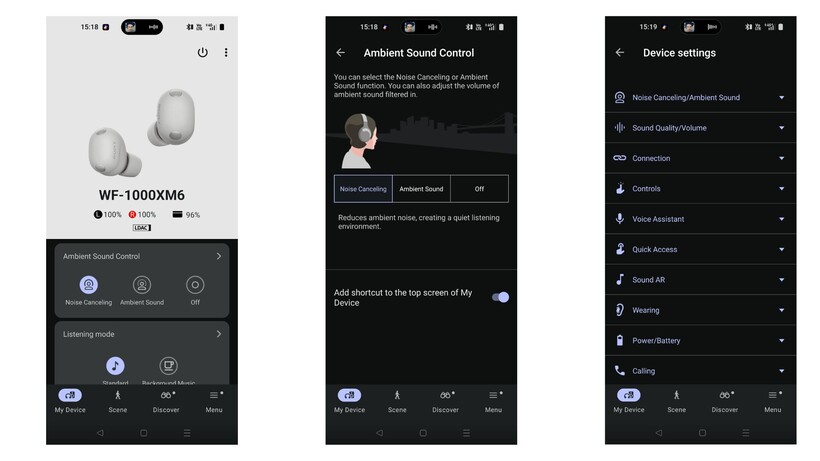
Firstly, due to the additional microphone, the XM6 model is slightly chunkier than its predecessor, and subsequently can make the earbuds fiddly to wear and fit correctly. While we never noted an issue with comfort, we did struggle to get a perfectly airtight seal for ANC. Using the Sony Sound Connect app, we found the earbuds struggled to pass Sony’s strict test for a suitable seal. It’s frustrating, but fortunately doesn’t seem to impede the ANC too much – but more on that later.
Otherwise, both earbuds are fitted with responsive touch controls that cover playback, switching between ANC modes, volume control and more, all of which can be customised via the companion app.
In addition, both earbuds are fitted with the same stiffer ear-tips that aim to plug your ears more effectively than silicon alternatives, and both have an IPX4 rating too. This means both buds can withstand sweat and rain drops.
Winner: Sony WF-1000XM5
Sony WF-1000XM6
Sony WF-1000XM5
Features
- Both earbuds are packed with features, including Speak to Chat, Adaptive Sound Control and voice assistants
- Both also support 360 Reality Audio and can be connected to two devices at once
With both, you’ll benefit from the likes of Quick Attention Mode, Speak to Chat and Adaptive Sound Control. There’s also head gesture control, your choice of voice assistant and a clever Find Your Equalizer that allows you to adjust the sound more intuitively than playing around with bands and frequencies.
Controlling both Sony earbuds is done via the Sound Connect smartphone app, and allows you to customise touch controls, noise-cancellation modes and the Bluetooth connection too. While we wish the app was a bit more streamlined, overall it’s a solid companion piece to the buds.

One especially interesting feature on the app is the Discover section that has features like your listening history across all music services, plus logs how long you use the headphones and includes badges to help game-mify the experience too. How useful this is will depend really on your personal preference, but it shows just how feature-packed the buds are.
Winner: Tie
Sound Quality
- WF-1000XM6 has a larger 8.4mm driver
- Both offer a clear, balanced approach across the frequency range, however the XM6 have improved highs
- Overall, the XM6 is more vibrant and energetic compared to the XM5
Although there are differences between the two, it’s worth noting that both the XM6 and XM5 are brilliant sounding earbuds. However, thanks to the larger 8.4mm driver at play here, the XM6 offers a wider soundstage compared to the XM5. In fact, we found that not only were highs improved, with more clarity and detail, but bass felt weightier too. This is especially noteworthy, as we concluded that bass lovers might be a bit disappointed by the XM5’s more balanced approach.
In addition, we noted that at its default volume, the XM6 picks up more vibrancy, dynamism and energy than the XM5.

All of this, however, is not to say the XM5s don’t sound good – quite the opposite – but it’s just the XM6 has tweaked the overall quality.
Winner: Sony WF-1000XM6
Noise Cancellation
- WF-1000XM6 has one additional microphone for noise cancelling
- Although the XM5s are easier to wear, the XM6s offer overall stronger noise-cancellation
- Call quality is also stronger with the XM6s
Sony claims the WF-1000XM6 offers the “best true wireless for noise-cancellation” and we’re confident to say that they are, in fact, among the quietest pair of earbuds we’ve reviewed. While getting the right fit can be fiddly, which we’ve mentioned earlier, over the weeks we’ve found the earbuds manage to curb outside noises like traffic, voices and even planes brilliantly.
Overall, although the XM6 is a solid improvement over the XM5 pair, we should note that the XM5s are easier to wear than the XM6.

Call quality also sees an improvement, as we found the XM5 had a tendency to let in noise when we spoke. Fortunately, the XM6 sounds completely silent during phone calls.
Winner: Sony WF-1000XM6
Battery Life
- No improvements with the XM6
- Both offer eight hours per charge with an additional 16 hours in the case
Sony hasn’t made any improvements with the battery life of the XM6 buds, and promises the same 24 hours total (eight plus sixteen in the case) as the XM5. Having said that, we actually found the XM6 seemed likely to offer even more hours than Sony claims, with an hour of listening still resulting in 100% charge.
The XM5 actually benefits from a slightly faster charging speed, with a three minute charge resulting in an extra hour of playback, whereas the XM6 needs five minutes. The difference is negligible, but if you find yourself in a pinch then you’ll definitely be thankful.
Winner: Tie
Verdict
Although they’re slightly chunkier and can be quite fiddly to wear initially, the Sony WF-1000XM6 buds are a brilliant upgrade from the WF-1000XM5 pair. Not only is the ANC among the best we’ve ever tested, but the sound is more vibrant and dynamic than its predecessor.
Having said that, the XM6 buds do come with a hefty price tag. So, if you’re on a tighter budget, the XM5 is a brilliant compromise.

Google says Gmail end-to-end encryption (E2EE) is now available on all Android and iOS devices, allowing enterprise users to read and compose emails without additional tools.
Starting this week, encrypted messages will be delivered as regular emails to Gmail recipients’ inboxes if they use the Gmail app.
Recipients who don’t have the Gmail mobile app and use other email services can read them in a web browser, regardless of the device and service they’re using.

“For the first time, users can compose and read these E2EE messages natively within the Gmail app on Android and iOS. No need to download extra apps or use mail portals. Users with a Gmail E2EE license can send an encrypted message to any recipient, regardless of what email address the recipient has,” Google announced on Thursday.
“This launch combines the highest level of privacy and data encryption with a user-friendly experience for all users, enabling simple encrypted email for all customers from small businesses to enterprises and public sector.”
This feature is now available for all client-side encryption (CSE) users with Enterprise Plus licenses and the Assured Controls or Assured Controls Plus add-on after admins enable the Android and iOS clients in the CSE admin interface via the Admin Console.
To send an end-to-end encrypted message, Gmail users have to turn on the “Additional encryption” option by clicking the Lock icon when writing the message.
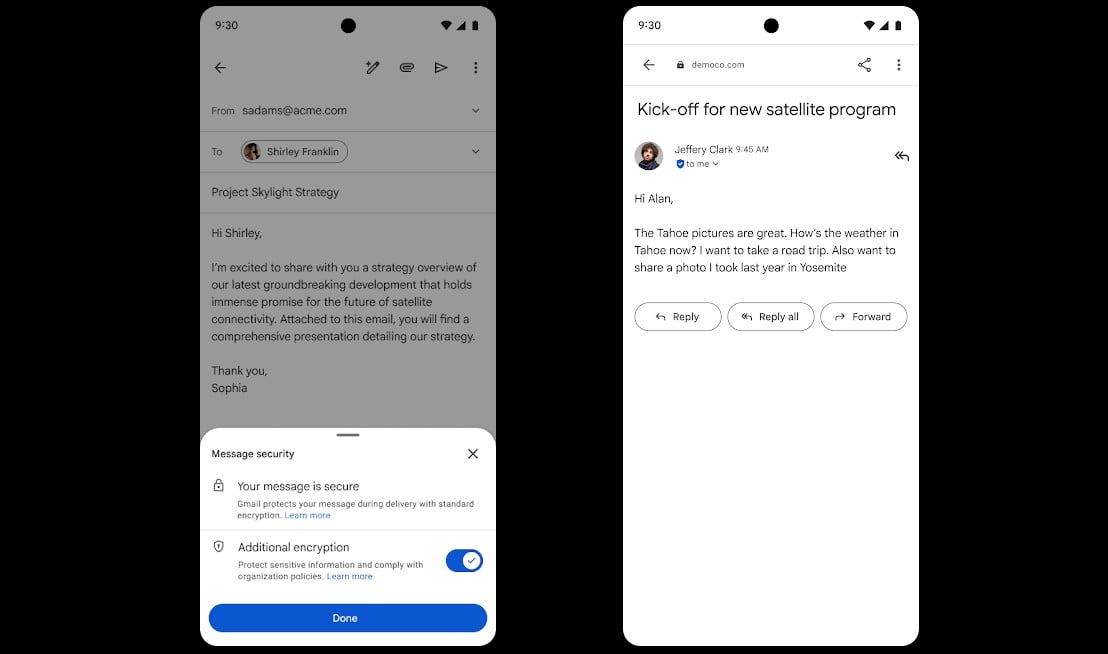
In October, Google also announced that Gmail enterprise users can now send end-to-end encrypted emails to recipients on any email service or platform.
Gmail’s end-to-end encryption (E2EE) feature is powered by the client-side encryption (CSE) technical control, which allows Google Workspace organizations to use encryption keys they control and are stored outside Google’s servers to protect sensitive documents and emails.
This way, the messages and attachments are encrypted on the client before being sent to Google’s servers, which helps meet regulatory requirements such as data sovereignty, HIPAA, and export controls by ensuring that Google and third parties can’t read any of the data.
Gmail CSE was introduced in Gmail on the web in December 2022 as a beta test, following an initial beta rollout to Google Drive, Google Docs, Sheets, Slides, Google Meet, and Google Calendar, and it reached general availability for Google Workspace Enterprise Plus, Education Plus, and Education Standard customers in February 2023.
The company began rolling out its new end-to-end encryption (E2EE) model in beta for Gmail enterprise users in April 2025.

Automated pentesting proves the path exists. BAS proves whether your controls stop it. Most teams run one without the other.
This whitepaper maps six validation surfaces, shows where coverage ends, and provides practitioners with three diagnostic questions for any tool evaluation.
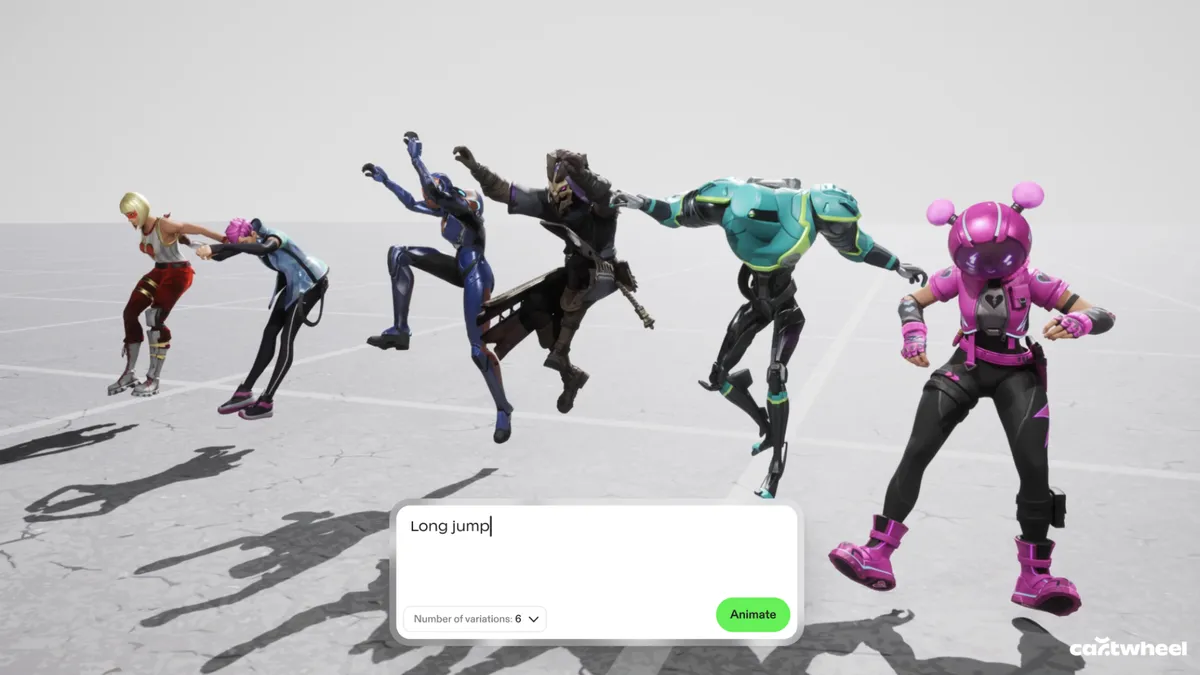
The current wave of generative AI animation often feels like a magic trick that only works once. You type in a prompt, a video appears, and if you don’t like the result — maybe the feet are all wonky, which is a regular issue with AI generations — your only real option is to try a different prompt. This “black box” approach is exactly what Cartwheel, a new 3D animation startup, is trying to dismantle.
Andrew Carr and Jonathan Jarvis, two veterans with roots at OpenAI and Google, respectively, founded the company, which is working to build a future where AI handles the technical drudgery of animation while leaving the creative soul to the artist.
I spoke with Carr and Jarvis about launching their company, defining “taste” with AI, and the technical and creative difficulties of animation in 2026.
What sets Cartwheel apart
According to the founders, one of the biggest hurdles in this space is that 3D motion data is remarkably scarce compared to the endless oceans of text and images available online that AI models are trained on.
“If you look at all the big tech companies, they’ve built their models on written language, audio, image, [and] video because there’s just so much of it, so finding those patterns is much easier,” Jarvis said. “We knew it was going to be hard, but it turns out to be harder than we thought by probably a factor of 10 or 100 to get that data.”
Read more: Generative AI in Gaming Is Here, but Facing Pushback From Gamers — and Developers
While other tech giants focus on generating final pixels, Cartwheel has spent years mapping how humans actually move. Their models are built to understand the nuances of a performance so that a simple 2D video of someone dancing in their backyard can be translated into a precise, realistic 3D skeleton.
This shift from flat images to 3D assets is what gives animators the control they have been missing in the AI era.
Cartwheel has spent years tackling the difficult task of mapping how humans actually move.
Preventing AI “sameness”
Cartwheel’s executives said they view AI’s “sameness” as a byproduct of a lack of control. If everyone uses the same generator to produce a video, the results may eventually start to look all too similar.
“The output of our system is designed for people to edit. It’s designed for people to touch and manipulate, and we don’t want someone to type something in and then have it shuffle through to a finished animation. That’s not the point of it. That’s boring, who’s going to watch that?” Carr said.
“The fact that it’s very easy for people to get into it and edit it actually totally removes the sameness problem,” he said. “You put it on different characters, you put it in different environments, you change how it looks, you push the performance, you pull the performance, and in that sense [sameness] turns into a nonissue.”
Carr and Jarvis said the solution is to provide a “control layer” where the AI output is just the starting point. By generating 3D data instead of flat video, the creator can change the lighting, move the camera or adjust a character’s pose after the AI has done its initial work — making the technology a sophisticated power tool rather than a replacement for the artist.
Founder Andrew Carr said one of his core scientific hypotheses is that movement and motion is a fundamental data type.
The future of animation with AI
Beyond just making animation faster and lowering the barrier to entry, the company is looking toward a concept they call “open-ended storytelling” or “open-ended world-building.” In modern gaming and social media, the demand for content has reached a scale that manual animation cannot possibly match.
Cartwheel envisions characters that aren’t just programmed with a few set moves but are powered by motion models that allow them to react and perform in real time. It’s less about choreographing every single frame and more about “rehearsing” with a digital actor that understands the intent of the scene.
Ultimately, the goal is to bridge the gap between 2D vision and 3D execution, said the founders.
“One of the core hypotheses that we hope is true in the next three years for Cartwheel is everyone will work in 3D even if it’s authored in 2D, even if the final output is just 2D video,” Carr said.
By focusing on the “layer below the pixels,” Carr and Jarvis said they hope that as animation becomes more automated, it also becomes more personal. The machine handles the biomechanics and the file exports, but the human keeps the final say on the taste, the timing and the heart of the story.

CSK vs DC LIVE Score, IPL 2026: Sanju Samson Slams 115 Not Out, CSK Post 212/2 vs Delhi Capitals

‘Crimson Desert’ Is a Cat Dad Simulator

Fury vs Makhmudov LIVE: Start time, fight stream, latest updates and results


-

 Business6 days ago
Three Gulf funds agree to back Paramount’s $81 billion takeover of Warner, WSJ reports
-

 Sports7 days ago
India men’s 4x400m and mixed 4x100m relay teams register big progress | Other Sports News
-

 Politics21 hours ago
US brings back mandatory military draft registration
-

 Fashion22 hours ago
Weekend Open Thread: Veronica Beard
-

 Tech4 days ago
How Long Can You Drive With Expired Registration? What Florida Law Says
-

 Business6 days ago
No Jackpot Winner, Prize to Climb to $231 Million
-

 Fashion5 days ago
Massimo Dutti Offers Inspiration for Your Summer Mood Board
-
 Sports22 hours ago
Man United discover Nico Schlotterbeck transfer fee as defender reaches Dortmund agreement
-

 Fashion4 days ago
Let’s Discuss: DEI in 2026
-

 Crypto World3 days ago
Bitcoin recovers as US and Iran Agree a Ceasefire Deal
-

 Crypto World2 days ago
Canary Capital Files SEC Registration for PEPE ETF
-

 Business7 days ago
Akebia Therapeutics, Inc. (AKBA) Discusses Pipeline Progress and Strategic Focus on Kidney Disease Treatments at R&D Day – Slideshow
-

 Business19 hours ago
Tesla Model Y Tops China Auto Sales in March 2026 With 39,827 Registrations, Beating Cheaper EVs and Gas Cars
-

 Business1 day ago
OpenAI Halts Stargate UK Data Centre Project Over Energy Costs and Copyright Row
-

 Tech5 days ago
Haier is betting big that your next TV purchase will be one of these
-

 Tech5 days ago
Gamer Restores the Original PlayStation Portal From Two Decades Ago
-

 Politics1 day ago
Malcolm In The Middle OG Turned Down ‘Buckets Of Money’ To Appear In Reboot
-

 Tech5 days ago
The Xiaomi 17 Ultra has some impressive add-ons that make snapping photos really fun
-

 Tech5 days ago
Samsung just gave up on its own Messages app
-

 Tech5 days ago
Save $130 on the Samsung Galaxy Watch 8 Classic: rotating bezel, sleep coaching, and running coach for $369
You must be logged in to post a comment Login