There are some premium apps for MacOS that offer more of an iTunes-like experience, but nothing that I vouch for.
Backing Up to Your Chromebook
Here is how to back up files from your Android phone on a Chromebook:
Plug your phone into a USB port on your Chromebook.
Drag down the notification shade and look for a notification from Android System that says something like Charging this device via USB, Tap for more options and tap it.
Look for an option that says File transfer and select it.
The Files app will open on your Chromebook, and you can drag any files you want to copy over.
Backing Up to Another Cloud Service
Maybe you have run out of Google storage, or you prefer another cloud service. There are Android apps for Dropbox, Microsoft’s OneDrive, MEGA, Box, and others. Most of them offer some cloud storage for free, but what you can back up and how you do it differs from app to app.
Advertisement
We looked at how to back up mobile photos on a few of these before, and you can usually set up the process to be automatic, though other files often have to be backed up manually. If you want to automatically sync photos and other files across devices using one of these services, then check out the Autosync app. There are specific versions for Dropbox, OneDrive, MEGA, and Box.
Maybe you’d prefer not to use the cloud or Google’s services for your backup. You can always use the methods listed above for Windows or Mac to download files, then manually move them onto a portable hard drive or USB flash drive, but that’s quite a lot of work.
Advertisement
If you have network-attached storage (NAS), there’s likely an app that can automatically back up some of your files when you are connected to home Wi-Fi. You might also consider Syncthing (though it’s best for syncing rather than backing up) or something like Swift Backup, though you may need to pay and/or root your phone to get the best from them.
Backing Up Within Apps
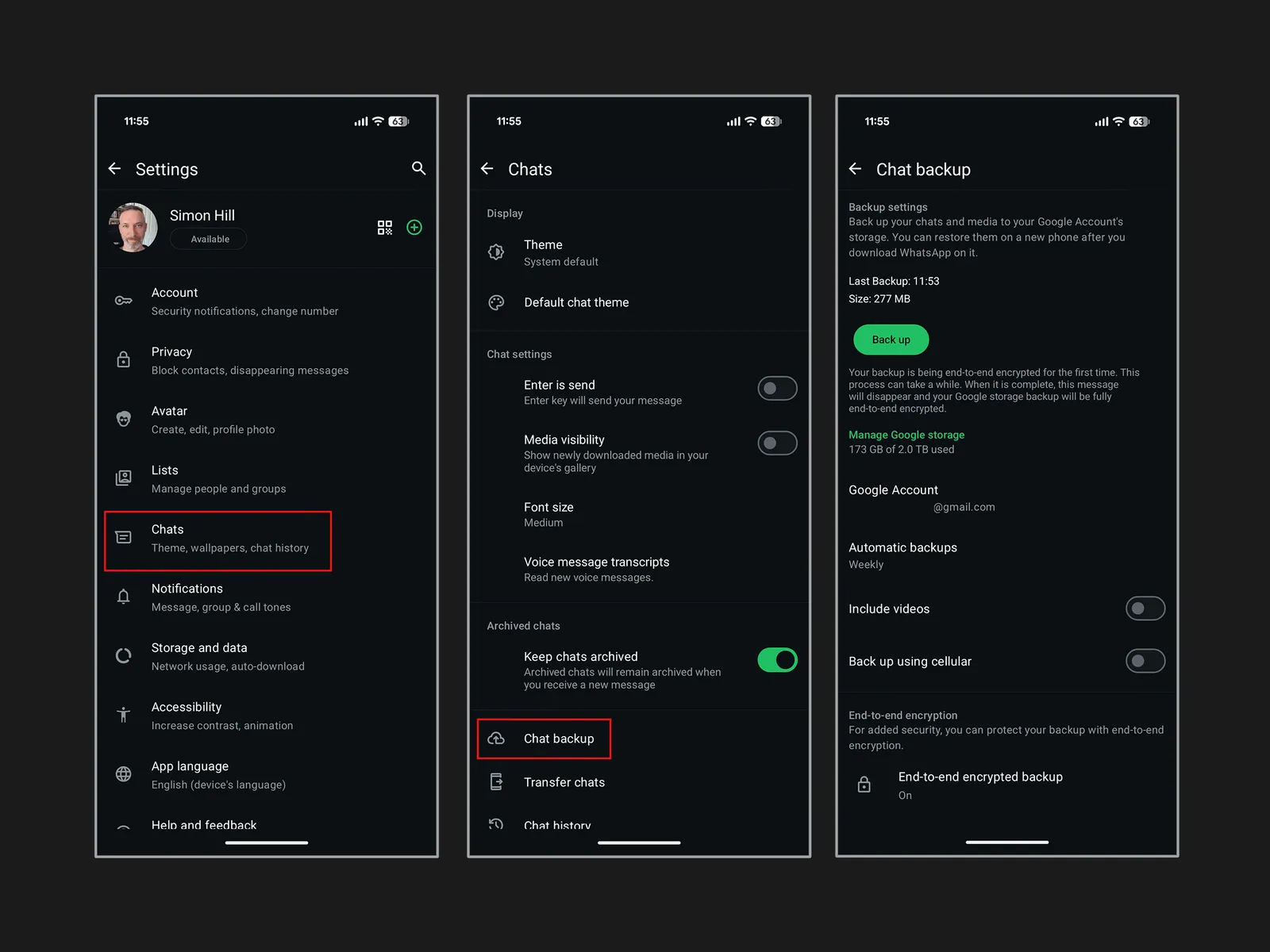
Messaging apps, and a handful of other apps, have their own backup systems built in. I’ll give you a couple of examples here, but check up on your favorites.
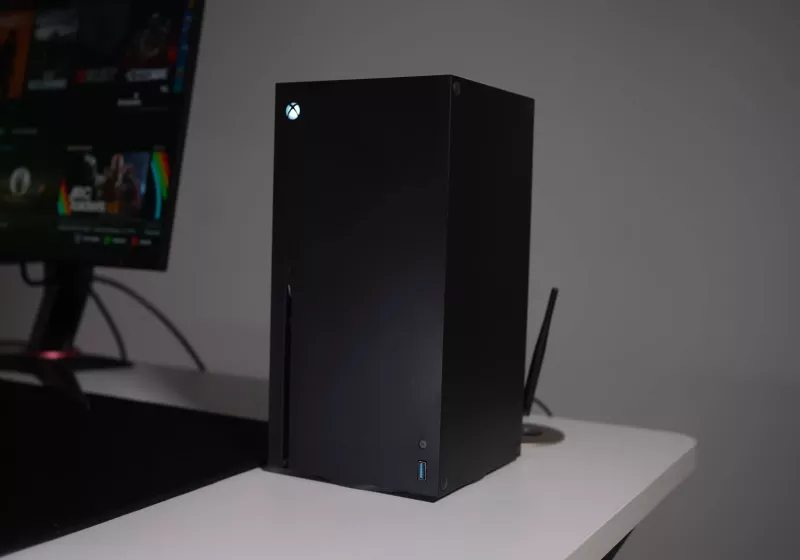
The result of the mod is less a novelty case mod and more a proof-of-concept for what a hybrid Xbox/PC box could look like in practice, arriving months before Microsoft’s own Project Helix promises official support for PC titles on next-gen Xbox hardware. Read Entire Article Source link
Get caught up on the latest technology and startup news from the past week. Here are the most popular stories on GeekWire for the week of March 15, 2026.
The Washington Research Foundation is investing $7 million in Nobel laureate David Baker’s UW lab to turn AI-designed proteins into real-world tools. … Read More
Five months after releasing its “responsible AI plan” providing guidelines for the technology’s use, the City of Seattle has tapped the brakes on artificial intelligence. … Read More
Former Microsoft leader to run a nonprofit using AI to talk with animals; three Amazon leaders resign and a longtime Google engineer joins LinkedIn. … Read More
GeekWire spoke with legal experts and wealth advisors to learn more about how the new income tax may impact different people in Washington’s tech ecosystem. … Read More
For this installment in our Agents of Transformation series, GeekWire examined the rising trend of vertical AI agents — tools built to do one job exceptionally well by combining models with domain-specific data, workflows, and context. … Read More
Seattle startup Certiv emerged from stealth with $4.2 million in funding to build security software that monitors and controls AI agents on employee computers. … Read More
Jeff Bezos’ space venture seeks FCC’s go-ahead for a constellation that would complement TeraWave network — and set up another rivalry with SpaceX. … Read More
Despite world-class AI-biotech research, a Nobel Prize-winning protein design lab and proximity to global AI expertise, Washington’s life sciences sector is still learning to tell its story. … Read More
Carbon Robotics names a CFO; Nordstrom gets a VP of AI; and a Microsoft gaming GM goes to Netflix while one of its longtime legal leaders retires. … Read More
The developer behind the open-world RPG Crimson Desert has issued an official apology after players discovered several instances of AI-generated art in the game. Pearl Abyss posted on X that it released the game with some 2D visual props that were made with “experimental AI generative tools” and forgot to replace them before launch.
Just a day after Crimson Desert’s launch, players took to social media to post reports of potential generative AI usage. Pearl Abyss said on X that “following reports from our community, we have identified that some of these assets were unintentionally included in the final release.” Now, the game’s Steam page has an AI generated content disclosure, which says that, “generative AI technology is used in a supplementary capacity during the creation of some 2D prop assets” which are later replaced.
Moving forward, Pearl Abyss said it will conduct a “comprehensive audit of all in-game assets and are taking steps to replace any affected content.” The developer said that these updated assets will roll out in upcoming patches, and that the team would internally review how it communicates with its player base to provide more “transparency and consistency.”
Pearl Abyss isn’t the only developer to fail to disclose the use of AI-generated assets in its games. Late last year, Sandfall Interactive was stripped of its Game of the Year and Debut Game awards from the Indie Game Awards for the use of generative AI in Clair Obscur: Expedition 33 for placeholder textures that were mistakenly left in the game. Like Pearl Abyss, Arc Raiders’ developer Embark Studios is going back and replacing AI-generated material in its game after some backlash from its player base.
As both the iPad Air M4 and iPad Pro M4 sport the same chip, what really separates the two tablets? Is it a guarantee that the Pro iteration is best?
To help you decide between the two, we’ve compared our experiences between the iPad Air M4 and iPad Pro M4 and noted the key differences below.
Remember, the iPad Pro M4 has been succeeded by the iPad Pro M5. For a closer look at the newer model, visit our iPad Pro M5 vs iPad Pro M4 comparison to see what’s new with the latest model.
The recently announced iPad Air M4 is available to buy now, with a starting RRP of £599/$599 for the 11-inch, 128GB iteration.
SQUIRREL_PLAYLIST_10208285
Advertisement
As it’s been succeeded by the iPad Pro M5, the iPad Pro M4 is no longer readily available to buy from Apple’s official site. In fact, tracking down an iPad Pro M4 can be quite difficult, unless you’re happy to opt for a refurbished or renewed model. If so then the price will vary somewhere between the £660 – £800 range, depending on the condition and provider.
Remember, neither of these starting RRPs includes any accessories such as an Apple Pencil or Magic Keyboard. Those will need to be purchased separately.
Design
Both come in a choice of two sizes: 11- or 13-inches
Although the 13-inch iPad Pro M4 is the thinnest, the 11-inch is also thinner than the iPad Air M4
Both have landscape front-facing cameras
Both the iPad Air M4 and iPad Pro M4 come in a choice of two screen sizes: 11- or 13-inches. Regardless of the iPad Air M4 size you opt for, the tablet will be just 6.1mm thick.
Advertisement
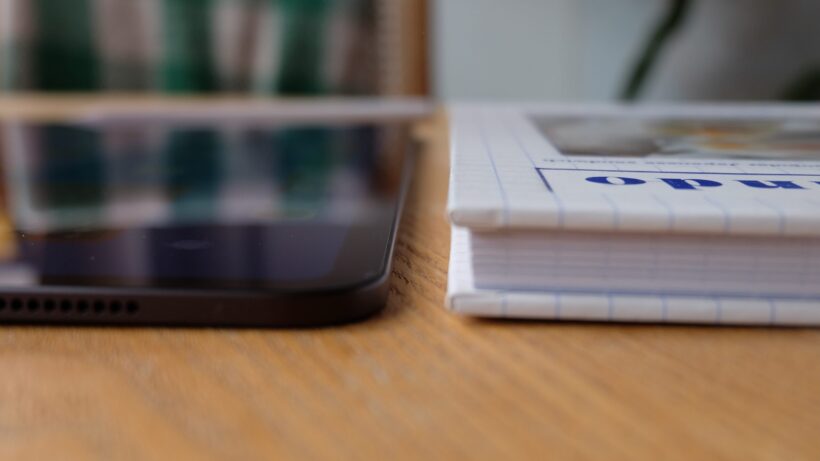
In comparison, the 13-inch iPad Pro M4 is the thinnest of the lot, at just 5.1mm thick whereas the 11-inch version is 5.3mm. The 13-inch iPad Pro is so thin, that you’ll actually notice the USB-C cable will jut out ever so slightly when it’s plugged into the device.
Advertisement
iPad Pro M4 thickness. Image Credit (Trusted Reviews)
Otherwise, the 11-inch iPad Air weighs up to just 465g (for the cellular iteration) while the 13-inch is slightly heavier at up to 617g (again, for the cellular model). The iPad Pro M4 sits in-between the two iPad Airs, as the 11-inch weighs up to 446g while the 13-inch is 579g.
iPad Air M4. Image Credit (Trusted Reviews)
Although all iPad Pro M4 models are lighter than the iPad Air, which means the tablet feels barely noticeable whether in hand or slotted away in your bag, it’s still worth noting that we found the iPad Air to still be a compact model – especially the smaller 11-inch version.
Finally, both the iPad Air and iPad Pro are equipped with a Touch ID fingerprint scanner that’s built into the power key and a USB-C port at the bottom. In addition, both are equipped with a landscape front camera, which makes taking video calls feel more intuitive than before.
Advertisement
Winner: iPad Pro M4
Screen
iPad Pro has an OLED panel for brighter and more vibrant colours
ProMotion is only available on the iPad Pro
Even so, the iPad Air’s LED-backlit panel is enough for everyday use
As we mentioned above, both the iPad Air and iPad Pro M4 come as either an 11- or 13-inch iteration. Fortunately, regardless of the size you choose, the screen technologies will remain more or less the same. That’s an improvement over the iPad Pro M3, where the smaller 11-inch model had a lower resolution LCD panel compared to the 12.9-inch mini LED.
iPad Pro M4 screen. Image Credit (Trusted Reviews)
So, let’s dive into the screen technologies on offer here. Unfortunately the iPad Air’s screen isn’t as well equipped as the iPad Pro’s, with an LED-backlit panel and not quite enough brightness levels for HDR video. In fact, put the iPad Air next to the OLED-equipped iPad Pro and the difference is unmistakable, as the pricier tablet boasts a higher maximum brightness and more vibrant colours too.
Not only that, but the iPad Pro also benefits from ProMotion technology, which means it sees a 120Hz refresh rate. Unfortunately, the iPad Air still caps out at just 60Hz. While this isn’t necessarily a dealbreaker, when you’re comparing it to the 120Hz iPad Pro, the iPad Air feels dated.
Advertisement
Advertisement
iPad Air M4 screen. Image Credit (Trusted Reviews)
Finally, the iPad Pro M4 has the option to sport a nano-texture glass display which goes a long way in reducing glare and providing a matte finish. However, this is only available on the 1TB or 2TB models, and will cost an additional £150/$150.
Winner: iPad Pro M4
Performance
Although both have M4 chips, the iPad Air’s silicon has one less CPU and GPU-core
iPad Air features the N1 and C1X chips (latter only in cellular models)
You can upgrade your iPad Pro M4 with more memory, storage and additional cores in the chip
The newly launched iPad Air may appear to have the same M4 chip as the 2024 iPad Pro, however there are a few differences between the two silicons. Firstly, the iPad Air M4 has an eight-core CPU and a nine-core GPU, whereas the standard iPad Pro M4 has a nine-core CPU and 10-core GPU. Plus, you can even add an additional CPU-core thanks to the 1TB and 2TB iterations – although they come at a higher price.
iPad Pro M4. Image Credit (Trusted Reviews)
Advertisement
Even so, the iPad Air M4 is still a very capable tablet that can even handle exporting large files in Final Cut, doing AI-based tasks and editing images with ease.
However, we were seriously blown away with the sheer amount of power on offer with the iPad Pro M4. While it’s likely overkill for anyone who wants an iPad for reading and the occasional video stream, the iPad Pro M4 is brilliant for those seeking serious power for more intensive tasks.
Advertisement
With this in mind, we’d argue that the iPad Air M4 is likely the better choice for more casual users who don’t necessarily have a need to splurge. Plus, the iPad Air M4 benefits from Apple’s own N1 chip which brings Wi-Fi 7 to the tablet, and cellular models sport Apple’s C1X modem too.
Winner: iPad Pro M4 in terms of sheer power
Software
Both run on iPadOS and include Apple’s Liquid Glass UI
You can use your Mac’s trackpad and keyboard to control the iPad Air M4
There aren’t many differences between the iPad Air and iPad Pro M4’s software, as both support Apple’s most recent iPadOS 26 which saw the design shift to Liquid Glass. While it’s not quite macOS, iPadOS does operate a little more like a traditional computer, and has a windowed interface for layering apps and multitasking.
Advertisement
iPad Air M4 Home Screen. Image Credit (Trusted Reviews)
A new feature we especially appreciate with the iPad Air M4 is Universal Control which allows you to control your iPad using your Mac’s trackpad and keyboard. It’s clever and means the iPad Air can easily double as a makeshift laptop.
One area which somewhat lets the iPad Air and iPad Pro M4 down is Apple Intelligence, which is pretty underwhelming overall.
Advertisement
Winner: Tie
Battery Life
Apple hasn’t made many improvements with either the iPad Air or iPad Pro M4
Both promises around 10-hours of battery life
The 11-inch iPad Pro M4 has a slightly larger battery than the thinner 13-inch model
Advertisement
Unlike some of the best Android tablets, Apple doesn’t tend to fit its iPads with mighty batteries. Even so, both the iPad Air and iPad Pro M4 are promised to see up to 10-hours of battery life and, during our respective reviews, we found this to be more or less the case. Of course, do remember that the actual battery life will vary depending on your own usage.
Annoyingly, only some regions will benefit from a charging adapter in the box and the UK isn’t one of them.
Winner: Tie
Advertisement
iPad Air M4. Image Credit (Trusted Reviews)
Verdict
Remember that the iPad Pro M4 has now been succeeded by the iPad Pro M5, so tracking down the former is slightly harder (though you’ll likely be able to nab a decent price cut if you do). Check out our iPad Pro M5 vs iPad Pro M4 guide to see what’s new with the top-end model.
Otherwise, we’d advise that if you want an everyday iPad for general browsing and streaming, and perhaps light work or studying, then the iPad Air M4 seems like a brilliant choice with a decent price tag. On the other hand, if you tend to use more demanding apps for photo or video editing, gaming or the like, then you’ll likely be better suited to the iPad Pro M4 instead.
This drone, priced at $149 after clipping the on-page $50 off coupon (was $249), weighs only 135 grams and fits neatly into almost any backpack or pocket, making it light enough to carry without drawing attention. The DJI Neo’s frame is around five inches across and manages to fit all of the necessary components for smooth flights and sharp 4K filming with minimum (or none at all) trouble.
Launch and landing are quick and easy; simply place the drone in your hand, hit a button on the phone app, and it rises on its own, propellers shielded by built-in guards so you can get up close and personal without worry. When it comes time to land, everything works the same way in reverse, with no complicated procedures or extra equipment to get in the way. Don’t forget about the video; it rolls at a silky 30 frames per second in 4K, with the half-inch sensor also capturing sharp 12mp stills, all kept steady by electronic stabilisation even when the breeze kicks up to a fair old 4. If you want some vertical clips for your phone screen, they’ll be 1080p and ready to use right away.
Due to platform compatibility issue, the DJI Fly app has been removed from Google Play. DJI Neo must be activated in the DJI Fly App, to ensure a…
Lightweight and Regulation Friendly – At just 135g, this drone with camera for adults 4K may be even lighter than your phone and does not require FAA…
Palm Takeoff & Landing, Go Controller-Free [1] – Neo takes off from your hand with just a push of a button. The safe and easy operation of this drone…
Flight time is approximately eighteen minutes each charge, which is more than enough time to capture some great images. The 22g of internal storage should be sufficient for a while, so you won’t need to carry spare memory cards. When the battery runs out, a spare pack will allow you to go on longer travels. The phone app handles all of the fundamental tasks for you, such as monitoring and preset flights that will circle your subject or pull back gently, so you don’t have to worry about the intricacies. If you want to get fancy, you can attach the extra remote controller and increase your range; in manual mode, it will go up to sixteen metres per second for some proper active pictures, or you can just utilize the gesture control and wave your hand to start filming without touching the screen.
The auto-tracking and object following modes are useful for everyday video since they easily transform everyday scenes into properly finished films. The flying settings are quite ingenious; they just whiz through the camera moves, ensuring that your results remain consistent. Many users in 2026 continue to choose this small model for the ideal blend of size, video quality, and price, describing it as a dependable entry-level device with no complicated restrictions or hefty fees to contend with.
The Huawei FreeBuds 5 Pro combine a supremely comfortable fit, confident sound and class-leading ANC with useful extras like multipoint and rich EQ options to offer a polished, genuinely premium alternative to big-name rivals – despite a few frustrations around wireless charging, Huawei-only features and the faffy Android app install.
Superb noise cancellation
Comfortable, lightweight fit
Strong connectivity features
No wireless charging
Huawei-only smart extras
Awkward Android app setup
Key Features
Advertisement
Review Price:
£179.99
Supremely comfortable fit
Advertisement
Smaller, lighter buds reshaped from 10,000+ ear scans for a secure, all-day wear.
Rock-solid connectivity
Advertisement
Bluetooth 6.0 and a stem antenna keep audio stable even in busy stations.
Impressive noise cancellation
Advertisement
Dual-driver ANC easily cuts out most travel and city noise.
Introduction
Huawei isn’t short of premium wireless earbuds, but the FreeBuds 5 Pro might be its most compelling pair yet.
Combining a subtly refined design with next-gen connectivity, punchy sound and seriously impressive noise cancellation, they’re pitched as a true alternative to some of the best wireless earbuds around – and at a lower price, too.
Advertisement
After a few weeks of commuting, travelling and everyday listening with them, it’s clear Huawei has learned a lot from previous generations. From comfort and fit to rock-solid connectivity in busy stations, these buds feel every inch a flagship – even if some of their smartest tricks are still reserved for those in Huawei’s own ecosystem.
Advertisement
So, are the FreeBuds 5 Pro strong enough to tempt AirPods loyalists and undercut Sony’s best, or do a few key compromises hold them back? Let’s dive in.
Design
Similar design, but thinner and lighter
Touch, tap and squeeze controls
IP57 dust and water resistance
If you were expecting a total redesign for Huawei’s long-standing premium earbuds, you’ll be disappointed – but you won’t hear any complaints from me. Huawei’s older FreeBuds were among the comfiest around to wear, with a snug fit that didn’t feel too bulky in the ear – and it’s very much still the same story here.
Image Credit (Trusted Reviews)
In fact, they’re 10% smaller and 6% lighter than the FreeBuds 4 Pro, and have been squeezed and reshaped based on the modelling of over 10,000 ear shapes to make them more comfortable than ever.
Advertisement
Advertisement
I’ve long been an AirPods Pro 2 user, even after switching to Android, as I find them the most unintrusive and comfortable to wear during longer listening sessions, but I think the FreeBuds 5 Pro are on par – or maybe even a little better – than the Apple alternative. That did require me to spend a bit of time truly testing the multiple ear-tip sizes (XS to L) to find the right fit for me, but it was well worth it.
Image Credit (Trusted Reviews)
Of course, the two sets of premium buds share plenty of similarities, including the same overall stemmed design, but Huawei’s buds separate themselves in several ways.
First off, Huawei’s ‘star oval on a stick’ design – Huawei’s words, not mine – allows the stem to double up as an antenna, which not only boosts the overall range of the buds but reduces that annoying Bluetooth interference you sometimes get in signal-congested areas.
They’re also available in more shades than Apple’s famously white-only earbuds, available in sand, white, grey and blue, with a matching carrying case.
The oval-shaped carry case is as sleek as ever, with a hidden hinge that keeps it clean, even when open. It sports a new excimer film coating that somehow makes the plastic case feel of my white sample almost like satin in my hand – a very premium feel, indeed – though it’s also available in a vegan leather finish if you opt for the blue finish.
Advertisement
Advertisement
Image Credit (Trusted Reviews)
There are also various ways to control the buds, including various combinations of taps, swipes, and pinches. You can swipe and tap the outer panel of the buds on a separate glossy surface, while pinching is reserved for the sides.
Pinching is the most reliable of the bunch, both quick pinching and pinching and holding, and the volume control via a swipe works well most of the time. I had to disable the tap-and-hold input however; it activated seemingly at random, summoning Gemini when I didn’t want/need it. It’s not like I have long hair to blame for the accidental activation, either.
Image Credit (Trusted Reviews)
You’ve also got head gestures, allowing you to nod or shake your head to accept or decline a call without touching your phone, but like with Apple’s alternative, I always feel like a bit of a lemon randomly nodding or shaking my head in public. Maybe that’s just a me thing though…
The good news is that all the gestures can be customised or, in my case, completely disabled in the companion app – but more on the app shortly.
Advertisement
Advertisement
Durability is pretty much par for the course for high-end wireless buds too, with IP57 protection on the buds and a slightly lesser IP54 from the case. That should make them fine for use in the rain or particularly sweaty gym sessions, but I wouldn’t get in the pool with them.
Features
Support for 2.3Mbps lossless audio, but only with Huawei phones
Solid connectivity, even in congested areas
App is a faff to install, but well worth it
As Huawei’s flagship earbuds, it should come as no surprise that the FreeBuds 5 Pro feature the very latest in connectivity. Headed by Bluetooth 6.0, the buds offer true high-res 2.3Mbps Lossless Audio support, ideal for Tidal playback and the like – though that’s only available if you’re using a Huawei phone and, let’s be honest, not many of us are these days.
Outside the Huawei-exclusive sound profile, support for most of the (non-Qualcomm) staples – LDAC, AAC, SBC – are all present and accounted for, though which you’ll get depends on the device you’re connected to. Different manufacturers prefer different codecs, and there isn’t much you can do to force it to the highest-quality codec if your phone, tablet or laptop doesn’t support it.
Image Credit (Trusted Reviews)
Regardless, the combination of Bluetooth 6.0 and the redesigned antenna module delivered superb connectivity, even staying connected and playing music while wandering through the main concourse of London Liverpool Street station – something that, seemingly, only a few wireless earbuds can manage.
Advertisement
When connected to an iPhone or Android device, you’ll have access to the new Huawei Audio Connect app. It’s easy enough to install on iOS, as it’s on the App Store, but you won’t find it on Google Play. Instead, you’ll have to rely on your phone manufacturer’s oft-neglected app store (it’s available on both Samsung’s Galaxy Store and Oppo’s App Market, in my experience) or download it directly from the Huawei site.
Advertisement
It can be a bit of a pain, especially for the less tech-savvy among us, but it’s only something you’ll need to do once – and it’s well worth doing, as the app provides access to a wealth of optional features and functionality.
Image Credit (Trusted Reviews)
It’s a rather clean app despite being packed to the rafters with extra features. The staples of the companion app are front and centre, providing a quick glance at elements like battery life, connectivity and the ability to toggle elements like ANC and transparency, along with more advanced options.
That includes a range of EQ options, both preset and custom, with the latter designed in conjunction with the Beijing Central Conservatory of Music. The default balanced profile provides the best all-around experience, but as somewhat of a bass-head, I opted for the bass profile, and the jump in bass presence is immediately noticeable.
You can tweak the level of ANC depending on your environment, customise the range of controls available, enable optional features like conversational awareness and adaptive volume, and if you’re struggling to find the right ear tips, the ear fit test can guide you in the right direction.
Advertisement
Advertisement
There’s also support for multi-point connectivity, and while it’ll automatically switch between connected devices depending on playback, you can manually switch between devices in the app – and even specify a priority connection if you like.
You’ll also find a Find Device option, which helps you locate the buds if you’ve misplaced them by playing loud tones from the buds. It doesn’t offer anything like Apple’s Find My support for wider coverage though, and nor can you find the case if you’ve misplaced that.
Battery Life
Up to 9 hours of battery life
Drops down to 5 hours with ANC and LDAC playback
Case holds up to 38 hours of charge, but no wireless charging
Despite being smaller and lighter than their predecessors, the FreeBuds 5 Pro offer better battery life. Huawei claims that they can last up to nine hours with ANC disabled or six hours with it enabled, matching the likes of the second-gen Bose QuietComfort Ultra buds but behind Apple’s AirPods (eight hours) and the JBL Tour Pro 3 (10 hours).
Image Credit (Trusted Reviews)
In testing, which consisted of listening to a Spotify playlist for around an hour with ANC active and using the highest-quality LDAC sound profile I had available to me, the buds drained around 20%, suggesting battery life of around five hours, just under Huawei’s numbers – though that improves if you drop down to AAC, and even more if you disable the battery-sucking ANC when it’s not needed.
Advertisement
Of course, the accompanying carry case boosts overall battery life, holding a charge for up to 38 hours of use, depending on the modes you use.
Advertisement
Rather disappointingly for premium earbuds, there’s no wireless charging here, just USB-C – though you’ll get the buds from flat to full in 40 minutes, with a full charge of the case in around an hour in my experience.
Sound Quality
Dual-driver system
Isolated airflow between woofer and tweeter
Bass doesn’t overpower the highs at all
Huawei’s flagship buds sport a dual-driver system sporting an in-house developed 6mm diaphragm Planar tweeter, which the company claims can deliver two times brighter treble, along with a more precise woofer that reduces distortion by 45%.
That alone would be a pretty solid upgrade, but the Huawei boffins have worked out a way to isolate the airflow for the woofer and tweeter separately, allowing for better sound separation – essentially preventing the bass from overpowering the highs, as with many small in-ear buds.
Image Credit (Trusted Reviews)
Advertisement
And, connecting the buds to my Oppo Find N6 and using the LDAC codec with Spotify Lossless, I was pleasantly surprised by what I heard. The default profile is well-judged, offering a pretty wide soundstage paired with punchy bass, great vocal separation and a nice, smooth treble.
However, even with the bass-focused profile enabled, the thumping bass still doesn’t have much detrimental effect on the high end. It’s more present, for sure, but it feels well controlled and, more importantly, distortion-free at high volumes, ideal for the old-school D&B and Dubstep tracks I listen to on my morning commute.
Advertisement
I don’t think it has quite the sharpest resolution of any wireless earbud on the market – that award goes to the excellent WF-1000XM6 – but for much less than Sony’s buds, it’s not a bad showing at all.
Noise-Cancellation
Impressive ANC capabilities in most scenarios
Transparency mode really lets you hear the world around you
Huawei has done something interesting when it comes to ANC; rather than simply using standard ANC capabilities, the FreeBuds Pro 5 uses both the tweeter and woofer for noise cancellation, which the company claims can boost the cancellation frequency from 4kHz to 6kHz and provide a more robust overall experience.
Compared with a boosted sample rate – up to 400,000 times per second – Huawei claims that there’s a 220% increase in noise cancellation performance compared to the FreeBuds 4 Pro.
Advertisement
Image Credit (Trusted Reviews)
That all means that the FreeBuds Pro 5 aren’t another pair of your bog-standard noise-cancelling buds – they’re pretty phenomenal. I keep harking back to the AirPods Pro 2, but for me (and likely many others), these are the baseline of what to expect from wireless ANC, and it’s a high bar. But one that Huawei just matched.
Enabling the ANC with maximum effect (something you can do in the app), the world around me quietened noticeably. Even without anything playing on the buds, irritating noises were reduced to more of a whisper, and with music playing, the wider world effectively vanished.
Advertisement
Some particularly loud noises, like the hiss of a bus (that gave me quite a jump) and particularly loud segments of the London Underground slipped past Huawei’s guard at times, but for the most part, it was a distraction-free experience. It’s just as effective on planes too, getting me to and from Barcelona without needing to crank the buds up anywhere near maximum volume.
Now these aren’t the very best noise-cancelling buds around – that crown has passed to the Sony WF-1000XM6 – but they’re not too far off.
Transparency mode performance is similarly top-notch. Some brands try to blend environmental noise into the sound of the music so they don’t stand out too much, but really, I want the opposite; I want to hear the environment over the music so I can truly stay aware of my surroundings.
Advertisement
Advertisement
That’s what the FreeBuds Pro 5 do, and they do it exceptionally well with clear directional audio – so well that I’m usually able to have a full conversation with someone without needing to take the buds out. There is a conversational mode that automatically turns down the audio and toggles on the transparency mode when you speak, but I prefer to control it manually.
Should you buy it?
You want a great all-round pair of buds
With a comfortable design, a solid companion app, impressive sound quality and great ANC, the FreeBuds 5 Pro tick a lot of boxes.
Advertisement
You want the very best ANC
Advertisement
Even with Huawei’s new dual-driver ANC system, it still can’t quite compete with some of the best around from Bose and Sony.
Final Thoughts
The Huawei FreeBuds 5 Pro nail the fundamentals with a comfortable, lightweight design, confident sound and some of the best ANC you’ll find at this price, while extras like multipoint, rich EQ options and rock-solid connectivity help them feel every bit as premium as their more expensive rivals. The fact they held their own – and in some areas, surpassed – my long-term AirPods Pro 2 on daily commutes and flights is no small achievement.
Advertisement
They’re not flawless; the absence of wireless charging feels stingy on a flagship pair of buds, the smartest audio tricks are still locked behind Huawei hardware, and having to jump through hoops to install the companion app on Android won’t appeal to everyone.
But if you can live with those caveats, the FreeBuds 5 Pro deliver a level of polish, performance and value that makes them a genuine contender to the established greats – and a seriously tempting upgrade for anyone looking beyond the usual suspects.
How We Test
The Huawei FreeBuds 5 Pro were tested over the course of a month in a variety of environments, including public transport, outdoor settings and on planes. A wide range of music was used to test bass, treble and midrange performance.
Tested with real-world use
Battery drain carried out
ANC compared to rivals
Tested for a month
FAQs
Do the Huawei FreeBuds 5 Pro work well with non-Huawei phones?
Yes. You still get strong connectivity, LDAC/AAC support and most features via the Huawei Audio Connect app.
Advertisement
How good is the noise cancellation on the Huawei FreeBuds 5 Pro?
ANC is excellent for the price, cutting most travel and city noise and coming close to top-tier rivals.
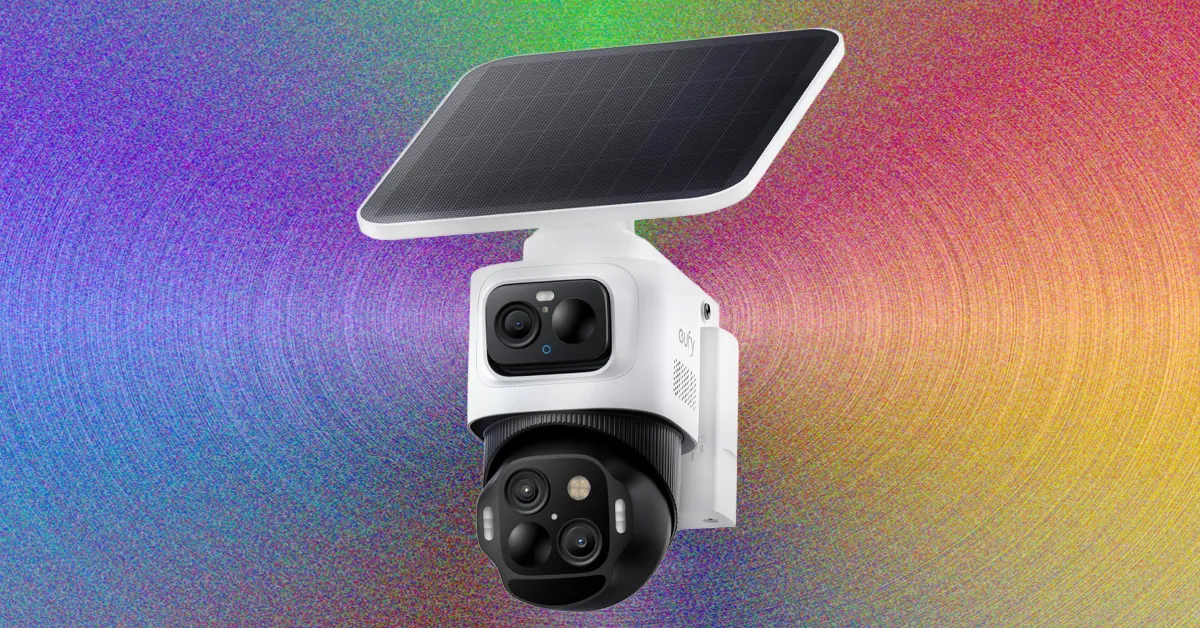
Local Hub: Manufacturers like Eufy and TP-Link offer smart hubs that link wirelessly to their security cameras and offer expandable storage. Sometimes these local hubs allow for more local AI processing (Eufy’s hub enables facial recognition). They can also sometimes extend the wireless signal and stability for cameras. These hubs often need to be plugged directly into your router via Ethernet cable.
MicroSD Card: Plugging a microSD card into a camera is a quick and simple way to record locally, but if an intruder steals the camera, your footage is gone with it. Occasionally, camera manufacturers offer indoor hubs that are expandable via a MicroSD card.
Network Attached Storage (NAS): If you have a NAS server, you can likely configure it to store your security camera video. These devices contain hard drives and are expandable, offering a potentially enormous amount of storage.
Cloud storage means your video is backed up online, so an intruder can’t get to it, it is usually quicker to access or stream when you are away from home, and it doesn’t require any additional storage hardware. On the downside, you pay a monthly fee, the video doesn’t get uploaded if your Wi-Fi fails or is scrambled, and you are trusting the service provider, who may share it or use it in ways you’d prefer they didn’t (data breaches are also common).
Local storage is a one-off cost, it’s not reliant on Wi-Fi, and it’s much harder for anyone other than you to access the footage. But, there’s a risk someone steals the physical hardware your footage is stored on, or the hardware fails, and it can be slower to access and stream video when you are away from home.
Advertisement
For maximum security, even with a local system, you might consider a cloud backup. You can reduce the risk of your footage being exposed by picking a cloud service that is end-to-end encrypted, such as Apple’s HomeKit Secure Video.
Protecting Your Privacy
Access to your security camera feeds and recorded videos should be end-to-end encrypted, and you should always use two-factor authentication to protect account access. With end-to-end encryption, only your authorized devices can decrypt your videos. With 2FA, you will be sent a passcode to a trusted number, email, or device when you try to log in on a new device, so your login and password alone are not enough to gain access. Sadly, these features are not always turned on by default.
Eufy cameras offer end-to-end encryption, but you must opt in by tapping the menu top left in the app and choosing Settings, Security, Video Encryption, Advanced Encryption. You can make sure 2FA is toggled on by tapping your name at the top of the menu and Two-factor authentication.
TP-Link Tapo cameras lack end-to-end encryption, but you can set up 2FA for your account by tapping on the Me tab, View account, Login Security. To encrypt footage on microSD cards, go to your device settings and choose Storage & Recording, Local Storage, and tap SD Card Encryption.
Aqara offers end-to-end encryption on your locally stored video by default. For 2FA, tap Profile at the bottom right, Settings, Accounts and Security, and make sure Two-Factor Authentication is toggled on.
Welcome back to TechCrunch Mobility, your central hub for news and insights on the future of transportation. To get this in your inbox, sign up here for free — just click TechCrunch Mobility!
If you haven’t noticed, Uber is suddenly everywhere, at least when it comes to autonomous vehicles. The company sold off Uber ATG, its in-house autonomous vehicle development unit, back in 2020. Uber shed a number of its moonshots — although it maintained an equity stake in all of them — so it could focus on its core businesses of delivery and ride-hailing.
But Uber never gave up entirely on AVs. It’s spent the past two years locking up partnerships with dozens of autonomous vehicle technology companies across delivery, drones, trucking, and robotaxis. It has taken a worldview, too, making agreements with Chinese companies to launch robotaxis in Europe and the Middle East, as well as startups like U.K.-based Wayve.
And now there is another one with Rivian. The TL;DR of the deal is Uber will make an initial $300 million investment in Rivian and will buy 10,000 fully autonomous R2 robotaxis ahead of a planned rollout in San Francisco and Miami in 2028. Uber has the option to buy up to 40,000 more starting in 2030. This fleet will be exclusively available on Uber’s network.
Advertisement
Here’s how I am thinking about this deal. While the total deal could be as high as $1.25 billion, Uber’s initial outlay is relatively small. And the risk ratio is heavily weighted toward Rivian. It’s also the only deal that Uber has made in which the company is the developer of the self-driving system and the vehicle manufacturer.
Rivian hasn’t started producing the R2 SUV yet, nor has it tested and deployed a self-driving system designed for robotaxis. To raise the hurdle even higher, the robotaxi is supposed to be built in Rivian’s Georgia factory, which is still under construction.
And the EV maker has already made at least one sacrifice in hopes of pulling it off. Rivian said it no longer expects to meet its profitability goal in 2027 because of how much money it is spending on its autonomy efforts.
Techcrunch event
Advertisement
San Francisco, CA | October 13-15, 2026
In our newsletter, we had a poll asking, Are the risks too high for Rivian? Sign up here to get Mobility in your inbox and let your voice be heard in our polls!
Advertisement
A little bird
Image Credits:Bryce Durbin
Speaking of Uber, a little bird hinted that the ride-hailing company might have been in talks with Rivian for its robotaxi deal for quite a long time. One person directly familiar with both companies told me a deal like this wouldn’t happen overnight. After I asked for more specifics, I got a question in return: “Does RJ strike you as someone who has a strategic horizon that short?” Touché!
Like Uber, Nvidia is everywhere. Or at least wants to be. The company has made numerous investments — either direct cash injections or in-kind chip deals — in autonomous vehicle technology companies. And it’s also locking up partnerships with automakers — as we saw this week during its GTC conference — in a bid to sell its autonomous vehicle development platform called Nvidia Drive Hyperion.
Nvidia CEO Jensen Huang announced onstage deals — either new or expanded — with BYD, Geely, Hyundai, and Nissan for its AV development platform. GM, Mercedes-Benz, and Toyota have already signed deals with Nvidia to use the platform.
Nvidia has been making deals with automakers for years, but the pace and specificity of AVs is worth noting.
“The ChatGPT moment of self-driving cars has arrived. We now know we could successfully autonomously drive cars,” Huang said during his GTC keynote, noting that altogether the four automakers build 18 million cars each year.
Advertisement
Other deals that got my attention …
Advanced Navigation, an Australian startup developing navigation and autonomous systems, raised $110 million in a Series C funding round led by Airtree Ventures, with strategic participation from Quadrant Private Equity and the National Reconstruction Fund Corporation (NRFC).
Arc Boat Company, the Los Angeles electric boat startup, raised $50 million in a Series C funding round from Eclipse, a16z, Menlo Ventures, Lowercarbon Capital, Necessary Ventures, and Offline Ventures.
BusRight, the school bus routing and technology startup, raised more than $30 million in a round led by Volition Capital.
Advertisement
Jeff Bezos is reportedly raising $100 billion for a new fund that will focus on buying up companies in major industrial sectors — like automotive and aerospace. The plan is to then modernize these companies using AI models developed by Bezos’ new startup Project Prometheus.
Rivr, a Zurich-based autonomous robotics startup known for its stair-climbing delivery robot, was acquired by Amazon. Terms of the deal weren’t disclosed.
Trevor Milton, the founder of the now-bankrupt electric truck startup Nikola who was pardoned by President Trump, is trying to raise $1 billion for AI-powered planes.
Zenobē Energy has purchasedRevolv, a San Francisco-based fleet charging startup, for an undisclosed amount.
Advertisement
Notable reads and other tidbits
Image Credits:Bryce Durbin
A cyberattack on U.S. vehicle breathalyzer company Intoxalock has left drivers across the United States stranded and unable to start their vehicles.
Kodiak has expanded commercial autonomous freight operations to the Dallas-El Paso corridor. This is the company’s second major route and a core part of its network expansion roadmap, according to COO Michael Wiesinger.
The National Highway Traffic Safety Administration upgraded its investigation into the performance of Tesla’s Full Self-Driving (Supervised) software in low-visibility conditions. The probe has now been escalated to an “engineering analysis,” its highest level of scrutiny and a required step before the agency tells a company to issue a recall.
One more thing …
Image Credits:Jay Janner / The Austin American-Statesman / Getty Images
I mentioned in last week’s edition to keep an eye out for my interview with Rivian founder and CEO RJ Scaringe. We covered a lot of ground and I found his comments about robotics particularly interesting. To summarize, Scaringe thinks companies are approaching industrial robotics all wrong. His new startup, Mind Robotics, is going to do things differently and focus more on robotic hands and steering clear of building robots that can do back flips.
As Scaringe told me: “I think what’s missed in industrial [robotics] and this is one of the things we really see clearly, is the work happens with the hands. So, the hands are very, very important. Everything else, from a robotic system point of view, is to get the hands to the right place. And so the ability for the robots to do really complex motions, like, let’s say, like a back flip, that actually just means the robot has a lot of unnecessary complexity in it for the vast majority of tasks.” You can read the interview here.
Thermal energy storage is pretty great, as phase-change energy storage is very consistent with its energy output over time, unlike chemical batteries. You also get your pick from a wide range of materials that you can either heat up or cool down to store energy. Here, the selection is mostly dependent on how you wish to use that energy at a later date. [Hyperspace Pirate] is mostly interested in cooling down a house, on account of living in Florida.
As can be seen in the top image, the basic setup is pretty straightforward. PV solar power charges a battery until it’s fully charged. Then an MCU triggers a relay on the AC inverter, which then starts the cooling compressor on the water reservoir. This proceeds to phase change the water from a liquid into ice. The process can later be reversed, which will draw thermal energy out of the surrounding air and thus provide cooling.
Although water is not the most interesting substance to pick for the
Advertisement
The cool side of the thermal storage system, chilling a car. (Credit: Hyperspace Pirate, YouTube)
thermal energy storage, it can provide 1 kWh of cooling power in 10.8 kg, or 92.8 kWh in a mere m3. This makes it much more compact as well as cheaper than chemical storage using batteries.
After charging the main compressor loop with R600 (N-butane), the system is trialed with a small PV solar array that manages to freeze the entire bucket of water. Courtesy of insulation, it’s kept that way for a few days, giving plenty of time for the separate glycol-filled loop to dump thermal energy into it and push cold air into the surrounding environment. This prototype managed to cool down [Hyperspace Pirate]’s car in just two hours, which is good enough for a proof-of-concept.
Microsoft may ditch the need to set up Windows 11 with a Microsoft account
A company exec says software engineers are working on it
There’s no indication yet of when the change might be implemented
Microsoft has told users that big improvements are coming to Windows 11 — improvements covering how much AI appears in the software, how updates are handled, and much more — and the operating system’s setup process might also be getting a welcome tweak.
Hanselman is a Vice President at Microsoft, and is part of the team tasked with pushing forward his company’s year of reliability and performance upgrades for Windows 11. So far, Microsoft’s changes have been positively received, for the most part.
Article continues below
Advertisement
Being able to set up a Windows 11 computer without the hassle of logging into a Microsoft account is something else that’s likely to prove popular with users — as you can see if you read through some of the comments underneath Handselman’s post.
Putting the users first
While it is still technically possible to set up Windows 11 without a Microsoft account, the workarounds are rather technical and tricky. The local account option has been gradually pushed out of the software over the years.
Advertisement
As we’ve written in the past, that takes away user choice and flexibility, and there are no doubt some users who would rather not tie their copy of Windows 11 to a Microsoft account – or even have a Microsoft account at all.
That Scott Hanselman says this is also something he hates is significant. It shows Microsoft willing to change features for the benefit of end users rather than prioritizing the best interests of the company.
Sign up for breaking news, reviews, opinion, top tech deals, and more.
While there’s still a lot of work to do to restore trust and goodwill with users, Microsoft is doing okay so far (and we’re only in March). As yet there’s no indication of when this might roll out however — and aside from Scott Hanselman’s post on X, there’s no official confirmation that the change will happen.
And of course, you can also follow TechRadar on YouTube and TikTok for news, reviews, unboxings in video form, and get regular updates from us on WhatsApp too.



























































You must be logged in to post a comment Login