The Huawei FreeBuds 5 Pro combine a supremely comfortable fit, confident sound and class-leading ANC with useful extras like multipoint and rich EQ options to offer a polished, genuinely premium alternative to big-name rivals – despite a few frustrations around wireless charging, Huawei-only features and the faffy Android app install.
Superb noise cancellation
Comfortable, lightweight fit
Strong connectivity features
No wireless charging
Huawei-only smart extras
Awkward Android app setup
Key Features
Advertisement
Review Price:
£179.99
Supremely comfortable fit
Advertisement
Smaller, lighter buds reshaped from 10,000+ ear scans for a secure, all-day wear.
Rock-solid connectivity
Advertisement
Bluetooth 6.0 and a stem antenna keep audio stable even in busy stations.
Impressive noise cancellation
Advertisement
Dual-driver ANC easily cuts out most travel and city noise.
Introduction
Huawei isn’t short of premium wireless earbuds, but the FreeBuds 5 Pro might be its most compelling pair yet.
Combining a subtly refined design with next-gen connectivity, punchy sound and seriously impressive noise cancellation, they’re pitched as a true alternative to some of the best wireless earbuds around – and at a lower price, too.
Advertisement
After a few weeks of commuting, travelling and everyday listening with them, it’s clear Huawei has learned a lot from previous generations. From comfort and fit to rock-solid connectivity in busy stations, these buds feel every inch a flagship – even if some of their smartest tricks are still reserved for those in Huawei’s own ecosystem.
Advertisement
So, are the FreeBuds 5 Pro strong enough to tempt AirPods loyalists and undercut Sony’s best, or do a few key compromises hold them back? Let’s dive in.
Design
Similar design, but thinner and lighter
Touch, tap and squeeze controls
IP57 dust and water resistance
If you were expecting a total redesign for Huawei’s long-standing premium earbuds, you’ll be disappointed – but you won’t hear any complaints from me. Huawei’s older FreeBuds were among the comfiest around to wear, with a snug fit that didn’t feel too bulky in the ear – and it’s very much still the same story here.
Image Credit (Trusted Reviews)
In fact, they’re 10% smaller and 6% lighter than the FreeBuds 4 Pro, and have been squeezed and reshaped based on the modelling of over 10,000 ear shapes to make them more comfortable than ever.
Advertisement
Advertisement
I’ve long been an AirPods Pro 2 user, even after switching to Android, as I find them the most unintrusive and comfortable to wear during longer listening sessions, but I think the FreeBuds 5 Pro are on par – or maybe even a little better – than the Apple alternative. That did require me to spend a bit of time truly testing the multiple ear-tip sizes (XS to L) to find the right fit for me, but it was well worth it.
Image Credit (Trusted Reviews)
Of course, the two sets of premium buds share plenty of similarities, including the same overall stemmed design, but Huawei’s buds separate themselves in several ways.
First off, Huawei’s ‘star oval on a stick’ design – Huawei’s words, not mine – allows the stem to double up as an antenna, which not only boosts the overall range of the buds but reduces that annoying Bluetooth interference you sometimes get in signal-congested areas.
They’re also available in more shades than Apple’s famously white-only earbuds, available in sand, white, grey and blue, with a matching carrying case.
The oval-shaped carry case is as sleek as ever, with a hidden hinge that keeps it clean, even when open. It sports a new excimer film coating that somehow makes the plastic case feel of my white sample almost like satin in my hand – a very premium feel, indeed – though it’s also available in a vegan leather finish if you opt for the blue finish.
Advertisement
Advertisement
Image Credit (Trusted Reviews)
There are also various ways to control the buds, including various combinations of taps, swipes, and pinches. You can swipe and tap the outer panel of the buds on a separate glossy surface, while pinching is reserved for the sides.
Pinching is the most reliable of the bunch, both quick pinching and pinching and holding, and the volume control via a swipe works well most of the time. I had to disable the tap-and-hold input however; it activated seemingly at random, summoning Gemini when I didn’t want/need it. It’s not like I have long hair to blame for the accidental activation, either.
Image Credit (Trusted Reviews)
You’ve also got head gestures, allowing you to nod or shake your head to accept or decline a call without touching your phone, but like with Apple’s alternative, I always feel like a bit of a lemon randomly nodding or shaking my head in public. Maybe that’s just a me thing though…
The good news is that all the gestures can be customised or, in my case, completely disabled in the companion app – but more on the app shortly.
Advertisement
Advertisement
Durability is pretty much par for the course for high-end wireless buds too, with IP57 protection on the buds and a slightly lesser IP54 from the case. That should make them fine for use in the rain or particularly sweaty gym sessions, but I wouldn’t get in the pool with them.
Features
Support for 2.3Mbps lossless audio, but only with Huawei phones
Solid connectivity, even in congested areas
App is a faff to install, but well worth it
As Huawei’s flagship earbuds, it should come as no surprise that the FreeBuds 5 Pro feature the very latest in connectivity. Headed by Bluetooth 6.0, the buds offer true high-res 2.3Mbps Lossless Audio support, ideal for Tidal playback and the like – though that’s only available if you’re using a Huawei phone and, let’s be honest, not many of us are these days.
Outside the Huawei-exclusive sound profile, support for most of the (non-Qualcomm) staples – LDAC, AAC, SBC – are all present and accounted for, though which you’ll get depends on the device you’re connected to. Different manufacturers prefer different codecs, and there isn’t much you can do to force it to the highest-quality codec if your phone, tablet or laptop doesn’t support it.
Image Credit (Trusted Reviews)
Regardless, the combination of Bluetooth 6.0 and the redesigned antenna module delivered superb connectivity, even staying connected and playing music while wandering through the main concourse of London Liverpool Street station – something that, seemingly, only a few wireless earbuds can manage.
Advertisement
When connected to an iPhone or Android device, you’ll have access to the new Huawei Audio Connect app. It’s easy enough to install on iOS, as it’s on the App Store, but you won’t find it on Google Play. Instead, you’ll have to rely on your phone manufacturer’s oft-neglected app store (it’s available on both Samsung’s Galaxy Store and Oppo’s App Market, in my experience) or download it directly from the Huawei site.
Advertisement
It can be a bit of a pain, especially for the less tech-savvy among us, but it’s only something you’ll need to do once – and it’s well worth doing, as the app provides access to a wealth of optional features and functionality.
Image Credit (Trusted Reviews)
It’s a rather clean app despite being packed to the rafters with extra features. The staples of the companion app are front and centre, providing a quick glance at elements like battery life, connectivity and the ability to toggle elements like ANC and transparency, along with more advanced options.
That includes a range of EQ options, both preset and custom, with the latter designed in conjunction with the Beijing Central Conservatory of Music. The default balanced profile provides the best all-around experience, but as somewhat of a bass-head, I opted for the bass profile, and the jump in bass presence is immediately noticeable.
You can tweak the level of ANC depending on your environment, customise the range of controls available, enable optional features like conversational awareness and adaptive volume, and if you’re struggling to find the right ear tips, the ear fit test can guide you in the right direction.
Advertisement
Advertisement
There’s also support for multi-point connectivity, and while it’ll automatically switch between connected devices depending on playback, you can manually switch between devices in the app – and even specify a priority connection if you like.
You’ll also find a Find Device option, which helps you locate the buds if you’ve misplaced them by playing loud tones from the buds. It doesn’t offer anything like Apple’s Find My support for wider coverage though, and nor can you find the case if you’ve misplaced that.
Battery Life
Up to 9 hours of battery life
Drops down to 5 hours with ANC and LDAC playback
Case holds up to 38 hours of charge, but no wireless charging
Despite being smaller and lighter than their predecessors, the FreeBuds 5 Pro offer better battery life. Huawei claims that they can last up to nine hours with ANC disabled or six hours with it enabled, matching the likes of the second-gen Bose QuietComfort Ultra buds but behind Apple’s AirPods (eight hours) and the JBL Tour Pro 3 (10 hours).
Image Credit (Trusted Reviews)
In testing, which consisted of listening to a Spotify playlist for around an hour with ANC active and using the highest-quality LDAC sound profile I had available to me, the buds drained around 20%, suggesting battery life of around five hours, just under Huawei’s numbers – though that improves if you drop down to AAC, and even more if you disable the battery-sucking ANC when it’s not needed.
Advertisement
Of course, the accompanying carry case boosts overall battery life, holding a charge for up to 38 hours of use, depending on the modes you use.
Advertisement
Rather disappointingly for premium earbuds, there’s no wireless charging here, just USB-C – though you’ll get the buds from flat to full in 40 minutes, with a full charge of the case in around an hour in my experience.
Sound Quality
Dual-driver system
Isolated airflow between woofer and tweeter
Bass doesn’t overpower the highs at all
Huawei’s flagship buds sport a dual-driver system sporting an in-house developed 6mm diaphragm Planar tweeter, which the company claims can deliver two times brighter treble, along with a more precise woofer that reduces distortion by 45%.
That alone would be a pretty solid upgrade, but the Huawei boffins have worked out a way to isolate the airflow for the woofer and tweeter separately, allowing for better sound separation – essentially preventing the bass from overpowering the highs, as with many small in-ear buds.
Image Credit (Trusted Reviews)
Advertisement
And, connecting the buds to my Oppo Find N6 and using the LDAC codec with Spotify Lossless, I was pleasantly surprised by what I heard. The default profile is well-judged, offering a pretty wide soundstage paired with punchy bass, great vocal separation and a nice, smooth treble.
However, even with the bass-focused profile enabled, the thumping bass still doesn’t have much detrimental effect on the high end. It’s more present, for sure, but it feels well controlled and, more importantly, distortion-free at high volumes, ideal for the old-school D&B and Dubstep tracks I listen to on my morning commute.
Advertisement
I don’t think it has quite the sharpest resolution of any wireless earbud on the market – that award goes to the excellent WF-1000XM6 – but for much less than Sony’s buds, it’s not a bad showing at all.
Noise-Cancellation
Impressive ANC capabilities in most scenarios
Transparency mode really lets you hear the world around you
Huawei has done something interesting when it comes to ANC; rather than simply using standard ANC capabilities, the FreeBuds Pro 5 uses both the tweeter and woofer for noise cancellation, which the company claims can boost the cancellation frequency from 4kHz to 6kHz and provide a more robust overall experience.
Compared with a boosted sample rate – up to 400,000 times per second – Huawei claims that there’s a 220% increase in noise cancellation performance compared to the FreeBuds 4 Pro.
Advertisement
Image Credit (Trusted Reviews)
That all means that the FreeBuds Pro 5 aren’t another pair of your bog-standard noise-cancelling buds – they’re pretty phenomenal. I keep harking back to the AirPods Pro 2, but for me (and likely many others), these are the baseline of what to expect from wireless ANC, and it’s a high bar. But one that Huawei just matched.
Enabling the ANC with maximum effect (something you can do in the app), the world around me quietened noticeably. Even without anything playing on the buds, irritating noises were reduced to more of a whisper, and with music playing, the wider world effectively vanished.
Advertisement
Some particularly loud noises, like the hiss of a bus (that gave me quite a jump) and particularly loud segments of the London Underground slipped past Huawei’s guard at times, but for the most part, it was a distraction-free experience. It’s just as effective on planes too, getting me to and from Barcelona without needing to crank the buds up anywhere near maximum volume.
Now these aren’t the very best noise-cancelling buds around – that crown has passed to the Sony WF-1000XM6 – but they’re not too far off.
Transparency mode performance is similarly top-notch. Some brands try to blend environmental noise into the sound of the music so they don’t stand out too much, but really, I want the opposite; I want to hear the environment over the music so I can truly stay aware of my surroundings.
Advertisement
Advertisement
That’s what the FreeBuds Pro 5 do, and they do it exceptionally well with clear directional audio – so well that I’m usually able to have a full conversation with someone without needing to take the buds out. There is a conversational mode that automatically turns down the audio and toggles on the transparency mode when you speak, but I prefer to control it manually.
Should you buy it?
You want a great all-round pair of buds
With a comfortable design, a solid companion app, impressive sound quality and great ANC, the FreeBuds 5 Pro tick a lot of boxes.
Advertisement
You want the very best ANC
Advertisement
Even with Huawei’s new dual-driver ANC system, it still can’t quite compete with some of the best around from Bose and Sony.
Final Thoughts
The Huawei FreeBuds 5 Pro nail the fundamentals with a comfortable, lightweight design, confident sound and some of the best ANC you’ll find at this price, while extras like multipoint, rich EQ options and rock-solid connectivity help them feel every bit as premium as their more expensive rivals. The fact they held their own – and in some areas, surpassed – my long-term AirPods Pro 2 on daily commutes and flights is no small achievement.
Advertisement
They’re not flawless; the absence of wireless charging feels stingy on a flagship pair of buds, the smartest audio tricks are still locked behind Huawei hardware, and having to jump through hoops to install the companion app on Android won’t appeal to everyone.
But if you can live with those caveats, the FreeBuds 5 Pro deliver a level of polish, performance and value that makes them a genuine contender to the established greats – and a seriously tempting upgrade for anyone looking beyond the usual suspects.
How We Test
The Huawei FreeBuds 5 Pro were tested over the course of a month in a variety of environments, including public transport, outdoor settings and on planes. A wide range of music was used to test bass, treble and midrange performance.
Tested with real-world use
Battery drain carried out
ANC compared to rivals
Tested for a month
FAQs
Do the Huawei FreeBuds 5 Pro work well with non-Huawei phones?
Yes. You still get strong connectivity, LDAC/AAC support and most features via the Huawei Audio Connect app.
Advertisement
How good is the noise cancellation on the Huawei FreeBuds 5 Pro?
ANC is excellent for the price, cutting most travel and city noise and coming close to top-tier rivals.
Norton VPN has launched “first truly AI native” VPN for Agents
It is fundamentally integrated with AI agent activities
It offers multi-tunnel support
Norton VPN has launched VPN for Agents, its AI-native VPN built for autonomous AI.
Traditionally, the best VPNs have been designed for users browsing the web, forcing AI agents to share your VPN and internet settings. The setup so far hasn’t been ideal, with AI Agents performing tasks on your behalf, either not being able to utilise VPNs when necessary or, at best, necessarily dictating your host’s entire VPN settings.
Norton VPN‘s new software promises to be “the first truly AI-native VPN for Agents” — the first to be fundamentally integrated with AI agent activities, with no need for client apps or CLI installation, and including innovative features such as multi-tunnel and multi-location support built in.
“With VPN for Agents, we’ve delivered two industry firsts: multi-tunnel technology that lets agents operate independently across different countries simultaneously, and an AI-native architecture that requires zero installation,” Himmat Bains, product lead at Norton VPN, tells TechRadar.
Developed in a collaboration between Gen Threat Labs and Gen AI Foundry — Norton’s parent company, Gen Digital’s arm entirely focused on AI — the VPN for Agents is currently available through the Gen Agent Trust Hub to a limited number of customers.
How does it work?
As Howie Xu, chief AI and innovation officer at Gen Digital, pointed out in a post on LinkedIn, “the world has about 8 billion people, but soon there will be far more than 8 billion agents.”
Advertisement
In a crowded VPN landscape, both human and agent traffic are currently routed through the same VPN paths, making the experience more cumbersome for both.
VPN for Agents offers a smart and elegant solution by creating an encrypted channel designed for the fast and multi-platform communication patterns of AI-powered autonomous agents.
Specifically, the software routes agents through temporary, region-specific identities using isolated VPN containers powered by Docker, enabling them to establish temporary VPN channels at will from any location they choose.
Advertisement
This way, each agent and each task can have its own separate VPN connection without interfering with yours. This also means agents can handle many separate VPN connections simultaneously in a variety of different locations at the same time.
For example, they can carry simultaneous requests at different websites routed through the US, China and Iran, with each constituting a separate Docker-based VPN instance running independently.
The approach makes the system more flexible, more powerful, and likely more secure than solutions based on a single permanent VPN client.
Advertisement
An open competition
Other providers, including Express VPN and Windscribe, have recently developed solutions to provide VPN facilities to the agentic world, but have specific use-cases.
Windscribe, for example, is designed mainly for OpenClaw systems that are running independently on a dedicated machine, targeting a specific isolated environment.
ExpressVPN’s solution enables AI agents to change the ExpressVPN app settings directly. But, while useful, the solution is arguably less elegant, with the sense of creating a workaround rather than a fundamental solution.
Advertisement
Instead of using a single, large system-wide VPN, Norton’s VPN for Agents creates a completely new, instant VPN tunnel dedicated exclusively to each individual request. This ‘sandbox’ VPN is opened within a temporary mini-environment; the tasks are carried out; then the container is permanently deleted, and the VPN instance disappears.
Bains, who’s already revitalised Norton VPN with a range of implementations since taking over in late 2025, confirms developing the VPN for Agents app required a new whole perspective on VPNs: “These weren’t incremental improvements, they required us to rethink what a VPN can be.”
“This is all while we continue with our Norton VPN roadmap with many exciting updates due in the coming weeks,” he adds.
Whether or not Norton VPN’s solution is the best agentic VPN for you is up to your own use case. But one thing is for sure: Agents just received a powerful new upgrade for those who need it.
ASUS is clearly going all-in on Snapdragon-powered creator machines, and its latest launch might be one of the most interesting yet. The new ProArt PZ14 is here, and it’s not just another 2-in-1. It’s ASUS trying to blend AI, portability, and serious creator-grade hardware into one compact device.
What makes the new ProArt PZ14 stand out?
The new ProArt PZ14 is a 14-inch detachable 2-in-1 built around the latest Snapdragon X2 Elite (X2E-88-100) chip, and that alone sets the tone. This is the successor to the ProArt PZ13, and it isn’t your typical thin-and-light. It’s an 18-core processor with up to 80 TOPS of AI performance, which means it’s built for tasks like on-device AI editing, rendering, and multitasking without relying heavily on the cloud.
ASUS
Then there’s the display, which honestly steals the show. ASUS has packed in a 14-inch Lumina OLED panel with a 144Hz refresh rate, 3K resolution, and excellent color accuracy aimed squarely at creators. The form factor is equally important here. It’s a detachable design with a stylus, keyboard, and stand, making it equally usable as a tablet or a laptop, depending on the workflow.
Is this the best creator laptop?
This device feels like ASUS positioning itself right in the middle of the AI PC transition. With Snapdragon chips gaining traction thanks to efficiency and AI capabilities, the ProArt PZ14 is clearly built to take advantage of that shift. It also checks all the boxes for creators on the move. It’s lightweight at around 0.79 kg, packs up to 32GB RAM and 1TB storage, and includes a fairly large 75Wh battery for a device this thin. The inclusion of Wi-Fi 7, USB4, and stylus support further reinforces that this is meant to be a flexible, all-in-one creative machine rather than just a secondary device.
ASUS
Right now, the ProArt PZ14 has launched in China, with ASUS confirming that a global rollout is coming soon. While exact timelines vary, earlier announcements suggest broader availability could follow in the coming months as part of ASUS’s wider 2026 lineup.
It doesn’t look like GameStop’s wild ride is stopping anytime soon, after the Wall Street Journal reported that the company is about to make an offer to acquire eBay. While an official offer hasn’t been submitted yet, WSJ said that GameStop could make a buyout offer for eBay “as soon as later this month.”
The WSJ noted that GameStop’s market value sat at around $11 billion, while eBay towered over it with a $45 billion market value, as of Friday’s market close. The report didn’t have details on the potential offer, but WSJ said that Cohen could also take the offer directly to eBay’s shareholders instead if eBay isn’t receptive.
It’s important to note that the company’s CEO, Ryan Cohen, could receive a $35 billion in stock if he meets certain criteria, including increasing GameStop’s market value to $100 billion. Acquiring eBay could also be a part of Cohen’s plans to evolve GameStop beyond its reputation as a video games and collectibles retailer.
Advertisement
However, the company has experienced plenty of ups and downs in recent history. In 2022, GameStop attempted to build a marketplace for non-fungible tokens that ultimately shuttered a couple of years later. More recently, GameStop announced its plans to pivot towards retro gaming at select locations. While the company is still throwing ideas at the wall and seeing what sticks, it also closed down more than 400 retail locations across the US earlier this year.
Apple will reveal more Apple Intelligence features than ever before during WWDC, but they will continue to stay out of the user’s way. Those that don’t want AI can just ignore it or turn it off.
We’re only a few weeks away from WWDC 2026, so the internal leaks have begun in earnest. While I’m sure Apple Intelligence and AI will play a major role at the event, I also expect Apple to respect its user base.
Unless something dramatic has changed at Apple, and no, I’m not talking about a CEO transition, I doubt Apple’s stance on AI has shifted. Ever since its first big AI event at WWDC 2024, Apple has made it clear that it views AI as a tool that should be in the background and on device.
Of course, Apple did want to emphasize that it had AI at all, so that’s where the rainbow Siri interface and various elements in features like Writing Tools came from. This approach is what earned Apple the “behind” label from pundits.
Advertisement
That label carries a lot of weight, especially when it isn’t properly defined. Apple definitely doesn’t have a competitive tool for image or video generation, nor does it have a chatbot. It also doesn’t have a can opener on the iPhone, so I could also say Apple is behind in that department as well.
The reality is that Apple’s hardware ecosystem is above and beyond what most other companies are offering in the AI space today. If rumors are correct about what is coming in iOS 27, Apple will be a powerhouse in the space that can’t be ignored.
But the AI itself? It can be ignored.
It’ll be there, but not in your face
AI is and should have always been treated as a background task that users have no business knowing about or interacting with directly. Imagine if the industry had the same reaction to the first successful machine learning decision tree.
Advertisement
Sure, the Photos editing tools will get some new AI features like extending beyond the frame, changing the perspective of a Spatial Photo, or an AI-powered enhance tool. Most iPhone users don’t even open the edit pane or even know that it is there, but know that some of the tools will have an AI backend with iOS 27.
Visual Intelligence is apparently moving to the Camera app as a toggle. I’m willing to bet that the toggle can be hidden, especially since the feature can still be launched by long-pressing Camera Control. Either way, don’t want it? Don’t use it.
Siri is being revamped with a new backend powered by Apple Foundation Models, but users don’t need to know that. They’ll still be able to play music, set timers, or make calls with the assistant as usual. Those that want to can go further by entering into longer chatbot-like conversations, but it isn’t a requirement.
I could go on, but I believe I’ve made my point.
Advertisement
Apple is the only company doing AI right. It is a background tool that can do some very interesting things, but it isn’t meant to be the product itself.
Apple doesn’t need AI to succeed
What is most interesting about Apple’s place in the AI race is that it has proven it doesn’t need AI at all. The iPhone’s growing popularity is the key indicator. So, seeing Apple slowly grow its AI feature set even if it doesn’t really need it is very interesting.
Apple’s position in the AI race may soon become irrelevant as it hosts all of its rivals
If anything, AI needs Apple to succeed.
Advertisement
One of the more significant features of iOS 27, that yes, can still be ignored, will be the ability to call out to any third-party tool. For example, if a user wants to have a query go through Claude, it could designate the Claude app as an endpoint. Anthropic would support this action through an API.
It means that Apple Foundation Models powering Apple Intelligence could drive on-device functions and Private Cloud Compute, but where needed, users could choose to target other models on their own. This would also mean not needing some kind of partnership with other companies like OpenAI to pull it off.
While I wish we had some of these AI features to play with today, I’m excited for what the summer beta cycle might provide. WWDC 2026 is nearly a month away, so we don’t have long to wait.
Relive the magic of the 1980s by stepping inside a classic Japanese arcade and playing “Tetris” on the Apple Vision Pro.
Tetris may not be the first video game, but it’s hard to think of any other franchise that is as iconic. In fact, Tetris ranks number two on the best-selling video game franchise list, seconded only to everyone’s favorite plumber, Mario.
And now you can relive the magic of classic Tetris on the Apple Vision Pro, thanks to Retrocade.
This isn’t technicallyTetris’ first appearance on Retrocade. Initially, the classic title featured as an Easter egg in the in-game back office.
Advertisement
But now it’s joined the growing list of classic titles showing up on Retrocade. Currently, Tetris is exclusive to Retrocade for the Apple Vision Pro, and comes with a brand new Japanese arcade environment.
Resolution Games’ Retrocade was added to Apple Arcade in February. As the name implies, it’s an app that aims to give the arcade experience to a modern audience by including a selection of classic titles to play.
Currently the list of games available for Retrocade include:
Asteroids
Bubble Bobble
Breakout
Centipede
Dig Dug
Frogger
Galaga
Haunted Castle
Pac-Man
Space Invaders
Tempest
Tetris
Track & Field
While most games are also available for iPhone and iPad, Tetris is exclusively available for the Apple Vision Pro. Retrocade is available via an Apple Arcade subscription, which costs $6.99 per month or $49.99per year.
Apple Arcade can be shared with up to six family members. It is also included in every Apple One tier.
As a Star Wars fan and someone who grew up with Lego as my favourite toy, Lego Star Wars sets have become some of my aspirational purchases as an adult — partly because the larger sets are expensive on their own, and I also don’t have the room to display all the sets in my wish list in my small apartment.
So it’s a good thing that Amazon has slashed prices on several Lego Star Wars sets in celebration of May the Fourth, including the ones on my wish list, but there are offers on the flashy new Smart Play sets that were unveiled at CES earlier this year. With Star Wars Day here, even those are now quite affordable.
There are also a lot of other sets across a variety of price ranges that have discounts too. So go on, indulge yourself and May the Fourth be with you.
For years, the smartphone chip conversation has been pretty straightforward. A phone with Snapdragon inside was almost always assumed to be the better option. If it had Exynos or MediaTek, the reaction was usually more doubtful. Qualcomm earned its reputation over time, but by 2026, that hierarchy no longer feels as solid.
MediaTek’s last couple of Dimensity 9000-series chips have been going neck and neck with Snapdragon 8-series SoCs, while Exynos has typically trailed behind both. Now, though, the race has become a lot more interesting.
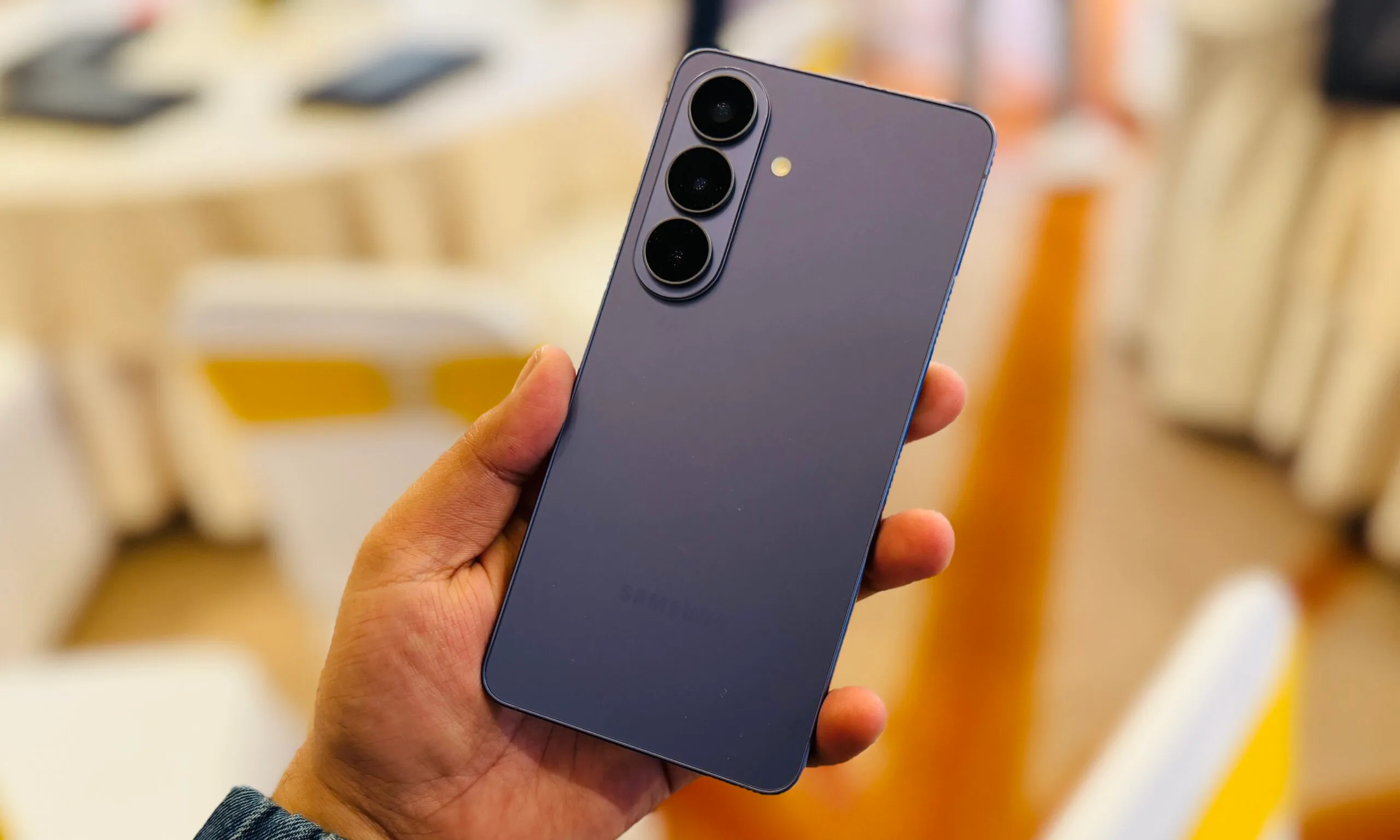
My recent time with the Galaxy S26, powered by Exynos 2600, has already surprised me in terms of performance. And once you widen the lens to include the Snapdragon 8 Elite Gen 5 in the S26 Ultra and the Dimensity 9500 in devices like the Oppo Find X9, the whole “Snapdragon automatically equals better” idea starts showing some cracks.
Benchmark
Galaxy S26 (Exynos 2600)
Galaxy S26 Ultra (Snapdragon 8 Elite Gen 5)
Oppo Find X9 (Dimensity 9500)
AnTuTu Total
3,101,654
3,638,265
3,512,048
Geekbench 6 Single-Core
3,036
3,524
3,207
Geekbench 6 Multi-Core
10,534
10,823
9,345
3DMark Wild Life Extreme
6,366
6,519
7,142
3DMark Wild Life Extreme Stress Test Stability (%)
53.5
63.2
54.9
Temperature After Stress Test (°C)
40.2
38.7
39.2
Galaxy S26 was a pleasant surprise
The easiest surprise here is that the Exynos 2600 does not show up as some obvious weak link. In my testing, the base Galaxy S26 put up 3,036 single-core and 10,534 multi-core in Geekbench 6, plus an AnTuTu score of 2,859,177. Historically, Samsung released its flagship devices in two variants. Historically, Samsung released its flagship devices in two variants. North America, China, and Japan got Snapdragon versions, while the rest of the world got Exynos processors. The company faced a lot of criticism for that split because older flagship models on Exynos chips often fell behind their Snapdragon-powered counterparts.
Advertisement
Nadeem Sarwar / Digital Trends
That, along with chip production yield issues, pushed Samsung to make a few generations of Galaxy S phones exclusively with Snapdragon processors. But it looks like Exynos is back. On 3DMark Wild Life Extreme, the Galaxy S26 scored 6366. The stress-test results are a little more mixed, delivering 53.5% stability in the stress test. These are healthy numbers for a smaller flagship, especially one many people were probably ready to dismiss the moment they saw “Exynos” on the spec sheet.
The S26 Ultra is faster, but not by much
The Galaxy S26 Ultra still has advantages, and that’s not really surprising. Its Wild Life Extreme Stress Test posted a best loop score of 6,519 and 63.2% stability, helped by its larger vapor chamber cooling setup. So yes, the overall thermal performance was better, but not by the kind of margin that completely changes the conversation when you compare it with the standard S26. In both AnTuTu and Geekbench, the Galaxy S26 Ultra led the pack. Exynos still lags a bit, but the gap is no longer the kind you would notice in ordinary day-to-day performance.
Nadeem Sarwar / Digital Trends
The S26 Ultra is clearly faster, but the difference is nowhere near as dramatic as older Snapdragon-versus-Exynos comparisons used to be. Especially when you compare the GeekBench scores, the performance is almost identical. Even without the upgraded cooling setup, the Galaxy S26 managed to stay surprisingly close to the S26 Ultra in the stress test. Where the Ultra does pull ahead more clearly is stability, which matters more once you start talking about sustained performance under load.
MediaTek is the part that makes the race fun
The Dimensity 9500 in the Oppo Find X9 Pro is what really makes this conversation interesting. Its Geekbench 6 single-core score of 3,203 beats the base Galaxy S26, while its AnTuTu score of 3,512,048 edges ahead as well. On 3DMark Wild Life Extreme, it posted 7,142, which puts it above both the S26 and the S26 Ultra.
Oppo
MediaTek is no longer showing up as the “other” flagship chip brand. It is putting up top-tier numbers and staying in the same conversation as Qualcomm and Samsung’s in-house silicon. For a long time, Dimensity chips were seen as the more budget-friendly alternative powering cheaper mid-range and entry-level phones. Results like these show how much ground MediaTek has made up at the high end. There is still a weak point here, which is the 54.9% stress-test stability, which trails the S26 Ultra.
Snapdragon still makes excellent chips, and the S26 Ultra proves that easily. But reputation alone is no longer a substitute for looking at the actual results. The Exynos 2600 has enough performance to not fall behind anymore, and the Dimensity 9500 is close enough in raw horsepower to make the flagship chip race feel properly competitive again.
Cybersecurity researchers have uncovered a large-scale fraud operation that uses Telegram’s Mini App feature to run crypto scams, impersonate well-known brands, and distribute Android malware.
A new report by CTM360 says the platform, dubbed FEMITBOT, is based on a string found in API responses and uses Telegram bots and embedded Mini Apps to create convincing, app-like experiences directly within the messaging platform.
Telegram Mini Apps are lightweight web applications that run inside Telegram’s built-in browser, enabling services such as payments, account access, and interactive tools without requiring users to leave the app.
Abusing Telegram mini apps
According to a CTM360 report shared with BleepingComputer, the FEMITBOT platform is used to conduct multiple types of scams, including fake cryptocurrency platforms, financial services, AI tools, and streaming sites.
Advertisement
In various campaigns, threat actors impersonated widely recognized brands to increase credibility and engagement, while using the same backend infrastructure with different domains and Telegram bots.
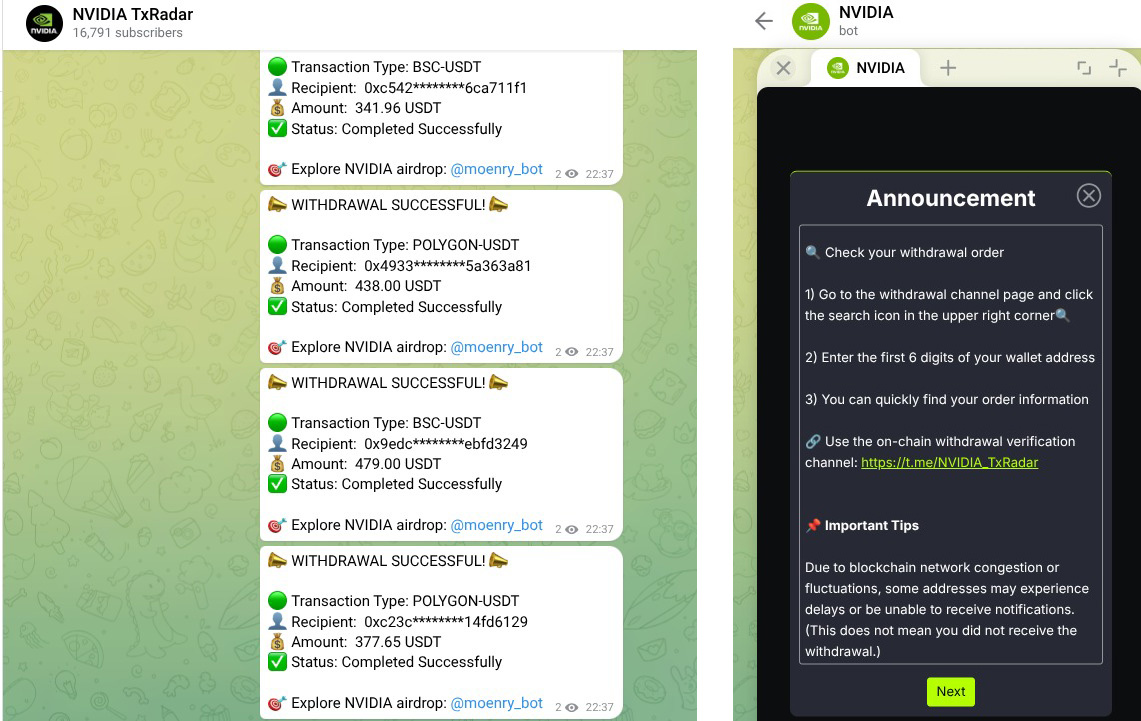
Some of the brands impersonated in this campaign include Apple, Coca-Cola, Disney, eBay, IBM, Moon Pay, NVIDIA, YouKu,
Telegram Mini App impersonating NVIDIA Source: CTM360
Researchers say the activity uses a shared backend, where multiple phishing domains use the same API response, “Welcome to join the FEMITBOT platform,” indicating they are all using the same infrastructure.
API response found in FEMITBOT campaigns Source: CTM360
The operation uses Telegram bots to display phishing sites directly within the social media platform. When a user interacts with a bot and clicks “Start,” the bot launches a Mini App that displays a phishing page in Telegram’s built-in WebView, making it appear as part of the app itself.
Once inside, victims are shown dashboards with fake balances or “earnings,” often paired with countdown timers or limited-time offers to create a sense of urgency.
When users attempt to withdraw funds, they are prompted to make a deposit or complete referral tasks, a common tactic in investment and advance-fee scams.
Advertisement
The researchers say the infrastructure is designed to be used across different campaigns, allowing attackers to easily switch branding, languages, and themes.
The campaigns also use tracking scripts, such as Meta and TikTok tracking pixels, to track users’ activity, measure conversions, and likely to optimize performance.
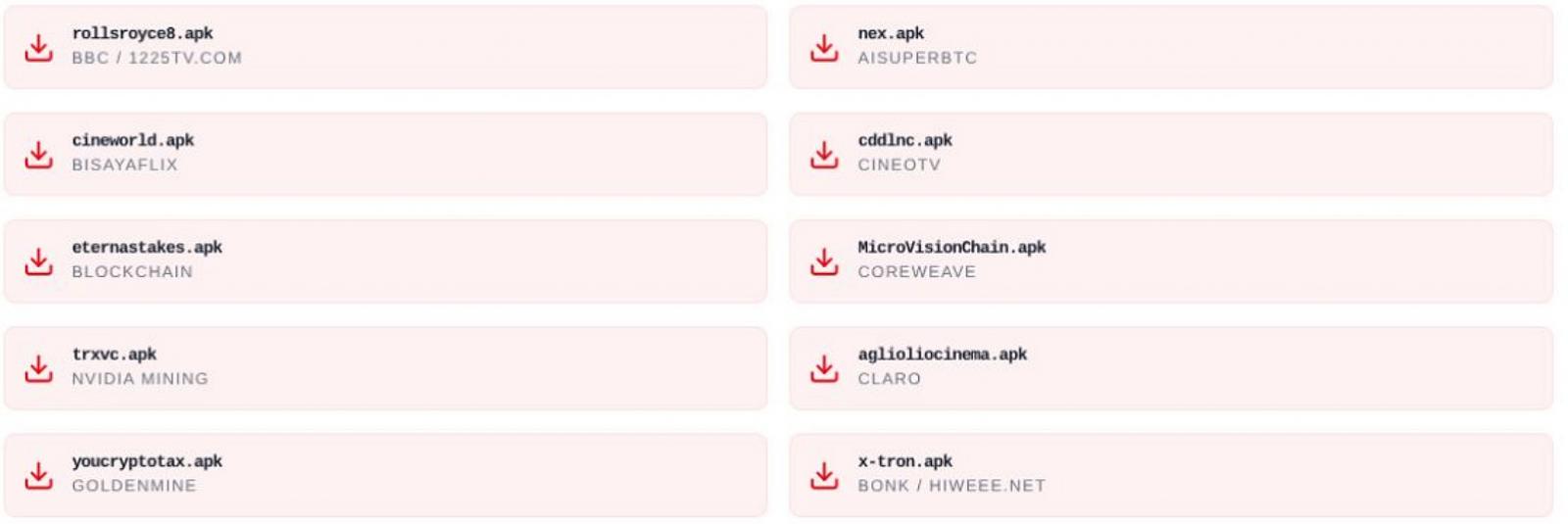
Some Mini Apps also attempted to distribute malware in the form of Android APKs that impersonated brands like the BBC, NVIDIA, CineTV, Coreweave, and Claro.
Some of the Android APKs pushed by FEMITBOT Source: CTM360
Users are prompted to download Android APK files, open links within the in-app browser, or install progressive web apps that mimic legitimate software.
“The APK filenames are carefully chosen to resemble legitimate applications or use random-looking names that don’t immediately trigger suspicion,” explains CTM360.
Advertisement
“The APKs are hosted on the same domain as the API, ensuring TLS certificate validity and avoiding mixed-content warnings in the browser.”
Users should be cautious when interacting with Telegram bots that promote crypto investments or prompt them to launch Mini Apps, especially if they are asked to deposit funds or download apps.
As a general rule, Android users should avoid sideloading APK files, which are commonly used to distribute malware outside the Google Play Store.
AI chained four zero-days into one exploit that bypassed both renderer and OS sandboxes. A wave of new exploits is coming.
At the Autonomous Validation Summit (May 12 & 14), see how autonomous, context-rich validation finds what’s exploitable, proves controls hold, and closes the remediation loop.
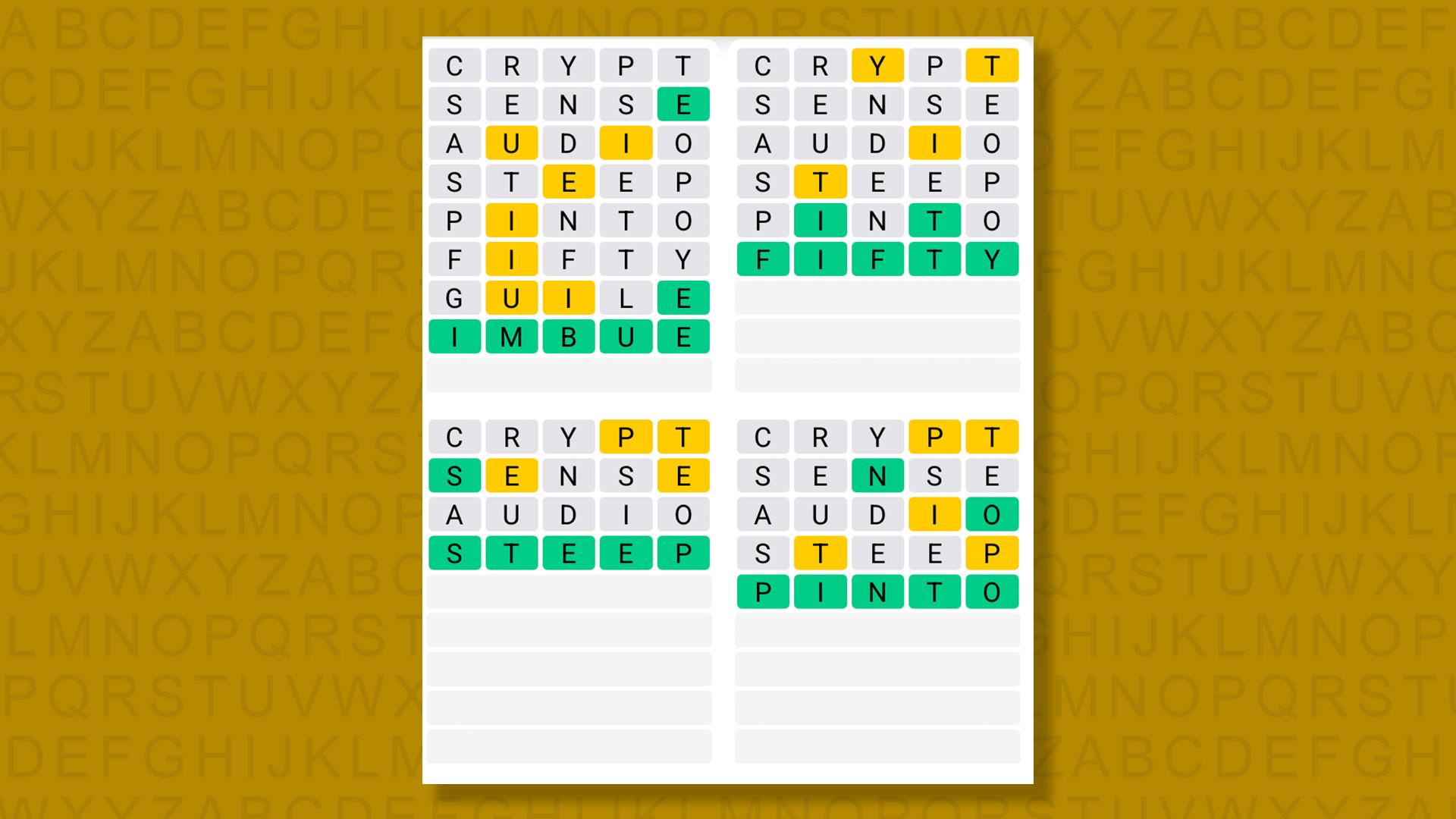
A new Quordle puzzle appears at midnight each day for your time zone – which means that some people are always playing ‘today’s game’ while others are playing ‘yesterday’s’. If you’re looking for Sunday’s puzzle instead then click here: Quordle hints and answers for Sunday, May 3 (game #1560).
Quordle was one of the original Wordle alternatives and is still going strong now more than 1,400 games later. It offers a genuine challenge, though, so read on if you need some Quordle hints today – or scroll down further for the answers.
Enjoy playing word games? You can also check out my NYT Connections today and NYT Strands today pages for hints and answers for those puzzles, while Marc’s Wordle today column covers the original viral word game.
Advertisement
SPOILER WARNING: Information about Quordle today is below, so don’t read on if you don’t want to know the answers.
Article continues below
Quordle today (game #1561) – hint #1 – Vowels
How many different vowels are in Quordle today?
• The number of different vowels in Quordle today is 4*.
* Note that by vowel we mean the five standard vowels (A, E, I, O, U), not Y (which is sometimes counted as a vowel too).
Advertisement
Quordle today (game #1561) – hint #2 – repeated letters
Do any of today’s Quordle answers contain repeated letters?
• The number of Quordle answers containing a repeated letter today is 2.
Quordle today (game #1561) – hint #3 – uncommon letters
Do the letters Q, Z, X or J appear in Quordle today?
• No. None of Q, Z, X or J appear among today’s Quordle answers.
A friend asked ChatGPT for input on a professional matter and received a banal, lackluster response. I suggested she try a different approach: ask for 15 different ideas, scan them, pick the two that felt most promising, and then ask ChatGPT to refine. She came back overjoyed. ChatGPT had not gotten smarter, but she became better at prompting.
This is my favorite gambit: ask AI for many options, delve deeper into the promising ones, and most importantly, if at first you don’t succeed, prompt, prompt again!
What follows is practical advice on how to use AI as a power tool rather than a slot machine. For a simple request, it’s overkill, but if you’re serious about prompting, read on.
Anthropic’s own guidance for prompting Claude contains a helpful hint: treat the model as a brilliant but literal-minded new employee on their first day. They are capable. They are also new. They will do exactly what you ask, so you have to ask exactly what you want.
Advertisement
The Anthropic team’s golden rule is to show your prompt to a colleague with no context and ask whether they could follow it. If the answer is no, the model can’t either. This principle generates a handful of habits that lift output quality immediately, before any of the more advanced techniques come into play.
One caveat from me, though: don’t think of the model as a person. It’s not. The “brilliant new employee” framing is a useful starting point, but it’s a metaphor, not reality. A new hire asks follow-up questions, remembers what you said yesterday, and notices when an instruction is dumb. Claude does none of that by default. Lean on the metaphor to remember to be specific and provide context, but drop it the moment you start to expect human judgment that just isn’t there.
Here’s the playbook, organized as a list for easy reference and periodic review.
Be specific about format, length, audience, and constraints.
Advertisement
Vague prompts produce vague output. The fix is to say what you actually want.
Before: Write about marketing trends.
After: Analyze the three most significant B2B SaaS marketing trends from the past six months. For each, give one company example and a one-sentence assessment of whether the trend will accelerate or plateau. Write it as a 400-word brief for a non-technical board.
Improving prompt quality is often simply stating constraints. Vague prompts produce safe, hedged, encyclopedic answers because the model has no signal about what to optimize for and defaults to coverage. Specific prompts produce opinionated, useful answers because the constraints eliminate the safe-but-useless options. Asking for “three” instead of “some” forces ranking. Asking for “accelerate or plateau” forces a call. Asking for “a board brief” determines what gets cut. Each constraint you add is a decision the model no longer gets to dodge.
Provide a few examples.
This is the highest-leverage move in everyday prompting. Models pick up patterns from examples faster than from descriptions.
Before: Turn these meeting notes into action items.
After: Turn these meeting notes into action items. Match this format: Example 1: Note: “Sarah will look into the pricing question and get back to us next week.” Action item: Sarah → research pricing options → due next Friday. Example 2: Note: “We agreed to push the launch.” Action item: Team → revise launch timeline → due before Monday’s standup. Now do the same for these notes: [paste]
Tell the model what to do, not what not to do.
Negative instructions are easier to violate than positive ones. Reframing in the affirmative gets you cleaner results.
Advertisement
Before: Don’t be too formal. Don’t use jargon. Don’t make it boring.
After: Write in a warm, conversational tone, the way a smart colleague would explain this over coffee. Use plain English and short sentences.
Match the style of your prompt to the style of the output you want.
This one surprises some people. If your prompt is full of bullets and bold text, the model will return bullets and bold text. If you want flowing prose, write in flowing prose.
These habits sound modest. But applied together, they take prompts from the level my friend was operating at, where ChatGPT seemed unhelpful, to a level where AI yields dividends left and right. The advanced techniques in the rest of this piece build on this foundation, but they won’t rescue a prompt that fails the basics.
Beyond the basics, here is a set of effective habits that show up in guidance from OpenAI, Google, working developers, and the people who build production AI systems for a living. These are not techniques so much as workflow disciplines.
Iterate; treat prompting as test-driven.
Advertisement
Your first prompt is a draft. The most experienced practitioners build small sets of test cases (the inputs they care about), run their prompt across them, and refine until the output is consistently good. Several open-source toolkits exist to formalize this loop.
Before: Write the prompt. Try it on one example. Looks good. Ship it.
After: Write the prompt. Pick five inputs, including the awkward edge cases. Run the prompt on all five. Where it fails, change one thing in the prompt and retest. Keep the version that works on the most cases.
Specify a definition of done.
OpenAI’s own guidance for GPT-5 stresses telling the model what counts as a finished answer. Without that, the model decides for itself, often by stopping at the first plausible-looking response.
Before: Help me debug this Python error.
After: Help me debug this Python error. You are done when: (1) you have identified the root cause, (2) you have proposed a specific fix with the corrected code, and (3) you have explained why the original failed. If you are not confident on any of those three, say so explicitly rather than guessing.
Calibrate effort to the task.
Modern reasoning models have effort or thinking dials. Low effort for extraction and triage; high for synthesis and strategy. Most users leave them on default and pay for it on hard problems.
Before: Summarize this 80-page report.
After: Set thinking effort to high. Read the entire report. Identify the three most important findings, the two weakest claims, and the one question I should ask the authors. Cite page numbers.
Inject current or proprietary context directly.
Be careful to avoid jargon and abbreviations unknown to the model (instead of the acronym PMO, say “Project Management Office”). Models don’t have access to your internal documents. Paste in the relevant material.
Advertisement
Before: How should I structure a related work section comparing my framework to prior agent governance proposals?
After: Below is my current draft related work section, plus PDFs of the three papers I am positioning against (pasted). Based only on these sources, identify points of overlap I have not yet acknowledged and any claims in my draft that the cited papers would not actually support.
Build a personal prompt library.
This is a power move for a pro. The patterns that worked yesterday are likely to work tomorrow. Stop rewriting them from scratch. Save the prompts that consistently produce good results, organized by task type. Treat them as living documents, not one-off attempts.
Before: Open a new chat. Type out the framing, the constraints, the examples, and the question from memory. Watch yourself forget two of them.
After: Open your prompt library. Copy the “draft a memo for my manager” template. Paste in today’s specific topic and source material. Run.
Here are some key don’ts:
Don’t tell reasoning models to “think step by step.”
Models like OpenAI’s o-series and GPT-5 thinking already do that internally. Adding the instruction can hurt rather than help. Save it for the everyday models.
Don’t lean on “do not” or “never” instructions for everything.
Advertisement
Models, especially Gemini, can over-index on broad negative constraints and degrade on basic reasoning. Prefer positive framing: tell the model what to do.
Don’t trust polished prose as evidence of correctness.
Hallucinations are most dangerous when they are well-written. As I pointed out in How to Read with AI, you have to carefully verify AI output.
Don’t use aggressive language (“CRITICAL: You MUST…”).
Advertisement
Modern models are highly responsive to ordinary instructions. Aggressive phrasing can produce overcautious output and triggers refusals. Use normal language.
Don’t include undefined acronyms in your prompt.
They measurably degrade output. For research on the impact of prompt changes see this recent paper on Brittlebench.
Don’t change three things at once when iterating.
Advertisement
When a prompt isn’t working, change one variable, test, then change the next. Otherwise you don’t know what helped.
Don’t assume that the same prompt works across models.
Different model families need different prompting. The same instruction can help one and hurt another. The temperature and effort settings that work for GPT are not the ones that work for Claude or Gemini.
Don’t treat the first answer as the final one.
Advertisement
Failing to iterate is a common failure mode in everyday AI use. Here’s a trick for making AI better at multi-step tasks: after each attempt, have the AI write a short critique of what went wrong and tuck that note into its memory for the next try. No fancy mechanics, just the model “talking to itself” in plain English. On the next attempt, it reads its own past reflections and adjusts. This loop can produce meaningful gains over one-shot prompts.
The people who get the most out of AI aren’t the ones with the best prompt templates. They’re the ones who treat the model as a powerful tool for advancing their work. You don’t need to show up with perfect clarity about what you want. A good dialog can get you there, surfacing options and questions you’d have missed on your own. What it can’t do is recognize the right answer when it appears. That part is still on you.
Editor’s note: GeekWire publishes guest opinions to foster informed discussion and highlight a diversity of perspectives on issues shaping the tech and startup community. If you’re interested in submitting a guest column, email us at tips@geekwire.com. Submissions are reviewed by our editorial team for relevance and editorial standards.

































































You must be logged in to post a comment Login