Regardless of your course type, having a decent laptop while you’re studying should be one of your top priorities. After all, you’ll be using it for everything from taking notes and revising, to streaming and maybe even the odd spot of gaming too.
But with so many laptops on the market, all at varying prices, it can be difficult to work out which one to choose. That’s where we come in.
Our team of experts have put countless laptops through a series of rigorous tests to determine just how well each one performs. We assess everything from power and battery life to the screen quality and how portable each laptop is for carrying across campus. From here, only the laptops that we deem are best for students have made it onto this list.
We understand that not every course is identical, so we’ve made sure to include a range of laptops to suit your needs. So whether you just need a simple laptop for typing up essays and coursework or you need a bit more oomph to support creative courses, there’s bound to be an option here for you.
Advertisement
In addition, we’ve also tried our best to keep budgets sensible as we know the last thing a student needs is to fork out on an overpriced device.
Keep reading to see our list of the best laptops for uni students. If, however, you can’t find a laptop that’s quite suitable for your needs then fear not, as our computing experts have put together a multitude of lists to help guide you in the right direction. Check out our lists of the best budget laptops and the best laptops overall, if you’re open to spending a bit more.
Advertisement
SQUIRREL_ANCHOR_LIST
Advertisement
Learn more about how we test laptops
Every laptop we review goes through a series of uniform checks designed to gauge key things including build quality, performance, screen quality and battery life.
These include formal synthetic benchmarks and scripted tests, plus a series of real world checks, such as how well it runs the most frequently used apps.
We also make sure to use every laptop we review as our primary device for at least a week to ensure our review is as accurate as possible.
Advertisement
Pros
Solid performance
Brilliant endurance
Good port selection
Pros
Snapdragon X Plus offers beefy performance
Solid display
Excellent battery life
Pros
Lower starting price makes it surprisingly excellent value
All models have at least 16GB RAM
Excellent performance
Fantastic battery life
Cons
The screen is starting to show its age
Small port selection
More fun colours would be nice
Pros
Good price for OLED
Strong battery life
Respectable entry-level performance
Cons
Basic typing experience with no backlight
Memory and storage can’t be upgraded
Pros
Lightweight, sleek chassis
Decent power for a Chromebook
Excellent endurance
Cons
Screen lacks some detail
Speakers are a little thin
Pros
Fantastic battery life in most situations
Quiet fans
Solid gaming performance on battery power
Quality build
Cons
CPU performance doesn’t match some rivals
Shallow keyboard
Uninspiring webcam
Pros
Brilliant port selection
Potent performance
Gorgeous OLED screen
Cons
Horrendously expensive
Rivals can go for longer
Pros
Immensely lightweight and portable
Sublime battery life
Solid port selection
Cons
Key rivals can offer more power
Rather expensive
Pros
Luxury portable redesign
Excellent keyboard
Luscious OLED display
Impressive graphical performance
Pros
It’s so fast thanks to M1
Exceptional battery life
Strong app support
Great keyboard
Cons
Poor webcam
Same design as before
Poorly positioned (and only two) USB ports
Pros
Innovative, funky design
Solid port selection
Brilliant endurance
Cons
Underpowered in intensive tasks against the competition
Higher refresh rate display would have been pleasant
Pros
Fantastic OLED screen
Solid battery life
Excellent port selection
Cons
Modest performance for the price
Thinner speakers
Solid performance
Brilliant endurance
Good port selection
The Acer Aspire 14 AI might come across as a bit of an odd choice, owing to the fact it doesn’t necessarily take pride of place at the top of our other ‘best laptop’ list – that honour goes to a laptop further down this list.
Instead, we’ve picked this Acer option as the best Windows laptop for students owing to it simply being a great all-rounder, prioritising function over form.
Advertisement
For instance, the Intel Core Ultra 7 256V processor inside provides solid performance for basic productivity tasks such as web browsing and typing up notes and has the potential to push on to more intensive tasks. It also comes with some beefier integrated graphics that mean you could dabble in creative tasks such as photo or video editing if you need to for your course.
Its 1920×1200 OLED screen offers good colours and decent detail for those tasks, along with exemplary black levels and contrast to add a little more pizzazz to displayed images. The Aspire 14 AI’s chassis is also light and portable, while coming with an exceptionally functional port selection at its modest price point.
What’s more, its 18 and a half hours of runtime in our testing makes it a seriously strong choice for when you’re out all day and you don’t want to have to carry a charger around. The keyboard and trackpad are also a bit of a mixed bag, although for the price, it’s only a minor complaint.
For the sub price tag, this Acer Aspire 14 AI is a fantastic Windows laptop that certainly takes it to much more premium rivals.
Advertisement
Snapdragon X Plus offers beefy performance
Solid display
Excellent battery life
The Dell Inspiron 14 Plus 7441 (2024) is our next top recommendation for a student laptop thanks to its fantastic performance, solid display and excellent battery life.
The Dell Inspiron 14 Plus 7441 (2024) has a well-made brushed aluminium design and is reasonably slender at 14.69mm. It’s on the heavier side for an ultrabook, but still more than portable enough to slot into a bag without much thought.
Advertisement
One benefit to its slightly larger size is the well-rounded selection of ports. This includes two USB 4 Type-C ports, one USB 3.2 Gen 1 Type-A port, a 3.5mm jack and a MicroSD reader.
We found the keyboard to be solid, offering snappy travel and a fingerprint reader for Windows Hello integration.
The 14-inch IPS touchscreen display has a QHD+ resolution and offers solid contrast, deep blacks and perfect temperature. The screen is vibrant and colour accuracy is decent, though below the level required for some creative workloads.
Performance from the 10-core Snapdragon X Plus chip is surprisingly brisk, and the 1TB SSD is great too, offering some of the best and fastest speeds of any laptop we’ve tested. Windows 11 comes with minimal bloatware, and there are some nifty AI features baked into some apps courtesy of that Snapdragon X Plus SoC. There’s also quick access to Microsoft’s AI assistant via the Copilot key.
Advertisement
The battery life here is excellent. We were able to get nearly two full working days out of the Dell Inspiron 14 Plus 7441 (2024) before reaching for the charger. Charging is decently fast too, with a full charge possible in about 75 minutes.
Lower starting price makes it surprisingly excellent value
All models have at least 16GB RAM
Excellent performance
Fantastic battery life
The screen is starting to show its age
Small port selection
More fun colours would be nice
The Apple MacBook Air M4 is the brand’s latest and greatest offering yet, sustaining Apple’s immense reputation for offering sublime lightweight laptops that don’t half pack a punch.
Advertisement
The M4 chip inside offers some potent performance in our testing that makes it suitable for everything from web browsing and multi-tasking without even breaking a sweat to editing 4K video without much trouble. With this and the sustained optimisation of games for macOS, it’s even possible to use this latest-gen MacBook Air for a spot of gaming.
The base model has jumped up to 16GB of unified memory from the 8GB of older models to give more headroom for multitasking and intensive workloads, although if you’ve got more cash, you can always add more. The same goes for storage beyond the 256GB SSD fitted to the base model.
The move to the M4 chip also helps this MacBook Air yield even stronger battery life, which in our experience translated to getting through an intensive work day with around a third charge left in the device.
One area where things haven’t improved is that it retains the same 60Hz LCD screen, which, while decent, feels a tad long in the tooth against the other options here with high-res OLEDs. In addition, the port selection isn’t too great, so you’ll be carrying around a dongle with you for most of the day.
Advertisement
If you can get past these issues, though, the MacBook Air M4 is easily the most complete model in the Air lineup to date, and that’s why it earns a rightful spot here.
Good price for OLED
Strong battery life
Respectable entry-level performance
Basic typing experience with no backlight
Memory and storage can’t be upgraded
This laptop has a well-built plastic design that’s light enough to carry around on the regular, and to our great surprise, a lovely OLED screen that makes movie marathons an absolute delight. The large 15-inch should also make it easier to fit more text on your screen, which should be helpful for both essay typing and scanning documents.
Advertisement
The biggest issue with this laptop is that it’s not very powerful, falling behind the likes of the Surface Laptop Go 3 in our tests. But during our time with the laptop, we found it perfectly adequate for browsing the web, writing up essays and watching videos. As long as you’re not going to push it too hard – such as photo/video editing – the performance should be fine.
So if you’re looking for a supremely cheap Windows laptop with a top-notch screen, you’ll struggle to do better than the Asus Vivobook Go 15 OLED. The Surface Laptop Go 2 is another great cheap Windows laptop worth considering, but Microsoft is sadly phasing it out of stores, so you may only be able to pick it up second-hand in the coming months.
Advertisement
Lightweight, sleek chassis
Decent power for a Chromebook
Excellent endurance
Screen lacks some detail
Speakers are a little thin
If it’s a lightweight device you want in both chassis and operating system, the Samsung Galaxy Chromebook Plus is one of the absolute best we’ve tested.
ChromeOS has come on leaps and bounds since a few years ago, and remains an ideal operating system for a lightweight and productivity-focused use case, such as typing up notes, watching YouTube videos or even more so. This particular option is also a Chromebook Plus, which means you get some handy A features, such as the clever Magic Eraser tech from Google’s Pixel phones, as well as live translated captions and auto-framing and background blur tech for the webcam when in Google Meet scenarios.
The real benefit of this Samsung option is that it weighs just 1.17kg, making it one of the most portable laptops we’ve tested full stop – ideal for when you need to carry it from one side of campus to the other in a dash. The fact that Samsung has crammed a 15.6-inch OLED screen for more real estate and sublime definition is fantastic, too.
For good measure, you’ll also find a competent port selection, a snappy and tactile keyboard, and a smooth trackpad to make navigation a breeze. Its 10-core Intel Core 5 120U processor is also zippy for productivity tasks, and it posted some great scores in our Geekbench 6 test that push more expensive Windows devices such as the Asus Zenbook A14. There is also a decent set of 256GB storage, and while the 8GB of RAM might seem stingy in 2025, it’s fine for the workloads you’re likely to undertake.
Advertisement
In a video loop test, it was also able to last for 15 and a half hours or so before conking out, giving you all-day battery life for when you’re away from the mains a lot. Against other premium student laptops that are a lot more expensive than this one, it’s brilliant.
The only caveat to this Chromebook is its higher price, and if that’s too prohibitive, then options such as the Asus Chromebook Plus CX34 can provide the fundamentals of a good experience for a bit less.
Advertisement
Fantastic battery life in most situations
Quiet fans
Solid gaming performance on battery power
Quality build
CPU performance doesn’t match some rivals
Shallow keyboard
Uninspiring webcam
The Asus Zenbook S14 OLED takes the crown in our list of the best ultrabooks, so it makes sense that it wins out here, too.
The reason for this is that it features a smart and elegant design, complete with Asus’ innovative “Ceraluminum” surface that has been fitted to the most recent Zenbook S laptops, combining ceramic and aluminium for an immensely lightweight and durable finish to make for a wonderfully portable and svelte laptop for when you want to win style points with your friends. Ports are good too, with HDMI, USB-A and a headphone jack alongside two Thunderbolt 4 USB-C ports.
It comes with a 3K resolution OLED screen that wowed us with its pixel-perfect colour accuracy for both generalist and creative tasks, plus punchy peak brightness, inky blacks and excellent contrast and dynamic range. It also has a 16:10 aspect ratio to play nicely with modern workloads, and a 120Hz refresh rate for improving general responsiveness.
This Zenbook S14 OLED has an Intel Core Ultra 7 258V that we found to provide good performance, with especially strong single-core performance. Intel’s decision to remove hyperthreading from this generation of chips means that multi-core performance isn’t as strong as some AMD and Snapdragon-powered rivals. The ballpark performance here is between the M2 and M3 chips in recent MacBooks
Advertisement
This Asus laptop also has a capacious 72Whr battery, which in a laptop of this size is excellent. Combined with the efficiency of the Core Ultra 2 chip inside, it’s able to help this Asus laptop last for nearly 20 hours while video streaming, which is fantastic.
It’s only little things to watch out for with this one, such as a shallow keyboard that may not suit some, as well as an uninspiring 1080p webcam. With this in mind, the Asus Zenbook S14 OLED is the real cream of the crop for an ultrabook for students, although it comes at a bit of a price.
Advertisement
Brilliant port selection
Potent performance
Gorgeous OLED screen
Horrendously expensive
Rivals can go for longer
Suppose you’re likely to be working on creative projects, such as if you’re on a photography or media-type course that involves technical editing work. In that case, you’ll want a laptop with a dazzling screen and heaps of power – enter the Asus ProArt P16 (2025).
For the first part of that, we’ve got a large 16-inch 3K resolution OLED screen with some fantastic detail, plus deep blacks and vibrant dynamic range. Its colour accuracy is also virtually perfect, so it’s ideal for undertaking creative tasks that utilise those specialist gamuts. Being a 120Hz screen helps its general responsiveness, too.
As for its power, this laptop packs in an AMD Ryzen AI 9 HX 370 processor with its 12 cores and 24 threads that make it a serious powerhouse, while the addition of an RTX 5070 GPU gives you enough oomph for those intensive loads and some gaming tasks, too. It essentially trades blows with Apple’s powerful MacBook Pro M4.
The ProArt P16 (2025) isn’t lacking elsewhere either, with a tactile keyboard and huge trackpad to make navigation a breeze, plus one of the best port selections you’ll find with a a range of USB-C, HDMI and USB-A ports The 10 and a half hours of battery life is fine for a laptop with this spec, although you will get better longevity further down the list with other options.
Advertisement
If it’s a proper laptop for content creation tasks you want, and you don’t mind the premium attached to it, this ProArt option is truly sublime.
Immensely lightweight and portable
Sublime battery life
Solid port selection
Key rivals can offer more power
Rather expensive
Laptops with larger screens can be quite cumbersome to carry around, but if you’re on the go a lot and don’t want to sacrifice portability and more screen real estate, then the LG Gram Pro 16 seems like an ideal solution.
Advertisement
This laptop, being part of LG’s Gram line, has a penchant for being lightweight and portable; indeed, its magnesium frame contributes to both a durable and super light finish at just 1.2kg. There is some flexing under pressure, although not too much. At just 12.8m thick, it’s also slender, but still packs in a good port selection with a pair of USB4 Type-C ports, a full–size HDMI, two USB-As and a headphone jack.
The slightly larger chassis also lends itself to a proper full-size keyboard, complete with a snappy and short travel, plus a capacious trackpad for navigating and such.
You can spec this laptop with an OLED panel if you wish, although ours came with a high resolution IPS screen. It’s a 2560×1600 resolution 144Hz screen with variable refresh rate tech that delivers on a bright and punchy experience with decent depth and contrast alongside fantastic colour accuracy for an IPS panel to make it handy for both productivity and more creative workloads.
The Intel Core Ultra 7 258V chip inside provides decent performance with strong single-core performance in the Geekbench 6 and Cinebench R23 tests, although again, the lack of any hyperthreading befalls Intel with multi-threaded performance against AMD and Apple’s chips. There is also a fast 1TB SSD and plenty of fast DDR5 RAM headroom on hand with 32GB.
Advertisement
The Gram Pro 16 also wins out in this list for battery life, lasting for 21 hours and 10 minutes in the PCMark 10 battery test. This means it’ll easily last for two to nearly three days on a charge before needing to be plugged back in, and you can take it away with you and put endurance concerns to the back of your mind.
If it’s a portable big-screen laptop you want for lectures, classwork or otherwise, this LG Gram Pro 16 is a brilliant option.
Advertisement
Luxury portable redesign
Excellent keyboard
Luscious OLED display
Impressive graphical performance
Being both a gamer and a student can be a pricey affair, as you’ll likely need a console, laptop and TV to survive the semester. So how about combining all of those devices together to save on money? The Asus ROG Zephyrus G14 (2023) is the perfect remedy, capable of doubling up as both your gaming rig and workstation with very few compromises.
Firstly, the G14 is shockingly lightweight for a gaming laptop, hitting the scales at just 1.7kg. Most gaming laptops are significantly heavier, making them unsuitable for porting around university. The optional Mini LED screen ensures fantastic picture quality too, which is important for watching movies and playing games.
Performance is plenty powerful enough to play all of the latest games. The intense graphics power here also opens up the opportunity for more creative pursuits such as editing video/photos and graphics design. The biggest issue here is battery life, with our tests seeing a result of just 3 hours and 20 minutes for productivity work. That could be a big issue if you’re working on the go away from a power mains.
Nevertheless, if you fancy the idea of owning a laptop that can fulfil the duties of both gaming and student work, then we strongly recommend the Asus ROG Zephyrus G14 (2023). Or if you want something cheaper, make sure to check out our Asus TUF Gaming A15 (2023) review as an alternative option.
Advertisement
It’s so fast thanks to M1
Exceptional battery life
Strong app support
Great keyboard
Poor webcam
Same design as before
Poorly positioned (and only two) USB ports
If you want a MacBook on a budget, the MacBook Air M1 is a fantastic option. Though no longer available through Apple, the laptop can be found as a refurbished model for under £400, making it the perfect MacBook for any student.
The standout feature of the MacBook Air M1 is its Apple M1 chipset. The M1 took over the Intel Core i3/i5 in this laptop, enabling faster performance beyond what you might expect from Apple’s cheapest laptop.
Advertisement
The six-year-old laptop has since been outpaced by the MacBook Air M2 and Air M3 models, plus the M4 mentioned above, but you won’t find either at quite as low a price as the 2020 M1 model.
The design also feels a little outdated compared to the Air M2, though the display is sharp and bright enough for most use cases and the Magic Keyboard feels fantastic to type on.
App support is strong, with a growing number of native M1 apps available and Rosetta 2 ready to translate any stragglers from the x86 platform. We found that mainstream apps ran with no issue and you can even install apps from the iOS App Store.
Finally, the MacBook Air M1 has an impressive nine to 11-hour battery life with looped 1080p video lasting up to 12 hours on a single charge. This is another major upgrade granted by the custom M1 chipset and the laptop’s standby time is excellent, too.
Advertisement
The MacBook Air M1 delivers fantastic performance, battery life and app support without breaking the bank.
Innovative, funky design
Solid port selection
Brilliant endurance
Underpowered in intensive tasks against the competition
Higher refresh rate display would have been pleasant
As far as we’re concerned, on top of the performance that you need to get you through your classes, the most important aspect of a student laptop is whether or not it’s portable enough to be easily carried from one end of the campus to the other. After all, with the amount of textbooks and snacks required to make it through the day, the last thing you want is to be bogged down by a heavy laptop. To that end, the Asus Zenbook A14 is the perfect option.
Advertisement
By using Asus’ ceraluminium material which is both lightweight and durable, the Zenbook A14 totals in at less than a kilogram on the scales so you’ll barely notice its presence if it’s chucked into a backpack or tote bag. It’s also just 13.3mm thick which is barely that much more than some of the USB-C ports on the side of the device.
Of course, the worry with any laptop that’s as slim and portable as this one, is that the battery life suffers as a result, but we’re glad to report that the Zenbook A14 has no such issue. In our battery test we were able to get the laptop to run for a whopping 20 hours and 47 minutes before it needed to be topped up, which is astonishing and more than enough to get you through two-days of use between charges.
Part of what allows for such strong battery life is the efficiency of the Snapdragon X chipset inside. This Arm-based processor is one of the fastest around which is why the laptop also benefits from top-level performance that can handle almost any task you throw at it. When jumping from one task to the next, the A14 moved at great speed without any signs of slowing down, and files from the 1TB SSD would load in next to no time.
Asus has also made sure to use the available space efficiently by creating a keyboard with tons of travel, and a large trackpad that goes almost all the way from the opening of the lid, to the bottom of the space bar. You won’t be caught short on ports either with two USB-C slots, one USB-A port, and a place to connect an HDMI cable and wired headphones.
Advertisement
Fantastic OLED screen
Solid battery life
Excellent port selection
Modest performance for the price
Thinner speakers
As much as we love the Asus Zenbook A14 for its portability, there are some students out there who would no doubt be happy to trade some of that portability for a bit more power, especially where the display is concerned, and it’s here that the Acer Swift 16 AI comes into view. This is a powerful yet still portable laptop with a gorgeous display.
The moment you open up this laptop, it’s hard not to be mesmerised by the 16-inch 2.8K OLED panel. Not only does its larger amount of space make the process of side-by-side multitasking a great deal easier, but the clarity of its resolution ensures that everything you look at is crisp.
Advertisement
When you decide that it’s time to call it a day, the OLED technology makes the latest films and TV shows look even better with a level of contrast that really draws you into darker sections of a scene whilst giving vibrant colours the space they need to really pop. It’s perfect for anyone who wants to use their university laptop as their main device for both work and entertainment.
Powering the show is the super powerful Intel Core Ultra 5 chipset which made short work of our benchmarking tests. In fact, its high performance in PCMark 10 is a solid indicator of just how well this laptop facilitates everyday web browsing and working between multiple apps. The speedy 512GB SSD also means that you’ll have plenty of room to store those all-important course files locally so you can rely on them at a moment’s notice.
Because of the power that Intel’s chipset brings to the table, the Swift 16 AI (as its name implies) provides quick access to Microsoft Copilot Plus. Having a fully featured AI assistant that’s always ready at the press of a button is a huge help for bouncing ideas around when you’re stuck on a project.
Advertisement
FAQs
What should a student look for in a laptop?
A good keyboard, long battery life and snappy performance are all key things to consider when purchasing a student laptop. You’ll also want to make sure it isn’t too heavy, with 1.3kg and under being an ideal heft. Screen quality is worth thinking about if you plan on using the laptop for Netflix and YouTube.
Advertisement
Do students need a laptop with a GPU?
A dedicated GPU is only worth considering if you’re a creative/design student who will be doing lots of video editing, 3D modelling or animation. Gamers will also benefit from a powerful GPU. But be warned, a GPU will crank up the price, make the laptop heavier and shorten the battery life, so only get a laptop with one if it’s essential.
How much RAM does a student laptop need?
Advertisement
Honestly, most people will be fine with 8GB RAM, but it may be worth investing in 16GB of RAM or beyond for heavier workloads such as content creation and gaming.
What is the best laptop for a student?
We’ve crowned the Acer Aspire 14 AI as the best overall laptop for students, thanks to its Intel Core Ultra 7 processor that provides solid performance for productivity tasks, all for a decent price.
Advertisement
However, if your budget is tight then we’d recommend the Asus Vivobook Go 15 OLED instead – especially if your course doesn’t require too many intensive tasks like photo or video editing.
Advertisement
Advertisement
Test Data
Acer Aspire 14 AI
Dell Inspiron 14 Plus 7441 (2024)
Apple MacBook Air M4
Asus Vivobook Go 15 OLED
Samsung Galaxy Chromebook Plus
Asus Zenbook S14 OLED
Asus ProArt P16 (2025)
LG Gram Pro 16
Asus ROG Zephyrus G14 (2024)
MacBook Air M1
Asus Zenbook A14
Acer Swift 16 AI
PCMark 10
7623
–
–
3414
–
6604
8292
7243
3691
–
–
7662
UL Procyon photo editing
–
–
–
–
–
–
–
-4
–
–
–
–
Cinebench R23 multi core
9618
8152
11863
–
–
–
22629
9583
15946
–
–
7963
Cinebench R23 single core
1911
1115
2159
–
–
–
2943
1927
1696
–
–
1777
Geekbench 5 single core
–
–
–
–
–
–
–
–
–
1731
–
–
Geekbench 5 multi core
–
–
–
–
–
–
–
–
–
7308
–
–
Geekbench 6 single core
2658
2456
3748
1187
1947
2516
2058
2756
2333
–
–
2522
Geekbench 6 multi core
10638
13265
14664
2878
7080
10132
22606
10939
13213
–
–
10069
3DMark Time Spy
4340
1871
–
590
–
4122
11630
4262
11494
–
–
3507
CrystalDiskMark Read speed
6386.86 MB/s
6185.31 MB/s
2833.5 MB/s
1090.18 MB/s
–
5007 MB/s
5280.88 MB/s
7133.66 MB/s
5010.11 MB/s
–
–
4796.17 MB/s
CrystalDiskMark Write Speed
5581.54 MB/s
4793.16 MB/s
2728.6 MB/s
1009 MB/s
–
2804 MB/s
4896.13 MB/s
6487.43 MB/s
3440.1 MB/s
–
–
3504.39 MB/s
Brightness (SDR)
383.5 nits
457.7 nits
–
392.43 nits
–
372 nits
359.1 nits
419.5 nits
440.1 nits
–
–
394.6 nits
Brightness (HDR)
–
–
–
–
–
616 nits
500 nits
–
–
–
–
–
Black level
0.01 nits
0.09 nits
–
0 nits
–
0 nits
0.01 nits
0.21 nits
0 nits
–
–
0.01 nits
Contrast ratio
28000:1
1930:1
–
1:1
–
–
26360:1
1380:1
0:1
–
–
28810:1
White Visual Colour Temperature
6600 K
6300 K
–
6243 K
–
–
6600 K
7300 K
6800 K
–
–
6800 K
sRGB
100 %
97 %
–
99.7 %
–
100 %
100 %
100 %
100 %
–
–
100 %
Adobe RGB
95 %
75 %
–
95.5 %
–
95.8 %
94 %
87 %
96 %
–
–
94 %
DCI-P3
99 %
74 %
–
98 %
–
99.9 %
100 %
98 %
100 %
–
–
100 %
PCMark Battery (office)
18.5 hrs
16.5 hrs
–
7.52 hrs
–
18.5 hrs
10.5 hrs
21.2 hrs
6 hrs
–
–
14.75 hrs
Battery Life
–
–
–
8 hrs
–
–
–
–
–
12 hrs
–
–
Battery discharge after 60 minutes of online Netflix playback
6 %
7 %
–
–
7 %
–
6 %
5 %
–
–
–
7 %
Battery recharge time
94 mins
75 mins
–
–
112 mins
–
75 mins
108 mins
–
–
–
95 mins
Cyberpunk 2077 (Quad HD)
–
–
–
–
–
–
48.92 fps
–
30.23 fps
–
–
–
Cyberpunk 2077 (Full HD)
–
–
–
–
–
–
82.19 fps
–
67.15 fps
–
–
–
Cyberpunk 2077 (Full HD + RT)
–
–
–
–
–
–
34.88 fps
–
31.96 fps
–
–
–
Cyberpunk 2077 (Full HD + Supersampling)
–
–
–
–
–
–
55 fps
–
53.64 fps
–
–
–
Returnal (Quad HD)
–
–
–
–
–
–
–
–
58 fps
–
–
–
Returnal (Full HD)
–
–
–
–
–
–
90 fps
–
77 fps
–
–
–
Rainbow Six Extraction (Quad HD)
–
–
–
–
–
–
96 fps
–
81 fps
–
–
–
Rainbow Six Extraction (Full HD)
–
–
–
–
–
–
154 fps
–
136 fps
–
–
–
F1 22 (4K)
–
–
–
–
–
–
–
–
-3 fps
–
–
–
Full Specs
Acer Aspire 14 AI
Dell Inspiron 14 Plus 7441 (2024) Review
Apple MacBook Air M4 Review
Asus Vivobook Go 15 OLED Review
Samsung Galaxy Chromebook Plus Review
Asus Zenbook S14 OLED Review
Asus ProArt P16 (2025) Review
LG Gram Pro 16 Review
Asus ROG Zephyrus G14 (2024) Review
MacBook Air M1 Review
Asus Zenbook A14 Review
Acer Swift 16 AI Review
UK RRP
£899.99
£1049.99
£999
£500
£749
–
£2798.99
£1799.98
£2399
£999
–
£1199.99
USA RRP
–
$898.99
$999
–
$700
–
–
$2299.99
$2199
$999
–
$1194.99
EU RRP
–
–
–
–
–
–
–
–
–
€1129
–
–
CA RRP
–
–
–
–
–
–
–
–
–
CA$1299
–
–
AUD RRP
–
–
–
–
–
–
–
–
–
AU$1499
–
–
CPU
Intel Core Ultra 7 256V
Qualcomm Snapdragon X Plus
Apple M4
Intel Core i3-N305
Intel Core 5 120U
–
AMD Ryzen AI HX 370
Intel Core Ultra 7 258V
AMD Ryzen 9 8945HS
M1 8-core
–
Intel Core Ultra 5 226V
Manufacturer
Acer
Dell
Apple
Asus
Samsung
Asus
Asus
LG
Asus
Apple
–
Acer
Screen Size
14 inches
14 inches
13.6 inches
15.6 inches
15.6 inches
–
16 inches
16 inches
14 inches
13.3 inches
–
16 inches
Storage Capacity
1TB
1TB
256GB, 512GB, 1TB, 2TB
256GB
256GB
–
2TB
1TB
1TB
2TB
–
512GB
Front Camera
1080p webcam
1080p 30fps webcam
12MP
720p
1080p webcam
–
–
1080p webcam
FHD IR
720p
–
–
Battery
65 Whr
54 Whr
53.8 mAh
42 Whr
68 Whr
–
90 Whr
77 Whr
73 Whr
49.9 Whr
–
70 Whr
Battery Hours
18 35
16 33
–
–
15 25
–
10 23
21 10
–
18
–
14 45
Size (Dimensions)
318.9 x 225.1 x 16.9 MM
314 x 223.75 x 14.69 MM
30.41 x 21.5 x 1.13 CM
36.03 x 23.25 x 1.79 CM
225.8 x 355.8 x 9.8 MM
310 x 214 x 12.9 MM
354.9 x 246.9 x 14.9 INCHES
357.7 x 251.6 x 12.9 MM
312 x 220 x 15.9 MM
304 x 212 x 161 MM
–
356 x 249.4 x 9.92 MM
Weight
1.4 G
1.4 KG
1.24 KG
1.63 KG
1.17 KG
1.2 KG
1.85 KG
1.2 KG
1.50 KG
1.29 G
–
1.53 KG
ASIN
–
–
B0DZD958Z8
–
–
–
–
–
–
B08N5NMHM3
–
–
Operating System
Windows 11
Windows 11
macOS
–
ChromeOS
–
Windows 11
Windows 11
Windows 11
macOS
–
Windows 11
Release Date
2025
2024
2025
2023
2024
2024
2025
2025
2024
17 November 2020
–
2025
First Reviewed Date
–
26/08/2024
16/04/2025
09/01/2024
15/03/2025
09/10/2024
13/05/2025
–
–
02/12/2020
–
17/04/2025
Model Number
–
–
–
E1504G
–
–
–
–
–
–
–
–
Resolution
1920 x 1200
2560 x 1600
2560 x 1664
1920 x 1080
1920 x 1080
x
2880 x 1800
2560 x 1600
2880 x 1800
2560 x 1600
–
2880 x 1800
HDR
–
–
–
Yes
–
–
Yes
–
Yes
–
–
Yes
Refresh Rate
60 Hz
59 Hz
60 Hz
60 Hz
60 Hz
–
120 Hz
144 Hz
120 Hz
60 Hz
–
120 Hz
Ports
2x USB4 Type C, 2x USB-A, 1x HDMI, 1x 3.5mm jack
1 USB 3.2 Gen 1 Type-A port 1 Audio Jack (headphone and microphone combo) port 2 USB4 40Gbps (USB Type-C®/DisplayPort™/Power Delivery)
MagSafe 3 charging port, 3.5mm headphone jack, 2x Thunderbolt 4 (USB-C) ports with support for: Charging DisplayPort Thunderbolt 4 (up to 40Gb/s) USB 4 (up to 40Gb/s)
Blue Origin’s New Glenn rocket rises from its Florida pad, sending an AST SpaceMobile satellite into orbit. (Blue Origin via YouTube)
Jeff Bezos’ Blue Origin space venture used a previously flown New Glenn rocket booster to send a satellite into orbit today, taking its competition with Elon Musk’s SpaceX to new heights.
And after it aced its second launch, the first-stage booster — nicknamed “Never Tell Me the Odds” — made yet another successful touchdown on a floating platform in the Atlantic Ocean.
The rocket lifted off from Launch Complex 36 at Cape Canaveral Space Force Station in Florida at 7:25 a.m. ET (4:25 a.m. PT), sending AST SpaceMobile’s BlueBird 7 telecom satellite into low Earth orbit.
The twice-used booster made its first flight last November when it launched NASA’s Escapade probes on a mission to Mars. Blue Origin’s Florida team recovered and refurbished the booster for today’s launch.
Blue Origin executed the same maneuver today. The webcast showed the booster settling down to a touchdown on the landing craft, which was christened Jacklyn as a tribute to Bezos’ mother. Team members could be heard cheering at Mission Control in Florida, at the company’s headquarters in Kent, Wash., and at other outposts in Texas and Alabama.
Advertisement
“Welcome back once again, Never Tell Me the Odds,” launch commentator Tabitha Lipkin said. “It’s good to say that twice.”
This was the third launch for Blue Origin’s orbital-class New Glenn rocket. The first liftoff in January 2025 sent a payload into orbit to test the communication and control systems for Blue Origin’s Blue Ring space mobility platform. Blue Origin tried to recover the booster that was used for that mission, nicknamed “So You’re Telling Me There’s a Chance,” but the booster missed its chance and couldn’t be saved.
After today’s successful booster touchdown, the focus shifted to the mission’s primary objective: deploying BlueBird 7 from the rocket’s second stage in low Earth orbit. That was due to take place an hour and 15 minutes after liftoff.
If all goes well, BlueBird 7 is destined to join six other satellites in Texas-based AST SpaceMobile’s constellation. The BlueBird satellites are designed to deliver cellular broadband connectivity directly from space to standard smartphones.
Advertisement
AST SpaceMobile aims to have up to 60 satellites in its constellation by the end of 2026. The company is aiming to start providing commercial satellite service in partnership with AT&T and Verizon later this year.
Last week, Amazon announced that it will acquire Globalstar, a Louisiana-based satellite operator, and will partner with Apple to beef up D2D services. That deal is expected to give a boost to the Amazon Leo satellite broadband network, a Starlink competitor that’s due to begin commercial service this year.
Rocket reusability is another technological realm where SpaceX has long been a leader but is now facing heightened competition. The ability to recover and reuse rocket boosters plays a huge part in SpaceX’s strategy to drive down launch costs — and today’s launch demonstrated that Blue Origin is able to leverage rocket reusability as well.
iPads are stolen from a Best Buy, G-Love is caught up in the fake Ledger app scam, and AirTags solve two thefts, all in this week’s Apple Crime Blotter.
Only a very lucky few people ever get to travel into space, but more than 5.6 million names just completed a journey around the Moon, stored on a microSD card carried aboard NASA’s Artemis II mission.
That flight sent four astronauts farther from Earth than humans have ever traveled, completing a roughly 10-day mission that orbited the Moon before safely returning to Earth.
The trip tested critical systems for future deep-space exploration and marked a major milestone for the Artemis program which will ultimately return humans to the surface of the Moon in 2028.
Advertisement
Today’s top memory card deal
(Image credit: NASA)
The microSD card, carrying 5,647,889 submitted names, was zipped into Rise, the mission’s mascot, a cartoonish Moon wearing a cap covered in stars. The mascot itself was designed by a year three student from California, called Lucas Ye, whose artwork was selected from more than 2,600 entries from over 50 countries.
While the specific card zipped inside Rise was certified for spaceflight conditions, it traces its lineage to the SanDisk Ultra series used by people here on Earth inside cameras, handheld devices, and portable recording gear.
The consumer version of the SanDisk Ultra microSD series comes in 16 and 32GB capacities and supports both microSD and microSDHC formats, making it compatible with a wide range of devices used for everyday recording and storage tasks.
Advertisement
Rated at Class 10 speeds, the card supports read speeds of up to 80MB/s, which suits Full HD video capture, burst photography, and quick file transfers.
It’s durable, with protection against water, temperature extremes, and X-ray exposure, and maybe (but we wouldn’t bet on it), trips around the Moon.
After splashdown, the mission mascot didn’t stay tucked away inside the spacecraft as it should have done according to NASA’s mission rules, Artemis II commander Reid Wiseman later revealed on X.
“I was supposed to leave Rise in Integrity….but that was not something I was going to do. I stuffed that little guy in a dry bag we had in our survival kit and hooked the bag onto my pressure suit,” he wrote.
If pet hair on the sofa or crumbs down the side of the car seat are the kind of daily irritants that a full-sized vacuum feels entirely too cumbersome to deal with, a compact handheld is the tool that actually gets used.
The Shark Handheld Cordless Vacuum is built for exactly that, and it is now down from £69.99 to £49.99, a 29% saving on a machine ranked fourth in handheld vacuums on Amazon barely a month after release.
Shark’s new handheld cordless vacuum is now almost a third cheaper, barely a month after launch
If pet hair on the sofa or crumbs down the side of the car seat are a daily occurance, a Shark Handheld Cordless Vacuum is the tool for you.
Dual cyclonic air streams separate the workload inside the machine, with one stream dedicated to suction power and a second separating large and small debris to keep the filter and motor running efficiently across repeated uses rather than degrading with each session.
Advertisement
That filtering performance is maintained by a HEPA filter, which captures the fine particles that cheaper handheld vacuums push back into the air, and the washable design means ongoing running costs stay low without the need for replacement parts.
Weighing just over one kilogram, the Shark Handheld Cordless Vacuum is genuinely light enough to grab for a quick clean of stairs, upholstery, or car interiors without it feeling like a chore before you have even started.
Advertisement
The ten-minute run time is the honest caveat here: it is enough for targeted spot cleaning across those kinds of surfaces, but buyers expecting to cover a whole floor in one pass will need to manage expectations or ensure the battery is fully charged before each session.
A CleanTouch dirt ejector handles emptying without requiring you to reach into the dust cup, which matters more than it sounds when you are cleaning up after pets or anything particularly unpleasant, and the 0.45-litre capacity holds a reasonable amount before that becomes necessary.
The included crevice tool and scrubbing brush extend reach and versatility for the kinds of narrow gaps and textured surfaces that the main nozzle alone cannot address, rounding out a kit that covers the realistic daily use cases for a machine of this type.
This is a well-specified grab-and-go option at £49.99, backed by a two-year manufacturer warranty, and it suits households that want something genuinely lightweight and instant-access for the messes a full-sized vacuum is too unwieldy to justify.
For those still deciding on a primary machine to pair it with, our best cordless vacuum cleaners 2026 guide rounds up every wire-free option our experts have put through its paces.
In short: The FAA is developing SMART (Strategic Management of Airspace Routing Trajectories), an AI system that would extend air traffic conflict prediction from 15 minutes to two hours, with Palantir, Thales, and Air Space Intelligence competing for the contract. The project follows the LaGuardia crash that exposed controller overwork and aging systems, and sits within a $32.5 billion modernisation programme as the agency replaces 612 outdated radar systems and recruits 1,200 new controllers in fiscal 2026.
The Federal Aviation Administration is building an AI system called SMART that would allow air traffic controllers to predict and resolve flight conflicts up to two hours before they happen, replacing a planning window that currently extends just 15 minutes. Three companies are competing for the contract: Palantir, Thales, and Air Space Intelligence. Transportation Secretary Sean Duffy confirmed the project and the three bidders on 17 April, with a press event scheduled for 21 April to provide further details.
SMART, which stands for Strategic Management of Airspace Routing Trajectories, uses high-fidelity 4D modelling to anticipate bottlenecks and schedule conflicts before aircraft leave the ground. The system would shift air traffic management from reactive to predictive, addressing the fundamental problem that the current infrastructure was designed for a lower volume of flights and relies on controllers making real-time decisions with limited forward visibility. The FAA has said the system could be operational in some form later this year.
The three bidders
Palantir Technologies brings the deepest government relationship of the three. The company’s revenue guidance for 2026 is approximately $7.2 billion, representing 61% growth, driven by a $10 billion ceiling-value Army contract signed in July 2025 and expanding partnerships with GE Aerospace and Airbus. Its government revenue grew 70% year over year in Q4 2025. Palantir’s pitch for aviation AI is an extension of its core business: ingesting vast quantities of operational data and presenting it in decision-support interfaces that government users can act on without needing to understand the underlying models.
Thales, the European aerospace and defence firm, has more than 85 years of supplying air traffic management systems to the FAA and the Department of Defense. More than 99% of instrument landing systems at US airports use Thales equipment. The company’s TopSky platform is already embedded in theaviation infrastructurethat SMART would need to integrate with, giving it an incumbent advantage that the other two bidders lack.
Advertisement
Air Space Intelligence, a Boston-based startup backed by Andreessen Horowitz, is the smallest competitor but arguably the most relevant. Its Flyways AI platform already manages over 40% of all US air traffic through partnerships with major airlines, using the same kind of 4D modelling and optimisation that SMART requires. ASI recently announced a partnership withJoby Aviationto integrate electric air taxis into the national airspace, positioning the company at the intersection of current air traffic management and the next generation of aviation.
Why this matters now
The urgency behind SMART is not abstract. On 22 March, Air Canada Express Flight 8646 collided with a fire truck on the runway at LaGuardia Airport. The investigation found that the air traffic controller involved was simultaneously serving as tower controller and clearance delivery controller, and that the automated runway safety system failed to alert because it could not create a confident track when vehicles merged near the runway. The incident crystallised a problem that the aviation industry has been warning about for years: controllers are overworked, the technology they rely on is outdated, and the margin for error is shrinking as traffic volumes increase.
The FAA has received $12.5 billion from Congress for air traffic control modernisation and estimates it needs an additional $20 billion to complete the overhaul. The agency is replacing 612 outdated radar systems, migrating its NOTAM system to a cloud-based platform, and recruiting controllers at an accelerated pace, having hired nearly 1,200 new controllers in fiscal 2026 so far, roughly half its annual target. FAA Administrator Bryan Bedford, who was confirmed by Congress and sworn in last July, has made SMART a central pillar of the modernisation programme.
DOGE, Elon Musk’s Department of Government Efficiency, has also inserted itself into FAA operations. DOGE personnel have visited air traffic control facilities to evaluate operations, and Musk has said the initiative will make “rapid safety upgrades” to air traffic control systems. A separate initiative called Project Lift is directing FAA funds toward upgrading network communications. DOGE is scheduled to end operations on 4 July, though a successor entity will continue.
Advertisement
The contract dynamics
The competition between Palantir, Thales, and Air Space Intelligence reflects three distinct approaches togovernment AIprocurement. Palantir offers a platform that can be configured for any government use case, backed by extensive security clearances and institutional relationships. Thales offers domain expertise and an installed base that no competitor can match. ASI offers a purpose-built aviation AI platform that is already handling a significant portion of the traffic the FAA is trying to manage.
The FAA’s history with technology modernisation is not encouraging. The agency’s last major technology overhaul, the NextGen programme, took more than a decade and cost billions more than originally projected. The air traffic control workforce has been resistant to automation that threatens to change established workflows, and procurement timelines in government aviation are measured in years, not months. SMART’s promise that it could be operational later this year suggests either a genuinely compressed timeline or a demonstration version that falls short of full deployment.
For Palantir, the FAA contract would extend its government portfolio into a critical civilian agency and support the revenue growth trajectory that has made it the most expensive stock in the S&P 500 at roughly 120 times sales. For Thales, it would modernise a relationship that has sustained its US aviation business for decades. For Air Space Intelligence, it would validate an approach that has already proven itself in the commercial aviation sector and position the company as a central piece of nationalairspace infrastructure.
The stakes are higher than any individual contract. The US air traffic control system manages roughly 45,000 flights per day across the most complex airspace in the world. The controllers who run it are stretched thin, the technology they use predates the smartphone, and the safety margins that have made commercial aviation extraordinarily safe are being tested by volume growth, staffing shortages, and the kind of cascading failures that the LaGuardia incident exposed. SMART is a bet that AI can close the gap between what the system was designed to handle and what it is being asked to do. The question is whether any of the three companies competing for it can deliver on that promise at the speed theFAAnow requires.
Ring is rolling out a new feature designed to make its doorbell alerts a lot more useful. It also makes them a bit more personal.
Called Familiar Faces, it replaces generic notifications like “Person detected” with named alerts such as “Mum at Front Door.” As a result, you know exactly who’s outside without opening the app.
The feature is launching for 2K, 4K and select HD Ring devices in the UK, and it’s entirely opt-in. Once enabled, your camera starts detecting faces. It lets you build a personal directory of up to 50 people, from family members to frequent visitors like dog walkers or babysitters. From there, notifications become more tailored including the option to mute alerts for people you see all the time.
It’s a small change on paper, but one that tackles a familiar annoyance. Standard motion alerts can quickly become noise, especially in busy households. However, by adding context, Familiar Faces aims to cut through that clutter and make alerts more meaningful. For example, you’ll know your child just got home from school or spot an unexpected visitor right away.
Advertisement
Setup is fairly straightforward. You can label faces directly from your event history or within a dedicated library in the Ring app. The system automatically clears out unlabelled faces after 30 days to keep things tidy. Named faces will then appear across your timeline, notifications and shared accounts.
Advertisement
As you’d expect, Ring is leaning heavily on privacy controls here. The feature is off by default, face data is encrypted and stored within your account. Moreover, the app includes prompts that remind users to obtain consent where required. You’re also in full control of your library, with options to edit, merge or delete profiles at any time.
Familiar Faces is available to users with a Ring Protect subscription, including Pro and Pro Intelligence plans. The feature will roll out via the app starting today.
Advertisement
It’s not a huge hardware upgrade, but it’s the kind of smart, software-led tweak that could make everyday use of Ring cameras feel a lot less repetitive. Consequently, it should feel a bit more intuitive.
We spend hours testing every product or service we review, so you can be sure you’re buying the best. Find out more about how we test.
As this product isn’t available, consider this a hands-on, as between now and its release, some of the issues I’ll talk about might well be fixed.
Punkt. is a Swiss company that manufactures in Germany, and the MC03, as the name suggests, is the third iteration of its secure, minimalist phone design.
Advertisement
If you like minimalist things, perhaps in black and white, and your Android phone not spaffing your personal data around carelessly, then perhaps the MC03 could be for you.
Comparing it to the MC02 model, the new MC03 swaps up the Dimensity 900 to the newer Dimensity 7300 SoC, more RAM and storage, but largely the same camera.
However, the thing that makes this offering stand out is AphyOS, a fork of AOSP 15, a GrapheneOS-related development, according to Punkt., is inherently more secure and able to keep the user’s data from being easily harvested.
However, the AphyOS-specific apps are unique to Punkt. platforms require a monthly or yearly subscription after the first year, on top of the $699 base price of the device.
Advertisement
In terms of the phone’s specifications, it’s decent, but hardly premium. The SoC is mid-range, 8GB of RAM, and 256GB of storage are hardly pushing the boat out, and a 64MP camera sensor is hardly cutting-edge. And, Punkt. phones have a reputation for bugs that linger over successive patches.
Sign up to the TechRadar Pro newsletter to get all the top news, opinion, features and guidance your business needs to succeed!
If you, or your business, are invested in the Proton suite the MC03 offers, including Mail, Calendar, Drive, VPN and Pass, alongside Threema for encrypted messaging, then perhaps the high cost and ongoing subscription might be worth it. But for regular Android users, the high cost of mid-range hardware and additional costs to ownership could be deal breakers.
Since this device hasn’t officially launched yet, it’s way too early to say whether it is one of the best rugged phones yet.
Advertisement
Punkt. MC03: Price and availability
How much does it cost? $699/£660/€699
When is it out? On Pre-order
Where can you get it? You can order it directly from Punkt.
Based on the most recent information, in Europe, the MC03 is on pre-order from the official site here, with the intention to ship at the end of April 2026. North American customers should be able to see this device in early Summer 2026, hopefully.
The pre-release pricing is $699/£660/€699. When exchange rates are taken into consideration, the most expensive place to buy is the UK, followed by Europe, where it’s made, and the least expensive is the USA, which has tariffs on European goods. This makes zero sense, other than perhaps the market for secure phones in the USA is greater than in Europe.
As an alternative, Google‘s Pixel phones can run GrapheneOS, and a Pixel 10 is around $650 with 12GB of RAM and 256GB of storage. And that phone has an optical zoom on its camera.
Punkt has always been a design company that happens to make phones rather than the other way around. The MC03 carries that forward. The aesthetic is stripped back and deliberate, favouring clean lines over the glossy excesses that dominate this market.
Advertisement
This device is assembled at Gigaset’s facility in Bocholt, Germany, which Punkt uses as a selling point and rightly so, given that German assembly brings with it a baseline assumption of quality control that assembly lines elsewhere do not always guarantee.
The dimensions are 163 x 76 x 11mm with a mass of just 240 grams. That is a meaningful presence in the hand and not a light phone by any measure, but it’s also significantly closer to a normal phone than those typically marketed as rugged. The IP68 rating for dust and water resistance is where it should be at this price point and covers immersion up to a metre for 30 minutes, which is the standard you would expect.
The frame is aluminium, and I suspect the display is Gorilla Glass protected, though Punkt’s own materials are somewhat vague on those specifics.
The button layout is as derivative as it gets, with the volume rocker and power button on the right, and a custom button on the left.
Advertisement
However, due to unresolved beta issues with AphyOS, the fingerprint reading doesn’t currently work, and there is no way to define what the custom key does. By accident, I discovered it takes a shot while using the camera, but there is no tool to adjust what it does at this time. I’m assuming that the fingerprint will be read via the power button, because I don’t see the rear sensor that the phone mentioned when I tried to use this feature.
The bottom edge of the phone has the SIM tray and USB port, which doesn’t require a rubber plug, thankfully. It’s slightly odd that there is an external SIM tray, since the entire back of the MC03 comes off, revealing the replaceable battery and the TF card slot. Since there is only one Nano SIM supported by the external slot, why this wasn’t placed inside is a mystery. You can have a second SIM by eSIM, so you can have two phone numbers and a TF card in place simultaneously.
Having a battery you can replace is certainly a great feature, especially in an IP68-rated phone, although the capacity of only 5200 mAh isn’t huge. On top of the battery is a wireless charging coil that enables the phone to charge at 15W without a cable being inserted if you have a Qi-compatible charger.
(Image credit: Mark Pickavance)
Probably the other standout feature of the MC03 is the screen, a 6.67-inch OLED with a 120Hz refresh rate, a dramatic improvement over the IPS panel the MC02 got. However, I do find a strong sense of irony in putting OLED on a phone that uses monochrome icons as part of its minimalist ethos.
Advertisement
Although not in the Punkt. specs, the peak brightness is around 550 nits, which is workable but not especially impressive for outdoor use in strong sunlight. OLED’s inherent contrast advantage helps considerably, and the 120Hz refresh makes the interface feel responsive rather than sluggish in a way the old panel never could. Punkt describes the display as supporting HDR, which should benefit anything streamed from Proton or accessed via the Wild Web environment.
The MC03 certainly has a love-or-hate aesthetic based on how you feel about minimalism as a design concept. While I’m not a massive fan of excessive embellishments, there isn’t much to get excited about here from a style perspective either. Because I have the view that a lack of style isn’t an actual style, in the same way that black isn’t truly a color.
But, you might think differently, and the replaceable battery is something few alternatives can match.
Advertisement
Punkt. MC03: Features
MediaTek Dimensity 7300
5200 mAh battery
The Dimensity 7300 is such a common SoC that I must have written a sixteen-part white paper’s worth of words about this octa-core chip that uses 2x Cortex-A78 @ 2.5GHz + 6x Cortex-A55 @ 2.0GHz.
Technically, it can address up to 16GB of RAM and 512GB of storage, but on this device, you get half of that amount in each case. The issue here isn’t that the Dimensity 7300 is a poor SoC, because it’s far from that, but frankly, it’s a mid-range SoC, not something built for a premium design.
That said, I’m wondering if the sort of customer Punkt. is aiming the MC03 at will care, because it’s unlikely they’ll be running the sort of tasks that demand more performance than the Dimensity 7300 has to offer. But it should be clear that if this phone were made in China, and not Germany, the justification for its asking price would be even more contradictory than it already is.
The one advantage of using a 4nm SoC design is that it can make the battery go a long way, and with only 5200 mAh of capacity under the hood, then maybe it was the right choice.
While it is possible to change this battery, this isn’t one of those situations where you would want to buy an extra battery to carry along to swap when you need more power. Replacing the battery requires partially dismantling the phone, and the connectors aren’t designed for repeated detachment and reattachment cycles. Swapping the battery is something you might do when it doesn’t hold a charge reliably, maybe three years from now, not because you forgot to charge it up.
Advertisement
(Image credit: Mark Pickavance)
With a battery of this size and 33W charging, it can be recharged from empty reasonably quickly, I estimate in under two hours.
And using wireless charging, it should take about twice that timeframe. That there doesn’t appear to be a provision for reverse charging is no huge surprise on a battery of this capacity.
Punkt. MC03: Software
(Image credit: Mark Pickavance)
AphyOS, developed by the Swiss firm Apostrophy, is the entire reason the MC03 exists and the source of its most interesting commercial divergence. The operating system is built on AOSP 15, meaning the Android foundation is familiar and functional, but Apostrophy has replaced the tracking and monetisation infrastructure that normally sits on top of that foundation with its own privacy-first layer.
Advertisement
The most visible expression of that approach is the dual environment. The Vault is the primary home screen and contains only applications that have been vetted and approved by Punkt and AphyOS.
In practice, that means the full Proton suite, including Mail, Calendar, Drive, VPN and Pass, alongside Threema for encrypted messaging and Punkt’s own curated app selection. The interface in this environment is intentionally monochrome and minimal, which sounds austere, but the logic here is that it actively discourages the aimless scrolling that characterises most smartphone use.
The Wild Web is the second environment, accessible via a swipe, and it is where the MC03 reveals its pragmatism. Google Play is not installed by default, but users can enable it during the setup process if they wish. Third-party applications installed here operate within sandboxed environments with visible, adjustable permissions. The MC03 does not pretend the wider Android ecosystem does not exist; it simply insists that applications within it be contained and transparent about their data appetites.
Additional AphyOS features include Digital Nomad, a built-in VPN that encrypts traffic, and the Ledger, which gives per-app privacy controls ranging from full access to complete lockdown. The Ledger also includes a Carbon Reduction view showing background energy consumption by application, which is either a genuinely useful tool for the environmentally conscious or a conversation starter, depending on how you look at it.
Advertisement
(Image credit: Mark Pickavance)
The snag? The first twelve months of AphyOS are included with the device. After that, continued access to the full feature set costs $9.99 per month, or around $120 per year. Multi-year bundles reduce this significantly: three years of future subscription is priced at $129 (a saving of 45 per cent), and five years at $199 (a saving of 60 per cent).
Without a subscription, the phone reverts to a basic AOSP device, which means losing the Vault environment, the Proton integration, the VPN, and the managed app ecosystem.
Given the device’s relatively high cost, is this additional subscription justified?
The honest answer is that value depends entirely on your existing outgoings and your threat model. If you already pay for Proton Mail and a separate VPN service, the MC03 subscription bundles several things you are already paying for into a device-level solution.
Advertisement
Many Proton users pay $9.99 per month for Proton Unlimited on its own, and that does not include device-level hardening or a Threema subscription. From that angle, the MC03 subscription is competitive with the status quo rather than additional to it.
For journalists, legal professionals, medical practitioners, activists in high-risk environments, or anyone handling commercially sensitive communications, the total cost-of-ownership argument is reasonably straightforward. For a general-purpose user who mostly wants social media and a decent camera, the case is harder to make.
Let’s cut to the chase, some of these sensors are decent, others less so, the thing they all have in common is that they are inexpensive. Evidently, Punkt. doesn’t consider its core audience to be interested in photography, which is why we see Omnivision and GalaxyCore sensors across the board.
Advertisement
While the 64MP Omnivision OV64b40 isn’t a bad primary sensor, it’s not something I’d expect to see on a premium device, but rather on a low- to mid-tier device.
It can take some sharp photos in good light conditions, and it has ML-PDAF focusing, but it only has digital zooming, not optical, and its native 0.7μm pixels are smaller than many competitors.
But as I’ve seen more of the results of this sensor, I’ve also noticed that the dynamic range isn’t wide, and it tends to wash out bright areas too easily. Some of its deficiencies can be addressed by post-capture software processing, but I see little evidence of this on the MC03, resulting in missing detail in shadows, for example.
The redeeming aspect of this camera cluster is that it will take 4K video, even if the storage capacity of this phone isn’t ideal for doing that.
Advertisement
One disappointment is that Punkt. wouldn’t pay for the Widevine L1 license, only L3, so if you use the MC03 to watch streams from the likes of Disney or Netflix then the resolution will only be 480p, even if you have an HDR-rated display capable of better than 1080p.
In short, not a photographer’s phone, although it can take the odd decent image.
Punkt. MC03 Camera samples
Image 1 of 18
Advertisement
(Image credit: Mark Pickavance)
(Image credit: Mark Pickavance)
(Image credit: Mark Pickavance)
(Image credit: Mark Pickavance)
(Image credit: Mark Pickavance)
(Image credit: Mark Pickavance)
(Image credit: Mark Pickavance)
(Image credit: Mark Pickavance)
(Image credit: Mark Pickavance)
(Image credit: Mark Pickavance)
(Image credit: Mark Pickavance)
(Image credit: Mark Pickavance)
(Image credit: Mark Pickavance)
(Image credit: Mark Pickavance)
(Image credit: Mark Pickavance)
(Image credit: Mark Pickavance)
(Image credit: Mark Pickavance)
(Image credit: Mark Pickavance)
Punkt. MC03: Performance
Swipe to scroll horizontally
Phone
Punkt MC03
Motorola ThinkPhone 25
SoC
Advertisement
MediaTek Dimensity 7300
Mediatek Mediatek Dimensity 7300-Ultra
GPU
Mali-G615 MC2
Advertisement
Mali-G615 MC2
NPU
MediaTek NPU 655
MediaTek NPU 655
Advertisement
Memory
8GB/256GB
8GB/256GB
Weight
Advertisement
240g
171g
Battery
5200
Advertisement
4310
Geekbench
Single
1013
Advertisement
1050
Multi
2974
2998
Advertisement
OpenCL
2481
2602
Vulkan
Advertisement
2478
2527
PCMark
3.0 Score
Advertisement
13082
15115
Battery
13h 15m
Advertisement
14h 21
Charge in 30 Mins
%
39
Advertisement
55
Passmark
Score
13819
Advertisement
14125
CPU
6912
7077
Advertisement
3DMark
Slingshot OGL
6642
6090
Advertisement
Slingshot Ex. OGL
5188
5037
Slingshot Ex. Vulkan
Advertisement
4905
3676
Wildlife
3184
Advertisement
3185
Row 20 – Cell 0
Nomad Lite
350
349
Advertisement
Originally, I was going to compare this phone to the AGM G3 Pro, since it uses the same SoC, but instead, I went with the Motorola ThinkPhone 25, which also uses that platform. I could have used the Doogee V Max LR, Ulefone Armor 34 Pro or Ulefone Armor 30 Pro, as these all use it too.
As you can see from these numbers, the performance of the Dimensity 7300 is reasonably consistent irrespective of the brand of phone, and it delivers reasonable if unexciting results.
However, what I found genuinely interesting was that with less battery, 20% less, the Motorola managed to run for a little longer. That hints that when you reorganise the OS to be more secure, there might be an impact on power efficiency. And, the Motorola also charges more rapidly, because it can charge at 68W, not 33W.
But the most damning aspect of this comparison isn’t in these benchmark scores. It’s that the ThinkPhone costs only £275 in the UK (not available in the USA), and it comes with a far superior camera platform that includes an optical zoom.
Advertisement
Therefore, if you strip away the AphyOS part of the MC03 offering, it appears to be more than double the price that the hardware can reasonably justify.
Punkt. MC03: Early verdict
(Image credit: Mark Pickavance)
I can rationalise that some people find minimalist tech attractive, probably because of companies like Microsoft and others that overstuff their products with features their customers never asked for.
However, my experience with the MC03 didn’t make me want to embrace the ringfenced mindset behind this design for numerous reasons.
Advertisement
As a reviewer of this device, along with the device I was provided by the makers with a long list of critical, major and minor known problems with the MC03. Having had the phone for a month, none of these has been addressed so far, and I’ve found additional problems along the way. Considering that this phone is meant to be ready for customers at the end of April, it’s concerning that I haven’t seen a rapid succession of updates.
If I do see a bug-squashing firmware release before it is available to purchase, I’ll add a note to that effect below.
But those flaws aside, my first complaint is that this device assumes, probably because the customer bought it, that they’ve entirely bought into the Punkt. ecosystem even before they’ve used the phone.
When you run through the typical question-and-answer system of a phone initialisation, you are told to create an Aphy account, which gives you one year of free use, and then it’s a paid subscription. You don’t get to skip this and come back to it later, which I personally hated.
Advertisement
Then it asks you which Aphy apps you want to install, even if you have no idea which ones you want, and it won’t accept the answer ‘none of them’. Again, the same approach to the customer is blatantly to do as you are told.
I randomly picked Proton VPN, and then I discovered that while you need an Aphy account to access the app, you also have to pay extra to use it.
It’s like at every turn, this device holds its hand up and declares that where you are heading is out of bounds. A personal favourite, and not one of the documented bugs, was that I couldn’t take screenshots of my benchmark results.
It told me that either the app or my organisation had not given permission for that! Yes, that overburdening corporation I work for decided I couldn’t take screenshots, even though I’m self-employed.
Advertisement
I could go on, but it’s all rather tedious to recount, and it made me just want vanilla Android more than ever.
Yes, I’m sure that what Punkt. has been built is technically more secure, and reducing the app model to this form has undeniable benefits. But, as has been the complaint with previous Punkt. phones, they’re expensive and can have significant bugs that the company seems slow to fix.
Others have commented that the security credentials of AphyOS come from companies that Punkt. does business with, where alternatives like Graphene have had independent third-party appraisals. I don’t have the inside knowledge to confirm or refute that view, but it would be interesting to see what the Mythos AI, created by Anthropic, made of this platform from a vulnerability perspective.
The security angle aside, the biggest issue here is asking this much for a phone with mid-tier components and additional subscriptions for the secure apps seems to shrink the number of potential customers for the MC03. But since this company has sold enough MC01 and MC02 devices to remain in business, it must be doing enough right to have brought us the MC03.
In short: Anthropic CEO Dario Amodei met White House Chief of Staff Susie Wiles and Treasury Secretary Scott Bessent on Friday in what the White House called “productive and constructive” talks over access to Mythos, the frontier AI model capable of finding thousands of zero-day vulnerabilities. The meeting signals a thaw in the standoff that began when the Pentagon blacklisted Anthropic for refusing to drop safety restrictions, though any deal would likely exclude the Defence Department and route Mythos access through civilian agencies.
Anthropic CEO Dario Amodei walked into the West Wing on Friday for a meeting with White House Chief of Staff Susie Wiles and Treasury Secretary Scott Bessent. The White House described the conversation as “introductory, productive, and constructive,” saying the three discussed “opportunities for collaboration, as well as shared approaches and protocols to address the challenges associated with scaling this technology.” President Trump later told reporters he had “no idea” the meeting had taken place.
The meeting is the most significant step toward resolving a standoff that has left one of the most important AI companies in the world blacklisted by its own government while that same government scrambles to gain access to its most powerful model. If the two sides reach a deal, it will likely exclude the Pentagon entirely, routing Mythos access through civilian agencies that are not party to the original dispute.
How we got here
The conflict began in late February when Defense Secretary Pete Hegseth demanded that Anthropic grant the Pentagon unfettered access to its AI models for “all lawful purposes,” including autonomous weapons systems and domestic surveillance. Amodei refused. He has said publicly that Anthropic wants to work with the military, but that AI models are not yet reliable enough for autonomous weapons and that US law has not caught up to protect Americans around AI’s use in mass surveillance. Hegseth’s response was to designate Anthropic a national security supply-chain risk, a classification previously reserved for companies associated with foreign adversaries, effectively blacklisting it from all government contracts.
Advertisement
Anthropic sued the Trump administration in early March, filing two federal lawsuits alleging illegal retaliation. A federal judge initially blocked the blacklisting, but an appeals court reversed that decision on 8 April. Anthropic is now excluded from Department of Defense contracts but can still work with other government agencies. After the court ruling went against it, Anthropic hired Trumpworld consultants to facilitate a political resolution, and Axios reported that Friday’s meeting was designed to pave the way toward a deal.
The 💜 of EU tech
The latest rumblings from the EU tech scene, a story from our wise ol’ founder Boris, and some questionable AI art. It’s free, every week, in your inbox. Sign up now!
The paradox that brought Amodei to the White House is that Anthropic announced Mythos on 7 April, ten days after losing its appeal, and the model turned out to be something the government could not ignore.
Advertisement
What Mythos can do
Mythos is a general-purpose AI model that, during testing, proved capable of identifying and exploiting thousands of previously unknown zero-day vulnerabilities across every major operating system and web browser. It found flaws that had survived decades of human security review. When directed to develop working exploits, it succeeded on the first attempt in more than 83% of cases. It is the first AI model to complete a 32-step corporate network attack simulation from start to finish. The UK’s AI Security Institute evaluated it as “substantially more capable at cyber offence than any model previously assessed.” JPMorgan Chase CEO Jamie Dimon said publicly that it “reveals a lot more vulnerabilities” for cyberattacks. The Council on Foreign Relations called it “an inflection point for AI and global security.”
Anthropic chose not to release Mythos publicly. Instead, it created Project Glasswing, a controlled access programme providing the model to roughly 40 vetted organisations, including Amazon Web Services, Apple, Google, Microsoft, Nvidia, and JPMorgan Chase, to find and fix vulnerabilities before they can be exploited. The company committed up to $100 million in Mythos usage credits and $4 million to open-source security organisations. The decision to restrict rather than release is a direct application of the safety principles that put Anthropic in conflict with the Pentagon in the first place.
What each side wants
The Treasury Department is seeking Mythos to hunt for vulnerabilities in its own systems. Parts of the intelligence community and the Cybersecurity and Infrastructure Security Agency are already testing it. The White House Office of Management and Budget is setting up protections to allow federal agencies to use a controlled version. Bessent’s presence at Friday’s meeting signals that the economic and financial security arguments for Mythos access have reached the most senior levels of the administration.
Anthropic needs the blacklisting resolved. Not because it needs Pentagon revenue; thecompany’s annualised revenuehas reached $30 billion, it has attracted investor offers at an $800 billion valuation, and it is exploring an IPO. But the supply-chain risk designation damages itsenterprise credibilityand creates uncertainty for every government-adjacent customer. What Amodei wants is a resolution that restores his company’s standing without surrendering the safety commitments that provoked the dispute.
Advertisement
The outlines of a compromise are visible. Anthropic would provide Mythos access for defensive cybersecurity purposes through civilian agencies. The administration would withdraw or narrow the supply-chain risk designation. The Pentagon would remain excluded unless a separate process for reviewing specific military use cases can be agreed. Both sides have incentives: Anthropic because the blacklisting is commercially damaging, and the White House because the technology is toovaluable to forgo.
The pressure from abroad
The diplomatic dimension adds urgency. Anthropic is planning to provide Mythos to selectBritish banks within daysand is quadrupling its London office to 800 staff. The Bank of England’s Governor Andrew Bailey named Mythos as a cybersecurity risk in a speech at Columbia University on 15 April, and the Bank’s Cross Market Operational Resilience Group is convening an emergency briefing with the CEOs of the UK’s eight largest banks and representatives from the Treasury, the FCA, and the National Cyber Security Centre. Canadian Finance Minister François-Philippe Champagne described Mythos as an “unknown unknown” at IMF meetings.
The result is a situation in which America’s closest allies may have access to a critical national security tool before the US government does. Thatgeopolitical realitygives the White House an incentive to resolve the dispute that transcends the original disagreement over safety guardrails. Bessent, whose Treasury Department is one of the agencies most eager for Mythos access, presumably made this point in Friday’s meeting.
What Friday means
The word “introductory” in the White House readout is carefully chosen. It signals that Wiles and Bessent are opening a channel, not closing a deal. The litigation is still active. The appeals court ruling still stands. Hegseth has not withdrawn his position. But the fact that the White House Chief of Staff and the Treasury Secretary sat down with the CEO of a company the Pentagon has blacklisted, and described the conversation as productive, represents a shift in the administration’s posture that would have been difficult to imagine six weeks ago.
Advertisement
Amodei built the most capable cybersecurity tool in existence as a byproduct of building a general-purpose AI model, then restricted its release on safety grounds, then was punished by the government for maintaining those same safety principles, and is now being courted by that government because the tool cannot be replicated or replaced. That sequence is playing out not in a congressional hearing or a regulatory proceeding but in a room in the West Wing where the most powerful chief of staff in a generation, the Treasury Secretary, and the CEO of an AI company are trying to find a formula that satisfies national security, commercial reality, and the safety principles that started the whole fight. Friday did not produce that formula. But it established that everyone in the room wants one.
We live in an age where an almost infinite amount of entertainment is available to us at the push of a button (or the tap of a screen): Whether it’s movies or video games or podcasts, there’s already an abundance of diverting content at our fingertips, with more being added with each passing day.
So how can we possibly keep track of it all? Everything we’ve seen, listened to, played, and read — and want to see, hear, play, or read as well?. That’s where Sofa comes in, an app for the iPhone, iPad, Mac, and Vision Pro that promises to help you “enjoy your downtime” by managing whatever it is that you might want to do with that downtime.
Homescreen heroes
This is part of a regular series of articles exploring the apps that we couldn’t live without. Read them all here.
Advertisement
Given that I badly need a better system for keeping tabs on where I’m up to in my entertainment, and the significant upgrade that this app just got with Sofa 5, I was keen to give it a try — and it’s quickly become one of my most-used apps.
Article continues below
Note that the basics of Sofa (such as list-making) are free, but a subscription is needed for tracking progress over time, and for other features such as reminders and app theming. Subscriptions start at $3.99 / £3.49 / AU$5.99 a month.
How Sofa works
(Image credit: Future)
Sofa starts with the Lists tab, where you can make lists of anything you like: video games you want to play, TV shows you’re watching, mobile apps you’d like to check out, albums you’d like to recommend to other people, or whatever it is. These lists can be customized in a variety of ways, from how items are grouped to how their thumbnails are shown.
Tied closely to the Lists interface is the simple search function — this lets you sift through entertainment databases to find movies, shows, podcasts, music, apps, and more. I never failed to find what I was looking for, but custom items can be added manually if needed.
Advertisement
It’s then really up to you how you manage your lists: Sofa offers just the right amount of flexibility in terms of how much control you get. Lists can be easily filtered through a whole host of criteria (from date and genre, to runtime and which streaming service something is available on), and you can pin items as well — this all means you can tailor the app to match your own preferences and viewing habits.
Sign up for breaking news, reviews, opinion, top tech deals, and more.
List-making is something I’m a fan of, so I was able to very quickly build up multiple custom lists inside Sofa. It scores highly for the amount of information you get about each movie or TV show you record — this adds to the overall polish of the app experience, and means every screen is very easy on the eye.
I’m not going to be able to cover everything in Sofa here — there’s a fully featured podcast player, and a trip planner that I’ve barely had a chance to try — but as it was the entertainment options that I was most interested in, I prioritized digging into these.
Advertisement
My tracking experience
(Image credit: Future)
To get the full suite of tracking options, you do need to sign up to one of the Sofa subscription plans. Otherwise, all you’ll be able to do is add items to lists and check them off one by one — it works, but it’s pretty basic. Paying for the app means you get options like episode-by-episode tracking for your TV shows, and more of a choice over how you log progress in the app.
With movies, for example, you can opt to set what you’re currently watching, as well as keeping a log of how many times you’ve seen a particular film. For TV shows, you’re able to go episode by episode, check off entire seasons at a time, and record the dates each time. For books, you’re able to track pages and chapters.
All of this tracking information is fed into the Logbook screen, which is really useful. It gives you an overview of everything you’re part way through — an overview I’m now checking regularly — plus some fun stats on how much entertainment tracking and logging you’re doing over time.
You can see at a glance which weekends you had more free time than others, and when new seasons of the best shows dropped — it’s all there in the charts. Plus, you can add in notes and custom events, so again there’s plenty of flexibility for setting up a tracking system that’s exactly tailored to your requirements.
I’m certainly going to be using Sofa to keep track of movies and TV shows in the future, though I’ll probably still leave the music tracking to YouTube Music and Spotify. The more data you plug into it, the more useful it gets, and the way it’s put together and laid out means logging your viewing is a fun activity rather than a chore.
Advertisement
Download Sofa on iOS and get your watching, reading, and listening organized
If you’re lining up for Record Store Day 2026, this episode focuses on the one name that matters most: Zev Feldman, known as The Jazz Detective. Best known for his first-release live recordings of Bill Evans on Resonance and Elemental, Feldman has already delivered 14 Evans RSD titles, with a 15th arriving April 18.
For Record Store Day 2026, he goes further than ever with 11 new jazz releases (including the Evans) across Resonance, Elemental, and Time Traveler Recordings, the label he co founded to bring back rare and hard to find 1970s jazz albums from the Muse catalog. This is not filler for collectors. It is a serious expansion of what Record Store Day can deliver.
Join Eric Pye and Mitch Anderson as they break down the full slate, the continued demand for the Bill Evans RSD series, and the reality of tracking down and restoring lost recordings. At the center is Feldman’s latest discovery, a deep archive from legendary Chicago club owner Joe Segal, now driving an ongoing series of never before heard live albums, with five debuting for RSD 2026. If you care about jazz, vinyl, and making smart choices before the lines form, this conversation gives you a real advantage.
Sponsor: Thank you SVS for sponsoring this episode.
Advertisement
Resonance Records
Joe Henderson – Consonance: Live at the Jazz Showcase 3-LP set featuring saxophone titan Joe Henderson and his quartet with pianist Joanne Brackeen, bassist Steve Rodby and drummer Danny Spencer captured in February of 1978. Liners by John Koenig, reflections by Brackeen, Rodby and Spencer, but Joe Segal’s son Wayne.
Ahmad Jamal – At The Jazz Showcase: Live in Chicago 2-LP set featuring the iconic pianist with bassist John Heard and drummer Frank Gant on March 20-21, 1976. Newly curated liner notes by Jamal scholar Eugene Holley, Jr. with memories from Jamal’s daughter Sumayah and appreciations from pianists Joe Alterman and Fred Hersch.
Yusef Lateef – Alight Upon The Lake: Live at the Jazz Showcase 3-LP set featuring Lateef with pianist Kenny Barron, bassist Bob Cunningham and drummer Albert “Tootie” Heath captured live in June of 1975. Liner notes by Lateef biographer Herb Boyd, plus interviews with Bennie Maupin, Wayne Segal and more.
Mal Waldron – Stardust & Starlight: At The Jazz Showcase 2-LP set featuring Waldron with bassist Steve Rodby, drummer Wilbur “the Chief” Campbell, and saxophonist Sonny Stitt captured in August 1979. Newly curated liner notes by Howard Mandel, interviews with pianist Lafayette Gilchrist, bassist Steve Rodby, Wayne Segal and more.
Advertisement
Time Traveler Recordings
Terry Callier – At The Earl of Old Town 2-LP set featuring the influential singer/songwriter at just 22-years-old. A compelling never-before-released 1967 solo performance, recorded by NEA Jazz Master Joe Segal. The package includes comprehensive liner notes by Callier’s longtime friend, Real Jazz Sirius/XM program director Mark Ruffin and comments by daughter Sunny Callier.
Roy Hargrove – BERN Recorded at the International Jazzfestival Bern, Switzerland in May 2000, the album captures a vital, previously unissued Roy Hargrove date showcasing the then 30-year-old trumpeter/bandleader at the height of his powers. The package features extensive liner notes by noted jazz journalist/author Nate Chinen.
Buster Williams – Pinnacle Williams’ celebrated 1975 debut album will be reissued for the first time by Time Traveler Recordings’ Muse Master Edition Series. Package includes original 1975 notes by Elliot Meadow, new liners by noted journalist Mike Flynn and a rare period photo by Raymond Ross.
Advertisement. Scroll to continue reading.
Advertisement
Elemental Records
Michel Petrucciani – Kuumbwa (Europe only) 2-LP set capturing a fiery 1987 performance at Kuumbwa Jazz Center in Santa Cruz, California. The first Petrucciani release among the label’s many jazz treasures, the recording features the legendary pianist with bassist Dave Holland and drummer Eliot Zigmund. The thoughtfully annotated set includes reflections by pianist’s son Alexandre Petrucciani, drummer Eliot Zigmund, Italian pianist Enrico Pieranunzi, journalist Thierry Pérémarti, and Kuumbwa Co-Founder Tim Jackson.
Bill Evans at the BBC 2-LP set featuring spellbinding, intimate music from a 1965 performance showcasing the legendary pianist’s trio with bassist Chuck Israels and drummer Larry Bunker which aired on the British TV program Jazz 625, hosted by English trumpet player Humphrey Lyttelton. The comprehensive package includes notes by Evans scholar Marc Myers, appreciations by Jamie Cullum and James Pearson, and an interview with Israels who told Marc Myers, “Yes, we were damn near perfect at the BBC.”
Cecil Taylor Unit – Fragments, The Complete 1969 Salle Pleyel Concerts 3-LP set featuring two explosive never-before released Cecil Taylor Unit performances featuring the avant-jazz pianist’s 1969 Unit with saxophonist Jimmy Lyons, saxophonist/flutist Sam Rivers and drummer Andrew Cyrille at their creative peak. The expansive package includes notes by Taylor biographer Philip Freeman, memories from drummer Andrew Cyrille and appreciations from Karen Borca, Matthew Shipp, Jack DeJohnette and more.
Freddie King – Feeling Alright: The Complete 1975 Nancy Jazz Pulsation Concerts 3-LP set featuring the blues legend Freddie King live before more than 50,000 fans in October 1975, the final full year of his life. Joining King are organist Alvin Hemphill, guitarist Ed Lively, pianist Lewis Stephens, bassist Benny Turner and drummer Calep Emphrey. The deluxe package features appreciations from his daughter, Wanda King, as well as ZZ Top’s Billy Gibbons, plus liner notes by author Cary Baker. The set documents an essential blues artist whose ferocious guitar tone, commanding singing, and genre-bridging vision helped reshape modern blues and rock.


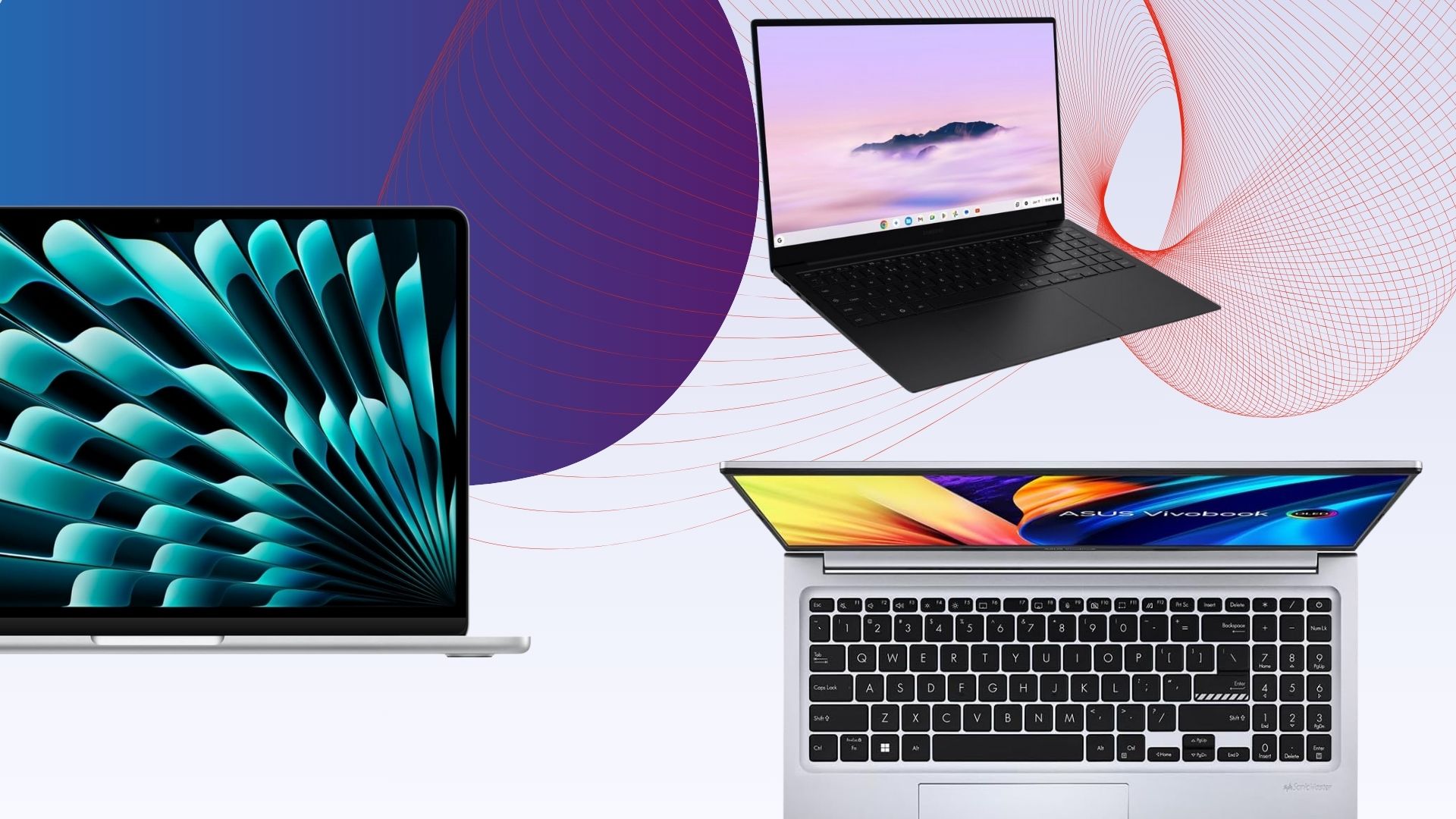

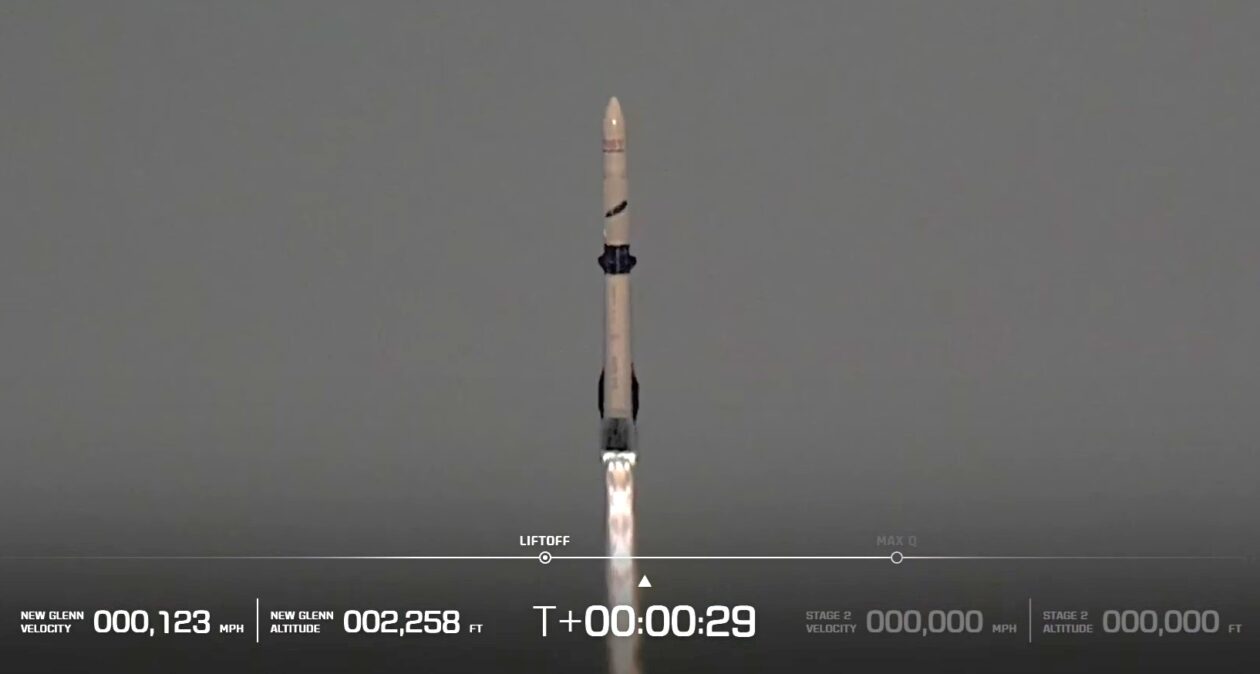





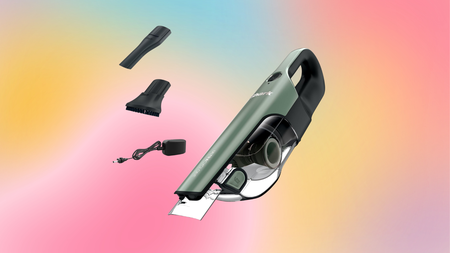





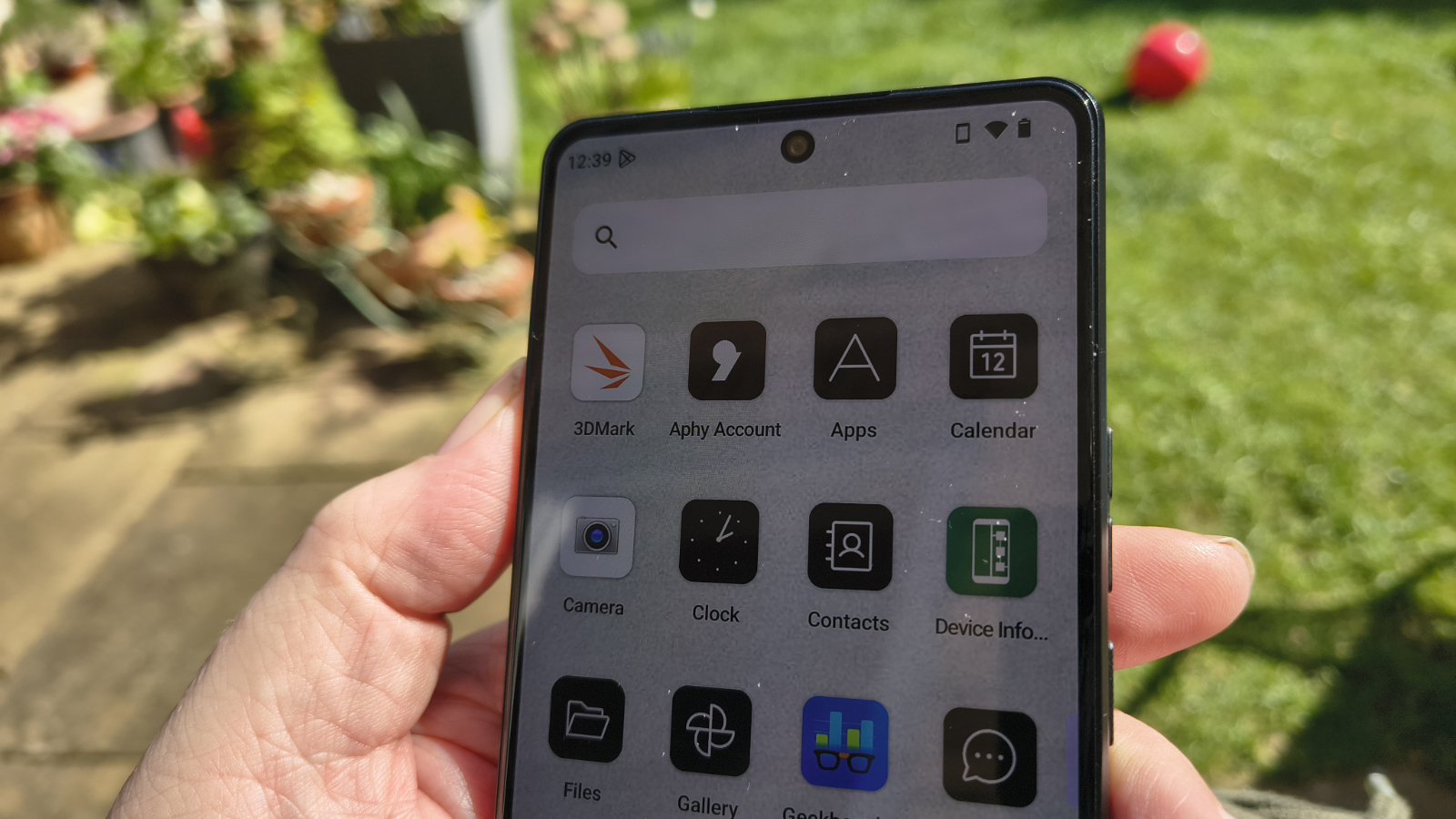
























































You must be logged in to post a comment Login