
Crypto World
Bitcoin’s volatility spikes to its highest since FTX’s collapse as prices crater to nearly $60,000



Bitcoin’s Wall Street-like fear gauge has spiked to its highest level since the collapse of the FTX exchange in 2022, signaling intense market panic as prices plummeted to nearly $60,000.
Volmex’s bitcoin volatility index (BVIV), which represents the annualized expected price turbulence over four weeks, jumped to nearly 100% from 56% on Thursday.
The index serves as a crypto equivalent to Cboe’s VIX, the so-called fear/panic gauge, which indicates the 30-day implied volatility of the S&P 500 and rises during market panics as traders bid up options prices to hedge against declines in the index.
The BVIV does the same more often than not, rising during market panics as observed on Thursday.
“A wave of panic swept through crypto markets this week, correlated to a sharp risk-off move across various asset classes. Bitcoin’s 30-day implied volatility, as measured by the BVIV Index, surged from just over 40 to 95 in a matter of days, levels not seen since the infamous collapse of FTX at the end of 2022,” Cole Kennelly, founder and CEO of Volmex Labs, told CoinDesk in a Telegram chat.
Implied volatility is influenced by demand for options, or derivative contracts that help traders make asymmetrical gains from uptrends in the underlying asset and hedge downside risks. Call options are used to bet on the upside, while put options are typically bought as insurance against price drops.
On Thursday, traders scrambled to buy Deribit-listed options, especially puts, as bitcoin’s price tanked from $70,000 to nearly $60,000. The top five most traded options of the past 24 hours are all puts at strikes ranging from $70,000 to $20,000, according to data source Deribit Metrics. The $20,000 put represents a bet that prices will fall below that level.
“Volatility markets reacted sharply to last night’s price drop. Front-end volatility surged as dealers adjusted for gamma [near-term risks]. Short-dated vols led the surge, showing higher demand for protection, while longer-dated vols lagged, keeping the volatility curve steeply inverted,” Jimmy Yang, co-founder of institutional liquidity provider Orbit Markets, told CoinDesk.
Yang’s clients rushed to buy downside protection, fearing the price crash could devastate digital asset treasuries that bought bitcoin at higher levels. These firms could now liquidate at a loss, leading to a deeper slide in bitcoin’s price.
“With significant uncertainty still ahead — particularly around the DATs and the risk of further unwind cascades, we’ve seen a lot of client demand for downside protection,” he added.
Bitcoin’s price has bounced to over $64,000 at the time of writing, an over 5% recovery from overnight lows, according to CoinDesk data. Yang expects volatility to stabilize.
“Sentiment is deep in extreme fear, but bitcoin’s price seems to have found a base near $60K. If price action stabilizes, volatility looks stretched and could quickly pull back,” he said.

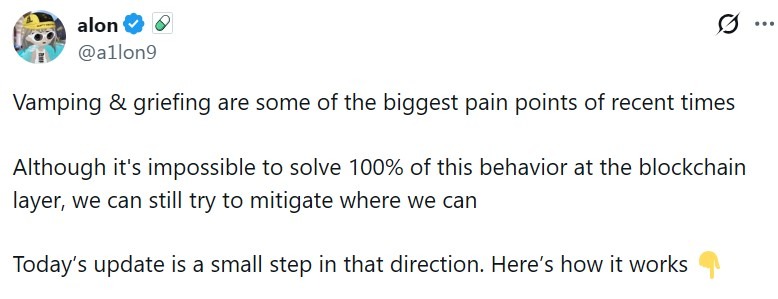
Memecoin launchpad Pump.fun introduced a new restriction on creator fee settings, limiting token deployers to a single post-launch change in how fees are distributed on the platform.
In a post on X, Pump.fun co-founder Alon Cohen said the update aims to reduce “griefing” — where creators alter fee recipients after a token gains traction — and other forms of manipulation tied to fee redirection, where token creators can alter who receives fees after a coin gains traction.
Under the change, each token will have one opportunity to redirect creator fees to a different wallet, after which the configuration becomes permanently locked.
Pump.fun’s latest update follows a broader overhaul announced in January, when the platform acknowledged that its creator-fee model had skewed incentives by disproportionately rewarding token deployers over traders.

Pump.fun’s broader attempts to shift incentives to traders
On Jan. 10, the platform introduced changes like multi-wallet distribution and post-launch controls, aiming to improve transparency and better align rewards with trading activity.
On Feb. 17, Pump.fun introduced “Cashback Coins,” requiring creators to choose at launch whether fees go to themselves or are redirected to traders, with that high-level model locked in once selected.
The change aimed to rebalance the distribution of rewards between token deployers and traders. However, while the overall fee model was fixed at launch, creators or coin admins could still adjust the specific wallets receiving those fees and how they were distributed after a token went live.
Related: ‘Hawk Tuah’ girl Haliey Welch says memecoin implosion ‘traumatized’ her
This meant that even if the model didn’t change, the underlying recipients could, creating potential trust issues for traders. The latest update narrows that flexibility by allowing only a single post-launch change to fee recipients, after which the configuration is permanently locked.
Early community reactions suggest the change may do little to address broader trading dynamics on the platform. X user gake said the change might not help much, while another user, tom, described it as a “drop in the bucket” that shows the team is at least acknowledging the issue.
Pump.fun activity drops as fees and volume fall year over year
Pump.fun’s shift in its incentive structure comes as its fees have declined from their peak. DefiLlama data shows that in January 2026, the platform recorded $31.8 million in fees, down about 75% from $148 million in January 2025, its best-performing month to date.
In February 2026, the platform recorded $25 million in revenue, down 66% from nearly $75 million in February 2025.

The platform’s trading volume has followed a similar pattern. According to DefiLlama, Pump.fun recorded monthly volume of over $11.6 billion in January 2025, which fell to about $2.1 billion in January 2026, a decline of roughly 81%.
In February 2026, monthly volume totaled about $1.91 billion, down 68% from $6.1 billion in February 2025.
Magazine: Animoca teams up with Ava Labs, Shrapnel on Steam: Web3 Gamer


Bhutan transferred more Bitcoin from a state-linked wallet on Wednesday, continuing a series of March outflows tied to its sovereign holdings.
Summary
- Bhutan moved 519.7 BTC on Wednesday, marking its third large sovereign wallet transfer this month.
- Arkham data showed Bhutan still held 4,453 BTC after the latest state-linked outflow this month.
- Bhutan continues expanding mining and reserve plans while trimming Bitcoin holdings through repeated March transfers.
Meanwhile, the latest move came as the country kept building its broader Bitcoin strategy through mining, infrastructure, and reserve planning. Arkham data showed that a Bhutan government-linked wallet moved about 519.7 BTC on Wednesday. The amount was worth about $36.7 million at the time of transfer. The funds went to two separate wallets.
Onchain Lens said one of the recipient wallets was linked to trading firm QCP Capital. The transfer added to market attention around Bhutan’s Bitcoin activity, as traders and analysts tracked movements from the country’s known sovereign wallet.
The latest transaction marked the third large Bitcoin move from the Bhutan-tagged wallet in March. It followed a $72 million transfer spread across six transactions in the 24 hours before March 18. The wallet also moved $11.8 million on March 9.
This recent pattern stood out against February activity. During that month, Bhutan moved just over 284 BTC. Arkham data showed the wallet still held 4,453 BTC worth around $315 million after the latest transfer. That total was down from more than 13,000 BTC recorded in October 2024.
As of March 12, Bhutan ranked as the fifth-largest country by Bitcoin holdings, based on an Arkham report. It trailed the United States government, the United Kingdom government, El Salvador, and the United Arab Emirates Royal Group.
The ranking kept Bhutan in focus because of its early and direct involvement in Bitcoin mining. Unlike many governments that acquired Bitcoin through seizures or law enforcement actions, Bhutan built part of its position through mining activity tied to state-backed operations.
Bitcoin strategy supports mining and development plans
Bhutan began adopting Bitcoin mining in 2019. Since then, it has developed mining operations powered by hydroelectric energy from its glacial river systems. The country has used its natural energy resources to support low-cost power generation for mining.
In May 2023, Bhutan’s sovereign wealth fund, Druk Holding and Investments, announced a $500 million partnership with Bitdeer to expand Bitcoin mining capacity. The strategy later expanded beyond mining. In December 2025, Bhutan said it would use part of its Bitcoin holdings to support construction in the Gelephu Mindfulness City.
That plan formed part of the country’s wider Bitcoin Development Pledge. On Jan. 8, 2026, Gelephu Mindfulness City also announced plans for a strategic crypto reserve that would include Bitcoin, Ether, and BNB. The latest wallet transfer came as Bhutan continued balancing asset movements with longer-term digital asset plans.
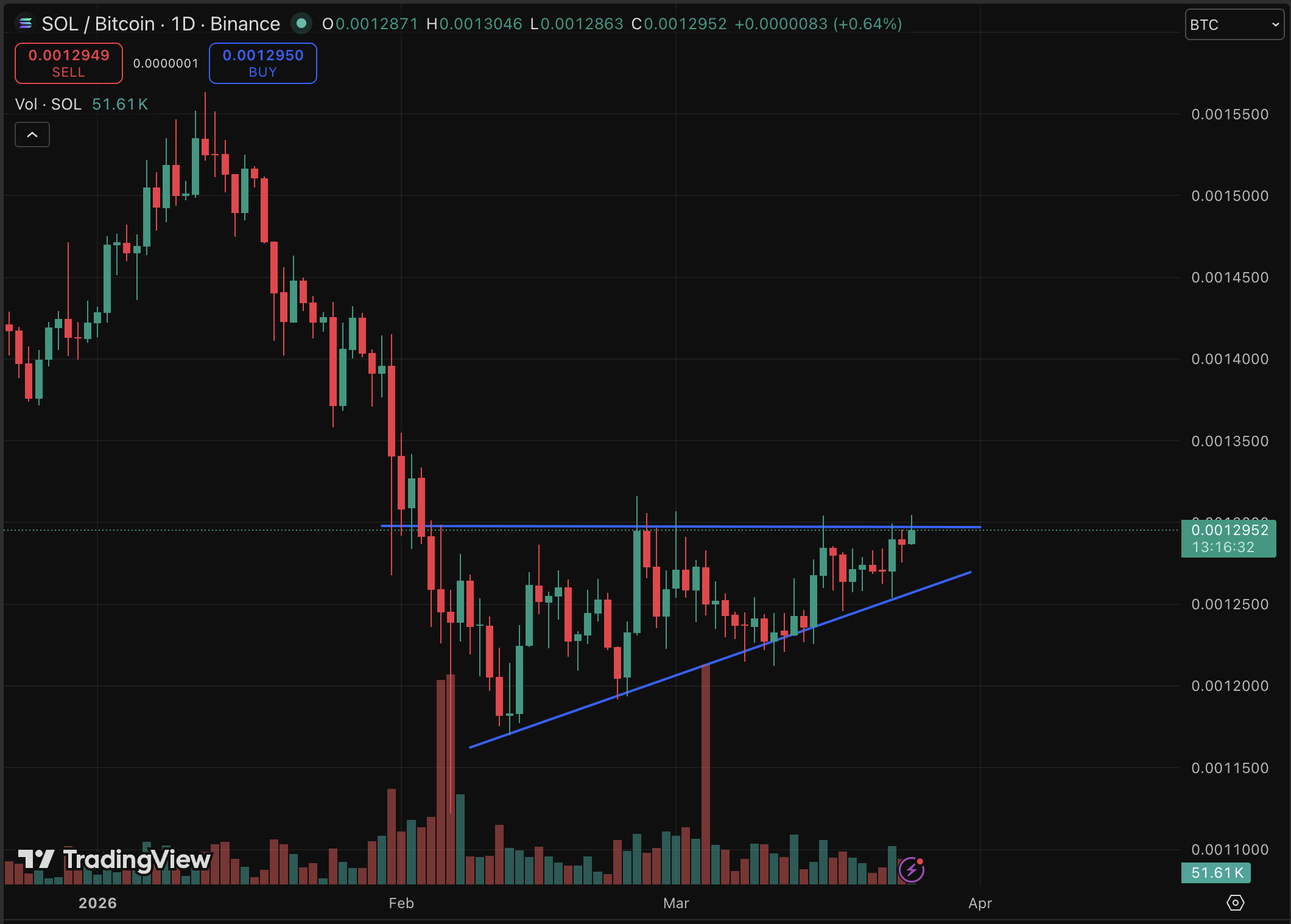
Solana price is fighting to hold crucial ground, currently trading between $90 and $ 93 as traders watch for a definitive directional move and a bullish prediction. Despite a sharp contraction in DEX volumes, technical structures against Bitcoin are flashing potential outperformance signals.
There is a tightening wedge pattern on the SOL/BTC pair, with the asset pushing against horizontal resistance while respecting a rising trendline. This setup, often a precursor to volatility, coincides with the anticipated Alpenglow consensus upgrade targeting sub-second finality. The market now faces a binary decision point: reclaim $100 or surrender the $80 psychological floor.

As liquidity rotates across the meme coin sector, Solana’s ability to maintain its position as the premier casino chain is under scrutiny due to contracting on-chain activity.
Discover: The best pre-launch token sales
Solana Price Prediction: Can SOL Reclaim $100 Before Month End?
The technical landscape for Solana remains precarious yet opportunistic. Currently hovering near $91, SOL faces immediate resistance at the Bollinger upper band of $92. A confirmed close above this level exposes the next targets at $98, effectively invalidating the bearish pressure accumulating since the January peak of $148.
Conversely, the downside carries significant risk; a head-and-shoulders pattern is also identified at 4 hours chart, and it suggests a breakdown below the $80 critical support could trigger a slide toward $59.

Momentum indicators offer little clarity, with the RSI oscillating between 51 and 55, a classic neutral consolidation signal. However, the SOL/BTC pairing tells a different story. A breakout attempt from a multi-month ascending triangle, suggesting capital may rotate back into Solana’s ecosystem if Bitcoin stabilizes above $72k.
Discover: The best crypto to diversify your portfolio with
Bitcoin Hyper Targets Early Mover Upside as Solana Tests Key Levels
While Solana battles strictly defined resistance levels with limited immediate upside, smart money is increasingly hunting for infrastructure plays with higher aggressive growth potential. The market’s appetite for speed is shifting toward the Bitcoin ecosystem itself.
Why settle for Solana’s volatility when you can access similar speeds on the world’s most secure blockchain?
From a humble beginning… — Bitcoin Hyper (@BTC_Hyper2) March 23, 2026
To Hyper Scale. 
 https://t.co/VNG0P4GuDo pic.twitter.com/TTkNzelKN3
Enter Bitcoin Hyper ($HYPER), the first-ever Bitcoin Layer 2 utilizing the Solana Virtual Machine (SVM). This project aims to solve Bitcoin’s notorious latency issues by delivering sub-second transaction speeds directly on the Bitcoin network, effectively bringing Solana’s programmability to Bitcoin’s security.
The presale data reflects massive institutional interest, with more than $32 million raised from early backers. Priced at just $0.0136, $HYPER offers a low-entry alternative and a 36% APY staking rewards.
With features like a Decentralized Canonical Bridge and significant staking APY, it targets the liquidity trapped in the BTC ecosystem.
Research the Bitcoin Hyper Presale
Disclaimer: This article is not financial advice. Cryptocurrency markets are highly volatile. Always do your own research (DYOR) before investing.
The post Solana Price Prediction: Is SOL Done? Will Memecoin Season Back to Solana? appeared first on Cryptonews.


- $90 acts as crucial support for a potential Solana price upward move.
- Rising short-term momentum supports a possible rebound.
- Breaking $100 could open the path toward $120.
Solana (SOL), currently trading at around $91.90, has been under immense bear pressure in recent months.
The token has seen a steady decline from its previous highs, but recent technical signals suggest a rebound could be in play.
The $90 level is emerging as a key support level, which, if held, could trigger a strong upward move.
Technical analysis
The immediate support level at $90 has been tested several times in recent weeks, and every time Solana approaches it, buyers have stepped in to prevent further declines.
Technical charts show that holding this level is critical since a break below it could lead to a pullback toward $77.

On the other hand, maintaining $90 provides a foundation for bulls to push higher.
Momentum indicators show a mixed picture, with shorter timeframe charts indicating growing strength, although some oscillators are still signalling caution.
This suggests that while there is potential for upward movement, the market is waiting for confirmation.
Trading volume has also picked up slightly in the past month, showing renewed interest among traders.
Yet, on-chain activity has dropped, indicating fewer transactions on the network.
This combination of higher trading volume and lower on-chain use points to speculative interest driving the short-term rally.
Why a rebound to $120 is possible
The combination of technical support, rising volume, and potential bullish momentum makes the $120 target realistic if $90 holds.
If Solana holds $90, the path to $96.47 is relatively clear.
Once $96.47 is broken and sustained, a move toward $120 becomes plausible.
This would represent a nearly 30% gain from current levels, making it an attractive scenario for bullish traders.
Historical patterns also support this possibility.
In previous cycles, Solana has seen rapid rallies after establishing such strong support levels.
Short-term momentum is improving, and daily momentum indicators such as Moving Average Convergence Divergence (MACD) and the Relative Strength Index (RSI) are turning more positive.
The MACD histogram is above the middle line, and the signal line has moved above the main MACD line, and the RSI has rebounded above 50 after a slight dip, signalling a possible rebound in the near term.
These suggest that buyers are gaining control, at least for the near term.
However, caution still remains since any failure at the resistance at $96.47 could lead to sideways trading or a complete collapse.
In addition, the market is sensitive to broader cryptocurrency trends, and a strong rebound in Bitcoin (BTC) and Ethereum (ETH) could further lift Solana’s price, while weakness in these coins could cap Solana’s gains.

A Thane magistrate court in India has granted bail to CoinDCX co-founders Sumit Gupta and Niraj Khandelwal after a 71 lakh rupee cheating complaint tied to a fake trading platform impersonating the Indian crypto exchange. The March 23 common order found no prima facie case against the founders, who were questioned and remanded over the weekend amid allegations they defrauded an investor. The court noted that the informant had admitted in court that another person, not the applicants, was involved in the fraudulent scheme and that an amicable settlement had been reached in the matter.
In a move that underscores the ongoing risk of impersonation in the crypto space, CoinDCX responded on March 24 via X (formerly Twitter), saying the proceedings reinforced a third‑party impersonation scenario. The firm emphasized that the fraud occurred on a counterfeit site, coindcx.pro, which has no connection to CoinDCX. The company urged users to verify domains and interact only with the exchange’s official platform and social profiles.
Key takeaways
- The Thane court granted bail to CoinDCX co-founders Sumit Gupta and Niraj Khandelwal after ruling there was no prima facie case, based on the information available at the initial stage of the investigation.
- The alleged fraud involved a lookalike site, coindcx.pro, described by CoinDCX as unaffiliated with the company, illustrating a broader impersonation risk facing Indian crypto platforms.
- Judges noted that the informant had filed an affidavit stating another accused, Rana, had repaid the cheated amount, and that the founders were not present at the café in Mumbra where the deal occurred. The matter was described as amicably settled, reducing the likelihood of evidence tampering claims.
- CoinDCX publicly framed the incident as a case of third‑party impersonation, reinforcing the need for users to verify domains and interact only with official channels to curb phishing and scam risk.
- The case highlights the ongoing tension between fast‑moving crypto‑sector growth in India and the persistent risk of brand impersonation, phishing, and counterfeit platforms targeting investors and users.
Legal framing: What the bail order reveals
The court’s order indicates that the investigation officer had “no objection” to releasing Gupta and Khandelwal on bail, a procedural signal often used when authorities see insufficient immediate evidence to justify continued detention. The magistrate also observed that the accused were not present at the location of the alleged offense and that the informant acknowledged in court that another individual could have represented themselves as the accused to defraud the investor. The “amicable settlement” between the informant and the principal accused further complicated the prosecution’s case, suggesting a potential resolution that could limit the scope of trial proceedings.
Both founders were released on bail upon a bond of 50,000 Indian rupees (about $530) with conditions to cooperate with the investigation and stand trial if required. While bail offers temporary relief from detention, it does not conclude the merits of the underlying allegations, and the case could proceed if prosecutors pursue further charges or uncover new evidence.
Impersonation, phishing, and the risk to users
The broader context of this episode is the rising incidence of impersonation and phishing aimed at India’s crypto ecosystem. CoinDCX’s statement frames the incident as part of a pattern in which fraudsters mimic well-known brands and create lookalike platforms to deceive investors. The company urged users to validate domain names, avoid responding to offers from unverified sources, and rely on the exchange’s official channels for trading and communications. For readers watching regulatory developments, this case underscores why incident‑response and security best practices are increasingly central to crypto firms’ operating models.
The incident also resonates with a wider industry concern: how to differentiate legitimate platforms from counterfeit sites, especially when the lookalikes copy branding and user interfaces with alarming fidelity. For investors and traders, the episode reinforces the practical need to scrutinize URLs, bookmark official sites, and remain vigilant against phishing attempts that can surface even when a high‑profile exchange is involved. CoinDCX’s emphasis on third‑party impersonation will likely feed into ongoing industry conversations about brand protection and user education as structural responses to fraud risk.
For those seeking more background on security best practices in crypto, industry observers often highlight the importance of confirming site authenticity and using hardware wallets for large holdings, in addition to platform‑level protections and verifications. As fraud schemes evolve, platforms may increasingly adopt stricter identity checks, domain monitoring, and rapid takedown processes to reduce exposure to impersonation. Readers can follow updates through official exchange communications and regulatory disclosures as the case unfolds.
Impact on CoinDCX and market trust
From a market trust perspective, the bail decision points to the complexity of policing a fast‑growing crypto landscape in which legitimate ventures are sometimes entangled with opportunistic fraud. While the court’s ruling removes a layer of immediate personal risk for the founders, the broader case keeps investors’ attention on the structural challenges of brand protection and consumer safety in crypto. CoinDCX’s public response—framing the incident as impersonation—seeks to reassure users while spotlighting the need for robust checks beyond a single exchange’s controls.
The case also intersects with ongoing regulatory discourse in India about crypto activity, consumer protection, and enforcement. As authorities sharpen their focus on compliant operations and risk controls, exchanges may face increased expectations to demonstrate transparent incident handling, rigorous verification processes, and proactive user education. For now,CoinDCX’s stance emphasizes that users should treat only official nodes of communication as authoritative and stay vigilant against lookalikes and spoofed platforms.
Readers should monitor subsequent updates from the court regarding the status of the investigation and any further filings. While the bail order provides temporary clarity on the personal risk to the founders, it does not close the door on potential civil or criminal follow‑ups, nor does it diminish the ongoing need for improved security protocols across the sector. The event serves as a reminder that, in crypto’s rapid expansion, legitimacy and trust hinge as much on governance and consumer safeguards as on product innovation.
CoinDCX’s March statements and the court’s March order together illustrate a broader narrative: as crypto platforms scale in India, the risk environment for users grows more complex, demanding heightened scrutiny of websites, vigilant due diligence, and continuous investor education. The industry will likely watch closely how enforcement bodies evolve their investigations and what technical and regulatory measures exchanges adopt to prevent impersonation and safeguard user funds.
What remains uncertain is how the case will proceed beyond the bail stage—whether prosecutors will pursue further charges or whether the amicable settlement will influence future proceedings. Investors and users should stay tuned for continued coverage of the investigation’s trajectory and any policy developments that could shape brand protection standards across India’s crypto landscape.
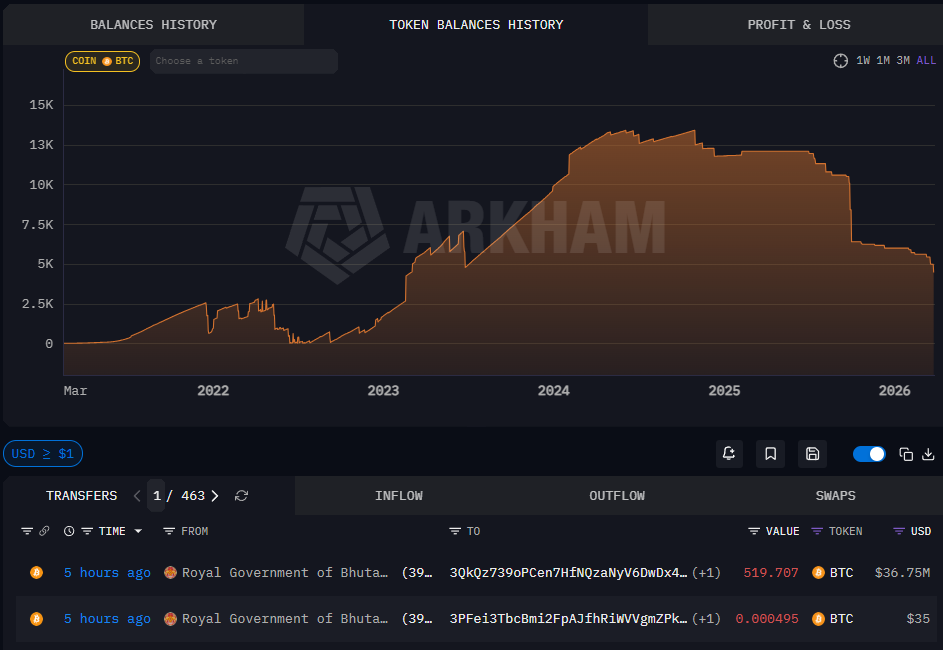
Bhutan moved more Bitcoin from its state-linked wallet on Wednesday, extending a March drawdown in its sovereign holdings.
Arkham data showed a Bhutan government-linked wallet transferred about 519.7 BTC, worth roughly $36.7 million, to two wallets on Wednesday. Onchain Lens said one of the destination wallets was linked to trading firm QCP Capital.
The move marked the Bhutan-tagged wallet’s third large Bitcoin transfer in March, following the $72 million moved in six separate transactions in the 24 hours leading up to March 18, and the $11.8 million moved on March 9.
The latest transfer adds to a heavier March outflow pattern after Bhutan moved just over 284 BTC in February. The wallet still holds 4,453 BTC worth around $315 million, down from over 13,000 BTC in October 2024, according to Arkham.

As of March 12, Bhutan was the fifth-largest country by Bitcoin holdings, behind the US government, the United Kingdom’s government, El Salvador, and the United Arab Emirates Royal Group, according to a report by Arkham.
Related: Bhutan deepens green Bitcoin strategy with Cumberland-backed infrastructure
Bhutan leverages Bitcoin mining to support its economic growth
Bhutan was among the earliest countries to adopt Bitcoin mining in 2019 and has since constructed multiple hydroelectric power plants along its glacial rivers to harness cheap hydroelectric power.
In May 2023, Bhutan’s sovereign wealth fund, Druk Holding and Investments, announced a $500 million partnership with Bitdeer to expand its Bitcoin mining operations.
In December 2025, Bhutan said it will tap into BTC from its stash to help build its special administrative region, the Gelephu Mindfulness City (GMC). The initiative is part of the wider national Bitcoin Development Pledge, which aims to support Bhutan’s long-term economic development through its Bitcoin holdings and mining operations.
On Jan. 8, 2026, Bhutan’s GMC revealed plans to set up a strategic cryptocurrency reserve comprising major tokens, including Bitcoin, Ether (ETH) and BNB (BNB).
Magazine: Big questions: Would Bitcoin survive a 10-year power outage?
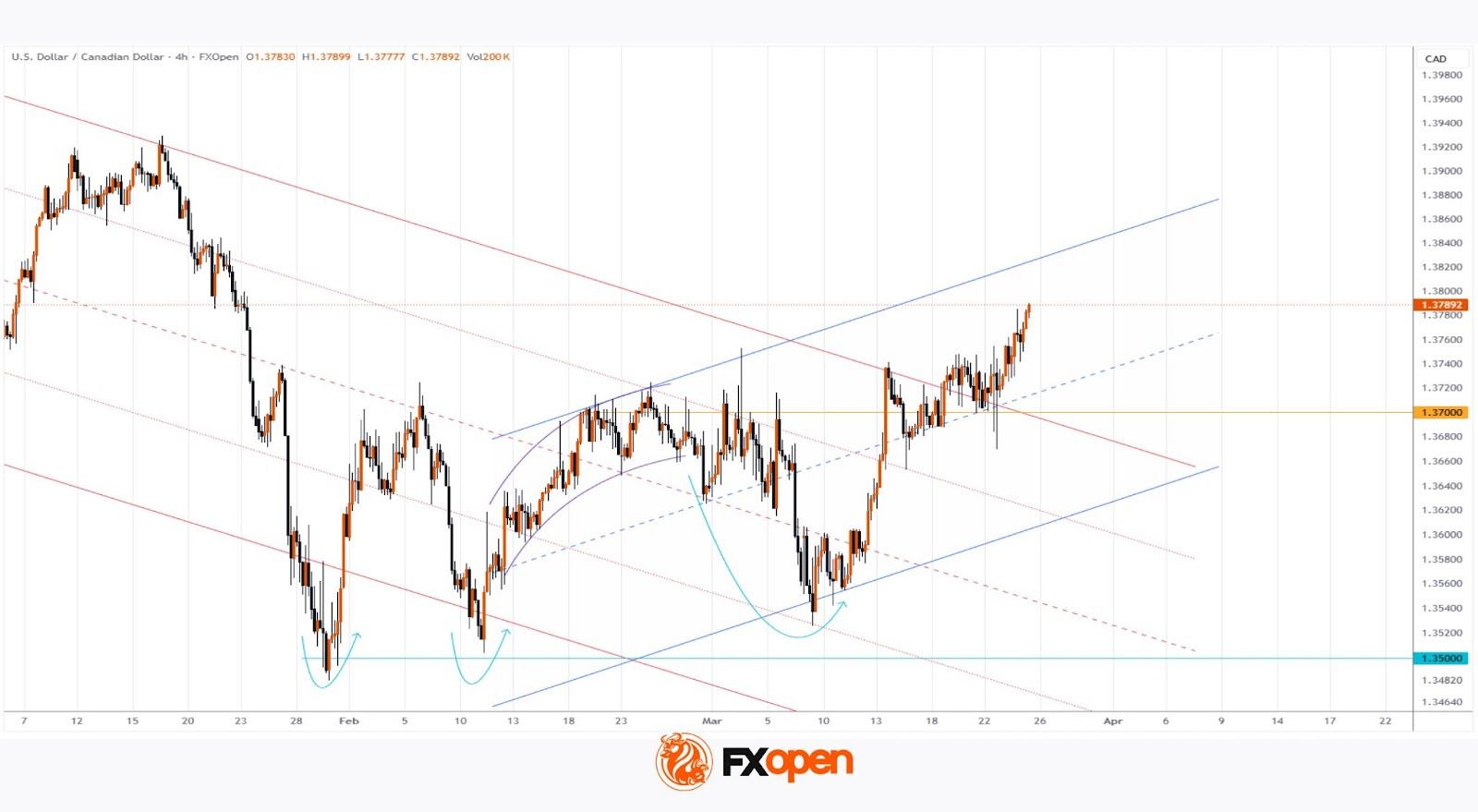
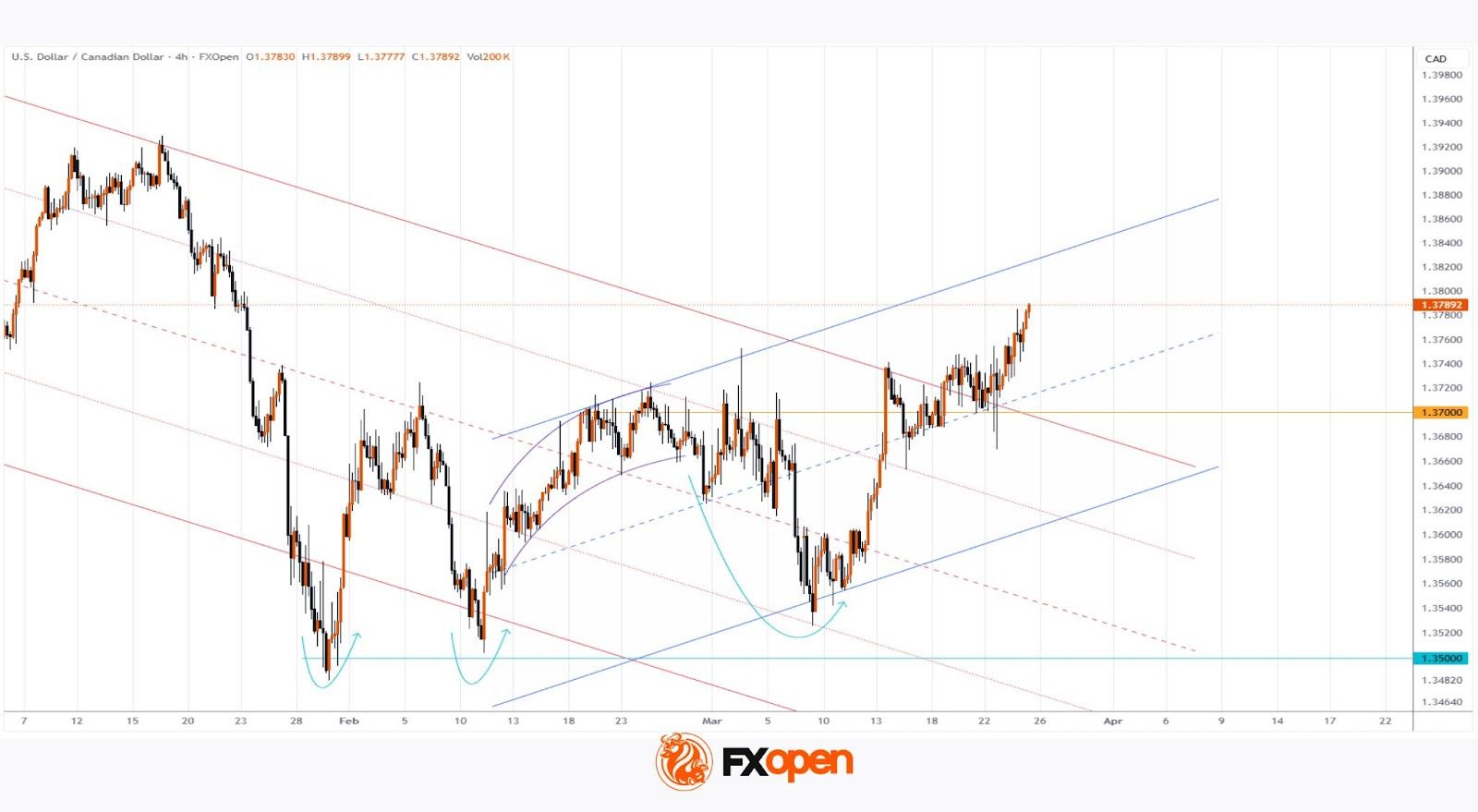
Today, the USD/CAD currency pair climbed above the 1.3787 level for the first time since late January.
→ Demand for the US dollar is being supported by concerns over escalating tensions in the Middle East. Market participants are favouring the USD as a safe-haven asset.
→ The Canadian dollar is under pressure due to domestic economic concerns. According to media reports, recent data point to weak GDP growth and a soft labour market. This increases the likelihood that the Bank of Canada will cut interest rates, while the Federal Reserve is expected to keep them unchanged.
Technical Analysis of USD/CAD
On 23 February, when the pair was trading around the 1.3700 level, we:
→ highlighted the ongoing long-term descending channel and the key support at 1.3500;
→ noted similarities with a rounding top pattern;
→ suggested a scenario in which bears might attempt to regain control and resume the longer-term downtrend.
Indeed, in the following sessions, USD/CAD showed signs of strong selling pressure, with the most pronounced move occurring on 9 March, when the pair dropped below 1.3530.
However, the onset of the Middle East conflict and other factors have significantly shifted market sentiment. The long-term descending channel has now been broken, suggesting that:
→ bulls have regained control of the market;
→ the pair may continue to develop within a newly formed ascending channel (shown in blue);
→ the 1.3700 level, which previously acted as resistance, may now serve as support going forward.
Trade over 50 forex markets 24 hours a day with FXOpen. Take advantage of low commissions, deep liquidity, and spreads from 0.0 pips (additional fees may apply). Open your FXOpen account now or learn more about trading forex with FXOpen.
This article represents the opinion of the Companies operating under the FXOpen brand only. It is not to be construed as an offer, solicitation, or recommendation with respect to products and services provided by the Companies operating under the FXOpen brand, nor is it to be considered financial advice.
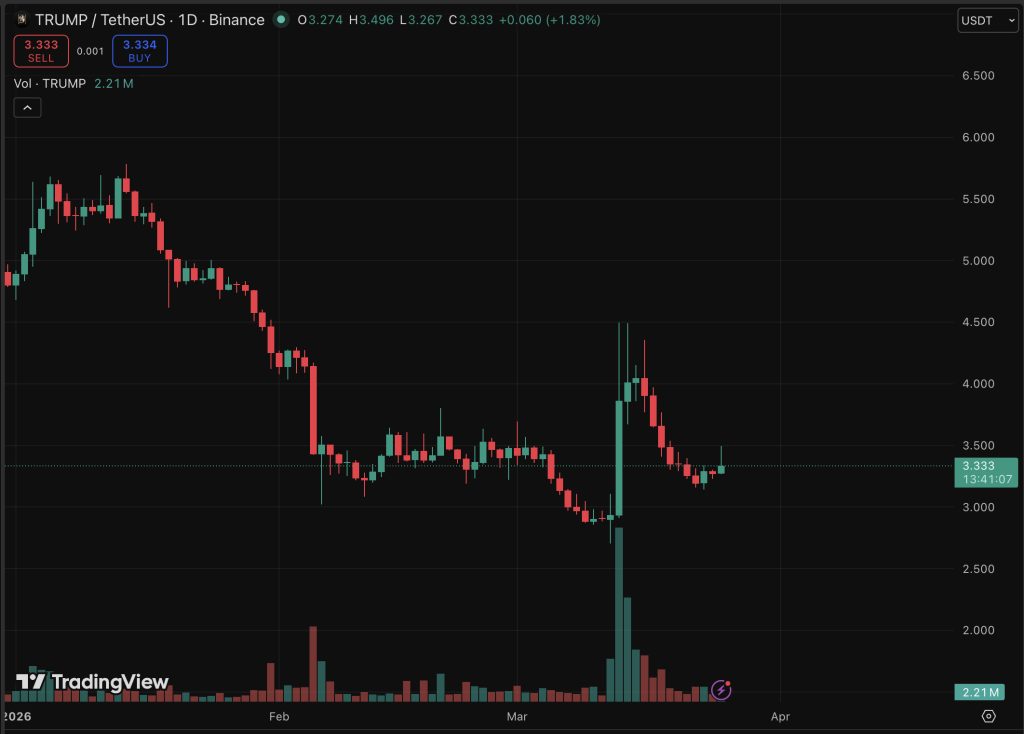
TRUMP crypto hangs precariously around the $3.34 mark, posting a deceptive 3.11% gain over the last 24 hours while trading volume plummeted by 8.84% to $145.36 million. The asset has shed 10% of its value in the past week, consolidating after a series of sharp corrections that have shaken holder confidence.
This divergence, rising price on falling volume, often signals a lack of conviction with the coin itself, occurring as the broader market navigates geopolitical tensions and extreme volatility. With technical indicators flashing conflicting signals, the immediate path remains ambiguous.
Discover: The best pre-launch token sales
Can TRUMP Crypto Recover or Is a Breakdown Imminent?
The technical structure for TRUMP is currently fragile. The asset is trading just above a critical support level at $3.30. A failure to hold this line could be catastrophic, potentially triggering a “death cross” scenario if the price slips below the $3.20 threshold. This bearish formation typically invites aggressive short-selling, which would deepen the correction significantly.
However, the data offers a glimmer of hope. The Relative Strength Index (RSI) sits at 56.44, indicating a mild bullish bias (some room to run), and the Bull Bear Power (BBP) reading of 0.133 suggests buyers retain a slight edge.
Yet, the broader money flow tells a different story. The Technical outlook is clouded by a Chaikin Money Flow (CMF) of -0.15, revealing that capital is actively exiting the asset despite the minor price bump. Additionally, the MACD and signal lines remain submerged below the zero line, confirming that bearish momentum still dominates the trend.

For a reversal to stick, bulls must push past the $3.37 resistance. A sustained close above this level could initiate a golden cross, driving the price toward $3.40. Without a surge in volume to back this move, however, any rally is likely to be sold into.
Discover: The best crypto to diversify your portfolio with
LiquidChain Targets Early Mover Upside as TRUMP Stagnates
While TRUMP holders anxiously watch the $3.31 support, smart money is increasingly rotating into utility-dense infrastructure plays that solve fundamental market fragmentation. Traders fatigued by meme coin volatility are pivoting toward projects like LiquidChain ($LIQUID), a Layer 3 protocol designed to unify the scattered liquidity of the crypto ecosystem.
Unlike speculative assets reliant on sentiment, LiquidChain fuses Bitcoin, Ethereum, and Solana liquidity into a single execution environment. The presale data confirms this demand: LiquidChain has already raised $600K as of right now.
A new layer emerges. Only a few see it first.
The future is LiquidChain⟁https://t.co/vqvBcdSj94 pic.twitter.com/R7ZeZ0NPGl
— LiquidChain (@getliquidchain) March 24, 2026
Currently priced at $0.0143, the entry point offers a huge 1700% APY staking rewards. With features like verifiable settlement and a unified liquidity layer, $LIQUID aims to be the connective tissue of the multi-chain future. The contract itself has been audited by Certik, the benchmark of crypto safety.
Research LiquidChain Presale Today
Disclaimer: Crypto is a high-risk asset class. This article is provided for informational purposes only and does not constitute financial advice.
The post Trump Crypto Price Test: A Bounce or A Downtrend Extension appeared first on Cryptonews.


Financial technology company Ripple said Wednesday it had joined the Monetary Authority of Singapore’s (MAS) BLOOM initiative with supply chain finance technology firm Unloq to test programmable cross-border trade settlement using the XRP Ledger and Ripple USD.
The pilot will use Unloq’s SC+ smart-contract-driven trade finance infrastructure, which integrates trade obligations, settlement conditions and financing workflow into a single execution layer. The pilot will also utilize Ripple’s XRP Ledger (XRPL) and its stablecoin designed for enterprise use cases, Ripple USD (RLUSD), the announcement states.
MAS launched BLOOM, short for Borderless, Liquid, Open, Online, Multi-currency, in October 2025 to extend settlement capabilities using tokenized bank liabilities and regulated stablecoins.
The pilot comes a little under four months after Ripple said MAS had approved an expanded scope of payment activities for the major payment institution license held by its Singapore subsidiary, Ripple Markets APAC, in December 2025.
Ripple and Unloq said the pilot will use digital settlement assets, including stablecoins and tokenized bank liabilities, with RLUSD payments released when predefined commercial conditions are met. The companies said the model is intended to improve visibility into settlement risk and support trade-finance access for smaller businesses.
Cointelegraph reached out to Ripple for comment on the timeline and details of the pilot initiative.
Related: Stablecoin issuers and fintechs race to own payment rails
Singapore embraces tokenization
Singapore has continued to expand its tokenization agenda across payments, settlement and capital markets.
On Nov. 13, 2025, MAS announced plans to issue tokenized MAS bills to primary dealers, which will be settled using its wholesale central bank digital currency. The central bank said it will share more details about this future trial in 2026.
A day later, on Nov. 14, MAS updated its Guide on Digital Token Offerings to clarify how Singapore’s Securities and Futures Act (SFA) applies to tokenized capital market products and issuing entities. The new guide included case studies, disclosure expectations, and pilot program criteria for the responsible development of tokenization initiatives.
Magazine: How crypto laws changed in 2025 — and how they’ll change in 2026
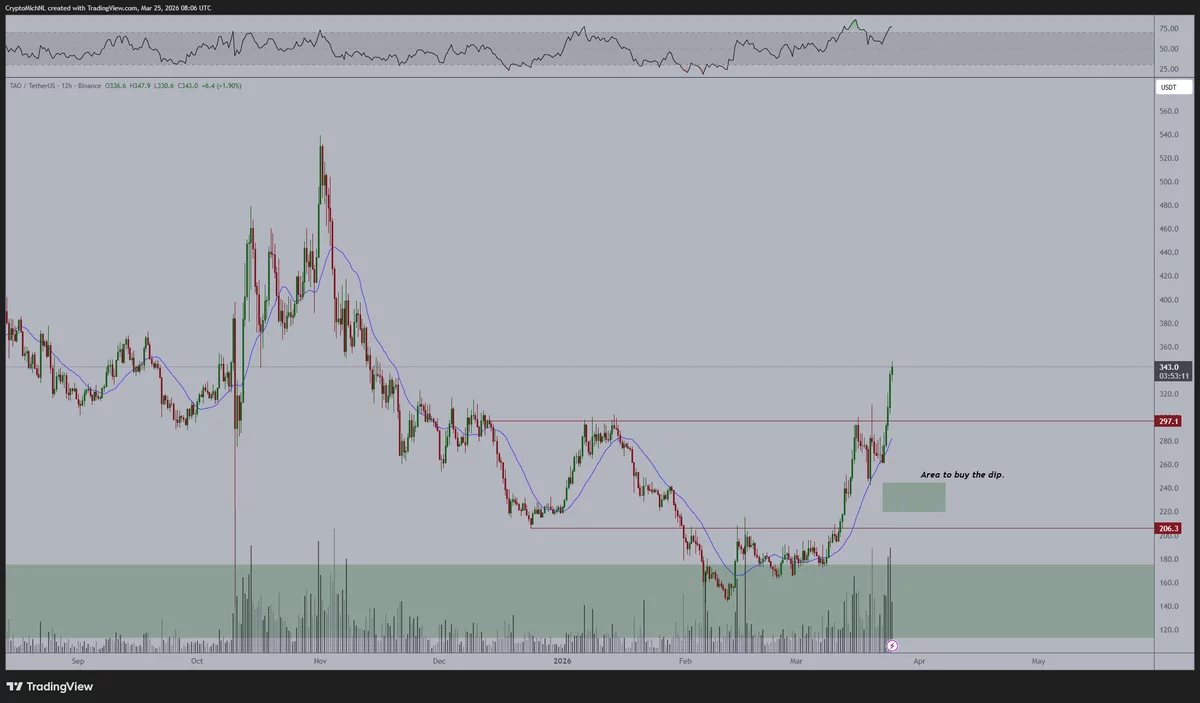
Bittensor’s native token TAO (TAO) moved higher on March 25 as traders tracked rising subnet activity, fresh staking data, and the network’s first halving event.
Summary
- AO rose to $350 as traders tracked subnet growth, halving effects, and stronger market activity.
- TAO staked across Bittensor subnets jumped past $620 million as the ecosystem expanded over months.
- Only part of TAO sits in subnets, leaving room for more rotation from Root staking.
Consequently, the token traded at $350 at press time, with a 24-hour trading volume of $887.8 million, a daily gain of 12%, and a seven-day increase of 25%.
The move came as Bittensor’s subnet ecosystem posted rapid growth over the past year. Market participants also watched new comments from analysts and ecosystem figures as TAO reached its highest level since November 2025.
Moreover, Bittensor held a market capitalization of $3.35 billion, based on a circulating supply of 9.6 million TAO. The token ranked among the better-performing digital assets in the top 100 by market value over the past 24 hours.
Recent gains followed a broader move that started earlier in March. TAO had already moved above $300 after Nvidia CEO Jensen Huang referred to the Covenant-72B model during an appearance on the All-In Podcast, while market data also pointed to buying pressure and a short squeeze during the run-up.
CryptoRank data showed that the total TAO staked across subnets rose from about $74,400 to more than $620 million over the past 12 months. The increase came as more users moved into subnet participation, which plays a central role in Bittensor’s decentralized AI network.
Network activity also grew through the number of subnets. The count rose from about 80 to more than 120 over the same period, while several subnet projects posted monthly gains, including Templar at 171%, Quasar at 146%, NOVA at 66%, Targon at 36%, and iota at 29%.
Most TAO still sits outside subnets
Despite the rise in subnet staking, a large share of TAO remains outside subnet allocations. Mark Jeffrey, partner at Bittensor Fund and Stillcore Capital, said only 19% of TAO is staked in subnets, while about 48% remains in Root. He said,
“Once the first subnet zooms to $1B+, I expect Root stakers will start rushing into Subnets. Even if NO NEW TAO is bought, Subnets could 3x or 4x just because of that alone.”
His comment pointed to the scale of capital that could rotate within the ecosystem without fresh buying.
In addition, CoinGecko said TAO gains came after the network completed its first halving event, which cut token emissions by half. The reduced issuance added a new catalyst as traders assessed supply dynamics alongside ecosystem growth.
Crypto analyst Michaël van de Poppe also commented on the move. He wrote,
“What an absolutely wonderful morning with the strength of $TAO. Again; it’s in a new bull run, higher lows, higher highs. Next area of resistance: $500.”
Disclosure: This article does not represent investment advice. The content and materials featured on this page are for educational purposes only.

NHL roundup: Connor McDavid hits 400-goal milestone in Oilers’ win

Spotify says AI slop is flooding your music feed, adds artist control tool

Crypto Trading LIVE: BTC Live Trading Bitcoin Analysis | 21 MAR #crypto #bitcoin #btc


-
 Crypto World4 days ago
NIO (NIO) Stock Plunges 6.5% as Shelf Registration Sparks Dilution Worries
-

 Fashion5 days ago
Weekend Open Thread: Adidas – Corporette.com
-

 Politics5 days ago
Jenni Murray, Long-Serving Woman’s Hour Presenter, Dies Aged 75
-

 Crypto World4 days ago
Best Crypto to Buy Now: Strategy Just Spent $1.57 Billion on Bitcoin During Fear While Early Investors Quietly Enter Pepeto for 150x Potential
-

 News Videos7 days ago
RBA board divided on rate cut, unusually buoyant share market | Finance Report | ABC NEWS
-

 Crypto World4 days ago
Bitcoin Price News: Bhutan Sells $72 Million in BTC Under Fiscal Pressure, but the Smart Money Entering Pepeto Sees What the Market Does Not
-

 Tech5 days ago
inKONBINI Lets You Spend Summer Days Behind the Register
-
 NewsBeat2 hours ago
Manchester United reach agreement with Casemiro over contract clause amid transfer speculation
-

 Crypto World7 days ago
Canada’s FINTRAC revokes registrations of 23 crypto MSBs in AML crackdown
-

 Sports2 days ago
Remo Stars and Kano Pillars Strengthen Survival Hopes in NPFL
-
 NewsBeat7 days ago
Residents in North Lanarkshire reminded to register to vote in Scottish Parliament Election
-

 News Videos7 days ago
PARLIAMENT OF MALAWI – PAC MEETING WITH REGISTRAR OF FINANCIAL ON AMARYLLIS HOTEL – INQUIRY LIVE
-

 Politics6 days ago
Gender equality discussions at UN face pushbacks and US resistance
-

 Business3 days ago
No Winner in March 21 Drawing as Prize Rolls to $133 Million for Next
-

 Business7 days ago
Who Was Alex Pretti? 5 Key Facts About the ICU Nurse Killed by Federal Agents in Minneapolis
-

 Sports2 days ago
Gary Kirsten Accuses Pakistan Cricket Board Of ‘Interference’, Mohsin Naqvi Responds
-

 Tech3 days ago
Give Your Phone a Huge (and Free) Upgrade by Switching to Another Keyboard
-

 Tech7 days ago
Inventec’s bizarre VeilBook laptop hides its touchpad under a sliding keyboard just to give cooling fans a little breathing room
-
 Sports5 days ago
2026 Kentucky Derby horses, odds, futures, preview, date: Expert who nailed 12 Derby-Oaks Doubles enters picks
-
Sports6 days ago
Vikings Free Agency Enters Phase 2 with Key Questions
You must be logged in to post a comment Login