



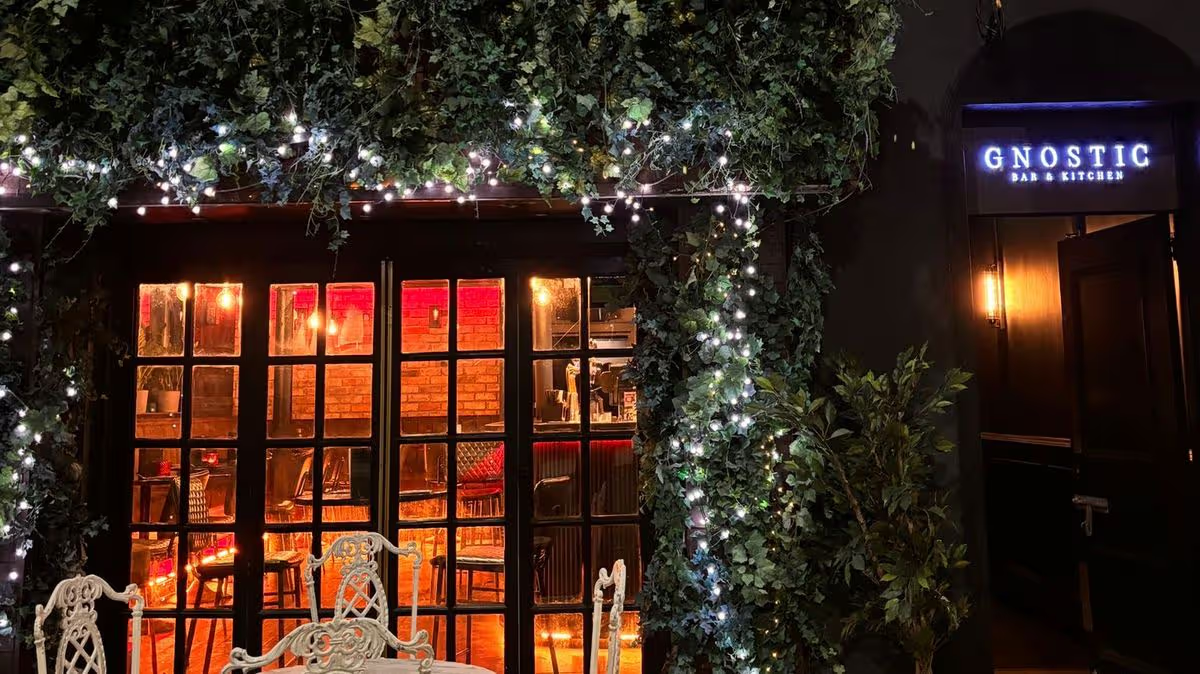
Situated down by the River Lagan, opposite the Harbour Commissioners Office, it may be a little out of the way of the heart of Belfast’s bar and restaurant scene, but don’t let that put you off
There was once a time when getting out for a meal in Belfast was a weekly occurrence for us and we would be quick to try the latest foodie spot.
But fast forward two children later and family life, as well as the crippling cost of living, means getting out for a meal together happens rarely.
So when it comes to picking a spot to try, we are fussy. You don’t want to waste your one night out on somewhere that won’t deliver.
Gnostic had been on our radar for a long time, coming highly recommended by family and friends. So when the opportunity arose to get out for the night, we decided it was time to give it a try.
Located down by the River Lagan, opposite the Harbour Commissioners Office, it is a little out of the way of our usual haunts in the city centre, but unlike many restaurants in Belfast, it opens on a Sunday night. This just so happened to be our night of freedom. The stars had aligned and it was time to tick this spot off our list.
What we ordered:
There was so much on the menu we wanted to sample, it was difficult to come to an agreement. It is divided up into meat, fish, veggie, slider and taco setions, with three choices in each. Due to the size of the portions, which aren’t exactly small, the waiter advised we get three plates and a side dish.
After much deliberation, we decided to go for the Crispy Pork Wonton, which came with a honey, soy, ginger dipping sauce (£15), the Curried Cauliflower, which came with onion bhaji, cauliflower puree and chimichurri (£14), Katsu chicken sliders (£12.50), and the BBQ pulled pork taco (£12.50).
We had planned to try the corn ribs side dish, which sounded amazing as it came with honey soy ginger, but they had sold out. It just gives us an excuse to return in the future.
What we liked:
The food definitely packs a punch flavour wise, which is exactly what I expected after hearing so many great things about this spot. I was surprised by the size of the plates. Our waiter had said they weren’t small but it was definitely a generous portion for the price, so what we ordered was more than enough. The honey, soy, ginger sauce with the pork wontons was delicious and I wasn’t wasting a drop of it.
I also loved our katsu chicken sliders, the Asian slaw that came with it was the perfect addition and again the size of the slider was very generous and we got one each.
What I would change:
It is a lovely, cosy and intimate spot, which was great, but at times I did think it was slightly too dark inside. It sounds like a silly thing to pick up on but as they say, you do eat with your eyes. Also, the presentation for the tacos could have been better. It didn’t have the same restaurant quality look as the other dishes, but they were delicious. I couldn’t fault the taste at all.
Apart from that, the food quality was great, the cocktails were delicious and we had a great time and would certainly return. I will say we were sat downstairs in the bar type setting, and perhaps the upstairs dining area is a different experience. It was definitely a more casual and relaxed dining experience, which we did enjoy.
How much it cost:
In total, our bill came to £105.16, which included a 10% service charge, and included our food and four cocktails. In total for the four dishes we tried, it was £54, which for a meal out for two I think it pretty standard. The size of the portions was generous as well, so I don’t begrudge paying that price per dish. Our cocktails were roughly £10 each, which again is pretty average for a night out in Belfast now. Overall, I think the price was spot on for the quality of the food, portion size and alcohol we purchased. We were also given a free shot at the end of the night, which was a nice touch.
I’m so glad we finally got to try this little gem. It’s been on our list of places to visit for a long time after hearing so many great things, now we can add our own experience to that list. The menu is so varied that we could return again and have an entirely different meal. I’m already visualising what I would pick on our next trip.
It may be a little out of the way of Belfast’s more central foodie areas, but I think it’s definitely worth the dander. Also if you don’t usually have an excuse to be in that area, then you can enjoy a walk through City Quays Gardens, which opened almost a year ago.
So if you are looking for somewhere new to try in the city, I highly recommend giving Gnostic a try.
In the interest of fairness and transparency, we pay for all the meals and drinks we review. This ensures that we are giving accurate and honest representations of the food and service that we receive. So, unless we state otherwise that we were invited down, we have paid for the meal ourselves and visited without the knowledge of the eatery, so you can trust our opinions aren’t skewed by a freebie.
For all the latest news, visit the Belfast Live homepage here and sign up to our daily newsletter here.

















































You must be logged in to post a comment Login