



Connect with us
DAPA Banner
DAPA Coin
DAPA
COIN PAYMENT ASSET
PRIVACY · BLOCKDAG · HOMOMORPHIC ENCRYPTION · RUST
ElGamal Encrypted MINE DAPA
🚫 GENESIS SOLD OUT
DAPAPAY COMING

Tech

Jedify raises $24M to help companies arm AI agents with context on their business

Published

on

AI vendors promote their enterprise products as if they’re turnkey solutions, but the chances are low that AI agents will hit the ground running right away. Unless you put in the effort to train a model on the specifics of your business, it’s unlikely to understand how your company, for example, defines revenue or knows who is allowed to see which file. That’s part of the reason why we’re seeing AI companies deploying engineers to help integrate their AI products into customers’ systems.

New York-based startup Jedify is attacking this very gap. The company says its platform connects to enterprises’ knowledge sources via APIs to build a “context graph” about their business that AI agents can use to work better. These sources can be databases, data warehouses and lakes, SaaS apps or BI tools, as well as unstructured sources such as reports, documentation, code bases, and even Slack channels and meeting recordings.

To build that out, Jedify has raised $24 million in a Series A funding round led by Norwest, TechCrunch has exclusively learned. The round saw participation from returning backers S Capital VC and Cerca Partners, as well as new investor Oceans Ventures. Data giant Snowflake also participated as a strategic investor and is integrating the startup’s tech with its AI products, such as its Cortex AI service, Semantic Views, and CoWork.

Jedify’s pitch is that to be useful within enterprises, AI agents need access to the relationships between entities, data, permissions, domain knowledge, workflows, operational assumptions, and company-specific terminology. This context, the company says, allows an AI agent to narrow its attention to the information that is relevant to a particular task instead of searching across everything a company has.

Advertisement

Co-founder and CEO Assaf Henkin (pictured above, on the far right) pointed to Kiteworks, a compliance company, as an example of how customers are using Jedify. Kiteworks connected Snowflake, Tableau, Notion, and internal playbooks, including documents and screenshots, to Jedify, then built agentic tools for different customer workflows.

“They wanted to arm their sellers and account teams with a sophisticated app — you can think of it as both like a dashboard application and a real-time conversational application. When they go into a customer conversation, Jedify builds for them, on the fly, everything they need to know. And during the conversation, they can, in real time, get very specific details surfaced proactively,” Henkin said. 

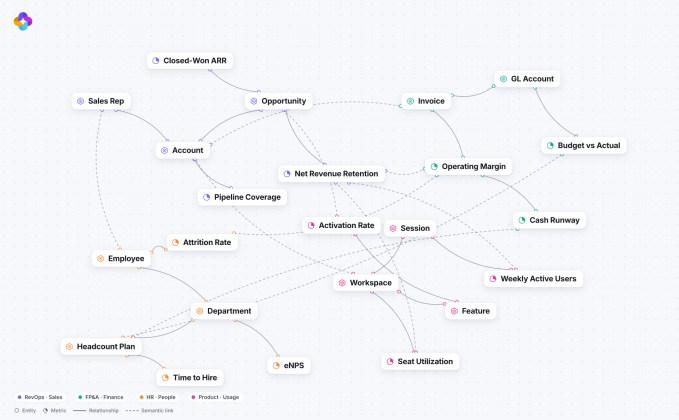
Jedify’s context graph. Image Credits: JedifyImage Credits:Jedify /

Henkin argues that Jedify’s context graph is different from the semantic layers, metadata catalogs, and knowledge graphs that companies already use because it is multi-dimensional, capturing relationships across entities, data, people, permissions, and customers. It’s also model-agnostic and updates in real time as information flows into and out of the systems it is connected to.

“When you want to enable an agentic solution to really be autonomous, to drive decisions across CRM data, Zendesk tickets, maybe telemetry data that’s coming in real time, that’s when a context graph is much better in terms of capabilities versus a semantic layer,” he said.

Permissions are an obvious hurdle here. It wouldn’t do for an agent to give an intern access to the CFO’s revenue projections, for example. Henkin said his platform works to address that by inheriting permissions from identity systems, file systems, SaaS tools, and databases, including row-, column-, and table-level access rules, then lets its customers create additional groups that define what and whom agents or workflows are allowed to reach. It also offers observability and governance tools to help customers ensure their AI agents are behaving as intended.

Advertisement

Jedify is currently targeting mid-market and large enterprise customers that have mature data stacks and multiple databases or data warehouses. Henkin said the company has between 10 and 20 early customers, one of which is The Weather Company, and is seeing interest from data-heavy sectors such as gaming, industrials, and consumer packaged goods.

Snowflake’s investment and partnership are notable because large data platforms are also trying to build similar capabilities. But Henkin argues that Jedify is complementary to such efforts because much of a company’s data, and most of its institutional knowledge, isn’t usually stored with a single cloud provider.


“[The large data companies] will tell you, ‘Oh yeah, just bring everything.’ But in reality, companies have multiple databases, and warehouses, and data solutions […] The big thing is that not all of your data is in those environments, and most of your knowledge is not there, so it’s a bit of a disadvantage that they actually have,” he said.

Henkin also noted that for companies trying to do this on their own, training an AI model to build a comparable context layer can be cost-prohibitive, especially as companies are scrutinizing and clamping down on their AI token usage.

Advertisement

And the rapid advances in AI model development play into the company’s broader bet: as models grow more capable and more interchangeable, proprietary context that helps those models work better within businesses could prove a valuable and durable moat.

The startup will use the fresh cash for product development, hiring, and go-to-market motion. It brings the firm’s total funding to about $33 million.

When you purchase through links in our articles, we may earn a small commission. This doesn’t affect our editorial independence.

Source link

Advertisement
Continue Reading
Click to comment

You must be logged in to post a comment Login

Leave a Reply

Tech

YouTube has revived direct messaging so you can finally share videos without leaving the app

Published

on

YouTube officially announced that its in-app video sharing and messaging feature is now rolling out to the US, UK, Brazil, and Singapore, bringing the total number of supported countries to 40.

The feature is available to users aged 18 and older who are logged into a YouTube channel. The rollout is gradual, so it may not appear in your app immediately.

How to DM on YouTube?

Once the feature is enabled for you, a messaging icon appears in the top right corner of the app. You can also share any video or Short directly from the Share button while watching.

The catch is that starting a conversation is not as simple as searching for someone. You have to send an invite link first, and that link must go out through a third-party app like WhatsApp, iMessage, or SMS. The other person then accepts the invite and gets added to your YouTube contacts. This extra step is designed to prevent spam and unwanted messages.

Once connected, you can send text messages freely, react to content in real time, unsend messages by long-pressing them, delete entire conversations, and block or report contacts if needed. The only media you can share inside the chat is YouTube content, including videos, livestreams, and Shorts. No images, GIFs, or files allowed.

Advertisement

Why is YouTube bringing messaging back now?

YouTube had a direct messaging feature in 2017, but it was quietly killed off in 2019. Now, it’s back once again in a much bigger way.

The feature has already been available in over 30 European countries since March 2026. YouTube says the positive response from countries where the feature was already live drove the decision to expand. Recently, the platform also added three new podcast features, but they are only for Premium subscribers.

Source link

Advertisement
Continue Reading

Tech

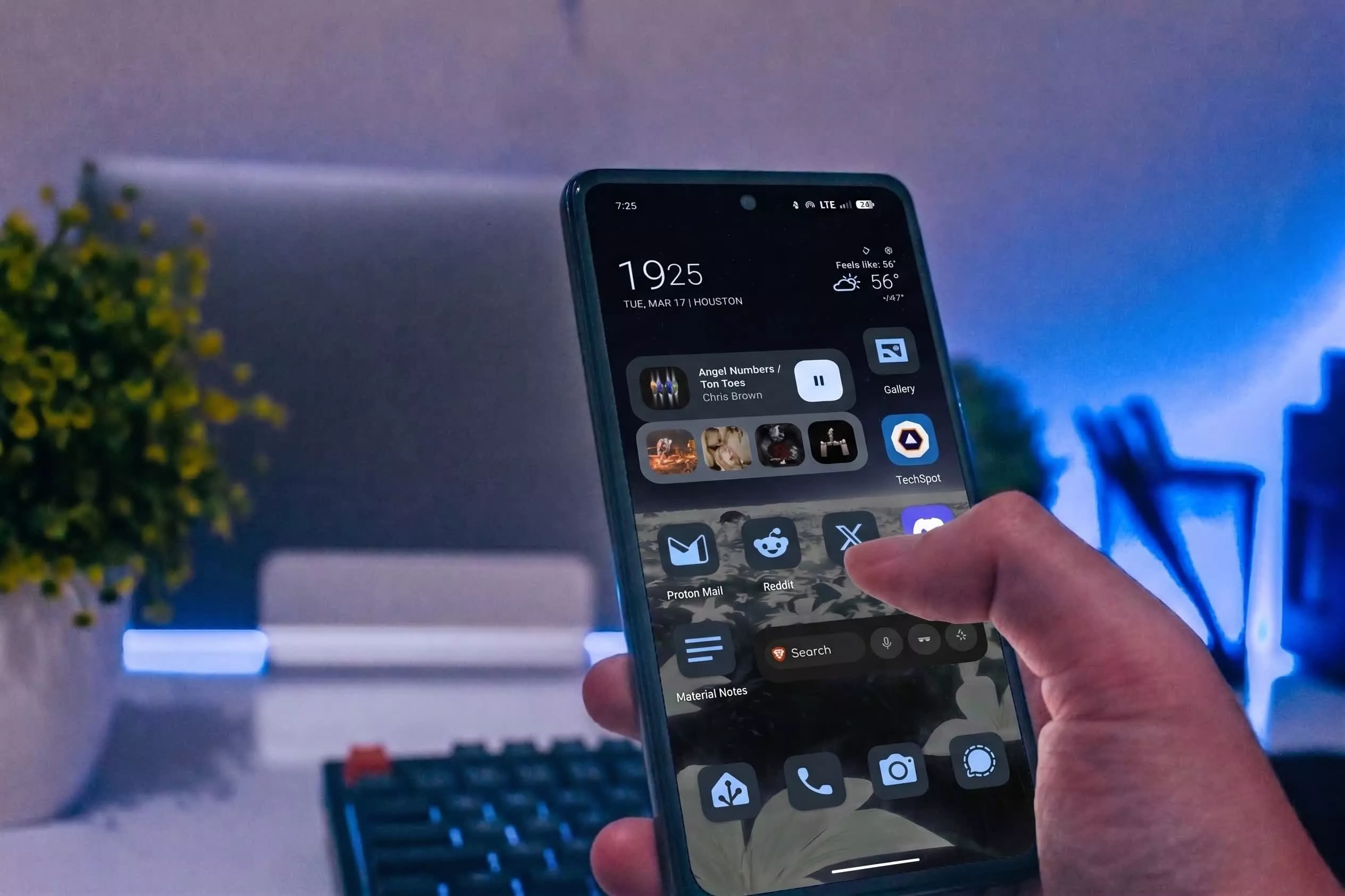
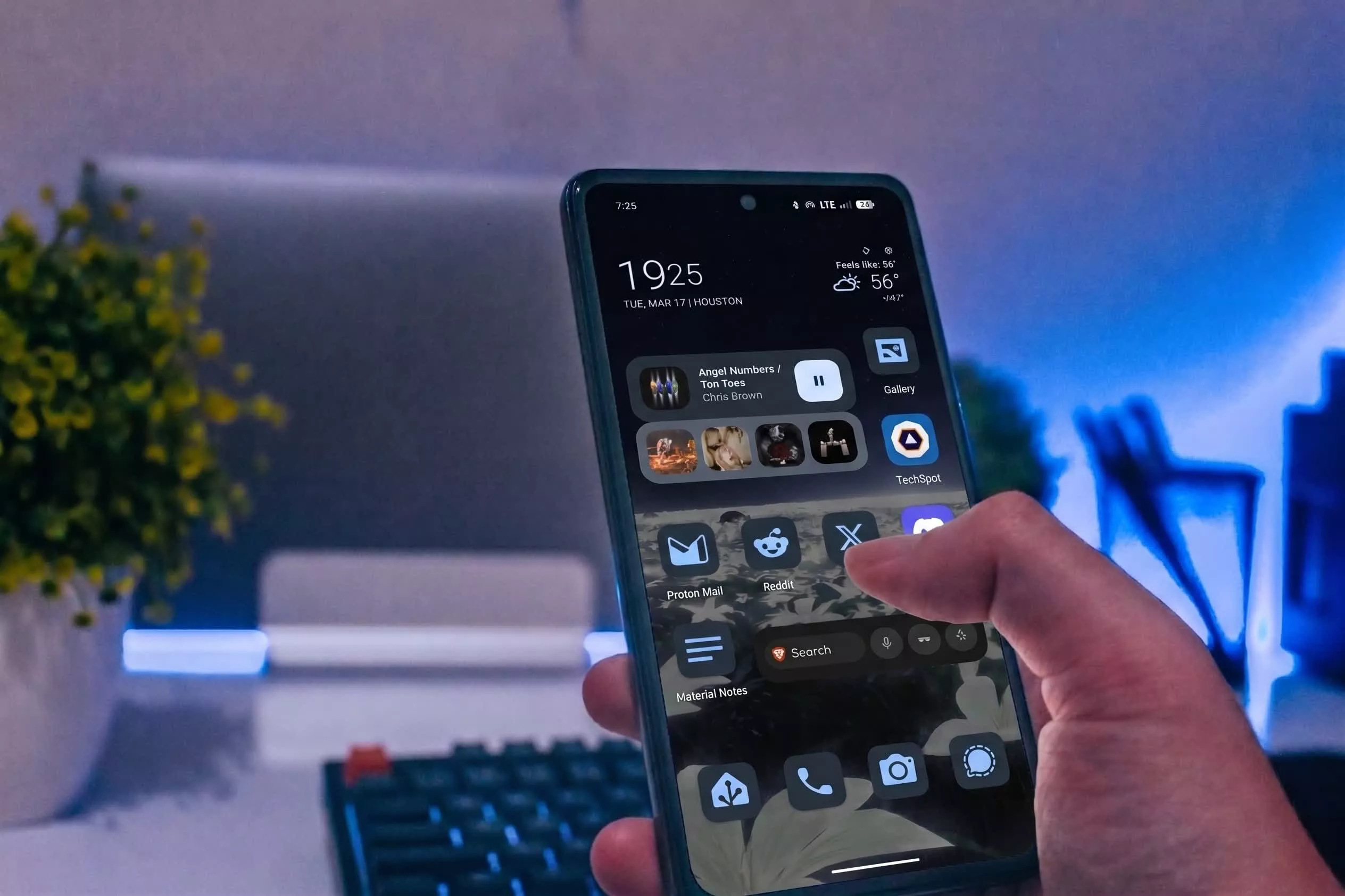
4 Of 2026’s Best Big-Screen Phones

Published

on


There was a time when smartphones rarely crossed the 5-inch mark. As the years have passed, though, screen sizes on smartphones have grown, with many devices now soaring past 6.5 inches. While there are still a handful of great compact phones, most mainstream devices are now designed around bigger screens that are generally better suited for content consumption and gaming.

Big smartphones also often pack in larger batteries, more powerful internals, and ample space for cooling. If you’re in the market for one, the good news is that you won’t have to look very hard. We’ve compiled a list of our favorite giant-screened smartphones you can buy in 2026. Since most devices — across different price points — sport screen sizes of 6.5 inches or more, we’re considering premium phones with displays measuring around 6.9 inches to be truly gigantic.

It’s worth noting that while foldables like the Galaxy Z Fold 7 technically unfold into tablet-sized displays, we’ve limited our picks to traditional candybar-style smartphones. This way, you still get to experience the perks of a larger screen without having to deal with the compromises that come with foldable smartphones. 

Advertisement

OnePlus 15

OnePlus might not be a household name in the U.S., but it enjoys a very loyal user base owing to its mantra of producing flagship-level hardware at comparatively affordable price points. The company’s flagship for 2026 is the OnePlus 15 — a $900 offering that rivals the likes of the iPhone 17 Pro and Galaxy S26 Ultra in terms of performance. It also happens to sport a generous 6.78-inch LTPO AMOLED display, with thin, uniform bezels all around and a tiny notch to house the front-facing camera.

If you’re looking to maximize screen real estate for movies you’re watching or games you’re playing, the OnePlus 15 provides an excellent experience. The display’s hallmark feature this year is its ability to hit 165Hz in supported games. Being backed by the Snapdragon 8 Elite Gen 5 SoC, the OnePlus 15 is probably one of the most powerful smartphones you can buy currently that makes good use of its internals.

Advertisement

The display also supports HDR10+ and Dolby Vision and gets plenty bright outdoors with a peak brightness of 1,800 nits. Furthermore, OxygenOS remains one of the smoothest ways to experience Android. In our review of the OnePlus 15, we were particularly impressed with its 7,300 mAh silicon carbon battery, which lasted much longer than a single day in our test. The bundled 80W (or 120W in certain regions) SuperVOOC fast charger is simply the cherry on top.

Advertisement

Google Pixel 10 Pro XL

At 6.8 inches, the Pixel 10 Pro XL by Google certainly lives up to its name. While Pixel smartphones aren’t necessarily known for their outright performance or endurance, they are a great option for those looking to enjoy Android in its purest form. Priced at $1,200, the Pixel 10 Pro XL features an LTPO OLED display that can hit refresh rates up to 120Hz. Google calls it a Super Actua display, which is just a fancy way of saying it can get really bright outdoors, with the display capable of up to 3,300 nits of peak brightness.

The bezels aren’t as slim as other flagships, but they’re uniform and are accompanied by a small enough notch for the front-facing camera. If you’re eyeing a Pixel, you’re likely doing it for the software experience and camera performance, both of which, as we’ve discussed in our review of the Pixel 10 Pro XL, are still among the best in the industry. Google promises up to seven years of major operating system updates, which include frequent Pixel Drops that introduce exciting new features.

Advertisement

Apple iPhone 17 Pro Max

Apple went from releasing one or two smartphones a year to maintaining an entire fleet of iPhones — from the affordable iPhone 17e to the design-focused iPhone Air. The top-of-the-line iPhone 17 Pro Max is the most powerful smartphone the company sells, and it also happens to be the largest. It sports a mammoth 6.9-inch Super Retina XDR OLED display with a peak brightness of 3,000 nits. There’s support for HDR10 and Dolby Vision, and since this is a ProMotion panel, you get a 120Hz refresh rate, too.

Surprisingly, even with a much bigger notch that houses the Face ID scanner in addition to the front-facing camera, the iPhone 17 Pro Max boasts a higher screen-to-body ratio compared to the Pixel 10 Pro XL, thanks to its ultra-slim uniform bezels. The notch does get in the way when viewing widescreen movies, but human eyes are remarkably good at tuning it out in a few minutes. Besides,  the Dynamic Island housed in that notch offers some genuinely useful ways to interact with Live Activities on the iPhone.

Pricing starts at $1,200, which gets you Apple’s most powerful smartphone chip, the A19 Pro. Aside from its screen and performance, our review of the iPhone 17 Pro Max also found that its triple-camera setup is great at capturing natural-looking photos and that the phone’s large battery lasts all day. Apple is also great with OS updates, with the iOS 27 update scheduled for fall 2026 promising performance and stability improvements and an updated version of Siri.

Advertisement

Samsung Galaxy S26 Ultra

If you’re in the market for a high-octane Android phone with reliable cameras, the Galaxy S26 Ultra is difficult to beat. It’s powered by the Snapdragon 8 Elite Gen 5 chip and houses a quad-camera setup on the rear, including a 200-megapixel primary lens, two telephoto lenses, and an ultrawide sensor. Also impossible to ignore on every Galaxy S Ultra flagship is the display. This time, you get a giant 6.9-inch 120Hz AMOLED panel with a peak brightness of 2,600 nits. The display has slim bezels and a tiny hole-punch cutout for the front-facing camera.

The Galaxy S26 Ultra also offers an anti-reflective coating, which helps reduce glare when using it under harsh lighting. We’ve reviewed previous generations of the Galaxy S Ultra before, and although the changes have been pretty incremental since, it continues to offer some of the best multimedia experiences you can get on a smartphone.

Samsung’s flagship also has something that every other mainstream smartphone, irrespective of screen size, lacks — a built-in stylus. The S Pen is a great way to make the most of the Galaxy S26 Ultra’s massive display for taking notes, doodling, or simply editing images with greater precision. On top of that, Samsung’s Galaxy AI features continue to grow, and the manufacturer promises up to seven years of OS updates as well. Pricing starts at $1,300, making it as expensive as it is big.

Advertisement


Source link

Advertisement
Continue Reading

Tech

AI The Truly Environmentally Friendly Way

Published

on

A common complaint about the rise of commercial AI services is that they are power-hungry and thus damage the environment. If this concerns you then [Squeezlabs] has the solution, in the form of an AI powered by a handcrank.

The guts of the system is a Raspberry Pi 5 running llama.cpp and appropriate speech conversions, but it and the Large Language Model (LLM) side are not the most interesting part of this system. The power comes from a hand crank charger of the type you’ll see for sale on the likes of AliExpress, designed for USB charging. That in itself is not enough to power the Pi though, as upticks in the processing can cause brownouts that crash the machine. Thus there’s a custom-made capacitor board to take up the strain, and even with that the handle resistance varies significantly depending on the computing load.

We can see that this is not the ideal way to experience an LLM, but maybe that’s not the point. It does however point towards a future in which the power demands of processing decrease and less effort is required. Meanwhile, this is by no means the first hand cranked project we’ve seen.

Source link

Advertisement
Continue Reading

Tech

If Your Car Has A Snowflake Button Near The Gear Shift, Here’s What It Does

Published

on


Depending on the car you have and the region it’s sold in, you may have spotted a little snowflake button sitting somewhere near your gear shift. You might be wondering what it does, and even more so if you’ve also got another snowflake button in your car, sitting near the climate controls. The short answer is that it turns on a dedicated Snow Mode, a driver setting that tunes your car for snowy and slippery conditions.

In that kind of weather, it’s very easy for your wheels to spin too quickly and lose traction, so to make up for that, Snow Mode makes your car slower to react when your foot lands on the accelerator. At the same time, the transmission changes its habits, shifting into higher gears earlier than normal – so early, in fact, that it sometimes pulls away in second gear rather than first. Even the traction control, which you should never turn off, gets jumpier and steps in sooner, especially when it senses a wheel losing grip. In Hyundai’s version (available on the Tucson, Venue, and Santa Fe), the wheel spin is checked every fiftieth of a second, and if one tire starts to slide, it quietly shuffles torque over to the others, helping keep you pointed where you actually meant to go.

Advertisement

Snow mode comes in various flavors

Of course, plenty of other brands offer the mode besides Hyundai. On Toyota and Lexus, you actually get proper buttons. Hop into a Highlander, for instance, and you’ll see a Snow button right on the center console, sometimes badged ECT Snow. Lexus uses a near-identical button or switch. Subaru runs its own take too, only it badges the whole thing X-Mode instead of Snow. It’s actually mostly older cars that slap the snowflake symbol on the button, though, like the Saturn Astra.

Advertisement

On most other brands, the snow mode is tucked in alongside their other drive modes. Hyundai routes it through Drive Mode Select, while Ford spins it onto a rotary dial, where it’s sometimes called Slippery Mode. Then there’s Land Rover, which folds it into a combined Grass, Gravel and Snow setting. The mode may be badged differently as well, like Winter or a plain W. On newer models, you may not get any physical button or dial at all and might have to dig through the touchscreen menus to find it. However it’s presented, it basically works the same way across companies, mostly softening the throttle and reining in wheelspin.

Advertisement

When to use snow mode

As for when to use it, the rule of thumb is pretty simple. It’s meant to be flipped on the moment the road turns nasty, whether that’s fresh snow, packed ice, or freezing rain. It also helps when you’re crawling up a slick hill. And some folks even use it in mud, if there’s no dedicated mode for that, since the same low-grip logic applies. The setting is usually pretty flexible too, and you don’t necessarily have to be parked to switch it on. Volkswagen, for one, lets you jump into Snow Mode mid-drive.

As for the other side of things, the mode doesn’t do anything that’d make it unsafe under normal conditions. Still, running it then is pointless since it dulls your acceleration and quietly eats into your fuel economy, so it’s best to flip it off once the pavement is dry. Just keep in mind that it isn’t magic. All it really does is make your car a bit less excitable so it doesn’t get away from you. It won’t save bald tires or rescue you off a sheet of ice. For those more extreme cases, you’d be better off fitting your tires with some of the best tire chains.

Advertisement


Source link

Continue Reading

Tech

YouTube and FIFA Expand World Cup Partnership With Inaugural Creator Cup Match

Published

on

Earlier this year, FIFA named YouTube a preferred partner for experiencing the World Cup 2026. On Wednesday, the next step in this partnership was announced, with the inaugural YouTube FIFA Creator Cup. It’s an exhibition match that’ll feature popular content creators from the platform, as well as athletes and celebrities. It’ll take place in New York City on July 12, ahead of the FIFA World Cup Final.

The Creator Cup is the latest step in FIFA’s moves to broaden soccer’s appeal through creator-involved content, potentially reaching the platform’s digital audience. The creators, athletes and celebrities competing in the match will be announced closer to the date.

Being a FIFA preferred partner means YouTube will, for the first time ever, broadcast unique World Cup-themed coverage — including the ability for viewers to stream the first 10 minutes of each game live on approved creators’ channels. 

Advertisement

The roster of approved creators includes: Anwar JibawiAra y FerAshley AlexanderCeline DeptCourtreezyDeestroyingHaley KalilHorchata SotoHowieazyJeenie WeenieJenny HoyosJesserKelly WakasaKika KimKYLECTRIXKwak YoongyMax the Meat GuyNeagleNoor StarsThe SidemenSonrixsTokaiOnAirRYOViniblogger and Zhong.

According to the platform, these creators have collectively amassed more than 350 million subscribers, all specializing in different content niches from sports analysis to food features, social challenges and travel videos. This means you’ll have an array of options to choose from for unique programming featuring your favorite YouTube personalities, all while still getting your World Cup fix.

A YouTube spokesperson didn’t immediately respond to our request for further comment.

Advertisement

Source link

Continue Reading

Tech

Why the Social Media Addiction Case Isn’t Over Yet

Published

on

Algorithms. Beauty filters. Endless scrolling.

The case over “social media addiction” against Meta and Google in a California courtroom ultimately came down to these elements, legal experts say, and what a jury found was negligence on social media companies’ part when designing apps where tweens and teens would come to spend roughly one-fifth of their day.

Joseph McNally, former federal prosecutor and director of Emerging Torts and Litigation at McNicholas & McNicholas in California, says jurors agreed with the novel legal argument that Meta and Google were negligent in their design of Instagram and YouTube, respectively, contributing to the mental health problems of the plaintiff. Parent companies of Snapchat and TikTok settled with the plaintiffs before the trial.

McNally and other experts tell EdSurge the verdict will affect thousands of similar cases and influence how tech companies roll out their features — and that the legal tussle over where liability falls when it comes to youth mental health isn’t over yet. With the social media giants vowing to appeal, the case could end up before the U.S. Supreme Court.

Advertisement

Email Evidence

The impact left by the presentation of internal company emails was undeniable, McNally says. Internal Meta communications showed that employees raised alarms about the potential harm to teen girls posed by a beauty filter. Documents also showed they knew that users much younger than 13 — the minimum age required for sign up — were on their platforms, he adds.

“They looked the other way because — the plaintiffs argued — they had a long-term benefit, long-term value of hooking those users early,” McNally says. “I think that the emails painted a picture of a company whose own employees were raising concerns about features in the product, and the plaintiff effectively used those emails to show that they knew about the risk of the product.”

“Addictive” Design

If Meta and Google had settled, the court wouldn’t have had cause to grapple with the legal question of whether social media companies can be held liable for harm caused by their design. But from the defense’s perspective, tech companies had been solidly protected by Section 230 in the past, explains Princess Uchekwe, corporate attorney and founder of The Chief Counsel in New York. That’s the part of the 1996 Communications Decency Act that shields websites and online platforms from being sued over content posted by users.

Just one day before the California verdict, a New Mexico jury found Meta liable in a $375 million consumer protection lawsuit over its failure to protect children from social media harm on its platforms.

Advertisement

“What the lawyers for the plaintiffs were arguing is, essentially, it’s not the content that we have a problem with,” Uchekwe says, “It’s the fact that when people use your platform, you have implemented certain features that make it almost impossible for people to leave. You can scroll into the bottomless pit of hell on Instagram, and nothing ever tells you, ‘Maybe you should pause.’”

NEWSLETTERS

STAY AHEAD IN EDUCATION.

Sign up for EdSurge newsletters for timely news, insights and analysis.

The Appeal of an Appeal

The $6 million in damages is a drop in the bucket for the two social media giants, but McNally says there are potential benefits to appealing the ruling anyway. There are thousands more consumer lawsuits against social media companies around the country, with school districts joining as plaintiffs.

Advertisement

One is that an appellate court might find that the long-time protections that social media companies have relied on should have come into play. The verdict barreled through the defenses raised by Section 230, which protects platforms from claims of harm caused by third-party content. It’s a policy that makes a free and open internet possible.

“[Section] 230 has resulted in the dismissal of hundreds of lawsuits over the years where they would’ve otherwise faced hundreds of millions of dollars in liability,” McNally says. “An appeal [based on] Section 230, which is a federal statute, could make its way up to the Supreme Court, who would have the final word on the scope. [If the] court of appeals remanded it back to the trial court and said, ‘Look, Section 230 applies,’ it would essentially bar these claims [of harm caused by the design].”

Uchekwe says failure to win an appeal could be “almost devastating” for tech companies due to the sheer amount of damages they could have to pay across thousands of similar lawsuits, along with the cost of restructuring how their apps function. That could mean rethinking features like targeted algorithms, the ability to endlessly scroll and notifications that draw users back into the app.

“Not only social media companies,” Uchekwe says, “all tech companies that have implemented things like that, especially if they have children as a base, are going to have to start reconsidering.”

Advertisement

First Amendment Question

There’s also a First Amendment case to be made, McNally adds. Some legal experts, including UC Berkeley law professor Erwin Chemerinsky, argue that the “addictive” algorithms that came under fire during the trial are protected free speech. If that argument succeeds on appeal, it could stop the legal cases arguing product liability in their tracks.

“If the Supreme Court overturned it based on Section 230 and the First Amendment, it’s unlikely there’s going to be a new trial. It would likely be dismissed,” McNally says. “I won’t say that with certainty, but the prospects of dismissal would be pretty good for the defendants.”

Ripple Effect

McNally says the fact that a jury ruled Meta and Google’s app features were “unreasonably unsafe for its users” creates challenges for them in the swaths of similar lawsuits they’re facing. Plaintiffs in those cases still must prove a direct link between the social media companies and the harm they’re alleging.

“I think it’s going to result in some cases probably moving closer to settlement, but in all those cases, I think that the defendants are going to be looking closely at the causation issue,” McNally says. “There’s probably other cases out there where the evidence of causation is not as strong, and those cases may be harder for a plaintiff to get across the finish line.”

Advertisement

Uchekwe predicts that if the verdict sticks, tech companies — especially those with users who are under 18 — will be forced to retool their app features to encourage users to spend less time on their platforms. That could hurt the companies’ ad revenue and their ability to gather data on users.

“Undoing some of those things may decrease their bottom line, but I’m not sure it will do it to the extent that it’s detrimental to their revenue,” Uchekwe says. “If you weigh the benefits of putting these safeguards in for children versus your revenue, I never think that your profit should come at the expense of a generation of people.”

Nadia Tamez-Robledo (@nadiatamezr) is a reporter covering K-12 education for EdSurge with focuses on student and teacher mental health and changing demographics. You can reach her at nadia [at] edsurge [dot] com.

Advertisement

Source link

Continue Reading

Tech

Which Warehouse Store Opened First?

Published

on


William Shakespeare wrote “The Tragedy of Hamlet, Prince of Denmark” (which, for obvious reasons, is typically referred to as just “Hamlet”) somewhere around 1600. And for centuries, the age-old philosophical question was, “To be, or not to be?” Had ol’ Willy been born in modern times, though, that question might instead have been, “To Costco, or to Sam’s Club?” Because if we’re being honest, that’s a far more important question, as it directly impacts our wallets on a near-every-day basis.

Most of us who visit these big-box stores are looking for a way to save money. When we leave pushing two carts full of stuff we didn’t know we needed in the first place, though, did we really save anything at all? Consumerist anxieties aside, believe it or not, both stores opened in 1983 and began the Costco versus Sam’s Club rivalry we still have today. They’re almost like a modern-day Hatfields and McCoy, but the preferred weapon of choice is bucks over bullets.

Advertisement

Technically, Sam’s Club (founded by Walmart’s Sam Walton) struck first, flinging open the doors to its first members-only store in Midwest City, Oklahoma, in April of 1983. Costco opened its first store in Seattle, Washington, just a few months later, in September of that same year. While both started in the same year, the story of these two economic juggernauts (and their rivalry isn’t that clean and simple.

Advertisement

Price Club, Costco, and Sam’s Club rattled sabers

A store called Price Club opened in 1976 in what had once been an airplane hangar on Morena Boulevard in San Diego, California. Founded by Sol Price and his son, Robert, it’s considered the world’s first membership warehouse club, and initially catered only to business customers in need of supplies and wholesale items. Jim Sinegal was the executive vice president of merchandising, distribution, and marketing for this lone warehouse store, which took off and thrived for several years.

In April 1983, Walmart’s Sam Walton launched his competing chain, Sam’s Club. Then, Jim Sinegal, taking what he had learned from Price Club, teamed up with Jeffrey Brotman to open the first Costco in September of the same year — and the big box store war truly began. A decade later, Sam’s Club was the dominant leader, raking in $14.7 billion annually at its roughly 400 stores. Second, with 94 stores, was Price Club, while Costco’s 103 stores placed it in third.

Realizing they wouldn’t be able to win the war by maintaining that status quo, Price Club merged with Costco in 1993, with the new enterprise relaunching as PriceCostco. The new company quickly generated $16 billion annually from 206 stores, edging out Sam’s Club, and eventually renamed itself Costco in 1997. Today, Sam’s Club and Costco are locked in a seemingly never-ending battle, with the two companies vying to offer the better deal on tires, televisions, and other goods to customers.

Advertisement


Source link

Continue Reading

Tech

Time Capsule support is dead in macOS 27

Published

on

Apple has terminated support for AFP in macOS 27, effectively killing off the Time Capsule. However, affected owners might be able to revive their hardware.

A long-discontinued network storage device, Time Capsules gave Mac users a way to back up over a home network using Time Machine. While the hardware hasn’t been available for quite a few years, support continued up to macOS 26.

However, as warned in macOS Sequoia 15, support for the Apple Filing Protocol, AFP, was being deprecated and removed in a future macOS release. That turned out to be macOS 27, thanks to a notice in macOS 26 warning about the end of support for AirPort Disk and other Time Capsule disks.

This is an issue that affects Time Capsule specifically, as it relies on AFP for its connectivity. While Time Capsule does include support for SMBv1 (Server Message Block), it was only supported in macOS 26 as a deprecated measure.

Advertisement

From macOS 27 onwards, Time Machine will require hardware using SMBv2 or SMBv3. This will mean it will work with modern NAS devices, but not Time Capsules.

Life finds a way

While Time Capsules in their normal state won’t work for Time Machine, there are efforts to try and add the required functionality to the hardware.

A GitHub project we wrote about in April, titled TimeCapsuleSMB, aims to update the outdated SMB layer with a newer one, while keeping Apple’s firmware untouched. This way, Apple’s file sharing stays enabled, so your internal disk, or connected USB ones, keep auto-mounting and working on the forthcoming macOS 27.

Really, it’s a modern Samba build to manage file sharing that’s loaded onto the Time Capsule. It runs Samba 4.24.3 server, advertises itself with Bonjour, and accepts authenticated SMB3 connections.

Advertisement

At that point, assuming the project ever works, you can connect to the server using a normal SMB URL, and then use it for Time Machine backups.

When we first wrote about the project, there were concerns that it was more a proof-of-concept than a full project. However, at the time of publication, there have been many commits to the project, including some that are just hours old.

According to the project’s requirements, you need to use a Mac running macOS 14 or later, or a Linux device on the same local network as the Time Capsule. You also need the password for the Time Capsule, as well as Homebrew, Python 3.9 or later, and smbclient installed locally.

The instructions to install it are quite complex, which puts the project out of reach of the typical user. However, near the top is a “Quick Start” option that relies on just five commands, streamlining the process.

Advertisement

As it stands, Time Machine users have few choices in how they maintain their backups. They could look for an external drive or invest in a NAS, as the most obvious, if expensive, solutions.

But, with a project like TimeCapsuleSMB, there’s a chance of reviving an underappreciated part of Apple’s former product line.

Source link

Advertisement
Continue Reading

Tech

Every employee’s password was stored in a single Excel file

Published

on

SECURITY

The CEO thought this was the best way to deal with some email issues

PWNED Welcome, once again, to PWNED, the weekly screed where we highlight those who did not do the deed of securing their systems. If someone left their passwords or their access exposed, we will be writing about them here.

Have a story about someone leaving a gaping hole in their network? Share it with us at pwned@sitpub.com. Anonymity is available upon request.

Advertisement

This week’s terrifying tale of poor security hygiene comes courtesy of Luke Irwin, CEO and principal consultant at Aegis Cybersecurity. He’s been in the industry for more than a quarter of a century and he knows where the bits are buried. 

At one point, Irwin consulted for a company that was a large national facility services organization, a 2,000-employee firm that provided cleaning, security guards, industrial abseiling (cleaning the facade), and other things that other large businesses need to keep their physical plants running smoothly.

The CEO had one very peculiar idea about how to keep his own house in order: he wanted to have access to every one of his employees’ login credentials.

The chief executive had an Excel spreadsheet sitting right on his desktop with a complete list of all the employee usernames and passwords. Let that sink in for a second. One person had all the keys to the castle in a single, easily accessible file.

Advertisement

In any decent security setup, no one in the company has access to anyone else’s password. Even the head of the IT department should not know another employee’s password. I say this as someone who used to work for a company where the IT department would ask you to DM them your password if you had computer problems.

But this company’s CEO wanted the usernames and passwords for reasons I’m sure any of his employees would appreciate: so he could go into their email accounts! He had an experience where one colleague had sent secret information to the entire company via email and he had spent the evening logging into every single account and deleting the message before anyone could see it.

Just in case other messages were sent in error in the future, the CEO wanted the ability to log into all the relevant accounts and delete them himself. Perhaps for the same reason, he would not allow MFA (multi-factor authentication), because that would have kept him out of people’s inboxes. He was adamant even though the company had been the victim of a ransomware incident previously. 

“Despite repeated advice, he held that position for around four months, until we were able to demonstrate that the IT team could remove messages centrally using fairly simple administrative commands, without needing everyone’s password,” Irwin said.

Advertisement

Even after getting rid of the Excel sheet of shame, the boss still refused to turn on MFA and the company subsequently suffered two data breaches involving sensitive client data. 

Unfortunately, this company wasn’t the only one that Irwin worked with where the management had something against MFA. Another client, this one in the medical sector, was opposed to multi-factor authentication because it “made things just a little too hard” for the external consultants they were using to access their systems.

During the time that Irwin worked with that company, they got lucky and no one breached them. But since then, he’s seen signs that their data was available on the dark web. No word on whether they ever switched MFA on.

There’s plenty to learn from Irwin’s two clients, but it’s all pretty obvious. First, don’t let anyone, even administrators or CEOs, have other people’s passwords. If someone has to get into another person’s email account, have IT use administrative access. Second, always enable MFA, preferably MFA with passkeys. ®

Advertisement

Source link

Continue Reading

Tech

The researcher Microsoft threatened just dropped a seventh Windows zero-day hours after Patch Tuesday

Published

on

TL;DR

Chaotic Eclipse dropped RoguePlanet, their seventh Windows zero-day, hours after Microsoft’s record Patch Tuesday. It grants SYSTEM access on fully patched machines.

Chaotic Eclipse, the security researcher Microsoft threatened with criminal prosecution, has published a seventh Windows zero-day exploit. Called RoguePlanet, it grants attackers SYSTEM privileges on fully patched Windows 10 and 11 machines. The researcher released the proof-of-concept hours after Microsoft shipped its June Patch Tuesday update, which fixed a record 200 vulnerabilities.

RoguePlanet exploits a race condition in Windows Defender’s internal processing logic. Specifically, it is a Time-of-Check to Time-of-Use (TOCTOU) vulnerability. An unprivileged user can redirect a file operation performed by Defender, which runs as SYSTEM, to execute attacker-controlled code at the highest privilege level.

The exploit is a race condition, so it’s a hit or miss,” the researcher said. “I have managed to get a 100% success rate on some machines while it struggled to work on others.

Advertisement

The 💜 of EU tech

The latest rumblings from the EU tech scene, a story from our wise ol’ founder Boris, and some questionable AI art. It’s free, every week, in your inbox. Sign up now!

Security firm ThreatLocker confirmed the flaw works and published a video demonstration. “Our initial analysis confirms that the RoguePlanet exploit is viable and performs as described,” said CEO Danny Jenkins. He added that application allowlisting can prevent the exploit from executing.

The proof-of-concept was published on a self-hosted Git repository after the researcher said Microsoft had both GitHub and GitLab repositories hosting earlier work removed. This is part of an escalating dispute. Microsoft invoked its Digital Crimes Unit against the researcher and revoked access to their Microsoft Security Response Center account.

Advertisement

Chaotic Eclipse has disclosed seven zero-days in a matter of months: BlueHammer, RedSun, UnDefend, YellowKey, GreenPlasma, MiniPlasma, and now RoguePlanet. Microsoft’s June Patch Tuesday fixed two of them, GreenPlasma and YellowKey, but the rest remain unpatched. The researcher says the disclosures are retaliation for how Microsoft handled the process.

They mopped the floor with me and pulled every childish game they could,” the researcher wrote. “I was wondering if I was dealing with a massive corporation or someone who is just having fun seeing me suffer.

The timing is pointed. Microsoft’s June Patch Tuesday was its largest ever, fixing 200 vulnerabilities including 33 rated critical and three publicly disclosed zero-days. Analysts attribute the surge in part to AI-assisted code auditing, which is finding vulnerabilities faster than defenders can patch them. RoguePlanet arriving hours after the record update underscores the gap: even the biggest patch cycle in Microsoft’s history was immediately obsolete for anyone running Windows Defender.

Advertisement

Source link

Continue Reading

Trending

Copyright © 2025