
TL;DR
BYD denies environmental breaches at its Szeged factory as Hungarian police probe toxic soil claims and the company scouts a second European plant.



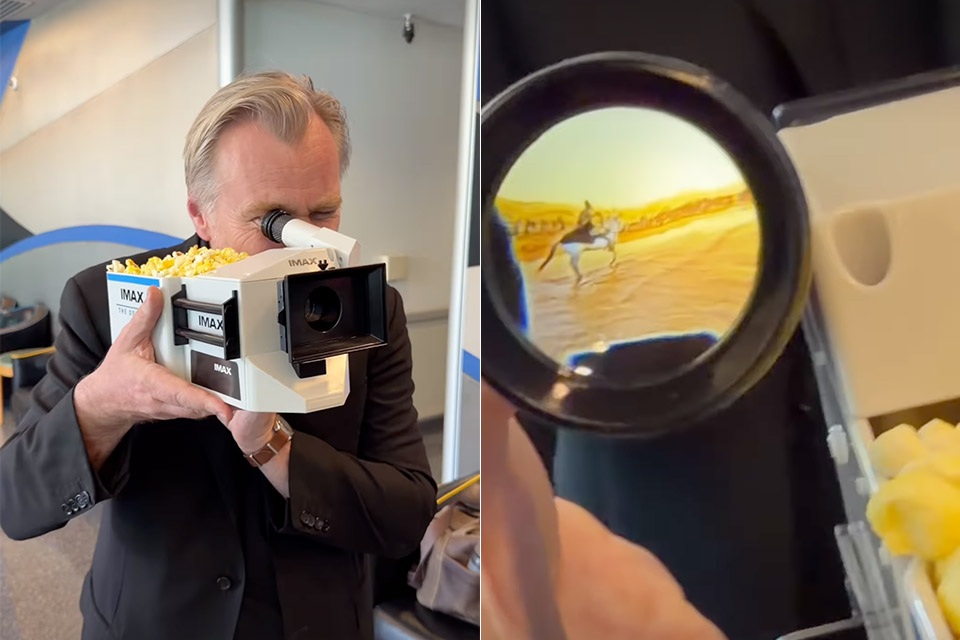
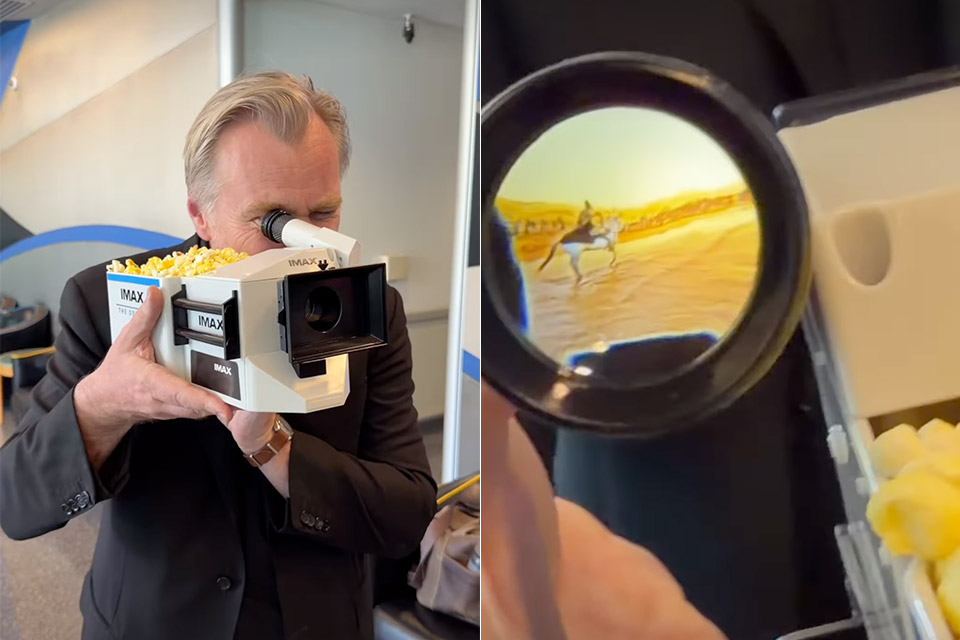
Christopher Nolan’s upcoming film has already sparked plenty of conversation, but one of the quickest sellouts tied to it did not involve tickets or posters. Instead, it was a limited-run popcorn container modeled directly after the large-format film camera Nolan has long praised as his go-to tool.
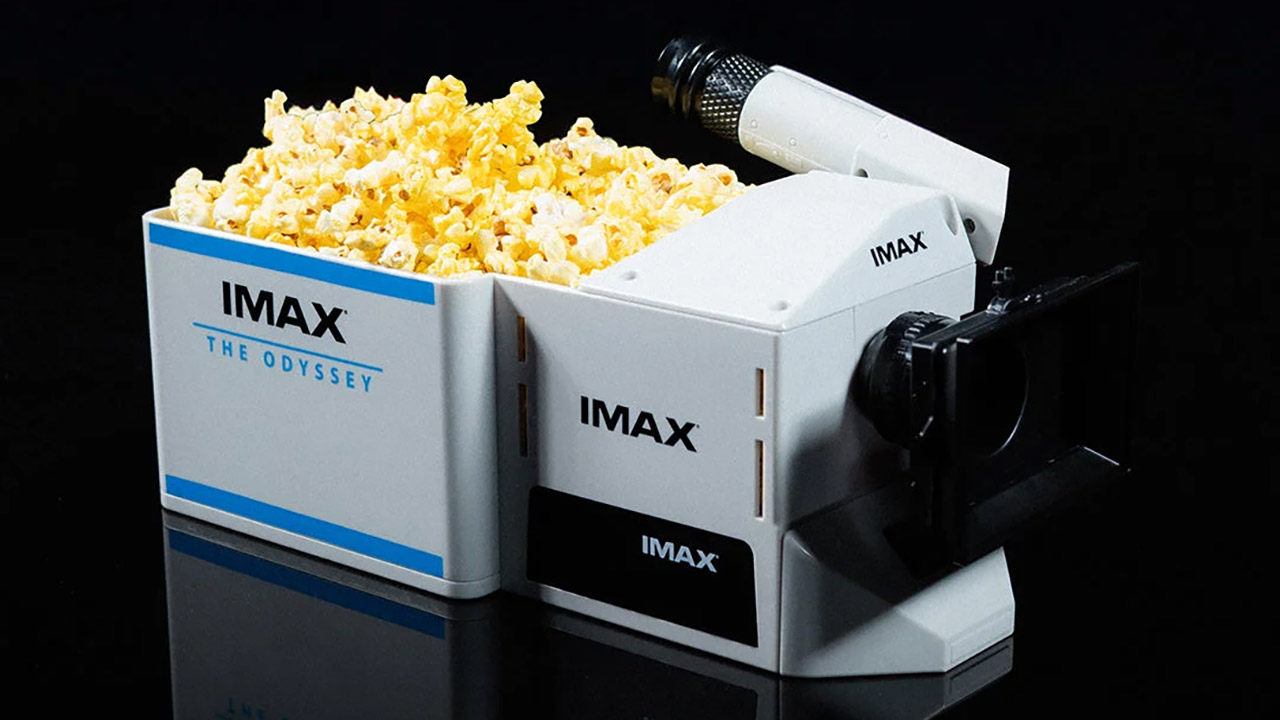
On June 18, the IMAX web store launched their limited edition item, which quickly sold out. This thing originally cost $50, but it’s currently available on resale sites for two or three times that price. What they came up with was far more than a conventional bucket with a logo on the side. Designers worked hard to build an object that resembles the real IMAX 15/65mm camera body that has been used behind the scenes in several of Nolan’s previous works, and it is now also the main camera in The Odyssey. The end result is somewhere between a cool keepsake and a rather functional prop.
You have a large rectangular piece on the side that holds the popcorn and has clean “IMAX THE ODYSSEY” branding in blue and black on it. The camera body is then mounted on top, complete with lens barrel details, adjuster knobs, and a viewfinder, all of which are fairly accurate. Overall the object measures around 14 inches long, 6.25 inches wide and 5.3 inches tall, & the weight is around 1.26 pounds once you’ve removed the eyepiece.
The materials are rather simple, consisting of injection-molded polymers such as acrylic, polypropylene, and ABS, so it’s durable enough to withstand a few trips to the theater while yet being light enough to carry without being a nuisance. They add a small LED light and an LR1130 battery. When you turn on the light and look through the viewfinder, you’ll see a still image from The Odyssey in the unique 1.43:1 enlarged aspect ratio that IMAX uses on their largest displays.
The fact that the light has transformed that simple bucket into something more than simply a bowl; even if the lights are turned off and the trailers are playing, a quick look through the eyepiece gives you a tiny little sampling of the film’s scale before the main feature begins. Early photos show Nolan himself handing over a device to cinematographer Hoyte van Hoytema and demonstrating the viewfinder during advertising events. It has a decent capacity for popcorn.

IMAX describes the project as a tribute to both their groundbreaking film technology and the art of large-format filmmaking. Nolan has been gushing about their camera system as the “gold standard” for years, and The Odyssey is only the latest chapter in that collaboration. This is essentially a pocket-sized salute to the same equipment that will eventually project the film in its proper format on the biggest screens.
[Source]


OFFBEAT
Stop Killing Games campaign suffers setback as European Commission favors industry code of conduct over legal obligation
The Stop Killing Games movement was dealt a blow this week after the European Commission decided not to propose a legal obligation to keep video games playable after they are no longer commercially available.
Users of licensed software that depends on online components may also find this development of interest – more on that later.
The grievance concerns online video games that become unplayable when publishers shut down the servers they run on. Almost 1.3 million grumpy gamers signed a petition calling for publishers to ensure games enjoy an afterlife, leading to a public hearing in the European Parliament.
It’s a contentious issue. On one hand, customers who have purchased a game might feel aggrieved when it is rendered unplayable by a commercial decision. On the other, publishers argue that shutting down services must be an option when a game is no longer commercially viable.
A middle path would be a patch that lets the game run standalone, or releasing software so enthusiasts can host their own.
Ross Scott, founder of the Stop Killing Games movement, told The Register: “The behavior of the Commission seems to go beyond simply disagreeing this is a problem that needs solving. On the contrary, they haven’t clarified how the law views this situation and are trying to pass the ambiguity off to individual nation states. This is a recipe for policy fragmentation, which is under the Commission’s charter to prevent.”
Scott added that the group was not calling for “endless support” for online games. “All we can say is the Commission appears to have an agenda independent of the initiative’s request and their charter.”
Software shutouts are a depressingly familiar scenario for users. Licensed software can stop working or suffer reduced functionality when online services are lost. A recent example is the impending demise of Microsoft Office 2019 for macOS, which will reach the end of the road in July due to a certificate expiration. If the application cannot reach the licensing servers, users can’t edit or save documents – rendering it mostly useless.
Scott told us the group was focused on video games for the time being because “they have an almost unique place under the law.”
“EU court rulings consider them more than ‘just’ software due to all the copyrighted content contained within them and thus subject to more laws than just those that pertain to software.”
The European Commission cited existing intellectual property protections for creators and publishers as one reason not to propose new rules. It also noted that EU consumer law already provides some safeguards. “Video game providers must inform consumers about the duration and the conditions for terminating the contract before the consumers sign up for the video game,” it said.
Instead, the Commission said it would work with the industry to draw up a code of conduct.
Stop Killing Games posted on X: “This decision is not unexpected. But we were prepared. Hence, we’re pushing forward with @Europarl_EN amending #StopKillingGames to the Digital Fairness Act.”
In other words, the next step is to try to get the group’s suggestions into the Digital Fairness Act, a legislative proposal by the European Commission, which, according to Scott, “coincidentally is an excellent fit for it.” ®
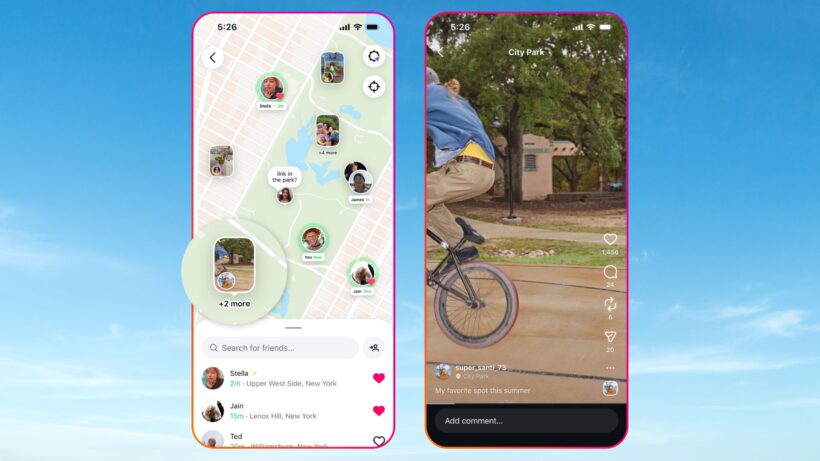
The UK has recently announced that, from Spring 2027, all those under 16 years old will be banned from accessing certain social media platforms.
This, pretty unsurprisingly, has been met with mixed reactions as many parents, guardians, teachers and even under-16s have praised the ban. On the other hand, some have criticised the ban as, to them, it simply makes “no sense”.
Whatever your stance on the social media ban is, we’ve rounded up everything you need to know, from what platforms will be included and how the ban will be enforced. We should disclaim that the ban isn’t expected until next year, so there’s still a lot of unanswered questions.
For more, visit our overview on the social media ban while our very own Dave Ludlow has given his two cents on the ban.
The UK government is planning to ban social media for those aged under 16. This means that although under-16s will still have general access to the internet, and can read the news, research topics and play games, they won’t be able to use platforms like Instagram, YouTube, TikTok, Snapchat, Facebook and X. At the time of writing, we don’t know whether that list is exhaustive, or if the government will eventually include more platforms to the ban list.
You’d be right in thinking this sounds familiar, as the government has stated that it’s using the “same model” as Australia’s social media ban which was implemented back in December 2025.
The purpose of the social media ban is partly in response to a national consultation which showed an “overwhelming public demand for action”. According to the consultation, the vast majority of parents and under-16s alike agreed that social media platforms shouldn’t be used by young people.

According to the government, the social media ban will be implemented in Spring 2027 after the first set of regulations are laid out by the end of the year. At the time of writing, there haven’t been any specific dates provided.
Judging from the fact sheet on gov.uk, it would be fair to say that the details haven’t been formalised yet. Instead, the government states that it plans on following Australia’s ban, whose model included “platforms like Instagram, YouTube, TikTok, Snapchat, Facebook and X”. We’d assume that YouTube Kids will still be available for under 16s, but the government hasn’t confirmed this just yet.

The government has stated that it does not “intend” for messaging services to be included in the social media ban, which is likely to be a relief for parents who are concerned about keeping in touch with kids while they’re out and about. However, it has currently only mentioned Whatsapp and Signal, and fails to explain whether the likes of Telegram will be banned.
We also wonder whether Messenger will be banned too. Yes, you need a Facebook account to initially set-up the tool, but you can technically still use it even if you deactivate your account.
It seems that the main method of enforcing the social media ban will be via age verification, with stronger requirements needed for age checks on platforms. Ofcom is said to be setting out different options for effective forms of age verification that are “accurate, robust, reliable and fair”. However, the government hasn’t provided any further details on what those verifications will look like.
Adults won’t need to do checks, as many already have a social media account that’s been open for more than 16 years (what a way to make us feel old), has a credit card connected or is linked to an email address that’s already passed age verification in other ways. If those steps fail to prove an age, then apparently a simply face scan should verify a person’s age.
For children, the ban has been hailed by the government as “kickstarting a cultural shift”, and is promised to give kids their childhoods “back” as there will be less time for scrolling and “more time for play”.
However, those slightly older children who have grown up with social media platforms and will soon lose access may struggle to get used to the so-called “new normal”. There’s even, at the time of writing, a petition calling for the social media ban to be stopped which has over 208,000 signatures.
Essentially, people are clearly divided by the ban as although the harms of social media are widely acknowledged, many hail it a useful tool to stay in contact with friends and family.
Otherwise, the government has assured parents that, as of right now, they don’t have to do anything and they will be provided with further detail ahead of the changes in 2027. For now, it’s advisable that parents start taking steps with their children to discuss the upcoming ban and explain why the government is implementing it.
Being 16 or 17 years old has always been a difficult age to navigate, and it seems the social media ban will feel similar. While 16 and 17 year olds will be able to access social media, the government plans to ban live streaming and stranger communication for those ages.
This follows a smartphone and tablet ban in classrooms.
Norway is imposing a strict ban on the use of generative AI tools by elementary school kids, according to a report by Reuters. Prime Minister Jonas Gahr Stoere suggested at a press conference that AI lets children skip crucial steps in their education and that schools should focus on teaching them how to “read, write and do mathematics.”
These standards will be imposed at the start of the new school year, which begins in late August. The ban impacts students from first through seventh grade, ages six to 13. However, the policy also extends to teens, albeit in a reduced fashion. Kids aged 14 to 16 can use generative AI, but only with a teacher’s supervision. Teens 17 and above are encouraged to use AI appropriately on their own.
This isn’t the first move Norway has made to remove tech from classrooms. The country banned smartphones from schools back in 2024, which has proven to be a success. It led to a reduction in bullying, better grades and a significant decrease in the number of visits to psychologists for mental health issues. These results were especially potent with girls.
Norway is also planning a social media ban for all children under 16, which is similar to how Australia handles things. A bill will be introduced to parliament by the end of the year.
The US has also been slowly making moves to limit the amount of time kids can spend with AI chatbots. The Senate and the House have been discussing a bill that would require AI companies to implement an age-verification process and ban them from providing chatbots to minors.
The so-called Guidelines for User Age-verification and Responsible Dialogue Act, or GUARD Act, advanced past the US Senate Judiciary Committee but has yet to be voted on. The language of the bill did soften last month. When originally proposed, it was aimed at nearly every AI-powered chatbot. Now, it just refers to “AI companions”, which potentially means that products like ChatGPT, Gemini and CoPilot would be exempt.
Critics of the legislation have suggested that the bill’s narrower language could let companies exempt themselves if the chatbot function of their tools are deemed “incidental.” After all, it’s a fine-line between an “AI companion” and a “search tool” that someone happens to talk to 24/7.

You’ve probably used VLC Media Player, the free video player with the orange traffic-cone icon — it’s been downloaded more than 6 billion times. But according to its lead developer, Jean-Baptiste Kempf, robots will soon be almost as ubiquitous as his open source video software.
Convinced that “hundreds of millions of robots and drones” will be roaming the streets in a few years, this French serial entrepreneur and open-source legend has been building Kyber, an infrastructure layer for controlling remote devices in real time. Its core software is an SDK that synchronizes video, audio, sensor data, and control inputs with minimal latency.
This lines up well with the rise of physical AI, and it’s part of why the Paris-based startup was able to raise a $5 million round led by Lightspeed, which has also backed Anthropic and Mistral AI. “Physical AI is only as good as the underlying systems running it,” the American VC firm wrote in a LinkedIn post announcing its investment.
Kyber’s potential applications go well beyond AI, though. Kempf told TechCrunch the platform is built for “all the use cases where the person who’s operating is not in the same place as the compute, which is not in the same place as the action.”
Remote control is one half of the equation; speed is the other — and it’s what inspired the startup’s name, a nod to the lightsaber crystals in Star Wars. “If you control things in the real world, every millisecond matters,” Kempf said.
Kyber’s approach to eliminating lag is rooted firmly in video-streaming technology. The company started as a side project Kempf built while CTO at cloud gaming startup Shadow, and its early focus on streaming makes the VLC connection an easy one to draw. But IoT expertise matters just as much for optimization — tuning performance to a device’s available compute, at scale — the other core piece of what Kyber does.
Kempf says other companies with the resources and the need have already built similar software for their own use cases, like remote driving. “But the largest fleets today have maybe 2,000 or 3,000 vehicles. Imagine you need to manage millions of them; that’s not the same thing.”
That jump in scale also raises the stakes on observability — knowing systems are actually working will matter even more when AI agents, not people, are managing entire fleets and networks. Even at much smaller scale, though, there’s a real benefit: not needing to physically reach every device just to push a software update, for example.
That range — from a handful of devices to millions — means Kyber’s user base will likely span far more companies than will ever become paying customers. True to Kempf’s roots, the core project is open source, while the company sells a productized version to enterprise customers. And it’s not just software: like Palantir and others, Kyber also offers hands-on, custom deployment through forward-deployed engineers, or FDEs.
FDEs make up a large part of Kyber’s team, which currently numbers 25 full-time staffers. The startup is headquartered in Paris but has offices in San Francisco and Singapore to support what it expects will be a global client base across a variety of industries. The company says it is already in commercial deployment with customers in defense, telco, robotics, and AI.
To focus its efforts, Kyber has been prioritizing three segments: robotics, drones of every kind, and remote IT access, where demand has been particularly strong. In that last segment, Kempf says Kyber aspires to be more than just a Citrix challenger — but even that comparison alone points to a sizable total addressable market.
Remote IT access isn’t exactly glamorous, but Kempf seems energized by the problem — and Kyber’s careers page hints at why: “The companies that tried to solve it spent years and tens of millions building custom solutions they’ll never share. We’re building the version everyone else can use.”
When you purchase through links in our articles, we may earn a small commission. This doesn’t affect our editorial independence.
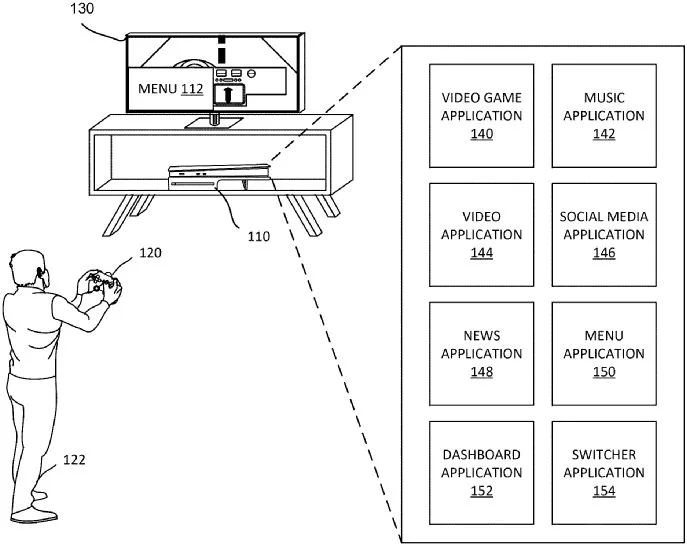
Sony has filed a PSN login patent, first spotted by RespawnFirst, that would pull the DualSense controller into the sign-in process. A PlayStation console would start the request, then the controller would help confirm that the account holder is close enough to approve access.
For players, the appeal is easy to see. PSN account abuse can lead to unauthorized purchases, lost access, and attempts to resell established accounts. Sony already offers 2-step verification and passkeys, but this idea adds a hardware check to the login chain.

The patent describes a handoff that begins at the console. A PS5 or another PlayStation system would send a sign-in request, then the controller would scan for a nearby device such as a smartphone. The diagrams show the console, controller, and account screen as separate parts of the same approval flow.
The controller could use Bluetooth, NFC, proximity sensors, light, sound, or haptic feedback to make contact. After the nearby device responds, credentials would move through the controller and return to the console so the sign-in can finish.
Passkeys already give PlayStation users a cleaner way to sign in with a stored credential, including through the PlayStation app. Sony’s patent changes the burden on an attacker. A stolen login becomes harder to use if the console also expects a specific controller to join the process.
There’s a tradeoff, and it isn’t small. A lost, broken, or unavailable DualSense could become a lockout risk unless Sony builds in another way to get back in. The filing doesn’t confirm whether current controllers would support the system, or whether it would require future hardware.

The harder PSN security problem may sit outside the console. Attackers can exploit account recovery by persuading customer support to provide sensitive account access using limited details.
That leaves Sony with two jobs if this ever becomes real. The controller check would need to be convenient enough for regular players, and account recovery would need tougher guardrails. Until then, the PSN login patent is worth watching, but it shouldn’t be treated as a full answer to account theft.


Many organizations view multi-factor authentication as one of their strongest defenses against account compromise. However, attackers increasingly use phishing techniques that don’t require stealing passwords or bypassing MFA at all.
On July 8, 2026, BleepingComputer will host a live webinar titled “Stop chasing alerts: Automating email security with behavioral AI” presented by Dan Nickolaisen, Solutions Architect Manager at Abnormal AI, and Eric Danneker, Director of Cyber Vigilance and Defense at Novant Health.
The webinar will examine how modern phishing campaigns, business email compromise (BEC), and account takeover (ATO) attacks exploit trusted services and authentication workflows to gain access to corporate accounts.
One technique receiving growing attention is Device Code phishing, where attackers trick users into authorizing access through legitimate Microsoft authentication pages. Because users complete a real login and MFA challenge, attackers can obtain persistent access without ever stealing credentials.
This shift presents a challenge for security teams. Traditional email defenses, credential monitoring, and MFA protections may not detect these attacks, leaving analysts to investigate suspicious activity only after an account has already been compromised.
Abnormal AI uses behavioral AI to identify unusual account activity, suspicious communications, and attack patterns that conventional security controls may miss.
Attendees will learn practical approaches for detecting account compromise earlier, reducing investigation workloads, and improving response times through automation and behavioral analysis.
Many phishing attacks still focus on stealing passwords, but increasingly attackers are targeting authentication workflows themselves.
By abusing legitimate authorization processes, attackers can obtain access tokens that grant ongoing access to email, cloud applications, and corporate resources without triggering many traditional security controls.
This webinar will explore how organizations can identify these attacks sooner and use behavioral AI to automate detection and response activities before compromised accounts lead to larger security incidents.
Join us to learn how organizations can better defend against modern phishing techniques that exploit trust, identity, and legitimate authentication workflows.
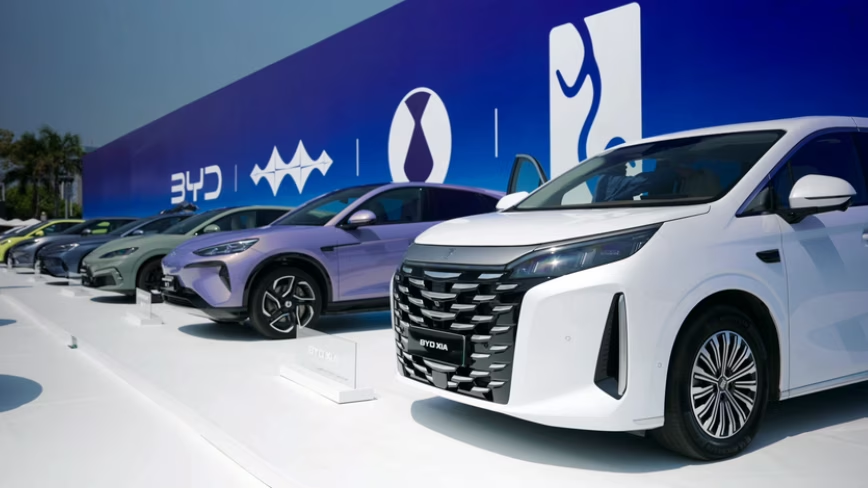
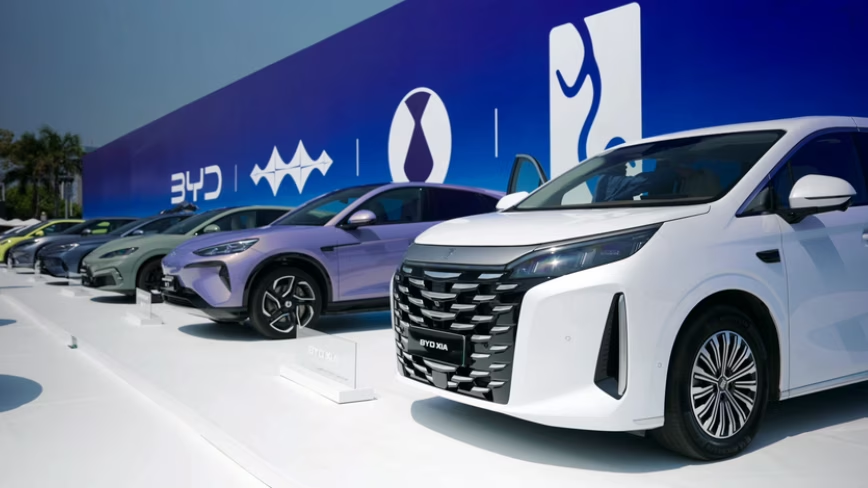
BYD denies environmental breaches at its Szeged factory as Hungarian police probe toxic soil claims and the company scouts a second European plant.
BYD executive vice president Stella Li said the Chinese automaker has complied with all environmental regulations at its Szeged factory in Hungary, pushing back against allegations that the company violated its obligations during construction. Li made the comments at a press conference in Belgrade on Friday, where she met with Serbian President Aleksandar Vucic to discuss a potential second European production site.
The denial comes after Hungary’s environment minister said in May that BYD had “seriously violated” its environmental obligations at the Szeged site, where Hungarian police are investigating whether toxic soil was improperly handled during construction work. The government imposed a fine of 10 million forints, roughly $27,000, on the company over the incident.
BYD began trial production at the Szeged plant in early 2026 and plans to start full assembly operations in the fourth quarter. The factory is the first major Chinese automaker production facility in Europe, a milestone that has drawn both investment interest and political scrutiny. Hungary positioned itself as China’s gateway into the EU under former Prime Minister Viktor Orban, capturing 44% of all Chinese foreign direct investment into Europe in 2023.
The political landscape has since shifted. Peter Magyar, who replaced Orban earlier this year, has taken a harder line on environmental and labour standards at Chinese-backed projects. The scrutiny of BYD’s Szeged site is part of a broader review that has also targeted battery manufacturers CATL and Samsung SDI, both of which operate or are building large facilities in Hungary.
However, subsequent testing has complicated the initial allegations. According to Hungary Today, later soil tests on surrounding farmlands found no contamination above regulatory limits. The distinction matters: the police investigation centres on whether soil from the construction site itself was improperly disposed of, not whether the factory is actively polluting surrounding land.
Li’s appearance in Belgrade served a dual purpose. Beyond addressing the environmental controversy, she was there to discuss BYD’s search for a second European plant. Bloomberg reported that BYD is open to buying an existing facility, partnering with another manufacturer, or building from scratch.
Vucic offered Serbia as a production site during the meeting, pitching the country’s lower labour costs and proximity to EU markets.
The second-plant search has also involved conversations with Stellantis, according to Bloomberg. The Franco-Italian automaker has excess factory capacity across Europe, and a deal would give BYD immediate production infrastructure without the multi-year timeline of a greenfield build. European EV demand has surged in 2026, with battery-electric registrations jumping 51% in March alone, creating urgency for Chinese manufacturers to localise production and avoid EU import tariffs.
The Szeged controversy sits within an even broader pattern of scrutiny. China Labor Watch and other organisations have raised separate allegations of forced labour practices at the construction site, claims that BYD has denied. The European Parliament has also flagged labour conditions at Chinese-backed projects in Hungary, adding another dimension to the political pressure on Magyar’s government to demonstrate tighter oversight.
For BYD, the stakes extend well beyond a $27,000 fine. The company overtook Tesla as the world’s largest seller of battery-electric vehicles in 2025 and is racing alongside other Chinese automakers to establish European manufacturing before tariff walls rise further. Any sustained regulatory friction in Hungary could complicate its expansion plans at a moment when the European market is its fastest-growing opportunity.
Li told reporters in Belgrade that BYD will continue to invest in Hungary and cooperate fully with the investigation. Whether that cooperation satisfies Magyar’s government, which has political incentives to distance itself from Orban’s permissive approach to Chinese investment, remains the open question.
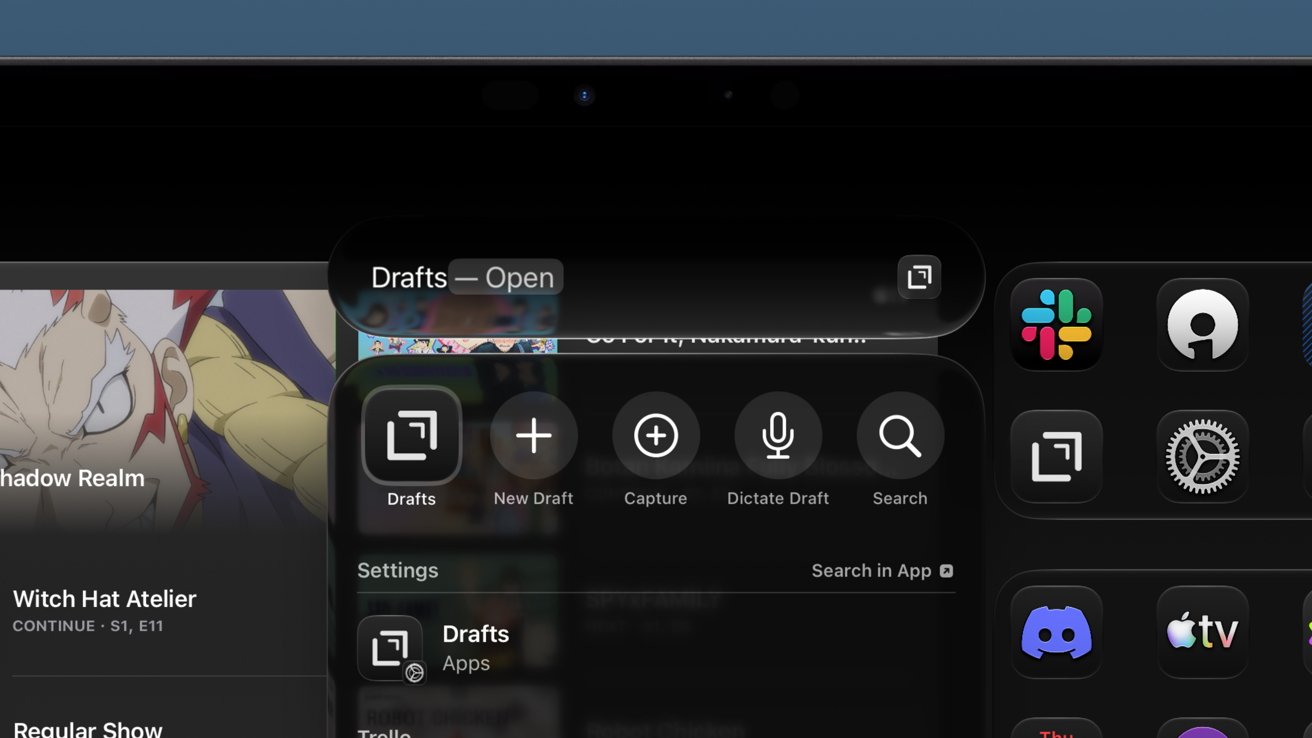
Siri AI and system optimizations are the focus of iPadOS 27, but that’s enough for iPad’s usual in-between year. Power users will notice the changes the most.
The iPad operating system has been on a predictable tick-tock upgrade cycle where one year is significant and the other minimal. Apple focused on Siri AI for its OS 27 releases, but iPadOS 27 still has a few new and useful upgrades.
As an iPad-first user, I’m most interested in how iPadOS might affect my workflows each year. I do have a Mac mini for recording a video podcast, and my Apple Vision Pro is still used regularly for focused work, but the iPad is where I live.
Of those three platforms, funny enough, the Apple Vision Pro saw the most new feature upgrades overall.
That isn’t to say what’s new in iPadOS 27 won’t affect me or my work. There are some interesting new automation and windowing features that may prove useful.
Plus, the merging of Spotlight and Siri saved the search tool from being a broken mess.
If you’re an iPad user who’s mainly using the iPad as a tablet, there’s a chance you won’t notice much new beyond Siri AI. Power users definitely got the most focus this year thanks to system optimizations, design changes, and a couple of new features.
Let’s get into it.
Apple’s WWDC keynote didn’t split up features by OS due to a focus on optimizations and child safety features. I’m not getting into the child safety stuff in this early review since it doesn’t affect me.
There are many small changes across every operating system, but when you break down exactly what’s in each, it feels small versus previous years. That’s likely because of Apple’s stability and optimization focus this year, and how nearly all the truly new features are tied to AI.
Spotlight search is vastly improved thanks to a completely rethought indexing system. Everything stored on your device, from Contacts to Journal entries, is crawled after installing iPadOS 27.

iPadOS 27 review: Spotlight is finally instant again
The process can take up to a week, depending on how much data you have saved locally. The improvements are immediately noticeable because you can actually use Spotlight without waiting for results to populate.
There’s word that the new indexing is being added in iPadOS 26.6 so people upgrading to iPadOS 27 in the fall will already have everything done day one. However, while that indexing will be done, it won’t be used until the fall releases.
That’s important because the new Siri AI relies heavily on that newly indexed data. Some queries flat out didn’t work when indexing was still going on, so keep that in mind.
While the Spotlight interface has integrated Siri AI, they are still distinct entities. If you search for an app name, hit enter, and it launches, that’s Spotlight.
In my use this past week I can say that Apple accomplished its goal. Spotlight is instant.
Quality-of-life improvements aren’t always the most exciting, especially when discussed during a keynote. However, they are felt in everything you do when implemented properly.

iPadOS 27 review: paste suggestions are helpful
One feature everyone will notice almost immediately is the new paste option in the typing suggestions. On iPad, that shows up whether you’re using the virtual keyboard or a physical one.
Not only is it convenient when using the touch interface, it’s great for verifying what is in your clipboard before pasting. So, even if you’re on a physical keyboard, there is some benefit.
Apple says that windowing actions are faster in iPadOS 27. I’m not sure if I notice faster, but they certainly feel more fluid and responsive.
Transferring files in the Files app to an external drive is five times faster. While I didn’t pull out a stopwatch, it certainly seems to be true.
I need to get photos from my camera’s SD card to my iPad, then from my iPad to an SSD later for backup, and both can be quite annoying when in progress.

iPadOS 27 review: Files app transfers to external drives are now up to 5 times faster
Family photoshoots can take ages to transfer, especially when you’re trying to transfer photos while on the move. That 5-minute transfer turning into 1 minute is a huge workflow improvement.
6GB took around 20 seconds to transfer to my external SSD I keep attached to my Studio Display. While I don’t have a good way to compare, it’s certainly faster.
The iPad menu bar is also changed, and I think for the better. Whatever your active app is, wherever it is on the display, the name is shown in the top left corner.
Hovering over that name with a cursor, or tapping with a finger, opens the menu bar items for that app. The window controls appear there too in full-screen mode, but otherwise stick with the window.
Siri AI is here and it’s deeply ingrained in Apple’s operating systems. However, I stand by the idea that the AI side of Apple is still ignorable if that’s what you want.

iPadOS 27 review: Siri AI has a home in the new Siri app
I understand the anti-AI sentiments, but I do think we shouldn’t be throwing a blanket over all AI. It’s a dumb term that applies to too many technologies.
Many of these implementations are bad, yes.
Apple’s use of AI, arguably, is one of the few that feels right. It is private and secure with a focus on local operation, though there are powerful cloud models when needed.
There are five new third-generation Apple Foundation Models.
Users don’t really need to worry about the specifics of this. And while the new Apple Foundation Models were built thanks to a partnership with Google, the Gemini Assistant and Google Search are nowhere to be found.
It’s Apple AI all the way down.
I’m conflicted on what I should talk about here in regard to an iPadOS review. The Siri AI and new Apple Intelligence features are available across Apple’s ecosystem.
The new live proofreading feature is a nice addition. If I make a silly grammatical mistake, a blue line appears in my text.
Writing Tools vanished in beta 1 a day after I installed it. However, those grammar suggestions still work, so that’s a good in-between until the Writing Tools Proofread function returns in a later beta.
I don’t generate images, text, or anything for work and don’t plan to start. Spotlight and Siri AI are useful in that it’s easier than ever to uncover an old email.
The new Photo editing tools like extend and reframe are interesting, but I don’t think this is the place to discuss them. I’ll be examining those more closely in the future.

iPadOS 27 review: world knowledge helps get things answered without using Google
I’m sure some workflows might emerge from this new Apple Intelligence, but I didn’t use AI before either. I have considered that the Siri app might be a good search alternative.
The idea would be to ask Siri if there are any gaps in my longform pieces and have it present me with some results. I’d reference the included sourcing and verify if that information indeed was missing and learn what I needed to add from there.
I can say that I will never take a Siri text response as the default answer or paste in a response into my text as fact. The results of some queries are interesting though, as Siri generally doesn’t summarize what it is sharing.
Instead, Siri shares giant clumps of data from various sources. Since the text is verbatim from the source, it can even include typos. Apple is doing this to prevent hallucinations in the output, which actually works quite well.

iPadOS 27 review: Siri is always available via Spotlight
That said, it is still AI, and I do catch it in a hallucination from time to time. So, since I know I can’t catch every bit of wrong information, I just default to it as a reference and open the link to verify.
As we said in US Navy nuclear power operations when checking each other’s work: trust, but verify.
I believe this is a great starting point for Siri AI and Apple Intelligence. Apple delivered on everything it promised in 2024, and took things even further with its new models.
I believe Apple is the only player on the market with an entire ecosystem of products and data with an AI built in at this scale. Google Gemini has some of this on Pixel, Samsung Galaxy, and a few others, but not to the depth of Apple’s AI integrations.
It can only improve from here. I’m especially excited for third-party developer support.
Shortcuts is quite the powerful tool that I’m not sure many Apple users actually know about. That, or they’ve stumbled into it and got intimidated and never came back.

iPadOS 27 review: Shortcuts are easier to generate
Either way, iPadOS 27 and the other new releases make Shortcuts much easier to use. You simply hit the plus button and type in what you want a shortcut to do, and if it’s reasonable and within the app’s abilities, it generates that shortcut.
That’s it, you’re done. Now, you’re not going to generate a 200-step shortcut using this method, but you can massage out a task with a few commands to refine what you’d like to do.
I’ll remind everyone that is experimenting with Shortcuts: simple is better. Instead of making a giant and complex shortcut with a million actions, break each section of actions out into their own shortcuts.
Then, once you’ve got your various separate tasks, you can combine the shortcuts into one action using the Run Shortcut option. But of course, that’s a bit more manual.
Now you can just voice your shortcut into being.
It is limited to Apple apps at the moment, so you won’t be making Shortcuts with third-party actions just yet. That should become available once developers can add support outside of the beta.
iPadOS 27 users got one new action that could come in handy. You can now have a shortcut run when removing or attaching a keyboard.
So, toggle between full-screen apps for tablet mode and multitasking for keyboard mode. It’s a simple automation that helps lean into iPad’s ability to be a naked robotic core and transform into the device you need in the moment.
The refinements and optimization paired with Siri AI make the 2027 release feel like it’s good enough. Had Apple ignored the platform entirely beyond the new Siri, we’d be having a very different discussion.

iPadOS 27 review: iPad continues to be whatever you need it to be thanks to a strong OS base
There’s also the chance iPadOS could see more changes through the beta and through the OS 27 cycle. Never count Apple out of introducing some big paradigm-shifting feature in iPadOS 27.3 or something.
I do wish more time could have been spent on some of the pain points, like the awkwardness of Slide Over and some windowing actions. Resizing my Safari window from the right shouldn’t reduce its size from the left too, especially when it was touching the left side before.
We’re all still waiting on features like clipboard history and system-wide extensions similar to those found on macOS. I do wonder with the continued attention on the menu bar if we won’t see menu bar apps in iPadOS eventually.
The iPad Pro continues to be my device and platform of choice. Apple Vision Pro is another great option, but there are several awkward areas there that make work a little slower versus the iPad.
My Mac mini is great for capturing our video version of the AppleInsider Podcast. I wonder if we’ll see a dedicated podcast recording and editing tool for Apple Creator Studio at some point.
Then, and only then, will I fully leave Mac behind. For now, Continuity Camera and multiple recording options are only available on Mac.
Oh, one last thing: bring Universal Control to iPad. Let me move my cursor from my iPad Pro to my iPad mini without a Mac present.
Anyway, this is an early review of iPadOS 27 conducted during the first developer beta. A lot could change in the coming months, and AppleInsider will be back to review the shipping version in the fall.
As far as in-between iPadOS years go, this is a strong offering. Siri AI is transformative to the entire ecosystem, including on iPad.
It is never a bad thing to take time to focus on optimization, speed, and design. More could have been done for multitasking and pro tools, but we’ll see what iPadOS 28 offers in that regard.

Apple’s latest explanation for Siri AI on Apple Watch identifies which models support the feature, but it still doesn’t explain why older watches are excluded despite requiring a nearby Apple Intelligence-enabled iPhone.
A June 19 interview with TechRadar offered Apple’s first public response to questions about the cutoff. Apple Watch and Health Product Marketing Manager Cait Dooley said Siri AI and other watchOS 27 features work best on newer hardware.
Apple specifically pointed to Apple Watch Series 9 and later models, Apple Watch Ultra 2 and later models, and Apple Watch SE 3.
WWDC 2026 introduced Siri AI as part of watchOS 27. The feature requires both a supported Apple Watch and a nearby Apple Intelligence-enabled iPhone, with support beginning on Apple Watch Series 9.
TechRadar asked Apple why older Apple Watch models don’t qualify. Dooley said Apple makes power and performance a priority with every software release and repeated that Siri AI works best on newer hardware.
Her answer clarified the compatibility list, but it stopped short of explaining the technical reason behind the cutoff.
Siri AI on watchOS 27 supports the following models.
Older models don’t make the cut.
Apple Watch Series 8 and the first-generation Apple Watch Ultra use the S8 chip, which includes a 2-core Neural Engine. Apple Watch Series 9 introduced the S9 system-in-package with a 4-core Neural Engine that handles machine learning tasks up to twice as fast as the S8.
 Siri AI requires both a supported Apple Watch and a nearby Apple Intelligence-enabled iPhone
The newer chip also brought on-device Siri processing and support for the double tap gesture. The hardware gap between supported and unsupported models provides one possible explanation for Apple’s compatibility cutoff.
After publishing Apple’s comments, TechRadar offered its own interpretation. The publication wrote that “it’s likely only Apple Watches running Apple’s powerful S9 and S10 chips can handle the technical demands of Siri AI.”
Apple didn’t make that claim.
The company’s explanation and TechRadar’s conclusion aren’t the same thing. Apple may have technical reasons for limiting Siri AI to newer watches, likely the on-device Siri processing, but its current public statements don’t identify what those reasons are.
Apple’s own requirements make the Siri AI cutoff harder to evaluate because the feature isn’t being presented as a standalone Apple Watch capability. A paired iPhone does the heavy lifting for computational needs.
Apple Watch owners now have a compatibility list and a broad performance explanation. A technical explanation for why Siri AI begins with the Apple Watch Series 9 generation hasn’t arrived yet.


The Chimelong Spaceship Theme Park in China’s Zhuhai region is a 750-meter-long structure that lies against green hills, like a vessel that just landed and stayed. The world’s largest indoor theme park is contained within its over 400,000-square-meter enclosed area. It began functioning in stages in late 2023 and quickly established seven Guinness World Records before most people outside the region were aware of it.
The structure itself sends a very clear message from the start, with its sleek, rounded form creating a stunning display at night thanks to the blue accent lights and blending in pretty well with the surrounding terrain during the day. The park was created by a Los Angeles company with great experience in huge marine projects at a cost of around $1.1 billion spread over more than ten years. It shares a border with an ocean-themed resort and a huge hotel, forming part of a major destination expected to attract millions of visitors each year.

However, when you enter, it becomes clear that this place is massive. The park combines a vast aquarium operation with rides, entertainment, and themed attractions spread across around 15 different zones. It’s not just big; it’s also home to over 150,000 marine animals of over 300 species. The total volume of water in all of the tanks is a staggering 75 million litres, setting yet another record. The largest single tank alone holds 56 million litres and incorporates an incredible wave system capable of producing waves as tall as 3.2 metres, gaining the Guinness World Record for the highest indoor artificial wave ever.
One of the most impressive marine attractions is the world’s largest living coral reef exhibit, spread across multiple specially designed tanks with a combined capacity that breaks all kinds of records. Visitors can walk through an environment filled with live coral, stunning fish, and well-lit displays underlining the value of reef ecosystems. There’s even a presentation that uses a giant animatronic coral monster to demonstrate reef importance in an engaging fashion, rather than just a boring lecture.
Rides are scattered throughout the park, mixing together with space themes and undersea excursions. One of the first things you’ll notice is a very gentle introduction to the park, a motion simulator called Spaceship Story in which you sit aboard a vessel that takes off, encounters a few challenges, and then returns, all using screens and movement to immerse you in the park’s story of exploration and discovery from the start.
The clear star of the show is below in the deep-sea section, where Bermuda Storm, the world’s largest seated motion simulator capacity, can accommodate 304 people on a single platform. Riders enter what appears to be a research vessel and face a giant curved projection screen that must be well over 1,600 square meters in size. The entire thing is overlaid with water effects, wind, actual set pieces, and even an animatronic character who interacts with what’s happening on screen. Many tourists believe that this is the ride that will stay with them the most at the park since it involves all of your senses at once and delivers a light and adventurous story that is never too intense.
Next to that is China’s first real underwater submarine experience. Riders enter a vessel that transports them through a genuine aquarium tank, with fish swimming straight past the windows and projections and stage pieces resulting in some very spectacular encounters with larger creatures, such as the gigantic squid scene. The entire journey unfolds at a very peaceful, observant pace, which contrasts perfectly with the high-adrenaline adventure next door.





No Jackpot Winner as $257 Million Prize Rolls Over to $269 Million Monday Draw

Zimbabwe Requires Crypto Businesses to Register Annually Under New FIU Regulations


Weekend Open Thread: Miami – Corporette.com

Matt Damon’s Viral Sci-Fi Thriller Has Taken Over HBO Max


Anthropic staff to meet White House officials next week, Axios reports


As AI companies race to go public, who else is along for the ride?

Bitcoin could crash to $48,000, if this historical pattern is triggered

what doctors are seeing in ebike crashes

Warning of disruption as Cardiff Crossrail works to start

Tributes to former deputy head teacher at Cambridge school among death and funeral notices


“Israel’s” ban on ICRC visits ruled illegal, but Knesset moves to stop them permanently


Deion Sanders Shares Powerful Post After Viral Advice To Deiondra


Financial Accounting | Last Day Revision Strategy and Booster | CMA Inter – June 2026

Kate Middleton Glare Goes Viral After Kids Booed At Royal Event


Over 400 Arch Linux packages compromised to push rootkit, infostealer


XRP ETFs Outperform As Bitcoin And Ethereum Funds Extend Outflow Trend


Invesco Quality Income Fund Q1 2026 Commentary

Market Preview: SpaceX (SPCX) IPO Record, Federal Reserve Meeting, and Iran Nuclear Agreement


Singer Oliver Tree dies aged 32 in helicopter crash in Brazil


Dick Advocaat’s Curacao scores first-ever World Cup goal against Germany


You must be logged in to post a comment Login