Reachy Mini is a limbless desktop robot from Hugging Face made for human interaction experiments, and to give you an idea of what it’s like is a guide on how to implement expressive, local conversational AI complete with head movements and antenna wiggles. It’s conversational in the sense that it aims to feel natural, with low-latency responses and the ability to interrupt, with everything running on local hardware if one so wishes.
Reachy Mini can use remote services, or work in tandem with a desktop machine or laptop.
The software stack is essentially VAD (voice activity detection) → STT (speech-to-text) → LLM (large language model) → TTS (text-to-speech) which allows users to tweak things to their liking, or independently swap or modify pieces as things evolve.
This also allows users to tailor the services to match whatever their hardware is capable of. For example, one could easily use a frontier AI model via remote API for the LLM while keeping everything else local.
The local models in the example configuration are effective and relatively modest (Qwen3-4B-Instruct for the LLM, and even smaller models for the rest) but it’s nice to have the option to offload parts to remote providers if necessary.
Advertisement
Reachy Mini looked very interesting when it was launched as a kit last year, and since then Hugging Face has built up an impressive software suite and infrastructure through which users can easily share their applications. If you’re curious, there’s a simulator for Reachy Mini which should give you an idea of what it can do.
For some of us, there was a time — however long ago — when we would actually answer a call without knowing who was on the other end. For those of a certain age, answering the phone when it rang was just what you did, a behavior that stemmed from spending time around a landline — a now “ancient” technology, according to the kids. Thanks to the internet and the stunning transformation of cellphones that would eventually give us the smartphones that sit in our pockets today, the way we communicate has drastically changed.
According to a recent YouGov poll, 42% of people don’t answer calls from numbers they don’t recognize, while only 5% claim to answer calls regardless of the number that’s calling. The reasoning for unanswered phone calls is a bit of a nuanced topic, with different age groups having different preferences on what they consider to be the norm. However, one common thread among them is the growing problem of spam.
Advertisement
Spam communications are no longer just limited to calls, but increasingly moving to text messages, as Consumer Reports found that scam text messages have increased by 50%. The FCC has been battling robocalls and spam texts in a number of ways, and network carriers have also introduced their own tools in an effort to stem the tide of unwanted calls and texts. For T-Mobile customers, the company has Scam Shield with both free and premium benefits, and a report spam feature — here’s what you should know.
Advertisement
T-Mobile customers can forward spam messages to 7726
Piotr Swat/Shutterstock
T-Mobile, as well as most major carriers, allow customers to forward suspected spam messages to 7726 — which spells “spam” on most keypads. According to T-Mobile’s support documentation, “We automatically forward the message to the Security Center for analysis. The Security Center is a global system, run by a vendor on our behalf, that helps protect mobile phone subscribers from spam, fraud, and malware.”
T-Mobile also notes that its Security Center is linked to a global database to track and cross reference potential spam messages, and that those messages may be shared with government agencies in an effort to combat spam and fraud. Carriers also use this information to calibrate spam filters and improve other tools, which could include training machine learning, as carriers are relying more on AI to identify potential scam and fraud activity.
Scam Shield is T-Mobile’s flagship service for blocking fraudulent calls and robocalls. T-Mobile uses its own network data and machine learning in an attempt to identify and block spam, which includes spoofing, robo-dialers, and anything else that the network deems as “Scam Likely.” T-Mobile’s Scam Shield has been brought in under the company’s T-Life app, and costs $4/line to activate if you want all the benefits. Depending on your service plan, Scam Shield may be included in the price. Many of Scam Shield’s basic features are free to customers, including Scam ID, Scam Block, Caller ID, and Scam Reporting, and Callback Protection. Scam Shield primarily relies on the STIR/SHAKEN caller ID protocol, which has proven to be a major milestone for spam prevention.
The Scam Shield Premium features include the ability to block categories of callers (like telemarketers), a reverse number look up, and a voicemail-to-text service. Customer satisfaction with the service is mixed: some report a reduction in unwanted calls or texts, while others claim little has changed. Many seem to find the app itself unintuitive, with certain features buried in the user interface. Some people have also reported false positives, causing them to miss legitimate calls they needed to take. The overall sentiment seems to suggest that it’s better to stick what whatever plan T-Mobile provides for free rather than upgrading to a paid plan.
A new NYT Connections puzzle appears at midnight each day for your time zone – which means that some people are always playing ‘today’s game’ while others are playing ‘yesterday’s’. If you’re looking for Sunday’s puzzle instead then click here: NYT Connections hints and answers for Sunday, June 28 (game #1113).
Good morning! Let’s play Connections, the NYT’s clever word game that challenges you to group answers in various categories. It can be tough, so read on if you need Connections hints.
What should you do once you’ve finished? Why, play some more word games of course. I’ve also got daily Strands hints and answers and Quordle hints and answers articles if you need help for those too, while Marc’s Wordle today page covers the original viral word game.
Advertisement
SPOILER WARNING: Information about NYT Connections today is below, so don’t read on if you don’t want to know the answers.
Latest Videos From
NYT Connections today (game #1114) – today’s words
(Image credit: New York Times)
Today’s NYT Connections words are…
WOOFER
RUFFIAN
INHALE
GROOT
EMBARK
MAGNET
SNARF
CONE
ROGUE
CRUSH
CABINET
STRUNK
NUDIBRANCH
MISCREANT
GUZZLE
SCOUNDREL
NYT Connections today (game #1114) – hint #1 – group hints
What are some clues for today’s NYT Connections groups?
Advertisement
YELLOW: Hooligans of yesteryear
GREEN: Eat quickly
BLUE: Parts of a device for musical volume
PURPLE: Don’t bark up the wrong one
Need more clues?
We’re firmly in spoiler territory now, but read on if you want to know what the four theme answers are for today’s NYT Connections puzzles…
Sign up for breaking news, reviews, opinion, top tech deals, and more.
Advertisement
NYT Connections today (game #1114) – hint #2 – group answers
What are the answers for today’s NYT Connections groups?
YELLOW: OLD TIMEY TROUBLEMAKERS
GREEN: CONSUME WITH GUSTO
BLUE: PARTS OF A SPEAKER
PURPLE: ENDING IN PARTS OF A TREE
Right, the answers are below, so DO NOT SCROLL ANY FURTHER IF YOU DON’T WANT TO SEE THEM.
Advertisement
NYT Connections today (game #1114) – the answers
(Image credit: New York Times)
The answers to today’s Connections, game #1114, are…
YELLOW: OLD TIMEY TROUBLEMAKERS MISCREANT, ROGUE, RUFFIAN, SCOUNDREL
GREEN: CONSUME WITH GUSTO CRUSH, GUZZLE, INHALE, SNARF
BLUE: PARTS OF A SPEAKER CABINET, CONE, MAGNET, WOOFER
PURPLE: ENDING IN PARTS OF A TREE EMBARK, GROOT, NUDIBRANCH, STRUNK
My rating: Hard
My score: 1 mistake
I wasted some time looking at parts of words and convinced myself that there must be some canine-themed collection thanks to WOOFER and EMBARK, but ENDING IN PARTS OF A TREE passed me by.
My mistake was a stupid one. I knew that we were threading OLD TIMEY TROUBLEMAKERS, but I included GROOT instead of ROGUE based on some half-remembered slang rather than the Marvel character.
Meanwhile, did anyone else experience deja vu from the green group CONSUME WITH GUSTO? I’m sure we have had this quartet before.
Advertisement
Yesterday’s NYT Connections answers (Sunday, June 28, game #1113)
YELLOW: HIGH-QUALITY CHOICE, FINE, PRIME, SELECT
GREEN: SIGNALS TO COMMENCE BEGIN, GO, NOW, START
BLUE: ACCESSORIES FOR A GUITARIST CAPO, PICK, SLIDE, STRAP
PURPLE: THEY HAVE BOARDS CHESS, CORPORATION, DARTS, SURFER
What is NYT Connections?
NYT Connections is one of several increasingly popular word games made by the New York Times. It challenges you to find groups of four items that share something in common, and each group has a different difficulty level: green is easy, yellow a little harder, blue often quite tough and purple usually very difficult.
On the plus side, you don’t technically need to solve the final one, as you’ll be able to answer that one by a process of elimination. What’s more, you can make up to four mistakes, which gives you a little bit of breathing room.
It’s a little more involved than something like Wordle, however, and there are plenty of opportunities for the game to trip you up with tricks. For instance, watch out for homophones and other word games that could disguise the answers.
It’s playable for free via the NYT Games site on desktop or mobile.
Amazon’s month-end MacBook Pro deals deliver up to $650 in discounts on M5, M5 Pro, and M5 Max 14-inch and 16-inch configurations.
Amazon’s month-end MacBook Pro sale offers deals from $1,649.99, which after Apple raised prices on June 25, provides up to $650 in savings on M5, M5 Pro, and M5 Max 14-inch and 16-inch models.
The M5 Max deals are especially enticing at $550 to $650 off, but please note, inventory levels may be constrained as ship dates are starting to slip on select models.
Advertisement
Top 14-inch MacBook Pro discounts
14″ MacBook Pro M5 (10C CPU, 10C GPU, 16GB, 1TB, Standard Display): $1,649.99 ($350 off)
14″ MacBook Pro M5 Pro (15C CPU, 16C GPU, 24GB, 1TB, Standard Display): $2,149.99 ($350 off)
14″ MacBook Pro M5 Pro (15C CPU, 16C GPU, 24GB, 2TB, Standard Display): $2,549.99 ($450 off)
14″ MacBook Pro M5 Max (18C CPU, 32C GPU, 36GB, 2TB, Standard Display): $3,549.99 ($550 off)
Best 16-inch MacBook Pro sales
16″ MacBook Pro M5 Pro (18C CPU, 20C GPU, 24GB, 1TB, Standard Display, Space Black): $2,649.99 ($350 off)
16″ MacBook Pro M5 Max (18C CPU, 32C GPU, 36GB, 2TB, Standard Display): $3,849.99 ($550 off)
16″ MacBook Pro M5 Max (18C CPU, 40C GPU, 48GB, 2TB, Standard Display): $4,349.99 ($650 off)
For even more deals and easy price comparison across retail and CTO models, be sure to check out our MacBook Pro Price Guide.
Apple’s Mac Studio may not be getting a fresh new look anytime soon, but it could be getting a meaningful upgrade where it matters most. According to Mark Gurman in the latest edition of his Power On newsletter, Apple is preparing an M5 Ultra-powered Mac Studio as early as this year, while an even more powerful M7 Ultra version is already on the company’s roadmap for 2028. Interestingly, the report also claims Apple is redesigning one component most users will never see: the heat sink.
More power is coming, and Apple wants to keep it cool
Gurman reports that the upcoming M5 Ultra Mac Studio won’t receive a major external redesign. Instead, Apple is reportedly focusing on internal improvements, including a redesigned heat sink, to better manage the additional power of its next-generation Ultra chip.
Apple’s Mac Studio plans include an M5 Ultra model as early as this year and an M7 Ultra model in 2028. Apple is also working on a redesigned heat sink to better support the additional power. https://t.co/q7fQ9IjMK9
That makes plenty of sense. As Apple’s silicon continues to evolve, professional workloads such as 8K video editing, 3D rendering, software development, and on-device AI models are becoming increasingly demanding. Better thermal management could allow the Mac Studio to sustain peak performance for longer without throttling under heavy loads.
Advertisement
Apple
The roadmap doesn’t stop there. Gurman also says Apple is already planning an M7 Ultra Mac Studio for 2028, suggesting the company is thinking multiple generations ahead for its flagship desktop workstation.
If it isn’t broken, don’t redesign it
If you were hoping for a radical redesign, though, you may have to wait. According to Gurman, Apple appears happy sticking with the current Mac Studio chassis, choosing to refine what’s inside rather than reinvent the hardware itself.
Apple
Honestly, that’s probably the right call. The Mac Studio’s compact aluminum design has held up remarkably well since its debut, and professionals shopping for one are far more interested in sustained performance than cosmetic changes. If Apple can deliver a faster Ultra chip with better cooling while keeping the same footprint, it could end up being exactly the kind of upgrade Mac Studio users have been waiting for.
For some people, the ice in a beverage is almost as important as the drink itself. That’s the audience Govee had in mind when designing its latest ice maker, the GoveeLife Smart Nugget Ice Maker Pro. This $500 premium smart home gadget is aimed at those who crave what’s called “the good ice,” the soft, chewable nugget ice often found in fast food or restaurant drinks.
Govee says that the modern-design gadget delivers nugget ice in as little as six minutes. That’s a claim that proved true in my testing. It can make up to 60 pounds of ice per day, and has a 3.5-pound ice basket that automatically refills as you scoop out ice.
The hefty price tag means it’s not for people who are perfectly happy with refrigerator ice and don’t know what “good ice” even means. Instead, it’s for self-proclaimed ice enthusiasts willing to splurge on a fun, luxury gadget that makes everyday drinks a little more enjoyable.
It’s simple to use, as you just need to fill the tank with water and press start on the screen. You can also control the ice maker with the GoveeHome app, which lets you start ice production from your phone or schedule it so ice is ready when you need it, such as before your morning coffee.
Advertisement
Image Credits:TechCrunch/Aisha Malik
The app control is quite convenient. I could start ice production from my phone while working at my desk, and by the time I wanted an iced latte, there was fresh nugget ice ready to go without ever having to walk to the kitchen to turn the machine on. The app also shows ice production in real time and how much is currently in the ice bin, which is useful for wanting to stop production when you just want a certain amount.
The ice maker also supports voice commands with Alexa and Google Assistant, which means a quick ““Hey Google, start the ice maker,” leads to fresh ice.
The ice maker uses what Govee calls AI NoiseGuard technology to keep operating noise low, too. Designed to operate at around 40 dB, the system can automatically trigger defrosting cycles to minimize noise and help ensure a steady supply of ice. The machine does produce a steady hum while making ice, but I didn’t find the noise distracting or overtly loud.
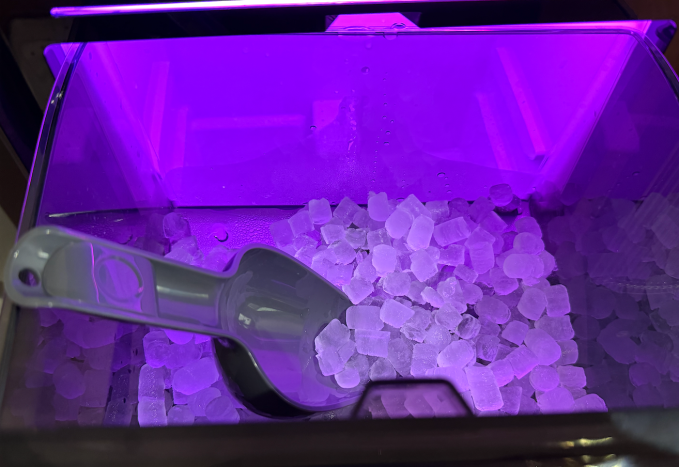
It wouldn’t be a Govee product if it didn’t offer customizable ambient lighting. The smart ice maker has a light that illuminates the ice basket and adds a fun visual element to the appliance. Through the app, you can choose from a variety of presets or create your own custom lighting effects. You can choose how bright you want the lights to be or turn them off altogether.
I mostly kept it on a light pink setting, but occasionally switched to the “cyberpunk” mode, which casts a changing purple and red glow that felt fun and futuristic when I had people over.
Advertisement
Image Credits:TechCrunch/Aisha Malik
Measuring 17.28 inches deep, 13.98 inches wide, and 17.01 inches tall, the ice maker takes up a lot of counter space and weighs a hefty 50 pounds. If you have a small kitchen, it can appear bulky, especially because its sleek design doesn’t exactly resemble an ice maker from afar.
As for setup, it was pretty straightforward, but afterwards I definitely needed my husband’s help to place it in our kitchen, and then again when I needed to move it around when it came to descaling and cleaning the machine.
Overall, the nugget ice elevated my iced drinks, giving them a coffee shop feel at home and making my morning routine more enjoyable. I also observed that the ice melted more slowly than my fridge ice, so my drinks stayed colder for longer without getting watered down as quickly.
Another big plus was its speed. It made ice much faster than my refrigerator, so I always had enough on hand when hosting friends and family. The ice maker itself was something guests noticed when they came over, not just because of its size and beaming lights, but because the nugget ice was a hit with the other self-proclaimed ice connoisseurs in my life (some even threatened to steal it).
Whether or not the GoveeLife Smart Nugget Ice Maker Pro is for you really comes down to how much you care about having nugget ice on demand and how often you’ll actually use it. If you aren’t much into ice, you obviously don’t need a fairly niche appliance.
Advertisement
But if you’re someone who regularly drinks iced beverages and loves “the good ice,” this ice maker could be the gadget you never knew you needed.
When you purchase through links in our articles, we may earn a small commission. This doesn’t affect our editorial independence.
Forgetting the recovery phrase to a crypto wallet can be stressful enough. Unfortunately, that’s exactly the moment scammers are waiting for. A new warning highlights a growing scam in which cybercriminals disguise malware as cryptocurrency recovery software, tricking desperate users into handing over far more than just access to their wallets.
The fake recovery tool that’s actually malware
According to The Guardian, the scam begins when users search online for a way to recover a forgotten 12- or 24-word seed phrase, the recovery key that unlocks a cryptocurrency wallet. Fake websites then promote seemingly legitimate recovery tools with reassuring names like “Lost Crypto Wallets Finder”, claiming they can help recover lost wallets. The website hosting the malicious software has since been taken offline, but security experts warn that similar scams are likely to reappear under different names.
Taylor Frint / Digital Trends Graphic
Instead of recovering anything, the downloaded software quietly installs malware. Researchers at HP Security Lab say it can harvest browser passwords, personal documents, photos, and other sensitive files before packaging everything into an archive that’s sent back to the attackers. Even though this particular website is no longer active, experts caution that cybercriminals often launch near-identical sites just as quickly, making the underlying scam far from over.
Security experts recommend taking a step back before downloading any recovery software. Legitimate recovery services do exist, but users should thoroughly research them, read independent reviews, and avoid downloading tools from unfamiliar websites. If malware has already been installed, experts advise removing it with reputable security software and immediately changing passwords, starting with banking and email accounts.
Crypto isn’t the target. Your panic is.
The funny thing is that this scam doesn’t rely on sophisticated hacking. It relies on human psychology. Losing access to a wallet that could contain thousands of dollars is enough to make almost anyone rush into downloading the first “solution” they find. That’s exactly the reaction scammers are banking on.
It’s also part of a broader trend. From fake Ledger letters and QR code scams to AI-powered phishing campaigns, cybercriminals are increasingly targeting crypto users through social engineering rather than breaking encryption. The lesson is surprisingly simple: if someone promises to magically recover a lost seed phrase with a free download, they’re probably trying to recover something else instead. And this time, that “something” is your personal data.
If you were hoping the memory crisis was about to ease up, I have some bad news for you. It comes directly from Wall Street.
Your next smartphone, laptop, or tablet could cost even more, regardless of whether it has recently been subject to a price hike.
Harrison Broadbent / Unsplash
So how bad is it actually going to get?
Investment bank Jefferies has laid out the clearest and ugliest forecast yet.
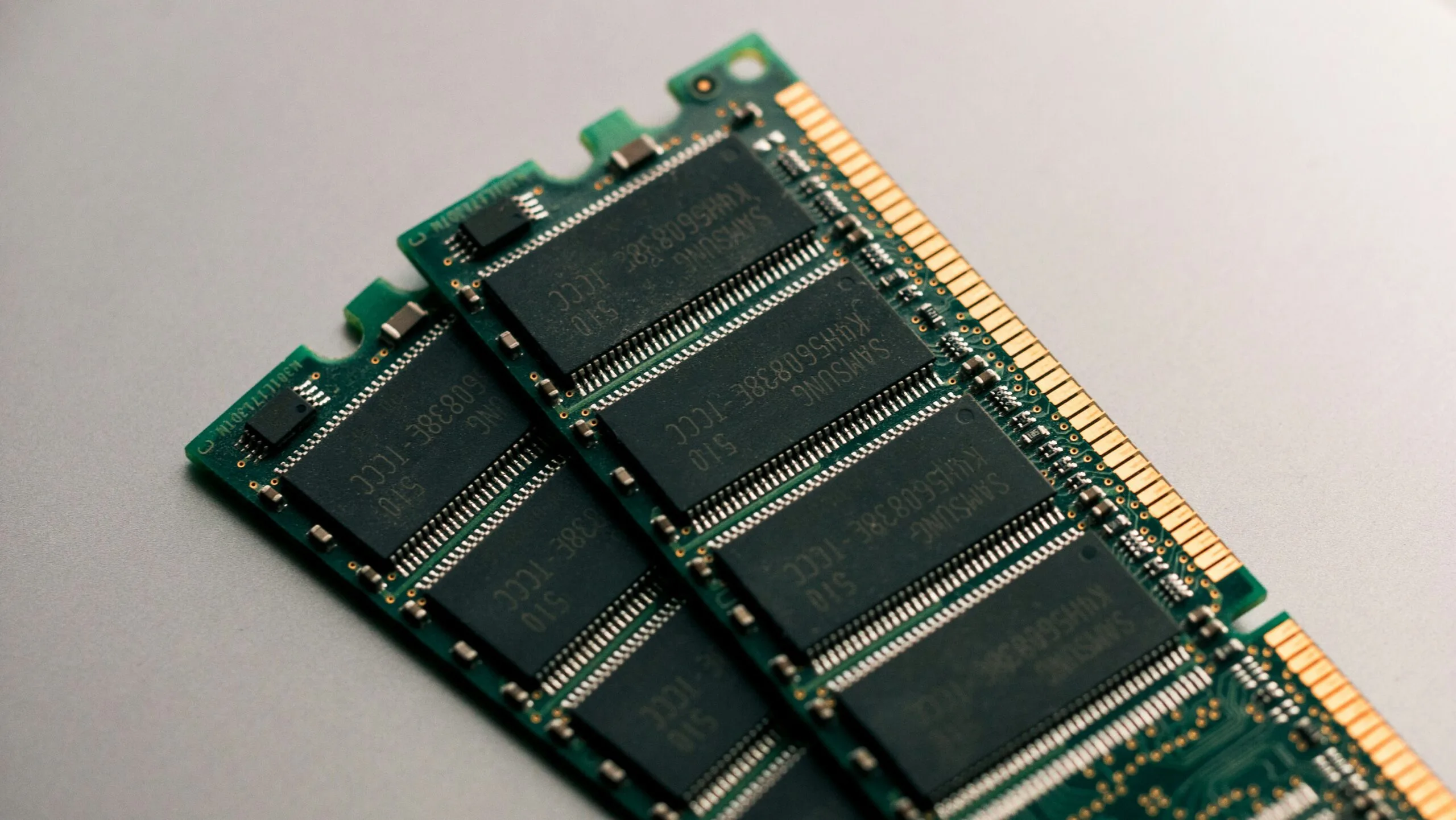
Memory prices are expected to jump by 40-50% in the third quarter of 2026 compared with the current quarter. While it would have been great if they had stopped there, prices could rise by another 30-40% in the fourth quarter of the year.
For all of 2027, Jefferies projects a 40-45% year-on-year increase. Based on those sequential estimates, we’re looking at a compounded price increase of roughly 150-205% between today and the end of 2027. If I were in the market for a new smartphone or laptop, I’d be worried.
Advertisement
The only real relief comes in 2028, when roughly 15-20% of new manufacturing capacity is expected to come online. Even then, demand for AI and computing will continue to grow simultaneously. In other words, the new supply may not stretch as far (via Wccftech).
Image used with permission by copyright holder
What does this mean for the price of your next phone or laptop?
That 13%, when you do the math, on a $1,000 phone, amounts to an additional $130 on your bill. Gartner also warned that the entry-level PC segment, devices costing less than $500, could effectively disappear by 2028, simply because companies might not be able to recoup their component costs, let alone earn a healthy margin.
Making things worse, 50% of total memory capacity is already locked into long-term contracts with major tech firms, a figure that could increase even further to 70%, leaving even less supply for consumer devices (via CNBC).
Every single sign you see while you’re driving is vital, even if some are quite confusing. Not only is it against the law if you don’t follow many of these signs, but they’re also there to make the driving experience on the road safer, both for you and for everyone else on it. One of the most important of these signs indicates the speed limit. While the white, rectangular speed limit sign is the most common, there are other speed limit markers you need to pay attention to.
One of those is a yellow diamond warning sign. Within that diamond is the standard speed limit sign, but it’s accompanied by an arrow pointing forward above it. This sign is indicating to drivers that the speed limit is going to decrease ahead, and you can then prepare to slow down your vehicle as you approach that next sign.
These signs will always be warning of an upcoming speed limit decrease. With this added warning, you don’t have to immediately brake hard (and unsafely) to meet the new lower limit, which will also spare some wear and tear. This also gives you the opportunity to make sure you’re slowed down enough when you reach the new speed limit zone, as it’s pretty common for police to use these speed limit decreasing spots for speed traps. Sometimes, you will see the same yellow diamond sign with just the words that there’s an X MPH Speed Zone Ahead, which is just a different version of this arrowed road sign.
Advertisement
Other road signs with arrows and speed limits
Johna410444/Shutterstock
While the ones mentioned above indicate that there’s a new speed zone approaching, there are other road signs with arrows and speed limits that also tell drivers that there’s a decreasing speed limit ahead. However, these are more to indicate temporary limits for specific situations rather than changing the overall speed limit for the road.
Mostly, these are two road signs stacked on top of each other. The one on top is the same yellow diamond shape as mentioned before, but here, that diamond is solely going to feature an arrow. These arrows can take a number of different shapes, such as a 90-degree arrow that points left or right or a long, wavy arrow ultimately pointing forward.
Advertisement
These arrows tell drivers what the immediate shape of the road will be, warning them of sharp turns, winding roads, hairpin curves, and more. Below these diamond signs will be a yellow square sign. This indicates the maximum speed at which you should maneuver through these trickier roads. Once you make it through this section of road though, you’re free to return to the speed limit of this overall speed zone.
Another specific road sign that features an arrow and a speed limit are to show drivers that they’ll be on a highway exit or ramp that is an extreme curve. These signs are yellow rectangles and feature an arrow that nearly makes a complete circle with the recommended speed limit below it. Importantly, yellow speed limit signs are warnings, so if you’re driving a bit over the limits on these signs, you’re not technically breaking the law. You’re just more in danger.
A new NYT Strands puzzle appears at midnight each day for your time zone – which means that some people are always playing ‘today’s game’ while others are playing ‘yesterday’s’. If you’re looking for Sunday’s puzzle instead then click here: NYT Strands hints and answers for Sunday, June 28 (game #847).
Strands is the NYT’s latest word game after the likes of Wordle, Spelling Bee and Connections – and it’s great fun. It can be difficult, though, so read on for my Strands hints.
Want more word-based fun? Then check out my NYT Connections today and Quordle today pages for hints and answers for those games, and Marc’s Wordle today page for the original viral word game.
Advertisement
SPOILER WARNING: Information about NYT Strands today is below, so don’t read on if you don’t want to know the answers.
Latest Videos From
NYT Strands today (game #848) – hint #1 – today’s theme
What is the theme of today’s NYT Strands?
• Today’s NYT Strands theme is… The mark of a good composer
Advertisement
NYT Strands today (game #848) – hint #2 – clue words
Play any of these words to unlock the in-game hints system.
CRAB
TRAM
BALD
FELON
ARABIC
CRANK
NYT Strands today (game #848) – hint #3 – spangram letters
How many letters are in today’s spangram?
• Spangram has 12 letters
NYT Strands today (game #848) – hint #4 – spangram position
What are two sides of the board that today’s spangram touches?
First side: left, 5th row
Advertisement
Last side: right, 6th row
Right, the answers are below, so DO NOT SCROLL ANY FURTHER IF YOU DON’T WANT TO SEE THEM.
Advertisement
NYT Strands today (game #848) – the answers
(Image credit: New York Times)
The answers to today’s Strands, game #848, are…
CLEFT
REST
NOTE
BRACKET
MEASURE
ACCIDENTAL
SPANGRAM: MUSICALSTAFF
My rating: Hard
My score: 1 hint
The theme was initially confusing — were we searching for composers like Mozart? — and even spotting the spangram MUSICSTAFF didn’t make any difference.
Sign up for breaking news, reviews, opinion, top tech deals, and more.
Advertisement
Musical staff? Is that a posh way to describe an orchestra?
However, after a hint, I realized we were searching for words associated with the composer’s craft of writing music.
That said, ACCIDENTAL was a new one for me, as I did not know this was a musical term and it took me ages to connect — it is a symbol placed immediately before a note that alters its pitch, temporarily raising or lowering it.
Advertisement
Yesterday’s NYT Strands answers (Sunday, June 28, game #847)
PARADE
RAINBOW
DRAG
RALLY
FLAGS
CELEBRATION
SPANGRAM: PRIDEMONTH
What is NYT Strands?
Strands is the NYT’s not-so-new-any-more word game, following Wordle and Connections. It’s now a fully fledged member of the NYT’s games stable that has been running for a year and which can be played on the NYT Games site on desktop or mobile.
I’ve got a full guide to how to play NYT Strands, complete with tips for solving it, so check that out if you’re struggling to beat it each day.
Dell‘s EOFY laptop discounts can be a little less obvious than a normal retailer sale, because there’s no before price shown after a drop. Fortunately, I track Dell pricing, so I can spot when an easily missed price drop is actually worth paying attention to.
That’s why the Dell 14 Plus caught my eye: it’s a compact 14-inch Windows laptop with a pretty grunty Ryzen AI 7 350 processor, 16GB RAM and a roomy 1TB SSD. Just as importantly, there’s a TechRadar coupon code available that brings the price down to just AU$1,139.05.
Our review said the Dell 14 Plus “delivers pretty much exactly what you need to get the job done” for everyday use, school work and general productivity.
What more could you want?
Advertisement
One of the reasons I like this little laptop is that for the price, it doesn’t shortchange you on memory or storage space. And it might not feel as important now, but that 1TB SSD means you can store loads of photos and files without worrying about running out of space.
Our review gave the Dell 14 Plus 4.1 stars, and the scorecard sums it up neatly: “a solid general-use and productivity notebook that’s great for work or school”. The value score is a top-notch 5 out of 5, while performance and battery life each score 4 out of 5.
There are some caveats, of course. The display is only 300 nits, so it’s better suited to an office, home desk or lecture room than bright outdoor use. Our review also noted the keyboard, trackpad and speakers could be better, so I wouldn’t buy this expecting a premium MacBook Air feel.
Advertisement
But considering the price, those trade-offs make perfect sense if you mainly need a portable Windows laptop that handles everyday work without any fuss.
There’s also a related Dell deal that may suit some readers better: the Dell 14 Plus 2-in-1 with a Ryzen AI 7 350 processor, 16GB RAM and a 1TB SSD is AU$1,299.10 with the same FUTUREAU5% code, down from the early June price of AU$1,799.
The 2-in-1 makes more sense if you like using a touchscreen. Personally, I find that being able to fold the display back into tablet or tent mode is super handy for things like handwritten notes, reading on the couch, marking up documents or watching movies on a plane.
If you want to check out more laptop options before deciding, our main EOFY laptop deals hub is chock full of laptop deals. It covers everything from more Dell deals to MacBooks, Windows laptops, 2-in-1s and gaming laptops, so it has something for everyone.
Advertisement
For even more Dell discounts, check out our TechRadar Dell coupons page, or try one of the codes below.
FUTURE13% — Save 13% off selected XPS and Alienware laptops and desktops
FUTURE11% — Take 11% off select monitors and displays
FUTUREAU5% — Enjoy 5% off a wide range of laptops and desktops



























































You must be logged in to post a comment Login