KPMG finds nearly a third of execs struggle to understand costs as companies rethink deployments
Nearly a third of corporate leaders report difficulty understanding and controlling operating costs when implementing business AI at scale, according to a survey from KPMG.
In recent months, Anthropic, OpenAI, and GitHub have shifted some services away from flat-rate subscriptions toward usage-based billing.
Advertisement
“As usage-based pricing models become more common, many organizations are still building the capabilities required to forecast, monitor, and manage AI spending effectively,” KPMG said.
The survey of 2,145 senior leaders across 20 countries found that 29 percent struggle to understand their operating costs as they scale their enterprise AI deployments.
A third of senior corporate leaders also identified limited understanding of AI costs and economics as a challenge to deploying AI agents.
Businesses are rethinking their AI plans in the face of changing cost structures and rising fees. The research also found nearly half of organizations have rephased AI deployments when costs have outweighed the expected value. Lower-cost, high-fidelity models are the fastest-growing influence on AI strategy, up 7 percentage points from Q1.
Advertisement
“These actions do not signal reduced confidence in AI. Rather, they suggest a growing willingness to evaluate where AI creates meaningful value and where it does not. Organizations appear increasingly focused on concentrating investment where expected returns are strongest,” the report said.
Amazon plans capital expenditure of around $200 billion this year, largely to provide capacity for AI in its AWS datacenters, an increase of 50 percent on a year earlier. Microsoft’s total capex is expected to reach $190 billion, up 61 percent from the previous year.
Both companies are now investing significantly in forward-deployed engineering to help customers develop AI applications that will generate demand for the capacity being built.
Microsoft is providing $2.5 billion in funding for a new operating entity called Microsoft Frontier Company, “enabling customers to amplify their IQ with AI while refining their differentiated value in the markets that they serve.”
In the KPMG report, challenges remain around AI governance: the question of who takes responsibility for decisions made by statistical models prone to erroneous outputs – or “hallucinate,” as tech vendors would prefer.
KPMG said executive accountability is important, but “governance ultimately succeeds or fails through day-to-day operating practices.”
“Organizations need clear rules for when employees can intervene, who owns AI-related costs, how AI outputs are reviewed and what happens when systems fail. While most organizations report having at least some governance mechanisms in place, relatively few describe these practices as fully embedded,” the report said.
Advertisement
Perhaps the tech consultancy and services giant speaks from experience. Last month, research outfit GPTZero claimed a forensic review of KPMG’s October 2025 report, “Total Experience: Redefining Excellence in the Age of Agentic AI,” found that only five of its 45 citations pointed accurately to the cited source. The rest contained errors ranging from misleading or invented details to references that were too vague to verify.
KPMG later removed the report from some of its websites and issued a statement.
“KPMG International takes the accuracy and integrity of its published content seriously. The report has been removed and we are reviewing the circumstances surrounding its publication. We expect all our people to follow our guidelines on the responsible use of AI, including human oversight to validate content and verify independent sources,” a spokesperson said. ®
It’s called Assistive Access. Introduced with iOS 17, Apple designed it for those with cognitive disabilities. If you’ve never encountered or stumbled across it, it’s a distinctive iOS experience: fewer options, more focused features, easier to navigate. The aesthetic is ideal for kids: large, friendly tiles for the apps replace the smaller icons of the “normal” Apple interface.
Here’s how you set it up: Head into Settings, tap Accessibility, scroll down to the General section at the very bottom, and tap Assistive Access. Now, tap Set Up Assistive Access, then Continue. It will then ask you to select your preferred appearance: rows or a grid. I suggest choosing a grid. This is how you get those super-large tiles. Now the OS will ask you to select allowed apps—tap the green plus icon next to the apps you want to allow.
Crucially, this is where, unlike with Apple’s standard child screen-time restrictions, you can choose to completely block internet browsing by simply not allowing Safari, Chrome, or any other similar app. And, unlike with those screen-time restrictions, if someone texts your child a link, it won’t work. Why? Assistive Access is designed to prevent accidental navigation, so the system restricts unexpected web browsing.
Advertisement
Even though Assistive Access on Apple devices allows internet access, it is heavily restricted by design, and it’s turned off by default. In this mode, the phone treats any link in a message as plain text, preventing the user from accidentally leaving the simplified interface.
Made for caregivers or trusted supporters, the user must specifically add internet-enabled apps like Messages, Safari, or third-party web apps to the Assistive Access interface. And once you add, say, Messages or Calls, you then choose whether your child can contact or be contacted by everyone, their contacts only, or just selected favorites.
Building your ideal hi-fi setup is no small task. Depending on your specific goals, you could be in for buying a lot of different gear to perfect your sound and make sure you have everything you need to listen to what you love, how you’d love to. That’s an expensive endeavor — and sometimes, a confusing one. It’s sometimes difficult to tell what different devices can do, or how they differ from one another.
Deciding how to play vinyl is similarly difficult, yet vital. If you’re interested in vinyl, then there’s a good chance that you’re already committed to achieving the best sound you can at home. So, naturally, you’ll want to make sure you pick up the most suitable gear possible. There’s a great turntable out there at almost any budget, but there’s a crucial difference to be aware of before you splash the cash: whether you need a record player or a turntable.
Although the two phrases are used interchangeably, they’re actually different equipment. Generally speaking, a record player is an all-in-one device that has everything you need to play vinyl, including built-in speakers. Turntables, on the other hand, only play records themselves, with no speakers. That means you need to hook turntables up to amps and speakers if you want to hear anything. That offers invaluable flexibility if you’re an audiophile crafting your dream listening experience, even if it can be a little inconvenient.
Advertisement
A turntable offers more flexibility
kopi std/Shutterstock
When you pick a turntable, you’re just choosing the device that spins your records and the stylus that translates the grooves into electrical signals, not your speakers, amplifier, subwoofer, or anything else. As a result, you can build the exact setup you want by picking up a turntable instead. Think of it as a modular system, where the turntable makes up one part of the wider hi-fi setup. Meanwhile, when you pick a record player, you’re also often picking the amplifier, speakers, and anything else it comes with.
For many audio lovers, selecting the equipment to get the sound they want is a big part of the fun. Audiophilia is a hobby, after all. With that in mind, using ready-out-of-the-box audio equipment — like a record player with a built-in amplifier and speakers — can take some of the joy out of the process. Using a turntable, on the other hand, opens up a world of possibilities, since you can use it with other components you may be interested in.
Advertisement
While it’s convenient to grab a record player and be able to use it straight away without needing other equipment, that convenience comes with a compromise: you’re generally restricted to the components it comes with, at least to some extent. That’s not always the case, though, as some record players do essentially double up as turntables, allowing you to hook them up to other equipment like speakers. But you’re still going to be somewhat restricted by the player’s internals and overall capabilities.
Advertisement
All-in-one record players don’t always offer the best sound
New Africa/Shutterstock
Being stuck with the amplifier and speakers that your record player comes with isn’t only a problem of limited customizability. Unfortunately, sometimes whatever’s built into your all-in-one record player just doesn’t sound that good to start with. These decks have to spin the records, amplify the sound, and push it through the built-in speakers, and this all-in-one nature can lead to sonic compromises. If you can’t enjoy the sound, it defeats the purpose of investing time and money into your setup.
Generally speaking, all-in-one record players don’t offer the best sound quality. They can sound tinny and lack clarity, stopping you from getting the most out of your collection’s potentially high-fidelity capabilities. Instead, you run the risk of getting a listening experience you could just as easily get from a small radio, speaker, or even your phone. For that reason, some opt to skip all-in-one options in favour of turntables designed to work with proper hi-fi equipment.
Interference is also a common problem with all-in-one record players. That happens when the stylus picks up vibrations from the built-in speakers as it’s playing a record. Usually, this happens with a slight delay, which can lead to a messy, discordant, and even distorted sound. This can happen with any vinyl setup, but the proximity of the speakers to the turntable’s stylus means it’s much more common with record players.
Advertisement
Issues are easier to deal with
Josefephotography/Getty Images
When a record player breaks, you could be looking at anything from a duff speaker to a busted amplifier and a good few things in between. That’s because of all the functions they perform. In some cases, a broken part could even be the end of the line for that record player altogether, leaving you to pick up an entirely new one.
Turntables, on the other hand, are typically a little more straightforward. Sure, there is still plenty that can go wrong — including the belt (or drive motor), cartridge, arm, or power supply — but it’ll be something specific to the vinyl-spinning process itself. Pretty much everything else that makes up your setup is separate, meaning that replacing a busted speaker is a matter of buying some new speakers rather than opening up your player to see what’s inside, or replacing the player altogether.
One related area where record players are at a significant disadvantage compared to turntables is the stylus or needle. Styluses wear down over time, and you should replace them to reduce the risk of damaging your records. However, some record players are designed in a way that means you can’t replace the stylus. So, that means that when your needle reaches the end of its life, your record player does as well. That’s a lot of waste, and a fair amount of risk for your records.
Advertisement
Some record players can even damage your records
Tatiana Dyuvbanova/Getty Images
Even with all their faults, an all-in-one record player might still tempt some with its ease of use and affordability. However, that convenience and cost could quickly turn into an expensive and awful ordeal if it ends up damaging your records. There are a couple of culprits behind this, but one of them is down to the placement of your record player’s speakers.
All sound is vibration. That means that when your record player’s speakers blare out whatever you’re spinning, your deck is also vibrating. Your record spins on top of the deck, while it’s being read by the player’s needle. Except that the vibrations will cause all of it to move slightly. In turn, the player’s stylus might move around more than it should, and it may skip across the record and scratch it. Some slight scratches on records can go unnoticed, but damage builds up over time, and deeper scuffs can cause audible imperfections or even skips. Nobody wants that, audiophile or otherwise.
That isn’t the only time that needles can cause damage to your records. Records can wear down over time, and this can happen on any system, regardless of whether it’s a record player or turntable. However, budget all-in-one record players may also have budget needles, which could cause more damage in the long-term compared to a finer needle. Another thing to keep in mind is that you won’t have much room to adjust settings like the tracking force.
Advertisement
Record players can have tonearm limitations
Taigi/Shutterstock
All-in-one record players are at a particular disadvantage compared to turntables when it comes to the tonearm. The tonearm is a crucial part of any record deck, as it holds the cartridge in place, allowing it to follow grooves on a vinyl record and for the turntable to produce sound. It also ensures the needle is stable and that the pressure (or tracking force) is consistent, reducing the risk of damaging your records while reproducing the music as clearly as possible. Overall, being able to adjust the tracking weight is important for playback, ensuring your records sound great, don’t skip, and don’t wear out too quickly. Despite that, it’s not an option on many popular all-in-one record players.
In some cases, the arm is set to the wrong weight altogether, so the tonearm places far too much pressure on the record. That’s no big deal if you can adjust the weight, but if you can’t, you’re stuck with a significant risk of your LPs getting damaged over time. That’s the last thing anyone would want, but it’s probably going to be a deal-breaker if you’re especially invested in enjoying the highest fidelity sound possible, or if you collect rare records. As a result, any gear that doesn’t offer tonearm adjustability is inherently less appealing than gear that does.
This article is crossposted from IEEE Spectrum’s careers newsletter. Sign up now to get insider tips, expert advice, and practical strategies, written in partnership with tech career development company Parsity and delivered to your inbox for free!
You want to become a senior developer. A CTO, maybe. Start your own company, perhaps. Or maybe you just want to land your first role in tech.
You will not get there from raw engineering skill alone.
There’s a skill that’s quietly essential to technical leadership and yet consistently overlooked: public speaking.
Advertisement
If you’re anything like I used to be, you’re already listing reasons not to. “I got into this to code, not to give presentations.” “I don’t want to lead.” “I’m too junior to speak about anything.” No, no, and no again. There’s a ceiling on the return from technical skill alone.
I was terrified of public speaking for the first three years of my career. I wanted to hide behind code, and for the most part it worked. I did my job and did it well.
Then I joined a startup where hiding wasn’t an option. The whole company was five people. I was one of two developers. I had to form opinions on our technical direction and defend them, and the CTO told me directly that I needed to speak up more.
A few things happened once I did. I took more pride in my work. I said some cringe-worthy stuff, lived through the mini-anxiety attacks, and got better. To my own disbelief, I’m now an engineering manager whose job is largely speaking to groups of developers and leading presentations, online and in person.
Advertisement
Here’s why this is worth your time:
Leadership. Communicating ideas clearly, influencing decisions, and aligning your team are core leadership functions, and they matter more the further you climb.
Visibility. Speaking lets you show your expertise, build a reputation, and connect with people who open doors to better roles.
Durability. As automation absorbs more routine technical work, skills rooted in human interaction and judgment are far harder to replace.
Advertisement
The good news is you can build this deliberately, in low-stakes steps.
Record yourself. Use a screen-recording tool to walk through your work, explain a concept, or narrate your code. You can edit, re-record, and over-think it as much as you want. That’s the point. It gets you comfortable on camera before the stakes are real.
Volunteer for demos. Next time you ship a feature or fix a bug, ask your manager for a short time slot to walk the team through it. No format for that on your team? Suggest a monthly lunch-and-learn and kick it off with a 15-minute lightning talk on something you know.
Start small—really small. If your anxiety is spiking, don’t jump into the deep end. In your next meeting, ask one question. Write it down beforehand if you have to. Then be the first to break the awkward silence when someone else asks one. Developers are a famously quiet bunch, so it doesn’t take much to stand out.
Advertisement
The further you grow, the more you’ll be expected to hold opinions and voice them publicly. So start now. Record yourself, ask questions, get uncomfortable, and notice that it gets easier every time you do it.
—Brian
Salome Mikadze-Struk built her tech company Movadex as an undergraduate student at the height of the COVID-19 pandemic—then kept it running during the outbreak of war in her native Ukraine. Now, she’s channeling what she learned into mentoring tech founders and speaking about the importance of resilience as AI upends the software industry.
LLMs are now part of many engineers’ daily workflow, and the demand for technical expertise in implementing and securing the models is rising. But to build tools that work consistently, developers must have a strong understanding of the core principles that govern how the models work. IEEE is now offering a five-course program to teach how to use LLMs effectively, starting with the fundamental engineering behind the technology.
Two researchers at the City University of Hong Kong developed a method to make a circuit trace by simply bending a piece of paperlike material. With the right ingredients—isopropanol and liquid metal—you can make your own origami circuit board. The researchers also created a toolkit, called LiqMetCraft, with software tools and instructions to make it easy for beginners, whether in papercraft or electronics.
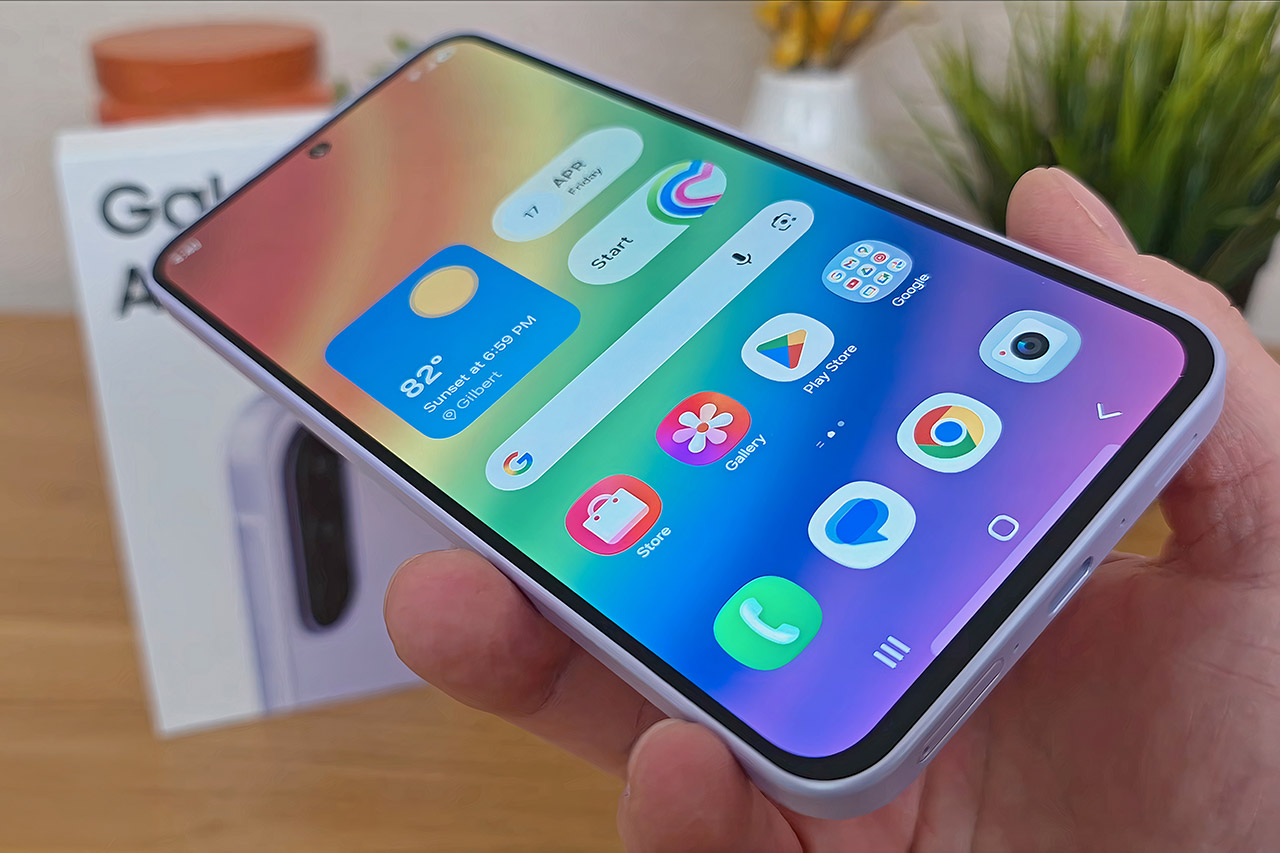
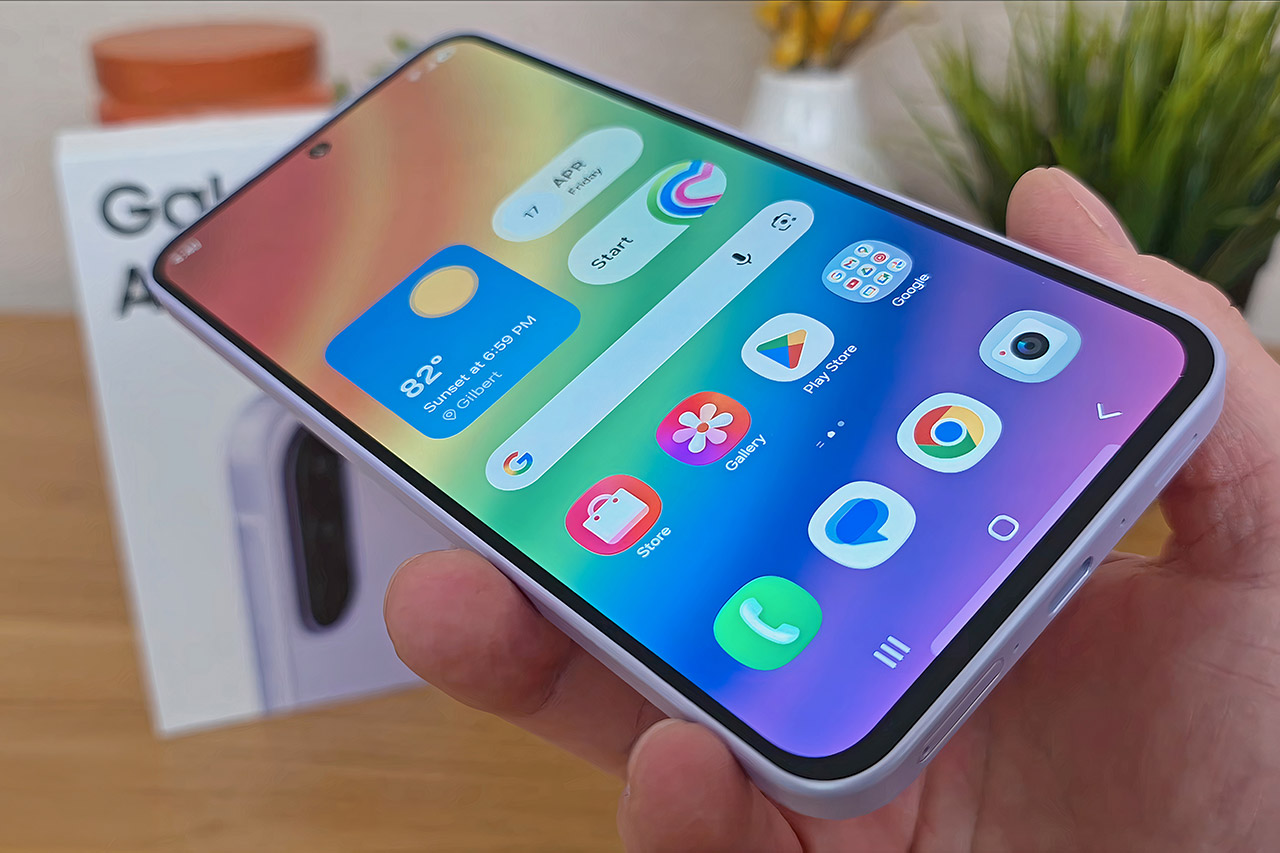
Many smartphone shoppers today simply want a device that manages their routines smoothly. They need reliable calls, zippy apps, clear photos for everyday moments, and enough battery to last without constant worry. Samsung built the Galaxy A37 5G, priced at $399.99 (was $539.99), around those priorities.
Samsung delivers the Galaxy A37 5G in a compact package, measuring just 7.4 millimeters thick and weighing only 196 grams. A layer of glass coated with Corning Gorilla Glass Victus+ protects both the front and back, making it more than capable of withstanding the wear and strain of everyday living. The phone also has an IP68 rating, so it will easily recover from an accidental drop in water.
AWESOME SCREEN. ENDLESS POSSIBILITIES: Elevate your content no matter where you are with the 6.7″ Super AMOLED display¹ of the Galaxy A37 5G. Enjoy…
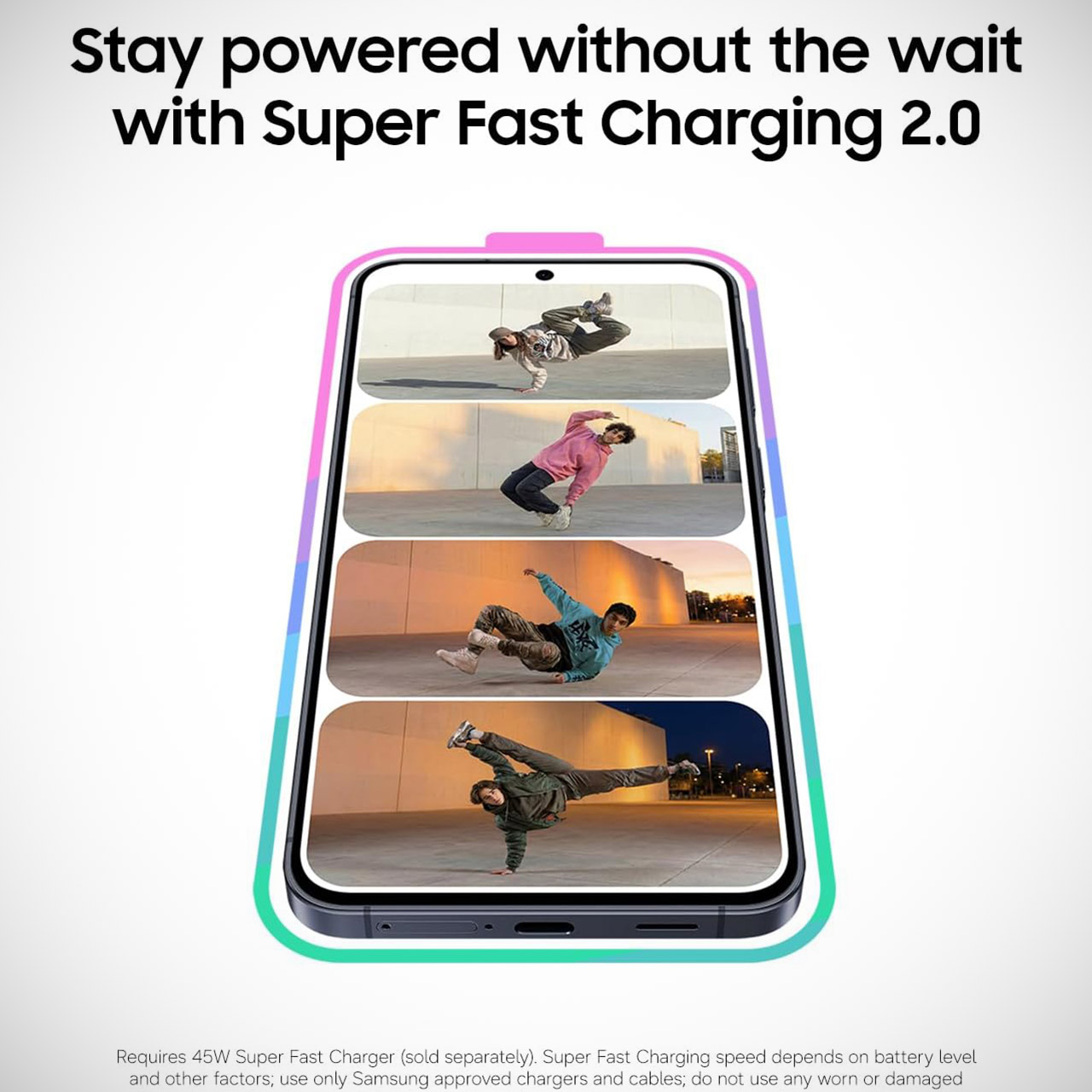
LONG-LASTING BATTERY: Whether it’s family moments or important calls, stay powered without the wait with Galaxy A37 5G. Super Fast Charging…
NEVER MISS THE SHOT, EVEN IN LOW LIGHT: With effortless Nightography, you can capture clear high-quality photos and videos on your phone automatically…
The Galaxy A37 5G’s impressive screen quality is thanks to a 6.7-inch Super AMOLED panel that delivers full high-definition resolution with a smooth 120-hertz refresh rate. This means you’ll be able to easily cycle through feeds and enjoy your apps with silky smooth animation. Furthermore, it is quite bright, allowing you to see what is going on in the sunshine. Let’s not forget about the colors, which are brilliant and natural, as one would expect from a high-quality display. The same Gorilla Glass protection that shields the screen from scratches and drops also protects you from pocket detritus.
Advertisement
The Galaxy A37 5G features an Exynos 1480 processor with 6GB of RAM. This combination results in a very responsive interface that works continuously throughout the day. To top it all off, you get 128GB of internal storage, which will greatly improve your load times and multitasking capabilities. A 5000-milliamp-hour battery provides plenty of juice to go through the day and typically has plenty left over for the next one, as long as you don’t push it too hard. If you’re doing a little bit of everything, including calls, social applications, navigation, and the occasional video, this power consumption is quite efficient. If you run low, simply plug it in and the 45-watt charging will bring it back up to speed in about 30 minutes, or a full recharge in around 70.
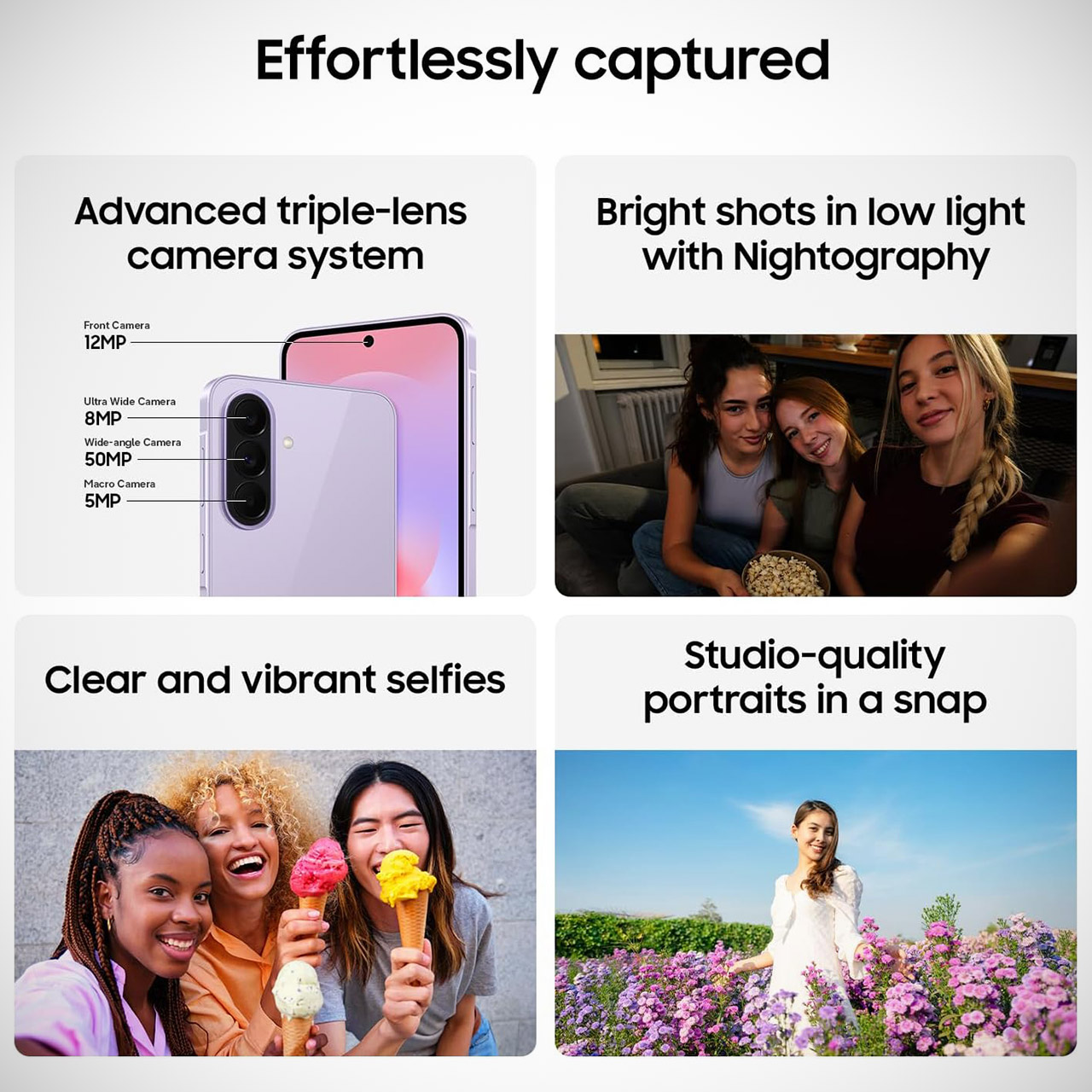
The Galaxy A37 5G’s rear cameras are based on a 50-megapixel primary sensor with optical stabilization. It does an excellent job of capturing detailed photos throughout the day and even outperforms expectations in low-light circumstances. However, the 8-megapixel ultra-wide lens allows you to record a wider image, while the 5-megapixel macro lens is available for close-up shots. With video recording at 4K and great steady stabilization, you’ll be able to shoot some extremely smooth footage. A 12-megapixel camera on the front is in charge of taking selfies and video calls, and it does a pretty good job with the added punch of Super HDR.
Android 16 is preloaded with Samsung’s One UI, which is quite simple to use. As a bonus, Samsung will keep the phone updated with new software and security patches for at least six years, ensuring that it remains safe and current for a long time to come.
The company’s robotaxi roadmap mentions future expansions to Orlando and Tampa.
Miami residents are getting another option for autonomous taxi services, at least for those who live in a specific portion of the Floridian city. As posted on X, Tesla has expanded its Robotaxi service to a small section of West Miami.
Like we saw with the robotaxi rollout for Dallas and Houston earlier this year, Tesla is limiting its initial Miami availability to outside of the busy downtown. However, customers were already seen riding in unsupervised Tesla robotaxis in videos circulating on X. Notably, the Teslas are seen operating without a safety monitor in the car, which was a controversial inclusion when the company first rolled out its autonomous ridehailing service in Austin, Texas. We’re expecting Tesla to expand the geographic scope of its Miami robotaxi service eventually, considering it expanded availability to the entirety of the Austin metro last month.
Advertisement
For those wondering why Tesla is expanding to Miami, the city is already home to Waymo’s autonomous robotaxis that kicked off in January. Similarly, Zoox is targeting an expansion to Miami and has begun testing its fleet with its employees as of this year. Beyond Miami, Tesla’s roadmap includes introducing its robotaxi service to more cities across the US, including Phoenix and Las Vegas along with Orlando and Tampa, Fla.
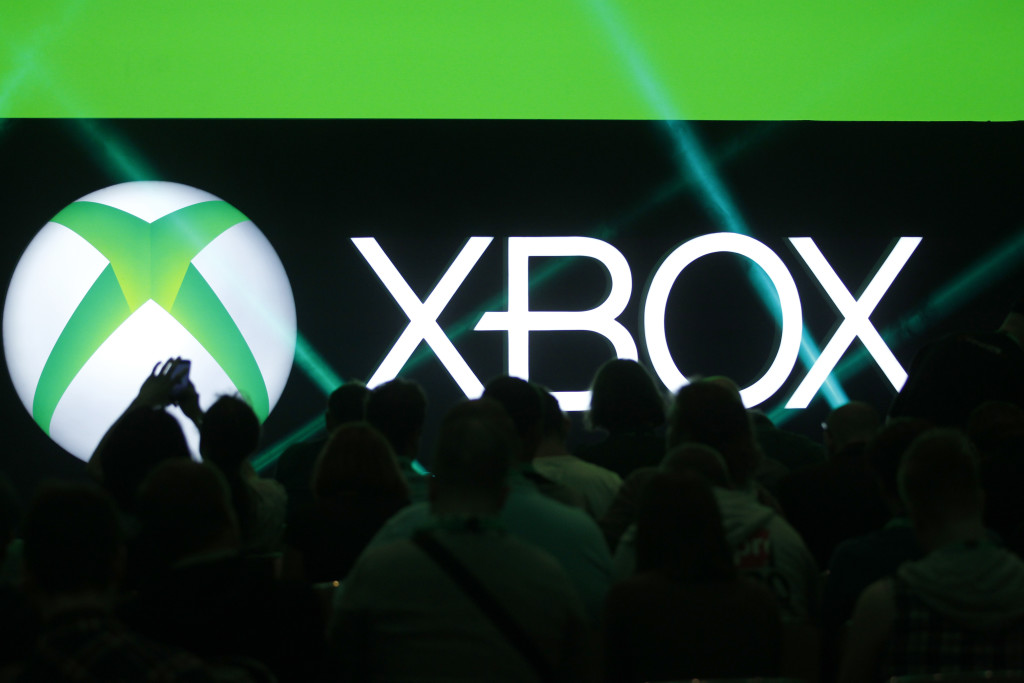
Xbox at a gamescom briefing in 2014. Microsoft is pressing its games division to turn a profit. (Microsoft Photo)
In 2007, Microsoft’s Xbox 360 consoles started dying — overheating until three lights on the front blinked red, a defect gamers came to call the “red ring of death.” Microsoft’s response was to extend the warranty on every machine and take a charge of more than $1 billion to fix the problem, making it one of the costliest product failures in the company’s history.
Microsoft could afford it financially, but the bigger factor was strategy. Xbox was a bet on the living room, and for a company minting money on Windows and Office at the time, losing a billion or so was a justifiable cost of staying in the game.
Nearly two decades later, that patience has run out.
“Going forward, this cannot continue,” the new Xbox CEO Asha Sharma wrote in a memo to employees last month, offering a blunt assessment of a business that has spent more than $20 billion over five years, only to see its core revenue fall by nearly half a billion dollars, running at a thin 3% profit margin, by Microsoft’s own internal measures.
Asha Sharma took over as CEO of Microsoft’s Xbox business in February. In a memo to employees last month, she wrote that the division’s heavy spending and shrinking revenue “cannot continue.” (Microsoft File Photo)
With thousands of layoffs expected to be announced across Microsoft as soon as next week, the Xbox division is likely to be among the hardest hit.
The cuts reach across the company — including sales and consulting — part of a restructuring that has become routine around the close of Microsoft’s fiscal year. But for Xbox, they’re an early step in a broader effort to reset the business, rein in costs, and position the division for healthier profits.
Advertisement
Microsoft CEO Satya Nadella has been blunt about it: the company has spent years subsidizing Xbox rather than profiting from it, and that era is over. The videos and livestreams of people playing Xbox games that fill YouTube generate more money than Microsoft makes from the games themselves, he noted in an appearance on the Hard Fork podcast.
“No one can accuse Microsoft of not having invested for the last 25 years,” Nadella said. “And now we have to turn this into a sustainable business.”
Long-term strategic bet
Turning it around means breaking a pattern that runs through Xbox’s entire history.
Xbox launched in 2001 and lost money for most of its first decade. Microsoft absorbed the losses and stayed in — going up against Sony’s PlayStation and Nintendo — because it saw a strategic prize in owning a piece of the living room, and later of mobile. Online gaming also gave the company early experience running services at scale, which fed its cloud ambitions.
Advertisement
Over time, the goal shifted from selling hardware to selling subscriptions.
Xbox Live, launched in 2002, turned online play into recurring revenue. Game Pass, which arrived in 2017, let players pay a monthly fee — the top tier is about $23 — for a library of games, including Microsoft’s own new releases the day they come out. The idea was to get people paying for Xbox everywhere: consoles, PCs, phones and the cloud.
And when growth stalled, Microsoft doubled down. It paid $7.5 billion in 2021 for Bethesda, the studio behind Fallout and The Elder Scrolls, then $69 billion in 2023 for Activision Blizzard (whose games include Call of Duty, World of Warcraft, Diablo and the mobile hit Candy Crush) the largest acquisition in Microsoft’s history.
A series of economic headwinds
Microsoft could afford to be patient through all of it. Now it’s not so simple. In recent years, almost everything about the economics of gaming has turned against Xbox at the same time.
Advertisement
Hardware loses money, and AI is making it worse. Microsoft sells consoles at or below cost, banking on games and subscriptions to make up the difference. But AI data centers are consuming so much memory and storage that chip prices have spiked. That has forced Microsoft to raise Xbox console prices, most recently a $100-to-$150 hike this summer that it blamed directly on component costs.
Xbox lost the console war. By most estimates, Sony’s PlayStation 5 has outsold the Xbox Series X and S more than two to one. A smaller base means fewer game sales and subscriptions to offset the upfront hardware losses. That has left Xbox a distant second for the entire generation.
Revenue is shrinking. Even setting aside the games it gained from Activision, Xbox’s annual revenue has fallen nearly $500 million over five years — while the money going into the business keeps climbing. It has been investing more to earn less.
Microsoft’s most recent quarterly filing shows gaming revenue of $16.8 billion for the nine months through March, down about $1.1 billion, or 6%, from a year earlier.
Advertisement
Game Pass cuts into sales. Handing subscribers a new game the day it launches undercuts the roughly $70 they would have paid to buy it. The service delivers steady subscription income, but thinner economics on the games themselves.
Activision didn’t fix the margins. Even with one of gaming’s most profitable businesses folded in, Xbox earns only about 3 cents of profit on every dollar — well under the 17 to 22 cents typical in the industry. If the biggest acquisition in company history can’t move the margin, little will.
Every spare billion is flowing to AI. Microsoft is pouring more than $100 billion a year into the data centers and chips behind its AI push, trying to capitalize on the boom. Against a risk and payoff that big, a gaming business that barely breaks even feels like yesterday’s strategic bet.
What’s next for Xbox
The cuts have already started. In recent weeks, Microsoft has signaled plans to close or sell some studios, including Ninja Theory, maker of the acclaimed “Hellblade” series.
Advertisement
Shedding staff, studios and marketing will lift Xbox’s profit margins in the near term. What it won’t do is fix the underlying problem: a business can trim its way to a better number only so much before it has to generate more revenue.
Sharma’s plan, so far, is to concentrate on Xbox’s biggest franchises, funding blockbusters like Halo and Fallout while pulling back elsewhere. It’s leaning on Game Pass and releasing most of its games on PCs and rival consoles from Sony and Nintendo, reaching players well beyond Xbox’s shrinking base, even as it holds back a few new exclusives like Gears of War to give owners a reason to stay.
Microsoft is also rethinking the console itself. In her memo, Sharma described a “hardware component crisis” that has left the company unable to make as many consoles as players want, and called for “a new business model and partnerships” for its hardware.
How far the reset ultimately goes is an open question. The Information reported that Microsoft has weighed making Xbox a standalone subsidiary, a joint venture, or a spin-off, though nothing is imminent.
Advertisement
Microsoft’s response to the Xbox 360 “red ring of death,” July 6, 2007. (Seattle Post-Intelligencer / NewsBank)
Whatever happens next, it’s clear that times have changed. In 2007, as the red ring of death crisis emerged, Peter Moore, who ran the Xbox business at the time, and his boss Robbie Bach went to then-CEO Steve Ballmer to ask for the money to repair and replace the failing consoles.
Told it was $1.15 billion, Ballmer said, simply: “Do it.”
Moore credits that decision with saving Xbox. There would have been no Xbox One, he said, without Ballmer’s willingness to spend more than a billion dollars to protect the brand.
Advertisement
But nearly two decades later, Microsoft is done writing that kind of check for Xbox.
A US government entity paid about $1m to the Kairos extortion group to keep stolen files private, according to a Ransom-ISAC case study based on a leaked negotiation chat and blockchain analysis. The clues point to Union County, Ohio, though neither party has confirmed it. The case illustrates how much of today’s “ransomware” involves no encryption at all.
A US government entity paid around $1m to stop stolen files from being published, according to a case study by researcher Rakesh Krishnan for Ransom-ISAC. The analysis draws on a leaked negotiation chat and the blockchain trail the payment left behind.
Advertisement
The group behind the deal calls itself Kairos, but it may not be a ransomware gang in any traditional sense. Krishnan reportedly found no encryptor, no locker, and no demand for a decryption key, just stolen files and a price for keeping them private.
The case study does not name the victim, but file names in the proof-of-theft samples, including an archive called union.rar, point to Union County, Ohio. Neither the county nor Kairos has confirmed the connection, and The Hacker News says it has contacted the county for comment.
The clues do line up with a real incident. In May 2025, Union County detected ransomware on its network and later notified 45,487 people that data including Social Security numbers, fingerprints, and passport details had been taken.
If the identification holds, a county of roughly 70,000 residents made a $1m payment it never publicly disclosed. The attacker reportedly leaned hardest on a folder marked “prosecutors office”, warning that a leak would help criminals evade charges.
Advertisement
Anatomy of a $1m deal
The negotiation ran for about a month, according to the case study. Kairos opened at $3m and claimed to hold more than 2TB of data across some 1.6 million files.
The county reportedly countered at $100,000 and inched up to $430,000, while Kairos dropped to $2m before fixing a final $1m deadline. The victim paid on 13 June 2025, ten times its opening offer.
The payment of roughly 9.44 bitcoin matched about $1m at that week’s market prices. Within hours it was reportedly split and routed through a chain of wallets towards deposits at Bybit, OKX, and BELQI, a Russian service that recalls earlier ransomware laundering through WEX and BTC-e.
What the money bought is another question. Kairos handed over a “proof of deletion” file, but a list of file names only proves the attacker once held the data, and promises to delete stolen data have unravelled before.
Ransomware without the ransomware
Union County described the incident as ransomware, yet nothing in the Kairos case was ever encrypted. A growing share of what still carries that label now skips lockers entirely and uses the stolen data itself as the pressure point, a playbook that recent extortion-only breaches have aimed at the private sector too.
Sophos reported in 2025 that only around half of ransomware attacks involved encryption, down from 70% a year earlier and the lowest rate in six years. Silent Ransom Group, an offshoot of the Conti ecosystem, has spent years running encryption-free extortion against US law firms, drawing repeated FBI warnings.
The bargaining arc is familiar too. When Black Basta’s internal chats leaked in February 2025, one deal moved from a $1.5m demand to a $100,000 counter and a $1m payment, almost the same curve.
Advertisement
Kairos itself has gone quiet, with its leak site offline and its last known victim posted in June 2026, per the case study. A linked wallet was reportedly still moving funds in May, so a dark leak site should not be read as a retired crew.
Unglamorous lessons
For small government networks, the takeaways are deliberately dull. Kairos claimed it got in by guessing a password, so multi-factor authentication and alerts on repeated failed logins would have raised the cost of entry considerably.
Defenders should also watch outbound transfers and throwaway file-sharing links, such as the temp.sh addresses the attacker used, and keep legal and citizen records segmented from the wider network. Above all, a thief’s receipt for deleted data is worth exactly what it cost to type.
Meta is planning to sell access to its AI computing power to outside customers, in a move that would see it compete directly with AWS, Azure and Google Cloud.
Meta is developing plans to enter the cloud computing market by building a business that would sell access to AI computing power and models to external customers, according to Bloomberg.
Bloomberg cited sources that say the social media giant is forming a unit to generate revenue from excess computing capacity, putting it in direct competition with established cloud providers such as Amazon Web Services, Microsoft Azure and Google Cloud.
The plans are being developed under an internal initiative called Meta Compute, led by Santosh Janardhan, Meta’s head of infrastructure, alongside Daniel Gross from the Meta Superintelligence Labs AI unit and Meta president Dina Powell McCormick.
Advertisement
One option reportedly under consideration is a service similar to AWS’s Bedrock offering, where developers would pay to access AI models hosted on Meta’s infrastructure, including its own Muse Spark models. The company is also weighing the sale of raw computing capacity, in a model comparable to neocloud providers like CoreWeave.
SiliconRepublic.com has reached out to Meta for comment. Bloomberg said the company’s plans are still in development and could yet change. The news sent Meta shares up 9.3pc yesterday, while potential rival neocloud player CoreWeave dropped as much as 14pc.
A possible move into the cloud infrastructure business was flagged by Mark Zuckerberg himself as recently as May. Speaking at Meta’s annual shareholder meeting, he told investors that launching a cloud service was “definitely on the table”, as CNBC reported at the time. He noted that outside companies had been approaching Meta “almost every week” to either use its API services or purchase excess compute capacity.
“We haven’t done that yet because we think that we have a use for the compute,” Zuckerberg said. “Obviously if we get to a point where we feel that we have overbuilt, then that is an option that we have.”
Advertisement
Meta has committed between $125bn and $145bn in AI-related capital expenditure for 2026, a level of spending that has made investors nervous about returns. A cloud business would certainly offer a direct route to monetise that infrastructure investment.
Don’t miss out on the knowledge you need to succeed. Sign up for the Daily Brief, Silicon Republic’s digest of need-to-know sci-tech news.
The Lenovo Yoga Slim 7x Gen 11 is a lovely Windows laptop with a lot of power with its Snapdragon X2 Elite SoC, plus it comes with a comfortable keyboard, dazzling OLED screen and immense endurance. It is rather expensive in the top configuration, though, and the port selection feels a bit one dimensional.
Lightweight and stylish finish
Increased grunt from Snapdragon X2 Elite chip
Excellent battery life
Dearer than rivals in top-spec
One-dimensional port selection
Squirrel Widget
Advertisement
Key Features
Review Price:
£1669.99
Advertisement
Snapdragon X2 Elite inside
The new Yoga Slim 7x Gen 11 packs a lot of power into a small chassis with its use of Qualcomm’s new Snapdragon X2 Elite processor.
Advertisement
14-inch 3K 120Hz OLED screen
It also has a high-res and high refresh rate OLED screen for added razzle-dazzle.
Advertisement
70Whr battery
This Lenovo laptop also has a large battery inside to help you power through work over multiple days.
Introduction
The Lenovo Yoga Slim 7x Gen 11 updates its longstanding line of excellent all-round ultrabooks with quite a boost in power.
Advertisement
The headline here is Qualcomm’s new Snapdragon X2 Elite SoC that touts a large boost in overall power against the original model, which comes alongside 32GB of RAM and a generous 2TB SSD in my sample. That comes built around a fetching blue metal chassis with a 14-inch 3K 120Hz OLED screen and large 70Whr battery.
It all sounds very promising, although Lenovo has quite the competition to overcome with its latest model. The Asus Zenbook A14 (2026) has a similar spec sheet and has been out and about for a few weeks, while there’s also the Acer Swift Edge 14 AI and of course the Apple MacBook Air M5 to worry about. Prices start at £1050/$1199 for a Snapdragon X2 Plus-equipped base model, with my tricked out sample costing £1669.99/$1899.99, making things very interesting indeed.
Advertisement
I’ve been putting the Yoga Slim 7x Gen 11 through its paces for the last couple of weeks to see if it’s one of the best laptops we’ve tested.
Advertisement
Design and Keyboard
Gorgeous and sturdy construction
Meagre port selection
Responsive keyboard and trackpad
One area about the Yoga Slim 7x Gen 11 I’m both relieved and surprised that hasn’t shifted too much is its overall design. I like the dark blue finish it retains, plus a metal chassis that provides a quality finish. If you’re after a Windows laptop that looks like a midnight blue MacBook Air, then this is a dead cert.
At 1.17kg, it’s quite light for a 14-inch laptop, and its compact form factor makes it especially easy to carry around. I am splitting hairs a little bit, but it isn’t quite as light as the Asus Zenbook A14 (2026) and Acer Swift Edge 14 AI, both of which push towards the sub-1kg mark, and you can feel it when you pick the laptop up.
Image Credit (Trusted Reviews)
Advertisement
The Yoga Slim 7x Gen 11 is just 13.9mm thick, which makes it slender and svelte, but has the unintended consequence of reducing its port selection down. We’ve got three USB4-capable Type-C ports in total, with two on the left and one on the right. It’s modern and fast, but a bit too one-dimensional.
This comes at a time when Asus’ rival is slightly thinner at 13.3mm, and manages to pack in a pair of USB-C ports, a full-size HDMI, a USB-A port and a 3.5mm headphone jack. As I said then, the Zenbook A14 (2026) is more Pro than Air, and it’s clear to see which side Lenovo has opted for.
Image Credit (Trusted Reviews)
The Yoga Slim 7x Gen 11 excels with its keyboard in typical Lenovo fashion, though. It’s a quiet, tactile scissor-actuated offering with Lenovo’s typical deep-dish keycaps that feel brilliant to use for extended periods, while its bright white legends are big and easy to read. The smaller form factor is fine, too, while its white underglow backlighting provides vibrancy for after-dark working.
As for the trackpad, it’s got a glossy, smooth texture to it in a similar vein to a lot of modern ultrabooks, while it’s also quite large for a laptop of its size, providing your fingers with a lot of real estate.
Advertisement
Display and Sound
A couple of different screen choices
Excellent brightness, contrast and black level
Surprisingly competent speakers
Advertisement
Lenovo is offering the Yoga Slim 7x Gen 11 with a couple of different display variants, both of them OLED, and both of them 14-inches in size.
The base model comes with a 1920×1200 resolution 60Hz touch-enabled panel, while the higher-end variant I have ups the resolution to 2880×1800 (or 3K), the refresh rate to 120Hz and its rated peak brightness. Weirdly, though, it eschews touch capabilities but retains a lay-flat hinge for collaborative working.
In practice, though, it’s a capable screen with deep blacks and lovely contrast, as measured by my colorimeter. Here, I measured a 0.03 black level and 17250:1 contrast ratio. A 6700K colour temperature is also right where it should be.
Image Credit (Trusted Reviews)
We’re also seeing sharp brightness, with a measured peak SDR of 480.2 nits, making it a capable panel for indoor and outdoor work, while also helping displayed images pop, given the black level and contrast ratio results. Lenovo also touts this screen to offer up to 1000 nits of HDR brightness alongside DisplayHDR 1000 True Black certification.
The Yoga Slim 7x Gen 11’s panel also impresses with its excellent colours. I saw perfect 100% coverage of both the sRGB and DCI-P3 spaces, plus an excellent 92% coverage of the trickier Adobe RGB gamut. This makes this screen suitable for productivity and more colour-sensitive workloads alike.
Advertisement
Advertisement
Image Credit (Trusted Reviews)
Lenovo has opted for an upward-firing four-speaker array for this laptop, with two woofers and two tweeters. This helps to provide a full and quite rich sound for a set of laptop drivers with decent mids and good volume.
Performance
Beefier Snapdragon X2 Elite processor
Improved integrated graphics
Capacious RAM and SSD arrangement
Lenovo’s last Yoga Slim 7x laptop I tested came with one of Qualcomm’s first-gen Snapdragon laptop SoCs, and it’s arguably inside where the biggest gains have been made with this latest model.
For 2026, the Yoga Slim 7x Gen 11 I have is supplied with Qualcomm’s new Snapdragon X2 Elite processor, the second-in-command to the Snapdragon X2 Elite Extreme. There are two variants of this processor available to manufacturers, with 12-core and 18-core options – the variant I have ships with the latter. For the base model, Lenovo is also offering the Snapdragon X2 Plus, which we haven’t tested just yet.
Image Credit (Trusted Reviews)
Advertisement
The difference between this chip and the Snapdragon X2 Elite Extreme you’ll find in the likes of the Asus Zenbook A16 (2026) appears to be clock speeds, with this chip rated for a max boost clock across single or dual cores of 4.7GHz (against the Elite Extreme’s 5GHz) and a max multi-core frequency of 3.4GHz (against the Elite Extreme’s 3.6GHz).
Qualcomm is touting major gains in both single and multi-core performance with this new 18-core chip, which I’d certainly wager is true in comparing it to laptops with the Snapdragon X Elite chip.
Advertisement
Image Credit (Trusted Reviews)
As you’d expect, the numbers here aren’t quite as strong as with the Snapdragon X2 Elite Extreme SoC, but the difference is only a few percentage points in the synthetic benchmarks in real terms. It is much the same story, though, with especially high single-core scores in Geekbench 6 that push this laptop into Apple Silicon territory for comparison, plus much-improved multi-core scores, too.
The improvements in Cinebench R23 are slightly more modest and peg this laptop back a smidgen, but there are nonetheless some substantial improvements to be proud of in synthetic terms against the original Snapdragon X Elite chip.
Image Credit (Trusted Reviews)
Advertisement
There is also a major improvement to the Adreno iGPU with the Snapdragon X2 Elite, which provided a doubling in the 3DMark Time Spy test and brings it more into line with more recent iGPUs fitted to x86-based laptop chips from Intel and AMD.
My sample of the Yoga Slim 7x Gen 11 came quite a generous RAM and storage configuration, with 32GB of fast DDR5 RAM provided and a hefty 2TB SSD. In testing, it also proves to be a brisk PCIe Gen 4 option, with reads and writes of 7144.32 MB/s and 6721.86 MB/s, respectively.
Software
Clean Windows 11 install with Copilot+ PC AI smarts
Minimal Lenovo-specific software
Small compatibility issues, being Arm-based
For its software situation, the Yoga Slim 7x Gen 11 comes with a reasonably clean Windows 11 install with minimal pre-installed apps, including McAfee antivirus. There are some Lenovo-specific system apps here, including the catch-all system app Lenovo Vantage in the taskbar, but that’s about it.
There is also enough AI horsepower from the Snapdragon X2 Elite chip inside to mark this laptop as a Copilot+ PC, providing access to Microsoft’s AI functionality for generative powers and filters in the Photos and Paint app, as well as the clever Windows Studio webcam effects for background blurring, auto framing and maintaining eye contact. With the latest version of Windows 11, there is also the controversial Microsoft Recall feature.
Advertisement
Image Credit (Trusted Reviews)
Advertisement
Being Arm-based, the Yoga Slim 7x Gen 11, also has the problem of having minor issues with some compatibility.
This is because Windows is traditionally run on x86-based systems, so to work on Arm, apps have had to be translated through Microsoft’s Prism translation software. For the most part, I had little in the way of issues with compatibility in running a range of benchmark software, as well as Photoshop and similar apps. Qualcomm has also worked with lots of brands to increase overall app compatibility with its latest Arm-based laptop chips against the original run from last year.
As with other Arm-based Windows laptops I’ve looked at, the PCMark 10 benchmark app doesn’t run fully, but that’s an issue we’ve seen on other Arm-based Windows systems
Battery Life
Lasted for 19 hours 42 minutes in the battery test
Capable of lasting for two to three working days
Lenovo has put a hefty 70Whr battery inside the Yoga Slim 7x Gen 11, which, combined with the excellent efficiency that these Qualcomm chips have traditionally yielded, should result in some fantastic battery life.
In dialling the brightness down to the requisite 150 nits and running a video loop test in PCMark 10, this Lenovo laptop lasted for 19 hours and 42 minutes – that’s just about enough for three working days with some hypermiling. For reference, that’s one of the best results I’ve seen in recent times, matching the likes of the Acer Swift Edge 14 AI and the Asus Zenbook A14 (2025). The new Zenbook A14 (2026) is nearly three hours ahead, though, and uses the same SoC as this Lenovo choice.
Advertisement
Advertisement
The Yoga Slim 7x Gen 11 comes with a reasonably compact 65W charger that’s also quite fast at getting charge back into the laptop. It took around 40 minutes to get it back to 50%, while a full charge took 75 minutes or so.
Squirrel Widget
Should you buy it?
Advertisement
You want oodles of power in a lightweight chassis
The Yoga Slim 7xGen 11 packs a lot of performance with its Snapdragon X2 Elite processor into a slender and lightweight chassis.
Advertisement
The three USB-C ports Lenovo provides are okay, although it feels quite one dimensional against rival choices from Acer and Asus that are much more rounded.
Final Thoughts
The Lenovo Yoga Slim 7x Gen 11 is a lovely Windows laptop with a lot of power from its Snapdragon X2 Elite SoC, plus it comes with a comfortable keyboard, dazzling OLED screen and immense endurance. It is rather expensive in the top configuration, though, and the port selection feels a bit limited.
Advertisement
The Asus Zenbook A14 (2026) is the closest competitor, as it ships with the same SoC as Lenovo’s choice, albeit at a slightly lower £1599 price tag. There is a compromise with a 1920×1200 OLED screen being lower-res, although it gains against the Yoga Slim 7x Gen 11 in battery life and port selection.
The Acer Swift Edge 14 AI offers similar computing power with its Intel Lunar Lake SoC, plus a similarly high-res OLED screen and a richer port selection, and is actually the cheapest of the three at £1399, making it a quietly unsung hero in the range of modern ultrabooks.
WIth this in mind, I think the Lenovo Yoga Slim 7x Gen 11 is a lovely laptop, and a lot of it is in part due to the Snapdragon X2 Elite chip inside, but rising costs mean it suffers the same price-driven criticism as the Samsung Galaxy Book6 Pro and the Asus Zenbook A14 (2026), not least with the other options offering similar spec sheets for less money. For more options, check out our list of the best laptops we’ve tested.
How We Test
This Lenovo laptop has been put through a series of uniform checks designed to gauge key factors, including build quality, performance, screen quality and battery life. These include formal synthetic benchmarks and scripted tests, plus a series of real-world checks, such as how well it runs popular apps and extensive gaming testing.
Advertisement
FAQs
What’s different between the Lenovo Yoga Slim 7x Gen 11 and the Lenovo Yoga Slim 7x Gen 10?
The Lenovo Yoga Slim 7x Gen 11 comes with a newer and faster Snapdragon X2 Elite processor, plus a stronger OLED screen, webcam and better battery life. It’s also a lot more expensive in terms of RRP.
A new NYT Connections puzzle appears at midnight each day for your time zone – which means that some people are always playing ‘today’s game’ while others are playing ‘yesterday’s’. If you’re looking for Saturday’s puzzle instead then click here: NYT Connections hints and answers for Saturday, July 4 (game #1119).
Good morning! Let’s play Connections, the NYT’s clever word game that challenges you to group answers in various categories. It can be tough, so read on if you need Connections hints.
What should you do once you’ve finished? Why, play some more word games of course. I’ve also got daily Strands hints and answers and Quordle hints and answers articles if you need help for those too, while Marc’s Wordle today page covers the original viral word game.
Advertisement
SPOILER WARNING: Information about NYT Connections today is below, so don’t read on if you don’t want to know the answers.
Latest Videos From
NYT Connections today (game #1120) – today’s words
(Image credit: New York Times)
Today’s NYT Connections words are…
WIN
OATS
GREEN
WIRE
WEST
CARD
WITH
HONEY
GOLD
TUNGSTEN
CHECK
SEEDS
CASH
PLATINUM
NUTS
CENTURION
NYT Connections today (game #1120) – hint #1 – group hints
What are some clues for today’s NYT Connections groups?
Advertisement
YELLOW: Healthy breakfast components
GREEN: Ways to pay
BLUE: A brand’s various levels
PURPLE: A letter before X in common
Need more clues?
We’re firmly in spoiler territory now, but read on if you want to know what the four theme answers are for today’s NYT Connections puzzles…
Sign up for breaking news, reviews, opinion, top tech deals, and more.
Advertisement
NYT Connections today (game #1120) – hint #2 – group answers
What are the answers for today’s NYT Connections groups?
YELLOW: GRANOLA INGREDIENTS
GREEN: PAYMENT METHODS
BLUE: AMEX CARD TYPES
PURPLE: WHAT “W” MIGHT STAND FOR
Right, the answers are below, so DO NOT SCROLL ANY FURTHER IF YOU DON’T WANT TO SEE THEM.
Advertisement
NYT Connections today (game #1120) – the answers
(Image credit: New York Times)
The answers to today’s Connections, game #1120, are…
PURPLE: WHAT “W” MIGHT STAND FOR TUNGSTEN, WEST, WIN, WITH
My rating: Easy
My score: Perfect
I used to work for American Express at their UK headquarters back in the day doing what is no doubt a fully automated task of authorising payments. It was the easiest and most boring job I’ve ever done, but the downside was I was on the night shift — which led to all manner of downsides, not least a poor diet.
That said, this is not why I got AMEX CARD TYPES; that would be a guess. With eight tiles left, it wasn’t too much of a stretch.
GRANOLA INGREDIENTS should have been my first foursome, seeing as that’s my regular breakfast, but instead the easy win of CARD, CASH, CHECK and WIRE was hard to resist.
Advertisement
Yesterday’s NYT Connections answers (Saturday, July 4, 2026, game #1119)
YELLOW: PERSIST CONTINUE, LAST, LINGER, STAY
GREEN: KINDS OF POEMS BALLAD, EPIC, ODE, VILLANELLE
NYT Connections is one of several increasingly popular word games made by the New York Times. It challenges you to find groups of four items that share something in common, and each group has a different difficulty level: green is easy, yellow a little harder, blue often quite tough and purple usually very difficult.
On the plus side, you don’t technically need to solve the final one, as you’ll be able to answer that one by a process of elimination. What’s more, you can make up to four mistakes, which gives you a little bit of breathing room.
It’s a little more involved than something like Wordle, however, and there are plenty of opportunities for the game to trip you up with tricks. For instance, watch out for homophones and other word games that could disguise the answers.
It’s playable for free via the NYT Games site on desktop or mobile.






























































You must be logged in to post a comment Login