

Tech
Apple iPhone Buried for 250 Years Probably Won’t Work, Report Says


An Apple iPhone 17 Pro Max that’s been buried as part of an America250 time capsule is unlikely to work when it’s time to unearth it. America’s Time Capsule, due to be dug up in 2276, includes an iPhone with a Notes app featuring “digital artifacts” for future readers.
America’s Time Capsule includes physical artifacts, archival documents, and digital records from all 50 states.
However, a Forbes report suggests that the iPhone will be unusable for future generations. The battery is a “fundamental failure point” because lithium-ion batteries degrade over time. The report also suggests that Apple’s “restrictive practices,” such as dropping support for older models, would prevent the phone from being unlocked at all, even if it survives.
That’s assuming humans will even be using wall outlets, chargers and the same kinds of energy supply and voltage in 250 years — and that Apple servers will still be active.
America Innovates is an event co-hosted by Forbes and America250. It’s unclear whether including Apple’s device was intended as a commentary on the company’s “planned obsolescence” business strategy, where products are designed with a limited lifespan.
Representatives for America Innovates did not respond immediately to CNET’s request for clarification.
This was state-of-the-art technology…
Burying technology in a time capsule may be functionally useless for preservation, but still valuable as a cultural mirror. Sure, the hardware will fail long before two centuries pass, but it serves a historical purpose rather than a practical one.
Still, it’s probably useful to include a disclaimer that we honestly believed we were living in the ultimate digital age when the capsule went underground. That state-of-the-art technology will probably be glorified, nonbiodegradable plastic trash in 250 years.
The pocket constitution is included inside America’s Time Capsule.
The 900-pound time capsule is also filled with photos, documents and other items from the three branches of the government, as well as from all 50 states and territories. These items include a stainless steel rosary from Puerto Rico and a Pocket Constitution signed by Supreme Court justices.
Experts warn that time capsules are an ineffective way to preserve information for several reasons, including the presence of groundwater. A 2019 article said that 99% of unearthed capsules are destroyed or, perhaps worse, simply boring.
“Burying something is literally the worst way to preserve it for future generations,” Paleofuture blogger Matt Novak told Mental Floss, “but we continue to do it.”
The iPhone is also not the first Apple product to be buried underground for later digging up. In 2013, a once-lost “Steve Jobs time capsule” buried 30 years prior was discovered with an Apple mouse inside. Also included was a six-pack of Ballantine beer and a Rubik’s Cube.
For 30 years, the location of the “Steve Jobs Time Capsule” was lost to history, until it was uncovered in 2013, containing the Apple founder’s Lisa mouse.



There’s no denying that coal as a fossil fuel has had a tremendous impact on the development of human society. To this day, it remains one of the most important sources of energy, with nearly 36% of the worldwide electricity generated using coal-based thermal power plants. Given how long humans have used coal, we’re fully aware of the ecological problems associated with it. The majority of these problems center around the most commonly used method to produce electricity from coal; by burning it. This process emits various types of pollutants into the air, and is the number one cause for coal ending up with such a bad reputation.
While engineers have steadily improved coal power plant efficiency over the decades, conventional combustion methods still wastes a significant portion of coal’s energy as heat. This is why a group of scientists from China’s Shenzhen University and the Chinese Academy of Engineering are trying a different method. This group recently embarked on a study that envisions coal being used as a relatively cleaner source of energy. While still in its infancy, they have managed to refine a process called Zero-Carbon-Emission Direct Coal Fuel Cell (ZC-DCFC). This technology uses the chemical energy stored in coal to generate electricity. Not by burning it, but instead using the principles of electrochemistry.
In many ways, the ZC-DCFC process works more like a fuel cell than a conventional coal-fired power plant. What makes the development of ZC-DCFC crucial, however, is the possibility of it solving the energy and fuel security concerns faced by several countries.
How does the ZC-DCFC process use coal to generate electricity?

Before understanding how the ZC-DCFC works, we need to understand how a traditional coal-powered thermal power plant generates power. In simple words, these power plants burn massive amounts of coal inside a furnace. The heat generated by the furnace boils water, which turns into steam. This steam then spins a turbine connected to a generator which ultimately generates electricity.
This method has been so effective, it continues to be used to this day. One major issue with this process, however, is its sheer inefficiency because it involves multiple energy conversion steps. Chemical energy becomes heat, heat becomes steam pressure, steam pressure becomes mechanical energy, and mechanical energy finally becomes electricity. If you have learned the basics of energy conversion in school, you’d realize that each of these steps results in energy loss, thereby making the entire process very inefficient.
One of the objectives of this ZC-DCFC system is to eliminate most of these stages, and in the process make electricity generation from coal more efficient. It partly archives this objective by feeding the fuel (coal) directly into a fuel cell. Inside the cell, electrochemical reactions separate electrons from the carbon contained in the coal. Those electrons then flow through an external circuit, creating an electric current that can be used to power homes, factories, or data centers. Basically, the fuel cell extracts electricity directly from the coal’s chemical energy rather than generating heat first.
Why is the ZC-DCFC process gaining global attention?

One of the main reasons for the ZC-DCFC tech gaining global attention is because of its potential for meeting the ever-increasing demand for electricity that doesn’t produce harmful emissions. The biggest beneficiaries of this tech could be countries like China and India that possess enormous domestic coal reserves. Both these nations — despite making impressive gains in the expansion of solar and wind power — continue to burn massive amounts of locally sourced coal to produce electricity, and remain the biggest contributors to global carbon emissions.
ZC-DCFC could eventually let these countries use their coal reserves in a much cleaner manner. This tech also has the potential to improve the energy security of these nations by accelerating the transition to pure electric vehicles. An increase in the number of EVs and hydrogen powered vehicles will eventually reduce the number of ICE vehicles on the roads. This would mean both India and China could, in turn, reduce their crude oil import bills, and protect their respective economies which are currently highly reactive to volatile oil prices. This was observed during the recent fuel crisis caused by the blockade of the Strait of Hormuz.
In simpler words, if the current research around ZC-DCFC succeeds, and countries could eventually use ZC-DCFC technology to its potential, one of the dirtiest sources of energy could become much cleaner than it is today. This could lead to a future where instead of abandoning coal altogether, countries could continue using one of the world’s most abundant and affordable energy sources without putting emissions into the air. That being said, this technology is still nascent and years away from mass adoption.

The Supreme Court on Monday ruled that Texas can, for now, continue enforcing its age verification law, which mandates app stores to verify minors’ ages and secure parental consent before downloading apps or making in-app purchases.
The Texas App Store Accountability Act, which was signed by Governor Greg Abbott in 2025, is being challenged in two separate lawsuits. One of the plaintiffs is the Consumer and Communications Industry Association, a tech industry trade group that counts Apple and Google among its members. The other is Students Engaged in Advancing Texas, a student advocacy group that uses apps for civic education.
In a one-sentence order, Justice Samuel Alito denied the plaintiffs’ request to pause enforcement of the law while the case is being decided. As with previous legal battles over age verification, this decision will have ramifications on a rising tide of similar proposals across the country — and serves as a blow to free speech advocates working to stop them.
Age verification has become one of the most popular and controversial strategies proposed to keep kids safe while they’re online. The general idea is that if a tech company knows a user’s age, it can ensure that inappropriate content isn’t served to them.
But free speech experts say that in practice, asking for a user to provide their government ID to prove their age comes with risks. People without government-issued ID cards may needlessly lose access. There are also concerns about tech companies sharing users’ personal data with authoritarian governments wanting to stifle critical speech.
Matthew Schruers, president of the Consumer and Communications Industry Association, said in a statement: “People should not have to turn over personal data to access the internet any more than they should show government identification to enter a bookstore.”
On July 1, the Fifth Circuit Court of Appeals ruled that the law can remain in effect and enforceable while the court case is being debated. The Supreme Court ruling issued Monday declined to block this motion, so the law remains in effect in Texas. An expedited hearing in the Fifth Circuit is expected in early August.
According to Cameron Samuels, executive director of Students Engaged in Advancing Texas, one of the parties bringing the lawsuit, the Supreme Court is preventing Texans from accessing everyday apps pending a final decision.
“In the name of protecting children and empowering parents, the App Store Accountability Act only burdens constitutional rights while doing nothing to hold technology companies accountable in the way Texas claims to intend,” Samuels told CNET in a statement.
The Texas attorney general’s office did not immediately respond to a request for comment.

An anonymous reader quotes a report from the New York Times: The number of students admitted to Ph.D. programs this fall dropped 15 percent from the previous year, according to data from over 50 top research universities, raising fears that the nation’s capacity to produce new science could be diminished. The decline is driven, in part, by a chaotic and unpredictable federal funding environment under the Trump administration, as federal cuts are promised and then reversed, and budgets remain unclear.
A reduction in doctoral students could mean fewer scholars at universities to teach and mentor undergraduates. Higher education leaders also worry that, if the declines continue, there will be fewer researchers to power a rapidly evolving scientific work force. The data showing the decrease comes from 55 universities, all of them members of the Association of American Universities, an invitation-only organization that includes 69 of the most prestigious research institutions in the United States. The data collection was conducted by another group, the Association of American Universities Data Exchange.
Schools in A.A.U. confer half of the nation’s research doctorates, according to the association. “We are at risk of losing a whole generation of new talent because of the reduction in the capacity to support those students,” said Toby Smith, a senior vice president at the A.A.U. University leaders and research advocates cite many reasons for the declines in new doctoral students. Key federal agencies, such as the National Institutes of Health and the National Science Foundation, have been funding fewer research grants. The wealthiest institutions also face a new federal tax on their endowments.
But the most cited reason in interviews was the unreliable nature of federal funding under the Trump administration. The administration proposed major cuts to federal research agencies last year, but Congress restored the funding. It is again proposing big cuts. While Congress may again reverse the administration’s proposed reductions, the uncertainty makes it hard for schools to make multiyear commitments to doctoral students. The administration also abruptly ended thousands of research grants last year, arguing that they did not align with the government’s priorities. The administration restored many of the grants after judges deemed the eliminations illegal and arbitrary, but research advocates say the whiplash was damaging.
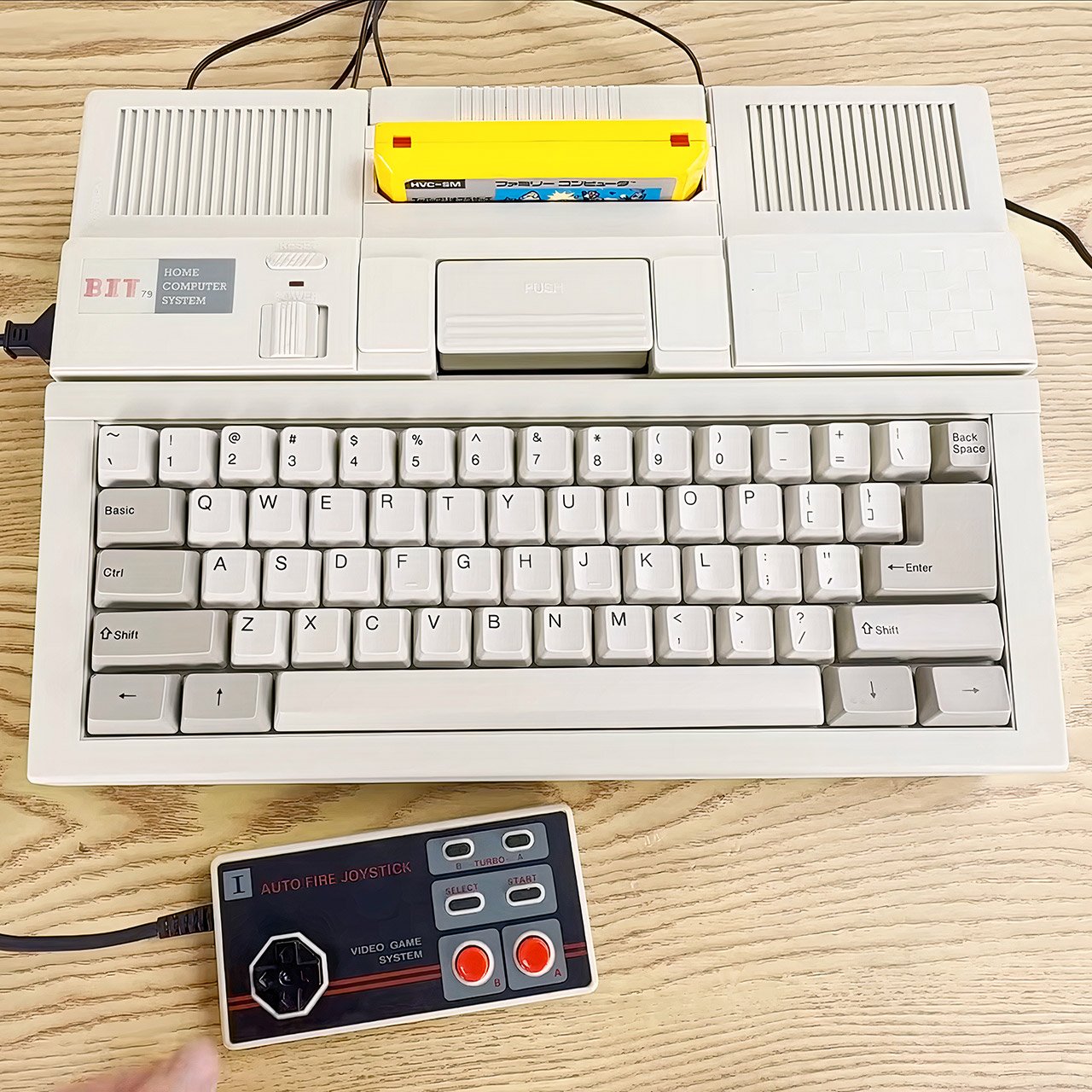
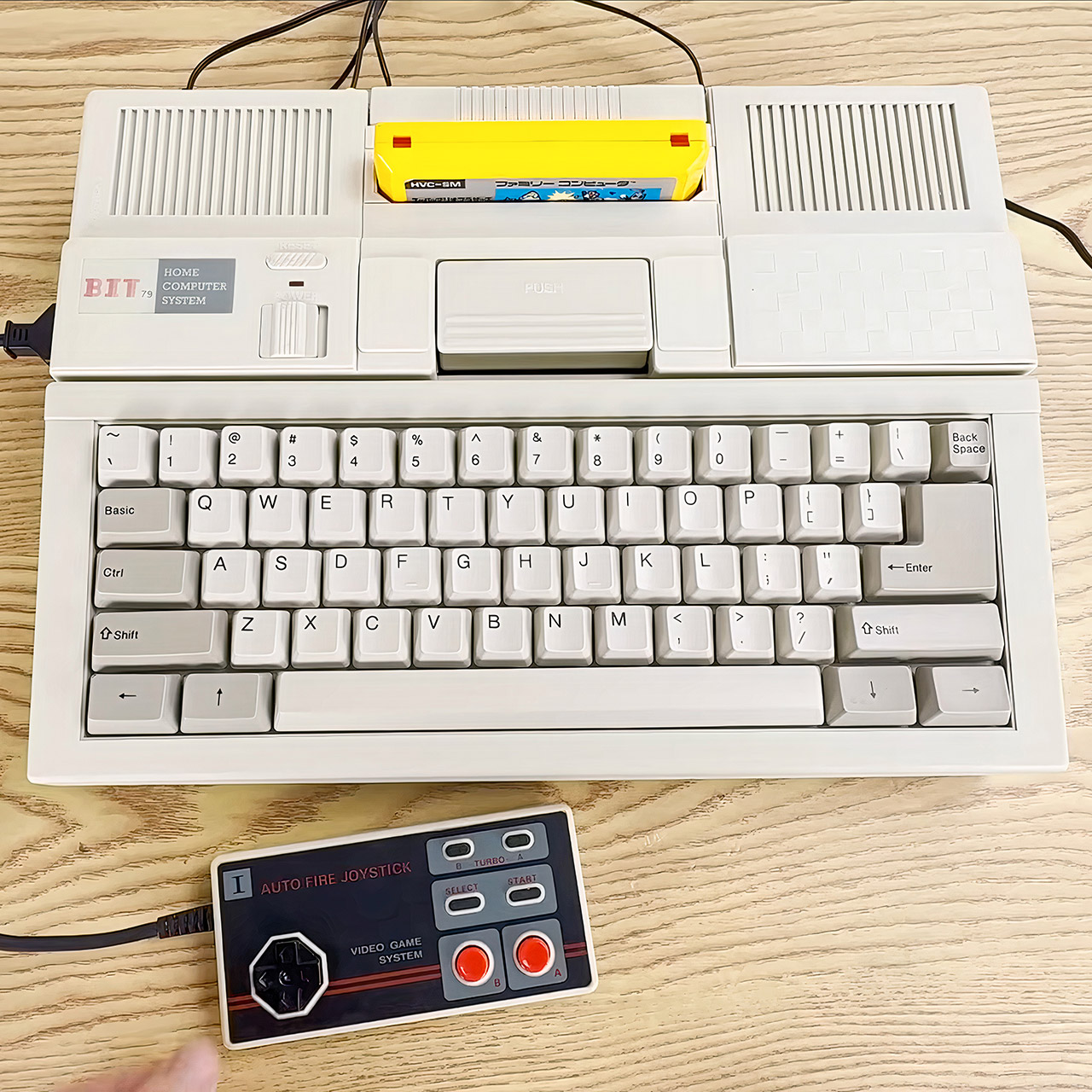
Bit Corporation released the Bit79 in 1989 as a machine that looked ready for serious work. The beige wedge-shaped case held a full keyboard across the front, a cartridge slot sat on top, and vents ran along the sides. Power and reset switches sat near the left edge. A person could sit down, flip the power on, and face a choice between typing programs or playing games.
By the late 1980s, Taiwan had established itself as a hub for Famicom clones. Around 1987, companies there reverse-engineered Nintendo’s unique chips, and Bit Corporation had previously created pirate cartridges as well as clones for the Atari 2600 and ColecoVision. The Bit79 marked their progression beyond ordinary game players. They included a keyboard and built-in software, allowing the system to act as a basic home computer while staying completely compatible with Famicom cartridges.
The Bit79’s hardware included chips from United Microelectronics Corporation, another Taiwanese company. A UA6527P, essentially a 6502-compatible processor, handled CPU responsibilities and ran at approximately 1.66 MHz. A UA6538 graphics chip handled the image processing, which was not particularly difficult. The work RAM was 8 kilobytes, four times that of a normal Famicom, which helped give the Bit79 some breathing room.
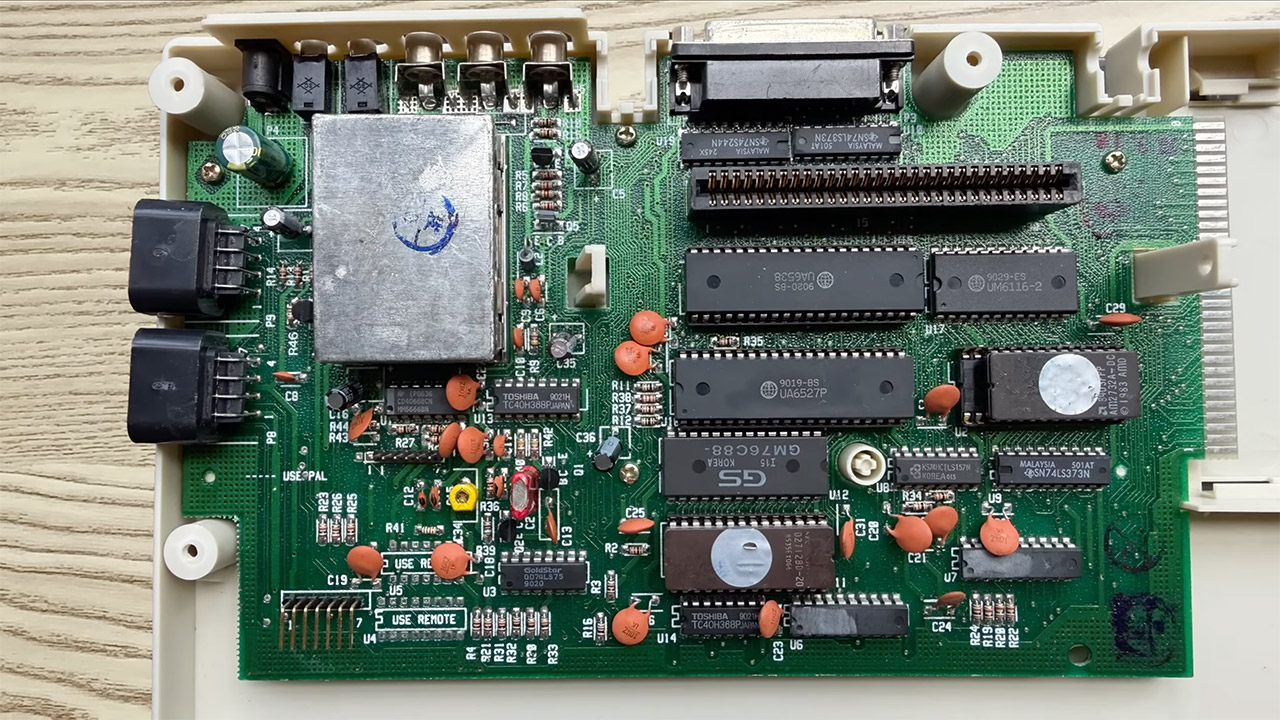
The language built into the machine was stored on a 16-kilobyte ROM, and not Nintendo’s own Family BASIC. They were utilizing an Applesoft BASIC implementation. The BASIC prompt appeared as a greater-than sign, and the interpreter could handle both integer and floating-point math, however the amount of calculation commands provided was adequate, not exceptional. Graphics commands existed, but they lacked the level of control that a specialist Famicom BASIC extension would provide, as you couldn’t easily control sprites or interact with the picture processing unit. Still, a person might be able to write a few simple programs, save them to cassette tape using the rear ports, and then load them back in.
When you turned it on, you’d get a simple boot menu, where you could push 1 to load the BASIC environment or 2 to go to cartridge mode and read whatever game was in the slot. There was also a reset button that allowed you to resume your current activity without having to shut down and restart. The keyboard included 58 keys, including some unique shift and basic keys that could input common commands with a single press. It was strong enough for its period, with a layout that felt identical to a regular typewriter.

In the back, there’s a DB25 parallel port for printers and tape input/output jacks for programming. An expansion edge connector was waiting for you to insert some new add-ons, but Bit Corporation never released any official upgrades, despite early claims of a 64-kilobyte memory update. Two controller ports on the front accepted conventional Famicom pads, so games played exactly like they would on a real Famicom.
Bit Corporation marketed the Bit79 as a versatile all-rounder for households that already owned or desired Famicom games. A family can load a cartridge for entertainment in the evening, then switch to BASIC for simple programming or mathematics the next day. With the increased RAM and the ability to connect a printer, it was a cut above most other Famicom clones at the time, which were still primarily focused on games.
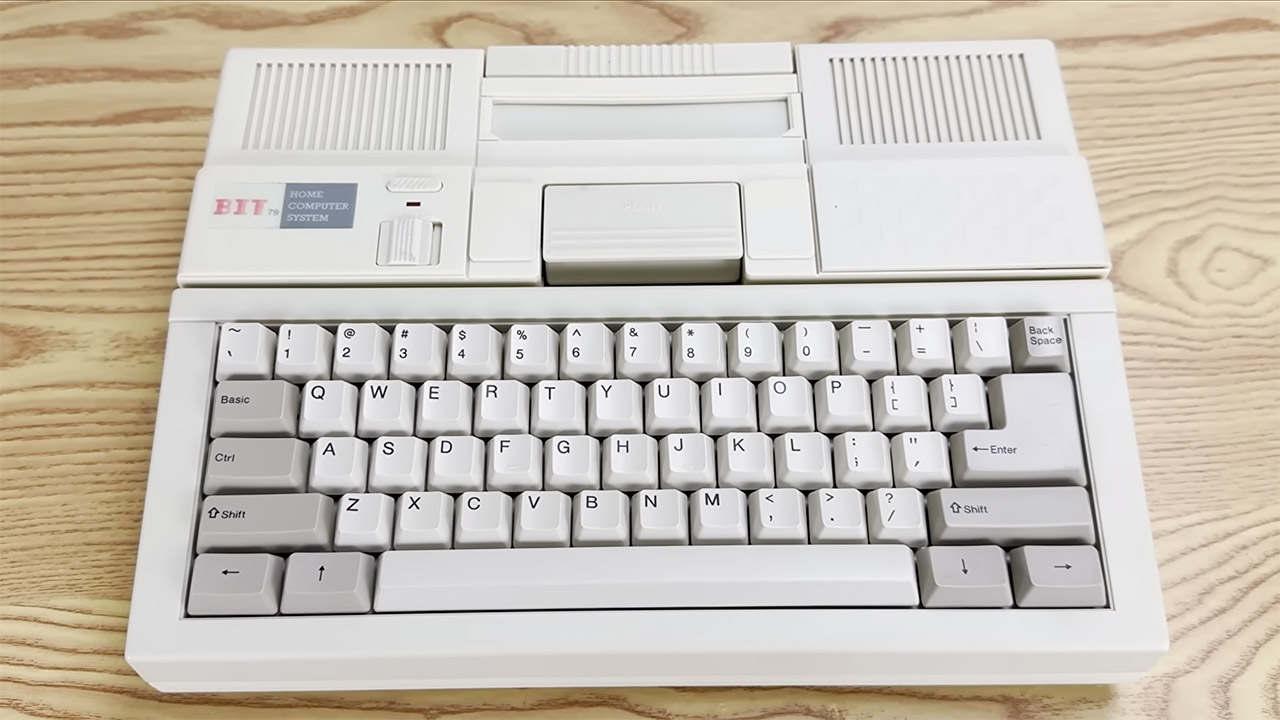
Unfortunately, sales were limited because the machine cost more than most basic game consoles, and faster personal computers were on the horizon. Bit Corporation eventually failed in 1992 owing to a variety of legal obstacles and a changing industry. Although the concept of a keyboard-equipped Famicom clone with built-in programming tools was already gaining traction, the Bit79 failed to meet commercial expectations. However, a few years later, Chinese manufacturers began producing “educational computers” that essentially merged game hardware with learning software, the same general concept as the Bit79, but with a few differences.

Apple Watch owners can now finally use the new-and-improved Siri AI, thanks to watchOS 27 beta 3.
At WWDC 2026, Apple’s virtual assistant received a long-overdue upgrade. Siri AI, available on iOS 27 beta, supports contextual awareness and understands natural language, effectively making it an Apple-designed chatbot.
Initially, Siri AI was made available to developers with an iPhone, iPad, Mac, or Apple Vision Pro. With Monday’s watchOS 27 developer beta, however, the revamped digital assistant has made its way to the Apple Watch, in the form of a dedicated Siri app.
Siri AI conversations held on one Apple device will appear across all linked and compatible products. This means that, even though Siri AI is new to the Apple Watch, developers can still pick up where they left off on their iPhone or iPad.
With watchOS 27 beta 3, the Siri app can be launched from the Dynamic App Grid, which acts as the default Home Screen. The Siri app is now front and center, with five surrounding context-aware applications chosen based on the wearer’s routines.
Monday’s developer beta, and watchOS 27, controversially require an Apple Watch Series 9, Apple Watch Ultra 2, Apple Watch SE 3, or newer. Essentially, the operating system only supports six Apple Watch models, as Apple says newer hardware works best with Siri AI.
We may receive a commission on purchases made from links.
What began for millions as a hasty laptop setup at the dining table has evolved into a dedicated workstation where they spend most of their productive hours. Contrary to what you may think, you don’t have to spend thousands of dollars to enjoy the comforts of a professional workspace.
Ergonomic furniture is vital for your posture and productivity, but it’s only a piece of the puzzle. To work at your best, you need to iron out the small bottlenecks that hurt productivity, like tangled cables or poor lighting that makes you rearrange your setup for video calls.
Luckily, it doesn’t cost much to fix these issues. We’ve compiled 12 sub-$25 gadgets to elevate your home office productivity and comfort without burdening your wallet. Our suggestions span several product categories, including peripherals, connectivity hubs, digital storage, and ergonomic mounts, so you can optimize every inch of your home office real estate.
Multi-button mouse
If you use a regular three-button mouse, you’re leaving efficiency wins on the table. The standard middle-click is handy, but extra buttons will supercharge your workflow, letting you bypass the keyboard finger gymnastics for switching windows and tabs or copying and pasting.
The Redragon M612 Predator is a wired mouse with nine physical buttons. All buttons are programmable, and you can customize the scroll-up and scroll-down functions, giving you 11 mappable inputs. Amazon users and reviewers at TechGearLab laud its comfortable and supportive shell and the value it offers despite its low price tag. TechGearLab highly recommends the M612 for gamers on a tight budget and has given it their Best Buy Award.
But for a liberating wireless setup, the Tecknet Bluetooth Mouse is probably the better option. Users love its build quality and comfort, and it supports 2.4GHz USB and Bluetooth 5.0/5.3, connecting up to three devices simultaneously — excellent for multi-device workspaces. There are seven buttons, including a side scroll for tackling broad spreadsheets. The manufacturer states that the buttons are non-programmable, but you can remap them using third-party software. Irrespective of your choice, the additional buttons will save you minutes of navigation daily.
Laptop stand
A laptop is designed for portability at the expense of ergonomics. Unlike a desktop, you can move around with it and work on the couch or the dining table, but none of these makeshift workspaces is good for your productivity, posture, and long-term health. Even a laptop flat on your desk forces a steep downward angle, hunching your neck, spine, and shoulders.
For a more ergonomic posture, you need a stand to elevate your screen — like this Amazon Basics Laptop Stand. Its Z-shaped, hinged frame raises the height by 7 inches, and non-slip silicone pads keep your device in place. The hollow aluminum frame also boosts ventilation.
Both Amazon buyers and the pro reviewers at Wired compliment its remarkably sturdy and stable build that doesn’t sag under the laptop’s weight. A common complaint across both camps is the stiff hinges that take effort to adjust. But it’s reassuring because it proves that the stand can support heavier hardware, including the robust workstations ranking among the best laptops of 2026.
Wrist comfort tends to be a compromise with laptop stands because of the elevated keyboard height. To maximize ergonomics, use an external keyboard and mouse with the stand so that your arms are at desk level. The split configuration allows your upper body to effortlessly maintain a more natural and relaxed posture.
Wireless keyboard
A wireless keyboard is a must when using a monitor or an elevated laptop stand. It’ll ensure a more ergonomic wrist position along with a neat, cable-free aesthetic. A full-size keyboard gives your fingers more breathing room than a cramped laptop keyboard, and the 10-key design can make spreadsheets easier. Media keys and programmable hotkeys can also tighten your workflow.
The Logitech MK270 is a low-cost wireless mouse and keyboard combo. Customers on Amazon like the simple setup because the keyboard and mouse connect to the computer with a unified 2.4GHz USB dongle and work immediately. Wireless connectivity is stable and highly responsive.
PCWorld noted that it worked perfectly during testing and favored the responsive typing experience, but criticized the keyboard’s cheap build. The advertised battery life is three years, with many users reporting it lasts beyond eight to 10 months.
The keyboard has four multimedia keys (play/pause, mute, and volume) and four hotkeys (home, e-mail, PC power, and calculator). Three hotkeys are programmable using Logitech’s old SetPoint software — you can assign keystrokes or open apps. Despite lacking premium materials, this entry-level keyboard delivers excellent bang for the buck for remote workers.
Adjustable monitor arm
The benefits of an adjustable monitor stand extend beyond ergonomics and healthy posture. Most monitors come with tabletop stands, but along with limited adjustability, they eat up your desk’s real estate. An adjustable monitor arm clamps to your desk’s edge and lifts the monitor, freeing space for peripherals and documents. And if you have a multiple-monitor setup, you get precise screen alignment for multitasking. Monitor arms often have integrated cable channels to route wires for a more organized layout.
The Wali Single Monitor Mount is an absolute steal — many Amazon users compliment its easy assembly, sturdy build quality, and overall functionality.
The mount supports 13 to 34-inch screens and works with most flat and curved models. It has a weight capacity of up to 26.4 pounds for flat screens and 19.8 pounds for curved ones. The arm extends nearly 20 inches outward and 17 inches upward, offering 180 degrees of swivel, 360 degrees of rotation, and 70 degrees upward and 45 degrees downward tilt.
BTOD rated it the best monitor arm for vertical height range under $50 (it’s currently priced under $25). It praised the mount’s thick steel construction and liked that its integrated cable management didn’t require a screwdriver for routing cables. Although not suited for expensive or heavy displays, the Wali mount could be great for someone using regular monitors.
Cable management box
Work can be hard enough — you don’t want a tangled mass of cables worsening it. Other than disrupting your workspace’s feng shui, messy cables are a visual distraction that overwhelm the senses and increase stress. Plus, there’s the safety concern of tripping over cords, or children and pets fiddling with them.
A smart way to clear the clutter is with an aesthetic container like the Naeety Large Cable Management Box. Cable ties and magnetic cable clips are handy for bundling wires, but they don’t hide them entirely. The Naeety box pack has a 16-inch and a 12.6-inch plastic bin with wooden tops. The large size fits a six or eight-plug power strip, while the medium size can house a four-plug extension.
Since there are no openings at the top or sides, cables exit only from the two endpoints, making routing restrictive. Some Amazon customers complain that the wooden lids don’t sit securely with too many wires or large charging blocks, but the included adhesive cable clips and ties somewhat alleviate these concerns. It does clasp securely once the lid is locked in place, so small children can’t easily open it.
Writers at The Spruce note that it’s made from materials resistant to fire, impact, and scratches, making it a durable and elegant home office upgrade.
Two-port GaN fast charger
All the devices at your home office desk need power, making space on a power strip precious. A multi-port charger will help you power more devices while freeing up outlets on your extension cord. And to take advantage of recent advancements, consider a gallium nitride (GaN) fast charger. Unlike older silicon chargers, GaN chargers are smaller, cooler, and more efficient, making it easier for them to output higher wattage and power multiple devices.
Belkin Dual-Port GaN Charger’s 50W output is advertised to charge the iPhone 16 Pro and Samsung S25 Ultra from 0 to 50% in 27 and 28 minutes, respectively. Each port outputs 50W when connected to a single device and splits the wattage when two devices are connected. Buyers on Amazon liked its speedy charging, dual port connectivity, foldable prongs, and travel-friendly compactness that’s also handy for fitting into crowded cable management boxes. However, many wished it included a USB-C cable.
CNN reviewers ranked the Belkin 45W GaN charger as the best USB-C charger for phones after testing it against the Mophie Speedport 45W and the Anker Nano. While the writers tested the 45W model, the higher-tier 50W version is currently a smarter purchase because of its lower price. You can further maximize this accessory by pairing it with USB-C cables that do more than charge your phone.
Ring light
Although upgrading to the best laptops with high-quality cameras is wise, hardware specs can’t do much without good lighting. Proper lighting elevates your video quality during digital meetings and makes you appear more polished and professional. Natural window light is superb, but outdoor light is unpredictable (and useless for evening meetings). For greater control over your lighting, you need a ring light, which is a circular LED device that casts even light on your face. It prevents harsh shadows, making you appear brighter and minimizing skin imperfections.
The UBeesize 12-inch Desk Ring Light is a budget favorite on Amazon. User reviews extensively praise its ease of setup, brightness, and adjustability. Along with 10 levels of brightness, it has three color temperatures — warm white, cool white, and daylight.
TechGearLab liked the swift setup and gave the ring light its Best Buy award. The light also includes a stable mini tripod with a textured ball joint for precise angle adjustment. Pro tip: during meetings, ensure the light is at eye level and slightly off-center to avoid unflattering shadows and eye strain.
The phone holder’s handy, but TechGearLab notes that it’s not very compatible with bulky phone cases, like Otterbox. Nonetheless, if the focus is on the webcam feed, this wallet-friendly light won’t disappoint.
Webcam
Remote work is bound to get you on video calls, but most built-in laptop webcams offer subpar camera quality. Underpowered laptop webcams are common because manufacturers prioritize performance, display quality, and sleek designs, leaving you with a grainy, washed-out feed.
You can improve image quality by adjusting your laptop’s placement or lighting, but the hardware eventually limits you. A more effective solution is an external webcam. While the best 4K webcams will set you back over $99, the NexiGo N60 is wallet-friendly at under $25.
Although it delivers 1080p at 30fps, reviewers at CNET commend its performance and find it outshines the 720p webcams on most laptops. Amazon users appreciate its noise-cancelling mic, but the CNET reviewer criticized its tinny sound.
It has a wide 110-degree field of view, which is helpful if more than one person needs to be in frame. The webcam’s shutter boosts privacy, and its mount tilts and swivels to improve framing without adjusting the entire display. Since it connects via USB-A, you may need an adapter if your laptop has only USB-C ports, but it’s a minor trade-off for a more professional video conferencing experience.
Smart lights
Smart lights bring varied benefits to a home office, and there’s no going back to regular lights once you get used to them. For starters, you can auto-schedule or manage these lights through your smartphone or voice assistant, so you don’t have to interrupt your flow to control them. (Still, standing up hourly is beneficial for your health — don’t let automation make you a desk potato.)
And often, your home office may share space with your bedroom or other living spaces. Smart lights can change from white to warm (or another hue, if you’re feeling creative) to signal to your brain that the working hours have concluded.
The TP-Link Tapo Smart Light Bulbs L535E are a two-pack set with millions of colors and adjustable brightness up to 1,100 lumens. They’re Matter-certified with built-in Wi-Fi, allowing you to control them directly using Apple’s HomeKit and Siri, Google Home, and Alexa. PCMag reviewers have rated it the best smart bulb overall in 2026 and note that it’s among the brightest in the publication’s roundup.
Lots of Amazon users appreciate the simple setup and app usability, though a few experienced platform-syncing bugs. The majority, however, applauded its fast response time, wide color range, and hub-free ecosystem flexibility. For a smoother transition, make sure you learn these three things before installing smart lights.
Surge protector
Your home office desk will likely house more gadgets beyond the laptop. Printer, monitor, table lamp — all these devices require outlets, making an extension cord vital for consolidating your desktop layout. But an unprotected power strip is risky because voltage spikes can fry connected hardware, damaging devices worth thousands of dollars. Electrical fluctuations can also overheat circuitry to become a major fire hazard.
For device safety, you’ll need robust surge protection, like the Belkin 12-Outlet Surge Protector Power Strip. Popular Mechanics highly recommends it to protect gadgets against power surges and spikes. Its 12 outlets can power all your gear at once and the 8-foot cable lets you position your workstation away from the wall socket.
The power strip’s protection indicator uses dual lights to confirm your devices are protected, and changes if the protection fails or there’s a grounding issue. Crucially, it provides 3,780 joules of surge protection, meaning it can survive many minor and a few major power fluctuations. For greater assurance, you get Belkin’s Connected Equipment Warranty, under which the company will fix or replace products damaged by electrical charge when connected to the surge protector — up to $300,000. No wonder it tops our surge protector brand rankings.
Amazon buyers appreciate its sleek profile, ample well-spaced outlets, indicator lights, and hefty warranty. Although it’s missing USB ports, its diverse premium features more than make up for it.
USB-C hub
Modern laptops are great — easy on the eyes and highly portable. Sadly, they sacrifice ports to achieve a slender profile, retaining barely one or two USB-C and a USB-A port. If you’re using a keyboard, monitor, and mouse, you’ll run out of ports, and it’s a hassle swapping cables. And USB-C-only connectivity on your laptop means USB-A accessories are incompatible without an adapter.
Your one-stop solution is a USB-C hub for additional connectivity. The Anker Multi-Port Adapter offers seven ports — two USB-A 3.0, two USB-C (one data and one charging), one HDMI, and one SD and microSD card. Only the HDMI port has video output, but it supports 4K at 60Hz for smooth visuals.
Customers on Amazon praise its reliable performance and ports, though a few would’ve liked an additional USB-C data port. There are a few mixed reviews about the HDMI output, with some users getting 4K at 60Hz but others capping out at 30Hz. This drop in refresh rate, however, occurs only if your device has DisplayPort 1.2 and not 1.4.
A reviewer at How-To Geek aptly described the Anker USB-C Hub as the best boring upgrade he’d ever bought, sharing that while it’s not flashy, it’s still a quality-of-life improvement. Consolidating your connections through this slim hub will eliminate your laptop’s port hiccups.
Portable flash drive
As convenient as online transfer is, it can stall when your internet speed isn’t blazing. And emailing large files or uploading them to transfer across machines can feel sluggish. Sometimes, it’s faster to use a local flash drive. Ideal for moving large files, the “sneakernet method” dates back to floppy disks, when people physically carried storage between computers. Compared to slow internet, it now ensures swift and reliable data transfer.
The SanDisk Ultra Dual Drive is apt for modern home offices because it has a USB-C and USB-A connector, so you can share files without needing an adapter. It’s available in sizes from 32 GB to 256 GB, with the 64 GB drive under $25 on Amazon. Amazon buyers loved the dual drive compatibility. Most of them liked the read/write speeds, but some wanted it faster. Since this is a flash drive, its speeds are limited — up to 150 MBps.
TechGearLab rated this the best flash drive featuring a Type-A and Type-C combo. The reviewer appreciated the transfer speeds, but noted slowdowns when transferring many small files. In the reviewer’s test, the flash drive took 26 minutes to transfer 5 GB of small files. If you need something massively faster and have a bigger budget, don’t miss the market’s fastest portable SSDs with transfer speeds above 1,000 MBps.
Methodology
We finalized all the gadgets on this list through a multi-tier evaluation. At the time of publishing, all products were under $25 and available on major platforms, like Amazon, Best Buy, and Walmart.
We compiled the gadget categories based on our remote-work experience, but we selected individual items based on personal experience and research. The products averaged over four stars with more than 1,000 verified buyer reviews, signifying consistent real-world performance across diverse home office setups. We made one exception to the 1,000-review count for a more recent hardware release from a well-established brand whose reliability is widely endorsed by industry experts.
The devices were also tested by reviewers at established consumer-tech publications, so you’d get a balanced perspective of how well they work from both regular remote workers and expert hardware analysts. Not to mention, all the items solve specific home office pain points to enhance comfort, productivity, or both.

Nearly ten years after launch, the original Nintendo Switch will vanish from European shops next year. Blame a new EU rule on batteries, not the Switch 2.
Nintendo will stop selling every version of the original Switch in Europe from mid-February 2027, The Verge reports. That lands weeks before the console’s tenth birthday. The cull covers the Switch, the Switch Lite and the Switch OLED model. Sales to retailers and through the Nintendo Store will both end.
Blame the battery rules
A new EU regulation drives the change. From 18 February 2027, portable devices sold in the bloc must let owners swap out their own batteries. Nintendo will phase out current models and roll out revised ones that comply, starting this summer. It promises “no difference in functionality” between the old and new versions.
The Switch 2 gets the biggest overhaul. A version with a user-replaceable battery should reach shops in the autumn, Engadget reports. The trade-offs are tiny. The new battery holds 5,172mAh against 5,220mAh, a drop of about 1 per cent, and the console gains roughly 10g. Revised Joy-Con controllers, the Switch 2 Pro Controller and the N64 and GameCube pads follow on a rolling basis.
What Nintendo drops
Not everything survives the switch. Nintendo will retire the original Switch Pro Controller, its Sega Mega Drive and SNES pads, and the Pokémon Go Plus+ accessory. None of them get a replaceable-battery successor. The rules apply across the 35 markets Nintendo of Europe serves, from the UK and Germany to Saudi Arabia and South Africa.

The 💜 of EU tech
The latest rumblings from the EU tech scene, a story from our wise ol’ founder Boris, and some questionable AI art. It’s free, every week, in your inbox. Sign up now!
A quiet end, for now
Nintendo has not said whether the cull reaches beyond Europe. Stopping production of the ageing hardware everywhere may prove tempting, given rising manufacturing costs and the shift to the Switch 2. Even so, the old machine has life in it yet. Fresh first-party games are still on the way, including Rhythm Heaven Groove and Tomodachi Life: Living the Dream.
The battery rules were first aimed at phones. Now they will quietly close the book on one of gaming’s best-selling consoles in its home region.


Freight rail is often described as the most energy-efficient way to move goods over land, yet it still runs on one of the dirtiest inputs in modern infrastructure: diesel. As rail operators face mounting pressure from volatile fuel costs, tightening emissions rules, and aging locomotive fleets, the question is no longer whether rail should decarbonize, but how.
One company argues the industry has been approaching the problem from the wrong direction. Voltify, co-founded by Daphna Langer, is pursuing a model that aims to leapfrog conventional electrification strategies, seeking to electrify freight rail without rebuilding the entire network or sacrificing operational range.
The Electrification Trap
On paper, the logic of electrifying rail is straightforward. Replace diesel locomotives with electric ones and connect them to clean power. In practice, freight rail in the United States spans roughly 140,000 miles of privately owned track, making full overhead electrification via catenary wire prohibitively expensive. This approach works for dense passenger corridors but collapses under the scale and fragmentation of freight networks.
The alternative use of battery-electric locomotives appears simpler but introduces a different constraint: energy density. Batteries store less energy per kilogram by over ten times than diesel fuel, which means a fully battery-dependent locomotive quickly runs into range limitations unless it is frequently recharged. That leads to an operational bottleneck: either stop often or carry too much battery weight to remain economically viable.
The industry, in other words, is stuck between two imperfect extremes: “wire everything” or “charge at a depot for hours.”
Leapfrogging Conventional Electrification
Voltify’s premise is that freight rail doesn’t need to choose between full network electrification and battery-only locomotives. Instead, it rethinks where electrification is actually needed, combining battery-electric locomotives with strategically placed charging infrastructure that powers trains while they’re in motion.
The key idea is scale compression. Rather than electrifying the entire rail network, Voltify’s model electrifies roughly a fraction of the track using high-power charging segments that can deliver energy while trains are in motion. The remaining route is covered by onboard battery storage. Static charging at depots complements this dynamic charging system, allowing locomotives to top up during natural breaks in operations.
This approach reframes electrification not as an all-or-nothing infrastructure overhaul, but as a selective augmentation of the highest-value segments of the rail network.
A Three-Pillar System
Voltify’s architecture is built around three tightly integrated layers: locomotives, charging infrastructure, and energy systems.
The first pillar is the locomotive itself. Rather than designing entirely new locomotives, Voltify retrofits existing diesel units into battery-electric locomotives. This approach reduces capital expenditure and leverages the rail industry’s existing asset base.
The second pillar is charging infrastructure. Voltify uses an overhead conductor bar and pantograph system capable of both static and dynamic charging, supported by an unmanned architecture designed for rail environments. A manual charger complements this system for depot-based energy replenishment. The goal is not continuous electrification but targeted, high-throughput energy transfer where trains naturally pass or pause.
The third pillar is power and optimization. Voltify integrates solar generation, grid power, and battery storage into localized microgrids. These are managed by proprietary software that dynamically decides when to buy, store, or dispatch electricity based on cost and demand conditions.
Together, these layers form a system designed not just for electrification, but for energy orchestration.
Where the Business Case Actually Works
While the decarbonization narrative is compelling, Voltify’s real traction point is economic.
Diesel is one of the largest and most volatile operating expenses for rail operators. Voltify argues that its system can reduce energy costs by up to 30%, reframing electrification as an operating margin improvement rather than only a sustainability initiative. For Class I railroads, where fuel is among the largest operating expenses, the opportunity to reduce energy costs without rebuilding the network is a compelling financial proposition.
Another driver is regulatory pressure tied to local air quality. Although freight rail contributes a relatively small share of global CO2 emissions, locomotives emit nitrogen oxides and diesel particulate matter that concentrate heavily in rail yards and port-adjacent communities. These facilities often sit next to densely populated, lower-income neighborhoods, making emissions a localized health burden rather than a diffuse global one.
The Concentration Problem
The critical nuance in rail emissions is not their total size, but their geography.
Rail yards operate around the clock, with switcher locomotives idling and maneuvering in fixed locations often adjacent to residential neighborhoods. This creates concentrated exposure to pollutants such as NOx and soot. Research on rail-related pollution has linked it to substantial public health costs nationwide, including thousands of premature deaths annually and tens of billions of dollars in health damages.
In California, studies of major rail yards have identified elevated cancer and asthma risk zones extending beyond facility boundaries, disproportionately affecting lower-income and minority communities. Compounding the issue, locomotive fleets are slow to modernize, with engines often remaining in service for nearly three decades under grandfathered emissions standards.
Beyond Carbon: A System Redesign
The result is a more complex reality than a simple climate narrative suggests. Rail emissions are significant in localized health outcomes. The problem is simultaneously technical, economic, and justice-oriented (environmental and economic).
Voltify’s approach sits at that intersection. By avoiding full-network electrification while still achieving meaningful decarbonization and cost reductions, it seeks to unlock a leapfrog path that traditional models have overlooked. Whether that model scales will depend not only on engineering execution, but on whether rail operators are ready to rethink electrification as a distributed system rather than a binary choice.


Summer heat is scorching across the United States and people are likely adjusting their air conditioners from the ideal temperature in an effort to cool down. Though it seems like a quick and easy fix, there’s a complex process happening inside an AC unit, which is where the 3-minute rule comes in. This rule involves the AC’s components and how they function during normal operation.
The “3-minute rule” describes compressor control behavior built into HVAC systems. This control determines the restart timing after the AC unit shuts down, which is typically around 3 to 5 minutes. These systems manage the compressor’s operation through timed cycles which are linked to thermostat demand. This includes set limits on how quickly the compressor can turn on and off, instead of tracking a fixed number of cycles.
The reason for the 3-minute gap is to keep the system from starting up too quickly after it shuts down. Without it, an AC unit would cycle on and off too frequently and put mechanical strain on the system and decrease the unit’s operational efficiency. Air conditioners already share some common problems, and a unit that cycles too much could result in a house feeling cool but humid at the same time. At the very least, it could cause inconsistent temperatures from one room to the next.
Inside AC compressors and alternative solutions

The compressor is the main part of the air conditioning system and it’s responsible for circulating refrigerant through the unit. This is done through a process in which the low-pressure refrigerant gas is compressed into a high-pressure state, which allows for heat to be released through the condenser coil. When that happens, the refrigerant cycles back indoors, which allows cool air to be circulated back into the home as heat is pulled out. Because of the work it does, the compressor’s effectiveness impacts how efficiently the unit performs.
In contrast, evaporative coolers, also known as swamp coolers, use water evaporation instead of refrigerant-based compression. These systems work through a process in which water-soaked pads cool outdoor air passing over them, and that air is then pulled into the home. Unlike AC compressors that rely on a timed restart schedule, evaporative coolers bring in fresh air continuously. These units are typically more energy efficient, though they do need a constant water supply to be effective. They also tend to work best in dry climates.
Absorption heat pumps/coolers also do not use compressors in order to provide cool air, though this technology is typically installed in large residential or commercial environments. These systems utilize a cycle in which a heat source like natural gas drives an ammonia-water process to move heat. A low-power pump then circulates the solution and restarts the cycle. This allows the space to cool as heat is transferred out.
Tech
Seattle’s Cascade PBS spins out Local Public, a tech platform that builds streaming apps for stations


Seattle’s Cascade PBS has spun out its streaming app technology into a standalone company called Local Public, which is now building connected-TV and mobile apps for public media stations across the country.
The goal is to provide local PBS stations nationwide their own branded, station-curated streaming apps — plus tools for fundraising and audience data — as an alternative to a one-size-fits-all national app.
Local Public was originally created within Cascade PBS (KCTS-TV channel 9) to build apps for that station, which serves Western Washington and part of British Columbia. Supported by 10 Founding Sponsor partner stations, a Local Streaming Initiative (LSI) was launched to expand the platform to serve stations nationwide.
On July 1, Local Public launched as a public benefit corporation. Cascade PBS owns 100% of Local Public, but it’s expected to take on investment and be co-owned by a coalition of other PBS stations in the near-future.
In a blog post announcing the launch, Local Public CEO Kevin Colligan wrote that the company is aiming to build “a growing coalition of independent public media organizations working together while remaining deeply rooted in their own communities.”
Eighteen stations are currently using Local Public, according to Cascade PBS, including Arizona PBS (Phoenix), Houston Public Media, OPB (Oregon), Rocky Mountain PBS (Denver), Vegas PBS, WETA (Washington, D.C.), WHYY (Philadelphia), WQED (Pittsburgh), and others.
Colligan framed the launch against the backdrop of media consolidation, arguing that a shrinking number of corporations increasingly control what Americans watch and read, while local newsrooms have been gutted and replaced by centralized programming.
He also pointed to the rise of low-effort, AI-generated content as a further threat to authentic local journalism and storytelling — one he said makes trusted, community-rooted public media more valuable, not less.
“We bring a startup mentality to public media’s longstanding tradition of community service,” Colligan wrote. “We are building technology that allows stations to move faster, collaborate more effectively, and reach audiences wherever they are.”
Local Public apps currently run on 10 platforms, including Roku, Fire TV, Apple TV, Google TV, Android TV, LG and Samsung smart TVs, iPhone, Android and a web video portal. NPR, radio and podcast integration is in development and expected to launch in fiscal year 2027.
The apps run on a centralized content management system, letting stations publish their own programming, build featured-content carousels and pull real-time viewer analytics. Stations can also message members and prospective donors directly within the app. The platform fully supports PBS Passport, the streaming benefit for recurring donors, and PBS Media Manager, the system stations use to manage and distribute video.
TheDesk.net reported that Sacramento’s KVIE has already relaunched its streaming app through Local Public as KVIE Plus (stylized KVIE+), offering free access to the station’s full lineup of broadcast channels over streaming alongside local programming and acquired shows, movies and documentaries. Denver’s KRMA has relaunched its connected-TV app through the platform as well
Pricing for Local Public is tiered by station size, based on how many Passport-eligible members a station has at signup. Small stations (fewer than 15,000 members), for instance, pay an $8,000 onboarding fee and $60,000 annually.

House prices in South of England fall while North sees growth

Bitcoin and ether ETFs drew inflows Monday

Penelope Cruz Suffered ‘Many’ Brain Aneurysm Scares


-

 Fashion4 days ago
Weekend Open Thread: High Hopes
-

 Politics4 days ago
The House | “Reframing the debate from a binary discussion of winners and losers”: Yuan Yang reviews ‘We Are Not Machines’
-

 Fashion15 hours ago
Open Thread: What Great Books Have You Read Recently?
-
 NewsBeat2 days ago
Taylor Swift and Travis Kelce wedding staffer hilariously struggles to keep her cool while checking in megastars
-

 News Videos7 days ago
How to Build INSANE Live Financial Dashboards With Claude
-
 Crypto World6 days ago
Airdrop Registration Becomes Key Focus For Remittix As RTX Launch Updates Approach
-

 Sports6 days ago
Broncos roster: OL Ben Powers (No. 74) entering final year of contract
-

 Crypto World5 days ago
Binance stock trading tops $1B in first month after launch
-

 NewsBeat6 days ago
Presenter Caroline Flack’s brother Paul Flack dies aged 55
-

 Crypto World5 days ago
Alibaba-affiliate Ant Group enters the humanoid robot market with 12 deals
-
 Crypto World4 days ago
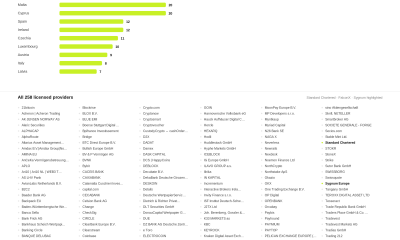
Standard Chartered Secures MiCA License as ESMA Adds 37 New Crypto Firms
-

 Crypto World2 days ago
South Africa proposes crypto tax guidance under existing rules
-

 News Videos16 hours ago
Best Time to Enter Small Caps Right Now? Another Bull Run? | Financially Free
-
 Business5 days ago
Meta Platforms Stock Jumps 7% Today as Bloomberg Reports Company Plans to Enter the Cloud Business
-
 NewsBeat5 days ago
New exhibition reflects five decades of movement between island of Ireland and GB
-

 Tech2 days ago
Lenovo laptops are now shipping with YMTC SSDs, a sign of Chinese NAND entering the mainstream
-

 Business4 days ago
What a 10 Percent Drop Means for Buyers, Sellers and Renters
-

 Crypto World4 days ago
Binance Re-Enters Philippines As EU MiCA Rules Restrict Access
-

 News Videos19 hours ago
Avoid entering in FOMO #bitcoin #cryptocurrency #trading #scalping
-

 News Videos3 hours ago
Whats Hidden Inside This Cash Register? #treasure #reselling #money
You must be logged in to post a comment Login