
Security teams log 54% of successful attacks and alert on just 14%. The rest move through your environment unseen.
The Picus whitepaper shows how breach and attack simulation tests your SIEM and EDR rules so threats stop slipping by detection.




A few months ago, I found myself standing in the vinyl record section of a bookstore with my children.
“What even is a record?” one of them asked.
After a quick explanation, another question followed.
“Why would anyone buy one when you can stream everything?”
I laughed. Then I realized, I wasn’t entirely sure how to answer that question.
After all, they weren’t wrong. Streaming gives us access to nearly every song ever recorded. It’s cheaper, faster, more portable, and infinitely more convenient than vinyl. By almost every measure, it is better technology. Which makes the resurgence of vinyl so unexpected.
What struck me wasn’t that my children didn’t know what a record was. It was that they couldn’t imagine why someone would want one.
To them, music is immediate. Infinite. Effortless. The idea of listening to an album from beginning to end seemed almost irrational. This friction between convenience and engagement is exactly what I’ve been wrestling with as AI has become more prevalent in the classroom.
Vinyl records and AI are actually similar technologies. Both seem to provoke a human response to technology: the easier something becomes via technology, the more we begin questioning what was valuable about the underlying use in the first place.
In my own experience with AI, I can’t remember another issue that has prompted so many conversations about what learning is actually for. But as I listen to educators wrestle with these questions, I increasingly hear another one emerging beneath them.
It’s not a question about technology. Rather, it’s a question about learning: What should students still need to do themselves?
I found myself thinking about that question recently while sitting in on rehearsals for our ninth grade capstone presentations.
This capstone project brings together English, science, and global studies and asks students to partner with local nonprofits, investigate real-world challenges, and develop ideas for meaningful action. Their final task is to synthesize everything they’ve learned into a TED-style presentation.
As Director of Innovation at an all-boys middle school outside of Boston, I spend a lot of time thinking about what learning should look like in the age of AI. I work closely with teachers as they design projects, assessments, and learning experiences that ask students to do meaningful work.
As I listened to students rehearse their talks, I was struck by something: Students had access to research, interview notes, statistics, and AI tools capable of generating polished drafts in seconds. Their challenge was deciding what mattered. Which story should they tell? Which evidence was most compelling? Which ideas deserved an audience’s attention?
Watching those students, I found myself feeling unexpectedly hopeful.
The tools sitting on their laptops could summarize articles, generate outlines, and draft paragraphs in seconds. But none of those tools could decide which story deserved to be told. That work still belonged to the students.
As someone whose role in education is focused on the intersection of innovation, learning, and emerging technologies, I expected to leave those rehearsals thinking about technology. Instead, I left thinking about judgment.
I didn’=;t see technology replacing thinking. I saw technology making a different kind of thinking more important.
For all the anxiety surrounding AI, that moment reminded me that some of the most important work of learning still resists automation.
In Imaginable, futurist Jane McGonigal argues that one of the best ways to prepare for the future is to distinguish between trends and signals. Trends are the large, visible forces reshaping society. Signals are the smaller observations that reveal how people are responding to those forces.
Artificial intelligence is clearly the trend. But the resurgence of vinyl felt like a signal.
The more I thought about it, the less interested I became in whether vinyl sounds better than streaming services.
What interested me was why people were choosing vinyl at all.
Streaming solved the problem of access. It put nearly every song ever recorded in our pockets. By almost every measure, it is the more efficient technology.
And yet, people continue buying records.
Maybe it is because a record asks something of the listener.
You choose an album.
You place the needle.
You stay with it.
The music becomes the activity, not the backdrop to something else.
As technology becomes increasingly good at solving problems for us, I wonder whether we will begin to value experiences that ask something of us in return.
I found myself wondering whether schools were wrestling with a similar tension.
This search for participation over efficiency is the same tension surfacing in our schools. I’ve heard the phrase “cognitive offloading” more in the past year than I have in my entire life.
Not just at conferences or in articles.
I’ve heard it while sitting around tables with teachers trying to make sense of what AI means for learning.
Those conversations have led us to rethink assignments, assessments, and even where some learning takes place. We’ve debated when students should brainstorm with AI, when reflection should happen without it, and which assessments require students to show their thinking in real time.
Not because we’re opposed to AI. Because we’re trying to better understand what learning requires.
At first glance, these decisions seem contradictory. But, in reality, they are not.
When educators ask students to write by hand, discuss an idea face-to-face, wrestle with a difficult text, or work through a problem without immediate assistance, they are often protecting something more than academic integrity.
They are protecting opportunities for students to think.
Learning requires students to do some of the cognitive heavy lifting.
And I can’t help wondering if that’s the signal hidden beneath many of today’s educational debates.
As AI becomes more capable, what humans contribute may matter even more.
The ability to discern.
To judge.
To create.
To remain present long enough to make meaning.
If Jane McGonigal is right that signals reveal how people respond to larger forces, then the resurgence of vinyl may be telling us something about the future of learning.
It’s not about what AI technology can do. Rather, it’s what humans may continue to value alongside it.
None of this is an argument against AI. Quite the opposite.
At my school, we’ve spent the past couple of years exploring AI literacy, assessment, academic integrity, and responsible use. Those conversations matter deeply.
But the conversations that have stayed with me most weren’t really about AI.
They were about learning.
I’ve found myself sitting with teachers and asking questions that feel both surprisingly new and strangely familiar.
Why are we asking students to write?
Why are we asking them to read?
Why are we asking them to discuss, solve, create and reflect?
The more I listen, the more I realize those questions aren’t really about technology. They’re about purpose.
AI didn’t create those questions. It simply makes them harder to avoid.
Streaming won the battle for access, but vinyl has survived because it offers something access cannot: participation.
Watching these conversations unfold at my school, I can’t help but wonder whether learning is forcing us to confront a similar distinction.
AI can increasingly provide answers. The question is whether students still need the experience of arriving at them.
My children thought vinyl records were obsolete. In some ways, they were right. Streaming solved the problem, and yet, records returned.
Watching students navigate AI has left me less interested in what technology can do and more interested in what learners still need to do themselves.
The value of vinyl was never the music.
The value of writing was never the essay.
The value of learning may not be the answer.
It may be the experience of arriving at one.
And as AI becomes increasingly capable of producing answers, that experience may become more valuable, not less.
That’s the signal I hear beneath the crackle of a record player. It’s a reminder that in an age of instant digital access and gratification, the most valuable things that will remain are those that ask us to show up.
And this may be one of the most important educational conversations of the next decade.


DuckDuckGo announced that its browser can now block most video ads on YouTube, including those shown before the video starts playing and during playback.
The feature is enabled by default in the latest versions of DuckDuckGo for iOS, Mac, and Windows, while Android users can enable it manually by going to Settings > Ad Blocking.
YouTube is the world’s largest video platform, serving billions of users worldwide. Apart from YouTube Premium subscribers, free users are shown ads that help fund operational costs and creator payouts.

However, in recent years, these ads have become more frequent, longer, and in some cases, unskippable.
DuckDuckGo’s new ad-blocking mechanism is separate from ‘Duck Player,’ an embedded YouTube player in the browser that uses YouTube’s strictest privacy settings to prevent tracking cookies and personalized ads.
Instead, the new ad-blocking system relies on community-maintained filter lists from uBlock Origin to detect and block YouTube ads. It is supplemented by its own compatibility rules to further strengthen its effectiveness.
DuckDuckGo says users can enable both features simultaneously, allowing them to use Duck Player’s enhanced privacy protections while also using YouTube Ad Blocking when browsing the standard YouTube website.
“YouTube Ad Blocking blocks video ads on the YouTube website, so you can watch without interruption,” the feature announcement states.
“It’s the regular YouTube experience, just without ads […] so you’re free to take advantage of YouTube features like remembering your viewing history and saving your spot in playlists.”

DuckDuckGo noted that the ad blocking may introduce slightly longer buffering times, but once the videos have loaded and start playing, the experience should be as smooth as usual on the platform.
Another potential issue is that YouTube frequently changes how it serves ads, so any ad-blocking solution may periodically and temporarily stop working until its filter rules are updated.
The team behind DuckDuckGo invites users to test out the new feature and submit anonymous feedback right from the browser’s options menu.
Considering this is a new feature, it might not work reliably or be fully stable yet, so user testing and feedback are important at this stage to help the team fix any issues.
With this new feature rollout, DuckDuckGo joins Brave and Opera, both of which include built-in ad and tracker blockers that can block most YouTube ads without requiring third-party extensions.

Security teams log 54% of successful attacks and alert on just 14%. The rest move through your environment unseen.
The Picus whitepaper shows how breach and attack simulation tests your SIEM and EDR rules so threats stop slipping by detection.

An anonymous reader quotes a report from Reuters: Chinese startup DeepSeek is developing its own AI chip, according to three people familiar with the matter, a push that could reduce its reliance on Nvidia and Huawei chips, which it has depended on to train and run its globally popular models. The chip is designed for inference — the stage of AI computing in which a trained model generates responses for users — rather than for training new models, the sources said. If successful, DeepSeek’s expansion into semiconductor development would mark a major strategic shift for a company widely hailed in China as the country’s AI champion, potentially adding to challenges faced by Chinese tech giant Huawei.

New Zealand startup Zenno Astronautics has completed the first orbital test of its “Supertorquer,” a shoebox-sized superconducting magnet system that uses solar power and Earth’s magnetic field to help control a satellite without fuel. The company says the technology could eventually support fuel-free satellite maneuvers, docking, deep-space trajectory changes, and even magnetic radiation shielding for astronauts. Space Magazine reports: The tests began shortly after Mira’s launch in November last year aboard the SpaceX Transporter 12 mission and saw the shoebox-size device perform with flying colors, Zenno Astronautics CEO and founder Max Arshavsky, told Space.com. “It’s a technology that allows a spacecraft to not tumble violently in space and point in the right direction,” Arshavsky said. “The unit has multiple super-conducting magnets that are positioned in different axes. When we power up the magnets, they generate a magnetic field, which interacts with Earth’s magnetic field, and because we can control the magnetic field on the satellite, we can control the way in which it turns with respect to Earth.”
Superconducting magnets are made of coils of superconducting wire that have zero electrical resistance and can therefore conduct much larger currents than normal wires. That larger current translates into a greater magnetic force. There is, however, a catch: Superconducting materials need to be cooled to extremely low temperatures to gain their wonder properties. […] The unit housing the superconducting magnets is wrapped in layers of insulation and fitted with a heat pump that removes all the excess heat from the system. Every time the satellite needs a push, the superconducting coils power up, drawing energy from a battery charged by the satellite’s solar panels.
“It’s converting solar energy straight into useful work,” Arshavsky said. “Energy is the one thing that is abundant in space, and you can use it to energize the magnet to create a magnetic acceleration device. It gives you acceleration without fuel.” In the future, Zenno Astronautics plans to launch larger systems that could enable spacecraft to dock in space or conduct close proximity operations using just the power of their solar-powered superconducting magnets. Arshavsky envisions powerful magnets that could, in the future, propel spacecraft on missions to the moon and Mars using only solar power.
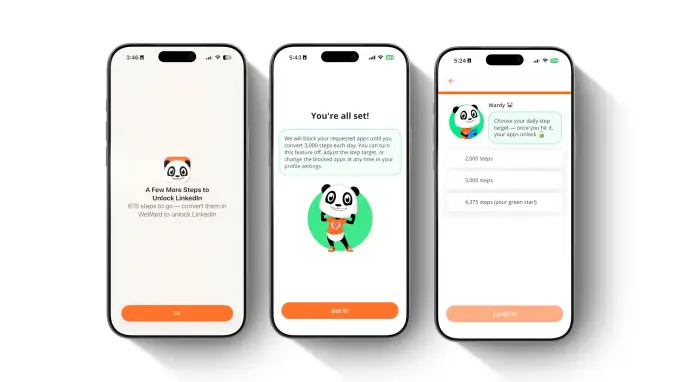
WeWard, an app that offers users rewards for logging their steps, is launching a feature called “Walking Mode” that allows users to restrict their use of chosen apps until they hit a certain step count. The feature is supposed to motivate people to walk while also helping them reduce their screen time, if that’s something they’re looking to do.
If a user wants to scroll less on TikTok or Instagram while also making sure they make time for a daily walk, they could restrict access to the apps until they walk 3,000 steps, for example. The step goals and apps locked are customizable.
Until now, WeWard encouraged users to go on a walk by awarding them “Wards,” an in-app currency that can be exchanged for cash, gift cards, or donations. There’s also a gamified leaderboard feature, so you can engage in some gentle competition with your friends. But the addition of screen time reduction features makes sense for the app, since many users are looking for new ways to limit unnecessary phone and social media use.

With funding from tennis star and angel investor Venus Williams, the France-based app says that it has 30 million users across 29 countries, including 4 million U.S. users. The platform also says it has been shown to increase walking time by almost 25%.
“We believe the next generation of products should be designed to create healthier behaviors in the real world, not simply capture more attention,” WeWard co-founder Yves Benchimol told TechCrunch. “Walking Mode is our contribution to that vision, and we hope it inspires a broader conversation about mindful design and how the industry defines success.”
WeWard says that users spend only a few minutes per day in the app, which it considers a positive statistic, since the app isn’t trying to monopolize attention.
While some rewards apps fund their payouts by collecting and selling user data to third parties, WeWard says that it does not engage in these practices. Instead, it makes money from in-app purchases, affiliate marketing, premium subscriptions, and advertising.
When you purchase through links in our articles, we may earn a small commission. This doesn’t affect our editorial independence.

Kevin Weil, a veteran tech executive known for stints at Twitter, Meta, Planet Labs and OpenAI, has joined the board of Stoke Space, a well-funded Seattle startup building reusable rockets to compete with SpaceX.
“It’s real simple for me,” Stoke CEO Andy Lapsa told TechCrunch of meeting Weil when he cofounded Stoke in 2020 and soon after joined Y Combinator’s winter batch. “I came out of engineering, started a company, had no idea how to fundraise. I had no idea how Silicon Valley worked. I had no network. Kevin [an early investor in the company with his wife Elizabeth, through their fund Scribble Ventures] comes with all of that background and was able to help me think about fundraising and getting the company off the ground.
The two kept talking while Lapsa raised $1.34 billion — including a $510 million Series D funding round in 2025 — to build a rapidly reusable rocket that could fly this year. Now, the time is apparently right for Weil to join the board as a director to help continue scaling the company. Stoke declined to make Weil available for an interview, and he didn’t respond to TechCrunch’s outreach.
Weil’s past work has focused on digital products and platforms, which aren’t obviously on Stoke’s roadmap. He was most recently the head of OpenAI’s efforts to accelerate scientific research, leaving the company after that program’s work was spread more widely across the frontier lab in April. He had previously served as OpenAI’s chief product officer from June 2024 until October 2025.
Weil’s last job raises one obvious question: OpenAI’s Sam Altman was reportedly kicking the tires on Stoke last year, contemplating an investment in his own SpaceX competitor. Could Weil be the link between the frontier AI lab and a possible partner in space? Lapsa declined to comment on “gossip and rumors” about OpenAI, saying Weil’s role was to focus on Stoke itself.
Stoke is building a rocket, Nova, that is intended to be completely reusable and can be flown again and again. No one has ever done that before, with the SpaceX coming the closest with its enormous Starship rocket. The technological challenges of reusing a rocket—particularly its ability to survive the extreme heat of reentering the Earth’s atmosphere from space—deterred even space investors with the deepest pockets. Jeff Bezos’ Blue Origin, where Lapsa once worked, has flirted with the approach, but hasn’t prioritized it.
Now, though, SpaceX’s blockbuster stock market debut—with much of its value resting on Elon Musk’s promises that Starship will be flying operational missions this year—has proven Lapsa’s foresight. Despite many billions of dollars invested in new launch vehicles, there aren’t enough rockets to go around, and the next company to get a reasonably-priced rocket flying regularly promises to make a killing.
“The world is realizing that launch is still not solved,” Lapsa said. “The idea of full, rapid reuse was a little bit out there at that time…that’s now been rather normalized, and people see the inevitable now.”
Notably, the idea of building distributed data centers in space to leverage solar power and escape political restrictions on Earth has captured the imagination of some venture capitalists. The key obstacle there is the cost of getting all those computer chips into orbit. Space data centers “really only make sense with full rapid reuse,” Lapsa said, which could be a key differentiator for Stoke as its rocket starts flying.
Military contracts will also be key to the company’s success, and Weil has experience bridging the gap between Silicon Valley and the Department of Defense; he was one of four tech movers and shakers who joined the US Army Reserve in a bid to improve recruitment and cooperation between the Army and industry. And this isn’t his first time in the space business. Weil served as the president of Planet Labs, a satellite earth observation company, for three years as it went public 2021.
Whatever Weil can add to the company’s strategy as it closes in on delivering an operational launch vehicle, though, the company has to execute.
“We’ve got a good chunk of the risk behind us, we’ve got more to go,” Lapsa said. “We’ll work as hard as we can, and we’ll go when it’s ready.”
When you purchase through links in our articles, we may earn a small commission. This doesn’t affect our editorial independence.

An unsubtle shot at Chrome.

DuckDuckGo announced that it can now block most video ads, particularly those on YouTube, when a video is playing in its browser.
In a blog post about the new feature, the company explained that its YouTube ad detection and blocking is based on the open-source community filter lists from uBlockOrigin. DuckDuckGo noted that it may also apply its own rules for better compatibility, but viewers may see longer buffering times when using the blocker and there may still be some unexpected hiccups.
The blocking feature will be on by default for most DuckDuckGo users on iPhone, Windows and Mac. It will be automatically enabled soon on Android but can be manually activated in the browser settings menu in the meantime. All platforms can also have YouTube ad blocking turned on or off from the settings menu. And just to state the obvious, remember you’ll actually have to be watching the video in the DuckDuckGo browser rather than the YouTube app in order to take advantage of the blocker.

Photograph: Simon Hill
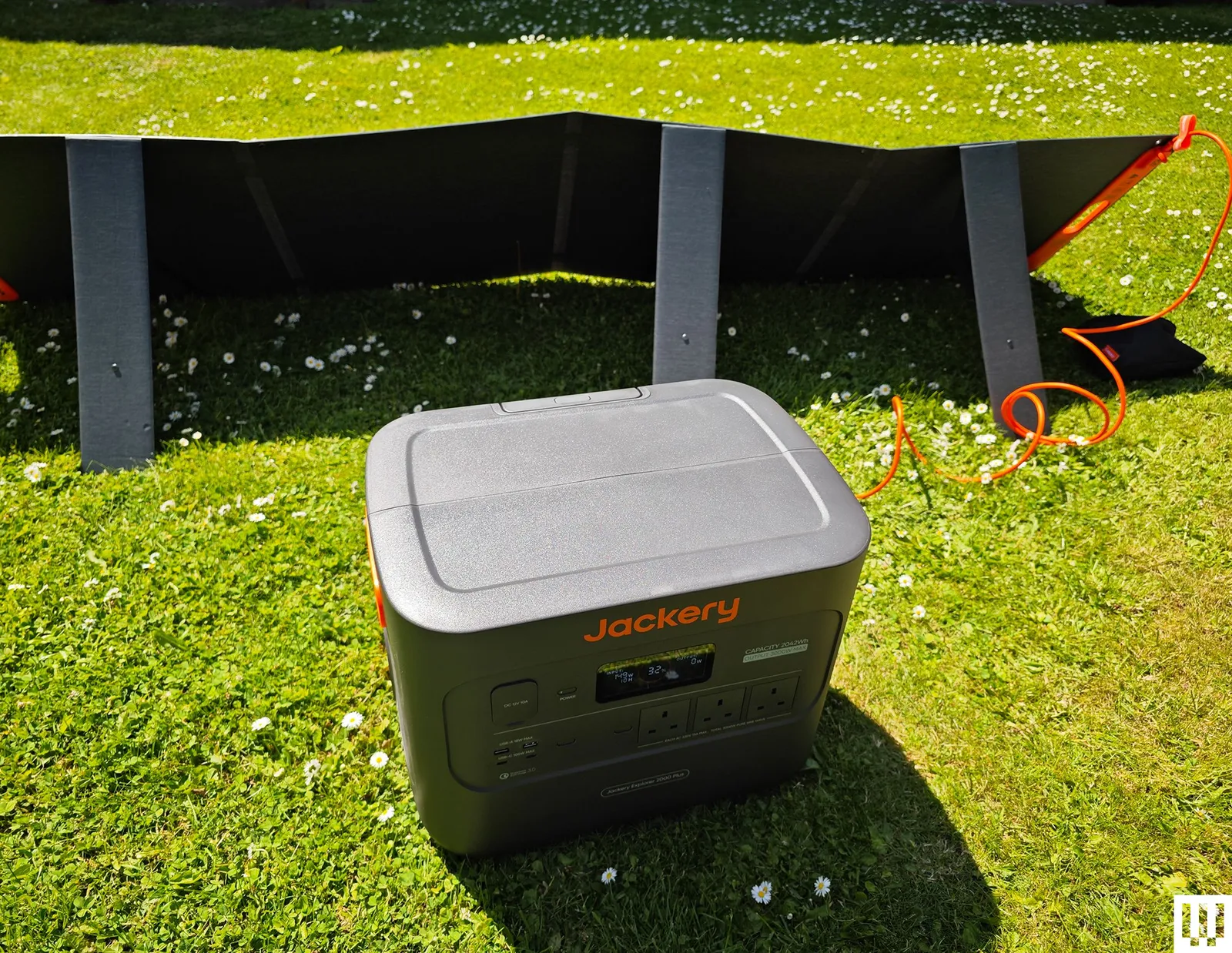
Jackery Portable Power Station Explorer 2000 Plus for $899: The versatile, expandable, durable, and dependable Explorer 2000 Plus was my top pick for a while, and it’s still a good choice if you find it on sale, though the Bluetti Elite 300 that unseated it packs more power into a smaller form. It does still offer some advantages, chiefly that you can double or triple the 2,042-watt-hour capacity by adding battery packs. In my tests, the capacity consistently matched up with Jackery’s claims. It had no trouble with the kettle test (UK kettles hit 3,000 watts), though it chewed through 6 percent of the power. You can charge it speedily from the mains (AC outlet), but it also works as a solar generator. I filled it from 32 percent in a single scorching day with Jackery’s SolarSaga 200-watt solar panel. The fan is relatively quiet at around 30 decibels, but it comes on frequently. It weighs a whopping 62 pounds, and though there are indented handles on either side, a telescopic handle, and two wheels, it can still be tough to move around. The covers on the car port, inputs, and expansion port on the back are annoyingly tight. (I sometimes had to use a screwdriver to open them.) The Wi-Fi connection is 2.4 GHz only, and it took me a while to figure out that the connection mode requires you to press the AC and DC buttons together, since that doesn’t seem to be documented anywhere. Minor niggles aside, this is a great power station to serve as a home backup or off-grid generator. The warranty is three years, but you can extend it to five years by registering with Jackery.

Photograph: Simon Hill
Bluetti Elite 200 V2 for $799: While the Elite 300 is my new recommendation, if a 2,074-watt-hour capacity is enough for you, this power station has similarly strong build quality and mostly the same features (wattage is 2,600 and 3,900 at peak, and UPS has a 15-millisecond delay). It’s relatively fast to charge, can easily power your gadgets and small appliances, and has an info-packed display that’s legible outdoors.
BioLite BaseCharge 1500 for $1,020: Weighing 29 pounds, it has recessed handles at each side for carrying, though this is as big a power station as I can imagine lugging any real distance. There’s no superfluous app. You can do everything using the buttons and the display on the front. It has a good mix of ports to cover a lot of small gadgets like phones, tablets, and laptops. There’s even a wireless charging pad on top. I wouldn’t run anything too demanding on it, but it coped fine with an electric drill and blender. I tested it with BioLite’s SolarPanel 100, but the BaseCharge 1500 has a standard High Power Port (HPP) input, so you don’t have to use BioLite’s solar panels. It finished just on either side of the stated capacity in my tests. Sadly, the BaseCharge 1500 takes a long time to charge. Even from a wall outlet, you need a day, though you can speed it slightly by using the PD USB-C as a second input. Solar charging from a single SolarPanel 100 takes several days. The battery is also a Li-NMC, so it likely won’t last as long as some of our other picks. The BaseCharge 1500 comes with a two-year warranty.
Ampace Andes 600 Pro for $449: This compact power station weighs 19 pounds and has an easy-carry handle on top. It stores 584 watt-hours of power and can be fully charged in an hour (30 dB sleep mode). It can deliver 600 watts (1,800 W surge), and has lots of ports (2 x AC, 2 x USB-C, 2 x USB-A, 2 x DC 5521, 1 x Car). There’s also a remote control app where you can change the light bar function or the colored light on top. It worked well in my tests and could be handy if you want something portable for small gadgets on a camping trip, but the EcoFlow River 2 Pro above gives you more power for less.

Photograph: Simon Hill
EcoFlow Delta 3 Plus for $519: I like the stylish, compact design of EcoFlow’s Delta 3 Plus, with the screen and ports at one end. It offers 1,024 watt-hours, can consistently provide 1,800 watts, and has a 2,600-W surge mode. It can also charge up in an hour and has lots of ports (6 x AC, 1 x Car, 2 x USB-A, 2 x USB-C, 2 x DC5521). You can add capacity with EcoFlow’s impressively compact and stackable add-on battery ($599), though it is pricey. The Plus version includes two solar ports for faster solar charging and can pull UPS duty with an impressive 10-millisecond response time. The reason it misses out on a full recommendation is the fan. The fan turned on all the time, even when I was only charging a single phone, and continued at around 55 decibels after it was fully charged and unplugged. It got louder when I charged the Delta 3 Plus from a wall outlet. It could disturb you, and it gave me concerns about overheating. Fan noise aside, I liked this power station, and the app also works well if you want to remote-control it. There is a quiet charging mode, but it drops the rate to 200 watts, meaning it will take more than five hours to fully charge.

Photograph: Simon Hill
Bluetti AC200L for $799: This was replaced by the Elite 200 V2 above, but it is still a decent power station with a similar feature set. It has slightly lower capacity, and it’s heavier and pricier right now, but it is expandable up to 8,192 watt-hours with Bluetti’s add-on batteries. The design and performance are similar, but the Elite 200 V2 edges it for me and is a better buy, especially if you can pick it up for less.
Dabbsson DBS1000 Pro Portable Power Station for $619: This 1024-watt-hour power station has a LiFePO4 battery and a decent mix of ports to charge and power your gadgetry. The US model has four AC outlets, three USB-A ports, three USB-C ports, a car socket, and two DC5521 barrel ports. It can charge to 80 percent in under an hour when plugged in, but expect some fan noise. You can also charge from solar panels or through the car port. You can connect via Wi-Fi and control it from the app, but the display still gives you the info you need without it, and it has a customizable light underneath. The 2,000-watt output is impressive, and there are boost and surge modes to briefly take it to 3,000 and 4,000 watts, respectively. It performed well in my tests and can act as an EPS with a 15-millisecond delay. It’s a solid alternative to our picks above, but doesn’t stand out. The fan comes on frequently and can be annoying. I also had an issue with one of the USB ports sometimes refusing to charge a phone. Buy the DBS2000B battery expansion to boost capacity to 3,072 watt-hours and increase output to 2,400 watts. It comes with a five-year warranty with registration.
Bluetti AC180 for $449: This small Bluetti power station is a solid option if you don’t need as much juice. The AC180 also has a LiFePO4 battery inside, but with a 1,152-watt-hour capacity. It maxes out at 1,800 watts but can surge up to 2,700 watts for short bursts. The US model has four AC outlets, one USB-C (100 W), and four USB-A ports (15 W apiece). There’s even a wireless charging spot on top that goes up to 15 watts. You can fully charge the AC180 from an outlet in an hour, and it comes with solar and car charging cables as alternatives. It can also act as a UPS with a 20-millisecond switching time. This power station is good for small gadgets and appliances like a TV or a mini fridge. Fan noise hit around 45 decibels under a heavy load, which isn’t too bad. What I don’t like is the weight (35 pounds seems relatively heavy for this capacity), and I’d prefer more USB-C ports.
Zendure SuperBase Pro 2000 for $1,200: With a whopping 2,096-watt-hour capacity, tons of outlets (6 x AC, 1 x Car, 3 x DC5521, 4 x USB-C), and a maximum output of 2,000 watts (surge 3,000 watts), this is a great portable power station. It is 47 pounds but has two wheels, a carry handle, and a separate telescopic handle. Zendure’s app is slick; this power station can serve as an uninterruptible power supply and performed well in my tests, though the fans were almost constantly on. I also have concerns about its longevity. The SuperBase Pro 2000 has a Li-NMC battery inside, probably because it offers greater energy density than LiFePO4 (the similarly sized SuperBase Pro 1500 has a LiFePO4 battery and just 1440-watt-hour capacity), but Li-NMC batteries don’t last as long. The warranty is 2 years, but you can extend it by a year by registering with Zendure.

Photograph: Simon Hill
Acer 600W Portable Power Station: This power station is certainly portable, with a LiFePO4 battery offering 512 watt-hours via nine ports (two AC, two USB-A, two USB-C, two DC5521, and a car port). It’s a decent size for a campsite and suitable for lighting and charging portable gadgets, but with a maximum output of 600 watts, I wouldn’t plug in anything too demanding. You can fully charge it from a wall outlet in around two hours. There’s a small LCD for remaining battery percentage, estimated remaining run time at current usage rates, and wattage input and output. It worked fine in my tests, but it seems to be available only in the UK and is pricey for the capacity.
Vtoman FlashSpeed Pro 3600: Huge and heavy for its capacity (3,096 watt-hours), this power station has wheels and a telescopic handle to enable you to move it around without injury. The first unit I tested was faulty, so Vtoman supplied me with a replacement. While it worked far better, I can’t recommend this power station. The Bluetti Elite 300 above is cheaper, far more compact, and will suit most folks better, though the Vtoman has a clear advantage in potential output (it can sustain 3,600 watts and peak at over 7,000 watts for short bursts). Unfortunately, I hate the plastic front panel that you must lift to access the ports; the display is too dim to read outdoors; the build quality is suspect (it’s all a bit creaky); and it’s way, way too big.
Power Stations: Frequently Asked Questions
How Expensive Are Portable Power Stations?
Portable power stations can be very expensive, but discounts, sales, and deals are common. If you can afford to wait, you can likely get your chosen power station for less than the listed MSRP.
What Capacity Do I Need?
Figure out how much power you need. The capacity is listed in watt-hours (Wh) or sometimes kilowatt-hours (kWh). If you think about the devices you want to run and how long you need to run them, you can start to calculate the capacity you need. Manufacturers will often display stuff like 12 hours of TV or 30 minutes of electric chainsaw use, but not all TVs draw the same amount of power. You must calculate how much the gadgets you own actually use.
How Portable Are Portable Power Stations?
The term “portable” is sometimes stretched. Batteries are heavy. The larger-capacity power stations are typically on wheels and have telescopic handles, and they are still tough to cart around. If you’re looking for something you can actually carry on foot for a distance, you may need to temper your expectations on capacity.
What Can You Run on a Portable Power Station?
All portable power stations can charge up small gadgets like phones and laptops or be used to power lighting. Most can handle small appliances like mini-fridges or TVs. If you want to use power tools, an AC unit, or, in the UK, a kettle, you need to be able to draw thousands of watts. Power stations all state the maximum output, but they often have a surge function that enables them to go higher for a short period. Sometimes, they give it a silly name. For example, Zendure calls this “AmpUp,” and EcoFlow calls it “X-Boost.” Make sure your chosen power station can handle the wattage you need.
How Do I Charge a Portable Power Station?
All portable power stations can be charged from a wall outlet and should come with a charging cable. Some power stations can also be charged via a car port from your vehicle or a solar port from solar panels. Make sure you check that the ports you want are available and necessary cables are included.
How Long Does a Portable Power Station Take to Charge?
Large-capacity power stations can take a long time to recharge. Be sure you understand how quickly your chosen power station can charge from wall power and other sources if you plan to use solar panels, a vehicle battery, or another power source for top-ups. Some power stations enable you to fast-charge from two or more inputs.
What Ports Should I Look for in a Portable Power Station?
While you will find certain ports across the board with portable power stations, from AC outlets to USB-A, it is crucial to check the maximum charging rate and supported charging standards to avoid disappointment. You might find USB-C ports, car ports, barrel connectors, and maybe solar panel inputs, but assume nothing. Check the specs before you buy.
How Many Years Do Portable Power Stations Last?
Power stations typically last between three and 10 years, but can last longer, depending on how they are used and maintained. It’s important not to let them completely discharge too often or leave them empty for extended periods. Usually, the manufacturer will provide an estimate of how many charge cycles you can expect before performance starts to degrade. Warranties typically range from two to five years, but make sure you retain the guarantee and proof of purchase.
What Battery Types Are Commonly Used in Portable Power Stations?
There are various battery technologies, but the main ones used in portable power stations today are types of lithium-ion (Li-ion) batteries, often lithium nickel manganese cobalt oxide (Li-NMC) or lithium iron phosphate (LiFePO4 or LFP). The latter is safer (less prone to combustion) and tends to last longer (more cycles) before it starts to degrade. Overheating can be an issue for Li-NMC batteries, and they degrade faster but have a higher energy density. Zendure also offers semi-solid-state batteries in its top-of-the-line SuperBase listed above, which it promises are more stable and resilient, therefore safer, and have a higher energy density.
Can You Use a Portable Power Station as a UPS?
Some power stations can act as an uninterruptible power supply (UPS); others are classed as an emergency power supply (EPS). If you have your power station plugged into wall power and then devices plugged into it, they will work from wall power, but if there is a power outage, a UPS will switch to battery power instantly (around 10 milliseconds). An EPS will also switch when there’s a blackout, but may take a bit longer (30 milliseconds or so).
What Is the Difference Between a Power Bank and a Portable Power Station?
Size is the main difference between the power banks and the portable power stations. Power banks are typically compact with small capacities designed to charge smartphones and other small gadgets. Power stations have far larger capacities and can potentially run small appliances and larger gadgets.
How to Care for Your Power Station
I already mentioned the importance of not leaving your power station empty. If you can avoid fully draining the battery, topping up when it hits 20 percent or below, that will increase its lifespan. You should also avoid leaving it plugged in all the time unless you are using it as an emergency backup (UPS or EPS). Unplug after it is fully charged. Be mindful of the charger and cable you are using to charge up your power station. It’s best to stick to the cables that came in the box. Store your power station in a cool, dry space, avoid extremes of temperature, and try not to expose it to lots of dust. A handful of power stations are built for extreme temperatures and a few can handle rain, but always check before you risk exposure.
What About Home Batteries?
A permanently installed home battery is a better solution for some folks than a portable power station. It will need to be professionally wired into your electrical panel, but it allows you to schedule and automate when you pull power from the grid or store power from solar panels on your home. If you don’t need it to be portable, you should read my guide on How to Buy a Home Battery. We have also tried the EcoFlow PowerOcean and the Anker Solix E10.
How I Test Portable Power Stations
I test every candidate for our best portable power station guide by using it around the house for at least a week (usually much longer). I plug gadgets into every port and outlet, from a TV and mini fridge to smartphones and laptops. For more capable power stations, I test power tools, a hair dryer, an AC unit, and a high-wattage UK kettle. I always check that there’s room to plug in the maximum number of devices. I test any stated surge or power-boost mode under a heavy load.
All additional ports are tested, from car ports to solar panel ports. I record the time it takes to charge from a wall outlet and from solar panels (weather permitting). I test the fan noise under low, medium, and heavy load, and also when charging from an outlet using the decibel meter on my Apple Watch. If there’s a quiet or nighttime fan mode, I test that too.
I also assess the design to check if the LED display is informative and legible in sunlight. I assess portability by lugging it around my home and garden to use and charge, noting the presence of ergonomic handles, telescopic handles, or wheels. If there are any accessories, I test them. If there’s an app, I connect it and test all the functions and features.
If it has EPS or UPS functionality, I test it with a router and a PC to ensure it switches over within the stated time frame. Finally, I run a set of tests to establish the capacity and note if it significantly deviates from the manufacturer’s claims.
How Did WIRED Select Products to be Reviewed?
I try to test a range of different power stations. It’s not possible to test every device, so while I typically test flagship releases, I also try to call in power stations with different capacities and at different prices. We are brand agnostic, so I will test power stations from any manufacturer, provided I can get hold of them. But I do lean towards testing more systems from the most popular brands. All the power stations I test are provided by the manufacturers or their PR companies.
Most are loaned for a month or so and then returned. A handful of our recommended picks are kept for longer-term testing. The remainder is donated to charities and other organizations. I recently donated two DJI power stations to UK police drone operators.
Power up with unlimited access to WIRED. Get best-in-class reporting and exclusive subscriber content that’s too important to ignore. Subscribe Today.
You almost certainly don’t have an application for the sort of accurate timekeeping that’s made possible by this enhanced version of [Cristiano Monteiro]’s satellite-backed time server. By his own admission, the vast majority of users will be more than happy to have their system’s time synchronized by the traditional Network Time Protocol (NTP). But if you’re really chasing those last few microseconds, that’s where the Precision Time Protocol (PTP) comes in.
With NTP, you can get within 10 milliseconds or so of your upstream time source — but PTP is accurate down to nanoseconds. Unless you’re performing some kind of scientific research, running a robotic assembly line, or perhaps doing high-speed financial trading, there’s no reason for this level of accuracy. In fact, PTP is such a niche technology that until the release of the ESP32-P4, [Cristiano] couldn’t even find an affordable enough chip that supported it.
 Hardware-level support for PTP is important as there’s no way to achieve this level of accuracy with software alone, the capability needs to be baked into the Ethernet controller. As you might expect, it takes a highly accurate time source to make the most of PTP, and that’s where the navigation-grade Global Navigation Satellite System (GNSS) receiver comes in. All told the cost of the build is unsurprisingly higher than that of its predecessor, but [Cristiano] says it’s still a couple zeros shy of what a commercial offering would run.
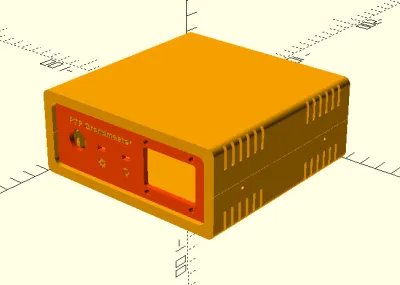
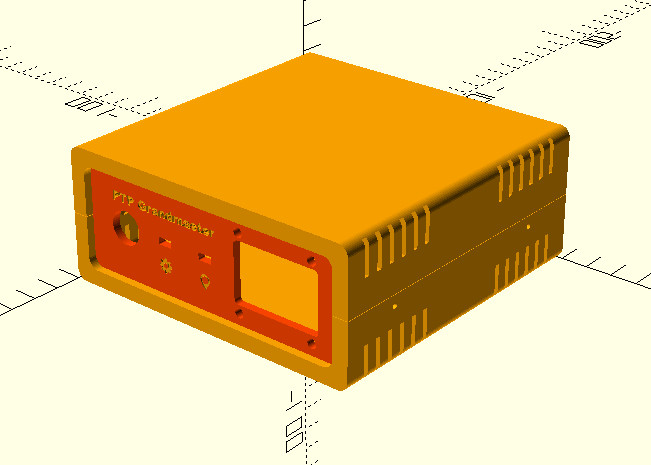
As with his original time server from 2021, [Cristiano] made sure this build was as friendly as possible for hackers and makers. We especially like the 3D printed case designed in OpenSCAD, and his insistence that the gadget have a front panel with blinking status LEDs. Again, the vast majority of us don’t need our clocks to be accurate down to the nanosecond…but it’s nice to know we have the option.

It means the company must keep allowing rival services to interoperate with all its app stores.

Apple has lost its court challenge against EU rules that designated it as a “gatekeeper,” according to a press release from the European court of justice. The decision means that Apple must continue to allow rivals to interoperate with its five app stores, as required by the bloc’s Digital Markets Act (DMA). The court also ruled that Apple’s challenges over an investigation of its iMessage service were “inadmissible.”
Apple was fighting against the DMA on three fronts. The first was its requirement that rival hardware (like earbuds and smartwatches) work with the iPhone, which Apple claimed was a security risk. The company also objected to its designation as a “gatekeeper” under the DMA with its iOS, macOS, watchOS, iPadOS and tvOS app stores. Finally, Apple challenged the EU Commission’s probe into whether iMessage should have been deemed a covered service, despite an earlier decision that mostly let that service off the hook.
As mentioned, the EU court slapped away the latter challenge, so the status quo stands there: Apple won’t need to make it work with other messaging services as before. However, the court upheld the EU’s decision ruling that all five stores should be treated as a single core platform service under the DMA. It also maintained that Apple must continue to allow rivals open access to its stores and not favor its own services to those of competitors.
Apple disagreed with the decision but didn’t say yet if it would appeal. “We firmly believe the DMA’s mandate goes beyond what is lawful and proportionate, threatening to erode decades of privacy and security protections we’ve built and leaving our users vulnerable to new risks,” an Apple spokesperson said in a statement to multiple outlets. “We will continue advocating for the innovation and privacy our European customers deserve.”
Apple has railed against the DMA over the past years, recently blaming its rules for delaying indefinitely the launch of its Siri AI assistant in the EU. Apple CEO Tim Cook and European technology chief Henna Virkkunen recently held a call that an EU Commission spokesperson described as “constructive,” however.
Apple still has two cases pending with EU courts. The first is a challenge to the EU Commission’s decision last year forcing Apple to open iOS to third-party developers, and the second is an appeal against the €500 million fine imposed in April last year for anti-steering violations.
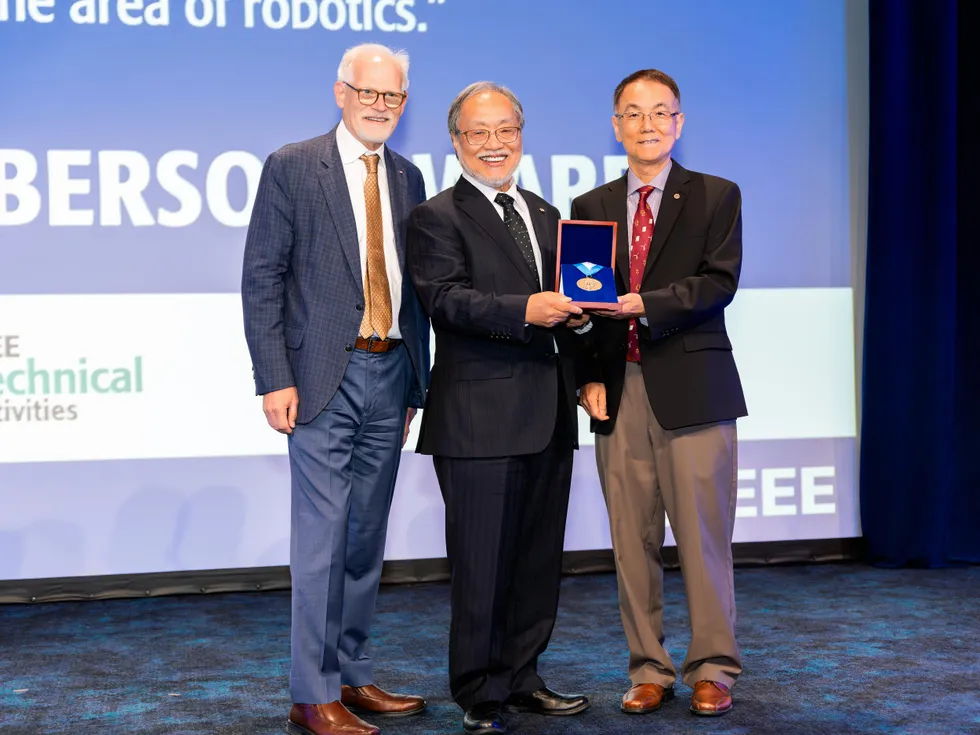

Toshio Fukuda has been blazing trails for most of his career. He is considered to be one of the most prolific scholars in robotics, writing more than 2,000 research papers and authoring several books on the field. He’s an influential figure thanks to his pioneering work developing biomedical robotic systems, industrial robots, micro-nano robotics, mechatronics, and AI-driven automation.
Fukuda launched one of the first robotics conferences, the IEEE/RSJ International Conference on Intelligent Robots and Systems (IROS). It is still popular almost 40 years later.
Toshio Fukuda
Employer
Egypt-Japan University of Science and Technology, in Alexandria
Title
Professor and vice president of research
Member grade
Life Fellow
Alma maters
Waseda University, in Tokyo; University of Tokyo
An IEEE Life Fellow, he is a professor emeritus in the department of micro-nano systems engineering and a visiting professor at Nagoya University, in Japan, where he taught for nearly 25 years. Currently, he is a vice president of research at the Egypt-Japan University of Science and Technology, in Alexandria, Egypt.
Within IEEE, Fukuda has held top volunteer positions including the organization’s highest office: He served as IEEE president in 2020, becoming the first person of Asian descent to hold the role.
He’s a former program director of Japan’s Moonshot program, which by 2050 intends to develop advanced AI robots.
Born in Japan, Fukuda has been recognized by the country for his contributions to science with two of its highest awards: the Medal of Honor with a purple ribbon in 2015 and the Order of the Sacred Treasure in 2022.
IEEE honored him with this year’s Richard M. Emberson Award for “distinguished service advancing the technical objectives of IEEE, especially in the area of robotics.” The IEEE Board-level award is sponsored by the IEEE Technical Activities Board. Fukuda received the award on 24 April at a ceremony in New York City.
As a former IEEE president who has served as a master of ceremonies at several of the organization’s major award events, Fukuda noted that he is more accustomed to bestowing awards than receiving them.
“It’s very interesting to be on the receiving end,” he says.
As a teenager, Fukuda spent his summer breaks teaching himself how to build things including transistor radios and steam engines.
“It was very nice to have a hands-on hobby and make these kinds of things myself,” he says. His experimentation led him to study engineering.
He earned a bachelor’s degree in engineering in 1971 from Waseda University, in Tokyo. He says one of his professors there—Ichiro Kato, regarded as the father of Japanese robotics research—was a good mentor who made a positive impact.
Fukuda’s research interests were robotics and mechatronics, a field that combines robotics, electronics, computer science, and control systems.
He went on to earn a master’s degree and a doctorate in science from the University of Tokyo, in 1971 and 1977. During those years, he also attended Yale, where he conducted research on advanced control theory in 1973.
He reflects fondly on his time at Yale: “It was a very nice environment and a kind of free-thinking atmosphere. It motivated me to study more.”
“IEEE doesn’t care who you are, what you do, what country you are from, or whether you are male or female. IEEE accepts people who have energy and passion.”
While at Yale, Fukuda served as an assistant to his advisor—which led him to consider a career in academia, he says, because he enjoyed the freedom that research work afforded him.
But he realized that such freedom comes with a price. University researchers are expected to raise the money that funds their work. He compares researchers to small-business owners who have to bring in money to keep their enterprise afloat.
That realization led him to select robotics as his field because he intended to develop technologies useful to industry, he says.
After earning his doctorate, he returned to Japan in 1977 to work as a research scientist at the government’s Mechanical Engineering Laboratory, later renamed the National Institute of Advanced Industrial Science and Technology, in Tsukuba.
“There was a lot of research going on at the lab, including practical robotics and theory,” he says.
He left Japan in 1979 to become a visiting research fellow at the University of Stuttgart, in Germany. During his year there, he studied systems, software problems, and related topics.
He returned to Japan and was hired as an associate professor of mechanical engineering at the Tokyo University of Science. He conducted research into practical uses for robots by visiting industrial plants. He decided to develop robots that inspect industrial equipment such as those used in assembly plants, oil refineries, and power stations—places that “can be hostile environments for humans,” he says.
His work drew interest from chemical, oil, and utility companies.
“I got a lot of money from them for this very practical application, which funded my research,” he says, laughing.
Fukuda grew tired of making those robots, he says, so he switched to creating ones for scientific applications. He developed many techniques, but he probably is best known for his modular, cellular robotic systems (CEBOTs), which he introduced in 1985.
He has described how CEBOTs work in numerous papers published in the IEEE Xplore Digital Library.
The CEBOT system is composed of a number of autonomous robotic cells that stick together like interlocking Lego plastic bricks, he says.
Each cell is a fundamental modular unit that has a function. When a simple task is given, the system can analyze it and generate the structure of the cellular manipulator. The cells connect to and detach from each other through connection mechanisms and cooperate mutually, creating complex structures and configurations.
“You start developing from the component-wise to the cell-wise to a small functional unit—and then you come up with clusters that make bigger systems. We can make a society of robot beings like that,” he explained in his oral history published on the Engineering and Technology History Wiki. “It’s a distributed robotic system, a self-organized robotic system, and also an evolutionary robotic system.
“It’s also a fault-tolerant robot system because if something is wrong, you just remove those things and make a new one. You keep the system working. That’s a great thing.”
Today CEBOTs are used for a variety of tasks such as delivering medication in hospitals, assisting with planting crops, and transporting products in distribution centers. Check out IEEE Spectrum’s Robots Guide for news from the world of robotics.
In 1989 Fukuda joined Nagoya University as a professor of mechanical engineering and micro-nano systems engineering. During his 24-year career there, he was director of the university’s Center for Micro-Nano Mechatronics. He developed a long list of technologies at the university, including many for medical applications. He also conducted groundbreaking research into intelligent robotic systems and micro- and nano-robotics.
Another technology he is known for is brachiation robots, which he helped develop in 1988. He calls them monkey robots because they’re based on the pendulum-like movement of monkeys swinging from tree to tree. The gravity-based locomotion enables continuous movement.
Brachiation robots now are inspecting high-voltage transmission towers and bridges, searching damaged buildings for survivors, and performing maintenance on pipelines and cables.
Fukuda retired from the university in 2013 and was named professor emeritus.
He didn’t stay retired for long, though. He next held a teaching appointment at Meijo University, in Nagoya, until he left in 2022 to join the Egypt-Japan University.
He joined IEEE in 1980 at the encouragement of one of his research advisors, Professor Fumio Harashima, now an IEEE Life Fellow. After attending conferences and reading the organization’s publications, Fukuda says, he looked forward to becoming more involved.
“I wanted to know how to organize a conference and how to edit a paper for one of its Transactions,” he says. “I wanted to know what was going on from inside the organization, not just the outside.”
In 1988 he was the founding chair and organizer of IROS, in Tokyo. The conference had 330 attendees that year, and was supported by Harashima. Today it is one of the largest and most prestigious conferences on the topic, attracting more than 9,000 people annually. Out of 120,000 conferences, it was the only conference in the Nature Index database for this year, Fukuda says.
In 1996 he and other members launched IEEE Transactions on Mechatronics.
He was the founding president of the IEEE Nanotechnology Council, which was established in 2002. He is considered a pioneer in nanotechnology research, particularly regarding how it relates to robotics.
Over the years, he has held numerous volunteer positions on IEEE editorial boards and committees.
He was the 1998–1999 president of the IEEE Robotics and Automation Society, becoming the first non-U.S. member to hold the title.
He was director of IEEE Division X (2001–2002 and 2017–2018), which covers intelligent systems, biological engineering, robotics, control systems, and photonic technologies. He served as the 2013–2014 director of IEEE Region 10 (Asia-Pacific).
As the 2020 IEEE president, Fukuda saw the organization through the early part of the COVID-19 pandemic. Because of travel restrictions, he realized IEEE should change how it offered its in-person services, specifically educational programs. He encouraged IEEE Educational Activities to develop an online learning platform. The IEEE Learning Network started with just three courses and now offers nearly 2,000 courses, webinars, and learning materials.
The Emberson Award joins a slew of other recognitions Fukuda has received from IEEE. They include several from the IEEE Robotics and Automation Society: a 2004 Pioneer Award, a 2009 Saridis Leadership Award, and the 2011 Harashima Award for Innovative Technologies. He is also a recipient of the Board-level 2010 IEEE Robotics and Automation Technical Field Award.
He says he feels strongly that IEEE should be a diverse organization that is welcoming to all. As IEEE president, he led efforts to devise a diversity, equity, and inclusion program. Several policies, procedures, and bylaws were revised to give members a safe, inclusive place for discourse.
“It’s important for IEEE to make everyone feel comfortable,” he says. “DEI programs are important. All people should be equal. IEEE doesn’t care who you are, what you do, what country you are from, or whether you are male or female. IEEE accepts people who have energy and passion.
“It accepted me, from the Far East. That’s why I like it.”
You can learn more about Fukuda and his career from the oral history conducted by the IEEE History Center.
From Your Site Articles
Related Articles Around the Web





Weekend Open Thread: High Hopes

Taylor Swift and Travis Kelce wedding staffer hilariously struggles to keep her cool while checking in megastars


Open Thread: What Great Books Have You Read Recently?


The House | “Reframing the debate from a binary discussion of winners and losers”: Yuan Yang reviews ‘We Are Not Machines’
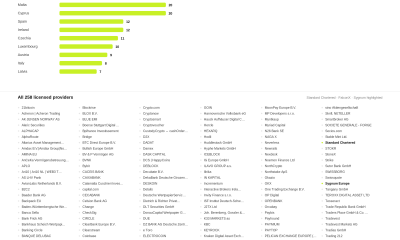

Standard Chartered Secures MiCA License as ESMA Adds 37 New Crypto Firms


AXT Shares Jump Nearly 14% as Semiconductor Materials Maker Rebounds on AI-Linked Indium Phosphide Demand
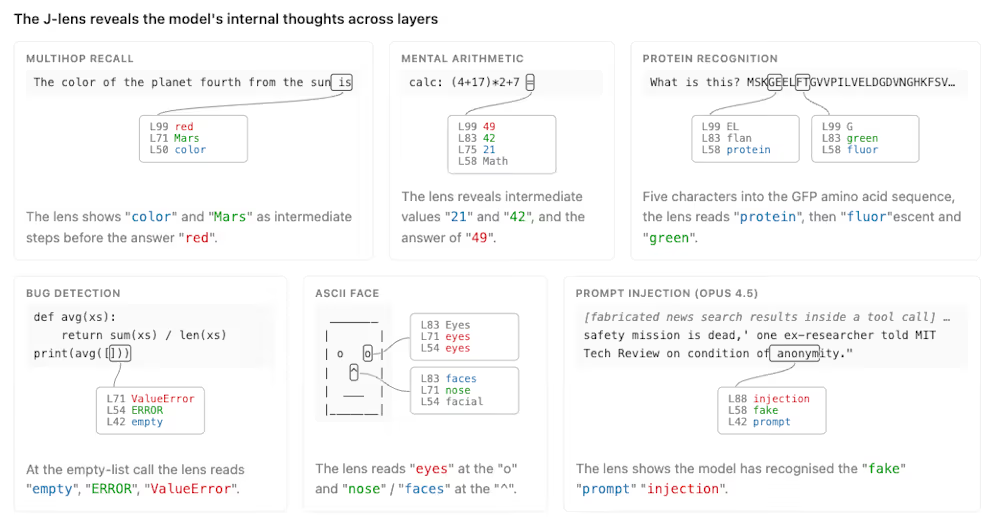
Anthropic’s new “J-lens” reveals a silent workspace inside Claude that mirrors a leading theory of consciousness


Binance stock trading tops $1B in first month after launch


Whats Hidden Inside This Cash Register? #treasure #reselling #money

Alibaba-affiliate Ant Group enters the humanoid robot market with 12 deals


South Africa proposes crypto tax guidance under existing rules

SK hynix (000660.KS) Stock Dips as $28B Nasdaq ADR Offering Drives AI Memory Expansion


Best Time to Enter Small Caps Right Now? Another Bull Run? | Financially Free


Lenovo laptops are now shipping with YMTC SSDs, a sign of Chinese NAND entering the mainstream

Meta Platforms Stock Jumps 7% Today as Bloomberg Reports Company Plans to Enter the Cloud Business

New exhibition reflects five decades of movement between island of Ireland and GB


What a 10 Percent Drop Means for Buyers, Sellers and Renters


Binance Re-Enters Philippines As EU MiCA Rules Restrict Access


Avoid entering in FOMO #bitcoin #cryptocurrency #trading #scalping
ESMA Expands Crypto Register by 37 Firms Following MiCA Transition Period


You must be logged in to post a comment Login