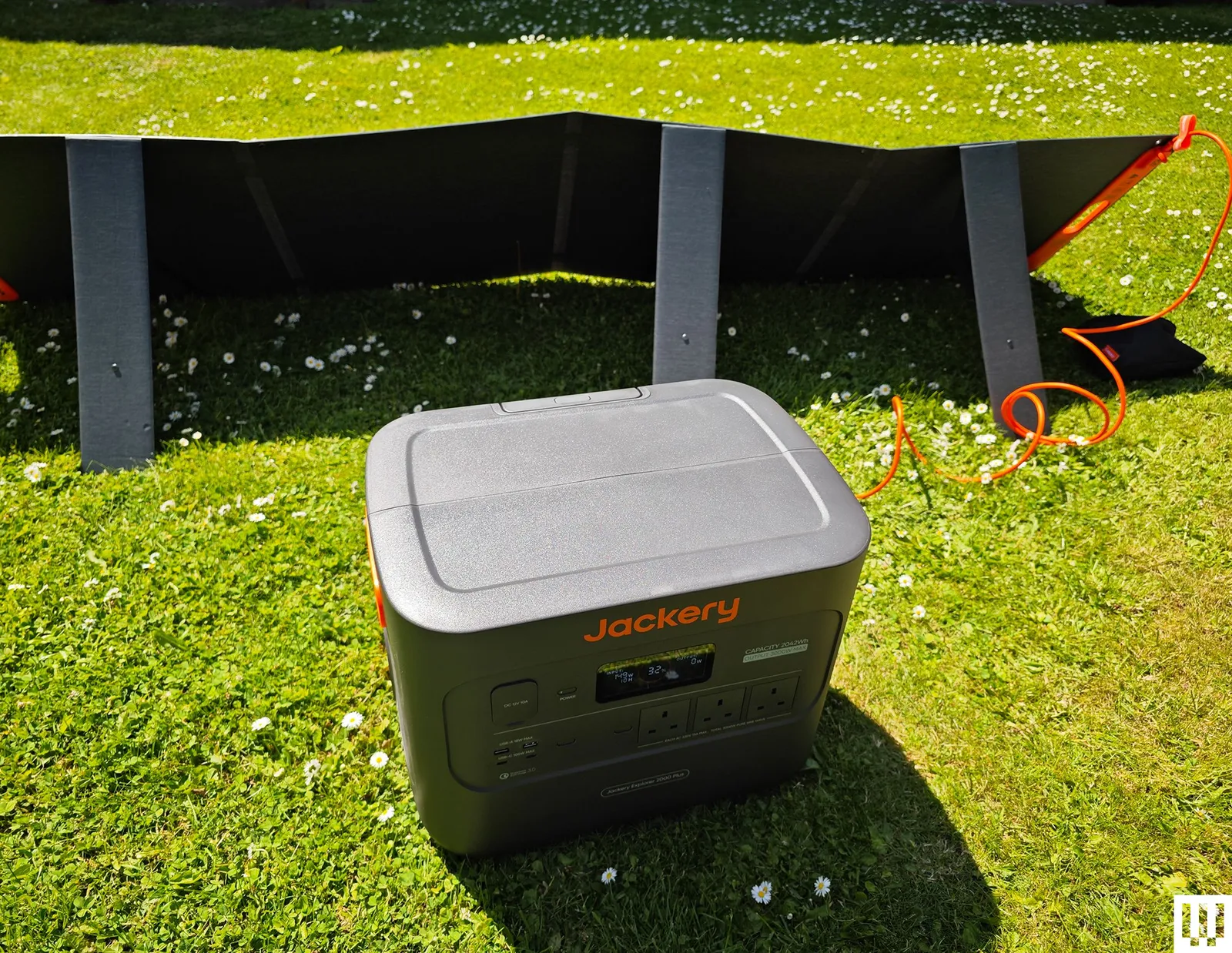
Jackery Portable Power Station Explorer 2000 Plus for $899: The versatile, expandable, durable, and dependable Explorer 2000 Plus was my top pick for a while, and it’s still a good choice if you find it on sale, though the Bluetti Elite 300 that unseated it packs more power into a smaller form. It does still offer some advantages, chiefly that you can double or triple the 2,042-watt-hour capacity by adding battery packs. In my tests, the capacity consistently matched up with Jackery’s claims. It had no trouble with the kettle test (UK kettles hit 3,000 watts), though it chewed through 6 percent of the power. You can charge it speedily from the mains (AC outlet), but it also works as a solar generator. I filled it from 32 percent in a single scorching day with Jackery’s SolarSaga 200-watt solar panel. The fan is relatively quiet at around 30 decibels, but it comes on frequently. It weighs a whopping 62 pounds, and though there are indented handles on either side, a telescopic handle, and two wheels, it can still be tough to move around. The covers on the car port, inputs, and expansion port on the back are annoyingly tight. (I sometimes had to use a screwdriver to open them.) The Wi-Fi connection is 2.4 GHz only, and it took me a while to figure out that the connection mode requires you to press the AC and DC buttons together, since that doesn’t seem to be documented anywhere. Minor niggles aside, this is a great power station to serve as a home backup or off-grid generator. The warranty is three years, but you can extend it to five years by registering with Jackery.
Photograph: Simon Hill
Bluetti Elite 200 V2 for $799: While the Elite 300 is my new recommendation, if a 2,074-watt-hour capacity is enough for you, this power station has similarly strong build quality and mostly the same features (wattage is 2,600 and 3,900 at peak, and UPS has a 15-millisecond delay). It’s relatively fast to charge, can easily power your gadgets and small appliances, and has an info-packed display that’s legible outdoors.
BioLite BaseCharge 1500 for $1,020: Weighing 29 pounds, it has recessed handles at each side for carrying, though this is as big a power station as I can imagine lugging any real distance. There’s no superfluous app. You can do everything using the buttons and the display on the front. It has a good mix of ports to cover a lot of small gadgets like phones, tablets, and laptops. There’s even a wireless charging pad on top. I wouldn’t run anything too demanding on it, but it coped fine with an electric drill and blender. I tested it with BioLite’s SolarPanel 100, but the BaseCharge 1500 has a standard High Power Port (HPP) input, so you don’t have to use BioLite’s solar panels. It finished just on either side of the stated capacity in my tests. Sadly, the BaseCharge 1500 takes a long time to charge. Even from a wall outlet, you need a day, though you can speed it slightly by using the PD USB-C as a second input. Solar charging from a single SolarPanel 100 takes several days. The battery is also a Li-NMC, so it likely won’t last as long as some of our other picks. The BaseCharge 1500 comes with a two-year warranty.
Advertisement
Ampace Andes 600 Pro for $449: This compact power station weighs 19 pounds and has an easy-carry handle on top. It stores 584 watt-hours of power and can be fully charged in an hour (30 dB sleep mode). It can deliver 600 watts (1,800 W surge), and has lots of ports (2 x AC, 2 x USB-C, 2 x USB-A, 2 x DC 5521, 1 x Car). There’s also a remote control app where you can change the light bar function or the colored light on top. It worked well in my tests and could be handy if you want something portable for small gadgets on a camping trip, but the EcoFlow River 2 Pro above gives you more power for less.
Photograph: Simon Hill
EcoFlow Delta 3 Plus for $519: I like the stylish, compact design of EcoFlow’s Delta 3 Plus, with the screen and ports at one end. It offers 1,024 watt-hours, can consistently provide 1,800 watts, and has a 2,600-W surge mode. It can also charge up in an hour and has lots of ports (6 x AC, 1 x Car, 2 x USB-A, 2 x USB-C, 2 x DC5521). You can add capacity with EcoFlow’s impressively compact and stackable add-on battery ($599), though it is pricey. The Plus version includes two solar ports for faster solar charging and can pull UPS duty with an impressive 10-millisecond response time. The reason it misses out on a full recommendation is the fan. The fan turned on all the time, even when I was only charging a single phone, and continued at around 55 decibels after it was fully charged and unplugged. It got louder when I charged the Delta 3 Plus from a wall outlet. It could disturb you, and it gave me concerns about overheating. Fan noise aside, I liked this power station, and the app also works well if you want to remote-control it. There is a quiet charging mode, but it drops the rate to 200 watts, meaning it will take more than five hours to fully charge.
Photograph: Simon Hill
Bluetti AC200L for $799: This was replaced by the Elite 200 V2 above, but it is still a decent power station with a similar feature set. It has slightly lower capacity, and it’s heavier and pricier right now, but it is expandable up to 8,192 watt-hours with Bluetti’s add-on batteries. The design and performance are similar, but the Elite 200 V2 edges it for me and is a better buy, especially if you can pick it up for less.
Advertisement
Dabbsson DBS1000 Pro Portable Power Station for $619: This 1024-watt-hour power station has a LiFePO4 battery and a decent mix of ports to charge and power your gadgetry. The US model has four AC outlets, three USB-A ports, three USB-C ports, a car socket, and two DC5521 barrel ports. It can charge to 80 percent in under an hour when plugged in, but expect some fan noise. You can also charge from solar panels or through the car port. You can connect via Wi-Fi and control it from the app, but the display still gives you the info you need without it, and it has a customizable light underneath. The 2,000-watt output is impressive, and there are boost and surge modes to briefly take it to 3,000 and 4,000 watts, respectively. It performed well in my tests and can act as an EPS with a 15-millisecond delay. It’s a solid alternative to our picks above, but doesn’t stand out. The fan comes on frequently and can be annoying. I also had an issue with one of the USB ports sometimes refusing to charge a phone. Buy the DBS2000B battery expansion to boost capacity to 3,072 watt-hours and increase output to 2,400 watts. It comes with a five-year warranty with registration.
Bluetti AC180 for $449: This small Bluetti power station is a solid option if you don’t need as much juice. The AC180 also has a LiFePO4 battery inside, but with a 1,152-watt-hour capacity. It maxes out at 1,800 watts but can surge up to 2,700 watts for short bursts. The US model has four AC outlets, one USB-C (100 W), and four USB-A ports (15 W apiece). There’s even a wireless charging spot on top that goes up to 15 watts. You can fully charge the AC180 from an outlet in an hour, and it comes with solar and car charging cables as alternatives. It can also act as a UPS with a 20-millisecond switching time. This power station is good for small gadgets and appliances like a TV or a mini fridge. Fan noise hit around 45 decibels under a heavy load, which isn’t too bad. What I don’t like is the weight (35 pounds seems relatively heavy for this capacity), and I’d prefer more USB-C ports.
Advertisement
Zendure SuperBase Pro 2000 for $1,200: With a whopping 2,096-watt-hour capacity, tons of outlets (6 x AC, 1 x Car, 3 x DC5521, 4 x USB-C), and a maximum output of 2,000 watts (surge 3,000 watts), this is a great portable power station. It is 47 pounds but has two wheels, a carry handle, and a separate telescopic handle. Zendure’s app is slick; this power station can serve as an uninterruptible power supply and performed well in my tests, though the fans were almost constantly on. I also have concerns about its longevity. The SuperBase Pro 2000 has a Li-NMC battery inside, probably because it offers greater energy density than LiFePO4 (the similarly sized SuperBase Pro 1500 has a LiFePO4 battery and just 1440-watt-hour capacity), but Li-NMC batteries don’t last as long. The warranty is 2 years, but you can extend it by a year by registering with Zendure.
Portable Power Stations to Avoid
Photograph: Simon Hill
Acer 600W Portable Power Station: This power station is certainly portable, with a LiFePO4 battery offering 512 watt-hours via nine ports (two AC, two USB-A, two USB-C, two DC5521, and a car port). It’s a decent size for a campsite and suitable for lighting and charging portable gadgets, but with a maximum output of 600 watts, I wouldn’t plug in anything too demanding. You can fully charge it from a wall outlet in around two hours. There’s a small LCD for remaining battery percentage, estimated remaining run time at current usage rates, and wattage input and output. It worked fine in my tests, but it seems to be available only in the UK and is pricey for the capacity.
Vtoman FlashSpeed Pro 3600: Huge and heavy for its capacity (3,096 watt-hours), this power station has wheels and a telescopic handle to enable you to move it around without injury. The first unit I tested was faulty, so Vtoman supplied me with a replacement. While it worked far better, I can’t recommend this power station. The Bluetti Elite 300 above is cheaper, far more compact, and will suit most folks better, though the Vtoman has a clear advantage in potential output (it can sustain 3,600 watts and peak at over 7,000 watts for short bursts). Unfortunately, I hate the plastic front panel that you must lift to access the ports; the display is too dim to read outdoors; the build quality is suspect (it’s all a bit creaky); and it’s way, way too big.
Advertisement
Power Stations: Frequently Asked Questions
How Expensive Are Portable Power Stations?
Portable power stations can be very expensive, but discounts, sales, and deals are common. If you can afford to wait, you can likely get your chosen power station for less than the listed MSRP.
What Capacity Do I Need?
Advertisement
Figure out how much power you need. The capacity is listed in watt-hours (Wh) or sometimes kilowatt-hours (kWh). If you think about the devices you want to run and how long you need to run them, you can start to calculate the capacity you need. Manufacturers will often display stuff like 12 hours of TV or 30 minutes of electric chainsaw use, but not all TVs draw the same amount of power. You must calculate how much the gadgets you own actually use.
How Portable Are Portable Power Stations?
The term “portable” is sometimes stretched. Batteries are heavy. The larger-capacity power stations are typically on wheels and have telescopic handles, and they are still tough to cart around. If you’re looking for something you can actually carry on foot for a distance, you may need to temper your expectations on capacity.
What Can You Run on a Portable Power Station?
Advertisement
All portable power stations can charge up small gadgets like phones and laptops or be used to power lighting. Most can handle small appliances like mini-fridges or TVs. If you want to use power tools, an AC unit, or, in the UK, a kettle, you need to be able to draw thousands of watts. Power stations all state the maximum output, but they often have a surge function that enables them to go higher for a short period. Sometimes, they give it a silly name. For example, Zendure calls this “AmpUp,” and EcoFlow calls it “X-Boost.” Make sure your chosen power station can handle the wattage you need.
How Do I Charge a Portable Power Station?
All portable power stations can be charged from a wall outlet and should come with a charging cable. Some power stations can also be charged via a car port from your vehicle or a solar port from solar panels. Make sure you check that the ports you want are available and necessary cables are included.
How Long Does a Portable Power Station Take to Charge?
Advertisement
Large-capacity power stations can take a long time to recharge. Be sure you understand how quickly your chosen power station can charge from wall power and other sources if you plan to use solar panels, a vehicle battery, or another power source for top-ups. Some power stations enable you to fast-charge from two or more inputs.
What Ports Should I Look for in a Portable Power Station?
While you will find certain ports across the board with portable power stations, from AC outlets to USB-A, it is crucial to check the maximum charging rate and supported charging standards to avoid disappointment. You might find USB-C ports, car ports, barrel connectors, and maybe solar panel inputs, but assume nothing. Check the specs before you buy.
How Many Years Do Portable Power Stations Last?
Advertisement
Power stations typically last between three and 10 years, but can last longer, depending on how they are used and maintained. It’s important not to let them completely discharge too often or leave them empty for extended periods. Usually, the manufacturer will provide an estimate of how many charge cycles you can expect before performance starts to degrade. Warranties typically range from two to five years, but make sure you retain the guarantee and proof of purchase.
What Battery Types Are Commonly Used in Portable Power Stations?
There are various battery technologies, but the main ones used in portable power stations today are types of lithium-ion (Li-ion) batteries, often lithium nickel manganese cobalt oxide (Li-NMC) or lithium iron phosphate (LiFePO4 or LFP). The latter is safer (less prone to combustion) and tends to last longer (more cycles) before it starts to degrade. Overheating can be an issue for Li-NMC batteries, and they degrade faster but have a higher energy density. Zendure also offers semi-solid-state batteries in its top-of-the-line SuperBase listed above, which it promises are more stable and resilient, therefore safer, and have a higher energy density.
Can You Use a Portable Power Station as a UPS?
Advertisement
Some power stations can act as an uninterruptible power supply (UPS); others are classed as an emergency power supply (EPS). If you have your power station plugged into wall power and then devices plugged into it, they will work from wall power, but if there is a power outage, a UPS will switch to battery power instantly (around 10 milliseconds). An EPS will also switch when there’s a blackout, but may take a bit longer (30 milliseconds or so).
What Is the Difference Between a Power Bank and a Portable Power Station?
Size is the main difference between the power banks and the portable power stations. Power banks are typically compact with small capacities designed to charge smartphones and other small gadgets. Power stations have far larger capacities and can potentially run small appliances and larger gadgets.
How to Care for Your Power Station
Advertisement
I already mentioned the importance of not leaving your power station empty. If you can avoid fully draining the battery, topping up when it hits 20 percent or below, that will increase its lifespan. You should also avoid leaving it plugged in all the time unless you are using it as an emergency backup (UPS or EPS). Unplug after it is fully charged. Be mindful of the charger and cable you are using to charge up your power station. It’s best to stick to the cables that came in the box. Store your power station in a cool, dry space, avoid extremes of temperature, and try not to expose it to lots of dust. A handful of power stations are built for extreme temperatures and a few can handle rain, but always check before you risk exposure.
What About Home Batteries?
A permanently installed home battery is a better solution for some folks than a portable power station. It will need to be professionally wired into your electrical panel, but it allows you to schedule and automate when you pull power from the grid or store power from solar panels on your home. If you don’t need it to be portable, you should read my guide on How to Buy a Home Battery. We have also tried the EcoFlow PowerOcean and the Anker Solix E10.
How I Test Portable Power Stations
Advertisement
I test every candidate for our best portable power station guide by using it around the house for at least a week (usually much longer). I plug gadgets into every port and outlet, from a TV and mini fridge to smartphones and laptops. For more capable power stations, I test power tools, a hair dryer, an AC unit, and a high-wattage UK kettle. I always check that there’s room to plug in the maximum number of devices. I test any stated surge or power-boost mode under a heavy load.
All additional ports are tested, from car ports to solar panel ports. I record the time it takes to charge from a wall outlet and from solar panels (weather permitting). I test the fan noise under low, medium, and heavy load, and also when charging from an outlet using the decibel meter on my Apple Watch. If there’s a quiet or nighttime fan mode, I test that too.
I also assess the design to check if the LED display is informative and legible in sunlight. I assess portability by lugging it around my home and garden to use and charge, noting the presence of ergonomic handles, telescopic handles, or wheels. If there are any accessories, I test them. If there’s an app, I connect it and test all the functions and features.
If it has EPS or UPS functionality, I test it with a router and a PC to ensure it switches over within the stated time frame. Finally, I run a set of tests to establish the capacity and note if it significantly deviates from the manufacturer’s claims.
Advertisement
How Did WIRED Select Products to be Reviewed?
I try to test a range of different power stations. It’s not possible to test every device, so while I typically test flagship releases, I also try to call in power stations with different capacities and at different prices. We are brand agnostic, so I will test power stations from any manufacturer, provided I can get hold of them. But I do lean towards testing more systems from the most popular brands. All the power stations I test are provided by the manufacturers or their PR companies.
Most are loaned for a month or so and then returned. A handful of our recommended picks are kept for longer-term testing. The remainder is donated to charities and other organizations. I recently donated two DJI power stations to UK police drone operators.
This week on the GeekWire podcast: Microsoft and Amazon both reported quarterly numbers, and both stocks rose on cloud results that beat expectations. Is all that AI spending paying off? And in related news, Microsoft sees a rare annual headcount decline, hitting product R&D hardest.
Plus: Satya Nadella builds a Power BI dashboard out of an analyst’s research report, and touts it on the earnings call to make a bigger point. Jeff Bezos names Amazon’s chips business as the long-awaited fourth pillar. And AI House managing director Jacob Colker delivers a much-needed pep talk for Seattle tech, calling on the region to recognize and build on its strengths.
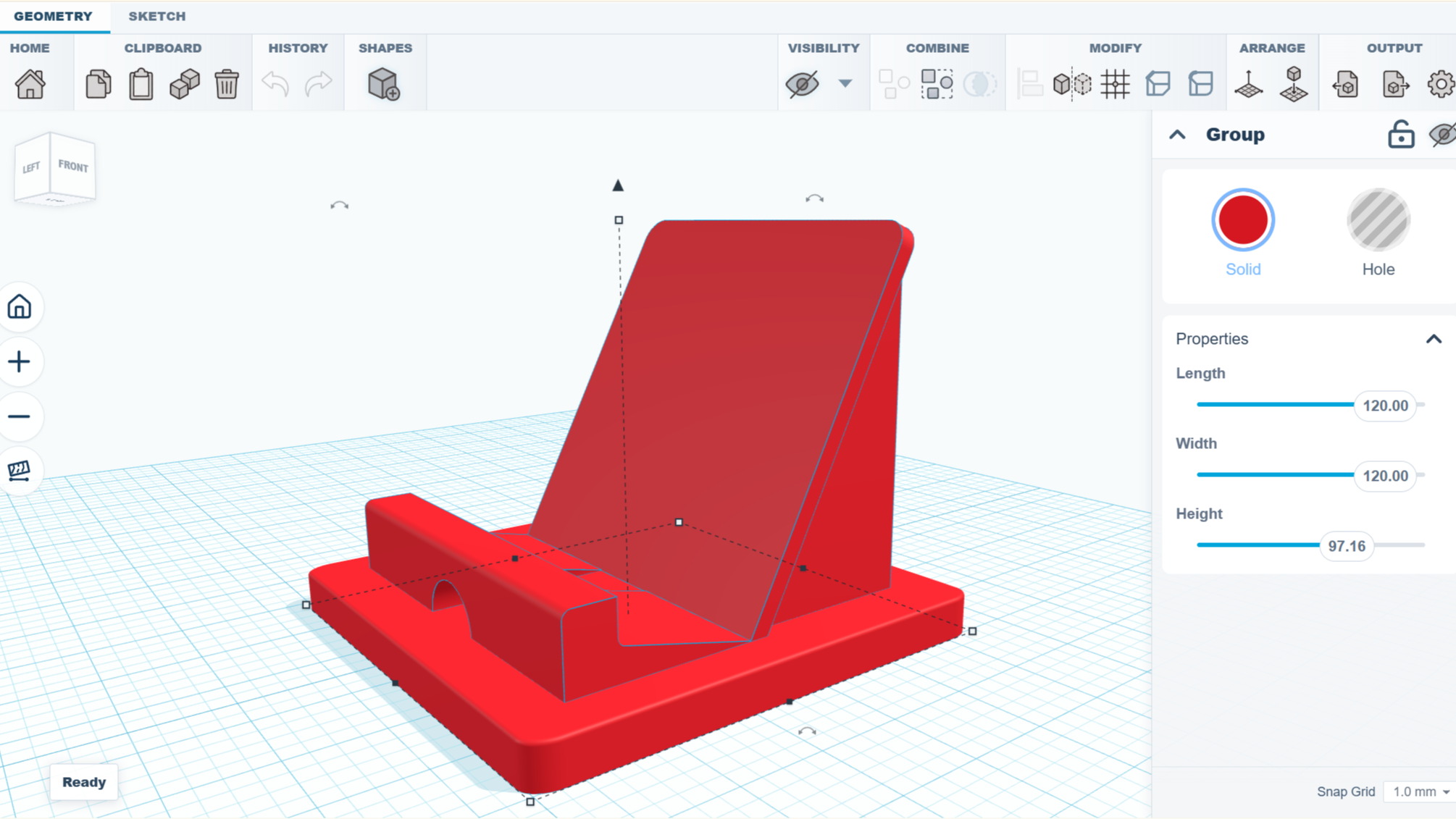
Got an idea and want to make a simple 3D model, but don’t want to install a full-fledged CAD modeling suite and queue up a few hours of tutorial videos? Check out SketchForge, a 3D modeling program that runs locally in one’s browser without any need for an account, or external services.
SketchForge takes a more WYSIWYG approach to 3D modeling by making it easy to put an object together with primitive shapes, and making it extra easy to specify dimensions and align parts with one another. There’s also a sketch feature that makes it easier to create more complex shapes by making a 2D drawing, then extruding or revolving it into a solid. We like that it has STEP format export as an option, making it easy to import your creation into another CAD program of your choice later. Most 3D printer slicers natively support the STEP format nowadays, too.
It’s a bit reminiscent of Tinkercad in concept, but entirely local. It’s still new, but there’s a demo online that gives a good idea of its capabilities if you’d like to give it a spin.
Advertisement
We’re reminded of CaDoodle, another project that takes the “Tinkercad, but local” approach but as a standalone executable, instead of browser-based.
OpenAI CEO Sam Altman seemed excited to share what he called a “cool use case” on Friday, posting that parents could “connect your family calendars and explain your kids’ interests” to the company’s new product ChatGPT Work, then “every morning for the drive to school, have it make a podcast that talks about one kid’s soccer game that afternoon, one kid’s upcoming birthday, some news, etc.”
Altman’s post prompted lots of virtual eye-rolling, including a simple response from Alex Hirsch, creator of the animated series “Gravity Falls”: “What if you just talked to your children”?
Hirsch’s question seems to have gone even more viral than Altman’s initial post — while Altman’s comment has been reposted around 300 times and liked around 9,600 times (as of Saturday morning), Hirsch’s response has been reposted 9,000 times and received 122,000 likes.
This isn’t the first time a tech CEO has promised that AI can shield users — and specifically users’ morning commutes — from the messy realities of human experience. Last year, Microsoft CEO Satya Nadella said he’d stopped listening his favorite podcasts during his morning drive; instead, he asked an AI chatbot about those podcasts.
Advertisement
Altman’s post also echoed comments he’s made about parenting in the past, most notably when he appeared on “The Tonight Show with Jimmy Fallon” and declared, “I cannot imagine having gone through figuring out how to raise a newborn without ChatGPT.” (Though he was also quick to acknowledge, “Clearly, people did it for a long time, no problem.”)
Getting parents on-board seems to be a priority for OpenAI, which recently posted a job listing for a product manager with experience building trust-sensitive consumer experiences for parents and families.
But while the company has added safety features for parents, it also faces multiple lawsuits from parents and families alleging that ChatGPT played a role in loved ones’ delusions and suicides. (The company has said it’s “continuously improving how our models respond in sensitive interactions.”)
When you purchase through links in our articles, we may earn a small commission. This doesn’t affect our editorial independence.
Back in the day, you could just scroll the App Store, pick out an icon or two that you liked the look of, and have a new game downloaded and ready to play in just a few moments.
Ultimate Guide to Apple Arcade
(Image credit: Apple / Future)
This article is part of our Ultimate Guide to Apple Arcade: the definitive guide to everything that you need to know about the gaming service. Be sure to browse the full series here.
Advertisement
Booting them up, you’re not confronted with a 29.68GB additional download that you have to stay on one screen to complete, a wall of sketchy in-app permissions to accept, or a page demanding that you sign in with some iffy third-party account — just a neat little self-contained experience designed to help you kill a few hours on the train.
Though they seemed simple, many of the best App Store games were quietly revolutionary. Angry Birds and Fruit Ninja pioneered intuitive touch-screen controls, while Doodle Jump smartly utilized the iPhone’s accelerometer to show how hardware features could become core gameplay mechanics.
Statista estimates that there are now more than 180,000 mobile games available on the App Store. But when was the last time you installed one that felt genuinely exciting, rather than like a thinly veiled scheme to force ad views, harvest personal data, or pressure you into pricey Gacha Pulls? That’s exactly where Apple Arcade comes in.
Advertisement
Back in time
Puyo Puyo Puzzle Pop is an incredible Apple Arcade exclusive entry in the long-running puzzle series. (Image credit: Sega)
Having spent the last week diving into all 200+ of the titles available on the service, I can’t help but think that Apple’s highly curated library of mobile titles feels like a journey back in time to the App Store’s glory days.
The whole experience is completely seamless. You sign up for $6.99 / £6.99 / AU$9.99 a month and can immediately jump into browsing the games. They’re all contained in a dedicated Arcade tab in your iPhone’s App Store, so there’s no ambiguity about whether the app you’re looking at is part of the service or not.
Advertisement
Sign up for breaking news, reviews, opinion, top tech deals, and more.
Although the selection here is nowhere near as expansive as the regular games tab, it feels genuinely curated and cuts out huge amounts of clutter and spam.
No matter what you like to play, there’ll be at least a few games for you. An impressive variety of genres are represented in the catalog: there are plenty of massive role-playing games (RPGs) that you can sink hours into, be that Trials of Mana+ or Final Fantasy+, fast-paced racers such as Asphalt 8: Airborne+ and Sonic Racing, head-scratching puzzlers in Monument Valley+ and Lego Builder’s Journey, and so much more.
Jetpack Joyride 2 adds new missions, weapons, upgrades, and more. (Image credit: Halfbrick Studios)
Those iconic early mobile titles I mentioned earlier? They’re back too in new and improved forms that make them a nostalgic joy to revisit. There’s a full-on Angry Birds remake with enhanced graphics and extra levels, an expanded Doodle Jump sequel that updates the hand-drawn graphics and adds new environments, and a Temple Run successor that trades the endless format for challenging levels that are better-suited for short bursts of play.
Advertisement
The innovation of the early App Store is there too. RPG Fantasian wows with incredible art direction that sees you exploring hundreds of beautiful real-world dioramas that were digitally scanned into the game, while bonkers sports simulator What the Golf? takes full advantage of punchy iPhone haptics to add real weight to its wacky physics challenges.
No distractions
No ads makes it easier than even to lock-in in rhythm games like Taiko no Tatsujin Pop Tap Beat. (Image credit: Bandai Namco)
The games are all entirely devoid of ads and microtransactions, so you never have to deal with a frustrating splash screen or pop-up that takes you out of the action.
Advertisement
This means that most of the games will work entirely offline as well, just like they did back in the day. I had practically given up playing mobile games on my commute before getting into Apple Arcade simply because it was so hard to find titles that wouldn’t kick me out the second my train went into a tunnel.
There are no sign-in screens anywhere, and most games don’t even request permission to send push notifications. Your progress will even automatically sync to the cloud so you can continue playing on your iPad, Mac, or Apple TV when you get home.
Oh, and you don’t need to worry about your privacy in all this either. Apple says that all of the games in the service have no third-party tracking software and don’t collect any advertising data. All that, to me, is certainly worth paying for.
The PD20 combines all of Astell & Kern’s longstanding understanding of electronics and metalwork with a freshly comprehensive suite of software that makes it a formidable option for headphone use on the move. It’s not cheap and it’s not small but the performance is good enough that many people won’t care
Superb headphone performance
Well-made and superbly finished
Flexible use options
Pricey
Large and heavy for portable use
Battery life in some modes is quite limited
Key Features
Advertisement
Review Price:
£1799
Storage
Advertisement
256gb internal storage expandable up to 2.25tb
DAC
Advertisement
Quad ESS DAC with twin headphone amplifier
Apps
Advertisement
Supports most major streaming services and Roon
Introduction
The market for personal audio players is a rather affair than it once was when the iPod dominated the business of listening to music on the move.
Astell & Kern has carved out a strong presence at the top of this more niche market and over the years, they have cleverly evolved their devices to be more than a portable device for use on the move.
Advertisement
The PD10 that I looked at in 2025 can deliver great performance over headphones or earphones but can then be parked in its supplied cradle and used as a superb source for your main system as well. It’s clever thinking and the PD10 is a superb product.
You might reasonably assume that a device called the PD20 would be more of the same; tweaked and improved but intended to offer the same dual use concept. The reality though is a bit different.
Advertisement
While Astell & Kern hasn’t abandoned the idea of being able to do more than use the PD20 out and about, it has revisited the functionality needed to make the PD20 a more effective partner for this primary role. As I shall cover, this includes functionality that hasn’t appeared on any Astell & Kern device up to this point as well.
Advertisement
As such, we need to see if this change in direction has yielded positive results and if the not inconsequentially expensive PD20 is the device you’ll want to turn to when it’s time to leave the house.
Price
The PD20 is available in the UK for £1,799. The dealer network isn’t huge but it covers most areas of the country and it is possible to purchased online if you are particularly remote. In the USA, it is available for $1,970 USD while in Australia, it will be $2,649.
Something that is important to stress is that the PD20 is not a replacement for the PD10. The two units will be sold together and this reflects the differences in specification and intended use between the two different models.
It’s also worth stressing that despite the higher number, the PD20 isn’t a higher specification device than the PD10 and indeed costs less.
Advertisement
Advertisement
Design
Superbly made and finished
A bit on the big and heavy side
Revised external controls
Clear and logical interface
Those of you familiar with Astell & Kern’s handiwork up to this point won’t find anything alarming about the PD20. The all metal chassis is solid, weighty (weighty enough that any of you who go in for a loose fitting garment might want to check what happens if you put it in a pocket before you head out) and finished to an immaculate standard.
There are some intriguing differences between the PD10 and PD20 though. The PD10 streamlines the controls to a row of buttons down the side. The PD20 by contrast has rather more going on in the form of both a pair of rotary controls on the top to control both tone and volume and a row of switches on the side; the functions of which we’ll cover in the specifications section.
Image Credit (Trusted Reviews)
There is no getting away from the fact that the Astell & Kern is pretty big for a ‘portable’ device. This might be better viewed as something that travels with you in a bag and, even then, it had better be a reasonable sized bag.
The upside to this is that it means that Astell & Kern is able to fit a decent sized screen which is bright and easy to read. It wasn’t too long ago that even the premium models didn’t feel as responsive and easy to use as a middling phone. This is very much no longer the case.
Advertisement
Advertisement
Image Credit (Trusted Reviews)
The interface itself is also as good as I’ve ever experienced from an Astell & Kern device. At its core is a version of Android but a great deal has been changed and tweaked by Astell & Kern to better suit its more specialised use case. Key things like swiping down to access key settings and menus has been retained though and it makes the PD20 feel wholly unintimidating to use.
Final mention has to go to the packaging too. It’s attractive, brilliantly laid out and does a fine job of making you feel like you haven’t wasted your money. You get some screen protectors included but no case which is a slight shame as I’m sure that your first scratch will be a mortifying experience.
Image Credit (Trusted Reviews)
Specifications
Limited internal memory with option to expand
Quad DAC arrangement
Adjustable amp classes
New hearing test software and EQ
Like the PD10, the PD20 offers 256GB of internal memory which, in 2026, feels a bit on the parsimonious side.
Advertisement
Yes, you can add a micro SD card of up to 2 terabytes in size and these have become more affordable in recent years but if you use Qobuz or Tidal as your main source of material (both of which the PD10 supports natively), these files can only be stored offline in the internal memory which will quickly fill up.
Image Credit (Trusted Reviews)
At the best part of two grand, 512gb doesn’t feel like too much of an ask. As well as Tidal and Qobuz other streaming services can be installed and the unit can also used via Roon and Roon ARC as well.
The decoding is significantly different to the PD10 which used AKM hardware. Here, there are no less than four ES9027PRO chips fitted that sum their results against each other, looking for and then correcting any decoding errors.
Advertisement
This is a lot of processing power (each DAC on its own can support eight channels of information) and the quoted performance is impressive. The DACs are externally clocked and fronted by an Octo Core processor.
The PD20 supports PCM to 768kHz and DSD512. There is also DAR (Digital Audio Remaster) software; an upsampling algorithm that can be used in PCM or DSD versions (and, no less importantly, can be switched off).
Advertisement
If you do run it, the sample rate increases considerably, with Astell&Kern stating that this allows for additional information to be interpolated and worked into the output. This is combined with six adjustable digital filters that adjust the roll off rate and amount of pre ringing.
Advertisement
Image Credit (Trusted Reviews)
The digital stage outputs to an internal amp that works a little differently to both the PD10 and indeed other Astell & Kern models. On the side of the casework you’ll find two three-position switches. The first allows you to switch the topology of the output between Class A, Class AB and Hybrid – intended to combine the benefits of both.
A second switch changes the amp current settings between high, medium and low, depending on the headphones you are using. This gives the Astell & Kern the notional ability to power some very demanding headphones indeed although if you run it in Class A mode and the high current setting, the battery life will be limited.
At the top of the chassis you’ll find both a 3.5mm and 4.4mm output for balanced and unbalanced headphones and these are coupled to a 150 step volume control which can be bypassed if you put the PD20 into line out mode. It also has an entirely effective two way Bluetooth implementation too. It’s still perfectly possible to use the Astell & Kern as a compact digital source for your system if the fancy takes you, even if the neatness of the PD10’s dock is absent.
Image Credit (Trusted Reviews)
Advertisement
So far, these are only minor changes from the PD10 but at this point, the PD20 starts to differ significantly. The PD20 is fitted with software that Astell & Kern has developed with Audiodo to perform an interactive listening test on your hearing and adjust the output of the PD20 based on your feedback.
Running the test takes less than five minutes and you can store multiple profiles on the device as well. In order for this result to be consistent, you’ll find a small pair of earphones in the box to run the test with that ensures the results will be consistent.
Advertisement
This is partnered both with tone control adjustment and an on board EQ to further tweak the performance to your needs. This is by far the most flexible and customisable Astell & Kern device I’ve tested and it should allow the PD20 to match up with pretty much any headphone and then adjust what it’s doing to suit your needs. Neither is it done there.
There is also software called Audiosphere which Astell&Kern claims ‘goes beyond conventional stereo, delivering a powerful sense of spatial immersion. It expands two-channel audio into a virtual three-dimensional sound field and offers four presets.’ I have to say it’s an acquired taste in use but it’s there if you want it.
Performance
Capable of excellent performance even with no EQ engaged…
… but it gets better still once you do
Switchable amp modes have less effect
Capable used as a line level source
Advertisement
Something that is very important to get across about the PD20 is that the new suite of software isn’t something that it ‘needs’ to have engaged to deliver a decent performance.
Leave it switched off, the EQ set to flat and none of the upsampling engaged and this is still a superb piece of audio equipment. Using it as a Roon Endpoint and sending it random corners of my music library did nothing to unsettle it and it’s as happy with the scuzzy shoegaze of New Meaning by Tempers as it is with the sublime high res of Sarah Jarosz’s Blue Heron Suite.
Advertisement
It’s tonally accurate and impressively good at keeping a feeling of space and three dimensionality in what you are hearing, even when you are using earphones.
Image Credit (Trusted Reviews)
If you do take the time out to run the hearing tests though, it does have a meaningful effect on the performance. For my sins, I am 45 and while I have looked after my hearing as best as I can, I am undoubtedly experiencing some rolling off at higher frequencies. After the tests had been run, there is a little more treble energy to the lovely Hallucinating Love by Maribou State that makes it a little more vibrant and exciting without it tipping over into being bright or harsh.
Something I found interesting is that I’ve lost a fraction more of the high end registers in one ear than the other and the test resulted in a gentle rebalancing of this which ensured the performance had a greater sense of stereo to it.
Advertisement
I was a little concerned that this would in turn affect adding crossfeed to the signal (as what was being transferred to the other channel would be boosted over what that ear ‘needs’ but I needn’t have worried and I still preferred the performance with some crossfeed engaged.
Advertisement
Image Credit (Trusted Reviews)
Against this, I have found the amp modes to be less profound in what they do. This is partly down to the reality that none of the headphones and earphones that live here are very hard to drive so the extra current on offer doesn’t have a night and day effect but, even allowing for this, I suspect that the digital tweaks will make more difference for most owners than the amp mode switches which I suspect will see less use once some initial tinkering has taken place.
There is also the good news that, while the PD20 doesn’t feel quite a slick to use in a fixed installation as the PD10, it’s still capable of delivering a truly satisfying performance.
Listening to Boards of Canada’s mighty Prophecy at 1420MHz via the PD20 captures the shifting and positively unsettling power of the work, the immediacy and scale it has and the intricate details of the samples are well worked into the main system.
The PD20 feels less a portable audio source than the PD10 but it doesn’t prevent it from being entirely effective used as one.
Advertisement
Advertisement
Should you buy it?
After a few years showing that their products could be more than a portable player, the PD20 feels like a revisiting of the concept. The extra software fitted means it is more flexible and capable of delivering a sparkling performance with pretty much any headphone or earphone at home or on the move.
This is still a big, heavy and expensive way of listening to music on the move and, as we head into summer with fewer pockets to hand, many people will find the PD20 simply too big and pricey to relax into using it out and about.
What it is might be best seen as a considered take on what a high spec portable player needs to be in 2026.
The overlapping nature of the Astell & Kern range means that this here to be a viable option for headphone only customers who might have been feeling left out by the system integration efforts of the PD10.
Advertisement
How We Test
We test every portable music player we review thoroughly over an extended period of time. We use industry standard tests to compare features properly. We’ll always tell you what we find. We never, ever, accept money to review a product.
Find out more about how we test in our ethics policy.
The glamorous part of AI is the models. The expensive, unglamorous part is getting them the right data. A startup just raised $40 million betting that job is the next big enterprise layer.
DataBahn, a Texas company founded in 2023, has closed a $40 million Series B led by Insight Partners, it said on Thursday. Forgepoint, GTM Capital and S3 Ventures joined. The round takes its total funding to $59 million.
DataBahn sells what it calls an “agentic data control plane.” In plain terms, it is a neutral layer between the systems that produce enterprise data and the ones that consume it, from security tools to data warehouses and, now, AI agents. Rather than shovel every log into every system, it reduces, enriches and routes only what is needed, and pulls extra context on demand.
The bill nobody can pay
The timing is not an accident. Companies now generate more telemetry than their tools can afford to process. Cloud transfer fees, storage, rising data volumes and AI inference costs are all climbing at once. Moving everything, everywhere, has become a bill few can justify.
Advertisement
AI sharpens the problem. Agents do not just answer questions; they act. That needs data that is current, well-structured and governed. A control plane can also decide what an agent is allowed to see, and log how each piece of data was changed and routed, a governance job that matters in regulated industries.
Less plumbing, more judgment
The product tries to move the smarts into the pipe. Cruz AI, its “data engineer,” watches for when a source changes format and breaks a pipeline, then drafts the updated parser for a human to approve. That replaces the slow work of hand-building each connector.
The pitch is landing. DataBahn reports revenue up more than 400% year on year, 180% net revenue retention and no customer churn. Fortune 100 firms in healthcare, finance, manufacturing and transport use it, including MVB Bank and the Canada Pension Plan Investment Board. It sells mostly through partners, plugs into Microsoft’s security stack, and grew out of the observability and security-telemetry world.
A crowded, buzzword-heavy field
There is a catch. Cribl, Splunk and the big cloud and security vendors all route and store data, and “agentic data control plane” is a label DataBahn has to prove is a real, separate layer. Its answer is neutrality: no lock-in to one store, one vendor or one model. It will show new features at Black Hat next month.
Advertisement
The wider bet is simple. The money flooding into AI infrastructure is starting to chase the plumbing, not just the models. DataBahn’s wager is that enterprises do not need to collect more data. They need to govern what they already have well enough for AI to use it.
Banning phones in schools. Yay or nay? It’s certainly a topic that’s raised debate on both sides in recent years as more states look to enforce stricter rules. Interestingly, however, it does appear that public opinion is starting to sway heavily towards the ‘pro ban’ camp.
A new report from the Pew Research Center has just concluded that an overwhelming 77 percent of adults surveyed now support a ban on phones in the classroom. That’s a massive increase from the 36 percent reported just two years ago.
The ban on phones in the classroom is generally considered distinct from a full ban on devices in schools – commonly referred to as a ‘bell-to-bell’ ban. Support for a full ban remains firmly split in the Pew report, with 48 percent of adults supporting a full ban in comparison.
Advertisement
Latest Videos FromTechRadar
Teachers have long been overwhelming advocates of stricter rules. A 2024 survey by the National Education Association found that a whopping 90 percent of teachers supported a ban on phones in class, whereas this 2025 survey by RAND found that 70 percent of school principals believe bans have a positive effect in school. Now, however, it appears that the general public is increasingly on board.
But what do you think? At TechRadar, we’re interested in hearing what our readers have to say. I’ve attached a poll just down below, and we’d also love to hear your concerns in the comments, if you have any.
Do you support a phone ban in the classroom?
The case for a ban
(Image credit: Lance Ulanoff / Future)
Studies have suggested an improvement in suspension rates
Evidence for improved performance is more mixed
On a gut level, it certainly feels like phones should be out of the classroom. As adults, we’re increasingly recognizing the perceived downsides of doomscrolling, social media, or other common phone-based habits. I know I’ve certainly felt frustrated at my own tendency to be distracted by my phone during work hours.
Luckily, we don’t have to just rely on gut feeling; however, as there is in fact some evidence to suggest that phone bans in schools result in better outcomes for students.
Sign up for breaking news, reviews, opinion, top tech deals, and more.
Advertisement
Perhaps the most convincing report I’ve seen is from the Education Next Journal, which collated evidence from Florida’s state-wide ban in 2023. While other states have followed suit, Florida is a particularly good case as it was the first state to actually institute a ban. In short, the data is strong here.
Interestingly, the report suggests a higher suspension rate in the first year of the ban, followed by a return to a base level, followed by an overall decrease. Test scores remained steady in the year after the ban but then massively improved in the second year. That suggests it takes a while for any positive changes to be evident.
Another excellent report is from the National Bureau of Economic Research, which studied students from 40,000 schools nationwide between 2019 and 2025. In this study, students reported a greater sense of well-being post-ban as well as decreased suspension rates long-term (after a temporary increase).
This report’s findings are a little less cut-and-dry than Education Next’s, however, as it didn’t find any meaningful effects on test scores. Overall, the report still skews toward viewing a ban favorably, and crucially reports on students’ own sense of well-being.
The case against a ban
(Image credit: Future)
Parents cite child safety as a concern
Questions remain around other tech devices
So are there any arguments against a ban? Well, the answer is actually yes; there are a few, and they’re mostly fielded by concerned parents.
The most common point I’ve seen raised is the issue of safety in schools. Some have commented that they’d prefer for their child to have a phone in the case of an emergency on school grounds.
Even though I don’t have kids, I can certainly empathize with parents in this case. Sadly, we know that violence continues to be an issue in schools, so it’s a very good point that absolutely shouldn’t be ignored when exploring this topic.
Advertisement
One other point that I’ve seen raised, and one that certainly also holds weight, is that even with a phone ban, children may still be distracted by other forms of technology in the classroom. If a child still has a laptop, for example, then they may still have access to social media, messaging, and so on.
This was actually suggested by the authors of the National Bureau of Economic Research report as one of the reasons why test results didn’t improve in their study. Certainly, it could suggest that you really need a holistic approach to technology as a whole in the classroom. Banning smartphones could just be the start.
If you’re a die-hard iPhone user, then there’s a strong chance that you already have access to Apple Arcade and don’t take full advantage of it. The gaming service is currently included with all tiers of the Apple One subscription — an all-in-one bundle that also includes the likes of iCloud Plus, Apple TV Plus, and Apple Music in one monthly fee.
Ultimate Guide to Apple Arcade
(Image credit: Apple / Future)
This article is part of our Ultimate Guide to Apple Arcade: the definitive guide to everything that you need to know about the gaming service. Be sure to browse the full series here.
Even if you don’t pay for Apple One, a free three-month trial of Apple Arcade comes bundled with every new iPhone, iPad, Mac, or Apple TV, plus, the service is available as a standalone subscription if you don’t want it bundled with anything else. Sounds great, right? But what actually is Apple Arcade, how much does it cost, and is it really worth the price?
Advertisement
I’ve spent this week getting to grips with all things Apple Arcade, from diving into some of its biggest exclusive games to comparing it to other competing services, in order to bring you this comprehensive breakdown of everything you need to know about it. Read on and become an Apple Arcade expert.
Latest Videos FromTechRadar
Advertisement
What actually is Apple Arcade?
Apple Arcade is a gaming subscription service by Apple designed for its iPhone, iPad, Mac, Apple TV and even Apple Vision Pro devices. It launched in September 2019 and gives you access to a huge library of more than 200 premium games that you can download and play offline.
Unlike many titles that you might download from the App Store, Apple Arcade games are wholly devoid of both ads and in-app purchases. They are complete experiences that you can dive into without the risk of annoying interruptions or being asked to shell-out real world cash for in-game items or downloadable content (DLC).
Advertisement
What kind of games are included?
Wherever you are, Apple Arcade is open | Parking Lot | Apple Arcade – YouTube
There are more than 200 games available on Apple Arcade, with options across a wide variety of genres. This includes a selection of high-quality original games such as fast-pace platformer Sonic Dream Team, cozy life simulator Hello Kitty Island Adventure, and beautiful role-playing game Fantasian.
There are also some ports of console and PC games, such as hit strategy game Sid Meier’s Civilization 7 Arcade Edition, Disney life sim Disney Dreamlight Valley Arcade Edition, and indie roguelike Cult of the Lamb.
Sign up for breaking news, reviews, opinion, top tech deals, and more.
You will also find loads of premium versions of existing mobile titles with no ads or microtransactions in the likes of Doodle Jump 2+, Fruit Ninja Classic+, Bloons TD 6+, and much more.
You can use our quiz below for some hand-picked recommendations.
Advertisement
How much does Apple Arcade cost?
The Apple Arcade standard plan costs $6.99 / £6.99 / AU$9.99 a month.
You can save some cash by opting for an annual plan instead, which is $49.99 / £49.99 / AU$79.99 — a saving of $33.89 / £33.89 / AU$39.89 compared to 12 months of monthly payments.
Advertisement
No matter which of these two options you choose, you can share your Apple Arcade subscription with up to six family members at no extra cost.
Apple Arcade is also available as part of all Apple One tiers (Individual, Family, and Premier). Unlike Apple Arcade, Apple One is not available in an annual subscription format, so you can only pay for it on a monthly basis. You can view and compare all of the options below.
Swipe to scroll horizontally
Plan
Price
Advertisement
Included services
Sharing limit
Apple Arcade
$6.99 / £6.99 / AU$9.99 per month
Advertisement
$49.99 / £49.99 / AU$79.99 yearly
Apple Arcade
Up to six users
Apple One Individual
Advertisement
$19.95 / £18.95 / AU$24.95 per month
Apple Arcade,Apple Music, Apple TV Plus, 50GB iCloud Plus
One user
Apple One Family
Advertisement
$27.95 / £24.95 / AU$34.95 per month
Apple Arcade, Apple Music, Apple TV Plus, 200GB iCloud Plus
Up to six users
Apple One Premier
Advertisement
$39.95 / £36.95 / AU$52.95 per month
Apple Arcade, Apple Music, Apple TV Plus, Apple News Plus, Apple Fitness Plus, 2TB iCloud Plus
Up to six users
Advertisement
How to claim your Apple Arcade free trial
In most regions a new iPhone, iPad, Mac, or Apple TV now comes with a three-month free subscription to Apple Arcade. The offer is only valid for 93 days (that’s roughly three months), so if you have an eligible device you should consider claiming it quickly if you’re interested.
To do so, simply follow these four simple steps
Open the App Store on the eligible device
Tap the Apple Arcade tab at the bottom of the screen
The offer should appear automatically
Follow the on-screen instructions to redeem it
If you’re not eligible for a complimentary three-month subscription, there’s no need to worry — because new subscribers can still claim a one-month trial via the App Store.
Whether you claim three months or one month, bear in mind that a valid payment method will be required in order to get set up. This will be billed at the standard subscription price when your promotional period is over, so remember to cancel your subscription if you want to avoid any charges.
Do you need a controller to play Apple Arcade games?
The CRKD NEO S is a good pick for Apple Arcade. (Image credit: CRKD)
You don’t actually need a controller to play the majority of Apple Arcade games. On iPhone and iPad, almost every title supports full touch screen controls and can be enjoyed without any extra hardware.
If you’re playing on Mac, many titles support keyboard and mouse controls.
On Apple TV, you’re most likely to need a dedicated gamepad as there are only a few titles that work well with the included remote.
Advertisement
Of course, lots of games still allow you to use a controller on any device even if it’s not strictly required and I’d recommend it if you’re after an even more console-like gaming experience.
You can see some models that I’ve personally tested and would recommend for Apple Arcade below.
What about the competition?
If you’re strictly looking for a gaming subscription service for your iPhone, then Apple Arcade doesn’t really have much direct competition.
The biggest alternatives on that platform are cloud gaming services such as Amazon Luna, which you can access through your iPhone’s web browser. These stream games to your phone directly from a cloud server, which means that they require a constant internet connection and cannot be accessed offline.
They also don’t work too well with on-screen controls, which means a controller like the dedicated Luna Wireless Controller is required for anything but the most casual titles.
Advertisement
That said, cloud gaming does have some big advantages. You can access full console or PC games, including massive titles such as Fortnite, Fallout 4, or Shadow of the Tomb Raider. As they do not rely on your local hardware, they can also offer high-end graphics features such as maximum in-game settings and ray tracing — though slow or choppy internet can negate this by introducing visual artifacts.
If you have access to an Android Phone, Google Play Pass is a potential alternative. It’s cheaper than Apple Arcade but similarly grants access to loads of mobile games with zero ads or microtransactions. It also includes some productivity apps, meaning that it’s a little more versatile than the strictly gaming-focused Apple Arcade.
That said, its software library feels much more chaotic and less curated. It also lacks the compelling exclusive releases that I think really bring a lot of value to Apple Arcade.
Advertisement
Apple Arcade FAQs
Do Apple Arcade games work offline?
Yes, all Apple Arcade games work offline. This means that you can play them on your iPhone or iPad when you’re out of the house and don’t have a steady internet connection.
Is it worth getting Apple Arcade?
Apple Arcade can be worth getting if you frequently play mobile and want a more curated, premium experience. The lack of in-game ads and microtransactions means that you don’t have to worry about annoying distractions or impulse spending, while many of the exclusive games are high-quality experiences that are worth playing.
Do I lose my games if I cancel Apple Arcade?
You will lose access to Apple Arcade games if you cancel your subscription. You don’t need to worry about losing any progress, however, as your save data is stored by Apple via iCloud. This means you can pick up exactly where you left off if you resubscribe at a later date.
Can games leave Apple Arcade?
Although it is uncommon, games can leave Apple Arcade. When this happens you can keep playing the game for a short grace period, before it becomes unavailable on your device.
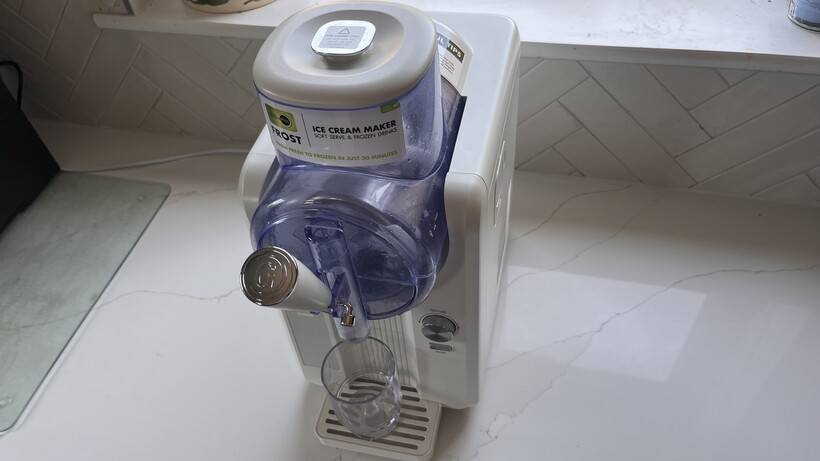
The Greenpan Frost is a frozen drink and ice cream maker. Within one hour you can be enjoying your favourite frozen treat, which is smooth and perfectly formed. I found it really easy to set up and use, but cleaning up was a bit of an operation. And whilst it is a compact design, it does still take up space on the kitchen worktop – which will become more noticeable if this appliance gets seldom use.
Makes a variety of drinks, snacks & desserts
Neat, compact design
Easy to set up & use
No single-serve
Narrow pouring shute (makes a mess)
Tricky to clean
Key Features
Introduction
Compact yet versatile, the Greenpan Frost Ice Cream Maker, Soft Serve & Frozen Drinks is a dedicated appliance that can make all sorts of frozen treats from five different modes within the hour.
Advertisement
By pressing just one button you can opt for a Slushie, Soft Ice Cream, Spiked Slushie, Sorbet or Milkshake. Turn a dial, and you can choose from seven different textures.
Whilst it’s £399 price makes it more expensive than rivals, you don’t need to freeze the mixture before using it, like you need to do with the Ninja Creami Deluxe, and it offers more customization.
Advertisement
Image Credit (Trusted Reviews)
Design and Features
Compact design
6 modes, 7 textures
Removable parts
The Greenpan Frost is a neat, compact machine that takes up little space on the kitchen worktop. Measuring 17.3(h) x 8.7(w) x 17.2(l) inches, it won’t quite fit underneath most wall cabinets, but it’s far enough away from the wall on the worktop to still be comfortably used.
It’s all controlled by a control dial and mode button; turn the dial to control the texture and press the dial to start or stop, and use the mode button to cycle between six modes.
Advertisement
Image Credit (Trusted Reviews)
Advertisement
These six modes will make you a chilled, iced drink or frozen desert in no longer than 45 minutes. Starting at number 1, you can make a slushie to make icy treats then; 2 for soft ice cream; 3 for spiked slushies; 4 for sorbets; 5 for milkshakes and 6 for extrude/clean.
It does not have an on / off switch.
You’ll do all the mixing in the 2QT (64oz or around 1.9L) mixing bowl, which is clear so that you can see the ingredients be transformed into a chilled or frozen treat.
Image Credit (Trusted Reviews)
Most of the parts are removable for cleaning. This includes the mixing bowl which unclips by turning it anti-clockwise and the stirring blade which can be slipped off. The handle can also be fixed into position with the pin latch.
Image Credit (Trusted Reviews)
Advertisement
It’s looks like a fun appliance with a pop-up cone holder and lever handle. It’s also available in a choice of five colours including Cream, Licorice, Berry, Pistachio and Cotton Candy. It arrives pretty much fully assembled; you’ll just need to attach the handle and drip tray.
Advertisement
Image Credit (Trusted Reviews)
In the box, the Greenpan Frost comes with the following accessories: bristle cleaning brush, 2x extrusion head gaskets, sealing ring, silicone cleaning brush/installation rod, handle and handle fixing pin.
Performance
All-in-one
Can make a creamy, frosted milkshake in 30 minutes
Quiet
Greenpan Frost is an all-in-one appliance that’ll stir and frost ingrients to make a selection of treats. It doesn’t do all the prep work though. For example, it won’t blend berries into a smooth pulp and it won’t dissolve sugar either.
The first treat that I made was soft ice cream. I needed to buy more whole milk, heavy (double) cream and vanilla extract. All these ingredients, along with the sugar, needed to be whisked together before pouring into the mixing bowl.
Advertisement
You’ll need a jug to pour in the whisked ingredients and a steady hand because the chute is narrow and, as I found, this can make a mess.
Image Credit (Trusted Reviews)
I then selected Soft Ice Cream Mode and chose a texture level of 4. It churned until the Frost switched to “Cool” and beeped one hour later.
At first I had a bit of bother to extract the ice cream – it didn’t start to drop when I pulled the lever down. Instead I *think* I panicked and pressed “Extract” mode and removed the handle (there’s my error) so it all started to drop onto the drip tray and I couldn’t stop it. I ended up filling up a glass vessel and spooning out the mixture into cone (the cone holder came in handy).
Advertisement
Image Credit (Trusted Reviews)
Lesson learned.
Advertisement
Next I tried making a Strawberry milkshake using “Milkshake” mode. I blended together the strawberries, vanilla and sugar before whisking in the whole milk and heavy cream before pouring in to the mixing bowl.
Again, I made a mess when pouring in the mixture to the mixing bowl.
Image Credit (Trusted Reviews)
I selected “Milkshake” mode and texture level 4. Then, 30 minutes later I heard a beep and the machine switched into “Cool” mode.
Initially I wasn’t ready to drink a cold milkshake so I left it whirling around in the mixing bowl. The Greenpan Frost will keep in “Cool” mode for two hours after the selected texture setting has been reached.
Advertisement
The recipe I had followed made enough milkshake for 3-4 people so while I enjoyed one glass of it, I extrududed the rest and put it on the fridge for the kid’s to enjoy later after school. When it was first extruded, it was too frosty for me (too frosty for a milkshake really), so it was enjoyed 30 minutes after leaving the mixing bowl; it was thick, creamy and fluffy.
Advertisement
It would have been a good idea to strain through a fine mesh to remove the seeds but, alas, I did not so some of these found there way around the seal in the extrustion head.
Image Credit (Trusted Reviews)
I also made raspberry sorbet using “Sorbet” mode. I dissolved some sugar with water and lemon zest, before adding to a bowl of blended raspberries with water. I then strained the seeds from the mix because I can’t imagine the sorbet will go down well with all the hundreds of raspberry seeds on the palette.
I poured the strained mixture into the mixing bowl and selected “Sorbet” mode, texture 1. Then, 40 minutes later it was ready to extrude.
Advertisement
Image Credit (Trusted Reviews)
The results were delicious, with the mixture evenly frosted – and it extruded perfectly. I only kept it in “Cool” mode for a few minutes before extruding because I heard a squeaking noise which I guess is from some resistance from the stirring blade inside the mixing bowl.
Advertisement
Image Credit (Trusted Reviews)
I recorded a noise level of 58dB of the GreenPan Frost when it was in use which is equivialant to a quiet street. The noise level increase to 64dB when it was in “Cool” mode.
To clean the Greenpan Frost I switched over to the Extrude/Clean mode after each recipe I tried. I poured a solution of warm water and liquid soap into the mixing bowl, to clean the bowl and stirring blade. I kept the handle levered down to empty it into a large bowl underneath (I removed the drip tray to get the bowl snug underneath the extrusion head).
After this, the mixing bowl, stirring blade and drip tray all needed washing by hand with warm soapy water. I found that, especially after mixing whole milk and double cream, there was a layer of fatty residue on these parts mentioned that the Extrude/Clean mode alone doesn’t budge. The extrusion head also trapped some residue around the seal that only handwashing (and patience) can remove.
Final Thoughts
I’ve had a lot of fun using the Greenpan Frost. I’ve made icy treats that have been previously shop-bought, and the results have been delicious.
Advertisement
Through from set-up to using the Frost it has been really easy, with only one dial and one button to navigate in order to achieve a treat some 30 minutes later. Whilst there is some prep work to the ingredients such as mixing and straining, the Frost stirs to even texture and temperature throughout the mix.
However, I found bulk-making to be a nuisance, owed to a lack of space in the fridge or freezer and storage units large enough to contain the treats. And whilst the overall design of the Frost is neat and compact, if it’s only going to be used once or twice a year then you might want to think again about buying it because it’ll only take up space in the cupboard.
Advertisement
Should you buy it?
Advertisement
You reguarly enjoy iced drinks and chilled desserts
It’s quick to make a slushie, ice cream, slushie, sorbet or milkshake.
Advertisement
You want to batch make and store
This machine is best for fresh treats enjoyed there and then, and is a bit more fiddly if you want to extrude and store the results.
Advertisement
How We Test
We test every small appliance thoroughly over an extended period of time. We use industry standard tests to compare features properly. We’ll always tell you what we find. We never, ever, accept money to review a product.
Find out more about how we test in our ethics policy.
Used to make ice cream, milkshake and… to use three of the five controls
Recorded the noise level when mixing
FAQs
Does the Greenpan Frost Ice Cream Maker, Soft Serve & Frozen Drinks keep treats cold?
Yes, it will keep treats cold for up to two hours.
Engineers make progress in stabilizing mission but push back the rendezvous date
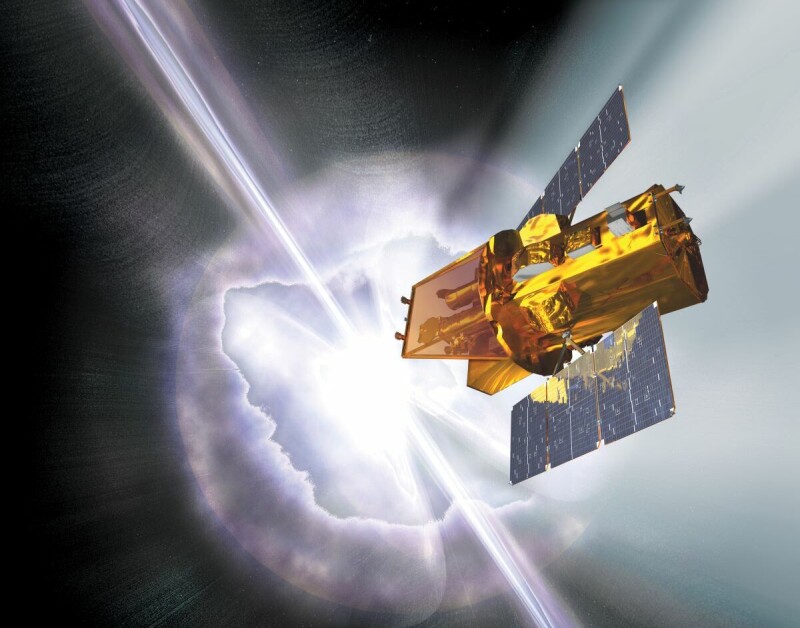
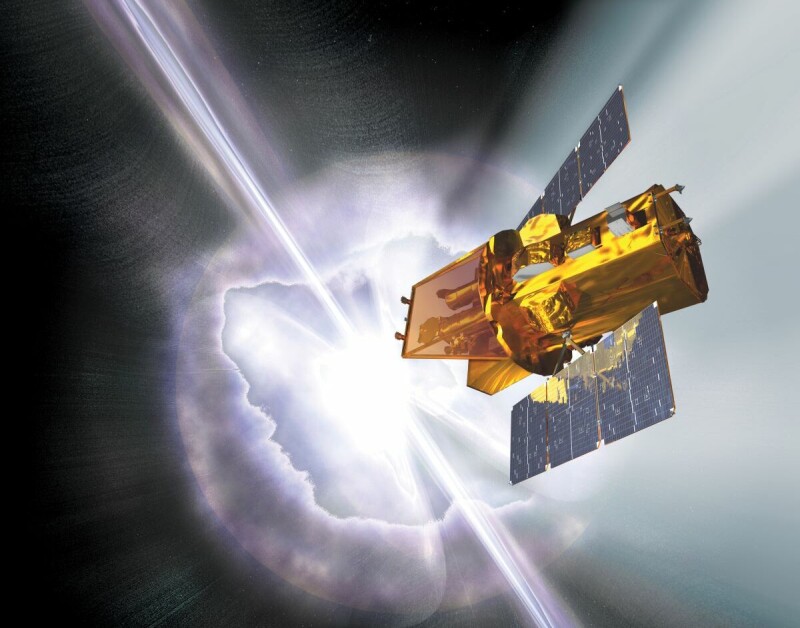
Katalyst Space has confirmed that problems with its LINK spacecraft have delayed its attempt to rescue NASA’s Swift observatory, with rendezvous now targeted for the end of August.
Katalyst disclosed the delay in an update on the spinning spacecraft. Engineers used a thruster to cut LINK’s rotation rate from 9 degrees per second to approximately 4 degrees per second, with further burns planned.
Advertisement
Katalyst and NASA are also developing a new attitude controller suited to the spacecraft’s reduced capabilities. Engineers are determining which systems remain usable and testing their plans in a simulator before trying them on the vehicle in orbit.
The trouble has pushed the targeted rendezvous to the end of August. LINK is supposed to sidle up to Swift, survey it, grapple the observatory, and carry it to a higher orbit. For now, however, Katalyst says: “We’re focused on stabilizing the spacecraft and restoring core system functionality.” Any rendezvous attempt depends on that work succeeding.
LINK launched earlier this month, less than a year after NASA awarded Katalyst Space the contract for a rescue mission. The spacecraft encountered problems during commissioning before going into a spin over the weekend. Earlier this week, Katalyst reported that two of the three reaction wheels, used to control LINK’s attitude, were inoperable, but the team was working to stabilize the vehicle using its electric propulsion thrusters.
Time is running short. Swift is expected to enter the Earth’s atmosphere in the coming months. The observatory has enjoyed a prodigiously long life and far exceeded its primary mission, but its orbit is decaying and it cannot raise itself. LINK’s success could add years to Swift’s operational lifetime.
Advertisement
In January, almost all of NASA’s models predicted that Swift would re-enter by the summer of 2026. Most science operations were paused in February to buy more time. More recent predictions indicate that it could dip below 300 km, the altitude beneath which raising its orbit becomes more difficult, around November.
Katalyst must now stabilize LINK, secure NASA’s approval for its revised plans, and reach Swift before the observatory sinks too low for a practical rescue. ®
































































You must be logged in to post a comment Login