

Tech
Keychron 14-in-1 Thunderbolt 5 Docking Station Review: Compact and feature-rich

Verdict
The Keychron 14-in-1 Thunderbolt 5 Docking Station is a capable and compact Thunderbolt 5 docking station with a vast array of ports in a sturdy and surprisingly small frame for the features on offer. The Thunderbolt 5 USB-C ports are fast, alongside brisk USB and SD card slots, although it is quite dear and lacks some more advanced features from dearer choices.
-
Compact and sturdy
-
Excellent port selection
-
Very easy to live with
-
Still quite expensive
-
Lacks some more advanced features
-
Maximum functionality relies super-modern devices
Key Features
-
Thunderbolt 5 connectivity:
This Keychron dock offers bang up-to-date connectivity with Thunderbolt 5 both in and out, allowing for fast power delivery and high resolution and refresh rate display out with compatible devices.
-
14-in-1 ports:
It comes with a wide range of ports for display, charging other devices and connecting external storage and more to one laptop in a neat package.
Introduction
The Keychron 14-in-1 Thunderbolt 5 Docking Station sees the famed peripherals manufacturer enter a new product category.
This is its first docking station, which looks like quite a formidable choice for folks who want a compact and feature-rich option that sits somewhere between the Ugreen Maxidok 10-in-1 Thunderbolt 5 Docking Station and the Ugreen Maxidok 17-in-1 Thunderbolt 5 Docking Station in terms of price and overall features, with everything from fast USB-C ports to Ethernet, SD cards and more, while also looking good, too.
At $349.99, it sits between the two Ugreen choices as I expected, although it is more towards the premium end of the general docking station market, not least the array of Thunderbolt 5 ones we’ve got these days.
I’ve been putting it through its paces for the last couple of weeks to see how it fares.
Design and Features
- Surprisingly compact and sturdy
- Lots of useful modern ports front and back
- Lacking in more advanced means against dearer choices
The first thing that struck me with this Keychron 14-in-1 Thunderbolt 5 Docking Station is how remarkably small it is. The Ugreen choices are already rather dinky, but this Keychron choice feels smaller because it’s much narrower and by default stands upright like a desktop PC, meaning it takes up less space on a desk than competing choices.
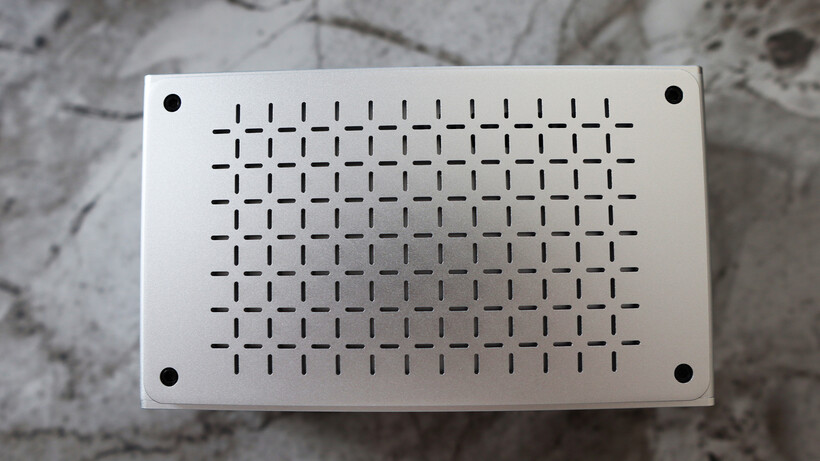
As with Keychron’s keyboards, this docking station is made of machined aluminium and has some real heft to it. There is an ounce of flair with the cross pattern on the elevated side panels of the unit that also works as a flow-through grille for passive cooling in conjunction with its aluminium heatspreader.

The ports on this Keychron 14-in-1 Thunderbolt 5 Docking Station are split evenly between the front and back, with thoughtful placement putting the ones you’re most likely to use on the front, and the others on the back.
On the front, we’ve got a power button and indicator LED alongside a 10GB/s USB-C port and a pair of USB-A 10GB/s ports, too. There are also separate SD and TF card slots and a headphone jack. The SD card readers are potentially faster than a lot of the ones you’ll find in modern ultrabooks, being rated for up to 312Mbps, as they’re both UHS-II-rated, as long as you’re using a card that’ll take advantage of the higher-speed interface.

The main attraction is the rear I/O of this Keychron unit, though, with an upstream Thunderbolt 5 port to your laptop handling the rest of the crowd of ports that provides up to 140W of power to the host device. To add to this, there are two further Thunderbolt 5 ports for hooking up external monitors, fast external SSDs and such, plus two full-size HDMI 2.1 slots for more display action.
For reference, Thunderbolt 5 doubles data speeds from 40Gbps to bi-directional 80Gbps, and up to 120Gbps in ‘boost mode’ for higher display bandwidth, which technically means it’s capable of up to 8K/60Hz or 4K/240Hz, depending on the laptop you’re using and the ports it comes with.

Moreover, for those connecting high-speed SSDs, Thunderbolt 5 also provides a hefty bandwidth increase with up to 64Gbps PCIe 4.0 available, and transfer speeds of up to 6200MB/s.
You also get 2.5-gig Ethernet for stable and brisk wired networking, plus a further two 10GB/s USB-A ports. There isn’t any form of M.2 on-board if you wanted to connect another ‘internal’ drive to supplement your existing laptop storage. All of this is powered by a 180W DC power supply that’s nearly as big as the docking station itself.
Performance
- Fast charging to my MacBook Pro
- Convenient means of connecting everything I needed to and more
- Permissions need to be granted before it can work
During my time with the Keychron 14-in-1 Thunderbolt 5 Docking Station, I hooked it up to my main 16-inch M1 Pro-powered MacBook Pro work laptop and used it in conjunction with a range of devices to best judge its usability.
I used the bundled Thunderbolt 5 USB-C port to connect my MacBook to the docking station, which not only makes it the brains of the operation, but with up to 140W of power delivery, also charges my laptop up briskly to boot.

When hooking up an external display, I was initially greeted with no signal, but it turns out that macOS needed permissions to connect to the dock before anything would work – that’s just a useful troubleshooting tip if you get no display out over either one of the rear USB-C ports or the two HDMI 2.1 ports on the unit.
My 16-inch M1 Pro-powered MacBook Pro unfortunately doesn’t support full-fat Thunderbolt 5 output, and instead has three Thunderbolt 4 USB-C ports, meaning its display-out capabilities max out at 6K/60Hz, rather than the 8K/60Hz that Keychron touts. To get Thunderbolt 5, you’ll want to look to top-end MacBook Pros, such as the M4 and M5 Pro and Max variants.

Nonetheless, I had no trouble using it at 4K/144Hz with my Philips Evnia 32M2N8900 monitor hooked up to the docking station via the Thunderbolt 4-capable USB-C cable that came with the monitor initially. With a compatible Thunderbolt 5 monitor, though, you may be able to reap the full benefits of 4K/240Hz output over USB-C, especially as Keychron provides the necessary capability in the box for upstream connectivity.
The large number of ports that the Keychron 14-in-1 Thunderbolt 5 Docking Station comes with proved to be more than enough for hooking up everything from an SD card from my camera for ingesting photos, a wired mechanical keyboard, wired networking and external SSDs with the other rear Thunderbolt 5 port.

This dock is designed primarily for more intensive power users than me, and I still had ports I could have used when I thought I’d connected all my devices. It goes to prove the power of an apparent 14-in-1 docking station, and what you can really do with it.
Should you buy it?
You want a compact, feature-rich docking station
This Keychron docking station excels in putting a lot of fast and useful ports into a very small frame, so it won’t take up much desk space.
You don’t need so many ports
If you don’t strictly require the 14-in-1 connectivity this laptop provides, then you can get away with a less featured choice that’ll also be a fair amount more affordable.
Final Thoughts
The Keychron 14-in-1 Thunderbolt 5 Docking Station is a capable and compact Thunderbolt 5 docking station with a vast array of ports in a sturdy and surprisingly small frame for the features on offer. The Thunderbolt 5 USB-C ports are fast, alongside brisk USB and SD card slots, although it is quite dear and lacks some more advanced features from dearer choices such as the M.2 slot for SSD storage found on the Ugreen Maxidok 17-in-1 Thunderbolt 5 Docking Station.
How We Test
We test every docking station we review thoroughly over an extended period of time. We use industry-standard tests to compare features properly. We’ll always tell you what we find. We never, ever, accept money to review a product.
Find out more about how we test in our ethics policy.
- Tested for more than a week
- Tested with real world use
FAQs
The Keychron 14-in-1 Thunderbolt 5 Docking Station has 14 total ports with one upstream Thunderbolt 5 port (80Gbps/120Gbps, 140W, two downstream Thunderbolt 5 ports (80Gbps, 15W), one USB-C port (10Gbps), three USB-A ports (10Gbps), two HDMI 2.1 ports, Ethernet (2.5Gb), a UHS-II SD card reader (312MBps), a UHS-II microSD card reader (312MBps), a 3.5mm combo audio jack (front) and uses a 180W power supply.
Test Data
Full Specs
| Keychron 14-in-1 Thunderbolt 5 Docking Station Review | |
|---|---|
| USA RRP | $349 |
| Manufacturer | – |
| Size (Dimensions) | 165 x 98 x 53 MM |
| Weight | 856 G |
| Release Date | 2026 |
| First Reviewed Date | 09/07/2026 |
| Resolution | x |
| Ports | 2 Thunderbolt 5 1 USB-C 3.2 Gen 2 4 USB-A 3.2 Gen 2 2 HDMI 2.1 1 2.5 Gbps Ethernet 1 SD card slot 1 TF card slot 1 3.5mm headphone jack |
| Touch Screen | No |
| Convertible? | No |



We may receive a commission on purchases made from links.
The overwhelming majority of shoppers at Home Depot go there for tools, parts, lumber, building materials, and maybe the odd appliance or two. Even the garden center puts up pretty respectable numbers. Generally speaking, when you’re gearing up for a trip to Home Depot, it’s a targeted trip where you know what you’re looking for before you walk out the door, which is perfectly okay. Home Depot too has made quite a lot of money on that type of shopping.
However, as with most retailers these days, Home Depot has spent a considerable amount of time diversifying, either by buying up companies, or by expanding its e-commerce efforts to include other types of products. You can find some odd stuff here and there at Home Depot, like the seasonal pumpkins for carving, but you probably won’t see too many strange things just walking around the store. That particular treasure trove is almost exclusively online.
So, if you haven’t walked around the virtual Home Depot lately, you may be surprised about what you can find there. Here are some products you can buy from Home Depot right now that feel a little weird buying from a hardware store. Do note that we don’t take The Company Store or Blinds.com products into consideration here because, while Home Depot owns those brands, they maintain their own storefronts.
Paper towels and toilet paper
This one isn’t necessarily new, but it’s still a little goofy. Home Depot sells paper towels and toilet paper directly to consumers. Unlike most of the items on this list, you can actually find these in store next to the cleaning products, which we’ll include here as an honorary mention. The paper towels largely make sense. It’s nice to have a roll of those in your garage for checking oil or wiping something off. You usually want something a little more robust, like a box of white rags, which are much thicker than kitchen-use paper towels.
Home Depot leans into this as well. They own the brand HDX, which has its own line of paper towels that you can buy one roll at a time if you so choose. That one sits on the shelf right next to the Bounty paper towels that are often prominently featured in store, at least in stores near me.
The more curious product, though, is toilet paper. Home Depot sells Charmin and other brands, often in store. While I certainly appreciate the broad availability of quality of toilet paper, picking one up at the local hardware store is just flat weird, unless it’s during a product shortage. Few people have ever gone shopping for a hammer, a shovel, and toilet paper all at the same time, but apparently it happens often enough to warrant selling all in the same stores.
Cooking supplies
You can buy all manner of fun gadgets at Home Depot, but full sets of kitchen tools and cooking supplies isn’t something you’d expect to see in a hardware store. Home Depot has all sorts of kitchen stuff, way more than you would think. That includes cookware like stainless steel, non-stick, and cast-iron pots, pans, and skillets. You can also get baking sheets, bundt cake pans, cupcake pans, and basically anything else you can think of to outfit an entire kitchen with cooking surfaces. Most of the brands aren’t terribly recognizable aside from the odd Rachel Ray or Cuisinart listing, but if you look around long enough, you can find all sorts of things.
This extends into kitchen gadgets as well. Many of these are a giant waste of money, but you can find some useful stuff too, like waffle makers, countertop griddles, blenders, and things like that. The brands for these products are typically on par with what you’d find at Target, Best Buy, or other retailers where you would normally go to shop for this stuff.
Usually, Home Depot is a place where you go to buy things to fix your kitchen, not stock it with everyday cooking items. And yet, clear as day, Home Depot has so many of these products that you can outfit an entire kitchen if you wanted.
Sporting gear
Home Depot also sells sporting goods, although not quite in the same way as a dedicated sporting goods store or a variety store like Walmart would. You can’t find things like balls, bats, hockey sticks, gloves, skates, or any of that stuff at Home Depot. We checked. What you can find, though, are secondary and tertiary pieces of equipment that kind of stick out like a sore thumb in Home Depot’s lineup. These include things like full-sized basketball hoops, both portable and permanent, hockey nets with practice targets, and even pop-up batting cages.
This is a rather strange assortment of sporting goods, and it’s a little weird that Home Depot doesn’t lean into it a little more. These products seem like they’re mostly for establishments, like recreation centers or batting cages, rather than for someone at home. That’s the only explanation I can come up with for why Home Depot would sell a ball rack, but no balls to put on the rack.
Generally speaking, you can find all of this stuff at a proper sporting goods store like Dick’s Sporting Goods while also being able to get the entire assortment of things you’d need to play sports, and some other things that might come in handy. It doesn’t make any sense to go to Home Depot to buy a hoop and then to another store to buy a ball. You may as well just get everything in one spot.
Real urine
If you search for urine at Home Depot, the first thing you’ll be met with is pet cleaners. The selection is actually pretty good, and includes brands like Nature’s Miracle, which I’ve been using for years to clean up after my dogs. Those are weird enough to get from a hardware store since pet stores exist, but we already talked about cleaning products earlier. If you keep scrolling and keep your eyes peeled, however, you’ll run into something even weirder. You can buy actual urine from Home Depot.
There are two main use cases for owning a jug of urine. The first is hunting. Hunters use it to mask the scent of humans and to attract deer, making them easier to hunt. However, wildlife authorities have been banning the use of urine over the last two decades to help contain the spread of chronic wasting disease in deer and elk. That’s why the urine you can find at Home Depot is not for hunting.
The urine sold at Home Depot is actually for home use and comes from the many predators native to North America, like foxes, coyotes, and wolves. You spray this along the outskirts of your property to keep those predators from getting inside and damaging your house, lawn, pets, or livestock, if you have any. There’s nothing unusual about this, but no matter how you swing it, logging onto a hardware store to buy a gallon of urine is a little strange.
Brewing supplies
Arguably the weirdest thing that you really don’t expect to find at a hardware store is an alcohol still. These are designed for brewing your own adult beverage, however in the U.S. the distillation of alcohol at home is still generally illegal on a federal level. You may need a permit to use one of these machines for distilling alcohol. The distillers available at Home Depot all aren’t name brands, but they seem to work just fine for most users.
You can also buy the airtight bottles used to seal in the carbon dioxide when brewing beer, making Home Depot a one-stop-shop for this kind of equipment. You can also get fermentation bottles. These have airlocks at the top to let gasses escape and are normally used for things like sourdough starters and pickling, but can be used to make mead as well. Home Depot also sells mason jars if you need something to store your mead. Just make sure to sanitize them first.
Home Depot never really comes across as a place to go for making your own alcohol, but it does have a surprising amount of equipment for the endeavor. The only downside is that it doesn’t have yeast or any of the other ingredients you need to actually make these things, so you’ll have to get those elsewhere.


James Bruton has fabricated many rideable machines over the years. This one began with a simple question: could ordinary elastic bands, the thick variety offered for exercising, store enough energy to propel a full-size cart carrying a person? The solution emerged after weeks of testing, gear ratios, special plates, and meticulous winding. The final contraption rolled approximately ten meters using nothing but twisted resistance bands.
He started with a 50-millimeter resistance band suspended from a sturdy frame made of high-grade aluminum extrusion. One end was held in place, while the other was attached to a shaft that rotated on bearings from inexpensive lazy Susans. Bruton wound the band by repeatedly twisting it in his palm until it was completely knotted up. When he let go, the unwinding band turned the shaft around. Early versions, without wheels or gearing, could only travel approximately 2 meters, even with a 2-to-1 bevel gear set. Despite having excellent connection sites, the band consistently snapped or became slack in the middle.

Segway Ninebot Gokart Pro 2 – High-Speed Electric Go Kart for Ages 14+, Drift & Race with Speeds Up to…
- Extreme Speed: Race at a thrilling 26.7 mph in Race Mode, delivering an electrifying go-karting experience that leaves you exhilarated and hungry for…
- Versatile Riding Modes: Personalize your ride with ECO, Sport, Race, and Manual Modes, providing a diverse range of speed and control options to suit…
- Long-lasting Adventure: Extend your fun with a typical range of 15.5 miles, ensuring hours of non-stop excitement and enjoyment on the track without…

Clearly, they needed to boost torque, so he added another stage of gearing, resulting in a 6-to-1 reduction. The extra leverage allowed him to coil the band up a little further without it breaking, resulting in around 2.8 meters of travel this time. That was a nice sign, but it was clear that a single band could never carry anyone very far. Attempting to use a longer band produced its own set of problems, as the longer it became, the less efficient it became, and the twist became uneven, causing the band to bounce around rather than generate nice crisp torque.
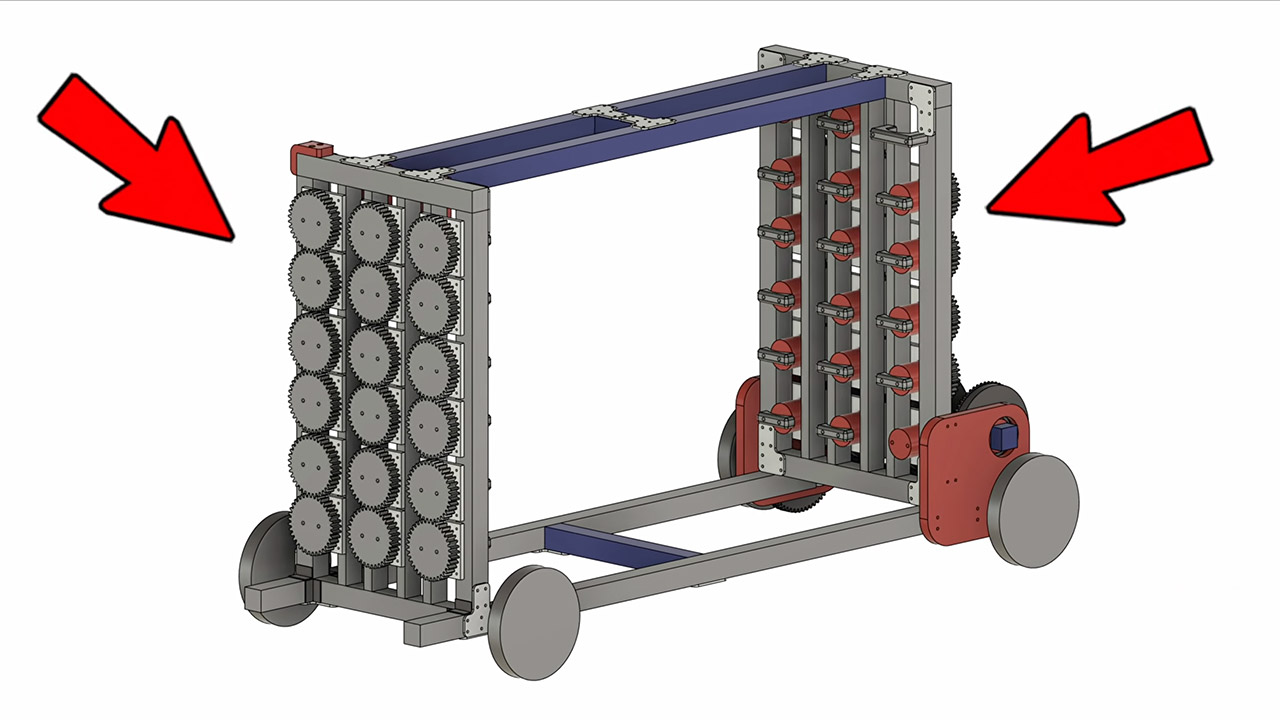
The aim was to use a series of shorter bands that worked together to increase the energy without making the whole thing overly large. Bruton devised the concept of routing the bands through additional gears, allowing them to flow back and forth inside the frame like a folded ribbon. Three columns of bands, each with six bands, totaled 18. Bevel gears at either end allow the columns to transfer their torque to a single common axle. Some unique aluminum plates were carved out using a CNC router to combine the extrusion into a beautiful solid box. A couple of vertical rails at either end ran six lazy Susan bearings each, allowing the winding shafts to spin freely.
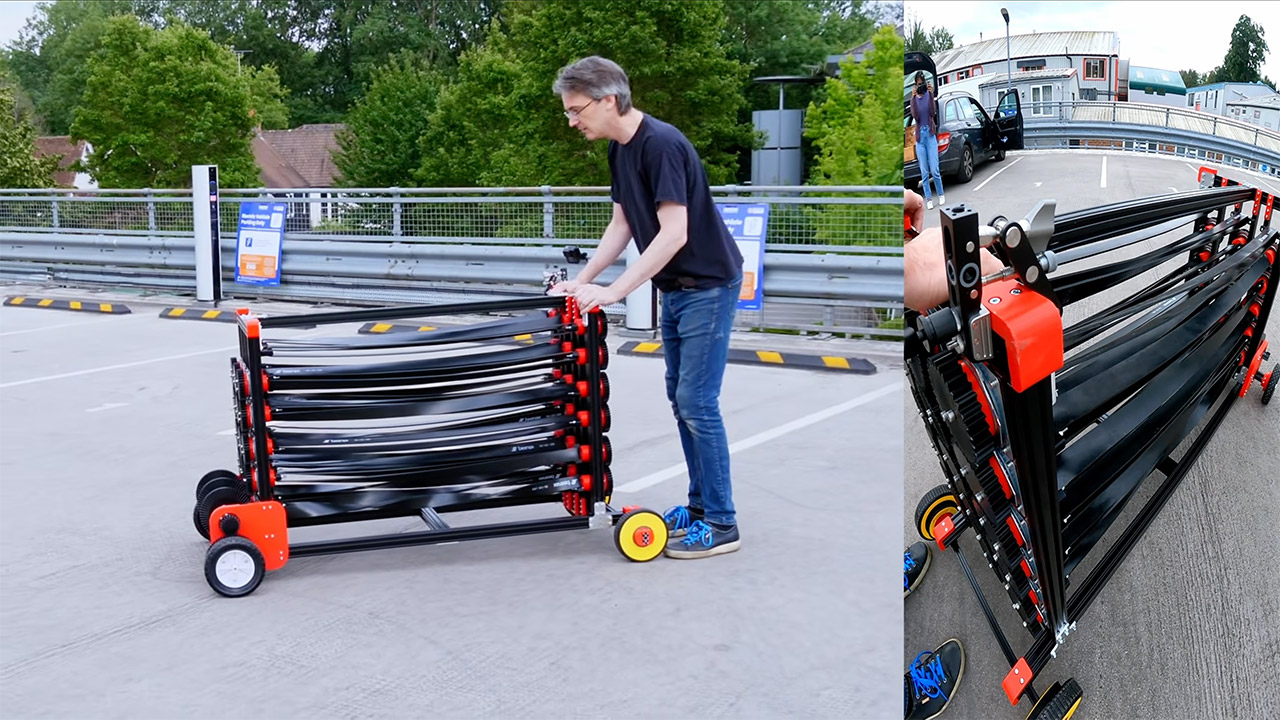
Testing is now moved outside, where Bruton winds the bands by driving the cart in reverse, allowing the wheels and gears to accomplish the hard twisting rather than raw effort. He’s taking it carefully at this point, aiming for a clean run of around 9.88 meters. That is the maximum distance the cart can travel before the front wheels lift up and prevent it from moving any farther. If he winds it up a little more, a little more “aggressive,” it adds a little more distance because of the velocity, but it also causes a problem where some of the bands are twisted a lot more than the others due to small little changes in friction in the gear box. Bands that are wound up later in the sequence frequently underperform.
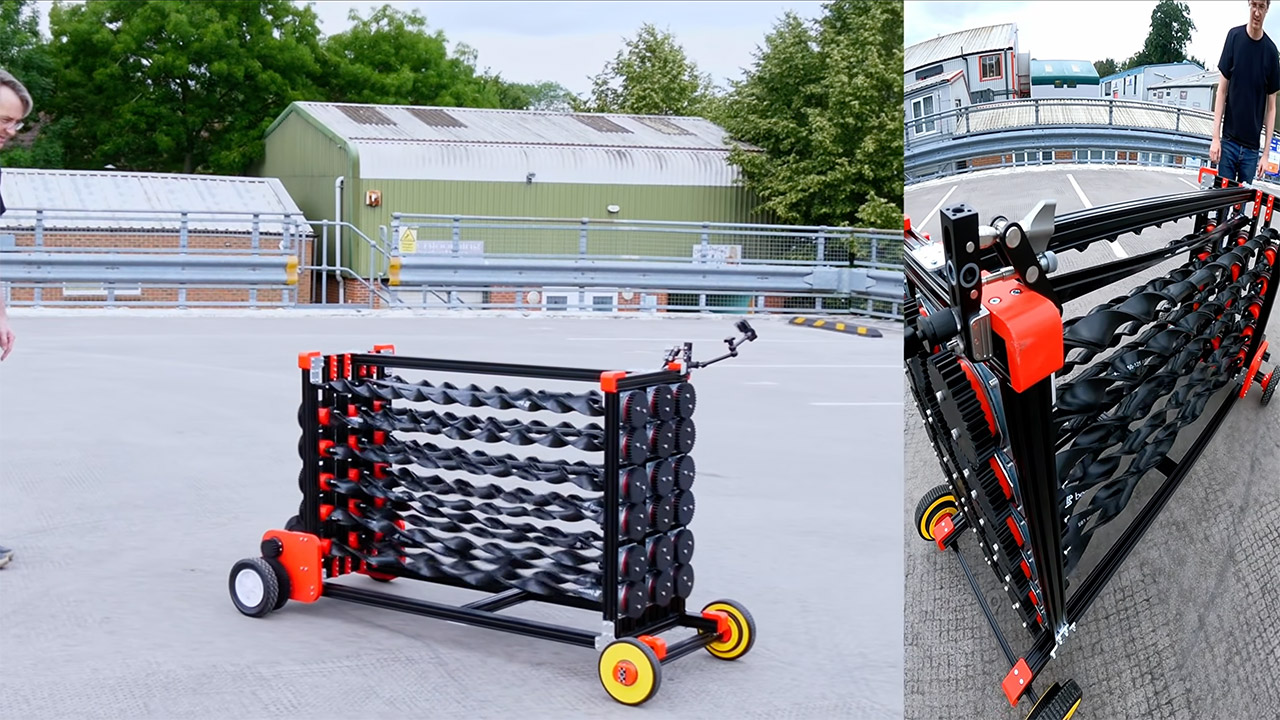
Bruton is already brainstorming about where to go next. If he winds the bands one at a time instead of all at once, he may be able to extend the power delivery and smooth out the acceleration. Alternatively, a clutch system might be an excellent option, as each stage can only begin working after the one before it has almost completely run out of gas. So far, the build has demonstrated that the main concept is viable at human scale.

The EPA-rated range on your electric vehicle will likely differ from the real-world range you get — and by that, it means real-world range is usually a lot lower, but that’s because people are using their vehicles a lot differently in the real world than the automaker usually expects. For example, a Cybertruck owner recently owed a 6,500 lb boat for 350 miles, giving car enthusiasts a closer look at how heavy towing impacts an EV’s range.
Ahead of the Cybertruck’s launch, Tesla claimed it would have a 500-mile range. Once it was released and tested, the controversial EV was confirmed to have 325 miles of range. In Inside EVs‘ real-world testing, it only made it to 252 miles. While towing a 6,500-pound boat, the owner reported the Cybertruck made it 170 miles — driving 145 miles and leaving 25 miles of reserve in case of wind, traffic, or simply going the wrong way. Why did towing a boat make the Cybertruck lose so much range?
Why did the Cybertruck lose range while towing a heavy boat?

Contrary to what some may believe, the lost range wasn’t due solely to the boat being heavy. At 6,500 pounds, the boat is below the Cybertruck’s 11,000-pound tow rating (also much lower than the claim before its launch). There are a few other factors at play. “Overall this trip went way better than planned,” the Cybertruck owner wrote on Facebook. “Going faster killed range and meant more charging stops. So paradoxically, driving slower (55mph) made us reach our destination quicker.”
Going faster will use up more battery in all EVs, and that’s especially true with a boat behind you, since you’ll need to accelerate faster to reach higher speeds and brake harder to stop in time at those speeds — not to mention the added drag. Towing will lead to more charging stops, and some of those charging stops may not have room for a 6,500 lb boat. You’ll definitely want to plan your trip with these charging stops in mind, since the trip will be a lot slower with the boat in tow – each charging stop may take 45 minutes to get back up to 80%, depending on the charger you have stopped at.
If you want to make less frequent stops in an EV while towing a boat, you’d maybe want to consider the Chevrolet Silverado EV, which has an EPA-rated 492 miles of range and a 12,500 lb towing capacity. However, the Cybertruck really isn’t that far behind the competition, and while the strange-looking vehicle has other shortcomings, leading to frequent Cybertruck sales drops, this experiment actually proved the Cybertruck quite capable when it comes to heavy towing in an EV.

OpenAI’s first hardware device is a limited-edition desktop keypad called the Codex Micro that lets users monitor and control AI coding agents. Axios reports: Codex Micro is a collaboration with Work Louder, a boutique hardware company known for customizable mechanical keyboards and shortcut controllers for developers and designers. The small, square macro pad — with backlit keys, a rotary knob and a tiny joystick — sits beside your regular keyboard as a physical shortcut box for common Codex actions and shows the status of your agents. The keys are customizable and include a push-to-talk option as well as a dial to adjust your reasoning setting. Codex Micro is a niche device for Codex power users and will only be available until it sells out. It’s priced at $230.

FreeBSD 16 has removed the last GPL-licensed code from its base system, retiring the old GNU ‘dialog’ implementation after the installer moved to ‘bsddialog’ and the final dependency was disabled. Phoronix reports: This ticket to retire dialog was opened back in February while is now merged to the FreeBSD source tree for what will become FreeBSD 16.0. With dialog removed, the latest FreeBSD code now retires the GNU sub-tree of the FreeBSD base system now that no more GNU code remains. FreeBSD 16.0 is working its way toward release that is expected to happen in December 2027.


Emergent’s vibe coding platform hit a $1.5bn valuation a year after launch. Its founder says most businesses do not need software, they need a way to turn how they work into it.
“Most businesses don’t need any software. They need a way to turn how they actually work into software.” That is how Mukund Jha pitched his startup as he announced it had become a $1.5bn unicorn.
Emergent, the vibe coding platform Jha runs with his twin brother Madhav, has raised a $130m Series C. The round values it at $1.5bn, about five times its valuation in January. That makes Emergent a unicorn roughly a year after its 2025 launch.
Creaegis, a private equity firm, led the round. Claypond Capital and Sentinel Global co-led. Earlier backers Khosla Ventures, SoftBank’s Vision Fund 2, Lightspeed, and Y Combinator returned. Total funding now reaches $230m.
An engineering team in a box
Emergent lets people build full software by typing plain-language prompts. Autonomous AI agents write the code, then handle hosting, testing, and deployment. Jha says 70% of its users have never coded.
“You’re basically getting an engineering team in a box,” he told TechCrunch. The company says more than 12 million apps have been built on the platform in a year. Jha puts annual revenue at a $120m run-rate, with 200,000 paying customers.
These are not just websites. Users build CRMs, inventory systems, and marketplaces. Jha points to an Ohio roofer who replaced five tools with one system, and a Florida car detailer who rebuilt his site in four days. Software that once cost six figures, he says, now costs a few thousand dollars.
A crowded, expensive race
Emergent is chasing the same wave as some of the most richly valued startups in tech. Lovable is reportedly seeking a $13.2bn valuation. Anysphere’s Cursor was bought by SpaceX for $60bn in June. That boom has also flooded app stores with a surge of AI-built apps.
Against those numbers, $1.5bn looks modest. Emergent’s bet is a different customer. It targets small businesses and solo founders, not the professional developers who lean on Replit and Cursor. Jha calls Replit his closest rival.
He is candid about the limits. He admits design is a weakness, noting that many AI-built sites look alike. Success rates, he says, are still lower than he wants them to be.
What Emergent does with the money
Most of the cash will go to hiring and research. Emergent wants to lift its success rates and support more complex apps, including ones that run on open-source models. It is weighing a European office and expanding in San Francisco.
Jha’s ambition is bigger than an app builder. He wants Emergent to become “the operating system for businesses,” and is putting $200,000 into two builder contests to draw more people in. If software itself gets solved, he told Business Insider, builders will simply move on to harder problems, from quantum computing to drug discovery.

Microsoft just released the third edition of its AI in Education Report, surveying more than 3,000 students, educators and leaders across six countries. Ira Apfel sat down with Pat Yongpradit, general manager of global education and workforce policy at Microsoft, which sells AI tools including Copilot to schools, at ISTELive 26 in Orlando, to talk through what the data reveals about daily use, trust, training gaps, and where the policy backlash against AI in schools may be headed next.
Pat Yongpradit on Adoption, Trust and Cheating
Yongpradit walks through why daily AI use in schools still lags far behind overall adoption, even though nine in 10 educators, students and leaders report having tried the tools at least once. He addresses the recent drop in student optimism, framing it as a predictable dip on a familiar technology adoption curve rather than a warning sign.
The conversation also covers the wide gap between how much training school leaders believe their staff have received and what teachers and students say they have actually experienced. Yongpradit also shares his candid take on academic integrity, arguing that the panic around cheating has more to do with long-standing temptation than with any single tool.
Listen to the episode:
Stories Mentioned in This Episode
2026 AI in Education Report by Microsoft
This Week with EdSurge is a weekly podcast from EdSurge. Subscribe to EdSurge newsletters for more news and analysis on education and technology.

Verdict
The Nothing Phone 4(b) is a capable budget Android handset with a clean OS, avant-garde looks and excellent battery life. Its internal power is fine for the price, although lacking against some of the competition, and the dual camera array is mostly fine for the price.
-
Classic Nothing design
-
Solid internal grunt
-
Excellent battery life
-
Screen is dimmer than some rivals
-
A fair bit dearer than the last CMF phone
-
Performance isn’t as strong as rival devices
Key Features
-

Review Price:
£299
-
Snapdragon 6 Gen 4 SoC
The Phone 4(b) has a decent mid-range Qualcomm chip inside to offer solid day-to-day performance.
-
50MP + 8MP camera system
It features a dual camera setup with a 50MP main sensor and 8MP ultrawide, meaning no dedicated telephoto lens is present.
-
Signature Nothing design
In spite of being a more affordable option, this handset retains Nothing’s signature industrial design and unique elements.
Introduction
The Nothing Phone 4(b) is the first of a new kind of phone for the London-based brand.
The budget phones sector was rocked by the decision from Nothing that it wasn’t going to release a sequel to the excellent CMF Phone 2 Pro this year, and instead chose to launch a spiritual successor under its own Nothing branding.
To this end, the Phone 4(b) is in essence a cut-down and more affordable version of the Nothing Phone 4(a), featuring a Qualcomm Snapdragon 6 Gen 4 SoC with 8GB of RAM and 128GB of storage, plus a 6.77-inch Super AMOLED screen and a 5200mAh battery inside.
Priced at £299/$399, it’s more expensive than the older CMF Phone 2 Pro, although it makes a few key upgrades and positions this new Nothing handset against the likes of the Motorola Moto G86 5G and the Poco X8 Pro.
To see if the Phone 4(b) can come out on top as one of the best cheap phones we’ve tested, I’ve been putting it through its paces for the last week or so.
Design
- Solid polycarbonate chassis
- Typically Nothing design
- IP64 water and dust resistance
Nothing’s phones have always had a certain look to them, and the Phone 4(b) sticks with its tried-and-tested formula of being funkier and more interesting than a lot of its contemporaries. You either like it, or you don’t, and admittedly, I’m quite a fan of it.
It is made of polycarbonate (plastic), as you’d perhaps expect for a more affordable handset, but I won’t hold that against Nothing with this phone. It’s comfortable to hold and feels quite durable compared to other cheaper phones out there. There isn’t any creaking or twisting at the corners, either.

As for colour options, the Phone 4(b) is available in black, white, or blue. My sample is the latter, adding a pleasant pop of colour against the other options, and certainly helping it to stand out.
The rear portion features a rectangular camera bump that doesn’t protrude too far from the main chassis, keeping the phone stable when you set it down. It comes with Nothing’s typical retro-futuristic touches, alongside a downsized Glyph Bar borrowed from the Phone 4(a).

The Glyph Bar has long been Nothing’s calling card when it comes to its phone design, and it achieves much of the same use cases as with the brand’s other phones. It can do everything from lighting up for notifications from specific people to letting you check charging progress, counting down shutter timers for the camera, or even pulsing red for severe weather alerts.
Ports are standard fare for a modern phone, with a USB-C port for charging and a SIM slot off to the left. There aren’t any other frills, either, such as a headphone jack or a microSD card slot for expandable storage.

We’ve got IP64 water and dust resistance for the Phone 4(b), which should protect it well against water and dust. This is ahead of the IP54 rating on Nothing’s own CMF Phone 2 Pro, although behind the IP68/IP69 rating of the Motorola Moto G86 5G.
This handset doesn’t ship with a charger in the box, although you at least get a USB-C to USB-C cable and a clear silicone case to help protect the phone.
Screen
- 6.77-inch 120Hz 1080×2344 AMOLED
- 2000 nits peak HDR brightness
- Optical fingerprint sensor
Nothing has kitted the Phone 4(b) out with a large 6.77-inch Super AMOLED screen with a 1080×2344 resolution. This makes it one of the larger screens kitted out to a phone at this price.
The resolution is more akin to HD, which provides reasonable detail at the price, plus as an AMOLED choice, there are deep blacks and good contrast to my eye.

If there’s one area where the Phone 4(b)’s screen isn’t quite as strong as its rivals, it’s brightness. A typical peak brightness of 1200 nits gives images some pop and means this phone is fine for brighter conditions, although the 2000-nit peak for HDR content isn’t as vivid as on other budget phones.
It’s up to 120Hz of refresh rate here, which gives an added slickness against the 60Hz we were stuck at for a long time, although the screen here lacks the more advanced LTPO tech we see in costlier phones, meaning the variable refresh rate works in a blockier manner. For the most part, the Phone 4(b)’s panel sticks at 120Hz in my experience, which isn’t much of a hardship.

Nothing has also included an optical under-display fingerprint sensor for this phone, mounted quite low down on the panel. It’s fine to use, although not quite as good as the ultrasonic ones seen on higher-end devices.
Cameras
- Main rear camera is reasonable
- Lack of a telephoto leaves long-range photography fuzzy
- Decent selfie camera and okay video options
In terms of cameras, the Phone 4(b) slices off the telephoto shooter found on the Phone 4(a) and opts for a dual-camera arrangement. The main camera is a 50MP 1/2.76-inch sensor optically stabilised snapper with an f/1.8 aperture, which is joined by an 8MP 1/4-inch ultrawide sensor with an f/2.2 aperture.
By default, the main sensor chucks out 12MP images, although you can switch to the camera’s 50MP mode to make full use of the resolution on offer for more detail, dynamic range and inherently larger file size.

Out-of-the-box images with the main snapper are perfectly pleasant, with natural colours and solid detail resolution. In general, the 12MP mode offers richer colours, while using the full 50MP resolution will give you stronger detail.
By comparison, the 8MP ultrawide is lacking in overall detail and only provides images I’d describe as serviceable at best. Finer portions are fuzzier if you pixel-peep.

The lack of a telephoto lens is the downfall of the Phone 4(b)’s camera setup, as it means anything beyond a simple 2x or 3x zoom can cause detail to fall off dramatically. For instance, the images taken of Spinnaker Tower beyond the advised 2x on the phone’s camera leave a lot to be desired, with a digital crop nowhere near as effective as proper optical zoom. A dedicated telephoto would have resolved the fuzziness and given a lot more to work with.

For selfies, the 16MP snapper on the front is okay, with good richness of colour and a pleasant, vibrant tone. Video capabilities in any guise are locked to a max of 1080p/60fps or 4K/30fps, which is fine, if unremarkable.
Performance
- Reasonable mid-tier Qualcomm SoC inside
- Solid speed for more basic tasks
- More advanced 3D loads can lead to stutters
Inside, the Phone 4(b) is brought down a peg or two against its dearer brother by coming with a Qualcomm Snapdragon 6 Gen 4 SoC, paired with 8GB of RAM and 128GB of storage as its only configuration.
With this in mind, performance is stronger against the likes of the Xiaomi Redmi Note 15 4G model, with a much stronger CPU and GPU in the customary Geekbench 6 test. From Nothing’s own canon, the cheaper CMF Phone 2 Pro is rather similar in its performance, while last year’s Phone 3(a) is also faster than the 4(b) in this regard.

For general use, things are better than the benchmark numbers would suggest, with zippy performance navigating the operating system, streaming music or video or dealing with social media in my usual workflow.
In terms of 3D performance, more casual titles such as COD Mobile or PUBG fare absolutely fine, just as long as you’re happy to turn down some graphics settings for a smoother feel. With this in mind, don’t expect to be playing heavier and more intensive titles, as the 3DMark Wild Life Extreme test posted single-digit frame rates for one of the lower scores I’ve seen.

For more prolonged intensive loads, expect this Nothing phone to get a little on the warm side, although it wasn’t uncomfortable to the point I had to put it down. The Phone 4(b)’s vapour chamber cooling apparatus seems to do its job decently well.
Test Data
Nothing Phone 4(b)
Xiaomi Redmi Note 15 4G
CMF Phone 2 Pro
Nothing Phone 3a
Geekbench 6 single core
1090
738
1003
1164
Geekbench 6 multi core
3177
1990
2910
3273
Geekbench 6 GPU
2912
1307
–
–
3D Mark – Wild Life
965
350
852
1057
3D Mark – Wild Life Stress Test
99.2 %
99.1 %
–
–
Software & AI
- Monochromatic Nothing OS or stock Android looks available
- Very basic AI features against rivals
- Reasonable OS and security update commitments
The Phone 4(b) comes with Nothing’s own Nothing OS 4.1 Android skin out of the box that’s based on Android 16. When you first set the phone up, you get a choice between a stock Android lock or the monochromatic, retro-future aesthetic Nothing offers.
I went full Nothing, and opted for its own skin, which is an interesting look against other budget Android phones out there. App icons appear in white on black circles, and it can be a little difficult to distinguish one app icon from another at first. If you’d prefer, going back to the more colourful traditional Android aesthetic is a few taps away in the settings menu.

With this in mind, I didn’t find any bloat or unwanted crud here, and the OS is remarkably clean for such an affordable phone. The OS itself has some useful features, such as a hidden vault called Private Space to store sensitive documents and photos, as well as its clever freeform window sizing where you can make any app any size, which is neat.
Pressing the Essential key on the phone’s left side opens up the Essential Space, where the Phone 4(b) uses AI to organise screenshots, recordings and notes, auto-generating summaries, reminders and any to-do lists from the information you saved.

That’s as far as AI seemingly goes on this Nothing phone, though. There doesn’t seem to be any more AI gubbins here, such as for photo editing as we see on lots of other phones up and down the price ladder.
For the Phone 4(b), Nothing is committing to six years of security updates and three years of Android updates, giving some peace of mind for long-term use.
Battery Life
- 5200 mAh battery
- 33W wired charging
- No wireless charging support
The Phone 4(b) features a 5200mAh battery inside, which is ironically the largest battery Nothing has ever fitted to one of its phones, in spite of it being the most affordable Nothing-branded handset. For reference, the Phone 4(a) comes with a 5080mAh cell.
The brand says that works out to enough for 22 hours of video streaming. In my experience, I managed around eight hours of screen-on time of use when it came to an intensive day of multitasking and using my phone as normal at more middling brightness levels.

For reference, that’s scrolling my social media, streaming music through Tidal or Plexamp, taking the odd photo when out and about, and dealing with a small amount of work in a pinch in Google Docs.
For a more scientific test, a cursory run of the PCMark Work V3.0 battery test at 50% brightness worked out to nearly 17 and a half hours of use – a fantastic result.

The Phone 4(b) supports up to 33W wired charging with no wireless charging support, which lags behind a lot of its key rivals. In using my 66W 6A charger to put some go-juice back into the handset, it also proves to be quite slow, taking 57 minutes to get back to 50%, while a full charge took 100 minutes.
Should you buy it?
You want an affordable Nothing phone
The Phone 4(b) is the cheapest Nothing-branded phone out there, and if you want the brand’s unique features and design, it’s the most affordable way to do it.
You want a brighter screen
Against some rivals, this Nothing handset lacks some vividness with its screen and has less in the way of overall detail, too.
Final Thoughts
The Nothing Phone 4(b) is a capable budget Android handset with a clean OS, avant-garde looks and excellent battery life. Its internal power is fine for the price, although lacking against some of the competition, and the dual camera array is mostly fine for the price.
It makes several key upgrades to the CMF Phone 2 Pro, such as with battery life, dust and water resistance, and by sticking with Nothing’s own design philosophy, although it feels a little baffling considering the Phone 4(b)’s screen is dimmer, and it isn’t much more powerful. Bear in mind the CMF option is also nearly £100 cheaper, too.
Elsewhere, the Motorola Moto G86 5G has a slightly higher-res screen, similar performance from its MediaTek Dimensity 7300 SoC and a similar camera array to the Phone 4(b) while costing £20 less. Its OS is much more chock-full of bloatware than Nothing’s, though, so it’s swings and roundabouts.
With this in mind, the Phone 4(b) is an interesting choice if you want an affordable handset with Nothing’s typical flair and interesting design, and seems like it’s going to be the way the brand does things going forward. For more choices, check out our list of the best cheap phones we’ve tested.
How We Test
We test every mobile phone we review thoroughly. We use industry-standard tests to compare features properly and we use the phone as our main device over the review period. We’ll always tell you what we find and we never, ever, accept money to review a product.
- Used as a main phone for a week
- Thorough camera testing in a variety of conditions
- Tested and benchmarked using respected industry tests and real-world data
FAQs
The Nothing Phone 4(b) has a 5200mAh battery inside, which is the biggest Nothing has ever fitted to one of its devices.
Test Data
| Nothing Phone 4(b) | |
|---|---|
| Geekbench 6 single core | 1090 |
| Geekbench 6 multi core | 3177 |
| Geekbench 6 GPU | 2912 |
| Max brightness | 2000 nits |
| 1 hour video playback (Netflix, HDR) | 4 % |
| Time from 0-100% charge | 100 min |
| 3D Mark – Wild Life | 965 |
| 3D Mark – Wild Life Stress Test | 99.2 % |
Full Specs
| Nothing Phone 4(b) Review | |
|---|---|
| Manufacturer | Nothing |
| Screen Size | 6.77 inches |
| Storage Capacity | 128GB |
| Rear Camera | 50 MP, f/1.8, (wide), 1/2.76″, PDAF, OIS, 8 MP, f/2.2, 15mm, 120˚ (ultrawide), 1/4.0″, 1.12µm |
| Front Camera | 16 MP, f/2.4, (wide), 1/3.0″ |
| Video Recording | Yes |
| IP rating | IP65 |
| Battery | 5200 mAh |
| Fast Charging | Yes |
| Size (Dimensions) | 78.2 x 159.4 x 8.6 MM |
| Weight | 210 G |
| Operating System | Nothing OS 4.1 (Android 16) |
| Release Date | 2026 |
| First Reviewed Date | 15/07/2026 |
| Resolution | 1078 x 2344 |
| HDR | Yes |
| Refresh Rate | 120 Hz |
| Ports | USB-C |
| Chipset | Qualcomm Snapdragon 6 Gen 4 |
| RAM | 8GB |
| Colours | Black, White, Blue |
| Stated Power | 33 W |
| UK RRP | £299 |
| USA RRP | $399 |
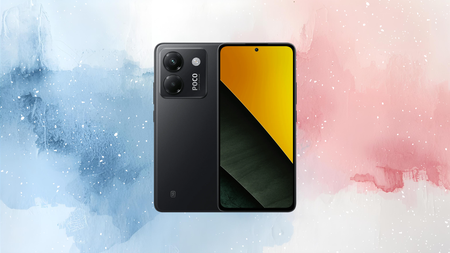
A phone that pairs a 120Hz AMOLED display with a 50MP OIS camera rarely costs under £200, but for a limited time, you could own one for just that.
That’s because the POCO M7 Pro 5G is now available for £179.00 instead of £259.00 – saving you 30% and giving you one a chance to pick up one of the best cheap phones available in this price bracket.
Save 30% on a Xiaomi handset with a crisp 50MP camera and a 120Hz AMOLED screen built for silky scrolling
The POCO M7 Pro 5G is down to £179, a 30% saving. Enjoy a 120Hz AMOLED display, 50MP OIS camera, and 5110mAh battery with 45W charging.
One of the things we love about the M7 Pro 5G is the 50MP Sony camera that comes with optical image stabilisation built in, which keeps handheld shots sharp in situations where a shakier phone would blur, from a moving bus to a poorly lit restaurant table at night.
Above that sits a 120Hz FHD+ AMOLED display designed with eye care in mind, delivering the kind of smooth scrolling and crisp colour that makes browsing or gaming feel noticeably sharper than a standard 60Hz panel.
Powering all of that is a Dimensity 7025-Ultra processor, a 6nm 5G chip with an octa-core CPU clocked up to 2.5GHz, built to handle multitasking and heavier games without slowing down or overheating during longer sessions.

Memory Extension technology adds up to 12GB of virtual RAM on top of the phone’s physical memory, taking the total as high as 24GB and letting more than 42 apps stay open in the background at once.
None of that performance drains the battery quickly either, since the 5110mAh cell paired with 45W turbo charging is built to get through a full day of heavy use and top back up fast when it does run low.
The handset also carries IP64 dust and water resistance, a flagship-level touch that protects against light rain, spilled drinks, or dusty environments without needing a separate case bought just for peace of mind, which is rare to find at this price point.
Worth noting is that the enhanced 5G experience POCO promises depends on regional network coverage and local operator support, meaning actual speeds will vary depending on where the M7 Pro is used day to day.
If you’re after a 5G phone that covers photography, display quality, and everyday battery life without the flagship price tag, the POCO M7 Pro 5G is a no brainer choice right now, especially when you’ll save £80 before this deal disappears.
SQUIRREL_PLAYLIST_10148964


Recent photos from NASA / ESA’s Hubble Space Telescope show magnificent crimson plasma and dazzling blue stars in all their glory. The image in question is from LH 95, a star-forming region in the Large Magellanic Cloud, a dwarf galaxy that orbits the Milky Way.

The light from hundreds of young stars is burning the surrounding hydrogen, creating a bright red glow across the entire image. This type of emission, known as H-alpha, is a good indicator that star formation is actually taking place, and it’s similar to a flashing neon sign that draws your attention. You can also detect darker wisps of dust breaking through the light gas, indicating that denser material has withstood the relentless battering of star winds and radiation.

LEGO Icons Project Hail Mary Collectible Building Set for Adults – Room or Office Decor for Men & Women…
- PROJECT HAIL MARY SCI-FI MODEL – Launch into the world of cinematic science fiction with the LEGO Icons Project Hail Mary (11389) microscale…
- WHAT’S IN THE BOX – Includes everything you need to build a microscale replica of the Hail Mary spacecraft, a functional display stand, plus a…
- FUNCTIONAL SPACE MODEL – Turn the crank on the display stand to send the crew module into orbit, simulating the spaceship’s centrifugal gravity…
Blue and white stars sparkle vividly against the blazing red backdrop. Many of these are extremely hot, massive objects that have only been around for a few million years, and if you look closely, there’s one that really stands out, located just above the middle and to the left, as this bloke has a mass between 60 and 70 times that of the sun, and he’s probably a million years younger than the ones around him, the majority of which are around 4 million years old.
So far, astronomers have identified nearly 2,500 stars in LH 95, which have all of the mass they’ll ever need. They are still in the pre-main-sequence phase, essentially hanging out in their disks while nuclear fusion takes place and transforms them into stable, hydrogen-burning stars. However, the results reveal that this growth stage can last several million years, which is longer than some researchers had previously anticipated. However, accretion rates do slow down over time, but material continues to pour in for quite some time.
Hubble has given us a magnificent view of the hottest gas and brightest stars in all of their glory. The hues in this photo are fairly typical, with shorter wavelengths displaying blue and longer visible light, as well as that magnificent red hydrogen emission glowing brightly red. It all helps to accentuate the dynamic dance between stars and their surroundings, and the dark dust lanes stand out since they are the only areas that conceal some of the backdrop glow, adding depth to the entire impression.

‘Heartbreakingly excellent’ Belfast drama available to stream now

Verizon: Executing Amid Industry Uncertainty, Raising My Target

US Inflation Fell on Cheap Gas, But That Relief is Already Fading


-

 Fashion6 days ago
Loro Piana Fall 2026 Enters Houston’s Art Scene
-

 Fashion5 days ago
Weekend Open Thread: Nutriplenish Leave-In Conditioner
-
 Sports6 days ago
2026 Genesis Scottish Open Thursday TV coverage: Round 1
-

 Sports5 days ago
Super Eagles star Moses Simon opens up on Liverpool transfer regret
-

 Tech6 days ago
Character.AI enters the microdrama arena with its own productions, but there’s a twist
-

 Politics7 hours ago
Young campaigners urge incoming PM to act on outdoor junk food ads
-

 News Videos24 hours ago
XRP BOMBSHELL… XRP OMBOARDED FOR TRANSACTIONS!!!
-

 Tech2 days ago
Get Your ESP32 Sunny Side Up With This Solar Dev Board
-

 Tech23 hours ago
Dark Secrets Emerge When Jailbreaking LLMs
-

 News Videos7 days ago
Crypto Just Entered Its Most Important 6-Month Candle (Could Decide Everything!)
-

 Tech6 days ago
Level Infinite Launches Gangstar Mirage City in India with Pre-Registrations
-
 NewsBeat6 days ago
Major update after Huntingdon train attack as man enters plea
-

 News Videos2 days ago
how to make coin bank box with cardboard #scienceproject #money #diy #shorts
-
 Tech2 days ago
Cloudflare Precursor Watches Your Mouse and Keyboard To Decide If You Are Human
-
 Entertainment2 hours ago
Disney’s Most Ambitious Failed Star Wars Attraction Is Coming to SDCC
-

 Tech7 days ago
Entra passkey enrollment vishing targets Microsoft 365 users
-

 Crypto World7 days ago
DeFi Dashboard Zapper to Shut Down After 7 Years
-
Crypto World1 day ago
Ripple, Coinbase, Circle Join Linux x402 Foundation to Help Shape AI Payments
-

 Crypto World7 days ago
Mark Cuban-Backed DeFi Dashboard Zapper Shuts Down After 7 Years
-

 Tech6 days ago
Claude’s New Reflect Dashboard Wants To Help You Log Off Of Claude
You must be logged in to post a comment Login